
AlgoRadar
- ユーティリティ
-
Stephen J Martret
 With over 23 years of experience trading Forex, Gold, and other financial markets, I have worked extensively with both discretionary (manual) and algorithmic trading strategies across a wide range of market conditions.
 - バージョン: 1.49
- アップデート済み: 25 7月 2026
- アクティベーション: 10
AlgoRadar is an on-chart analytics dashboard for MT5 that aggregates Expert Advisor performance across multiple accounts, brokers, and platforms, including both MT4 and MT5 data, into a single live view on your MT5 chart. All analysis runs from the chart interface, with no external applications or manual report processing required.
EA Analysis and Ranking
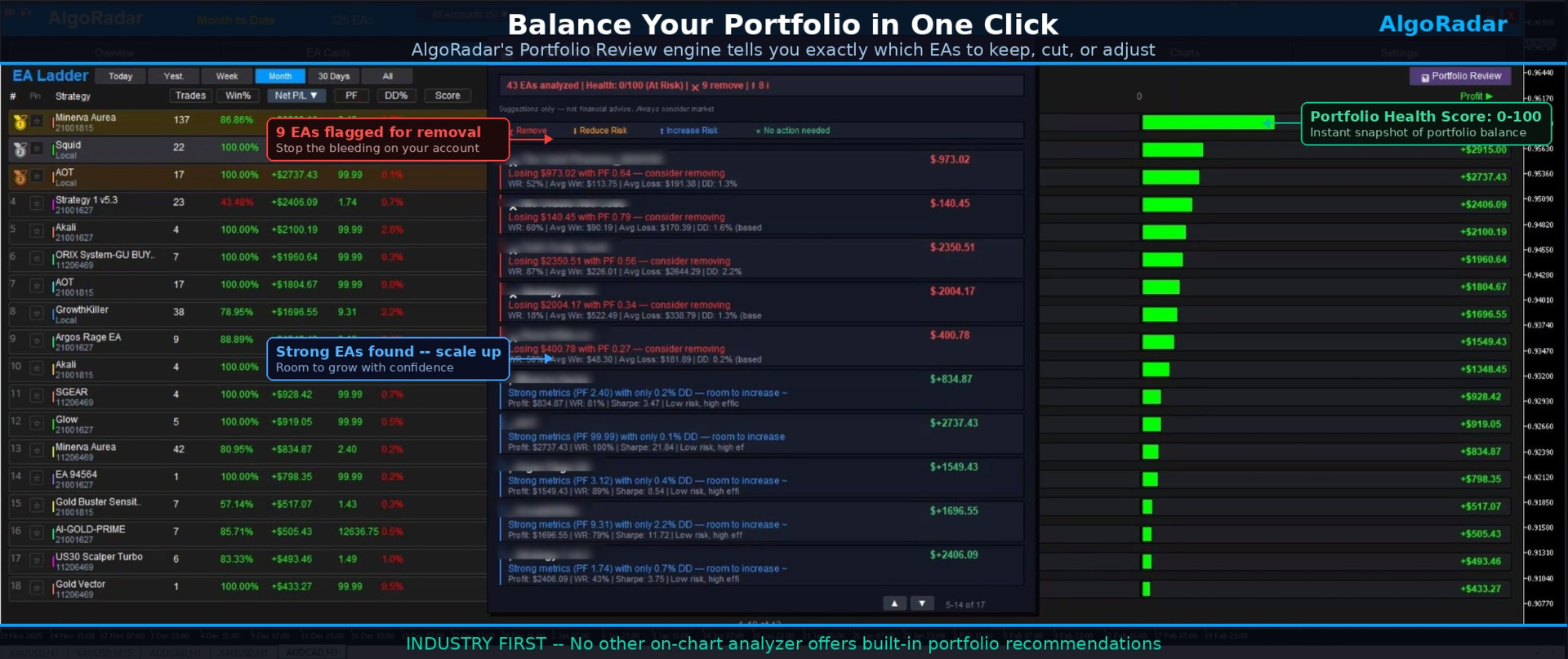
For traders running multiple Expert Advisors, AlgoRadar provides a consolidated view of each EA's performance across accounts. Active EAs are auto-detected on startup and presented in a sortable performance ladder, with visual rank indicators (gold, silver, bronze) for the top performers by composite score. The composite score is a weighted formula combining win rate, profit factor, Sharpe ratio, and drawdown. Click any column header to re-rank by profit, trades, win percentage, profit factor, drawdown, or score, and switch between Today, Week, Month, and All Time periods directly from the ladder.
Portfolio Review Engine
The Portfolio Review engine analyzes the full EA set and produces category-based recommendations. One click on Portfolio Review in the EA Ladder runs the analysis. It examines each EA's risk-adjusted performance across the portfolio, identifies EAs with negative expectancy contribution, flags EAs with disproportionate drawdown relative to returns with a suggested percentage lot reduction, highlights EAs with low drawdown and strong metrics with a suggested percentage scaling, and calculates a portfolio health score from 0 to 100 with an overall balance rating.
Each EA is assigned to one of four categories. Remove covers EAs with negative expectancy or net loss over the analysed period. Reduce Risk covers profitable EAs with drawdown high relative to returns, with a specific percentage lot reduction. Increase Risk covers strong metrics with low drawdown, with a specific percentage scaling suggestion. No Action covers EAs performing within balanced parameters at current settings. The engine cross-references profit factor, win rate, Sharpe ratio, drawdown contribution, risk-reward ratio, and per-trade expectancy.
Multi-Account Aggregation
For traders running EAs across multiple prop accounts or brokers, AlgoRadar consolidates the data into combined rankings across the portfolio. VPS, desktop, and laptop data is synced via the included Exporter, available at no additional cost.
Prop Firm Mode
Profit targets and drawdown limits are configurable as percentages, with separate tracking for Phase 1, Phase 2, and Funded accounts. Four daily drawdown calculation methods cover common prop firm rule variations, and a visual progress chart displays target and drawdown limit lines.
Trade History Export
Generate trade statements directly from MT5 history in CSV format (one row per closed position, 14 columns) or print-ready HTML format with summary, gains, and losses on separate pages. Any period is supported via the Custom Date picker, with group summaries by Magic Number, Comment, or Symbol, and filtering by Close Time or Open Time. Calculations are transparent and fully auditable (Net equals DealProfit plus Commission plus Swap), with partial closes aggregated by Position ID. Files save to Common\Files for VPS compatibility. This export is a data tool; users should consult their local tax professional for jurisdiction-specific reporting.
Profile System
Settings auto-save on exit and restore on restart, with five named profile slots for different analysis views, for example "Daily Review", "Prop Gold Only", or "All Accounts Monthly". Switch between profiles via the Profiles popup. Custom names, per-account storage, and strategy states are all preserved.
Seven Tabs
AlgoRadar is organised into seven tabs. Overview shows the balance chart, key stats, and period cards. EA Cards provides visual snapshots with mini equity curves and rank indicators. EA Ladder displays sortable rankings with profit/loss bars and Portfolio Review access. Calendar shows a daily P/L heatmap. Charts overlays multiple strategies for visual comparison. Prop Firm offers challenge tracking with four drawdown calculation methods. Settings is used to scan EAs, rename strategies, save and load profiles, and export statements.
Metrics Tracked
Net profit/loss, win rate, profit factor, max drawdown (dollar and percentage), Sharpe ratio, expectancy, average win, average loss, risk-reward ratio, best trade, worst trade, total trades, consecutive wins, consecutive losses, composite score, best symbol, worst symbol, profit by hour, daily drawdown, balance curve, and equity curve.
Setup
Drag AlgoRadar onto any MT5 chart, click Scan and Configure, and active EAs are detected and ranked automatically. Settings auto-save between sessions.
What's Included
AlgoRadar main dashboard, AlgoRadar Exporter for multi-account synchronisation (request via MQL5 comments), user manual in PDF, and updates through the MQL5 comments section.











































I have purchased AlgoRadar and I have to say I am extremely satisfied with it. As someone who is still relatively new to the world of Expert Advisors, AlgoRadar has become really important for me. It provides a clear ranking of all my EAs and allowing me to instantly see their performance in a very structured and userfriendly way. One of the features I like detailed overview of profit and loss over different timeframes like monthly, weekly, daily, and even hourly. I also make a lot of use of the portfolio reviewer. AlgoRadar offers valuable suggestions by analyzing the EAs, including risk and drawdown when running multiple EAs on a single account. It can recommend whether an EA could take on more risk, less risk, or even be removed entirely when it perform bad. Another big advantage is that I use both MetaTrader 4 and MetaTrader 5, and AlgoRadar works seamlessly with both. It comes with an exporter that can be installed on other terminals, which means I can monitor all my accounts in one place, regardless of whether they are MT4 or MT5. Overall, I am extremely happy with this tool. A big compliment to the dev! Not only for creating such a useful product, but also for being very responsive and helpful whenever I have questions. Knd regards Femke