Telegram Bactester Custom

Becktester Telegram Signals Custom

Becktester Telegram Signals Custom is an advanced version of the regular Becktester Telegram Signals, created for traders who want not only to parse Telegram signals and backtest them in MetaTrader 5, but also to test custom post-entry trade management logic that goes far beyond the standard version.

The regular Becktester Telegram Signals already allows you to connect to Telegram, read real channel messages, parse Buy/Sell, Entry, Stop Loss and Take Profit data, and run backtests inside the MetaTrader 5 Strategy Tester. The Custom version adds a separate Advanced Custom Management layer that makes it possible to test how the same Telegram signals would behave under more sophisticated management rules.

What makes the Custom version different?

The main difference between the regular Becktester Telegram Signals and Becktester Telegram Signals Custom is that the Custom version is built not only for signal parsing, but also for strategy-style trade management testing. This means you can test the same Telegram channel with different management models and see how much results change depending on Stop Loss logic, Take Profit selection, milestone-based protection, timeout rules, and trailing structure.

  • Advanced Flexible Management Engine
  • Optional multiple trades per one signal
  • Flexible choice of whether to use signal SL and signal TP
  • Custom single-trade TP selection mode
  • Break-even trigger and offset control
  • TP-Level Management Mode with milestone logic
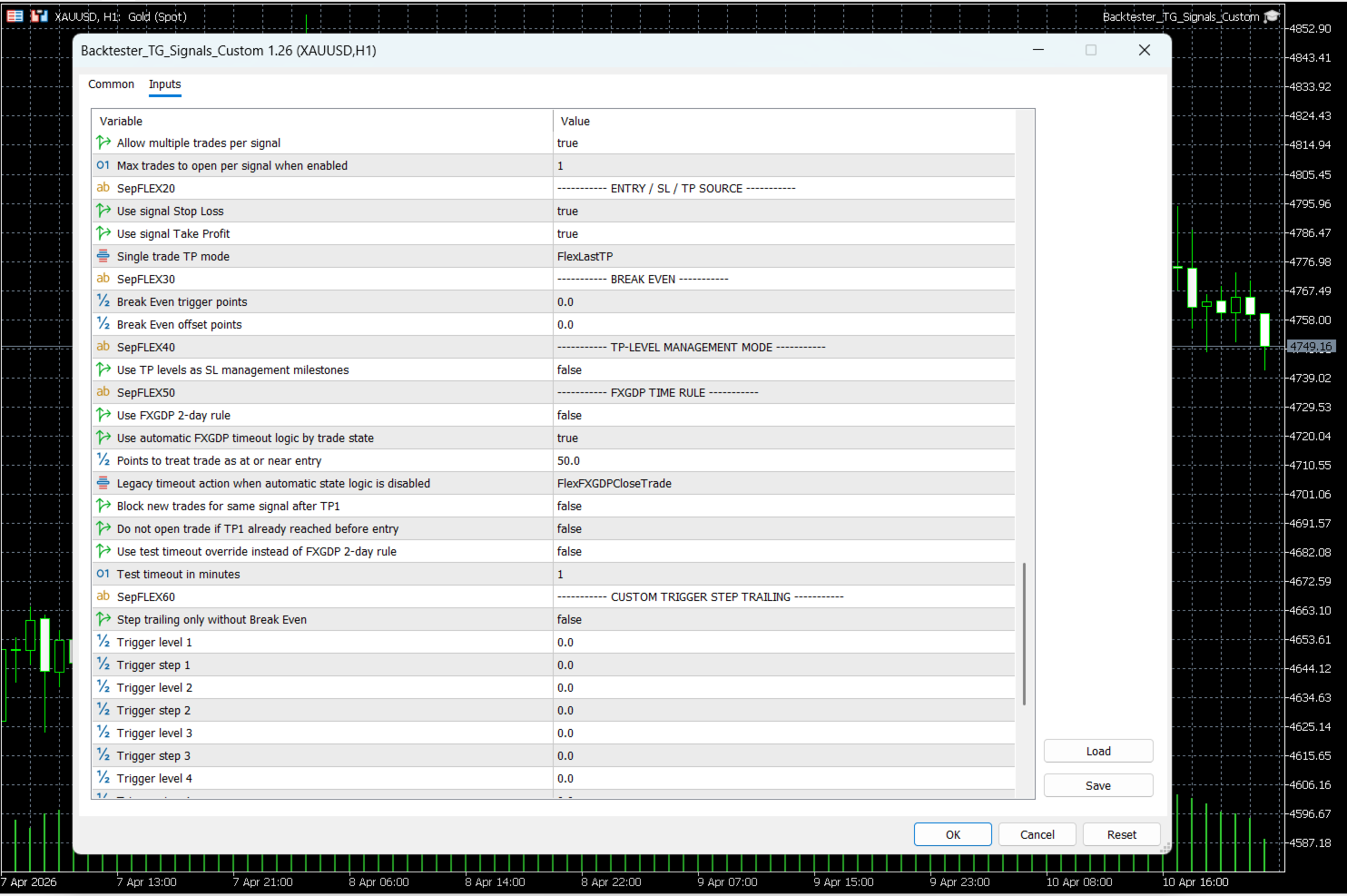
  • FXGDP TIME RULE with automatic timeout actions
  • TP1-based signal blocking and entry protection
  • Custom Trigger Step Trailing with up to 10 levels
  • More accurate testing of how signals behave after entry, not only at entry

Core product purpose

Becktester Telegram Signals Custom still keeps the main goal of the original product: turn Telegram signals into real backtests inside MetaTrader 5 Strategy Tester. It reads signals from Telegram history, parses their structure, exports the result into CSV, and allows the Expert Advisor to simulate those signals in the tester with objective statistics.

  • Read signals from real Telegram channels
  • Parse Buy / Sell / Entry / SL / TP structure automatically
  • Verify parsing before backtest with live parsing test mode
  • Run backtests in MetaTrader 5 Strategy Tester
  • Use multi-currency testing workflow in MT5
  • Export and analyze structured signals through signals.csv

Advanced Custom Management

The Custom version introduces a dedicated Advanced Custom Management block that allows you to test different trade-handling scenarios on the same Telegram signals. This is especially useful if you want to compare the provider’s native SL/TP structure with your own management rules.

  • Enable custom management engine
  • Allow multiple trades per signal
  • Set maximum trades per signal
  • Choose whether Stop Loss should come from the signal
  • Choose whether Take Profit should come from the signal
  • Select TP behavior in single-trade mode:
    • Keep default TP
    • Use first TP
    • Use last TP

This allows the same Telegram channel to be tested under different management philosophies instead of blindly following the original message structure.

TP-Level Management Mode

One of the most important additions in the Custom version is TP-Level Management Mode. In this mode, the Take Profit ladder is used not only as exit targets, but also as a management ladder for Stop Loss protection.

  • When TP1 is reached, Stop Loss can be moved to Break Even
  • When TP2 is reached, Stop Loss can be moved to TP1
  • When TP3 is reached, Stop Loss can be moved to TP2
  • The same logic can continue across the stored TP structure

This makes the Custom version much more suitable for testing channels where the target ladder should also control trade protection. Instead of using only standard trailing, you can backtest milestone-based management directly on historical Telegram signals.

FXGDP TIME RULE

Another major Custom addition is the FXGDP TIME RULE block. This feature introduces a timeout model for signals that should not remain open forever if the market fails to reach TP1 within the expected time window.

  • Enable FXGDP-style 2-day time rule
  • Use automatic FXGDP state logic
  • Set near-entry threshold in points
  • Select legacy timeout action when automatic mode is disabled
  • Block new trades for the same signal after TP1
  • Block entry if TP1 was already reached before order opening
  • Use test timeout override for faster scenario checks
  • Set timeout override in minutes for testing purposes

Automatic FXGDP timeout logic

When automatic FXGDP logic is enabled, the Custom version can apply different actions depending on the trade state at the moment of timeout:

  • If the trade is still at or near entry, it can close the trade
  • If the trade is already in profit, it can move Stop Loss to entry
  • If the trade is in loss, it can move Take Profit to entry

This is a major upgrade compared with a static management model, because the timeout action becomes conditional and depends on the actual condition of the trade.

TP1-based protection and entry filtering

Becktester Telegram Signals Custom also adds a more intelligent TP1-aware protection workflow. This is useful when testing whether it is worth entering a signal late or reopening a signal that has already partially played out.

  • Track TP1 state for each managed signal
  • Move SL to entry automatically after TP1 in FXGDP logic
  • Block new trades for the same signal once TP1 is reached
  • Skip late entry if TP1 was already reached before entry

This makes historical testing more realistic, because it helps avoid unrealistic late entries on already-developed signals.

Custom Trigger Step Trailing

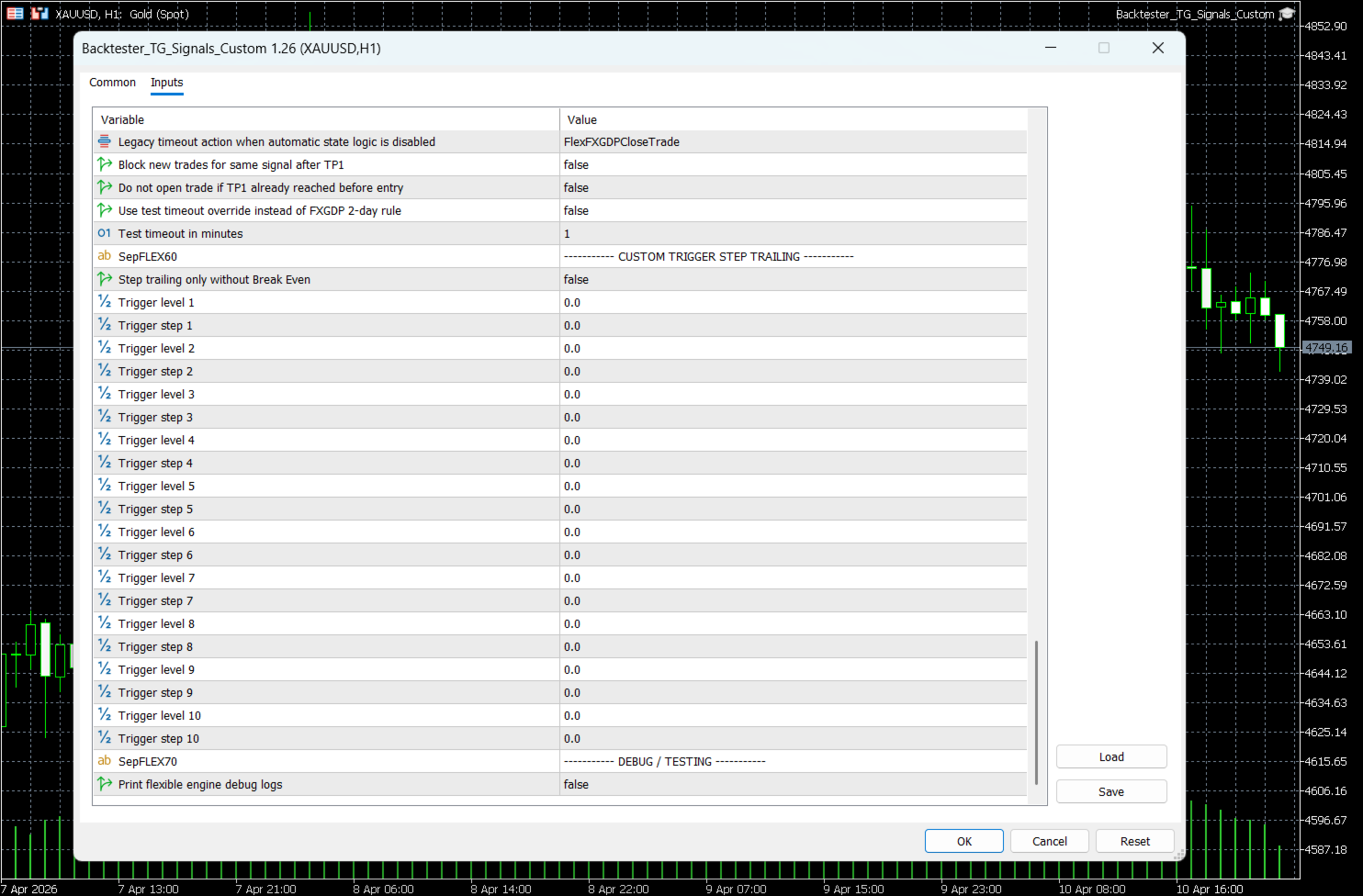
The Custom version also adds a far more advanced alternative to standard trailing stop: Custom Trigger Step Trailing.

Instead of one universal trailing rule, you can define up to 10 independent trigger levels, each with its own trailing step. This allows you to test progressive protection logic as the trade moves further into profit.

  • Trigger level 1 + trailing step 1
  • Trigger level 2 + trailing step 2
  • Trigger level 3 + trailing step 3
  • Trigger level 4 + trailing step 4
  • Trigger level 5 + trailing step 5
  • Trigger level 6 + trailing step 6
  • Trigger level 7 + trailing step 7
  • Trigger level 8 + trailing step 8
  • Trigger level 9 + trailing step 9
  • Trigger level 10 + trailing step 10

An additional option allows this step trailing logic to work without Break Even when needed. This gives the user much more freedom when comparing management models.

Advanced Break Even logic

Becktester Telegram Signals Custom extends break-even handling by making it configurable inside the flexible engine.

  • Set a custom Break Even trigger in points
  • Set an additional Break Even offset in points
  • Use Break Even as an independent protection stage or as part of milestone logic

This makes it possible to backtest more precise trade protection than a simple “move SL to entry” rule.

Signal parsing and verification

Like the standard product, the Custom version still focuses on accurate Telegram parsing before any backtest is started. This helps the user verify that the signal structure is understood correctly before running the Strategy Tester.

  • Extract Buy / Sell direction
  • Parse market and pending order structure
  • Read Entry, Stop Loss, and multiple TP levels
  • Support flexible symbol mapping such as GOLD → XAUUSD
  • Use broker prefix and suffix settings when needed
  • Validate parsed structure before full test

Live Parsing Test Mode

Before launching a backtest, you can verify how the parser reads a message. This makes the tool practical not only for testing results, but also for testing the parsing logic itself.

  • Choose input type: By Link or By Text
  • Paste a public Telegram message link or raw signal text
  • Preview the parsed structure before backtesting
  • Optionally save a test CSV for quick validation

How it works

  1. The Telegram parser connects to your account and reads signal history from the selected channel.
  2. The parser extracts symbol, direction, entry, Stop Loss, and Take Profit structure.
  3. The parsed data is exported to signals.csv.
  4. The MT5 Expert Advisor loads the CSV file and runs the signal simulation in Strategy Tester.
  5. The Custom version can then apply its own management logic on top of those parsed signals.

This means you can compare not only whether a channel gives good signals, but also whether a different trade management model can improve the final performance.

Why the Custom version is useful

Many Telegram channels publish the same signal idea in a simple structure, but the final trading result depends heavily on how the position is managed after entry. The standard backtester shows how the signal behaves under the default logic. The Custom version allows you to test whether the same signal history performs better under:

  • single-trade mode with selected TP logic
  • milestone-based Stop Loss movement
  • FXGDP timeout behavior
  • TP1-based signal blocking
  • multi-level step trailing
  • different Break Even models

This makes Becktester Telegram Signals Custom useful not only for verifying signal providers, but also for building your own execution model around those signals.

Statistics and reports

After the backtest, you can evaluate results through the MetaTrader 5 Strategy Tester and exported report data.

  • Total Trades
  • Win Rate
  • Net Profit / Loss
  • Max Drawdown
  • Profit Factor
  • Average risk-to-reward profile
  • Trade duration analysis

Who is this product for?

  • Traders who want to verify real Telegram channels before risking money
  • Users who want to compare several management models on the same signal history
  • Signal subscribers who do not want to rely only on the provider’s original exit logic
  • Traders who want to test milestone management, timeout logic, and structured trailing
  • Users looking for a more strategy-oriented Telegram signal backtester

System notes

The product is designed for MetaTrader 5 Strategy Tester workflow. CSV files such as signals.csv are used for communication between the parser and the Expert Advisor. For best performance, it is recommended to use a Windows environment or Windows VPS for uninterrupted parser operation.

Final overview

Becktester Telegram Signals Custom takes the idea of Telegram signal backtesting much further than the regular version. It does not only show how Telegram signals would perform in the tester — it allows you to test how different post-entry management models would change the result. With Flexible Management Engine, TP milestone logic, FXGDP TIME RULE, TP1-based entry protection, and 10-level trigger trailing, this version is built for traders who want deeper analysis, more realistic signal handling, and far more control over how Telegram signals are evaluated in MetaTrader 5.
おすすめのプロダクト
One Click Trading – Auto TP SL Developer TraderLinkz Version 1.00 Category Utility What it does Adds missing TP and SL to your manual trades and pending orders Sets them once per ticket Lets you move TP and SL afterward Works on hedging and netting accounts Scans on every tick and reacts on trade events Why you want it You place faster entries You get consistent risk and exit targets You reduce fat finger errors You keep full manual control Quick start Attach the EA to any chart Keep TP and SL e
FREE
https://youtu.be/KHhg88fXWTk?si=ZoVtpc-wpfTVImSL 5-Minute Trading Strategy | Quick & Effective for Beginners Welcome to our trading channel- the deepak trading In this video, we'll be exploring a simple 5-minute trading strategy that can help you capture quick market movements and make profitable trades. Whether you're a beginner or an experienced trader, this strategy is designed to give you clear entry and exit points using technical indicators like EMA, RSI, and Stochastic Oscillator.
FREE
Core function Intelligent transaction management one-click opening and closing operation, which supports user-defined lots to set multiple closing modes: all closing, closing by direction and closing by profit and loss status. Professional risk control, real-time risk monitoring and spread control to avoid high-cost trading environment. Visual control panel has an intuitive graphical interface, and all functions can be operated with one button to display position information, profit and loss sta
FREE
️ Trade Manager oneclick  ( Reverse Trade,  Partial Close,  Breakeven, Close All Running Trade )   control – Smart Manual Trade Control for MT5 Trade Manager oneclick control is a powerful yet lightweight trade management utility built for manual traders who want precise control over their open positions — directly from the MT5 chart. This EA does not open or close trades automatically based on any strategy. It simply provides one-click management tools to handle your running trades efficient
FREE
FREE FREE FREE Trade Assistant MT5 – Professional Trading & Risk Management Panel Trade Assistant MT5 is an advanced trading panel designed to help traders execute orders faster, safer, and more professionally . It simplifies manual trading by combining smart order management , precise risk control , and one-click execution , making it ideal for both beginners and advanced traders. This tool does not trade automatically . Instead, it empowers you with full control while applying professional-gra
FREE
実際の資金を危険にさらす前にProp Firmの課題を習得しましょう!   私たちの高度なシミュレーターは、本物のProp Firm取引環境を再現し、自信を持って練習し、戦略を立て、課題を通過するのに役立ちます。当シミュレーターを使用すると、デモまたはライブアカウントを使用してあらゆるProp Firmの課題をシミュレートでき、手動取引戦略とEAを介した自動取引の両方をサポートし、カスタマイズされた期間のパーソナライズされた課題を作成し、一貫した収益性に必要な規律を開発するために自分自身に挑戦できます。 FTMO 10kおよび100K課題セットファイル:   主要なすべてのProp Firmのセットファイルと専用サポートが利用可能 - お問い合わせください! 先着10名様に30%オフ。 主な機能 リアルタイム課題監視 ライブ統計ダッシュボード - 残高、純資産、P&L、ドローダウンのリアルタイム追跡 プロフェッショナル指標 - 確定P&Lと未確定P&L、勝率、取引分析 手動/自動取引サポート: 手動取引戦略とエキスパートアドバイザーによる自動取引の両方 完全なProp Firmルー
Quick Trade Panel Pro
Nicolas Olivier Menetrey
5 (1)
自動ロット・リスク管理付きワンクリック取引パネル Quick Trade Panel Pro は、リスクを完全にコントロールしながら素早く注文を執行したいトレーダーのために設計された直感的な取引パネルです。 主な機能 利用可能証拠金の割合に基づいてロットサイズを自動計算 ポイント単位で設定可能なストップロス、各取引に自動適用 一連の取引中はロットサイズをロックし、一貫したポジションサイズを確保 スマートヘッジシステム ヘッジモードで既存取引と反対方向のポジションを開くことが可能 独立したヘッジ割合(50%、100%、200%以上) 方向ごとの取引制限で精密なコントロール 自動利益保護 Auto Secure :一定の利益に達するとストップロスを損益分岐点に移動 Trailing Stop :価格を追従して利益を保護しながら、勝ちトレードを伸ばす 両システムを併用して最適な保護が可能 モダンでシンプル、プロフェッショナルなインターフェース リアルタイム表示:最大ロット、最終ロット、ヘッジロット 制限に達するとBUY/SELLボタンが自動的に無効化 シンボルとマジックナンバーごとに
FREE
Position Size Calculator FREE Universal Risk Management Tool for MetaTrader 5 Position Size Calculator FREE is a simple and reliable risk management tool designed to help traders calculate the correct lot size based on account balance, risk percentage, and stop loss distance. This tool does not open trades and does not interfere with trading logic . It simply calculates the optimal position size and displays the information directly on the chart in real time. The EA is compatible with Forex, Ind
FREE
Bohemia Gold MT5
Vladislav Taska
4.75 (4)
Bohemia Gold MT5 is  Trend & Volatility EA trading system designed specifically for Gold (XAUUSD) . It combines higher-timeframe trend filtering , trend detection , volatility-based SL management , and advanced trade management to adapt market conditions. It uses style logic focused on trend strength, volatility, and capital protection. NOTE:   Based on backtests, I found better trading results with the following setup: D1/H4/H2 (Trend/ADX/ATR & trade). The SET file can be downloaded here … bohe
FREE
25R - WASD Order is a visual risk management EA for MetaTrader 5 that combines gaming-style WASD keyboard controls with interactive chart drawing for precise order placement. Designed for active traders who value speed and accuracy, it lets you visually plan trades by dragging entry and stop-loss lines directly on the chart, while automatically calculating position size based on your risk percentage. The tool displays color-coded profit/loss zones with real-time risk metrics, supports automatic
Breakeven Bot
Gabriel Paul Ange Perrin
Optimize your trading management with Breakeven Bot, the essential tool for active traders managing multiple positions at once. No more wasting time manually adjusting your stops—one click is all it takes to secure your profits! Main Feature: ️ "BREAKEVEN" Button – Instantly set all profitable positions to breakeven and protect your gains quickly. ️ Customization Options: Set breakeven in pips or currency, depending on your preference. Choose whether breakeven should be at the entr
FREE
EA Agulhada do Didi
Devscode Desenvolvimento de Softwares LTDA
このエキスパートアドバイザーは、 Didi Index インジケーターのロジックを基に、MetaTrader 5 上で取引を自動化するために開発されました。 EA は、ユーザーが設定したルールとパラメータに従い、すべての取引をチャート上で自動的に実行します。 本ロボットは、明確で客観的なエントリーおよび管理ロジックを適用することを目的としており、外部連携や追加ライブラリを使用せずに、取引状況を分かりやすく確認できます。 主な機能 自動取引 Didi Index インジケーターのロジックに基づいて取引を自動で実行します。 取引時間の設定 EA が取引を行う時間帯を指定できます。設定時間外では新規取引は行われません。 トレーリングストップ 設定された条件に従い、価格の動きに合わせてストップを自動調整します。 自動ブレイクイーブン 条件を満たした際に、ストップをエントリー価格へ自動的に移動します。 チャート上の情報パネル EA の稼働状況や取引情報をリアルタイムで表示します。 対応環境 MetaTrader 5 デモ口座およびリアル口座 プラットフォームに対応したすべての銘柄で動作
FREE
Tick Volume Chart は、 MetaTrader 5 上でティックボリュームに基づいたチャートを作成するためのユニークなツールです。 Tick Volume Chart を使用すると、時間ではなく、指定したティック数ごとにローソク足が形成されるチャートを構築できます。これにより、標準的な時間足チャートでは得られない、市場活動の極めて正確な分析が可能になります。カスタムシンボルに対応したインジケーターやEA(自動売買プログラム)であれば、すべてご利用いただけます。作成したチャートは、標準チャートと同様に快適に操作できます。 標準ツールとは異なり、 Tick Volume Chart は時間間隔ではなく、実際の取引強度に基づいて市場を分析することを可能にします。 Tick Volume Chart の利点 各バーに 固定ティックボリューム を設定したチャートを作成可能。 内蔵ティックデータベースにより、履歴データの 高速な読み込み を実現。 リアルタイムデータが、 通常のチャートと同期し、遅延なく 更新されます。 複数の ティックボリュームチャートを同時に作成 することが可能
1. Introduction Collective TP Manager v2 is a MetaTrader 5 Expert Advisor designed to automatically manage the collective Take Profit and Stop Loss of multiple open positions on a single symbol. Instead of setting individual TP/SL for each order, this EA monitors the combined profit/loss of all (or filtered) positions and takes action when your targets are reached. *** Group support:  https://www.mql5.com/en/channels/vuongphamtrading 1.1 Why You Need This EA In modern trading, especially scalp
FREE
IMPORTANT NOTE: This is a professional Trade Management Utility and on-chart assistant. It is NOT an automated trading robot. It does not open trades on its own. The UltraFast Trade Manager MT5 is the ultimate execution and risk-management suite designed to give you absolute control over your manual and algorithmic trades. When managing multiple positions, calculating complex net break-even points, or constantly monitoring the economic calendar, hesitation can lead to costly mistakes. This utili
FREE
Manual position management. Missing SL. Price moves against you. No protection. Trade Manager Lite automates Stop Loss, Take Profit, Trailing Stop, and Break-Even for your open positions. Attach to one chart. Configure your default SL/TP distance. Let it manage your positions automatically. What's Included (FREE Version) Auto SL/TP: Applies missing Stop Loss and Take Profit to positions based on your configured distance in points Trailing Stop: Adjusts SL dynamically as price moves in your favor
FREE
Bonus when buying an indicator or an advisor from my list. Write to me in private messages to receive a bonus. Manual Assistant MT5 is a professional manual trading tool that will make your trading fast and comfortable. It is equipped with all the necessary functions that will allow you to open, maintain and close orders and positions with one click. It has a simple and intuitive interface and is suitable for both professionals and beginners. The panel allows you to place buy and sell orders w
FREE
Trade Masterは、MetaTrader 5用のプロフェッショナルなトレーディングパネルで、超高速かつ正確な手動取引のために設計されています。取引と注文の視覚化、リスクと利益の計算、ポジションの開始、終了、変更、損益分岐点、トレーリングストップ、部分的なストップロスとテイクプロフィット、時間ベースの決済、エクイティストップロスとテイクプロフィットなど、これらすべてが、ホットキーまたはチャート上でレベルをマウスで直接ドラッグするだけで、ワンクリックまたは数回のクリックで利用できます。直感的なインターフェースにより、必要なシナリオをテストし、ほぼすぐにアプリケーションの使用を開始できます。 変動の激しい市場では、あらゆる遅延が損失につながります。手作業による計算ではなく、取引判断に集中しましょう。Trade Masterを使えば、より迅速かつ効率的に取引できます。 デモアカウント版のインストール | ユーザーガイド 特徴 成行注文と指値注文の発注。チャート上のレベルをドラッグすることで、発注中の注文、エントリー価格、ストップロス、テイクプロフィットを視覚的に確認できます。指定した取
Position Size Tool – Smart Risk Management & Trade Execution Panel The Position Size Tool is a powerful and intuitive MT5 panel that simplifies your trading by combining position sizing , risk calculation , risk/reward visualization , and order placement —all in one place. ️ Clean & Functional Interface The tool features a compact, real-time panel with the following: Balance & Equity display Live Price tracking Customizable Risk % input Auto-calculated Lot Size based on SL and Risk Input for S
FREE
Lot by Risk MT5
Sergey Vasilev
4.87 (15)
Lot by Risk tradingパネルは、手動取引用に設計されています。 これは、注文を送信するための代替手段です。 パネルの最初の特徴は、管理線を使用した注文の便利な配置です。 第二の特徴は、ストップロスラインの存在下で与えられたリスクのための取引量の計算です。 制御線はホットキーを使用して設定されます: 利益を取る-デフォルトではTキー; 価格-デフォルトではPキー; ストップロス-デフォルトでは、Sキー; 取引パネルの設定で自分でキーを設定できます。 操作のアルゴリズム: 1)-レベルを希望の場所に配置します(すべてのレベルを配置する必要はありません); 2)-リスクを指定します(オプション); 3)-緑の送信注文ボタンをクリックします; 4)-注文が行われるのを待っているか、エラーメッセージ付きのアラートが表示されます; 5)-マジックでExpert Advisorにリンクされている現在のシンボルのすべての注文を閉じる場合は、注文を閉じるボタンをクリックします。 注文を送信ボタンを何度も押すべきではありません。 一度で十分です。 注文後、ボタンは「
FREE
SwiftEdge Scalper 完全な手動制御を備えたプロフェッショナルティックスキャルピングEA スキャルピングには瞬時の判断、正確なリスク管理、シームレスな注文執行が求められます。価格動向を見ながらブレイクイーブン計算、トレーリングストップ、複数ポジションを管理することは、適切なツールなしでは圧倒されます。 SwiftEdge Scalperは、アクティブなスキャルパーとデイトレーダー向けに設計されたプロフェッショナルなトレーディングアシスタントです。ワンクリックまたはキーボードショートカットで取引を実行し、EAが自動的にブレイクイーブン、トレーリングストップ、ポジション管理を処理します。これは自動売買ロボットではありません — あなたが決定した時のみ取引します。 詳細はこちら: 完全な設定ガイドとドキュメント (English) 期間限定オファー: 最初の50ダウンロードは無料!その後、この製品は有料になります。今すぐダウンロードして無料コピーを確保してください。 主な機能 ワンクリック取引: パネルボタンまたはカスタマイズ可能なキーボードショートカット(B/S/A/C/E/
SmartRAL
Jemy Yeferson Dimu Ludji
SmartRAL (Smart Risk Auto-Lot EA) SmartRAL: The Ultimate Risk & Lot Management Expert Advisor (EA) SmartRAL is an essential tool for traders who demand precise risk management and automated position sizing in MetaTrader 5. Stop guessing your lot size and let the algorithm handle the calculations. This EA allows you to trade with confidence by guaranteeing your risk exposure on every single trade, while offering absolute flexibility in setting your Stop Loss (SL). Key Features & Benefits Guarante
MT5用NAS100 Auto SL and TP Makerをご紹介します: MetaTrader5でナスダック100市場をナビゲートするトレーダーにとって不可欠なアシスタントであるNAS100オートSLおよびTPメーカーで、ストップロスおよびテイクプロフィットの設定をもう見逃すことはありません。このツールは、ストップロスとテイクプロフィットのレベル管理を自動化するシームレスなソリューションを求める方々のために設計されています。 主な特徴 簡単な自動化: ストップロスやテイクプロフィットのないナスダック100取引を自動的に監視します。 ユーザーが構成した設定に基づいてレベルを動的に調整します。 注文タイプの多様性: Nasdaq100の成行注文と未決済注文の両方に対応。 MetaTrader 5で利用可能なさまざまな注文タイプをサポートします。 カスタマイズされた設定: ユーザーフレンドリーなパラメータ設定により、トラッキング設定とストップロス/テイクプロフィットレベルのカスタマイズが可能です。 柔軟な範囲: 実行する特定のNAS100商品または取引されるすべての商品に対してスト
FREE
Trade Assistant Panel: Your Optimal Trading Ally "The Trade Assistant Panel" is a graphical tool for traders aiming to simplify and enhance their trading experience. It streamlines order execution and management, allowing you to focus on market analysis and decision-making. With just a few clicks, you can initiate various order types, ensuring that you always have full control over your trading strategy: Buy Orders Sell Orders Buy Stop Orders Buy Limit Orders Sell Stop Orders Sell Limit Orders Y
FREE
Imagine flying a real aircraft without ever stepping into a flight simulator. That's what trading is like. You have to simulate your strategy before you can take it to a live market. It is good if you can simulate things speedily before even stepping into any live market, or before coming up with an automated system.  People don't have all day to stare at a higher timeframe chart until the entry signal finally arrives. That's why I built this so that you can simulate your strategy with speed. Th
FREE
MultiTimeframe Info Feed (MIF) Indicator Description: MultiTimeframe Info Feed (MIF) is a smart MQL5 indicator that displays a dynamic, real-time info panel directly on your chart, offering powerful insight into current market conditions. Key features include: Real-time display of Open, High, Low, Close, and live Tick price Tick Rate (ticks per second) for assessing market activity Auto-calculated Entry Price on new candle formation Signal direction detection (BUY / SELL) Price action pattern re
FREE
This MQL4 code is a   custom indicator   that draws multiple colored rectangles on a chart, spaced apart by a defined pip distance, and projected into the future. Here's a brief breakdown: Purpose: Draws several horizontal rectangles (zones) starting from a specified price. Rectangles are spaced apart vertically by a pip distance. Colors alternate between FirstColor and SecondColor . Rectangles can be drawn behind candles and optionally filled. Each rectangle extends into the future for a specif
FREE
Smart SLTP ATR Trade Manager A trade management utility for MetaTrader 5 that automatically assigns Stop Loss and Take Profit levels to open positions, and trails Stop Loss as price moves in the trader's favor. Compatible with manual trades, Expert Advisors, and copy trading signals simultaneously. Overview The utility monitors all open positions on the chart and assigns SL/TP levels immediately upon trade entry, based on one of four configurable calculation modes. An optional step-based traili
FREE
Gold grid Manager
Eslam Mohamed Hassanein Hassan Aly
Grid Profit Manager PRO is a powerful MT5 Expert Advisor designed to intelligently manage your grid trading positions with precision and control. This tool automatically calculates and applies Take Profit and Stop Loss levels in USD, allowing traders to control their risk and lock in profits efficiently. With independent management for Buy and Sell positions, you gain full flexibility to handle complex grid strategies without manual intervention. Key Features: Separate Buy & Sell position ma
このプロダクトを購入した人は以下も購入しています
Farmed Hedge Yield Farming | All Markets (Manual - Hybrid - Semi/Automated EA) MULTI-ASSET SUPPORT Trade any asset available on your broker - Forex: Major, Minor, Exotic pairs - Crypto: BTC, ETH, XRP, SOL, BNB - Stocks: Apple, Tesla, Amazon, Google, etc. - Commodities: Gold, Silver, Oil, Gas - Indices: US30, NAS100, SPX500, DAX40 - Any CFD your broker offers VERIFIED TRADING RESULTS - Farmed Hedge Yield Axi Copy:  https://www.mql5.com/en/signals/2356376 - Farmed Hedge Yield Exn Copy:   https:/
Quant AI Agents is NOT AN Expert Advisor. Quant AI Agents   is a   multi-agent AI trading framework   that turns natural-language strategy prompts into live.  WANT THE SAME RESULTS AS MY LIVE SIGNAL?   Use the exact same brokers I do:   IC MARKETS , IC TRADING   .  Unlike the centralized stock market, Forex has no single, unified price feed.  Every broker sources liquidity from different providers, creating unique data streams. Other brokers can only achieve trading performance equivalent to 60
Power Candles Strategy Scanner - 自動最適化型マルチシンボル設定ファインダー パワーキャンドル・ストラテジー・スキャナーは 、パワーキャンドル・インジケーターを駆動するのと全く同じ自己最適化エンジンを、マーケットウォッチに登録されているすべての銘柄に対して並行して実行します。1つのパネルで、現在統計的に取引可能な銘柄、各銘柄で勝率の高い戦略、最適なストップロス/テイクプロフィットの組み合わせが表示され、新たなシグナルが発生した瞬間に通知が届きます。 このツールは、Stein Investmentsのエコシステムの一部です。  18種類以上のツールをすべて閲覧し、AIを活用したセットアップの推奨を受け取り、  https://stein.investments でコミュニティに参加しましょう 市場動向を網羅。銘柄ごとに3,000件以上の自動最適化。2種類のアラート。ワンクリックでチャートを切り替えて即座にアクション。 なぜこれが必要なのか 多くのマルチ銘柄スキャナーは、 価格の動き (ボラティリティ、変動率、銘柄ごとのRSI)を表示するだけです。それ
YuClusters
Yury Kulikov
4.93 (43)
Attention: You can view the program operation in the free version  YuClusters DEMO .  YuClusters is a professional market analysis system. The trader has unique opportunities to analyze the flow of orders, trade volumes, price movements using various charts, profiles, indicators, and graphical objects. YuClusters operates on data based on Time&Sales or ticks information, depending on what is available in the quotes of a financial instrument. YuClusters allows you to build graphs by combining da
The product will copy all telegram signal to MT5 ( which you are member) , also it can work as remote copier.  Easy to set up, copy order instant, can work with almost signal formats, image signal,  s upport to translate other language to English Work with all type of channel or group, even channel have "Restrict Saving Content", work with  multi channel, multi MT5 Work as remote copier: with signal have ticket number, it will copy exactly via ticket number. Support to backtest signal. How to s
Footprint Chart Pro — Professional OrderFlow EA for MetaTrader 5 Version 6.34 | Professional tool for real traders | Institutional-Grade Visualization DEMO USERS - PLEASE SELECT EVERY TICK / REAL TICK WHEN TESTING AND YOU HAVE DOWNLOADED HISTORICAL DATA. IF YOU SEE A WAITING SCREEN AND IT IS NOT DOWNLOADING, IT MEANS YOU HAVE LOW HISTORICAL DATA. TRY 1 MIN AND 5 MIN FIRST ON 1 DAY DATA. ONE DAY DATA SHOULD BE THE NEWEST AND MOST CURRENT DATE. PLEASE WAIT UNTIL THE MARKET HAS ROLLED OVER PERIOD.
Ultimate Extractor - Professional Trading Analytics for MT5 *****this is the local HTML version of Ultimate Extractor. !!!!!it is not compatible with Cloud!!!! For the online version please reach out to me directly****** Ultimate Extractor transforms your MetaTrader 5 trading history into actionable insights with comprehensive analytics, interactive charts, and real-time performance tracking. What It Does Automatically analyzes your MT5 trading history across all Expert Advisors and generates
ManHedger MT5
Peter Mueller
4.83 (6)
THIS EA IS A SEMI-AUTO EA, IT NEEDS USER INPUT. Manual & Test Version Please TEST this product before BUYING  and watch my video about it. The price of the ManHedger will increase to 250$ after 20 copies sold. Contact me for user support or bug reports or if you want the MT4 version! MT4 Version  I do not guarantee any profits or financial success using this EA. With this Expert Advisor, you can: Implement your own Zone Recovery strategy to capitalize on trending markets. Create Grid trading s
EA を買う前に、本当に耐えられるのか、それともバックテストでたまたま良く見えただけなのかを確認してください。 ほとんどのロボットは、見栄えのするバックテストと一緒に売られています。 右肩上がりのカーブ。 良い Profit Factor。 ほとんど疑いのない見た目。 それでも、その多くの EA は、市場がその履歴どおりに動かなくなった瞬間に崩れ始めます。 なぜでしょうか。 それは、バックテストが証明するのは一つだけだからです。 その戦略が、ある特定の価格の流れでは機能したということです。 別の流れでも通用することは証明しません。 頑健であることも証明しません。 もちろん、その EA があなたのお金に値することも証明しません。 なぜなら、あなたが EA を買うのは過去のきれいなカーブを眺めるためではないからです。 変化する市場で使うために買うのです。 AntiOverfit PRO がすること AntiOverfit PRO は、MetaTrader 5 の Expert Advisor が本当にしっかりしているのか、それとも特定の過去データにたまたまうまくはまっているだけなのかを確
One button. One trade. MT5 Trading Deck is a hotkey trading panel for MetaTrader 5 that turns the platform into a keyboard-driven execution cockpit. Stop loss, take profit and lot size are pre-calculated for every key; the moment you press, a market order is live on the broker. A complete technical user manual is attached in the product Comments section. It documents every input parameter, the full hotkey map, the recommended Stream Deck XL layout, and the advanced workflows for Pre-Limit orders
Custom Alerts AIO:マルチマーケット監視を一括で実現 — 設定不要ですぐに使えるインテリジェントツール 概要 Custom Alerts AIO は、追加のインジケーター設定が不要で、インストール後すぐに利用できる高機能マーケットスキャナーです。FX Power、FX Volume、FX Dynamic、FX Levels、IX Power を内部にすべて統合し、主要なすべての資産クラス(為替、金属、指数、暗号資産)を一括監視できます。MetaTrader の仕様により、株式は個別のシンボルとして追加可能ですが、一般的には利用頻度は低めです。 1. なぜ Custom Alerts AIO を選ぶべきか 追加ライセンス不要 • 必要なすべての Stein Investments インジケーターが内蔵されており、すぐに使用可能です。 • チャートに表示されるグラフィックは省略されており、アラート生成に特化した構成です。 市場を広範囲にカバー • 為替、金属、暗号資産、株価指数に対応(株式は手動追加可能)。 • シンボル名を入力する必要はなく、プロパティで資産クラス
あなたがメンバーである任意のチャネルから(プライベートおよび制限されたものを含む)シグナルを直接あなたのMT5にコピーします。  このツールは、トレードを管理し監視するために必要な多くの機能を提供しながら、ユーザーを考慮して設計されています。 この製品は使いやすく、視覚的に魅力的なグラフィカルインターフェースで提供されています。設定をカスタマイズして、数分で製品を使用を開始できます! ユーザーガイド + デモ  | MT4版 | Discord版 デモを試してみたい場合は、ユーザーガイドにアクセスしてください。 Telegram To MT5 受信機は、ストラテジーテスターで動作しません! Telegram To MT5の特徴 複数のチャネルから一度にシグナルをコピー プライベートおよび制限されたチャネルからシグナルをコピー BotトークンまたはChat IDは必要ありません   (必要に応じて使用することができます) リスク%または固定ロットを使用して取引 特定のシンボルを除外 すべてのシグナルをコピーするか、コピーするシグナルをカスタマイズするかを選択 すべてのシグナルを認
FUTURES ORDERFLOW FOOTPRINT CHART Professional OrderFlow EA for MetaTrader 5 Version 1.01| Professional tool for real traders | Institutional-Grade Visualization STRATEGY TESTER USERS - PLEASE SELECT EVERY REAL TICK WHEN TESTING AND YOU HAVE DOWNLOADED HISTORICAL DATA. IF YOU SEE A WAITING SCREEN AND IT IS NOT DOWNLOADING, IT MEANS YOU HAVE LOW HISTORICAL DATA. TRY 1 MIN AND 5 MIN FIRST ON 1 DAY DATA. ONE DAY DATA SHOULD BE THE NEWEST AND MOST CURRENT DATE. PLEASE WAIT UNTIL THE MARKET HAS ROL
This is exactly what the name says. Visual strategy builder . One of a kind. Turn your trading strategies and ideas into Expert Advisors without writing single line of code. Generate mql source code files with a few clicks and get your fully functional Expert Advisors, which are ready for live execution, strategy tester and cloud optimization. There are very few options for those who have no programming skills and can not create their trading solutions in the MQL language. Now, with Bots Builde
Telegram to MT5 Pro — 高度なTelegramシグナルコピー機(自動修正・マルチTP・リスク管理・完全トレード管理) Telegram to MT5 Pro — プロフェッショナル Telegram シグナルコピーツール Telegram to MT5 Pro は、TelegramのシグナルをMetaTrader 5アカウントへ自動で直接実行する高性能トレードコピーシステムです。リスク管理、執行、トレード管理を完全に制御できます。 本システムは2つのコンポーネントで構成されています: • MetaTrader 5内で動作するExpert Advisor(EA) • Telegramと接続しシグナルをローカルでEAへ送信するコンパニオンデスクトップアプリ 両方は同じPC上で動作する必要があります。MQL5の制限によりEAはTelegramへ直接接続できません。ブリッジがTelegram処理を担当し、EAが取引を実行します。 サポートとインストール支援 完全なPDFインストール&ユーザーガイドが提供されます。 サポート内容: • 完全PDFユーザーガイド(全設定説明)
ATTENTION For a free trial version, visit my website. Manual QUANTUM RiskGuard Management — Your ultimate ally for uncompromising trading. Lot Calculator — Automatic lot size calculation. Quantum — Automatic risk to maximize profits and reduce drawdowns. Automatic Journal — Included and freely downloadable from my website. Automatic Screenshot — Two screenshots: one at entry and one at exit. Partial Profit — Smartly managed partial exits. Smartphone Trading — Place orders from your mobile, mana
EASY Insight AIO – スマートで手間いらずな取引のオールインワンソリューション 概要 数秒で市場全体——FX、ゴールド、暗号資産、指数、さらには株式まで——を、手作業のチャート確認や複雑なセットアップ・インジケーター導入なしにスキャンできたらどうでしょうか? EASY Insight AIO はAIトレードのための究極のプラグ&プレイ型エクスポートツールです。市場全体のスナップショットを、クリーンなCSVファイルで一括出力。ChatGPT、Claude、Gemini、Perplexityなど、さまざまなAIプラットフォームで即座に解析できます。 ウィンドウの切り替えやグラフのごちゃごちゃしたオーバーレイはもう不要。自動エクスポートされる純粋で構造化されたインサイトだけで、無駄なチャート監視に悩まされず、スマートなデータ主導の判断に集中できます。 なぜEASY Insight AIOなのか? 本当のオールインワン • セットアップ不要、インジケーターのインストール不要、チャートへのオーバーレイ不要。インストールして起動し、エクスポートするだけです。 マルチアセット対
The core idea: using the user interface, you configure the parameters the chart must meet before entering a position (or positions), choose which entry models to use, and set the rules for when trading and planning should end. Lazy Trader  handles the rest: it  takes over all the routine chart watching and execution! full description  :: 3 key videos [1] ->  [2]   ->  [3] What can it do? - Understands Larry Williams market structure - Understands swing market structure by Michael Huddleston
Crypto Charting for MT5 – MetaTrader 5 向け暗号資産チャートツール 概要 Crypto Charting for MT5 は、WebSocket を介して暗号資産の OHLC チャートデータをリアルタイムで提供します。複数の取引所に対応し、MT5 上で履歴データの自動更新が可能です。 機能 WebSocket によるリアルタイムデータ 自動履歴データ更新 接続障害時のスケジュール更新 全ての MT5 時間足に対応 OHLCV データ構成 ストラテジーテスターに対応 自動再接続機能付き 対応取引所 Binance、Bybit、OKX、KuCoin、MEXC、Gate.io、Bitget、XT.com 補足情報 ティックデータおよび板情報には、別製品の Crypto Ticks をご覧ください。 注意事項 DLL を使用していません。VPS に適しています。 Strategy Tester では WebRequest 機能は動作しません。 デモをご希望の場合は、MQL5 のプライベートメッセージでご連絡ください。 Full Documentati
MetaTrader 5用Crypto Ticks – 暗号通貨のリアルタイムティックデータと板情報の統合 概要 Crypto Ticksは、主要な仮想通貨取引所からのリアルタイムティックデータとオーダーブック(板情報)をMetaTrader 5に直接ストリーミングします。スキャルピング、アルゴリズム戦略、ストラテジーテストを必要とするトレーダー向けに設計されています。 対応取引所 Binance:現物 と先物 KuCoin:現物と先物(チャート板サポート) Bybit:先物およびインバース先物 XT.com:現物と先物 主な機能 WebSocketによるリアルタイムティックデータ Binanceのデータストリーム対応:@ticker, @bookTicker 取引所APIを使用したOHLCV履歴の完全更新 オーダーブックの可視化(最良の買値/売値と深さ) 自動再接続で安定性を確保 キャンドル精度向上のためのデータ置換 MT5再起動時に履歴を自動更新 ティックベースのデータを使ったStrategy Testerに対応 外部DLL不要でVPS対応 補足情報 高精度データを必要とするス
The Performance Logger is a utility for MetaTrader 5 designed to track and report account metrics. It identifies trades based on specific criteria and provides summaries of account activity. Main Functions Automated Reporting : Generates summaries of account performance and sends them to specified communication channels (Telegram or Discord) on a weekly, monthly, or yearly basis. Strategy Analysis : Organizes performance data based on the specific Expert Advisor or strategy used for each trade.
VOLUME BUBBLES ORDERFLOW FOOTPRINT PROFESSIONAL Expert Advisor for MetaTrader 5 Complete Feature Documentation Introduction: Volume Bubbles OrderFlow Footprint Professional is an advanced order flow visualization tool designed for the MetaTrader 5 platform. It provides institutional-grade market analysis through real-time volume bubbles visualization, volume profiling, and sophisticated order flow analysis. This Expert Advisor transforms raw market data into actionable trading intelligence, hel
Trade Copier Pro MT5 is a tool to copy trade remotely to multiple MT4, MT5 and cTradfer accounts at different computers/locations over internet. This is an ideal solution for you if you are a signal provider and want to copy your trades to other receivers globally on your own rules. One provider can copy trades to multiple receivers and one receiver can get trade from multiple providers as well. The provider can even set the subscription expiry for each receiver, so that receiver will not be abl
What Exactly Is A Smart Trading Tool? Smart Trading Tool   was developed for fast and comfortable trading of the financial markets especially for   ORDER BLOCKS TRADERS .   It provides traders functionalities, such as: A Drawing Tool One-Click Trading Panel Automated Lot Sizes Calculation   based on your risk appetite & Money Management ( Watch this video , how this tool can help manage your risk per trade better!) Built in PRICE LEVELS (Fibonacci, Round Numbers, Daily hi-low, etc) Shows Trading
The product will copy all  Discord  signal   to MT5   ( which you are member  ) , also it can work as remote copier.  Easy to set up. Work with almost signal formats, support to translate other language to English Work with multi channel, multi MT5. Work with Image signal. Copy order instant, auto detect symbol. Work as remote copier: with signal have ticket number, it will copy exactly via ticket number. How to setup and guide: Let read all details about setup and download Discord To MetaTrader
Mt5 To InterativeBrokers Copier allows you to copy deals from MT5 account to Interactive Brokers. With this, you can run your EA strategy on a MT5 Demo/Real Account, then copy all the deals to Interactive Brokers account real time. Features: 1. Copy or Invert-Copy deals Realtime from MT5 to IB Account. 2. Synchronizing positions of both accounts periodicaly, in case any missing copying. 3. You can choose only Buy position or Sell position. Symbols Setup: General Format:  {MT Symbol} -> {IB S
Gamma Edge Pro MT5 — GexBot Classic API Integration Gamma Edge Pro   brings institutional-grade   Gamma Exposure (GEX) data   directly onto your MetaTrader 5 chart — the same data used by professional options traders to anticipate price magnets, hedging flows, and dealer positioning. Powered by the   GexBot Classic API , this indicator automatically maps options market data from US-listed instruments onto any   MT5 CFD instrument   — Forex pairs, Gold, indices, and more — with intelligent price
Attention: Demo version for review and testing can be downloaded here . It does not allow trading and can only be run on one chart. Active Lines - a powerful professional tool for operations with lines on charts. Active Lines provides a wide range of actions for events when the price crosses lines. For example: notify, open/modify/close a position, place/remove pending orders. With Active Lines you can assign several tasks to one line, for each of which you can set individual trigger conditions
Unlimited Trade Copier Pro MT5 is a tool to copy trade remotely to multiple MT4, MT5 and cTrader accounts at different computers/locations over internet. This is an ideal solution for you if you are a signal provider and want to copy your trades to other receivers globally on your own rules. One provider can copy trades to multiple receivers and one receiver can get trade from multiple providers as well. The provider can even set the subscription expiry for each receiver, so that receiver will n
Crystal Trade Manager – Advanced MT5 Risk and Trade Control Utility Overview Crystal Trade Manager (CTM) is a professional MetaTrader 5 utility designed for risk management, trade automation, and instant execution control. It provides traders with an integrated system for protecting equity, managing daily drawdowns, controlling lot sizes, and applying automation features such as automatic SL/TP, break-even, and trailing stop. The tool is suitable for manual traders, prop-firm challenge particip
作者のその他のプロダクト
TelegramからMT5へ: 究極のシグナルコピーソリューション Telegram to MT5 を使えば、取引がシンプルになります。DLL を必要とせず、Telegram のチャンネルやチャットから MetaTrader 5 プラットフォームに取引シグナルを直接コピーできる最新ツールです。この強力なソリューションは、正確なシグナル実行、豊富なカスタマイズオプション、時間の節約、そして効率性の向上を実現します。 [ Instructions and DEMO ] 主な特徴 直接的なTelegram API統合 電話番号とセキュアコードで認証します。 ユーザーフレンドリーな EXE ブリッジを通じてチャット ID を簡単に管理できます。 複数のチャネル/チャットを追加、削除、更新して、同時に信号をコピーします。 高度なフィルターによる信号解析 例外的な単語 (例: 「レポート」、「結果」) を含む不要な信号をスキップします。 柔軟な SL および TP 形式 (価格、ピップ、ポイント) をサポートします。 価格ではなくポイントを指定するシグナルのエントリ ポイントを自動的に計算します。
GoldPro MT5
Sergey Batudayev
5 (5)
GoldPro (MT5) — クラシックとスキャルピングの2つのモードを選択できるXAUUSDエキスパートアドバイザー GoldPro は、構造、明確なリスク管理、さまざまな市場テンポで機能する EA を求めるトレーダー向けに構築された 、XAUUSD (ゴールド) の自動取引システムです。 1つのEA内で 、どのように取引するかを 選択できます。 1) クラシックモード - スイングとプルバックのための穏やかなロジック 反転/平均回帰行動(市場の「枯渇」ゾーンからのエントリー)と構造化されたポジション管理に重点を置いた古典的なアプローチ。 バスケット型マネジメント(一連のポジションを扱う) 厳密な制限(距離 / ステップ / ロット係数)によるオプションの平均化 複数の出口スタイル:固定目標、損益分岐点、トレーリングロジック スプレッドフィルター 取引スケジュール管理(平日 / 金曜日の締め切り / 週末のストップ) 取引方向オプション: 買い / 売り / 両方 / 季節性モード 2) スキャルピングモード - 日中チャンスのためのより高速なロジック 柔軟なエントリー プロファイ
AI トレード アナライザーは、 インジケーター形式で実装されたインテリジェントな市場分析ツールです。このプログラムはチャート上のシグナルを視覚化し、テクニカル指標とニュースの背景に基づいてトレーダーが市場の状況を評価するのを支援します。 主な機能: 1. テクニカル分析: 人気の指標のサポート: EMA (ショート/ロング)、一目均衡表、ADX、RSI、MACD、ストキャスティクス、ATR、ボリンジャー バンド、ピボット ポイント、フィボナッチ。 トレンド、相違、主要レベルを特定します。 2. ニュースの背景を扱う: 指定されたパラメータ (時間枠、日付) に従って経済イベントを受信します。 マクロ経済データが市場に及ぼす可能性のある影響を考慮に入れる。 3. 自動化とカスタマイズ性: 潜在的なエントリ ポイント、SL、TP を計算して分析結論を形成します。 確立されたパラメータに従って情報を解釈する能力を使用して市場の状況を評価します。 4. 多言語サポート: 結果はロシア語、英語、ドイツ語、インドネシア語で表示できます。 5. 柔軟なインターフェース: ユーザーは、コントロール
MT5のエキスパートアドバイザーリスクマネージャーは非常に重要であり、私の意見ではすべてのトレーダーにとって必要なプログラムです。 このエキスパートアドバイザーを使用すると、取引口座のリスクを管理することができます。リスクと利益の管理は、金銭的およびパーセンテージの両方で実行できます。 エキスパートアドバイザーが機能するには、それを通貨ペアチャートに添付し、許容可能なリスク値を預金通貨または現在の残高の%で設定するだけです。 [Instruction for Risk Manager parameters] アドバイザ機能 このリスクマネージャーは、リスクの管理を支援します。 -取引のために -1日あたり - 1週間 - ひと月ほど 制御することもできます 1)取引時の最大許容ロット 2)1日あたりの最大注文数 3)1日あたりの最大利益 4)エクイティを引き受ける利益を設定する それだけではありません。設定で自動設定を指定した場合、アドバイザーはデフォルトのSLとTPを設定することもできます。 アドバイザーは各イベントにアラートを添えて、注文を削除する理由を説明し
コピーマスター MT4       MetaTrader 4およびMetaTrader 5ターミナル用のトレードコピーツールです。双方向のコピーをサポートしています。 MT4 から MT5、MT5 から MT4、同じタイプのアカウント間での MT4 から MT4 への移行も可能です。 正しく動作するには、すべての端末が同じ PC または VPS 上で実行されている必要があります。 [ Instruction  and Demo ]  MetaTrader 4にコピーする場合は、別のバージョンが必要です。       コピーマスター MT5       - が必要です。 主な特徴: コピーモード マスターとレシーバーの両方の役割をサポートします。取引の送受信を柔軟に設定できます。 注文管理 成行注文と未決済注文をコピーします。同期決済、部分決済、取引反転、SL/TP変更をサポートします。 シンボル処理 プレフィックスとサフィックスをサポートします。特定のシンボルを除外または含めたり、アセットにカスタム名を割り当てたりできます。 リスク管理と制限 1 日の取引制限、最大損失制限、お
GoldPro
Sergey Batudayev
5 (2)
GoldPro (MT4) — クラシックとスキャルピングの2つのモードを選択できるXAUUSDエキスパートアドバイザー GoldPro は、構造、明確なリスク管理、さまざまな市場テンポで機能する EA を求めるトレーダー向けに構築された 、XAUUSD (ゴールド) の自動取引システムです。 1つのEA内で 、どのように取引するかを 選択できます。 1) クラシックモード - スイングとプルバックのための穏やかなロジック 反転/平均回帰行動(市場の「枯渇」ゾーンからのエントリー)と構造化されたポジション管理に重点を置いた古典的なアプローチ。 バスケット型マネジメント(一連のポジションを扱う) 厳密な制限(距離 / ステップ / ロット係数)によるオプションの平均化 複数の出口スタイル:固定目標、損益分岐点、トレーリングロジック スプレッドフィルター 取引スケジュール管理(平日 / 金曜日の締め切り / 週末のストップ) 取引方向オプション: 買い / 売り / 両方 / 季節性モード 2) スキャルピングモード - 日中チャンスのためのより高速なロジック 柔軟なエントリー プロファ
EasyTradePad – MetaTrader 5用取引パネル EasyTradePadは 、手動および半自動取引のためのツールです。パネルでは、注文とポジションを迅速に管理できるほか、リスク管理の計算もワンクリックで行えます。 パネルの機能: 事前に定義されたリスク(%または預金通貨)で取引を開始および終了します SLとTPをポイント、パーセンテージ、または金額で設定します リスクと報酬の比率を自動計算 損切りを損益分岐点に移動する 部分的なポジションのクローズ トレーリングストップ(ポイントまたはローソク足の影による) ポジションの平均化とピラミッディング アクティブな取引のパラメータを変更する [   デモ ] [   説明 ] 追加機能: ピラミッド化 価格がテイクプロフィットに近づくにつれて、段階的に取引を追加します。新規取引ごとのリスクを軽減できます。追加する取引数は簡単に設定できます。 平均化 チャート上のカスタムレベルで追加注文を出すことができます。ポジションは平均エントリー価格で決済されます。 損益分岐点移転 価格が指定された利益幅に達した後、ストップロ
TelegramからMT4へ: 究極のシグナルコピーソリューション Telegram to MT4 は、DLLを必要とせず、TelegramのチャンネルやチャットからMetaTrader 4プラットフォームに取引シグナルを直接コピーできる最先端のユーティリティです。この堅牢なソリューションは、比類のない精度とカスタマイズオプションにより、シグナルのシームレスな実行を保証し、時間を節約し、効率性を向上させます。 [ Instructions and DEMO ] 主な特徴 直接的なTelegram API統合 電話番号とセキュアコードで認証します。 ユーザーフレンドリーな EXE ブリッジを使用して、チャット ID を簡単に取得および管理します。 複数のチャネル/チャットを追加、削除、更新して、同時に信号をコピーします。 高度なフィルターによる信号解析 カスタム例外語 (例: 「レポート」、「概要」) を含む不要な信号をスキップします。 柔軟な SL および TP 形式 (価格、ピップ、ポイント) をサポートします。 シグナルが価格ではなくポイントを指定する場合、エントリ ポイントを自動
MT4のエキスパートアドバイザーリスクマネージャーは非常に重要であり、私の意見ではすべてのトレーダーにとって必要なプログラムです。 このエキスパートアドバイザーを使用すると、取引口座のリスクを管理することができます。リスクと利益の管理は、金銭的およびパーセンテージの両方で実行できます。 エキスパートアドバイザーが機能するには、それを通貨ペアチャートに添付し、許容可能なリスク値を預金通貨または現在の残高の%で設定するだけです。 アドバイザ機能 このリスクマネージャーは、リスクの管理を支援します。 -取引のために -1日あたり - 1週間 - ひと月ほど 制御することもできます 1)取引時の最大許容ロット 2)1日あたりの最大注文数 3)1日あたりの最大利益 4)エクイティを引き受ける利益を設定する それだけではありません。設定で自動設定を指定した場合、アドバイザーはデフォルトのSLとTPを設定することもできます。 アドバイザーは各イベントにアラートを添えて、注文を削除する理由を説明します。たとえば、あなたが開封し、6番目の注文を開封し、1日あたり5つの注文のみを開封す
自動取引は、無限の設定や理論で混乱させるのではなく、資本を増やすのに役立ちます。 SPARK は 、精度とシンプルさを重視して初心者が自信を持って始められるように設計された、軽量でありながら効果的なエキスパート アドバイザーです。 SPARK が他と違うのはなぜですか? EUR/USD に重点を置きます:   EA は、最も流動性と安定性に優れた通貨ペアの 1 つである EUR/USD に特化して最適化されています。 流動性ブレイクアウトロジックに基づいて構築:   SPARK は、価格がブレイクアウトする可能性のある独自の流動性ゾーンを識別して反応し、高確率の取引を実現します。 設定のストレスは不要。EUR   /USDチャートに貼り付けて実行するだけです。すべて事前に設定されています。 自動保護:   EA はスリッページとスプレッド条件を管理して、不適切な取引エントリーを回避します。 一貫したロジック: 取引は動的なゾーン検出アルゴリズムによってフィルタリングされ、よりスマートかつタイムリーなエントリーが可能になります。 物語ではなく、実際の結果 過去の月間収益性: +3.98%
FREE
Coppy Master MT5 は、   MetaTrader 4 端末と MetaTrader 5 端末間で取引をコピーするためのツールです。両方向のコピーをサポートします: MT5 から MT4、MT4 から MT5、また同じタイプのアカウント間でも可能です。 正しく動作させるには、すべてのターミナルを 1 台のコンピューターまたは VPS で起動する必要があります。 [ Instruction  and Demo ]  MetaTrader 4 にコピーするには、製品の別のバージョンである Coppy Master MT4 が 必要です。 主な機能: 接続タイプ マスターモードとレシーバーモード。注文の送受信ロジックを柔軟に設定できます。 注文管理 成行注文と保留注文のコピー。取引の同期クローズ、部分クローズ、取引の反転、SL/TP の変更のサポート。 シンボルの操作 プレフィックスとサフィックスのサポート。個々の文字の除外/包含。アセットにカスタム名を割り当てる機能。 制限とリスク管理 1 日あたりの取引回数、1 日の最大損失、コピーを停止する残高レベルの制限。 音量
真の需給指標     -すべての時間枠で抵抗の場所とサポートレベルをすばやく決定できます。 この指標は、取引でテクニカル分析を使用する人に役立ちます。 インジケーターは使いやすく、チャート上でドラッグアンドドロップするだけで、インジケーターは最も可能性の高いサポートレベルとレジスタンスレベルを表示します。 時間枠を切り替えると、新しく選択した時間枠のレベルが表示されます。 おすすめのロボットスキャルパー     -       テスト 。 入力パラメータ Use_priceラベル -オン/オフレベルの近くに価格アイコンを表示する 価格レベルの色 -価格アイコンの色を選択します 価格Lebelサイズ -価格アイコンサイズ サポート/耐性レベルの色 -レベルの色を選択します 私の購読     ページ 、私は他の多くの有用な製品を持っています。 この指標が気に入ったら 、レビューを残してください。便利な製品を無料で共有する動機付けになります。
Smart Grid Set EAは、グリッド上に指値注文を配置するための、柔軟で使いやすいエキスパートアドバイザーです。損益分岐ロジック、複数のトレーリングストップモード、手動グリッド配置、カスタマイズ可能なロットサイズ、そして直感的なチャートインターフェースをサポートしています。 グリッド戦略や平均化戦略を採用するトレーダーに最適です。 主な特徴 カスタマイズ可能なグリッドに 買いストップ注文 と 売りストップ 注文を配置します 各グリッドレベルごとに個別の区画サイズをサポート トレーリングストップを内蔵: クラシック、ローソク足の高値/安値、または移動平均 自動損益分岐機能 グリッドのカスタム開始価格を設定する機能 画面上のボタンによる手動グリッド起動 チャート上に直接ボタンと編集可能なフィールドを備えたビジュアルコントロールパネル 時間枠変更後の注文の再作成(オプション) コミュニティに参加する     MQL5 と Telegram で結果、質問、フィードバックを共有してください。 MQL5チャンネル Telegramチャンネル @AlgoTrader_Sergey 入力パラ
FREE
このユーティリティは、MT5からDiscordにシグナルを送信するために設計されています。数多くの独自の機能を備えており、取引シグナルの送信だけでなく、以下の機能も実行できます。 ターミナルからDiscordに直接メッセージを送信する カスタムテキストと一緒に絵文字を送信する MT5ターミナルからDiscordに直接テキストと画像を送信します これにより、ユーザーはシグナルを含むチャネルを維持し、取引と質の高いシグナルの発見に集中できるようになります。 Instructions for the utility 完全にカスタマイズ可能なメッセージ 信号メッセージは完全にカスタマイズできます。 独自のヘッダーとフッターを指定する メッセージの下部にリンクを挿入します アドバイザーまたは手動注文からのコメントを表示する 複数の言語をサポート このユーティリティは、メッセージに 14 の言語をサポートしています。 英語 スペイン語 ロシア ドイツ語 イタリア語 フランス語 ポルトガル語 トルコ語 マレー語 中国語 日本語 韓国語 アラブ ヒンディー語 翻訳は、特にあなたのチャンネルに送信され
Drawdown Detective Overview: Drawdown Detective is a utility script for MetaTrader 4 designed to help traders analyze their open and closed positions. It calculates key metrics including open position risk, potential profit/loss, the number of trades without Stop Loss or Take Profit, as well as monthly performance statistics such as net profit and maximum drawdown. Key Features: Open Trade Analysis: Automatically detects all currently traded instruments. Calculates net lot exposure per symbol. E
アドバイザーの説明 Smart Expert Advisorは、各トレーディングペアの設定を自動選択する自動グリッドトレーディングアドバイザーです。 Expert Advisorは、各通貨ペアの設定を自動的に選択するため、各ペアのパラメーターを定義する必要はありません。計算は、取引されている商品のボラティリティに基づいています。 取引時に、エントリーポイントの方向を設定できます。トレンドによるフィルターを有効にします。 戦略について EAはプルバックの動きをキャッチするロジックに基づいており、価格がロールバックするとEAは取引を開始します。価格が取引の方向に進むと、ピラミッドのグリッドが構築されます。価格が価格に反する場合は、アドバイザは平均化を使用します。 リスク管理 リスクコントロールを設定するには、最大DD設定を使用します。これは、ポジションへの入力に失敗した場合にグリッドを閉じる必要がある最大ドローダウン%を設定します。 誰もが自分の裁量でこの設定を設定します。実際には、私は資本の30%を展示しています。 リスクを超えたときにすべての注文を削除するには、M_DD後の注文の削除
パネルには、すべての初心者が処理できる最も直感的なインターフェイスがあります。 SLp列で-SLサイズをピップで指定する必要があります。値が灰色に変わり、同時にベイ/セルボタンも非アクティブになっている場合は、ブローカーによって設定される前に許可されていた値よりも小さいSL値を指定しています。 [TP%]列で、アカウント残高の%でTPを示します。設定では、この指標の計算内容に基づいて、資本、残高、または自由証拠金を選択できます。 R%列では、取引のリスク値を設定できます。 Insボタン。 -設定値ですぐに注文を開くことができます。無効になっている場合は、取引のパラメータをチャートに直接プリセットできます。 上部の左上隅にあるマイナス記号をクリックすると、グラフのパネルを最小化できます。 パネル名の下にある+ボタンと-ボタンを調整することで、パネル自体のサイズを拡大または縮小することもできます。 保留中の注文を開いてBUへの転送、トレーリングストップ、注文を開くためのさまざまな設定の保存、さまざまな手法での注文のサポートも必要な場合は、より機能的なEasyTradePad
EasyTradePad
Sergey Batudayev
5 (5)
EasyTradePad – MetaTrader 4用取引パネル EasyTradePadは 、手動および半自動取引のためのツールです。パネルでは、注文とポジションを迅速に管理できるほか、リスク管理の計算もワンクリックで行えます。 パネルの機能: 事前に定義されたリスク(%または預金通貨)で取引を開始および終了します SLとTPをポイント、パーセンテージ、または金額で設定します リスクと報酬の比率を自動計算 損切りを損益分岐点に移動する 部分的なポジションのクローズ トレーリングストップ(ポイントまたはローソク足の影による) ポジションの平均化とピラミッディング アクティブな取引のパラメータを変更する [   デモ ] [   説明 ] 追加機能: ピラミッド化 価格がテイクプロフィットに近づくにつれて、段階的に取引を追加します。新規取引ごとのリスクを軽減できます。追加する取引数は簡単に設定できます。 平均化 チャート上のカスタムレベルで追加注文を出すことができます。ポジションは平均エントリー価格で決済されます。 損益分岐点移転 価格が指定された利益幅に達した後、ストップロ
iPumpインジケーターは、3つのカテゴリーのインジケーターの利点を組み合わせた用途の広いインジケーターです。 複数のTFでの同時トレンド検出 抵抗とサポートのゾーンを定義する 買われ過ぎと売られ過ぎのゾーンの決定 インジケーター機能: トレンドの定義 この機能は、現在の市場の方向性を客観的に評価し、主観を避けたいすべてのトレーダーに必要です。ほんの一瞬で、最も重要な時間枠でトレンドの方向を比較することができ、これは明確で直感的になります。 サポートとレジスタンスレベルの決定 iPumpインジケーターを使用すると、数秒以内に資産の潜在的な価格障壁を評価できます。 また、インジケーターは目の前にあるレベルのタイプを示します。 テストレベル(抵抗/サポート) 逆転レベル 弱いレベル テストされていないレベル 買われ過ぎと売られ過ぎのゾーンの決定 このタスクでは、インジケーターに遅延や再描画のないシグナルオシレーターがあり、アセットの現在の状態を示します。このデータに基づいて、次のことができます。 購入するのが面白くなる時期を正確に知る 資産を売却することが興味深い場合のゾーン
このスクリーナーを使用すると、選択した期間(時間枠)内に通常よりも買われ過ぎ(成長率)または売られ過ぎ(減少率)の資産を特定できます。 市場は法律によって支配されており、より安く購入し、より高価に販売しますが、自動スキャナーがないと、たとえば今週内に、通常よりも買われ過ぎまたは売られ過ぎの通貨/株を特定することは非常に困難です。現在の時間、または月。 数十または数百の機器が存在する可能性があり、すべてを手動で分析する時間がないことが物理的に可能な場合もあります。これらの問題は、Screenerを使用して簡単に解決できます。 スクリーナーができること スキャナーはどのTFでも使用できます スキャナーは、通貨、株式、暗号通貨、商品、インデックス、およびその他の機器で動作します 資産を特定するロジックは、市場の基本法則に基づいているため、普遍的です。 スクリーナーの助けを借りて、あなたはさまざまな戦略に従って作業することができます、最も一般的なものの1つはポンプとダンプです 各商品の平均値を明らかにする-SoftimoTradeScreenerは、選択したTFの資産の買われ過ぎと売られ過ぎ
作業ロジック この指標の重要性は、「燃料が機器に残っている」量を理解できるという事実にあります。状況を想像してみてください。あなたが半分放電したバッテリーを搭載した車に残した場合、平均して、この量のエネルギーは通常250 kmの車に十分であるため、必要に応じて700kmの距離を超えることはできません。そのため、商品ごとに一定の日次価格変動があり、統計的観察の結果、資産が1日あたり1 ATRを通過する時間の85%、2以上のATRを通過する時間の15%のみであることが明らかになりました。 例、毎日のATR EURUSD = 682ピップ。トレードに参加します。たとえば、TPが500ピップのレベルのブレイクアウトの場合、正しいTPサイズを設定したように見えますが、資産がすでに1日のATRの90%を通過していることを考慮していません。取引が開始された時間、したがって、楽器にはTPを受け取るのに十分なエネルギーがない可能性があります。楽器の残りのチャージが10%しかない場合は、TPを調整するか、取引にはまったく参加しません。 パワーリザーブインジケーターは、計測器が慣性を使い果たした量を%
MetaTraderユーティリティMTI(メイントレーディング情報)–トレーダーの基本的なトレーディング情報を表示します。 平均および現在のスプレッドサイズ ショートポジションとロングポジションのスワップサイズ 1つの取引ロットに対して1ピップのコスト ストップレベルサイズ(保留中の注文を出すための最小距離) 現在の(赤)終了までの時間と次の(灰色)取引セッションの開始までの時間 現在の取引セッションが終了するまでの時間は赤で表示され、次のセッションが開始されるまでの時間は灰色で表示されます。色は、インジケーターのプロパティで個別に調整できます。 おすすめのロボットスキャルパー-       https://www.mql5.com/en/market/product/77108 表示は次の方法で実行されます。 欧州貿易セッション(EU旗) アメリカの貿易セッション(米国旗) オセアニア貿易セッション(オーストラリア国旗) アジア貿易セッション(日の丸) 取引セッションの終了と変更の時間を知ることは重要です。なぜなら、取引セッションの終了までに、多くのトレーダーはポジションを修正し、
Impuls Pro MT4
Sergey Batudayev
5 (2)
EAの戦略はスウィングトレードに基づいており、iPumpインジケーターによって計算された鋭いインパルスの後のエントリーがあります。 前述のように、EAには自動サポートで手動取引を開始する機能があります。 -下降トレンドの場合↓価格が修正された後に取引を開始し、資産が買われ過ぎゾーンに入り、トレンドに沿って販売します。 -上昇トレンド↑の場合、価格が修正的に下落した後に取引を開始し、資産が売られ過ぎゾーンに分類され、トレンドに沿って購入します。 選択した資産で取引する場合、アドバイザーはトレンドを考慮し、現在のトレンドに従ってのみ取引を開始します。不採算の取引は、停止と平均化の両方を使用して閉じることができます。2番目のオプションは確かにより収益性が高く、リスクも高くなります。 利点 さまざまなTFのレベルを分析するための組み込みレベルインジケーター チャート上で手動で平均化のレベルを選択する機能 多くのピラミッド型注文を開くことによって利益を増やす能力(注文数は自分で制御できます) iPumpインジケーターのリバースシグナルに基づいて、TPを%で設定するためのより多くの基準 「ハンド
作業ロジック ストップアウトユーティリティは、ストップアウトレベルまで残っているポイント数を示すシンプルですが非常に便利なインジケーターです。 その利点は、多くのトレーダーが利益を追求して取引する際のリスクを故意に過大評価し、利用可能な証拠金を最大限に使用するという事実にあります。この場合、ブローカーがあなたのポジションを強制的に閉じることができる場所を知ることは非常に重要です。 チャートにインジケーターを配置するだけで、買いまたは売りのオープンポジションに応じて、チャート上にこの取引の価格の境界マークが表示されます。 ポジションを開くまで、ラインはチャートに表示されません。 おすすめのロボットスキャルパー-       https://www.mql5.com/en/market/product/77108 変数 フォントサイズ-ラベルのフォントサイズ エッジインデント-エッジからインデントします 線の色-線の色 テキストの色-テキストの色
戦略ロジック Pump and Dump Expert Advisorは、トレーダーがトレーダーのために作成した完全に自動化されたトレーディングアドバイザーです。 戦略は「より安く購入し、より高価に販売する」です。価格が大幅に上昇/下降した後、注文が開始されます。 ポンプアンドダンプ戦略の基本的な意味は、価格が下がると資産を安く購入し、価格が上がると資産を高く売ることです。 市場での急激な価格変動の後、反対方向に大幅な価格ロールバックが発生し、いわゆる「ヘアピン」が描画され、EAが力強い成長または価格の下落の瞬間を捉え、に基づいて市場に参入することにお気づきかもしれません。これらの信号。ビデオとスクリーンショットで詳しく説明します。 アドバイザの戦略は、iPumpインジケーターを使用した%価格変動の分析に基づいて資産の買われ過ぎ/売られ過ぎゾーンを識別するアルゴリズムに基づいています。インジケーターは資産の買われ過ぎ/売られ過ぎレベルを評価し、これに基づいてアドバイザーは取引された商品の最適な売買ゾーン、そして市場に参入します。 利点 アカウントドローダウンの最大許容レベルを最初
Close All Orders for MT4 script - closes absolutely all orders, whether pending or market ones. Orders are closed at the current profit/loss indicators at the time of closing. The script is suitable for moments when you need to quickly close all orders at the current indicators. The script is very easy to use, just drag the script onto the chart and it will do its job. Add me as a friend , I have many other useful products.
EA Ice Cube Scalper
Sergey Batudayev
4.71 (21)
トレーディングアドバイザーアイスキューブスカルパー-     それはデイスカルパー であり、毎日多数の取引を行い、各取引でいくつかのポイントを取ります。 EAの戦略は、RSI指標を使用したトレンドとの取引に基づいています。 EAは乗数ロットによる平均化を使用します。EAを使用する前にこれを理解する必要がありますが、戦略はバックテストとライブ取引の両方でうまく機能しました。 購入する前に、必ずストラテジーテスターでアドバイザーの仕事をテストしてください。 Expert Advisorでリスクを管理するために、平均化する注文の最大数と株式リスクを制限できます。 アドバイザーがどのように機能するかを理解するために、無料のシグナルをサブスクライブして、アドバイザーがどのように機能し、その可能性を理解できるようにすることができます。 ご購入後、必ずご連絡ください。     私はいつも設定を手伝います。また、すべてのバイヤーにとって、 入力パラメータ ロット _ 乗数     -     でのロット乗数   出品時   注文の平均 Start_Lot         -     開始ロット 注
スクリプトはMT4のすべてのポジティブオーダーを閉じます     -アカウントのすべての収益性の高い注文をすばやく閉じることができます。 このスクリプトは 、収益性の高いすべての注文をすばやく閉じる必要がある場合に 適し ています。 スクリプトには、Profit_in_pipsを設定するための唯一のパラメーターがあります。このスクリプトでは、ポジションを閉じるための条件に該当するように、注文にいくつの利益ポイントを指定する必要があります。 スクリプトは非常に使いやすく 、スクリプトをチャートにドラッグアンドドロップするだけで機能します。 推奨されるロボットスキャルパー -   テスト します。 私のページを購読して ください 、私は他の多くの有用な製品を持っています。 スクリプトが気に入ったら 、レビューを残してください。便利な製品を無料で共有する動機付けになります。
真の需給指標     -すべての時間枠で抵抗の場所とサポートレベルをすばやく決定できます。 この指標は、取引でテクニカル分析を使用する人に役立ちます。 インジケーターは使いやすく、チャート上でドラッグアンドドロップするだけで、インジケーターは最も可能性の高いサポートレベルとレジスタンスレベルを表示します。 時間枠を切り替えると、新しく選択した時間枠のレベルが表示されます。 おすすめのロボットスキャルパー     -       テスト 。 入力パラメータ Use_priceラベル -オン/オフレベルの近くに価格アイコンを表示する 価格レベルの色 -価格アイコンの色を選択します 価格Lebelサイズ -価格アイコンサイズ サポート/耐性レベルの色 -レベルの色を選択します 私の購読     ページ 、私は他の多くの有用な製品を持っています。 この指標が気に入ったら 、レビューを残してください。便利な製品を無料で共有する動機付けになります。
Risk Controller Expert Advisorは、アカウントのトレーディングアドバイザーの総リスクを管理できるようにするプログラムです。 このプログラムを使用すると、すべてのアドバイザーのアカウントで許可される最大のリスクを制御できます。 たとえば、最大ドローダウンの30%のリスクを設定します。つまり、株式取引ロボットが30%のリスクを超えると、リスクコントローラーはアドバイザーのすべてのポジションを閉じ、開いているすべてのチャートを閉じることもできます。顧問はさらに働くことから。 平均化ロボットをマーチンゲールと交換し、不可抗力やその他の予期しない状況が発生した場合にロボットからの最大損失を制限したい場合は、「安らかな睡眠」のためにエキスパートアドバイザーが必要になります。市場の逆転。 Советник Risk Controller, очень важная и по моему мнению необходимая программа для каждого трейдера который торгует роботами. 制御は、アカウントの最大損失に相当す
フィルタ:
レビューなし
レビューに返信