EdgeMaster Pro EA Set File Analyzer

Key Note: Easy Install Instructions below.

What's New:

What’s New in StrategySuccessAnalyzer v2.0 – Major Upgrades

  • Interactive GUI Dashboard
    Visualize strategy health in real time with dynamic score gauges, equity projections, and color-coded performance alerts — directly on your MT5 chart.

  • 30-Day Forward Performance Projection
    Forecast equity growth, drawdown risk, and net PnL over the next month using realistic trade simulations and optional compounding logic.

  • One-Click CSV Export
    Save full backtest projections to CSV for auditing, reporting, or integration with external analytics tools — ideal for traders, teams, and fund managers.

  • Auto-Load from MT5 Strategy Tester
    Eliminate manual entry — the tool now intelligently parses your latest backtest results from the MT5 journal log for faster, error-free analysis.

  • Smart Risk Engine with Compounding Support
    Simulate both fixed and compounding risk models to evaluate long-term sustainability and capital efficiency.

  • Enterprise-Grade Data Handling
    Built with secure file I/O practices, ensuring safe, reliable data export — consistent with our commitment to security through trusted processes.

  • Professional Output & Warning System
    Clear, color-coded alerts and structured reporting help you instantly identify red flags — from high drawdown to commission drag.


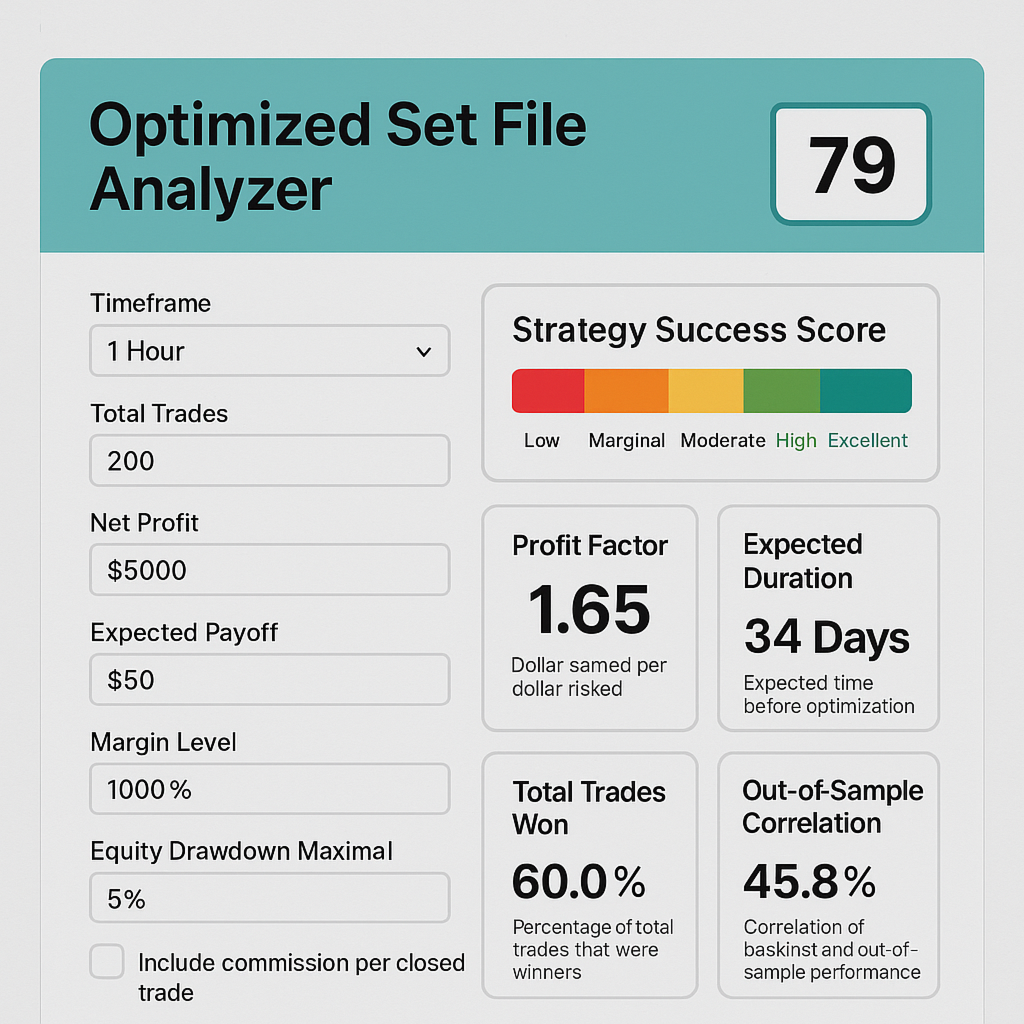
EdgeMaster Pro transforms MT5 backtest data into actionable insights with a single click. By combining statistical edge (Z-Score, SE), profitability (Profit Factor, Expected Payoff), consistency (Win Rate), and risk controls (Drawdown, Margin, Commission, Risk %, Lot Size), it generates a clear 0–100 % Success Score and easy-to-interpret descriptors. Timeframe-aware frequency checks and adaptive warnings alert you to under-sized samples or excessive drawdowns, while optional commission inputs ensure real-world P&L fidelity. Fully self-contained in HTML/JS, EdgeMaster Pro is the ultimate utility for traders and EAs—optimizing profitability while safeguarding capital, all within the MT5 terminal.

Key Features & Benefits

  • UComprehensive MT5 Metrics – Integrates Total Trades, Z-Score, Standard Error, Win Rate, Profit Factor, Expected Payoff, Equity Drawdowns, Margin Level, Risk %, Lot Size, and optional Commission adjustments for a 360° strategy view.

  • Accurate Composite Scoring – Aggregates profitability, statistical edge, consistency, and risk into a single 0–100 % Success Score, using industry-proven weightings to reflect true robustness.

  • Adaptive Drawdown Warnings – Flags high Equity Drawdown Maximal (%), Absolute Drawdown, and low Margin Level, while allowing you to tweak Risk % and Lot Size to pre-emptively mitigate losses. 

  • Commission-Aware Profitability – Optional “Commission $ Per Closed Trade” input recalculates Net Profit and Expectancy after fees, ensuring live-trading P&L accuracy. 

  • Timeframe-Aware Trade Frequency – Choose any MT5 timeframe (M1→MN) to display average trades per bar, normalizing sample adequacy regardless of strategy speed. 

  • Metric-by-Metric Explanations – Each result includes a concise descriptor, clarifying why Raw Success measures edge or why PF Score indicates reward vs. risk.

  • Self-Contained & Shareable – Pure HTML/JS; no backend required. Run locally or embed on any site for lightning-fast, private analysis. 


✅ How to Install & Use EDGEMASTER PRO SET FILE ANALYZER in MT5

(For New Users – 6 Simple Steps)

🔹 Step 1: Open MetaTrader 5

  • Launch your MT5 trading platform.
  • Make sure you're logged in (demo or live account is fine).

🔹 Step 2: Open the MetaEditor

  • In MT5, go to the top menu:
    Tools → MetaQuotes Language Editor (or press F4).

🔹 Step 3: Save the Script

  • In MetaEditor, go to:
    File → Open Folder → MT5_Data\Scripts
  • Open the file: EDGEMASTER PRO SET FILE ANALYZER.mq5 (provided by you)
  • Copy and paste the full code into the editor (if not already there)
  • Click the Compile button (✅) — you should see “0 errors, 0 warnings”
  • Close MetaEditor

🔹 Step 4: Refresh the Navigator

  • Back in MT5, press Ctrl + N to open the Navigator panel.
  • Right-click anywhere in the "Scripts" section and choose "Refresh".

🔹 Step 5: Run the Analyzer

  • In the Navigator, find:
    EDGEMASTER PRO SET FILE ANALYZER
  • Drag it onto any chart (e.g., EURUSD H1), or
  • Double-click it to run immediately
  • A settings window will pop up — click OK to use your values

💡 The tool will:

  • Analyze your strategy
  • Show a score dashboard on the chart
  • Save a 30-day forecast to your Files folder
  • Print a full report in the Journal (Ctrl+J)

🔹 Step 6: View Results

  • Press Ctrl+J to open the Journal tab and see the full analysis
  • Go to: File → Open Data Folder → Files
    → You’ll find: EdgeMaster_Projection.csv (open with Excel)

🔐 Security Note

Just like your secure payment system, this tool runs 100% locally on your machine.
No data leaves your computer — your strategy details stay private and protected.

📌 Tip: Reuse with New SET Files

After each backtest:

  1. Copy key stats (Trades, Win%, PF, etc.) into the script inputs
  2. Run again to analyze the new strategy

✅ Done! You’re now using the professional-grade EDGEMASTER PRO analyzer — secure, powerful, and built for elite performance.


おすすめのプロダクト
EasyTradePad – MetaTrader 5用取引パネル EasyTradePadは 、手動および半自動取引のためのツールです。パネルでは、注文とポジションを迅速に管理できるほか、リスク管理の計算もワンクリックで行えます。 パネルの機能: 事前に定義されたリスク(%または預金通貨)で取引を開始および終了します SLとTPをポイント、パーセンテージ、または金額で設定します リスクと報酬の比率を自動計算 損切りを損益分岐点に移動する 部分的なポジションのクローズ トレーリングストップ(ポイントまたはローソク足の影による) ポジションの平均化とピラミッディング アクティブな取引のパラメータを変更する [   デモ ] [   説明 ] 追加機能: ピラミッド化 価格がテイクプロフィットに近づくにつれて、段階的に取引を追加します。新規取引ごとのリスクを軽減できます。追加する取引数は簡単に設定できます。 平均化 チャート上のカスタムレベルで追加注文を出すことができます。ポジションは平均エントリー価格で決済されます。 損益分岐点移転 価格が指定された利益幅に達した後、ストップロ
The Position Control is an intuitive yet powerful trading tool that facilitates risk management from entry to exit.  It includes automatic lot sizing, fixed stop loss and take profit features, or determines them using the ATR indicator. After opening a position, you can set automatic break-even points, trailing stops, and choose from three types of partial closures. Moreover, if you open a 0.01 lot position from your phone, the expert will automatically close it and open a risk-managed position
Tired of fumbling with lot size calculations and manually managing every trade? The Visual Risk Manager (VRM) is a professional-grade trading panel designed to streamline your trading and enforce discipline. This Expert Advisor is not a strategy; it's a powerful utility that allows you to manage your risk and execute trades with unparalleled speed and precision, directly from your chart. Why You Need the Visual Risk Manager Stop letting emotions and guesswork control your trading. VRM ensures t
Nebula Trading Manager
Sina Mohammadamin Shahriari Moghadam
This expert advisor named   TradeManager   provides a manual trading management panel in MetaTrader 5 that allows precise control over open positions. It is designed for traders who want dynamic management of Stop Loss (SL), Take Profit (TP), Break Even (BE), and Partial Close functionality. Key Features: Dynamic Trade Management : Manually set or drag-and-drop SL, TP, and BE levels. Supports partial closing at different profit levels (1:1, 1:1.5, 1:2). Automated Drawing : Automatically draw
Free MetaTrader 5 indicator that displays "CALL IT A DAY" when London & New York sessions close. Customizable alerts, session tracking, and a guilt-free reminder to log off. Perfect for workaholic traders! Tired of staring at charts when the market’s already clocked out? Session Guardian   is your sassy trading assistant that slaps a giant   "CALL IT A DAY"   on your screen when both London   and   New York sessions are closed—because even traders deserve happy hour. Key Features:   Big, Bo
FREE
Core function Intelligent transaction management one-click opening and closing operation, which supports user-defined lots to set multiple closing modes: all closing, closing by direction and closing by profit and loss status. Professional risk control, real-time risk monitoring and spread control to avoid high-cost trading environment. Visual control panel has an intuitive graphical interface, and all functions can be operated with one button to display position information, profit and loss sta
FREE
RRtoolbox - Professional Tools: Risk:Reward Trading Tool (SL/TP Horizontals + Pending orders + Diagonals), Alerts set on trend lines (for alerts on diagonal levels), SelfManagement (BE, partials...), close/cancelling by time, Statistics, Info and trading on chart. One-Click Trading with Visual Risk:Reward Management RRtoolbox is a comprehensive trading panel that combines one-click order execution,  statistics and  powerful visual Risk:Reward tools, alerts set with trendlines, on chart butt
金融市場の中で、熟練した資本管理は不可欠です。それは、初期投資を守るだけでなく、増やすことにも関係しています。手動の計算の時代は終わりました。リターンを最大化し、リスクを最小化し、金融市場の潜在力を前代未聞の形で引き出すことができます。トレードパネルでトレードの旅を制御してください。 もしスキャルパーとして迅速に実行する必要がある場合、私たちのトレードマネージャーパネルはあなたの指先で必要なすべてのツールを提供します。固定された注文パラメータを設定し、「買う」ボタンや「売る」ボタンをクリックするだけで迅速にトレードを実行できます。すべてのポジションをワンクリックで閉じることもできますし、特定のタイプの保留注文を選択したり、利益が出ているトレードまたは損失を出しているトレードのみを閉じることもできます。 新しいレベルの利便性、効率性、収益性を体験してください。 Trade Panel MGHの使い方 MT4 Version 機能: -    トレーリングストップ - トレードが上昇するにつれて、プログラムは利益の一部を確保します -    部分クローズ - 価格が正しい方向に移動し、ト
Account Turbo Flip Lite: The Basic Trade Management Assistant Trading successfully isn't just about finding the perfect entry—it is about how you manage the trade once you are in the market. Account Turbo Flip Lite  is a streamlined, semi-automated Expert Advisor designed to take the emotion and hesitation out of trade management. Built for traders who prefer to maintain control over their own entries, this "Lite" version acts as your dedicated tactical assistant. You pull the trigger based on y
CosmiCLab SMC FIBO CosmiCLab SMC FIBO is a professional trading indicator designed for traders who use Smart Money Concepts (SMC), market structure analysis and Fibonacci retracement levels. The indicator automatically detects market swings and builds Fibonacci levels based on the latest impulse movement. It also identifies market structure changes such as BOS (Break of Structure) and CHOCH (Change of Character), helping traders understand the current market direction. CosmiCLab SMC FIBO also pr
Description Manzano Risk Manager Pro is a risk management tool for MetaTrader 5 designed to monitor open positions and execute automatic or manual closures when user-defined conditions are reached. Its purpose is to help maintain control over account risk and reduce execution errors during trading. The product does not open trades or modify any trading strategy. Main Features Automatic position closing The system allows you to define profit and loss limits and automatically close positions when
Trade Manager は、リスクを自動的に計算しながら、取引を迅速に開始および終了するのに役立ちます。 過剰取引、復讐取引、感情的な取引を防止する機能が含まれています。 取引は自動的に管理され、アカウントのパフォーマンス指標はグラフで視覚化できます。 これらの機能により、このパネルはすべてのマニュアル トレーダーにとって理想的なものとなり、MetaTrader 5 プラットフォームの強化に役立ちます。多言語サポート。 MT4バージョン  |  ユーザーガイド + デモ Trade Manager はストラテジー テスターでは機能しません。 デモについてはユーザーガイドをご覧ください。 危機管理 % または $ に基づくリスクの自動調整 固定ロットサイズを使用するか、ボリュームとピップに基づいた自動ロットサイズ計算を使用するオプション RR、Pips、または価格を使用した損益分岐点ストップロス設定トレーリングストップロス設定 目標に達したときにすべての取引を自動的に終了するための 1 日あたりの最大損失 (%)。 過度のドローダウンからアカウントを保護し、オーバートレードを防ぎます
Bneu AI OmniScanner
Marvinson Salavia Caballero
Bneu AI OmniScanner Free — Cloud AI Multi-Symbol Scanner This free utility for MetaTrader 5 scans 5 major forex pairs using a cloud-based analysis engine. For each symbol, it analyzes trend, RSI, ATR, and EMA data, then delivers a BUY, SELL, or WAIT signal with confidence score, entry price, stop loss, and take profit levels. What You Get (Free Version) - Cloud analysis for 5 pairs (EURUSD, GBPUSD, USDJPY, XAUUSD, AUDUSD) - BUY / SELL / WAIT signals with confidence score - Entry price, stop
FREE
More stable MetaTrader 4 version is available here:  Lot Calculator Tool . This tool helps you to automatically calculate and manage risk, conveniently place orders visually, schedule orders, trail stops, move them to break-even and more. Features Place market or pending orders using draggable lines Schedule orders Calculate and limit risk using various methods See current spread See time till next candle Set custom order comments Trail stops Move stops to break-even See order profit/loss in p
Equity Shield Pro 1.1 NEW VERSION  Equity Shield Pro 1.1 is a powerful utility EA designed to safeguard your trading account by actively monitoring and enforcing equity protection and profit management rules. Whether you’re trading personal accounts or working through proprietary firm challenges, this EA ensures strict adherence to risk and profit targets, enabling you to maintain discipline and consistency. Fully compatible with all challenge types, Equity Shield Pro 1.1 is specifically craft
Meridian Pro
Ottaviano De Cicco
5 (1)
Meridian Pro:MT5用プロフェッショナル・マルチタイムフレーム・トレンドマトリックス 概要 Meridian Pro は Merkava Labs が開発したマルチタイムフレーム・トレンドマトリックスで、方向性の状態、強度、モメンタムの状況、マトリックスの合意をひとつのコンパクトなパネルに集約します。ひとつのアダプティブエンジンがM1からW1まで一貫して適用されます。シンボルごとの調整は不要。インジケーターの積み重ねも不要。すべてのアセットとすべてのタイムフレームをカバーするひとつの構造化された読み取りです。 発売キャンペーン — Meridian Proを USD 99 (導入価格)で入手。通常価格:USD 149 。 1. Meridian Proが他と異なる理由 ひとつのエンジン、バラバラなインジケーターのダッシュボードではない 多くのMTFダッシュボードは、タイムフレームごとに生のインジケーター値を繰り返すだけです。Meridian Proはマトリックス全体でひとつのアダプティブ・トレンドエンジンを使用するため、パネルの各行が同じ構造化フレームワークから導出されます
Know Your Exact Lot Size Before Every Trade Universal Position Size Calculator solves the most common problem in manual trading:   "How many lots should I trade?" Set your dollar risk amount and stop-loss distance. The calculator instantly gives you the precise lot size — on   any symbol . Forex, stocks, crypto, metals, indices, futures. It handles them all correctly because it uses MT5's own   OrderCalcProfit()   function, not simplified pip-value formulas that break on non-Forex instruments. W
Account Monitor Pro — Your Ultimate Trade Statistics Hub Account Monitor Pro is a professional information dashboard designed for traders who combine Expert Advisors (EAs) and manual trading. The indicator separates statistics in real-time based on your Magic Number, allowing you to clearly see who is driving the profit: the algorithm or yourself. Key Features: Split Monitoring: Instant separation of "Robot" positions (by Magic Number) and "Manual" trades. Multi-language Support: 11 languages in
FREE
Equity monitor This is a simple means change informer. I wrote it for myself, maybe someone will need it... 1. Displays the change in funds for the day. Every day, when the terminal is first launched, it remembers the current funds and monitors changes throughout the day. 2. The first day of the month, well remembers the money and, within months, to monitor changes. 3. Well, it displays the profit of the open position. To work, you need to create 4 global variables: gvarEqityDay , gvarEq
FREE
THIS RISK MANAGER WILL HELP YOU IN YOUR DAILLY TRADING, BY CALCULATING THE RISK AND THE LOTS, AND SET STOPLOSS, AND TAKE PROFIT, AND CAN CLOSE TRADES FOR YOU. RISK PERCENTAGE CASHRISK LOTS STOPLOSS TAKE PROFIT SELL AND BUY BUTTONS LOSE IN PROFIT BUTTON WICH WILL CLOSE ALL TRADES IN PROFIT SET BY THE USER CLOSE ON PROFIT BUTTON WICH WILL CLOSE ALL TRADES WHEN THE EQUALITY IS IN PROFIT SET BY THE USER AS WELL CLOSE TRADES BUTTON
Recluse FX
Michael Prescott Burney
3 (2)
Recluse FX is the ultimate trading system for US30 on the H1 chart. With dedicated stop-loss and take-profit for each order, it guarantees optimal performance and risk management. Validated across over 1200 trades since 2021 with a 100% win rate, Recluse FX delivers unmatched stability and consistent gains under all market conditions. Its progressive pricing means that after 50 copies are sold, the system becomes exclusive to its owners. Purchase Recluse FX now and message for free access to th
It has never been so easy to manage the risk of your account until now, this tool will allow you to have full control of your capital and manage your entries in the synthetic index derivative markets, in an easy, practical and safe way. The available input and configuration parameters are as follows :  RISK MANAGEMENT 1. Value of your account: Here as its name says you will place the value corresponding to the size of your account, for example if your account is 150 dollars the corresponding val
This is a common, simple and easy to use but effective tool to manage trading risks for all traders. It also help trader places stop loss and take profit levels at the same time the order is filled. How to set the expert advisor's parameters to support your trading style? Lots size. Fixed lots size - For traders who prefered to trade with fixed lots size, they can input the lots size in 'User lots' menu in the expert advisor's properties. The input value should be from the 'Minimum Volume' to th
Auto-Shutdown MT5 Terminal - Saves you from Over-Trading by   automatically closing MT5 Termial   when daily loss limits are breached Love it? Hate it? Let me know in a review! Feature requests and ideas for new tools are highly appreciated. :) Try "The AUDCAD Trader": https://www.mql5.com/en/market/product/151841 ️ Your Automated Discipline Enforcer "I'll just make back what I lost..." "One more trade to break even..." "I can't end the day red..." Sound familiar?   These thoughts have d
FREE
One Click Trading – Auto TP SL Developer TraderLinkz Version 1.00 Category Utility What it does Adds missing TP and SL to your manual trades and pending orders Sets them once per ticket Lets you move TP and SL afterward Works on hedging and netting accounts Scans on every tick and reacts on trade events Why you want it You place faster entries You get consistent risk and exit targets You reduce fat finger errors You keep full manual control Quick start Attach the EA to any chart Keep TP and SL e
FREE
Account Statistics – MetaTrader 5のためのトレーディング統計ダッシュボード Account StatisticsはMetaTrader 5向けの分析およびレポートツールです。取引口座の主要な指標をチャート上に直接表示し、さまざまな期間にわたるパフォーマンスを体系的に評価することができます。 本製品は、結果を体系的に分析し、明確に記録したいトレーダー向けに設計されています。 期間限定オファー: 最初の30本はわずか30ドル!価格はまもなく49ドルに上がります。 機能 統合されたダッシュボードは、主要な取引指標をリアルタイムで表示します。これには損益、勝率、プロフィットファクター、その他の統計データが含まれます。表示は日次、週次、月次、年次、および全期間の統計など、さまざまな期間に切り替えることが可能です。 さらに、このツールは自動レポート機能を備えています。レポートは指定した時刻に作成され、プラットフォームの通知機能を通じて送信されます。日次レポートと定期的なサマリーを組み合わせることも可能です。 プログラムは週次、月次、年次の切り替えなどの重要な期間を
Trade Manager MT5 - ビジュアルリスクコントロール&トレーディングパネル Trade Manager MT5は、手動取引における最も一般的な課題である、正確なリスク計算、精密な執行、視覚的な取引計画を解決するために設計されたプロフェッショナルユーティリティです。標準のMetaTrader 5「ワンクリックトレーディング」パネルを、フル機能を備えた高性能なコマンドセンターに置き換えます。 スピード、正確性、視覚的な明瞭さを求める本格的なトレーダー向けに設計されたこのツールは、ソフトウェアが計算と執行を処理する間、お客様が戦略に集中できるようにします。 主な利点 取引前にリスクを可視化 ストップロスとテイクプロフィットがどこに位置するか推測する必要はもうありません。Trade Managerは、チャート上にリアルタイムのビジュアルゾーンを直接描画します。 グリーンゾーン:利益目標エリアを即座に視覚化します。 レッドゾーン:価格アクションに対するリスクエリアを明確に示します。 これにより、ボタンをクリックする前に、エントリーをサポート/レジスタンスレベルに完全に合わせる
Global Risk Manager Auto Stop Loss  Automate Your Risk Management This utility works seamlessly with any symbol, by intelligently setting your initial Stop Loss and Take Profit the instant a new position is opened. Perfect for traders who enter manually or via an EA  but want consistent, rules-based risk management applied automatically. Why You Need This Eliminates Human Error: Never forget to set a stop loss again. Ensures every trade is protected from the start. Enforces Discipline: Removes
PZ Trade Pad MT5
PZ TRADING SLU
4.41 (22)
This simple visual expert advisor allows you to trade easily from the chart. It handles risk management for you and can perform several useful tasks with your existing trades, saving time and making risk-management for each individual trade easier.  [ Installation Guide | Update Guide | Troubleshooting | FAQ | All Products ] Trade easily from the chart Trade with precise risk management, hassle free Trade pending order with drag and drop price selection Set SL and TP levels with drag and drop pr
FREE
What is MTF Confluence Panel? A premium multi-timeframe analysis tool that scores 8 technical indicators across 4 timeframes simultaneously to give you a clear confluence score — so you can enter trades with confidence, not guesswork. How It Works Each timeframe gets scored by 8 independent indicators that vote BUY or SELL: EMA Cross (20/50) — Trend direction Price vs EMA 50 — Price position relative to trend RSI (14) — Momentum MACD Histogram — Momentum confirmation Stochastic (14,3,3) — Fast m
FREE
このプロダクトを購入した人は以下も購入しています
Trade Assistant MT5
Evgeniy Kravchenko
4.42 (207)
取引 ごとのリスクの 計算、新規注文 の 簡単 な 設置、部分的 な 決済機能 を 持 つ 注文管理、 7 種類 のトレーリングストップなど 、便利 な 機能 を 備 えています 。 追加の資料と説明書 インストール手順   -   アプリケーションの手順   -   デモアカウント用アプリケーションの試用版 ライン機能 チャート上にオープニングライン、ストップロス、テイクプロフィットを表示します。この機能により、新規注文を簡単に設定することができ、注文を出す前にその特徴を確認することができます。   リスク計算 リスク計算機能は、設定されたリスクとストップロス注文のサイズを考慮して、新規注文のボリュームを計算します。ストップロスの大きさを自由に設定できると同時に、設定したリスクを守ることができます。 Lot calc ボタン - リスク 計算 を 有効 / 無効 にします 。 Risk フィールドでは 、必要 なリスクの 値 を 0 から 100 までのパーセンテージまたは 預金通貨 で 設定 します 。 設定」 タブで 、 リスク 計算 の 種類 を 選択 します :「 $ 通
Trade Manager EAへようこそ。これは、取引をより直感的、正確、そして効率的にするために設計された究極の リスク管理ツール です。これは単なるオーダー実行ツールではなく、包括的な取引計画、ポジション管理、リスク管理のためのソリューションです。初心者から上級者、迅速な実行を必要とするスキャルパーまで、Trade Manager EAはあらゆるニーズに対応し、為替、指数、商品、暗号通貨などさまざまな市場で柔軟に対応します。 Trade Manager EAを使用すると、複雑な計算が過去のものになります。市場を分析し、エントリーポイント、ストップロス、テイクプロフィットのレベルをチャート上のラインでマークし、リスクを設定するだけで、Trade Managerが最適なポジションサイズを即座に計算し、SLとTPをピップ、ポイント、口座通貨でリアルタイムに表示します。すべての取引が簡単かつ効果的に管理されます。 主な機能: ポジションサイズ計算機 :定義されたリスクに基づいて取引サイズを瞬時に決定します。 簡単な取引計画 :エントリー、ストップロス、テイクプロフィットを設定するためのド
Local Trade Copier EA MT5
Juvenille Emperor Limited
4.96 (135)
Local Trade Copier EA MT5 による、驚くほど高速な取引コピーを体験してください。1分で簡単にセットアップできるこの取引コピー機は、同じWindowsコンピュータまたはWindows VPS上の複数のMetaTrader端末間で取引をコピーすることができ、0.5秒未満の高速コピースピードを実現します。 初心者であろうとプロのトレーダーであろうと、 Local Trade Copier EA MT5 には、あなたの特定のニーズに合わせてカスタマイズするための幅広いオプションが用意されています。これは、利益の可能性を高めたい人にとって究極のソリューションです。 今すぐ試してみて、これが市場で最も速くて簡単なトレードコピー機である理由を理解してください。 ヒント: デモアカウントで Local Trade Copier EA MT5 デモバージョンをダウンロードして試すことができます: ここ ダウンロードした無料のデモ ファイルを MT5 >> ファイル >> データ フォルダを開く >> MQL5 >> Experts フォルダに貼り付けて、ターミナルを再起動しま
TradePanel MT5
Alfiya Fazylova
4.87 (150)
Trade Panelは多機能なトレーディングアシスタントです。アプリには手動取引用の50以上のトレーディング機能が搭載されており、ほとんどの取引作業を自動化することができます。 ご注意ください!割引は期間限定で、毎週火曜日に価格が5ドルずつ上昇します(上限100ドルまで)。 購入前に、デモアカウントでアプリのデモ版をテストすることができます。デモアカウント用のアプリの試用版をダウンロードするには、次のリンクをご利用ください: https://www.mql5.com/en/blogs/post/750865 。 完全な手順 こちら 。 取引。 ワンクリックで取引操作を行うことができます: リスクを自動計算して指値注文やポジションを開く。 複数の注文やポジションをワンクリックで開く。 注文のグリッドを開く。 保留中の注文やポジションをグループごとに閉じる。 ポジションの方向を反転(Buyを閉じてSellを開く、またはSellを閉じてBuyを開く)。 ポジションをブロックする(不足している量のポジションを開くことでBuyとSellのポジション量を等しくする)。 すべてのポジションを部分的
Farmed Hedge Yield Farming | All Markets (Manual - Hybrid - Semi/Automated EA) MULTI-ASSET SUPPORT Trade any asset available on your broker - Forex: Major, Minor, Exotic pairs - Crypto: BTC, ETH, XRP, SOL, BNB - Stocks: Apple, Tesla, Amazon, Google, etc. - Commodities: Gold, Silver, Oil, Gas - Indices: US30, NAS100, SPX500, DAX40 - Any CFD your broker offers VERIFIED TRADING RESULTS - Farmed Hedge Yield Axi Copy:  https://www.mql5.com/en/signals/2356376 - Farmed Hedge Yield Exn Copy:   https:/
Exp COPYLOT CLIENT for MT5
Vladislav Andruschenko
3.82 (34)
MT5のトレードコピー機は、МetaТrader5プラットフォームのトレードコピー機です 。 それは間の 外国為替取引をコピーします   任意のは 、MT5 - MT5、MT4 - MT5   COPYLOT MT5版の アカウント (またはを MT4 - MT4   MT5 - MT4   COPYLOT MT4版用) 信頼できるコピー機! MT4のバージョン 完全な説明   +DEMO +PDF 購入する方法 インストールする方法     ログファイルの取得方法     テストと最適化の方法     Expforex のすべての製品 МТ4ターミナルでトレードをコピーすることもできます(   МТ4   -   МТ4、МТ5   -   МТ4   ):   MT4のCOPYLOT CLIENT このバージョンには、端末間 МТ5   -   МТ5、МТ4   -   МТ5が含まれ ます。 ディールコピー機は、2/3/10端末間でディール/ポジションをコピーするために作成されます。 デモ口座と投資口座からのコピーがサポートされています。 プログラムは、複数の端末バインデ
Tired of complex order placement and manual calculations? Trade Dashboard is your solution. With its user-friendly interface, placing orders becomes effortless, by a single click, you can open trades, set stop loss and take profit levels, manage trade lot size, and calculate risk to reward ratios, allowing you to only focus on your strategy. Say goodbye to manual calculations and streamline your trading experience with Trade Dashboard. Download  Demo Version  right now. You can find  Details of
Copy Cat More Trade Copier MT5 (コピーキャット MT5) は、今日の取引課題に対応して設計されたローカルトレードコピーシステムと完全なリスク管理・実行フレームワークです。プロップファームのチャレンジから個人ポートフォリオ管理まで、堅牢な実行、資本保護、柔軟な設定、高度な取引処理の組み合わせで、あらゆる状況に適応します。 コピーシステムはマスター(送信側)とスレーブ(受信側)の両方のモードで動作し、成行注文と指値注文、取引修正、部分決済、両建て決済操作のリアルタイム同期を行います。デモ口座とライブ口座、取引ログインまたは投資家ログインの両方に対応し、EA、ターミナル、またはVPSが再起動してもパーシスタント取引メモリシステムを通じて復旧を保証します。複数のマスターとスレーブをユニークIDで同時に管理でき、ブローカー間の違いはプレフィックス/サフィックス調整またはカスタムシンボルマッピングを通じて自動的に処理されます。 マニュアル/設定  | Copy Cat More MT4 | チャンネル  特別機能: 設定が簡単 — わずか30秒で完了(ビデオをご覧
Ultimate Extractor - Professional Trading Analytics for MT5 *****this is the local HTML version of Ultimate Extractor. !!!!!it is not compatible with Cloud!!!! For the online version please reach out to me directly****** Ultimate Extractor transforms your MetaTrader 5 trading history into actionable insights with comprehensive analytics, interactive charts, and real-time performance tracking. What It Does Automatically analyzes your MT5 trading history across all Expert Advisors and generates
AntiOverfit PRO:バックテストの不都合な真実 そのEAを買う前に、少し立ち止まってください。 年利250%をうたうシステムを見つけたところです。バックテストは完璧に見えます。販売者の価格は399ドル、あるいは1,999ドルかもしれません。表面上は、すべてが理にかなって見えます。 しかし問題があります。そのバックテストは、あなたが思っていることを証明してはいません。 過去データだけでは、ほとんど何も証明できません。確認できるのは、そのロジックが ある1つの 特定の市場シーケンスで機能したということだけです。価格が別の経路をたどった瞬間に、ロボットは崩れ始めます。 そして高額なEAの多くは、まさにそこで失敗します。 AntiOverfit PROがすること AntiOverfit PROは、システムを売る前にほとんど誰も見せないものを提供します。お金を使う 前に 、その堅牢性を確認する方法です。 数学者である必要はありませんし、難しく考える必要もありません。流れはとてもシンプルです。 MT5のチャートにAntiOverfitを配置します。 AntiOverfitが現実的な
この製品は、ニュースタイム中にすべてのエキスパートアドバイザーと手動チャートをフィルタリングするため、急激な価格変動によるマニュアルトレードのセットアップの破壊や他のエキスパートアドバイザーによって入力された取引について心配する必要はありません。この製品には、ニュースのリリース前にオープンポジションとペンディングオーダーを処理できる完全な注文管理システムも付属しています。 The News Filter  を購入すると、将来のエキスパートアドバイザーのためにビルトインのニュースフィルターに頼る必要はなく、今後はすべてのエキスパートアドバイザーをここからフィルタリングできます。 ニュース選択 ニュースソースは、Forex Factoryの経済カレンダーから取得されます。 USD、EUR、GBP、JPY、AUD、CAD、CHF、NZD、CNYなど、任意の通貨数に基づいて選択できます。 Non-Farm(NFP)、FOMC、CPIなどのキーワード識別に基づいて選択することもできます。 影響レベルによってフィルタリングするニュースを選択することができ、低、中、高の影響範囲から選択できます。
Smart Stop Scanner – マルチアセット対応の市場構造型ストップロス分析システム 概要 Smart Stop Scanner は、複数の市場にわたるストップロス構造をプロフェッショナル品質で監視するために設計されたツールです。 実際の市場構造、重要なブレイクアウト、価格アクションロジックに基づいて最も意味のあるストップゾーンを自動的に検出し、 高精細(DPI対応)で見やすい統一パネルに表示します。 Forex、ゴールド、インデックス、メタル、暗号資産など幅広い市場に対応しています。 ストップレベルの算出方法 従来型のインジケーターや任意の計算式は使用していません。 代わりに、 ブレイクアウト、より高い高値、より低い安値 といった実際の市場構造イベントを検出します。 ストップレベルはこれらの構造ポイントから直接生成されるため、より自然で信頼性が高く、 実際の市場動向に即したストップ設定が可能になります。 主なハイライト • 高精度のマルチアセット対応 Forex、メタル、ゴールド、インデックス、暗号資産など、幅広い銘柄をサポートし、桁数やティックサイズを自動処
The core idea: using the user interface, you configure the parameters the chart must meet before entering a position (or positions), choose which entry models to use, and set the rules for when trading and planning should end. Lazy Trader  handles the rest: it  takes over all the routine chart watching and execution! full description  :: 3 key videos [1] ->  [2]   ->  [3] What can it do? - Understands Larry Williams market structure - Understands swing market structure by Michael Huddleston
The product will copy all telegram signal to MT5 ( which you are member) , also it can work as remote copier.  Easy to set up, copy order instant, can work with almost signal formats, image signal,  s upport to translate other language to English Work with all type of channel or group, even channel have "Restrict Saving Content", work with  multi channel, multi MT5 Work as remote copier: with signal have ticket number, it will copy exactly via ticket number. Support to backtest signal. How to s
Trend Cue is a basket-management utility for MetaTrader 5 hedging accounts. You open the first trade. You choose the direction, the timing, and the lot size. Trend Cue then manages the basket that forms around that decision — setting take-profit levels based on real market volatility, optionally building a grid of additional entries, tracking your average price, and protecting your account with drawdown limits that act on the entire basket rather than on individual positions. It works on any ins
The Ultimate TradingView to MT5 Bridge Automation 手動取引や遅延の問題に終止符を。 TradingView to MT5 Copier PRO は、TradingViewのアラートをMetaTrader 5で直接実行するための、最速かつ最も信頼性の高いブリッジツールです。カスタムインジケーター、ストラテジーテスターのスクリプト、または手動の描画ツールを使用しているかに関わらず、このEAは 高速WebSocket技術 を使用して即座にトレードを実行します。 単純なコピーツールとは異なり、このPROバージョンには Arena Statistics が含まれています。これは、トレードパフォーマンス、ドローダウン、シャープレシオをチャート上で直接分析できる、プロ仕様の統合ダッシュボードです。 主な機能 トレードコピー機能 (Trade Copier) 超高速約定: WebSocket接続(標準的なWebRequestよりも高速)を使用し、スリッページを最小限に抑えます。 ユニバーサルブローカー対応: あらゆるブローカー および プロップファーム
Custom Alerts AIO:マルチマーケット監視を一括で実現 — 設定不要ですぐに使えるインテリジェントツール 概要 Custom Alerts AIO は、追加のインジケーター設定が不要で、インストール後すぐに利用できる高機能マーケットスキャナーです。FX Power、FX Volume、FX Dynamic、FX Levels、IX Power を内部にすべて統合し、主要なすべての資産クラス(為替、金属、指数、暗号資産)を一括監視できます。MetaTrader の仕様により、株式は個別のシンボルとして追加可能ですが、一般的には利用頻度は低めです。 1. なぜ Custom Alerts AIO を選ぶべきか 追加ライセンス不要 • 必要なすべての Stein Investments インジケーターが内蔵されており、すぐに使用可能です。 • チャートに表示されるグラフィックは省略されており、アラート生成に特化した構成です。 市場を広範囲にカバー • 為替、金属、暗号資産、株価指数に対応(株式は手動追加可能)。 • シンボル名を入力する必要はなく、プロパティで資産クラス
Smart Stop Manager – プロレベルの精度でストップロスを自動実行 概要 Smart Stop Manager は Smart Stop ラインナップの「実行レイヤー」であり、複数ポジションを持つトレーダーのために構築された、構造化された信頼性の高い完全自動ストップロス管理システムです。すべての保有中ポジションを継続的に監視し、Smart Stop のマーケットストラクチャー・ロジックを用いて最適なストップレベルを計算し、明確で透明性のあるルールに従ってストップを自動更新します。 単一の銘柄から複数銘柄のポートフォリオ全体まで、Smart Stop Manager は各トレードに規律、安定性、そして完全なリスク可視化をもたらします。感情的判断を排除し、手作業を大幅に削減し、すべてのストップが常に市場構造に基づいた論理的なプロセスに従うことを保証します。 ハイライト マーケットストラクチャーに基づく自動ストップ配置 • Smart Stop ロジックに基づき、各オープンポジションへ最適なストップロスを自動適用します。 ポートフォリオ全体を一目で把握 • 銘柄、方向
HINN MAGIC ENTRY – the ultimate tool for entry and position management! Place orders by selecting a level directly on the chart! full description   ::  demo-version  :: 60-sec-video-description Key features: - Market, limit, and pending orders - Automatic lot size calculation - Automatic spread and commission accounting - Unlimited partitial take-profits  - Breakeven and trailing stop-loss and take-profit  functions - Invalidation leves - Intuitive, adaptive, and customizable interface - Works
ワンクリックで取引できるトレーディングパネル。ポジションと注文の操作!チャートまたはキーボードから取引。 当社の取引パネルを使用すると、チャートから直接シングルクリックで取引を実行でき、標準の MetaTrader コントロールよりも 30 倍高速に取引操作を実行できます。 パラメータと関数の自動計算により、トレーダーにとって取引がより速く、より便利になります。 グラフィックのヒント、情報ラベル、取引取引に関する完全な情報はチャート MetaTrader にあります。 MT4のバージョン 完全な説明   +DEMO +PDF 購入する方法 インストールする方法     ログファイルの取得方法     テストと最適化の方法     Expforex のすべての製品 手動取引用の取引パネル。チャート(チャートウィンドウ)またはキーボードから取引できます。  開閉、リバース、ロックポジションと注文を処理する МetaТrader5 のメインオーダーのトレーディングコントロールパネル:売買、売却、売却、売却、売却、閉じる、削除、修正、トレーリングストップ、ストップロス、takeproft
Trade Manager DashPlus
Henry Lyubomir Wallace
5 (13)
DashPlus は、MetaTrader 5プラットフォーム上での取引効率と効果を向上させるために設計された高度なトレード管理ツールです。リスク計算、注文管理、高度なグリッドシステム、チャートベースのツール、パフォーマンス分析など、包括的な機能を提供します。 主な機能 1. リカバリーグリッド 逆境の市場環境下で取引を管理するための平均化および柔軟なグリッドシステムを実装します。 取引回復のための戦略的なエントリーおよびエグジットポイントを可能にします。 2. スタックグリッド 強い市場の動きの中でポジションを追加することで、有利な取引での潜在的なリターンを最大化するように設計されています。 トレンド市場で利益を得られるよう、勝ち取引を拡大します。 3. 損益(P&L)ライン チャート上に直接、潜在的な利益と損失のシナリオを視覚的に表示します。 設定を調整し、P&Lラインをドラッグして、実行前にさまざまな取引結果を評価します。 4. バスケットモード 同じシンボルでの複数ポジションの管理を簡素化し、それらを単一の集約ポジションにまとめます。 平均価格に基づいて、ストップロスやテイクプ
DrawDown Limiter
Haidar Lionel Haj Ali
5 (20)
Drawdown Limiter EA You are in the right place if you were searching for Drawdown control, Drawdown limiter, Balance protection, Equity Protection or Daily Drawdown Limit related to Prop Firm, FTMO, or Funded account trading, or if you want to protect your trading account. Have you suffered from controlling your drawdown when trading funded accounts? This EA is meant for you. Prop firms usually set a rule called “Trader Daily Drawdown”, and if it is not respected, you are disqualified.  I am an
Local Trade Copier EA は、MAMまたはPAMMアカウントを必要とせずに、外部ソースからのトレードシグナルを実行する必要がある、または同時に複数のアカウントを管理する必要がある個々のトレーダーまたはアカウントマネージャー向けのソリューションです。最大8つのマスターアカウントから無制限のスレーブアカウントにコピーします [ インストールガイド | アップデートガイド | トラブルシューティング | FAQ | すべての製品 ] 100%セルフホスト インストールと使用が簡単 インストーラー、構成ファイル、サーバー、メモリパイプ、DLLは使用されていません EAを永久に使用するための1000回のアクティベーション ローカル実行、ネットワーク遅延なし それはあなたがこれまでに必要とするすべての機能を実装します: 最大8つのマスターアカウントと無制限のスレーブアカウント すべてのブローカーおよびDD / NDD / ECN / STP実行で動作します 異なる口座通貨の口座で動作します ライブアカウントとデモアカウントの間で区別なく機能します マスターアカウントとスレーブア
Seconds Chart - MetaTrader 5で秒足チャートを作成するユニークなツールです。 Seconds Chart を使用すると、秒単位のタイムフレームでチャートを構築でき、標準的な分足や時間足チャートでは得られない柔軟性と分析精度を実現します。例えば、 S15 は15秒足を表します。カスタムシンボルをサポートしているインジケーターやEAをすべて使用できます。標準的なチャートと同様に便利に操作できます。 標準的なツールとは異なり、 Seconds Chart は超短期のタイムフレームでも高い精度と遅延なく作業できるように設計されています。 Seconds Chartの利点 1秒から900秒 までのタイムフレームをサポート。 組み込みのティックデータベースにより、ヒストリカルデータを 瞬時にロード 。 リアルタイムでデータが更新され、 遅延やラグなし 。 複数の秒足チャートを同時に作成可能。 Seconds Chartが最適な用途 スキャルピング や高頻度取引。 正確なエントリーとエグジット。 短期タイムフレームでの取引戦略のテスト。 タイムフレームの設定 デフォルトの設
オーダーチケット, 取引パネル, リスク管理, 手動取引, トレーリングストップ, 注文管理, 高速約定 — JoOrderTrade Pro — MetaTrader 5 用実行パネル JoOrderTrade Pro は、MetaTrader 5 における手動取引および注文管理のためのグラフィカルパネルです。 高速な注文実行、Stop Loss および Take Profit の設定が可能であり、Trailing Stop、Breakeven、SP(Save Position)システムなどのリスク管理機能を備えています。 本パネルは MetaTrader 5 の環境上で動作し、内部スクリプトを通じて注文を実行するために Algotrading を有効にする必要があります。 本製品は自動売買を行いません。 動作要件 MetaTrader 5 Algotrading 有効(パネル動作に必須) Netting または Hedge 口座 主な機能 成行注文および指値注文・逆指値注文の実行 Stop Loss と Take Profit の設定 設定可能な Trailing Stop 自動
EA DIDI アラート - ATM システム検針器 金融市場で最高の取引機会を活用するのに役立つツールをお探しですか? 次に、ATM SystemsのDIDI Alert - Agulhadas Detectorは、DIDI INDEXを通じてDidi Aguiarの強力なNeedles Setup取引戦略を使用する市場で唯一のアドバイザーであり、この戦略の他の専任アドバイザーとは異なり、利用可能なさまざまなリソースを備えていることを知っておく必要があります。非常に完成度が高く、機能的で実用的です。ボリンジャーバンドのニーズ、トレンド、空き状況を特定し、「完全なニーズ」が検出されると、プッシュ通知や電子メールを介してアラートを発します。また、ボリンジャーバンドの結果を迅速かつ簡単に表示するための直感的なグラフィカルダッシュボードも提供します。分析。 DIDI Alert は最先端の人工知能を使用して開発され、コードのすべての行が最適化および洗練され、最大限のパフォーマンスと精度を保証します。さらに、DIDI Alert は、世界最大かつ最も信頼できる取引コミュニティである MQL
Signal TradingView to MT5 Pro Automator TradingViewとMetaTrader 5間の即時プロフェッショナル実行 TradingViewのシグナル(アラート)とMT5での実際の約定を繋ぐ、最も強固なコミュニケーションブリッジで、取引戦略を自動化します。スピード、柔軟性、そして完璧なリスク管理を求めるトレーダー向けに設計されたこのExpert Advisorは、あらゆるアラートメッセージを正確な成行または指値注文に変換します。 強みと利点 ユニバーサルパーシングエンジン(独自技術): あらゆるアラート形式からデータを自動的に認識し、抽出できる高度なテクノロジー。単一の固定フォーマットに制限されることはありません。システムはシンボル(銘柄)、アクション、価格、SL(ストップロス)、TP(テイクプロフィット)を自動的に理解します。 リアルタイム実行: レイテンシ(遅延)を最小限に抑えるよう最適化された、1秒未満の超高速ポーリング技術。シグナルを受信してから数ミリ秒以内に注文が実行されます。 機関投資家レベルのリスク管理: 以下に基づく自動かつ正確
Anchor: The EA Manager A coordination system for traders running multiple EAs. Anchor ensures only one EA can trade at a time, preventing conflicting positions and keeping your portfolio safer. Attach Anchor to any chart. Configure your EAs and their magic numbers. Anchor handles the rest. Built for portfolios. Built for discipline. Built for prop firms. The Problem Running multiple EAs on the same account creates risk. Two gold EAs can open opposite positions on the same candle. Three EA
Trader Evolution
Siarhei Vashchylka
5 (7)
" Trader Evolution " - A utility designed for traders who use wave and technical analysis in their work. One tab of the utility is capable of money management and opening orders, and the other can help in making Elliott wave and technical analysis. Manual (Be sure to read before purchasing) | Version for MT4 Advantages 1. Trading in a few clicks. Immediate and pending orders are available in the panel 2. Money management. The program automatically selects the appropriate lot size 3. Simplifies
作者のその他のプロダクト
MT5 TICK DATA QUALITY ANALYZER   Professional tick data quality analysis tool for MetaTrader 5 traders and developers Price: $69 USD (Launch Special $69 - Regular $99) Product Type: Expert Advisor / Utility Platform: MetaTrader 5 License: Lifetime, 5 Activations INTELLIGENT BACKTEST RECOMMENDATIONS  Automated Backtest Mode Selection - Tells you EXACTLY which tick data format to use in Strategy Tester Optimal Time Period Detection - Automatically identifies the BEST historical range for backtes
フィルタ:
レビューなし
レビューに返信