EdgeMaster Pro EA Set File Analyzer
- Utilità
- Versione: 2.0
- Aggiornato: 31 luglio 2025
- Attivazioni: 5

Key Note: Easy Install Instructions below.
What's New:
✅ What’s New in StrategySuccessAnalyzer v2.0 – Major Upgrades
-
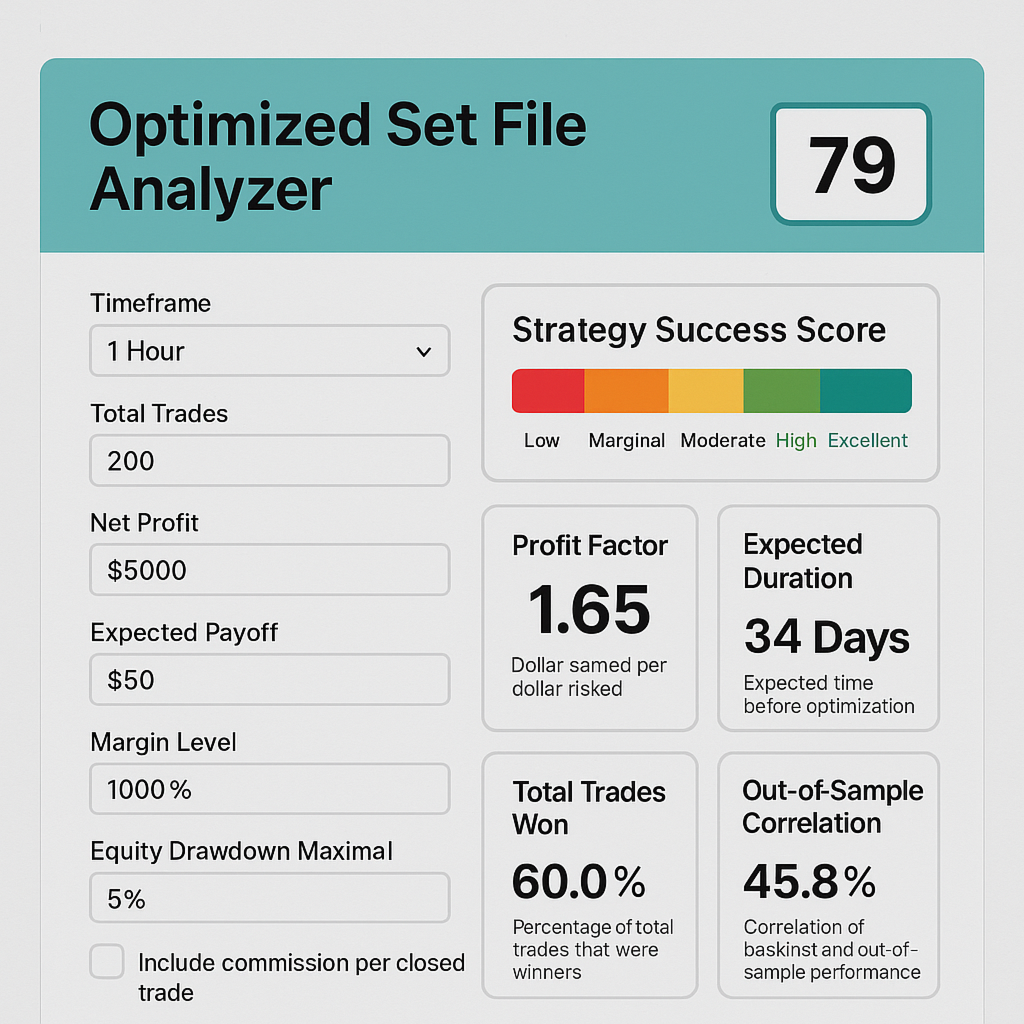
Interactive GUI Dashboard
Visualize strategy health in real time with dynamic score gauges, equity projections, and color-coded performance alerts — directly on your MT5 chart. -
30-Day Forward Performance Projection
Forecast equity growth, drawdown risk, and net PnL over the next month using realistic trade simulations and optional compounding logic. -
One-Click CSV Export
Save full backtest projections to CSV for auditing, reporting, or integration with external analytics tools — ideal for traders, teams, and fund managers. -
Auto-Load from MT5 Strategy Tester
Eliminate manual entry — the tool now intelligently parses your latest backtest results from the MT5 journal log for faster, error-free analysis. -
Smart Risk Engine with Compounding Support
Simulate both fixed and compounding risk models to evaluate long-term sustainability and capital efficiency. -
Enterprise-Grade Data Handling
Built with secure file I/O practices, ensuring safe, reliable data export — consistent with our commitment to security through trusted processes. -
Professional Output & Warning System
Clear, color-coded alerts and structured reporting help you instantly identify red flags — from high drawdown to commission drag.
EdgeMaster Pro transforms MT5 backtest data into actionable insights with a single click. By combining statistical edge (Z-Score, SE), profitability (Profit Factor, Expected Payoff), consistency (Win Rate), and risk controls (Drawdown, Margin, Commission, Risk %, Lot Size), it generates a clear 0–100 % Success Score and easy-to-interpret descriptors. Timeframe-aware frequency checks and adaptive warnings alert you to under-sized samples or excessive drawdowns, while optional commission inputs ensure real-world P&L fidelity. Fully self-contained in HTML/JS, EdgeMaster Pro is the ultimate utility for traders and EAs—optimizing profitability while safeguarding capital, all within the MT5 terminal.
Key Features & Benefits
-
UComprehensive MT5 Metrics – Integrates Total Trades, Z-Score, Standard Error, Win Rate, Profit Factor, Expected Payoff, Equity Drawdowns, Margin Level, Risk %, Lot Size, and optional Commission adjustments for a 360° strategy view.
-
Accurate Composite Scoring – Aggregates profitability, statistical edge, consistency, and risk into a single 0–100 % Success Score, using industry-proven weightings to reflect true robustness.
-
Adaptive Drawdown Warnings – Flags high Equity Drawdown Maximal (%), Absolute Drawdown, and low Margin Level, while allowing you to tweak Risk % and Lot Size to pre-emptively mitigate losses.
-
Commission-Aware Profitability – Optional “Commission $ Per Closed Trade” input recalculates Net Profit and Expectancy after fees, ensuring live-trading P&L accuracy.
-
Timeframe-Aware Trade Frequency – Choose any MT5 timeframe (M1→MN) to display average trades per bar, normalizing sample adequacy regardless of strategy speed.
-
Metric-by-Metric Explanations – Each result includes a concise descriptor, clarifying why Raw Success measures edge or why PF Score indicates reward vs. risk.
-
Self-Contained & Shareable – Pure HTML/JS; no backend required. Run locally or embed on any site for lightning-fast, private analysis.
✅ How to Install & Use EDGEMASTER PRO SET FILE ANALYZER in MT5
(For New Users – 6 Simple Steps)
🔹 Step 1: Open MetaTrader 5
- Launch your MT5 trading platform.
- Make sure you're logged in (demo or live account is fine).
🔹 Step 2: Open the MetaEditor
- In MT5, go to the top menu:
Tools → MetaQuotes Language Editor (or press F4).
🔹 Step 3: Save the Script
- In MetaEditor, go to:
File → Open Folder → MT5_Data\Scripts - Open the file: EDGEMASTER PRO SET FILE ANALYZER.mq5 (provided by you)
- Copy and paste the full code into the editor (if not already there)
- Click the Compile button (✅) — you should see “0 errors, 0 warnings”
- Close MetaEditor
🔹 Step 4: Refresh the Navigator
- Back in MT5, press Ctrl + N to open the Navigator panel.
- Right-click anywhere in the "Scripts" section and choose "Refresh".
🔹 Step 5: Run the Analyzer
- In the Navigator, find:
EDGEMASTER PRO SET FILE ANALYZER - Drag it onto any chart (e.g., EURUSD H1), or
- Double-click it to run immediately
- A settings window will pop up — click OK to use your values
💡 The tool will:
- Analyze your strategy
- Show a score dashboard on the chart
- Save a 30-day forecast to your Files folder
- Print a full report in the Journal (Ctrl+J)
🔹 Step 6: View Results
- Press Ctrl+J to open the Journal tab and see the full analysis
- Go to: File → Open Data Folder → Files
→ You’ll find: EdgeMaster_Projection.csv (open with Excel)
🔐 Security Note
Just like your secure payment system, this tool runs 100% locally on your machine.
No data leaves your computer — your strategy details stay private and protected.
📌 Tip: Reuse with New SET Files
After each backtest:
- Copy key stats (Trades, Win%, PF, etc.) into the script inputs
- Run again to analyze the new strategy
✅ Done! You’re now using the professional-grade EDGEMASTER PRO analyzer — secure, powerful, and built for elite performance.