EdgeMaster Pro EA Set File Analyzer

Key Note: Easy Install Instructions below.

What's New:

✅ What’s New in StrategySuccessAnalyzer v2.0 – Major Upgrades

  • Interactive GUI Dashboard
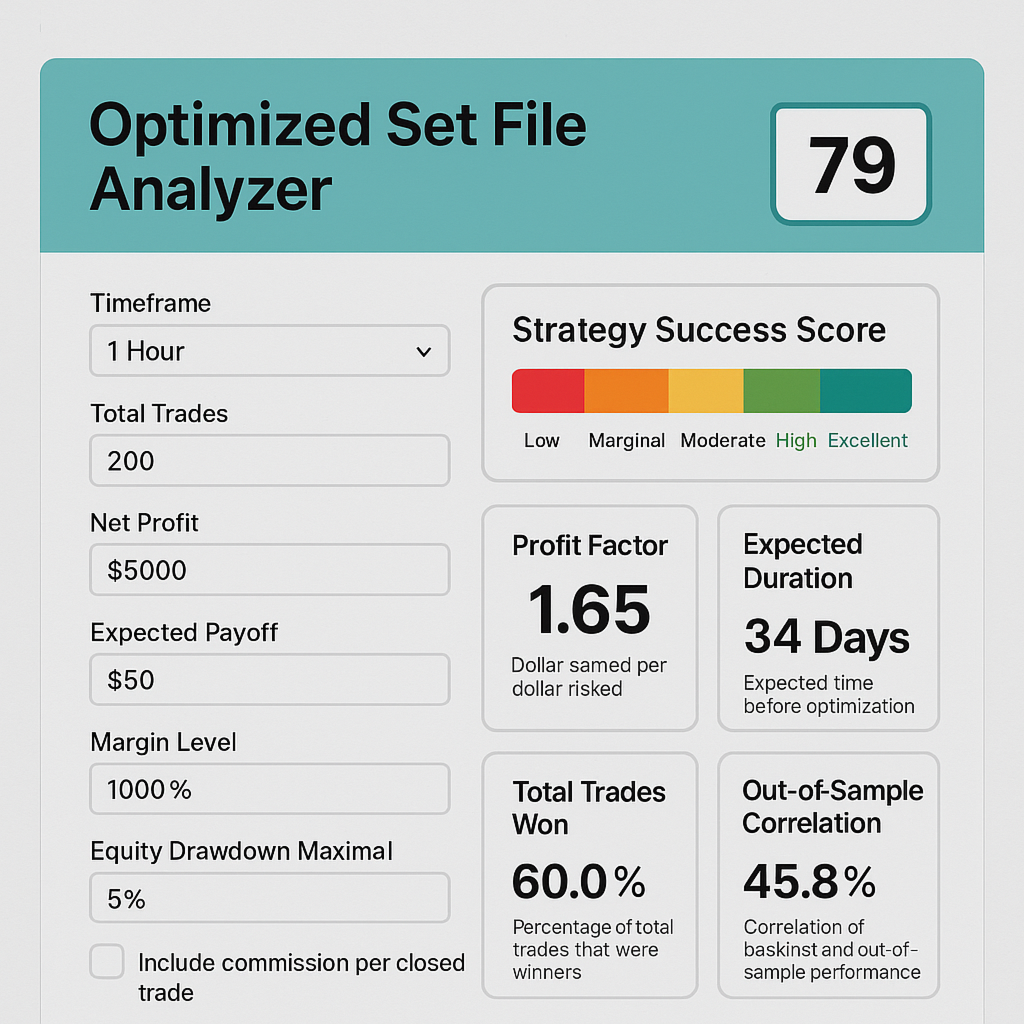
    Visualize strategy health in real time with dynamic score gauges, equity projections, and color-coded performance alerts — directly on your MT5 chart.

  • 30-Day Forward Performance Projection
    Forecast equity growth, drawdown risk, and net PnL over the next month using realistic trade simulations and optional compounding logic.

  • One-Click CSV Export
    Save full backtest projections to CSV for auditing, reporting, or integration with external analytics tools — ideal for traders, teams, and fund managers.

  • Auto-Load from MT5 Strategy Tester
    Eliminate manual entry — the tool now intelligently parses your latest backtest results from the MT5 journal log for faster, error-free analysis.

  • Smart Risk Engine with Compounding Support
    Simulate both fixed and compounding risk models to evaluate long-term sustainability and capital efficiency.

  • Enterprise-Grade Data Handling
    Built with secure file I/O practices, ensuring safe, reliable data export — consistent with our commitment to security through trusted processes.

  • Professional Output & Warning System
    Clear, color-coded alerts and structured reporting help you instantly identify red flags — from high drawdown to commission drag.


EdgeMaster Pro transforms MT5 backtest data into actionable insights with a single click. By combining statistical edge (Z-Score, SE), profitability (Profit Factor, Expected Payoff), consistency (Win Rate), and risk controls (Drawdown, Margin, Commission, Risk %, Lot Size), it generates a clear 0–100 % Success Score and easy-to-interpret descriptors. Timeframe-aware frequency checks and adaptive warnings alert you to under-sized samples or excessive drawdowns, while optional commission inputs ensure real-world P&L fidelity. Fully self-contained in HTML/JS, EdgeMaster Pro is the ultimate utility for traders and EAs—optimizing profitability while safeguarding capital, all within the MT5 terminal.

Key Features & Benefits

  • UComprehensive MT5 Metrics – Integrates Total Trades, Z-Score, Standard Error, Win Rate, Profit Factor, Expected Payoff, Equity Drawdowns, Margin Level, Risk %, Lot Size, and optional Commission adjustments for a 360° strategy view.

  • Accurate Composite Scoring – Aggregates profitability, statistical edge, consistency, and risk into a single 0–100 % Success Score, using industry-proven weightings to reflect true robustness.

  • Adaptive Drawdown Warnings – Flags high Equity Drawdown Maximal (%), Absolute Drawdown, and low Margin Level, while allowing you to tweak Risk % and Lot Size to pre-emptively mitigate losses. 

  • Commission-Aware Profitability – Optional “Commission $ Per Closed Trade” input recalculates Net Profit and Expectancy after fees, ensuring live-trading P&L accuracy. 

  • Timeframe-Aware Trade Frequency – Choose any MT5 timeframe (M1→MN) to display average trades per bar, normalizing sample adequacy regardless of strategy speed. 

  • Metric-by-Metric Explanations – Each result includes a concise descriptor, clarifying why Raw Success measures edge or why PF Score indicates reward vs. risk.

  • Self-Contained & Shareable – Pure HTML/JS; no backend required. Run locally or embed on any site for lightning-fast, private analysis. 


✅ How to Install & Use EDGEMASTER PRO SET FILE ANALYZER in MT5

(For New Users – 6 Simple Steps)

🔹 Step 1: Open MetaTrader 5

  • Launch your MT5 trading platform.
  • Make sure you're logged in (demo or live account is fine).

🔹 Step 2: Open the MetaEditor

  • In MT5, go to the top menu:
    Tools → MetaQuotes Language Editor (or press F4).

🔹 Step 3: Save the Script

  • In MetaEditor, go to:
    File → Open Folder → MT5_Data\Scripts
  • Open the file: EDGEMASTER PRO SET FILE ANALYZER.mq5 (provided by you)
  • Copy and paste the full code into the editor (if not already there)
  • Click the Compile button (✅) — you should see “0 errors, 0 warnings”
  • Close MetaEditor

🔹 Step 4: Refresh the Navigator

  • Back in MT5, press Ctrl + N to open the Navigator panel.
  • Right-click anywhere in the "Scripts" section and choose "Refresh".

🔹 Step 5: Run the Analyzer

  • In the Navigator, find:
    EDGEMASTER PRO SET FILE ANALYZER
  • Drag it onto any chart (e.g., EURUSD H1), or
  • Double-click it to run immediately
  • A settings window will pop up — click OK to use your values

💡 The tool will:

  • Analyze your strategy
  • Show a score dashboard on the chart
  • Save a 30-day forecast to your Files folder
  • Print a full report in the Journal (Ctrl+J)

🔹 Step 6: View Results

  • Press Ctrl+J to open the Journal tab and see the full analysis
  • Go to: File → Open Data Folder → Files
    → You’ll find: EdgeMaster_Projection.csv (open with Excel)

🔐 Security Note

Just like your secure payment system, this tool runs 100% locally on your machine.
No data leaves your computer — your strategy details stay private and protected.

📌 Tip: Reuse with New SET Files

After each backtest:

  1. Copy key stats (Trades, Win%, PF, etc.) into the script inputs
  2. Run again to analyze the new strategy

✅ Done! You’re now using the professional-grade EDGEMASTER PRO analyzer — secure, powerful, and built for elite performance.

Рекомендуем также
EasyTradePad for MT5
Sergey Batudayev
5 (5)
EasyTradePad – торговая панель для MetaTrader 5 EasyTradePad — это инструмент для ручной и полуавтоматической торговли. Панель позволяет быстро управлять ордерами и позициями, а также рассчитывать параметры управления рисками в один клик. [Демо и Инструкция] Возможности панели: открытие и закрытие сделок с учётом заданного риска (% или в валюте депозита); установка SL и TP в пунктах, процентах или деньгах; расчет соотношения риска к прибыли; перенос стоп-лосса в безубыток; частичное закрытие п
R33 Trade Manager — Position Sizing & Trade Management Panel R33 Trade Manager is an on-chart trading panel that combines risk-based position sizing with fast trade management — set your risk, drag your levels, and execute in one click. Watch the full walkthrough:  https://youtu.be/t0F-aKWLU_o The problem every manual trader knows Calculating the right lot size by hand at the moment of entry is slow and error-prone — one wrong decimal in the math can blow past your intended risk. And once a tr
ZenTrade Manager MT5
Ian Paolo Lumba Castro
ZenTrade Manager MT5 Stop Computing. Start Trading. Are you tired of missing perfect entries because you were busy calculating pip distances, lot sizes, or monetary risk? Do you overthink your Stop Loss and Take Profit levels, only to watch the market reverse while you're adjusting lines? ZenTrade Manager MT5 removes the mental load of order management, allowing you to focus 100% on what matters: Reading the Market. You handle the high-level analysis and decide when to enter; ZenTrade handles t
EdgeReplay — Manual Backtesting Trainer Most backtesting isn’t practice — it’s a spreadsheet, or a static chart with arrows drawn on it after the fact. A demo account doesn’t fix this either: watching a thousand setups go by teaches you nothing repeatable. Until you’ve actually pulled the trigger, moved your stop, and lived with what happens next, you haven’t practiced — you’ve only watched. EdgeReplay turns any historical period on your own broker’s symbols into a live, candle-by-candle repl
Tired of fumbling with lot size calculations and manually managing every trade? The Visual Risk Manager (VRM) is a professional-grade trading panel designed to streamline your trading and enforce discipline. This Expert Advisor is not a strategy; it's a powerful utility that allows you to manage your risk and execute trades with unparalleled speed and precision, directly from your chart. Why You Need the Visual Risk Manager Stop letting emotions and guesswork control your trading. VRM ensures t
Nebula Trading Manager
Sina Mohammadamin Shahriari Moghadam
This expert advisor named   TradeManager   provides a manual trading management panel in MetaTrader 5 that allows precise control over open positions. It is designed for traders who want dynamic management of Stop Loss (SL), Take Profit (TP), Break Even (BE), and Partial Close functionality. Key Features: Dynamic Trade Management : Manually set or drag-and-drop SL, TP, and BE levels. Supports partial closing at different profit levels (1:1, 1:1.5, 1:2). Automated Drawing : Automatically draw
MT5 History Checker Can you trust the historical data behind your MT5 backtest? MT5 History Checker is a diagnostic utility designed to identify missing periods and coverage problems in the historical data supplied by your MetaTrader 5 broker. Select the symbol and date range you want to examine and run the checker. The utility analyses the available history and provides a clear PASS, WARNING or FAIL result. What it checks Historical tick-hour coverage M1 historical-data coverage Missing periods
FREE
Equity Sculper EA
Christopher Calmerin
Put your trading profits to work. Equity Sculptor EA is an MT5 trade-management tool that uses new closed profits to gradually reduce losing positions across your account. Account-wide management: All symbols and magic numbers, including manual trades. Two funding modes: Rescue Wallet or Legacy Balance. Flexible settings: Customize profit allocation, trim size and trade selection. Clear dashboard: View your funds, performance and configurations. Persistent tracking: Saved accounting continues af

Coasyn Value Acceptance is a manual decision-support utility for MetaTrader 5 designed to help traders understand how price is participating relative to value. The system uses weekly and rolling VWAP-based value references to show whether price is holding around value, failing at value, accepting above or below value, or extending away from the field. Use it to monitor: • Weekly VWAP context • Rolling session value • Participation around value • Repeated tests and holds • Deviation and dista
TradePulseMonitor for MetaTrader 4 & 5 OVERVIEW TradePulseMonitor is a real-time, on-chart dashboard that shows everything you need to know about your position on the current symbol: profit, risk, exposure, margin, swaps and historical performance . All data is consolidated in a compact panel in the lower-right corner of the chart, so you no longer need to keep switching to the Terminal window. All position, profit and risk figures refer to the symbol of the chart the indicator is attached to. P
FREE
Free MetaTrader 5 indicator that displays "CALL IT A DAY" when London & New York sessions close. Customizable alerts, session tracking, and a guilt-free reminder to log off. Perfect for workaholic traders! Tired of staring at charts when the market’s already clocked out? Session Guardian   is your sassy trading assistant that slaps a giant   "CALL IT A DAY"   on your screen when both London   and   New York sessions are closed—because even traders deserve happy hour. Key Features:   Big, Bo
FREE
RiskGuard Pro enforces a daily loss limit, a profit lock and a maximum drawdown on your account - across your manual trades and any other EA you run. It does not open trades and it does not predict anything. What it does RiskGuard Pro watches your account equity and enforces three limits you set: Daily loss limit - measured against your start-of-day equity. Daily profit lock - stop trading once the day has gone well enough. Maximum drawdown - measured from your account's peak equity, not from to
Core function Intelligent transaction management one-click opening and closing operation, which supports user-defined lots to set multiple closing modes: all closing, closing by direction and closing by profit and loss status. Professional risk control, real-time risk monitoring and spread control to avoid high-cost trading environment. Visual control panel has an intuitive graphical interface, and all functions can be operated with one button to display position information, profit and loss sta
FREE
DDKiller Pro
Njaratahiry Michael Randrianiaina
Stop Blowing Your Account. Once and For All. DDKiller Pro is the MT5 risk guardian that runs silently on your chart and shuts down trading the moment you hit a limit — whether you're grinding a prop firm challenge or managing your own CFD account. The problem every trader knows: You set your rules. You break them anyway. One revenge trade. One overleveraged position. One session that erases a month of gains. DDKiller Pro removes that decision from your hands entirely. What it does: The second yo
Real Trade Assistant
Muhammad Muzaffar Hussan
Real Trade Assistant Plan it. Size it. Place it. Manage it. Practise it. All from one panel on your chart. Real Trade Assistant is a trading cockpit for MetaTrader 5. It does not trade for you. It gives you fast, precise control over your own trades, and it adds a complete practice lab inside the same panel, so you can rehearse a setup before risking money. Real Trade Assistant User guide. Only in Real Trade Assistant Seconds Chart Open a 1s, 5s, 15s, 90s chart, or any number of seconds you choo
Apex Point is a trend-following indicator for MetaTrader 5, transforming complex market data into signals for traders. It displays blue dots for uptrends, red dots for downtrends, and yellow crosses at potential reversals, helping users identify momentum shifts quickly. Key features include a confirmation system requiring multiple bars (default: 3) to validate changes, reducing false signals; dynamic ATR-based offsets for adaptive trailing, with instant ratcheting in the trend direction and smo
FREE
В сфере финансовых рынков важно владеть навыками управления капиталом. Это касается не только защиты вашего первоначального вложения, но и его увеличения. Дни ручных расчетов позади. Максимизируйте ваши доходы, минимизируйте риски и раскройте потенциал финансовых рынков, как никогда прежде. Возьмите контроль над своим торговым путешествием с помощью Торговой Панели. Если вы работаете в качестве скрапера и вам нужно выполнить быстрые операции, наша панель Торгового Менеджера предоставляет все нео
CosmiCLab SMC FIBO CosmiCLab SMC FIBO — это профессиональный торговый индикатор, основанный на концепциях Smart Money Concepts (SMC), анализе структуры рынка и уровнях Fibonacci. Индикатор автоматически определяет свинги рынка и строит уровни Fibonacci по последнему импульсному движению. Также индикатор определяет ключевые изменения структуры рынка: BOS — Break Of Structure CHOCH — Change Of Character Дополнительно отображаются сигнальные стрелки BUY / SELL при пробое структуры. Индикатор подход
JMM Trade Panel MT5 JMM Trade Panel MT5 — это удобный торговый инструмент для MetaTrader 5, работающий непосредственно на графике. Открывайте сделки Buy и Sell, быстро изменяйте отображаемый размер лота, контролируйте прибыль корзин и управляйте сделками с помощью настраиваемого Magic Number и правил выбора символов. Полное руководство пользователя:   Скачать Основные возможности Кнопки Buy, Sell и Close All прямо на графике. Закрытие всех сделок, которыми управляет советник, одним нажатием.
Trade Copilot - полуавтоматическая панель управления рисками для золота (XAUUSD) и любого инструмента Trade Copilot - это полуавтоматическая торговая панель для трейдеров, которые хотят дисциплину советника, не теряя контроль над собственными входами в рынок. Вы выбираете направление и уровень - панель автоматически рассчитывает размер риска, устанавливает стоп-лосс, управляет тейк-профитом и защищает сделку. ОСНОВНЫЕ ФУНКЦИИ - Расчёт лота по риску - выберите Risk %, Risk $ или фиксированный
Trading Manager — ваша панель для исполнения сделок и управления ими, с риском всегда перед глазами Trading Manager — это помощник для ручной торговли, который объединяет весь процесс в одной панели на графике. Вы выбираете направление и риск, устанавливаете стоп-лосс и тейк-профит, а панель рассчитывает лот и показывает убыток по стоп-лоссу и прибыль по цели ещё до отправки ордера. Затем вы управляете одной или несколькими позициями из той же таблицы. Когда и в каком направлении торговать, реша
Бесплатно. Задайте риск, нажмите Buy или Sell — готово. TrueRisk Trade Panel рассчитывает размер лота за вас. Введите, какой частью счёта вы хотите рискнуть (например, 1%), задайте стоп-лосс в пунктах или перетащите его на графике — и кнопки BUY и SELL уже показывают правильный лот. Никакого калькулятора лотов, никаких догадок, никаких сделок с риском в десять раз больше задуманного. Версия MT4 (бесплатно) НОВИНКА (бесплатно): снимок каждой сделки сохраняется сам. TrueRisk Trade Journal сохраняе
FREE
Trade Manager DaneTrades
Levi Dane Benjamin
4.13 (31)
Trade Manager, который поможет вам быстро входить и выходить из сделок, автоматически рассчитывая риск. Включает функции, которые помогут предотвратить чрезмерную торговлю, торговлю из мести и эмоциональную торговлю. Сделками можно управлять автоматически, а показатели эффективности счета можно визуализировать в виде графика. Эти функции делают эту панель идеальной для всех трейдеров, занимающихся ручной торговлей, и помогают улучшить платформу MetaTrader 5. Многоязычная поддержка. Версия для МТ
Pattern Recognition EA - From Learn to Earn. The market repeats itself. This EA finds every past repeat of the current candle sequence - and lets history vote the direction. ONE SHAPE. EVERY REPEAT IN HISTORY VOTES. The last N candles on your signal timeframe form a shape. The EA scans the history you choose - a fixed number of bars or everything your broker provides - for the SAME shape, and checks what happened next, every single time. Only when enough repeats exist AND a clear majority of t
XBOOT BOLETA PRO Professional Manual Trading Panel for MetaTrader 5 XBOOT Boleta Pro is a complete trading panel designed for traders who execute manual trades and want greater speed, organization, and control during every trading session. More than a standard Buy and Sell panel, XBOOT Boleta Pro combines powerful trading tools into a single interface, helping traders analyze the market, manage risk, execute orders, and monitor trading performance without leaving the chart. Its purpose is to sim
Lot calculator tool MT5
Ernestas Kvedaras
3.67 (3)
More stable MetaTrader 4 version is available here:  Lot Calculator Tool . This tool helps you to automatically calculate and manage risk, conveniently place orders visually, schedule orders, trail stops, move them to break-even and more. Features Place market or pending orders using draggable lines Schedule orders Calculate and limit risk using various methods See current spread See time till next candle Set custom order comments Trail stops Move stops to break-even See order profit/loss in p
Recovery Manager Panel MT5 is a manual order management panel for traders who want to manage open positions directly from the chart in a clearer and more organized way. This tool is not a signal robot. It does not predict market direction, generate entry signals, or trade automatically based on market forecasts. Instead, it helps traders work with positions that are already open. You can calculate possible recovery lot sizes, view estimated target levels on the chart, and use available floating
RRtoolBox
David Ruiz Moreno
RRtoolbox - Professional Tools: Risk:Reward Trading Tool (SL/TP Horizontals + Pending orders + Diagonals), Alerts set on trend lines (for alerts on diagonal levels), SelfManagement (BE, partials...), close/cancelling by time, Statistics, Info and trading on chart. One-Click Trading with Visual Risk:Reward Management RRtoolbox is a comprehensive trading panel that combines one-click order execution,  statistics and  powerful visual Risk:Reward tools, alerts set with trendlines, on chart butt
Truvana Trend Campaign Manager EA (TCM) Advanced Basket Management & Profit Locking Tool for Trend Traders Short Description Turn strong trends into managed campaigns. Truvana TCM is a professional trade management EA designed for traders who already know how to identify trends and execute entries. The EA automatically manages basket expansion, validates risk before adding positions, and locks profits using a broker-side Basket Stop Price (BSP). No martingale. No grid recovery. No signal genera
С этим продуктом покупают
Trade Assistant MT5
Evgeniy Kravchenko
4.43 (216)
Помогает рассчитать риск на сделку, простая установка нового ордера с помощью линий, управление ордерами с функциями частичного закрытия, 7 типов трейлинг-стопа и другие полезные функции. Дополнительные материалы и инструкции Инструкция по установке - Инструкция к приложению Функция Линии   - отображает на графике линию открытия, стоп-лосс, тейк-профит. С помощью этой функции легко установить новый ордер и увидеть его дополнительные характеристики перед открытием. Управление риском   -   функ
Farmed Hedge Yield Farming | All Markets (Manual - Hybrid - Semi/Automated EA) VERIFIED TRADING RESULTS - Farmed Hedge Yield Axi Copy:  https://www.mql5.com/en/signals/2356376 - Farmed Hedge Yield Exn Copy:   https://www.mql5.com/en/signals/2356404 - Farmed Hedge Yield V Copy:  https://www.mql5.com/en/signals/2357156 IMPORTANT NOTICE: FarmedHedge is a MANUAL-FOCUSED TRADING UTILITY ,not a fully automated EA. Results shown on this Signal include manual trades and overall strategic management.
Добро пожаловать в Trade Manager EA — лучший инструмент для управления рисками, предназначенный для упрощения, точности и эффективности торговли. Это не просто инструмент для размещения ордеров; это комплексное решение для удобного планирования торгов, управления позициями и усиленного контроля над рисками. Независимо от того, начинающий вы трейдер, опытный специалист или скальпер, нуждающийся в быстром исполнении, Trade Manager EA адаптируется к вашим потребностям и работает с любыми активами:
Telegram to MT5 Multi-Channel Copier   автоматически копирует торговые сигналы из ваших Telegram- и Discord -каналов прямо в MetaTrader 5. Без ботов, без браузерных расширений, без ручного копирования. Сигнал приходит в Telegram или Discord — и советник открывает сделку в вашем терминале за считанные секунды. А перед тем как копировать канал, встроенный бэктестер покажет, что этот канал сделал бы на вашем счёте. Продукт состоит из двух компонентов: приложения для Windows, которое слушает ваши Te
Local Trade Copier EA MT5
Juvenille Emperor Limited
4.94 (150)
Local Trade Copier EA MT5 — это быстрый и гибкий копировщик сделок для копирования и управления сделками между несколькими счетами MetaTrader 5 на одном компьютере с Windows или Windows VPS. Он сочетает локальную синхронизацию сделок с настройками на стороне Receiver для управления размером лота, рисками, фильтрацией сделок, сопоставлением символов, управлением сделками и защитой счета. Настройте терминалы Transmitter и Receiver примерно за 1 минуту и копируйте ручные сделки или сделки, открыты
TradePanel MT5
Alfiya Fazylova
4.88 (173)
Trade Panel — это многофункциональный торговый помощник. Приложение содержит более 50 торговых функций для ручной торговли и позволяет автоматизировать большинство торговых операций. Инструкция к приложению: https://www.mql5.com/ru/blogs/post/756476 Пробная версия приложения для демо-счета: https://www.mql5.com/ru/blogs/post/750864 Как установить приложение: https://www.mql5.com/ru/blogs/post/750096 Как тестировать приложение в визуальном режиме: https://www.mql5.com/ru/blogs/post/770274 Как уст
News Trade EA MT5
Konstantin Kulikov
4.55 (11)
Представляю полезного робота, которым пользуюсь сам уже несколько лет. Может использоваться как в полуавтоматическом, так и в полностью автоматическом режиме. >>> Chat <<< Программа содержит гибкие настройки торговли на новостях экономического календаря. В тестере стратегий проверить нельзя. Только реальная работа. Скачайте последний архив настроек: https://www.mql5.com/en/blogs/post/747929 Мониторинг сигналов: https://www.mql5.com/ru/signals/author/test-standart При создании своих собственных
Копируйте сигналы из Telegram по своим торговым правилам Telegram to MT5 Signal Trader автоматически копирует текстовые торговые сигналы из открытых и закрытых каналов и групп Telegram в MetaTrader 5. Управляйте несколькими поставщиками сигналов и счетами MT5 из одного приложения для компьютера, задавая индивидуальные параметры риска и торговли для каждого поставщика . Для копирования не нужны бот Telegram и настройка API. Просто войдите в свой аккаунт Telegram по номеру телефона или QR-коду и в
Exp COPYLOT CLIENT for MT5
Vladislav Andruschenko
3.97 (35)
Профессиональный копировщик сделок для MetaTrader 5 Быстрый, профессиональный и надежный копировщик сделок для MetaTrader . COPYLOT позволяет копировать сделки Forex между терминалами MT4 и MT5 с поддержкой счетов Hedge и Netting . Версия COPYLOT для MT5 поддерживает: - MT5 Hedge → MT5 Hedge - MT5 Hedge → MT5 Netting - MT5 Netting → MT5 Hedge - MT5 Netting → MT5 Netting - MT4 → MT5 Hedge - MT4 → MT5 Netting Версия MT4 Полное описание + DEMO + PDF Как купить Как установить Как получить файлы жур
EA Overfitter
Stephen J Martret
5 (3)
Бэктест выглядит отлично. Но будет ли советник зарабатывать завтра, через неделю, через месяц? EA Overfitter прогоняет вашего советника по 100 историям цены, которых он никогда не видел. Одна оценка показывает, реально ли преимущество. Бэктест показывает, что советник сделал на одной истории цены — на той, которая случайно произошла. Из него невозможно понять, какая часть результата была заслугой стратегии, а какая — конкретного пути цены. EA Overfitter отвечает на этот вопрос. Он строит до 10
================================================================================ POC BREAKOUT - V20.72. Full Professional Grade Toolkit ================================================================================ POC Breakout is a full MetaTrader 5 trading dashboard for discretionary traders who want breakout signals, Point of Control (POC) context, volume profiles, order flow, market structure, news, alerts, and advanced trade planning in one professional workspace. Attached directly to you

The product will copy all telegram signal to MT5 ( which you are member) , also it can work as remote copier.  Easy to set up, copy order instant, can work with almost signal formats, image signal,  s upport to translate other language to English Work with all type of channel or group, even channel have "Restrict Saving Content", work with  multi channel, multi MT5 Work as remote copier: with signal have ticket number, it will copy exactly via ticket number. Support to backtest signal. How to s
Power Candles Strategy Scanner: самооптимизирующийся поиск сетапов по множеству символов Сканер, который пищит на каждое шевеление, приучает вас его игнорировать. Одно оживлённое закрытие свечи, оповещение за оповещением, и тот единственный сетап, который вы действительно торгуете, тонет в шуме. Power Candles Strategy Scanner запускает самооптимизирующийся движок Power Candles на каждом символе вашего Market Watch и оповещает только о том, что прошло ваши собственные фильтры: силу последней закр
Timeless Charts
Samuel Manoel De Souza
5 (9)
Timeless Charts is an all-in-one trading utility for professional traders. It combines custom chart types such as Seconds Charts and Renko with advanced order flow analysis using Footprints , Clusters , Volume Profiles , VWAP studies, and anchored analysis tools for deeper market insight. Trading and position management are handled directly from the chart through an integrated trade management panel , while Market Replay and Virtual Accounts provide environments for practicing trading skills and
Следующее обновление — версия 2.52 уже скоро! [НОВОЕ] Приготовьтесь к 4 новым важным функциям, призванным улучшить ваш анализ рынка и торговый процесс. Мы выводим анализ рынка на новый уровень с помощью 4 новых функций, разработанных с учётом ваших потребностей в трейдинге. Представляем: 1. TRADE OVERVIEW DASHBOARD 2. CONFLUENCE AT ZONE 3. STRONG & WEAK HIGH/LOW 4. OTE 1. TRADE OVERVIEW DASHBOARD Панель, которая помогает легче понимать общую картину рынка, предоставляя рекомендации для поддержк
Anchor Trade Manager
Kalinskie Gilliam
5 (8)
Your EAs cannot see each other, but Anchor can. Anchor gives you one place to coordinate your EAs, manage risk, and decide when trading is allowed. It works alongside the trading bots you already use without any changes to them. The Problem One EA opens a trade. Then another starts trading. The next thing you know, you wake up to multiple grids built across your account. Each EA may be doing exactly what it was designed to do, but together they can place far more risk on your account than you in
EA Auditor
Stephen J Martret
5 (7)
EA Auditor is an independent analysis tool for traders evaluating Expert Advisors and trading signals on MetaTrader 5. It audits backtest reports, reviews posted developer signals, and cross-verifies the two against each other to help traders assess strategies before committing capital. The MQL5 market offers a wide range of Expert Advisors from many developers, with varying approaches, quality, and transparency. EA Auditor provides a consistent, data-driven framework for reviewing them, answer
Trade Dashboard MT5
Fatemeh Ameri
4.94 (135)
Trade Dashboard simplifies how you open, manage, and control your trades, with built-in lot size calculation. It allows you to execute trades, manage risk, and control positions directly on the chart, with tools such as partial close, breakeven, and trailing stop. Designed to reduce manual work and help you stay focused on your trading decisions. A demo version is available for testing. Detailed explanations of features are provided within the MQL5 platform. Installation instructions are include
MT5 to Telegram Signal Provider — это простой в использовании полностью настраиваемый инструмент, который позволяет отправлять определённые сигналы в чат, канал или группу Telegram, превращая вашу учётную запись в провайдера сигналов . В отличие от большинства конкурирующих продуктов, он не использует импорт DLL. [ Демо ]   [ Руководство ] [ Версия MT4 ] [ Версия для Discord ] [ Канал в Telegram ]  New: [ Telegram To MT5 ] Настройка Доступно пошаговое руководство пользователя . Никаких знаний A
RETAILBERG FOOTPRINT CHART PRO — Order-Flow Workspace for MetaTrader 5 Version 7.00  |  Professional System  |  31 tools  |  One chart A full 150-page illustrated User Manual is included. Please read the full manual to understand this feature packed footprint chart elements and ui. https://www.mql5.com/en/blogs/post/777982 DEMO / STRATEGY TESTER — PLEASE READ FIRST
VirtualTradePad PRO SE MT5 — профессиональный торговый центр управления для MetaTrader 5 VirtualTradePad PRO SE — это премиальная торговая панель и рабочая среда управления сделками на графике для MetaTrader 5 . Она создана для трейдеров, которым нужны более быстрое исполнение, более понятный контроль позиций, структурированное управление сделками, визуальное планирование уровней и профессиональный рабочий процесс прямо с графика. Это не просто панель BUY / SELL. PRO SE объединяет ручную торговл
Trader Evolution
Siarhei Vashchylka
5 (7)
"Trader Evolution" - Утилита, предназначенная для трейдеров, которые используют в своей работе волновой и технический анализ. Одна вкладка утилиты способна управлять капиталом и открывать ордера, а другая - помогать в построении волн Эллиотта, уровней поддержки и сопротивления, а также линий тренда. Инструкция/Мануал ( Обязательно читайте перед приобретением ) | Версия для МТ4 Преимущества 1. Торговля в несколько кликов. В панели доступны немедленные и отложенные ордера 2. Управление капиталом
AW Trade Manager
AW Trading Software Limited
AW Trade Manager - торговая панель для MetaTrader 5 с инструментом риск/прибыль на графике. Сделка планируется линиями Entry, Stop Loss и Take Profit, которые тянут мышью: плашки показывают цену, расстояние и деньги, зоны показывают прибыль и убыток, а объём считается от риска. Перед отправкой окно подтверждения показывает сделку целиком: риск, маржу и правила позиции. Инструкция и описание -> ЗДЕСЬ / Бесплатное LIVE-демо -> ЗДЕСЬ Для ведения позиции после входа в панели есть безубыток, трейлинг
Торговая панель для MetaTrader 5 — профессиональная торговля в один клик с графика и клавиатуры Мощная торговая панель для активного ручного трейдинга, которая позволяет открывать, сопровождать и закрывать сделки значительно быстрее и удобнее, чем стандартными средствами MetaTrader. Панель создана для тех, кто хочет получить полный контроль над позициями, ордерами, прибылью и торговыми сценариями в одном рабочем пространстве. Это не просто вспомогательная утилита. Это полноценный торговый интер
COPYLATOR – MT5 Trade Copier Key Highlights Multi-Sender / Multi-Receiver Trade Replication – supports one-to-many, many-to-one, and many-to-many configurations, with complete real-time copying of market orders, pending orders, SL, and TP. Advanced drawdown protection – closing, blocking, pending-order deletion, manual and automatic reset mechanisms. Automatic symbol mapping – finds correct symbols, alerts if missing, allows manual override. Hedging & Netting support – auto-detected, no manual s
Торговый ассистент на графике и панель управления рисками Полнофункциональная утилита на графике с многорежимными SL и TP (ATR, R:R, пункты, валюта счета), живой аналитикой и экономическим календарем Ergotick Trade Manager — это профессиональная торговая панель «все в одном», разработанная для дискреционных трейдеров, участников проп-челленджей и скальперов. Она сочетает в себе мгновенный автоматический расчет размера лота, многорежимную настройку Stop Loss и Take Profit, продвинутое управление
Master Your Trading Discipline   Stop losing your hard-earned gains to overtrading and emotional decisions. The Discipline Tool is your ultimate trading assistant, ensuring strict risk management in real-time. Key Protection Features: Advanced Drawdown Defense : Automatically halts trading if your daily drawdown exceeds a preset threshold (percentage or dollar amount). Real-Time Equity Lock : Safeguard profits by referencing peak equity, ensuring drawdown stays within control. Hard Profit Target
Dealer's Panel No signal decides anything here — a hand does. One click, and the panel calculates what's underneath: lot size from risk, target from a 30-step balance ladder that remembers exactly how far an account has climbed. Toggle between market and pending without touching an input field. Set a stop, and the take-profit can write itself — a fixed share of the balance, translated into price with no arithmetic left for the trader to get wrong. One trade live at a time; it won't let a seco
Astro Trade MT5
Indra Maulana
5 (8)
25% discount on the release of the tool: only for the next 3 buyers Send a message to receive a demo version. AstroTrade Trading Assistant AstroTrade is a comprehensive multi-functional trading utility developed for the MetaTrader 5 platform. It integrates essential tools for trade execution, risk management, and technical monitoring into a single unified interface. The application is designed to assist traders in managing their daily operations through a visual and structured environment. Vi
Bneu Prop Firm Pass System
Marvinson Salavia Caballero
5 (1)
BNEU PROP FIRM PASS SYSTEM v2.37 PRODUCT OVERVIEW Bneu Prop Firm Pass System is a professional risk management and account protection utility for MetaTrader 5. Attach to any chart and configure your account rules. The system monitors daily loss, maximum drawdown, profit target, trading days, open risk, margin usage, news events, pending orders, weekend restrictions, and rollover restrictions from one dashboard. It includes a 5-tab premium dashboard, prop firm presets, custom rules, Risk Sentine
Другие продукты этого автора
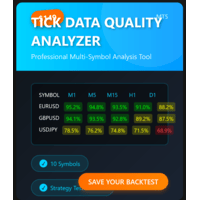
MT5 TICK DATA QUALITY ANALYZER   Professional tick data quality analysis tool for MetaTrader 5 traders and developers Price: $69 USD (Launch Special $69 - Regular $99) Product Type: Expert Advisor / Utility Platform: MetaTrader 5 License: Lifetime, 5 Activations INTELLIGENT BACKTEST RECOMMENDATIONS  Automated Backtest Mode Selection - Tells you EXACTLY which tick data format to use in Strategy Tester Optimal Time Period Detection - Automatically identifies the BEST historical range for backtes
Фильтр:
Нет отзывов
Ответ на отзыв