EdgeMaster Pro EA Set File Analyzer

Key Note: Easy Install Instructions below.

What's New:

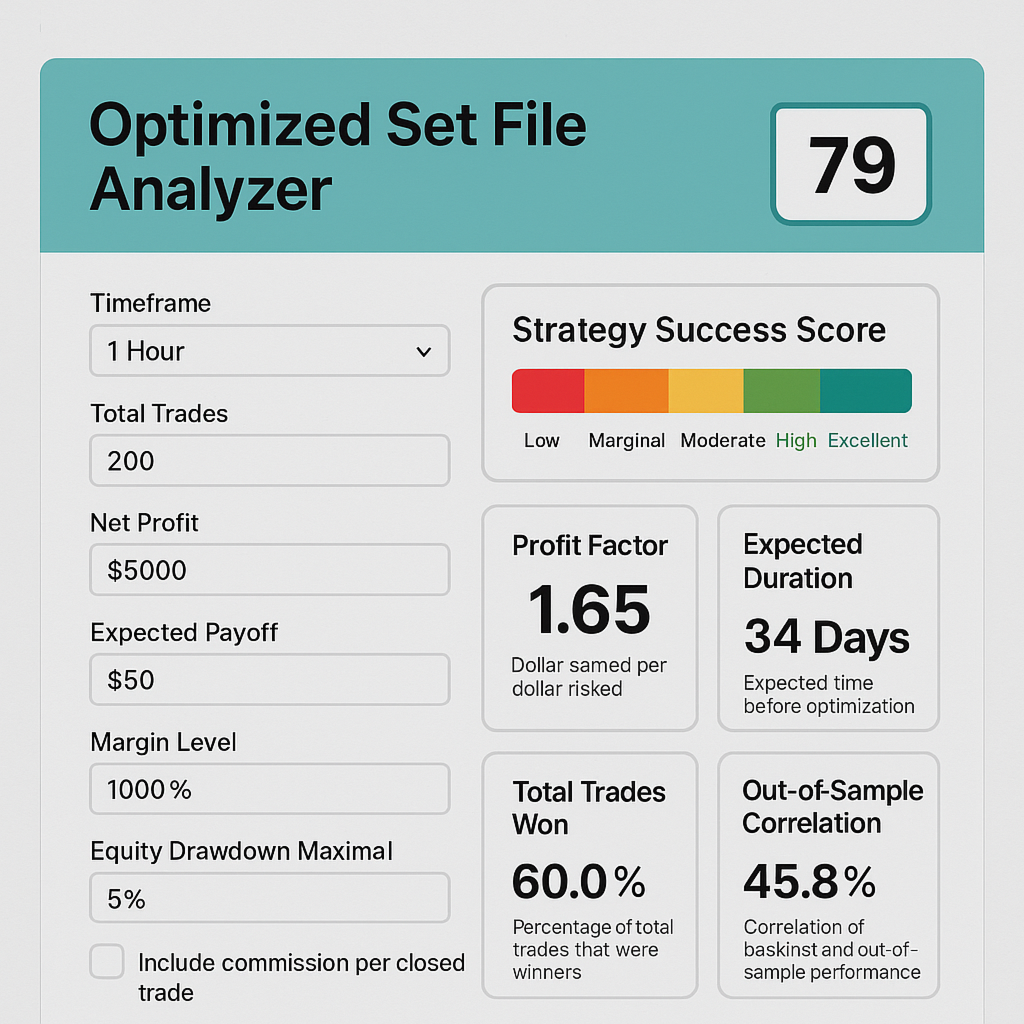
What’s New in StrategySuccessAnalyzer v2.0 – Major Upgrades

  • Interactive GUI Dashboard
    Visualize strategy health in real time with dynamic score gauges, equity projections, and color-coded performance alerts — directly on your MT5 chart.

  • 30-Day Forward Performance Projection
    Forecast equity growth, drawdown risk, and net PnL over the next month using realistic trade simulations and optional compounding logic.

  • One-Click CSV Export
    Save full backtest projections to CSV for auditing, reporting, or integration with external analytics tools — ideal for traders, teams, and fund managers.

  • Auto-Load from MT5 Strategy Tester
    Eliminate manual entry — the tool now intelligently parses your latest backtest results from the MT5 journal log for faster, error-free analysis.

  • Smart Risk Engine with Compounding Support
    Simulate both fixed and compounding risk models to evaluate long-term sustainability and capital efficiency.

  • Enterprise-Grade Data Handling
    Built with secure file I/O practices, ensuring safe, reliable data export — consistent with our commitment to security through trusted processes.

  • Professional Output & Warning System
    Clear, color-coded alerts and structured reporting help you instantly identify red flags — from high drawdown to commission drag.


EdgeMaster Pro transforms MT5 backtest data into actionable insights with a single click. By combining statistical edge (Z-Score, SE), profitability (Profit Factor, Expected Payoff), consistency (Win Rate), and risk controls (Drawdown, Margin, Commission, Risk %, Lot Size), it generates a clear 0–100 % Success Score and easy-to-interpret descriptors. Timeframe-aware frequency checks and adaptive warnings alert you to under-sized samples or excessive drawdowns, while optional commission inputs ensure real-world P&L fidelity. Fully self-contained in HTML/JS, EdgeMaster Pro is the ultimate utility for traders and EAs—optimizing profitability while safeguarding capital, all within the MT5 terminal.

Key Features & Benefits

  • UComprehensive MT5 Metrics – Integrates Total Trades, Z-Score, Standard Error, Win Rate, Profit Factor, Expected Payoff, Equity Drawdowns, Margin Level, Risk %, Lot Size, and optional Commission adjustments for a 360° strategy view.

  • Accurate Composite Scoring – Aggregates profitability, statistical edge, consistency, and risk into a single 0–100 % Success Score, using industry-proven weightings to reflect true robustness.

  • Adaptive Drawdown Warnings – Flags high Equity Drawdown Maximal (%), Absolute Drawdown, and low Margin Level, while allowing you to tweak Risk % and Lot Size to pre-emptively mitigate losses. 

  • Commission-Aware Profitability – Optional “Commission $ Per Closed Trade” input recalculates Net Profit and Expectancy after fees, ensuring live-trading P&L accuracy. 

  • Timeframe-Aware Trade Frequency – Choose any MT5 timeframe (M1→MN) to display average trades per bar, normalizing sample adequacy regardless of strategy speed. 

  • Metric-by-Metric Explanations – Each result includes a concise descriptor, clarifying why Raw Success measures edge or why PF Score indicates reward vs. risk.

  • Self-Contained & Shareable – Pure HTML/JS; no backend required. Run locally or embed on any site for lightning-fast, private analysis. 


✅ How to Install & Use EDGEMASTER PRO SET FILE ANALYZER in MT5

(For New Users – 6 Simple Steps)

🔹 Step 1: Open MetaTrader 5

  • Launch your MT5 trading platform.
  • Make sure you're logged in (demo or live account is fine).

🔹 Step 2: Open the MetaEditor

  • In MT5, go to the top menu:
    Tools → MetaQuotes Language Editor (or press F4).

🔹 Step 3: Save the Script

  • In MetaEditor, go to:
    File → Open Folder → MT5_Data\Scripts
  • Open the file: EDGEMASTER PRO SET FILE ANALYZER.mq5 (provided by you)
  • Copy and paste the full code into the editor (if not already there)
  • Click the Compile button (✅) — you should see “0 errors, 0 warnings”
  • Close MetaEditor

🔹 Step 4: Refresh the Navigator

  • Back in MT5, press Ctrl + N to open the Navigator panel.
  • Right-click anywhere in the "Scripts" section and choose "Refresh".

🔹 Step 5: Run the Analyzer

  • In the Navigator, find:
    EDGEMASTER PRO SET FILE ANALYZER
  • Drag it onto any chart (e.g., EURUSD H1), or
  • Double-click it to run immediately
  • A settings window will pop up — click OK to use your values

💡 The tool will:

  • Analyze your strategy
  • Show a score dashboard on the chart
  • Save a 30-day forecast to your Files folder
  • Print a full report in the Journal (Ctrl+J)

🔹 Step 6: View Results

  • Press Ctrl+J to open the Journal tab and see the full analysis
  • Go to: File → Open Data Folder → Files
    → You’ll find: EdgeMaster_Projection.csv (open with Excel)

🔐 Security Note

Just like your secure payment system, this tool runs 100% locally on your machine.
No data leaves your computer — your strategy details stay private and protected.

📌 Tip: Reuse with New SET Files

After each backtest:

  1. Copy key stats (Trades, Win%, PF, etc.) into the script inputs
  2. Run again to analyze the new strategy

✅ Done! You’re now using the professional-grade EDGEMASTER PRO analyzer — secure, powerful, and built for elite performance.


Produtos recomendados
EasyTradePad for MT5
Sergey Batudayev
5 (5)
EasyTradePad – Painel de Negociação para MetaTrader 5 O EasyTradePad   é uma ferramenta para negociação manual e semiautomática. O painel permite o gerenciamento rápido de ordens e posições, bem como cálculos de gerenciamento de risco com um clique. Características do painel: Abra e feche negociações com risco predefinido (% ou moeda de depósito) Defina SL e TP em pontos, porcentagens ou valores monetários Calcular automaticamente a relação risco-recompensa Mover stop loss para o ponto de equil
ZenTrade Manager MT5
Ian Paolo Lumba Castro
ZenTrade Manager MT5 Stop Computing. Start Trading. Are you tired of missing perfect entries because you were busy calculating pip distances, lot sizes, or monetary risk? Do you overthink your Stop Loss and Take Profit levels, only to watch the market reverse while you're adjusting lines? ZenTrade Manager MT5 removes the mental load of order management, allowing you to focus 100% on what matters: Reading the Market. You handle the high-level analysis and decide when to enter; ZenTrade handles t
MT5 History Checker Can you trust the historical data behind your MT5 backtest? MT5 History Checker is a diagnostic utility designed to identify missing periods and coverage problems in the historical data supplied by your MetaTrader 5 broker. Select the symbol and date range you want to examine and run the checker. The utility analyses the available history and provides a clear PASS, WARNING or FAIL result. What it checks Historical tick-hour coverage M1 historical-data coverage Missing periods
Tired of fumbling with lot size calculations and manually managing every trade? The Visual Risk Manager (VRM) is a professional-grade trading panel designed to streamline your trading and enforce discipline. This Expert Advisor is not a strategy; it's a powerful utility that allows you to manage your risk and execute trades with unparalleled speed and precision, directly from your chart. Why You Need the Visual Risk Manager Stop letting emotions and guesswork control your trading. VRM ensures t
Nebula Trading Manager
Sina Mohammadamin Shahriari Moghadam
This expert advisor named   TradeManager   provides a manual trading management panel in MetaTrader 5 that allows precise control over open positions. It is designed for traders who want dynamic management of Stop Loss (SL), Take Profit (TP), Break Even (BE), and Partial Close functionality. Key Features: Dynamic Trade Management : Manually set or drag-and-drop SL, TP, and BE levels. Supports partial closing at different profit levels (1:1, 1:1.5, 1:2). Automated Drawing : Automatically draw
Free MetaTrader 5 indicator that displays "CALL IT A DAY" when London & New York sessions close. Customizable alerts, session tracking, and a guilt-free reminder to log off. Perfect for workaholic traders! Tired of staring at charts when the market’s already clocked out? Session Guardian   is your sassy trading assistant that slaps a giant   "CALL IT A DAY"   on your screen when both London   and   New York sessions are closed—because even traders deserve happy hour. Key Features:   Big, Bo
FREE
Core function Intelligent transaction management one-click opening and closing operation, which supports user-defined lots to set multiple closing modes: all closing, closing by direction and closing by profit and loss status. Professional risk control, real-time risk monitoring and spread control to avoid high-cost trading environment. Visual control panel has an intuitive graphical interface, and all functions can be operated with one button to display position information, profit and loss sta
FREE
DDKiller Pro
Njaratahiry Michael Randrianiaina
Stop Blowing Your Account. Once and For All. DDKiller Pro is the MT5 risk guardian that runs silently on your chart and shuts down trading the moment you hit a limit — whether you're grinding a prop firm challenge or managing your own CFD account. The problem every trader knows: You set your rules. You break them anyway. One revenge trade. One overleveraged position. One session that erases a month of gains. DDKiller Pro removes that decision from your hands entirely. What it does: The second yo
Product Name MT5 Gold & Silver Multi-Language Trading Panel V17.00 Introduction This is a professional trading panel designed specifically for manual gold and silver traders. It supports five languages: English, Chinese, Spanish, Arabic, and German. The panel automatically detects gold and silver symbols, so users do not need to enter symbol codes manually. It is compatible with most brokers worldwide, including standard accounts, zero spread accounts, and raw spread accounts. Users only need t
No reino dos mercados financeiros, uma gestão de capital proficiente é essencial. Não se trata apenas de proteger seu investimento inicial, mas também de aumentá-lo. Os dias de cálculos manuais acabaram. Maximizar seus retornos, minimizar seus riscos e desbloquear o potencial dos mercados financeiros como nunca antes. Assuma o controle de sua jornada de negociação com o Trade Panel. Se você trabalha como scalper e precisa executar rapidamente, nosso painel Trade Manager oferece todas as ferramen
CosmiCLab SMC FIBO CosmiCLab SMC FIBO is a professional trading indicator designed for traders who use Smart Money Concepts (SMC), market structure analysis and Fibonacci retracement levels. The indicator automatically detects market swings and builds Fibonacci levels based on the latest impulse movement. It also identifies market structure changes such as BOS (Break of Structure) and CHOCH (Change of Character), helping traders understand the current market direction. CosmiCLab SMC FIBO also pr
GAM Risk Manager Professional Risk Management & Multi-Entry Trade Planning Tool GAM Risk Manager is a professional MetaTrader 5 trading tool designed to help traders plan, calculate, and manage risk with precision before and during a trade. Instead of manually calculating lot sizes, risk exposure, average entry prices, and multiple take-profit levels, GAM Risk Manager brings these calculations together in one interactive trading environment. Whether you trade Forex, Gold, Indices, Commodities, o
JMM Trade Panel MT5 JMM Trade Panel MT5 é uma ferramenta de execução e gerenciamento de operações para MetaTrader 5. Abra operações Buy e Sell diretamente no gráfico, ajuste rapidamente o volume, acompanhe o desempenho das cestas e gerencie operações através de Magic Number e filtros de símbolos configuráveis. Manual completo do usuário: DOWNLOAD Principais recursos Botões Buy, Sell e Close All no gráfico. Fechamento com um clique de todas as operações gerenciadas pelo EA. Opção para gerencia
Trade Copilot - Painel semiautomático de gestão de risco para Ouro (XAUUSD) e qualquer instrumento Trade Copilot é um painel de negociação semiautomático criado para traders manuais que desejam a disciplina de um EA sem abrir mão do controle sobre suas próprias entradas. Você decide a direção e o nível; o painel calcula automaticamente o tamanho do risco, posiciona o stop-loss, gerencia o take-profit e protege a operação. PRINCIPAIS RECURSOS - Cálculo de lote baseado em risco - escolha Risco
Trade Manager DaneTrades
Levi Dane Benjamin
4.23 (30)
Trade Manager para ajudá-lo a entrar e sair rapidamente de negociações enquanto calcula automaticamente seu risco. Incluindo recursos para ajudar a evitar negociações excessivas, negociações de vingança e negociações emocionais. As negociações podem ser gerenciadas automaticamente e as métricas de desempenho da conta podem ser visualizadas em um gráfico. Esses recursos tornam este painel ideal para todos os traders manuais e ajudam a aprimorar a plataforma MetaTrader 5. Suporte multilíngue. Vers
Pattern Recognition EA
Claudiu-georgian Zavera
Pattern Recognition EA - From Learn to Earn. The market repeats itself. This EA finds every past repeat of the current candle sequence - and lets history vote the direction. ONE SHAPE. EVERY REPEAT IN HISTORY VOTES. The last N candles on your signal timeframe form a shape. The EA scans the history you choose - a fixed number of bars or everything your broker provides - for the SAME shape, and checks what happened next, every single time. Only when enough repeats exist AND a clear majority of t
XBOOT BOLETA PRO A ferramenta profissional para operações manuais no MetaTrader 5 A XBOOT Boleta Pro é um painel completo desenvolvido para traders que realizam operações manuais e desejam mais agilidade, organização e controle durante a execução das operações. Muito mais do que uma simples boleta de compra e venda, a XBOOT Boleta Pro reúne em um único painel diversas ferramentas que auxiliam desde a leitura do mercado até o gerenciamento das posições abertas. Seu objetivo é reduzir o tempo gast
Lot calculator tool MT5
Ernestas Kvedaras
3.67 (3)
More stable MetaTrader 4 version is available here:  Lot Calculator Tool . This tool helps you to automatically calculate and manage risk, conveniently place orders visually, schedule orders, trail stops, move them to break-even and more. Features Place market or pending orders using draggable lines Schedule orders Calculate and limit risk using various methods See current spread See time till next candle Set custom order comments Trail stops Move stops to break-even See order profit/loss in p
Recovery Manager Panel MT5 is a manual order management panel for traders who want to manage open positions directly from the chart in a clearer and more organized way. This tool is not a signal robot. It does not predict market direction, generate entry signals, or trade automatically based on market forecasts. Instead, it helps traders work with positions that are already open. You can calculate possible recovery lot sizes, view estimated target levels on the chart, and use available floating
RRtoolBox
David Ruiz Moreno
RRtoolbox - Professional Tools: Risk:Reward Trading Tool (SL/TP Horizontals + Pending orders + Diagonals), Alerts set on trend lines (for alerts on diagonal levels), SelfManagement (BE, partials...), close/cancelling by time, Statistics, Info and trading on chart. One-Click Trading with Visual Risk:Reward Management RRtoolbox is a comprehensive trading panel that combines one-click order execution,  statistics and  powerful visual Risk:Reward tools, alerts set with trendlines, on chart butt
Truvana Trend Campaign Manager EA (TCM) Advanced Basket Management & Profit Locking Tool for Trend Traders Short Description Turn strong trends into managed campaigns. Truvana TCM is a professional trade management EA designed for traders who already know how to identify trends and execute entries. The EA automatically manages basket expansion, validates risk before adding positions, and locks profits using a broker-side Basket Stop Price (BSP). No martingale. No grid recovery. No signal genera
Know Your Exact Lot Size Before Every Trade Universal Position Size Calculator solves the most common problem in manual trading:   "How many lots should I trade?" Set your dollar risk amount and stop-loss distance. The calculator instantly gives you the precise lot size — on   any symbol . Forex, stocks, crypto, metals, indices, futures. It handles them all correctly because it uses MT5's own   OrderCalcProfit()   function, not simplified pip-value formulas that break on non-Forex instruments. W
Account Monitor Pro — Your Ultimate Trade Statistics Hub Account Monitor Pro is a professional information dashboard designed for traders who combine Expert Advisors (EAs) and manual trading. The indicator separates statistics in real-time based on your Magic Number, allowing you to clearly see who is driving the profit: the algorithm or yourself. Key Features: Split Monitoring: Instant separation of "Robot" positions (by Magic Number) and "Manual" trades. Multi-language Support: 11 languages in
FREE
Risk Properly with FXPosition Size Calculator which calculated the optimal Lot sSize based on your desired Risk Percentage and Stop-Loss, ensuring precise Risk Management. Enter your account balance, risk percentage, and Stop-Loss(either in points or price levels), and the calculator instantly determines the required lot size so that you don't risk too much. Protect your capital and trade with confidence with Accurate Position Sizing and Simplicity.
Swing Points Pro v2 – Enhanced Highs and Lows Indicator with Push Notifications Overview : The Swing Points Pro v2 indicator is a powerful and reliable tool designed to help traders identify critical swing highs and lows on their charts. Whether you trade Forex, Stocks, or Crypto, this updated version provides advanced features to enhance your market analysis, with real-time push notifications for key market movements. Key Features : Accurate Swing Identification : Pinpoints major swing highs a
FREE
Protect your funded accounts and personal capital with military-grade precision. This utility continuously monitors your floating equity against your daily starting balance. The moment your custom drawdown threshold is breached, it instantly liquidates all open positions, deletes pending orders, and completely unloads from the chart. Stop revenge trading and never fail a prop firm evaluation due to a margin breach again.

FREE
Equity monitor This is a simple means change informer. I wrote it for myself, maybe someone will need it... 1. Displays the change in funds for the day. Every day, when the terminal is first launched, it remembers the current funds and monitors changes throughout the day. 2. The first day of the month, well remembers the money and, within months, to monitor changes. 3. Well, it displays the profit of the open position. To work, you need to create 4 global variables: gvarEqityDay , gvarEq
FREE
Smart Risk Manager
Abderrahmane Benali
5 (1)
Smart Risk Manager – Master Your Trades with Precision and Confidence Take complete control of your manual trading with Smart Risk Manager , a professional all-in-one trade and risk management Expert Advisor for MetaTrader 5 . Designed for traders who value speed, precision, and capital protection, it simplifies every step of trade execution while ensuring your risk remains under control. Whether you trade Forex, Gold, Indices, or Cryptocurrencies , Smart Risk Manager helps you execute trades w
Grid Trading EA is a semi-automated one-click trading EA for both Normal Trading and Grid/Martingale Trading . Normal Trading Simply click Buy or Sell directly from the chart. The EA will automatically manage trades by: Setting Stop Loss and Take Profit Managing Trailing Stop Grid / Martingale Trading (For Hedging Account Type Only) When Grid Trading mode is enabled, the EA will automatically open additional grid orders at specified distances while increasing the lot size based on your settings.
THIS RISK MANAGER WILL HELP YOU IN YOUR DAILLY TRADING, BY CALCULATING THE RISK AND THE LOTS, AND SET STOPLOSS, AND TAKE PROFIT, AND CAN CLOSE TRADES FOR YOU. RISK PERCENTAGE CASHRISK LOTS STOPLOSS TAKE PROFIT SELL AND BUY BUTTONS LOSE IN PROFIT BUTTON WICH WILL CLOSE ALL TRADES IN PROFIT SET BY THE USER CLOSE ON PROFIT BUTTON WICH WILL CLOSE ALL TRADES WHEN THE EQUALITY IS IN PROFIT SET BY THE USER AS WELL CLOSE TRADES BUTTON
Os compradores deste produto também adquirem
Trade Assistant MT5
Evgeniy Kravchenko
4.43 (216)
Ajuda a calcular o risco por comércio, a fácil instalação de uma nova encomenda, gestão de encomendas com funções de fecho parcial, trailing stop de 7 tipos e outras funções úteis. Materiais e instruções adicionais Instruções de instalação   -   Instruções para a aplicação   -   Versão de teste da aplicação para uma conta de demonstração Função de linha Mostra no gráfico a linha de Abertura, Stop Loss, Take Profit. Com esta função é fácil definir uma nova ordem e ver as suas características ad
Bem-vindo ao Trade Manager EA—uma ferramenta de gestão de risco criada para tornar o trading mais intuitivo, preciso e eficiente. Não é apenas uma ferramenta para executar ordens, mas uma solução abrangente para planejamento de operações, gerenciamento de posições e controle de risco. Seja você um iniciante, trader avançado ou scalper que precisa de execução rápida, o Trade Manager EA adapta-se às suas necessidades, oferecendo flexibilidade em todos os mercados, desde forex e índices até commodi
Local Trade Copier EA MT5
Juvenille Emperor Limited
4.94 (149)
Local Trade Copier EA MT5 é um copiador de operações rápido e flexível para copiar e gerenciar operações entre várias contas MetaTrader 5 no mesmo computador Windows ou Windows VPS. Ele combina a sincronização local de operações com controles no lado do Receiver para tamanho de lote, gerenciamento de risco, filtragem de operações, mapeamento de símbolos, gerenciamento de operações e proteção da conta. Configure seus terminais Transmitter e Receiver em aproximadamente 1 minuto e copie operações
TradePanel MT5
Alfiya Fazylova
4.88 (168)
Trade Panel é um assistente de negociação multifuncional. O aplicativo contém mais de 50 funções de negociação para trading manual e permite automatizar a maioria das tarefas de negociação. Instruções para o aplicativo + vídeo-instruções: https://www.mql5.com/pt/blogs/post/772421 Versão de teste do aplicativo para conta demo: https://www.mql5.com/pt/blogs/post/762547 Como instalar o aplicativo: https://www.mql5.com/pt/blogs/post/762548 Como testar o aplicativo no modo visual: https://www.mql5.co
================================================================================ POC BREAKOUT - V20.72. Full Professional Grade Toolkit ================================================================================ POC Breakout is a full MetaTrader 5 trading dashboard for discretionary traders who want breakout signals, Point of Control (POC) context, volume profiles, order flow, market structure, news, alerts, and advanced trade planning in one professional workspace. Attached directly to you
Copie sinais do Telegram com suas próprias regras de negociação Telegram to MT5 Signal Trader copia automaticamente sinais de negociação em texto de canais e grupos públicos e privados do Telegram para o MetaTrader 5. Gerencie vários provedores e contas MT5 em um único aplicativo para desktop, com configurações individuais de risco e de negociação para cada provedor . Você não precisa de um bot do Telegram nem configurar uma API para copiar sinais. Basta entrar com sua própria conta do Telegram
O Telegram to MT5 Multi-Channel Copier copia automaticamente os sinais de trading dos seus canais de Telegram diretamente para o MetaTrader 5. Sem bots, sem extensões de navegador, sem copiar à mão. O sinal chega ao Telegram e o EA abre a operação no seu terminal em poucos segundos. E antes de copiar um canal, o backtester integrado mostra o que esse canal teria feito na sua conta. O produto inclui dois componentes: um aplicativo de Windows que escuta os seus canais de Telegram, e este Expert Ad
Farmed Hedge Yield Farming | All Markets (Manual - Hybrid - Semi/Automated EA) VERIFIED TRADING RESULTS - Farmed Hedge Yield Axi Copy:  https://www.mql5.com/en/signals/2356376 - Farmed Hedge Yield Exn Copy:   https://www.mql5.com/en/signals/2356404 - Farmed Hedge Yield V Copy:  https://www.mql5.com/en/signals/2357156 IMPORTANT NOTICE: FarmedHedge is a MANUAL-FOCUSED TRADING UTILITY ,not a fully automated EA. Results shown on this Signal include manual trades and overall strategic management.
Premium Trade Manager - O Painel de Operações com um Coach Integrado Premium Trade Manager coloca um coach de trading dentro do seu gráfico, com um motor de execução completo por baixo. Configure a operação da forma que sempre faz e deixe o Max, seu coach de trading com IA, ler exatamente esse setup em relação à sua conta ao vivo e dar um veredicto direto antes de confirmar: se o stop é disciplinado, se o risco faz sentido, se há um evento de alto impacto a minutos de distância, se você está pró
EA Overfitter
Stephen J Martret
5 (1)
That backtest looks great. But will it still be making money tomorrow, next week, next month? EA Overfitter re-runs your EA on 100 price histories it has never seen. One score tells you if the edge is real. A backtest tells you what an EA did on one price history — the one that happened to occur. What you cannot tell from it is how much of that result was the strategy and how much was the particular path. EA Overfitter answers that. It builds up to 100 synthetic price histories your EA has n
Trade Copier Ultimate
Janitha Sandaruwan Amaradasa Wickramasingha Arachchilage
5 (5)
Trade Copier Ultimate - Telegram to MT5 Signal Copier Trade Copier Ultimate automatically copies Telegram trading signals into MetaTrader 5. The EA can read signal messages, detect the symbol, order type, entry price, Stop Loss, Take Profit levels and selected update commands, then execute or manage the trade in MT5 using your lot and risk settings. It is more than a basic Telegram to MT5 copier. TCU also supports Bot API and user-account Bridge workflows, Discord signal routing, local MT5 to MT
The product will copy all telegram signal to MT5 ( which you are member) , also it can work as remote copier.  Easy to set up, copy order instant, can work with almost signal formats, image signal,  s upport to translate other language to English Work with all type of channel or group, even channel have "Restrict Saving Content", work with  multi channel, multi MT5 Work as remote copier: with signal have ticket number, it will copy exactly via ticket number. Support to backtest signal. How to s
Trade Manager DashPlus
Henry Lyubomir Wallace
4.85 (13)
DashPlus é uma ferramenta avançada de gerenciamento de operações projetada para melhorar a eficiência e a eficácia das suas transações na plataforma MetaTrader 5. Ela oferece um conjunto completo de funcionalidades, incluindo cálculo de risco, gestão de ordens, sistemas de grade avançados, ferramentas baseadas em gráficos e análise de desempenho. Principais Funcionalidades 1. Grade de Recuperação Implementa um sistema de grade flexível e de média para gerenciar operações em condições adversas de
Trade Indicator Assistant   is a powerful MT5 utility designed to turn indicators into automated trading systems. Its main feature is the ability to automatically detect an indicator’s   BUY and SELL signal buffers , without requiring you to know the buffer numbers, search through indicator settings, or modify the indicator source code. Bonus Indicator:   After purchasing Trade Indicator Assistant, contact me to receive   Trade Signal Pro   completely free as a bonus indicator. [Download Demo V
Astro Trade MT5
Indra Maulana
5 (7)
25% discount on the release of the tool: only for the next 3 buyers Send a message to receive a demo version. AstroTrade Trading Assistant AstroTrade is a comprehensive multi-functional trading utility developed for the MetaTrader 5 platform. It integrates essential tools for trade execution, risk management, and technical monitoring into a single unified interface. The application is designed to assist traders in managing their daily operations through a visual and structured environment. Vi
FUTURES ORDERFLOW FOOTPRINT CHART Professional OrderFlow EA for MetaTrader 5 Version 1.01| Professional tool for real traders | Institutional-Grade Visualization STRATEGY TESTER USERS - PLEASE SELECT EVERY REAL TICK WHEN TESTING AND YOU HAVE DOWNLOADED HISTORICAL DATA. IF YOU SEE A WAITING SCREEN AND IT IS NOT DOWNLOADING, IT MEANS YOU HAVE LOW HISTORICAL DATA. TRY 1 MIN AND 5 MIN FIRST ON 1 DAY DATA. ONE DAY DATA SHOULD BE THE NEWEST AND MOST CURRENT DATE. PLEASE WAIT UNTIL THE MARKET HAS ROL
Timeless Charts
Samuel Manoel De Souza
5 (8)
Timeless Charts é um utilitário de trading tudo-em-um para traders profissionais. Ele combina tipos de gráficos personalizados, como Gráficos por Segundos e Renko , com análise avançada de fluxo de ordens utilizando Footprints , Clusters , Perfis de Volume , estudos VWAP e ferramentas de análise ancorada para uma visão mais profunda do mercado. O gerenciamento de ordens e posições é realizado diretamente no gráfico por meio de um painel integrado de gerenciamento de operações , enquanto o Market
Trade Dashboard MT5
Fatemeh Ameri
4.94 (133)
Trade Dashboard simplifies how you open, manage, and control your trades, with built-in lot size calculation. It allows you to execute trades, manage risk, and control positions directly on the chart, with tools such as partial close, breakeven, and trailing stop. Designed to reduce manual work and help you stay focused on your trading decisions. A demo version is available for testing. Detailed explanations of features are provided within the MQL5 platform. Installation instructions are include
HINN MagicEntry Extra
ALGOFLOW OÜ
4.74 (19)
HINN MAGIC ENTRY – the ultimate tool for entry and position management! SIMPLE. FASTEST. INTUITIVE. MAX AUTOMATED. Place orders by selecting a level directly on the chart! full description   ::  demo-version  :: 60-sec-video-description Key features: - Market, limit, and pending orders - Automatic lot size calculation - Automatic spread and commission accounting - Unlimited partitial take-profits  - Breakeven and trailing stop-loss and take-profit  functions - Invalidation leves - Intuitive, a
Exp COPYLOT CLIENT for MT5
Vladislav Andruschenko
3.97 (35)
Copiador profissional de operações para MetaTrader 5 Um copiador de operações rápido, profissional e confiável para MetaTrader . COPYLOT permite copiar operações de Forex entre terminais MT4 e MT5 com suporte para contas Hedge e Netting . A versão MT5 do COPYLOT oferece suporte a: - MT5 Hedge → MT5 Hedge - MT5 Hedge → MT5 Netting - MT5 Netting → MT5 Hedge - MT5 Netting → MT5 Netting - MT4 → MT5 Hedge - MT4 → MT5 Netting Versão MT4 Descrição completa + DEMO + PDF Como comprar Como instalar Como
Trade Assistant 38 in 1
Makarii Gubaydullin
4.91 (23)
Ferramenta Multifuncional: Calculadora de Lote, Ordens Grid, Proporção R/R, Gerenciador de Negociações, Zonas de Oferta e Demanda, Price Action e muito mais Versão Demo   |   Manual do Usuário O Assistente de Trading   não funciona no testador de estratégias : você pode baixar a   Versão Demo AQUI  para testar a utilidade . Entre em contato   para qualquer dúvida  / ideias de melhoria / caso encontre um erro Se precisar de uma versão MT4, ela está disponível aqui Simplifique, acelere e automati
Footprint Chart Pro — Professional OrderFlow EA for MetaTrader 5 Version 6.34 | Professional tool for real traders | Institutional-Grade Visualization DEMO USERS - PLEASE SELECT EVERY TICK / REAL TICK WHEN TESTING AND YOU HAVE DOWNLOADED HISTORICAL DATA. IF YOU SEE A WAITING SCREEN AND IT IS NOT DOWNLOADING, IT MEANS YOU HAVE LOW HISTORICAL DATA. TRY 1 MIN AND 5 MIN FIRST ON 1 DAY DATA. ONE DAY DATA SHOULD BE THE NEWEST AND MOST CURRENT DATE. PLEASE WAIT UNTIL THE MARKET HAS ROLLED OVER PERIOD.
Grid Manual MT5
Alfiya Fazylova
4.73 (22)
"Grid Manual" é um painel comercial para trabalhar com uma grade de ordens. O utilitário é universal, possui configurações flexíveis e uma interface intuitiva. Ele trabalha com uma grade de ordens não apenas na direção da média das perdas, mas também na direção do aumento dos lucros. O trader não precisa criar e manter uma grade de ordens, tudo será feito pelo ""Grid Manual". Basta abrir um orden e o "Grid manual" criará automaticamente uma grade de ordens para ele e trabalhará com ele até que s
Welcome to ENTRY IN THE ZONE WITH SMC MULTI TIMEFRAME Entry In The Zone and SMC Multi Timeframe is a real-time market analysis tool based on Smart Money Concepts (SMC), designed to analyze market structure, price direction, and key trading zones. It supports both Single-Timeframe Analysis and Multi-Timeframe Analysis, providing a clearer view of the overall market structure across multiple timeframes, with real-time BUY / SELL signals that do not repaint. It is designed to help filter trading op
Anchor Trade Manager
Kalinskie Gilliam
5 (9)
Your EAs cannot see each other, but Anchor can. Anchor gives you one place to coordinate your EAs, manage risk, and decide when trading is allowed. It works alongside the trading bots you already use without any changes to them. The Problem One EA opens a trade. Then another starts trading. The next thing you know, you wake up to multiple grids built across your account. Each EA may be doing exactly what it was designed to do, but together they can place far more risk on your account than you in
Seconds Chart MT5
Boris Sedov
4.61 (18)
Seconds Chart - uma ferramenta exclusiva para criar gráficos de segundos no MetaTrader 5 . Com o Seconds Chart , você pode criar gráficos com períodos definidos em segundos, proporcionando flexibilidade e precisão ideais para análise, indisponíveis em gráficos padrão de minutos ou horas. Por exemplo, o período S15 indica um gráfico com velas de 15 segundos. Você pode usar qualquer indicador ou Expert Advisor com suporte a símbolos personalizados. Trabalhar com eles é tão conveniente quanto negoc
Power Candles Strategy Scanner - Localizador de configurações multissímbolo com auto-otimização O Power Candles Strategy Scanner utiliza o mesmo motor de auto-otimização que alimenta o indicador Power Candles — em todos os símbolos da sua lista de observação, lado a lado. Um painel indica-lhe quais os símbolos que são estatisticamente negociáveis neste momento, qual a estratégia vencedora para cada um, o par ideal de Stop Loss / Take Profit, e avisa-o assim que um novo sinal é emitido. Esta ferr
Signal TradingView to MT5 Pro Automator Execução profissional instantânea entre TradingView e MetaTrader 5 Automatize a sua estratégia de trading com a ponte de comunicação mais robusta entre os alertas do TradingView e a execução real no MT5. Concebido para traders que exigem velocidade, flexibilidade e uma gestão de risco impecável, este Expert Advisor transforma qualquer mensagem de alerta numa ordem de mercado ou de limite precisa. PONTOS FORTES E VANTAGENS Motor de Parsing Universal (Propri
Risk Manager Pro MT5 is an account protection Expert Advisor for traders who want strict risk control inside MetaTrader 5. The utility monitors your account equity, daily and weekly results, drawdown, open positions, trade count, consecutive losses, and trading hours. When a configured limit is reached, it can automatically close positions, cancel pending orders, stop other EAs, send notifications, or close the terminal. Instead of relying on discipline during a stressful trading session, you de
This Expert Advisor waits a position to be opened, no matter if you open manually or with the EA buttons or eventually via mobile: it creates a Grid in Anti Martingale with pending stop orders in the same direction of the first position. You can specify the number of orders, the size and the distance between the orders. You can also adjust the Monetary Target of the Grid, the monetary Stop Loss, the Intermediate Target (when reached the EA insert an order with opposite direction of the total pos
Mais do autor
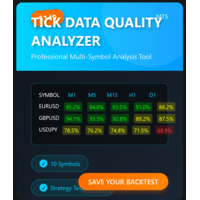
MT5 TICK DATA QUALITY ANALYZER   Professional tick data quality analysis tool for MetaTrader 5 traders and developers Price: $69 USD (Launch Special $69 - Regular $99) Product Type: Expert Advisor / Utility Platform: MetaTrader 5 License: Lifetime, 5 Activations INTELLIGENT BACKTEST RECOMMENDATIONS  Automated Backtest Mode Selection - Tells you EXACTLY which tick data format to use in Strategy Tester Optimal Time Period Detection - Automatically identifies the BEST historical range for backtes
Filtro:
Sem comentários
Responder ao comentário