AdvisorPanel

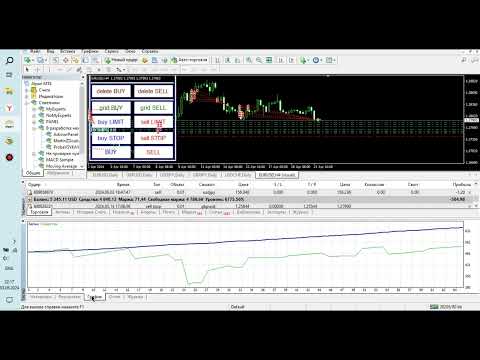
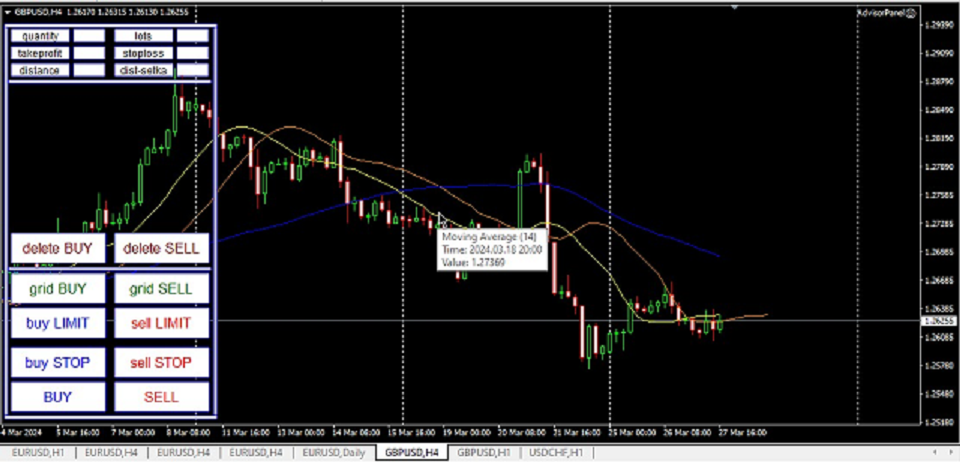
こんにちはます。  金融外国為替市場での取引のためのこのパネルについて少しお話ししたいと思います。 このパネルはMQL4プログラミング言語で書かれており、特定のポジションの成行注文を開くのに役立つように設計されています。
これは、通常の注文と保留中の注文の両方で動作します。 つまり、Buy、Sell、BuyLimit、SellLimit、BuyStop、SellStopなどの売り注文と買い注文を開きます。 また、グリッド注文を含む保留中の注文のネットワーク、つまり、保留中の注文を制限し、保留中の注文を一度に停止することもできます。 このパネルは、保留中の注文も閉じます。
今後の注文の設定は、パネルの上部にあります:

1. quantityは注文数(このパラメータは成行注文には影響せず、1つの価格で100注文としましょう)であり、ボタンを1回クリックするだけで開かれる保留中の注文の数を示します。
2. ロットは、ご注文が開かれる価格です
3. takeprofitはあなたの順序が利益と閉まる市場価格である。
4. stoplossは、お客様の注文が損失で終了する市場価格です
5. 距離は、保留中の注文が開かれる現在の価格からの距離です。
6. dist-setkaは、このパネルによって開かれる保留中の注文間の距離です。
P.S.takeprofitとstoplossパラメータはポイントで与えられ、変換され、注文がクローズされるまでのオープン注文の価格からの価格の距離を示します。 また、もう1つの機能は、複数の注文が開かれた場合、すべての注文に対してtakeprofitとstoplossが1つ設定されることです。

おすすめのプロダクト
Close All SELL Orders for MT4 script   - closes absolutely all orders, whether pending or market ones. Orders are closed at the current profit/loss indicators at the time of closing. The script is suitable for moments when you need to quickly close all orders at the current indicators. The script is very easy to use, just drag the script onto the chart and it will do its job. Add me as a friend, I have many other useful products.
FREE
Simple RSI Forex Trading Strategy
Victor Manuel Valderrama Zamora
4 (1)
Diversify the risk in your trading account by combining our Expert Advisors. Build your own custom trading system here:   Simple Forex Trading Strategies The expert advisor opens trades when RSI indicator enter in oversold or overbought areas. The Stop Loss, Take Profit, and Trailing Stop are calculated based on the ATR indicator. The recommended currency pair is EURGBP and the recommended timeframe to operate and to do backtests is H4. This Expert Advisor can be profitable in any TimeFrame an
FREE
Price Alert EA for MT4 – Customizable Alert System with Intuitive Chart Interface The CFN  Price Alerts EA is a powerful yet easy-to-use Expert Advisor designed for traders who want full control over price level alerts directly from their MT4 charts. No need to manually set alerts through MT4’s native system – this EA gives you an on-chart interface to quickly set, view, and remove price alerts with flexibility. Key Features: Set unlimited price alerts directly on your chart. Visual display
FREE
Welcome guys !  I offer to you this MT4 project I've been working on for the last 2 years ( roughly over 900h of work.. ).  This is a complete tool that will change the way you see MT4, because I almost recoded it entirely ! It will provides you a solid base for risk management, order positionning, hedging, account preservation and journaling. I wanted an all-in-one panel that covers both scalping and swing trading and that suits every type of trader.       Main goal was : NO INPUTS. Never
TPSpro リスクマネージャー   は、あらゆるトレーニングとあらゆる資本のトレーダーを対象とした、専門的なリスク管理のユニークなシステムです。取引における損失や取引における重大なミスを回避できます。 TPSpro Risk Manager は、主にスキャルパーやデイトレーダーのリスク管理に必要ですが、あらゆる取引スタイルのトレーダーによって問題なく使用されています。 パネルには 3 つの列があり、それぞれに役立つ情報が含まれています。 最初の列には、当月初めの時点でのアカウントに関する情報が表示されます。つまり、全体的な結果がパーセンテージと入金通貨で表示されます。 2 番目の列には、設定で指定されたその日のリスクが表示されます。 3 番目の列には、現在のアカウントの状況が表示されます。 指定されたリスクを 1 日超えた場合、または注文数を超えた場合、アドバイザーはすべての注文を閉じ、新しい注文のオープンを許可しないため、トレーダーを「感情的な取引」から保護します。 「リスクマネージャー」を使用すると、次のパラメータに従って取引を制御できます。 1日あたりの損失限度額 残高損失
Virtual Exchange Reserve Equity Monitor In an environment where exchanges offer increasingly high leverage ratios, it is all the more important for traders to tightly regulate their level of equity .  This software is designed to be run in the background on any virtual private server that can run Meta Trader 4/5.  It implements basic equity control functions ahead of the broker---allowing users to set their own equity trailing stop, an equity limit to lock-in a certain profit margin, and a unive
FREE
Description Impulse Pro is an indicator's impulse trading system based on Moving Average and MACD Line . The idea of the impulse system based on Moving Average and MACD Histogram was first offered by Dr. Alexander Elder in his book "Come Into My Trading Room". The system allows users to choose the calculation method (Moving Average and MACD Line) based on a single, double or triple moving average. You can color bullish and bearish moods. Inputs Calc_Method - Moving Average and MACD Line calcula
Expert candle finder for forex in MetaTrader 4 Expert candle finder is one of the practical trader assistant experts that is used in the forex financial market, this expert accurately identifies the candlestick patterns on the price chart as a signal, all the found candles. informs you. This expert is run on your Meta trader platform and in a very precise way, it examines all the currency pairs that are in your watch list and every currency pair that had a professional and good candlestick patt
Unlock the full potential of your trading strategy with this  all-in-one  solution:  Trade History Exporter  +  Pro Excel Trading Dashboard . Whether you're trading manually or using Expert Advisors (EAs), this powerful tool allows you to analyze, optimize, and improve your performance with professional-grade metrics and interactive dashboards. With the Pro Excel Dashboard, you can deeply analyze your trade history—manual or algorithmic—and even evaluate any EA’s performance using backtest resu
This tool works on MT4. The connection to the IQ option box program is established. With this software, IQ Optiona opens orders in selected time periods. The IQ option box program is required. First, the connection to the IQ option box is established. Then you can trade by sending a trading order by adding MT4. IQ O BOX Free Connection Software Download Link. https://drive.google.com/open?id=1xW6ynCwtdbGL4_GFzXU7penZAvTwYaWP
Demo version of the paid product - Copy MT4 copier , limited to lot size of 0.01 Universal copier of deals from MetaTrader 4 to MetaTrader 4 ( MT5<->MT5 version is available ; with both versions, you can copy MetaTrader 5<->MetaTrader 4, MetaTrader 4<->MetaTrader 5, MetaTrader 5<->MetaTrader 5, MetaTrader 4<->MetaTrader 4). Spread filter. Select the best price (start copying positions with a profit or loss). Configure the lot size, fixed or ratio-based (provider signals can be copied with an inc
FREE
HFT FAST SCALPING EA the High Frequency Trading which use stop orders to enter the trades when market is trending. best use for 1- Low slippage brokers for us30 and DE40 . 2- LOW OR ZERO COMMISSION BROKERS FOR EUR AND GOLD. 3-Prop firms like ftmo ,tff,.......etc This EA UNLIKE Other HFT EAs , You can see that in the parameters ,, CHOOSE LOT SIZE , MAX LOT , CHOOSE TIME , COMMENT AND OTHERS . IT STOPS 3 MINUTES AUTOMATICALLY EVERY 15 MINUTES TO PROTECT THE EQUITY FROM A BIG UNWANTED SLIPPAGE .
Close All BUY Orders for MT4 script   - closes absolutely all orders, whether pending or market ones. Orders are closed at the current profit/loss indicators at the time of closing. The script is suitable for moments when you need to quickly close all orders at the current indicators. The script is very easy to use, just drag the script onto the chart and it will do its job. Add me as a friend, I have many other useful products.
FREE
Universal copier of deals from MetaTrader 4 to MetaTrader 4 ( MT5<->MT5 version is available ; with both versions, you can copy MetaTrader 5<->MetaTrader 4, MetaTrader 4<->MetaTrader 5, MetaTrader 5<->MetaTrader 5, MetaTrader 4<->MetaTrader 4). Spread filter. Select the best price (start copying positions with a profit or loss). Configure the lot size, fixed or ratio-based (provider signals can be copied with an increased lot). Configure order copying (include pending orders or copy only open po
The Night Scalper EA Lite is a fully automated Expert Advisor that trades at night and relies on price reversion. The EA trades using market orders and has the option to use time averaging to improve performance. This EA works best on EURUSD using the M5 timeframe, but will also work on AUDUSD, GBPUSD, NZDUSD, USDCAD, USDCHF and likely many more. A VPS is advisable when trading this system and a low spread and commission based broker is best. Check the comments for back test results and optimiz
FREE
Magic Grid
Aliaksandr Charkes
4.54 (28)
Magic Grid is an indicator-free advisor that uses a grid strategy. The strategy is based on automatic reopening of grid pending orders, after closing their market positions (by Take-Profit, Stop-Loss or manually). Pending orders are placed with a specified step from the initial prices, which can be entered manually or generated automatically ( one time at the beginning of the trade ). The robot can trade on any time frame, on any currency pair, on several currency pairs, and on any number of di
FREE
Profit Loss Symbols Dashboard Dashboard displays all manually entered pairs in settings and shows their profit loss information. One click to navigate between all pairs on one chart. Dashboard can be hide or displayed. Green Colour: Symbol(s) in Profit Red Colour: Symbol(s) in Loss Blue Colour: Current Chart Yellow Colour: Timeframe Selected TRY HAWA GOLD WITH 80% WIN RATE MT4 VERSION: https://www.mql5.com/en/market/product/58832 MT5 VERSIION: https://www.mql5.com/en/market/product/59276 Pleas
FREE
"Just copier" is designed to copy trading without any complicated settings. The copy can be done in one PC. One EA can be set as master (provider) or slave (receiver). The receiver lot can be set to multiple providers lots. Please also check this product at fxina.hostingerapp.com.  Any type of copy is available. MT4 -> MT5 MT4 -> MT4 MT5 -> MT5 MT5 -> MT4 If you want to copy MT4 -> MT5 or MT5 -> MT4, please purchase "Just copier" for MT4 and "Just copier" for MT5 separately. Just Copier can copy
**Multi-Function Trading Assistant EA - Complete User Manual** **Program Overview**   Multi-Function Trading Assistant is an advanced trading panel EA developed based on MQL4, specifically designed for the MetaTrader 4 platform. This program provides a one-stop order management solution with an intuitive visual interface and powerful batch operation capabilities. **Detailed Explanation of Core Functions** **1. Batch Order Management Functions** **1.1 One-Click Close All Orders of Current Tr
Vizzion is a fully automated scalping Expert Advisor that can be run successfully using GBPJPY currency pair at H1 timeframe. Very Important This Expert Advisor can not run with any EAs in the same account. As part of the money management plan, it calculates and monitors the Margin Level % and assumes that all open trades are created by it. If you want an Expert Advisor that trades in a daily basis, this EA is not for you because using this requires a patience to wait for a few days or weeks on
Hello Trader ! If you are looking for a tool to export the historical data series of any timeframe in excel, you are in the right place! Load this tool on a chart for the selected pair, choose the timeframe you want to export, and that's it!  You can decide whether to export the entire historical series (pay attention at the number of bars you are exporting) or a predefined time interval; PARAMETERS: 1 - Choose the Time Frame you want to export, the chart will update automatically; 2 - The Inte
Daily Trading Dashboard – MT4 Indicator A compact and efficient tool that displays your daily trading statistics directly on the chart. Designed for traders who need a clear overview of their performance without switching screens. Key Features Real-time calculation of today’s profit/loss (with green/red color coding) Display of trade count and total trading volume Lightweight 280×160 px panel with clean blue design Automatic updates every few seconds Optional filtering by Magic Number or Comment
FREE
あなたの外国為替ポートフォリオを管理してください。あなたが立っている場所、何が働いているのか、そして何があなたに痛みを引き起こしているのかを即座に見てください! ここで利用可能なMT5バージョン:https:// www.mql5.com/en/market/product/58658 Trade Managerダッシュボードは、外国為替市場での現在の各ポジションが一目でわかるように設計されており、リスク管理と通貨へのエクスポージャーを理解しやすくします。 複数のポジションで徐々に市場に参入するトレーダー、またはそれらのトレーディンググリッドとバスケット戦略にとって、これは重要な情報です。ターミナル内の複数の位置を監視することは、管理が難しいことがよくあります。 不十分なリスクの活用と使用:報酬は、新しいトレーダーや一部の経験豊富なトレーダーが直面する主要な問題です。トレードマネージャーは、各通貨へのエクスポージャーを個別に示し、一度に両方向に取引しないようにします。 特徴: オープントレード-通貨ペアでソートされた現在のオープントレードをすべて表示します。ペアだけでなく、その
Description Bulls CD LTB (Bulls Convergence/Divergence Low Top Bottom) is a universal analytical bulls convergence/divergence indicator between a financial instrument and any of the twenty two standard indicators included in МT4 package. The indicator is the second out of the two possible versions (LBT and LTB) of the bullish convergence/divergence origins. Due to its multiple use feature, the indicator allows you to find convergences/divergences between the price and various standard indicators
Fast Trade Copier
Volodymyr Hrybachov
4.2 (5)
The trade copier is designed for a fast and accurate copying of orders between the MetaTrader 4 terminals. The trade copier copies trades from the Master account to the Slave account by writing information to the total file, which is located in the common directory of the MetaTrader 4 terminals. This allows the trade copier to either customize various schemes for receiving and transmitting trade signals by changing the file name. Reading and writing the copier file is performed by timer. The tra
Close All Orders for MT4 script - closes absolutely all orders, whether pending or market ones. Orders are closed at the current profit/loss indicators at the time of closing. The script is suitable for moments when you need to quickly close all orders at the current indicators. The script is very easy to use, just drag the script onto the chart and it will do its job. Add me as a friend , I have many other useful products.
The Versatile Copier MT4
Emmanuel Lovski Ijeawele Maduagwuna
4 (1)
This   all-purpose copytrade   utility enables any user  remotely   or  locally   duplicate trades between Meta Trader terminals quickly and effortlessly. It works with any machine or server running on a Windows OS. Copying of trade entries between different terminal types (i.e. Meta Trader 4 and Meta Trader 5) is fully supported. Trade copying functionality coves all MetaTrader scenarios -  MetaTrader 4   -   MetaTrader 4 MetaTrader 4   -   MetaTrader 5 MetaTrader 5   -   MetaTrader 5 MetaTrade
Ict Gold Scalper
Alex Amuyunzu Raymond
5 (1)
ICTVALID EA – Smart Money Concepts Automated Trading The ICTVALID EA is a professional trading system built on Smart Money Concepts (ICT methodology) . It automatically detects and trades institutional setups, allowing you to follow market structure with precision and consistency.  Key Features Dual Trading Modes – Choose between Scalping (short-term precision entries) or Swing Trading (longer-term trends). Smart Money Logic – Incorporates Change of Character (CHoCH), Break of Structure (BoS),
EA123 Snipper MACD
Jose Francisco Flores Rojas
MACD Divergence Pro is an intelligent and adaptive Forex trading robot designed to capitalize on MACD signals and detect divergence patterns that often precede major price reversals. The EA automatically places Buy and Sell trades when: Bearish divergence is detected at market highs Bullish divergence is detected at market lows MACD crossover signals confirm potential entry points Key Features: Fully automated trading using MACD and divergence logic ️ Customizable MACD settings for f
MACD Pro I EA https://youtu.be/2wCzTFIGNp4 =============== This Robot is fully automated and has been created for everyone. The Robot works also on cent accounts. The Ea is based on the MACD Indicator and 3 more and has been kept simple. ========================================= Maybe better to go for small profit, set it on higher time frames then you can use it for more pairs at the same time. =========================================== => works on all Time Frames but i would recommend the
このプロダクトを購入した人は以下も購入しています
The product will copy all telegram signal to MT4   ( which you are member  ) , also it can work as remote copier.  Easy to set up, copy order instant, can work with almost signal formats, image signal, s upport to translate other language to English Work with all type of channel or group, even channel have "Restrict Saving Content", work with  multi channel, multi MT5 Work as remote copier: with signal have ticket number, it will copy exactly via ticket number. Support to backtest signal. How to
EASY Insight AIO – スマートで手間いらずな取引のオールインワンソリューション 概要 数秒で市場全体——FX、ゴールド、暗号資産、指数、さらには株式まで——を、手作業のチャート確認や複雑なセットアップ・インジケーター導入なしにスキャンできたらどうでしょうか? EASY Insight AIO はAIトレードのための究極のプラグ&プレイ型エクスポートツールです。市場全体のスナップショットを、クリーンなCSVファイルで一括出力。ChatGPT、Claude、Gemini、Perplexityなど、さまざまなAIプラットフォームで即座に解析できます。 ウィンドウの切り替えやグラフのごちゃごちゃしたオーバーレイはもう不要。自動エクスポートされる純粋で構造化されたインサイトだけで、無駄なチャート監視に悩まされず、スマートなデータ主導の判断に集中できます。 なぜEASY Insight AIOなのか? 本当のオールインワン • セットアップ不要、インジケーターのインストール不要、チャートへのオーバーレイ不要。インストールして起動し、エクスポートするだけです。 マルチアセット対
Ultimate Extractor - Professional Trading Analytics for MT4 Ultimate Extractor transforms your MetaTrader 4 trading history into actionable insights with comprehensive analytics, interactive charts, and real-time performance tracking. Ability to combine multiple accounts and MT4 and MT5 into a single dashboard. What It Does Automatically analyzes your MT4 trading history across all Expert Advisors and generates detailed HTML reports with interactive visualizations. Tracks live performance metric
Unlimited Trade Copier Pro is a tool to copy trade remotely to multiple MT4, MT5 and cTrader accounts at different computers/locations over internet. This is an ideal solution for you if you are a signal provider and want to copy your trades to other receivers globally on your own rules. One provider can copy trades to multiple receivers and one receiver can get trade from multiple providers as well. The provider can even set the subscription expiry for each receiver, so that receiver will not b
Strategy Builder offers an incredible amount of functionality. It combines a trade panel with configurable automation (covert indicators into an EA), real-time statistics (profit & draw down) plus automatic optimization of SL, TP/exit, trading hours, indicator inputs. Multiple indicators can be combined into an single alert/trade signal and can include custom indicators, even if just have ex4 file or purchased from Market. The system is easily configured via a CONFIG button and associated pop-up
Time saving and fast execution Whether you’re traveling or sleeping, always know that Telegram To Mt4 performs the trades for you. In other words, Our   Telegram MT4 Signal Trader  will analyze the trading signals you receive on your selected Telegram channels and execute them to your Telegram to MT4 account. Reduce The Risk Telegram To Mt4   defines the whole experience of copying signals from   Telegram signal copier to mt4 platforms. Users not only can follow all instructions from the signa
あなたがメンバーである任意のチャンネル(プライベートおよび制限されたチャンネルを含む)からのシグナルを、直接あなたのMT4にコピーします。 このツールは、ユーザーを念頭に置いて設計されており、取引を管理および監視するために必要な多くの機能を提供しています。 この製品は、使いやすく視覚的に魅力的なグラフィカルインターフェースで提供されています。設定をカスタマイズして、数分で製品を使用開始できます! ユーザーガイド + デモ  | MT5版 | Discord版 デモを試したい場合は、ユーザーガイドを参照してください。 Telegram To MT5レシーバーは、ストラテジーテスターでは機能しません! Telegram To MT4の特長 一度に複数のチャンネルからシグナルをコピー プライベートおよび制限されたチャンネルからシグナルをコピー BotトークンやチャットIDは不要です(必要な場合は引き続き使用できます) リスク%または固定ロットを使用して取引 特定のシンボルを除外 すべてのシグナルをコピーするか、コピーするシグナルをカスタマイズするかを選択 すべてのシグナルを認識するため
The product will copy all  Discord  signal   to MT4   ( which you are member  ) , also it can work as remote copier.  Easy to set up. Work with almost signal formats, support to translate other language to English Work with multi channel, multi MT4. Work with Image signal. Copy order instant, auto detect symbol. Work as remote copier: with signal have ticket number, it will copy exactly via ticket number. How to setup and guide: Let read all details about setup and download Discord To MetaTrader
Crystal Trade Manager PRO – MT4向け 高度リスク管理・トレードコントロールシステム 無料版: https://www.mql5.com/en/market/product/150632 概要 Crystal Trade Manager PRO(CTM)は、MetaTrader 4 のために設計された、プロフェッショナル向けのリスク管理および取引管理ユーティリティです。 厳密な執行、強力な資金保護、高度な自動化を必要とするトレーダーのために構築されています。 本システムは、リスク管理、エクイティ保護、日次制限、SL/TP の自動設定を行い、プロレベルの高速ワンクリック取引パネルを提供します。 Prop Firm チャレンジ、デイトレード、スキャルピング、資金運用者に最適です。 MT5版も利用可能です。 主な特徴 1. 高度なリスク・ドローダウン保護 日次ドローダウン上限を 1%〜70% の範囲で設定可能。 上限超過時、 全てのポジションを即時クローズ 。 オプションで 全ての保留注文(Pending Orders)を自動削除 。 日次ロックアウトモード:翌日
Remote Trade Copier   is an advanced tool designed for efficiently copying trades between accounts in both   local   and   remote   modes. It allows for lightning-fast order replication from a master account to a slave account. In local mode, trades are copied instantly, while in remote mode, the copying process takes a second.  In new version, in remote mode , the copy operation can be performed with a delay of milliseconds or zero . After purchase, ask how to activate it MT4 Version (Only Loc
平均化ヘルパー - この種の取引ヘルパー ツールは、次の 2 つのテクニックを使用して、以前は利益がなかったポジションを平均化するのに役立ちます。 標準平均 トレンドに応じてポジションを開くヘッジ このユーティリティは、買いと売りの両方の異なる方向の複数のオープンポジションを一度に整理する機能を備えています 。例えば、売りポジションを1つ、買いポジションを1つオープンしたが、どちらも利益が出ていない場合、あるいは1つは利益が出ているものの利益が十分でない場合、この2つのポジションを平均化してプラスで取引を終了したい場合などです。これは、私の平均化支援ユーティリティが役立ちます。 平均化ヘルパー ユーティリティ - 次のポジションのサイズ、注文価格、ポジションを平均化する方向、指定した利益確定サイズでプラスでポジションをクローズする方向を自動的に計算できます。 このユーティリティでは、「買い」と「売り」ボタンを使ってポジションを開くこともできます。希望する利益確定額と開始ロットを指定するだけです。ユーティリティ自体は、最初に指定した利益確定額でポジションをクローズするか、ポジションを平均
Custom Alerts AIO:マルチマーケット監視を一括で実現 — 設定不要ですぐに使えるインテリジェントツール 概要 Custom Alerts AIO は、追加のインジケーター設定が不要で、インストール後すぐに利用できる高機能マーケットスキャナーです。FX Power、FX Volume、FX Dynamic、FX Levels、IX Power を内部にすべて統合し、主要なすべての資産クラス(為替、金属、指数、暗号資産)を一括監視できます。MetaTrader の仕様により、株式は個別のシンボルとして追加可能ですが、一般的には利用頻度は低めです。 1. なぜ Custom Alerts AIO を選ぶべきか 追加ライセンス不要 • 必要なすべての Stein Investments インジケーターが内蔵されており、すぐに使用可能です。 • チャートに表示されるグラフィックは省略されており、アラート生成に特化した構成です。 市場を広範囲にカバー • 為替、金属、暗号資産、株価指数に対応(株式は手動追加可能)。 • シンボル名を入力する必要はなく、プロパティで資産クラス
With this Expert Advisor, you can seamlessly integrate various channel, arrow, and reversal indicators. It offers the flexibility to use all popular channel trading strategies, while also providing powerful tools to customize your trading conditions and risk management system.   The Expert Advisor opens orders when the price crosses the channel boundaries. Multiple crossing conditions are available for customization: Price touches boundary on re-entry into the channel Price touches boundary on
THIS EA IS A SEMI-AUTO EA, IT NEEDS USER INPUT. Manual & Test Version Please TEST this product before   BUYING  and watch my video about it. Contact me for user support or bug reports, or if you want the MT5 version! MT5 Version I do not guarantee any profits or financial success using this EA. With this Expert Advisor, you can: Implement your own   Zone Recovery   strategy to capitalize on trending markets. Create   Grid   trading strategies, to profit from ranging markets. Place orders easil
Wouldn't it be great if AI had a second look at your trading data — graphics, indicators, and beyond? Introducing AI Trading Station , a revolutionary utility seamlessly integrated with the MetaTrader platform. Powered by the advanced intelligence of OpenAI's ChatGPT, this complete solution covers every step of your trading journey, from data gathering to trade execution. The Complete Trading Process. Reinvented Data Gathering & Visualization: Collect and display vital market data on intuitive
Trade Copier Pro is a tool to copy trade remotely to MT4, MT5 and cTrader accounts at different computers/locations over internet. This is an ideal solution for you if you are a signal provider and want to copy your trades to other receivers globally on your own rules. One provider can copy trades to multiple receivers and one receiver can get trade from multiple providers as well. The provider can even set the subscription expiry for each receiver, so that receiver will not be able to receive t
A ready-made multitimeframe trading system based on automatic plotting and tracking of Fibonacci levels for buying and selling any symbol. Advantages Determines the trend direction based on a complex of 14 indicators ( Cx ), extremums of ZigZag ( Z ), RSI ( R ), Impulse ( I ) Displaying the values of 14 indicators comprising the trend direction ( Cx ) Plotting horizontal levels, support and resistance lines, channels View the plotting option of Fibonacci levels on any timeframe, with the abilit
LIMITED OFFER - JUST FOR 2 DAYS | 50% BLACK FRIDAY DISCOUNT $640 -> $320 Your Smart Trading Assistant for the Forex Market Introducing a powerful MetaTrader tool designed to revolutionize the way you trade. This intelligent assistant goes beyond traditional indicators to provide a comprehensive, AI-driven market analysis — so you can trade with clarity and confidence. What It Does This advanced tool continuously monitors and analyzes a wide range of market data to deliver high-quality trading
News Trapper EA
Noha Mohamed Fathy Younes Badr
4.85 (13)
Hi, all.  News trapper EA It is an expert for trading news very safe expert  Automated Trading on the news of the economic calendar. It shows stable trading during last 10  years. EA doesn't use dangerous technologies like martingale, grid. The Expert is very simple to use.      sale will end after 48 h how to install it     and set files     read the blog         after purchase contact me to add you to   VIP   channel  The program contains flexible settings for trading on the news of the econo
This is an Expert Adviser use for manual trading as a background EA or combine with external EA to open orders. Loss Recovery Trading is one of your options to handle the lose positions instead of using stop loss by setting a zone recovery area and target to exit the turn rounds sequence. How It Work? If the market goes against your first positions direction at the specific of losing points, the EA will open an opposite direction position with calculated larger lot size and also keep the first
The advantage of using this EA This EA directly updates takeprofit and stop losses that are still empty in a manual order Parameters Multiplier: Multiplier value of the previous transaction Distance: Distance hedging from the previous order Takeprofit: take profit taken from the last price + the value of this column We recommend that you do not add more than one manual transaction in the same pair martingale hedging | manual hedging | hedging manual | hedging lot | best robot | best ea
This means now you can trade on multiple MetaTrader 4 accounts simultaneously, mirror the trades of any trading bot to your friends and family accounts (even if it is locked to your MT4 account number), create investment portfolios of many MT4 accounts, remove risk of unregulated Forex brokers, turn losing trading strategy into a winner and become an independent account manager immediately without the need to sign any contracts or opening expensive PAMM accounts with the broker. Reverse Trading
The FFx Hidden Manager panel will help you to manage easily your orders directly on the chart. Below all features described: TP, SL and TrailingStop are hidden Each order has its own lines on chart Drag & Drop any line to change the TP/SL as per your need Option to move automatically the SL line at breakeven when TP #1 is reached Option to choose the TP/SL type (by pips or price) Option to choose the TrailingStop type (by pips, MA, Fractals, PSAR or ATR) Define which order(s) you want to manage
FFx Risk Calculator panel will help you to calculate very easily your trades size, SL or the risk directly on the chart. All features are described below: Option to select which parameter to calculate: Risk, Stop Loss or Lot Size The panel will show if the lot size is allowed according to the current account free margin Button to maximize/minimize the panel Drag and Drop the panel anywhere on the chart How to use it? Select the parameter you want to be calculated. It will be based on the 2 other
News Trader Pro is a unique robot that allows you to trade the news by your predefined strategy. It loads every piece of news from several popular Forex websites. You can choose any news and preset the strategy to trade it, and then News Trader Pro will trade that news by selected strategy automatically when the news comes. News release gives opportunity to have pips since the price usually has big move at that time. Now, with this tool, trading news becomes easier, more flexible and more exciti
The FFx Watcher PRO is a dashboard displaying on a single chart the current direction of up to 15 standard indicators and up to 9 timeframes. It has 2 different modes: 1. Watcher mode: Multi Indicators User is able to select up to 15 indicators to be displayed User is able to select up to 9 timeframes to be displayed 2. Watcher mode: Multi Pairs User is able to select any number of pairs/symbols User is able to select up to 9 timeframes to be displayed This mode uses one of the standard indicat
Copies transactions between MT4 terminals. Possibilities: quick copy start minimum processor load direct and reverse (reverse) copying. copying Take Profit and Stop Loss levels copying deferred and their changes copy transactions one to many copy trades many to one local copy only Attention: The product is designed for copying trades only within a single computer or VPS with access to the desktop. The product will not work on the built-in Virtual Hosting of the terminal. We will help you set up
The product combines a manual trade panel with the ability to perform actions automatically in a highly configurable way. Actions include capturing indicator values and then based on those values raising alerts, open/close or partially close trades, scale-in, setting up pending orders, adjusting stop loss, take profit and more. On-chart controls can be configured, such as tick boxes and buttons, so can be fully interactive. The EA also handles money management, news events, hidden stop loss, tak
Binary Options Copier Remote is an EA that allows to copy binary options trades between MT4 accounts at different computers. This is an ideal solution for signal provider, who want to share his trade with the others globally on his own rules. Provider can give free bonus license to 10 receivers. That means those 10 receivers can copy from provider by using Binary Options Receiver Free (no cost). From 11th one, receiver have to buy Binary Options Receiver Pro (paid version) in order to copy from
The Price Action Dashboard is an innovative tool to help the trader to control a large number of financial instruments. This tool is designed to automatically suggest signals and price conditions. The Dashboard analyzes all major Time Frame suggesting price action conditions with graphic elements. The Dashboard can suggest you the strength of the trend identifying directional movement, it is an indispensable tool for those who want to open position themselves using market trends identifiers. The
作者のその他のプロダクト
This Expert Advisor uses Moving Average with certain parameters to open orders. He will always open the first deal to buy, but, with certain settings, he can only open deals to sell. To close orders, he uses a profit after which he will close all orders and start his work again. So far, it works as a Martingale and as a networker. extern double Lots                 = 0.20 ; - - From this parameter, which is the value of the currency at which you will to trade, the Expert Advisor begins its work.
The Breaking Trend ADVISOR opens the first position only to buy an order. Next, he looks at if the price goes to a loss, then at a certain loss distance he puts a pending Stop Order Sell for sale with an increased lot in order to cover the loss and fix the profit when closing buy and sell orders. And then the whole trade actually takes place with this logic. These are the settings of the advisor: -- LOT --- extern double lots                       = 0.2 ; - this parameter is responsible for th
このExpert Advisorは実際にはマーチンゲールであり、Magic1での買い注文に対してのみトレーリングで動作します。 他のすべてのオーダーでは、トローリングは機能しません。 EnteringMarketパラメータに応じて、EAが開きます 注文の頻度が少ないか、より頻繁に注文します。 これは、互いに移動平均の距離に依存し、この距離が大きいほど、 買い注文が開かれることはあまりありません。 戦略の意味は単純です:発注書が開かれ、価格がどのように動作するかに応じて、次のようになります。 我々は知らないが、保留中の注文を使用して、我々はそのさらなる動きを仮定し、予測し、 したがって、我々は獲得しようとします。 そして、はい、顧問は販売のためのマーチンゲールを開き、価格があれば注文を購入しません ロットは10.00以上に達し、10.00を超えるものはすべて4で除算され、3倍になります。 したがって、マーチンゲールから売り注文と買い注文の通常のグリッドアドバイザーに移動します これ以上の十ロット以下の運のための増加したロット。 extern double LotsBuy         
これはマーチンゲールシステムに取り組んでいる普通の顧問です。 平均価格の交点に応じて注文を配置します。 ここでは、例えば、第二以降の注文の開口部後の利益と終値と言わなければなりません 販売は、ポイントで測定され、カウントされません。 つまり、ストラテジーテスターでExpert Advisorを実行する必要があります そして、特定の通貨ペアなどのために適切にその設定を準備します。 あなたによってあなたに提供される資産の ブローカー。 extern double Lots= 0.01 ; -これは、最初の買い注文と売り注文が開かれるロット価格です。 extern int TakeProfit= 400 ; -これは、注文が利益でクローズされるポイント単位の価格です。 extern int TPB= 300 ;-これは、 複数の注文の終値が次のようになるポイント単位の価格です                                   発注書のための利益を使って。 extern int TPS= 400 ;-これは、 複数の注文の終値が次のようになるポイント単位の価格です      
アドバイザーはマーチンゲールシステムを使用して動作します。 彼は移動平均スケジュールに従って取引を開きます。 開くには、期間M15と異なる期間を使用します 価格計算期間と異なるシフトを持つ。 ここでは、例えば、第二以降の注文の開口部後の利益と終値と言わなければなりません 販売は、ポイントで測定され、カウントされません。 つまり、ストラテジーテスターでExpert Advisorを実行する必要があります そして、特定の通貨ペアなどのために適切にその設定を準備します。 あなたによってあなたに提供される資産の ブローカー。 extern double Lots= 0.20 ;-これは、最初の買い注文と売り注文が開かれるロット価格です。 extern int TakeProfit= 400 ;-これは、注文が利益でクローズされるポイント単位の価格です。 extern int TPB= 300 ;-これは、複数の注文の終値が次のようになるポイント単位の価格です                                    発注書のための利益を使って。 extern int TPS= 40
ここでは、このアドバイザーにはマジックナンバーがありません。 ある種の、これは不可能であるため、欠点です 複数のExpert Advisorsが互いに干渉するため、同じ端末で複数のExpert Advisorsを開きます。 しかし、 これは異なる端末では発生しません。 アドバイザーが動作し、そのロジックでそれらを使用するので、それらはコード自体にあります 専用の魔法の注文番号。 つまり、それはアドバイザーの仕事の論理の一部であり、それがなければ、方法はありません。 市場に参入するとき、顧問は現在の価格の異なる平均値とコントロールの大きな読み取り値を使用します 現在のバーを時間内に開くと、結論が出て買い注文または売り注文が開きます。 彼の取引のポイントは、常にトレンドに追いつくことです。 extern double Lots= 0.20 ;あなたのブローカーとあなたの口座の通貨でのロットの値を開く                                  最初の発注書。 extern int TakeProfit= 400 ;-購入のためのポイントで計算された利益を持つ注文の終値
このEAは最初のEAの続きですが、何倍も多くの注文を開きます。 どうして? 私が追加したので 保留中の注文を使用して彼にトレンド検索制御。 つまり、彼は価格がどの方向に動いているのかを覚えています。 どこで、なぜ彼は最後の注文を開いた。.. そして、このアドバイザーは常に正しい方向に動いています。 その唯一の欠点は、正しく設定してこれらの設定で動作させない場合です。 彼はまた、現在の価格の平均を考慮し、いくつかの結論に達し、結果を開きます 取引。 また、現在のバーの開口部を制御し、前に開かれた位置を分析します。 唯一の欠点は、現在の価格からのポイントで保留中の注文の開始を指定しなかったことです。 私がそれを改善するとき、私は間違いなくこのパラメータを設定に追加する可能性があります。.. extern double Lots= 0.20 ;-あなたのブローカーとあなたのアカウントの通貨でのロットの値を開く                                    最初の発注書。 extern double LotsStop= 0.08 ;-ストップ保留中の注文のロット値. e
この顧問の仕事の論理は非常に普通です。 市場に参入するには、異なる値の移動平均を使用します そして、これらの比率に基づいて、それは開き、常に最初の購入取引を開きます。 そしてすでに彼女と彼女の行動に基づいています 彼の行動の次のモデルを構築します。 その通り!... Expert Advisorでは、利食いとストップロスは使用されませんが、クローズされます 一定の利益を達成するための注文は、設定でそれ以下ではないことを示しています。.. たぶんもっと、しかし少なくはありません。 extern double Lots     = 0.2 ; これは、トランザクションのサイズ、つまりそのボリュームを決定する値です。 extern int Magic       = 1121 ; アドバイザーの注文のマジックナンバー。 // //--- // extern int EnteringMarketBuy = 100 ; これは、市場に参入するための2つの移動平均の間の距離です。 // //--- // extern int FirstTransition        = 500 ; 価格が次
これは、買い注文と売り注文のネットワークを配置する通常のパネルです。 このExpert Advisorは、設定で定義された利益注文を閉じます。 次に、ラダーと呼ばれるパラメータがあり、ラダーパラメータで示されたポイントだけ注文間の距離が増加し始めることを含みます(ここでは、メイン設定では10ポイントです)。これは、2次が10ポイント、3次が20ポイント、4次が40ポイントなどを意味します。 次に、これは設定にないため、このアドバイザーに何があるかを知る必要がありますが、このアドバイザーが提案した戦略のロジックに影響します。. アドバイザーが5つの注文を開くのは、ここの設定であるとしましょう。.. または購入のために。.. または販売のため。.. よかった.. ただし、注文を開くと、次のオープン注文のロットが以前にオープンした注文の半分だけ増加します。 つまり、設定で0.1ロットを設定すると、スキームに従って5つの注文が開き、現在の価格に近い最初の注文は0.1ロットの価格で開かれます。 第二に、与えられたステップのために、ここで50ポイントのステップは0.15ロットの価格で開きます。
яяяя 1 . "Opening Orders" extern double Lots      = 0.2 ;   extern int Slippage     = 50 ;   extern int Magic1       = 1911 ; extern int FirstBuy     = 100 ;   extern int NextOrderBuy = 300 ;   //--- //                       2 . "Order Opening Time" extern int Include   = 1 ; extern int TheSwitch = 15 ; //--- // 3 . "Increasing the lot" extern double mnogitb = 3.0 ; extern double mnogits = 2.0 ; //--- //                       4 . "Sell Order Network Settings" extern bool grids                   
zzzz "Opening Orders" ; extern double Lots             = 0.2 ; extern int Slippage            = 50 ; extern int Magic1              = 1911 ; extern int Magic2              = 1912 ; extern int FirstBuyOne         = 3 ; extern int FirstBuyTwo         = 0 ; extern int FirstBuyThree       = 1 ; extern int OpeningDistanceBuy  = 100 ; extern int NextOrderBuyOne     = 100 ; extern int FirstSellOne        = 1 ; extern int FirstSellTwo        = 3 ; extern int FirstSellThree      = 1 ; extern int OpeningD
Expert Advisorは設定に応じて取引されます。.. アグレッシブはアグレッシブではありません-ここでは、あなたがそれを設定すると、それは取引されます。 彼の戦略の特徴として何を強調すべきですか? そして、顧問がこのような取引を開くという事実。.. 彼が指定されたパラメータに従って買い取引を開いた場合、設定の特定のポイントを介して、売りシグナルがあるとすぐに買い注文の下で売り取引を開きます。 そしてまったく逆です。 彼が指定されたパラメータに従って売り取引を開いた場合、買い取引は売り取引の上に開かれます。 それでは、アドバイザーの取引について何を言えばよいですか? したがって、たとえば3.00から10.00までの時間を設定すると、アドバイザーは3.00から10.00までのトランザクションのみを開き、ターミナルウィンドウ、通貨ペアにいる間に残りのすべての作業を行います。これは、設定でトロールを指定し、最も重要なことに、これらの取引がこのアドバイザーによって開かれた場合はトランザクションを閉じることです。 Expert Advisorは、移動平均とアリゲーターの二つの指標を取引に使

このアドバイザーは、アイデアがマーチンゲールに似ていますが、まったくマーチンゲールではありません。 最初はそのロジックを隠したかったのですが、私はまだその特性を設定で部分的に開示しなければならないという事実を紹介します。プログラマーは、私の意見では、思考の論理において普通の人々とはわずかに異なるため、買い手がロジックに混乱しないように、そのパラメータを指定する必要があります。 そして、このため、個人的には、この顧問の仕事についての詳細を説明しようとします。 まず、私はこの顧問の口座残高の全額に制限を設定しており、顧問は確立された制限のこの量が彼が取引するのに十分であるまでのみ取引を開 ここでは、アドバイザーがドローダウンに入り、注文を開かない場合、マージンコール制限自体があなたを救うことはできませんが、彼はオープントレードで損失を被るので、アドバイザーは最終的にあなたのアカウントのすべての資本を排出することを知っておく必要があります。 そして、このため、貿易の顧問を提供する方が良い状況があります。 アドバイザの設定でLimit-1.0(one)を指定すると、制限を無効にできます。 
なぜヘッジ? このアドバイザーの戦略は、あなたの投資投資を保存しようとしますので。 そのため、この顧問はストップロスを使用せず、彼の戦略は勝利のみを目的としており、外国為替市場で発生する危機的な状況では、取引を開始して資本を節約しようとします。 XAUUSD通貨ペアのスクリーンショットグラフは、アドバイザーがヘッジ状態に入り、資本を節約しようとした時点で正確に表示され、同時にひどく稼がなかった(グラフ上のこれらの上向きの縞模様は、アドバイザーがどれだけ稼いだかを示しています。..)通貨ペアは一種の波、それが動く廊下を持っているので、プロセスの設定を変更することも良いことではありません。 もちろん、例外はありますが、価格はほとんど常に通常のコースに戻り、頑固に設定された方向に移動します。 彼女が今回何かを手に入れなかったら、彼女は間違いなく戻ってきて、彼女が手に入れなかったものを手に入れるでしょう。 これは人間の精神がどのように機能するかです。 したがって、賭けている通貨ペアの履歴に基づいてExpert Advisorを設定し、一定期間にわたって実行し、リスクを軽減し、道路に乗ることをお
指標はその作成において普通です。 これは、高値と安値を計算し、平均価格とそれらを相関させます。 それの唯一の美しさは、それが過去の日のパラメータと現在のパラメータを相関させることであり、それが私がそれを「その日」と呼んだ理由です。"これは、H1時間チャートの期間のために開発されました。 そして、それは彼が正しく行動する場所です。 設定では、パラメータを設定するのは簡単です。長さは平均価格を決定します。 パラメータ:primは、指標が平均価格を計算するために使用する価格を示します。 たとえば、2つの指標をチャートに配置し、1つの指標の低価格をプリムパラメータで指定し、もう1つの指標の高価格を指定すると、これら2つの指標がコリドーを作成します。 また、2つの指標を使用してストップロスを設定することもできます。 最初のパラメータがprim=Low、2番目のパラメータが=Medianであり、買い注文または売り注文の配置に応じて、ストップロスを中央線を超えて移動できるとします。 パラメータ:countは、最大値と最小値の計算を行います。 つまり、カウントするバーの数です。


この指標は、線を使用して特定のろうそくの測定値を構築する一種の戦略であり、トレーダーの計算と取引に役立ちます。 インジケーター自体は通常の移動平均であり、明るい色と暗い色の2色で着色されているため、特定の時点での現在の状況での市場行動の性質をトレーダーに示し、色の表示に応じて、この段階でどの取引が最もよく開かれているかを示します。購入するか、販売するかのいずれかです。 しかし、インジケーターの垂直線と水平線は、トレーダーに彼の結論を詳しく見る権利を与え、トレーダーが特定の時間に取引している場合はさらにそうです。このインジケーターは、インジケーター設定でトレーダー自身が設定した特定の時間の水平線で、キャンドルの最大値と最小値の開閉を計算し、これを分割しますパラメーターは、トレーダー自身が設定した一定期間の最大値と最小値の平均値を示す3行目で分割されます。 そして、トレーダーの便宜のために、私は日の取引で今日の取引の終わりを示す3番目の垂直線を追加しました。 インジケーターはH1期間正しく機能しています。 私は他の期間にそれをチェックしませんでした。 その後、私は無料でExper
Expert Advisorはレベルごとに取引されます。 つまり、レベルはアドバイザーの設定で設定されます。朝はレベルが計算されるとき、夕方は計算が実行されるときであり、アドバイザーが終値と始値の高値と安値を計算するのはこの期間中であり、その後は最大値より上のストップ保留中の注文を開き、最小値より下の1つを売ります。 アドバイザーの設定のnottradeパラメータは、アドバイザーが保留中の注文を開くまでの時間を担当します。 アドバイザーにはストップロスはありません。 Expert Advisorは、価格が損失している場合に前の注文を閉じるためにカウンター注文を開きます。 アドバイザーは、最大レベルと最小レベルの間の中央に正確にカウンター注文を開きます。 彼は増加したロットでこの注文を開きます。 どうして? ここでは、カウンター注文のロットが大きいほど、カウンター注文が注文を閉じるためのアドバイザーの設定にも示されている利益に主なものを閉じます。 しかし、カウンター注文が終値に達しず、市場価格がカウンター注文から再びロールバックされた場合、アドバイザーはメイン注文を閉じるのに役立つカウン
アドバイザーは市場の主要プレーヤーを計算し、主要プレーヤーが賭けをする準備ができているという結論に達し、この時点でアドバイザーはストップロスで売買するために2つの保留中のストップオーダーを開きます。市場には1人の主要プレーヤーがいない可能性があり、誰がどの方向に毛布を引っ張るのかわからないのですか?この時点で、アドバイザーは2つの保留中のストップオーダーを開き、ストップロスで売買します。! 現在の価格が逆転し、主要なプレーヤーが勝利にすべてを賭けた場合、後で特定の損失を被るよりもすぐに負けた注文を閉じる方が良いので、最小ストップロスを設定することをお勧めします。 アドバイザーの矢印、またはターミナルチャート上のファキルの魔法の杖は、トレンドの方向を示し、毎日のトレンドがどの方向に発展するか、または現在の価格による内訳が予想されるイベントを予測します。 アドバイザーは通貨ペアでうまく機能します:XAUUSDとbalance10,000のバランスで10年で400万ドル以上になりますが、アドバイザーは取引ごとに5.0ロットまたはtransaction5 これに基づいて、すべてを10で割った場
私はそれを少し変えました。 どうして? ストラテジーテスターを扱うのは少し難しいので、多くのブローカーは独自の個人的な履歴データを持っているため、あるブローカーのアドバイザー設定が別のブローカーの設定と一致しないことが判明し、アドバイザーを再構成してトランザクションの論理構造に入る必要があります。 ここでは、別のブローカーからの二つのスクリーンショットで、私はそれが動作するように必要なように、顧問の仕事を設定しようとしました、とあるブローカーでの顧問の設定は、別のブローカーでの顧問の設定と一致していない、とあるブローカーでの顧問の測定値は、別のブローカーでの顧問の測定値と一致していません。 だからここでは、道に沿って、踊りたい人は誰でも、私の興味を紹介します。 しかし、実際には、それはすべて、彼がこれらの問題に直面しなければならないので、誰がこの顧問とブローカーの彼の選択を得るかに依存します。 そこで私の意見ですが、お問合せくださいませダウンロードする必要があり、体験版のかたまりをビニール袋に入れ、お仲介確認し、図の思えなければいけないのですが、、描かれる結論は是非一度もしつこのアドバ
フィルタ:
レビューなし
レビューに返信