Boletovisc MT5

Boletovisc MT5

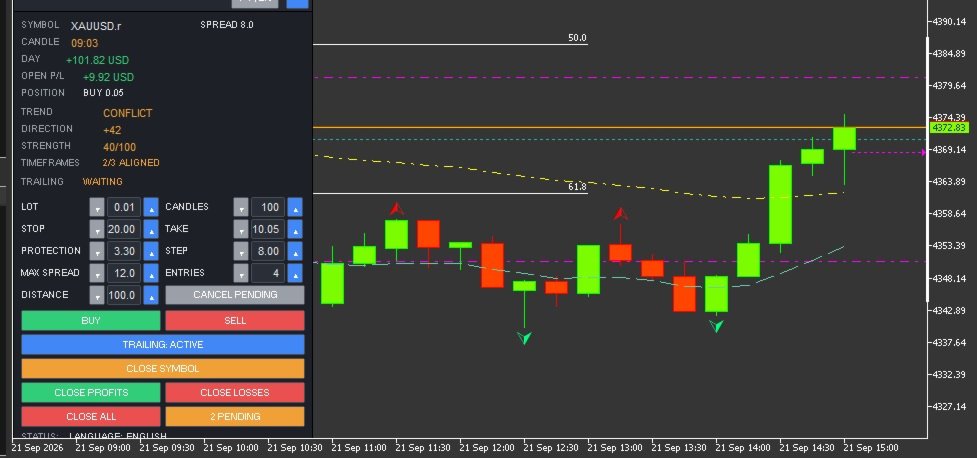
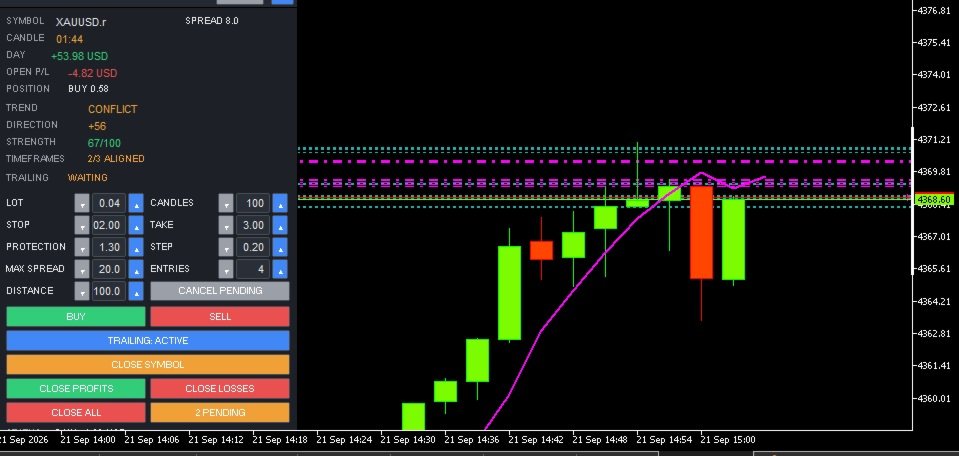
Boletovisc MT5 is a manual trading, position management and technical analysis panel developed for MetaTrader 5.

The tool brings execution, protection, position management and market analysis features into a single interface, allowing the user to control trades directly from the chart.

Boletovisc does not automatically open trades based on Trend V2. Buy, sell, hold and close decisions remain under the user's control.

Main Features

  • Market Buy and Sell directly from the panel.
  • Configurable number of entries per click.
  • Stop Loss in monetary value.
  • Take Profit in monetary value.
  • Trailing Stop based on monetary value.
  • Configurable initial protection and financial step.
  • Configurable maximum spread for new market orders.
  • Two simultaneous pending orders: BUY STOP and SELL STOP.
  • Configurable pending order distance.
  • Cancellation of pending orders created by Boletovisc.
  • Closing positions controlled by the current instance.
  • Closing only profitable positions.
  • Closing only losing positions.
  • Closing all positions controlled by the instance with safety confirmation.
  • Independent control per panel instance.
  • Daily realized result.
  • Floating result of open positions.
  • Current spread display.
  • Candle countdown timer.
  • Movable, resizable and minimizable panel.
  • Settings memory.
  • Portuguese and English interface.
  • Configurable sounds for positive and negative trade closures.
  • Integrated Trend V2 technical analysis module.
Account Compatibility: Boletovisc MT5 can operate on both HEDGING and NETTING accounts. For users who want to run multiple independent instances on the same symbol, the HEDGING model provides the best compatibility because positions can be isolated by instance/Magic Number. On NETTING accounts, positions for the same symbol are consolidated by MetaTrader 5 into a single net position.

    Buy and Sell

    BUY and SELL orders are sent only when the user presses the respective buttons.

    The user can configure the lot size and also the number of market entries sent per click.

    Boletovisc does not automatically decide when a trade should be opened.

    Stop Loss and Take Profit in Money

    Stop Loss and Take Profit can be configured using monetary values.

    Boletovisc calculates the corresponding price level according to the symbol, position volume and trading information provided by the server.

    The final result may differ due to spread, commission, swap, slippage, liquidity and broker execution conditions.

    Financial Trailing

    The trailing system uses two main parameters:

    Protection

    Defines the initial monetary value the system attempts to protect.

    Step

    Defines the financial increment used to progressively increase the protected level as the position result develops.

    When allowed by the symbol conditions and broker restrictions, the system moves the Stop Loss to protect progressively higher values.

    Spread Control

    Boletovisc displays the current spread and allows the user to define a maximum spread limit for new market orders.

    When the current spread exceeds the configured limit, new BUY and SELL orders sent from the panel are blocked.

    Setting the value to 0 disables this limit.

    This feature only applies an operational condition defined by the user and does not evaluate the potential quality or future result of a trade.

    Pending Orders

    Boletovisc can simultaneously create:

    BUY STOP above the current market price.

    SELL STOP below the current market price.

    The distance is configured in points.

    Both orders are independent. Execution of one order does not automatically cancel the other.

    If the market later reaches the level of the second order, it may also be executed.

    Position Management

    The panel allows the user to:

    • close positions controlled by the current instance;
    • close only profitable positions;
    • close only losing positions;
    • close all positions controlled by the instance;
    • cancel pending orders created by Boletovisc.

    The Close All command requires an additional confirmation to reduce accidental execution.

    Independent Control per Instance

    Each Boletovisc window uses its own identification to separate its trades from other instances.

    This allows multiple instances to operate without one panel indiscriminately managing positions belonging to another.

    The identification system is used for position management, orders, trailing, closing functions and statistics.

    Trend V2

    Trend V2 is an integrated technical analysis module.

    It uses closed candles and combines multiple technical criteria, including:

    • market structure;
    • EMA 20;
    • EMA 50;
    • EMA 200;
    • ADX;
    • +DI and -DI;
    • RSI;
    • ATR;
    • momentum;
    • recent price movement;
    • multi-timeframe analysis.

    The combination of these elements generates information about Direction, Strength, Timeframe Alignment and Trend State.

    Direction

    Direction uses an internal scale from:

    -100 to +100

    Positive values indicate predominance of bullish directional criteria used by the algorithm.

    Negative values indicate predominance of bearish directional criteria.

    Values closer to the central region indicate lower directional predominance.

    Important: Direction is not a probability of success.

    Example:

    +70 does not mean a 70% probability that the market will rise.

    It is only an internal technical score.

    Strength

    Strength is displayed on an internal scale from:

    0 to 100

    It represents the degree of consistency among the technical criteria used by Trend V2.

    Example:

    STRENGTH 75/100 does not mean a 75% probability of profit.

    It is an internal algorithmic metric and not a prediction of trading results.

    Timeframe Alignment

    Trend V2 also compares the current timeframe with higher timeframes.

    When the panel displays, for example:

    3/3 ALIGNED

    this means that the analyzed timeframes show directional agreement according to the algorithm's criteria.

    Alignment does not guarantee that the market will continue moving in that direction.

    Trend States

    Strong Up

    Indicates strong bullish predominance according to the internal criteria of Trend V2.

    Direction is positive, the strength reading is elevated and there is no relevant directional conflict among the analyzed timeframes.

    It does not represent an automatic Buy signal.

    Up

    Indicates positive directional predominance according to the analyzed criteria.

    The algorithm detects a bullish technical bias, but not all conditions required for a Strong Up classification are present.

    It does not represent an automatic recommendation to Buy.

    Sideways

    Indicates that the analyzed criteria do not show enough directional predominance to classify the market as bullish or bearish.

    It may represent balance, weak directional definition or absence of a clear trend according to the algorithm.

    It does not determine whether the user should trade or stay out of the market.

    Down

    Indicates negative directional predominance according to the analyzed criteria.

    The algorithm detects a bearish technical bias, but not all conditions required for a Strong Down classification are present.

    It does not represent an automatic recommendation to Sell.

    Strong Down

    Indicates strong bearish predominance according to the internal criteria of Trend V2.

    Direction is negative, the strength reading is elevated and there is no relevant directional conflict among the analyzed timeframes.

    It does not represent an automatic Sell signal.

    Conflict

    Indicates directional divergence among the analyzed timeframes.

    Part of the technical structure may show bullish predominance while another part shows bearish predominance.

    This only means that there is no directional consensus among the analyzed timeframes.

    It does not represent a recommendation to open, close or avoid a trade.

    PT / EN Interface

    Boletovisc includes interface support for:

    Portuguese

    and

    English

    The language can be changed directly from the panel using the PT | EN control.

    Main Inputs

    InpLanguage
    Defines the initial interface language.

    InpStopLossMoney
    Monetary value used for Stop Loss.

    InpTakeProfitMoney
    Monetary value used for Take Profit.

    InpTrailProtectMoney
    Initial monetary value used by the trailing protection system.

    InpTrailStepMoney
    Financial increment used by the trailing system.

    InpMaxSpreadPoints
    Maximum spread limit for new market orders. Value 0 disables the limit.

    InpTrendBars
    Number of candles used as the base for Trend V2 analysis.

    InpTrailingEnabled
    Defines whether trailing starts enabled.

    InpCloseSounds
    Enables or disables trade closing sounds.

    InpInitialLot
    Initial lot size displayed on the panel.

    InpInitialEntries
    Initial number of market entries per click.

    InpPendingDistancePts
    Initial distance of BUY STOP and SELL STOP pending orders.

    InpRememberSettings
    Keeps settings during restarts and timeframe changes.

    Important Notice

    Boletovisc MT5 is an execution, position management and technical analysis tool.

    It does not guarantee profit, profitability or any financial result.

    Trend V2 does not predict future market behavior with certainty and should not be interpreted as investment advice.

    Direction, Strength, timeframe alignment and trend states are mathematical outputs generated by the algorithm from available market data.

    No information displayed by the panel should be interpreted on its own as a recommendation to Buy or Sell.

    The user remains responsible for trading decisions, lot size, risk, Stop Loss, Take Profit and all other parameters used.

    Financial markets involve risk.

    Spread, commission, swap, slippage, volatility, liquidity and broker execution conditions may affect actual trading results.


    Prodotti consigliati
    Session boxes with automatic GMT offset & DST, a global world-clock panel, and a personal Trading Window that alerts you the second a trade slips outside your plan. Set it once — never adjust for daylight saving again. TrendSync Sessions — Trade the Right Hours, on Any Broker Every session indicator dies twice a year: daylight saving changes, the boxes shift, and you are left re-entering GMT offsets by hand. TrendSync Sessions was built to end that. Sessions are defined in each exchange's LOCA
    FREE
    FiveStarFX Gold Reversal Edge Professional automated trading solution designed for structured execution and controlled risk management in the Gold market. Built for traders who value discipline, precision, and consistency. Key Features Fully automated trading One trade at a time (controlled exposure) Fixed Stop Loss and Take Profit Smart Break-Even protection Profit lock with buffer Step-based trailing management Spread protection system Works on any broker Trade Management The E
    FREE
    Risk Management Buttons
    Kriengsak Peitaisong
    This is a common, simple and easy to use but effective tool to manage trading risks for all traders. It also help trader places stop loss and take profit levels at the same time the order is filled. How to set the expert advisor's parameters to support your trading style? Lots size. Fixed lots size - For traders who prefered to trade with fixed lots size, they can input the lots size in 'User lots' menu in the expert advisor's properties. The input value should be from the 'Minimum Volume' to th
    Kiwi One Click Trade Pro MT5 Kiwi One Click Trade Pro MT5 is a free manual trading and risk-management utility for MetaTrader 5 designed to make trade planning, position sizing and order execution faster and easier. Instead of manually calculating lot size, Stop Loss and Take Profit before every trade, Kiwi One Click Trade Pro brings the essential controls together in one simple on-chart panel. Set your preferred risk, define the Stop Loss and Risk-to-Reward ratio, review the calculated trade pl
    FREE
    The SafeProfit Market Profile is the most advanced tracking indicator in the Forex Market. It was developed to track the market profile of each session of the day: Asian, European and American. With this indicator you will operate Intraday smiling ... knowing exactly where the Big Players are positioned and the exact moment where they are going to. The indicator is simple, fast and objective, tracking every movement of the Big Players in price. Get out of the 95% statistic that only loses and us
    # Zikiman Risk Panel Pro — Gestore del rischio MT5, calcolatore lotti e Trade Manager Zikiman Risk Panel Pro è un EA di gestione del rischio per MT5 dedicato al trading manuale. Riunisce in un unico flusso sul grafico un gestore del rischio per MT5, un calcolatore della dimensione del lotto, un calcolatore della dimensione della posizione, un calcolatore del rischio, un pannello di trading, un gestore delle operazioni e un gestore delle posizioni. Sei tu a scegliere direzione, rischio e livel
    THE       MAC Trade Panel       It is an advanced trading utility designed for manual traders (scalpers and day traders) seeking speed, precision, and professional risk management in MetaTrader 4. Forget about time-consuming lot calculations: define your risk and let the dashboard do all the heavy lifting. Fully interactive, resizable, and with a modern design, it allows you to trade directly from the chart with order previews, manage multiple partial exits, and automatically protect your capita
    Trade Copier Local MT5 is a fast local trade copier for copying trades between multiple MT4 and MT5 accounts. One EA works in both Master and Slave modes. Simply select the required Copier Mode and use the same product on your MetaTrader terminals. Copy trades between: • MT5 → MT5 • MT5 → MT4 • MT4 → MT5 • MT4 → MT4 Perfect for: • Trading multiple accounts at once • Linking multiple trading accounts • Personal account mirroring • Signal providers • Account managers • Prop trading setups #


    NHS Risk Manager Pro
    Hope Singwe Njoyim
    NHS Risk Manager PRO NHS Risk Manager PRO is a professional trade-management and risk-control Expert Advisor for MetaTrader 5, built around one core idea: protect the account first, execute with precision second . At its center is a dedicated prop-firm compliance framework that tracks the rules that actually get funded accounts disqualified — daily drawdown, total drawdown, profit targets, and minimum trading days — and enforces them automatically instead of relying on the trader to remember the
    Order Ticket, Pannello di trading, Gestione del rischio, Trading manuale, Trailing Stop, Gestione ordini, Esecuzione veloce — JoOrderTrade Pro — pannello di esecuzione per MetaTrader 5 JoOrderTrade Pro è un pannello grafico completo per l'esecuzione manuale degli ordini e la gestione avanzata del rischio in MetaTrader 5. Sostituisce le finestre di trading native della piattaforma con un'interfaccia pulita, reattiva e ottimizzata per le prestazioni, offrendo maggiore precisione e controllo duran
    Technical and Professional Description of the Indicator Price Structure, Fibonacci, Financial Volume, and Interest Zone Indicator This indicator was developed based on in-depth studies of price structure, Fibonacci levels, financial volume behavior, and the identification of market interest zones . Its primary purpose is to transform these different analytical elements into a structured visual tool, allowing users to identify key levels and areas of greater structural relevance on the chart in a
    FREE
    Aathmaa Algo
    Deivanayagam Deivanayagam Arumugam
    Aathmaa Algo — Fixed-Risk Multi-Symbol Expert Advisor     Check the live signal   ·   Read the setup guide   ·    Trade what the market gives you. Risk only what you decide in advance. AATHMAA is a multi-symbol EA built on one rule: every position opens with a fixed, known stop-loss, and every winning position is managed forward for as long as the market agrees with it. No averaging down, no martingale, no widening stops to "wait out" a loss. Runs on  USDJPY, GBPUSD, EURUSD, and XAUUSD  simul
    EasyTrade Pro - Pannello di Trading Manuale per MT5 Fai trading in modo più rapido, semplice ed efficiente con EasyTrade Pro. EasyTrade Pro è un pannello di trading manuale leggero e intuitivo, progettato per i trader che desiderano eseguire operazioni velocemente e avere sempre sotto controllo le informazioni più importanti del mercato direttamente sul grafico. Nessuna configurazione complessa. Nessun indicatore inutile. Solo gli strumenti che servono davvero ogni giorno. Funzionalità Apertur
    FREE
    Quick Trade Panel Pro
    Nicolas Olivier Menetrey
    5 (1)
    Pannello di trading one-click con gestione automatica del lotto e del rischio Quick Trade Panel Pro è un pannello di trading intuitivo progettato per i trader che vogliono eseguire ordini rapidamente mantenendo il pieno controllo sul rischio. Funzionalità principali Calcolo automatico della dimensione del lotto basato su una percentuale del margine disponibile Stop Loss configurabile in punti, applicato automaticamente a ogni trade Dimensione del lotto bloccata durante una serie di trade per ga
    FREE
    TradeDock Pro
    Alex Michael Murray
    TradeDock Pro (MT5) — One-Click Trade Manager Panel TradeDock Pro is a sleek and professional one-click trade panel for MetaTrader 5 designed for fast manual execution and simple trade management. Built for traders who want a clean interface, quick order placement, and essential management tools — without complicated settings or typing. Can be used on any market. KEY FEATURES One-Click BUY / SELL Lot size control on chart (0.01 – 99.99) SL toggle + SL in points TP toggle + TP in points Trailing
    This tool will perform Trailing stop loss and Break even management for orders. Helps you limit or reduce the time spend watching orders on the screen, especially when you need to go to sleep. Just add this EA to 1 chart, you can manage all pairs. You can filter orders by comment, magic number, symbol and order ticket number. When Breakeven it can add shift/offset pips (to cover the commission...). You can try in strategy tester before purchase. The EA will add Buy and Sell alternately, so you
    Lot calculator tool MT5
    Ernestas Kvedaras
    3.67 (3)
    More stable MetaTrader 4 version is available here:  Lot Calculator Tool . This tool helps you to automatically calculate and manage risk, conveniently place orders visually, schedule orders, trail stops, move them to break-even and more. Features Place market or pending orders using draggable lines Schedule orders Calculate and limit risk using various methods See current spread See time till next candle Set custom order comments Trail stops Move stops to break-even See order profit/loss in p
    XBOOT BOLETA PRO Professional Manual Trading Panel for MetaTrader 5 XBOOT Boleta Pro is a complete trading panel designed for traders who execute manual trades and want greater speed, organization, and control during every trading session. More than a standard Buy and Sell panel, XBOOT Boleta Pro combines powerful trading tools into a single interface, helping traders analyze the market, manage risk, execute orders, and monitor trading performance without leaving the chart. Its purpose is to sim
    LT Trade Panel Lite
    Thiago Duarte
    4.59 (54)
    LT Trade Panel Lite - Esecuzione rapida e pannello ordini gratuito LT Trade Panel Lite è la pulsantiera di negoziazione più pratica e rapida per MetaTrader 5, progettata per i trader che cercano la massima agilità nell'esecuzione manuale. Ideale per il Day Trading su indici, azioni e forex. Questa versione gratuita offre gli strumenti essenziali per operare con precisione professionale a costo zero. Cosa trovi nella Versione LITE: Esecuzione Istantanea: Pulsanti di Acquisto (Buy), Vendita (
    FREE
    Risk Calculator Veqrix
    Jose Luis Heredia Padilla
    Risk Calculator Veqrix  Risk Calculator Veqrix is a risk calculation, visual trade planning, and manual order execution tool for MetaTrader 5. The EA automatically calculates the trade volume using the configured risk, entry price, and distance to the Stop Loss. It also displays the planned trade directly on the chart and distributes the total volume across up to three Take Profit targets. This tool does not generate trading signals . The user selects the direction, configures the levels, and
    FREE
    Order Blocks Indicator Fnix v3 Smc
    Monique Ellen Miranda Dos Santos
    Disegna blocchi su ogni candela del grafico, evidenziando Order Blocks (OB) validi per setup rialzisti e ribassisti con criteri avanzati di price action. Ideale per trader SMC (Smart Money Concepts). **Principali Caratteristiche:** - Renderizza rettangoli su tutte le candele analizzate (fino a 500 barre), con proiezione futura e offset. - Rileva OB: Bullish (blu, OB↑) e Bearish (rosso, OB↓) basati su pressione della candela, dimensione minima e rotture di struttura. - Avvisi personalizzabili:
    Summary of the Advanced Account Monitoring for MT5 The Advanced Account Monitoring for MT5 is a powerful tool designed for advanced account monitoring, offering traders detailed insights into their trading performance. This indicator provides a comprehensive dashboard to track drawdowns, profits, and trading volumes across different timeframes. Below is an overview of its key functions: Account and Robot Monitoring The indicator allows users to monitor either the entire account or a specific Ex
    Slime Risk manager
    Paul Odhiambo Ouma
    Professional Risk Manager Dashboard.   An advanced position sizing and trade management assistant designed for manual traders. It calculates precise lot sizes based on your chosen risk parameters, helping you protect your account equity while aiming for consistent returns. The tool includes built-in psychological safeguards to encourage disciplined trading behavior, as well as daily profit monitoring to help you lock in gains. It serves as a powerful visual decision-support tool for implementing
    TP SL Bot MT5
    Ruslan Brezovskiy
    5 (1)
    TP SL Bot - un'utilità che imposta automaticamente Stop Loss e Take Profit per gli ordini appena aperti in vari modi secondo le tue indicazioni. È inoltre disponibile una funzione per calcolare il volume con cui aprire un trade per ottenere l'importo desiderato con la dimensione specificata di Stop Loss/Take Profit.   Ci sono diversi modi per calcolare la dimensione e impostare i parametri: 1. Impostazione basata sull'importo specificato dall'utente come percentuale del saldo corrente del conto.
    SMC Visual indicator
    Gabriel Balbino De Oliveira
    SMC Visual Indicator v6 – Trade Like Smart Money Most traders spend hours trying to identify market structure, liquidity zones, Fair Value Gaps, and potential reversals. By the time they finish their analysis, the market has already moved. SMC Visual Indicator v6 does the hard work for you. Built around advanced Smart Money Concepts (SMC) and ICT methodologies, this indicator automatically identifies the key areas where institutional traders leave their footprints. Imagine opening your chart and
    Symbol Manager for MT5
    Taras Slobodyanik
    5 (3)
    Symbol Manager or Grid Manager, designed to group orders into one position (by Symbol or by Magic Number). This utility will be useful to multi-currency traders (many EAs), who can have multiple orders on several pairs. You will be able to see the total number of lots, the total profit, and set virtual stop loss and virtual take profit. To set a real TP (or SL), you must first set the virtual value, and then enter the command in this cell: "set". If you want to set real TP/SL for all orders at
    Trend Slayer Indicator
    Felipe Carvalho De Queiroz
    Trend Indicator Pro Use any currency and any time period you want For greater profitability use a risk return of at least 1:3 or 1:4 Entry Signal : Appears after the moving average crossover closes ️️ Histogram Flip : Signals important trend changes ️ Easy to use : Perfect for those who want fast, confident decisions! Boost your accuracy : Find the best market entry moments with more confidence! Get straight to the point and seize the best trend opportunities!
    Zirk Trading Management Zirk Trading Management is a powerful trade management utility for MetaTrader that helps traders execute trades with consistent risk management. It is designed to simplify position sizing by automatically calculating the correct lot size based on your chosen risk percentage and stop-loss distance. Instead of manually calculating lot sizes, simply set your desired account risk (e.g., 1%), place your stop loss, and the utility instantly determines the appropriate trade volu
    Gold Soverient H4
    Arockia Dinesh Babu
    Trading Specifications: Symbol: XAUUSD (Gold) Timeframe: H4 (Required for optimal performance) Strategy: Swing Trading / Trend Following Minimum Deposit: $1000 (Recommended for proper risk management) Lot Size : 0.01 ·         Within a year, your entire initial capital was fully withdrawn, and since then, the EA has been trading exclusively with profit funds only, without any exposure to the original balance. ·         The current price of $599 is a limited launch offer, and it will be increased
    Partial
    Pablo Filipe Soares De Almeida
    Partial Close Manager – Strumento di Regolazione del Volume di Trading Questo strumento consente di chiudere parzialmente le operazioni aperte in MetaTrader 5. Funzionalità Chiusura Parziale: Chiudi parte delle operazioni aperte con un solo clic. Calcolo del Volume: Calcola automaticamente il volume da chiudere, evitando inserimenti manuali. Supporto Multi-Ordine: Applica la chiusura parziale a tutti gli ordini aperti dello stesso simbolo. Tabella Trascinabile: Clicca e tieni premuto l’intestazi
    Gli utenti di questo prodotto hanno anche acquistato
    Trade Assistant MT5
    Evgeniy Kravchenko
    4.43 (216)
    It helps to calculate the risk per trade, the easy installation of a new order, order management with partial closing functions, trailing stop of 7 types and other useful functions. Additional materials and instructions Installation instructions - Application instructions - Trial version of the application for a demo account Line function -   shows on the chart the Opening line, Stop Loss, Take Profit. With this function it is easy to set a new order and see its additional characteristics bef
    Forex Trade Manager MT5
    InvestSoft
    4.98 (679)
    Benvenuto a Trade Manager EA, lo strumento definitivo per la gestione del rischio , progettato per rendere il trading più intuitivo, preciso ed efficiente. Non è solo uno strumento per l'esecuzione degli ordini, ma una soluzione completa per la pianificazione delle operazioni, la gestione delle posizioni e il controllo del rischio. Che tu sia un principiante, un trader avanzato o uno scalper che necessita di esecuzioni rapide, Trade Manager EA si adatta alle tue esigenze, offrendo flessibilità s
    Local Trade Copier EA MT5
    Juvenille Emperor Limited
    4.94 (149)
    Local Trade Copier EA MT5 è un trade copier rapido e flessibile per copiare e gestire operazioni tra più conti MetaTrader 5 sullo stesso computer Windows o Windows VPS. Combina la sincronizzazione locale delle operazioni con controlli lato Receiver per dimensione del lotto, gestione del rischio, filtraggio delle operazioni, mappatura dei simboli, gestione delle operazioni e protezione del conto. Configura i terminali Transmitter e Receiver in circa 1 minuto e copia operazioni manuali o aperte d
    Strategy Ledger Pro
    Abdullah Uygar Tuna
    5 (4)
    Ora disponibile in italiano. Strategy Ledger Pro è un pannello di analisi del conto in sola lettura per MetaTrader 5. Separa i risultati del conto per Expert Advisor, strategia, simbolo e numero magic, così puoi vedere quanto contribuisce davvero ciascuno. Il pannello è disponibile in 11 lingue: English, Français, Deutsch, Español, Italiano, Português, Русский, Türkçe, 中文, 日本語 e 한국어. Prima di scaricare la demo. Il Market esegue la demo di qualsiasi prodotto a pagamento solo nello Strategy Teste
    Telegram to MT5 MultiChannel Copier
    Sergio Marquez Uroz
    4.59 (17)
    Telegram to MT5 Multi-Channel Copier   copia automaticamente i segnali di trading dai tuoi canali Telegram direttamente su MetaTrader 5. Niente bot, niente estensioni del browser, niente copia manuale. Il segnale arriva su Telegram e l'EA apre l'operazione nel tuo terminale in pochi secondi. E prima di copiare un canale, il backtester integrato ti mostra cosa avrebbe fatto quel canale sul tuo conto. Il prodotto include due componenti: un'applicazione Windows che ascolta i tuoi canali Telegram, e
    ================================================================================ POC BREAKOUT - V20.72. Full Professional Grade Toolkit ================================================================================ POC Breakout is a full MetaTrader 5 trading dashboard for discretionary traders who want breakout signals, Point of Control (POC) context, volume profiles, order flow, market structure, news, alerts, and advanced trade planning in one professional workspace. Attached directly to you
    TradePanel MT5
    Alfiya Fazylova
    4.88 (169)
    Trade Panel è un assistente commerciale multifunzionale. L'applicazione contiene più di 50 funzioni di trading per il trading manuale e permette di automatizzare la maggior parte delle attività commerciali. Istruzioni per l'applicazione + video tutorial: https://www.mql5.com/it/blogs/post/772320 Versione di prova dell'applicazione per un conto demo: https://www.mql5.com/it/blogs/post/762419 Come installare l'applicazione: https://www.mql5.com/it/blogs/post/762362 Come testare l'applicazione in m
    Copia i segnali Telegram con le tue regole di trading Telegram to MT5 Signal Trader copia automaticamente i segnali di trading testuali dai canali e gruppi Telegram pubblici e privati in MetaTrader 5. Gestisci più fornitori e conti MT5 da un'unica applicazione desktop, con impostazioni di rischio e di trading specifiche per ogni fornitore . Per copiare i segnali non servono bot Telegram né configurazioni API. Accedi semplicemente con il tuo account Telegram tramite numero di telefono o codice QR
    FarmedHedge Pair Trading Dashboard
    Tanapisit Tepawarapruek
    5 (5)
    Farmed Hedge Yield Farming | All Markets (Manual - Hybrid - Semi/Automated EA) VERIFIED TRADING RESULTS - Farmed Hedge Yield Axi Copy:  https://www.mql5.com/en/signals/2356376 - Farmed Hedge Yield Exn Copy:   https://www.mql5.com/en/signals/2356404 - Farmed Hedge Yield V Copy:  https://www.mql5.com/en/signals/2357156 IMPORTANT NOTICE: FarmedHedge is a MANUAL-FOCUSED TRADING UTILITY ,not a fully automated EA. Results shown on this Signal include manual trades and overall strategic management.
    Power Candles Strategy Scanner - Strumento di ricerca configurazioni multi-simbolo con ottimizzazione automatica Power Candles Strategy Scanner utilizza lo stesso motore di auto-ottimizzazione che alimenta l'indicatore Power Candles, applicandolo a tutti i simboli presenti nel tuo Market Watch, uno accanto all'altro. Un unico pannello ti indica quali simboli sono statisticamente negoziabili in questo momento, quale strategia è vincente su ciascuno di essi, la coppia ottimale di Stop Loss / Take
    Exp COPYLOT CLIENT for MT5
    Vladislav Andruschenko
    3.97 (35)
    Copiatore professionale di trade per MetaTrader 5 Un copiatore di trade veloce, professionale e affidabile per MetaTrader . COPYLOT consente di copiare operazioni Forex tra terminali MT4 e MT5 con supporto per conti Hedge e Netting . La versione MT5 di COPYLOT supporta: - MT5 Hedge → MT5 Hedge - MT5 Hedge → MT5 Netting - MT5 Netting → MT5 Hedge - MT5 Netting → MT5 Netting - MT4 → MT5 Hedge - MT4 → MT5 Netting Versione MT4 Descrizione completa + DEMO + PDF Come acquistare Come installare Come ot
    Signal Trading View to MT5 Pro
    Mirel Daniel Gheonu
    4.5 (2)
    Signal TradingView to MT5 Pro Automator Esecuzione professionale istantanea tra TradingView e MetaTrader 5 Automatizza la tua strategia di trading con il ponte di comunicazione più robusto tra gli alert di TradingView e l'esecuzione reale in MT5. Progettato per i trader che richiedono velocità, flessibilità e una gestione del rischio impeccabile, questo Expert Advisor trasforma qualsiasi messaggio di avviso in un preciso ordine a mercato o limite. PUNTI DI FORZA E VANTAGGI Motore di Parsing Univ
    HINN MagicEntry Extra
    ALGOFLOW OÜ
    4.74 (19)
    HINN MAGIC ENTRY – the ultimate tool for entry and position management! SIMPLE. FASTEST. INTUITIVE. MAX AUTOMATED. Place orders by selecting a level directly on the chart! full description   ::  demo-version  :: 60-sec-video-description Key features: - Market, limit, and pending orders - Automatic lot size calculation - Automatic spread and commission accounting - Unlimited partitial take-profits  - Breakeven and trailing stop-loss and take-profit  functions - Invalidation leves - Intuitive, a
    Premium Trade Manager - Il pannello di trading con un coach integrato Premium Trade Manager porta un coach di trading direttamente nel tuo grafico, con un motore di esecuzione completo al di sotto. Imposta il trade come fai sempre, poi lascia che Max, il tuo coach di trading IA, legga esattamente quel setup rispetto al tuo conto live e ti dia un verdetto chiaro prima che tu confermi: lo stop rispetta un approccio disciplinato, il rischio è ragionevole, c'è un evento ad alto impatto tra pochi min
    Scrivimi dopo l’acquisto per ricevere il kit completo del manuale + 3 giorni di prova dell’API OpenAI per testare le funzionalità AI + un altro regalo bonus Il prezzo attuale è uno sconto limitato per l’aggiornamento del rilancio di agosto — assicurati subito la tua edizione prima che il prezzo aumenti. Prossimo prezzo: $340 È completamente diverso da qualsiasi pannello di trading tu abbia mai provato o visto sul mercato. È uno dei pannelli di trading basati sull’IA più innovativi attualmente d
    MT5 Trading Deck
    Manuel Michiels
    5 (2)
    One button. One trade. MT5 Trading Deck is a hotkey trading panel for MetaTrader 5 that turns the platform into a keyboard-driven execution cockpit. Stop loss, take profit and lot size are pre-calculated for every key; the moment you press, a market order is live on the broker. A complete technical user manual is attached in the product Comments section. It documents every input parameter, the full hotkey map, the recommended Stream Deck XL layout, and the advanced workflows for Pre-Limit orders
    Grid Manual MT5
    Alfiya Fazylova
    4.73 (22)
    Grid Manual è un pannello di trading per lavorare con una griglia di ordini. L'utilità è universale, ha impostazioni flessibili e un'interfaccia intuitiva. Funziona con una griglia di ordini non solo nella direzione delle perdite, ma anche nella direzione dell'aumento dei profitti. Il trader non ha bisogno di creare e mantenere una griglia di ordini, lo farà l'utilità. È sufficiente aprire un ordine e il manuale di Grid creerà automaticamente una griglia di ordini per esso e lo accompagnerà fino
    EasyInsight AIO MT5
    Alain Verleyen
    4.92 (12)
    EASY Insight AIO – La soluzione all-in-one per un trading intelligente e senza sforzo Panoramica Immagina di poter analizzare l’intero mercato — Forex, Oro, Cripto, Indici e persino Azioni — in pochi secondi, senza dover controllare manualmente i grafici, installare indicatori o affrontare configurazioni complicate. EASY Insight AIO è il tuo strumento definitivo di esportazione per il trading alimentato dall’IA, pronto all’uso. Offre una panoramica completa del mercato in un unico file CSV pul
    Trade Dashboard MT5
    Fatemeh Ameri
    4.94 (134)
    Trade Dashboard simplifies how you open, manage, and control your trades, with built-in lot size calculation. It allows you to execute trades, manage risk, and control positions directly on the chart, with tools such as partial close, breakeven, and trailing stop. Designed to reduce manual work and help you stay focused on your trading decisions. A demo version is available for testing. Detailed explanations of features are provided within the MQL5 platform. Installation instructions are include
    Trade copier MT5
    Alfiya Fazylova
    4.61 (56)
    Trade Copier è un'utilità professionale progettata per copiare e sincronizzare le transazioni tra conti di trading. La copiatura avviene dal conto/terminale del fornitore al conto/terminale del destinatario, che sono installati sullo stesso computer o vps. PROMOZIONE - Se avete già acquistato il "Trade copier MT5", potete ottenere gratuitamente il "Trade copier MT4" (per la copia MT4 > MT5 e MT4 < MT5). Per maggiori informazioni sulle condizioni, vi preghiamo di contattarci tramite messaggi priv
    EA Overfitter
    Stephen J Martret
    5 (1)
    That backtest looks great. But will it still be making money tomorrow, next week, next month? EA Overfitter re-runs your EA on 100 price histories it has never seen. One score tells you if the edge is real. A backtest tells you what an EA did on one price history — the one that happened to occur. What you cannot tell from it is how much of that result was the strategy and how much was the particular path. EA Overfitter answers that. It builds up to 100 synthetic price histories your EA has n
    MT5 to Telegram Signal Provider è un'utilità facile da usare e completamente personalizzabile che consente l'invio di segnali specificati a una chat, canale o gruppo Telegram, rendendo il tuo account un fornitore di segnali. A differenza della maggior parte dei prodotti concorrenti, non utilizza importazioni DLL. [ Dimostrativo ] [ Manuale ] [ Versione MT4 ] [ Versione Discord ] [ Canale Telegram ]  New: [ Telegram To MT5 ] Configurazione Una guida utente passo-passo è disponibile. Nessuna cono
    Telegram To MT5 Ultra
    Mirel Daniel Gheonu
    5 (5)
    Telegram To MT5 — Copiatore di segnali Trasforma le indicazioni di trading dei tuoi canali Telegram in veri ordini MT5 — automaticamente, su quanti account vuoi, con rischio e regole totalmente sotto il tuo controllo. Telegram To MT5 collega i canali VIP / di segnali che già segui su Telegram al tuo terminale MetaTrader 5. Un'app desktop companion gratuita legge i messaggi (anche dai canali che bloccano i bot), e questo Expert Advisor li esegue sul tuo conto — applicando le tue impostazioni di r
    EA Slipstream
    Stephen J Martret
    5 (1)
    Your backtest filled every order at the price it asked for. Your account does not. EA Slipstream measures what execution costs your EA, using your own fills, slippages and spreads to show you the true performance of your EA. A backtest prices every trade at the level the EA named. In live trading a pending order fills at whatever price is available when it triggers, a stop closes wherever the market is when it is hit, and the spread at that moment is whatever the account was quoting. The differ
    Dynamic Fibonacci Grid
    Tsvetan Tsvetanov
    5 (1)
    Presentazione dell’ultima versione del Dynamic Fibonacci Grid Dashboard per MT5. Ora dotato di molte nuove funzionalità, questo nuovo dashboard trasforma la tua esperienza di trading e ti permette di osservare il mercato e l’azione dei prezzi da una prospettiva completamente nuova. Scopri nuove possibilità grazie all’analisi simultanea di più timeframe e simboli. Interfaccia user-friendly per il trading manuale e la gestione delle posizioni, con capacità ampliata di applicare strategie automati
    Telegram to MT5 Coppy
    Sergey Batudayev
    5 (10)
    Da Telegram a MT5:   la soluzione definitiva per la copia del segnale Semplifica il tuo trading con Telegram su MT5, il moderno strumento che copia i segnali di trading direttamente dai canali e dalle chat di Telegram sulla tua piattaforma MetaTrader 5, senza bisogno di DLL. Questa potente soluzione garantisce un'esecuzione precisa dei segnali, ampie opzioni di personalizzazione, fa risparmiare tempo e aumenta la tua efficienza. [ Instructions and DEMO ] Caratteristiche principali Integrazione d
    The News Filter MT5
    Leolouiski Gan
    4.78 (23)
    Questo prodotto filtra tutti gli esperti consulenti e i grafici manuali durante il periodo delle notizie, così non dovrai preoccuparti di improvvisi picchi di prezzo che potrebbero distruggere le tue impostazioni di trading manuali o le negoziazioni effettuate da altri esperti consulenti. Questo prodotto viene fornito anche con un sistema completo di gestione degli ordini che può gestire le tue posizioni aperte e gli ordini in sospeso prima della pubblicazione di qualsiasi notizia. Una volta che
    The product will copy all telegram signal to MT5 ( which you are member) , also it can work as remote copier.  Easy to set up, copy order instant, can work with almost signal formats, image signal,  s upport to translate other language to English Work with all type of channel or group, even channel have "Restrict Saving Content", work with  multi channel, multi MT5 Work as remote copier: with signal have ticket number, it will copy exactly via ticket number. Support to backtest signal. How to s
    Anchor Trade Manager
    Kalinskie Gilliam
    5 (9)
    Your EAs cannot see each other, but Anchor can. Anchor gives you one place to coordinate your EAs, manage risk, and decide when trading is allowed. It works alongside the trading bots you already use without any changes to them. The Problem One EA opens a trade. Then another starts trading. The next thing you know, you wake up to multiple grids built across your account. Each EA may be doing exactly what it was designed to do, but together they can place far more risk on your account than you in
    Footprint Chart Pro — Professional OrderFlow EA for MetaTrader 5 Version 6.34 | Professional tool for real traders | Institutional-Grade Visualization DEMO USERS - PLEASE SELECT EVERY TICK / REAL TICK WHEN TESTING AND YOU HAVE DOWNLOADED HISTORICAL DATA. IF YOU SEE A WAITING SCREEN AND IT IS NOT DOWNLOADING, IT MEANS YOU HAVE LOW HISTORICAL DATA. TRY 1 MIN AND 5 MIN FIRST ON 1 DAY DATA. ONE DAY DATA SHOULD BE THE NEWEST AND MOST CURRENT DATE. PLEASE WAIT UNTIL THE MARKET HAS ROLLED OVER PERIOD.
    Filtro:
    Nessuna recensione
    Rispondi alla recensione