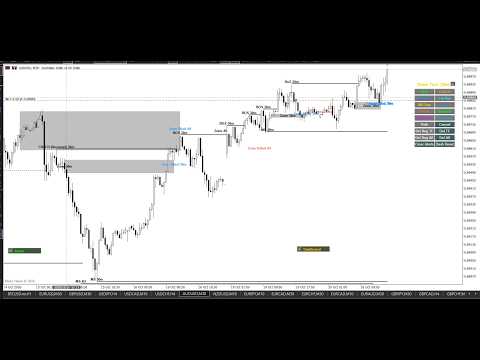
SMC Drawing Tools Pro Alerts and Dashboard
- Indicatori
- Versione: 1.2
- Aggiornato: 30 ottobre 2026
- Attivazioni: 5

The complete Smart Money Concepts suite for the serious SMC trader: auto structure, real-time alerts, multi-timeframe dashboard, and trade signals, with over 45 professional features.
This is the advanced Pro edition of the SMC Drawing Tools. While the Lite version provides manual drawing utilities, the Pro version transforms your chart into an automated, real-time SMC trading system.
The default settings are pre-configured with my own personal trading inputs, so the indicator is optimized and ready to use the moment you attach it to your chart.
Important!!!! Due to limitations in MetaTrader 5, this tool does not work in the Strategy Tester. Instead of a demo check out the lite version:
https://www.mql5.com/en/market/product/202576
Most Striking Features of Pro
-
Auto BoS and CHoCH Detection: The indicator watches your MS Rays. When price closes through a ray, it uses strict SMC structural analysis (Higher Highs/Lower Lows) at the exact moment of the break to determine if it is a Break of Structure (Continuation) or Change of Character (Reversal). It then snaps the line to the exact candle and labels it.
-
Multi-Timeframe Dashboard: A built-in dashboard monitors up to 8 timeframes simultaneously. It shows the current Trend, Structure, Momentum, and where price is moving.
-
Custom Timeframe Scoping: You can now tell the indicator exactly which timeframes to analyze for trade signals (e.g., Current TF and lower) and which timeframes should actually trigger popup alerts (e.g., Trade TF only).
-
Real-Time Alerts: Get popup, sound, and mobile push notifications the moment a Zone is tapped, a Liquidity sweep occurs, or a BoS or CHoCH is confirmed.
-
Dynamic Trade Signals: When a high-probability setup occurs (for example, a Liquidity sweep followed by a CHoCH), the indicator prints clear BUY or SELL arrows directly on your chart.
-
HTF Confirmation: You can force the indicator to only alert you if a lower-timeframe break is confirmed by a higher-timeframe candle close.
-
Liquidity and Zone Tracking: It tracks whether a zone is untouched, tapped, filled, or failed. It also detects liquidity sweeps (where price wicks a ray but closes back inside) and dynamically updates the Zone Efficiency percentage.
Value and Community
I built this indicator to give back to the trading community. Institutional SMC software often costs hundreds of dollars a month. I believe retail traders deserve institutional-grade tools at a fair, one-time price. You are not just buying an indicator; you are getting over 45 professional features that replace multiple paid subscriptions, all combined into one lightweight, lag-free tool.
The complete list of features and how everything works is included in the user guide below.
Feel free to report any bugs and please leave a review even after trying the demo.
The Comprehensive User Guide
This guide covers every single feature. We recommend using the default settings to start, as they are optimized for the best performance.
1. The Multi-Timeframe Dashboard
The dashboard gives you a bird's-eye view of the market across up to 8 different timeframes simultaneously.
-
Live Structure: Shows the most recent structural event (BoS, CHoCH, Liquidity, or Zone).
-
Directional Bias: Tells you exactly where price is moving (e.g., "Towards 1H Supply (85%)").
-
Trend State Machine: Displays the current trend (Up, Down, or Range) based on recent break sequences.
-
Momentum Tracker: Rates candle strength (Strong, Neutral, Poor) by comparing the body size to the ATR.
-
UI Controls: You can drag and drop the dashboard anywhere on your chart, and use the minimize button to collapse it into a tiny strip.
2. Automated Market Structure & Trade Signals
The Pro version actively watches your drawings and reacts to market movements in real-time.
-
Auto BoS & CHoCH: If price closes through an MS Ray, the indicator determines the structure and renames the line.
-
HTF Confirmation: Filters out fakeouts by requiring the break to be confirmed by the close of a Higher Timeframe (HTF) candle.
-
Liquidity Sweeps: Detects when price wicks through a ray but closes back inside, sending an alert without freezing the ray (allowing it to track future breaks).
-
Dynamic Trade Arrows: Automatically plots clear BUY/SELL arrows on your chart when high-probability setups occur.
-
Trade Direction Filter: Filter arrows to only fire "Aligned" (with the trend), "Counter" (against the trend), or "All".
3. Smart Zone Tracking
Stop guessing which zones are still valid.
-
State Tracking: Automatically tracks zones through Tapped (price entered), Filled (price closed outside), and Failed (price pierced both sides).
-
Zone Efficiency %: Calculates and displays how much of the zone remains unfilled, dynamically updating the on-chart label and dashboard.
4. The Alert System
Never miss a setup with our multi-channel alert system.
-
Alert Types: Popup, Sound, Mobile Push (SendNotification), and Terminal Print.
-
On-Chart Markers: Places text labels directly on the candles where the alert happened (e.g., "BoS 1H", "Liq M30").
-
Alert History Panel: A dedicated on-chart panel that logs your last 8 signals, split into "Trade Alerts" and "Draw Tools Alerts."
5. Drawing Tools & Shortcuts
Use the customizable toolbar to select a tool, then click on the chart.
-
Complete Toolkit: BOS, CHoCH, Liquidity Lines, MS Rays, Liq Rays, Zones, Supply/Demand, and Unfilled Rectangles.
-
Path Tool: Left-click to add points. Double-click the last point to finish. A central handle allows you to drag the entire path at once.
-
Auto-Extend: Rays and zones automatically extend to the current bar.
-
Auto-Stop at Touch: Rays and zones freeze exactly when price touches them.
-
Shift + R: Select any Ray/Zone and press to restart (extend to current bar).
-
Shift + F: Select any Ray/Zone and press to freeze it.
-
Drag-to-Reset: Dragging an object resets its internal state so it can track touches/breaks again.
6. Visibility & Performance
Keep your chart clean and running fast.
-
Structured Visibility: Higher timeframe objects automatically cascade and display on lower timeframes based on your anchor settings.
-
Timeframe Opacity: Fades higher-timeframe objects by blending their colors with the chart background.
-
Smart Pruning (Anti-Lag): Automatically deletes the oldest, untouched objects (protecting your newest drawings) to keep your chart running at maximum speed.
-
Delete Utilities: Delete objects by Timeframe, by Time Range (click start/end), or clear the entire chart.
Complete Inputs Guide
(Because the defaults are set to my personal trading style, you rarely need to change these, but here is what they do.)
Toolbar & Behavior
-
InpShowToolbar: Show/hide the drawing toolbar.
-
InpBtnW / InpBtnH: Button width and height.
-
InpToolbarLayout: 3 different grid shapes (3x6, 6x3, 9x2).
-
InpAutoStopAtTouch: If true, rays stop extending when price touches them.
-
InpMinRectBars: Minimum width of a zone rectangle.
-
InpRightClickRange: How close (in pixels) you must right-click to select an object.
Structure & Signals
-
InpLiqBosEnabled: Triggers an alert if a Liquidity sweep is followed by a BoS within InpLiqBosWindowBars .
-
InpZoneTapFailEnabled: Triggers an alert if a zone is tapped, then fails within InpZoneTapFailWindowBars .
-
InpRequireHTFConfirm: If true, a break on M5 must be confirmed by the M15 candle close.
-
InpTradeTF: The timeframe that triggers the BUY/SELL arrows.
-
InpTradeTFAnalysis (NEW): Sets the scope for Trade Signals. Options: Current TF Only, Current and lower, Current and above, All TF.
-
InpAlertTFAnalysis (NEW): Sets the scope for Popup Alerts. Options: Trade TF Only, Current TF and Trade TF only, Current TF/Trade TF and lower, all TFs.
-
InpTradeOnReversal / InpTradeOnBos: Toggle arrows for reversals, continuations, or both.
-
InpTradeDirFilter: Aligned (only with trend), Counter (only against), or All.
-
InpTradeArrowKeepLast: How many trade arrows to keep on the chart.
Dashboard & Timeframes
-
InpEnableDash: Turn the multi-TF dashboard on/off.
-
InpDashCorner / InpAlertPanelCorner: Where the panels sit on the screen.
-
InpAnchor1_On through InpAnchor8_On: Select which timeframes appear in the dashboard.
-
InpVisMode: All (objects show everywhere), TopDown (only own TF), or Structured (cascading).
Alerts & Visuals
-
InpAlertsEnabled: Master switch for all alerts.
-
InpAlertPopup / InpAlertSound / InpAlertSendMobile: Choose your notification methods.
-
InpDrawAlertMarkers: Places text labels on the chart where the alert happened.
-
InpTFOpacityEnabled: Fades objects from different timeframes.
-
InpMaxObjectsPerTF: Automatically prunes the oldest untouched objects to save memory.
Support is provided via the MQL5 Comments section. If you appreciate the value and the community-first pricing, please leave a review!