Boletovisc MT5

Boletovisc MT5

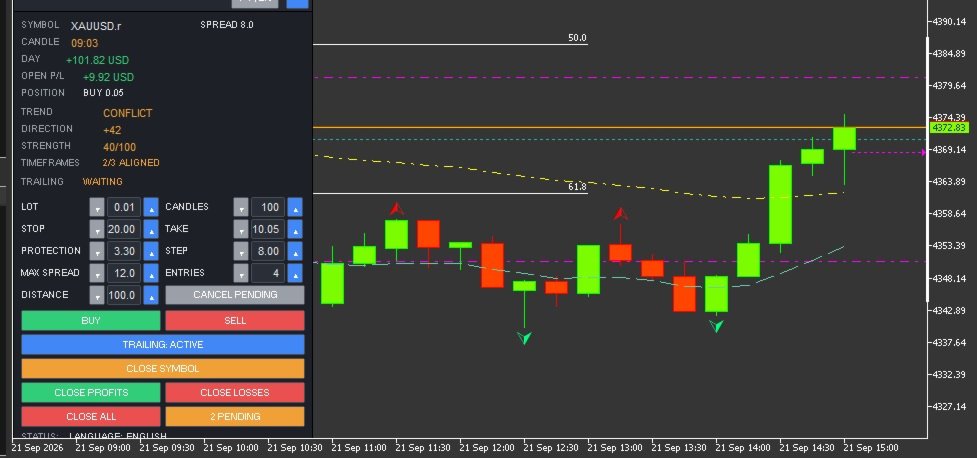
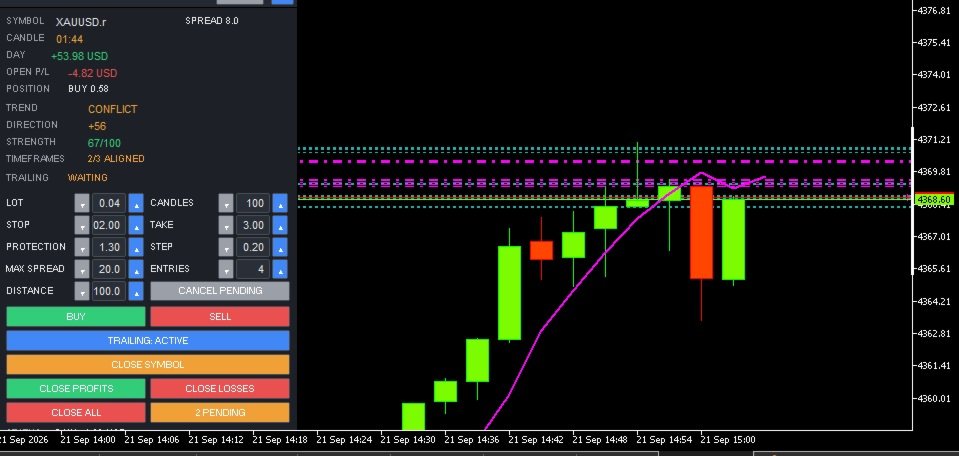
Boletovisc MT5 is a manual trading, position management and technical analysis panel developed for MetaTrader 5.

The tool brings execution, protection, position management and market analysis features into a single interface, allowing the user to control trades directly from the chart.

Boletovisc does not automatically open trades based on Trend V2. Buy, sell, hold and close decisions remain under the user's control.

Main Features

  • Market Buy and Sell directly from the panel.
  • Configurable number of entries per click.
  • Stop Loss in monetary value.
  • Take Profit in monetary value.
  • Trailing Stop based on monetary value.
  • Configurable initial protection and financial step.
  • Configurable maximum spread for new market orders.
  • Two simultaneous pending orders: BUY STOP and SELL STOP.
  • Configurable pending order distance.
  • Cancellation of pending orders created by Boletovisc.
  • Closing positions controlled by the current instance.
  • Closing only profitable positions.
  • Closing only losing positions.
  • Closing all positions controlled by the instance with safety confirmation.
  • Independent control per panel instance.
  • Daily realized result.
  • Floating result of open positions.
  • Current spread display.
  • Candle countdown timer.
  • Movable, resizable and minimizable panel.
  • Settings memory.
  • Portuguese and English interface.
  • Configurable sounds for positive and negative trade closures.
  • Integrated Trend V2 technical analysis module.
Account Compatibility: Boletovisc MT5 can operate on both HEDGING and NETTING accounts. For users who want to run multiple independent instances on the same symbol, the HEDGING model provides the best compatibility because positions can be isolated by instance/Magic Number. On NETTING accounts, positions for the same symbol are consolidated by MetaTrader 5 into a single net position.

    Buy and Sell

    BUY and SELL orders are sent only when the user presses the respective buttons.

    The user can configure the lot size and also the number of market entries sent per click.

    Boletovisc does not automatically decide when a trade should be opened.

    Stop Loss and Take Profit in Money

    Stop Loss and Take Profit can be configured using monetary values.

    Boletovisc calculates the corresponding price level according to the symbol, position volume and trading information provided by the server.

    The final result may differ due to spread, commission, swap, slippage, liquidity and broker execution conditions.

    Financial Trailing

    The trailing system uses two main parameters:

    Protection

    Defines the initial monetary value the system attempts to protect.

    Step

    Defines the financial increment used to progressively increase the protected level as the position result develops.

    When allowed by the symbol conditions and broker restrictions, the system moves the Stop Loss to protect progressively higher values.

    Spread Control

    Boletovisc displays the current spread and allows the user to define a maximum spread limit for new market orders.

    When the current spread exceeds the configured limit, new BUY and SELL orders sent from the panel are blocked.

    Setting the value to 0 disables this limit.

    This feature only applies an operational condition defined by the user and does not evaluate the potential quality or future result of a trade.

    Pending Orders

    Boletovisc can simultaneously create:

    BUY STOP above the current market price.

    SELL STOP below the current market price.

    The distance is configured in points.

    Both orders are independent. Execution of one order does not automatically cancel the other.

    If the market later reaches the level of the second order, it may also be executed.

    Position Management

    The panel allows the user to:

    • close positions controlled by the current instance;
    • close only profitable positions;
    • close only losing positions;
    • close all positions controlled by the instance;
    • cancel pending orders created by Boletovisc.

    The Close All command requires an additional confirmation to reduce accidental execution.

    Independent Control per Instance

    Each Boletovisc window uses its own identification to separate its trades from other instances.

    This allows multiple instances to operate without one panel indiscriminately managing positions belonging to another.

    The identification system is used for position management, orders, trailing, closing functions and statistics.

    Trend V2

    Trend V2 is an integrated technical analysis module.

    It uses closed candles and combines multiple technical criteria, including:

    • market structure;
    • EMA 20;
    • EMA 50;
    • EMA 200;
    • ADX;
    • +DI and -DI;
    • RSI;
    • ATR;
    • momentum;
    • recent price movement;
    • multi-timeframe analysis.

    The combination of these elements generates information about Direction, Strength, Timeframe Alignment and Trend State.

    Direction

    Direction uses an internal scale from:

    -100 to +100

    Positive values indicate predominance of bullish directional criteria used by the algorithm.

    Negative values indicate predominance of bearish directional criteria.

    Values closer to the central region indicate lower directional predominance.

    Important: Direction is not a probability of success.

    Example:

    +70 does not mean a 70% probability that the market will rise.

    It is only an internal technical score.

    Strength

    Strength is displayed on an internal scale from:

    0 to 100

    It represents the degree of consistency among the technical criteria used by Trend V2.

    Example:

    STRENGTH 75/100 does not mean a 75% probability of profit.

    It is an internal algorithmic metric and not a prediction of trading results.

    Timeframe Alignment

    Trend V2 also compares the current timeframe with higher timeframes.

    When the panel displays, for example:

    3/3 ALIGNED

    this means that the analyzed timeframes show directional agreement according to the algorithm's criteria.

    Alignment does not guarantee that the market will continue moving in that direction.

    Trend States

    Strong Up

    Indicates strong bullish predominance according to the internal criteria of Trend V2.

    Direction is positive, the strength reading is elevated and there is no relevant directional conflict among the analyzed timeframes.

    It does not represent an automatic Buy signal.

    Up

    Indicates positive directional predominance according to the analyzed criteria.

    The algorithm detects a bullish technical bias, but not all conditions required for a Strong Up classification are present.

    It does not represent an automatic recommendation to Buy.

    Sideways

    Indicates that the analyzed criteria do not show enough directional predominance to classify the market as bullish or bearish.

    It may represent balance, weak directional definition or absence of a clear trend according to the algorithm.

    It does not determine whether the user should trade or stay out of the market.

    Down

    Indicates negative directional predominance according to the analyzed criteria.

    The algorithm detects a bearish technical bias, but not all conditions required for a Strong Down classification are present.

    It does not represent an automatic recommendation to Sell.

    Strong Down

    Indicates strong bearish predominance according to the internal criteria of Trend V2.

    Direction is negative, the strength reading is elevated and there is no relevant directional conflict among the analyzed timeframes.

    It does not represent an automatic Sell signal.

    Conflict

    Indicates directional divergence among the analyzed timeframes.

    Part of the technical structure may show bullish predominance while another part shows bearish predominance.

    This only means that there is no directional consensus among the analyzed timeframes.

    It does not represent a recommendation to open, close or avoid a trade.

    PT / EN Interface

    Boletovisc includes interface support for:

    Portuguese

    and

    English

    The language can be changed directly from the panel using the PT | EN control.

    Main Inputs

    InpLanguage
    Defines the initial interface language.

    InpStopLossMoney
    Monetary value used for Stop Loss.

    InpTakeProfitMoney
    Monetary value used for Take Profit.

    InpTrailProtectMoney
    Initial monetary value used by the trailing protection system.

    InpTrailStepMoney
    Financial increment used by the trailing system.

    InpMaxSpreadPoints
    Maximum spread limit for new market orders. Value 0 disables the limit.

    InpTrendBars
    Number of candles used as the base for Trend V2 analysis.

    InpTrailingEnabled
    Defines whether trailing starts enabled.

    InpCloseSounds
    Enables or disables trade closing sounds.

    InpInitialLot
    Initial lot size displayed on the panel.

    InpInitialEntries
    Initial number of market entries per click.

    InpPendingDistancePts
    Initial distance of BUY STOP and SELL STOP pending orders.

    InpRememberSettings
    Keeps settings during restarts and timeframe changes.

    Important Notice

    Boletovisc MT5 is an execution, position management and technical analysis tool.

    It does not guarantee profit, profitability or any financial result.

    Trend V2 does not predict future market behavior with certainty and should not be interpreted as investment advice.

    Direction, Strength, timeframe alignment and trend states are mathematical outputs generated by the algorithm from available market data.

    No information displayed by the panel should be interpreted on its own as a recommendation to Buy or Sell.

    The user remains responsible for trading decisions, lot size, risk, Stop Loss, Take Profit and all other parameters used.

    Financial markets involve risk.

    Spread, commission, swap, slippage, volatility, liquidity and broker execution conditions may affect actual trading results.


    Produits recommandés
    Session boxes with automatic GMT offset & DST, a global world-clock panel, and a personal Trading Window that alerts you the second a trade slips outside your plan. Set it once — never adjust for daylight saving again. TrendSync Sessions — Trade the Right Hours, on Any Broker Every session indicator dies twice a year: daylight saving changes, the boxes shift, and you are left re-entering GMT offsets by hand. TrendSync Sessions was built to end that. Sessions are defined in each exchange's LOCA
    FREE
    FiveStarFX Gold Reversal Edge Professional automated trading solution designed for structured execution and controlled risk management in the Gold market. Built for traders who value discipline, precision, and consistency. Key Features Fully automated trading One trade at a time (controlled exposure) Fixed Stop Loss and Take Profit Smart Break-Even protection Profit lock with buffer Step-based trailing management Spread protection system Works on any broker Trade Management The E
    FREE
    This is a common, simple and easy to use but effective tool to manage trading risks for all traders. It also help trader places stop loss and take profit levels at the same time the order is filled. How to set the expert advisor's parameters to support your trading style? Lots size. Fixed lots size - For traders who prefered to trade with fixed lots size, they can input the lots size in 'User lots' menu in the expert advisor's properties. The input value should be from the 'Minimum Volume' to th
    Kiwi One Click Trade Pro MT5 Kiwi One Click Trade Pro MT5 is a free manual trading and risk-management utility for MetaTrader 5 designed to make trade planning, position sizing and order execution faster and easier. Instead of manually calculating lot size, Stop Loss and Take Profit before every trade, Kiwi One Click Trade Pro brings the essential controls together in one simple on-chart panel. Set your preferred risk, define the Stop Loss and Risk-to-Reward ratio, review the calculated trade pl
    FREE
    The SafeProfit Market Profile is the most advanced tracking indicator in the Forex Market. It was developed to track the market profile of each session of the day: Asian, European and American. With this indicator you will operate Intraday smiling ... knowing exactly where the Big Players are positioned and the exact moment where they are going to. The indicator is simple, fast and objective, tracking every movement of the Big Players in price. Get out of the 95% statistic that only loses and us
    THE       MAC Trade Panel       It is an advanced trading utility designed for manual traders (scalpers and day traders) seeking speed, precision, and professional risk management in MetaTrader 4. Forget about time-consuming lot calculations: define your risk and let the dashboard do all the heavy lifting. Fully interactive, resizable, and with a modern design, it allows you to trade directly from the chart with order previews, manage multiple partial exits, and automatically protect your capita
    Trade Copier Local MT5 is a fast local trade copier for copying trades between multiple MT4 and MT5 accounts. One EA works in both Master and Slave modes. Simply select the required Copier Mode and use the same product on your MetaTrader terminals. Copy trades between: • MT5 → MT5 • MT5 → MT4 • MT4 → MT5 • MT4 → MT4 Perfect for: • Trading multiple accounts at once • Linking multiple trading accounts • Personal account mirroring • Signal providers • Account managers • Prop trading setups #

    NHS Risk Manager PRO NHS Risk Manager PRO is a professional trade-management and risk-control Expert Advisor for MetaTrader 5, built around one core idea: protect the account first, execute with precision second . At its center is a dedicated prop-firm compliance framework that tracks the rules that actually get funded accounts disqualified — daily drawdown, total drawdown, profit targets, and minimum trading days — and enforces them automatically instead of relying on the trader to remember the
    Ticket d’ordre, Panneau de trading, Gestion des risques, Trading manuel, Trailing Stop, Gestion des ordres, Exécution rapide — JoOrderTrade Pro — panneau d’exécution pour MetaTrader 5 JoOrderTrade Pro est un panneau graphique complet destiné à l’exécution manuelle des ordres et à la gestion avancée des risques sur MetaTrader 5. Il remplace les fenêtres de trading natives de la plateforme par une interface propre, réactive et optimisée pour les performances, offrant davantage de précision et de
    Technical and Professional Description of the Indicator Price Structure, Fibonacci, Financial Volume, and Interest Zone Indicator This indicator was developed based on in-depth studies of price structure, Fibonacci levels, financial volume behavior, and the identification of market interest zones . Its primary purpose is to transform these different analytical elements into a structured visual tool, allowing users to identify key levels and areas of greater structural relevance on the chart in a
    FREE
    Aathmaa Algo
    Deivanayagam Deivanayagam Arumugam
    Aathmaa Algo — Fixed-Risk Multi-Symbol Expert Advisor     Check the live signal   ·   Read the setup guide   ·    Trade what the market gives you. Risk only what you decide in advance. AATHMAA is a multi-symbol EA built on one rule: every position opens with a fixed, known stop-loss, and every winning position is managed forward for as long as the market agrees with it. No averaging down, no martingale, no widening stops to "wait out" a loss. Runs on  USDJPY, GBPUSD, EURUSD, and XAUUSD  simul
    EasyTrade Pro - Panneau de Trading Manuel pour MT5 Tradez plus rapidement, plus simplement et plus efficacement avec EasyTrade Pro. EasyTrade Pro est un panneau de trading manuel léger et intuitif, conçu pour les traders qui souhaitent exécuter leurs ordres rapidement tout en gardant sous les yeux les informations les plus importantes du marché directement sur le graphique. Aucune configuration complexe. Aucun indicateur inutile. Uniquement les outils dont vous avez réellement besoin au quotidie
    FREE
    Quick Trade Panel Pro
    Nicolas Olivier Menetrey
    5 (1)
    Panel de trading one-click avec gestion automatique du lot et du risque Quick Trade Panel Pro est un panneau de trading intuitif conçu pour les traders qui veulent exécuter leurs ordres rapidement tout en gardant un contrôle total sur leur risque. Fonctionnalités principales Calcul automatique de la taille du lot en fonction d'un pourcentage de votre marge disponible Stop Loss configurable en points, appliqué automatiquement à chaque trade Lot verrouillé pendant une série de trades pour garanti
    FREE
    TradeDock Pro
    Alex Michael Murray
    TradeDock Pro (MT5) — One-Click Trade Manager Panel TradeDock Pro is a sleek and professional one-click trade panel for MetaTrader 5 designed for fast manual execution and simple trade management. Built for traders who want a clean interface, quick order placement, and essential management tools — without complicated settings or typing. Can be used on any market. KEY FEATURES One-Click BUY / SELL Lot size control on chart (0.01 – 99.99) SL toggle + SL in points TP toggle + TP in points Trailing
    This tool will perform Trailing stop loss and Break even management for orders. Helps you limit or reduce the time spend watching orders on the screen, especially when you need to go to sleep. Just add this EA to 1 chart, you can manage all pairs. You can filter orders by comment, magic number, symbol and order ticket number. When Breakeven it can add shift/offset pips (to cover the commission...). You can try in strategy tester before purchase. The EA will add Buy and Sell alternately, so you
    Lot calculator tool MT5
    Ernestas Kvedaras
    3.67 (3)
    More stable MetaTrader 4 version is available here:  Lot Calculator Tool . This tool helps you to automatically calculate and manage risk, conveniently place orders visually, schedule orders, trail stops, move them to break-even and more. Features Place market or pending orders using draggable lines Schedule orders Calculate and limit risk using various methods See current spread See time till next candle Set custom order comments Trail stops Move stops to break-even See order profit/loss in p
    XBOOT BOLETA PRO Professional Manual Trading Panel for MetaTrader 5 XBOOT Boleta Pro is a complete trading panel designed for traders who execute manual trades and want greater speed, organization, and control during every trading session. More than a standard Buy and Sell panel, XBOOT Boleta Pro combines powerful trading tools into a single interface, helping traders analyze the market, manage risk, execute orders, and monitor trading performance without leaving the chart. Its purpose is to sim
    LT Trade Panel Lite
    Thiago Duarte
    4.59 (54)
    LT Trade Panel Lite - Exécution rapide et panneau d'ordres gratuit LT Trade Panel Lite est le panneau de trading le plus pratique et le plus rapide pour MetaTrader 5, conçu pour les traders qui recherchent une réactivité totale lors de l'exécution manuelle. Idéal pour le Day Trading sur indices, actions et forex. Cette version gratuite vous offre les outils essentiels pour opérer avec une précision professionnelle, sans aucun coût. Ce que vous trouverez dans la version LITE : Exécution inst
    FREE
    Risk Calculator Veqrix
    Jose Luis Heredia Padilla
    Risk Calculator Veqrix  Risk Calculator Veqrix is a risk calculation, visual trade planning, and manual order execution tool for MetaTrader 5. The EA automatically calculates the trade volume using the configured risk, entry price, and distance to the Stop Loss. It also displays the planned trade directly on the chart and distributes the total volume across up to three Take Profit targets. This tool does not generate trading signals . The user selects the direction, configures the levels, and
    FREE
    Order Blocks Indicator Fnix v3 Smc
    Monique Ellen Miranda Dos Santos
    Il dessine des blocs sur chaque bougie du graphique, en mettant en évidence les Order Blocks (OB) valides haussiers et baissiers avec des critères avancés de price action. Idéal pour les traders SMC (Smart Money Concepts). **Principales fonctionnalités :** - Rend des rectangles sur toutes les bougies analysées (jusqu'à 500 barres), avec projection future et décalages. - Détecte les OB : Bullish (bleu, OB↑) et Bearish (rouge, OB↓) basés sur la pression de la bougie, taille minimale et ruptures
    Résumé de la Surveillance Avancée du Compte pour MT5 La Surveillance Avancée du Compte pour MT5 est un outil puissant conçu pour un suivi avancé des comptes, offrant aux traders des informations détaillées sur leurs performances de trading. Cet indicateur fournit un tableau de bord complet permettant de suivre les drawdowns, les profits et les volumes de trading sur différentes périodes. Voici un aperçu de ses principales fonctionnalités : Surveillance du Compte et des Robots L’indicateur permet
    Slime Risk manager
    Paul Odhiambo Ouma
    Professional Risk Manager Dashboard.   An advanced position sizing and trade management assistant designed for manual traders. It calculates precise lot sizes based on your chosen risk parameters, helping you protect your account equity while aiming for consistent returns. The tool includes built-in psychological safeguards to encourage disciplined trading behavior, as well as daily profit monitoring to help you lock in gains. It serves as a powerful visual decision-support tool for implementing
    TP SL Bot MT5
    Ruslan Brezovskiy
    5 (1)
    TP SL Bot - un utilitaire qui définit automatiquement les Stop Loss et Take Profit pour les nouveaux ordres ouverts de différentes manières selon vos indications. Il dispose également d'une fonction de calcul du volume nécessaire pour ouvrir un trade afin d'atteindre le montant souhaité avec la taille de Stop Loss/Take Profit spécifiée.   Il existe plusieurs façons de calculer la taille et de définir les paramètres : 1. Réglages basés sur le montant spécifié par l'utilisateur en pourcentage du s
    SMC Visual indicator
    Gabriel Balbino De Oliveira
    SMC Visual Indicator v6 – Trade Like Smart Money Most traders spend hours trying to identify market structure, liquidity zones, Fair Value Gaps, and potential reversals. By the time they finish their analysis, the market has already moved. SMC Visual Indicator v6 does the hard work for you. Built around advanced Smart Money Concepts (SMC) and ICT methodologies, this indicator automatically identifies the key areas where institutional traders leave their footprints. Imagine opening your chart and
    Symbol Manager for MT5
    Taras Slobodyanik
    5 (3)
    Symbol Manager or Grid Manager, designed to group orders into one position (by Symbol or by Magic Number). This utility will be useful to multi-currency traders (many EAs), who can have multiple orders on several pairs. You will be able to see the total number of lots, the total profit, and set virtual stop loss and virtual take profit. To set a real TP (or SL), you must first set the virtual value, and then enter the command in this cell: "set". If you want to set real TP/SL for all orders at
    Trend Slayer Indicator
    Felipe Carvalho De Queiroz
    Trend Indicator Pro Use any currency and any time period you want For greater profitability use a risk return of at least 1:3 or 1:4 Entry Signal : Appears after the moving average crossover closes ️️ Histogram Flip : Signals important trend changes ️ Easy to use : Perfect for those who want fast, confident decisions! Boost your accuracy : Find the best market entry moments with more confidence! Get straight to the point and seize the best trend opportunities!
    Zirk Trading Management Zirk Trading Management is a powerful trade management utility for MetaTrader that helps traders execute trades with consistent risk management. It is designed to simplify position sizing by automatically calculating the correct lot size based on your chosen risk percentage and stop-loss distance. Instead of manually calculating lot sizes, simply set your desired account risk (e.g., 1%), place your stop loss, and the utility instantly determines the appropriate trade volu
    Gold Soverient H4
    Arockia Dinesh Babu
    Trading Specifications: Symbol: XAUUSD (Gold) Timeframe: H4 (Required for optimal performance) Strategy: Swing Trading / Trend Following Minimum Deposit: $1000 (Recommended for proper risk management) Lot Size : 0.01 ·         Within a year, your entire initial capital was fully withdrawn, and since then, the EA has been trading exclusively with profit funds only, without any exposure to the original balance. ·         The current price of $599 is a limited launch offer, and it will be increased
    Partial
    Pablo Filipe Soares De Almeida
    Partial Close Manager – Outil d’Ajustement du Volume de Transaction Cet outil permet d’effectuer des fermetures partielles sur les positions ouvertes dans MetaTrader 5. Fonctionnalités Fermeture Partielle : Fermez une partie de vos positions ouvertes en une seule action. Calcul du Volume : Calcule automatiquement le volume à fermer, sans saisie manuelle. Support Multi-Ordres : Applique la fermeture partielle à toutes les positions ouvertes du même symbole. Table Déplaçable : Cliquez et maintenez
    Capital Management EA – Smart Risk Management & Profit Optimization for MT5 Take control of your trading capital with smart, automated strategies — fully optimized for MetaTrader 5 (MT5). Looking to protect your capital and maximize profits through automated money management strategies ? Capital Management EA is the all-in-one Expert Advisor for MetaTrader 5 (MT5) that helps you trade smarter, not harder. Core Features: 5-in-1 Capital Management Strategies – Built-in versatility Gr
    Les acheteurs de ce produit ont également acheté
    Trade Assistant MT5
    Evgeniy Kravchenko
    4.43 (216)
    It helps to calculate the risk per trade, the easy installation of a new order, order management with partial closing functions, trailing stop of 7 types and other useful functions. Additional materials and instructions Installation instructions - Application instructions - Trial version of the application for a demo account Line function -   shows on the chart the Opening line, Stop Loss, Take Profit. With this function it is easy to set a new order and see its additional characteristics bef
    Bienvenue sur Trade Manager EA, l’outil ultime de gestion des risques conçu pour rendre le trading plus intuitif, précis et efficace. Ce n’est pas seulement un outil d’exécution d’ordres ; c’est une solution complète pour la planification des trades, la gestion des positions et le contrôle des risques. Que vous soyez débutant, trader expérimenté ou scalpeur ayant besoin d’une exécution rapide, Trade Manager EA s’adapte à vos besoins, offrant une flexibilité sur tous les marchés, des devises et i
    ================================================================================ POC BREAKOUT - V20.72. Full Professional Grade Toolkit ================================================================================ POC Breakout is a full MetaTrader 5 trading dashboard for discretionary traders who want breakout signals, Point of Control (POC) context, volume profiles, order flow, market structure, news, alerts, and advanced trade planning in one professional workspace. Attached directly to you
    Strategy Ledger Pro
    Abdullah Uygar Tuna
    5 (7)
    Désormais disponible en français. Strategy Ledger Pro est un panneau d'analyse de compte en lecture seule pour MetaTrader 5. Il sépare les résultats du compte par Expert Advisor, stratégie, symbole et numéro magic, pour que vous voyiez ce que chacun apporte réellement. Le panneau est disponible en 11 langues : English, Français, Deutsch, Español, Italiano, Português, Русский, Türkçe, 中文, 日本語 et 한국어. Avant de télécharger la démo. Le Market exécute la démo de tout produit payant uniquement dans l
    Local Trade Copier EA MT5
    Juvenille Emperor Limited
    4.94 (149)
    Local Trade Copier EA MT5 est un copieur de trades rapide et flexible permettant de copier et de gérer des trades entre plusieurs comptes MetaTrader 5 sur le même ordinateur Windows ou Windows VPS. Il combine la synchronisation locale des trades avec des contrôles côté Receiver pour la taille des lots, la gestion du risque, le filtrage des trades, le mappage des symboles, la gestion des trades et la protection du compte. Configurez vos terminaux Transmitter et Receiver en environ 1 minute et co
    Telegram to MT5 Multi-Channel Copier   copie automatiquement les signaux de trading de vos canaux Telegram directement vers MetaTrader 5. Pas de bots, pas d'extensions de navigateur, pas de copie manuelle. Un signal arrive sur Telegram et l'EA ouvre le trade dans votre terminal en quelques secondes. Et avant de copier un canal, le backtester intégré vous montre ce que ce canal aurait fait sur votre compte. Le produit comprend deux composants : une application Windows qui écoute vos canaux Telegr
    TradePanel MT5
    Alfiya Fazylova
    4.88 (170)
    Trade Panel est un assistant commercial multifonction. L'application contient plus de 50 fonctions de trading pour le trading manuel et permet d'automatiser la plupart des tâches commerciales. Instructions d'utilisation : https://www.mql5.com/fr/blogs/post/762589 Version d'essai de l'application pour un compte démo : https://www.mql5.com/fr/blogs/post/762644 Comment installer l'application : https://www.mql5.com/fr/blogs/post/762645 Comment tester l'application en mode visuel : https://www.mql5.
    Copiez les signaux Telegram avec vos propres règles de trading Telegram to MT5 Signal Trader copie automatiquement les signaux de trading au format texte provenant de canaux et de groupes Telegram publics et privés vers MetaTrader 5. Gérez plusieurs fournisseurs et comptes MT5 depuis une seule application de bureau, avec des paramètres de risque et de trading propres à chaque fournisseur . Aucun bot Telegram ni configuration d'API n'est nécessaire pour copier les signaux. Connectez-vous simpleme
    Farmed Hedge Yield Farming | All Markets (Manual - Hybrid - Semi/Automated EA) VERIFIED TRADING RESULTS - Farmed Hedge Yield Axi Copy:  https://www.mql5.com/en/signals/2356376 - Farmed Hedge Yield Exn Copy:   https://www.mql5.com/en/signals/2356404 - Farmed Hedge Yield V Copy:  https://www.mql5.com/en/signals/2357156 IMPORTANT NOTICE: FarmedHedge is a MANUAL-FOCUSED TRADING UTILITY ,not a fully automated EA. Results shown on this Signal include manual trades and overall strategic management.
    Exp COPYLOT CLIENT for MT5
    Vladislav Andruschenko
    3.97 (35)
    Copieur professionnel de trades pour MetaTrader 5 Un copieur de trades rapide, professionnel et fiable pour MetaTrader . COPYLOT permet de copier des trades Forex entre les terminaux MT4 et MT5 avec prise en charge des comptes Hedge et Netting . La version MT5 de COPYLOT prend en charge : - MT5 Hedge → MT5 Hedge - MT5 Hedge → MT5 Netting - MT5 Netting → MT5 Hedge - MT5 Netting → MT5 Netting - MT4 → MT5 Hedge - MT4 → MT5 Netting Version MT4 Description complète + DEMO + PDF Comment acheter Comme
    Trade copier MT5
    Alfiya Fazylova
    4.61 (56)
    Trade Copier est un utilitaire professionnel conçu pour copier et synchroniser les commandesentre les comptes de trading. Les commandes sont copiées du compte/terminal du fournisseur vers le compte/terminal du destinataire, qui sont installés sur le même ordinateur ou vps. Avant d'acheter, vous pouvez tester la version démo sur un compte démo. Version démo ici . Instructions complètes ici . Principales fonctionnalités et avantages: Prend en charge la copie des commandes MT5> MT5, MT4> MT5, MT5>
    Power Candles Strategy Scanner - Outil de recherche de configurations multi-symboles à optimisation automatique Le Power Candles Strategy Scanner utilise le même moteur d'auto-optimisation que celui qui alimente l'indicateur Power Candles, pour chaque symbole de votre Market Watch, en parallèle. Un panneau vous indique quels symboles sont statistiquement négociables à l'instant, quelle stratégie est la plus performante pour chacun, la paire Stop Loss / Take Profit optimale, et vous alerte dès qu
    Signal Trading View to MT5 Pro
    Mirel Daniel Gheonu
    4.5 (2)
    Signal TradingView to MT5 Pro Automator Exécution professionnelle instantanée entre TradingView et MetaTrader 5 Automatisez votre stratégie de trading avec le pont de communication le plus robuste entre les alertes TradingView et l'exécution réelle sur MT5. Conçu pour les traders qui exigent vitesse, flexibilité et une gestion des risques impeccable, cet Expert Advisor transforme tout message d'alerte en un ordre au marché ou à cours limité précis. POINTS FORTS ET AVANTAGES Moteur d'analyse univ
    MT5 to Telegram Signal Provider est un utilitaire facile à utiliser et entièrement personnalisable qui permet l'envoi de signaux spécifiés vers un chat, un canal ou un groupe Telegram, transformant ainsi votre compte en fournisseur de signaux. Contrairement à la plupart des produits concurrents, il n'utilise pas d'importations DLL. [ Démonstration ] [ Manuel ] [ Version MT4 ] [ Version Discord ] [ Canal Telegram ]  New: [ Telegram To MT5 ] Configuration Un guide utilisateur étape par étape est
    Premium Trade Manager - Le panneau de trading avec un coach intégré Premium Trade Manager intègre un coach de trading directement dans votre graphique, avec un moteur d'exécution complet en dessous. Configurez le trade comme vous le faites toujours, puis laissez Max, votre coach de trading IA, analyser ce setup exact par rapport à votre compte en direct et vous donner un verdict clair avant de vous engager : le stop est-il discipliné, le risque est-il raisonnable, une publication à fort impact e
    HINN MagicEntry Extra
    ALGOFLOW OÜ
    4.74 (19)
    HINN MAGIC ENTRY – the ultimate tool for entry and position management! SIMPLE. FASTEST. INTUITIVE. MAX AUTOMATED. Place orders by selecting a level directly on the chart! full description   ::  demo-version  :: 60-sec-video-description Key features: - Market, limit, and pending orders - Automatic lot size calculation - Automatic spread and commission accounting - Unlimited partitial take-profits  - Breakeven and trailing stop-loss and take-profit  functions - Invalidation leves - Intuitive, a
    EA Overfitter
    Stephen J Martret
    5 (1)
    That backtest looks great. But will it still be making money tomorrow, next week, next month? EA Overfitter re-runs your EA on 100 price histories it has never seen. One score tells you if the edge is real. A backtest tells you what an EA did on one price history — the one that happened to occur. What you cannot tell from it is how much of that result was the strategy and how much was the particular path. EA Overfitter answers that. It builds up to 100 synthetic price histories your EA has n
    Envoyez-moi un message après l’achat pour recevoir le kit complet du manuel + un essai de 3 jours de l’API OpenAI pour tester les fonctionnalités d’IA + un autre cadeau bonus Le prix actuel est un tarif promotionnel limité pour la mise à jour du relancement d’août — sécurisez votre édition maintenant avant l’augmentation du prix. Prochain prix : $340 C’est complètement différent de tous les panneaux de trading que vous avez pu essayer ou voir sur le marché. C’est l’un des panneaux de trading al
    Footprint Chart Pro — Professional OrderFlow EA for MetaTrader 5 Version 6.34 | Professional tool for real traders | Institutional-Grade Visualization DEMO USERS - PLEASE SELECT EVERY TICK / REAL TICK WHEN TESTING AND YOU HAVE DOWNLOADED HISTORICAL DATA. IF YOU SEE A WAITING SCREEN AND IT IS NOT DOWNLOADING, IT MEANS YOU HAVE LOW HISTORICAL DATA. TRY 1 MIN AND 5 MIN FIRST ON 1 DAY DATA. ONE DAY DATA SHOULD BE THE NEWEST AND MOST CURRENT DATE. PLEASE WAIT UNTIL THE MARKET HAS ROLLED OVER PERIOD.
    EA Slipstream
    Stephen J Martret
    5 (1)
    Your backtest filled every order at the price it asked for. Your account does not. EA Slipstream measures what execution costs your EA, using your own fills, slippages and spreads to show you the true performance of your EA. A backtest prices every trade at the level the EA named. In live trading a pending order fills at whatever price is available when it triggers, a stop closes wherever the market is when it is hit, and the spread at that moment is whatever the account was quoting. The differ
    Trade Manager DaneTrades
    Levi Dane Benjamin
    4.23 (30)
    Trade Manager pour vous aider à entrer et sortir rapidement des transactions tout en calculant automatiquement votre risque. Y compris des fonctionnalités pour vous aider à éviter le sur-trading, le trading de vengeance et le trading émotionnel. Les transactions peuvent être gérées automatiquement et les mesures de performances du compte peuvent être visualisées dans un graphique. Ces fonctionnalités rendent ce panneau idéal pour tous les traders manuels et contribuent à améliorer la plateforme
    Telegram To MT5 Ultra
    Mirel Daniel Gheonu
    5 (5)
    Telegram To MT5 — Copieur de signaux Transformez les appels de trading de vos canaux Telegram en véritables ordres MT5 — automatiquement, sur autant de comptes que vous le souhaitez, avec le risque et les règles entièrement sous votre contrôle. Telegram To MT5 relie les canaux VIP / de signaux que vous suivez déjà sur Telegram à votre terminal MetaTrader 5. Une application de bureau compagnon gratuite lit les messages (même des canaux qui bloquent les bots), et cet Expert Advisor les exécute sur
    Dynamic Fibonacci Grid
    Tsvetan Tsvetanov
    5 (1)
    Présentation de la dernière version du Dynamic Fibonacci Grid Dashboard pour MT5. Désormais doté de nombreuses nouvelles fonctionnalités, ce tableau de bord transforme votre expérience de trading et vous permet de visualiser le marché et l’action des prix sous un angle totalement différent. Découvrez de nouvelles possibilités grâce à l’analyse simultanée de plusieurs périodes et de plusieurs symboles. Interface conviviale pour le trading manuel et la gestion des positions, avec une capacité éte
    Trade Indicator Assistant   is a powerful MT5 utility designed to turn indicators into automated trading systems. Its main feature is the ability to automatically detect an indicator’s   BUY and SELL signal buffers , without requiring you to know the buffer numbers, search through indicator settings, or modify the indicator source code. Bonus Indicator:   After purchasing Trade Indicator Assistant, contact me to receive   Trade Signal Pro   completely free as a bonus indicator. [Download Demo V
    Welcome to ENTRY IN THE ZONE AND SMC MULTI TIMEFRAME Entry In The Zone and SMC Multi Timeframe is a real-time market analysis tool based on Smart Money Concepts (SMC), designed to analyze market structure, price direction, and key trading zones. It supports both Single-Timeframe Analysis and Multi-Timeframe Analysis, providing a clearer view of the overall market structure across multiple timeframes, with real-time BUY / SELL signals that do not repaint. It is designed to help filter trading opp
    Grid Manual MT5
    Alfiya Fazylova
    4.73 (22)
    Grid Manual est un panneau de trading permettant de travailler avec une grille d'ordres. L'utilitaire est universel, possède des paramètres flexibles et une interface intuitive. Il fonctionne avec une grille d'ordres non seulement dans le sens des pertes, mais aussi dans le sens de l'augmentation des profits. Le commerçant n'a pas besoin de créer et de maintenir une grille d'ordres, l'utilitaire le fera. Il suffit d'ouvrir une ordre et "Grid Manual" créera automatiquement une grille de ordres po
    DrawDown Limiter
    Haidar Lionel Haj Ali
    5 (22)
    DrawDown Limiter v5.0 — Contrôleur avancé de protection de compte DrawDown Limiter v5.0 est un contrôleur de protection de compte côté client conçu pour surveiller votre compte de trading et réagir automatiquement lorsque les limites configurées de risque, de profit, d’actualités, de planification, de rollover ou de nombre de positions sont atteintes. Il peut surveiller les opérations manuelles, les stratégies automatisées, plusieurs Expert Advisors, les ordres en attente et les positions ouvert
    Exp5 Duplicator
    Vladislav Andruschenko
    4.78 (9)
    Duplicator pour MetaTrader 5 — système professionnel de duplication de positions dans un seul terminal Un Expert Advisor fiable conçu pour les traders qui veulent dupliquer automatiquement des positions déjà ouvertes dans MetaTrader 5, augmenter le volume global, appliquer leurs propres règles de lot et gérer les duplicatas avec une logique précise. C’est un outil pratique pour le trading manuel, les systèmes automatisés et la gestion plus flexible de positions déjà existantes dans un seul term
    Seconds Chart MT5
    Boris Sedov
    4.61 (18)
    Seconds Chart - un outil unique pour créer des graphiques en secondes dans MetaTrader 5 . Grâce à Seconds Chart , vous pouvez créer un graphique avec une période définie en secondes, offrant une flexibilité et une précision idéales pour l'analyse, indisponibles sur les graphiques standards en minutes ou en heures. Par exemple, la période S15 indique un graphique avec des bougies d'une durée de 15 secondes. Vous pouvez utiliser n'importe quels indicateurs et experts advisors compatibles avec les
    Multi Account Local Trade Copier est un copieur de trades local rapide pour MetaTrader : copiez les trades entre terminaux MT4/MT5 sur le même PC ou VPS Windows, d'un compte master vers plusieurs comptes récepteurs — vos propres comptes réels, démo ou prop firm, chez le même courtier ou chez plusieurs. Il est piloté par événements : le master publie chaque trade à l'instant où il se produit, et le récepteur mesure et enregistre la latence de copie réelle de chaque trade — typiquement 50-150 ms .
    Filtrer:
    Aucun avis
    Répondre à l'avis