Boletovisc MT5

Boletovisc MT5

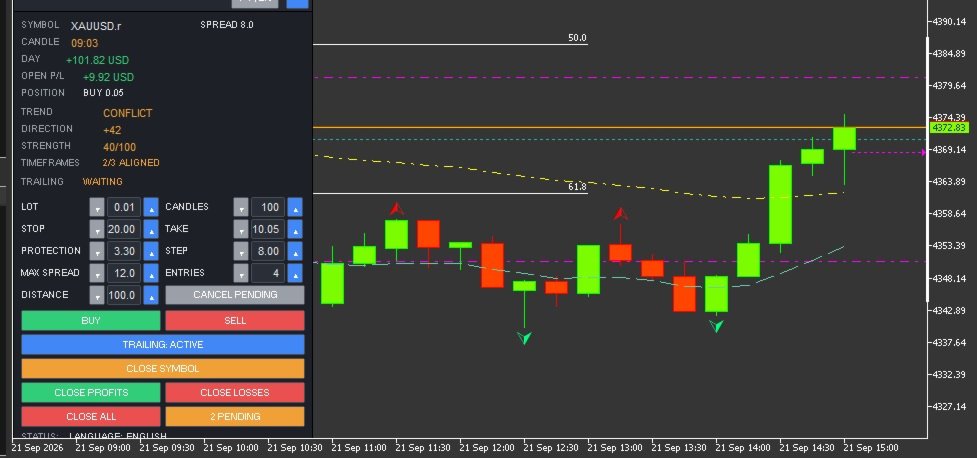
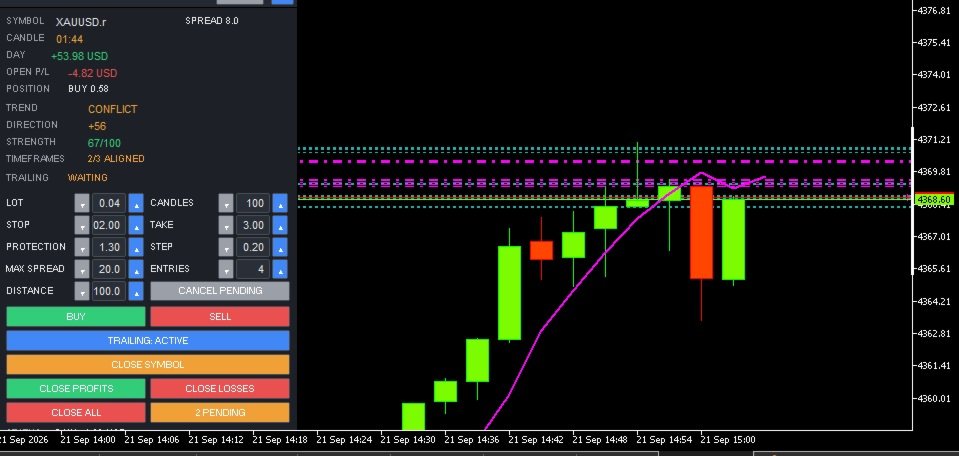
Boletovisc MT5 is a manual trading, position management and technical analysis panel developed for MetaTrader 5.

The tool brings execution, protection, position management and market analysis features into a single interface, allowing the user to control trades directly from the chart.

Boletovisc does not automatically open trades based on Trend V2. Buy, sell, hold and close decisions remain under the user's control.

Main Features

  • Market Buy and Sell directly from the panel.
  • Configurable number of entries per click.
  • Stop Loss in monetary value.
  • Take Profit in monetary value.
  • Trailing Stop based on monetary value.
  • Configurable initial protection and financial step.
  • Configurable maximum spread for new market orders.
  • Two simultaneous pending orders: BUY STOP and SELL STOP.
  • Configurable pending order distance.
  • Cancellation of pending orders created by Boletovisc.
  • Closing positions controlled by the current instance.
  • Closing only profitable positions.
  • Closing only losing positions.
  • Closing all positions controlled by the instance with safety confirmation.
  • Independent control per panel instance.
  • Daily realized result.
  • Floating result of open positions.
  • Current spread display.
  • Candle countdown timer.
  • Movable, resizable and minimizable panel.
  • Settings memory.
  • Portuguese and English interface.
  • Configurable sounds for positive and negative trade closures.
  • Integrated Trend V2 technical analysis module.
Account Compatibility: Boletovisc MT5 can operate on both HEDGING and NETTING accounts. For users who want to run multiple independent instances on the same symbol, the HEDGING model provides the best compatibility because positions can be isolated by instance/Magic Number. On NETTING accounts, positions for the same symbol are consolidated by MetaTrader 5 into a single net position.

    Buy and Sell

    BUY and SELL orders are sent only when the user presses the respective buttons.

    The user can configure the lot size and also the number of market entries sent per click.

    Boletovisc does not automatically decide when a trade should be opened.

    Stop Loss and Take Profit in Money

    Stop Loss and Take Profit can be configured using monetary values.

    Boletovisc calculates the corresponding price level according to the symbol, position volume and trading information provided by the server.

    The final result may differ due to spread, commission, swap, slippage, liquidity and broker execution conditions.

    Financial Trailing

    The trailing system uses two main parameters:

    Protection

    Defines the initial monetary value the system attempts to protect.

    Step

    Defines the financial increment used to progressively increase the protected level as the position result develops.

    When allowed by the symbol conditions and broker restrictions, the system moves the Stop Loss to protect progressively higher values.

    Spread Control

    Boletovisc displays the current spread and allows the user to define a maximum spread limit for new market orders.

    When the current spread exceeds the configured limit, new BUY and SELL orders sent from the panel are blocked.

    Setting the value to 0 disables this limit.

    This feature only applies an operational condition defined by the user and does not evaluate the potential quality or future result of a trade.

    Pending Orders

    Boletovisc can simultaneously create:

    BUY STOP above the current market price.

    SELL STOP below the current market price.

    The distance is configured in points.

    Both orders are independent. Execution of one order does not automatically cancel the other.

    If the market later reaches the level of the second order, it may also be executed.

    Position Management

    The panel allows the user to:

    • close positions controlled by the current instance;
    • close only profitable positions;
    • close only losing positions;
    • close all positions controlled by the instance;
    • cancel pending orders created by Boletovisc.

    The Close All command requires an additional confirmation to reduce accidental execution.

    Independent Control per Instance

    Each Boletovisc window uses its own identification to separate its trades from other instances.

    This allows multiple instances to operate without one panel indiscriminately managing positions belonging to another.

    The identification system is used for position management, orders, trailing, closing functions and statistics.

    Trend V2

    Trend V2 is an integrated technical analysis module.

    It uses closed candles and combines multiple technical criteria, including:

    • market structure;
    • EMA 20;
    • EMA 50;
    • EMA 200;
    • ADX;
    • +DI and -DI;
    • RSI;
    • ATR;
    • momentum;
    • recent price movement;
    • multi-timeframe analysis.

    The combination of these elements generates information about Direction, Strength, Timeframe Alignment and Trend State.

    Direction

    Direction uses an internal scale from:

    -100 to +100

    Positive values indicate predominance of bullish directional criteria used by the algorithm.

    Negative values indicate predominance of bearish directional criteria.

    Values closer to the central region indicate lower directional predominance.

    Important: Direction is not a probability of success.

    Example:

    +70 does not mean a 70% probability that the market will rise.

    It is only an internal technical score.

    Strength

    Strength is displayed on an internal scale from:

    0 to 100

    It represents the degree of consistency among the technical criteria used by Trend V2.

    Example:

    STRENGTH 75/100 does not mean a 75% probability of profit.

    It is an internal algorithmic metric and not a prediction of trading results.

    Timeframe Alignment

    Trend V2 also compares the current timeframe with higher timeframes.

    When the panel displays, for example:

    3/3 ALIGNED

    this means that the analyzed timeframes show directional agreement according to the algorithm's criteria.

    Alignment does not guarantee that the market will continue moving in that direction.

    Trend States

    Strong Up

    Indicates strong bullish predominance according to the internal criteria of Trend V2.

    Direction is positive, the strength reading is elevated and there is no relevant directional conflict among the analyzed timeframes.

    It does not represent an automatic Buy signal.

    Up

    Indicates positive directional predominance according to the analyzed criteria.

    The algorithm detects a bullish technical bias, but not all conditions required for a Strong Up classification are present.

    It does not represent an automatic recommendation to Buy.

    Sideways

    Indicates that the analyzed criteria do not show enough directional predominance to classify the market as bullish or bearish.

    It may represent balance, weak directional definition or absence of a clear trend according to the algorithm.

    It does not determine whether the user should trade or stay out of the market.

    Down

    Indicates negative directional predominance according to the analyzed criteria.

    The algorithm detects a bearish technical bias, but not all conditions required for a Strong Down classification are present.

    It does not represent an automatic recommendation to Sell.

    Strong Down

    Indicates strong bearish predominance according to the internal criteria of Trend V2.

    Direction is negative, the strength reading is elevated and there is no relevant directional conflict among the analyzed timeframes.

    It does not represent an automatic Sell signal.

    Conflict

    Indicates directional divergence among the analyzed timeframes.

    Part of the technical structure may show bullish predominance while another part shows bearish predominance.

    This only means that there is no directional consensus among the analyzed timeframes.

    It does not represent a recommendation to open, close or avoid a trade.

    PT / EN Interface

    Boletovisc includes interface support for:

    Portuguese

    and

    English

    The language can be changed directly from the panel using the PT | EN control.

    Main Inputs

    InpLanguage
    Defines the initial interface language.

    InpStopLossMoney
    Monetary value used for Stop Loss.

    InpTakeProfitMoney
    Monetary value used for Take Profit.

    InpTrailProtectMoney
    Initial monetary value used by the trailing protection system.

    InpTrailStepMoney
    Financial increment used by the trailing system.

    InpMaxSpreadPoints
    Maximum spread limit for new market orders. Value 0 disables the limit.

    InpTrendBars
    Number of candles used as the base for Trend V2 analysis.

    InpTrailingEnabled
    Defines whether trailing starts enabled.

    InpCloseSounds
    Enables or disables trade closing sounds.

    InpInitialLot
    Initial lot size displayed on the panel.

    InpInitialEntries
    Initial number of market entries per click.

    InpPendingDistancePts
    Initial distance of BUY STOP and SELL STOP pending orders.

    InpRememberSettings
    Keeps settings during restarts and timeframe changes.

    Important Notice

    Boletovisc MT5 is an execution, position management and technical analysis tool.

    It does not guarantee profit, profitability or any financial result.

    Trend V2 does not predict future market behavior with certainty and should not be interpreted as investment advice.

    Direction, Strength, timeframe alignment and trend states are mathematical outputs generated by the algorithm from available market data.

    No information displayed by the panel should be interpreted on its own as a recommendation to Buy or Sell.

    The user remains responsible for trading decisions, lot size, risk, Stop Loss, Take Profit and all other parameters used.

    Financial markets involve risk.

    Spread, commission, swap, slippage, volatility, liquidity and broker execution conditions may affect actual trading results.


    Önerilen ürünler
    Session boxes with automatic GMT offset & DST, a global world-clock panel, and a personal Trading Window that alerts you the second a trade slips outside your plan. Set it once — never adjust for daylight saving again. TrendSync Sessions — Trade the Right Hours, on Any Broker Every session indicator dies twice a year: daylight saving changes, the boxes shift, and you are left re-entering GMT offsets by hand. TrendSync Sessions was built to end that. Sessions are defined in each exchange's LOCA
    FREE
    FiveStarFX Gold Reversal Edge Professional automated trading solution designed for structured execution and controlled risk management in the Gold market. Built for traders who value discipline, precision, and consistency. Key Features Fully automated trading One trade at a time (controlled exposure) Fixed Stop Loss and Take Profit Smart Break-Even protection Profit lock with buffer Step-based trailing management Spread protection system Works on any broker Trade Management The E
    FREE
    This is a common, simple and easy to use but effective tool to manage trading risks for all traders. It also help trader places stop loss and take profit levels at the same time the order is filled. How to set the expert advisor's parameters to support your trading style? Lots size. Fixed lots size - For traders who prefered to trade with fixed lots size, they can input the lots size in 'User lots' menu in the expert advisor's properties. The input value should be from the 'Minimum Volume' to th
    Kiwi One Click Trade Pro MT5 Kiwi One Click Trade Pro MT5 is a free manual trading and risk-management utility for MetaTrader 5 designed to make trade planning, position sizing and order execution faster and easier. Instead of manually calculating lot size, Stop Loss and Take Profit before every trade, Kiwi One Click Trade Pro brings the essential controls together in one simple on-chart panel. Set your preferred risk, define the Stop Loss and Risk-to-Reward ratio, review the calculated trade pl
    FREE
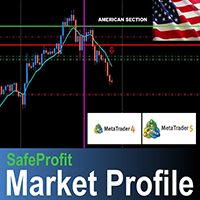
    The SafeProfit Market Profile is the most advanced tracking indicator in the Forex Market. It was developed to track the market profile of each session of the day: Asian, European and American. With this indicator you will operate Intraday smiling ... knowing exactly where the Big Players are positioned and the exact moment where they are going to. The indicator is simple, fast and objective, tracking every movement of the Big Players in price. Get out of the 95% statistic that only loses and us
    # Zikiman Risk Panel Pro — MT5 Risk Yöneticisi, Lot Hesaplayıcı ve Trade Manager Zikiman Risk Panel Pro, manuel işlem yapan yatırımcılar için bir MT5 risk yönetimi EA’sıdır. MT5 risk yöneticisi, lot hesaplayıcı, pozisyon büyüklüğü hesaplayıcı, risk hesaplayıcı, işlem paneli, işlem yöneticisi ve pozisyon yöneticisini grafik tabanlı tek bir iş akışında birleştirir. Yönü, riski ve fiyat seviyelerini siz belirlersiniz. Panel lot büyüklüğünü hesaplar, planlanan riski ve olası getiriyi gösterir, pi
    THE       MAC Trade Panel       It is an advanced trading utility designed for manual traders (scalpers and day traders) seeking speed, precision, and professional risk management in MetaTrader 4. Forget about time-consuming lot calculations: define your risk and let the dashboard do all the heavy lifting. Fully interactive, resizable, and with a modern design, it allows you to trade directly from the chart with order previews, manage multiple partial exits, and automatically protect your capita
    Trade Copier Local MT5 is a fast local trade copier for copying trades between multiple MT4 and MT5 accounts. One EA works in both Master and Slave modes. Simply select the required Copier Mode and use the same product on your MetaTrader terminals. Copy trades between: • MT5 → MT5 • MT5 → MT4 • MT4 → MT5 • MT4 → MT4 Perfect for: • Trading multiple accounts at once • Linking multiple trading accounts • Personal account mirroring • Signal providers • Account managers • Prop trading setups #


    NHS Risk Manager PRO NHS Risk Manager PRO is a professional trade-management and risk-control Expert Advisor for MetaTrader 5, built around one core idea: protect the account first, execute with precision second . At its center is a dedicated prop-firm compliance framework that tracks the rules that actually get funded accounts disqualified — daily drawdown, total drawdown, profit targets, and minimum trading days — and enforces them automatically instead of relying on the trader to remember the
    Emir Bileti, İşlem Paneli, Risk Yönetimi, Manuel İşlem, Trailing Stop, Emir Yönetimi, Hızlı Emir Gerçekleşmesi — JoOrderTrade Pro — MetaTrader 5 için yürütme paneli JoOrderTrade Pro, MetaTrader 5 için manuel emir yürütme ve gelişmiş risk yönetimi sağlayan kapsamlı bir grafik panelidir. Platformun yerleşik işlem pencerelerini temiz, hızlı yanıt veren ve performans açısından optimize edilmiş bir arayüzle değiştirerek işlem sırasında daha yüksek doğruluk ve kontrol sunar. Ürün bir otomatik işlem r
    Technical and Professional Description of the Indicator Price Structure, Fibonacci, Financial Volume, and Interest Zone Indicator This indicator was developed based on in-depth studies of price structure, Fibonacci levels, financial volume behavior, and the identification of market interest zones . Its primary purpose is to transform these different analytical elements into a structured visual tool, allowing users to identify key levels and areas of greater structural relevance on the chart in a
    FREE
    Aathmaa Algo
    Deivanayagam Deivanayagam Arumugam
    Aathmaa Algo — Fixed-Risk Multi-Symbol Expert Advisor     Check the live signal   ·   Read the setup guide   ·    Trade what the market gives you. Risk only what you decide in advance. AATHMAA is a multi-symbol EA built on one rule: every position opens with a fixed, known stop-loss, and every winning position is managed forward for as long as the market agrees with it. No averaging down, no martingale, no widening stops to "wait out" a loss. Runs on  USDJPY, GBPUSD, EURUSD, and XAUUSD  simul
    EasyTrade Pro - MT5 için Manuel İşlem Paneli EasyTrade Pro ile daha hızlı, daha kolay ve daha verimli işlem yapın. EasyTrade Pro, işlemlerini hızlı bir şekilde gerçekleştirmek ve önemli piyasa bilgilerini doğrudan grafik üzerinde takip etmek isteyen yatırımcılar için tasarlanmış hafif ve kullanımı kolay bir manuel işlem panelidir. Karmaşık ayarlar yok. Gereksiz göstergeler yok. Sadece her gün gerçekten ihtiyaç duyduğunuz araçlar. Özellikler Tek tıkla BUY ve SELL işlemleri Tüm pozisyonları ka
    FREE
    Quick Trade Panel Pro
    Nicolas Olivier Menetrey
    5 (1)
    Otomatik lot ve risk yönetimli tek tıkla işlem paneli Quick Trade Panel Pro , emirleri hızlı bir şekilde gerçekleştirmek isteyen ve aynı zamanda riskleri üzerinde tam kontrol sahibi olmak isteyen yatırımcılar için tasarlanmış sezgisel bir işlem panelidir. Ana Özellikler Kullanılabilir marjın yüzdesine göre otomatik lot büyüklüğü hesaplama Puan cinsinden ayarlanabilir Stop Loss, her işleme otomatik uygulanır Tutarlı pozisyon büyüklüğü sağlamak için işlem serisi boyunca lot büyüklüğü kilitlenir
    FREE
    TradeDock Pro (MT5) — One-Click Trade Manager Panel TradeDock Pro is a sleek and professional one-click trade panel for MetaTrader 5 designed for fast manual execution and simple trade management. Built for traders who want a clean interface, quick order placement, and essential management tools — without complicated settings or typing. Can be used on any market. KEY FEATURES One-Click BUY / SELL Lot size control on chart (0.01 – 99.99) SL toggle + SL in points TP toggle + TP in points Trailing
    This tool will perform Trailing stop loss and Break even management for orders. Helps you limit or reduce the time spend watching orders on the screen, especially when you need to go to sleep. Just add this EA to 1 chart, you can manage all pairs. You can filter orders by comment, magic number, symbol and order ticket number. When Breakeven it can add shift/offset pips (to cover the commission...). You can try in strategy tester before purchase. The EA will add Buy and Sell alternately, so you
    More stable MetaTrader 4 version is available here:  Lot Calculator Tool . This tool helps you to automatically calculate and manage risk, conveniently place orders visually, schedule orders, trail stops, move them to break-even and more. Features Place market or pending orders using draggable lines Schedule orders Calculate and limit risk using various methods See current spread See time till next candle Set custom order comments Trail stops Move stops to break-even See order profit/loss in p
    XBOOT BOLETA PRO Professional Manual Trading Panel for MetaTrader 5 XBOOT Boleta Pro is a complete trading panel designed for traders who execute manual trades and want greater speed, organization, and control during every trading session. More than a standard Buy and Sell panel, XBOOT Boleta Pro combines powerful trading tools into a single interface, helping traders analyze the market, manage risk, execute orders, and monitor trading performance without leaving the chart. Its purpose is to sim
    LT Trade Panel Lite - Hızlı İşlem İletimi ve Ücretsiz Emir Paneli LT Trade Panel Lite, manuel işlemlerde mutlak hız arayan yatırımcılar için tasarlanmış, MetaTrader 5 platformundaki en pratik ve en hızlı işlem panelidir. Endeks, hisse senedi ve forex piyasalarında Günlük Al-Sat (Day Trade) yapanlar için idealdir. Bu ücretsiz sürüm, profesyonel bir hassasiyetle ve hiçbir ücret ödemeden işlem yapabilmeniz için gerekli temel araçları sunar. LITE Sürümünde Neler Var? Anlık İşlem İletimi: Tek bi
    FREE
    Risk Calculator Veqrix  Risk Calculator Veqrix is a risk calculation, visual trade planning, and manual order execution tool for MetaTrader 5. The EA automatically calculates the trade volume using the configured risk, entry price, and distance to the Stop Loss. It also displays the planned trade directly on the chart and distributes the total volume across up to three Take Profit targets. This tool does not generate trading signals . The user selects the direction, configures the levels, and
    FREE
    Order Blocks Indicator Fnix v3 Smc
    Monique Ellen Miranda Dos Santos
    Grafiğin her mumunda bloklar çizer ve gelişmiş price action kriterleriyle geçerli Order Blocks (OB)'leri (yükseliş ve düşüş setup'ları için) vurgular. SMC (Smart Money Concepts) yatırımcıları için ideal. **Ana Özellikler:** - Tüm analiz edilen mumlara (en fazla 500 bar) dikdörtgenler render eder, gelecek projeksiyonu ve kaydırmalarla. - OB'leri algılar: Bullish (mavi, OB↑) ve Bearish (kırmızı, OB↓), mum baskısı, minimum boyut ve yapı kırılımlarına göre. - Özelleştirilebilir uyarılar: Popup, pu
    Summary of the Advanced Account Monitoring for MT5 The Advanced Account Monitoring for MT5 is a powerful tool designed for advanced account monitoring, offering traders detailed insights into their trading performance. This indicator provides a comprehensive dashboard to track drawdowns, profits, and trading volumes across different timeframes. Below is an overview of its key functions: Account and Robot Monitoring The indicator allows users to monitor either the entire account or a specific Ex
    Slime Risk manager
    Paul Odhiambo Ouma
    Professional Risk Manager Dashboard.   An advanced position sizing and trade management assistant designed for manual traders. It calculates precise lot sizes based on your chosen risk parameters, helping you protect your account equity while aiming for consistent returns. The tool includes built-in psychological safeguards to encourage disciplined trading behavior, as well as daily profit monitoring to help you lock in gains. It serves as a powerful visual decision-support tool for implementing
    TP SL Bot MT5
    Ruslan Brezovskiy
    5 (1)
    TP SL Bot - Yeni açılan emirlere, belirtilen talimatlarınıza göre otomatik olarak Stop Loss ve Take Profit ayarlayan bir araçtır. Ayrıca, istenen Stop Loss/Take Profit boyutunda istenen miktarı elde etmek için işlem açmak için gereken hacmi hesaplama özelliği de bulunmaktadır. Boyut ve parametre ayarlamaları için birkaç seçenek vardır: 1. Mevcut hesap bakiyesinin yüzdesi olarak kullanıcı tarafından belirtilen miktarlara göre ayarlama yapma. 2. Kullanıcı tarafından belirtilen Stop Loss veya Take
    SMC Visual indicator
    Gabriel Balbino De Oliveira
    SMC Visual Indicator v6 – Trade Like Smart Money Most traders spend hours trying to identify market structure, liquidity zones, Fair Value Gaps, and potential reversals. By the time they finish their analysis, the market has already moved. SMC Visual Indicator v6 does the hard work for you. Built around advanced Smart Money Concepts (SMC) and ICT methodologies, this indicator automatically identifies the key areas where institutional traders leave their footprints. Imagine opening your chart and
    Symbol Manager or Grid Manager, designed to group orders into one position (by Symbol or by Magic Number). This utility will be useful to multi-currency traders (many EAs), who can have multiple orders on several pairs. You will be able to see the total number of lots, the total profit, and set virtual stop loss and virtual take profit. To set a real TP (or SL), you must first set the virtual value, and then enter the command in this cell: "set". If you want to set real TP/SL for all orders at
    Trend Slayer Indicator
    Felipe Carvalho De Queiroz
    Trend Indicator Pro Use any currency and any time period you want For greater profitability use a risk return of at least 1:3 or 1:4 Entry Signal : Appears after the moving average crossover closes ️️ Histogram Flip : Signals important trend changes ️ Easy to use : Perfect for those who want fast, confident decisions! Boost your accuracy : Find the best market entry moments with more confidence! Get straight to the point and seize the best trend opportunities!
    Zirk Trading Management Zirk Trading Management is a powerful trade management utility for MetaTrader that helps traders execute trades with consistent risk management. It is designed to simplify position sizing by automatically calculating the correct lot size based on your chosen risk percentage and stop-loss distance. Instead of manually calculating lot sizes, simply set your desired account risk (e.g., 1%), place your stop loss, and the utility instantly determines the appropriate trade volu
    Gold Soverient H4
    Arockia Dinesh Babu
    Trading Specifications: Symbol: XAUUSD (Gold) Timeframe: H4 (Required for optimal performance) Strategy: Swing Trading / Trend Following Minimum Deposit: $1000 (Recommended for proper risk management) Lot Size : 0.01 ·         Within a year, your entire initial capital was fully withdrawn, and since then, the EA has been trading exclusively with profit funds only, without any exposure to the original balance. ·         The current price of $599 is a limited launch offer, and it will be increased
    Partial
    Pablo Filipe Soares De Almeida
    Partial Close Manager – İşlem Hacmi Ayarlama Aracı Bu araç, MetaTrader 5’te açık işlemlerde kısmi kapatma yapmanızı sağlar. Özellikler Kısmi Kapatma: Açık işlemlerin bir kısmını tek işlemle kapatın. Hacim Hesaplama: Kapatılacak hacmi otomatik hesaplar, manuel giriş gerekmez. Çoklu Emir Desteği: Aynı semboldeki tüm açık emirlerde kısmi kapatma uygular. Taşınabilir Tablo: Başlığı tıklayıp basılı tutarak tabloyu grafikte istediğiniz yere taşıyın.
    Bu ürünün alıcıları ayrıca şunları da satın alıyor
    Trade Assistant MT5
    Evgeniy Kravchenko
    4.43 (216)
    It helps to calculate the risk per trade, the easy installation of a new order, order management with partial closing functions, trailing stop of 7 types and other useful functions. Additional materials and instructions Installation instructions - Application instructions - Trial version of the application for a demo account Line function -   shows on the chart the Opening line, Stop Loss, Take Profit. With this function it is easy to set a new order and see its additional characteristics bef
    Trade Manager EA’ye hoş geldiniz! Ticaretin daha sezgisel, hassas ve verimli hale gelmesi için tasarlanmış nihai risk yönetim aracı ile tanışın. Bu sadece bir emir verme aracı değil; ticaret planlaması, pozisyon yönetimi ve risk kontrolü için kapsamlı bir çözüm. İster yeni başlayan bir yatırımcı olun, ister deneyimli bir trader ya da hızlı emir gerektiren bir scalper, Trade Manager EA ihtiyaçlarınıza uyum sağlar ve forex, endeksler, emtialar ve kripto paralar dahil tüm piyasalarda esneklik sunar
    Local Trade Copier EA MT5
    Juvenille Emperor Limited
    4.94 (149)
    Local Trade Copier EA MT5, aynı Windows bilgisayarı veya Windows VPS üzerinde çalışan birden fazla MetaTrader 5 hesabı arasında işlemleri kopyalamak ve yönetmek için hızlı ve esnek bir işlem kopyalayıcıdır. Yerel işlem senkronizasyonunu, Receiver tarafında lot büyüklüğü, risk yönetimi, işlem filtreleme, sembol eşleştirme, işlem yönetimi ve hesap koruması kontrolleriyle birleştirir. Transmitter ve Receiver terminallerinizi yaklaşık 1 dakika içinde ayarlayın ve aynı veya farklı brokerlardaki hesa
    Şimdi Türkçe dil desteği ile. Strategy Ledger Pro , MetaTrader 5 için salt okunur bir hesap analiz panelidir. Hesap sonuçlarını Uzman Danışman (EA), strateji, sembol ve magic numaraya göre ayırır; böylece her birinin gerçekte ne kattığını görürsünüz. Panel 11 dilde kullanılabilir: English, Français, Deutsch, Español, Italiano, Português, Русский, Türkçe, 中文, 日本語 ve 한국어. Demoyu indirmeden önce. Market, her ücretli ürünün demosunu yalnızca Strateji Test Cihazında çalıştırır. Bu panel kendi hesabı
    ================================================================================ POC BREAKOUT - V20.72. Full Professional Grade Toolkit ================================================================================ POC Breakout is a full MetaTrader 5 trading dashboard for discretionary traders who want breakout signals, Point of Control (POC) context, volume profiles, order flow, market structure, news, alerts, and advanced trade planning in one professional workspace. Attached directly to you
    Telegram to MT5 Multi-Channel Copier   , Telegram kanallarınızdaki alım-satım sinyallerini doğrudan MetaTrader 5'e otomatik kopyalar. Bot yok, tarayıcı uzantısı yok, elle kopyalama yok. Sinyal Telegram'a düşer ve EA birkaç saniye içinde terminalinizde işlemi açar. Ve bir kanalı kopyalamadan önce, yerleşik backtester o kanalın hesabınızda ne yapmış olacağını gösterir. Ürün iki bileşenden oluşur: Telegram kanallarınızı dinleyen bir Windows uygulaması ve sinyalleri MT5 terminalinizde yürüten bu Exp
    TradePanel MT5
    Alfiya Fazylova
    4.88 (169)
    Trade Panel, çok işlevli bir ticaret asistanıdır. Uygulama, manuel ticaret için 50'den fazla ticaret fonksiyonu içerir ve çoğu ticaret görevini otomatikleştirmeyi mümkün kılar. Uygulama talimatları + video talimatları: https://www.mql5.com/en/blogs/post/772292 Demo hesabı için uygulamanın deneme sürümü: https://www.mql5.com/en/blogs/post/750865 Uygulamayı nasıl kurulur: https://www.mql5.com/en/blogs/post/756239 Uygulamayı görsel modda nasıl test edilir: https://www.mql5.com/en/blogs/post/770277
    Telegram sinyallerini kendi işlem kurallarınızla kopyalayın Telegram to MT5 Signal Trader , herkese açık ve özel Telegram kanallarındaki ve gruplarındaki metin tabanlı işlem sinyallerini otomatik olarak MetaTrader 5'e kopyalar. Tek bir masaüstü uygulamasından birden fazla sinyal sağlayıcısını ve MT5 hesabını yönetin; her sağlayıcı için ayrı risk ve işlem ayarları belirleyin. Sinyal kopyalamak için Telegram botu veya API kurulumu gerekmez. Kendi Telegram hesabınızla telefon numarası veya QR kod k
    Farmed Hedge Yield Farming | All Markets (Manual - Hybrid - Semi/Automated EA) VERIFIED TRADING RESULTS - Farmed Hedge Yield Axi Copy:  https://www.mql5.com/en/signals/2356376 - Farmed Hedge Yield Exn Copy:   https://www.mql5.com/en/signals/2356404 - Farmed Hedge Yield V Copy:  https://www.mql5.com/en/signals/2357156 IMPORTANT NOTICE: FarmedHedge is a MANUAL-FOCUSED TRADING UTILITY ,not a fully automated EA. Results shown on this Signal include manual trades and overall strategic management.
    Power Candles Strateji Tarayıcısı - Kendi Kendini Optimize Eden Çoklu Sembol Kurulum Bulucu Power Candles Strateji Tarayıcısı , Power Candles göstergesini çalıştıran aynı kendinden optimize edici motoru, Piyasa İzleyicinizdeki her sembol üzerinde yan yana çalıştırır. Tek bir panel, şu anda istatistiksel olarak hangi sembollerin işlem yapılabilir olduğunu, her birinde hangi stratejinin kazandığını, en uygun Stop Loss / Take Profit çiftini gösterir ve yeni bir sinyal geldiği anda size bildirim gön
    Exp COPYLOT CLIENT for MT5
    Vladislav Andruschenko
    3.97 (35)
    MetaTrader 5 için profesyonel işlem kopyalayıcı MetaTrader için hızlı, profesyonel ve güvenilir bir işlem kopyalayıcı . COPYLOT , MT4 ve MT5 terminalleri arasında Forex işlemlerini kopyalamanıza olanak tanır ve Hedge ile Netting hesaplarını destekler. COPYLOT MT5 sürümü şunları destekler: - MT5 Hedge → MT5 Hedge - MT5 Hedge → MT5 Netting - MT5 Netting → MT5 Hedge - MT5 Netting → MT5 Netting - MT4 → MT5 Hedge - MT4 → MT5 Netting MT4 sürümü Tam açıklama + DEMO + PDF Nasıl satın alınır Nasıl kurul
    Signal TradingView to MT5 Pro Automator TradingView ve MetaTrader 5 arasında anında profesyonel uygulama TradingView alarmları ile MT5'teki gerçek uygulama arasındaki en güçlü iletişim köprüsüyle ticaret stratejinizi otomatikleştirin. Hız, esneklik ve kusursuz risk yönetimi talep eden yatırımcılar için tasarlanan bu Uzman Danışman (Expert Advisor), herhangi bir alarm mesajını hassas bir piyasa (market) veya limit emrine dönüştürür. GÜÇLÜ YÖNLER VE AVANTAJLAR Evrensel Ayrıştırma Motoru (Tescilli)
    Premium Trade Manager - İçine Koç Yerleştirilmiş İşlem Paneli Premium Trade Manager , grafiğinizin içine bir trading koçu yerleştirir; altında tam bir yürütme motoru çalışır. İşlemi her zamanki gibi kurun, ardından yapay zeka trading koçunuz Max, o kurulumu tam olarak okusun ve canlı hesabınıza göre taahhüt etmeden önce size net bir değerlendirme sunsun: stop disiplinli bir yaklaşıma uyuyor mu, risk büyüklüğü makul mü, yüksek etkili bir haber dakikalar sonra mı geliyor, prop firm limitinize yakl
    HINN MAGIC ENTRY – the ultimate tool for entry and position management! SIMPLE. FASTEST. INTUITIVE. MAX AUTOMATED. Place orders by selecting a level directly on the chart! full description   ::  demo-version  :: 60-sec-video-description Key features: - Market, limit, and pending orders - Automatic lot size calculation - Automatic spread and commission accounting - Unlimited partitial take-profits  - Breakeven and trailing stop-loss and take-profit  functions - Invalidation leves - Intuitive, a
    MT5 to Telegram Signal Provider , hesabınızı bir sinyal sağlayıcı haline getirerek belirtilen sinyalleri Telegram'ın sohbetine, kanalına veya grubuna göndermeyi sağlayan kullanımı kolay, tamamen özelleştirilebilir bir araçtır. Rakip ürünlerin çoğunun aksine, DLL içe aktarması yapmaz. [ Demo ] [ Kılavuz ] [ MT4 Versiyonu ] [ Discord Versiyonu ] [ Telegram Kanalı ]  New: [ Telegram To MT5 ] Kurulum Adım adım bir kullanıcı kılavuzu mevcuttur. Telegram API'si hakkında bilgi gerekmemektedir; ihtiyac
    One button. One trade. MT5 Trading Deck is a hotkey trading panel for MetaTrader 5 that turns the platform into a keyboard-driven execution cockpit. Stop loss, take profit and lot size are pre-calculated for every key; the moment you press, a market order is live on the broker. A complete technical user manual is attached in the product Comments section. It documents every input parameter, the full hotkey map, the recommended Stream Deck XL layout, and the advanced workflows for Pre-Limit orders
    Satın aldıktan sonra bana mesaj göndererek tam kullanım kılavuzu paketini + AI özelliklerini test etmek için 3 günlük OpenAI API denemesini + bir başka bonus hediyeyi alabilirsiniz Mevcut fiyat, Ağustos Yeniden Lansman Güncellemesi için sınırlı süreli indirimli fiyattır — fiyat artmadan önce sürümünüzü şimdi güvence altına alın. Sonraki fiyat: $340 Bu, piyasada şimdiye kadar denediğiniz veya gördüğünüz tüm trading panellerinden tamamen farklıdır. Şu anda perakende piyasasında bulunan en yenilik
    Grid Manual MT5
    Alfiya Fazylova
    4.73 (22)
    Grid Manual, sipariş ızgarasıyla çalışmak için kullanılan bir ticaret yardımcı programıdır. Yardımcı program evrenseldir, esnek ayarlara ve sezgisel bir arayüze sahiptir. Sadece kayıpların ortalaması yönünde değil, aynı zamanda kazanç artışı yönünde de bir emir ızgarası ile çalışır. Tüccarın bir emir ızgarası oluşturmasına ve eşlik etmesine gerek yoktur, bu yardımcı programı yapacaktır. Emri açmanız yeterlidir ve Grid manual otomatik olarak ona bir emir ızgarası oluşturacak ve kapanana kadar ona
    Trade copier MT5
    Alfiya Fazylova
    4.61 (56)
    Trade Copier, ticaret hesapları arasındaki işlemleri kopyalamak ve senkronize etmek için tasarlanmış profesyonel bir yardımcı programdır. Kopyalama, tedarikçinin hesabından/terminalinden alıcının aynı bilgisayarda veya vps'de kurulu olan hesabına/terminaline gerçekleşir. KAMPANYA - Eğer zaten "Trade copier MT5" aldıysanız, "Trade copier MT4"ü ücretsiz olarak alabilirsiniz (MT4 > MT5 ve MT4 < MT5 kopyalamalar için). Koşullar hakkında daha fazla bilgi almak için lütfen bizimle özel mesaj yoluyla i
    EA Overfitter
    Stephen J Martret
    5 (1)
    That backtest looks great. But will it still be making money tomorrow, next week, next month? EA Overfitter re-runs your EA on 100 price histories it has never seen. One score tells you if the edge is real. A backtest tells you what an EA did on one price history — the one that happened to occur. What you cannot tell from it is how much of that result was the strategy and how much was the particular path. EA Overfitter answers that. It builds up to 100 synthetic price histories your EA has n
    Riskinizi otomatik olarak hesaplarken işlemlere hızlı bir şekilde girip çıkmanıza yardımcı olacak Ticaret Yöneticisi. Aşırı Ticaret, İntikam Ticareti ve Duygusal Ticaretten korunmanıza yardımcı olacak özellikler içerir. İşlemler otomatik olarak yönetilebilir ve hesap performans ölçümleri bir grafikte görselleştirilebilir. Bu özellikler, bu paneli tüm manuel yatırımcılar için ideal kılar ve MetaTrader 5 platformunun geliştirilmesine yardımcı olur. Çoklu Dil desteği. MT4 Sürümü  |  Kullanım Kılavu
    Trade Dashboard simplifies how you open, manage, and control your trades, with built-in lot size calculation. It allows you to execute trades, manage risk, and control positions directly on the chart, with tools such as partial close, breakeven, and trailing stop. Designed to reduce manual work and help you stay focused on your trading decisions. A demo version is available for testing. Detailed explanations of features are provided within the MQL5 platform. Installation instructions are include
    Telegram To MT5 — Sinyal Kopyalayıcı Telegram kanallarınızdaki işlem çağrılarını gerçek MT5 emirlerine dönüştürün — otomatik olarak, istediğiniz kadar hesapta ve risk ile kurallar tamamen sizin kontrolünüzde. Telegram To MT5, Telegram'da zaten takip ettiğiniz VIP / sinyal kanallarını MetaTrader 5 terminalinize bağlar. Ücretsiz bir eşlik eden masaüstü uygulaması mesajları okur (botlara izin vermeyen kanallardan bile), ve bu Expert Advisor bunları hesabınızda yürütür — kendi risk ayarlarınızı, sem
    EA Slipstream
    Stephen J Martret
    5 (1)
    Your backtest filled every order at the price it asked for. Your account does not. EA Slipstream measures what execution costs your EA, using your own fills, slippages and spreads to show you the true performance of your EA. A backtest prices every trade at the level the EA named. In live trading a pending order fills at whatever price is available when it triggers, a stop closes wherever the market is when it is hit, and the spread at that moment is whatever the account was quoting. The differ
    MT5 için Dynamic Fibonacci Grid Dashboard’un en son sürümünü tanıtıyoruz. Artık birçok yeni özellikle donatılmış olan bu yeni gösterge paneli, ticaret deneyiminizi tamamen değiştirir ve piyasayı ile fiyat hareketlerini tamamen farklı bir bakış açısıyla görmenizi sağlar. Birden fazla zaman dilimi ve sembolün eşzamanlı analizleriyle yeni fırsatları keşfedin. Manuel işlem ve pozisyon yönetimi için kullanıcı dostu arayüz ve önceden tanımlanmış otomatik stratejileri uygulama yeteneğinin genişletilmi
    Welcome to ENTRY IN THE ZONE AND SMC MULTI TIMEFRAME Entry In The Zone and SMC Multi Timeframe is a real-time market analysis tool based on Smart Money Concepts (SMC), designed to analyze market structure, price direction, and key trading zones. It supports both Single-Timeframe Analysis and Multi-Timeframe Analysis, providing a clearer view of the overall market structure across multiple timeframes, with real-time BUY / SELL signals that do not repaint. It is designed to help filter trading opp
    Basket EA MT5
    Juvenille Emperor Limited
    5 (7)
    Basket EA MT5 , güçlü bir kâr alma aracı ve kapsamlı bir hesap koruma sistemini basit ve kullanımı kolay bir çözümde birleştirir. Ana amacı, tüm açık pozisyonları tek tek değil, bir sepet (basket) olarak yöneterek, hesabınızın toplam kâr ve zararını tamamen kontrol altında tutmaktır. EA; sepet düzeyinde take profit, stop loss, break even ve trailing stop gibi özellikler sunar. Bunlar, bakiye yüzdesi, sabit bir para birimi değeri ya da yönetilen işlemlerin ortalama pip hedefi olarak ayarlanabilir
    Bu ürün, haber saatlerinde tüm uzman danışmanları ve manüel grafikleri filtreler, böylece manüel ticaret kurulumlarınızı veya diğer uzman danışmanlar tarafından girilen işlemleri yok edebilecek ani fiyat dalgalanmaları konusunda endişelenmenize gerek kalmaz. Bu ürün, herhangi bir haber yayınlanmadan önce açık pozisyonlarınızı ve bekleyen emirlerinizi yönetebilen tam bir sipariş yönetim sistemi ile birlikte gelir.   The News Filter'ı   satın aldığınızda, gelecekteki uzman danışmanlar için yerleşi
    The product will copy all telegram signal to MT5 ( which you are member) , also it can work as remote copier.  Easy to set up, copy order instant, can work with almost signal formats, image signal,  s upport to translate other language to English Work with all type of channel or group, even channel have "Restrict Saving Content", work with  multi channel, multi MT5 Work as remote copier: with signal have ticket number, it will copy exactly via ticket number. Support to backtest signal. How to s
    Your EAs cannot see each other, but Anchor can. Anchor gives you one place to coordinate your EAs, manage risk, and decide when trading is allowed. It works alongside the trading bots you already use without any changes to them. The Problem One EA opens a trade. Then another starts trading. The next thing you know, you wake up to multiple grids built across your account. Each EA may be doing exactly what it was designed to do, but together they can place far more risk on your account than you in
    Filtrele:
    Değerlendirme yok
    Değerlendirmeye yanıt