Boletovisc MT5

Boletovisc MT5

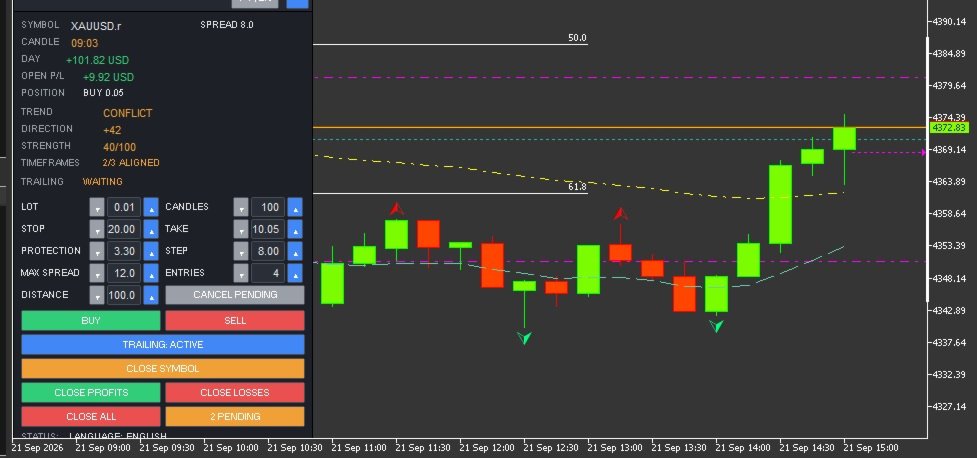
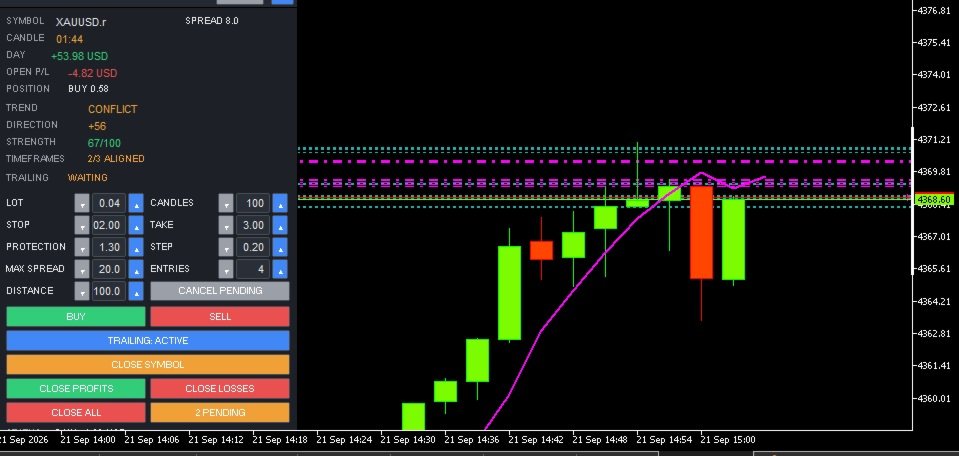
Boletovisc MT5 is a manual trading, position management and technical analysis panel developed for MetaTrader 5.

The tool brings execution, protection, position management and market analysis features into a single interface, allowing the user to control trades directly from the chart.

Boletovisc does not automatically open trades based on Trend V2. Buy, sell, hold and close decisions remain under the user's control.

Main Features

  • Market Buy and Sell directly from the panel.
  • Configurable number of entries per click.
  • Stop Loss in monetary value.
  • Take Profit in monetary value.
  • Trailing Stop based on monetary value.
  • Configurable initial protection and financial step.
  • Configurable maximum spread for new market orders.
  • Two simultaneous pending orders: BUY STOP and SELL STOP.
  • Configurable pending order distance.
  • Cancellation of pending orders created by Boletovisc.
  • Closing positions controlled by the current instance.
  • Closing only profitable positions.
  • Closing only losing positions.
  • Closing all positions controlled by the instance with safety confirmation.
  • Independent control per panel instance.
  • Daily realized result.
  • Floating result of open positions.
  • Current spread display.
  • Candle countdown timer.
  • Movable, resizable and minimizable panel.
  • Settings memory.
  • Portuguese and English interface.
  • Configurable sounds for positive and negative trade closures.
  • Integrated Trend V2 technical analysis module.
Account Compatibility: Boletovisc MT5 can operate on both HEDGING and NETTING accounts. For users who want to run multiple independent instances on the same symbol, the HEDGING model provides the best compatibility because positions can be isolated by instance/Magic Number. On NETTING accounts, positions for the same symbol are consolidated by MetaTrader 5 into a single net position.

    Buy and Sell

    BUY and SELL orders are sent only when the user presses the respective buttons.

    The user can configure the lot size and also the number of market entries sent per click.

    Boletovisc does not automatically decide when a trade should be opened.

    Stop Loss and Take Profit in Money

    Stop Loss and Take Profit can be configured using monetary values.

    Boletovisc calculates the corresponding price level according to the symbol, position volume and trading information provided by the server.

    The final result may differ due to spread, commission, swap, slippage, liquidity and broker execution conditions.

    Financial Trailing

    The trailing system uses two main parameters:

    Protection

    Defines the initial monetary value the system attempts to protect.

    Step

    Defines the financial increment used to progressively increase the protected level as the position result develops.

    When allowed by the symbol conditions and broker restrictions, the system moves the Stop Loss to protect progressively higher values.

    Spread Control

    Boletovisc displays the current spread and allows the user to define a maximum spread limit for new market orders.

    When the current spread exceeds the configured limit, new BUY and SELL orders sent from the panel are blocked.

    Setting the value to 0 disables this limit.

    This feature only applies an operational condition defined by the user and does not evaluate the potential quality or future result of a trade.

    Pending Orders

    Boletovisc can simultaneously create:

    BUY STOP above the current market price.

    SELL STOP below the current market price.

    The distance is configured in points.

    Both orders are independent. Execution of one order does not automatically cancel the other.

    If the market later reaches the level of the second order, it may also be executed.

    Position Management

    The panel allows the user to:

    • close positions controlled by the current instance;
    • close only profitable positions;
    • close only losing positions;
    • close all positions controlled by the instance;
    • cancel pending orders created by Boletovisc.

    The Close All command requires an additional confirmation to reduce accidental execution.

    Independent Control per Instance

    Each Boletovisc window uses its own identification to separate its trades from other instances.

    This allows multiple instances to operate without one panel indiscriminately managing positions belonging to another.

    The identification system is used for position management, orders, trailing, closing functions and statistics.

    Trend V2

    Trend V2 is an integrated technical analysis module.

    It uses closed candles and combines multiple technical criteria, including:

    • market structure;
    • EMA 20;
    • EMA 50;
    • EMA 200;
    • ADX;
    • +DI and -DI;
    • RSI;
    • ATR;
    • momentum;
    • recent price movement;
    • multi-timeframe analysis.

    The combination of these elements generates information about Direction, Strength, Timeframe Alignment and Trend State.

    Direction

    Direction uses an internal scale from:

    -100 to +100

    Positive values indicate predominance of bullish directional criteria used by the algorithm.

    Negative values indicate predominance of bearish directional criteria.

    Values closer to the central region indicate lower directional predominance.

    Important: Direction is not a probability of success.

    Example:

    +70 does not mean a 70% probability that the market will rise.

    It is only an internal technical score.

    Strength

    Strength is displayed on an internal scale from:

    0 to 100

    It represents the degree of consistency among the technical criteria used by Trend V2.

    Example:

    STRENGTH 75/100 does not mean a 75% probability of profit.

    It is an internal algorithmic metric and not a prediction of trading results.

    Timeframe Alignment

    Trend V2 also compares the current timeframe with higher timeframes.

    When the panel displays, for example:

    3/3 ALIGNED

    this means that the analyzed timeframes show directional agreement according to the algorithm's criteria.

    Alignment does not guarantee that the market will continue moving in that direction.

    Trend States

    Strong Up

    Indicates strong bullish predominance according to the internal criteria of Trend V2.

    Direction is positive, the strength reading is elevated and there is no relevant directional conflict among the analyzed timeframes.

    It does not represent an automatic Buy signal.

    Up

    Indicates positive directional predominance according to the analyzed criteria.

    The algorithm detects a bullish technical bias, but not all conditions required for a Strong Up classification are present.

    It does not represent an automatic recommendation to Buy.

    Sideways

    Indicates that the analyzed criteria do not show enough directional predominance to classify the market as bullish or bearish.

    It may represent balance, weak directional definition or absence of a clear trend according to the algorithm.

    It does not determine whether the user should trade or stay out of the market.

    Down

    Indicates negative directional predominance according to the analyzed criteria.

    The algorithm detects a bearish technical bias, but not all conditions required for a Strong Down classification are present.

    It does not represent an automatic recommendation to Sell.

    Strong Down

    Indicates strong bearish predominance according to the internal criteria of Trend V2.

    Direction is negative, the strength reading is elevated and there is no relevant directional conflict among the analyzed timeframes.

    It does not represent an automatic Sell signal.

    Conflict

    Indicates directional divergence among the analyzed timeframes.

    Part of the technical structure may show bullish predominance while another part shows bearish predominance.

    This only means that there is no directional consensus among the analyzed timeframes.

    It does not represent a recommendation to open, close or avoid a trade.

    PT / EN Interface

    Boletovisc includes interface support for:

    Portuguese

    and

    English

    The language can be changed directly from the panel using the PT | EN control.

    Main Inputs

    InpLanguage
    Defines the initial interface language.

    InpStopLossMoney
    Monetary value used for Stop Loss.

    InpTakeProfitMoney
    Monetary value used for Take Profit.

    InpTrailProtectMoney
    Initial monetary value used by the trailing protection system.

    InpTrailStepMoney
    Financial increment used by the trailing system.

    InpMaxSpreadPoints
    Maximum spread limit for new market orders. Value 0 disables the limit.

    InpTrendBars
    Number of candles used as the base for Trend V2 analysis.

    InpTrailingEnabled
    Defines whether trailing starts enabled.

    InpCloseSounds
    Enables or disables trade closing sounds.

    InpInitialLot
    Initial lot size displayed on the panel.

    InpInitialEntries
    Initial number of market entries per click.

    InpPendingDistancePts
    Initial distance of BUY STOP and SELL STOP pending orders.

    InpRememberSettings
    Keeps settings during restarts and timeframe changes.

    Important Notice

    Boletovisc MT5 is an execution, position management and technical analysis tool.

    It does not guarantee profit, profitability or any financial result.

    Trend V2 does not predict future market behavior with certainty and should not be interpreted as investment advice.

    Direction, Strength, timeframe alignment and trend states are mathematical outputs generated by the algorithm from available market data.

    No information displayed by the panel should be interpreted on its own as a recommendation to Buy or Sell.

    The user remains responsible for trading decisions, lot size, risk, Stop Loss, Take Profit and all other parameters used.

    Financial markets involve risk.

    Spread, commission, swap, slippage, volatility, liquidity and broker execution conditions may affect actual trading results.


    Рекомендуем также
    Session boxes with automatic GMT offset & DST, a global world-clock panel, and a personal Trading Window that alerts you the second a trade slips outside your plan. Set it once — never adjust for daylight saving again. TrendSync Sessions — Trade the Right Hours, on Any Broker Every session indicator dies twice a year: daylight saving changes, the boxes shift, and you are left re-entering GMT offsets by hand. TrendSync Sessions was built to end that. Sessions are defined in each exchange's LOCA
    FREE
    FiveStarFX Gold Reversal Edge Professional automated trading solution designed for structured execution and controlled risk management in the Gold market. Built for traders who value discipline, precision, and consistency. Key Features Fully automated trading One trade at a time (controlled exposure) Fixed Stop Loss and Take Profit Smart Break-Even protection Profit lock with buffer Step-based trailing management Spread protection system Works on any broker Trade Management The E
    FREE
    This is a common, simple and easy to use but effective tool to manage trading risks for all traders. It also help trader places stop loss and take profit levels at the same time the order is filled. How to set the expert advisor's parameters to support your trading style? Lots size. Fixed lots size - For traders who prefered to trade with fixed lots size, they can input the lots size in 'User lots' menu in the expert advisor's properties. The input value should be from the 'Minimum Volume' to th
    Kiwi One Click Trade Pro MT5 Kiwi One Click Trade Pro MT5 is a free manual trading and risk-management utility for MetaTrader 5 designed to make trade planning, position sizing and order execution faster and easier. Instead of manually calculating lot size, Stop Loss and Take Profit before every trade, Kiwi One Click Trade Pro brings the essential controls together in one simple on-chart panel. Set your preferred risk, define the Stop Loss and Risk-to-Reward ratio, review the calculated trade pl
    FREE
    Профиль рынка SafeProfit - это самый продвинутый индикатор отслеживания на рынке Форекс. Он был разработан для отслеживания рыночного профиля каждой сессии дня: азиатской, европейской и американской. С помощью этого индикатора вы будете работать в течение дня, улыбаясь ... точно зная, где находятся крупные игроки и в какой момент они собираются. Индикатор простой, быстрый и объективный, он отслеживает каждое движение крупных игроков в цене. Выйдите из 95% статистики, которая только проигрывает,
    # Zikiman Risk Panel Pro — риск-менеджер MT5, калькулятор лота и Trade Manager Zikiman Risk Panel Pro — советник для управления риском в MT5, созданный для ручной торговли. Он объединяет в одном интерфейсе на графике риск-менеджер для MT5, калькулятор лота, калькулятор размера позиции, калькулятор риска, торговую панель, менеджер сделок и менеджер позиций. Направление, риск и ценовые уровни выбираете вы. Панель рассчитывает объём позиции, показывает планируемый риск и потенциальную прибыль, о
    THE       MAC Trade Panel       It is an advanced trading utility designed for manual traders (scalpers and day traders) seeking speed, precision, and professional risk management in MetaTrader 4. Forget about time-consuming lot calculations: define your risk and let the dashboard do all the heavy lifting. Fully interactive, resizable, and with a modern design, it allows you to trade directly from the chart with order previews, manage multiple partial exits, and automatically protect your capita
    Trade Copier Local MT5 is a fast local trade copier for copying trades between multiple MT4 and MT5 accounts. One EA works in both Master and Slave modes. Simply select the required Copier Mode and use the same product on your MetaTrader terminals. Copy trades between: • MT5 → MT5 • MT5 → MT4 • MT4 → MT5 • MT4 → MT4 Perfect for: • Trading multiple accounts at once • Linking multiple trading accounts • Personal account mirroring • Signal providers • Account managers • Prop trading setups #


    NHS Risk Manager PRO NHS Risk Manager PRO is a professional trade-management and risk-control Expert Advisor for MetaTrader 5, built around one core idea: protect the account first, execute with precision second . At its center is a dedicated prop-firm compliance framework that tracks the rules that actually get funded accounts disqualified — daily drawdown, total drawdown, profit targets, and minimum trading days — and enforces them automatically instead of relying on the trader to remember the
    Ордерная форма, Торговая панель, Управление риском, Ручная торговля, Трейлинг-стоп, Управление ордерами, Быстрое исполнение — JoOrderTrade Pro — панель исполнения для MetaTrader 5 JoOrderTrade Pro — это полнофункциональная графическая панель для ручного исполнения ордеров и расширенного управления рисками в MetaTrader 5. Она заменяет стандартные окна платформы чистым, отзывчивым и оптимизированным по производительности интерфейсом, обеспечивая большую точность и контроль во время торговли. Прод
    Technical and Professional Description of the Indicator Price Structure, Fibonacci, Financial Volume, and Interest Zone Indicator This indicator was developed based on in-depth studies of price structure, Fibonacci levels, financial volume behavior, and the identification of market interest zones . Its primary purpose is to transform these different analytical elements into a structured visual tool, allowing users to identify key levels and areas of greater structural relevance on the chart in a
    FREE
    Aathmaa Algo
    Deivanayagam Deivanayagam Arumugam
    Aathmaa Algo — Fixed-Risk Multi-Symbol Expert Advisor     Check the live signal   ·   Read the setup guide   ·    Trade what the market gives you. Risk only what you decide in advance. AATHMAA is a multi-symbol EA built on one rule: every position opens with a fixed, known stop-loss, and every winning position is managed forward for as long as the market agrees with it. No averaging down, no martingale, no widening stops to "wait out" a loss. Runs on  USDJPY, GBPUSD, EURUSD, and XAUUSD  simul
    EasyTrade Pro - Панель для Ручной Торговли MT5 Торгуйте быстрее, проще и эффективнее с EasyTrade Pro. EasyTrade Pro — это лёгкая и удобная панель для ручной торговли, созданная для трейдеров, которым нужны быстрые сделки и вся важная рыночная информация прямо на графике. Никаких сложных настроек. Никаких лишних индикаторов. Только инструменты, которые действительно нужны каждый день. Возможности Быстрое открытие BUY и SELL Кнопка закрытия всех позиций Настраиваемые Stop Loss и Take Profit
    FREE
    Quick Trade Panel Pro
    Nicolas Olivier Menetrey
    5 (1)
    Панель торговли в один клик с автоматическим управлением лотом и риском Quick Trade Panel Pro — это интуитивно понятная торговая панель, разработанная для трейдеров, которые хотят быстро исполнять ордера, сохраняя полный контроль над рисками. Основные функции Автоматический расчёт размера лота на основе процента от доступной маржи Настраиваемый Stop Loss в пунктах, автоматически применяемый к каждой сделке Размер лота фиксируется во время серии сделок для обеспечения постоянного размера позиции
    FREE
    TradeDock Pro
    Alex Michael Murray
    TradeDock Pro (MT5) — One-Click Trade Manager Panel TradeDock Pro is a sleek and professional one-click trade panel for MetaTrader 5 designed for fast manual execution and simple trade management. Built for traders who want a clean interface, quick order placement, and essential management tools — without complicated settings or typing. Can be used on any market. KEY FEATURES One-Click BUY / SELL Lot size control on chart (0.01 – 99.99) SL toggle + SL in points TP toggle + TP in points Trailing
    This tool will perform Trailing stop loss and Break even management for orders. Helps you limit or reduce the time spend watching orders on the screen, especially when you need to go to sleep. Just add this EA to 1 chart, you can manage all pairs. You can filter orders by comment, magic number, symbol and order ticket number. When Breakeven it can add shift/offset pips (to cover the commission...). You can try in strategy tester before purchase. The EA will add Buy and Sell alternately, so you
    Lot calculator tool MT5
    Ernestas Kvedaras
    3.67 (3)
    More stable MetaTrader 4 version is available here:  Lot Calculator Tool . This tool helps you to automatically calculate and manage risk, conveniently place orders visually, schedule orders, trail stops, move them to break-even and more. Features Place market or pending orders using draggable lines Schedule orders Calculate and limit risk using various methods See current spread See time till next candle Set custom order comments Trail stops Move stops to break-even See order profit/loss in p
    XBOOT BOLETA PRO Professional Manual Trading Panel for MetaTrader 5 XBOOT Boleta Pro is a complete trading panel designed for traders who execute manual trades and want greater speed, organization, and control during every trading session. More than a standard Buy and Sell panel, XBOOT Boleta Pro combines powerful trading tools into a single interface, helping traders analyze the market, manage risk, execute orders, and monitor trading performance without leaving the chart. Its purpose is to sim
    LT Trade Panel Lite
    Thiago Duarte
    4.59 (54)
    LT Trade Panel Lite — Быстрое исполнение и бесплатная торговая панель LT Trade Panel Lite — это самая практичная и быстрая торговая панель для MetaTrader 5, разработанная для трейдеров, которым важна максимальная скорость при ручном исполнении сделок. Идеально подходит для дей-трейдинга на индексах, акциях и Форекс. Эта бесплатная версия предоставляет все необходимые инструменты для ведения профессиональной и точной торговли совершенно бесплатно. Что вы найдете в версии LITE: Мгновенное исп
    FREE
    Risk Calculator Veqrix
    Jose Luis Heredia Padilla
    Risk Calculator Veqrix  Risk Calculator Veqrix is a risk calculation, visual trade planning, and manual order execution tool for MetaTrader 5. The EA automatically calculates the trade volume using the configured risk, entry price, and distance to the Stop Loss. It also displays the planned trade directly on the chart and distributes the total volume across up to three Take Profit targets. This tool does not generate trading signals . The user selects the direction, configures the levels, and
    FREE
    Он рисует блоки на каждой свече графика, выделяя валидные Order Blocks (OB) для бычьих и медвежьих сетапов с использованием продвинутых критериев price action. Идеально для трейдеров SMC (Smart Money Concepts). **Ключевые особенности:** - Отображает прямоугольники на всех анализируемых candles (до 500 баров), с проекцией в будущее и смещениями. - Обнаруживает OB: Bullish (синий, OB↑) и Bearish (красный, OB↓) на основе давления свечи, минимального размера и пробоев структуры. - Настраиваемые оп
    Summary of the Advanced Account Monitoring for MT5 The Advanced Account Monitoring for MT5 is a powerful tool designed for advanced account monitoring, offering traders detailed insights into their trading performance. This indicator provides a comprehensive dashboard to track drawdowns, profits, and trading volumes across different timeframes. Below is an overview of its key functions: Account and Robot Monitoring The indicator allows users to monitor either the entire account or a specific Ex
    Профессиональная панель управления рисками.   Продвинутый помощник для расчета позиций и управления сделками для ручных трейдеров. Рассчитывает точные объемы лотов на основе выбранных вами параметров риска, помогая защитить капитал счета и стремиться к стабильным результатам. Инструмент включает в себя встроенные психологические механизмы для поддержания дисциплинированного поведения, а также контроль дневной прибыли. Это мощный визуальный инструмент поддержки принятия решений для строгого соблю
    TP SL Bot MT5
    Ruslan Brezovskiy
    5 (1)
    TP SL Bot – утилита, которая автоматически устанавливает Stop Loss и Take Profit по вновь открытым ордерам различными способам по вашим указаниям. Также предусмотрена функция расчета объема, c которым нужно открыть сделку, чтобы получить желаемую сумму при указанном размере Stop Loss / Take Profit .   Есть несколько вариантов расчета размера и установки параметров: 1. Установки исходя из суммы, заданной пользователем в процентах от текущего остатка депозита 2. Установка исходя из введенной польз
    SMC Visual indicator
    Gabriel Balbino De Oliveira
    SMC Visual Indicator v6 – Торгуйте как Smart Money Большинство трейдеров тратят часы на поиск структуры рынка, зон ликвидности, Fair Value Gap и возможных разворотов. К моменту завершения анализа рынок уже ушел. SMC Visual Indicator v6 выполняет эту работу за вас. Созданный на основе передовых концепций Smart Money Concepts (SMC) и ICT, этот индикатор автоматически определяет ключевые области, где действуют крупные институциональные участники рынка. Представьте, что вы открываете график и мгнове
    Менеджер символов или Сеточный менеджер, разработан для группировки ордеров в одну позицию (по символу и по направлению). Эта утилита будет полезна сеточникам и мультивалютникам, тем у кого может быть открыто множество ордеров по нескольким парам. Вы сможете видеть общее количество лотов, общую прибыль, и устанавливать виртуальные стоплосс и тейкпрфит. Для установки реального ТП (или СЛ) необходимо сначала задать виртуальное значение, а затем ввести в этой ячейке команду: "set". Если вы хотите
    Trend Indicator Pro Use any currency and any time period you want For greater profitability use a risk return of at least 1:3 or 1:4 Entry Signal : Appears after the moving average crossover closes ️️ Histogram Flip : Signals important trend changes ️ Easy to use : Perfect for those who want fast, confident decisions! Boost your accuracy : Find the best market entry moments with more confidence! Get straight to the point and seize the best trend opportunities!
    Zirk Trading Management Zirk Trading Management is a powerful trade management utility for MetaTrader that helps traders execute trades with consistent risk management. It is designed to simplify position sizing by automatically calculating the correct lot size based on your chosen risk percentage and stop-loss distance. Instead of manually calculating lot sizes, simply set your desired account risk (e.g., 1%), place your stop loss, and the utility instantly determines the appropriate trade volu
    Trading Specifications: Symbol: XAUUSD (Gold) Timeframe: H4 (Required for optimal performance) Strategy: Swing Trading / Trend Following Minimum Deposit: $1000 (Recommended for proper risk management) Lot Size : 0.01 ·         Within a year, your entire initial capital was fully withdrawn, and since then, the EA has been trading exclusively with profit funds only, without any exposure to the original balance. ·         The current price of $599 is a limited launch offer, and it will be increased
    Partial
    Pablo Filipe Soares De Almeida
    Partial Close Manager – Инструмент для регулировки торгового объёма Этот инструмент позволяет выполнять частичное закрытие открытых сделок в MetaTrader 5. Функционал Частичное закрытие: Закрывайте часть открытых сделок одним действием. Расчёт объёма: Автоматически вычисляет объём для закрытия, без ручного ввода. Поддержка нескольких ордеров: Применяет частичное закрытие ко всем ордерам по тому же символу. Перемещаемая таблица: Нажмите и удерживайте заголовок, чтобы переместить таблицу по графику
    С этим продуктом покупают
    Trade Assistant MT5
    Evgeniy Kravchenko
    4.43 (216)
    Помогает рассчитать риск на сделку, простая установка нового ордера с помощью линий, управление ордерами с функциями частичного закрытия, 7 типов трейлинг-стопа и другие полезные функции. Дополнительные материалы и инструкции Инструкция по установке - Инструкция к приложению - Пробная версия приложения для демо счета Функция Линии   - отображает на графике линию открытия, стоп-лосс, тейк-профит. С помощью этой функции легко установить новый ордер и увидеть его дополнительные характеристики пе
    Добро пожаловать в Trade Manager EA — лучший инструмент для управления рисками, предназначенный для упрощения, точности и эффективности торговли. Это не просто инструмент для размещения ордеров; это комплексное решение для удобного планирования торгов, управления позициями и усиленного контроля над рисками. Независимо от того, начинающий вы трейдер, опытный специалист или скальпер, нуждающийся в быстром исполнении, Trade Manager EA адаптируется к вашим потребностям и работает с любыми активами:
    Local Trade Copier EA MT5
    Juvenille Emperor Limited
    4.94 (149)
    Local Trade Copier EA MT5 — это быстрый и гибкий копировщик сделок для копирования и управления сделками между несколькими счетами MetaTrader 5 на одном компьютере с Windows или Windows VPS. Он сочетает локальную синхронизацию сделок с настройками на стороне Receiver для управления размером лота, рисками, фильтрацией сделок, сопоставлением символов, управлением сделками и защитой счета. Настройте терминалы Transmitter и Receiver примерно за 1 минуту и копируйте ручные сделки или сделки, открыты
    Strategy Ledger Pro
    Abdullah Uygar Tuna
    5 (7)
    Теперь доступно на русском языке. Strategy Ledger Pro — панель анализа счёта для MetaTrader 5, работающая только на чтение. Она разделяет результаты счёта по советникам, стратегиям, символам и magic-номерам, чтобы было видно, что на самом деле вносит каждый из них. Панель доступна на 11 языках: English, Français, Deutsch, Español, Italiano, Português, Русский, Türkçe, 中文, 日本語 и 한국어. Перед загрузкой демоверсии. Маркет запускает демоверсию любого платного продукта только в тестере стратегий. Эта
    Telegram to MT5 Multi-Channel Copier   автоматически копирует торговые сигналы из ваших Telegram-каналов прямо в MetaTrader 5. Без ботов, без браузерных расширений, без ручного копирования. Сигнал приходит в Telegram — и советник открывает сделку в вашем терминале за считанные секунды. А перед тем как копировать канал, встроенный бэктестер покажет, что этот канал сделал бы на вашем счёте. Продукт состоит из двух компонентов: приложения для Windows, которое слушает ваши Telegram-каналы, и этого с
    TradePanel MT5
    Alfiya Fazylova
    4.88 (169)
    Trade Panel — это многофункциональный торговый помощник. Приложение содержит более 50 торговых функций для ручной торговли и позволяет автоматизировать большинство торговых операций. Инструкция к приложению + видео-инструкции: https://www.mql5.com/ru/blogs/post/771695 Пробная версия приложения для демо-счета: https://www.mql5.com/ru/blogs/post/750864 Как установить приложение: https://www.mql5.com/ru/blogs/post/750096 Как тестировать приложение в визуальном режиме: https://www.mql5.com/ru/blogs/
    ================================================================================ POC BREAKOUT - V20.72. Full Professional Grade Toolkit ================================================================================ POC Breakout is a full MetaTrader 5 trading dashboard for discretionary traders who want breakout signals, Point of Control (POC) context, volume profiles, order flow, market structure, news, alerts, and advanced trade planning in one professional workspace. Attached directly to you
    Копируйте сигналы из Telegram по своим торговым правилам Telegram to MT5 Signal Trader автоматически копирует текстовые торговые сигналы из открытых и закрытых каналов и групп Telegram в MetaTrader 5. Управляйте несколькими поставщиками сигналов и счетами MT5 из одного приложения для компьютера, задавая индивидуальные параметры риска и торговли для каждого поставщика . Для копирования не нужны бот Telegram и настройка API. Просто войдите в свой аккаунт Telegram по номеру телефона или QR-коду и в
    Farmed Hedge Yield Farming | All Markets (Manual - Hybrid - Semi/Automated EA) VERIFIED TRADING RESULTS - Farmed Hedge Yield Axi Copy:  https://www.mql5.com/en/signals/2356376 - Farmed Hedge Yield Exn Copy:   https://www.mql5.com/en/signals/2356404 - Farmed Hedge Yield V Copy:  https://www.mql5.com/en/signals/2357156 IMPORTANT NOTICE: FarmedHedge is a MANUAL-FOCUSED TRADING UTILITY ,not a fully automated EA. Results shown on this Signal include manual trades and overall strategic management.
    Power Candles Strategy Scanner — самооптимизирующийся инструмент для поиска настроек по нескольким инструментам Power Candles Strategy Scanner использует тот же самооптимизирующийся движок, что и индикатор Power Candles — для всех символов в вашем Market Watch, одновременно. На одной панели отображается информация о том, какие символы в данный момент являются статистически торгуемыми, какая стратегия выигрывает на каждом из них, оптимальная пара Stop Loss / Take Profit, а также отправляется увед
    Exp COPYLOT CLIENT for MT5
    Vladislav Andruschenko
    3.97 (35)
    Профессиональный копировщик сделок для MetaTrader 5 Быстрый, профессиональный и надежный копировщик сделок для MetaTrader . COPYLOT позволяет копировать сделки Forex между терминалами MT4 и MT5 с поддержкой счетов Hedge и Netting . Версия COPYLOT для MT5 поддерживает: - MT5 Hedge → MT5 Hedge - MT5 Hedge → MT5 Netting - MT5 Netting → MT5 Hedge - MT5 Netting → MT5 Netting - MT4 → MT5 Hedge - MT4 → MT5 Netting Версия MT4 Полное описание + DEMO + PDF Как купить Как установить Как получить файлы жур
    Signal TradingView to MT5 Pro Automator Мгновенное профессиональное исполнение между TradingView и MetaTrader 5 Автоматизируйте свою торговую стратегию с помощью самого надежного моста связи между алертами TradingView и реальным исполнением в MT5. Разработанный для трейдеров, которым требуются скорость, гибкость и безупречное управление рисками, этот советник (Expert Advisor) превращает любое сообщение с алертом в точный рыночный или лимитный ордер. ПРЕИМУЩЕСТВА И СИЛЬНЫЕ СТОРОНЫ Универсальный д
    Trade copier MT5
    Alfiya Fazylova
    4.61 (56)
    Trade Copier — это профессиональная утилита, предназначенная для копирования и синхронизации сделок между торговыми счетами. Копирование происходит от счета/терминала поставщика к счету/терминалу получателя, которые установлены на одном компьютере или vps. АКЦИЯ - Если вы уже приобрели "Trade copier MT5", вы можете получить "Trade copier MT4" бесплатно (для копирования MT4 > MT5 и MT4 < MT5). Для получения более подробной информации об условиях, пожалуйста, свяжитесь с нами через личные сообщени
    Premium Trade Manager - Торговая панель со встроенным коучем Premium Trade Manager помещает торгового коуча прямо в ваш график, а под ним работает полноценный движок исполнения. Настройте сделку так, как вы всегда это делаете, затем позвольте Max, вашему ИИ-наставнику по трейдингу, прочитать именно эту настройку с учётом вашего живого счёта и дать чёткое заключение до того, как вы входите: соответствует ли стоп дисциплинированному подходу, разумен ли риск, не выходит ли высоковолатильный релиз ч
    MT5 to Telegram Signal Provider — это простой в использовании полностью настраиваемый инструмент, который позволяет отправлять определённые сигналы в чат, канал или группу Telegram, превращая вашу учётную запись в провайдера сигналов . В отличие от большинства конкурирующих продуктов, он не использует импорт DLL. [ Демо ]   [ Руководство ] [ Версия MT4 ] [ Версия для Discord ] [ Канал в Telegram ]  New: [ Telegram To MT5 ] Настройка Доступно пошаговое руководство пользователя . Никаких знаний A
    HINN MAGIC ENTRY - лучший инструмент для входа и менеджмента позиций! ПРОСТО. БЫСТРО. ИНТУИТИВНО. МАКСИМАЛЬНО АВТОМАТИЗИРОВАНО. Выставляет ордера через выбор уровня на графике! полное описание    ::    demo-версия    ::   60-sec-video-description Основные функции: - Рыночные, лимитные и отложенные ордера -  Автоматический подсчет лоттажа  -  Автоматический учет спреда и комиссий -  Неограниченное количество промежуточных тейков для позиций - Перевод в безубыток и трейл стоп-лосса и тейк-проф
    MT5 Trading Deck
    Manuel Michiels
    5 (2)
    One button. One trade. MT5 Trading Deck is a hotkey trading panel for MetaTrader 5 that turns the platform into a keyboard-driven execution cockpit. Stop loss, take profit and lot size are pre-calculated for every key; the moment you press, a market order is live on the broker. A complete technical user manual is attached in the product Comments section. It documents every input parameter, the full hotkey map, the recommended Stream Deck XL layout, and the advanced workflows for Pre-Limit orders
    EA Slipstream
    Stephen J Martret
    5 (1)
    EA Slipstream — описание для MQL5 Маркета (русский) Ваш бэктест исполнил каждый ордер по той цене, которую запросил. Ваш счёт — нет. EA Slipstream измеряет, во что обходится исполнение вашему советнику, используя ваши собственные исполнения, проскальзывания и спреды, и показывает реальную результативность советника. В бэктесте каждая сделка рассчитывается по цене, которую назвал советник. В реальной торговле отложенный ордер исполняется по той цене, которая доступна в момент срабатывания, стоп з
    Grid Manual MT5
    Alfiya Fazylova
    4.73 (22)
    Grid Manual — это торговая панель для работы с сеточными стратегиями. Утилита универсальная, имеет гибкие настройки и понятный интерфейс. Работает с сеткой ордеров не только в сторону усреднения убытков, но и в сторону наращивания прибыли. Трейдеру не нужно создавать и сопровождать сетку ордеров, это сделает утилита. Достаточно открыть ордер и Grid manual автоматически создаст ему сетку ордеров и будет сопровождать его до самого закрытия. Полная инструкция и демо-версия здесь . Основные особенно
    EA Overfitter
    Stephen J Martret
    5 (1)
    Бэктест выглядит отлично. Но будет ли советник зарабатывать завтра, через неделю, через месяц? EA Overfitter прогоняет вашего советника по 100 историям цены, которых он никогда не видел. Одна оценка показывает, реально ли преимущество. Бэктест показывает, что советник сделал на одной истории цены — на той, которая случайно произошла. Из него невозможно понять, какая часть результата была заслугой стратегии, а какая — конкретного пути цены. EA Overfitter отвечает на этот вопрос. Он строит до 10
    Напишите мне после покупки, чтобы получить полный комплект руководств + 3-дневный пробный доступ к API OpenAI для тестирования функций ИИ + ещё один бонусный подарок Текущая цена — ограниченная скидка в рамках августовского обновления и повторного запуска — успейте приобрести свою версию до повышения цены. Следующая цена: $340 Это совершенно не похоже ни на одну торговую панель, которую вы пробовали или видели на рынке. Это одна из самых инновационных торговых панелей с поддержкой ИИ, доступных
    Trade Manager DaneTrades
    Levi Dane Benjamin
    4.23 (30)
    Trade Manager, который поможет вам быстро входить и выходить из сделок, автоматически рассчитывая риск. Включает функции, которые помогут предотвратить чрезмерную торговлю, торговлю из мести и эмоциональную торговлю. Сделками можно управлять автоматически, а показатели эффективности счета можно визуализировать в виде графика. Эти функции делают эту панель идеальной для всех трейдеров, занимающихся ручной торговлей, и помогают улучшить платформу MetaTrader 5. Многоязычная поддержка. Версия для МТ
    Trade Dashboard MT5
    Fatemeh Ameri
    4.94 (134)
    Trade Dashboard simplifies how you open, manage, and control your trades, with built-in lot size calculation. It allows you to execute trades, manage risk, and control positions directly on the chart, with tools such as partial close, breakeven, and trailing stop. Designed to reduce manual work and help you stay focused on your trading decisions. A demo version is available for testing. Detailed explanations of features are provided within the MQL5 platform. Installation instructions are include
    Представляем последнюю версию Dynamic Fibonacci Grid Dashboard для MT5. Теперь с множеством новых функций, этот обновлённый дашборд полностью меняет ваш торговый опыт и позволяет увидеть рынок и ценовое движение с совершенно иной перспективы. Откройте новые возможности благодаря одновременному анализу нескольких таймфреймов и множества инструментов. Удобный интерфейс для ручной торговли и управления позициями, а также расширенные возможности применения предопределённых автоматических стратегий.
    Welcome to ENTRY IN THE ZONE AND SMC MULTI TIMEFRAME Entry In The Zone and SMC Multi Timeframe is a real-time market analysis tool based on Smart Money Concepts (SMC), designed to analyze market structure, price direction, and key trading zones. It supports both Single-Timeframe Analysis and Multi-Timeframe Analysis, providing a clearer view of the overall market structure across multiple timeframes, with real-time BUY / SELL signals that do not repaint. It is designed to help filter trading opp
    Telegram to MT5 Coppy
    Sergey Batudayev
    5 (10)
    Telegram to MT5: Идеальное решение для копирования сигналов Упростите свою торговлю с Telegram to MT5 — современным инструментом, который копирует торговые сигналы прямо из каналов и чатов Telegram на вашу платформу MetaTrader 5, без необходимости использования DLL. Это мощное решение обеспечивает точное исполнение сигналов, широкие возможности настройки, экономит время и повышает вашу эффективность. [ Instructions and DEMO ] [ FAQ ] [ How atach logs properly ] [ Settings descrition ] Ключевые
    Telegram To MT5 Ultra
    Mirel Daniel Gheonu
    5 (5)
    Telegram To MT5 — копировщик сигналов Превратите торговые сигналы из ваших Telegram-каналов в реальные ордера MT5 — автоматически, на любом количестве счетов, с полным контролем над риском и правилами. Telegram To MT5 связывает VIP / сигнальные каналы, на которые вы уже подписаны в Telegram, с вашим терминалом MetaTrader 5. Бесплатное приложение-компаньон для ПК читает сообщения (даже из каналов, которые не допускают ботов), а этот советник исполняет их на вашем счёте — применяя ваши настройки р
    Basket EA MT5
    Juvenille Emperor Limited
    5 (7)
    Basket EA MT5 — мощный инструмент для фиксации прибыли и комплексная система защиты счёта, объединённые в простое и удобное решение. Его основная цель — обеспечить полный контроль над общей прибылью и убытками вашего торгового счёта, управляя всеми открытыми позициями как корзиной, а не по отдельности. Усовершённый набор функций включает уровни тейк-профита, стоп-лосса, безубытка и трейлинг-стоп. Эти параметры можно задавать как процент от баланса, фиксированную сумму в валюте счёта или в виде
    Seconds Chart MT5
    Boris Sedov
    4.61 (18)
    Seconds Chart - уникальный инструмент для создания секундных графиков в MetaTrader 5 . С помощью Seconds Chart вы можете построить график с таймфреймом, заданным в секундах, получая идеальную гибкость и точность анализа, недоступную на стандартных минутных или часовых графиках. Например, таймфрейм S15 обозначает график со свечами продолжительностью 15 секунд. Вы можете использовать любые индикаторы и советники с поддержкой пользовательских символов. Работать с ними так же удобно, как и на станда
    The product will copy all telegram signal to MT5 ( which you are member) , also it can work as remote copier.  Easy to set up, copy order instant, can work with almost signal formats, image signal,  s upport to translate other language to English Work with all type of channel or group, even channel have "Restrict Saving Content", work with  multi channel, multi MT5 Work as remote copier: with signal have ticket number, it will copy exactly via ticket number. Support to backtest signal. How to s
    Фильтр:
    Нет отзывов
    Ответ на отзыв