Quick Trade Assistant

==================================================================
 QuickTradeAssistant — Product Description (MQL5 Market)
==================================================================
 Use PART A for the "Description" field of the product page.
 Use PART B for the "What's New" / version notes when you upload
 a new version. Keep appending new entries at the TOP of PART B.
 (Headers in CAPS can be made bold in the Market text editor.)
==================================================================


==================================================================
 PART A — DESCRIPTION
==================================================================

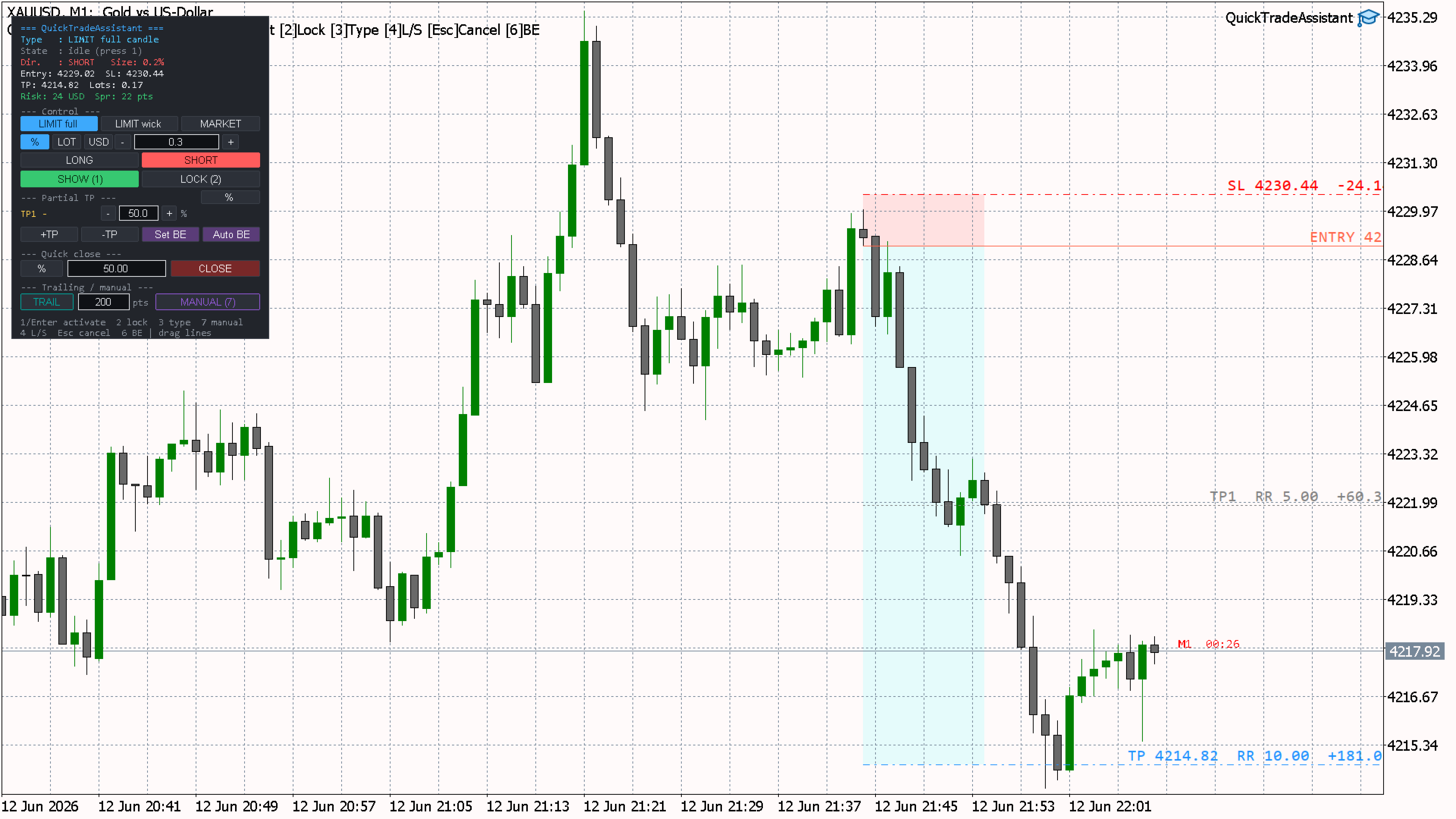
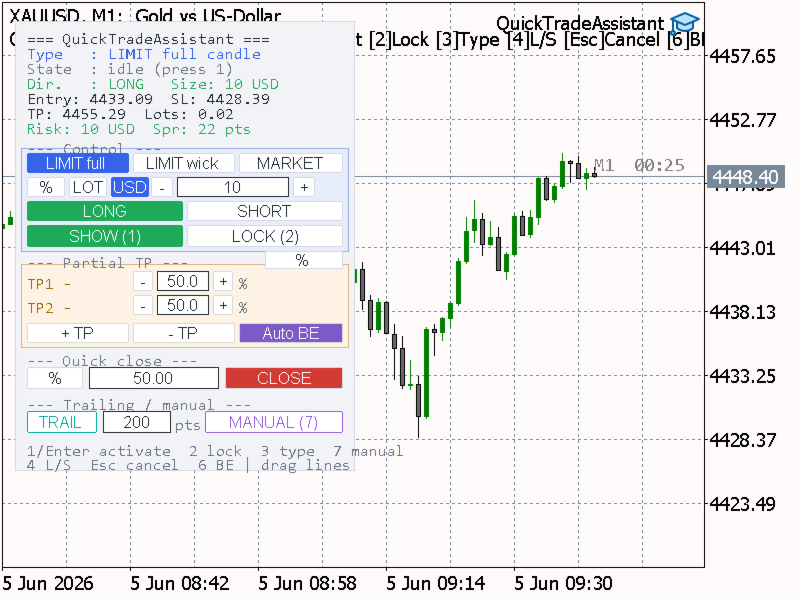
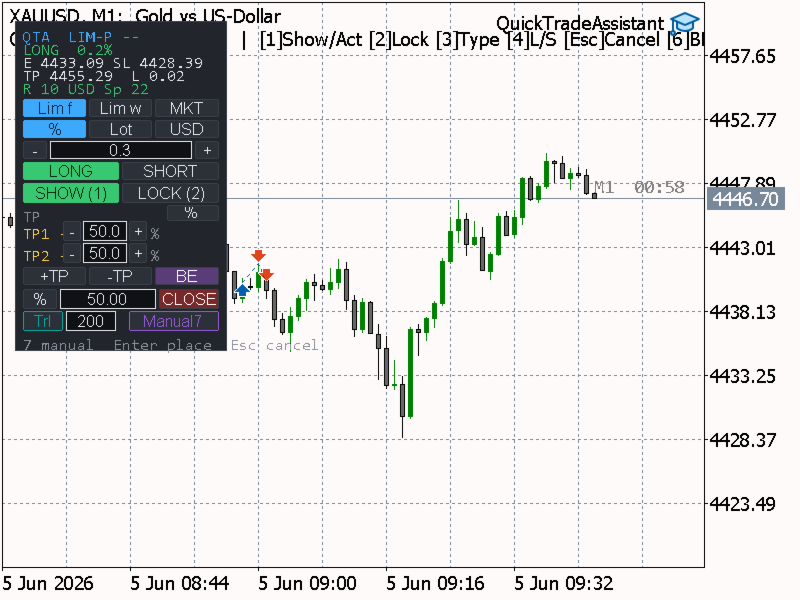
QuickTradeAssistant is a fast, discretionary order-placement panel
for MetaTrader 5. You define a trade with the mouse and confirm it
with a single key. Entry, Stop Loss and Take Profit are previewed
live on the chart, every level is draggable, and position size is
calculated for you. Built for traders who place orders by hand and
want speed and precision without opening dialog windows.

This is a trading TOOL, not an automated strategy. It does not open
trades on its own and makes no performance claims — you stay in
full control of every decision.


--- KEY FEATURES ---

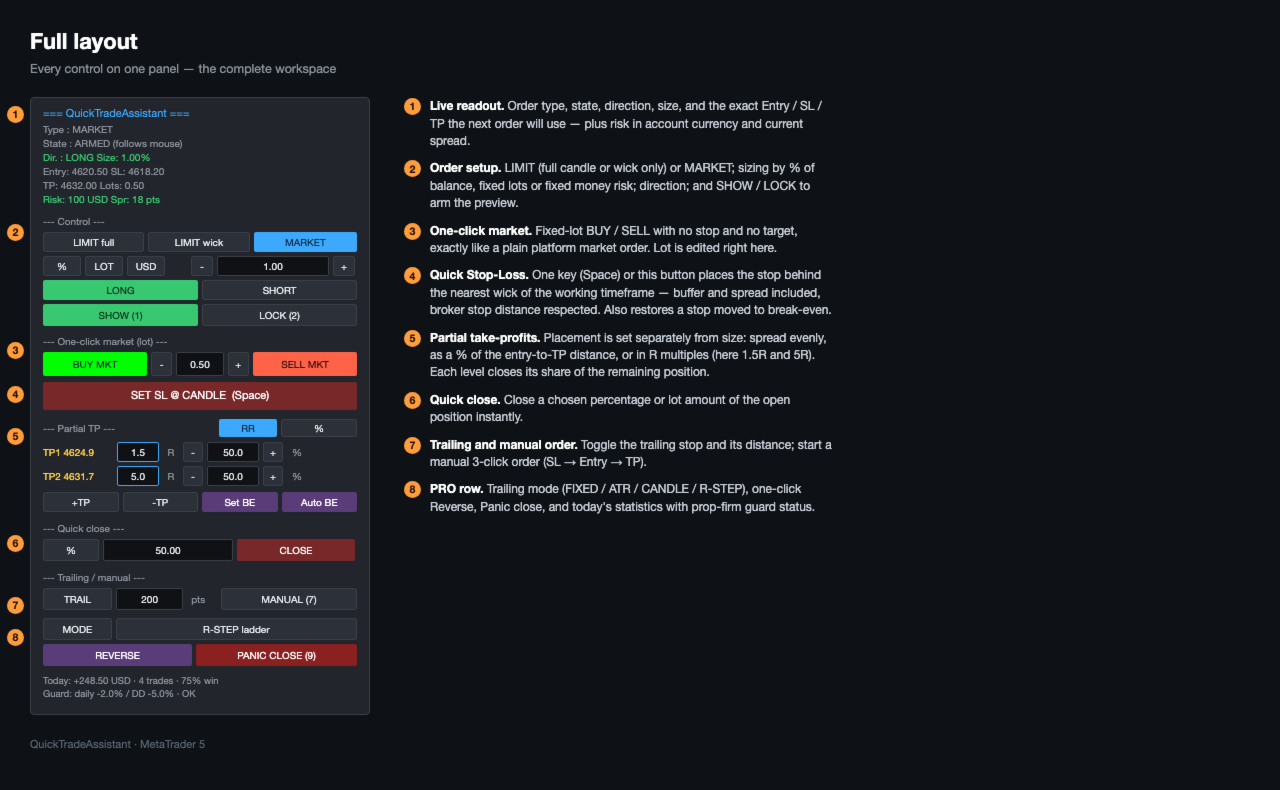
- One-key order placement: hover a candle, press a key, order sent.
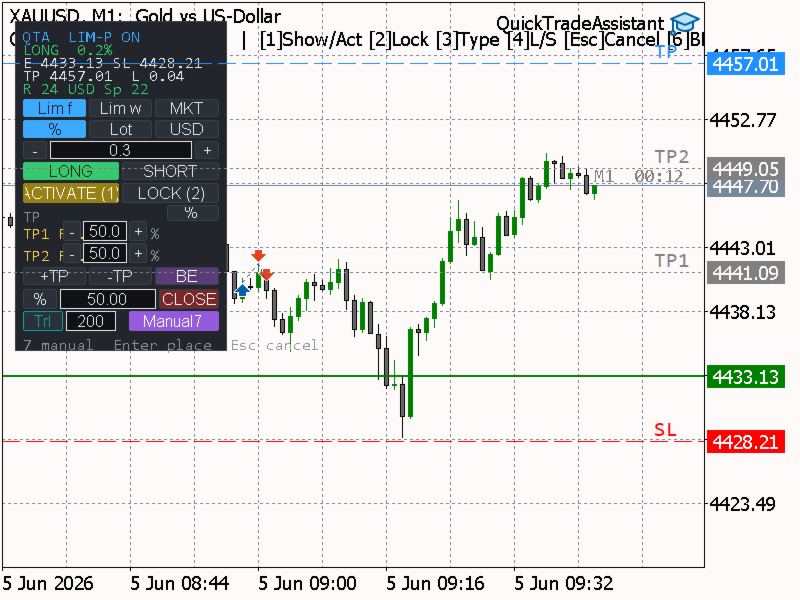
- Live on-chart preview of Entry, Stop Loss and Take Profit.
- All lines are draggable (custom drag that also works reliably
  when native dragging is unavailable). R:R and the risk/reward
  value in account currency are shown above each line.
- Three order modes: LIMIT (full candle), LIMIT (wick only),
  and MARKET.
- Three position-sizing methods: % of balance, fixed lots, or a
  fixed money risk in account currency. Each method keeps its own
  value, so switching is instant.
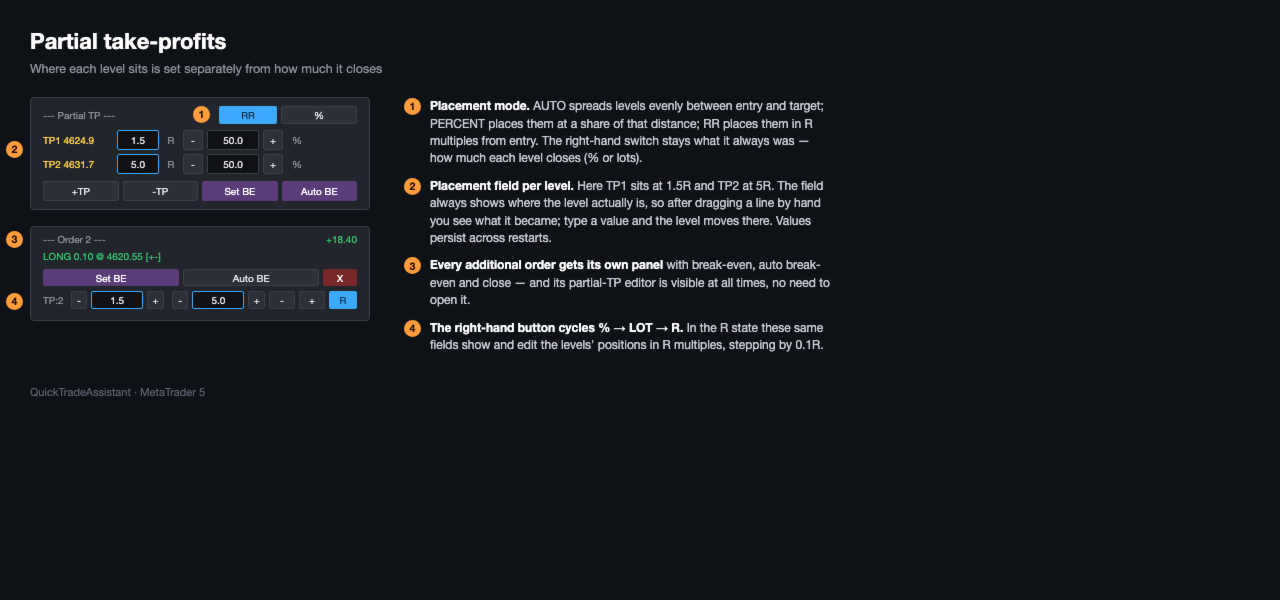
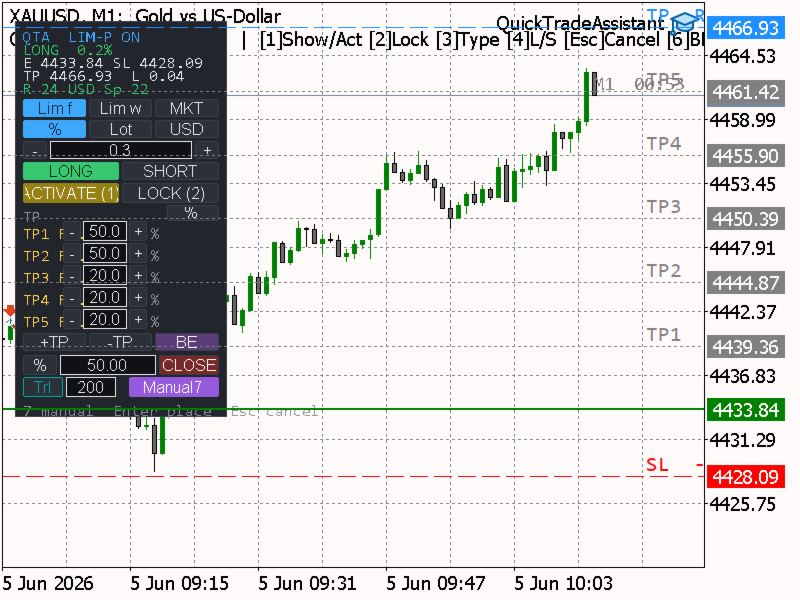
- Partial take-profits: multiple TP levels, each closing a chosen
  percentage of the REMAINING position (or a fixed lot amount).
  Add/remove levels and drag each TP to a custom price.
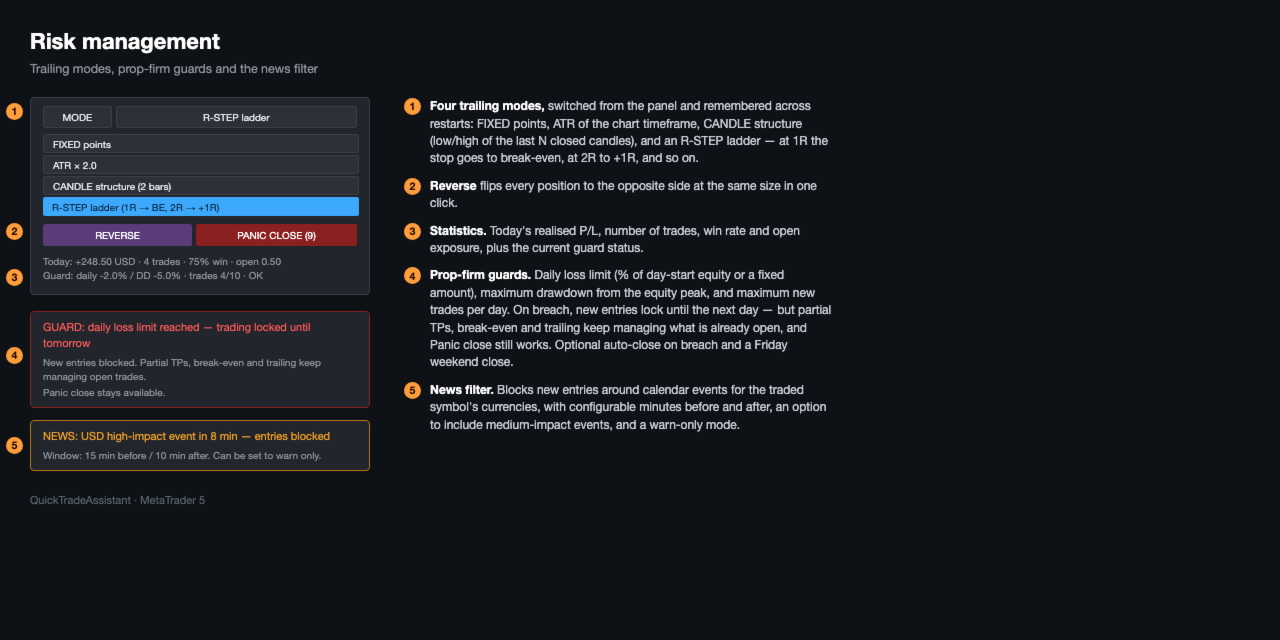
- Trailing stop: toggle on/off, set the distance in points or by
  dragging the stop line; it only moves in your favour and turns
  off automatically when the position closes.
- Auto break-even with a draggable trigger line, plus a manual
  break-even key.
- Quick close: close a chosen % or lot amount of the open position
  instantly.
- Manual 3-click order (SL -> Entry -> TP): direction is detected
  automatically, lot size is computed from the stop distance (the
  current spread is included), then you can still fine-tune every
  line before sending.
- Candle-close countdown timer (optional), for any timeframe.
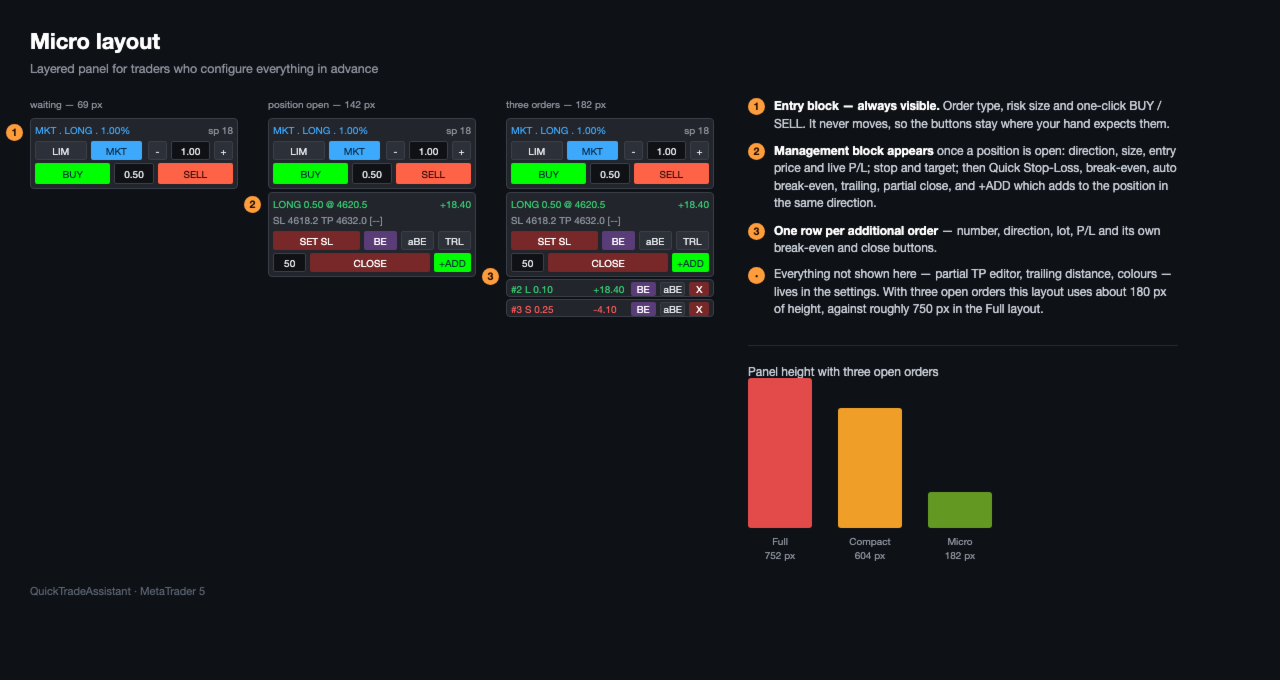
- 8 panel themes, Full or Compact layout, and selectable colors
  for every chart line.
- Works on any symbol and timeframe.


--- HOW IT WORKS (WORKFLOW) ---

1. Hover the candle you want to use as the stop anchor. Hovering
   above price prepares a LONG; below price prepares a SHORT.
2. Press 1 to arm the preview — Entry, SL and TP appear and follow
   your mouse.
3. Adjust anything by dragging the lines, or change order type,
   direction and size from the panel or hotkeys.
4. Press 1 (or Enter) to send the order. Press Esc to cancel.

After the position is open, manage it from the same panel: partial
TPs, trailing stop, auto/manual break-even and quick close.


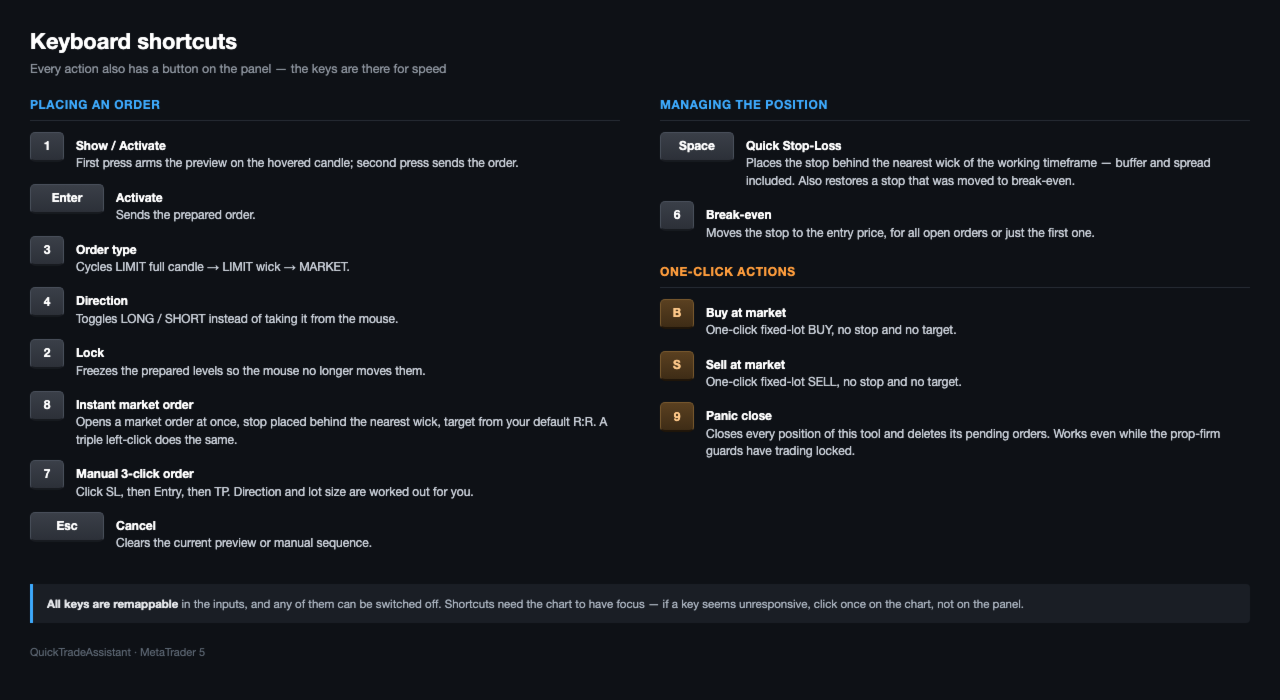
--- HOTKEYS ---

  1      Show preview (first press) / Activate & send order
  Enter  Activate & send the prepared order
  2      Lock / unlock the prepared levels
  3      Cycle order type: LIMIT full -> LIMIT wick -> MARKET
  4      Toggle direction: LONG / SHORT
  6      Move Stop Loss to break-even (manual)

  7      Start manual 3-click order / confirm & send when ready

  8      New — Instant MARKET order: press key 8 or a fast triple-left-click to open a market

  Esc    Cancel the current preview or manual sequence

All hotkeys are remappable in the inputs, and every action also has
a button on the panel.

Tip: keyboard shortcuts require the chart to have focus. If a key
seems unresponsive, click once on the chart (not on the panel).


--- ORDER MODES ---

  LIMIT full   Entry at the candle extreme (covers the whole candle).
  LIMIT wick   Entry at the candle body edge (covers the wick only).
  MARKET       Entry follows live price; SL/TP freeze when armed.


--- POSITION SIZING ---

  %     Risk a percentage of account balance.
  Lot   Use a fixed lot size.
  USD   Risk a fixed amount of money in account currency.

Lot size is derived from the distance between Entry and Stop Loss.


--- PARTIAL TAKE-PROFITS ---

Each partial TP closes its percentage of the REMAINING position at
the moment it is reached, so you can scale out and still leave a
runner. Values can also be entered as fixed lots. Levels are added
or removed from the panel and each TP line is draggable to a custom
price; the reward value updates live.


--- TRAILING STOP ---

Toggle the trailing stop on the panel. Set the distance in the
panel field, or simply drag the position's stop line to where you
want it. The stop never moves backwards. Activation profit and the
minimum step are configurable, and trailing switches off by itself
once the position is closed.


--- INPUT PARAMETERS ---

Risk / position size
  InpRiskMode        Sizing method: % of balance / fixed lot / USD risk
  InpRiskPercent     Risk percent of balance (default 1.0)
  InpFixedLot        Fixed lot size (default 0.10)
  InpRiskUSD         Fixed money risk in account currency (default 100)

TP / RR
  InpDefaultRR       Default reward-to-risk ratio (default 5.0)
  InpNumPartialTP    Number of partial TP levels (default 2)
  InpPartialMode     Partial unit: percent or lots
  InpPartialValues   Default partial values, comma-separated (e.g. 50,50)

SL / spread / type
  InpDefaultMode     Default order type (LIMIT full / wick / MARKET)
  InpSLBufferPoints  Extra buffer added to the stop, in points (default 20)
  InpUseSpreadInSL   Include current spread in the stop distance (default true)

Trailing stop
  InpTrailPoints       Trailing distance in points (default 200)
  InpTrailStartPoints  Start trailing after this profit in points (0 = immediately)
  InpTrailStepPoints   Minimum step to move the stop, in points (default 20)

Candle close timer
  InpShowCloseTimer  Show time left to candle close (default off)
  InpTimerTF         Timer timeframe (CURRENT = chart timeframe)
  InpTimerColor      Timer text color

Panel
  InpCorner          Panel corner on the chart
  InpPanelX/InpPanelY Panel offset from the corner
  InpFontSize        Panel font size
  InpLayout          Panel layout: Full or Compact
  InpSkin            Panel theme (8 styles)

Line colors
  InpColLong / InpColShort / InpColSL / InpColTP / InpColPartial / InpColBE
                     Colors for each chart line (pick from a list)

Hotkeys
  InpKey1..InpKey7   Remappable action keys (see HOTKEYS above)

General
  InpMagic           Magic number for this tool's orders (default 770077)
  InpSlippage        Maximum allowed slippage in points (default 30)


--- NOTES ---

- Discretionary tool: it never trades on its own; you confirm every
  order. No profit guarantees are made or implied.
- The free demo of this product runs only in the MetaTrader 5
  Strategy Tester (this is set automatically by the Market). Use
  the tester to try the panel before purchasing.
- No DLLs and no external connections are used.


==================================================================
 PART B — VERSION HISTORY ("What's New")
==================================================================
 When you publish an update, add the newest version on TOP, using
 the same format. Keep entries short and concrete.
------------------------------------------------------------------

Version 1.84
- New: Floating profit/loss indicator pinned to the right edge of the
  chart, shown in blue and updated in real time, so it never overlaps
  the candle-close timer.
- New: When a partial take-profit is reached, its row on the panel is
  highlighted ("taken") instead of leaving an empty gap. The panel
  returns to its initial state once the position is fully closed.
- Improved: In Lot mode, each partial take-profit is now an independent
  absolute lot amount, limited only by the size of the open position.
  You can freely allocate lots per level (for example, close 0.02 of a
  0.03 position). Percent mode still closes a percentage of the
  remaining position. Switching between % and Lot converts the values
  consistently.
- Improved: On-chart labels (R:R, value in account currency, and the
  candle-close timer) now sit just above their lines for readability.
- Fixed: The Auto break-even trigger line label now reads "Auto BE".

Version 1.80
- First public release on the MQL5 Market.
- One-key / mouse order placement with live Entry, SL and TP preview.
- Order modes: LIMIT (full candle), LIMIT (wick), MARKET.
- Position sizing by % of balance, fixed lots, or fixed money risk.
- Partial take-profits (percent of remaining or fixed lots),
  draggable, add/remove levels.
- Trailing stop with adjustable distance (field or drag), auto-off
  on close.
- Auto and manual break-even.
- Quick close by percent or lots.
- Manual 3-click order (SL -> Entry -> TP) with auto direction and
  spread-aware lot sizing.
- Optional candle-close countdown timer.
- 8 panel themes, Full / Compact layout, selectable line colors.
- Risk and reward values shown in account currency above each line.

------------------------------------------------------------------
 Template for the next entry (copy, fill in, move to the top):

Version X.YZ
- Added: ...
- Improved: ...
- Fixed: ...
------------------------------------------------------------------
Prodotti consigliati
TradePilotmt5
Hossein Khalil Alishir
TradePilot Expert Advisor (EA) for MetaTrader 5 TradePilot is a professional and user-friendly Expert Advisor (EA) for MetaTrader 5 (MT5) . It simplifies automated trading , risk management , and trade execution with a smart trading panel . Perfect for beginners and experienced traders looking for a reliable trade manager EA with automated lot size calculation and smart position management. Key Advantages User-Friendly Trading Panel: Customizable panel with buttons and hotkeys for fast ex
Bastion is a monitor-and-close-only risk manager for prop-firm traders. It watches your account against your firm's daily-loss and maximum-drawdown limits in real time and force-closes your open positions BEFORE you cross a line. It never opens a trade of its own, so it stays fully within the tools allowed by FTMO, FundedNext, The5ers, FTUK and FXIFY. Why traders fail challenges A large share of failed evaluations end on a single daily-loss breach: a moment of inattention, a news spike, one tra
Auto Trade Copier for MT5
Vu Trung Kien
4.56 (27)
Auto Trade Copier is designed to copy trades to multiple MT4, MT5 and cTrader accounts/terminals with 100% accuracy. The provider and receiver accounts must be on the same PC/VPS. With this tool, you can copy trades to receiver accounts on the same PC/VPS. All trading actions will be copied from provider to receiver perfectly. This version can be used on MT5 accounts only. For MT4 accounts, you must use Auto Trade Copier (for MT4). Reference: - For MT4 receiver, please download Trade Receiver Fr
Inverted_Chart_EA Utility Expert Advisor Inverted_Chart_EA creates and maintains a mirror-inverted chart of any symbol and timeframe. It automatically generates a custom instrument (e.g. US30_INV ) and keeps its price history updated in real time, with bars mirrored around a chosen pivot. This utility gives traders a new way to analyze the market from a different perspective by flipping the chart upside down. Why use an inverted chart? Highlight hidden patterns – price formations that look ordin
RR Box Trade Manager is an interactive risk/reward planning and trade management tool for MetaTrader 5. It is designed for traders who want to visually plan a trade, define Stop Loss and Take Profit levels, calculate position size, and execute market orders directly from the chart. MAIN FEATURES • Visual Risk/Reward box directly on the chart • BUY and SELL trade planning • Draggable Stop Loss level • Automatic Take Profit calculation based on the selected Risk/Reward ratio • Adjustable Risk/
CosmiCLab SMC FIBO CosmiCLab SMC FIBO is a professional trading indicator designed for traders who use Smart Money Concepts (SMC), market structure analysis and Fibonacci retracement levels. The indicator automatically detects market swings and builds Fibonacci levels based on the latest impulse movement. It also identifies market structure changes such as BOS (Break of Structure) and CHOCH (Change of Character), helping traders understand the current market direction. CosmiCLab SMC FIBO also pr
Enhanced Elliott Wave Pro – Advanced Market Structure & Wave Analysis   Enhanced Elliott Wave Pro is a lightweight, institutional-grade MT5 indicator that eliminates chart clutter by detecting and displaying only the current, active market structure: the 1-2-3-4-5 Impulse wave and the subsequent A-B-C Correction.   Built with classic Prechter wave rules and ATR-adaptive pivot detection, it delivers clean, real-time wave counts without bogging down your terminal.   ――――――――――――――――――――――――――――
TradeArchitect Grid Manager è un'utilità per il trading manuale su MetaTrader 5, utilizzabile direttamente dal grafico. Riunisce pianificazione visiva, calcolo della posizione in base al rischio, esecuzione di ordini market e pending, gestione delle posizioni e progressioni opzionali martingala o anti-martingala. L'utilità non genera segnali e non decide quando comprare o vendere. Il trader sceglie direzione, Entry, Stop Loss e Take Profit. GridPlan Trade Manager esegue i calcoli, controlla il
EA copy Master
Ridho Khairian Noor
# EA Copy Trade ## Copy Trading Made Simple **EA Copy Trade** is an automated trade-copying Expert Advisor designed to replicate trading signals and positions from a Master account to one or more receiving accounts. The EA is built for traders who want to automate the process of copying entries without manually monitoring charts and placing trades on every account. ### Key Features * **Automatic Trade Copying**   Automatically detects new trades from the Master account and copies them to c
Trading Utility for Forex Currency Pairs Only not for Gold  Functions Auto Lot Calculation based on Risk Auto stoploss  Auto TakeProfit Breakeven Auto Close Half % Close in percentage with respect to the PIPs Pending Orders BuyLimit Sell Limit with distances BuyStop Sell Stop    with distances Trading Informations Risk in percentage For Multiple trades Combine Takeprofit and Combine Stoplosses
Overview Mirror Signals EA is a powerful monitoring Expert Advisor that automatically sends real-time Telegram notifications for all important trade events on your MetaTrader 5 account. It is engineered specifically for signal providers , trade-copier operators , auditors , educators , and professional trading services that require immediate, detailed, and reliable reporting. Everything from entries, exits, SL/TP changes, comment changes, trailing stop activations, pending order modifications
Trade Copier Professional — Soluzione di Copia Locale   Trade Copier Professional è un sistema affidabile di copia locale delle operazioni per MetaTrader 4/5. Consente ai trader di replicare istantaneamente posizioni su più conti nello stesso computer, con controlli di sicurezza integrati e un pannello professionale.   Panoramica   L’EA funziona sia in modalità Master che Slave da un unico file, con passaggio fluido tra le due. Le operazioni possono essere copiate tra terminali MT4 e MT5 senza
Eabotpro Copy Trade is a simple and robust file-based trade copier EA for MetaTrader 5. It can work in two modes inside the same file: MASTER (writes all trades to a common file) and SLAVE (reads the file and copies the trades to another account). This makes it easy to copy trades between multiple MT5 accounts on the same PC or VPS without DLLs or external servers. Main features: - Single EA with dual mode: MASTER or SLAVE (selectable by input) - Copies market orders (BUY/SELL) and pending ord
Fabii Half Trend Baseline
Fabien Georges Andre Guillemaud
Smetti di operare contro il trend del timeframe superiore. Due baseline, un grafico. Senza repaint. Qualsiasi coppia, qualsiasi timeframe. Sul tuo grafico in 2 minuti. Demo gratuita nello Strategy Tester. Get more indicators here Baselines, volatility filters and oscillators. No repaint. Perché ti serve Entri in un trade perché una linea è diventata verde sul tuo grafico. Poi apri un timeframe superiore e vedi che il trend più grande punta nella direzione opposta. Il segnale era reale. Il tre
Trade Manger
Israr Hussain Shah
Here   our more valuable tools SMC Trend Trading   ,  Easy SMC Trading  ,  Institutional SMC Architect Volume Analysis Tools  ,  Volume flow Profile  ,  Market volume profile  , FVG with Volume  , Liquidity Heatmap Profile  ,  Volume Spread Analysis You Give an Instruction: When you run the script, a window pops up with a dropdown menu. You choose exactly what you want it to do from the list (e.g., "Close Profit Only" or "Delete Pending Orders"). It Scans Your Positions: The script then reads
ProTrade EA
Jim Ariel Camarce Ignao
Key Features   Automated Candle Pattern Recognition 10 Professional Patterns : Detects Bullish/Bearish Engulfing, Hammer/Shooting Star, Morning/Evening Star, Piercing/Dark Cloud, and 6 additional professional candlestick patterns Smart Filtering : Combine multiple patterns with configurable confirmation logic Volume Confirmation : Optional volume filter to validate pattern strength Multi-Timeframe Analysis : Separate execution and bias timeframes for better timing   Trading Dashboard Int
| Fully-automated Smart Money Concept (ICT) inspired trading solution with multi-strategy capabilities | Built by a grid trader >> for grid traders.  This is MT5 version, click  here  for  Blue CARA MT4  (settings and logics are same in both versions)     Real monitoring signal  -->  Cara Gold Intro Blue CARA EA   ('CARA') - short for  C omprehensive  A lgorithmic   R esponsive   A dvisor is a next-gen  multi-currency    multi-timeframe  EA base on the widely known (and perhaps the most popul
SmartRAL
Jemy Yeferson Dimu Ludji
SmartRAL (Smart Risk Auto-Lot EA) SmartRAL: The Ultimate Risk & Lot Management Expert Advisor (EA) SmartRAL is an essential tool for traders who demand precise risk management and automated position sizing in MetaTrader 5. Stop guessing your lot size and let the algorithm handle the calculations. This EA allows you to trade with confidence by guaranteeing your risk exposure on every single trade, while offering absolute flexibility in setting your Stop Loss (SL). Key Features & Benefits Guarante
Overview Mirror Signals Service EA (Text only)   is a powerful monitoring Expert Advisor that automatically sends   real-time Telegram notifications   for all important trade events on your MetaTrader 5 account. It is engineered specifically for   signal providers ,   trade-copier operators ,   auditors ,   educators , and   professional trading services   that require immediate, detailed, and reliable reporting. Everything from   entries, exits, SL/TP changes, comment changes, trailing sto
APEX Terminal
Lukasz Mariusz Holla
Apex Terminal is a trade panel for MetaTrader 5 that sizes every position from your risk and manages it from entry to exit. Set how much you accept to lose and where the stop-loss goes. Before you click, the panel shows the lot, the loss at the stop and the profit at the full target. One click opens the trade with the stop-loss and the whole take-profit ladder already in place. TRADE - Position size from % of balance or equity, a fixed amount of money or a fixed lot. The lot is rounded down t
Gold Flow Seconds Chart transforms MetaTrader 5 into a fast and convenient workspace for manual trading. The utility builds 5-second and 10-second candles from the tick data provided by your broker. M1, M5, M7, M15, M30, H1 and H4 views are also available in the same interface. MOUSE-DRIVEN CHART NAVIGATION • Drag the chart horizontally and vertically with the left mouse button. • Use the mouse wheel to change candle width. • Use Ctrl + mouse wheel to adjust the vertical scale. • Return to t
Copy Trade PRO - Slave EA (FREE with Master EA) Receive Trades Automatically from Your Master Account Copy Trade PRO - Slave EA is a professional trade receiver designed for MetaTrader 5. It automatically mirrors trades from the Copy Trade PRO Master EA with fast execution, intelligent symbol matching, and flexible risk management.    Telegram Support Link :   @GoldBotXSupport Need help or have questions? Contact me on WhatsApp:      https://wa.me/447378910922 This Slave EA is complete
FREE
Breakevan Utility
Jose Luis Thenier Villa
BreakEvan Utility  Is a simple tool in a panel with this utilities: This utility will draw a Golden Line in the chart applied showing the breakeven price, considering all the positions opened for that specific symbol. Also the information panel shows: Balance Breakeven Price for that chart Force Breakeven (for that symbol) as ON/OFF Force Breakeven Global (takes into account all trades opened) as ON/OFF Total Lots opened for Symbol Total Lots opened Global And two buttons: Force Breakeven: Whe
OB FVG Trade Copier: Unified Master & Slave EA Version: 2.00 Type: Trade Copier / Risk Management Utility Compatibility: MetaTrader 4 & MetaTrader 5 (Cross-compatible codebase) Overview The OB FVG Trade Copier is a professional-grade, unified trade copying system designed to mirror trades between Master and Slave accounts seamlessly. Built with a unified architecture, a single EA file serves as both the sender (Master) and receiver (Slave) simply by toggling the EA Mode in the settings. It uti
FREE
Candlestick Pattern Scanner is a multi-timeframe and multi-symbol dashboard and alert system that checks all timeframes and currency pairs for different candlestick patterns that are formed in them. Scanner is integrated   with support and resistance zones so you can check the candlestick patterns in most important areas of the chart to find breakout and reversal patterns in the price chart. Download demo version   (works on M4,M6,M12,H3,H8 timeframes and 20 symbols of Market Watch window) Read
MT5 to Binance
Roman Zhitnik
4.2 (5)
The MT5 to Binance trading panel is the perfect tool for cryptocurrency traders looking to maximize their purchases on Binance and Binance US exchanges. Before purchase please familiarize with comparison between MT5 to Binance and Binance Copier To get started, simply input your API Key and Secret Key created in the client area of Binance and select the Enable Spot & Margin Trading and Enable Futures checkboxes and start trading Once launched, the trading panel automatically loads all Spot and F
Trade Journal and Dashboard is a MetaTrader 5 analytics utility that automatically tracks every closed trade and calculates professional performance metrics in real time, directly on your chart. No spreadsheets and no external apps. Features Automatic trade logging: reads your trade history and updates as each position closes, with nothing to enter by hand. Core performance metrics: win rate, profit factor, average win and average loss, net profit, and best and worst trades. Real-time dashboard:
SolarTrade Suite Financial Robot: LaunchPad Market Expert - progettato per aprire le negoziazioni! Questo è un robot di trading che utilizza speciali algoritmi innovativi e avanzati per calcolare i suoi valori, il tuo assistente nel mondo dei mercati finanziari. Utilizza il nostro set di indicatori della serie SolarTrade Suite per scegliere meglio il momento in cui lanciare questo robot. Dai un'occhiata agli altri nostri prodotti della serie SolarTrade Suite in fondo alla descrizione. Vuoi n
Trade Mirror è un copiatore di operazioni locale e veloce per MetaTrader 5. Collegalo come Provider (fornitore) al conto su cui operi e come Receiver (ricevitore) a ogni conto che deve seguire. Le operazioni vengono copiate tra terminali sullo stesso computer in una frazione di secondo, senza server, senza abbonamento e senza DLL. Copia operazioni ma non può garantire alcun risultato. COME FUNZIONA Il Provider condivide le posizioni aperte tramite un piccolo file nella cartella comune di MetaTra
Gli utenti di questo prodotto hanno anche acquistato
Trade Assistant MT5
Evgeniy Kravchenko
4.43 (216)
It helps to calculate the risk per trade, the easy installation of a new order, order management with partial closing functions, trailing stop of 7 types and other useful functions. Additional materials and instructions Installation instructions - Application instructions Line function -   shows on the chart the Opening line, Stop Loss, Take Profit. With this function it is easy to set a new order and see its additional characteristics before opening.   Risk management  - The risk calculation
Forex Trade Manager MT5
InvestSoft
4.98 (688)
Benvenuto a Trade Manager EA, lo strumento definitivo per la gestione del rischio , progettato per rendere il trading più intuitivo, preciso ed efficiente. Non è solo uno strumento per l'esecuzione degli ordini, ma una soluzione completa per la pianificazione delle operazioni, la gestione delle posizioni e il controllo del rischio. Che tu sia un principiante, un trader avanzato o uno scalper che necessita di esecuzioni rapide, Trade Manager EA si adatta alle tue esigenze, offrendo flessibilità s
Local Trade Copier EA MT5
Juvenille Emperor Limited
4.94 (149)
Local Trade Copier EA MT5 è un trade copier rapido e flessibile per copiare e gestire operazioni tra più conti MetaTrader 5 sullo stesso computer Windows o Windows VPS. Combina la sincronizzazione locale delle operazioni con controlli lato Receiver per dimensione del lotto, gestione del rischio, filtraggio delle operazioni, mappatura dei simboli, gestione delle operazioni e protezione del conto. Configura i terminali Transmitter e Receiver in circa 1 minuto e copia operazioni manuali o aperte d
Telegram to MT5 MultiChannel Copier
Sergio Marquez Uroz
4.67 (21)
Telegram to MT5 Multi-Channel Copier   copia automaticamente i segnali di trading dai tuoi canali Telegram e Discord direttamente su MetaTrader 5. Niente bot, niente estensioni del browser, niente copia manuale. Il segnale arriva su Telegram o Discord e l'EA apre l'operazione nel tuo terminale in pochi secondi. E prima di copiare un canale, il backtester integrato ti mostra cosa avrebbe fatto quel canale sul tuo conto. Il prodotto include due componenti: un'applicazione Windows che ascolta i tuo
FarmedHedge Pair Trading Dashboard
Tanapisit Tepawarapruek
5 (6)
Farmed Hedge Yield Farming | All Markets (Manual - Hybrid - Semi/Automated EA) VERIFIED TRADING RESULTS - Farmed Hedge Yield Axi Copy:  https://www.mql5.com/en/signals/2356376 - Farmed Hedge Yield Exn Copy:   https://www.mql5.com/en/signals/2356404 - Farmed Hedge Yield V Copy:  https://www.mql5.com/en/signals/2357156 IMPORTANT NOTICE: FarmedHedge is a MANUAL-FOCUSED TRADING UTILITY ,not a fully automated EA. Results shown on this Signal include manual trades and overall strategic management.
Copia i segnali Telegram con le tue regole di trading Telegram to MT5 Signal Trader copia automaticamente i segnali di trading testuali dai canali e gruppi Telegram pubblici e privati in MetaTrader 5. Gestisci più fornitori e conti MT5 da un'unica applicazione desktop, con impostazioni di rischio e di trading specifiche per ogni fornitore . Per copiare i segnali non servono bot Telegram né configurazioni API. Accedi semplicemente con il tuo account Telegram tramite numero di telefono o codice QR
TradePanel MT5
Alfiya Fazylova
4.88 (170)
Trade Panel è un assistente commerciale multifunzionale. L'applicazione contiene più di 50 funzioni di trading per il trading manuale e permette di automatizzare la maggior parte delle attività commerciali. Istruzioni per l'applicazione: https://www.mql5.com/it/blogs/post/762331 Versione di prova dell'applicazione per un conto demo: https://www.mql5.com/it/blogs/post/762419 Come installare l'applicazione: https://www.mql5.com/it/blogs/post/762362 Come testare l'applicazione in modalità visuale:
Strategy Ledger Pro
Abdullah Uygar Tuna
5 (12)
Ora disponibile in italiano. Strategy Ledger Pro è un pannello di analisi del conto in sola lettura per MetaTrader 5. Separa i risultati del conto per Expert Advisor, strategia, simbolo e numero magic, così puoi vedere quanto contribuisce davvero ciascuno. Il pannello è disponibile in 11 lingue: English, Français, Deutsch, Español, Italiano, Português, Русский, Türkçe, 中文, 日本語 e 한국어. Prima di scaricare la demo. Il Market esegue la demo di qualsiasi prodotto a pagamento solo nello Strategy Teste
================================================================================ POC BREAKOUT - V20.72. Full Professional Grade Toolkit ================================================================================ POC Breakout is a full MetaTrader 5 trading dashboard for discretionary traders who want breakout signals, Point of Control (POC) context, volume profiles, order flow, market structure, news, alerts, and advanced trade planning in one professional workspace. Attached directly to you
News Trade EA MT5
Konstantin Kulikov
4.55 (11)
Presento un utile robot che io stesso utilizzo da diversi anni. Questo robot può essere utilizzato sia in modalità semiautomatica che completamente automatica. >>> Chat <<< Il programma contiene le impostazioni flessibili per fare trading sulle notizie del calendario economico. Non può essere verificato nel tester delle strategie. Soltanto il vero lavoro. Nelle impostazioni del terminale è necessario aggiungere il sito delle notizie all’elenco degli URL consentiti. Fare clic su Strumenti > Opz
Master Your Trading Discipline   Stop losing your hard-earned gains to overtrading and emotional decisions. The Discipline Tool is your ultimate trading assistant, ensuring strict risk management in real-time. Key Protection Features: Advanced Drawdown Defense : Automatically halts trading if your daily drawdown exceeds a preset threshold (percentage or dollar amount). Real-Time Equity Lock : Safeguard profits by referencing peak equity, ensuring drawdown stays within control. Hard Profit Target
Dealer Panel
Mian Rameez Ali
Dealer's Panel No signal decides anything here — a hand does. One click, and the panel calculates what's underneath: lot size from risk, target from a 30-step balance ladder that remembers exactly how far an account has climbed. Toggle between market and pending without touching an input field. Set a stop, and the take-profit can write itself — a fixed share of the balance, translated into price with no arithmetic left for the trader to get wrong. One trade live at a time; it won't let a seco
Exp COPYLOT CLIENT for MT5
Vladislav Andruschenko
3.97 (35)
Copiatore professionale di trade per MetaTrader 5 Un copiatore di trade veloce, professionale e affidabile per MetaTrader . COPYLOT consente di copiare operazioni Forex tra terminali MT4 e MT5 con supporto per conti Hedge e Netting . La versione MT5 di COPYLOT supporta: - MT5 Hedge → MT5 Hedge - MT5 Hedge → MT5 Netting - MT5 Netting → MT5 Hedge - MT5 Netting → MT5 Netting - MT4 → MT5 Hedge - MT4 → MT5 Netting Versione MT4 Descrizione completa + DEMO + PDF Come acquistare Come installare Come ot
Get Ready for Major New Features in Our Next Update — Version 2.52 Coming Soon! [NEW]  We’re taking market analysis to the next level with 4   new features designed to meet your trading needs. Introducing: TRADE OVERVIEW DASHBOARD  CONFLUENCE AT ZONE  OTE   Strong & Weak High/Low  1. TRADE OVERVIEW DASHBOARD A dashboard that helps you see the overall market picture more easily, with key information from multiple timeframes and trading guidance to support your trading decisions, helping you an
The product will copy all telegram signal to MT5 ( which you are member) , also it can work as remote copier.  Easy to set up, copy order instant, can work with almost signal formats, image signal,  s upport to translate other language to English Work with all type of channel or group, even channel have "Restrict Saving Content", work with  multi channel, multi MT5 Work as remote copier: with signal have ticket number, it will copy exactly via ticket number. Support to backtest signal. How to s
EasyInsight AIO MT5
Alain Verleyen
4.92 (12)
EASY Insight AIO – La soluzione all-in-one per un trading intelligente e senza sforzo Panoramica Immagina di poter analizzare l’intero mercato — Forex, Oro, Cripto, Indici e persino Azioni — in pochi secondi, senza dover controllare manualmente i grafici, installare indicatori o affrontare configurazioni complicate. EASY Insight AIO è il tuo strumento definitivo di esportazione per il trading alimentato dall’IA, pronto all’uso. Offre una panoramica completa del mercato in un unico file CSV pul
Telegram To MT5 Ultra
Mirel Daniel Gheonu
5 (5)
Telegram To MT5 — Copiatore di segnali Trasforma le indicazioni di trading dei tuoi canali Telegram in veri ordini MT5 — automaticamente, su quanti account vuoi, con rischio e regole totalmente sotto il tuo controllo. Telegram To MT5 collega i canali VIP / di segnali che già segui su Telegram al tuo terminale MetaTrader 5. Un'app desktop companion gratuita legge i messaggi (anche dai canali che bloccano i bot), e questo Expert Advisor li esegue sul tuo conto — applicando le tue impostazioni di r
MT5 to Telegram Signal Provider è un'utilità facile da usare e completamente personalizzabile che consente l'invio di segnali specificati a una chat, canale o gruppo Telegram, rendendo il tuo account un fornitore di segnali. A differenza della maggior parte dei prodotti concorrenti, non utilizza importazioni DLL. [ Dimostrativo ] [ Manuale ] [ Versione MT4 ] [ Versione Discord ] [ Canale Telegram ]  New: [ Telegram To MT5 ] Configurazione Una guida utente passo-passo è disponibile. Nessuna cono
Power Candles Strategy Scanner - Strumento di ricerca configurazioni multi-simbolo con ottimizzazione automatica Power Candles Strategy Scanner utilizza lo stesso motore di auto-ottimizzazione che alimenta l'indicatore Power Candles, applicandolo a tutti i simboli presenti nel tuo Market Watch, uno accanto all'altro. Un unico pannello ti indica quali simboli sono statisticamente negoziabili in questo momento, quale strategia è vincente su ciascuno di essi, la coppia ottimale di Stop Loss / Take
The Patch
Mian Rameez Ali
The Patch It never opens a trade. It walks behind the ones that did. Every open position, every pending order — checked twice a second for the one thing that's easy to forget: a stop, a target. Found bare, it doesn't ask. It writes the missing number in, measured in points from wherever the position began, and moves on to the next. No strategy, no opinion on direction. Just the quiet assumption that nothing should ever sit on the market unprotected — not because someone decided it shouldn't,
Grid Manual MT5
Alfiya Fazylova
4.73 (22)
Grid Manual è un pannello di trading per lavorare con una griglia di ordini. L'utilità è universale, ha impostazioni flessibili e un'interfaccia intuitiva. Funziona con una griglia di ordini non solo nella direzione delle perdite, ma anche nella direzione dell'aumento dei profitti. Il trader non ha bisogno di creare e mantenere una griglia di ordini, lo farà l'utilità. È sufficiente aprire un ordine e il manuale di Grid creerà automaticamente una griglia di ordini per esso e lo accompagnerà fino
Signal Trading View to MT5 Pro
Mirel Daniel Gheonu
4.5 (2)
Signal TradingView to MT5 Pro Automator Esecuzione professionale istantanea tra TradingView e MetaTrader 5 Automatizza la tua strategia di trading con il ponte di comunicazione più robusto tra gli alert di TradingView e l'esecuzione reale in MT5. Progettato per i trader che richiedono velocità, flessibilità e una gestione del rischio impeccabile, questo Expert Advisor trasforma qualsiasi messaggio di avviso in un preciso ordine a mercato o limite. PUNTI DI FORZA E VANTAGGI Motore di Parsing Univ
Serve supporto? Come configurarlo? Hai domande? Chiedi qui nella tua lingua, risposta rapida: https://www.mql5.com/en/market/product/139088/comments Scarica la demo funzionante Copy Cat More (Gatto Copione) — Copiatore di Trade (Trade Copier) MT5 è un copiatore locale di trade e un framework completo di gestione del rischio e di esecuzione, progettato per le sfide di trading di oggi. Dalle challenge delle prop firm alla gestione di portafogli personali, si adatta a ogni situazione con una comb
Anchor Trade Manager
Kalinskie Gilliam
5 (9)
Your EAs cannot see each other, but Anchor can. Anchor gives you one place to coordinate your EAs, manage risk, and decide when trading is allowed. It works alongside the trading bots you already use without any changes to them. The Problem One EA opens a trade. Then another starts trading. The next thing you know, you wake up to multiple grids built across your account. Each EA may be doing exactly what it was designed to do, but together they can place far more risk on your account than you in
Trade copier MT5
Alfiya Fazylova
4.61 (57)
Trade Copier è un'utilità professionale progettata per copiare e sincronizzare le transazioni tra conti di trading. La copiatura avviene dal conto/terminale del fornitore al conto/terminale del destinatario, che sono installati sullo stesso computer o vps. Prima di acquistare, puoi testare la versione demo su un account demo. Versione demo qui . Istruzioni complete qui . Funzionalità e vantaggi principali: Supporta la copia degli ordini: MT5> MT5, MT4> MT5, MT5> MT4, inclusi i conti di compensaz
Telegram to MT5 Coppy
Sergey Batudayev
5 (10)
Da Telegram a MT5:   la soluzione definitiva per la copia del segnale Semplifica il tuo trading con Telegram su MT5, il moderno strumento che copia i segnali di trading direttamente dai canali e dalle chat di Telegram sulla tua piattaforma MetaTrader 5, senza bisogno di DLL. Questa potente soluzione garantisce un'esecuzione precisa dei segnali, ampie opzioni di personalizzazione, fa risparmiare tempo e aumenta la tua efficienza. [ Instructions and DEMO ] Caratteristiche principali Integrazione d
The News Filter MT5
Leolouiski Gan
4.79 (24)
Questo prodotto filtra tutti gli esperti consulenti e i grafici manuali durante il periodo delle notizie, così non dovrai preoccuparti di improvvisi picchi di prezzo che potrebbero distruggere le tue impostazioni di trading manuali o le negoziazioni effettuate da altri esperti consulenti. Questo prodotto viene fornito anche con un sistema completo di gestione degli ordini che può gestire le tue posizioni aperte e gli ordini in sospeso prima della pubblicazione di qualsiasi notizia. Una volta che
VirtualTradePad One Click Trading Panel
Vladislav Andruschenko
4.59 (74)
Pannello di trading per MetaTrader 5 — controllo professionale del trading in un clic dal grafico e dalla tastiera Un pannello di trading avanzato progettato per trader attivi, pensato per aprire, gestire e chiudere operazioni molto più velocemente rispetto all’interfaccia standard di MetaTrader. Questa soluzione è dedicata a chi desidera controllare posizioni, ordini pendenti, profitto totale ed esecuzione da un unico spazio di lavoro professionale. Non si tratta di un semplice utilitario. È u
Floor Watch
Syed Tauqeer Hussain Shah
Floor Watch One number, watched every thirty seconds: how far equity has fallen since the day began — or since its highest point, if it's told to trail the peak instead of the open. Cross the line and it doesn't argue. Every open position closes, every pending order vanishes, and anything that slips through afterward gets shut the moment it appears. Not asked. Removed. The floor holds until the clock turns 5 AM Pakistan time — then, and only then, does the day start over. One rule. No except
RETAILBERG FOOTPRINT CHART PRO — Order-Flow Workspace for MetaTrader 5 Version 7.00  |  Professional System  |  31 tools  |  One chart A full 150-page illustrated User Manual is included. Please read the full manual to understand this feature packed footprint chart elements and ui. https://www.mql5.com/en/blogs/post/777982 DEMO / STRATEGY TESTER — PLEASE READ FIRST
Filtro:
RaydenLaPara
16
RaydenLaPara 2026.08.09 21:31 

L'utente non ha lasciato alcun commento sulla valutazione.

Raimondas Augustinas
821
Risposta dello sviluppatore Raimondas Augustinas 2026.08.17 11:09
thanks for your feedback, this is designed for traders who need to get into a position quickly by placing the lot size first and then setting the SL level afterward.
What error are you referring to? thanks
siy0729
34
siy0729 2026.06.08 05:29 

L'utente non ha lasciato alcun commento sulla valutazione.

Raimondas Augustinas
821
Risposta dello sviluppatore Raimondas Augustinas 2026.06.08 10:17
thanks!
Rispondi alla recensione