
Quick Trade Assistant
- Utilitários
- Versão: 2.71
- Atualizado: 7 outubro 2026
- Ativações: 5

==================================================================
QuickTradeAssistant — Product Description (MQL5 Market)
==================================================================
Use PART A for the "Description" field of the product page.
Use PART B for the "What's New" / version notes when you upload
a new version. Keep appending new entries at the TOP of PART B.
(Headers in CAPS can be made bold in the Market text editor.)
==================================================================
==================================================================
PART A — DESCRIPTION
==================================================================
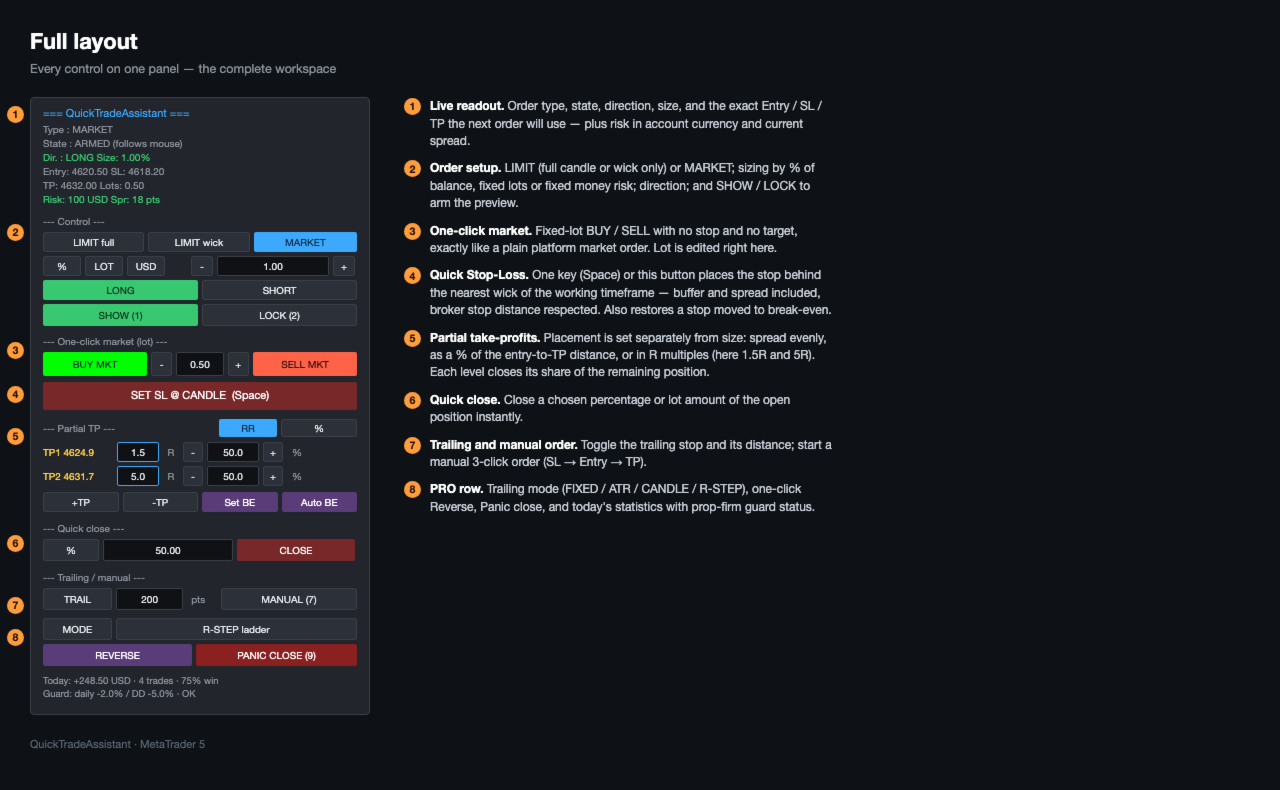
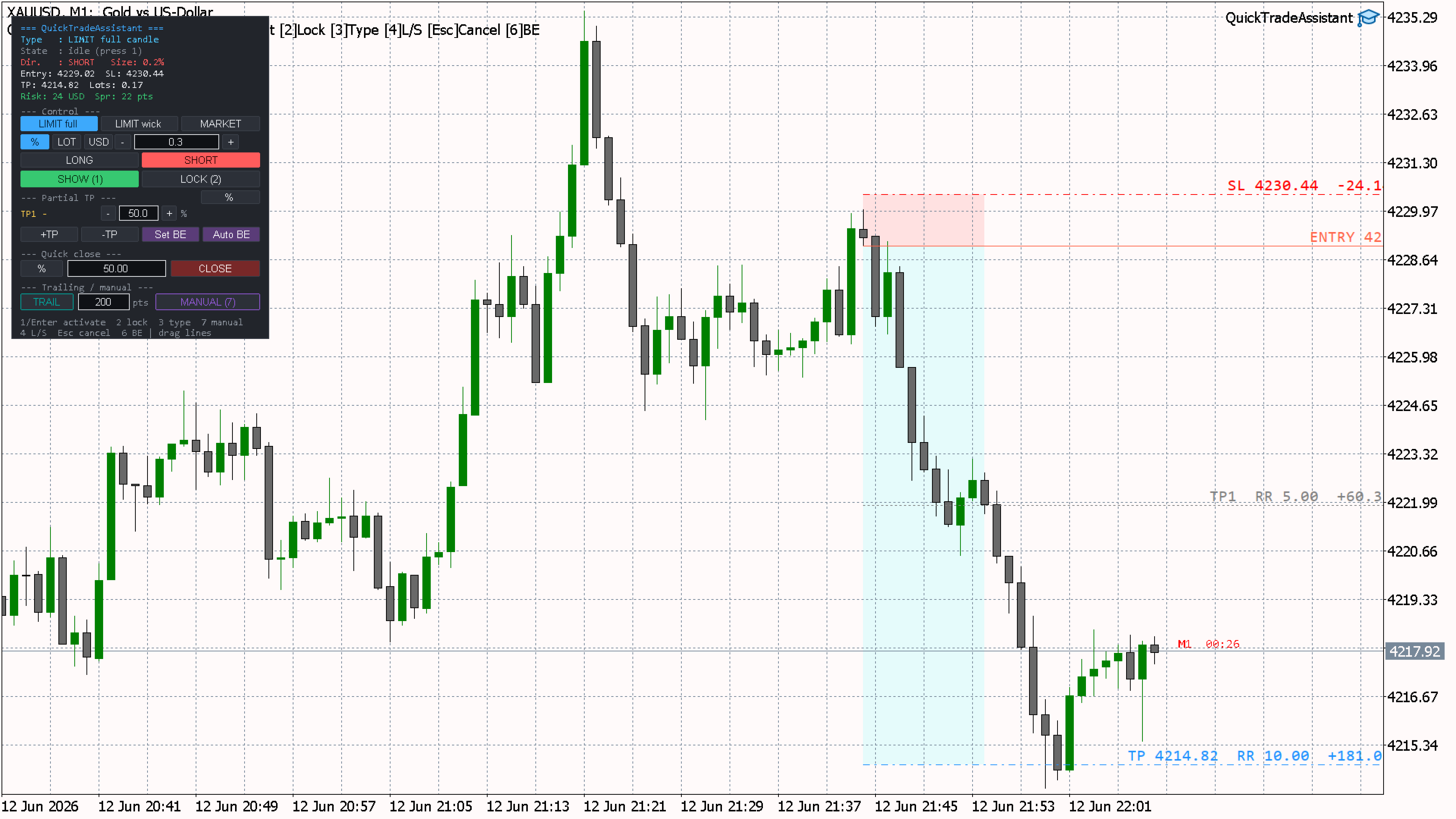
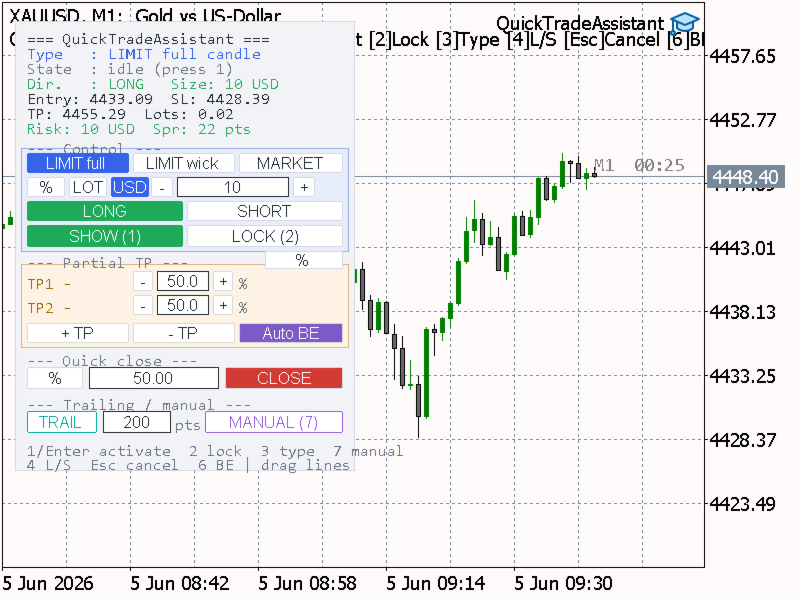
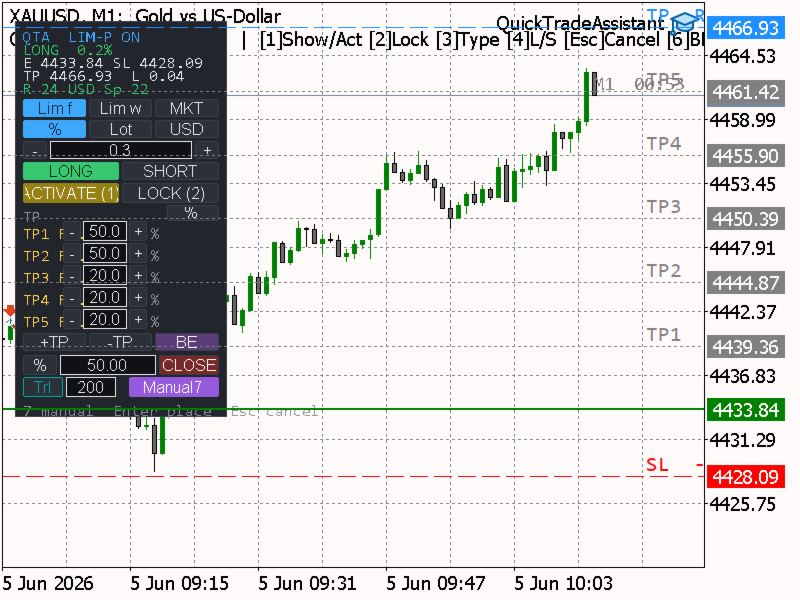
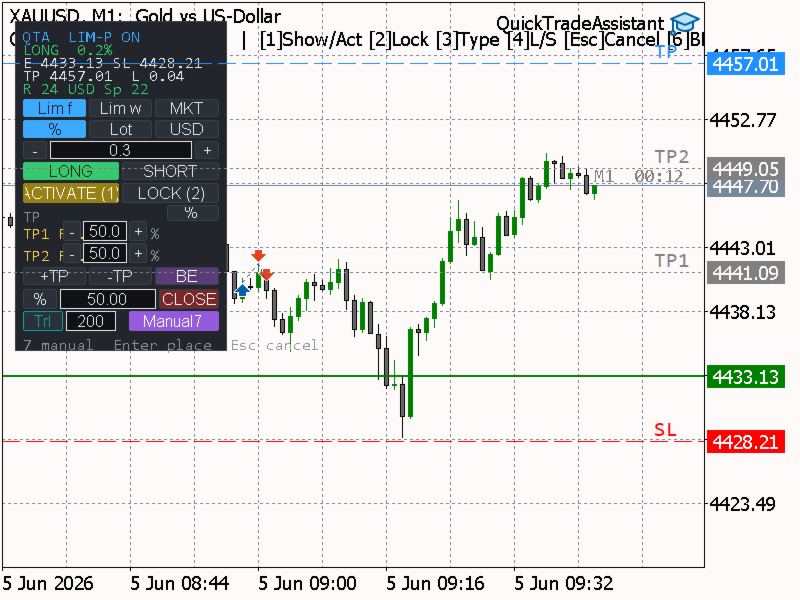
QuickTradeAssistant is a fast, discretionary order-placement panel
for MetaTrader 5. You define a trade with the mouse and confirm it
with a single key. Entry, Stop Loss and Take Profit are previewed
live on the chart, every level is draggable, and position size is
calculated for you. Built for traders who place orders by hand and
want speed and precision without opening dialog windows.
This is a trading TOOL, not an automated strategy. It does not open
trades on its own and makes no performance claims — you stay in
full control of every decision.
--- KEY FEATURES ---
- One-key order placement: hover a candle, press a key, order sent.
- Live on-chart preview of Entry, Stop Loss and Take Profit.
- All lines are draggable (custom drag that also works reliably
when native dragging is unavailable). R:R and the risk/reward
value in account currency are shown above each line.
- Three order modes: LIMIT (full candle), LIMIT (wick only),
and MARKET.
- Three position-sizing methods: % of balance, fixed lots, or a
fixed money risk in account currency. Each method keeps its own
value, so switching is instant.
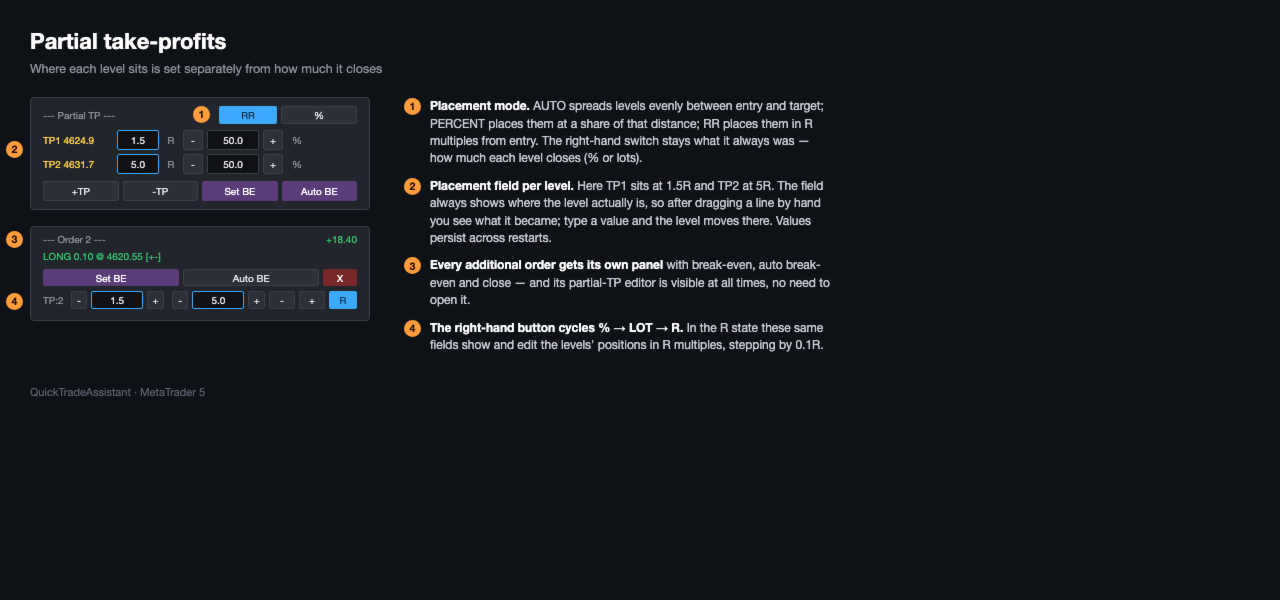
- Partial take-profits: multiple TP levels, each closing a chosen
percentage of the REMAINING position (or a fixed lot amount).
Add/remove levels and drag each TP to a custom price.
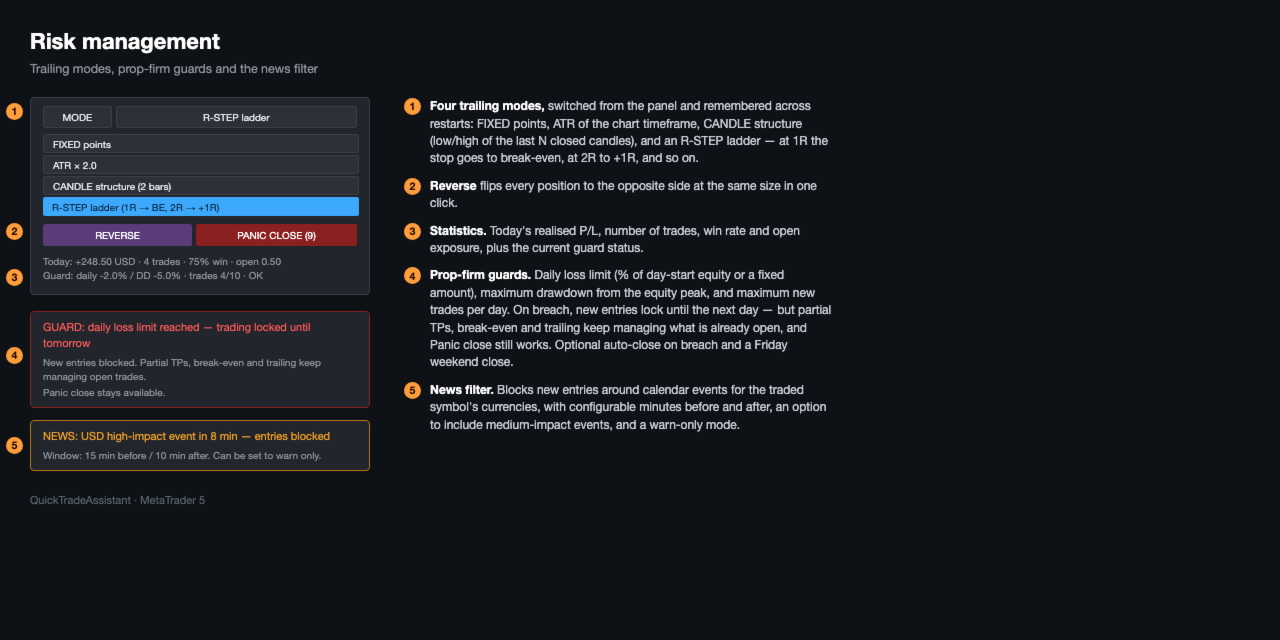
- Trailing stop: toggle on/off, set the distance in points or by
dragging the stop line; it only moves in your favour and turns
off automatically when the position closes.
- Auto break-even with a draggable trigger line, plus a manual
break-even key.
- Quick close: close a chosen % or lot amount of the open position
instantly.
- Manual 3-click order (SL -> Entry -> TP): direction is detected
automatically, lot size is computed from the stop distance (the
current spread is included), then you can still fine-tune every
line before sending.
- Candle-close countdown timer (optional), for any timeframe.
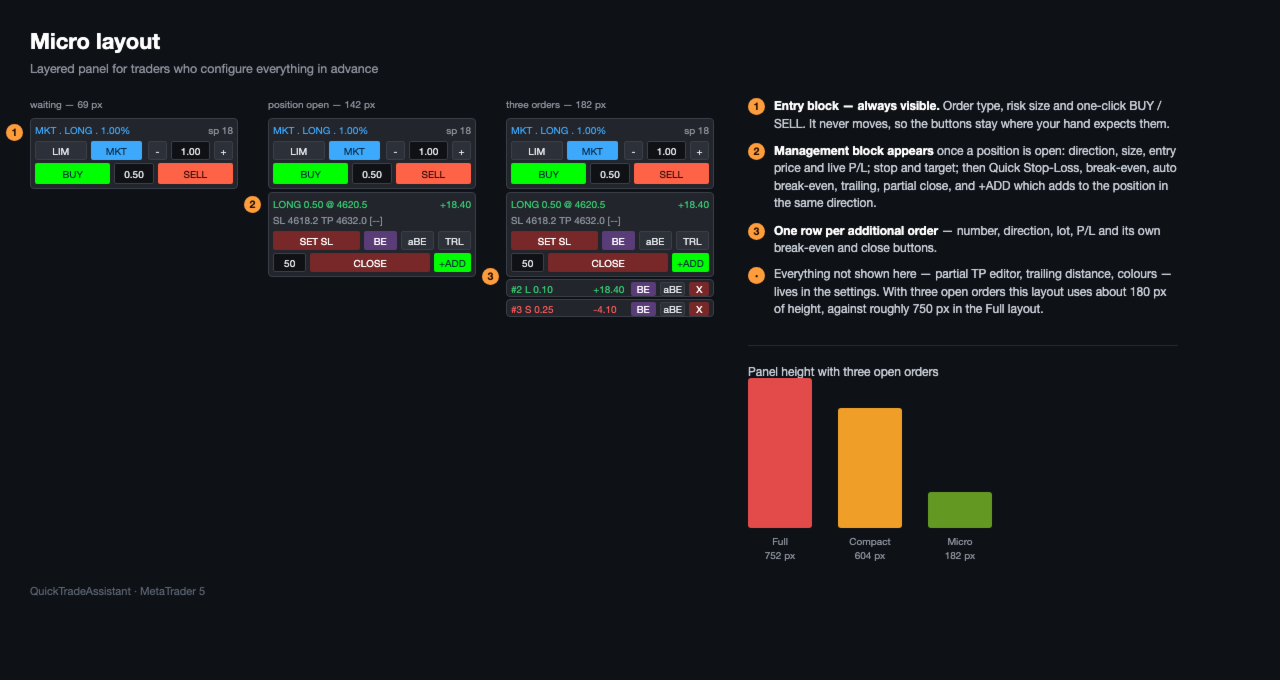
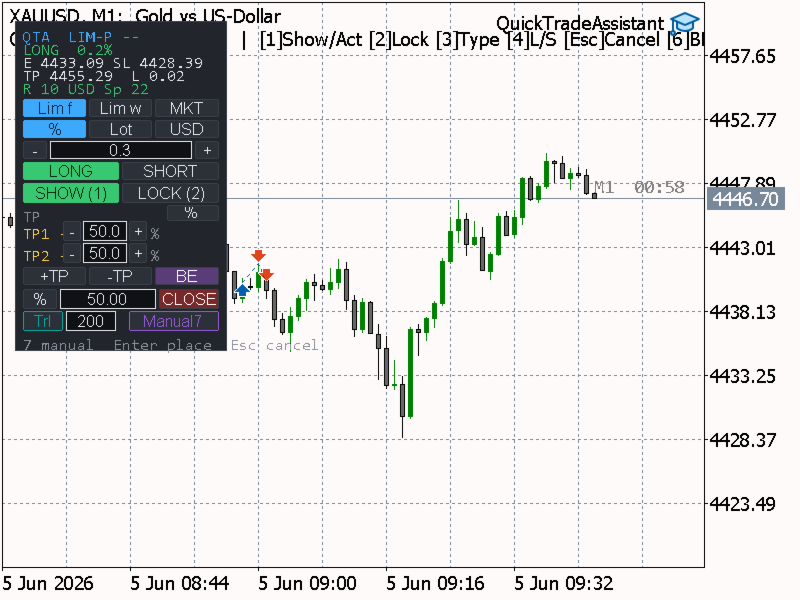
- 8 panel themes, Full or Compact layout, and selectable colors
for every chart line.
- Works on any symbol and timeframe.
--- HOW IT WORKS (WORKFLOW) ---
1. Hover the candle you want to use as the stop anchor. Hovering
above price prepares a LONG; below price prepares a SHORT.
2. Press 1 to arm the preview — Entry, SL and TP appear and follow
your mouse.
3. Adjust anything by dragging the lines, or change order type,
direction and size from the panel or hotkeys.
4. Press 1 (or Enter) to send the order. Press Esc to cancel.
After the position is open, manage it from the same panel: partial
TPs, trailing stop, auto/manual break-even and quick close.
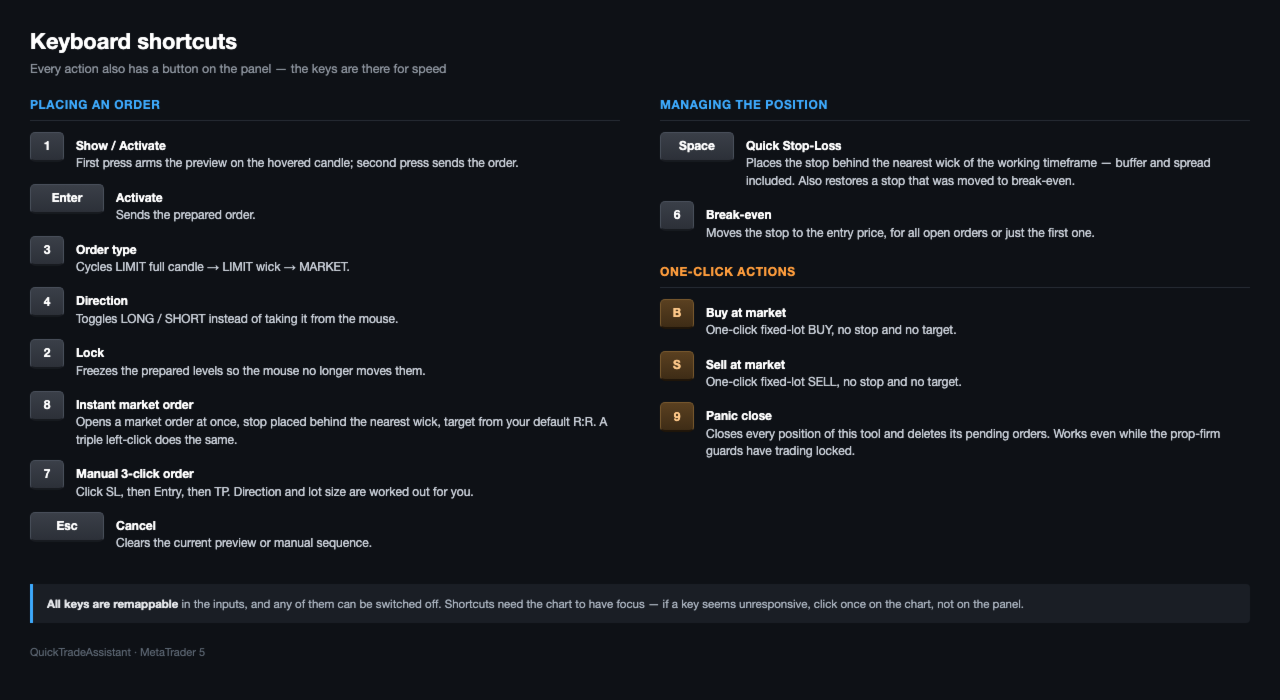
--- HOTKEYS ---
1 Show preview (first press) / Activate & send order
Enter Activate & send the prepared order
2 Lock / unlock the prepared levels
3 Cycle order type: LIMIT full -> LIMIT wick -> MARKET
4 Toggle direction: LONG / SHORT
6 Move Stop Loss to break-even (manual)
7 Start manual 3-click order / confirm & send when ready
8 New — Instant MARKET order: press key 8 or a fast triple-left-click to open a market
Esc Cancel the current preview or manual sequence
All hotkeys are remappable in the inputs, and every action also has
a button on the panel.
Tip: keyboard shortcuts require the chart to have focus. If a key
seems unresponsive, click once on the chart (not on the panel).
--- ORDER MODES ---
LIMIT full Entry at the candle extreme (covers the whole candle).
LIMIT wick Entry at the candle body edge (covers the wick only).
MARKET Entry follows live price; SL/TP freeze when armed.
--- POSITION SIZING ---
% Risk a percentage of account balance.
Lot Use a fixed lot size.
USD Risk a fixed amount of money in account currency.
Lot size is derived from the distance between Entry and Stop Loss.
--- PARTIAL TAKE-PROFITS ---
Each partial TP closes its percentage of the REMAINING position at
the moment it is reached, so you can scale out and still leave a
runner. Values can also be entered as fixed lots. Levels are added
or removed from the panel and each TP line is draggable to a custom
price; the reward value updates live.
--- TRAILING STOP ---
Toggle the trailing stop on the panel. Set the distance in the
panel field, or simply drag the position's stop line to where you
want it. The stop never moves backwards. Activation profit and the
minimum step are configurable, and trailing switches off by itself
once the position is closed.
--- INPUT PARAMETERS ---
Risk / position size
InpRiskMode Sizing method: % of balance / fixed lot / USD risk
InpRiskPercent Risk percent of balance (default 1.0)
InpFixedLot Fixed lot size (default 0.10)
InpRiskUSD Fixed money risk in account currency (default 100)
TP / RR
InpDefaultRR Default reward-to-risk ratio (default 5.0)
InpNumPartialTP Number of partial TP levels (default 2)
InpPartialMode Partial unit: percent or lots
InpPartialValues Default partial values, comma-separated (e.g. 50,50)
SL / spread / type
InpDefaultMode Default order type (LIMIT full / wick / MARKET)
InpSLBufferPoints Extra buffer added to the stop, in points (default 20)
InpUseSpreadInSL Include current spread in the stop distance (default true)
Trailing stop
InpTrailPoints Trailing distance in points (default 200)
InpTrailStartPoints Start trailing after this profit in points (0 = immediately)
InpTrailStepPoints Minimum step to move the stop, in points (default 20)
Candle close timer
InpShowCloseTimer Show time left to candle close (default off)
InpTimerTF Timer timeframe (CURRENT = chart timeframe)
InpTimerColor Timer text color
Panel
InpCorner Panel corner on the chart
InpPanelX/InpPanelY Panel offset from the corner
InpFontSize Panel font size
InpLayout Panel layout: Full or Compact
InpSkin Panel theme (8 styles)
Line colors
InpColLong / InpColShort / InpColSL / InpColTP / InpColPartial / InpColBE
Colors for each chart line (pick from a list)
Hotkeys
InpKey1..InpKey7 Remappable action keys (see HOTKEYS above)
General
InpMagic Magic number for this tool's orders (default 770077)
InpSlippage Maximum allowed slippage in points (default 30)
--- NOTES ---
- Discretionary tool: it never trades on its own; you confirm every
order. No profit guarantees are made or implied.
- The free demo of this product runs only in the MetaTrader 5
Strategy Tester (this is set automatically by the Market). Use
the tester to try the panel before purchasing.
- No DLLs and no external connections are used.
==================================================================
PART B — VERSION HISTORY ("What's New")
==================================================================
When you publish an update, add the newest version on TOP, using
the same format. Keep entries short and concrete.
------------------------------------------------------------------
Version 1.84
- New: Floating profit/loss indicator pinned to the right edge of the
chart, shown in blue and updated in real time, so it never overlaps
the candle-close timer.
- New: When a partial take-profit is reached, its row on the panel is
highlighted ("taken") instead of leaving an empty gap. The panel
returns to its initial state once the position is fully closed.
- Improved: In Lot mode, each partial take-profit is now an independent
absolute lot amount, limited only by the size of the open position.
You can freely allocate lots per level (for example, close 0.02 of a
0.03 position). Percent mode still closes a percentage of the
remaining position. Switching between % and Lot converts the values
consistently.
- Improved: On-chart labels (R:R, value in account currency, and the
candle-close timer) now sit just above their lines for readability.
- Fixed: The Auto break-even trigger line label now reads "Auto BE".
Version 1.80
- First public release on the MQL5 Market.
- One-key / mouse order placement with live Entry, SL and TP preview.
- Order modes: LIMIT (full candle), LIMIT (wick), MARKET.
- Position sizing by % of balance, fixed lots, or fixed money risk.
- Partial take-profits (percent of remaining or fixed lots),
draggable, add/remove levels.
- Trailing stop with adjustable distance (field or drag), auto-off
on close.
- Auto and manual break-even.
- Quick close by percent or lots.
- Manual 3-click order (SL -> Entry -> TP) with auto direction and
spread-aware lot sizing.
- Optional candle-close countdown timer.
- 8 panel themes, Full / Compact layout, selectable line colors.
- Risk and reward values shown in account currency above each line.
------------------------------------------------------------------
Template for the next entry (copy, fill in, move to the top):
Version X.YZ
- Added: ...
- Improved: ...
- Fixed: ...
------------------------------------------------------------------













































O usuário não deixou nenhum comentário para sua avaliação
What error are you referring to? thanks