Multi Symbol TP
- Utilità
-
Alex Amuyunzu Raymond
 I’m an experienced MQL5 developer and software engineer specializing in building robust, high-performance algorithmic trading systems for MetaTrader 5. My work goes beyond standard EA development — I design intelligent, scalable solutions that combine market logic, automation, and external
 - Versione: 1.0
Professional Trade Management Utility for MetaTrader 5
Copyright © YUNZUH TRADING SYSTEMS
WHAT THIS EA DOES
The Multi-Symbol Layered Take Profit Manager PRO is a sophisticated trade management utility designed exclusively for closing existing positions. This Expert Advisor does NOT open any trades. It is specifically engineered to manage your take profit targets across multiple symbols simultaneously using an intelligent layered system.
KEY CONCEPT: LAYER-BASED MANAGEMENT
What is a Layer?
A "layer" is a single open position. When you have multiple positions open on the same symbol, each position becomes a separate layer with its own independent take profit logic.
How Layers are Organized
For each symbol, the EA automatically:
- Collects all open positions matching your filters
- Sorts them by opening time (oldest first)
- Assigns layer numbers: Layer 1 = oldest position, Layer N = newest position
- Applies independent take profit logic to each layer
This system is ideal for traders using grid strategies, averaging techniques, multiple entries, or any trading approach involving multiple simultaneous positions per symbol.
CORE FEATURES
Multi-Symbol Operation
- Automatically scans and manages positions across ALL symbols in your account
- Each symbol is managed independently with no interference between symbols
- Attach to any chart once and manage your entire portfolio
- No need to attach multiple instances to different charts
Position Filtering System
Control which positions the EA manages through flexible filters:
- Magic Number Filter: Manage only positions with specific magic numbers, or set to 0 to manage all positions
- Symbol Filter: Manage all symbols, single symbol only, or a custom list of symbols (comma-separated)
- Current Chart Only Option: Restrict management to positions on the chart symbol where EA is attached
Eight Professional Take Profit Modes
1. Fixed Pips Take Profit Close each layer when it reaches a specified pip profit. Simple and reliable for standard trading.
2. Fixed Monetary Profit Close each layer when it achieves a specific dollar amount profit. Perfect for consistent profit targets.
3. Percentage of Account Balance Close each layer when profit reaches a percentage of your account balance. Scales with account growth.
4. ATR-Based Take Profit Dynamic take profit based on Average True Range indicator. Adapts to market volatility automatically. Specify ATR period and multiplier for customized volatility-based exits.
5. Entry Price Distance Close when price moves a specified distance from the entry price. Direct price movement targeting.
6. Net Profit Per Position Close each position when its net profit (including swap and commission) reaches your target.
7. Equity-Based Trigger Close positions when your total account equity reaches a specified level. Useful for global profit targets.
8. Time-Based Exit Automatically close positions after they have been open for a specified duration in minutes or hours. Ideal for time-limited trading strategies or session-based approaches.
ADVANCED FEATURES
Per-Layer Take Profit Scaling
Apply a multiplier to take profit targets based on layer number:
- Layer 1 uses base take profit
- Layer 2 uses base take profit × multiplier
- Layer 3 uses base take profit × multiplier²
- And so on...
This allows you to take progressively larger or smaller profits as more positions accumulate. Set multiplier above 1.0 to increase take profit with each layer, or below 1.0 to decrease it.
Direction-Based Take Profit Logic
Configure separate take profit rules for BUY and SELL positions:
- Apply different multipliers to long versus short positions
- Adapt to directional market bias
- Optimize for asymmetric market behavior
Trailing Take Profit System
Protect profits with intelligent trailing:
- Set activation threshold in pips (trailing begins only after position reaches specified profit)
- Define trailing step in pips (how far behind current price the take profit follows)
- Applies per layer independently
- Locks in profits as market moves in your favor
Breakeven Protection
Automatically move virtual take profit to breakeven plus additional pips:
- Activate after position reaches specified profit in pips
- Add extra pips beyond entry price for safety buffer
- Eliminates risk once position is sufficiently profitable
- Configurable per layer
SAFETY AND RISK MANAGEMENT
Minimum Holding Time Filter
Prevent premature closures by requiring positions to remain open for a minimum duration in seconds. Useful for avoiding spread-related or volatility-spike closures immediately after entry.
Spread Filter
Block position closures when spread exceeds your specified maximum in points. Prevents closing during unfavorable spread conditions that could reduce your net profit.
Slippage Control
Define maximum acceptable slippage in points for closing orders. Orders exceeding this slippage will be rejected and retried.
Maximum Layers Per Symbol
Set a limit on how many positions per symbol the EA will manage. Positions beyond this limit will not be processed. Set to 0 for unlimited layers.
Emergency Equity Protection
Global safety mechanism that closes ALL positions immediately if your account equity falls below a specified threshold relative to balance. Acts as an emergency stop-loss for the entire account.
USER INTERFACE
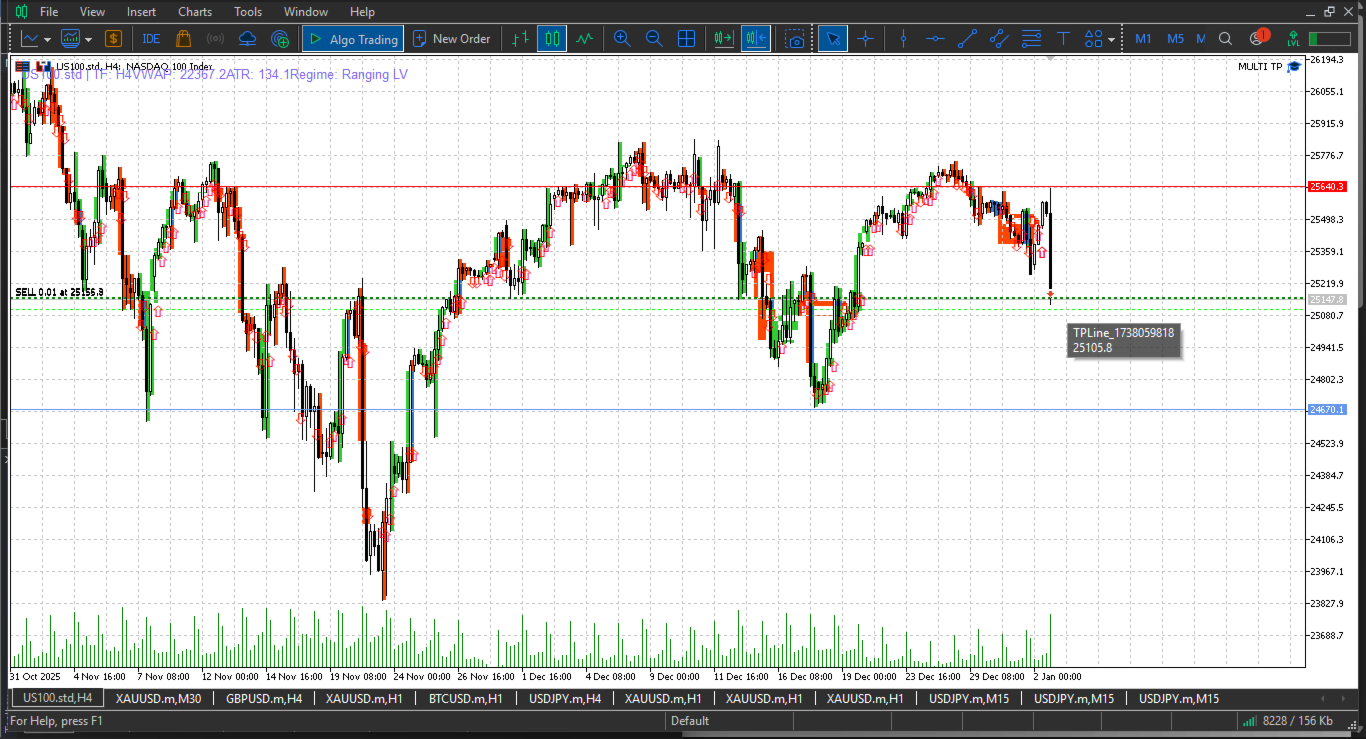
On-Chart Information Panel
Real-time display showing:
- Current take profit mode in use
- Number of symbols being managed
- Total layers (positions) under management
- Per-symbol breakdown with layer count and profit
- EA active status confirmation
Visual Take Profit Lines
Optional display of horizontal lines on the chart representing each layer's take profit level. Color-coded by layer number for easy identification. Only applicable for price-based take profit modes.
Debug Mode
Enable verbose logging for detailed information about:
- Layer assignment and indexing
- Take profit calculations
- Position closure execution
- Filter blocks and safety triggers
- Error messages with explanations
TECHNICAL SPECIFICATIONS
Execution Method
The EA operates on a timer-based system (configurable interval in milliseconds) rather than on every tick. This ensures:
- Efficient CPU usage even with many positions
- Consistent processing regardless of tick frequency
- Reduced platform load
- Smooth operation across all symbols
Error Handling
Comprehensive error management includes:
- Automatic retry on failed close attempts
- Detailed error logging with explanations
- Graceful handling of network interruptions
- Safe recovery from temporary failures
Performance Optimization
Designed for managing large numbers of positions:
- Efficient position scanning algorithms
- No infinite loops or blocking operations
- Minimal memory footprint
- Optimized for multi-symbol portfolios
COMPATIBILITY
Works With
- Manual trading strategies
- Grid trading Expert Advisors
- Signal-based EAs
- Martingale and averaging systems
- Prop firm trading accounts
- Any trading approach involving multiple simultaneous positions
Platform Requirements
- MetaTrader 5 platform
- No DLL dependencies
- No external web requests
- No special broker requirements
- MQL5 Market compliant
WHAT THIS EA DOES NOT DO
This is a trade management utility only. The EA explicitly does NOT:
- Open any buy or sell orders
- Generate trading signals
- Implement any trading strategy
- Use martingale or grid entry logic
- Average into positions
- Modify stop losses (manages only take profit)
TYPICAL USE CASES
Grid Traders
Manage multiple grid levels with independent take profit targets. Scale profits as grid expands. Close profitable levels systematically.
Manual Traders
Add professional automated take profit management to your manual entries. Focus on entry decisions while the EA handles exits.
Signal Followers
Combine with signal services or copiers. Let your signal provider handle entries while the EA manages exits according to your risk preferences.
Prop Firm Traders
Meet firm requirements with precise profit targeting. Manage multiple symbols simultaneously. Control risk with emergency protection features.
Portfolio Managers
Handle positions across multiple currency pairs, metals, indices, and commodities from a single EA instance.
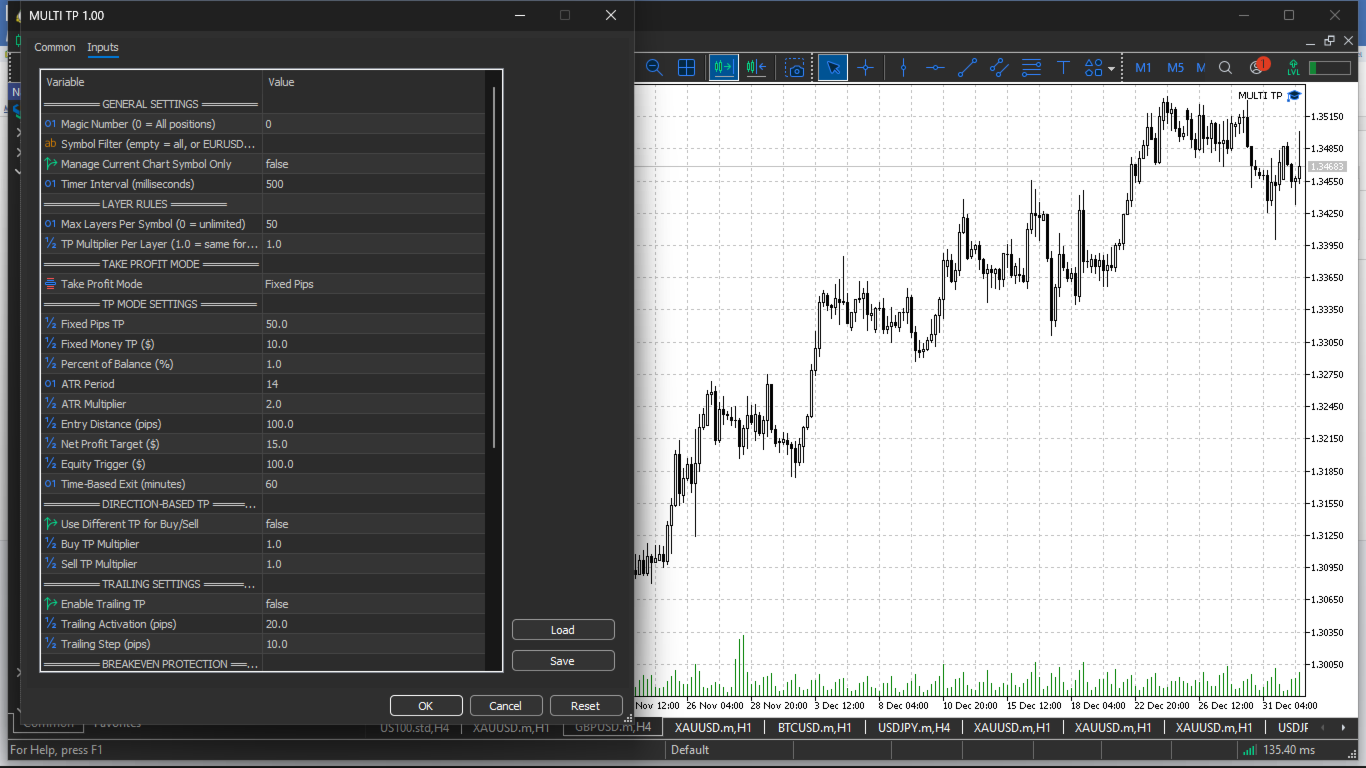
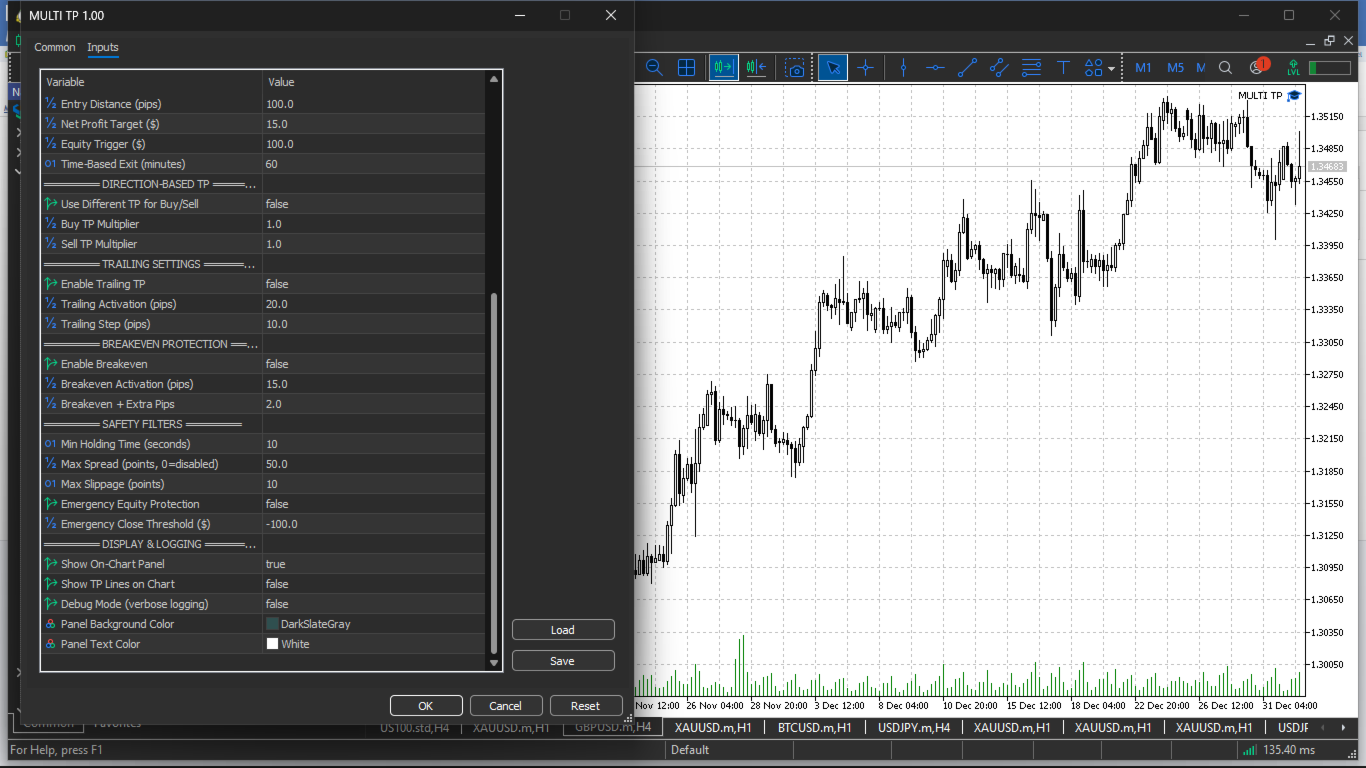
INPUT PARAMETERS OVERVIEW
All settings are organized into logical groups:
General Settings: Magic number, symbol filters, timer interval, chart-only mode
Layer Rules: Maximum layers per symbol, layer take profit multiplier
Take Profit Mode: Selection of one of eight take profit calculation methods
TP Mode Settings: Parameters specific to selected mode (pips, dollars, percentages, ATR settings, time duration, etc.)
Direction-Based TP: Enable separate rules for buy/sell, directional multipliers
Trailing Settings: Enable trailing, activation threshold, trailing step
Breakeven Protection: Enable breakeven, activation level, extra pips
Safety Filters: Minimum holding time, spread limit, slippage control, max layers, emergency protection
Display & Logging: Panel visibility, TP line display, debug mode, color customization
GETTING STARTED
- Attach the EA to any chart in your MetaTrader 5 terminal
- Configure your desired take profit mode and parameters
- Set appropriate filters (magic number, symbols) if needed
- Enable optional features (trailing, breakeven) as desired
- The EA will immediately begin managing all matching open positions
- Monitor the on-chart panel for real-time status
IMPORTANT NOTES
- The EA must remain attached to a chart and running for position management to function
- Changes to input parameters require EA restart to take effect
- Each position is evaluated independently - closing one layer does not affect others
- The EA respects all safety filters before executing any closure
- All closures are logged to the Experts journal for your records
SUPPORT AND UPDATES
This professional utility is actively maintained and supported. For questions, feature requests, or technical support, please contact through the MQL5 marketplace.
Developed by YUNZUH TRADING SYSTEMS
Product Link: https://www.mql5.com/en/users/yunzuhalex/seller
DISCLAIMER
This is a trade management tool, not a trading strategy. Past performance does not guarantee future results. Trading foreign exchange and other leveraged products carries a high level of risk. Only trade with capital you can afford to lose. The developer is not responsible for any trading losses incurred through use of this software.