SmartLimits

SmartLimits - Gestore Visivo di Ordini Pendenti

SmartLimits è uno strumento di trading professionale che ti consente di gestire gli ordini pendenti direttamente sul grafico con pieno controllo visivo.
Ti permette di creare, regolare e confermare ordini Buy o Sell Limit e Stop tramite un pannello intuitivo sul grafico, senza aprire le finestre degli ordini di MetaTrader.

Questo strumento è pensato per i trader che preferiscono un modo rapido e organizzato di gestire gli ordini in modo visivo, riducendo le azioni ripetitive e gli errori di inserimento.

Funzionalità Principali

  • Crea nuovi ordini pendenti direttamente dal grafico utilizzando il pulsante “New Order”.

  • Regola i livelli di Entry, Stop Loss e Take Profit trascinando le linee o modificando i valori nel pannello.

  • Modifica o elimina qualsiasi ordine istantaneamente con un solo clic.

  • Gestisci più ordini pendenti contemporaneamente, ciascuno con il proprio pannello di controllo.

  • Interfaccia visiva che mostra dati in tempo reale come prezzo, distanza e rapporto rischio/rendimento (R:R).

  • Determina automaticamente se un ordine è di tipo Limit o Stop in base alla posizione del prezzo.

  • Funziona sia con ordini lato broker che con ordini virtuali (esecuzione locale).

  • Salva e ripristina automaticamente tutte le configurazioni degli ordini pendenti dopo il riavvio del terminale.

  • Pulsante “Remove All” per eliminare immediatamente tutti gli ordini e le posizioni pendenti.

Parametri di Input

  • Virtual Mode: attiva la modalità virtuale. L’ordine pendente non viene inviato al broker; l’EA apre una posizione reale quando il prezzo raggiunge il livello di entrata.

  • Default Lot Size: volume di trading predefinito per i nuovi ordini.

  • Magic Number: identificatore utilizzato per tutti gli ordini piazzati da SmartLimits.

  • TP / SL Offset: distanza iniziale in punti per TP e SL quando vengono aggiunti.

  • Line Width: spessore delle linee di prezzo visive.

  • Tempo minimo in secondi per la scadenza degli ordini pendenti: definisce il tempo minimo di validità degli ordini pendenti.

  • Entry Drag moves block: definisce se trascinare la linea Entry sposta l’intero blocco dell’ordine o solo la linea stessa tra SL e TP.

Pulsanti e Controlli dell’Interfaccia

Lo strumento aggiunge due pulsanti principali nell’angolo in alto a destra del grafico:

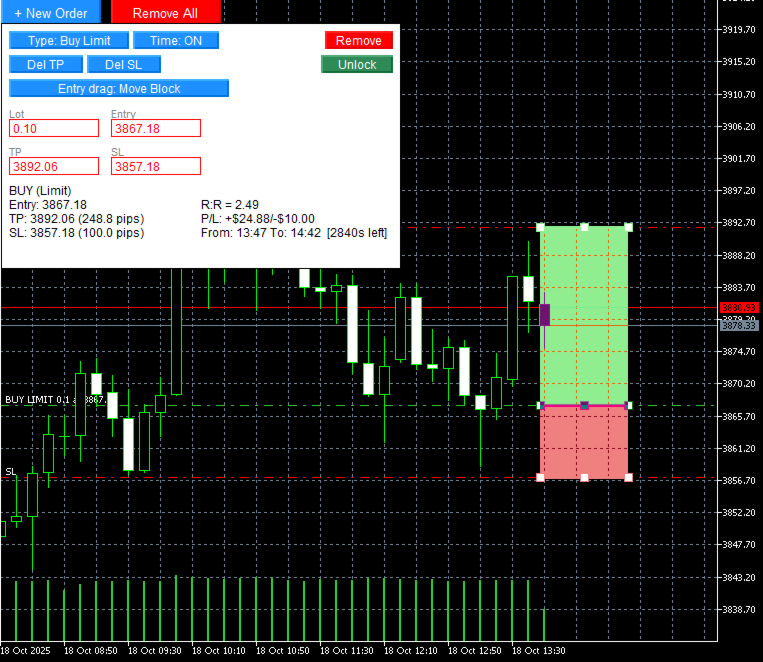
  • + New Order: crea un nuovo ordine pendente con linee Entry, SL e TP modificabili.

  • Remove All: elimina istantaneamente tutti gli ordini e le posizioni pendenti, inclusi quelli sul server del broker.

Ogni ordine dispone anche di un proprio pannello di controllo sul grafico che contiene:

  • Type: alterna tra modalità Buy e Sell.

  • Time: attiva o disattiva la scadenza dell’ordine pendente. Quando Time è disattivato, l’ordine rimane attivo a tempo indeterminato e verrà eseguito quando il prezzo raggiungerà il livello di entrata. Quando Time è attivato, l’ordine scadrà automaticamente dopo il tempo specificato.

  • Remove: elimina l’ordine selezionato.

  • Add TP / Del TP: aggiunge o rimuove la linea di Take Profit.

  • Add SL / Del SL: aggiunge o rimuove la linea di Stop Loss.

  • Confirm / Unlock: conferma o annulla l’ordine pendente (lo invia o lo rimuove dal broker).

  • Entry drag mode: alterna tra “Move Block” (sposta tutte le linee) e “Change Entry Price” (modifica solo la linea di entrata).

  • Campi Lot, Entry, TP, SL: campi modificabili per l’inserimento manuale del prezzo o del volume.

  • Visualizzazione R:R e P/L: mostra in tempo reale il rapporto rischio/rendimento e il profitto/perdita potenziale.

  • Etichetta del tempo: mostra il tempo rimanente fino alla scadenza o “Valid: GTC” (Valido fino a cancellazione) per ordini senza scadenza.

Come Funziona

  1. Clicca su + New Order per creare un nuovo blocco d’ordine interattivo.

  2. Regola Entry, TP e SL trascinando le linee o inserendo i valori manualmente.

  3. Clicca su Lock per inviare l’ordine al broker (o eseguirlo localmente in modalità virtuale).

  4. Usa Remove All per eliminare immediatamente tutti gli ordini pendenti.

  5. SmartLimits salva automaticamente tutti gli ordini e li ripristina dopo il riavvio del terminale.

Compatibilità

  • Funziona su tutti i simboli e timeframe.

  • Completamente compatibile con broker a più cifre decimali.

  • Gestisce tutti gli stati degli ordini del broker, incluse esecuzioni parziali, cancellazioni manuali e scadenze automatiche, mantenendo il grafico e lo stato interno completamente sincronizzati.
Prodotti consigliati
Trade assistant pro v8
Ahmed Mohammed Bakr Bakr
FREE FREE FREE Trade Assistant MT5 – Professional Trading & Risk Management Panel Trade Assistant MT5 is an advanced trading panel designed to help traders execute orders faster, safer, and more professionally . It simplifies manual trading by combining smart order management , precise risk control , and one-click execution , making it ideal for both beginners and advanced traders. This tool does not trade automatically . Instead, it empowers you with full control while applying professional-gra
FREE
FiT Panel Pro
Thonglak Janyakorn
Overview FiT Panel Pro is a professional-grade trade management panel designed for MetaTrader 5 traders who demand speed, precision, and full control over their trades. Built with a modern dark-theme UI, it combines one-click execution with advanced risk management, visual SL/TP drag lines, automatic Fibonacci-based levels, and comprehensive order management — all in a single, compact panel. Whether you are a scalper, day trader, or swing trader, FiT Panel Pro gives you the edge you need to exec
FREE
NAS100 Auto Sl And TP MT5
Moustapha Boulouz
5 (2)
Vi presentiamo NAS100 Auto SL e TP Maker per MT5: Non perdete mai più l'impostazione di StopLoss e TakeProfit con il nostro NAS100 Auto SL e TP Maker, un assistente indispensabile per i trader che navigano sul mercato del Nasdaq 100 su MetaTrader 5. Questo strumento è stato progettato per coloro che cercano una soluzione perfetta per automatizzare la gestione dei livelli di StopLoss e TakeProfit. Caratteristiche principali: Automazione senza sforzo: Monitora automaticamente le operazioni sul N
FREE
Click Trading
Jawad Tauheed
5 (2)
One Click Trading – Auto TP SL Developer TraderLinkz Version 1.00 Category Utility What it does Adds missing TP and SL to your manual trades and pending orders Sets them once per ticket Lets you move TP and SL afterward Works on hedging and netting accounts Scans on every tick and reacts on trade events Why you want it You place faster entries You get consistent risk and exit targets You reduce fat finger errors You keep full manual control Quick start Attach the EA to any chart Keep TP and SL e
FREE
Risk Manager – Account Protection Tool Risk Manager is an Expert Advisor for MetaTrader 5 designed to protect your trading account by applying automatic risk management rules. This tool does not open trades . It continuously monitors your account and enforces predefined limits to help prevent excessive losses and maintain disciplined trading. Risk Manager works in the background and can manage positions opened by manual trading or other Expert Advisors. It is particularly useful for: • Manual tr
FREE
Free MetaTrader 5 indicator that displays "CALL IT A DAY" when London & New York sessions close. Customizable alerts, session tracking, and a guilt-free reminder to log off. Perfect for workaholic traders! Tired of staring at charts when the market’s already clocked out? Session Guardian   is your sassy trading assistant that slaps a giant   "CALL IT A DAY"   on your screen when both London   and   New York sessions are closed—because even traders deserve happy hour. Key Features:   Big, Bo
FREE
Trade management panel for MetaTrader 5. It lets you place orders and manage open positions from a panel on the chart, without opening separate order windows. It works on any symbol and timeframe, on hedging and netting accounts. Layout and display The panel has two layouts. Single shows all controls in one view. Tabs splits the controls into separate tabs for a smaller footprint. You can hide the panel to see the chart behind it and restore it when needed. The panel scales with the screen res
FREE
Prop Edge Heartbeat
Nuno Madeira Amaro Pire Costa
EA to prevent inactivity violations on prop firms. This EA will scout for your most recent trade and if it is older than the number of days defined, will enter a micro lot position size 0.01 on the pair defined. It is recommended to use a tight spread pair like EURUSD. This EA will not act as long as you have at least one trade in the last X days (defined on config). This EA will not place other trades or modify existing position.
FREE
Core function Intelligent transaction management one-click opening and closing operation, which supports user-defined lots to set multiple closing modes: all closing, closing by direction and closing by profit and loss status. Professional risk control, real-time risk monitoring and spread control to avoid high-cost trading environment. Visual control panel has an intuitive graphical interface, and all functions can be operated with one button to display position information, profit and loss sta
FREE
Manual position management. Missing SL. Price moves against you. No protection. Trade Manager Lite automates Stop Loss, Take Profit, Trailing Stop, and Break-Even for your open positions. Attach to one chart. Configure your default SL/TP distance. Let it manage your positions automatically. What's Included (FREE Version) Auto SL/TP: Applies missing Stop Loss and Take Profit to positions based on your configured distance in points Trailing Stop: Adjusts SL dynamically as price moves in your favor
FREE
Recluse FX
Michael Prescott Burney
3 (2)
Recluse FX is the ultimate trading system for US30 on the H1 chart. With dedicated stop-loss and take-profit for each order, it guarantees optimal performance and risk management. Validated across over 1200 trades since 2021 with a 100% win rate, Recluse FX delivers unmatched stability and consistent gains under all market conditions. Its progressive pricing means that after 50 copies are sold, the system becomes exclusive to its owners. Purchase Recluse FX now and message for free access to th
FREE
Virtual Basket TP SL Manager
Moh Nugraha Kusuma
5 (1)
"Manage multiple positions as a single unit with hidden targets." The Virtual Basket TP SL Manager is a professional MetaTrader 5 utility designed to automate the closing of positions based on the total profit or loss of a group of orders (a "basket"). By utilizing Virtual Levels , all Take Profit (TP) and Stop Loss (SL) targets are stored locally within the EA's memory and are not sent to the broker's server, keeping your strategy safe from stop-hunting and price manipulation. Key Features Virt
FREE
================================================================ MATRIX CONDITION MONITOR Live Trade Condition Panel for MetaTrader 5 Fully Automatic -- Works with ALL Matrix EAs ================================================================ NEVER MISS A TRADE SETUP AGAIN Matrix Condition Monitor is a free utility that attaches to any chart and automatically checks all 10 trade conditions in real time -- showing you exactly why a trade will or will not open, and alerting you the moment ever
FREE
EA Utility Tool: Risk Consistency Manager The Risk Consistency Manager EA is a simple yet powerful tool that automates risk management across multiple open positions. It dynamically adjusts stop-loss levels to distribute a predefined total risk value (e.g., $10,000) evenly among all active trades. Key Features: Dynamic Risk Distribution: Automatically allocates an equal share of risk to each position (e.g. with total risk capital of $10,000, its will be distribute each trade with $3,333.33 risk
FREE
Market & Pending Risk Manager EA Operation Manual Market & Pending Risk Manager is a professional MT5 trading panel EA that integrates multiple functions such as market order trading, pending order trading, risk management, and trailing stop loss, providing traders with a comprehensive trading solution. Core Advantages Intelligent Dual-Mode Trading Market Order Mode: One-click buy/sell for fast execution Pending Order Mode: Precise entry to wait for the optimal timing Seamless Switching
FREE
TradeGacha
Phongsphat Chanswat
## Version 2.50 I created this EA with the intention of making it free for everyone to use. It serves as a tool to assist in trading with money management, entering order lots according to a percentage of the account balance, and automatically setting TP/SL based on high/low prices. In Version 2.50, The Auto TP/SL feature adjusts from the Line In (entry point), and Auto price in this version only shifts the entry line to the current price. Input settings: Ato update SL/TP Line >>> In version
FREE
Signalator Trade Summary Panel MT5 is a free local MetaTrader 5 utility that gives traders a clear account and open-trade overview directly on the chart. It is part of the Signalator Trading and Analysis Ecosystem — a growing set of practical MetaTrader tools for account monitoring, market analysis, symbol scanning, alerts and trader workflow improvement. This panel focuses on the account and position side of the workflow. It helps you quickly understand floating profit or loss, account status,
FREE
Apex TPGrid MT5
Carl Christian Nyberg
ApexTPGrid is a powerful Trade Management Utility designed to professionalize your grid and averaging strategies. Whether you trade manually or use other EAs, this utility takes control of your open "basket" of orders to manage them to a safe exit. The standout feature is the Swap-Aware Logic . We all know the pain of holding a grid for weeks, only to close at "breakeven" and realize negative swaps ate your capital. ApexTPGrid solves this by automatically calculating all accumulated costs (Swap
FREE
InnovaDash Smart Sync è il connettore di dati ufficiale progettato per collegare direttamente il tuo terminale MetaTrader alla tua dashboard InnovaDash Analytics. Creata per i trader professionisti, questa leggera utility viene eseguita silenziosamente in background, inviando automaticamente gli aggiornamenti del tuo capitale (equity) in tempo reale, le posizioni aperte e i dati storici di trading a InnovaDash. Perché InnovaDash? InnovaDash è una suite di analisi quantitativa premium basata
FREE
Position Size Tool – Smart Risk Management & Trade Execution Panel The Position Size Tool is a powerful and intuitive MT5 panel that simplifies your trading by combining position sizing , risk calculation , risk/reward visualization , and order placement —all in one place. ️ Clean & Functional Interface The tool features a compact, real-time panel with the following: Balance & Equity display Live Price tracking Customizable Risk % input Auto-calculated Lot Size based on SL and Risk Input for S
FREE
PZ Trade Pad MT5
PZ TRADING SLU
4.46 (24)
This simple visual expert advisor allows you to trade easily from the chart. It handles risk management for you and can perform several useful tasks with your existing trades, saving time and making risk-management for each individual trade easier.  [ Installation Guide | Update Guide | Troubleshooting | FAQ | All Products  |  Get Help ] Trade easily from the chart Trade with precise risk management, hassle free Trade pending order with drag and drop price selection Set SL and TP levels with d
FREE
EmaRsi robot
Deepak Saini
https://youtu.be/KHhg88fXWTk?si=ZoVtpc-wpfTVImSL 5-Minute Trading Strategy | Quick & Effective for Beginners Welcome to our trading channel- the deepak trading In this video, we'll be exploring a simple 5-minute trading strategy that can help you capture quick market movements and make profitable trades. Whether you're a beginner or an experienced trader, this strategy is designed to give you clear entry and exit points using technical indicators like EMA, RSI, and Stochastic Oscillator.
FREE
Trade With Price is a powerful and user-friendly MetaTrader 5 Expert Advisor designed to simplify and accelerate your trading execution. This EA provides a smart one-click trading panel that allows traders to instantly place BUY, SELL, and pending orders directly at the current market price—eliminating the need to calculate distances in pips. Key Features One-click BUY & SELL execution Place pending orders based on market price instead of pips Clean and intuitive trading panel interface
FREE
This is an EA designed to support manual trading. It can accurately calculate risk, automatically enter trades, set stop loss, and perform trailing stop loss using buttons on the chart. There are many features for risk calculation, setting stop loss, and trailing stop loss to suit various trading styles. It can also automatically manage prop firms by closing trades when reaching the target profit level or maximum daily loss. Additionally, it can perform manual backtesting using the strategy test
FREE
Haunted Risk Calculator is a visual risk management panel for MT5 that calculates the correct lot size in real time based on your account balance, risk percentage, and stop-loss distance. HOW IT WORKS Set your risk percentage or dollar amount, drag the SL and TP lines to your desired levels on the chart, and the panel instantly shows the calculated lot size, risk in dollars, reward-to-risk ratio, and expected profit. Execute with one click or a keyboard shortcut. FEATURES Draggable panel — grab
FREE
GDS RiskLab TradeDesk Free Manual Trading Desk and Risk-Control Utility for MetaTrader 5 GDS RiskLab TradeDesk is a free chart-based utility for traders who want a cleaner manual trading workspace in MetaTrader 5. It is designed as a simple execution-support and risk-control panel. The goal is to keep the trading process more organized: review the chart, plan the trade, keep risk visible and execute manually with more structure. This tool does not generate buy or sell signals. It does not predic
FREE
News Expert MT5
Maksim Neimerik
Introduction Welcome to the world of Forex trading, where every tick of the market can be influenced by news events. Introducing our expert advisor for MetaTrader, your ultimate tool for navigating the complexities of news trading. This innovative advisor is specifically designed to automate your trading strategy during key macroeconomic releases, ensuring you never miss an opportunity.  When important indicators are announced, volatility often spikes, creating potential for profit. Our expert
FREE
Dynamic Candle Timer
Channaphat Yamuangmorn
Overview The Dynamic Candle Timer is a lightweight and efficient utility designed for MetaTrader 5. Unlike traditional candle timers that remain static in the corner of the chart, this indicator dynamically attaches to the current Bid price line. This allows traders to monitor the remaining candle time directly at the point of action, enhancing focus during fast-paced market movements. It is highly suitable for day traders and scalpers operating on XAUUSD, Forex, Crypto, or Indices. Key Feature
FREE
TradeStats Pro – Lot & Risk Analytics Panel for MT5 TradeStats Pro is an analytics panel for MetaTrader 5 that displays trading history and account statistics in a structured, readable format directly on the chart. Account Overview The panel shows real-time account data including balance, equity, margin, free margin, floating profit/loss, win rate, profit factor, and maximum drawdown in both value and percentage. Lot Exposure Tracking Total buy lot, sell lot, and net lot exposure from open posi
FREE
Ultimate MT5 Auto SL/TP Assistant EA Our MT5 Expert Advisor is designed to automatically apply predefined SL and TP levels to any order you place – Fast, accurate, and fully automated, no manual errors, no delays. Perfect for scalpers, intraday traders, and anyone who values precision and speed. Auto SLTP Auto SL TP this is Utilities  Scalper Auto SL TP fast Open Close  https://www.mql5.com/en/market/product/158389
FREE
Gli utenti di questo prodotto hanno anche acquistato
Trade Assistant MT5
Evgeniy Kravchenko
4.43 (214)
It helps to calculate the risk per trade, the easy installation of a new order, order management with partial closing functions, trailing stop of 7 types and other useful functions. Additional materials and instructions Installation instructions - Application instructions - Trial version of the application for a demo account Line function -   shows on the chart the Opening line, Stop Loss, Take Profit. With this function it is easy to set a new order and see its additional characteristics bef
Forex Trade Manager MT5
InvestSoft
4.98 (668)
Benvenuto a Trade Manager EA, lo strumento definitivo per la gestione del rischio , progettato per rendere il trading più intuitivo, preciso ed efficiente. Non è solo uno strumento per l'esecuzione degli ordini, ma una soluzione completa per la pianificazione delle operazioni, la gestione delle posizioni e il controllo del rischio. Che tu sia un principiante, un trader avanzato o uno scalper che necessita di esecuzioni rapide, Trade Manager EA si adatta alle tue esigenze, offrendo flessibilità s
Local Trade Copier EA MT5
Juvenille Emperor Limited
4.96 (142)
Sperimenta una copia di trading eccezionalmente veloce con il   Local Trade Copier EA MT5 . Con la sua facile configurazione in 1 minuto, questo copiatore di trading ti consente di copiare i trades tra diversi terminali di MetaTrader sullo stesso computer Windows o su Windows VPS con velocità di copia ultra veloci inferiori a 0.5 secondi. Che tu sia un trader principiante o professionista,   Local Trade Copier EA MT5   offre una vasta gamma di opzioni per personalizzarlo alle tue esigenze speci
TradePanel MT5
Alfiya Fazylova
4.88 (162)
Trade Panel è un assistente commerciale multifunzionale. L'applicazione contiene più di 50 funzioni di trading per il trading manuale e permette di automatizzare la maggior parte delle attività commerciali. Prima dell'acquisto, è possibile testare la versione dimostrativa su un conto demo. Scaricare la versione di prova dell'applicazione per un account dimostrativo: https://www.mql5.com/it/blogs/post/762419 . Istruzioni complete qui . Commercio. Consente di effettuare operazioni di trading con u
Versione Beta Telegram to MT5 Signal Trader è quasi pronto per il rilascio ufficiale in versione alpha. Alcune funzionalità sono ancora in fase di sviluppo e potresti riscontrare piccoli bug. Se riscontri problemi, ti preghiamo di segnalarli, il tuo feedback aiuta a migliorare il software per tutti. Telegram to MT5 Signal Trader è uno strumento potente che copia automaticamente segnali di trading da canali o gruppi Telegram al tuo account MetaTrader 5 . Supporta canali pubblici e privati e cons
================================================================================ POC BREAKOUT - V20.72. Full Professional Grade Toolkit ================================================================================ POC Breakout is a full MetaTrader 5 trading dashboard for discretionary traders who want breakout signals, Point of Control (POC) context, volume profiles, order flow, market structure, news, alerts, and advanced trade planning in one professional workspace. Attached directly to you
FarmedHedge Pair Trading Dashboard
Tanapisit Tepawarapruek
5 (3)
Farmed Hedge Yield Farming | All Markets (Manual - Hybrid - Semi/Automated EA) MULTI-ASSET SUPPORT Trade any asset available on your broker - Forex: Major, Minor, Exotic pairs - Crypto: BTC, ETH, XRP, SOL, BNB - Stocks: Apple, Tesla, Amazon, Google, etc. - Commodities: Gold, Silver, Oil, Gas - Indices: US30, NAS100, SPX500, DAX40 - Any CFD your broker offers VERIFIED TRADING RESULTS - Farmed Hedge Yield Axi Copy:  https://www.mql5.com/en/signals/2356376 - Farmed Hedge Yield Exn Copy:   https:/
Exp COPYLOT CLIENT for MT5
Vladislav Andruschenko
3.97 (35)
Copiatore professionale di trade per MetaTrader 5 Un copiatore di trade veloce, professionale e affidabile per MetaTrader . COPYLOT consente di copiare operazioni Forex tra terminali MT4 e MT5 con supporto per conti Hedge e Netting . La versione MT5 di COPYLOT supporta: - MT5 Hedge → MT5 Hedge - MT5 Hedge → MT5 Netting - MT5 Netting → MT5 Hedge - MT5 Netting → MT5 Netting - MT4 → MT5 Hedge - MT4 → MT5 Netting Versione MT4 Descrizione completa + DEMO + PDF Come acquistare Come installare Come ot
Power Candles Strategy Scanner - Strumento di ricerca configurazioni multi-simbolo con ottimizzazione automatica Power Candles Strategy Scanner utilizza lo stesso motore di auto-ottimizzazione che alimenta l'indicatore Power Candles, applicandolo a tutti i simboli presenti nel tuo Market Watch, uno accanto all'altro. Un unico pannello ti indica quali simboli sono statisticamente negoziabili in questo momento, quale strategia è vincente su ciascuno di essi, la coppia ottimale di Stop Loss / Take
Anchor Trade Manager
Kalinskie Gilliam
5 (5)
Anchor: The EA Manager Run your full EA portfolio without conflicts, without stacked risk, and without watching every chart yourself. Anchor coordinates up to 64 Expert Advisors on a single account, including daily loss protection built for prop firm rules. Attach Anchor to any chart. Type your EA names and magic numbers in one line. Click OK. Anchor begins coordinating immediately. Built for portfolios. Built for prop firms. Built for discipline. The Problem Running multiple EAs on the same acc
Trade copier MT5
Alfiya Fazylova
4.59 (49)
Trade Copier è un'utilità professionale progettata per copiare e sincronizzare le transazioni tra conti di trading. La copiatura avviene dal conto/terminale del fornitore al conto/terminale del destinatario, che sono installati sullo stesso computer o vps. PROMOZIONE - Se avete già acquistato il "Trade copier MT5", potete ottenere gratuitamente il "Trade copier MT4" (per la copia MT4 > MT5 e MT4 < MT5). Per maggiori informazioni sulle condizioni, vi preghiamo di contattarci tramite messaggi priv
YuClusters
Yury Kulikov
4.93 (43)
Attention: You can view the program operation in the free version  YuClusters DEMO .  YuClusters is a professional market analysis system. The trader has unique opportunities to analyze the flow of orders, trade volumes, price movements using various charts, profiles, indicators, and graphical objects. YuClusters operates on data based on Time&Sales or ticks information, depending on what is available in the quotes of a financial instrument. YuClusters allows you to build graphs by combining da
Footprint Chart Pro — Professional OrderFlow EA for MetaTrader 5 Version 6.34 | Professional tool for real traders | Institutional-Grade Visualization DEMO USERS - PLEASE SELECT EVERY TICK / REAL TICK WHEN TESTING AND YOU HAVE DOWNLOADED HISTORICAL DATA. IF YOU SEE A WAITING SCREEN AND IT IS NOT DOWNLOADING, IT MEANS YOU HAVE LOW HISTORICAL DATA. TRY 1 MIN AND 5 MIN FIRST ON 1 DAY DATA. ONE DAY DATA SHOULD BE THE NEWEST AND MOST CURRENT DATE. PLEASE WAIT UNTIL THE MARKET HAS ROLLED OVER PERIOD.
Telegram to MT5 Multi-Channel Copier copia automaticamente i segnali di trading dai tuoi canali Telegram direttamente in MetaTrader 5. Nessun bot, nessuna estensione del browser, nessuna copia manuale. Ricevi un segnale su Telegram e l'EA apre l'operazione sul tuo terminale in pochi secondi. Il prodotto include due componenti: un'applicazione Windows che ascolta i tuoi canali Telegram, e questo Expert Advisor che esegue i segnali sul tuo terminale MT5. È disponibile anche una versione per MT4. G
Welcome to ENTRY IN THE ZONE WITH SMC MULTI TIMEFRAME Entry In The Zone with  SMC Multi Timeframe  is a professional trading indicator built on Smart Money Concepts (SMC), combining market structure analysis with a No Repaint BUY / SELL signal system in a single indicator. It helps traders understand market structure more clearly, identify key price zones, and focus on higher-quality trading opportunities. By combining Multi-Timeframe Analysis, Points of Interest (POIs), and real-time signals, t
The product will copy all telegram signal to MT5 ( which you are member) , also it can work as remote copier.  Easy to set up, copy order instant, can work with almost signal formats, image signal,  s upport to translate other language to English Work with all type of channel or group, even channel have "Restrict Saving Content", work with  multi channel, multi MT5 Work as remote copier: with signal have ticket number, it will copy exactly via ticket number. Support to backtest signal. How to s
HINN MagicEntry Extra
ALGOFLOW OÜ
4.75 (16)
LIMITED SUMMER SALE -40% !   ONLY $30 insead of $50!  Maximum real discount!  ONLY UNTIL 08/22 HINN MAGIC ENTRY – the ultimate tool for entry and position management! Place orders by selecting a level directly on the chart! full description   ::  demo-version  :: 60-sec-video-description Key features: - Market, limit, and pending orders - Automatic lot size calculation - Automatic spread and commission accounting - Unlimited partitial take-profits  - Breakeven and trailing stop-loss and take-p
Trade Manager DaneTrades
Levi Dane Benjamin
4.28 (29)
Trade Manager per aiutarti a entrare e uscire rapidamente dalle operazioni calcolando automaticamente il tuo rischio. Incluse funzionalità che ti aiutano a prevenire l'eccessivo trading, il vendetta trading e il trading emotivo. Le operazioni possono essere gestite automaticamente e i parametri di performance del conto possono essere visualizzati in un grafico. Queste caratteristiche rendono questo pannello ideale per tutti i trader manuali e aiuta a migliorare la piattaforma MetaTrader 5. Suppo
VirtualTradePad One Click Trading Panel
Vladislav Andruschenko
4.59 (74)
Pannello di trading per MetaTrader 5 — controllo professionale del trading in un clic dal grafico e dalla tastiera Un pannello di trading avanzato progettato per trader attivi, pensato per aprire, gestire e chiudere operazioni molto più velocemente rispetto all’interfaccia standard di MetaTrader. Questa soluzione è dedicata a chi desidera controllare posizioni, ordini pendenti, profitto totale ed esecuzione da un unico spazio di lavoro professionale. Non si tratta di un semplice utilitario. È u
EA Auditor
Stephen J Martret
5 (4)
EA Auditor is an independent analysis tool for traders evaluating Expert Advisors and trading signals on MetaTrader 5. It audits backtest reports, reviews posted developer signals, and cross-verifies the two against each other to help traders assess strategies before committing capital. The MQL5 market offers a wide range of Expert Advisors from many developers, with varying approaches, quality, and transparency. EA Auditor provides a consistent, data-driven framework for reviewing them, answer
Seconds Chart MT5
Boris Sedov
4.61 (18)
Seconds Chart - uno strumento unico per creare grafici in secondi su MetaTrader 5 . Con Seconds Chart , puoi generare grafici con timeframe definiti in secondi, ottenendo una flessibilità e una precisione d'analisi ideali, non disponibili nei grafici standard in minuti o ore. Ad esempio, il timeframe S15 indica un grafico con candele di 15 secondi. Puoi utilizzare qualsiasi indicatore e Expert Advisor con supporto per simboli personalizzati. Lavorare con loro è comodo quanto operare sui grafici

Trade Dashboard MT5
Fatemeh Ameri
4.95 (131)
Trade Dashboard simplifies how you open, manage, and control your trades, with built-in lot size calculation. It allows you to execute trades, manage risk, and control positions directly on the chart, with tools such as partial close, breakeven, and trailing stop. Designed to reduce manual work and help you stay focused on your trading decisions. A demo version is available for testing. Detailed explanations of features are provided within the MQL5 platform. Installation instructions are include
FUTURES ORDERFLOW FOOTPRINT CHART Professional OrderFlow EA for MetaTrader 5 Version 1.01| Professional tool for real traders | Institutional-Grade Visualization STRATEGY TESTER USERS - PLEASE SELECT EVERY REAL TICK WHEN TESTING AND YOU HAVE DOWNLOADED HISTORICAL DATA. IF YOU SEE A WAITING SCREEN AND IT IS NOT DOWNLOADING, IT MEANS YOU HAVE LOW HISTORICAL DATA. TRY 1 MIN AND 5 MIN FIRST ON 1 DAY DATA. ONE DAY DATA SHOULD BE THE NEWEST AND MOST CURRENT DATE. PLEASE WAIT UNTIL THE MARKET HAS ROL
HINN Lazy Trader
ALGOFLOW OÜ
5 (1)
LIMITED SUMMER SALE -40% ! ONLY $470 insead of $790!  Maximum real discount! ONLY UNTIL 08/22 The core idea: using the user interface, you configure the parameters the chart must meet before entering a position (or positions), choose which entry models to use, and set the rules for when trading and planning should end. Lazy Trader  handles the rest: it  takes over all the routine chart watching and execution! full description  :: 3 key videos [1] ->  [2]   ->  [3] What can it do? - Understand
Quant AI Agents
Ho Tuan Thang
5 (1)
Quant AI Agents are independent trading Expert Advisors. Instead of trading using a fixed strategy like other conventional EAs, Quant AI Agents   is a   multi-agent AI trading framework   that turns natural-language strategy prompts into live.  WANT THE SAME RESULTS AS MY LIVE SIGNAL?   Use the exact same brokers I do:   IC MARKETS , IC TRADING   .  Unlike the centralized stock market, Forex has no single, unified price feed.  Every broker sources liquidity from different providers, creating un
Timeless Charts
Samuel Manoel De Souza
5 (7)
Timeless Charts è un'utilità di trading completa progettata per trader professionisti. Combina tipi di grafici personalizzati come Grafici a Secondi e Renko con analisi avanzata del flusso ordini tramite Footprints , Clusters , Profili di Volume , studi VWAP e strumenti di analisi ancorata per una visione più approfondita del mercato. Il trading e la gestione delle posizioni vengono eseguiti direttamente dal grafico tramite un pannello integrato di gestione delle operazioni , mentre Market Repla

EasyInsight AIO MT5
Alain Verleyen
4.92 (12)
EASY Insight AIO – La soluzione all-in-one per un trading intelligente e senza sforzo Panoramica Immagina di poter analizzare l’intero mercato — Forex, Oro, Cripto, Indici e persino Azioni — in pochi secondi, senza dover controllare manualmente i grafici, installare indicatori o affrontare configurazioni complicate. EASY Insight AIO è il tuo strumento definitivo di esportazione per il trading alimentato dall’IA, pronto all’uso. Offre una panoramica completa del mercato in un unico file CSV pul
The News Filter MT5
Leolouiski Gan
4.78 (23)
Questo prodotto filtra tutti gli esperti consulenti e i grafici manuali durante il periodo delle notizie, così non dovrai preoccuparti di improvvisi picchi di prezzo che potrebbero distruggere le tue impostazioni di trading manuali o le negoziazioni effettuate da altri esperti consulenti. Questo prodotto viene fornito anche con un sistema completo di gestione degli ordini che può gestire le tue posizioni aperte e gli ordini in sospeso prima della pubblicazione di qualsiasi notizia. Una volta che
Trader Evolution
Siarhei Vashchylka
5 (7)
" Trader Evolution " - A utility designed for traders who use wave and technical analysis in their work. One tab of the utility is capable of money management and opening orders, and the other can help in making Elliott wave and technical analysis. Manual (Be sure to read before purchasing) | Version for MT4 Advantages 1. Trading in a few clicks. Immediate and pending orders are available in the panel 2. Money management. The program automatically selects the appropriate lot size 3. Simplifies
EA Performance Tracker
Russell Leeon Tan
5 (3)
EA Performance Tracker (AESTracker) A clean, modern dashboard that shows exactly how your trades and EAs are performing — right on your chart. It reads your full account history automatically and breaks down the numbers by magic number / strategy. Display only — it does not place any trades. What it shows - Account header: live Balance, Equity, and Open (floating) P/L - Profit summary: gross profit, net profit, and the exact commission & swap deducted - Key stats: win rate, profit factor, exp
Altri dall’autore
SmartChoise
Gabriel Costin Floricel
4.21 (82)
SmartChoise EA – Sistema di Trading Alimentato da Reti Neurali per XAU/USD (Oro) su Timeframe M1 Il manuale utente è disponibile tramite il link sulla mia pagina profilo — contiene spiegazioni dettagliate di tutte le impostazioni e opzioni. Sul canale Telegram puoi anche trovare diversi account che utilizzano SmartChoise con differenti saldi, livelli di rischio e configurazioni. È un ottimo modo per vedere le reali prestazioni dell’EA su più broker e condizioni. Prezzo ridotto per ora. Questo EA
SmartChoise Battery
Gabriel Costin Floricel
4.8 (5)
SmartChoise Battery EA Una continuazione raffinata e stabile del classico SmartChoise Expert Advisor (v8.2). Il manuale utente è disponibile tramite il link sulla mia pagina profilo. Questa edizione mantiene la logica neurale originale e il sistema di filtri classici che molti trader hanno apprezzato per il comportamento stabile e prevedibile. È pensata per chi preferisce il flusso di trading originario, concentrandosi su chiarezza e semplicità invece che su cambiamenti continui. Battery EA incl
SmartChoise MT4
Gabriel Costin Floricel
SmartChoise MT4 EA – Sistema di Trading basato su Rete Neurale per XAU/USD (Oro) su Timeframe M15 Manuale Utente: Disponibile tramite il link nella mia pagina profilo. Per ora, corrisponde alla versione MT5 — alcune opzioni sono state rimosse nella versione MT4, ma tutte le impostazioni attuali sono spiegate lì. Un manuale dedicato per MT4 sarà rilasciato in futuro. SmartChoise MT4 è progettato per una crescita a lungo termine e controllata, alimentata da un motore a rete neurale che si adatta a
SmartBid
Gabriel Costin Floricel
5 (3)
SmartBid – Sistema di Trading Basato su Rete Neurale per XAU/USD sul Time Frame M10 Un sistema di trading avanzato che utilizza una rete neurale per ottimizzare i punti di ingresso e uscita in base alle condizioni di mercato. È progettato per offrire una gestione intelligente delle operazioni, dimensionamento delle posizioni regolato in base al rischio e una strategia di recupero integrata per gestire il drawdown complessivo. Con livelli di rischio personalizzabili, filtri di spread, impostazion
ZoneFlow
Gabriel Costin Floricel
ZoneFlow — Scalper multi-simbolo su supporti e resistenze ZoneFlow è un Expert Advisor Forex progettato per operare zone di supporto e resistenza utilizzando ingressi confermati dall’RSI e una gestione delle operazioni basata su basket. L’EA cerca zone di prezzo importanti, attende che il prezzo raggiunga tali aree, conferma il setup con il comportamento dell’RSI e gestisce le operazioni aperte come un basket strutturato. ZoneFlow è progettato per trader che desiderano un sistema di mean rev
Filtro:
Nessuna recensione
Rispondi alla recensione