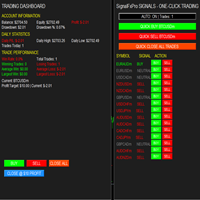
SignalFxPro Expert Advisor
- Experts
- Versione: 1.12
- Attivazioni: 5

SignalFxPro — automated, closed-bar breakout EA with ATR confirmation, optional martingale & grid recovery, news filter and per-TF SL/TP — designed for multi-symbol scanning and hands-off execution.
Overview
SignalFxPro is a pragmatic breakout Expert Advisor that uses closed-bar consolidation breakouts (no repaint) combined with ATR and a minimum pip distance to detect high-probability entries. It was built for systematic multi-symbol scanning across multiple timeframes and includes flexible trade sizing, optional martingale doubling after losing trades, an averaging/grid recovery option, and an integrated news block filter. The EA also displays a non-intrusive watermark so live charts clearly show it’s running.
Key features
-
Breakout detection on closed bars (no repaint) using a configurable lookback window.
-
Optional ATR multiplier and minimum pip distance filter to avoid micro-breakouts.
-
Two confirmation modes: close-price confirmation (default) or high/low touch confirmation.
-
Per-timeframe ATR-based SL/TP with sensible defaults and override values per TF (M5, M15, M30, H1, H4, D1).
-
Multi-symbol scanning across MarketWatch or a custom comma-separated symbol list.
-
Multi-timeframe operation — trade any combination of M1 / M5 / M15 / M30 / H1 / H4 / D1.
-
Flexible money management: fixed lot or automatic lot sizing based on 10% of free margin.
-
Martingale option (doubling after consecutive losing trades) with cap on doublings.
-
Optional grid averaging (distance and max levels configurable) to add orders into losing directions.
-
Safety controls: max primary orders per symbol/TF, hedging toggle (auto-close opposite trades if hedging disabled).
-
News filter (Investing.com style CSV parsing) to block trading around high/medium impact events; refresh timer included.
-
Lightweight bookkeeping (per-TF magic numbers) to avoid cross-interference between timeframes.
How it trades (summary of logic)
-
The EA scans configured symbols and timeframes.
-
For each symbol+TF it builds a consolidation high/low over the configured LookBackBars (closed bars).
-
A breakout is signalled when the last closed bar closes beyond the consolidation boundary by at least the ATR*AtrMultiplier (or the MinPipsDistance, whichever is larger).
-
If news of sufficient impact is close in time, the EA will block entry for the symbol.
-
When an entry fires the EA:
-
computes an initial lot (fixed or AutoMM 10% of free margin),
-
adjusts lot by martingale doubling based on recent consecutive losses (if enabled),
-
places the order with ATR-based SL and TP (per-TF multipliers applied).
-
-
If hedging is disabled, the EA will attempt to close opposite orders for the same symbol/TF before opening a new primary order.
-
If grid is enabled the EA can add averaging orders at configured step sizes once price moves against the first order.
Inputs (high-level)
-
Universe: UseAllMarketWatchSymbols , SymbolsCSV
-
Timeframes: TradeTF1..TradeTF4 (choose NONE to skip)
-
Breakout: LookBackBars , AtrMultiplier , AtrPeriod , MinPipsDistance , UseCloseConfirm
-
SL/TP: DefaultSL_ATR , DefaultTP_ATR + per-TF overrides (SL_M5, TP_M5, …)
-
Money management: UseAutoMM , RiskPercent , FixedLot , MinLot , MaxLot
-
Martingale: UseMartingale , MaxDoublings
-
Grid: UseGrid , GridStepPips , GridMaxLevels
-
Safety: Slippage , MaxOrdersPerSymbolTF , MagicBase , AllowHedging
-
News filter: UseNewsFilter , BlockBeforeNewsMin , BlockAfterNewsMin , MinImpactLevel , NewsRefreshMinutes , NewsURL
-
Watermark: WatermarkLine1/2 , WatermarkColor , font & padding settings
Recommended settings & usage notes
-
Default ATR multipliers and per-TF SL/TP settings are conservative for intraday TFs (M15–H1). Adjust to your pair volatility and broker spreads.
-
If your broker does not allow hedging and AllowHedging = false , the EA will attempt to close opposite trades before placing a new opposing order. Be aware this introduces extra order handling and possible partial fills.
-
Use the news filter if you want to avoid trading around high-impact releases. The EA fetches a CSV-style feed (configurable URL) and heuristically parses items; ensure the feed format matches expectations for best results.
-
MaxOrdersPerSymbolTF controls exposure per symbol/TF; set to 1 to only allow one primary active order per TF (recommended for conservative risk).
Installation
-
Copy the EA file to the MQL5/Experts folder in your platform directory.
-
Compile in MetaEditor and attach to a chart (recommended: attach on any chart; EA will scan MarketWatch or use SymbolsCSV ).
-
Allow automated trading and WebRequest permissions if you use the news filter (if ported to MQL5 ensure WebRequest URL list includes your NewsURL).
Compatibility
-
Logical design targets retail FX pairs and brokers supporting standard market orders.
-
If you convert/port to MQL5, ensure WebRequest usage and web/curl permissions are adapted to MQL5 WebRequest() specifics and that MarketInfo/OrderSend calls are correctly replaced with MQL5 trading API equivalents. (This description is suitable for an MQL5 product page — verify the code is fully ported to MQL5 before publishing.)
Change log
-
v1.11 — Added watermark, multi-TF configuration, per-TF SL/TP overrides, news filtering and autoMM.
Note: Multi-pair trading systems EA are the reason why strategy tester trading results are not displayed.