Terminal Strategy pro mtf Order Blocks EA
- Experts
-
AL MOOSAWI ABDULLAH JAFFER BAQER
 To trade successfully we need to go through the proven path that others had gone and reached!
Here are 17 quotes from such successful investors:
1- Limit your size in any position so that fear does not become the prevailing instinct guiding your judgment.
Joe Vidich - Versione: 1.2
- Attivazioni: 5
| • Please test the product in the Strategy Tester before purchasing to understand how it works. • If you face any issues, contact me via private message—I’m always available to help. • After purchase, send me a screenshot of your order to receive a FREE EA as a gift. |
|---|
Terminal Strategy PRO MTF Order Blocks
Please note, this Expert Advisor is provided as a foundational tool. It has not been optimized for any specific trading instrument or timeframe and is designed for you to test, customize, and optimize according to your own trading strategy and risk tolerance.
Terminal Strategy PRO is a sophisticated trading tool for MetaTrader 5 designed to provide a structured and analytical approach to the markets. It is built upon a multi-timeframe (MTF) logic that filters trades based on the dominant trend of a higher timeframe, aiming to execute entries on lower timeframe pullbacks.
This EA offers a clear framework for traders who utilize trend-following and pullback strategies.
Core Features:
-
Multi-Timeframe Trend Filter: The EA first analyzes the market on a higher timeframe (defaulting to Daily) using a 200 Exponential Moving Average (EMA) and an Average Directional Index (ADX). This ensures that entries are only considered when they align with the broader market direction and when the market shows sufficient momentum.
-
Pullback Entry System: On the active chart timeframe, the EA identifies entry opportunities when the price pulls back and crosses a 50 EMA. This is designed to enter the market at a potentially more favorable price within an established trend.
-
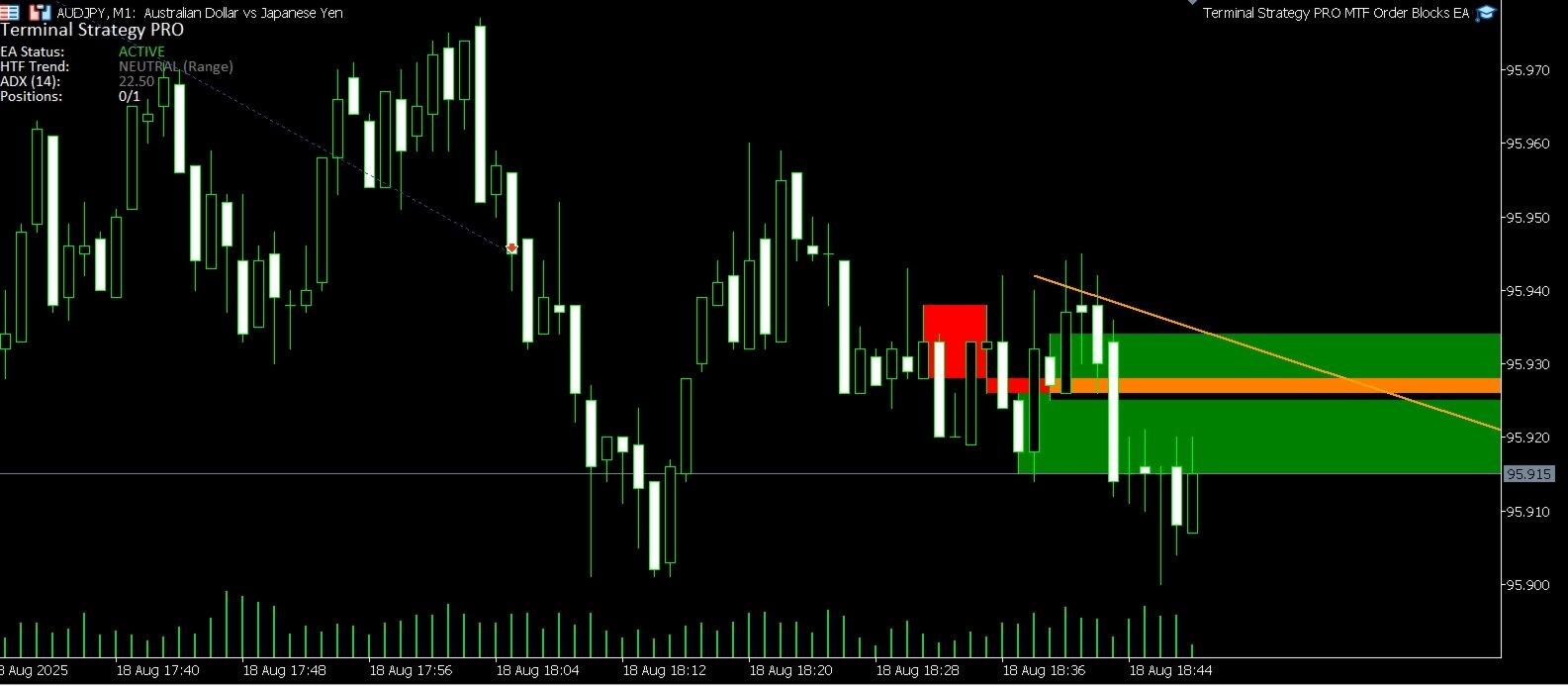
Integrated Order Block Visualization: The EA automatically detects and displays Bullish and Bearish Order Blocks on your chart. This visual tool helps in identifying key price levels that could act as potential support or resistance zones, adding another layer to your market analysis.
-
Strategy-Based Exit Logic: In addition to standard Stop Loss and Take Profit levels, the EA includes an optional strategy-based exit. If enabled, a position will be automatically closed if the higher timeframe trend conditions that triggered the trade are no longer valid.
-
Informative On-Screen Dashboard: A clean and customizable dashboard keeps you informed of the EA's status, the current higher timeframe trend, ADX value, and the number of open positions without cluttering your chart.
-
Full Customization: You have complete control over all parameters, including EMA and ADX periods, lot sizes, Stop Loss, Take Profit, and all visual elements. This allows you to adapt the EA's logic to fit your preferred trading style.
Pricing:
This tool is available for a one-time price of $30.
To explore other trading tools and Expert Advisors, you are welcome to visit my MQL5 seller page: https://www.mql5.com/en/users/1218858/seller .
The Logic Explained in Detail
The Terminal Strategy PRO EA operates on a layered, two-stage logic that combines a high-level trend filter with a precise low-level entry trigger.
1. The Higher Timeframe (HTF) Trend and Momentum Filter
The EA's primary rule is to only trade in the direction of the dominant, long-term trend. To establish this, it analyzes a higher timeframe, which is set to the Daily (D1) chart by default. Two classic indicators are used for this analysis:
-
200 EMA (Exponential Moving Average): This is used to define the overall trend direction. If the current price is above the 200 EMA on the daily chart, the EA considers the market to be in a general uptrend and will only look for buy signals. Conversely, if the price is below the 200 EMA, the market is considered to be in a downtrend, and the EA will only look for sell signals.
-
14 ADX (Average Directional Index): This indicator measures the strength or momentum of the trend. The EA requires the ADX value to be above a specific threshold (defaulting to 25). This condition acts as a filter to prevent the EA from taking trades during sideways or ranging market conditions where a clear trend is absent.
A trade will only be considered if both these conditions on the higher timeframe are met: the price must be on the correct side of the 200 EMA, and the ADX must indicate a trending market.
2. The Current Timeframe Entry Trigger
Once the higher timeframe filter gives a green light for either a buy or a sell, the EA then turns its attention to the current, active chart to find an entry point. The entry logic is based on a pullback strategy using a 50 EMA.
-
For a Buy Signal (in a Confirmed HTF Uptrend): The EA waits for the price to experience a temporary dip or pullback. The specific trigger occurs when the price, having been above the 50 EMA, crosses to close below it. This signals a potential entry point at a lower price just before the trend is expected to resume its upward movement.
-
For a Sell Signal (in a Confirmed HTF Downtrend): The EA waits for the price to experience a temporary rally. The trigger occurs when the price, having been below the 50 EMA, crosses to close above it. This provides a potential entry at a higher price before the downtrend is expected to continue.
3. Trade Management and Exit Strategy
When a trade is executed, it is managed by three potential exit scenarios:
-
Fixed Stop Loss: A standard Stop Loss is set at a user-defined number of points away from the entry price to manage risk.
-
Fixed Take Profit: A Take Profit level is set at a user-defined number of points to secure the position once a certain level has been reached.
-
Strategy-Based Exit: This is an optional feature. If enabled, the EA continuously monitors the higher timeframe filter conditions. If, for a buy trade, the HTF trend turns bearish or the ADX drops below the threshold, the EA will close the position automatically. This ensures the trade remains active only as long as the underlying strategic reasons for entering it are still valid.