ZoneRecoveryHW
- Experts
- Versione: 3.3
- Aggiornato: 3 novembre 2025

This is a high-risk strategy; it is recommended to set appropriate parameters.
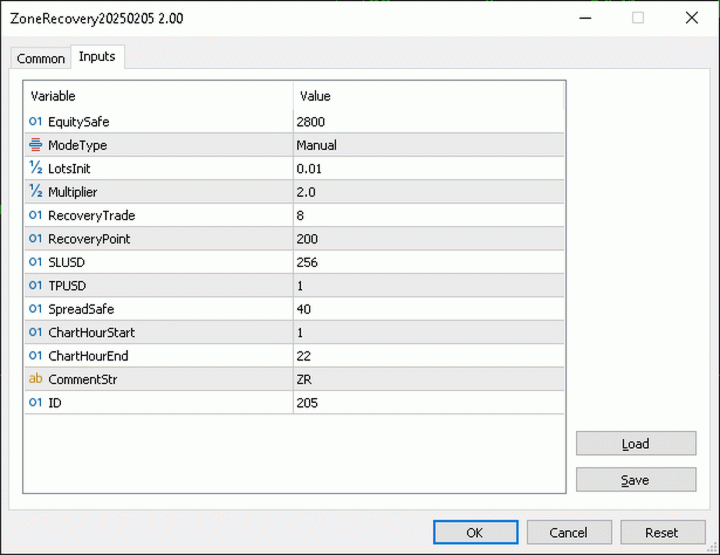
1. Pending Opposite Stop Order – Used for breakout trading.
2. Multiplier – Determines the lot size of the opposite order.
3. Recovery Point – the distances of Pending Opposite Stop Order. For example, setting 200 for EUR/USD is reasonable.
4. Built-in Strategies – AutoSpike or AutoVolatility or Manually click-to-trade with your own strategy.
5. SL USD and TP USD – Money-based stop-loss or take-profit to close all orders. For example, SL USD 2^8=256
6. Equity Safe – If the initial capital is $4,000. If equity falls below $2,800, all orders will be closed, and no new orders will be placed.
7. Spread Safe – If Spread over 40, first order will not open. Applies only to the first order.
8. Chart Hour Start & End – Defines the auto-trading time range. Applies only to the first order.
9. ID = Magic Number. PnL belongs to ID.
Please configure your own lot sizes and parameters.
1. Pending Opposite Stop Order – Used for breakout trading.
2. Multiplier – Determines the lot size of the opposite order.
3. Recovery Point – the distances of Pending Opposite Stop Order. For example, setting 200 for EUR/USD is reasonable.
4. Built-in Strategies – AutoSpike or AutoVolatility or Manually click-to-trade with your own strategy.
5. SL USD and TP USD – Money-based stop-loss or take-profit to close all orders. For example, SL USD 2^8=256
6. Equity Safe – If the initial capital is $4,000. If equity falls below $2,800, all orders will be closed, and no new orders will be placed.
7. Spread Safe – If Spread over 40, first order will not open. Applies only to the first order.
8. Chart Hour Start & End – Defines the auto-trading time range. Applies only to the first order.
9. ID = Magic Number. PnL belongs to ID.
Please configure your own lot sizes and parameters.




































Does it work only on EUR/USD? I tested it on XAU/USD and it didn’t work.