 MetaTrader 5
 Experts
 Indicateurs
 Bibliothèque
 Utilitaires
 Widgets
 Règles
Regardez les tutoriels vidéo de Market sur YouTube
Comment acheter un robot de trading ou un indicateur
Exécutez votre EA sur
hébergement virtuel
hébergement virtuel
Test un indicateur/robot de trading avant d'acheter
Vous voulez gagner de l'argent sur Market ?
Comment présenter un produit pour qu'il se vende bien
Nouveaux utilitaires de trading pour MetaTrader 4 - 24
 Vous trouverez ci-dessous des programmes de trading simplifiant le trading sur le marché Forex dans MetaTrader 4. Passez la souris sur un utilitaire dans la liste ci-dessous pour lire sa description et son objectif.
DepoControl – Full Control Over the Deposit Closers Expert Advisor controls the overall account status and closes ALL market orders on the account when certain conditions occur. The trading robot closes ALL orders on the account in the following cases (by profit): Close ALL orders by a total profit on the account in monetary terms . For example, suppose that the settings specify that positions should be closed when profit of 100 is reached. In this case, the Expert Advisor closes all mark
THIS EA IS A SEMI-AUTO EA, IT NEEDS USER INPUT. Manual & Test Version Please TEST this product before BUYING and watch my video about it. Contact me for user support or bug reports, or if you want the MT5 version! MT5 Version I do not guarantee any profits or financial success using this EA.
With this Expert Advisor, you can: Implement your own Zone Recovery strategy to capitalize on trending markets. Create Grid trading strategies, to profit from ranging markets. Place orders easil

Utilisation générale :
Vous pouvez utiliser cet indicateur comme une confirmation fiable pour les systèmes de retournement et également comme un puissant système de trading autonome. Il vous permet d'analyser la probabilité d'un retournement lorsque le prix rencontre chaque pivot ou niveau de support/résistance. Il joue un rôle similaire à la divergence ou aux freins de continuation de tendance. Le ratio risque-rendement de cet outil est d'au moins 1 pour 2, et dans le meilleur des cas, avec un
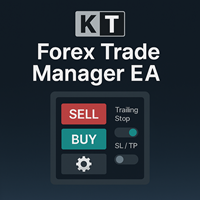
Le KT Trade Manager est un outil puissant conçu pour améliorer l'exécution des ordres et la gestion des positions. Grâce à son interface conviviale, les traders peuvent facilement surveiller et contrôler leurs opérations. Cette solution complète couvre divers aspects du trading, notamment la gestion des risques et des positions. En intégrant ces éléments essentiels, elle permet aux traders de naviguer plus efficacement sur les marchés financiers, de prendre des décisions éclairées et d’optimise

This is a Semi Automated OTE EA based on the free teachings of ICT. One of the biggest challenges in trading is related to executing and managing trades. After analyzing charts, draw an OTE Fibonacci and turn on the EA. It will automatically execute orders based on the Fibonacci level of your placement and protect any open positions when in profit. Please review the documentation that accompanies this product. *PLUS VERSION REMOVES LOT SIZE LIMIT THAT IS IN THE FREE VERSION*
Auto Lot Calculat

Pairs Navigator is a simple and easy-to-use tool that allows you to view all of your charts in a single window. This eliminates the need to open multiple charts from the Market Watch window, saving you time and effort. Pairs Navigator is also very lightweight, so it will not put a strain on your RAM or cause your MT4/5 platform to hang. To use Pairs Navigator, simply drag and drop the currency pairs you want to view into the Pairs Navigator window. You can then easily switch between charts by c
FREE
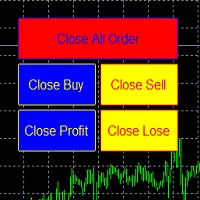
metatrader 4 ea simple closeall
you can get free ea by registering FBS broker through my link https://fbs.partners?ibl=621087&ibp=24536958
install ea in any pair and run it.. Congratulations on using the ea close assistant
Button Function : Close All Order = function to close all open orders and pending orders Close Sell = function to close all open sell orders Close Buy = function to close all open buy orders Close Profit = fu
FREE

Welcome to the ultimate trading assistant EA!
================ Manage Equity ===============
Gain full control over your trading equity with Manage Equity Pro. This powerful EA empowers you to optimize your trading performance and achieve consistent profits.
CloseAllOrdersIfProfit: Maximize your gains by automatically closing all open orders when reaching a profit threshold.
PositiveEquity: Set the desired positive equity target to trigger the closure of orders and secure your profits.
CloseA
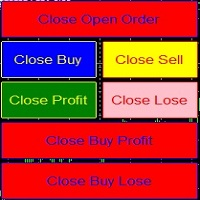
metatrader 4 close asisstent install ea in any pair and run it.. Congratulations on using the ea close assistant
you can get free ea by registering FBS broker through my link https://fbs.partners?ibl=621087&ibp=24536958
Button Function : Close Open Order = function to close all open orders Close Sell = function to close all open sell orders Close Buy = function to close all open buy orders Close Profit = function to close all profita
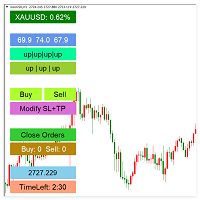
This automated trading assistant system is designed to help traders manage and optimize their trades more efficiently. The system provides comprehensive risk control features, including flexible stop-loss, take-profit settings, and risk limits, allowing traders to maintain stability during market fluctuations. It also offers batch opening, batch modifying stop-loss/take-profit, and batch closing functions, making it quicker and more precise when executing strategies. In addition, the system dis

BBMA Oma Ally Signals Scanner (BBMA Oma Ally Analyzer Dashboard EA) This is a multi-pair and multi scanner dashboard to find the key signal of BBMA Oma Ally Strategy BBMA consists of the use of 2 indicators: Moving Averages Bollinger Bands BBMA consists of many types of entries:
Reentry Extreme Rejection EMA50 GAP (EMA50 to Upper/Lower BB) MHV Full Setup (CSE>TPW>MHV>Direction>Reentry) There are many multi timeframe signals based on this strategy. RRE (Reentry - Reentry - Extreme) REE (Reentry
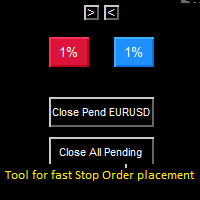
Stop Order placement tool (single click buttons) for faster trading. It places Stop Entry Order on the last bar possible break and places stop loss on the opposite side of that bar. Who knows Al Brooks or other price action traders, they enter on last bars high/low break, so when watching low timeframe and multiple pairs this tool speeds up stop order placement and helps to avoid mistakes. You get your setup candle and press buy or sell button and EA places stop order on setup candle with some
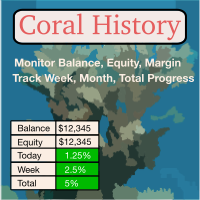
Coral History displays information about your trading account and a summary of your history for the day, week, month and all time in a convenient, lightweight window. NEW : You can now set daily / weekly / monthly goals. Coral History can notify you when reaching a goal. If set the goal will be displayed in the History section row header; and if you've reached the goal the row will be highlighted in green. Account Information Balance Equity Free Margin (amount, percent or drawdown) Marin Leve

Light Protector is a cutting-edge Expert Advisor designed for the MetaTrader 4 (MT4) trading platform. This powerful yet lightweight application is specifically developed to safeguard trading accounts from excessive losses by implementing multiple protective mechanisms.
One of the key advantages of Light Protector is its lightweight nature. The Expert Advisor is designed to have minimal impact on system resources, ensuring optimal performance and swift execution of trades. It operates seamless

Il s'agit du script nécessaire pour utiliser The News Filter. Ce script sélectionne n'importe quel graphique que vous souhaitez filtrer et envoie les données au programme The News Filter. Chaque entrée est spécifique à ce graphique, ce qui vous permet de définir des entrées différentes pour chaque graphique. Les liens vers The News Filter (démo gratuite) se trouvent ci-dessous : Le guide du filtre d'actualité + liens de téléchargement
Sélection de nouvelles
La source d'informations est obtenue
FREE
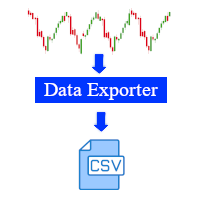
This software is a live data exporter for any instrument, it exports the data into a CSV file.
Instructions: 1. Deploy on any instrument and when prompted, change the interval variable to the duration of your liking. (Default setting is 30 seconds). The interval sets how many seconds before the exporter snapshots the data and exports it. (The minimum amount of seconds can be 1 second, however this will lead to a large file and may cause problems when processing it in python or other software

Note: After installation, please go to Tools>Options>Expert Advisors and add https://porsaj.com to 'Allow WebRequest for listed URL'. Still Problem?! Please check Internet connection!
Unlock the power of cutting-edge technology with Porsaj Artificial Intelligence Bot, your trusted Expert Advisor for MT4. Designed to revolutionize your trading experience, this advanced bot combines sentiment analysis, technical analysis, and harmonic patterns, all driven by the incredible capabilities of art

ManageEquity - A Powerful Trading Utility for Risk Management ManageEquity is a simple yet powerful trading utility designed to enhance risk management strategies. By attaching this utility to a single chart and specifying the maximum dollar amount for both profit and loss, traders can effectively manage their open orders. With ManageEquity, traders can easily set their desired profit target and maximum acceptable loss for all open trades. Once the profit target is reached or the maximum loss th
FREE

PnL Calendar - analyse to profit PnL Calendar turns your trading history into a clear calendar view, so you can see profitable days, monitor risk in real time, and combine multiple broker accounts into a single portfolio picture using the Multi-Broker data export feature. The Calendar Panel breaks profit down by day, week, month, and year, while the Account Panel tracks balance, equity, margin alerts, multi-timeframe summaries, and overnight gap adjustments. The Risk Dashboard adds leverage, dra
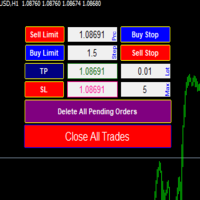
MultiLayer is order management tool for opening trades based on pending orders. It will open multiple trades in a layer based on the number you chose. If you put 10 it will place 10 pending orders in a layer and with gap distance. You have to make sure that you set all price, tp and sl values. Click the buttons Attention, the application does not work in the strategy tester . Orders management
The panel supports pending orders only(Buy Limit, Sell Limit, Buy Stop, Sell Stop). Gap - The gap betwe

ZAI TRADING MANAGER
Enhance Your Trading Experience with Our User-Friendly Trade Manager! Say goodbye to manual calculations and cumbersome processes when it comes to determining your win-loss ratio. Our revolutionary trade manager offers a seamless solution that simplifies your trading journey. Here's what you can expect from our product: Effortless Lotsize Calculation: Our trade manager automatically calculates the appropriate lotsize based on the level of risk you're comfortable with. No mor

Révolutionnez la personnalisation de vos graphiques avec l'utilitaire Chart Customizer. Conçu pour améliorer votre expérience de trading, cet outil puissant offre un large éventail de fonctionnalités et d'avantages.
Avec le mode Multichart, vous pouvez appliquer sans effort les paramètres de graphique souhaités à tous les graphiques ouverts. Dites adieu à la tâche fastidieuse d'ajuster manuellement chaque graphique. D'un simple clic, vous pouvez personnaliser plusieurs graphiques simultanément

Tool to send alerts to the phone when the account is in a negative balance.
- Push Noti to phone: Enable Push notifications to phone - Percents Equity/Balance, %: Percents loss - Loss amount, -$: Money loss Note: You need to Enable Push notifications on MT4 and enter your MetaQuotes ID The tool only serves the function of sending notifications to your phone when the account is in a negative balance
FREE

Cet outil ne fonctionne pas avec le Strategy Tester. Test version: https://www.mql5.com/en/blogs/post/753244 Cet outil vous permet de visualiser les performances de votre compte en affichant des indicateurs clés en fonction du solde de votre compte.
Vous pouvez sélectionner les lignes, les faire glisser et les déposer pour voir instantanément les indicateurs clés à différents niveaux de prix.
Si jamais vous souhaitez revenir à la position d'origine après avoir déplacé les lignes, double-clique

Présentation d'Auto Trailing Assistant - Votre solution ultime de gestion des suivis automatiques Forex Auto Trailing Assistant est un programme très avancé conçu pour révolutionner la façon dont vous gérez vos transactions avec des stops suiveurs. Avec son ensemble complet de fonctionnalités, cet outil puissant vous permet d'optimiser les résultats de vos transactions avec facilité et précision. ATA représente Auto Trailing Assistant dans les instructions ci-dessous. (*) Présentation des

If you run an EA on a VPS, it is necessary to quickly notice if the server loses the connection to the broker.
The ServerGuard24 EA checks the connection to the broker once a minute and sends the result to our monitoring server. There we notify you by e-mail, SMS, push and much more.
The setup is super easy:
1. register at www.serverguard24.de
2. create a "Cron" check
3. copy the URL that is shown to you during the "Cron" check into the properties of the EA.
And you can be sure that your Met
FREE

you can close all your positions in profit or lost when you use this robot. 1.you set your max profit and max lost for all your positions. 2.the robot show you in a window beside your chart. 3.when your equity reach your target close all your positions. 4.you can use one of them or both (profit or lost)togather. 5.this robot close all your positions. ((if you have any idea or want somthing i can help you)) i hope you win in all your times of life. best regard
FREE
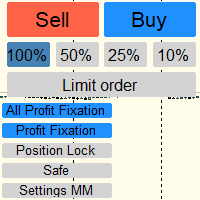
Отличный помощник для тех кто грамотно распоряжается своими рисками. Данный помощник просто не заменим если у вас всегда должен быть фиксированный риск на сделку. Помогает автоматически высчитывать лот в зависимости от вашего риска. Теперь можно не беспокоиться о том каким будет ваш Stoploss, риск всегда будет одинаковый. Считает объем сделок как для рыночных ордеров так и для отложенных. Удобный и интуитивно понятный интерфейс, так же есть некоторые дополнительные функции для упрощения вашей то
L'Expert Advisor Assistant de Test de Stratégie Manuelle est un outil puissant conçu pour aider les traders à tester leurs stratégies manuellement à l'aide du Testeur de Stratégie dans MetaTrader 4. Cet expert advisor fournit un panneau convivial avec des commandes intuitives pour placer des ordres, calculer la taille du lot, gérer les risques et surveiller le solde du compte et l'équité directement sur le graphique. Principales fonctionnalités : Panneau convivial avec 5 boutons pour une navigat
FREE

Account Protector Meta Trader 4 This utility prevents risk of ruin per trading cycle. Retail forex trading accounts are designed with stop-out levels that make it nearly impossible to restore lost capital after a trader — human or algorithmic — blows an account . This is especially frustrating for traders who have grown their account to multiples of its starting value, only to suffer irreparable losses from a series of bad trade entries. The Account Protector solves this by enforcing a specified

Программа при запуске в тестере выполняет подсчет количества пришедших тиков и пишет количество в строке комментариев. Программа может быть использована для сравнения качества исторических данных из разных источников в тестере. При запуске на счете онлайн тики будут считаться с момента запуска программы. При запуске на разных терминалах можно сравнивать разных брокеров на предмет объема предоставленных ценовых данных.

The Chart Navigator is a powerful and user-friendly indicator designed to enhance your chart navigation experience in the MetaTrader platform. With its advanced features and intuitive interface, it enables traders to effortlessly explore multiple timeframes, switch between symbols, and efficiently analyze price movements. Key Features: Timeframe Navigation: Seamlessly switch between different timeframes with just a single click. The Chart Navigator provides a graphical object that allows you to
FREE
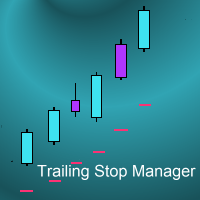
Introduction
This is a trade manager EA. It will detect an open trade and apply a number of different user selected trailing stops to the position simultaneously, always using the tightest stop loss out of all the different methods that have been turned on. The various different choices of trail are:
X bar trail to break-even : e.g. adjust the stop loss up towards break-even at the lowest low of the last X bars until break-even is reached. Risk-reward trail to break-even : e.g. move the stop
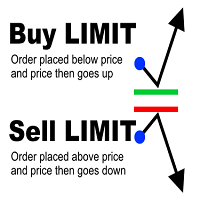
Limit Order Assistant EA This Expert Advisors will help us to put multiple stop order with single one click. This is an EA which can assist our first Order. ex. if we do instant Order Buy then EA will place multiple Buy Limit Pending Order if we do Sell Order then it will place muliple Sell Limit It also can set up Multiply in Lot size every position.
Main Feature 1. Put Multiple Limit Order 2. Specify how much stop orders will make 3. Set distance from current price 4. Set distance for each

We offer: - Every day signals on EURUSD, XAUUSD (Gold), XAGUSD, GBPUSD, CADJPY, USDJPY, USDCHF, AUDUSD, AUDNZD, NZDUSD, USDCAD, ... - We offer evaluated signals and you can see the signals with rank of signal providers based on their history
Note: After installation, please go to Tools>Options>Expert Advisors and add https://porsaj.com to 'Allow WebRequest for listed URL'. Still Problem?! Please check Internet connection!
More explanation: Forex and crypto signals are tools used by traders to

Click and Go Trade Manager: The Ultimate MT4 Execution Suite Precision Execution. Professional Performance Tracking. Total Control. In the world of Smart Money Concepts (SMC) , ICT, and high-frequency scalping, precision is your only edge. Most traders lose not because their analysis is wrong, but because their execution is slow and their psychology is undisciplined. The Hard Truth: If you are still manually calculating lot sizes or dragging lines while the price moves against you, you are trad

Firstly , the script estimates how many Mx bars of the chart (on which this script is applied) the future trend will most likely continue and what is its quality. Secondly (and most importantly), the script is an auxiliary tool for the extremely mathematically advanced and extremely effective ScientificTrade indicator in trading. The script calculates the optimal averaging period, which is also equal to Mx, of the ScientificTrade indicator, which gives the maximum profit according to the strate

Telegram MetaTrader Manager Pro Manage your account using this tool from Telegram.
Features: Get currently open orders with optional filtering Close orders with optional filtering Track orders and get notified when orders open or close Open new buy/sell orders with optional parameters Limit the execution of telegram commands to specific users, so it can be used in groups safely
How to use: To use Telegram API you have to add " https://api.telegram.org " in your MT4 Tools -> Options -> Expert A

Dedicated for FTMO and other Prop Firms Challenges 2020-2024
Trade only GOOD and checked PROP FIRMS Default parameters for Challenge $100,000 Best results on GOLD and US100 Use any Time Frame Close all deals and Auto-trading before US HIGH NEWS, reopen 2 minutes after
Close all deals and Auto-trading before Weekend at 12:00 GMT+3 Friday Recommended time to trade 09:00-21:00 GMT+3 For Prop Firms MUST use special Protector https://www.mql5.com/en/market/product/94887 ---------------------

This all-purpose copytrade utility enables any user remotely or locally duplicate trades between Meta Trader terminals quickly and effortlessly. It works with any machine or server running on a Windows OS. Copying of trade entries between different terminal types (i.e. Meta Trader 4 and Meta Trader 5) is fully supported. Trade copying functionality coves all MetaTrader scenarios - MetaTrader 4 - MetaTrader 4 MetaTrader 4 - MetaTrader 5 MetaTrader 5 - MetaTrader 5 MetaTrade

Доброго времени суток уважаемые трейдеры и инвесторы.
Вашему вниманию удобная утилита - закрыватель. Алгоритм может разделять закрытие по всем открытым ордерам и только по указанному символу. Установлена функция закрытия по: магическому номеру, комментарию, по результату позиции ( положительные и отрицательные ), по общему профиту или по общему убытку, в случае просадки большей чем задано в настройках. Balance - вводите свой изначальный для расчета максимальной просадки. PercentOfDD - максималь

Доброго времени суток уважаемые инвесторы и коллеги трейдеры!
Вашему вниманию утилита, которая следит за тем, есть ли связь с сервером у торговой платформы и если нет - посылается 1 или несколько сигналов в зависимости от того что вам нужно - Алерт, уведомление на телефон или уведомление на почту. Напоминаю, что прежде чем включить советник нужно настроить необходимые данные в сервис - настройки - Push или Почта. Советник построен по таймеру, а не по тику, поэтому вы не зависите от поступающих

Ce trade manager 2 en 1 est idéal pour trader les ruptures de chandelles. Cela peut coûter en moyenne une transaction en plaçant des ordres à cours limité supplémentaires sur les pullbacks. Cela vous assure d'obtenir le meilleur prix sur toutes vos positions et un RR plus élevé sur vos gains. Le risque est calculé par la hauteur de bougie la plus récemment fermée. Les boutons de l'assistant commercial aident à gérer toutes les commandes passées manuellement.
Utilisez-le avec n'importe quelle m
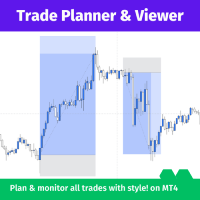
Trade Planner and Viewer est un outil puissant et polyvalent de MetaTrader qui vous aide à planifier et à surveiller vos transactions de manière plus efficace. Il offre plusieurs fonctionnalités qui en font un outil essentiel pour tout trader, notamment :
Analyse des risques : Trade Planner and Viewer calcule le ratio de risque de chaque transaction, vous permettant d'évaluer les risques potentiels et les récompenses avant d'entrer en position.
Suivi des transactions : Cet outil affiche de ma

Price action Telegram is designed to follow the price while away from the trading terminal. There is no need to remember how the name of the currency is spelled correctly, those currencies on which expert is installed are available, because the trader does not jump aimlessly from currency to currency, he knows what he wants and what he is waiting for.
Through telegram, you can work with any timeframe and currency on which the expert is installed. You will always be aware of the market situatio
FREE

Note: After installation, please go to Tools>Options>Expert Advisors and add https://porsaj.com to 'Allow WebRequest for listed URL'. Still Problem?! Please check Internet connection!
Sentiment is a vital gauge that provides traders and investors with valuable insights into their perceptions of the market and the broader economy. It serves as a reflection of their collective outlook, emotions, and expectations regarding future price movements and economic conditions. Porsaj is a powerful plat

Note: After installation, please go to Tools>Options>Expert Advisors and add https://porsaj.com to 'Allow WebRequest for listed URL'. Still Problem?! Please check Internet connection!
An economic calendar in the context of forex refers to a tool or resource that provides information about upcoming economic events, indicators, and data releases that can potentially impact the financial markets, particularly the foreign exchange market. It helps traders stay informed about key economic announce
The Change Chart Timeframe EA is a powerful tool that provides users with the ability to effortlessly modify and customize chart timeframes according to their trading strategies and personal preferences. You can select individual charts to modify or apply changes to all charts simultaneously, saving valuable time and effort. This EA is just a tool to help with your auto trading. It doesn't open any trades, so nothing happens if you backtest it. Any setting marked with "(pro)" will use its
FREE
The Change Chart Timeframe EA is a powerful tool that provides users with the ability to effortlessly modify and customize chart timeframes according to their trading strategies and personal preferences. You can select individual charts to modify or apply changes to all charts simultaneously, saving valuable time and effort. This EA is just a tool to help with your auto trading. It doesn't open any trades, so nothing happens if you backtest it.
Parameters Working hour setting Start hour:

This indicator provides essential information in a simple table about market range and identify whether the market has touched important pivot levels and breakout previous high/low. This version is still in the testing phase and is being offered for free and can only be used for a period of 3 months. We value your feedback to help us improve this application.
FREE

Need help managing your risk? Use Risk Helper
Drag this script onto your pair, enter your desired pip target, and open a trade. Once your pip target has been reached the Risk Helper will take partials profits, move the stop loss then double the profit target so it can do this process again on the next hit. A notification will be sent for every action the Risk Helper takes. Once the trade has been reduced to 0.01 lot size, Risk Helper will proceed to only move your stop loss for every pip tar

Introducing the "KFX Trade Manager" expert advisor for MetaTrader 4 (MT4), a comprehensive solution for advanced trade management and risk control. This powerful tool is designed to enhance your trading experience by automating various aspects of order handling, profit optimization, and alert notifications. With the "KFX Trade Manager," you can take your trading to the next level and streamline your operations for improved efficiency and better risk management. Key Features: Trade Management Set
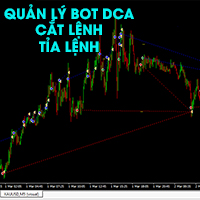
Bot chuyên quản lý và trị các thể loại DCA Kích hoạt bot theo level 1, level 2, level 3 Kích hoạt theo tiền hoặc theo % tài khoản tùy chọn Tất cả tự động Cắt tỉa lệnh theo cặp giúp hạ lot Đóng cắt lỗ thông minh Khóa lợi nhuận ngày Dùng lợi nhuận để đóng dần lệnh lỗ Giúp bot DCA về bờ sau 2-4 nhịp sideway Nhiều phương án đóng - cắt tỉa lệnh thông minh Phù hợp với tất cả các loại bot DCA, Martingel, Grid... Giúp không bay màu tài khoản Em chưa có thời gian viết kỹ tính năng. Mong mọi thông cảm. E

操作技术,资金管理,风险管理是交易系统三大要素,其中风险管理是交易中可以说是最重要的一部分,想要在市场上赚钱,首先要先活下来,要先活下来就要先做好风险管控。 相信做交易的朋友都会遇到风险管理的问题: 1. 不设置止损,亏了继续硬抗,如遇到单边行情,亏损便会大幅扩大,甚至爆仓。 2. 亏了一定资金后,开始着急想快点赚回来,开始重仓 或者频繁操作 ,结果亏得更多。 3. 赚了一定资金后,信心开始膨胀, 忘记做单规则 ,开始加仓操作,结果回吐利润。
这也是作者曾经经历的,所以把这些痛点总结出来做成工具,希望能帮助到大家。如果你是超级自律的人,能按照既定的系统规则交易,也能严格做好风控,也许不适合你,但 如果你正在经受这样的痛苦和懊恼,不妨试试这款工具,也许能帮助到你。
该工具具备以下功能: 1. 控制总资金回撤,当达到设定回撤时,会关闭所有持仓,并禁止开仓交易。 2. 当日资金回撤比例控制,对于日内交易者,可以帮助做好当天的资金回撤控制。 3. 当日资金盈利达到一定比例后可限制进行交易,以免头脑过热,回吐利润。 4. 下单仓位控制,可按照设置值来控制总的持仓大小。 5. 交易品种限制

1. Surveillance des lignes de tendance : Space Phoenix EA peut détecter les cassures immédiates au-dessus ou en dessous de toute ligne de tendance spécifiée tracée sur le graphique. Il peut surveiller jusqu'à 25 lignes de tendance simultanément.
2. Take Profit et Stop Loss automatiques : L'EA comprend une fonctionnalité permettant de définir des niveaux prédéterminés de take profit et de stop loss. Cette fonctionnalité aide à établir et maintenir des ratios risque-récompense favorables.
3. Tr

Details of each condition
Type 1. Set no use Hedging Martingale, to open the order by yourself only through the push button. TP and SL follow setting.
Set Setting_Hedging =false;
Use_HLine =false;
Set Setting_TrailingStop =false; if not use.
Type 2. Semi Auto Recovery Zone You have to open the order by yourself only through the push button.
If in the wrong direction and Set true on Hedging Martingale, EA will fix the order with the zone system by use Hedging Martingale
Set Se

Have you ever wanted to back-test a strategy but never wanted to risk real money? And the thought of using a demo account is exhausting as real time markets develop your skills slowly. This utility will help you develop your strategy faster and will help determine if the strategy works long-term by simulating real trading through back-tests. This will save you time as you can back-test strategies from previous price data. In order to set an sl during the backtest you have to click on the sl b
FREE

ANALOG ASSASINS IS A NASDAQ AUTO TRADING SYSTEM. IT IS TRND SYSTEM THAT DOES WELL TO KEEP OUT OF THE CHOPPY PARTS OF THE MARKETS. IT ALSO HAS A AUTOMATIC STOP LOSS THAT FOLLOWS AT 1.5 * ATR. WITH A BACKTESTING RESULT OF OVER 30% DURING A YEAR WHERE THE NASDAQ HAD NEGATIVE RETURNS. TARDES ON H1. MORE VERSIONS OF THIS SYSTEM WILL BE POSTED, SPECIFICLY FOR D1 TRADERS..... DOWNLOAD AND ENJOY!
Practice Simulator est un simulateur de trading tout-en-un pour le backtesting, l'entraînement au trading et le trading en direct. Que vous soyez débutant et souhaitiez vous entraîner ou trader expérimenté souhaitant analyser ses données, cet outil s'adapte à tous les niveaux. Utilisez-le pour le trading Forex, l'analyse du marché ou l'optimisation de stratégies. Practice Simulator permet de s'entraîner au trading à tout moment, même pendant les jours fériés des marchés, avec une interface simpl

Découvrez le pouvoir de la gestion des risques du Price Action pour positionner vos stop loss ! Avez-vous déjà été confronté à la situation où vous savez exactement quand entrer dans une opération, mais vous hésitez sur le moment idéal pour en sortir ? Ne vous inquiétez pas, vous n'êtes pas seul ! De nombreux traders sont confrontés à ce défi au quotidien. La bonne nouvelle, c'est que notre outil de gestion des risques basé sur le Price Action est là pour résoudre ce problème. Pendant que vous v

Veuillez noter que ce produit est conçu pour vous aider à définir un stop loss automatique sur chaque transaction ouverte manuellement, en particulier sur le graphique auquel il est attaché. En ce qui concerne les ordres en attente, le stop loss ne sera placé qu'une fois l'ordre en attente activé. Pour définir votre stop loss souhaité en points, vous pouvez utiliser le paramètre InpStopLossPoints.
Veuillez noter que ce produit a été testé uniquement pour les paires de devises, comme le GBPUSD.
FREE

Position Calculator calculates how many lots to trade based on: Entry and stop-loss levels Risk tolerance Account size (balance, equity, or even your savings account) Account currency Currency exchange rates - The main tab of the panel provides the primary control over the EA's functions and serves to output the most important calculation results: the position size, risk, reward, and risk-to-reward ratio. - The risk tab can help you assess current and potential risk and reward profile. Using a s
FREE

Exaado Capital care If you've been searching for ways to manage Drawdown control, Drawdown Control, Balance protection, or Daily Drawdown Limit related to trading with Prop Firms, FTMO, My Forex Fund, or Funded accounts, then you've come to the right place. Additionally, if you're looking to safeguard your trading account, we can help. Do you struggle with managing your drawdown while trading funded accounts? Our EA is designed specifically for those in your position. Many prop firms have a "Tra
FREE
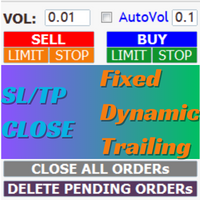
EaMinhonVN – TradeManagement The main functions of Ea TradeManagement 1. GUI o Interact with running EAs o GUI for placing orders o Closing orders by Ticket o Closing orders by MagicNumber o Closing all orders o Delete Pending orders 2. General management: o Management based on Symbol, manually orders , orders from the EA, and orders from other EAs o User-friendly trade interface with the ability to drag and drop SL,TP,Entry o Support backtest
3.

Breaking TrendLine This Forex Expert Advisor is a semi-automated trading system that utilizes trend lines and support/resistance levels to execute buy and sell orders in the foreign exchange market. The system automatically places stop-loss and take-profit orders based on predefined parameters set by the user. The Expert Advisor operates on an algorithmic approach to trading, allowing for precise and timely execution of trades without the need for human intervention. This system provides traders

[ MT5 Version ] [ Discord Version ] [ Pro: Telegram + Discord ] Post your MT4 trades to Telegram automatically — and keep every signal UPDATED: this is the only sender that EDITS the original message when you modify SL/TP or close the trade. Your followers always see the real state of every trade. Built for signal providers, VIP channel owners and traders who share their trading. WHY THIS ONE ️ EDITS THE ORIGINAL SIGNAL — modify SL/TP or close the trade and the o

Account tracker for a personal use.
Collect account balance, equity, margin, initial margin, p/l and push to a webserver. Lifetime license. Settings:
Allow dll import
Allow webrequest for certain urls drag and drop expert advisor on a new chart, minimize the chart and leave on the backgroud. Statistics will be update every 3 second and push it to the server.
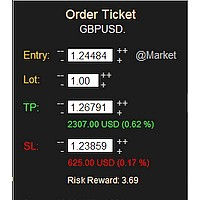
MONEY MANAGEMENT IS A CRITICAL COMPONENT OF SUCCESSFUL TRADING
One of the most important aspects of money management is risk management. YOU need to have a clear understanding of the risks associated with your trades, and mitigate those risks. This free MT4 indicator allows you to efficiently and easily protect your capital and avoid catastrophic losses. Download it and use it before every single trade! ***Please comment, rate and share it to your friends if you like it***
Tags: money managem
FREE
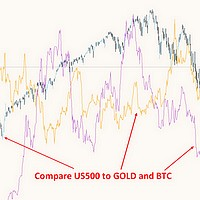
This free MT4 indicator allows you to easily compare as many symbols as you want! Make sure that the input symbol matches the name displayed in the Market Watch ***Please comment, rate and share it to your friends if you like it*** ------------------------------------------------------------------------------ Comparing trading pairs is useful for several reasons, including: Identifying relative strength: Comparing trading pairs can help traders identify which currency or asset is relatively stro
FREE

As a trader, it is essential to have access to the right trading tools and resources that can help you navigate the complex and constantly-changing markets. Get ready to elevate your trading game with Finanix Manager - a one-of-a-kind program that will revolutionize the way you trade. Are you ready to unlock your true potential and experience new levels of success? Try Finanix Manager today! First 10 customers - $30 Thus far: 0/10 buyers
Once 10 customers have bought the product, the price wi
Le MetaTrader Market est la seule boutique où vous pouvez télécharger un robot de trading de démonstration gratuit pour le tester et l'optimiser à l'aide de données historiques.
Lisez l’aperçu de l'application et les avis d'autres clients, téléchargez-la directement sur votre terminal et testez un robot de trading avant de l'acheter. Seul MetaTrader Market vous permet de tester gratuitement une application.

Vous manquez des opportunités de trading :
- Applications de trading gratuites
- Plus de 8 000 signaux à copier
- Actualités économiques pour explorer les marchés financiers
Inscription
Se connecter
Vous acceptez la politique du site Web et les conditions d'utilisation
Si vous n'avez pas de compte, veuillez vous inscrire