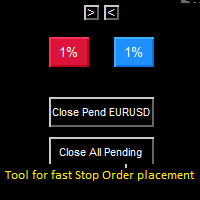
Stop Order Button for last bar break

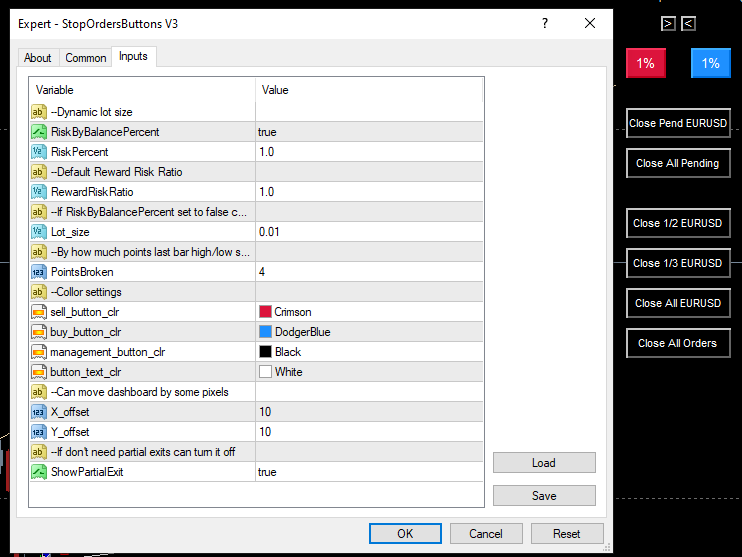
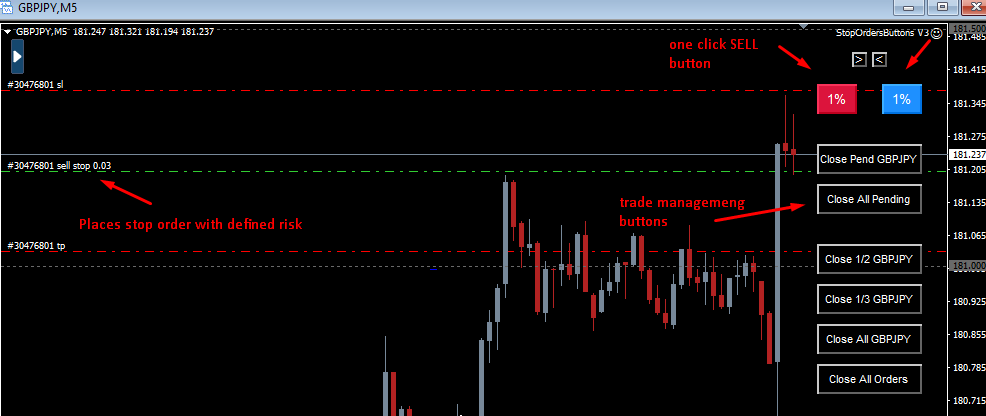
Stop Order placement tool (single click buttons) for faster trading. It places Stop Entry Order on the last bar possible break and places stop loss on the opposite side of that bar.

Who knows Al Brooks or other price action traders, they enter on last bars high/low break, so when watching low timeframe and multiple pairs this tool speeds up stop order placement and helps to avoid mistakes. You get your setup candle and press buy or sell button and EA places stop order on setup candle with some customizable break points. EA calculates lot sizing by your risk settings and places SL after setup bar. Also there are open position partial exit buttons, stop order cancelation button, open order close buttons...

Futures:

1. Places Buy or Sell stop entry orders on LAST BAR break

2. Automated lot sizing by percent of account or fixed lot calculations

3. Places SL and TP

4. Places TP by RR setting

5. Partial exit buttons

6. Cancelation or closing open trade buttons

7. Show - hide future

Please first learn tool with demo account. 
Produits recommandés
SwiftEdge Scalper EA Professionnel de Scalping avec Contrôle Manuel Complet Le scalping exige des décisions en une fraction de seconde, une gestion précise des risques et une exécution parfaite des ordres. Gérer les calculs de breakeven, les trailing stops et plusieurs positions tout en surveillant l'action des prix est accablant sans les bons outils. SwiftEdge Scalper est votre assistant de trading professionnel conçu pour les scalpers actifs et les day traders. Exécutez des trades en un clic o
This script is designed to automatically open charts for all available forex pairs on the MetaTrader 4 platform, as well as the gold (XAUUSD) chart. The script iterates through all symbols available on the platform, determines which of them are forex pairs, and opens their charts on the M1 (one minute) timeframe. Key Features: Gold Chart Opening: The script automatically opens the XAUUSD (gold/dollar) chart if this symbol is available from your broker. If the gold symbol is not found, an error m
BreakEven Grid Utility for MT4 BreakEven Grid is a powerful utility for manual trade management on the MetaTrader 4 platform. It provides a convenient on-screen panel with buttons to help you manage your open positions with a single click.  Features: Set BE+Profit: Automatically sets Take Profit to breakeven + desired profit in pips or money. Close BUY/SELL: Instantly close all Buy or Sell orders for the current symbol. Close +$/-$/Old/New: Close only profitable, losing, oldest or newest tra
Grid Trading
Waseem Raza
5 (3)
Grid Trading EA is a semi-automated one-click trading EA for both Normal Trading and Grid/Martingale Trading . Normal Trading Simply click Buy or Sell directly from the chart. The EA will automatically manage trades by: Setting Stop Loss and Take Profit Managing Trailing Stop Grid / Martingale Trading When Grid Trading mode is enabled, the EA will automatically open additional grid orders at specified distances while increasing the lot size based on your settings. Inputs & Settings Lots — Initia
VR Cub
Vladimir Pastushak
VR Cub est un indicateur permettant d'obtenir des points d'entrée de haute qualité. L'indicateur a été développé pour faciliter les calculs mathématiques et simplifier la recherche de points d'entrée dans un poste. La stratégie de trading pour laquelle l'indicateur a été rédigé prouve son efficacité depuis de nombreuses années. La simplicité de la stratégie de trading est son grand avantage, qui permet même aux traders débutants de négocier avec succès avec elle. VR Cub calcule les points d'ouve
The analyzer panel allows traders to add the pending order grid (Buy Limit, Sell Limit, Buy Stop, Sell Stop) quickly and efficiently.   Parameters stop mode - select stop setting mode every order - stop levels are set for each order separately position as - common stop levels for all orders order type - select pending order type Buy Limit Sell Limit Buy Stop Sell Stop magic - set a magic number for open orders if necessary. If position as mode is enabled, stop levels are corrected for all orders
It is so very disappointing when the price does not have enough points to achieve Take Profit and makes a reversal. This EA sets virtual levels near the TakeProfit levels. This EA sets virtual levels next to TakeProfit orders. If these levels are reached by price, breakeven or trailing stop is applied for an order. Features This EA does not set new orders. The aim of this EA is to manage stop losses of existing orders that are set by another EA or manually (magic number equals 0). For correct w
Bienvenue sur Trade Manager EA, l’outil ultime de gestion des risques conçu pour rendre le trading plus intuitif, précis et efficace. Ce n’est pas seulement un outil d’exécution d’ordres ; c’est une solution complète pour la planification des trades, la gestion des positions et le contrôle des risques. Que vous soyez débutant, trader expérimenté ou scalpeur ayant besoin d’une exécution rapide, Trade Manager EA s’adapte à vos besoins, offrant une flexibilité sur tous les marchés, des devises et i
VN Trade Panel II
Vyacheslav Nekipelov
4 (1)
The new version of the trading panel, which now has the ability to separately close Buy and Sell orders, display targets for all orders on the chart, as well as the ability to use the panel to trade with brokers working on the FIFO rule. Also, the new version adds option buttons for separate management of open orders. It has a convenient visualized interface and intuitive control without a lot of additional tabs to which traders have to be distracted and switch their attention. Thanks to this,
This EA utility does not trade on its own, but it only modifies the open  trades  to add take profit and stop loss that was  opened manually or by any other expert advisors.  The distance is based on Average True Range Indicator(ATR). How Does It Work? If Symbol to modify is set to "All Symbol" simply attach it to one chart, and all open trades in the entire terminal will set the take profit and stop loss with the distance of Average True Range value of their corresponding symbol.  If  Symbol
C'est un panneau commun qui expose un réseau d'ordres d'achat et de vente. Ferme cet ordre de conseiller sur le bénéfice défini dans les paramètres. Ensuite, il y a un paramètre et appelé Ladder qui comprend que la distance entre les ordres commencent à augmenter par les points spécifiés par le paramètre ladder (ici, dans les paramètres de base est de 10 points) signifie le deuxième ordre de 10 points, le troisième ordre de 20 points, le quatrième ordre de 40 points, etc. Ensuite, ce qui est i
L'une des séquences de numéros s'appelle « Séquence des incendies de forêt ». Il a été reconnu comme l'une des plus belles nouvelles séquences. Sa principale caractéristique est que cette séquence évite les tendances linéaires, même les plus courtes. C'est cette propriété qui a constitué la base de cet indicateur. Lors de l'analyse d'une série chronologique financière, cet indicateur essaie de rejeter toutes les options de tendance possibles. Et seulement s'il échoue, il reconnaît alors la prés
Virtual OCO Pending
Kenneth Parling
5 (1)
introduction 'Virtual OCO Pending' - un outil utilitaire de gestion des commandes semi-automatique (conseiller expert) avec évaluation des risques qui vous permet de placer rapidement des arrêts ou des limites en attente d'un simple clic sur un bouton au prix actuel avec prise de profit virtuelle et stop loss en utilisant la règle OCO en attente (One Cancel Autre). Niveaux visuels dessinés sur le graphique pour une confirmation visuelle facile. Vous pouvez utiliser cet utilitaire à partir d'un
Transformez votre graphique en un bureau de trading professionnel avec l’un des panneaux de trading les plus puissants, intuitifs et riches en fonctionnalités du marché — disponible maintenant à un prix promotionnel pour une durée limitée. ENVOYEZ-MOI UN MESSAGE APRÈS L’ACHAT POUR RECEVOIR LE CADEAU FONCTIONNALITÉS PRINCIPALES : Trading Visuel sur le Graphique Faites glisser Entry, Stop Loss et Take Profit directement sur le graphique. Voyez le risque, la récompense, le ratio R:R, la taille de
Smartility
Syed Oarasul Islam
This utility is designed to help you with your Manual Trading. It allows different ways of closing trades. It can display total number of BUY and SELL orders individually and also their individual profits. It can enter trades without stopl loss and take profits. However upon selecting UseStopLossTakeProfit from the settings it can use best possible stop loss and take profits based on the market conditions. Upon selecting the CloseOppositeTrades  from the settings it can close opposite trades. Fo
Symbol Manager
Taras Slobodyanik
5 (4)
Symbol Manager or Grid Manager, designed to group orders into one position (by Symbol or by Magic Number). This utility will be useful to multi-currency traders (many EAs), who can have multiple orders on several pairs. You will be able to see the total number of lots, the total profit, and set virtual stop loss and virtual take profit. To set a real TP (or SL), you must first set the virtual value, and then enter the command in this cell: "set". If you want to set real TP/SL for all orders at
Hedge Martin
Andrey Kornishkin
Hedge Martin Expert Advisor restores loss-making positions making them profitable by opening an opposite position with an increased lot. Trading strategy The EA works on a trend market selecting the appropriate curency pairs. The robot trades depending on the previous candle direction. The first order is set according to the following rules: If the previous candle is bullish, the EA opens a buy order; If the previous candle is bearish, the EA opens a sell order; If the price goes in unfavorable
本エキスパートアドバイザ(EA)は、以下の条件をすべて満たした注文が決済された場合に、自動的に同一内容の注文を再設定します。 対象となるのは指値注文または逆指値注文で、必ずテイクプロフィット(TP)とストップロス(SL)が設定されているものです。 そして、その注文がTPまたはSLによって決済された際、同じロット数・価格・TP・SL・有効期限などの条件を引き継いだ注文を自動で再発注します。 これにより、一度設定した戦略を継続的に適用でき、裁量判断なしに取引を繰り返すことが可能となります。 ただし、ブローカーによっては再注文時にスリッページが発生する場合がありますので、必ずご利用環境をご確認の上、自己責任でお使いください。
MajorAlert
Sergei Vassunov
MajorAlert - is a professional trading indicator for MetaTrader 4 that combines two distinct market analysis approaches into one powerful tool. By integrating a counter‑trend entry logic (upper block) with a trend‑following filter (lower block), the indicator generates high‑probability signals on the chart with clearly separated arrow colors. Key Features Fully self‑contained   – no external indicators required; all calculations are built‑in. Versatile inputs   – adjust all parameters to suit a
This EA represents an interactive panel with adjustable parameters destined for installation and deletion of pending orders (orders grid generator). You can place the panel anywhere on the screen or hide it into a dot clicking on the button in the upper left part of the chart (it will be shown after clicking on it for the second time). Number and step of orders, lot size, vertical shift for limit orders - all these things make your work easier. There are functions for restoring according to pend
Closing Orders At Specified Time is a utility which helps you to close opened orders and delete pending orders at a specified time - especially when you cannot be online and do it by yourself at that time. You can schedule a specific time for closing orders, and additionally you can choose what type of orders should be closed (all, only opened or only pending), what symbols (all or you can enter names of three symbols) and with what Magic Number. You can also select to close only profitable or o
Pomo Panel
Jermias Perkasa
Pomo Panel is a simple panel to help trader using grid strategy. It is designed with grid strategy in mind.  Its features: Open standard transactions Set up pending transactions Delete all pending transactions Modify multiple Stop-Loss and Target-Profit Calculate Lots of all opened transactions Calculate average Open-Close, High-Low Close All Opened Orders
Trade Manager MT4 DaneTrades
Levi Dane Benjamin
4.09 (11)
Trade Manager pour vous aider à entrer et sortir rapidement des transactions tout en calculant automatiquement votre risque. Y compris des fonctionnalités pour vous aider à éviter le sur-trading, le trading de vengeance et le trading émotionnel. Les transactions peuvent être gérées automatiquement et les mesures de performances du compte peuvent être visualisées dans un graphique. Ces fonctionnalités rendent ce panneau idéal pour tous les traders manuels et contribuent à améliorer la plateforme
Easy Trade Executor est un outil de calcul rapide du volume, d’exécution d’ordres et de gestion des positions pour MT4. Placez directement les niveaux de Prix d'entrée, Stop Loss et Take Profit sur le graphique, obtenez automatiquement le volume adapté à votre risque et ouvrez vos trades en quelques clics seulement. Pourquoi choisir Easy Trade Executor ? Easy Trade Executor a été conçu pour les traders qui recherchent bien plus qu’un simple calculateur de risque. Ils veulent gérer leurs trades
Auto SLTP Maker MT4  is an assistant for all those who forget to set StopLoss and/or TakeProfit in deal parameters, or trade on a very fast market and fail to place them in time. This tool automatically tracks trades without StopLoss and/or TakeProfit and checks what level should be set in accordance with the settings. The tool works both with market and pending orders. The type of orders to work with can be set in the parameters. It can track either trades for the instrument it runs on, or all
About The Secret of Dow The Secret of Dow  is an unique system running on a complex set of algorithms and advanced machine learning computation mechanism to analyze massive sets of data from the neural network, and combines with a special set of price action movement analysis to optimize the trading decision, and it will then predicts the next best possible and potential moves of the Dow Jones (US30) prices. The advantages of The Secret of Dow:- Easy plug and play, worry free with easy param
Risk Commander
Adisorn Soodkanueng
Product Name: Risk Commander: Trade Assistant & Strategy Simulator Risk Commander is more than just a trade panel—it is a complete Manual Trading Ecosystem . It serves two powerful purposes: Live Assistant: Helps you execute trades with speed, precision, and perfect risk management in real-time markets. Training Simulator: Fully compatible with the Strategy Tester (Visual Mode) , allowing you to practice manual trading on historical data without risking a cent. NEW! Built-in Simulator Mode Stop
Candleinfo
Igor Karchevsky
The script is designed to retrieve parameters for the specified number of candles from the current one (the current candle - the working candle, i.e., the one that hasn't closed yet - is not taken into account). The obtained parameters are exported to a text file in an understandable format. These data can then be fed to any AI for analysis. To perform the analysis, you need to make a request and insert the data. The request might look like this: "ANALYZE JAPANESE CANDLES, PROBABILITIES, AND TAR
Universal TP SL Pips
Genesis Hafalla
5 (1)
This EA utility does not trade on its own, but it only modifies the   open  trades    to add   take profit   and   stop loss   that was  opened manually or by any other expert advisors.  The distance is based on Pips . How Does It Work? If   Symbol to modify   is set to   "All Symbol"   simply attach it to one chart, and all   open trades   in the entire terminal will set the   take profit   and   stop loss   .  If  Symbol to modify   is set to   "Local Symbol"   , it will only set the   ta
Standard Trailing Stop is too slow! In the world of high-speed scalping like GOLD (XAUUSD) or volatile Forex pairs, even a few pips of delay in taking profit can be fatal.  "Just 5 more pips, then I'll cut!"  "But I need to find the next entry too!"  For scalpers fighting under such extreme pressure, we developed the "WOLF SCALPER PRO."  While inheriting the ironclad defense of "Auto SL/TP Insertion" and "Brother-Sync" from the original WOLF SYNC MANAGER, this new model is equipped with an
Les acheteurs de ce produit ont également acheté
Exp COPYLOT CLIENT for MT4
Vladislav Andruschenko
4.69 (65)
Copieur de trades professionnel pour MetaTrader 4 Un copieur de trades rapide, fiable et professionnel pour MetaTrader 4 . COPYLOT permet de copier des opérations Forex entre les terminaux MetaTrader 4 et MetaTrader 5 , avec une synchronisation flexible adaptée à différents types de comptes et styles de trading. La version COPYLOT MT4 prend en charge : MetaTrader 4 → MetaTrader 4 MetaTrader 5 Hedge → MetaTrader 4 MetaTrader 5 Netting → MetaTrader 4   Version MT5 Description complète + DEMO + PDF
TradePanel MT4
Alfiya Fazylova
4.84 (95)
Trade Panel est un assistant commercial multifonction. L'application contient plus de 50 fonctions de trading pour le trading manuel et permet d'automatiser la plupart des tâches commerciales. Avant l'achat, vous pouvez tester la version de démonstration sur un compte de démonstration. Télécharger la version d'essai de l'application pour un compte de démonstration : https://www.mql5.com/fr/blogs/post/762644 . Instructions complètes ici . Commerce. Permet d'effectuer des opérations commerciales e
Custom Alerts AIO : Surveillez tous les marchés à la fois — sans aucune configuration Présentation Custom Alerts AIO est une solution de surveillance du marché prête à l’emploi, sans configuration nécessaire. Tous les indicateurs requis — FX Power, FX Volume, FX Dynamic, FX Levels, IX Power — sont directement intégrés. Aucun graphique n’est affiché, ce qui rend cet outil idéal pour la génération d’alertes en temps réel. Il prend en charge toutes les classes d’actifs proposées par votre courtie
Telegram to MT4 Coppy
Sergey Batudayev
4 (10)
Télégramme vers MT4 :   la solution ultime pour copier des signaux Simplifiez votre trading avec   Telegram vers MT4   , l'utilitaire de pointe conçu pour copier les signaux de trading directement depuis les canaux et chats Telegram vers votre plateforme MetaTrader 4, sans DLL. Cette solution robuste garantit une exécution fluide des signaux avec une précision et des options de personnalisation inégalées, vous faisant gagner du temps et optimisant votre efficacité. [ Instructions and DEMO ] Cara
Telegram to MT4 Multi-Channel Copier copie automatiquement les signaux de trading de vos canaux Telegram directement dans MetaTrader 4. Pas de bots, pas d'extensions de navigateur, pas de copie manuelle. Vous recevez un signal sur Telegram et l'EA ouvre la position sur votre terminal en quelques secondes. Le produit comprend deux composants : une application Windows qui écoute vos canaux Telegram, et cet Expert Advisor qui exécute les signaux sur votre terminal MT4. Une version MT5 est également
Unlimited Trade Copier Pro is a tool to copy trade remotely to multiple MT4, MT5 and cTrader accounts at different computers/locations over internet. This is an ideal solution for you if you are a signal provider and want to copy your trades to other receivers globally on your own rules. One provider can copy trades to multiple receivers and one receiver can get trade from multiple providers as well. The provider can even set the subscription expiry for each receiver, so that receiver will not b
The product will copy all telegram signal to MT4   ( which you are member  ) , also it can work as remote copier.  Easy to set up, copy order instant, can work with almost signal formats, image signal, s upport to translate other language to English Work with all type of channel or group, even channel have "Restrict Saving Content", work with  multi channel, multi MT5 Work as remote copier: with signal have ticket number, it will copy exactly via ticket number. Support to backtest signal. How to
Le MT4 to Discord Signal Provider est un outil convivial et entièrement personnalisable conçu pour envoyer directement des signaux de trading à Discord. Cet outil transforme votre compte de trading en un fournisseur de signaux efficace. Personnalisez les formats de messages pour qu'ils correspondent à votre style ! Pour plus de facilité, choisissez parmi des modèles pré-conçus et décidez quels éléments du message inclure ou exclure. [ Démo ] [ Manuel ] [ Version MT5 ] [ Version Telegram ]  New:
VirtualTradePad PRO SE MT4 — panneau de trading avancé et espace graphique pour MetaTrader 4 VirtualTradePad PRO SE est un panneau de trading professionnel et un espace de gestion des trades pour MetaTrader 4 . Il aide les traders à ouvrir, gérer, protéger, fermer et analyser leurs trades plus rapidement depuis une seule interface basée sur le graphique. Le produit a été créé pour les traders manuels actifs qui ont besoin de plus qu’un simple ensemble de boutons. PRO SE combine l’exécution en un
The News Filter
Leolouiski Gan
5 (25)
Ce produit filtre tous les conseillers experts et les graphiques manuels pendant les heures de publication des actualités, de sorte que vous n'avez pas à vous soucier des pics de prix soudains qui pourraient détruire vos configurations de trading manuelles ou les transactions entrées par d'autres conseillers experts. Ce produit est également livré avec un système de gestion des ordres complet qui peut gérer vos positions ouvertes et vos ordres en attente avant la publication de toute actualité.
Smart Channel M4
Vahidreza Heidar Gholami
The trend in the market can be predicted using trend lines but the problem is you don’t know where exactly the price is going to touch the trend line where you can put your pending orders on. Smart Channel Expert Advisor makes it possible to put an advanced channel around the price data, which can be configured to handle placing orders, opening and closing positions, managing risk per trade, spread, slippage, and trailing stop-loss and take-profit automatically. Features Money Management (Calcul
ManHedger MT4
Peter Mueller
5 (2)
THIS EA IS A SEMI-AUTO EA, IT NEEDS USER INPUT. Manual & Test Version Please TEST this product before   BUYING  and watch my video about it. Contact me for user support or bug reports, or if you want the MT5 version! MT5 Version I do not guarantee any profits or financial success using this EA. With this Expert Advisor, you can: Implement your own   Zone Recovery   strategy to capitalize on trending markets. Create   Grid   trading strategies, to profit from ranging markets. Place orders easil
Coppy Master MT4
Sergey Batudayev
4 (3)
Copieur Master MT4       est un outil de copie de transactions pour les terminaux MetaTrader 4 et MetaTrader 5. Il prend en charge la copie dans les deux sens : de MT4 à MT5, de MT5 à MT4, ainsi qu'entre comptes du même type MT4 à MT4. Pour fonctionner correctement, tous les terminaux doivent fonctionner sur le même PC ou VPS. [ Instruction  and Demo ]  Pour copier vers MetaTrader 4, une version séparée —       Copieur Master MT5       — est requis. Caractéristiques principales : Modes de copie
News Filter EA: Advanced Algo Trading Assistant News Filter EA is an advanced algo trading assistant designed to enhance your trading experience. By using the   News Filter EA , you can integrate a Forex economic news filter into your existing expert advisor, even if you do not have access to its source code. In addition to the news filter, you can also specify   trading days   and   hours   for your expert. The News Filter EA also includes   risk management   and   equity protection   features
Le MT4 to Telegram Signal Provider est un outil facile à utiliser et entièrement personnalisable qui permet d'envoyer des signaux à Telegram, transformant ainsi votre compte en fournisseur de signaux. Le format des messages est entièrement personnalisable ! Cependant, pour une utilisation simple, vous pouvez également opter pour un modèle prédéfini et activer ou désactiver des parties spécifiques du message. [ Démonstration ]   [ Manuel ] [ Version MT5 ] [ Version Discord ] [ Canal Telegram ]  N
Améliorez vos signaux de trading avec notre EA Telegram Bridge avancé Il est temps de captiver votre audience avec des mises à jour de trading en temps réel, à la fois professionnelles et visuellement attrayantes. Contactez-moi pour recevoir un essai et voir la chaîne de démonstration ! Nous avons massivement investi dans des fonctionnalités conviviales qui créent une expérience unique pour les clients et les fournisseurs.  SIGNAL BRIDGE est capable de délivrer des SIGNAUX 100% COMPATIBLES COPI
EasyTrade MT4
Alain Verleyen
5 (1)
Easy Trade – Gestion des transactions intelligente, simple et puissante Easy Trade est la solution tout-en-un pour la gestion des transactions destinée aux utilisateurs de MetaTrader souhaitant garder le contrôle du risque et assurer une exécution fluide. Conçu dès le départ avec les retours des traders, Easy Trade facilite l'exécution, la surveillance et la gestion des transactions sur plusieurs symboles – sans complexifier votre flux de travail. Que vous pratiquiez le scalping manuel ou que
The Expert Advisor will help you forward all pop-up alert with screenshot from  MetaTrader 4 to Telegram channel/ group, also forward all notifications to Telegram. Parameters  -  Telegram Bot Token - create bot on Telegram and get token.  -  Telegram Chat ID  - input your Telegram user ID,  group / channel ID  -  Forward Alert - default true, to forward alert.  -  Send message as caption of Screenshot - default false, set true to send message below Screenshot  How to setup and guide  - Telegram
Ultimate Trailing Stop EA
BLAKE STEVEN RODGER
4.33 (15)
This EA Utility allows you to manage (with advanced filtering) unlimited open orders (manual or EA) with 16 trailing stop methods: fixed, percent, ATR Exit, Chandelier Exit, Moving Average, Candle High Low Exit, Bollinger Bands, Parabolic, Envelope, Fractal, Ichimoku Kijun-Sen, Alligator, Exit After X Minutes or Bars, RSI and Stochastic. The trailing stop can be either real or virtual, and you can exit fully or with a partial close percent on touch or bar close.  Moreover, you can add (overrid
Crystal Trade Manager PRO – Système Avancé de Gestion du Risque et de Contrôle des Positions pour MT4 Version gratuite : https://www.mql5.com/en/market/product/150632 Présentation Générale Crystal Trade Manager PRO (CTM) est un utilitaire professionnel pour MetaTrader 4 dédié à la gestion du risque, au contrôle des opérations et à l’automatisation intelligente du trading. Il a été conçu pour les traders qui exigent une exécution disciplinée, une protection solide du capital et un contrôle avancé
Take a Break
Eric Emmrich
5 (31)
News filter, equity guard & session control for all your EAs — one tool, full protection — Free Demo | Latest Updates Take a Break has evolved from a basic news filter into a comprehensive account protection solution . It pauses your other Expert Advisors during news events or based on custom filters. When trading resumes, it automatically restores your entire chart setup , including all EA settings. Why traders choose Take a Break One news filter for all your EAs — no more relying on individua
Riskless Pyramid
Snapdragon Systems Ltd
5 (1)
Introduction This powerful MT4 trade mangement EA offers a way potentially to aggressively multiply trade profits in a riskfree manner. Once a trade has been entered with a defined stoploss and take profit target then the EA will add three pyramid add-on trades in order to increase the overall level of profit. The user sets the total combined profit target to be gained if everything works out. This can be specified either as a multiple of the original trade profit or as a total dollar amount. Fo
The product will copy all  Discord  signal   to MT4   ( which you are member  ) , also it can work as remote copier.  Easy to set up. Work with almost signal formats, support to translate other language to English Work with multi channel, multi MT4. Work with Image signal. Copy order instant, auto detect symbol. Work as remote copier: with signal have ticket number, it will copy exactly via ticket number. How to setup and guide: Let read all details about setup and download Discord To MetaTrader
EchoTrade Telegram to MT4 Copier
Perpetual Chinemerem Vincent
5 (2)
EchoTrade Telegram to MT5 Copier Seamless, Instant, and Reliable Signal Copying - Direct from Telegram to MetaTrader 4! The product does not run in the strategy tester but you can get free trial version   here  for testing before purchase. Tired of manually executing trades from Telegram signals? EchoTrade automates the process, instantly copying trades from any Telegram channel or group directly into your MT5 account—accurately, efficiently, and without delay. Key Features: Universal Compatib
Auto Trade Copier
Vu Trung Kien
4.76 (85)
Auto Trade Copier is designed to copy trades to multiple MT4, MT5 and cTrader accounts/terminals with 100% accuracy. The provider and receiver accounts must be on the same PC/VPS. With this tool, you can copy trades to receiver accounts on the same PC/VPS. All trading actions will be copied from provider to receiver perfectly. This version can be used on MT4 accounts only. For MT5 accounts, you must use Auto Trade Copier for MT5 . Reference: - For MT4 receiver, please download Trade Receiver Fre
DrawDown Limiter MT4
Haidar Lionel Haj Ali
5 (8)
Expert Advisor "Drawdown Limiter"  Vous êtes au bon endroit si vous recherchez un contrôle de drawdown, un limiteur de drawdown, une protection du solde, une protection de l'équité ou une limite quotidienne de drawdown en rapport avec les entreprises de gestion de capitaux (Prop Firm), FTMO, My Forex Fund, ou si vous souhaitez protéger votre compte de trading. Avez-vous déjà eu du mal à contrôler votre drawdown en tradant sur des comptes financés ? Cet EA est fait pour vous. Les entreprises de
Offre spéciale trading – 40 % de réduction Gestionnaire de transactions avancé – La solution tout-en-un par excellence pour un trading manuel plus rapide, plus intelligent et plus sûr. Transformez votre trading manuel avec NextGen Trade Manager AI – le panneau professionnel intégré au graphique qui combine exécution instantanée, planification visuelle des transactions et gestion des risques performante dans un outil intuitif. Exécutez vos ordres, gérez les risques et protégez vos profits plus
RSI Divergence Scanner is a multi-timeframe and multi-symbol dashboard and alert that checks all timeframes and symbols to find divergences between price chart and RSI indicator. This divergence scanner is integrated with support and resistance zones so you can check the RSI divergences in the most important areas of the chart to find trend reversals in the price chart. Download demo version   (works on M 1,M5,M30,W1 timeframes) Full description of scanner parameters ->   click here . How to get
Risk Manager for MT4
Sergey Batudayev
4.6 (10)
Expert Advisor Risk Manager pour MT4 est un programme très important et, à mon avis, nécessaire pour chaque commerçant. Avec cet Expert Advisor, vous pourrez contrôler le risque de votre compte de trading. Le contrôle des risques et des bénéfices peut être effectué à la fois en termes monétaires et en termes de pourcentage. Pour que l'Expert Advisor fonctionne, attachez-le simplement au tableau des paires de devises et définissez les valeurs de risque acceptables dans la devise du dépôt ou en

PZ Trade Pad Pro MT4
PZ TRADING SLU
5 (2)
Effortlessly calculate lot sizes and manage trades to save time and avoid costly errors The Trade Pad Pro EA is a tool for the Metatrader Platform that aims to help traders manage their trades more efficiently and effectively. It has a user-friendly visual interface that allows users to easily place and manage an unlimited number of trades, helping to avoid human errors and enhance their trading activity. [ Installation Guide | Update Guide | Troubleshooting | FAQ | All Products ] One of the k
Plus de l'auteur
One Click market orders with different lot sizes, partial closing and break even line. Also it shows current setups profit or loss, with partial exits included in total setups PnL.  Great tool for manual trading, when different lot sizes needed as per grid or martingale strategies.  Major future is different symbol category detection. Due different instruments categories there is a need to use different pre determined lot sizes for different risk profiles. So EA  has auto detection of different
CWatch – Advanced Instrument Panel for MT4 CWatch transforms your MetaTrader 4 chart into a powerful, fully customizable market overview panel. Optimized for low CPU usage and stable operation even with large symbol lists. Works in weekend close, when no new ticks. Mt5 version Organize symbols into categories, monitor LTP, (last traded price) Daily Change and Spread in real time, highlight active trades, and instantly open or activate charts — all from one clean interface. Designed for active tr
CWatch – Advanced Instrument Panel for MT5 CWatch transforms your MetaTrader 5 chart into a powerful, fully customizable market overview panel. Optimized for low CPU usage and stable operation even with large symbol lists. Works in weekend close, when no new ticks. Mt4 version. Organize symbols into categories, monitor LTP, Daily Change and Spread in real time, highlight active trades, and instantly open or activate charts — all from one clean interface. Designed for active traders who want stru
Filtrer:
Aucun avis
Répondre à l'avis