 MetaTrader 5
 专家
专家
 指标
指标
 程序库
程序库
 实用工具
实用工具
 窗口小部件
窗口小部件
 规则
规则
全新的MetaTrader 4 交易实用工具 - 24
 以下是可在MetaTrader 4中简化外汇交易的交易程序。将鼠标悬停在下面列表中的工具上,阅读它的描述和用途。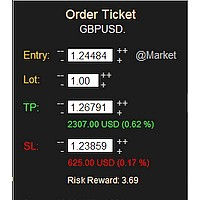
MONEY MANAGEMENT IS A CRITICAL COMPONENT OF SUCCESSFUL TRADING
One of the most important aspects of money management is risk management. YOU need to have a clear understanding of the risks associated with your trades, and mitigate those risks. This free MT4 indicator allows you to efficiently and easily protect your capital and avoid catastrophic losses. Download it and use it before every single trade! ***Please comment, rate and share it to your friends if you like it***
Tags: money managem
FREE

Have you ever wanted to back-test a strategy but never wanted to risk real money? And the thought of using a demo account is exhausting as real time markets develop your skills slowly. This utility will help you develop your strategy faster and will help determine if the strategy works long-term by simulating real trading through back-tests. This will save you time as you can back-test strategies from previous price data. In order to set an sl during the backtest you have to click on the sl b
FREE
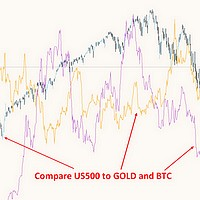
This free MT4 indicator allows you to easily compare as many symbols as you want! Make sure that the input symbol matches the name displayed in the Market Watch ***Please comment, rate and share it to your friends if you like it*** ------------------------------------------------------------------------------ Comparing trading pairs is useful for several reasons, including: Identifying relative strength: Comparing trading pairs can help traders identify which currency or asset is relatively stro
FREE

As a trader, it is essential to have access to the right trading tools and resources that can help you navigate the complex and constantly-changing markets. Get ready to elevate your trading game with Finanix Manager - a one-of-a-kind program that will revolutionize the way you trade. Are you ready to unlock your true potential and experience new levels of success? Try Finanix Manager today! First 10 customers - $30 Thus far: 0/10 buyers
Once 10 customers have bought the product, the price wi

This program sends alerts to telegram when a specified profit target or drawdown level is reached. The profit target and drawdown level are specified as percentages of the daily starting balance in the inputs. When you purchase feel free to contact me for any assistance required with the setup. I am open to adding custom functions limited to profit or drawdown alerts
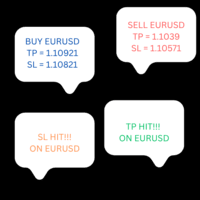
This product copies newly entered trades on MT4 and sends them to a telegram group or channel instantly. It also sends alerts on closed trades as TP Hit or SL Hit when they close with profit or loss. To use the product you first need to create a telegram bot and get the bot token. The bot token should be entered in the inputs on the token field. The chat ID to the telegram group/channel should be entered in the inputs on the chat_ID field. This product is suitable for instant sharing of trade si

n3oNpLoX Trade Manager Market Order. Stop Order. Limit Order.
To help you Place trades based on the amount of Money in Dollars you want to risk. As it will show in the screenshots you can calculate the right Lot size for the money you want to risk. Calculates Lot Size based on the distance between Stop Loss and Entry Point. 5 Options for TP - (1RR,2RR,3RR,4RR,5RR)
It will help you manage your risk and Place trades with the correct Lot Size. So you will not over expose yourself and your money
FREE

ANALOG ASSASINS IS A NASDAQ AUTO TRADING SYSTEM. IT IS TRND SYSTEM THAT DOES WELL TO KEEP OUT OF THE CHOPPY PARTS OF THE MARKETS. IT ALSO HAS A AUTOMATIC STOP LOSS THAT FOLLOWS AT 1.5 * ATR. WITH A BACKTESTING RESULT OF OVER 30% DURING A YEAR WHERE THE NASDAQ HAD NEGATIVE RETURNS. TARDES ON H1. MORE VERSIONS OF THIS SYSTEM WILL BE POSTED, SPECIFICLY FOR D1 TRADERS..... DOWNLOAD AND ENJOY!

介绍FX28 Trader Dashboard – 您的终极交易管理工具 通过FX28 Trader Dashboard,解锁您交易体验的全部潜力,这是一款全面而直观的交易管理工具,旨在将您的外汇交易提升到新的水平。无论您是经验丰富的交易员还是刚刚开始您的金融之旅,这个强大的工具旨在简化您的交易活动并提高您的决策过程。 主要特点: 用户友好界面: FX28 Trader Dashboard拥有用户友好的界面,适应各个层次的交易员。通过几次点击轻松导航各种功能和工具,确保您只需轻松几下就完全掌控了交易。 实时市场数据: 利用实时市场数据源,始终保持领先地位,为您提供有关货币对、趋势和市场波动的最新信息。做出明智的决策,充满信心地执行交易。 高级交易分析: 通过高级分析深入了解您的交易绩效。跟踪交易历史,分析趋势,并识别模式,以优化您的策略和改善您的结果。 风险管理工具: 用我们强大的风险管理工具保护您的投资。轻松设置止损和获利订单,自定义仓位大小,并轻松实施风险收益比,确保自律和受控的交易方法。 多时间框架分析: FX28 Trader Dashboard允许您同时分析不同时间框架的市

Hide Scale - 面向希望最大化图表空间的交易员的理想工具 如何使用 Hide Scale 按“T”键隐藏时间刻度,按“P”键隐藏价格刻度。 可以通过单击相应的按钮并选择每个功能的新键来自定义键盘快捷键。 如果想同时隐藏两个刻度,可以为两个选项分配相同的键。 要重新显示刻度,只需再次按相应的键即可。 Hide Scale 工具背后的原因 我们开发 Hide Scale 工具的目的是帮助使用我们的 Sweet VWAP 指标的交易员最大化其交易屏幕上的可用空间。 我们的目标是为那些需要处理屏幕空间不足的交易员创造更加高效和舒适的工作环境。 这个工具对于应用价格行为技术的交易员特别有优势,因为他们通常只需要监视蜡烛图的形成和价格的波动。 使用 Hide Scale,您可以轻松掌握刻度的控制。只需按下一个键,即可隐藏时间和价格刻度,需要再次使用时,只需再次按下相同的键即可。简单而高效! 这样,交易员就有可能专注于关键的市场评估。 自定义键盘快捷键设置 如果想自定义键盘快捷键,则可以通过单击相应的按钮并在键盘上输入新键来实现。这使得 Hide Scale 的使用更加适应个人喜好。 选择
FREE

請注意,該產品旨在幫助您為每筆手動開立的交易設置自動止損,特別是在它所附的圖表上。 關於掛單,只有在掛單被激活後才會設置止損。 要以點為單位設置所需的止損,您可以使用 InpStopLossPoints 參數。
請注意,該產品僅針對貨幣對進行了測試,例如 GBPUSD。 雖然它可能適用於其他符號,但尚未經過測試,您可以自行決定它是否適用於您的目的。 我們建議您在模擬賬戶而不是真實賬戶上測試產品,因為此產品不提供任何聲明或權利。
使用本產品的決定完全取決於您,因此我們無法提供任何保證或擔保。 我們要感謝 Orchard Forex 在這個 MT4 EA 上所做的工作,我們在其中添加了基於應用它的圖表而不是所有打開的交易的工作功能。
谷歌翻譯
FREE

Exaado Capital care If you've been searching for ways to manage Drawdown control, Drawdown Control, Balance protection, or Daily Drawdown Limit related to trading with Prop Firms, FTMO, My Forex Fund, or Funded accounts, then you've come to the right place. Additionally, if you're looking to safeguard your trading account, we can help. Do you struggle with managing your drawdown while trading funded accounts? Our EA is designed specifically for those in your position. Many prop firms have a "Tra
FREE

[ MT5 Version ] [ Discord Version ] [ Pro: Telegram + Discord ] Post your MT4 trades to Telegram automatically — and keep every signal UPDATED: this is the only sender that EDITS the original message when you modify SL/TP or close the trade. Your followers always see the real state of every trade. Built for signal providers, VIP channel owners and traders who share their trading. WHY THIS ONE ️ EDITS THE ORIGINAL SIGNAL — modify SL/TP or close the trade and the o

Account tracker for a personal use.
Collect account balance, equity, margin, initial margin, p/l and push to a webserver. Lifetime license. Settings:
Allow dll import
Allow webrequest for certain urls drag and drop expert advisor on a new chart, minimize the chart and leave on the backgroud. Statistics will be update every 3 second and push it to the server.

多符号双击图表上的任意位置以设置价格警报并从终端警报或推送通知中获得通知
1. 在图表上添加 EA Utility
2. 按 <- 左或 -> 右箭头键浏览图表
3. 双击图表上的任意位置,它会添加一条线,拖动这条线以设置您想要的价格,瞧,警报已设置! 当价格达到该线时,它会根据实用程序的设置通过终端或推送通知通知您。 即使您重新启动终端,此警报也会继续工作。
4. 继续浏览多品种并继续在您希望收到警报通知的许多图表上添加线条。
5. 如果您想重新开始,请按 D 删除您设置的所有警报。
6. 删除水平线,警报将被禁用。
-- 多符号双击图表上的任意位置以设置价格警报并从终端警报或推送通知中获得通知
1. 在图表上添加 EA Utility
2. 按 <- 左或 -> 右箭头键浏览图表
3. 双击图表上的任意位置,它会添加一条线,拖动这条线以设置您想要的价格,瞧,警报已设置! 当价格达到该线时,它会根据实用程序的设置通过终端或推送通知通知您。 即使您重新启动终端,此警报也会继续工作。
4. 继续浏览多品种并继续在您希望收到警报通知的许多图表上添加线条。
5. 如果

通过 Telegram Signal Sender MT4 提升您的外汇信号分享能力,这是一款强大的工具,旨在自动化并简化将交易信号发送到您的 Telegram 频道的流程,非常适合有志成为信号提供者或已建立信号提供服务的交易者。在 Forex Factory 和 Reddit 的 r/Forex 等交易社区中广受好评,并在 Investopedia 和 MQL5 论坛的讨论中因其高效的信号传播而备受关注,该工具深受希望扩大受众的交易者喜爱。用户报告称,由于及时且专业的信号传递,关注者参与度提高了 30-40%,许多人指出手动发送信号的时间减少了 50%。主要优势包括自动生成信号、可定制的风险管理以及用户友好的界面,简化了向公共或私人 Telegram 频道分享高质量信号的过程,从而提升您作为可靠信号提供者的声誉。 Telegram Signal Sender MT4 提供了一个可定制的面板(通过 PANEL_TOP、PANEL_LEFT、PANEL_WIDTH_PCT、PANEL_HIGHT_PCT、TEXT_HIGHT_PCT 和颜色等输入进行配置),用于根据用户定义的风险回报比率

This indicator is useful for monitoring the performance of individual strategies or even everything of the entire portfolio of strategies directly on your MT4. In this way you can view the equity line and the balance line directly on the chart. In addition, you can set a line based on the percentage number of DD Max that the individual strategy can reach. Try it.

Phoenix MT4 Discord Notifier is a trading utility that integrates with both MetaTrader4 and Discord. The utility publishes all your trades as signals in your channels or groups. This allows you to track in real time what is happening with your account via Discord .
Notifications for :
Opened order Closed order Modified order
Parameters :
Discord Webhook - Discord webhook which will be used for receiving the info
Discord Bot name - Bot name in Discord server/channel Notify for opened order - no
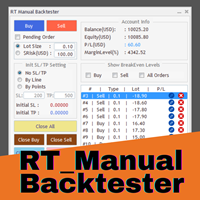
Enhance Your Manual Backtesting Experience in MT4 Strategy Tester with Our Powerful Trading Panel
>> The demo version allows a maximum of 5 orders and is limited to testing on EURUSD the M1 timeframe only. <<
Transform the way you practice and test your trading strategies in the MT4 Strategy Tester.
The RT_ManualBacktester enables you to execute trades and manage your orders more effectively,
providing a seamless manual backtesting experience. With RT_ManualBacktester , you can:
- Execut

这个产品在新闻时间过滤所有的专家顾问和手动图表,因此您不必担心突然的价格波动会破坏您的手动交易设置或其他专家顾问输入的交易。此产品还带有完整的订单管理系统,可在任何新闻发布前处理您的持仓和挂单。一旦您购买了 The News Filter ,您将不再需要依赖以后的专家顾问内置的新闻过滤器,因为这个产品可以从此过滤它们所有。
新闻选择 新闻来源于Forex Factory的经济日历。 选择可以基于任何一种货币,如USD,EUR,GBP,JPY,AUD,CAD,CHF,NZD和CNY等。 选择也可以基于关键识别,例如Non-Farm (NFP),FOMC,CPI等。 能够选择新闻影响级别的筛选,从低、中、到高影响。 自动模式只选择与图表相关的新闻。 新闻来源每小时自动刷新,以确保最新的新闻数据。 为每个新闻影响级别提供单独的输入,以确定您要过滤掉的新闻发布前后的分钟数。
订单管理选项
在新闻发布前关闭未平仓头寸的选项,并在新闻发布后恢复它们。 在新闻发布前删除挂单的选项,并在新闻发布后恢复它们。 在新闻发布前移除止损和止盈水平的选项,并在新闻发布后恢复它们。 在新闻发布前移动止损和止盈

在图表上显示高达 7个市场交易时段 和 3个每周范围 ,完全可自定义 每个时段和范围都可以显示或隐藏,并可根据每位交易者的需要适应特定的日内或周内时间段 使用以下任何一种方式定义时段的开始/结束时间: GMT/UTC 时间(可调整到任何时区) 服务器/经纪人时间(图表时间) 本地时间(您的计算机时间)
专业版功能
名称 : 使用特定名称区分每个时段和每周范围 开盘和收盘时间以分钟为单位 : 可以设置为小时:分钟(HH:mm)或仅小时(HH)格式 每周范围的开始和结束日期 : 为每周范围设置从一周的任何一天(星期日到星期一)到另一天的时间段 可调整的 GMT 时间偏移 : 设置时区偏移以匹配其位置的任何市场基准时间。例如,纽约时间:GMT -5 警报和移动通知 : 发送通知到 MetaTrader 安卓或 iPhone 应用程序*,在每个时段开始/结束时收到通知,还可以在之前提前提醒59分钟 最高和最低线 : 由价格的时段高/低范围定义,可以将它们延长至比时段结束时间长24小时。用于检查它们作为可能的支撑/阻力区域 水平线 : 基于时段范围幅度的比例。在范围内和范围外显示,可以延长至

The MoneyMint Trade Assist is a game-changer for traders. This all-in-one control panel puts the power of professional trading at your fingertips, empowering you to take your trading to the next level. With its intuitive design and feature-rich functionality, the MoneyMint Trade Assist simplifies the complexities of order entry and exit and gives you the edge you need to succeed. Whether you're an experienced trader or just starting out, this powerful tool will help you maximize your profits and
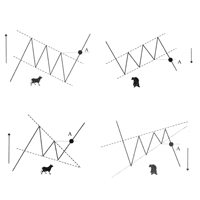
Скрипт проводит анализ трендов, выполняет поиск фигур продолжения и фигур разворота тренда по всем доступным инструментам окна Watch. Скрипт последовательно выводит несколько окон с сообщением о текущем состоянии: 1. Если в торговом терминале сохранено не достаточно цен по каждому инструменту или вам необходимо обновить цены по всем инструментам на актуальные после перерыва в работе, то проведите обновление. 2. Будет проведен анализ текущей тенденции активного графика. 3. На текущем графике п
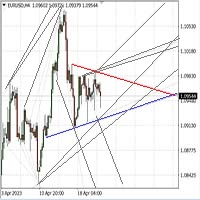
Автомated Trend Line Construction
Features: Draws multiple trend lines representing potential price growth/decline boundaries (gray lines) Identifies and draws price channels (green lines) Identifies potential technical analysis triangles (red and blue lines) Recommended: White chart background, Timeframe - M30 Settings: Interval=200 - Maximum number of bars used in the analysis for line construction The_greatest_distance=5000 - Controls the maximum distance from the current bar's price lev

本版本仅支持 单个订单 交易 手数 <1 0 的订单,如果 单个订单 交易 手数 >1 0 ,请订阅更高版本 本 EA 并非主动盈利,只利用交易时间增加交易次数达到节省掉期费用的目的。 工作原理:本 EA 在当日交易截止前,会生成 \MQL4\Experts\Orderhis_today.csv 文件用于记录当天已开仓的信息,生成 \MQL4\Experts\Orderhis.csv 文件用于记录运行本 EA 后所有的需要平仓的开仓信息,对需支付掉期费用的已开仓订单进行平仓,然后在交易次日开盘后读取 Orderhis_today.csv 补回前日已关闭的仓位,这样避免产生掉期费用。 1、 注意市场交易时间。市场报价 - 相应品种 - 规格,查看交易时间,根据券商的交易时间调整 EA 参数 2、 本 EA 仅平仓已开仓订单,对于 limit 和 stop 的挂单不做处理 免责声明: 1、 由于交易商、网络等不可控的原因过多,所以本产品不保证每个订单的交易都可以成功。 2、 挂单补仓价格由使用者通过设定回补价差参数自行调整 预期节省测算 以掉期 -9.4 测算,总交易量达 1 手
本版本仅支持 单个订单 交易 手数 < 0.1 的订单,如果 单个订单 交易 手数 >= 0.1 ,请订阅更高版本 本 EA 并非主动盈利,只利用交易时间增加交易次数达到节省掉期费用的目的。 工作原理:本 EA 在当日交易截止前,会生成 \MQL4\Experts\Orderhis_today.csv 文件用于记录当天已开仓的信息,生成 \MQL4\Experts\Orderhis.csv 文件用于记录运行本 EA 后所有的需要平仓的开仓信息,对需支付掉期费用的已开仓订单进行平仓,然后在交易次日开盘后读取 Orderhis_today.csv 补回前日已关闭的仓位,这样避免产生掉期费用。 1、 注意市场交易时间。市场报价 - 相应品种 - 规格,查看交易时间,根据券商的交易时间调整 EA 参数 2、 本 EA 仅平仓已开仓订单,对于 limit 和 stop 的挂单不做处理 免责声明: 1、 由于交易商、网络等不可控的原因过多,所以本产品不保证每个订单的交易都可以成功。 2、 挂单补仓价格由使用者通过设定回补价差参数自行调整 预期节省测算 以掉期 -9.4 测算,总交易量达
本版本仅支持 单个订单 交易 手数 =0.01 的订单,如果 单个订单 交易 手数 >0.01 ,请订阅更高版本 本 EA 并非主动盈利,只利用交易时间增加交易次数达到节省掉期费用的目的。 工作原理:本 EA 在当日交易截止前,会生成 \MQL4\Experts\Orderhis_today.csv 文件用于记录当天已开仓的信息,生成 \MQL4\Experts\Orderhis.csv 文件用于记录运行本 EA 后所有的需要平仓的开仓信息,对需支付掉期费用的已开仓订单进行平仓,然后在交易次日开盘后读取 Orderhis_today.csv 补回前日已关闭的仓位,这样避免产生掉期费用。 1、 注意市场交易时间。市场报价 - 相应品种 - 规格,查看交易时间,根据券商的交易时间调整 EA 参数 2、 本 EA 仅平仓已开仓订单,对于 limit 和 stop 的挂单不做处理 免责声明: 1、 由于交易商、网络等不可控的原因过多,所以本产品不保证每个订单的交易都可以成功。 2、 挂单补仓价格由使用者通过设定回补价差参数自行调整 预期节省测算 以掉期 -9.4 测算,总交易量达 1
FREE

[ MT5 Version ] [ Telegram Version ] [ Pro: Telegram + Discord ] Post your MT4 trades to Discord automatically via webhook — no bot setup, no permissions: paste ONE URL and you are live in 60 seconds . And keep every signal UPDATED: the original message is edited when you modify SL/TP or close the trade. Built for signal providers, trading communities and prop-firm teams on Discord. WHY THIS ONE WEBHOOK-BASED — no bot, no tokens: Discord channel → Integrations →
This powerful and user-friendly EA is designed to help you manage your trades with ease and efficiency. With its wide range of features and excellent compatibility, it runs flawlessly on the MetaTrader 4 platform. Key Features: Close All Positions: With just one click, you can close all open positions, regardless of their type and status. Close All Profitable Positions: Instantly close all positions that are currently in profit, ensuring you secure your gains. Close All Losing Positions: Swiftly

Multicurrency Hedge is an Automatic Trading Robot based on Standard Deviation. The EA is suitable for both beginners and experienced traders. The Main trade is when the price goes beyond the Standard Deviation on the Main Currency pair, and then the trading on other pairs is executed, the Multicurrency Grid is Activated. Install EA on VPS and on one Currency pair "EURUSD", Timeframe M15, Minimum deposit $1,000, Leverage 1:500.
PARAMETERS:
SD_TIMEFRAME - time frame for signals search;
SD_APRI

StarPlatform è un EA a pulsantiera che permette di aprire e, automaticamente, gestire e chiudere ordini. Apertura di posizione. StarPlatform permette di aprire ordini a mercato e/o piazzare pendenti di tipo LIMIT e STOP. I pendenti possono avere il livello d’ingresso posizionato manualmente oppure calcolato automaticamente in quanto ancorato ai massimi o ai minimi della candela su cui si clicca. Ogni ordine può avere lo Stop Loss piazzato con le stesse modalità del livello d’ingresso (impostat

Phoenix MT4 Telegram Notifier is a trading utility that integrates with both MetaTrader4 and Telegram. The utility publishes all your trades as signals in your channels or groups. This allows you to track in real time what is happening with your account via Telegram.
Notifications for :
Opened order Closed order Modified order
Parameters :
Telegram Bot Token - create a bot on Telegram and get a token Telegram Chat Id - input your Telegram group/channel Id Notify for opened order - notifies wh

Trade Closer
Set a trade and only have a profit target in mind? Drag onto the pair of choice, enter your profit target into the box and you're good to go. No need to set a Take profit anymore Your trade will be closed for you once the profit target is hit and will send an alert to your account.
Disclaimer: Only works on the windows version of MT4 and only when the computer terminal is active

Left4Trade MT4 Script
A script allows displaying the closure of a trade on the current chart. It helps to see where the trade was opened and closed and how it affects the overall trading result.
When using this script, arrows indicating the opening and closing of trades are displayed on the chart. They can be configured with different colors according to your preferences.
One of the main advantages of using this script is the ability to quickly analyze trading operations, which allows you to
FREE

Stormtrooper EA 基于货币特性的交易算法。 Stormtrooper 的策略结合了布林通道上、下阻力和支撑,以及行情波动率、分时收盘点位的一种交易算法。
推荐使用货币AUDCAD或NZDCAD进行操作 ,我用 2000 美元和1:500 的杠杆对其进行了测试,请查看下面的真实账户, 结果证明 Stormtrooper 极其稳定、且富有侵略性。 Stormtrooper 首次发布售价599美金,会根据信号展示结果进行逐渐涨价,最终售价为1999美金。(6月30日前特惠价599$,过后将回复原价,欢迎咨询购买.......) Stormtrooper 无论在测试还是实盘中,都展现了持续的稳定性。对此身边的朋友,在用过一段时间后,都给出了极高的评价。如果您对我的EA策略感兴趣,请您直接消息与我联系,以获取更多关于产品的信息以及我推荐的经纪人。相信我,如果选择我的EA策略,一定会收获满意的结果与回报,您将与我实盘真实账户同步。
结果展示
真实账户: https://www.mql5.com/zh/signals/1798191
特征:
建议用于15min时间

交易管理器可帮助您快速进入和退出交易,同时自动计算风险。 包括帮助您防止过度交易、报复性交易和情绪化交易的功能。 交易可以自动管理,账户绩效指标可以在图表中可视化。 这些功能使该面板成为所有手动交易者的理想选择,并有助于增强 MetaTrader 4 平台。多语言支持。 MT5版本 | 用户指南+演示 交易经理在策略测试器中不起作用。 如需演示,请参阅用户指南 风险管理 根据%或$自动调整风险 可选择使用固定手数或根据交易量和点自动计算手数 使用 RR、点数或价格设置盈亏平衡止损 追踪止损设置 最大每日损失百分比,在达到目标时自动平仓所有交易。 保护账户免遭过多提款并阻止您过度交易 最大每日损失(以美元为单位)在达到目标时自动关闭所有交易。 保护账户免遭过多提款并阻止您过度交易 一键实现所有交易的盈亏平衡 自动计算从手机/电话发送的交易的风险 OCO 在设置中可用
交易和头寸管理 通过设置每月、每周、每天、每小时或每分钟的最大交易次数,停止过度交易和报复性交易。 高级挂单管理。 调整何时关闭挂单的规则 追踪挂单 支持市价订单和挂单 每日最大利润目标(以美元为单位)以确保头寸并停止

Ultimate Trade Panel MT4 是一款为MetaTrader 4设计的强大专家顾问,旨在简化交易活动并提升MQL4平台上交易者的效率。此实用工具通过用户友好的功能减轻日常交易任务,成为管理交易的可靠助手,而无需依赖特定的交易逻辑。它专为寻求竞争优势的交易者量身定制,提供自动化和风险管理工具以优化交易体验。 注意 :请在您的模拟账户上下载并测试Ultimate Trade Panel MT4演示版, 点击此处 。 您可以在这里下载MT5版本: Ultimate Trade Panel MT5 您可以在这里下载完整的MT4版本: Ultimate Trade Panel MT4 有关详细文档: 设置和输入参数指南 功能: 指标管理器:根据输入模板加载指标,无需通过工具栏更改指标,方便快速决策。 符号管理器:通过市场观察按钮直接切换符号,无需更改图表,实现快速过渡。 时间框架管理器:通过单击按钮更改时间框架,无需浏览工具栏,加快访问速度。 多订单管理器:通过单击执行多个买入和卖出订单,简化放置多个订单的过程。 一键交易:通过单击放置买入/卖出订单,设置止损/止盈,指定手数大

此工具将具有指定或自动计算的时间差的原始时间刻度添加到图表底部。
通过使用这个方便的工具,您可以提高图表的可读性,并通过以您或您所在国家/地区熟悉的时间格式显示图表来减轻精神压力。
即使您不需要计算时差,只需将默认时间刻度替换为 Local_Time 即可提高图表的可读性。
Local_Time支持多种时间格式,如“DD.MM hh:mm”、“DD MMM hh:mm”、“MM-DD hh:mm”、“MM/DD hh:mm”、“DD hh:mm”、“ hh:mm”,专为不同国家的人使用而设计。
通过灵活的参数设置,您可以根据需要自定义 Local_Time,从删除默认时间刻度、自动或手动计算时差、调整夏令时、调整刻度之间的间隔。
如果在 Local_Time 下面创建了一个子窗口,会出现一个红色的条,点击它可以将其移动到底部。
产品图片请参考截图。
how to use
https://www.mql5.com/en/blogs/post/752455
FREE

Msg2Slack 是将消息从 MT4/MT5 文本框发送到 Slack 的工具。 只需单击位于文本框右侧的按钮,您就可以轻松地将文本和图表图像发送到您的 Slack 频道。 即使您在图表上画线、标记、注释等,图像也会被发布。
无论您是想向自己还是群组发送消息,这个简单而强大的工具都可以让您非常轻松地捕获图表图像并即时发送消息。
Msg2Slack 工具显示在图表底部。 只需输入您的消息并单击右侧的按钮即可发布您的消息或带有图像的消息。
虽然效用水平因人而异,但任何使用 Slack 进行交流的人都可以从 Msg2Slack 即时发送图表图像的能力中获益。
获取 Slack API TOKEN 并将其设置为该工具的参数。
您还可以使用策略测试器来检查它是否有效。
FREE
本版本仅支持 单个订单 交易 手数 <1的订单,如果 单个订单 交易 手数 >1,请订阅更高版本 本 EA 并非主动盈利,只利用交易时间增加交易次数达到节省掉期费用的目的。 工作原理:本 EA 在当日交易截止前,会生成 \MQL4\Experts\Orderhis_today.csv 文件用于记录当天已开仓的信息,生成 \MQL4\Experts\Orderhis.csv 文件用于记录运行本 EA 后所有的需要平仓的开仓信息,对需支付掉期费用的已开仓订单进行平仓,然后在交易次日开盘后读取 Orderhis_today.csv 补回前日已关闭的仓位,这样避免产生掉期费用。 1、 注意市场交易时间。市场报价 - 相应品种 - 规格,查看交易时间,根据券商的交易时间调整 EA 参数 2、 本 EA 仅平仓已开仓订单,对于 limit 和 stop 的挂单不做处理 免责声明: 1、 由于交易商、网络等不可控的原因过多,所以本产品不保证每个订单的交易都可以成功。 2、 挂单补仓价格由使用者通过设定回补价差参数自行调整 预期节省测算 以掉期 -9.4 测算,总交易量达 1 手,预计节约
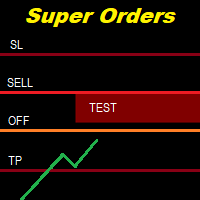
You can place an unlimited number of invisible pending orders using this tool. Orders will be filled under the following conditions: Spread is not greater than the set Max. spread Slippage is not greater than the set Max. slippage
The set trading time was not exceeded
The expiration time was not reached TRADING button is not switched to PAUSE If these conditions are not met, the order will be cancelled. You can also set up a Test Zone with an Off line for each order. The order will be cancel
Your feedback is valuable and appreciated.
I appreciate feedback on where the application is weak and what improvements or features would be beneficial.
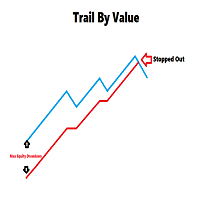
This is a utility for setting trailing stops by value. Trailing stops are great tools for locking in profits as a trade progresses. When trades progress towards potential targets confidence in the trade should be reflected in management of the trade. Market exposure persists for the duration of the trade, and the choice to remain in a trade is
FREE
Trading assistant that offers advanced management of your trades with optimization features. It automatically calculates the risk per trade, makes it easy to set up new orders, and offers advanced management tools such as automatic trade closing in 5 different ways. It also has other useful features that will improve your control and decision making. And best of all, you can use it in the strategy tester to perfect your tactics before trading live!
Our trading assistant is a trading tool that

Here is a powerful trading tool that will allow you to trade manually or automatically in any market, but is especially useful in markets with high volatility and liquidity.
This system has two EAs (Expert Advisors): one for Buy and one for Sell, which work independently. The operation is based on the hedging strategy and the increase in lots based on the Fibonacci sequence, which will allow you to always add the two previous lots: 1, 2, 3, 5, 8, 13...
You decide how you want to trade: you ca

SYSTEM DESCRIPTION: Cyber Capital TRADE HUB is support software for traders who wish to improve and speed up the opening, closing, and management of trades, as well as their own risk management. The system is developed for MT4 and allows you to open and close positions with fixed or automated lots based on percentage risk in one click. All the features of the dashboard are listed below. In addition to the normal functions of a trading dahsboard there is the ability to open manual trades with th
FREE
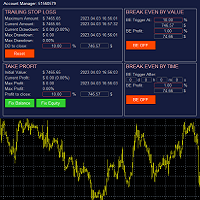
The account manager has a set of functions necessary for trading, which take into account the results of the entire account in total, and not for each individual open position: Trailing stop loss. Take profit. Break-even on the amount of profit. Breakeven by time. Stop Loss Typically, each of these options can be applied to each individual trade. As a result, the total profit on the account may continue to increase, and individual positions will be closed. This does not allow you to get the maxi

This EA is fully automated , it is built based on the method of catching the pop-up Alert event and Open Market Orders (BUY/SELL) . Download trial version here: https://www.mql5.com/en/blogs/post/751340
***NOTE: It is recommended to remove the available filter settings, only install the filter for your indicator. Parameters of the EA: -------- <EA Settings> -------- Magic Number: The identifying (magic) number of the currently selected order. Allow Open trade: Enable/ Disable Open Trade

The Golden Shield EA 是一款基于XAUUSD(GOLD)特有的波动性编译而成,是一种内在运行逻辑简单却又不一般的交易工具,它使用了马丁格尔+对冲+顺势而为一套运行模式。EA通过收集并学习了大量的历史数据,结合品种特性无数次用于测试市场,为此而诞生。 EA的逻辑很简单,当你打开策略,任何时候都可以双向开仓,自动止盈,整体止损;当行情走势缓慢的时候,它会很耐心等待机会,当走势瞬间变大,它也会根据走势的速率、持续性,择机进场补仓,同时它也会顺势补仓。 由于在策略中使用全自动交易,回测数据将不能体现 Golden Shield EA的特性,你可以在任何时间段将它用于模拟盘进行测试1个月~3个月,在此为了展现策略的特性,将向市场提供免费1个月的测试期限(请联系我)。最后它将无视任何的数据大行情,因此它是暴力的,同时它也是一款极具性价比的交易专家。
10个月的实盘成果 展示: https://www.mql5.com/zh/signals/1798191 (您可以通过回测去判断一款产品的价值,但我更愿意用实战去验证自己的成果,让我们一起通过模拟或实盘去见证吧!!) 参

Here is a utility that helps automatically setup stoploss, takeprofit and trailing stops for hand trades. This is not an auto-trading EA, it only supports manual trading of orders, helping you to better monitor your account management. Irrespective of symbol, server, timeframe. SETUP: On/Off: On or Off EA Take profit points: take profit value in points Stoploss points: s toploss value in points Average price of all orders of one type: when this function is enabled, the average take profit f

Have you developed your own entry strategy or are you using an Expert Advisor to automate your entries? Then do the same with your exits!!! Nothing is as important as the right moment to exit your trades. Either to avoid bigger losses or to get maximum profit. But prices often move unpredictably and quickly, which often becomes a problem for a manual exit. Also, the previously set StopLoss or TakeProfit are usually not suitable to get the maximum out. Stop Manager Pro offers you strategies like

平均助手——这种交易辅助工具将使用两种技术帮助您平均之前无利可图的头寸: 标准平均 对冲,随后根据趋势开仓 该实用程序能够 一次性筛选出多个不同方向的未平仓头寸,包括买入和卖出头寸。例如,您建了一个卖出仓位和一个买入仓位,但两个仓位均未盈利,或者一个仓位亏损,一个仓位盈利但盈利不足,您想对这两个仓位进行平均,以便平仓——我的“平均助手”实用程序可以帮助您。 平均助手实用程序 - 允许您自动计算下一个仓位的规模、下单价格、平均仓位和平仓的方向以及您指定的获利规模。 该实用程序还允许您使用“买入”和“卖出”按钮开仓。您只需指定所需的止盈大小和起始手数即可。实用程序本身将以最初指定的止盈价或平均价平仓,并会尝试以平均价平仓,同时考虑您为平均系列设置的止盈。 事实上,对于那些接受并理解平均线逻辑,同时又了解其风险的人来说,这款工具将是一个非常实用的助手。在 95% 的情况下,这项技术将帮助您全自动平仓并获利。 要开始工作,只需将实用程序拖到图表上,设置平均的 TP 大小并单击“开始平均”按钮,实用程序将尝试通过单个获利来关闭图表上所有未平仓交易。
使用此实用程序时,您初始开仓的交易量不应过大

这个实用的EA旨在从你的经纪人那里一次性下载所有历史数据。一旦投放到一个图表上(可以是任何图表),你将选择符号和时间段来处理输入。然后所有的都是自动的。这可能需要一些时间,所做的一切将显示在专家日志上。
当然,它只能下载经纪人服务器上真正可用的数据。这个过程取决于MT4的 "图表 "设置 "历史最大条数 "和 "图表最大条数",如果你想确保获得最大的数据,你可以将这些值设置为大于默认值。然而,并不是所有的经纪商都提供大量的历史数据,对这些设置使用非常大的值会严重影响你的平台性能,使用时要小心。 这个工具主要对下载指标或EA在多个符号和多个时间段工作所需的所有数据非常有用,因为所有的数据都是自动的,没有必要全部手动完成。 一个非常好的例子是在首先使用 Fx Power 之前 ,最好的 ,具有所有时间框架的完整历史的货币强度表 ,由我的合作伙伴 Daniel Stein 提供,他为你提供完整的交易工具组合和非常有趣的交易分析。
通过我们 在mql5 和 Telegram 上 的 晨间简报,获得每日市场更新的细节和截图!
FREE

我们中的大多数人使用VPS来运行我们的交易EA,24/7,但如何监控这些终端是否正常运行?
如果他们崩溃了,或者因为更新而关闭了怎么办?我如何得到这方面的通知?
这就是我们的心跳监测发挥作用的地方。
它为您的所有终端和VPS提供24/7的监控。
那么,我们需要什么呢?
1.一个 在Cronitor 的免费用户 账户 ,一个专业的监控服务。
2.2. 这个工具在您的VPS上的图表上运行。 在MT5或连接问题的情况下,您会收到邮件通知(有更多的通知方式)。
我们使用这个技术方案来监控我们关键的后台基础设施,所以它被证明是可靠和有用的。
请 阅读完整的教程 ,在我合作伙伴的博客:Daniel Stein。
如果你愿意,你也可以使用 Nodeping服务 (付费)。
通过我们 在mql5 和 Telegram 上 的 晨间简报,获得每日市场更新的细节和截图!

BALANCE GUARDIAN is a software to support traders who wish to set profit and maximum loss targets for their trading accounts. developed for MT4. Once BALANCE GUARDIAN is activated, the user will be able to set the maximum acceptable loss as well as their own profit target - upon reaching either one, the software will proceed with closing all open trades and subsequent deactivation of autotrading in case any Expert Advisors are active.
PLEASE NOTE: The software's sole purpose is to provide the
FREE
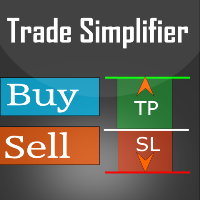
Trade simplifier is a trade panel that simplifies trade opening. It is simple and easy to understand, with key features to ease trading. Features include:
Order type selection Fixed lot entry from the chart user interface Easy Take profit entry field on the chart user interface Visual take profit selection and adjustment via the line that appears when you click the Take Profit button Easy Stop loss entry field in points on the chart user interface Visual Stop Loss selection and adjustment via
FREE

[LueYingEA]
掠影EA-简介:
掠影EA分为多个系列,不同系列之间由后缀字母区分.
[LueYingC] 掠影C:非自动助手类型工具EA-MT4版.
[LueYingX] 掠影X:多组件集成,强大云端数据库版EA-MT4版.
[LueYingM] 掠影M:多组件集成,强大云端数据库版EA-MT5版.
------------------------------
[LueYingC]
掠影C-使用:
操作防护:安全模式需要确认,急速模式操作立即执行.
做单模式:掠影C独立模式下的订单,自主管理不被掠影X识别.
掠影C联控模式下,同组订单可被掠影X管理同时在C上操作也.
可主动管理X版订单.
订单组别:修改后仅对指定组别进行操作.
手数:现价每单固定手数,挂单每单基础手数,
单数:订单数量.
挂单间隔:批量挂单每单间隔.
FREE
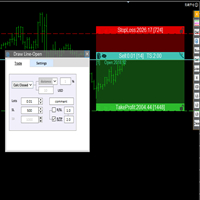
交易者的最佳伙伴! 基本使用设置 基本: 支持语言的选择切换(目前支持中文和英文) 自动识别语言 划线交易
支持英文中文自动选择,自动识别.
1.划线交易 ( 支持拖拉,支持多个订单线 ) 2.手数管理: 两种手数计算模式 ①资金的风险比例,例如设置风险百分比为1的时候,1万美金可交易1手. 计算手数 = 资金(净值或者余额或者剩余保证金) * RISK /10000 ②按亏损金额计算,本设置需要配合止损设置, 计算手数 = ( 当订单被初始下单设置的止损所止损的时候所亏损金额 计算得到的手数,小于最低手数会等于最小手数) ; 3.盈亏比等设置,
设置部分 1. 自动吸附最近高低点 2.高低点偏移 3.自动选择订单习惯 4.SL TP设置方式 5.语言设置

IMPORTANT: Blocks&Levels Alerts indicador.
Gives you the ability to easy draw Blocks and Levels (support and resistance) using key shortcuts and Alerts when price touch them. Please use it and give me feedback!! It really helps! Thank you very much! DESCRIPTION:
Blocks&Levels Indicator, has useful key shortcuts for draw Levels, Blocks Zones, change chart Time Frames, Select or Deselect all drew objects. SETUP:
Just install the Indicator on the Chart
Open and navigate Indicator properties to
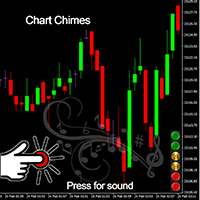
Chart Chimes 简介 - 让交易成为交响乐的 MT4/MT5 指标! 厌倦了整天盯着图表看? 交易时需要提神来保持精神振奋吗? 好吧,Chart Chimes 已经为您准备好了!
使用 Chart Chimes,每次按下该按钮时,您都会听到有趣的声音,让您的脸上露出笑容并跳到您的脚步。 想象一下在胜利的喇叭声或轻柔的竖琴声的背景下进行交易——就像拥有自己的私人管弦乐队为您加油一样!
但 Chart Chimes 不仅仅是一个有趣的消遣 - 它是一个强大的工具,可以帮助您在交易时保持专注和参与。 通过自定义声音的能力,您可以创建适合您的交易风格和偏好的独特声音环境。 需要一点提醒来坚持止损吗? 为什么不设置模仿裁判哨子的声音! 或者,也许您想用烟花的声音来庆祝成功的交易 - 可能性是无限的!
那么,当您可以拥有 Chart Chimes 时,为什么还要选择无聊、安静的图表呢? 对于想要为他们的交易程序注入一点乐趣和个性的交易者来说,这是一个完美的补充。 使用 Chart Chimes,每笔交易都可以成为您耳边的音乐!
FREE

Blind Broker System 的唯一目的是隐藏您的交易计划并使它们对您的经纪人不可见。 如果您真的想让他“失明”并确保他事先不知道您的止损水平、获利水平、交易量 - 只需使用此交易机器人。
特别鸣谢先生 Henryk Kardas 感谢这个项目的发起和想法。 请记住,MQL 提供的免费演示无法让您测试此 EA 的功能。 如需真实测试,请下载真实的演示版。
演示版链接 https://www.mql5.com/en/market/product/94190
Blind Broker System 是另一种管理订单的系统。 在某种意义上,它与 Meta Trader Terminal 内的系统相同。
不同之处在于,所有通过 Blind Broker System 提交的订单不是写入经纪人的服务器,而是写入程序的内存。
经纪人仅在市场订单发生时收到市场订单请求 - 仅此而已。
笔记! 正确操作需要不间断电源,建议使用 VPS(虚拟专用服务器)。
您可以将此系统视为您自己坐在屏幕前进行交易的副本。 在那种情况下,没有人能读懂你的想法。 您做出交易决定并执行它

This indicator shows both GMT time and your broker's time on the chart.
Simply attach the indicator to a chart, and you will see the GMT time and your broker's time displayed in the top left corner, as shown in the screenshot. By using this indicator, you can always stay informed about your broker's time, which is especially useful during daylight saving changes.
You won't have to worry about whether your broker follows the US or EU schedule, as the indicator automatically adjusts to reflect an
FREE

Features Ordering support tool using Fractals, Alligator, and HeikenAshi technical. Submit a stop order to the latest Fractals value emerging in the direction of Alligator's perfect order. Submit an additional stop order every time the Fractals price is updated. If Alligator's perfect order is canceled, cancel the placed stop loss order (leave only the contracted position). Filter entries by HeikenAshi (large), HeikenAshi (small) positive and negative lines. For filled positions, exit at any tim

The "Lot Size" button toggles between fixed and auto lot size modes. Fixed mode uses a predetermined lot size, while auto mode calculates lot size based on a customizable percentage of the account balance, displayed at the bottom. The "Trailing Stop" button enables the activation or deactivation of the trailing stop feature. Initially set to "No Trailing," clicking the button changes it to "Trailing ON" when the trailing stop is active, and "Trailing OFF" when it is inactive. Below the button,
This is a tool for back testing your strategy manually on the Strategy Tester , it's very easy to use, it may be useful for both professional and beginner traders. Features : • Simple buttons and inputs. • Back-test result will show on the strategy tester graph and results tabs.
How to use : • Select the EA in the strategy tester list. • Configure the settings to your needs. • Start the tester and begin trading , input the stop loss and take profit set the lot size
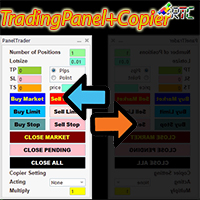
与类似的交易面板相比,该交易面板具有许多优势,包括: 1. 立即(市场)开立订单并以所需价格挂单。 2. TakeProfit (TP), StopLoss(SL), 以及TrailingStop(TS) 设置,可以在pip 或point 模式下设置。 3. 您可以只关闭市价订单,或只关闭挂单,或所有市价订单和挂单。 4. 还配备了 CopyTrade,作为主控打开的订单可以作为客户端复制到面板,其中可以从客户端设置手数比例值。
立即拥有此 TradingPanelPlusCopier 以促进您的交易活动。
TradingPanelPlusCopier的使用方法和demo可以在说明中的视频demo中看到。 问候利润!
与类似的交易面板相比,该交易面板具有许多优势,包括: 1. 立即(市场)开立订单并以所需价格挂单。 2. TakeProfit (TP), StopLoss(SL), 以及TrailingStop(TS) 设置,可以在pip 或point 模式下设置。 3. 您可以只关闭市价订单,或只关闭挂单,或所有市价订单和挂单。 4. 还配备了 CopyTrade,作为主控打

介绍 OrderManager :MT4的革命性工具 使用全新的Order Manager实用程序,像专业人士一样管理您在MetaTrader 4上的交易。Order Manager设计简单,易于使用,可让您轻松定义和可视化每笔交易的风险,从而做出明智的决策并优化您的交易策略。有关OrderManager的更多信息,请参阅手册。 [ 手册 ] [ MT5版本 ] [ Telegram 频道 ] New: [ Telegram To MT5 ]
主要功能: 风险管理:快速轻松地定义您交易的风险,让您做出更好的决策并提高交易性能。 视觉表示:图形化地查看您的交易和相关风险,以清晰简洁地了解您的开放头寸。 订单修改:只需几次点击即可轻松修改或关闭您的订单,简化您的交易过程,为您节省宝贵的时间。 掌握新闻:一键获取最新市场新闻。
不要错过这个MT4交易员的必备工具。用Order Manager提升您的交易体验,将您的交易游戏提升到新的水平。
OrderManager在startegyTester中 不 工作! OrderManager 仅与 Windows 兼容。
请考虑给这个产品一

介绍智能资金概念交易管理器——专为寻求市场专业优势的交易者设计的终极工具。无论您是ICT/Smart Money Concepts/手动交易者,我们的软件都专门为您构建,以便在实时中轻松自动化您的交易并管理风险。 使用智能资金概念交易管理器,您可以轻松自信地执行智能资金概念或机构交易设置。我们强大的工具运行在MetaTrader 4平台上(我们目前正在开发MT5版本),并提供一系列功能,以适应您独特的交易风格和目标。 智能资金概念交易管理器通过自动化风险管理和其他关键参数,包括止损、获利和使用我们的专有分形对称策略进行缩量测量,简化了您的交易体验。您可以自定义设置以适应您特定的交易和风险配置文件,算法将自动调整以适应您的账户规模。或者,您可以使用我们优化的默认设置以实现最大效率,确保您“先付给交易者 ;)”。 我们的系统适合初学者使用,易于使用,但足够灵活,以适应有经验的机构交易者的需求。然而,我们强烈建议您在演示账户上熟悉该工具并测试您的策略,然后再在实盘账户上执行。 通过使用智能资金概念交易管理器,您可以节省时间、减轻压力并增加利润。以纪律、自信和一致性交易-立即获取智能资金概念
FREE

DrawDown Limiter v5.0 — 高级账户保护控制器 DrawDown Limiter v5.0 是一款运行于客户端的交易账户保护控制器,用于监控您的交易账户,并在达到您所设定的风险、盈利、新闻、时间计划、Rollover 或持仓数量限制时自动采取相应措施。 它可以通过一个独立图表监控 手动交易、自动化策略、多个 EA、挂单以及浮动持仓 。它既可以保护整个交易账户,也可以通过 Magic Number 仅监控特定 EA 或一组 EA。 DrawDown Limiter 的目的不仅仅是显示回撤,而是 主动执行您设定的交易规则 ,并在保护条件保持有效期间持续执行这些规则。 DrawDown Limiter v5.0 不仅用于监控您的亏损程度,还用于控制策略何时可以继续运行、哪些风险敞口可以保留、何时必须停止交易,以及自动化交易环境何时可以安全恢复运行。 需要帮助或有任何问题? 请查看 DrawDown Limiter 用户指南 我是 Lio ,欢迎随时联系我! 我们始终愿意为您解答问题、提供帮助并持续改进产品。
统一的保护系统 DrawDown Limiter v
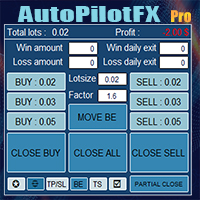
Introducing of AutoPilotFX Pro: Your Ultimate Trading Panel with Advanced Features of order management Take your trading to new heights with our Trade Assistant designed to streamline your trading process and optimize your strategies. Discover the powerful features it offers and learn how it can help you maximize your profits and minimize your risks.
Semi Automated EA for working as your trading assistant with Key Features: Automatic Lot Size Calculation: AutoPilotFX Pro automatically calc
Multi Chart Sync MT5 is a tool that synchronizes the chart symbol it is placed on to other charts, it can also be customized to exclude/skip some pairs from being synchronized to other charts, It also supports prefixes and suffixes that can be set from the input parameters for brokers with none-standard symbol formats, Synchronisation can be done once or continuously where if a synchronized chart symbol changes it will be reverted to the original/master symbol. This tool comes in handy for multi
学习如何在MetaTrader AppStore上购买EA交易,MetaTrader平台的应用程序商店。
MQL5.community支付系统支持通过PayPay、银行卡和热门付款系统进行交易。为更好的客户体验我们强烈建议您在购买前测试EA交易。
