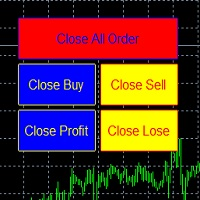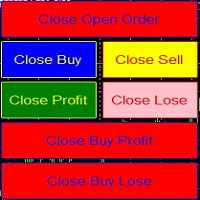
Close Asistent

metatrader 4 close asisstent

install ea in any pair and run it..

Congratulations on using the ea close assistant


you can get free ea by registering FBS broker through my link

https://fbs.partners?ibl=621087&ibp=24536958


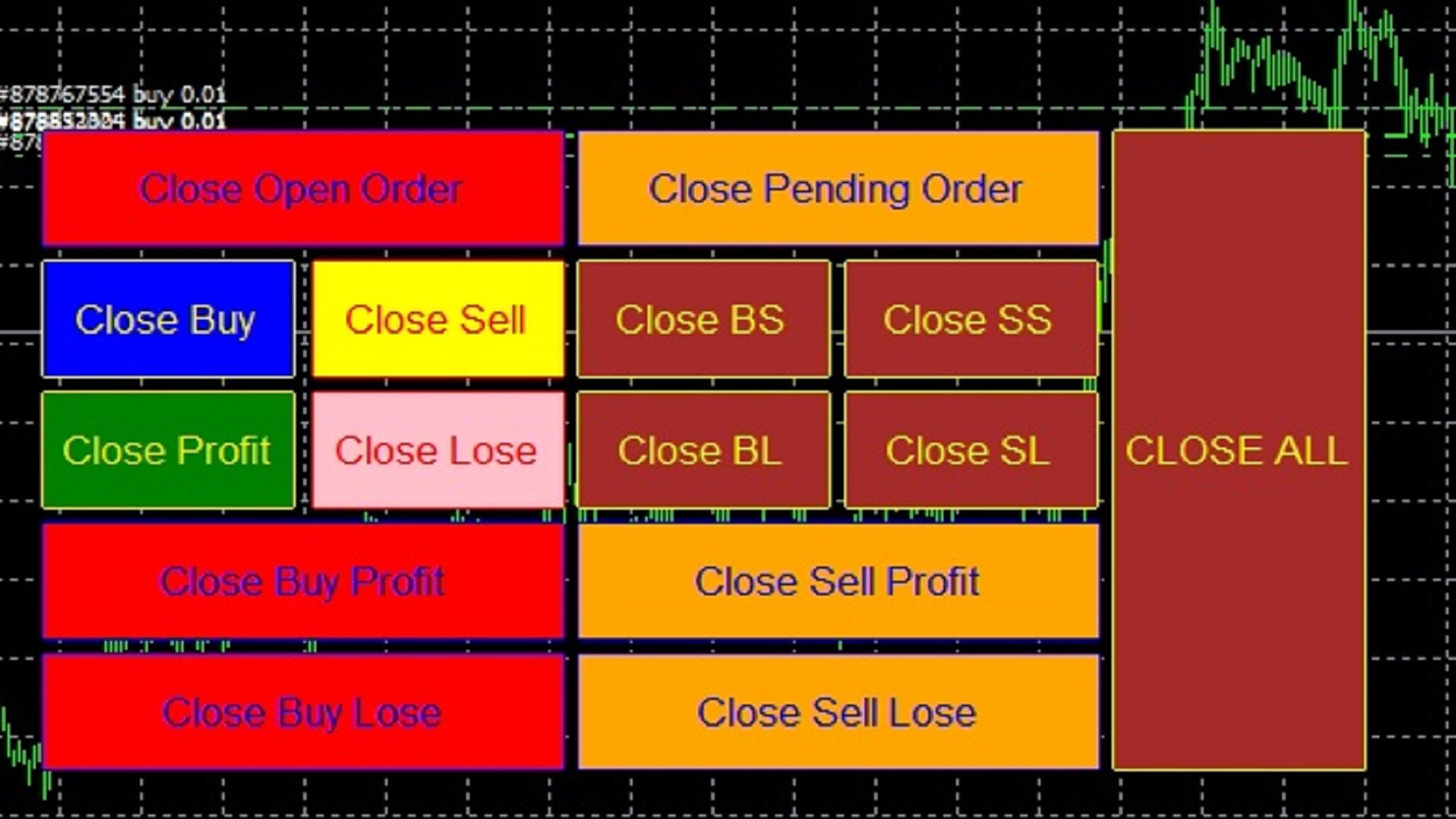
Button Function :

Close Open Order        = function to close all open orders

Close Sell                    = function to close all open sell orders

Close Buy                    = function to close all open buy orders

Close Profit                 = function to close all profitable orders

Close Pending Order    = function to close all  pending orders

Close Lose                   = function to close all losing orders

Close BS                      = function to close all buystop orders

Close SS                      = function to close all sellstop orders

Close BL                      = function to close all buylimit orders

Close SL                      = function to close all selllimit orders

Close Buy Profit           = function to close all profitable buy orders

Close Buy Lose             = function to close all losing buy orders

Close Sell Profit           = function to close all profitable sell orders

Close Sell Lose            = function to close all losing sell orders

CLOSE ALL                  = function to close all open orders and pending orders


Produits recommandés
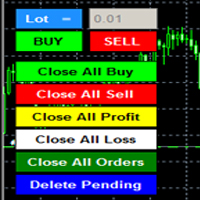
This tool working You can buy or sell from the button of this tool, the lot size can be filled manually, as for the close all buy button to end all buy positions, close all sell button to end all sell positions, Close All profit button to end  All  profit position, Close All Loss button to end all loss position, Delete Pending button to delete all Pending order, close all orders to end all orders. The variable, you can use close all percent for close all orders when profit in percent, if close
Risk Control Utility MT4   designed for manual trading. It helps to calculate and control your risks, transfer transactions to breakeven and accompany positions with trailing stop. Easy to set up and use. It can be used for calculating a trading lot, calculating stop loss and take profit levels. Works with currency pairs, CFDs, stocks, indices, futures, cryptocurrencies Displays   volume,   potential loss and profit before   placing an order Ability to set the expiration time of a pending order
This utility sends notification to trader’s MT4 (for MT5 version, checkout this link ) mobile app, to remind traders about their open positions. Super useful for part time traders to keep track and not forget any positions. To turn on notification, please visit this link (https://www.metatrader4.com/en/trading-platform/help/setup/settings_notifications) Features Keep track on open orders (pending orders, running orders) Customize time to send notification Customize notification interval (send ev
Trade Info
Johannes Schoeman
Trade and Account Information Panel The Trade Info Panel allows you to easily see the status of you trading by pair and account. Minimise the panel by clicking on it to reduce the display area. Easily Identify loosing pairs/ instruments traded by the change of header colour. The HEADER change colour should the months losses exceed the months gains. Displayed information: General Account information Account Leverage Spread Bar Time remaining Account Balance  Account Equity Margin Free Margin Acc
Parameters Lots = 0.01 Stop loss= 50 Take Profit=50 Delay= 2 Buy = true Sell=true LotMultiplier=2 PointMultiplier=1.5 Magic=111 MaxSlippage=30 Start Time=00:00 Stop Time=23:00 GMT Offset=0 that is a utility for trade, you can aitomaticly trading whit vps. And your invest can growing up to 100% or 1000%. you can back test before you buy this for analisis how this utility traing for you.
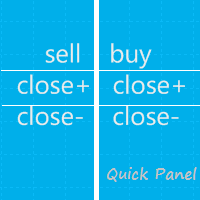
Ce panel est composé de conseillers experts et propose six groupes de panels de trading. Version MT5 :   cache panneau rapide caractéristiques La plupart des opérations de trading peuvent être effectuées rapidement en cliquant sur les boutons de ce panneau. Changer de panneau est aussi simple que de cliquer sur le bouton vert. EA peut être exécuté sur les graphiques visuels de Strategy Tester et fournit un moyen simple de s'entraîner au trading sur la base de données historiques. Modifiez le st
Risk Controller Expert Advisor, un programme qui vous permet de contrôler le risque total de vos conseillers en trading sur votre compte. Avec ce programme, vous pouvez contrôler le risque maximum qui sera autorisé sur le compte pour tous les conseillers. Par exemple, vous définissez le risque de 30% du drawdown maximum, ce qui signifie que si vos robots de trading actions dépassent le risque de 30%, le Risk Controller fermera toutes les positions des conseillers, et pourra également fermer tou
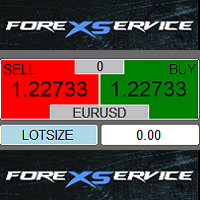
One Click Trader is a tool designed for MetaTrader 4 platform, which enables you to take your trading to the next level. It enables you to open, manage and close your trades in simple an efficient way by just one click of your mouse button. Up arrow minimizes the OCT panel Down arrow maximizes the OCT panel Right arrow displays the next panel with additional features Left arrow hides the panel with additional features Red SELL button enables you to open short market orders Red SELL STOP button e
StarBot
Dmitry Bondarenko
The StarBot utility works with open Sell and Buy orders, partially closes profit when the specified level is passed. There are three levels for partially closing the Sell and Buy orders. The utility also transfers Stop Loss to breakeven when the specified level is passed. It works on all currency pairs and timeframes. Demo version for testing can be downloaded at: https://www.mql5.com/en/market/product/27247 Input parameters Follow the orders - manage all orders, or select from Sell and Buy. Al
ExPad
Igor Semyonov
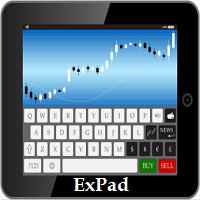
ExPad  - a trade panel for comfortable trading on financial markets. Suitable for trading any financial instruments. In general, the panel is able to perform the following functions: Open and reverse of deals Operation with visible and hidden StopLoss and TakeProfit Independent management of visible and hidden StopLosses Profit protection due to Breakeven and Trailing Stop  Choice of technique for Trailing Stop Distance from market price Moving Average Bolinger Bands Middle Line High and Low pri
EA Target MM Dollar
Raudhah Hayatun Nufus
It's very easy, you only need to enter the amount of profit you want to get, then when your account has grown this EA will close the order, even though you are not monitoring the chart. Now you don't need to worry if the profit you have achieved turns into a loss because you don't use this EA, because this EA will help you whenever, wherever you are. Good luck trying it, hopefully you will become a very profitable trader
MultiStopOrder
Agus Wahyu Pratomo
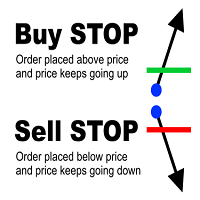
MultiStopOrder Tis Script will help us to put multiple stop order with single one click. This is a script not an EA Will place BUYSTOP and SELLSTOP with single click Main Feature 1. Put Multiple Stop Order 2. Specify how much stop orders will make 3. Set distance from current price 4. Set distance for each stop order 5. Set Take Profit dan Stop Loss  6. Use it on MT4 7. Set lot size with minmum 0.01 lots 8. Use with single one clicks
NEWS Telegram
Nguyen Nghiem Duy
NEWS Telegram is an Utility can get NEWS from Website "calendar fxstreet" and send to yours Telegram Chanel Only attach to Chart then do this step as bellow: In the terminal, open Tools ---> Options ---> Expert Advisors ---> add "calendar fxstreet" to the "Allow WebRequest for listed URL list" field. - SETTING UP THE UTILITY: Tools -> Settings -> Advisers -> Allow WebRequest for the following URLs Create your own bot in Telegram at @BotFather. Remember Token, it looks something like this - 1325
A script for closing all open positions in one click. It has no settings, you only need to save it to folder ...\mql4\scripts folder and restart the terminal. A click on the script will close all open positions with the best possible time. Works on all types of accounts with all currency pairs and any broker. The number of open positions is not limited. The script will be useful for trading strategies, in which you need to manage a large number of orders.
Advanced Pending Orders
Fernando Jose Velasco Borea
This EA facilitates sending multiple orders simultaneously. It also facilitates a function designed to be executed in a specific hour, ideal to facilitate its operation during the night, allowing to schedule positions while we are not next to the graph. The system can send direct orders at the market price or pending orders, speeding up the execution of operations with multiple Take Profit as well as controlling the Slippage of each order. The parameters of the system are: •          Broker Info
BreakEven ProSync EA – Trade Management & Risk Control Tool Overview BreakEven ProSync EA is an expert advisor for   MetaTrader 4  that helps traders manage open positions efficiently by   automating stop-loss adjustments   and ensuring position synchronization. This tool is designed for traders who want to standardize their stop-loss and take-profit levels across multiple trades while integrating a break-even function. The EA works by calculating the  average price   of all open positions and
This utility tool help you to close all orders having profit immediatly with only ONE CLICK, its work is very fast. You can choose which symbol you want or close all symbols so it will helpful for you in your trading to manage trading faster. If you want it work on all symbols, you just need to leave symbol parameter blank (like in default setting). If you want it work on 1 symbol only (for example EURUSD orders) you need to put symbol =EURUSD (see screenshot below). This is a script, so its wil
Trade Report Pro
Vu Trung Kien
3.5 (2)
Trade Report Pro is an EA that create professional graphic report of your trade history automatically and manually. It also send notification to your mobile or email once your account balance changed. Reports are saved by HTML and CSV format, while opening a quick summary report window inside MT4. Note: Demo version for testing can be downloaded at: https://www.mql5.com/en/market/product/5054 . Followings are highlight features: Report with full and professional statistics, which is better than
This is a utility that helps you close market orders and pending orders (optional), using keyboard shortcuts. For me,  it's more convenient and  faster  than clicking a button on the chart. You can set:  Keyboard Shortcut Hotkey: You can change and use most of the keys on the keyboard.   Key combination (Ctrl, Shift) also available in case you want to use (Note that not all combinations work).  Magic Number  Symbol: All Symbol, or Current Chart Symbol, or Select Symbol List  Close Pending order
本エキスパートアドバイザ(EA)は、以下の条件をすべて満たした注文が決済された場合に、自動的に同一内容の注文を再設定します。 対象となるのは指値注文または逆指値注文で、必ずテイクプロフィット(TP)とストップロス(SL)が設定されているものです。 そして、その注文がTPまたはSLによって決済された際、同じロット数・価格・TP・SL・有効期限などの条件を引き継いだ注文を自動で再発注します。 これにより、一度設定した戦略を継続的に適用でき、裁量判断なしに取引を繰り返すことが可能となります。 ただし、ブローカーによっては再注文時にスリッページが発生する場合がありますので、必ずご利用環境をご確認の上、自己責任でお使いください。
The Expert Advisor will help you forward all pop-up alert with screenshot from  MetaTrader 4 to Telegram channel/ group, also forward all notifications to Telegram. Parameters  -  Telegram Bot Token - create bot on Telegram and get token.  -  Telegram Chat ID  - input your Telegram user ID,  group / channel ID  -  Forward Alert - default true, to forward alert.  -  Send message as caption of Screenshot - default false, set true to send message below Screenshot  How to setup and guide  - Telegram
AccountQuickReport 4
Andrej Nikitin
5 (1)
The script creates account summary report in a separate window. The report can be created for all deals and for deals on selected financial instruments. It is possible to specify a time interval of calculation and save report to an htm file. Script inputs report starting date - initial report generation date. symbols selection for report - select a method of choosing tools for a report generation. allSymbol - report is generated for deals performed on all symbols. onlyCurrentSymbol - report is
HotKeys MT4
Alexey Valeev
3 (1)
This utility provides the ability to use hot keys in manual trading instantly responding to the current market situation. You can assign hot keys to open/close positions by their type, close all positions on the current chart and remove all orders on the current chart. You can also assign hot keys for five predefined trade volumes and switch between them if necessary with no need to change the volume manually from time to time. It is also possible to set the auto calculation of a trade volume in
This Expert provides a panel to manage all positions you have on different pairs or any instruments. not only you can close your positions just by clicking the amount of profit or loss shown on the related cell, but also you can customize whatever you see on the panel from font size  to lines and background colors. Remember ,  auto trading on MT4 panel must be active, but in our Expert we have provided a key on the panel to activate or deactivate the panel to avoid closing by accident. Any qu
This EA helps to Close all Positions opened. It saves you the time of closing multiple positions manually. Parameters: Buy:  Close Buy Positions Only Sell:  Close Sell Positions Only Buy & Sell: Close Buy & Sell Positions Pending: Close Pending Orders More Advanced MT4 version available at:   https://www.mql5.com/en/market/product/93468?source=Unknown%3Ahttps%3A%2F%2Fwww.mql5.com%2Fen%2Fmarket%2Fmy More Advanced MT5 version available at:  https://www.mql5.com/en/market/product/93301?source=Unk
Auto Trade Manager MT4
Benjamin Yew Loong Thong
You can finally leave a trade running without any worry! What is Auto Trade Manager MT4 ? It is an EA that does not  take trades (unless on 'Strategy Tester Mode') but manages  an active trade; this is done by automatically moving the stop loss by the user's specifications. Features! - Automatically places stop loss at break-even (Settings: Pips in profit, % of TP, % of SL) - Automatically trails your stop loss (Settings: Pips in profit, Money in profit, Stop loss on Moving Average) Can I tes
"Binary Lab Simulator" est un outil conçu pour pratiquer et vérifier des stratégies de trading. Cet outil fonctionne 24h/24, y compris les week-ends et les heures non commerciales, et supporte différentes périodes d'expiration telles que 30 secondes, 1 minute et 3 minutes, créant un environnement proche du trading réel. Il est compatible avec des outils externes pour analyser les résultats des entrées. Plusieurs modèles peuvent être facilement enregistrés, permettant des tests fluides de l'envir
Master Control via Telegram can help you perform some management tasks on MT4/MT5 remotely via your Telegram by one click, easy to set up & use. Demo here (see more Master Close   Master Notify  ) ************************************************************************************ LIST OF COMMANDS: info_acc -   Get account info info_pos -   Get positions details price -   Get symbol price buy  -   Open a buy position sell  -   Open a sell position inst_set  -   Set parameters for instant trade i
SetTP
Mohamed Aymen Maiza
This EA allows to set a specific Take Profit for all the trades of the same symbol when dropped in the chart. The Take profit can be set in the setting menu as a market price and not in pips. Usefull when opening multiple orders and want to close them all in one time at a specific market price level without entering manually the take profit for each trade. For any question about this EA, you are welcome to contact me.
A simple script that closes all current orders. Terminate once close all positions, so please don't worry about constantly closing your order. How to use : Drag the script from the navigator to the chart to activate it. Do remember to enable algo trading to use this script. There are different versions of the script that can choose whether to close all buy/sell posiitons, if you need this, do contact me in MQL5.
Les acheteurs de ce produit ont également acheté
Bienvenue sur Trade Manager EA, l’outil ultime de gestion des risques conçu pour rendre le trading plus intuitif, précis et efficace. Ce n’est pas seulement un outil d’exécution d’ordres ; c’est une solution complète pour la planification des trades, la gestion des positions et le contrôle des risques. Que vous soyez débutant, trader expérimenté ou scalpeur ayant besoin d’une exécution rapide, Trade Manager EA s’adapte à vos besoins, offrant une flexibilité sur tous les marchés, des devises et i
Exp COPYLOT CLIENT for MT4
Vladislav Andruschenko
4.69 (65)
Copieur de trades professionnel pour MetaTrader 4 Un copieur de trades rapide, fiable et professionnel pour MetaTrader 4 . COPYLOT permet de copier des opérations Forex entre les terminaux MetaTrader 4 et MetaTrader 5 , avec une synchronisation flexible adaptée à différents types de comptes et styles de trading. La version COPYLOT MT4 prend en charge : MetaTrader 4 → MetaTrader 4 MetaTrader 5 Hedge → MetaTrader 4 MetaTrader 5 Netting → MetaTrader 4   Version MT5 Description complète + DEMO + PDF
Trade Assistant MT4
Evgeniy Kravchenko
4.43 (197)
It helps to calculate the risk per trade, the easy installation of a new order, order management with partial closing functions, trailing stop of 7 types and other useful functions. Additional materials and instructions Installation instructions   -   Application instructions   Line function -   shows on the chart the Opening line, Stop Loss, Take Profit. With this function it is easy to set a new order and see its additional characteristics before opening.   Risk management  - The risk calcu
Local Trade Copier EA MT4
Juvenille Emperor Limited
4.96 (111)
Local Trade Copier EA MT4 est un copieur de trades rapide et flexible permettant de copier et de gérer des trades entre plusieurs comptes MetaTrader 4 sur le même ordinateur Windows ou Windows VPS. Il combine la synchronisation locale des trades avec des contrôles côté Receiver pour la taille des lots, la gestion du risque, le filtrage des trades, le mappage des symboles, la gestion des trades et la protection du compte. Configurez vos terminaux Transmitter et Receiver en environ 1 minute et co
Trade copier MT4
Alfiya Fazylova
4.62 (37)
Trade Copier est un utilitaire professionnel conçu pour copier et synchroniser les commandesentre les comptes de trading. Les commandes sont copiées du compte/terminal du fournisseur vers le compte/terminal du destinataire, qui sont installés sur le même ordinateur ou vps. Avant d'acheter, vous pouvez tester la version démo sur un compte démo. Version démo ici . Instructions complètes ici . Principales fonctionnalités et avantages: Prend en charge la copie des commandes MT4> MT4, MT4> MT5, MT5>
News Filter EA MT4
Rashed Samir
5 (10)
News Filter EA: Advanced Algo Trading Assistant News Filter EA is an advanced algo trading assistant designed to enhance your trading experience. By using the   News Filter EA , you can integrate a Forex economic news filter into your existing expert advisor, even if you do not have access to its source code. In addition to the news filter, you can also specify   trading days   and   hours   for your expert. The News Filter EA also includes   risk management   and   equity protection   features
RS Trade Copier
Boris Sedov
5 (1)
RS Trade Copier - le copieur de trades local ultra-rapide avec une véritable interface graphique. Arrêtez de saisir les numéros de compte manuellement. Fini les listes interminables de 200+ paramètres dans l'onglet Inputs. Un outil fiable et flexible pour copier les opérations de trading entre plusieurs terminaux MT4 et MT5. Il convient aux traders expérimentés, aux services de signaux ainsi qu'aux investisseurs privés. Il permet la synchronisation du trading d'un ou plusieurs Providers vers un
Telegram to MT4 Coppy
Sergey Batudayev
4.09 (11)
Télégramme vers MT4 :   la solution ultime pour copier des signaux Simplifiez votre trading avec   Telegram vers MT4   , l'utilitaire de pointe conçu pour copier les signaux de trading directement depuis les canaux et chats Telegram vers votre plateforme MetaTrader 4, sans DLL. Cette solution robuste garantit une exécution fluide des signaux avec une précision et des options de personnalisation inégalées, vous faisant gagner du temps et optimisant votre efficacité. [ Instructions and DEMO ] Cara
TradePanel MT4
Alfiya Fazylova
4.84 (95)
Trade Panel est un assistant commercial multifonction. L'application contient plus de 50 fonctions de trading pour le trading manuel et permet d'automatiser la plupart des tâches commerciales. Instructions d'utilisation : https://www.mql5.com/fr/blogs/post/762589 Version d'essai de l'application pour un compte démo : https://www.mql5.com/fr/blogs/post/762644 Comment installer l'application : https://www.mql5.com/fr/blogs/post/762645 Comment tester l'application en mode visuel : https://www.mql5.
Automatic Trailing Stop Based on Take Profit Percentage with Profit Lock EA MT4   Lock in your profits and "let your winners run" past your 100% take profit target with this EA.  This Expert Advisor automatically adjusts your Stop Loss based on up to 4 user-defined Take Profit Target Percentages, locking in your profit.  If price pushes past your 100% take profit target, the EA will automatically trail the price by user-defined pips, so you won't miss that runaway train again.   EA Features The
Telegram to MT4 Multi-Channel Copier   copie automatiquement les signaux de trading de vos canaux Telegram et Discord directement vers MetaTrader 4. Pas de bots, pas d'extensions de navigateur, pas de copie manuelle. Un signal arrive sur Telegram ou Discord et l'EA ouvre le trade dans votre terminal en quelques secondes. Et avant de copier un canal, le backtester intégré vous montre ce que ce canal aurait fait sur votre compte. Le produit comprend deux composants : une application Windows qui éc
CloseIfProfitorLoss with Trailing
Vladislav Andruschenko
4.88 (32)
Close If Profit or Loss with Trailing pour MetaTrader 4 — fermeture automatique par profit total ou perte totale Un utilitaire pratique pour MetaTrader 4 qui ferme automatiquement les positions lorsque le profit total ou la perte totale atteint le niveau que vous avez défini. L’Expert Advisor surveille les opérations ouvertes, calcule le résultat flottant, peut utiliser Trailing Profit et aide à gérer les positions plus rapidement qu’une réaction manuelle. MetaTrader 4 reste très utilisé par le
TradeMirror est un outil de copie d'ordres localisé, spécialement conçu pour les plateformes MT4/MT5, qui synchronise les opérations de trading en temps réel. Tutoriel Veuillez cliquer sur le lien Tutoriel Trademirror pour voir plus de tutoriels. Avantages du produit En se basant sur les normes élevées des logiciels financiers en matière de sécurité, de stabilité et de protection de la vie privée, nous avons procédé à des optimisations en profondeur sur trois dimensions principales : Une interfa
Exp Averager
Vladislav Andruschenko
4.82 (22)
Averager pour MetaTrader 4 — système professionnel de récupération de positions et de gestion de paniers d’ordres Un Expert Advisor conçu pour les traders qui veulent gérer intelligemment des positions en drawdown, améliorer leur prix moyen d’entrée et piloter toute une série d’ordres comme une seule structure cohérente. Averager ne se limite pas à ouvrir des ordres supplémentaires. Il aide à reconstruire un panier de positions avec une logique claire de récupération, de protection et de sortie
PZ Trade Pad Pro MT4
PZ TRADING SLU
3.67 (3)
Effortlessly calculate lot sizes and manage trades to save time and avoid costly errors The Trade Pad Pro EA is a tool for the Metatrader Platform that aims to help traders manage their trades more efficiently and effectively. It has a user-friendly visual interface that allows users to easily place and manage an unlimited number of trades, helping to avoid human errors and enhance their trading activity. [ Installation Guide | Update Guide | Troubleshooting | FAQ | All Products ] One of the k
Besoin d'aide ? Comment le configurer ? Des questions ? Demandez ici dans votre langue, réponse rapide : https://www.mql5.com/en/market/product/139089/comments Télécharger la version d'essai fonctionnelle Copy Cat More (Chat Copieur) — Copieur de Trades (Trade Copier) MT4 n'est pas un simple copieur de trades local ; c'est un cadre complet de gestion du risque et d'exécution (risk management and execution framework) conçu pour les défis du trading d'aujourd'hui. Des challenges de prop firm à
Trade Indicator Assistant is a powerful MT4 utility designed to turn indicators into automated trading systems. Its main feature is the ability to automatically detect an indicator’s   BUY and SELL signal buffers , without requiring you to know the buffer numbers, search through indicator settings, or modify the indicator source code. Bonus Indicator: After purchasing Trade Indicator Assistant, contact me to receive Trade Signal Pro completely free as a bonus indicator. [Download Demo Version]
Trading History MT4
Siarhei Vashchylka
5 (9)
Trading History - A program for trading and money management on the history of quotes in stratagy tester. It can work with pending and immediate orders, and is equipped with trailing stop, breakeven and take profit functions. Very good for training and testing different strategies. Manual (Be sure to read before purchasing) Advantages 1. Allows you to test any trading strategy in the shortest possible time 2. An excellent simulator for trading training. You can gain months of trading experience
Trade Manager Pro MT4
Bryan Djoufack Nguessong
Il s'agit d'un utilitaire pour faciliter votre trading en mettant en un ou quelques clics des tâches fastidieuses comme la gestion des ordres et la gestion des risques. Caractéristiques Gestion du risque  Calcule automatiquement les lots en fonction du risque spécifié en % ou en $ (paramètre d'entrée MoneyBasedRisk) dans le champ risque et vous laisse entrer en plaçant des lignes pour SL TP etc. et affiche le Risk Reward en temps réel. TrueRisk inclut les commissions lors du calcul de la ta
Copieur ->Interaction d'interface pratique et rapide, les utilisateurs peuvent l'utiliser immédiatement       ->>>> Recommandé pour une utilisation sur des ordinateurs Windows ou VPS Windows Caractéristiques: Paramètres de copy trading diversifiés et personnalisés : 1. Différents modes de lot peuvent être définis pour différentes sources de signaux 2. Différentes sources de signaux peuvent être définies pour le copy trading avant et arrière 3. Les signaux peuvent être définis avec des commentai
Shepherd Safety EA
AW Trading Software Limited
4.92 (13)
AW Shepherd Safety EA est un Expert Advisor qui accompagne les positions ouvertes. Le trader ouvre le premier ordre depuis le panneau, puis l'EA gère lui-même le panier : il ajoute des ordres de récupération filtrés par la tendance, clôture le côté par TakeProfit, trailing ou stop et affiche les niveaux de clôture sur le graphique. Les achats et les ventes sont gérés séparément, les deux côtés peuvent être ouverts simultanément. Un ordre de récupération ne s'ouvre pas simplement au pas de prix,
Trade Assistant Pro 36 in 1
Makarii Gubaydullin
4.76 (21)
Outil Multifonction : Calculatrice de Lots, Ordres Grid, Ratio R/R, Gestionnaire de Trades, Zones d'Offre et de Demande, Price Action et bien plus Version Démo   |   Manuel d'utilisation L'Assistant de Trading ne fonctionne pas dans le testeur de stratégies : vous pouvez télécharger la Version Démo ICI pour tester l' utilitaire . Contactez-moi pour toute question / idées d'amélioration / en cas de bug trouvé Si vous avez besoin d'une version MT5, elle est disponible ici Simplifiez, accélérez et
Rhino Chart Drawing Tools fournit un flux de travail de dessin de type TradingView pour MetaTrader 4. Il comprend 54 outils de dessin , une barre d'outils personnalisable, les Favoris, des styles rapides, les paramètres des objets, des modèles et un gestionnaire d'objets. Manuel utilisateur : Comment utiliser le produit Version démo gratuite : Télécharger la démo Version MetaTrader 5 : Rhino Drawing Tools pour MT5 Outils de dessin Groupe Liste des objets Lignes Ligne de tendance, rayon, ligne
Trade Dashboard MT4
Fatemeh Ameri
4.96 (55)
Trade Dashboard simplifies how you open, manage, and control your trades, with built-in lot size calculation. It allows you to execute trades, manage risk, and control positions directly on the chart, with tools such as partial close, breakeven, and trailing stop. Designed to reduce manual work and help you stay focused on your trading decisions. A demo version is available for testing. Detailed explanations of features are provided within the MQL5 platform. Installation instructions are include
Le MT4 to Telegram Signal Provider est un outil facile à utiliser et entièrement personnalisable qui permet d'envoyer des signaux à Telegram, transformant ainsi votre compte en fournisseur de signaux. Le format des messages est entièrement personnalisable ! Cependant, pour une utilisation simple, vous pouvez également opter pour un modèle prédéfini et activer ou désactiver des parties spécifiques du message. [ Démonstration ]   [ Manuel ] [ Version MT5 ] [ Version Discord ] [ Canal Telegram ]  N
Multi Account Local Trade Copier est un copieur de trades local rapide pour MetaTrader : copiez les trades entre terminaux MT4/MT5 sur le même PC ou VPS Windows, d'un compte master vers plusieurs comptes récepteurs — vos propres comptes réels, démo ou prop firm, chez le même courtier ou chez plusieurs. Il est piloté par événements : le master publie chaque trade à l'instant où il se produit, et le récepteur mesure et enregistre la latence de copie réelle de chaque trade — typiquement 50-150 ms .
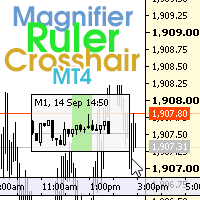
The indicator has three main tools: Magnifier (Zoom chart), Ruler  ( Time and Price scales ),   and Crosshair. You can move it all around with your mouse and customize different formats for  displaying , customize   size and color of each element. The Magnifier (zoom chart) allows you to display candles from any time frame and at different scales. Hotkeys: 'Q' - higher timeframe, 'A' - lower timeframe, 'W' - decrease candle size, 'S' - increase candle size, 'Z' - show/hide zoom chart You can
Easy Trade Executor est un outil de calcul rapide du volume, d’exécution d’ordres et de gestion des positions pour MT4. Placez directement les niveaux de Prix d'entrée, Stop Loss et Take Profit sur le graphique, obtenez automatiquement le volume adapté à votre risque et ouvrez vos trades en quelques clics seulement. Pourquoi choisir Easy Trade Executor ? Easy Trade Executor a été conçu pour les traders qui recherchent bien plus qu’un simple calculateur de risque. Ils veulent gérer leurs trades
The product will copy all telegram signal to MT4   ( which you are member  ) , also it can work as remote copier.  Easy to set up, copy order instant, can work with almost signal formats, image signal, s upport to translate other language to English Work with all type of channel or group, even channel have "Restrict Saving Content", work with  multi channel, multi MT5 Work as remote copier: with signal have ticket number, it will copy exactly via ticket number. Support to backtest signal. How to
KT Equity Protector MT4
KEENBASE SOFTWARE SOLUTIONS
3.75 (4)
An equity protection EA for MetaTrader that enforces your loss limits and profit target for you: when your account reaches a rule you set, it closes your trades on every symbol, before one bad day turns into a lost account. It suits prop firm challenges and personal accounts alike. Attach it to one chart, answer a few questions in the on-chart setup wizard, and it watches your whole account in the background while you trade by hand or with other EAs. What it protects Daily loss limit: a percenta
Plus de l'auteur
Simple Closeall
Catur Sulistiyanto A Md Tem
metatrader 4 ea simple closeall you can get free ea by registering FBS broker through my link https://fbs.partners?ibl=621087&ibp=24536958 install ea in any pair and run it.. Congratulations on using the ea close assistant Button Function : Close All Order            =  function to close all open orders and pending orders Close Sell                    = function to close all open sell orders Close Buy                    = function to close all open buy orders Close Profit                 = fu

FREE
CloseOrderProfitMoney
Catur Sulistiyanto A Md Tem
Metatrader 4 protection EA that limits profit Ways of working: * Aktif this EA to any pair in metatrader 4, you can start trade manual * Close all open orders if you have profit equity in money according to settings "Will close all open buy and sell orders regardless of profit or loss" * The EA/robot does not open orders, only closes orders if the settings are reached, this could be more or less due to market movements. For example, setting a profit of 5 $, the estimated profit can be 4.8 $ or


FREE
CloseOrderLossMoney
Catur Sulistiyanto A Md Tem
Metatrader 4 protection EA that limits loss Ways of working: * Aktif this EA to any pair in metatrader 4, you can start trade manual * Close all open orders if you have profit loss in money according to settings "Will close all open buy and sell orders regardless of profit or loss" * The EA/robot does not open orders, only closes orders if the settings are reached, this could be more or less due to market movements. For example, setting a loss of -5 $, the estimated profit can be -4.8 $ or -5.4
FREE
Gold Miner 46
Catur Sulistiyanto A Md Tem
Slow trading, low risk low return strategy open position only buy no stoploss , option ea : close equity target, stop equity target. Take profit step by step. For minimum blance please download excel file, and try ea in demo account before purchase link download  how our ea works is * Recommended free swap account (islamic account) * trading with own money * ea will open buy, the price goes down will buy again and so on ea will stop when the highest price is according to settings * floating min
Silver Miner 46
Catur Sulistiyanto A Md Tem
EA only work XAGUSD symbol Slow trading, low risk low return strategy open position only buy no stoploss , option ea : close equity target, stop equity target. Take profit step by step. For minimum blance please download excel file, and try ea in demo account before purchase link download  forex robot ea xagusd miner forex robot to generate profits with very low risk, such as owning a mine but does not require high-spec hardware which is very expensive, rather than buying mining hardware, it is
Eurusd Miner 46
Catur Sulistiyanto A Md Tem
This robot uses a strategy with hedge definite calculations, so that when it closes it is definitely profitable. how the robot works: 1. the first time the robot will open a buy position, - if the profit position is according to the target it will be closed automatically and re-open a buy position again - if a loss position the robot will open a buy and sell position simultaneously, if the position is still a loss the robot will open a position  buy sell together again and close profit short po
Gbpusd Miner 46
Catur Sulistiyanto A Md Tem
This robot uses a strategy with hedge definite calculations, so that when it closes it is definitely profitable. how the robot works: 1. the first time the robot will open a buy position, - if the profit position is according to the target it will be closed automatically and re-open a buy position again - if a loss position the robot will open a buy and sell position simultaneously, if the position is still a loss the robot will open a position  buy sell together again and close profit short po
Usdchf Miner 46
Catur Sulistiyanto A Md Tem
This robot uses a strategy with hedge definite calculations, so that when it closes it is definitely profitable. how the robot works: 1. the first time the robot will open a buy position, - if the profit position is according to the target it will be closed automatically and re-open a buy position again - if a loss position the robot will open a buy and sell position simultaneously, if the position is still a loss the robot will open a position  buy sell together again and close profit short po
WinnerForex xngusd
Catur Sulistiyanto A Md Tem
Automatic Trade Long term US Natural Gas (xngusd) account swap free This EA can only be used on a free swap account. If it is used on a swap account, it will be very detrimental. Im use expert advisor (automatic trade) Us Natural Gas robot is a metatrader 4 safe investment robot. This robot uses a strategy with hedge definite calculations, so that when it closes it is definitely profitable. how the robot works: 1. the first time the robot will open a buy position, - if the profit position is acc
EA DESCRIPTION Buy Drop Point EA is a BUY-ONLY Expert Advisor based on price drop measured in points. The EA will open a BUY position every time the price drops a specified number of points, and it can open multiple positions within the same timeframe candle as long as the drop condition is met. Recommended long positive swap pairs The pairs below are pairs at FBS: AUDCHF AUDJPY CADCHF CADJPY CHFJPY EURCHF EURJPY GBPCHF GBPJPY NZDCHF NZDJPY USDCHF USDCHF USDJPY For other brokers, the condition
Martingale Stochastic Smart
Catur Sulistiyanto A Md Tem
Martingale Stochastic EA MT5 is an advanced automated trading Expert Advisor that combines a step-based martingale strategy with a Stochastic indicator filter and flexible profit & equity management. This EA is designed for traders who want to secure partial profits without disturbing losing positions, while maintaining strict risk and equity control. Trading Logic Entries are based on price distance (step points) and martingale progression Stochastic filter can be applied to every martingal
Filtrer:
Aucun avis
Répondre à l'avis