Evgeniy Ozhiganov / Feed de Noticias
- Información
|
13+ años
experiencia
|
0
productos
|
0
versiones demo
|
|
0
trabajos
|
0
señales
|
0
suscriptores
|
Amigos
1652
Solicitudes
Enviadas
Eleni Anna Branou
Why Is My MT4/MT5 Trade Copier Slow? How to Diagnose Copying Delays, Frozen Terminals & VPS Performance
18 septiembre 2026, 18:12
Why Is My MT4/MT5 Trade Copier Slow? How to Diagnose Copying Delays, Frozen Terminals & VPS Performance A fast trade copier is only one part of a fast trade-copying setup...
Eleni Anna Branou
Partial Closure EA MT4/5© allows you to partially close any trade on your account, manually by a chosen percentage of the lot size and/or by trade ticket, or automatically at specified percentages of the TP/SL level, closing a percentage of the initial lot size across up to 10 take profit and 10 stop loss levels.. It can manage all or selected trades in your account by specifying or excluding certain magic numbers, comments, or symbols.
✔️ Extremely easy and straightforward interface
✔️ Works smoothly on any chart, account type, or broker
✔️ Automatic partial closure of managed trades at specified TP/SL levels, closing independent percentages of the initial lot size across up to 10 TP and 10 SL levels
✔️ Manual partial closure of all managed trades or any individual trade by ticket number, based on a percentage of the lot size
✔️ Option to move the stop loss to break even for the remaining portion of trades automatically partially closed as above
✔️ Option to move the stop loss to break even once a specified profit level (in points) is reached
✔️ Ability to exclude certain magic numbers, comments, or symbol trades from management
✔️ Compatible with MQL5 VPS
⭐️⭐️⭐️⭐️⭐️ Partial Closure EA MT4©: https://www.mql5.com/en/market/product/82356
⭐️⭐️⭐️⭐️⭐️ Partial Closure EA MT5©: https://www.mql5.com/en/market/product/82357
📥 Download the Partial Closure EA MT4© demo version in your demo account now: https://c.mql5.com/6/975/Partial_Closure_EA_MT4_1.30_Demo.ex4
📥 Download the Partial Closure EA MT5© demo version in your demo account now: https://c.mql5.com/6/975/Partial_Closure_EA_MT5_1.30_Demo.ex5
✅ Partial Closure EA MT4/5© installation & user guide: https://www.mql5.com/en/blogs/post/749385
💎💎💎💎💎 Check out all my Expert Advisors, Indicators and Utilities: https://www.mql5.com/en/users/eleanna74/seller
18 September 2026
✔️ Extremely easy and straightforward interface
✔️ Works smoothly on any chart, account type, or broker
✔️ Automatic partial closure of managed trades at specified TP/SL levels, closing independent percentages of the initial lot size across up to 10 TP and 10 SL levels
✔️ Manual partial closure of all managed trades or any individual trade by ticket number, based on a percentage of the lot size
✔️ Option to move the stop loss to break even for the remaining portion of trades automatically partially closed as above
✔️ Option to move the stop loss to break even once a specified profit level (in points) is reached
✔️ Ability to exclude certain magic numbers, comments, or symbol trades from management
✔️ Compatible with MQL5 VPS
⭐️⭐️⭐️⭐️⭐️ Partial Closure EA MT4©: https://www.mql5.com/en/market/product/82356
⭐️⭐️⭐️⭐️⭐️ Partial Closure EA MT5©: https://www.mql5.com/en/market/product/82357
📥 Download the Partial Closure EA MT4© demo version in your demo account now: https://c.mql5.com/6/975/Partial_Closure_EA_MT4_1.30_Demo.ex4
📥 Download the Partial Closure EA MT5© demo version in your demo account now: https://c.mql5.com/6/975/Partial_Closure_EA_MT5_1.30_Demo.ex5
✅ Partial Closure EA MT4/5© installation & user guide: https://www.mql5.com/en/blogs/post/749385
💎💎💎💎💎 Check out all my Expert Advisors, Indicators and Utilities: https://www.mql5.com/en/users/eleanna74/seller
18 September 2026
Vladimir Pastushak
Trading seems simple until you start trading with your own money. There is a price chart, a few candlesticks, Buy and Sell buttons — it may seem that all you need to do is figure out where the market is going, open a trade, and take the profit...
Vladimir Pastushak
5 главных ошибок начинающего трейдера: что мешает зарабатывать на финансовых рынках
18 septiembre 2026, 12:59
5 главных ошибок начинающего трейдера: что мешает зарабатывать на финансовых рынках Трейдинг кажется простым только до тех пор, пока человек не начинает торговать собственными деньгами...
Vladimir Pastushak
What is a financial instrument?
A financial instrument is an asset that can be bought or sold on the financial market to make a profit: stocks, currencies, indices, metals, oil, and cryptocurrencies. This is the basic concept that starts any trade. A trader selects an instrument, studies its features, analyzes the chart, and opens a position. Everything displayed in the terminal — price, spread, quote, volume — always relates to a specific financial instrument.
Financial instruments are divided into several large groups. Stocks are shares of companies that give the right to a part of their profit. Currencies are traded in pairs on the Forex market: EURUSD, GBPUSD, USDJPY, and others. Stock indices show the state of a group of companies, for example, the S&P 500 or NASDAQ. Metals such as gold and silver are considered safe-haven assets and attract investors in times of uncertainty. Oil and gas are commodity instruments that react sensitively to world news. Cryptocurrencies are the youngest and most volatile class, operating around the clock.
Each instrument has its own characteristics: liquidity, volatility, spread size, and trading hours. A beginner should start with one or two liquid and understandable instruments — for example, shares of large companies or major currency pairs. Study their behavior on the chart, practice on a demo account, and only then move on to more exotic assets. Understanding what you trade is half the success in trading.
In my profile you will find a lot of useful educational information, (don't forget to add me as a friend) Profile: https://www.mql5.com/en/users/voldemar
Что такое финансовый инструмент?
Финансовый инструмент — это актив, который можно купить или продать на финансовом рынке с целью получения прибыли: акции, валюты, индексы, металлы, нефть и криптовалюты. Это базовое понятие, с которого начинается любая сделка. Трейдер выбирает инструмент, изучает его особенности, анализирует график и открывает позицию. Всё, что отображается в терминале — цена, спред, котировка, объём, — всегда относится к конкретному финансовому инструменту.
Финансовые инструменты делятся на несколько больших групп. Акции — это доли компаний, дающие право на часть их прибыли. Валюты торгуются парами на рынке Forex: EURUSD, GBPUSD, USDJPY и другие. Фондовые индексы показывают состояние группы компаний, например, S&P 500 или NASDAQ. Металлы, такие как золото и серебро, считаются защитными активами и привлекают инвесторов в периоды неопределённости. Нефть и газ относятся к сырьевым инструментам и чутко реагируют на мировые новости. Криптовалюты — самый молодой и волатильный класс, работающий круглосуточно.
Каждый инструмент имеет свои характеристики: ликвидность, волатильность, величину спреда и время торгов. Новичку важно начать с одного-двух ликвидных и понятных инструментов — например, с акций крупных компаний или основных валютных пар. Изучите их поведение на графике, потренируйтесь на демо-счёте и только потом переходите к более экзотическим активам. Понимание того, чем вы торгуете, — половина успеха в трейдинге.
В моём профиле Вы найдете много полезной обучающей информации, (не забудь добавить в друзья) Профиль: https://www.mql5.com/ru/users/voldemar
A financial instrument is an asset that can be bought or sold on the financial market to make a profit: stocks, currencies, indices, metals, oil, and cryptocurrencies. This is the basic concept that starts any trade. A trader selects an instrument, studies its features, analyzes the chart, and opens a position. Everything displayed in the terminal — price, spread, quote, volume — always relates to a specific financial instrument.
Financial instruments are divided into several large groups. Stocks are shares of companies that give the right to a part of their profit. Currencies are traded in pairs on the Forex market: EURUSD, GBPUSD, USDJPY, and others. Stock indices show the state of a group of companies, for example, the S&P 500 or NASDAQ. Metals such as gold and silver are considered safe-haven assets and attract investors in times of uncertainty. Oil and gas are commodity instruments that react sensitively to world news. Cryptocurrencies are the youngest and most volatile class, operating around the clock.
Each instrument has its own characteristics: liquidity, volatility, spread size, and trading hours. A beginner should start with one or two liquid and understandable instruments — for example, shares of large companies or major currency pairs. Study their behavior on the chart, practice on a demo account, and only then move on to more exotic assets. Understanding what you trade is half the success in trading.
In my profile you will find a lot of useful educational information, (don't forget to add me as a friend) Profile: https://www.mql5.com/en/users/voldemar
Что такое финансовый инструмент?
Финансовый инструмент — это актив, который можно купить или продать на финансовом рынке с целью получения прибыли: акции, валюты, индексы, металлы, нефть и криптовалюты. Это базовое понятие, с которого начинается любая сделка. Трейдер выбирает инструмент, изучает его особенности, анализирует график и открывает позицию. Всё, что отображается в терминале — цена, спред, котировка, объём, — всегда относится к конкретному финансовому инструменту.
Финансовые инструменты делятся на несколько больших групп. Акции — это доли компаний, дающие право на часть их прибыли. Валюты торгуются парами на рынке Forex: EURUSD, GBPUSD, USDJPY и другие. Фондовые индексы показывают состояние группы компаний, например, S&P 500 или NASDAQ. Металлы, такие как золото и серебро, считаются защитными активами и привлекают инвесторов в периоды неопределённости. Нефть и газ относятся к сырьевым инструментам и чутко реагируют на мировые новости. Криптовалюты — самый молодой и волатильный класс, работающий круглосуточно.
Каждый инструмент имеет свои характеристики: ликвидность, волатильность, величину спреда и время торгов. Новичку важно начать с одного-двух ликвидных и понятных инструментов — например, с акций крупных компаний или основных валютных пар. Изучите их поведение на графике, потренируйтесь на демо-счёте и только потом переходите к более экзотическим активам. Понимание того, чем вы торгуете, — половина успеха в трейдинге.
В моём профиле Вы найдете много полезной обучающей информации, (не забудь добавить в друзья) Профиль: https://www.mql5.com/ru/users/voldemar
Artem Marukhov
Haven't you tried it yet? What are you waiting for?
https://www.mql5.com/ru/market/product/193863?source=Site+Market+MT5+Expert+Rating006
Eleni Anna Branou
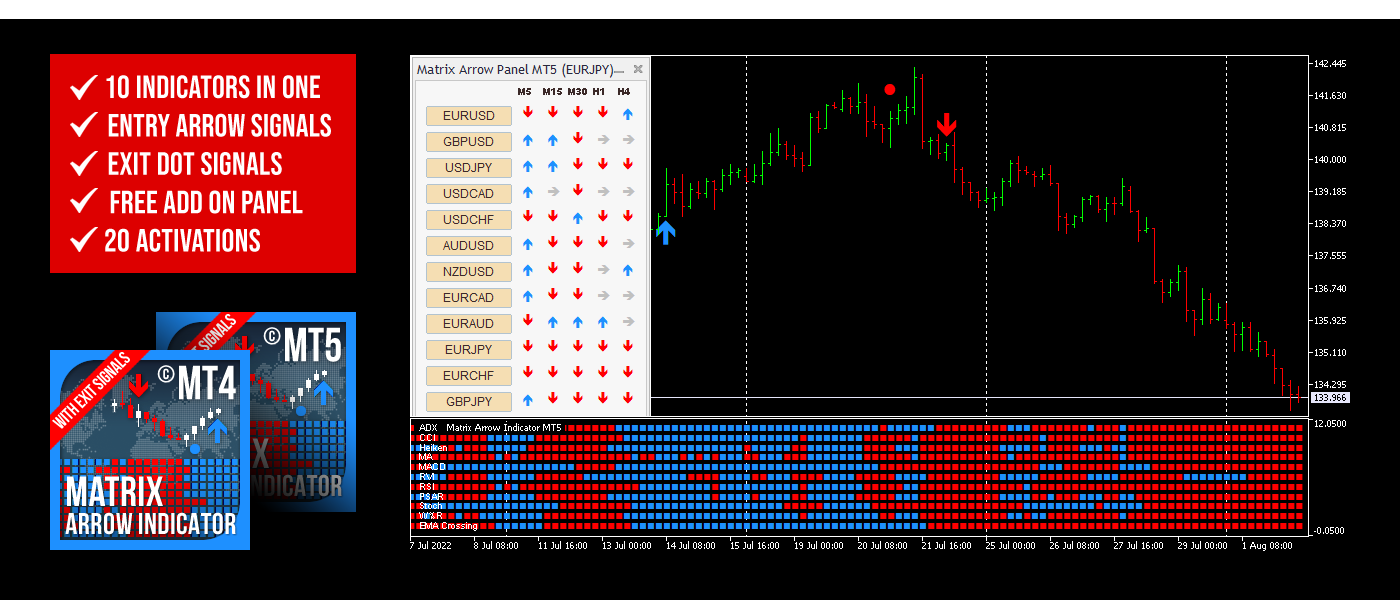
Matrix Arrow Indicator MT4/5© is a unique 10 in 1 trend following 100% non-repainting multi-timeframe indicator that can be used on all symbols/instruments: forex, commodities, cryptocurrencies, indices, stocks. Matrix Arrow Indicator MT4/5© will determine the current trend at its early stages, gathering information and data from up to 10 standard indicators, which are: Average Directional Movement Index (ADX), Commodity Channel Index (CCI), Classic Heiken Ashi candles, Moving Average, Moving Average Convergence Divergence (MACD), Relative Vigor Index (RVI), Relative Strength Index (RSI), Parabolic SAR, Stochastic Oscillator, Williams' Percent Range.
When all indicators give a valid buy or sell signal, a corresponding arrow will be printed on the chart, at the opening of the next candle/bar indicating a strong uptrend/downtrend. The user can choose which indicators will use and can adjust the parameters of each indicator separately. Matrix Arrow Indicator MT4/5© gathers information only from the selected indicators and prints the arrow based only on their data. Matrix Arrow Indicator MT4/5© can also send terminal, push notification or email alerts for all new signals. Matrix Arrow Indicator MT4/5© is a super friendly & efficient solution whether you are a scalper, intraday or swing trader!
Matrix Arrow Indicator MT4/5© comes with a free add on, the Matrix Arrow Indicator Multi Timeframe Panel MT4/5© that offers the option to show the Matrix Arrow Indicator signals for 5 customizable timeframes of 16 modifiable symbols/instruments. It gives also the option to change the current chart it is attached onto, by clicking any one of the 16 modifiable symbol buttons. This will allow you to work much faster between different symbols and never miss a trading opportunity again.
✔️ 100% Non-Repainting indicator
✔️ 10 in 1 unique and extremely efficient Matrix and Arrow indicator
✔️ Works on all timeframes and all symbols/instruments
✔️ Super accurate entry Arrow signals that indicate a strong trend
✔️ Exit dot signals define neutral periods with no clear trend
✔️ Equally effective in trending and ranging markets
✔️ Each one indicator can be turned ON/OFF
✔️ Each and every parameter of all 10 indicators are fully adjustable
✔️ Matrix and Arrow colors are fully customizable
✔️ Free add on Panel with Matrix Arrow signals for 16 symbols and 5 timeframes
✔️ Terminal, Push Notification and Email Alerts available
✔️ Ideal for beginners but also a great asset for experienced traders
🔥🔥🔥🔥🔥 Matrix Arrow Indicator MT4/5© Demonstration Video: https://vimeo.com/1157978887?fl=tl&fe=ec
⭐️⭐️⭐️⭐️⭐️ Matrix Arrow Indicator MT4©: https://www.mql5.com/en/market/product/69726
⭐️⭐️⭐️⭐️⭐️ Matrix Arrow Indicator MT5©: https://www.mql5.com/en/market/product/69725
👉 Matrix Arrow Indicator MT4/5© Real Trading Examples: https://www.mql5.com/en/blogs/post/745715
✅ Matrix Arrow Indicator MT4/5© Installation Guide: https://www.mql5.com/en/blogs/post/745711
✅ Matrix Arrow Indicator MT4/5© Settings/Inputs: https://www.mql5.com/en/blogs/post/745707
💎💎💎💎💎 Check out all my Expert Advisors, Indicators and Utilities: https://www.mql5.com/en/users/eleanna74/seller
18 September 2026
When all indicators give a valid buy or sell signal, a corresponding arrow will be printed on the chart, at the opening of the next candle/bar indicating a strong uptrend/downtrend. The user can choose which indicators will use and can adjust the parameters of each indicator separately. Matrix Arrow Indicator MT4/5© gathers information only from the selected indicators and prints the arrow based only on their data. Matrix Arrow Indicator MT4/5© can also send terminal, push notification or email alerts for all new signals. Matrix Arrow Indicator MT4/5© is a super friendly & efficient solution whether you are a scalper, intraday or swing trader!
Matrix Arrow Indicator MT4/5© comes with a free add on, the Matrix Arrow Indicator Multi Timeframe Panel MT4/5© that offers the option to show the Matrix Arrow Indicator signals for 5 customizable timeframes of 16 modifiable symbols/instruments. It gives also the option to change the current chart it is attached onto, by clicking any one of the 16 modifiable symbol buttons. This will allow you to work much faster between different symbols and never miss a trading opportunity again.
✔️ 100% Non-Repainting indicator
✔️ 10 in 1 unique and extremely efficient Matrix and Arrow indicator
✔️ Works on all timeframes and all symbols/instruments
✔️ Super accurate entry Arrow signals that indicate a strong trend
✔️ Exit dot signals define neutral periods with no clear trend
✔️ Equally effective in trending and ranging markets
✔️ Each one indicator can be turned ON/OFF
✔️ Each and every parameter of all 10 indicators are fully adjustable
✔️ Matrix and Arrow colors are fully customizable
✔️ Free add on Panel with Matrix Arrow signals for 16 symbols and 5 timeframes
✔️ Terminal, Push Notification and Email Alerts available
✔️ Ideal for beginners but also a great asset for experienced traders
🔥🔥🔥🔥🔥 Matrix Arrow Indicator MT4/5© Demonstration Video: https://vimeo.com/1157978887?fl=tl&fe=ec
⭐️⭐️⭐️⭐️⭐️ Matrix Arrow Indicator MT4©: https://www.mql5.com/en/market/product/69726
⭐️⭐️⭐️⭐️⭐️ Matrix Arrow Indicator MT5©: https://www.mql5.com/en/market/product/69725
👉 Matrix Arrow Indicator MT4/5© Real Trading Examples: https://www.mql5.com/en/blogs/post/745715
✅ Matrix Arrow Indicator MT4/5© Installation Guide: https://www.mql5.com/en/blogs/post/745711
✅ Matrix Arrow Indicator MT4/5© Settings/Inputs: https://www.mql5.com/en/blogs/post/745707
💎💎💎💎💎 Check out all my Expert Advisors, Indicators and Utilities: https://www.mql5.com/en/users/eleanna74/seller
18 September 2026
Artem Marukhov
If you haven't tried my new Expert Advisor yet, I think today is the perfect time.
https://www.mql5.com/ru/market/product/193863?source=Site+Market+MT5+Expert+Rating006
Eleni Anna Branou
Basket EA MT4/5© is a powerful profit-harvesting tool and a comprehensive account protection system, all combined into a simple and easy-to-use solution. Its core purpose is to give you complete control over your trading account’s overall profit and loss by managing all open positions at the basket level, rather than individually. The EA offers a full range of basket-level features, including take profit, stop loss, break even, and trailing stop loss. These can be configured as a percentage of your account balance, a fixed amount in your account’s currency, or a target in average points across all managed trades. This flexibility allows traders to tailor risk and profit strategies to their unique needs. Basket EA MT4/5© also supports intelligent trade filtering, allowing you to include or exclude specific trades from management based on their magic number, symbol, or comment. This ensures that only the trades you want managed by the EA are affected, while others are left untouched.
For added protection, the EA includes advanced account safeguarding mechanisms. When a specified equity take profit or stop loss level or a maximum drawdown from the account's balance high is reached, the EA can automatically close all open trades, delete any pending orders, and shut down all charts, removing any Expert Advisors running on them. This feature helps protect your capital during unexpected market movements or when reaching your predefined account targets.
✔️ Does not use Martingale, Grid, Averaging, or other high-risk techniques
✔️ Allows exclusion of specific Magic Numbers, trade comments, or symbol trades from management
✔️ Basket Take Profit in % for all managed trades combined
✔️ Basket Stop Loss in % for all managed trades combined
✔️ Basket Break Even in % for all managed trades combined
✔️ Basket Trailing Stop Loss in % for all managed trades combined
✔️ Basket Take Profit in money for all managed trades combined
✔️ Basket Stop Loss in money for all managed trades combined
✔️ Basket Break Even in money for all managed trades combined
✔️ Basket Trailing Stop Loss in money for all managed trades combined
✔️ Basket Take Profit in average points for all managed trades combined
✔️ Basket Stop Loss in average points for all managed trades combined
✔️ Basket Break Even in average points for all managed trades combined
✔️ Basket Trailing Stop Loss in average points for all managed trades combined
✔️ Option to reset all Basket settings after each account balance update or after a Basket target is hit
✔️ Option to close all managed trades at break even after recovering from a drawdown
✔️ Option to close all managed trades at a specific time on a chosen day or daily
✔️ Account protection feature that closes all trades and charts when equity-based TP or SL is reached
✔️ Maximum drawdown % from balance high that closes all trades and charts/EAs if triggered
✔️ Optional on-chart panel to monitor profit/loss and close trades by type or all at once
✔️ Terminal, push notification, and email alerts when any Basket or protection condition is triggered
✔️ 100% automated Expert Advisor
✔️ Fully compatible with MQL5 VPS
⭐️⭐️⭐️⭐️⭐️ Basket EA EA MT4©: https://www.mql5.com/en/market/product/45192
⭐️⭐️⭐️⭐️⭐️ Basket EA EA MT5©: https://www.mql5.com/en/market/product/72782
📥 Download the Basket EA MT4© demo version in your demo account now: https://c.mql5.com/6/988/Basket_EA_MT4_2_20_Demo.ex4
📥 Download the Basket EA MT5© demo version in your demo account now: https://c.mql5.com/6/988/Basket_EA_MT5_2_00_Demo.ex5
✅ Basket EA MT4/5© detailed Settings/Inputs guide: https://www.mql5.com/en/blogs/post/746117
💎💎💎💎💎 Check out all my Expert Advisors and Utilities: https://www.mql5.com/en/users/eleanna74/seller
18 September 2026
For added protection, the EA includes advanced account safeguarding mechanisms. When a specified equity take profit or stop loss level or a maximum drawdown from the account's balance high is reached, the EA can automatically close all open trades, delete any pending orders, and shut down all charts, removing any Expert Advisors running on them. This feature helps protect your capital during unexpected market movements or when reaching your predefined account targets.
✔️ Does not use Martingale, Grid, Averaging, or other high-risk techniques
✔️ Allows exclusion of specific Magic Numbers, trade comments, or symbol trades from management
✔️ Basket Take Profit in % for all managed trades combined
✔️ Basket Stop Loss in % for all managed trades combined
✔️ Basket Break Even in % for all managed trades combined
✔️ Basket Trailing Stop Loss in % for all managed trades combined
✔️ Basket Take Profit in money for all managed trades combined
✔️ Basket Stop Loss in money for all managed trades combined
✔️ Basket Break Even in money for all managed trades combined
✔️ Basket Trailing Stop Loss in money for all managed trades combined
✔️ Basket Take Profit in average points for all managed trades combined
✔️ Basket Stop Loss in average points for all managed trades combined
✔️ Basket Break Even in average points for all managed trades combined
✔️ Basket Trailing Stop Loss in average points for all managed trades combined
✔️ Option to reset all Basket settings after each account balance update or after a Basket target is hit
✔️ Option to close all managed trades at break even after recovering from a drawdown
✔️ Option to close all managed trades at a specific time on a chosen day or daily
✔️ Account protection feature that closes all trades and charts when equity-based TP or SL is reached
✔️ Maximum drawdown % from balance high that closes all trades and charts/EAs if triggered
✔️ Optional on-chart panel to monitor profit/loss and close trades by type or all at once
✔️ Terminal, push notification, and email alerts when any Basket or protection condition is triggered
✔️ 100% automated Expert Advisor
✔️ Fully compatible with MQL5 VPS
⭐️⭐️⭐️⭐️⭐️ Basket EA EA MT4©: https://www.mql5.com/en/market/product/45192
⭐️⭐️⭐️⭐️⭐️ Basket EA EA MT5©: https://www.mql5.com/en/market/product/72782
📥 Download the Basket EA MT4© demo version in your demo account now: https://c.mql5.com/6/988/Basket_EA_MT4_2_20_Demo.ex4
📥 Download the Basket EA MT5© demo version in your demo account now: https://c.mql5.com/6/988/Basket_EA_MT5_2_00_Demo.ex5
✅ Basket EA MT4/5© detailed Settings/Inputs guide: https://www.mql5.com/en/blogs/post/746117
💎💎💎💎💎 Check out all my Expert Advisors and Utilities: https://www.mql5.com/en/users/eleanna74/seller
18 September 2026
Eleni Anna Branou
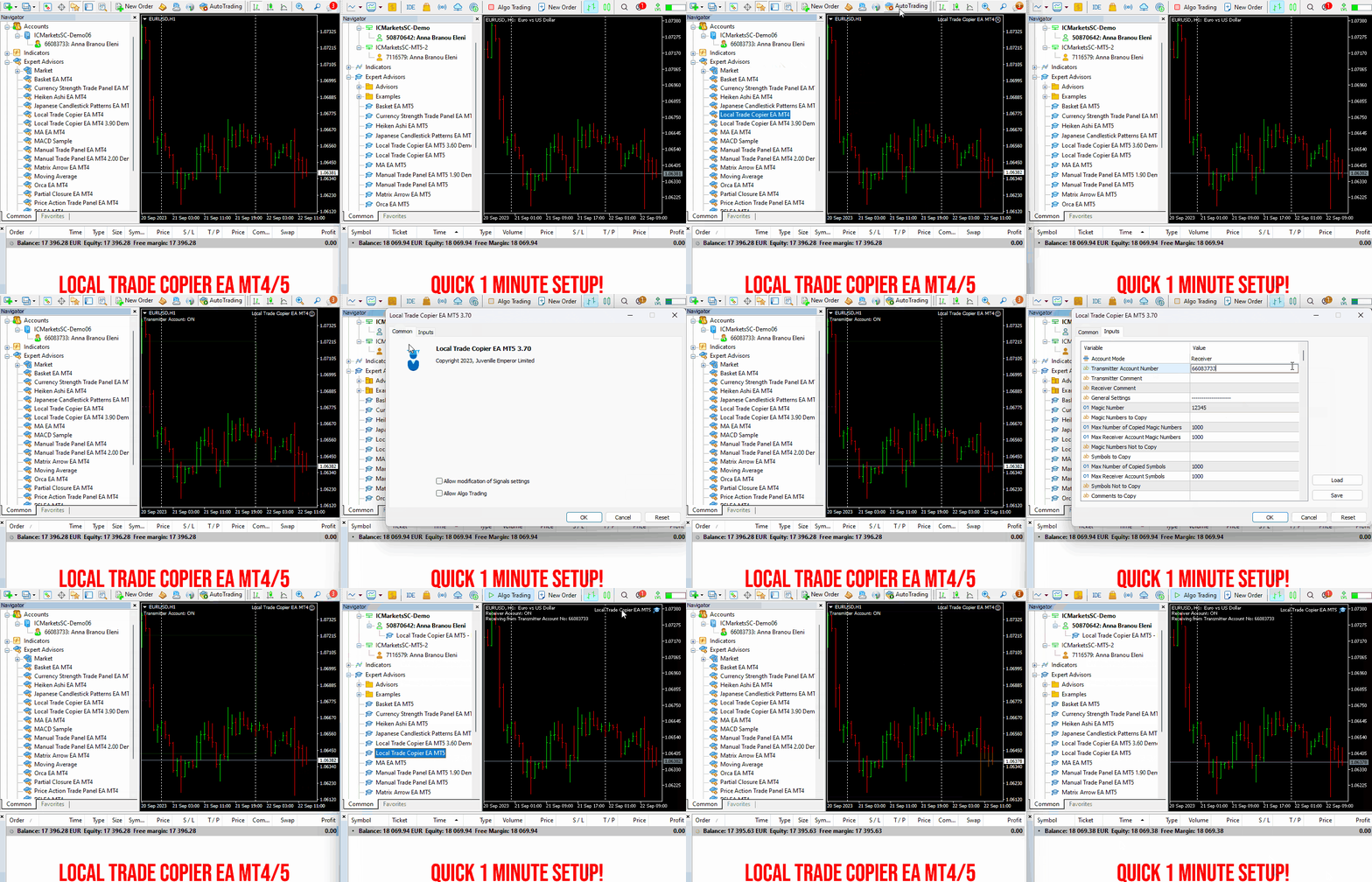
Local Trade Copier EA MT4/5© is a fast and flexible trade copier for copying and managing trades between multiple MetaTrader 4 and MetaTrader 5 accounts on the same Windows computer or Windows VPS.
Set up your Transmitter and Receiver terminals in about 1 minute and copy manual or EA trades between accounts at the same or different brokers. Under suitable conditions, trade information can be synchronized between local MetaTrader terminals in under 0.5 seconds. Actual trade execution depends on broker latency, network conditions, computer/VPS performance and terminal workload.
Each Receiver account can use its own lot sizing, risk management, trade filtering, symbol mapping, trade management and account-protection settings. This allows the same trading activity to be synchronized across multiple accounts while each Receiver can be configured according to its own requirements.
✔️ Copying & Connectivity *
Copy between MT4 and MT5 accounts using one or more Transmitters and Receivers on the same Windows computer or VPS. Supports different brokers, real/demo accounts and read-only Transmitters.
✔️ Lot Sizing & Risk Management
Choose from 18 lot size and risk options, with independent sizing and risk settings for each Receiver.
✔️ Trade Filtering & Copying Controls
Filter copied trades by symbol, magic number, comment, ticket, volume, direction, day and time.
✔️ Trade Management
Manage market and pending orders, TP/SL, partial closures, reopening, reverse copying, better-price conditions and trade splitting.
✔️ Account Protection
Control lot limits, risk, daily drawdown/profit, copying restrictions and emergency protection independently for each Receiver.
✔️ Broker Compatibility & Symbol Mapping
Copy between different brokers and configure suffixes and special symbol mappings when symbol names differ.
✔️ Notifications & Reliability
Use email/push notifications, persistent settings and MetaTrader logs for monitoring and troubleshooting.
✔️ 20 Activations & MQL5 VPS
Each MT4/MT5 version includes 20 activations and supports MQL5 VPS self-copier mode.
* MT4 → MT5 and MT5 → MT4 copying requires both LTC versions. Both terminals must run on the same Windows computer or Windows VPS.
🔥🔥🔥🔥🔥 Watch the Local Trade Copier EA MT4/5© Quick Setup Video: https://www.youtube.com/watch?v=zhc9s56QhlE
⭐️⭐️⭐️⭐️⭐️ Local Trade Copier EA MT4©: https://www.mql5.com/en/market/product/68950
⭐️⭐️⭐️⭐️⭐️ Local Trade Copier EA MT5©: https://www.mql5.com/en/market/product/68951
📥 Download the Local Trade Copier EA MT4© Free Demo: https://c.mql5.com/6/987/Local_Trade_Copier_EA_MT4_4_50_Demo.ex4
📥 Download the Local Trade Copier EA MT5© Free Demo: https://c.mql5.com/6/985/Local_Trade_Copier_EA_MT5_4_30_Demo.ex5
✅ Local Trade Copier EA MT4/5© Purchase, Installation & Quick Setup Guide: https://www.mql5.com/en/blogs/post/745683
✅ Local Trade Copier EA MT4/5© Detailed Inputs/Settings Guide: https://www.mql5.com/en/blogs/post/745681
✅ Local Trade Copier EA MT4/5© Troubleshooting Guide: https://www.mql5.com/en/blogs/post/746561
💎💎💎💎💎 View all my Expert Advisors, Indicators and Utilities: https://www.mql5.com/en/users/eleanna74/seller
18 September 2026
.
Set up your Transmitter and Receiver terminals in about 1 minute and copy manual or EA trades between accounts at the same or different brokers. Under suitable conditions, trade information can be synchronized between local MetaTrader terminals in under 0.5 seconds. Actual trade execution depends on broker latency, network conditions, computer/VPS performance and terminal workload.
Each Receiver account can use its own lot sizing, risk management, trade filtering, symbol mapping, trade management and account-protection settings. This allows the same trading activity to be synchronized across multiple accounts while each Receiver can be configured according to its own requirements.
✔️ Copying & Connectivity *
Copy between MT4 and MT5 accounts using one or more Transmitters and Receivers on the same Windows computer or VPS. Supports different brokers, real/demo accounts and read-only Transmitters.
✔️ Lot Sizing & Risk Management
Choose from 18 lot size and risk options, with independent sizing and risk settings for each Receiver.
✔️ Trade Filtering & Copying Controls
Filter copied trades by symbol, magic number, comment, ticket, volume, direction, day and time.
✔️ Trade Management
Manage market and pending orders, TP/SL, partial closures, reopening, reverse copying, better-price conditions and trade splitting.
✔️ Account Protection
Control lot limits, risk, daily drawdown/profit, copying restrictions and emergency protection independently for each Receiver.
✔️ Broker Compatibility & Symbol Mapping
Copy between different brokers and configure suffixes and special symbol mappings when symbol names differ.
✔️ Notifications & Reliability
Use email/push notifications, persistent settings and MetaTrader logs for monitoring and troubleshooting.
✔️ 20 Activations & MQL5 VPS
Each MT4/MT5 version includes 20 activations and supports MQL5 VPS self-copier mode.
* MT4 → MT5 and MT5 → MT4 copying requires both LTC versions. Both terminals must run on the same Windows computer or Windows VPS.
🔥🔥🔥🔥🔥 Watch the Local Trade Copier EA MT4/5© Quick Setup Video: https://www.youtube.com/watch?v=zhc9s56QhlE
⭐️⭐️⭐️⭐️⭐️ Local Trade Copier EA MT4©: https://www.mql5.com/en/market/product/68950
⭐️⭐️⭐️⭐️⭐️ Local Trade Copier EA MT5©: https://www.mql5.com/en/market/product/68951
📥 Download the Local Trade Copier EA MT4© Free Demo: https://c.mql5.com/6/987/Local_Trade_Copier_EA_MT4_4_50_Demo.ex4
📥 Download the Local Trade Copier EA MT5© Free Demo: https://c.mql5.com/6/985/Local_Trade_Copier_EA_MT5_4_30_Demo.ex5
✅ Local Trade Copier EA MT4/5© Purchase, Installation & Quick Setup Guide: https://www.mql5.com/en/blogs/post/745683
✅ Local Trade Copier EA MT4/5© Detailed Inputs/Settings Guide: https://www.mql5.com/en/blogs/post/745681
✅ Local Trade Copier EA MT4/5© Troubleshooting Guide: https://www.mql5.com/en/blogs/post/746561
💎💎💎💎💎 View all my Expert Advisors, Indicators and Utilities: https://www.mql5.com/en/users/eleanna74/seller
18 September 2026
.
Eleni Anna Branou
Moving Average EA ΜΤ4/5© is a fully automated Expert Advisor that takes the trading of Moving Average to a whole new level. Moving Average EA MT4/5© can either open one buy trade when MA turns up (blue color MA) or one sell trade when MA turns down (red color MA) or can open a new same direction trade on every new candle, as long as the slope direction of the Moving Average remains unchanged. A series of unique settings make this EA extremely versatile. This EA comes with provided set files for many symbols, specially optimized for ECN Raw Spread ICMarkets accounts (New York based GMT+3 time zone servers). Other brokers or account types may be used, but you may need to make any necessary time adjustments to fit your broker/account.
✔️ Martingale, Grid, Averaging or other dangerous techniques are not used
✔️ New trade on every change of the Moving Average slope direction
✔️ Option for a new same direction trade on each new candle
✔️ Offset setting for a better trade placement after a price retracement
✔️ Hard and Virtual Take Profit and Stop Loss levels
✔️ SL, TP, BE and Trailing SL levels in Percentage of the Average Daily Range
✔️ Basket TP, SL, BE and Trailing SL in % for all open positions combined
✔️ Optimized set files for many symbols/instruments
✔️ 100% automated Expert Advisor
✔️ MQL5 VPS compatible
🔥🔥🔥🔥🔥 Moving Average EA MT4/5© Backtests & New Set Files: https://www.mql5.com/en/blogs/post/745753
⭐️⭐️⭐️⭐️⭐️ Moving Average EA ΜΤ4©: https://www.mql5.com/en/market/product/45633
⭐️⭐️⭐️⭐️⭐️ Moving Average EA ΜΤ5©: https://www.mql5.com/en/market/product/47673
💎💎💎💎💎 Check out all my Expert Advisors, Indicators and Utilities: https://www.mql5.com/en/users/eleanna74/seller
17 September 2026
✔️ Martingale, Grid, Averaging or other dangerous techniques are not used
✔️ New trade on every change of the Moving Average slope direction
✔️ Option for a new same direction trade on each new candle
✔️ Offset setting for a better trade placement after a price retracement
✔️ Hard and Virtual Take Profit and Stop Loss levels
✔️ SL, TP, BE and Trailing SL levels in Percentage of the Average Daily Range
✔️ Basket TP, SL, BE and Trailing SL in % for all open positions combined
✔️ Optimized set files for many symbols/instruments
✔️ 100% automated Expert Advisor
✔️ MQL5 VPS compatible
🔥🔥🔥🔥🔥 Moving Average EA MT4/5© Backtests & New Set Files: https://www.mql5.com/en/blogs/post/745753
⭐️⭐️⭐️⭐️⭐️ Moving Average EA ΜΤ4©: https://www.mql5.com/en/market/product/45633
⭐️⭐️⭐️⭐️⭐️ Moving Average EA ΜΤ5©: https://www.mql5.com/en/market/product/47673
💎💎💎💎💎 Check out all my Expert Advisors, Indicators and Utilities: https://www.mql5.com/en/users/eleanna74/seller
17 September 2026
Eleni Anna Branou
Partial Closure EA MT4/5© allows you to partially close any trade on your account, manually by a chosen percentage of the lot size and/or by trade ticket, or automatically at specified percentages of the TP/SL level, closing a percentage of the initial lot size across up to 10 take profit and 10 stop loss levels.. It can manage all or selected trades in your account by specifying or excluding certain magic numbers, comments, or symbols.
✔️ Extremely easy and straightforward interface
✔️ Works smoothly on any chart, account type, or broker
✔️ Automatic partial closure of managed trades at specified TP/SL levels, closing independent percentages of the initial lot size across up to 10 TP and 10 SL levels
✔️ Manual partial closure of all managed trades or any individual trade by ticket number, based on a percentage of the lot size
✔️ Option to move the stop loss to break even for the remaining portion of trades automatically partially closed as above
✔️ Option to move the stop loss to break even once a specified profit level (in points) is reached
✔️ Ability to exclude certain magic numbers, comments, or symbol trades from management
✔️ Compatible with MQL5 VPS
⭐️⭐️⭐️⭐️⭐️ Partial Closure EA MT4©: https://www.mql5.com/en/market/product/82356
⭐️⭐️⭐️⭐️⭐️ Partial Closure EA MT5©: https://www.mql5.com/en/market/product/82357
📥 Download the Partial Closure EA MT4© demo version in your demo account now: https://c.mql5.com/6/975/Partial_Closure_EA_MT4_1.30_Demo.ex4
📥 Download the Partial Closure EA MT5© demo version in your demo account now: https://c.mql5.com/6/975/Partial_Closure_EA_MT5_1.30_Demo.ex5
✅ Partial Closure EA MT4/5© installation & user guide: https://www.mql5.com/en/blogs/post/749385
💎💎💎💎💎 Check out all my Expert Advisors, Indicators and Utilities: https://www.mql5.com/en/users/eleanna74/seller
17 September 2026
✔️ Extremely easy and straightforward interface
✔️ Works smoothly on any chart, account type, or broker
✔️ Automatic partial closure of managed trades at specified TP/SL levels, closing independent percentages of the initial lot size across up to 10 TP and 10 SL levels
✔️ Manual partial closure of all managed trades or any individual trade by ticket number, based on a percentage of the lot size
✔️ Option to move the stop loss to break even for the remaining portion of trades automatically partially closed as above
✔️ Option to move the stop loss to break even once a specified profit level (in points) is reached
✔️ Ability to exclude certain magic numbers, comments, or symbol trades from management
✔️ Compatible with MQL5 VPS
⭐️⭐️⭐️⭐️⭐️ Partial Closure EA MT4©: https://www.mql5.com/en/market/product/82356
⭐️⭐️⭐️⭐️⭐️ Partial Closure EA MT5©: https://www.mql5.com/en/market/product/82357
📥 Download the Partial Closure EA MT4© demo version in your demo account now: https://c.mql5.com/6/975/Partial_Closure_EA_MT4_1.30_Demo.ex4
📥 Download the Partial Closure EA MT5© demo version in your demo account now: https://c.mql5.com/6/975/Partial_Closure_EA_MT5_1.30_Demo.ex5
✅ Partial Closure EA MT4/5© installation & user guide: https://www.mql5.com/en/blogs/post/749385
💎💎💎💎💎 Check out all my Expert Advisors, Indicators and Utilities: https://www.mql5.com/en/users/eleanna74/seller
17 September 2026
Eleni Anna Branou
Matrix Arrow Indicator MT4/5© is a unique 10 in 1 trend following 100% non-repainting multi-timeframe indicator that can be used on all symbols/instruments: forex, commodities, cryptocurrencies, indices, stocks. Matrix Arrow Indicator MT4/5© will determine the current trend at its early stages, gathering information and data from up to 10 standard indicators, which are: Average Directional Movement Index (ADX), Commodity Channel Index (CCI), Classic Heiken Ashi candles, Moving Average, Moving Average Convergence Divergence (MACD), Relative Vigor Index (RVI), Relative Strength Index (RSI), Parabolic SAR, Stochastic Oscillator, Williams' Percent Range.
When all indicators give a valid buy or sell signal, a corresponding arrow will be printed on the chart, at the opening of the next candle/bar indicating a strong uptrend/downtrend. The user can choose which indicators will use and can adjust the parameters of each indicator separately. Matrix Arrow Indicator MT4/5© gathers information only from the selected indicators and prints the arrow based only on their data. Matrix Arrow Indicator MT4/5© can also send terminal, push notification or email alerts for all new signals. Matrix Arrow Indicator MT4/5© is a super friendly & efficient solution whether you are a scalper, intraday or swing trader!
Matrix Arrow Indicator MT4/5© comes with a free add on, the Matrix Arrow Indicator Multi Timeframe Panel MT4/5© that offers the option to show the Matrix Arrow Indicator signals for 5 customizable timeframes of 16 modifiable symbols/instruments. It gives also the option to change the current chart it is attached onto, by clicking any one of the 16 modifiable symbol buttons. This will allow you to work much faster between different symbols and never miss a trading opportunity again.
✔️ 100% Non-Repainting indicator
✔️ 10 in 1 unique and extremely efficient Matrix and Arrow indicator
✔️ Works on all timeframes and all symbols/instruments
✔️ Super accurate entry Arrow signals that indicate a strong trend
✔️ Exit dot signals define neutral periods with no clear trend
✔️ Equally effective in trending and ranging markets
✔️ Each one indicator can be turned ON/OFF
✔️ Each and every parameter of all 10 indicators are fully adjustable
✔️ Matrix and Arrow colors are fully customizable
✔️ Free add on Panel with Matrix Arrow signals for 16 symbols and 5 timeframes
✔️ Terminal, Push Notification and Email Alerts available
✔️ Ideal for beginners but also a great asset for experienced traders
🔥🔥🔥🔥🔥 Matrix Arrow Indicator MT4/5© Demonstration Video: https://vimeo.com/1157978887?fl=tl&fe=ec
⭐️⭐️⭐️⭐️⭐️ Matrix Arrow Indicator MT4©: https://www.mql5.com/en/market/product/69726
⭐️⭐️⭐️⭐️⭐️ Matrix Arrow Indicator MT5©: https://www.mql5.com/en/market/product/69725
👉 Matrix Arrow Indicator MT4/5© Real Trading Examples: https://www.mql5.com/en/blogs/post/745715
✅ Matrix Arrow Indicator MT4/5© Installation Guide: https://www.mql5.com/en/blogs/post/745711
✅ Matrix Arrow Indicator MT4/5© Settings/Inputs: https://www.mql5.com/en/blogs/post/745707
💎💎💎💎💎 Check out all my Expert Advisors, Indicators and Utilities: https://www.mql5.com/en/users/eleanna74/seller
17 September 2026
When all indicators give a valid buy or sell signal, a corresponding arrow will be printed on the chart, at the opening of the next candle/bar indicating a strong uptrend/downtrend. The user can choose which indicators will use and can adjust the parameters of each indicator separately. Matrix Arrow Indicator MT4/5© gathers information only from the selected indicators and prints the arrow based only on their data. Matrix Arrow Indicator MT4/5© can also send terminal, push notification or email alerts for all new signals. Matrix Arrow Indicator MT4/5© is a super friendly & efficient solution whether you are a scalper, intraday or swing trader!
Matrix Arrow Indicator MT4/5© comes with a free add on, the Matrix Arrow Indicator Multi Timeframe Panel MT4/5© that offers the option to show the Matrix Arrow Indicator signals for 5 customizable timeframes of 16 modifiable symbols/instruments. It gives also the option to change the current chart it is attached onto, by clicking any one of the 16 modifiable symbol buttons. This will allow you to work much faster between different symbols and never miss a trading opportunity again.
✔️ 100% Non-Repainting indicator
✔️ 10 in 1 unique and extremely efficient Matrix and Arrow indicator
✔️ Works on all timeframes and all symbols/instruments
✔️ Super accurate entry Arrow signals that indicate a strong trend
✔️ Exit dot signals define neutral periods with no clear trend
✔️ Equally effective in trending and ranging markets
✔️ Each one indicator can be turned ON/OFF
✔️ Each and every parameter of all 10 indicators are fully adjustable
✔️ Matrix and Arrow colors are fully customizable
✔️ Free add on Panel with Matrix Arrow signals for 16 symbols and 5 timeframes
✔️ Terminal, Push Notification and Email Alerts available
✔️ Ideal for beginners but also a great asset for experienced traders
🔥🔥🔥🔥🔥 Matrix Arrow Indicator MT4/5© Demonstration Video: https://vimeo.com/1157978887?fl=tl&fe=ec
⭐️⭐️⭐️⭐️⭐️ Matrix Arrow Indicator MT4©: https://www.mql5.com/en/market/product/69726
⭐️⭐️⭐️⭐️⭐️ Matrix Arrow Indicator MT5©: https://www.mql5.com/en/market/product/69725
👉 Matrix Arrow Indicator MT4/5© Real Trading Examples: https://www.mql5.com/en/blogs/post/745715
✅ Matrix Arrow Indicator MT4/5© Installation Guide: https://www.mql5.com/en/blogs/post/745711
✅ Matrix Arrow Indicator MT4/5© Settings/Inputs: https://www.mql5.com/en/blogs/post/745707
💎💎💎💎💎 Check out all my Expert Advisors, Indicators and Utilities: https://www.mql5.com/en/users/eleanna74/seller
17 September 2026
Evgenii Aksenov
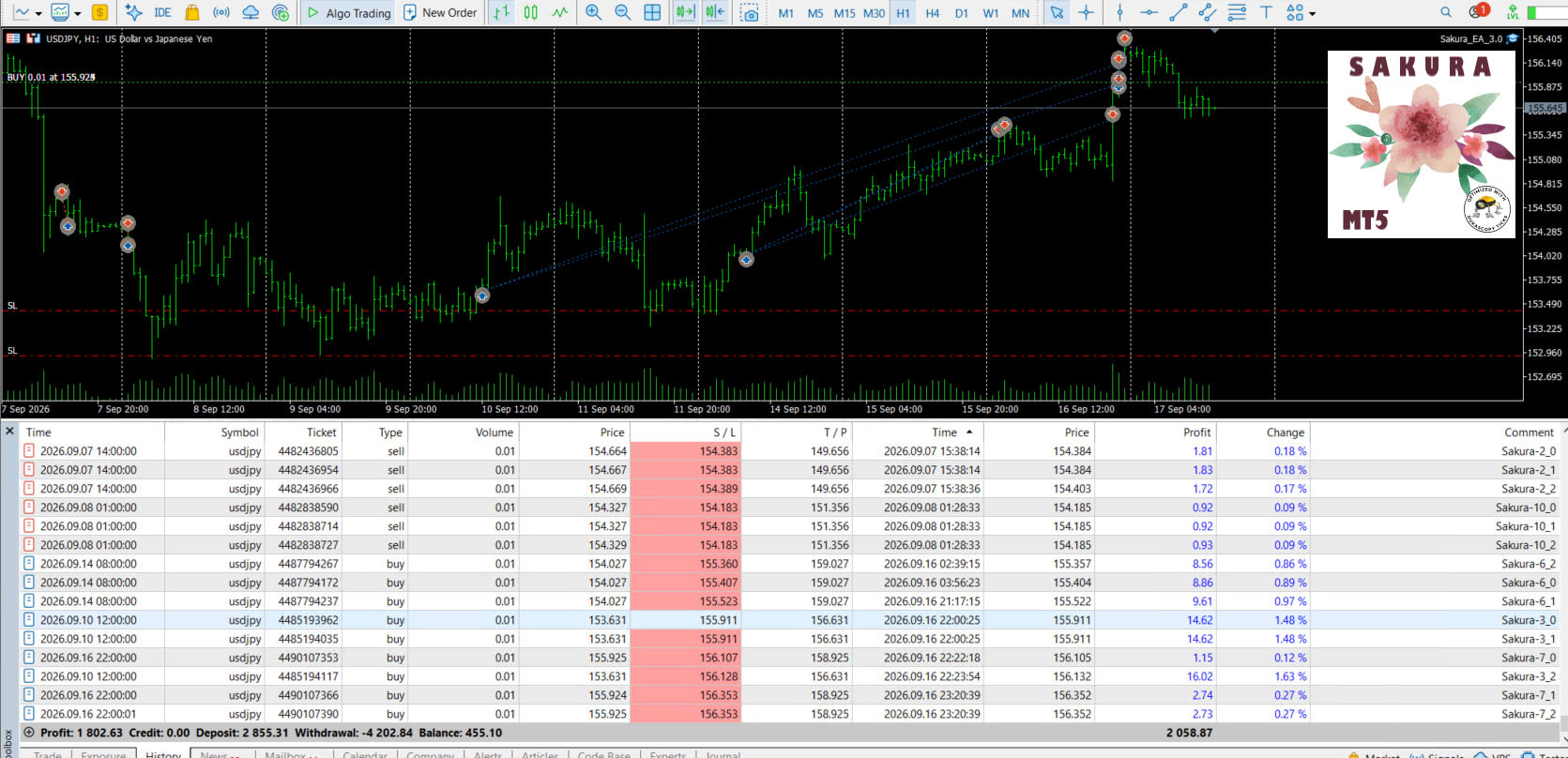
⭐ Sakura EA: https://www.mql5.com/en/market/product/82642
📈 Real signal: https://www.mql5.com/en/signals/2362856
Eleni Anna Branou
Experience exceptionally fast trade copying with the Local Trade Copier EA MT4/5©. With its quick 1-minute setup time, this trade copier allows you to copy trades between multiple MetaTrader terminals on the same Windows computer or Windows VPS with lightning-fast copying speeds of under 0.5 seconds. Whether you're a beginner or a professional trader, the Local Trade Copier EA MT4/5© offers a wide range of options to customize it to your specific needs. It's the ultimate solution for anyone looking to increase their potential for profit. Try it out today and see why it's the fastest and easiest trade copier on the market!
✔️ High-Speed Copying: Achieve transfers under 0.5 seconds between local MT4 and MT5 terminals*.
✔️ Versatile Support: Supports MT4>MT4, MT4>MT5, MT5>MT4, MT5>MT5 copying*.
✔️ User-Friendly Interface: Simple 1-minute setup for straightforward usage.
✔️ Compatibility: Works on Windows computers and Windows VPSs.
✔️ Flexible Copying: Copies between real>real, real>demo, demo>real, and demo>demo accounts, across all brokers.
✔️ Multi-Account Transfers: Allows one or more transmitter accounts to copy to one or more receiver accounts.
✔️ Customizable Lot Sizes and Risk: Offers a diverse range of 18 options for lot size and risk management per trade.
✔️ Read-Only Account Copying: Can copy from a read-only investor password transmitter account.
✔️ Comprehensive Trade Multiplication: Copies and multiplies trades from any source, including manual trades.
✔️ No Conflicts: Enables manual trading or expert advisor use without conflicts.
✔️ Stable Settings: Does not lose settings if connection is lost or terminals are restarted.
✔️ High Accuracy, Low Computing: Ensures high accuracy copying with minimal computing power.
✔️ Comment Options: Provides transmitter and receiver comment options.
✔️ Trade Filtering: Filters copied trades by magic number, symbol, comment, number, or volume.
✔️ Day and Time Control: Allows day and time control settings for copying.
✔️ Flexible Trade Copying: Copies long/short, old/new trades, market trades, or pending orders.
✔️ Take Profit and Stop Loss Handling: Copies or not take profit and stop loss levels from original transmitter trades.
✔️ Customized TP/SL Management: Offers various options for take profit and stop loss management.
✔️ Trade Closure Options: Provides options for synchronized trade closure and correct partial closure on receiver copied trades.
✔️ Trade Reopening: Allows reopening of closed receiver trades if original transmitter trades are still open.
✔️ Advanced Price Management: Offers better price options, reverse copying, and original TP/SL levels.
✔️ Trade Splitting: Splits copied trades automatically or at set smaller parts.
✔️ Risk Control: Implements maximum risk % control per symbol, currency, or account level.
✔️ Lot Size Management: Provides minimum/maximum lot size options for receiver copied trades.
✔️ Flexible Lot Size Ignoring: Can ignore minimum/maximum transmitter or receiver lot size options.
✔️ Account Protection: Offers emergency account protection measures.
✔️ Drawdown Management: Implements maximum daily drawdown and profit settings, with pause options.
✔️ Drawdown Control: No copying if transmitter or receiver drawdown exceeds a certain percentage level.
✔️ Notification Options: Provides email and push notifications for copied trades or receiver balance, equity, and margin levels.
✔️ Broker Compatibility Features: Includes prefix and suffix auto-detection and setup, and mapping of special symbols.
✔️ Activations: Offers 20 activations for installation across multiple terminals, computers, and VPSs.
✔️ Self-Copier Mode: Compatible with MQL5 VPS in self-copier mode.
✔️ Fully Automated: Operates as a 100% automated expert advisor.
* you must purchase both MT4 & MT5 versions of Local Trade Copier EA for copying between MT4<>MT5 terminals
🔥🔥🔥🔥🔥 Watch the Local Trade Copier EA MT4/5© Quick Setup Video: https://vimeo.com/1158003543?fl=tl&fe=ec
⭐️⭐️⭐️⭐️⭐️ Local Trade Copier EA MT4©: https://www.mql5.com/en/market/product/68950
⭐️⭐️⭐️⭐️⭐️ Local Trade Copier EA MT5©: https://www.mql5.com/en/market/product/68951
📥 Download the Local Trade Copier EA MT4© demo version in your demo account now: https://c.mql5.com/6/987/Local_Trade_Copier_EA_MT4_4_50_Demo.ex4
📥 Download the Local Trade Copier EA MT5© demo version in your demo account now: https://c.mql5.com/6/985/Local_Trade_Copier_EA_MT5_4_30_Demo.ex5
✅ Local Trade Copier EA MT4/5© installation guide: https://www.mql5.com/en/blogs/post/745683
✅ Local Trade Copier EA MT4/5© detailed inputs/settings guide: https://www.mql5.com/en/blogs/post/745681
💎💎💎💎💎 Check out all my Expert Advisors, Indicators and Utilities: https://www.mql5.com/en/users/eleanna74/seller
17 September 2026
✔️ High-Speed Copying: Achieve transfers under 0.5 seconds between local MT4 and MT5 terminals*.
✔️ Versatile Support: Supports MT4>MT4, MT4>MT5, MT5>MT4, MT5>MT5 copying*.
✔️ User-Friendly Interface: Simple 1-minute setup for straightforward usage.
✔️ Compatibility: Works on Windows computers and Windows VPSs.
✔️ Flexible Copying: Copies between real>real, real>demo, demo>real, and demo>demo accounts, across all brokers.
✔️ Multi-Account Transfers: Allows one or more transmitter accounts to copy to one or more receiver accounts.
✔️ Customizable Lot Sizes and Risk: Offers a diverse range of 18 options for lot size and risk management per trade.
✔️ Read-Only Account Copying: Can copy from a read-only investor password transmitter account.
✔️ Comprehensive Trade Multiplication: Copies and multiplies trades from any source, including manual trades.
✔️ No Conflicts: Enables manual trading or expert advisor use without conflicts.
✔️ Stable Settings: Does not lose settings if connection is lost or terminals are restarted.
✔️ High Accuracy, Low Computing: Ensures high accuracy copying with minimal computing power.
✔️ Comment Options: Provides transmitter and receiver comment options.
✔️ Trade Filtering: Filters copied trades by magic number, symbol, comment, number, or volume.
✔️ Day and Time Control: Allows day and time control settings for copying.
✔️ Flexible Trade Copying: Copies long/short, old/new trades, market trades, or pending orders.
✔️ Take Profit and Stop Loss Handling: Copies or not take profit and stop loss levels from original transmitter trades.
✔️ Customized TP/SL Management: Offers various options for take profit and stop loss management.
✔️ Trade Closure Options: Provides options for synchronized trade closure and correct partial closure on receiver copied trades.
✔️ Trade Reopening: Allows reopening of closed receiver trades if original transmitter trades are still open.
✔️ Advanced Price Management: Offers better price options, reverse copying, and original TP/SL levels.
✔️ Trade Splitting: Splits copied trades automatically or at set smaller parts.
✔️ Risk Control: Implements maximum risk % control per symbol, currency, or account level.
✔️ Lot Size Management: Provides minimum/maximum lot size options for receiver copied trades.
✔️ Flexible Lot Size Ignoring: Can ignore minimum/maximum transmitter or receiver lot size options.
✔️ Account Protection: Offers emergency account protection measures.
✔️ Drawdown Management: Implements maximum daily drawdown and profit settings, with pause options.
✔️ Drawdown Control: No copying if transmitter or receiver drawdown exceeds a certain percentage level.
✔️ Notification Options: Provides email and push notifications for copied trades or receiver balance, equity, and margin levels.
✔️ Broker Compatibility Features: Includes prefix and suffix auto-detection and setup, and mapping of special symbols.
✔️ Activations: Offers 20 activations for installation across multiple terminals, computers, and VPSs.
✔️ Self-Copier Mode: Compatible with MQL5 VPS in self-copier mode.
✔️ Fully Automated: Operates as a 100% automated expert advisor.
* you must purchase both MT4 & MT5 versions of Local Trade Copier EA for copying between MT4<>MT5 terminals
🔥🔥🔥🔥🔥 Watch the Local Trade Copier EA MT4/5© Quick Setup Video: https://vimeo.com/1158003543?fl=tl&fe=ec
⭐️⭐️⭐️⭐️⭐️ Local Trade Copier EA MT4©: https://www.mql5.com/en/market/product/68950
⭐️⭐️⭐️⭐️⭐️ Local Trade Copier EA MT5©: https://www.mql5.com/en/market/product/68951
📥 Download the Local Trade Copier EA MT4© demo version in your demo account now: https://c.mql5.com/6/987/Local_Trade_Copier_EA_MT4_4_50_Demo.ex4
📥 Download the Local Trade Copier EA MT5© demo version in your demo account now: https://c.mql5.com/6/985/Local_Trade_Copier_EA_MT5_4_30_Demo.ex5
✅ Local Trade Copier EA MT4/5© installation guide: https://www.mql5.com/en/blogs/post/745683
✅ Local Trade Copier EA MT4/5© detailed inputs/settings guide: https://www.mql5.com/en/blogs/post/745681
💎💎💎💎💎 Check out all my Expert Advisors, Indicators and Utilities: https://www.mql5.com/en/users/eleanna74/seller
17 September 2026
Maryna Shulzhenko
Hyper Trex https://www.mql5.com/ru/market/product/154624 Если вы устали от попыток угнаться за непредсказуемым рынком, то пришло время позволить боту Gipo Trex творить свою магию. Этот бот создан для того, чтобы ловить сильные колебания цены вверх или вниз, позволяя вам работать по максимуму, когда рынок движется в вашу пользу.
Artem Marukhov
I think you will have to try my new EA AI Algo Gold.
https://www.mql5.com/ru/market/product/193863?source=Site+Market+MT5+Expert+Rating006
Eleni Anna Branou
Basket EA MT4/5© is a powerful profit-harvesting tool and a comprehensive account protection system, all combined into a simple and easy-to-use solution. Its core purpose is to give you complete control over your trading account’s overall profit and loss by managing all open positions at the basket level, rather than individually. The EA offers a full range of basket-level features, including take profit, stop loss, break even, and trailing stop loss. These can be configured as a percentage of your account balance, a fixed amount in your account’s currency, or a target in average points across all managed trades. This flexibility allows traders to tailor risk and profit strategies to their unique needs. Basket EA MT4/5© also supports intelligent trade filtering, allowing you to include or exclude specific trades from management based on their magic number, symbol, or comment. This ensures that only the trades you want managed by the EA are affected, while others are left untouched.
For added protection, the EA includes advanced account safeguarding mechanisms. When a specified equity take profit or stop loss level or a maximum drawdown from the account's balance high is reached, the EA can automatically close all open trades, delete any pending orders, and shut down all charts, removing any Expert Advisors running on them. This feature helps protect your capital during unexpected market movements or when reaching your predefined account targets.
✔️ Does not use Martingale, Grid, Averaging, or other high-risk techniques
✔️ Allows exclusion of specific Magic Numbers, trade comments, or symbol trades from management
✔️ Basket Take Profit in % for all managed trades combined
✔️ Basket Stop Loss in % for all managed trades combined
✔️ Basket Break Even in % for all managed trades combined
✔️ Basket Trailing Stop Loss in % for all managed trades combined
✔️ Basket Take Profit in money for all managed trades combined
✔️ Basket Stop Loss in money for all managed trades combined
✔️ Basket Break Even in money for all managed trades combined
✔️ Basket Trailing Stop Loss in money for all managed trades combined
✔️ Basket Take Profit in average points for all managed trades combined
✔️ Basket Stop Loss in average points for all managed trades combined
✔️ Basket Break Even in average points for all managed trades combined
✔️ Basket Trailing Stop Loss in average points for all managed trades combined
✔️ Option to reset all Basket settings after each account balance update or after a Basket target is hit
✔️ Option to close all managed trades at break even after recovering from a drawdown
✔️ Option to close all managed trades at a specific time on a chosen day or daily
✔️ Account protection feature that closes all trades and charts when equity-based TP or SL is reached
✔️ Maximum drawdown % from balance high that closes all trades and charts/EAs if triggered
✔️ Optional on-chart panel to monitor profit/loss and close trades by type or all at once
✔️ Terminal, push notification, and email alerts when any Basket or protection condition is triggered
✔️ 100% automated Expert Advisor
✔️ Fully compatible with MQL5 VPS
⭐️⭐️⭐️⭐️⭐️ Basket EA EA MT4©: https://www.mql5.com/en/market/product/45192
⭐️⭐️⭐️⭐️⭐️ Basket EA EA MT5©: https://www.mql5.com/en/market/product/72782
📥 Download the Basket EA MT4© demo version in your demo account now: https://c.mql5.com/6/988/Basket_EA_MT4_2_20_Demo.ex4
📥 Download the Basket EA MT5© demo version in your demo account now: https://c.mql5.com/6/988/Basket_EA_MT5_2_00_Demo.ex5
✅ Basket EA MT4/5© detailed Settings/Inputs guide: https://www.mql5.com/en/blogs/post/746117
💎💎💎💎💎 Check out all my Expert Advisors and Utilities: https://www.mql5.com/en/users/eleanna74/seller
17 September 2026
For added protection, the EA includes advanced account safeguarding mechanisms. When a specified equity take profit or stop loss level or a maximum drawdown from the account's balance high is reached, the EA can automatically close all open trades, delete any pending orders, and shut down all charts, removing any Expert Advisors running on them. This feature helps protect your capital during unexpected market movements or when reaching your predefined account targets.
✔️ Does not use Martingale, Grid, Averaging, or other high-risk techniques
✔️ Allows exclusion of specific Magic Numbers, trade comments, or symbol trades from management
✔️ Basket Take Profit in % for all managed trades combined
✔️ Basket Stop Loss in % for all managed trades combined
✔️ Basket Break Even in % for all managed trades combined
✔️ Basket Trailing Stop Loss in % for all managed trades combined
✔️ Basket Take Profit in money for all managed trades combined
✔️ Basket Stop Loss in money for all managed trades combined
✔️ Basket Break Even in money for all managed trades combined
✔️ Basket Trailing Stop Loss in money for all managed trades combined
✔️ Basket Take Profit in average points for all managed trades combined
✔️ Basket Stop Loss in average points for all managed trades combined
✔️ Basket Break Even in average points for all managed trades combined
✔️ Basket Trailing Stop Loss in average points for all managed trades combined
✔️ Option to reset all Basket settings after each account balance update or after a Basket target is hit
✔️ Option to close all managed trades at break even after recovering from a drawdown
✔️ Option to close all managed trades at a specific time on a chosen day or daily
✔️ Account protection feature that closes all trades and charts when equity-based TP or SL is reached
✔️ Maximum drawdown % from balance high that closes all trades and charts/EAs if triggered
✔️ Optional on-chart panel to monitor profit/loss and close trades by type or all at once
✔️ Terminal, push notification, and email alerts when any Basket or protection condition is triggered
✔️ 100% automated Expert Advisor
✔️ Fully compatible with MQL5 VPS
⭐️⭐️⭐️⭐️⭐️ Basket EA EA MT4©: https://www.mql5.com/en/market/product/45192
⭐️⭐️⭐️⭐️⭐️ Basket EA EA MT5©: https://www.mql5.com/en/market/product/72782
📥 Download the Basket EA MT4© demo version in your demo account now: https://c.mql5.com/6/988/Basket_EA_MT4_2_20_Demo.ex4
📥 Download the Basket EA MT5© demo version in your demo account now: https://c.mql5.com/6/988/Basket_EA_MT5_2_00_Demo.ex5
✅ Basket EA MT4/5© detailed Settings/Inputs guide: https://www.mql5.com/en/blogs/post/746117
💎💎💎💎💎 Check out all my Expert Advisors and Utilities: https://www.mql5.com/en/users/eleanna74/seller
17 September 2026
: