
Why Is My MT4/MT5 Trade Copier Slow? How to Diagnose Copying Delays, Frozen Terminals & VPS Performance

Why Is My MT4/MT5 Trade Copier Slow?
How to Diagnose Copying Delays, Frozen Terminals & VPS Performance
A fast trade copier is only one part of a fast trade-copying setup.
Local Trade Copier EA MT4/5© is designed for fast local communication between MetaTrader terminals running on the same Windows computer or Windows VPS. Under suitable conditions, trade synchronization can typically occur in under 0.5 seconds.
But the copier does not operate in isolation.
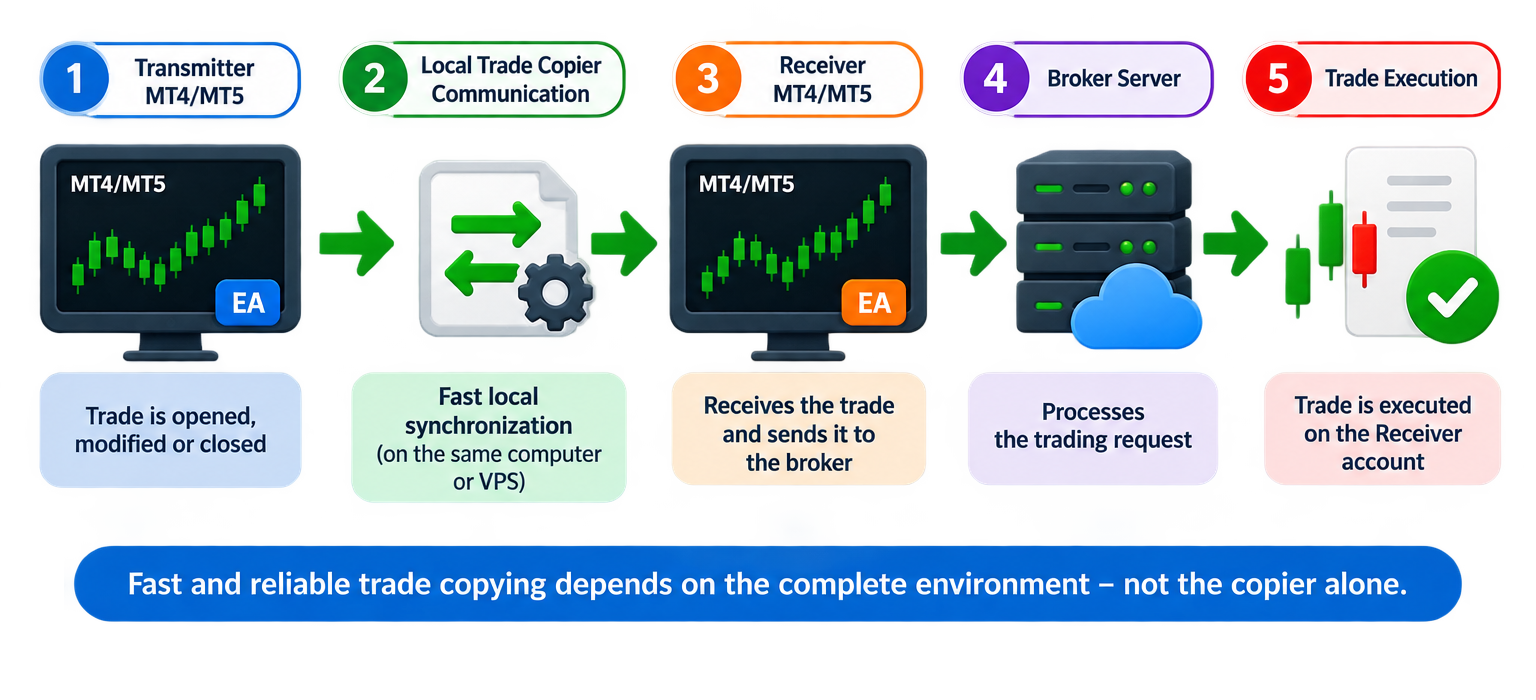
For a trade to be copied successfully, several different parts of the trading environment must resp
ond correctly:
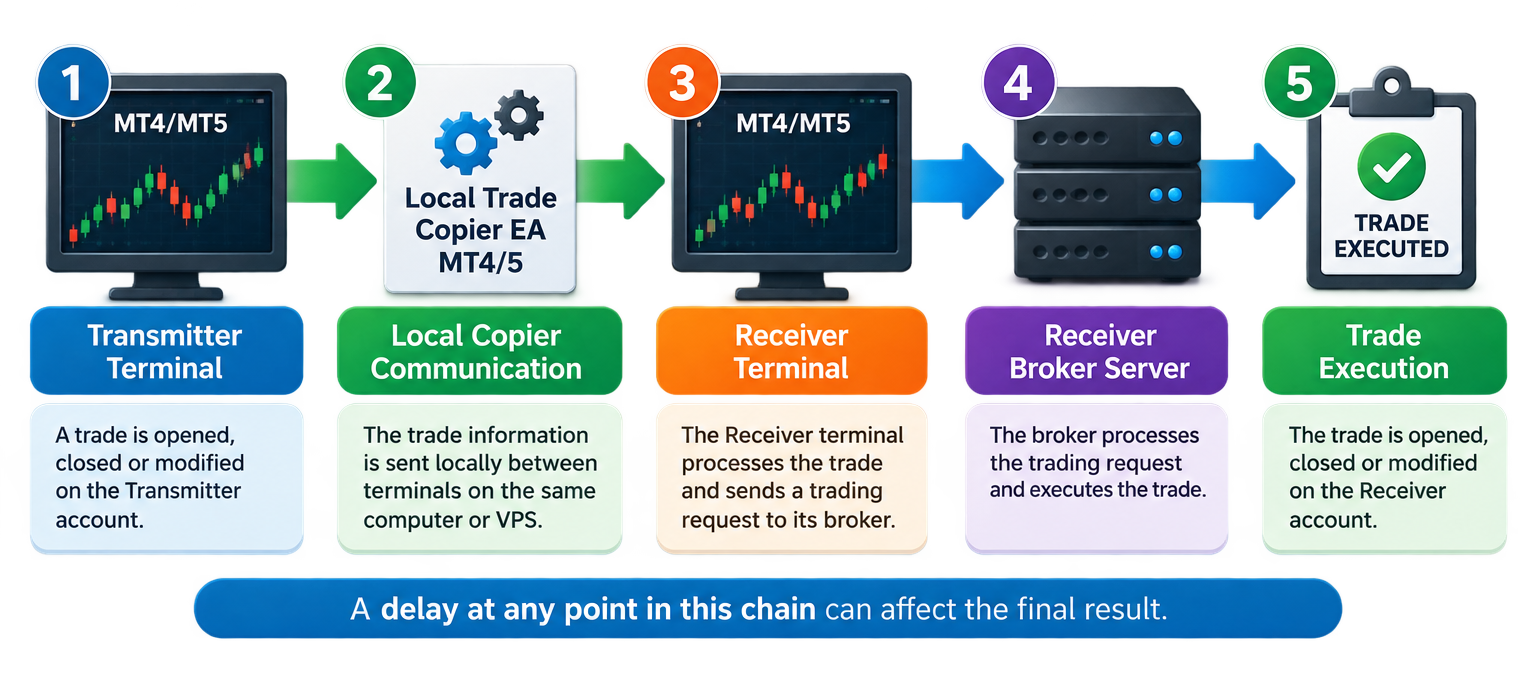
Transmitter MT4/MT5 Terminal
↓
Local Trade Copier Communication
↓
Receiver MT4/MT5 Terminal
↓
Receiver Broker Server
↓
Trade Execution
A delay or temporary freeze at any point in this chain can affect the final result.
This is why, when investigating slow trade copying, it is important not to look only at the trade copier. You should also check the responsiveness of the MetaTrader terminals, CPU and RAM usage, Windows or VPS performance, internet connectivity, broker-server connection and the Receiver account's execution conditions.
Quick Advice for Fast and Reliable Trade Copying
For the best possible Local Trade Copier EA MT4/5© performance:
-
Run the Transmitter and Receiver terminals on the same Windows computer or Windows VPS.
-
Make sure every MT4/MT5 terminal is responsive and operating normally.
-
Use sufficient CPU and RAM for the number of MetaTrader terminals you are running.
-
Avoid overloading the computer/VPS with unnecessary terminals, charts, indicators, Expert Advisors and other applications.
-
Use SSD storage and avoid a Windows environment that is constantly reaching its CPU, RAM or disk limits.
-
Keep MT4/MT5 and Windows functioning normally and up to date.
-
Use a stable internet connection.
-
If using a VPS, choose a location with good connectivity to your brokers' trading servers.
-
Check the MetaTrader Experts and Journal tabs when a delay occurs.
-
Check the Receiver broker's connection and execution conditions.
-
Make sure you have not intentionally configured a copying delay, Better Price requirement, maximum spread/slippage restriction or another setting that can postpone copying.
-
Restart unusually slow or unresponsive MetaTrader terminals and investigate the underlying system-performance problem if it happens repeatedly.
Most importantly:
If your MetaTrader terminal itself freezes for seconds or minutes, no trade copier running inside that terminal can be expected to copy trades normally during that period.
Need Help with Your Local Trade Copier EA MT4/5© Setup?
If you experience copying delays or any other problem and cannot identify the cause, I am happy to help you or check your setup through AnyDesk.
MQL5.com profile: https://www.mql5.com/en/users/eleanna74
Company email: info@juvenille-emperor.com
When contacting me about a copying-delay problem, it is helpful to provide screenshots of the Transmitter and Receiver terminals with the Market Watch window open, the Receiver Local Trade Copier EA settings as a .set file, and the Experts/Journal logs from around the time the delay occurred.
Local Trade Copier EA MT4/5©
Local Trade Copier EA MT4© – MQL5 Market
Local Trade Copier EA MT5© – MQL5 Market
A Real Support Example: A Trade Closed 6 Minutes Late
I recently received a support request from a Local Trade Copier EA MT4/5© user who was understandably unhappy with his copying speed.
He explained that when he opened a trade on the Transmitter account, it took several seconds before the corresponding trade appeared on the Receiver.
More seriously, when he later closed the Transmitter trade, the Receiver trade did not close until approximately 6 minutes later.
At first sight, this can easily look like a trade-copier problem:
“I closed the trade on the Transmitter, but the copier closed it 6 minutes later.”
So I connected to the user's computer to investigate the complete setup.
What I found was very revealing.
The computer was running approximately five MT5 terminals and was clearly struggling with the workload.
I closed and restarted the two MetaTrader terminals involved in the copying setup.
One terminal required approximately one minute to start and become usable.
The Receiver MT5 terminal required approximately two full minutes before it was properly operational and its visible chart prices began moving normally.
During this time, Windows displayed “Not Responding” in the MetaTrader title bar.
That observation completely changes the troubleshooting question.
Instead of asking:
“Why did the copier need so long to close the trade?”
the first question becomes:
“Why is the Receiver MetaTrader terminal itself freezing and taking two minutes to become responsive?”
If MT5 cannot process its normal interface, charts and incoming data for such a long period, an Expert Advisor running inside that terminal cannot reasonably be expected to react normally either.
This is one of the most common situations I encounter when helping Local Trade Copier EA MT4/5© users remotely.
The Trade Copier Cannot Be Faster Than the Environment It Runs In
An Expert Advisor does not run independently from MetaTrader and Windows.
Local Trade Copier EA MT4/5© runs inside the MT4/MT5 terminal.
Therefore, the Receiver terminal must be able to process the EA's operations normally.
Consider two very different environments.
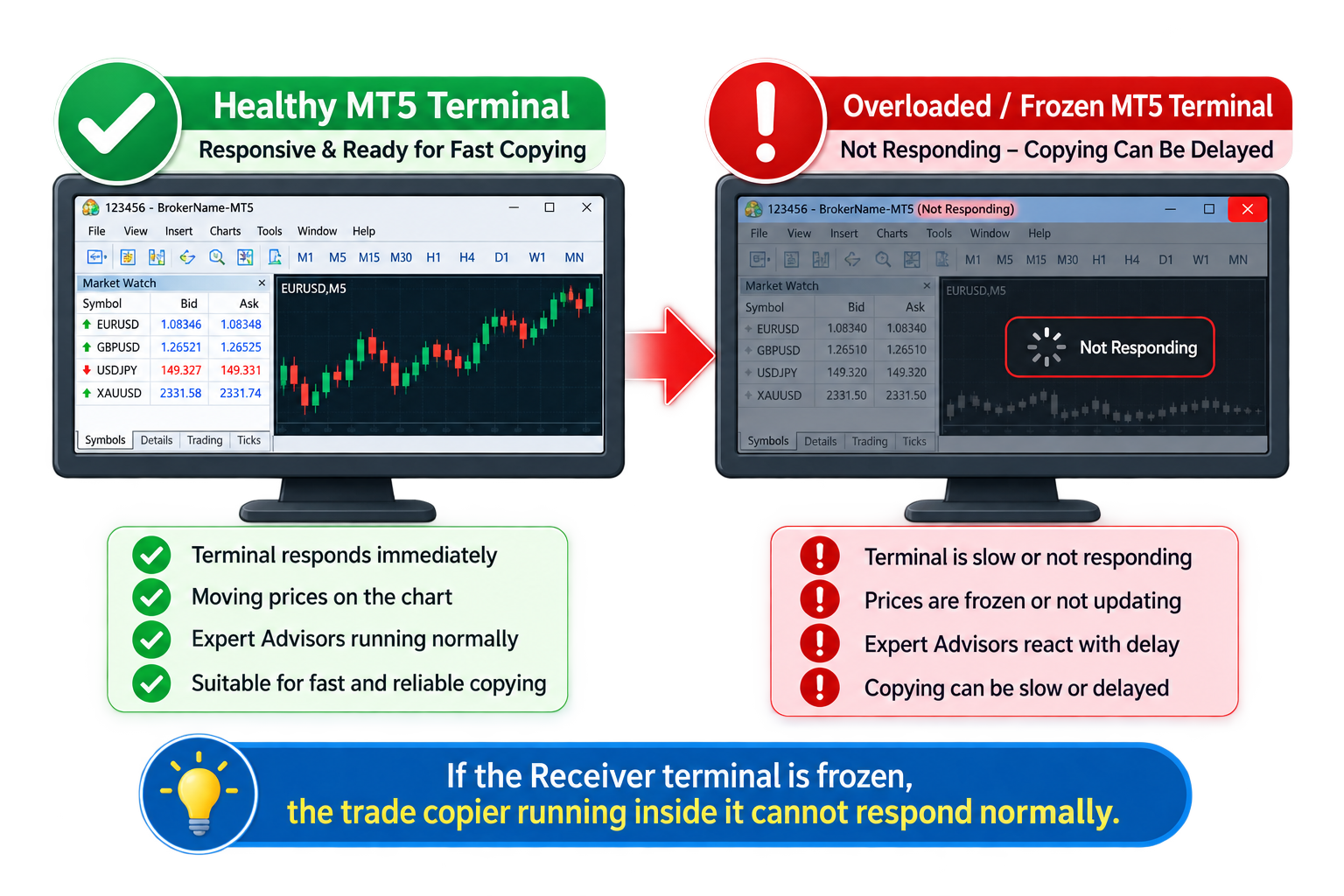
Healthy Environment
The Receiver terminal:
-
responds immediately when clicked
-
changes charts immediately
-
receives live ticks normally
-
shows continuously moving prices
-
opens and closes without long freezes
-
processes its Expert Advisors normally
-
has adequate CPU and RAM available
In this environment, the trade copier has the conditions it needs for fast synchronization.
Overloaded Environment
The Receiver terminal:
-
regularly displays Not Responding
-
freezes for 10, 30 or 60 seconds
-
takes one or two minutes to start
-
stops updating chart prices temporarily
-
reacts slowly when changing charts
-
has delayed Experts/Journal activity
-
shares an overloaded computer/VPS with many other terminals and applications
In this environment, delayed copying should not be surprising.
Changing the trade copier cannot make an unresponsive MT4/MT5 terminal responsive.
The underlying performance problem must first be identified and corrected.
Opening Speed Is a Very Useful Diagnostic Test
One of the simplest checks I perform during remote support is surprisingly useful:
Close the MetaTrader terminal and start it again.
Then observe what happens.
A terminal does not have to become fully initialized instantaneously, especially if it contains many symbols, charts, EAs or historical data.
But if an MT4/MT5 terminal repeatedly requires one or two minutes, displays Not Responding, freezes its interface and does not show normally moving prices during that period, I would investigate the terminal and computer/VPS performance before evaluating copier latency.
The same applies while the terminal is already running.
Try:
-
changing between charts
-
opening the Experts tab
-
opening the Journal
-
opening EA Properties
-
moving or resizing the terminal
-
checking whether Market Watch prices are updating normally
If MetaTrader freezes while performing basic operations, that is important evidence that the environment itself may be responsible for at least part of the copying delay.
A Frozen Receiver Is Especially Important
When diagnosing a copier setup, users sometimes focus primarily on the Transmitter.
The Receiver terminal is equally important.
The Transmitter must detect and communicate the original trading activity, but the Receiver must then process that information and perform the corresponding trading operation.
If the Receiver MT4/MT5 terminal is frozen, overloaded or temporarily unable to process its normal operations, the Receiver side becomes the bottleneck.
This can affect:
-
opening copied trades
-
closing copied trades
-
modifying trades
-
copying TP/SL changes
-
copying pending orders
-
partial closures
-
other Receiver-side management operations
So if opening copies quickly but closing is occasionally delayed, do not automatically conclude that the copier's closing function is slow.
Check what was happening on the Receiver terminal at the exact time of the delay.
Five MT4/MT5 Terminals Can Be Easy for One Computer and Too Much for Another
There is no universal rule such as:
“Five MetaTrader terminals require X GB of RAM.”
The number of terminals alone does not determine the workload.
Five lightweight terminals containing one simple chart each may consume relatively few resources.
Five terminals containing many charts, indicators, EAs, symbols, historical data and other processes may create a very different workload.
Performance also depends on:
-
CPU architecture and single-core performance
-
number of available CPU cores/threads
-
RAM
-
SSD/storage performance
-
Windows background activity
-
antivirus/security scanning
-
other applications running simultaneously
-
number and complexity of Expert Advisors
-
number of indicators
-
number of open charts
-
broker terminal behavior
-
amount of historical data
-
network quality
-
virtualized VPS resources and contention
Therefore, do not choose a computer or VPS only by looking at the advertised RAM.
A VPS with a large amount of RAM but weak, heavily shared or overloaded CPU resources can still produce poor MetaTrader performance.
CPU Performance Matters
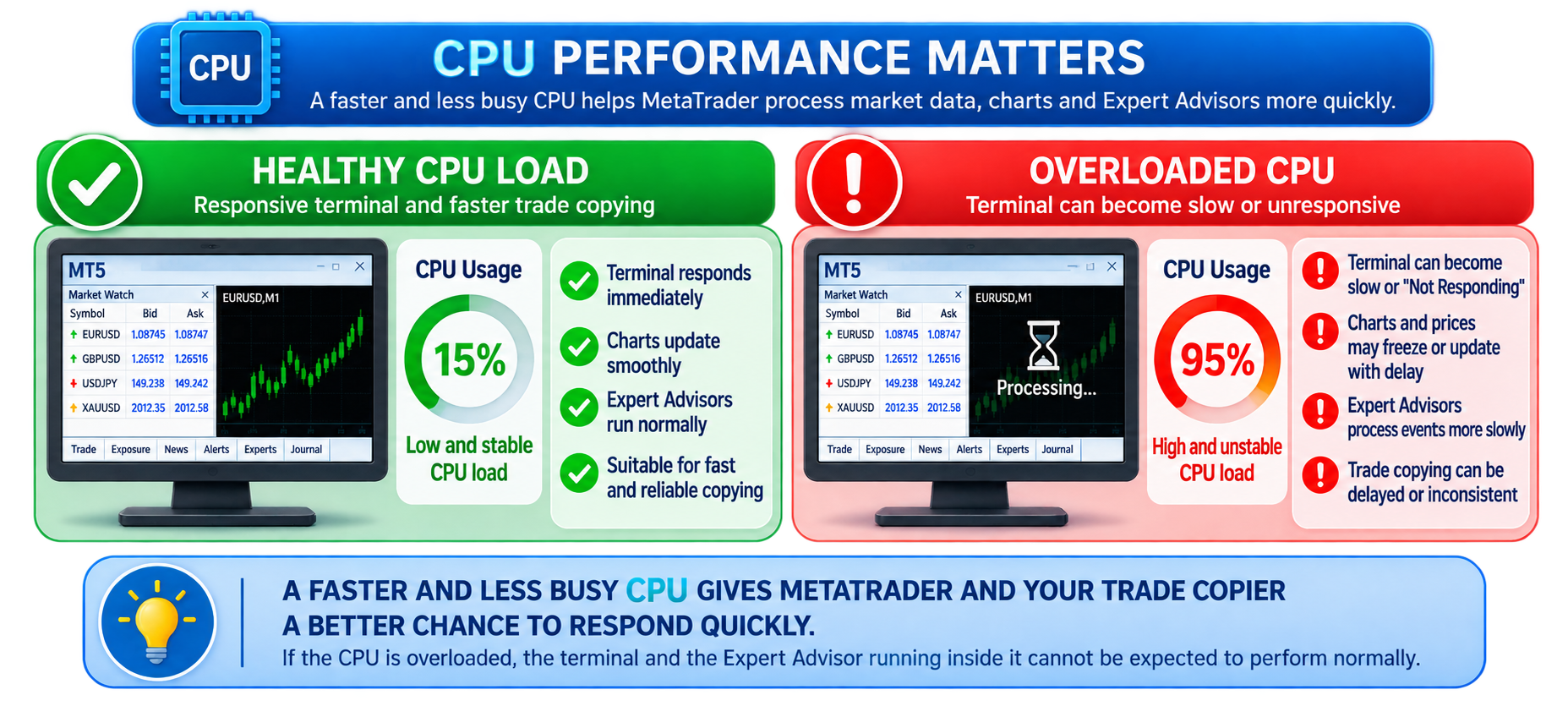
MetaTrader workloads are not determined by total CPU percentage alone.
A computer may show a seemingly acceptable overall CPU percentage while one or more important threads are heavily loaded.
Multiple MT4/MT5 terminals, Expert Advisors, indicators and Windows processes all compete for processor time.
Warning signs include:
-
frequent terminal freezes
-
delayed chart updates
-
slow switching between charts
-
delayed order processing
-
long terminal startup times
-
Windows becoming sluggish
-
individual MetaTrader processes consuming significant CPU
If reducing the number of running terminals immediately improves responsiveness, the computer or VPS workload is an obvious area to investigate.
RAM Matters — But Free RAM Is Not the Whole Story
Running multiple MetaTrader terminals consumes memory.
Every terminal may contain:
-
chart data
-
historical data
-
Expert Advisors
-
indicators
-
Market Watch symbols
-
graphical objects
-
logs and other resources
When physical memory becomes limited, Windows may increasingly depend on paging to disk.
That can make an already busy system considerably less responsive.
However, simply seeing some available RAM does not prove that the system is healthy. CPU load, storage activity and individual terminal behavior must also be considered.
SSD and Disk Activity Can Affect Terminal Responsiveness
MetaTrader reads and writes data including:
-
historical price data
-
logs
-
configuration information
-
cached data
-
EA-related files
Windows and other applications also use the same storage.
If disk activity becomes a bottleneck, terminals can become sluggish even when CPU and RAM initially appear acceptable.
For trading computers and VPS environments, SSD storage is preferable to slow traditional disk storage.
Too Many Charts, Indicators and EAs Add Workload
Every additional chart or Expert Advisor is another component the terminal may need to process.
For a dedicated Receiver terminal, there is usually no reason to load dozens of unnecessary charts simply because the account trades many symbols.
For a basic Local Trade Copier EA MT4/5© setup, the EA can be attached to one chart in the terminal and manage the configured copying activity from there.
You do not need to attach Local Trade Copier EA to every symbol chart.
Where possible:
-
close unnecessary charts
-
remove unused indicators
-
remove EAs that are no longer required
-
avoid duplicated copier instances
-
reduce unnecessary Market Watch symbols where appropriate
-
close applications that are consuming significant system resources
The goal is not to strip the computer of everything else.
The goal is to give the MetaTrader terminals enough resources to remain continuously responsive.
Internet and Broker Connectivity Still Matter
Local Trade Copier EA MT4/5© communicates locally between MetaTrader terminals on the same Windows computer or Windows VPS.
That eliminates the need for a remote cloud copying service between the Transmitter and Receiver.
But the MetaTrader terminals still need to communicate with their respective broker servers.
The complete process is therefore not purely local.
For example:
-
The Transmitter receives information from its broker.
-
Local Trade Copier EA detects the trading event.
-
The event is communicated locally to the Receiver.
-
The Receiver sends the corresponding trading request to its broker.
-
The Receiver broker processes that request.
Poor broker connectivity, temporary disconnections, network problems or slow broker execution can therefore add delay even when local copier communication is fast.
Copier Synchronization Speed Is Not the Same as Broker Execution Speed
This distinction is extremely important.
Suppose Local Trade Copier EA communicates a new trade to the Receiver almost immediately.
The Receiver still has to submit the trade to its broker.
The broker then has to process and execute it.
Final execution can be affected by:
-
network latency to the broker
-
broker-server load
-
market volatility
-
liquidity
-
symbol trading conditions
-
slippage
-
spread
-
market opening/closing periods
-
trading-session restrictions
Therefore:
Copier synchronization latency ≠ final broker execution latency
A useful troubleshooting process tries to identify which stage actually produced the delay.
VPS Location Can Affect Broker Latency
If you use a Windows VPS, location matters.
Ideally, choose a VPS with good connectivity to the broker servers used by the Transmitter and Receiver accounts.
A geographically distant VPS does not necessarily mean copying will fail, but additional network latency can affect communication with the brokers.
When several brokers are involved, there may not be one location that is perfect for every broker. In that case, choose a stable data center that provides good overall connectivity to the brokers you use.
Do Not Judge a VPS Only by Its Advertised Specifications
Two VPSs advertised with:
4 CPU cores + 8 GB RAM
can perform very differently.
Virtual CPU resources can differ significantly between providers and hosting environments.
The underlying physical processor, virtualization technology, resource allocation and contention with other customers can all affect real-world performance.
For MetaTrader use, actual terminal responsiveness matters more than impressive-looking specifications on a sales page.
If your terminals repeatedly freeze on one VPS, testing the same setup on another capable computer or VPS can be a very useful diagnostic comparison.
Suggested VPS Resources for Multiple MetaTrader Terminals
There is no exact specification that guarantees a particular level of performance, because MT4/MT5 workloads differ substantially.
As a practical starting point for Local Trade Copier EA MT4/5© setups, I generally suggest approximately:
2 terminals: 2 CPU cores / 4 GB RAM
3–5 terminals: 4 CPU cores / 6 GB RAM
7–8 terminals: 6 CPU cores / 12 GB RAM
10–15 terminals: 8 CPU cores / 16 GB RAM
30+ terminals: approximately 16–24 CPU cores / 48–64 GB RAM
I also recommend:
-
SSD storage
-
sufficient free disk space
-
a current supported Windows/Windows Server environment
-
stable network connectivity
-
a VPS location with good connectivity to the relevant broker servers
These are general starting recommendations, not guarantees.
A terminal running a complex EA with many charts and indicators can require substantially more resources than a simple Receiver terminal containing only Local Trade Copier EA.
Check Windows Task Manager During the Problem
When copying becomes slow, open Windows Task Manager.
Check:
-
CPU usage
-
Memory usage
-
Disk activity
-
Network activity
-
individual MetaTrader processes
-
other applications consuming significant resources
Do this while the problem is happening, not only several hours later.
A screenshot taken during a freeze can be much more useful than one taken when everything has returned to normal.
If one MT5 process becomes extremely busy while the Receiver terminal is frozen, that is valuable diagnostic information.
If the entire machine is under heavy CPU, RAM or disk load, that is equally important.
Check the Experts and Journal Tabs
The MetaTrader Experts and Journal tabs are among the most useful tools when diagnosing a copying problem.
They may show:
-
trading errors
-
connection problems
-
rejected operations
-
symbol problems
-
insufficient funds
-
trading restrictions
-
EA messages
-
initialization problems
-
delayed retry attempts
When contacting support about a delayed trade, please try to provide the log entries covering the exact period when the problem occurred.
For example, if a trade should have closed at 14:32 but did not close until 14:38, the Experts and Journal messages between 14:31 and 14:39 are much more useful than a general screenshot taken later.
Check Whether a Local Trade Copier EA Setting Is Intentionally Delaying the Trade
Not every delay is a performance problem.
Local Trade Copier EA MT4/5© contains several settings that can intentionally affect when or whether a Receiver trade is copied.
Before diagnosing hardware or VPS performance, check the Receiver settings.
Copying Delay in Seconds
This setting intentionally delays copying.
If you have configured a delay, the Receiver will not copy the trade immediately.
If you want the fastest possible copying, make sure you have not accidentally configured a copying delay.
Better Price
When Better Price is enabled, the Receiver may wait until the configured price condition is satisfied.
This is intentional behavior.
If the required price is not reached, a trade may be delayed or may not be copied at all.
Maximum Spread in Points
If the Receiver spread is above your configured maximum, copying may be prevented until the required condition is satisfied according to the applicable settings and trade conditions.
Maximum Slippage in Points
A restrictive slippage setting can affect whether a trade can be executed under current market conditions.
Maximum Copying Difference in Points
If the Transmitter and Receiver prices differ by more than the permitted amount, the Receiver may not be allowed to copy the trade under that condition.
Copying Expiration in Seconds
This setting can prevent an old trade from being copied after the configured maximum copying period has expired.
Retry Attempts in Seconds
If a trading operation fails—for example because of market conditions, insufficient funds or another execution problem—the configured retry interval determines when another attempt is made.
Therefore, always distinguish between:
a slow computer
a frozen MetaTrader terminal
a broker execution problem
and
a copier setting intentionally waiting for a particular condition
These are completely different causes and require different solutions.
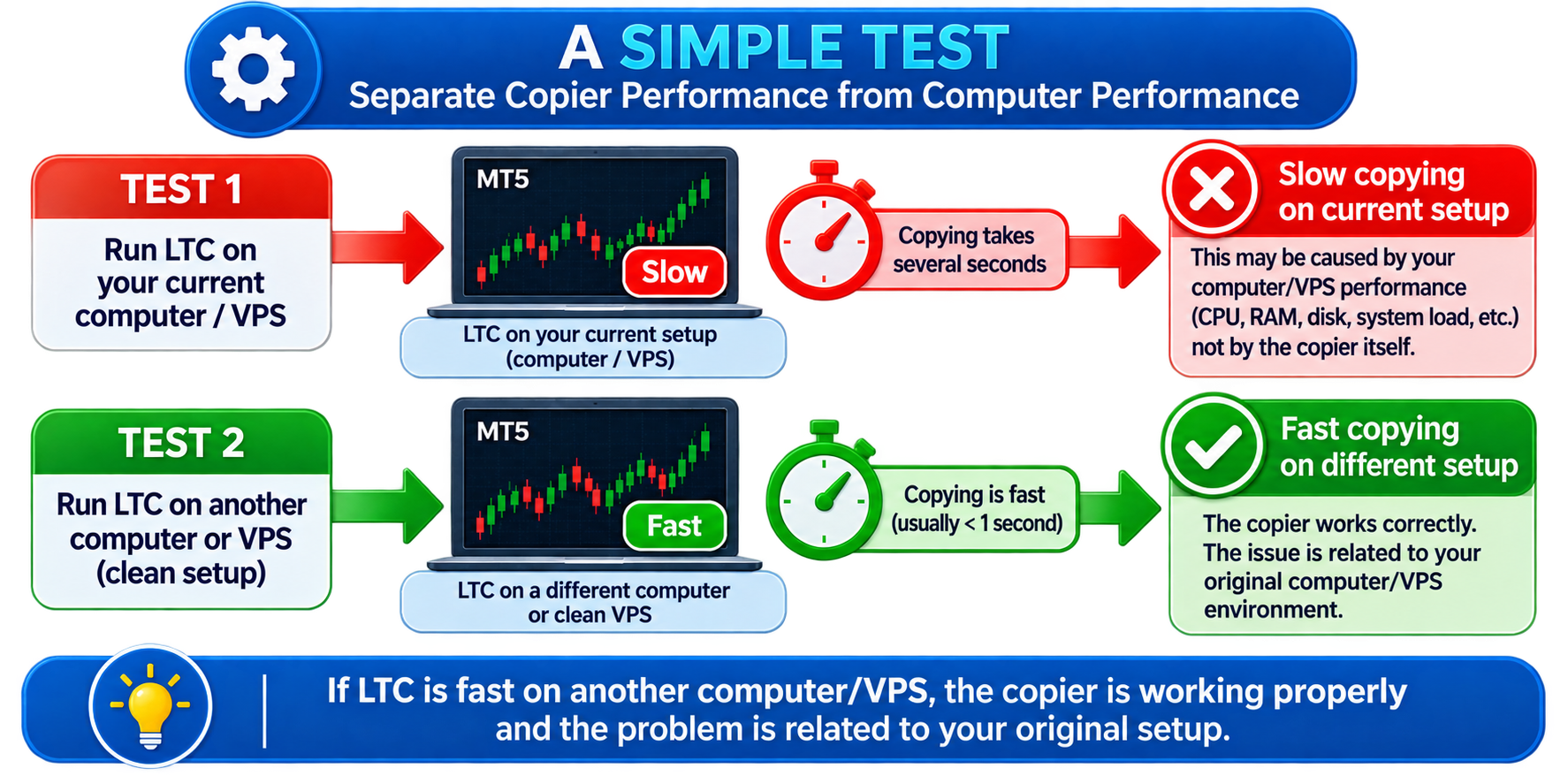
A Simple Test to Separate Copier Performance from Computer Performance
If you suspect that your computer or VPS is overloaded, perform a controlled test.
Step 1
Restart the Windows computer or VPS if practical.
Step 2
Open only the Transmitter and Receiver MetaTrader terminals required for the test.
Do not initially open the other unnecessary terminals or applications.
Step 3
Confirm that both terminals are fully responsive and receiving moving prices.
Step 4
Open a small test trade on the Transmitter.
Measure how quickly it appears on the Receiver.
Step 5
Close the Transmitter trade.
Measure how quickly the Receiver trade closes.
Step 6
Repeat the test several times under normal market conditions.
Step 7
Now gradually restore the other terminals, EAs and applications.
If copying is fast with two clean terminals but becomes slow when five, ten or more terminals and additional applications are running, you have learned something extremely important:
the copying software itself is probably not the primary bottleneck.
The overall workload is affecting the environment in which it operates.
Another Useful Test: Try a Different Computer or VPS
When the cause remains unclear, one of the strongest diagnostic tests is to reproduce the same basic setup on another sufficiently capable Windows computer or VPS.
Use:
-
the same Transmitter
-
the same Receiver
-
the same Local Trade Copier EA settings
-
the same brokers, where practical
If the copying delay disappears on the second machine, the original computer/VPS deserves closer investigation.
If the same delay remains, continue investigating the broker connection, account conditions, copier settings and Experts/Journal logs.
Changing one variable at a time is much more useful than guessing.
What “Not Responding” Really Tells Us
Seeing Not Responding does not automatically tell us the exact technical cause of the freeze.
It does tell us something very important:
Windows is not receiving a timely response from the application's user-interface thread.
The underlying reason still needs investigation.
It could involve:
-
excessive CPU workload
-
memory pressure
-
storage activity
-
a busy MetaTrader process
-
an Expert Advisor or indicator
-
terminal initialization
-
broker/history synchronization
-
Windows background activity
-
another software or system issue
Therefore, I would not diagnose the problem simply as:
“Your CPU is too weak.”
Instead, I would say:
“Your MetaTrader terminal is demonstrably becoming unresponsive. We now need to identify why.”
That is a much more accurate troubleshooting approach.
What I Recommend When MT4/MT5 Is Regularly Freezing
If your Transmitter or Receiver terminal frequently becomes unresponsive:
-
Restart the affected MetaTrader terminals.
-
Restart Windows/VPS if appropriate.
-
Test with only the required Transmitter and Receiver terminals.
-
Close unnecessary charts.
-
Remove unnecessary indicators and EAs.
-
Check Windows Task Manager.
-
Check available RAM.
-
Check CPU utilization and individual MetaTrader processes.
-
Check disk activity.
-
Check broker connection status.
-
Review Experts and Journal logs.
-
Verify Local Trade Copier EA Receiver settings.
-
Compare performance on another capable computer/VPS.
-
If using a VPS, ask the provider to investigate poor performance or move the VPS to another host if necessary.
-
Upgrade the computer/VPS if the workload consistently exceeds its available resources.
Do not keep adding MetaTrader terminals to an environment that is already freezing and expect copying performance to remain unchanged.
The Receiver Terminal Must Be Healthy Before Copier Latency Can Be Evaluated
This is probably the most important point in this entire article.
If somebody tells me:
“My Receiver closed the trade six minutes late.”
I absolutely want to investigate it.
But if I connect to that computer and discover that the Receiver MT5 terminal itself takes two minutes to start, displays Not Responding and does not even update the visible chart normally during that period, it would be misleading to evaluate those six minutes as six minutes of pure trade-copier latency.
First we must establish a healthy baseline:
-
responsive Transmitter terminal
-
responsive Receiver terminal
-
adequate Windows/VPS resources
-
stable broker connections
-
no intentional copying delays
-
no restrictive settings preventing immediate execution
-
normal Experts/Journal activity
Then we can meaningfully measure the copier's synchronization performance.
Fast Trade Copying Is the Result of the Complete Environment
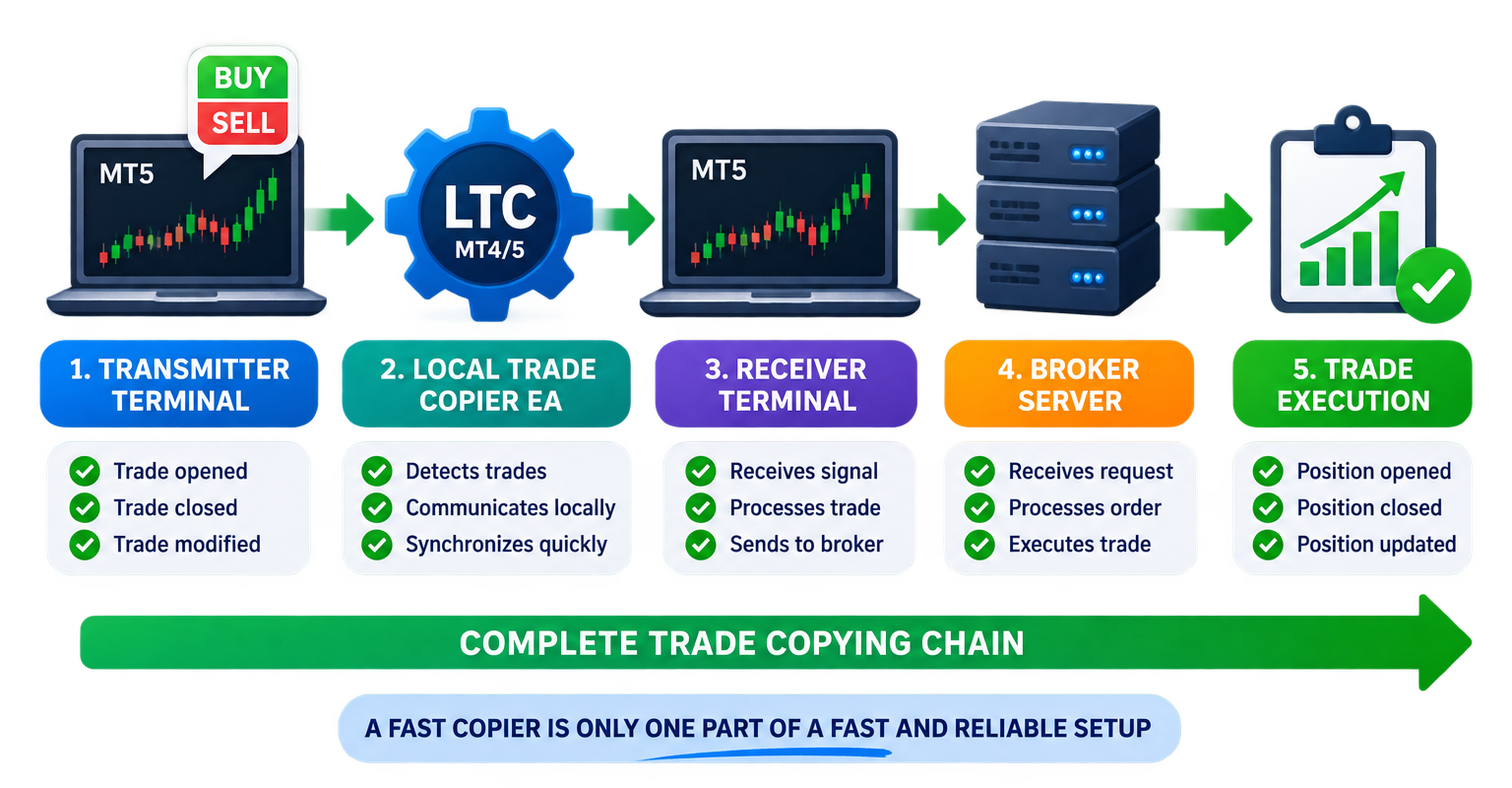
A reliable MT4/MT5 trade-copying setup is a chain.
Fast Trade Copier
+
Responsive Transmitter Terminal
+
Responsive Receiver Terminal
+
Adequate CPU/RAM/SSD Resources
+
Stable Windows Environment
+
Stable Internet Connection
+
Good Broker Connectivity
+
Suitable Receiver Settings
+
Normal Broker Execution
=
Fast and Reliable Trade Copying
Local Trade Copier EA MT4/5© can provide fast local synchronization, but it cannot compensate for a MetaTrader terminal that is frozen for minutes, a computer that has exhausted its resources, an unstable broker connection or a Receiver setting that intentionally waits for another condition.
When copying is slow, the right question is therefore not simply:
“Is my trade copier slow?”
The better question is:
“At which point in the complete copying chain is the delay occurring?”
Once that question is answered, the problem usually becomes much easier to diagnose.
Local Trade Copier EA MT4/5© English Guides
For complete instructions, please use the following English guides:
Local Trade Copier EA MT4/5© – Purchase, Installation & Quick Setup Guide
Local Trade Copier EA MT4/5© – Settings/Inputs Guide
Local Trade Copier EA MT4/5© – Troubleshooting Guide
You can also find the current web versions of the documentation here:
Purchase, Installation & Quick Setup Guide
Local Trade Copier EA MT4/5©
Local Trade Copier EA MT4© – MQL5 Market
Local Trade Copier EA MT5© – MQL5 Market
If you need assistance with installation, configuration or a copying problem, please contact me and I will be happy to help.
MQL5.com profile: https://www.mql5.com/en/users/eleanna74
Company email: info@juvenille-emperor.com




