
How to average into a trade (scale in) with one stop for the whole stack
9 November 2026, 11:08

0
11
Averaging in means opening more trades in the same direction at better prices, so your average entry improves. It is also the riskiest form of scaling, because you are adding to a trade that is losing. This article shows a way to do it with a defined total risk, using Stack Manager. Setup help is in the user manual.
Read this first
- Averaging into a loser raises your exposure while the market is telling you that you may be wrong.
- The least dangerous version has a hard stop for the whole stack, set before the first trade, and a size you can afford if that stop hits.
- Averaging with no stop, or with bigger and bigger sizes (martingale), is how accounts are wiped. Nothing here makes that safe.
- No tool can promise the stack will recover. Stack Manager manages levels. It does not choose entries or protect you from gaps.
Step 1: write the plan before the first trade
- Zone: where you would buy more because the idea is still valid. Example for XAUUSD: 4120 to 4100.
- Stop for the whole stack: one level beyond which the idea is wrong. Example: 4080.
- Number of entries and size of each. Equal or smaller as you add. Never bigger.
- Total loss at the stop: work it out for all planned entries, not just the first.
Illustrative numbers (assuming 1 lot = 100 oz, so 0.10 lots = 10 oz; check your broker's contract spec):
- 0.10 lots at 4120, 0.10 at 4110, 0.10 at 4100. Average entry 4110.
- Stop at 4080 for all three.
- Loss at the stop: (40 + 30 + 20) x 10 oz = about US$900, before spread, swap, commission and any slippage.
- If US$900 is more than you accept for this idea, cut the size now. Do not hope the third entry will not fill.
Step 2: size the whole stack, not one trade
- Decide the money you accept to lose on the idea. Divide it across all planned entries.
- Size every entry as if all will fill and the stop will hit.
- If you would only take two entries at the planned size, plan for two.
Step 3: attach Stack Manager and open the first trade with the stop
- Install and attach it as described in the user manual. Turn on AutoTrading and the EA's own permission.
- Open the first buy with the stack stop (4080) and a take profit.
- The dashboard shows the BUY stack: lots, average entry, breakeven, and the stop in price, points and money.
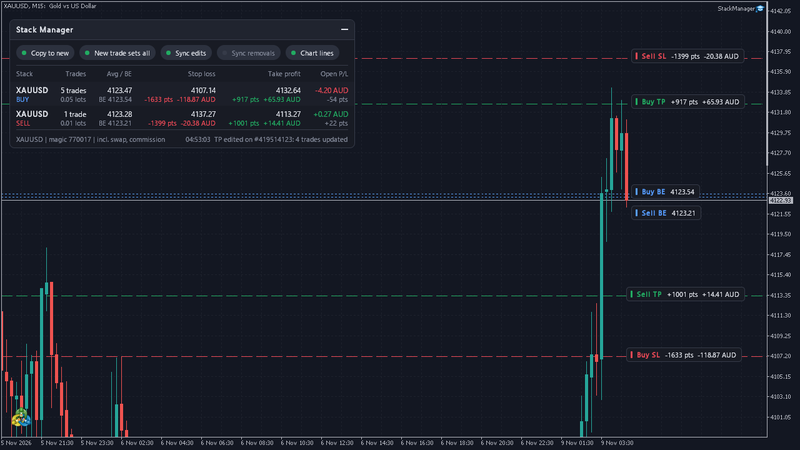
Step 4: add entries only inside the plan
- Open the next buy at the planned zone with no SL or TP. Usually within a second it gets the stack's levels.
- If you give a new trade its own SL or TP instead, the whole stack moves to those levels ("New trade sets all", on by default). Leave the add without levels unless you mean to move the stack.
- Watch the money under the Stop loss column after each add: what the stack loses if the stop is hit. It should match your plan. If it does not, stop.
- If the Stop loss column shows "none / risk not capped" (no stop at all) or "1 without SL" (a trade has none), fix it before anything else.
- Buys and sells are separate stacks. Do not average a buy stack with sells.
Step 5: manage the exit
- One stop and one target for the stack. Move one trade's level and the rest follow, on the terminal or the phone.
- Breakeven on the dashboard includes swap and commission (with that input on, the default). Long gold positions usually pay swap at most brokers, so a stack held for days tends to move its own breakeven against you.
- If the stop hits, the plan did its job. Do not add a fourth trade "to fix it".
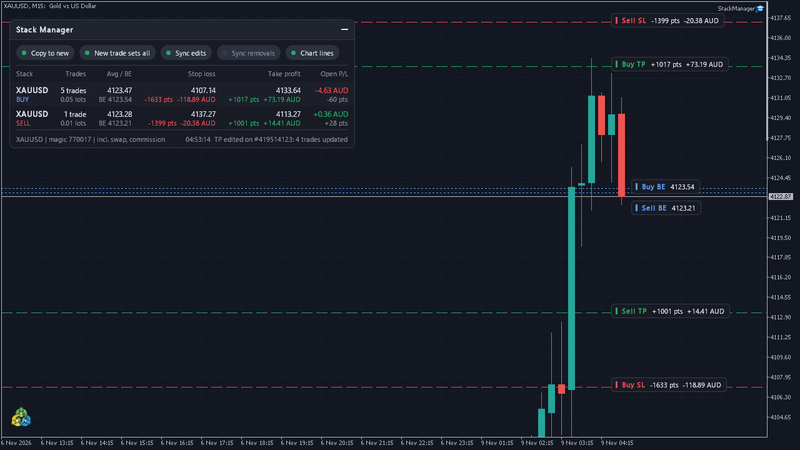
Rules that keep averaging survivable
- Total stop defined before entry one.
- Total loss at the stop sized to your account, not to your hope.
- Never size up as price goes against you.
- A time limit: if the idea has not worked in the time you expected, close the stack.
- No adding around high-impact news. Spreads tend to widen and gold can gap past a stop.
- Prove the routine on a demo account before real money.
Risk note
Stops are not guaranteed. Gold can gap past one, and then the loss is bigger than the plan. Averaging can turn a small loss into a large one quickly. This article is education, not financial advice, and nothing here promises profit. Stack Manager adjusts stop loss and take profit of trades you open. It does not trade for you.