
How to pyramid into a winning trade and move the whole stack to breakeven

Pyramiding means adding to a trade that is already working. You get more size in the move, and because the earlier trades are in profit, you can protect the stack by moving the stop up. The trick is doing that for every trade at once, quickly. Stack Manager does the syncing. The decisions are still yours.
Pyramiding in one minute
- You open trade 1 with a stop.
- Price moves your way. You add trade 2, smaller than the first.
- You move the stop on the whole stack up to breakeven or better.
- Each add is smaller, so a pullback is less likely to erase the whole gain.
Compare with averaging in: that adds to a loser. This adds to a winner.
Step 1: plan the adds
- Pick the trigger for each add. For example, a break and retest, or a pullback to a level you chose in advance.
- Make each add smaller than the one before. A common shape is 100%, 60%, 30% of the first size.
- Decide where the stop goes after each add. The goal is that the stack's worst case gets smaller, not bigger.
Illustrative gold example (assuming 1 lot = 100 oz, so 0.10 lots = 10 oz; check your broker's contract spec):
- Buy 0.10 at 4100, stop 4080 (risk: 20 x 10 oz = about US$200).
- Price reaches 4115. Move the stop to breakeven (about 4100) and add 0.06 at 4115 with the same stop.
- If the stop hits, the first trade is about flat and the second loses 15 x 6 oz = about US$90, before spread, swap, commission and any slippage.
Step 2: attach Stack Manager
- Install and attach it as in the user manual. Turn on AutoTrading and the EA's own permission.
- Keep "Copy to new", "New trade sets all" and "Sync edits" on (they are the defaults).
Step 3: add a trade and let it join the stack
- Open the add with no SL or TP and it picks up the stack's levels, usually within a second (the default wait is 1 second).
- Or set its own stop and take profit. With "New trade sets all" on, the whole stack follows those levels.
Step 4: move the stack to breakeven in one edit
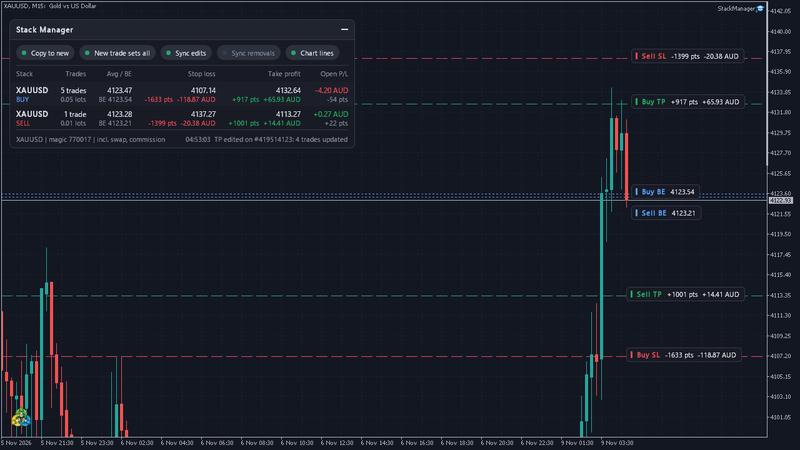
- Look at the breakeven price on the dashboard (BE under the average entry, and the chart line). It includes swap and commission when that input is on (the default).
- Move the stop on one trade to that price or just beyond it. Every other trade in the stack gets the same stop.
- Do it from the terminal, or from your phone. Edits from the phone app or web terminal sync too.
- Check the Stop loss column: it shows the stack's stop, and the money if it is hit. A positive figure means the stack would close in profit if the stop fills at its level. A gap or slippage can still fill it worse.
Step 5: trail it with discipline
- Move the stop up only at levels you set in advance, such as under the last swing low.
- Do not move it so tight that normal noise takes you out.
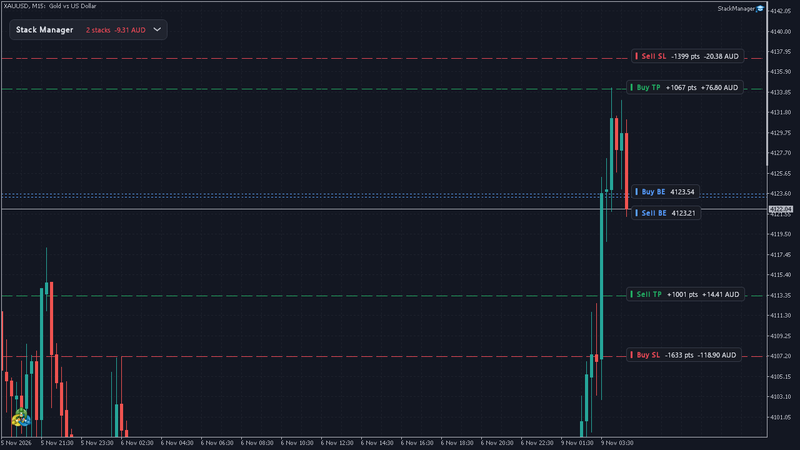
- Trail by hand, at your levels. A fast trailing stop or another EA that keeps changing the levels can trip the edit limit (default 12 a minute) and pause the sync for that stack.
- Do not move it down. A stop that only moves one way is a rule you can keep.
Mistakes to avoid
- Adding bigger than the first trade. A small pullback then costs more than your gains.
- Adding without moving the stop. The stack's risk grows with every trade.
- Adding at the end of a long move. The risk to reward is worst there.
- Adding into news.
- Forgetting spread and swap on a long hold.
Risk note
Stops are not guaranteed, and gold can gap past them. Pyramiding raises your exposure to one idea and can give back gains fast on a reversal. This article is education only and promises no result. Stack Manager manages stop loss and take profit of trades you open. It does not choose entries or trade for you. Practise on a demo account.