

SmartGoldSniper — User Manual
Installation and testing
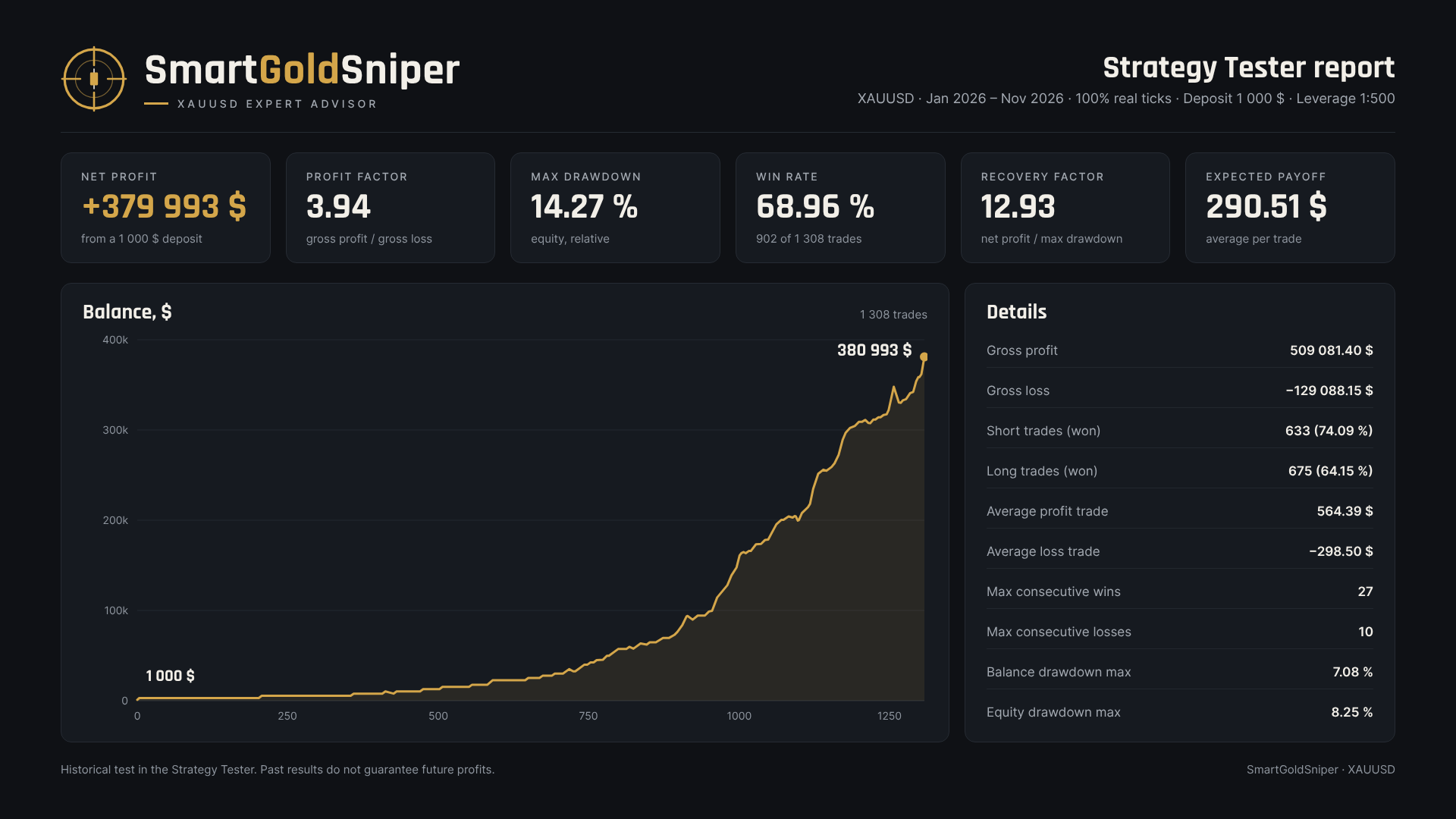
Attach the EA to one XAUUSD chart; it runs all systems by itself. Before trading on a real account, test it in the Strategy Tester on your broker's quotes.
Installation
- Open your broker's gold chart (XAUUSD, XAUUSD+, XAUUSDm, etc.). Any timeframe works; H1 is the most convenient.
- Drag SmartGoldSniper from the Navigator (Expert Advisors → Market) onto the chart.
- On the Common tab, enable "Allow Algo Trading". The Algo Trading button on the terminal toolbar must be green.
- On the Inputs tab, check the server time zone and the lot (see the sections below).
- A panel appears in the top left corner. The Status line should show trading or the reason for a pause (news, weekend, time before the start).
A VPS close to the broker's server is recommended: pending orders and the trailing stop work on ticks, so the terminal must run all the time. If you run a second copy on the same account, set different magic numbers for SgS1–SgS8.
Testing in the Strategy Tester
| Tester setting | Value |
|---|---|
| Symbol | gold of the broker you will trade with |
| Modeling | "Every tick based on real ticks". With "1 minute OHLC" and "Open prices only" the trailing stop is calculated incorrectly |
| Deposit and leverage | as on your account |
| Delays | first "Zero latency, ideal execution", then 200 ms — a slippage check |
| Inputs | the same as for the real account, especially GMT and summer time |
- The panel is shown in the tester only in visual mode; in normal mode it is turned off for speed.
- The news filter also works in the tester: the news dates are built into the EA.
Server time zone
The default settings are for a server at GMT+2 in winter and GMT+3 in summer, switching by US rules. Most brokers work this way (IC Markets, Vantage, VT Markets, Tickmill, etc.). On such a server the day ends at 17:00 New York time, and news at 8:30 New York time comes out at 15:30 server time.
What depends on time
- All times in the inputs are server time, as shown in Market Watch: Start time 01:15, SgS1 from 02:00, SgS2 until 22:15, the hours of SgS5 and SgS6.
- Server GMT offset in winter and Server summer time are used by the news filter. FedRate, NonFarm and CPI dates are stored in New York time, and the EA converts them to server time with these two parameters. A mistake here means the pause comes at the wrong time.
How to find your broker's time zone
- Look at the time in Market Watch on a working day and compare it with the current UTC time. The difference in hours is the server offset now.
- Ask your broker whether the server time changes in summer and by which rules: US (second Sunday of March — first Sunday of November) or Europe (last Sundays of March and October).
- Pick your row in the table below.
| Server in winter | Server in summer | Server GMT offset in winter | Server summer time |
|---|---|---|---|
| GMT+2 | GMT+3, US switch | 2 | US summer time (default) |
| GMT+2 | GMT+3, EU switch | 2 | EU summer time |
| GMT+3 | GMT+3 | 3 | No summer time |
| GMT+2 | GMT+2 | 2 | No summer time |
| GMT+0 | GMT+1, EU switch | 0 | EU summer time |
| GMT+0 | GMT+0 | 0 | No summer time |
Check
- On a real or demo account the panel compares the setting with the actual server time. If the Server line shows an orange real GMT+X! , the setting is wrong.
- The tester has no such check. Run a visual test on a Friday with NonFarm: on a GMT+2/+3 server the status should change to paused: NonFarm at 15:00 and return at 16:30. At the same time the M1 chart should show a large news candle at 15:30.
If the server is not GMT+2/+3
- System levels are built from the broker's candles, and daily candles are different on another time zone. Results will differ from tests on GMT+2/+3 servers.
- Set GMT and summer time from the table so that the news filter works on time.
- Shift Start time, SgS1, SgS2, SgS5 and SgS6 by the difference from GMT+2/+3. Example: the server is GMT+3 all year. In summer its time matches GMT+2/+3, in winter it is 1 hour later. For winter you can set Start time 02:15, SgS1 03:00, SgS2 23:15, and return the defaults in summer.
- Times must not cross midnight. Be sure to test on this broker's quotes.
Risk management
Risk is set by one parameter, the lot calculation. The default is 0.01 lot per each 400 $ of balance; for the first start 0.01 per 1000 $ is safer.
Lot modes ( Lot calculation )
- Lot per each N $ of balance (default): lot = Lot × whole number of (balance / N $ ), not less than Lot . It grows and shrinks in steps with the balance.
- Fixed lot: always Lot .
- Risk % of balance per trade: the lot is calculated from the system's Stop Loss so that a loss at the stop equals Risk per trade % of the balance. If the result is below the broker's minimum lot, the minimum lot is used and the risk is higher than set. Example: balance 1000 $, risk 0.25 % = 2.5 $, stop 9 $ → lot 0.003 is needed, 0.01 will be used.
| Balance | Lot: 0.01 per 400 $ | Lot: 0.01 per 1000 $ |
|---|---|---|
| 400 $ | 0.01 | 0.01 |
| 1 000 $ | 0.02 | 0.01 |
| 2 000 $ | 0.05 | 0.02 |
| 5 000 $ | 0.12 | 0.05 |
| 10 000 $ | 0.25 | 0.10 |
How many positions at once
- Each system has its own positions, so the risk adds up. In the 2025–2026 test usually 1 position was open, in 10 % of the time 3 or more, at most 6.
- By the trades of this test, the maximum balance drawdown was about 8 % at 0.01 per 1000 $ and about 27 % at 0.01 per 400 $. This is history, not a forecast: on a real account the drawdown can be larger.
Leverage and margin
- 0.01 lot of gold is 1 ounce. At a price of about 4000 $ the margin for 0.01 lot is: 1:500 — 8 $, 1:100 — 40 $, 1:30 — about 133 $.
- With 1:30 leverage and 0.01 per 400 $, one position takes a third of the balance. Use 0.01 per 1000 $ or less.
- The EA makes sure there is enough margin even if all its orders in one direction trigger: used margin plus the pending orders of that side stay within 90 % of equity. If a new order does not fit, its lot is reduced; if even the minimum lot does not fit, the order is skipped. Extra pending orders are deleted right after each entry. This is protection against errors, not a substitute for a reasonable lot.
Other risk levers
- News: on a real account keep FedRate and NonFarm on: at the release the spread and slippage are much larger than in the tester. CPI is optional. Also close open positions also closes open positions before the news.
- Turning systems off reduces the number of simultaneous trades. See how much each system contributes in the tester report by magic.
- BuyStopShift / SellStopShift : plus means earlier and more frequent entries, minus means later and fewer. Change them only after testing, in steps of 0.1–0.2 $.
Input parameters
The defaults are for XAUUSD and a GMT+2/+3 server. Distances are in dollars of the gold price: 1.00 $ = 100 points with two decimal places.
General parameters
| Parameter | Default | What it does |
|---|---|---|
| Start time | 01:15 | from this server time the systems place new orders for the day |
| Server GMT offset in winter | 2 | server offset from GMT in winter |
| Server summer time | US summer time | server summer time rules: US, Europe or none |
| Lot calculation | Lot per each N $ of balance | lot mode, see "Risk management" |
| Lot | 0.01 | fixed lot, or lot per each N $ |
| N $ of balance per lot | 400 | balance step for the "per each N $" mode |
| Risk per trade, % | 0.25 | risk per trade for the "risk %" mode |
| BuyStopShift, $ | 0.0 | added to the offset of all Buy Stops: + earlier entry, − later |
| SellStopShift, $ | 0.0 | the same for all Sell Stops |
| News filter | true | the whole news filter |
| FedRate | true | Fed rate decision, 14:00 New York time |
| NonFarm Payrolls | true | US employment, 8:30 New York time |
| CPI | false | US inflation, 8:30 New York time |
| Delete all pending orders N minutes before | 30 | how many minutes before the news to delete all pending orders of the EA |
| Re-place orders N minutes after | 60 | how many minutes after the news to place them again |
| Also close open positions | false | also close open positions before the news |
| Order comments | true | order comment = system name (SgS1 …); does not affect trading |
| Info panel, X, Y, font size | true, 10, 25, 9 | panel on the chart and its position |
- SL and TP are set from the entry price. If the broker's stop level is larger, the EA moves them to the allowed distance.
- The magic numbers of all systems must be different, otherwise the EA will not start.
- On other symbols all $ distances are scaled by price, but the EA is designed and tested only for XAUUSD.




