
PropGuardian setup guide: presets, reset time, and what a breach looks like

After this guide PropGuardian runs on one chart of your account, knows your firm's daily loss and drawdown rules and the time your firm's day ends, and you have seen the whole chain once on a demo account: warning, close-all, day lock, instant close of a trade opened while locked. Time needed: about ten minutes.
What you need
- PropGuardian installed in the terminal that trades the account (after purchase it appears under Market in the Navigator).
- Algo Trading switched on (the button in the toolbar). Without it PropGuardian can watch but not close.
- Your firm's current rules: daily loss limit, maximum drawdown, whether the drawdown is static or trailing, and the time of day the daily loss resets.
Step 1: attach it to one chart
PropGuardian guards the account, not a symbol. Drag it onto any single chart; symbol and timeframe do not matter. One instance per account: two instances with different settings would fight over the same stored state.
After the inputs dialog closes, the panel in the top left corner shows PROTECTING in green, your equity and balance, the used share of the daily limit, the stop-out equity, the drawdown floor and the active reset rule.
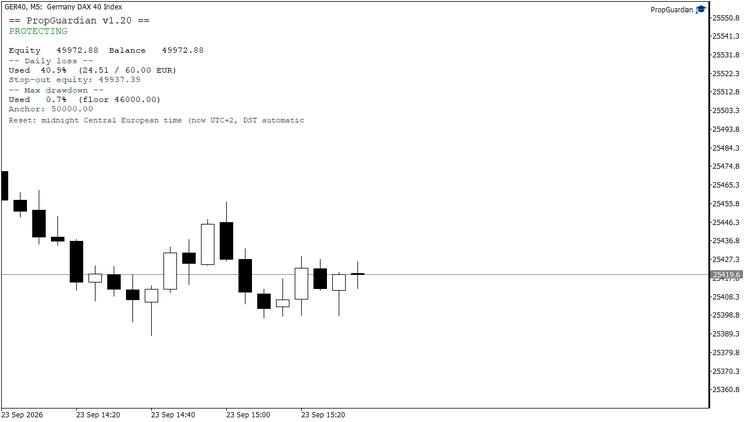
Normal state: equity, used share of the daily limit, stop-out equity, drawdown floor and the active reset rule.
Step 2: pick the preset for your firm
The first input, Rule preset, sets the limits, the daily basis, the drawdown model and the reset time in one go.
| Preset | Daily loss | Max drawdown | Daily reset |
|---|---|---|---|
| FTMO style | 4.5 % of initial | 9 % static | midnight Central European time, DST automatic |
| FundedNext style | 4.5 % of initial | 9 % static | broker server midnight |
| The5ers High Stakes style | 4.5 % of day-start | 9 % static | broker server midnight |
| FundingPips 2-Step style | 4.5 % of day-start | 9 % static | broker server midnight |
| Alpha Capital Pro 10 % style | 4.5 % of day-start | 9 % static | broker server midnight |
| Goat Funded 2-Step style | 4.5 % of day-start | 9 % static | 5 PM New York, DST automatic |
| Maven 2-Step style | 3.5 % of day-start | 7 % static | 00:00 UTC |
| Trailing firm | 4.5 % of day reference | 7 % trailing equity | broker server midnight |
| Conservative | 3 % of initial | 6 % static | broker server midnight |
| Custom | your own inputs below the preset | ||
The numbers sit below the firm's published limits on purpose: 4.5 instead of 5, 9 instead of 10. Breach detection is tick based, and in a fast market the realized loss can overshoot the configured level by a few points before the close executes. The half point is what absorbs that. Rules are as of September 2026; firms change them, so check yours before you rely on a preset.
Initial balance is detected from the first deposit in the account history. If the history has several deposits or withdrawals, enter it by hand.
Step 3: check the daily reset time
This is the setting most protection tools get wrong. Your firm's day rarely ends at your broker's server midnight. PropGuardian offers four modes:
- Broker server midnight: when your firm measures by the broker's day.
- Midnight at a fixed GMT offset: for a fixed reset zone without daylight saving.
- Midnight Central European time: CET in winter, CEST in summer, switched automatically.
- 5 PM New York: EST or EDT, switched automatically.
The presets set this for you. With Custom, pick the mode yourself. The panel's last line always shows the active rule, so you can see at a glance which day PropGuardian is counting.
Step 4: the action and the warning
Action on limit breach is the heart of the tool:
- Close all + lock (recommended): closes all positions, deletes pending orders and locks the day. While locked, any new trade from any EA or manual entry is closed at once.
- Close all: closes everything but does not lock.
- Alert only: never closes anything. The panel reminds you with an orange "no protection" status.
The early warning fires once per day at a configurable share of the limit (default 70 percent), as popup, push notification or e-mail. For push notifications on your phone, enter your MetaQuotes ID under Tools, Options, Notifications in the terminal.
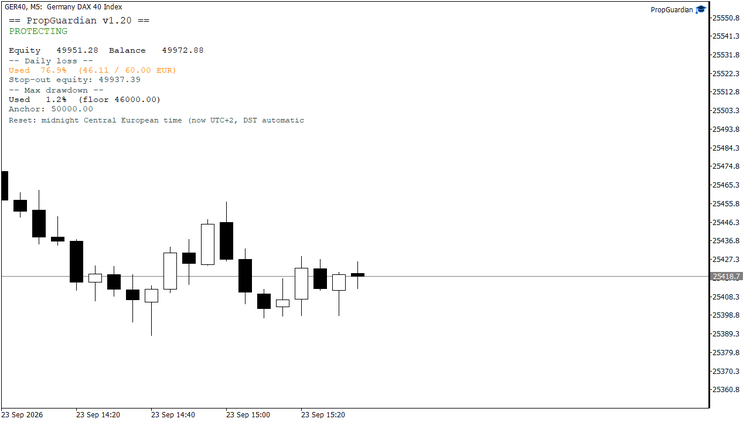
Early warning at 77 percent of the daily limit: one popup, push or e-mail, once per day.
What a breach looks like
The run below is from my demo account, provoked with a fixed daily limit of 60 EUR and hedged positions that lose only the spread. Warning at 77 percent, breach at 61.11 EUR, fourteen positions closed in 672 ms, day locked. A trade opened while locked was closed 47 ms after it was opened.
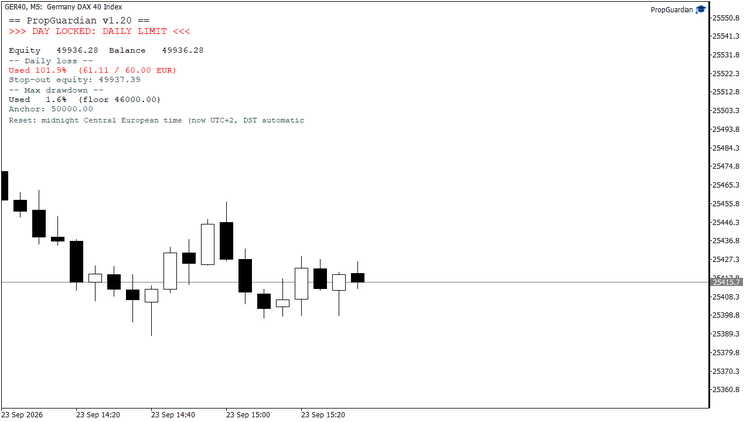
Limit reached: 14 positions closed in 672 ms, day locked.
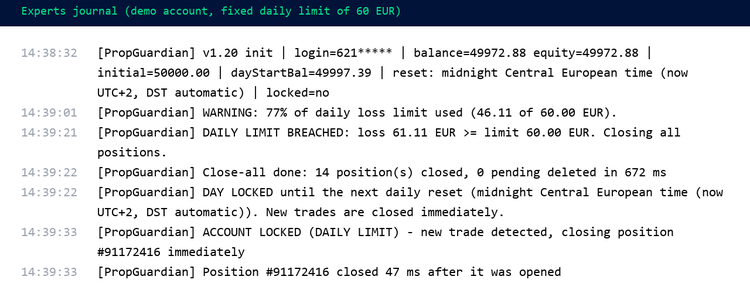
The journal of that run: warning, breach, close-all, day lock, and a trade opened while locked closed 47 ms later.
While the day is locked, every new trade costs one spread, because a Market product cannot switch off Algo Trading (no DLLs allowed). Closing instantly is the strongest enforcement the platform permits.
Restarts
If the terminal restarts (Windows update, VPS reboot, crash), most protection tools forget everything and let you trade again. PropGuardian stores its state per account login and restores it on startup, including an active lock and the day-start values. The lock releases automatically at the next daily reset.
Removing the EA from the chart wipes the stored state on purpose. That is the manual reset if you ever need one, and it also means the lock is only as strong as your discipline not to remove it.
Test it before you trust it
Two ways. In the strategy tester in visual mode, with the default inputs, a scripted losing day shows the whole chain three times in a row. On a demo account, set Rule preset to Custom, daily limit measured as fixed money amount, daily loss limit (money) to 5, and open a small position. Both take a few minutes, and afterwards you know what will protect the real account.
The inputs that matter
| Input | Default | What it does |
|---|---|---|
| Rule preset | Custom | Sets limits, daily basis, drawdown model and reset time for a firm. Custom uses the inputs below. |
| Initial account balance | 0 (auto) | Reference for the static drawdown and for limits in percent of initial. Enter by hand when the history is not a single deposit. |
| Daily loss limit (%) / measured as / (money) | 4.0 / % of initial / 400 | The daily rule. Basis: percent of initial balance, percent of the day-start reference, or a fixed amount. |
| Day-start reference | max of balance and equity | What today's loss is measured from. Most firms use the higher of the two at reset time. |
| Max drawdown limit (%) / anchor model | 8.0 / static from initial | The overall rule. Static from initial balance, trailing from highest balance, or trailing from highest equity. |
| Profit target | 0 (off) | Optional: lock trading once the target is reached, so a passed challenge stays passed. |
| Daily reset reference | broker server midnight | See step 3. |
| Action on limit breach | Close all + lock | See step 4. |
| Early warning at % of limit used | 70 | One warning per day when this share is used. |
| Popup / push / e-mail | on / off / off | Where warning, breach and lock messages go. |
| Privacy mode | false | Masks the account number in the journal, for screenshots and streams. |
| Publish state as global variable | true | Writes PropGuardian_<login>_State (1 free, 0 locked) for other tools such as PropSizer and PropMirror. |
| Scripted demo day in the strategy tester | true | Only affects the tester. |
Links
PropGuardian on the Market | What's new in 1.20 | PropMirror stops copying while the account is locked | All my products
Questions go in the Comments tab of the product page or by message. Reports from other brokers and firm setups are welcome, they are how the presets get better.