Take a Break 26.09 is here. Among many small fixes and improvements, three things stand out:
- a fix for a bug where a chart lost its trading EA after a pause
- Custom Indicator Rules — use any indicator as a protection rule (MetaTrader 5)
- Trading Times per Chart — your weekly schedule now lives on the chart
This post walks you through the changes.
First: what changes for my setup?
📌 Update both products. The new indicator needs the new EA. If the EA in your terminal is older, the indicator shows an alert. The info lines in both dialogs have new texts; your settings are not changed.
Weekly schedule: set it in one place. Trading hours per weekday now live in the indicator, per chart. The EA still has its old weekday fields for one more version. They still work, and they still apply to the whole account. If you set your schedule in the indicator, reset the EA's weekday fields to 0-24. Otherwise both apply, and the stricter one wins. The EA keeps the calendar filters (days of year, days of month, months). Those are account settings on purpose. The EA's weekday fields will be removed in v27.
Gold, index and stock charts now pause on news. Before, these charts had no news currencies unless you typed them in. Now they are detected automatically (see below). News protection is on by default, so these charts now pause on high-impact news. If you do not want that on a chart, set its news protection to Off.
New checkbox: "Close all trades when outside of Trading Times". You find it in the EA under TRADING TIMES. It is off by default. Before, this was part of an old dropdown. If you used that dropdown with "Close trades", switch the new checkbox on once.
Fixed: the chart came back without its EA
Some of you met this bug, so I start here. After a pause, a chart could come back without its trading EA. This is fixed.
The rule is now simple: the pause chart is your trading chart without its EA. Same indicators, same objects, same colors. Only the trading EA is removed while the chart is paused, and it comes back when the pause ends. If you want to run your own EA on the pause chart, that is still possible. It stays there. If you had extra things on the pause chart before, they are gone now.
If you lost an EA to this bug: attach it again while the chart is trading. That is all.
I tested the fix for one week on MT4 and MT5, with about 1,100 pauses and resumes per terminal, chart edits every day and two terminal restarts. No EA or modification was lost.
NEW: Custom Indicator Rules (MetaTrader 5)
Ever wanted your EA to stop trading when the market is overbought? Or to stay out below the 200 MA? Until now, that meant changing the EA, or writing your own. Now you write one line in Take a Break, with any indicator you already have on the chart.
And it does not stop at standard or market indicators. Write a small indicator with your own logic, put it on the chart, and its signal becomes a pause or close rule. If you can code it as an indicator, or let an AI code it for you, Take a Break can act on it.
In the indicator's settings there is a new section, CUSTOM INDICATOR FILTER, with three fields:
- Pause new trades on this condition — for example RSI>70
- Close BUY trades on this condition
- Close SELL trades on this condition
How it works: put any indicator on the chart, with the settings you like. Then write a condition with the indicator's name. That is all. Nothing to copy, nothing to keep in sync.
Not sure about the exact name? Switch on Log indicator names and buffer values (debug) in the same section. The Experts log then lists every indicator on the chart with its name and its current values. Copy the name from there, then switch the log off again.
Custom Indicator Rule: chart indicators: 'MA(200)', 'RSI(14)'
Custom Indicator Rule: pause condition 'RSI>70' -> false
Custom Indicator Rule: Close@1 = 1.14903
Custom Indicator Rule: MA(200)[0]@1 = 1.1504962
Custom Indicator Rule: close sell condition 'Close@1<MA(200)@1' -> true
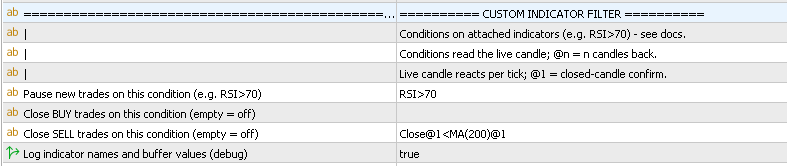
Some examples:
- Stop a grid from adding trades in an overbought market. Put RSI(14) on the chart. Pause on RSI>70. For the other side: RSI<30. Both: RSI<30 OR RSI>70.
- Only trade with the trend. Put a Moving Average with period 200 on the chart. Close<MA(200) pauses a long-only EA below it. Close is the current price and is always available.
- Pause when there is no trend. Put ADX(14) on the chart. Pause on ADX<20.
- Close one side only. Close BUY on RSI>70. Close SELL on RSI<30. The other side stays open.
- Compare with the last candle. RSI<RSI@1 means: RSI is lower than on the last closed candle.
- Combine conditions. RSI>70 AND ADX<20 pauses only when the market is overbought and has no trend. Put both indicators on the chart. AND and OR are read from left to right.
- Use your own indicator. MySignal[1]>0 reads buffer[1] of your own indicator. Your signal indicator becomes a protection rule. No code needed.
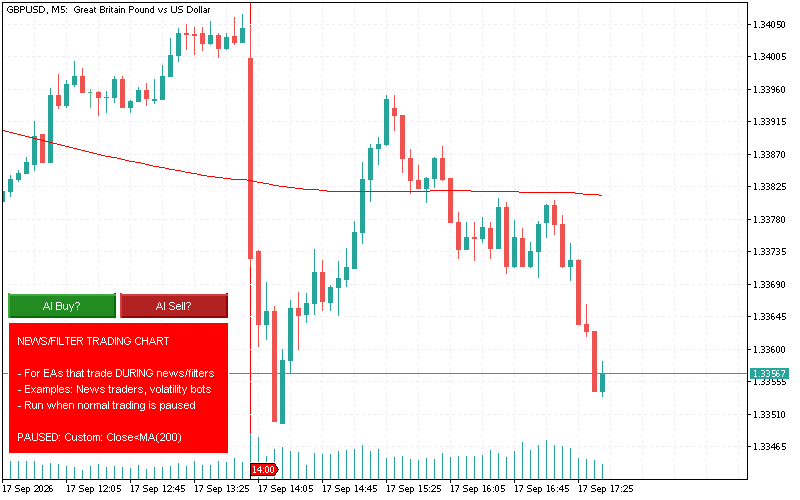
The rules in short: the indicator name alone means its first value in the Data Window. [n] picks another line. @n looks n candles back. Compare with > < >= <= == !=. Join with AND or OR, read from left to right, no brackets. Conditions use the current candle, exactly what you see on the chart.
Good to know:
- Each side is checked on its own. The minimum-profit guard looks at the buys when closing buys, and at the sells when closing sells. A losing sell side does not block a winning buy side. The switch for this is "Apply to custom indicator closes" in the MINIMUM PROFIT section.
- A typo does not break anything. If the indicator name is wrong, the info panel says "indicator not found". If the indicator is missing or still loading, the condition counts as not met.
- The indicator stays on the paused chart. So the rule can still see it, and can end the pause again.
⚠️ This feature is MetaTrader 5 only (MT4 limitation). Everything else in 26.09 is the same on both platforms.
NEW: Trading Times per Chart
Trading hours depend on the market. A DAX scalper has other hours than a gold swing EA. So the weekly schedule now lives in the indicator, per chart. In the TRADING TIMES section you find:
- Monday trading … Sunday trading — hours per day, for example 9,16:30-17:30,19-24. 0-24 means all day. -1 means no trading on that day. Times are MetaTrader server time.
- Close trades when outside trading times — off by default. When on, the chart closes its trades at the end of the window. No Saturday hours plus this switch = flat before the weekend.
- Max trade duration — closes a trade when it is older than X minutes. Only that trade. Younger trades and pending orders stay.
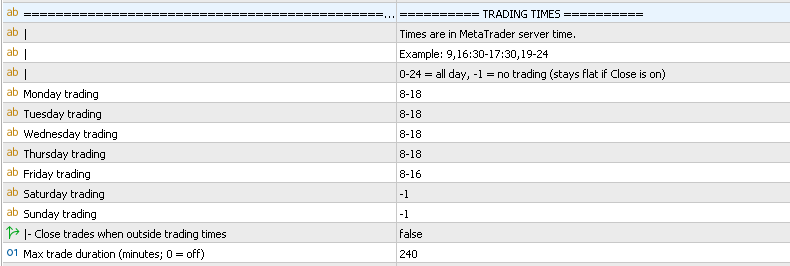
Example: two charts of the same symbol. A day EA with 08-18 on one chart. A night scalper with 18-08 on the other. One is paused while the other trades. No global filter can do that.

The EA keeps the account-level filters: Days of Year, Days of Month, Months. Use them for holidays, year end, or a multi-day event. One important thing: these fields list the days when trading IS allowed. To skip days 100 to 102, write 1-99,103-366. If you write 100-102, trading is allowed on those three days only. This is easy to get wrong.
Your old per-chart time settings keep working until you fill in the new weekday fields. The panel shows a small hint while the old settings are in use. Nothing is rewritten. One thing is gone: "days of year" per chart. That is an account setting now and lives in the EA.
News: currencies detected automatically
Until now, a chart only knew its news currencies if the symbol name was a currency pair, like EURUSD. A chart like GOLD#, US30, DE40 or a stock had none, so it never paused on news — unless you typed the currency into "News currencies". That was easy to miss.
26.09 detects the currencies for every symbol. GOLD# gets USD, DE40 gets EUR, EURUSD gets EUR and USD. Nothing to type. The indicator writes one line to the Experts log when it loads, so you can always check:
News currencies for DE40: EUR (detected automatically)
"News currencies" still works as before. If you fill it in, it wins over the detection. Copy the codes from the log line if you want to start from there.
News: pause until midnight, or from midnight
You can now use day on one side of a news window only. 0,day means trade until the release, then pause until midnight. day,30 means pause from midnight until the event, then 30 minutes after it. all day still means the whole day, before and after.
The news download line in the Experts log now shows how many events it got. If it says 0 events - check the news provider, something is wrong with the source. If it says failed - using cached news, the download failed and the last data is used.

Profit / loss: pause before you close
The per-chart profit/loss rule has two new fields: Pause new trades when loss reaches and Pause new trades when profit reaches. They sit next to the close limits. Set them lower than the close limit, and the chart stops taking new trades before anything is closed. A soft limit before the hard one.
The EA dialog: what stays, what goes
The most common question since v26: what do I set in the EA, and what in the indicator? The EA dialog now answers it. Everything that stays in the EA is at the top: Account Protection, Additional Filters, AI, Notifications, calendar filters. Then comes this line:
=== DO NOT USE ANYTHING BELOW THIS LINE IN A NEW SETUP ===
Below it, every section says [LEGACY] … - removed in v27, and every field starts with [MIGRATED]. These settings are off by default now. If you still use Chart Groups, your saved values are kept and keep working until v27.
Get it
MetaTrader 5
- Take a Break EA: https://www.mql5.com/en/market/product/45264
- Take a Break Indicator: https://www.mql5.com/en/market/product/51828
MetaTrader 4
- Take a Break EA: https://www.mql5.com/en/market/product/28252
- Take a Break Indicator: https://www.mql5.com/en/market/product/51832
📌 Update both products together. If you lost an EA to the bug above: attach it again on its chart while the chart is trading. 26.09 keeps it from now on.