

💎 TL;DR
Gold Session Box MT5 draws Asia, London, and New York session boxes directly on your XAUUSD chart - with live range calibration against a 20-day rolling average, breakout confirmation markers, liquidity sweep detection, and a real-time panel showing session bias and range state. No manual drawing. No checking the clock. No estimating whether today's range is compressed or extended.

🔥 The Problem Every Gold Trader Knows But Nobody Solves
You load MT5. You stare at the M15 chart. Gold is moving.
But moving from where? Is this a London breakout or just a random spike inside a still-forming Asia range? Is today's Asia session wider than average or already compressed? Did New York already sweep the London high before you opened your terminal?
Most traders deal with this by keeping a world clock open in one corner, sticky notes about session times in another, and manually drawing rectangles every morning. Every. Single. Day.
And on the days you forget, or you're five minutes late, or you switch to a different chart - the boxes aren't there. You're trading without the foundation.
This is the structural friction that makes XAUUSD intraday trading harder than it should be. Not missing signals - missing the intraday framework that helps you judge whether any signal is worth acting on.
🏆 The Real Engine: Rolling Range Calibration
Most session box tools draw the high and low. That part is straightforward.
What makes this indicator different is the layer built on top of that structure.
Every session is automatically benchmarked against its own 20-day rolling average. The tool calculates how today's Asia range compares to Asia's historical norm, how London is shaping up versus its typical behavior, and classifies each session as Tight, Normal, or Wide - updated live as the session develops.
This is the information experienced traders have to estimate manually from memory. The panel hands it to you directly:
ASIA $94.3 / avg $48.0 | Wide | Bull
That single line tells you: Asia ran almost double its typical range today, with a bullish lean. Before price has printed a single bar in London, you already know the intraday conditions you're walking into.
That's the real engine - not the boxes themselves, but the calibrated context around them.
🔎 What the Indicator Shows on Your Chart
Attach it to any M1–M30 XAUUSD chart and the following appear automatically:
🥇 Session Boxes - color-coded rectangles for Asia, London, and New York, each showing the session high, low, and optional midpoint. The active session updates in real time on a configurable timer (default every 3 seconds). Completed sessions lock in permanently.
🥇 Breakout Markers - when price closes beyond a completed session boundary with sufficient body distance past the level (configurable minimum close distance), a breakout marker appears on the chart. The confirmation logic requires a true body close, not just a wick, which keeps the markers meaningful rather than noisy.
🥇 Liquidity Sweep Markers - when price temporarily trades beyond a completed session high or low before closing back inside the session range, the indicator marks it as a potential liquidity sweep. The minimum spike distance is configurable, which filters out routine boundary touches from genuinely meaningful sweeps.
🥇 Live Status Panel - top-left corner, always current. It shows which session is active, the current range versus the 20-day average, and the session bias. Bull/Bear bias is determined by price position relative to the session midpoint - if current price is above the midpoint of the forming session range, bias is Bull; below, it's Bear. The panel also confirms whether alerts are armed.
🥇 Smart Alerts - session start, session end, breakout confirmation, and sweep detection can each be toggled independently across popup, push notification, email, or sound. A configurable cooldown timer prevents repeat spam when price is oscillating around a level.
🚀 What This Looks Like in Real Trading
The screenshot from June 10–11, 2026 on XAUUSD M15 makes the value concrete.
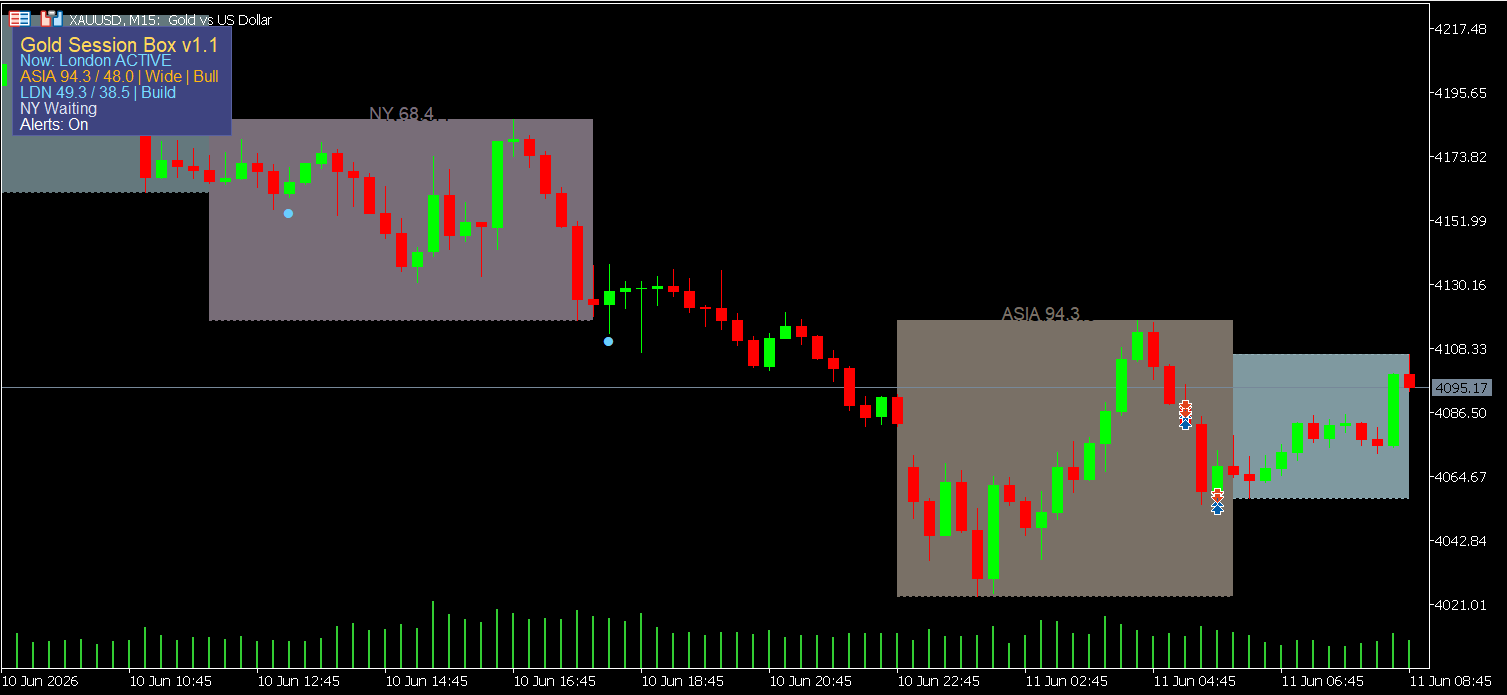
The grey box on the left is a completed London session - range fully formed, high and low fixed. The "NY 68.4" label shows the previous New York session's $68.4 range for reference. Moving right, the brown Asia box is building - currently showing $94.3 against a 20-day average of $48.0, classified Wide, with a Bull bias active.
At the far right, London is already forming - the panel reads "LDN 49.3 / 38.5 | Build," meaning the range is expanding toward the $38.5 average. New York shows "Waiting" - it hasn't opened yet.
Within a quick glance at this chart, a trader knows: Asia ran nearly double its normal range, bullishly. London is building from below that expanded Asia session. New York hasn't contributed yet. That's the full intraday framework for the day - no manual work, no estimation from memory.
A practical implication: seeing Asia expanded well beyond its average with a Bull lean, a trader using a breakout approach might decide not to chase long continuation into London and instead wait to see whether London accepts the Asia expansion or fades it. That's a workflow decision made directly from what the chart is showing - not a recommendation, just an example of how session context shapes how experienced traders filter their entries.
🔔 Practical Advantages Worth Noting
Beyond the visible features, there are a few workflow benefits that matter to regular MT5 users:
- Session boxes redraw automatically after switching symbols or timeframes - no need to reattach or reconfigure
- Historical session ranges from the past 3 days (configurable) stay visible for post-trade review and context comparison
- Session definitions are consistent across all charts, which removes the operator error that comes from drawing boxes slightly differently each day
None of these are dramatic. But after weeks of use, the consistency adds up.
🎁 Who This Is For
- XAUUSD intraday traders on M1 to M30 who need session structure visible without manual setup
- Traders who use session range context - breakouts, range fades, liquidity sweeps, or session-to-session continuation - as part of their decision process
- Anyone running an SMC or ICT-influenced framework who wants session levels consistently marked without rebuilding them every morning
- Multi-session traders who need to track Asia carry-over into London and New York in a single view
🌟 Who This Is NOT For
- Traders who work exclusively on H4, daily, or weekly charts - the session boxes are intraday tools optimized for M1–M30
- Anyone looking for entry signals - this is a structural reference layer, not a buy/sell indicator
- Traders who want an all-in-one strategy system - this tool does one job and does it well
🚀 What It Doesn't Do
Gold Session Box MT5 does not generate entries. It does not tell you when to buy or sell. It does not have an embedded strategy.
What it does is organize the intraday conditions that make your own signals easier to evaluate. Whether those signals come from SMC, ICT, breakout logic, or your own discretionary read - this gives you the session structure to judge them against.
Think of it as the map. You still decide where to go.
🎁 Get the Tool
👉 Gold Session Box MT5 on MQL5 Market: https://www.mql5.com/en/market/product/169025
If you've been drawing session boxes manually every morning, or guessing whether today's range is compressed or extended - this removes most of that manual work. Attach it once, configure your broker's UTC offset, and it runs itself from there.
🧰 Related Tools
These tools work naturally alongside Gold Session Box MT5:
- Gold ATR Risk Calculator MT5 - position sizing that adapts to live volatility, not fixed lot assumptions
- Gold Spread Monitor MT5 - identifies when spread conditions make entry genuinely unfavorable
❓ FAQ
✅ Does it work on symbols other than XAUUSD? Yes - any MT5 symbol with available M1–H1 history. The range calibration adjusts to whatever symbol you attach it to.
✅ How does it handle broker time offsets? You can enter your broker's UTC offset manually, or enable auto-detection via MT5 server time. DST adjustment is available as a separate toggle for brokers that shift server time seasonally.
✅ Can I change the session hours? Yes. All three sessions are fully configurable via input fields - useful for brokers using non-standard server time or for traders who want to define custom intraday windows.
✅ Does it repaint? No. Completed session boxes are locked once a session closes. The active session box updates in real time as new bars form - that live behavior is expected and by design, not repainting.
✅ Will it slow down my chart? The indicator is designed to update incrementally rather than recalculating the full session history on every tick, which helps keep CPU usage low during active sessions. Performance on M5 and M15 is stable under normal trading conditions.
✅ Is there a version for TradingView or cTrader? Currently MT5 only. The indicator is purpose-built for the MetaTrader 5 environment and takes advantage of MT5-specific timing and object management.
🎁 New to Gold Algo Lab?
Start with the Gold Algo Lab Tool Map - a practical guide that organizes our MT5 tools into 6 connected stages: market context, setup selection, risk planning, trade execution, position management and account protection.
→ Gold Algo Lab Tool Map: Where to Actually Start With MT5 Tools for XAUUSD
https://www.mql5.com/en/blogs/post/771930
Do not choose a tool by its name alone. Start with the part of your trading process that needs the most control, then build your workflow one layer at a time.
Gold Algo Lab builds practical, risk-first MT5 tools for serious XAUUSD traders, shaped by 8 years of developing and trading real systems to help traders identify clearer setups, manage risk with greater confidence and execute with more discipline.