Panther Trade Scenario in the Real Market: A Complete Review of the Trading Day on XAUUSD

Today I will review one trading day with the Panther Trade Scenario indicator on XAUUSD and show how a complete trading scenario is formed and used while the market is moving.
On June 22, 2026, sell trades were opened based on the indicator signals. In this article, I will show the overall result of the day, the parameters of the opened positions, and a video showing how the signal appeared and how the trades were opened in real time.
This format makes it possible to evaluate not only the final financial result, but also the full working process of Panther Trade Scenario: from identifying the market direction and displaying a complete scenario on the chart to opening and managing the positions.
✅ Main result of the trading day
+$3,506.90 after trading costs
🔍 Important
All signals can be checked in the MetaTrader Strategy Tester in visual mode — before purchase.
Panther Trade Scenario trading system
One Trading Day with Panther Trade Scenario
On June 22, XAUUSD developed a clear bearish move. During the day, Panther Trade Scenario displayed a sequence of sell scenarios, and four positions were opened based on them.
In this review, I do not want to focus only on the final profit figure. It is more important to show the process itself: how the indicator identified the direction, how the trading scenarios appeared on the chart, and how real positions were opened afterward.
Each trade had predefined parameters:
- direction;
- entry price;
- Stop Loss;
- Take Profit;
- position size.
At the same time, Panther Trade Scenario does not make the final decision for the trader and does not eliminate risk. The indicator creates a complete trade structure on the chart, after which the trader decides whether to open the position or skip the scenario.
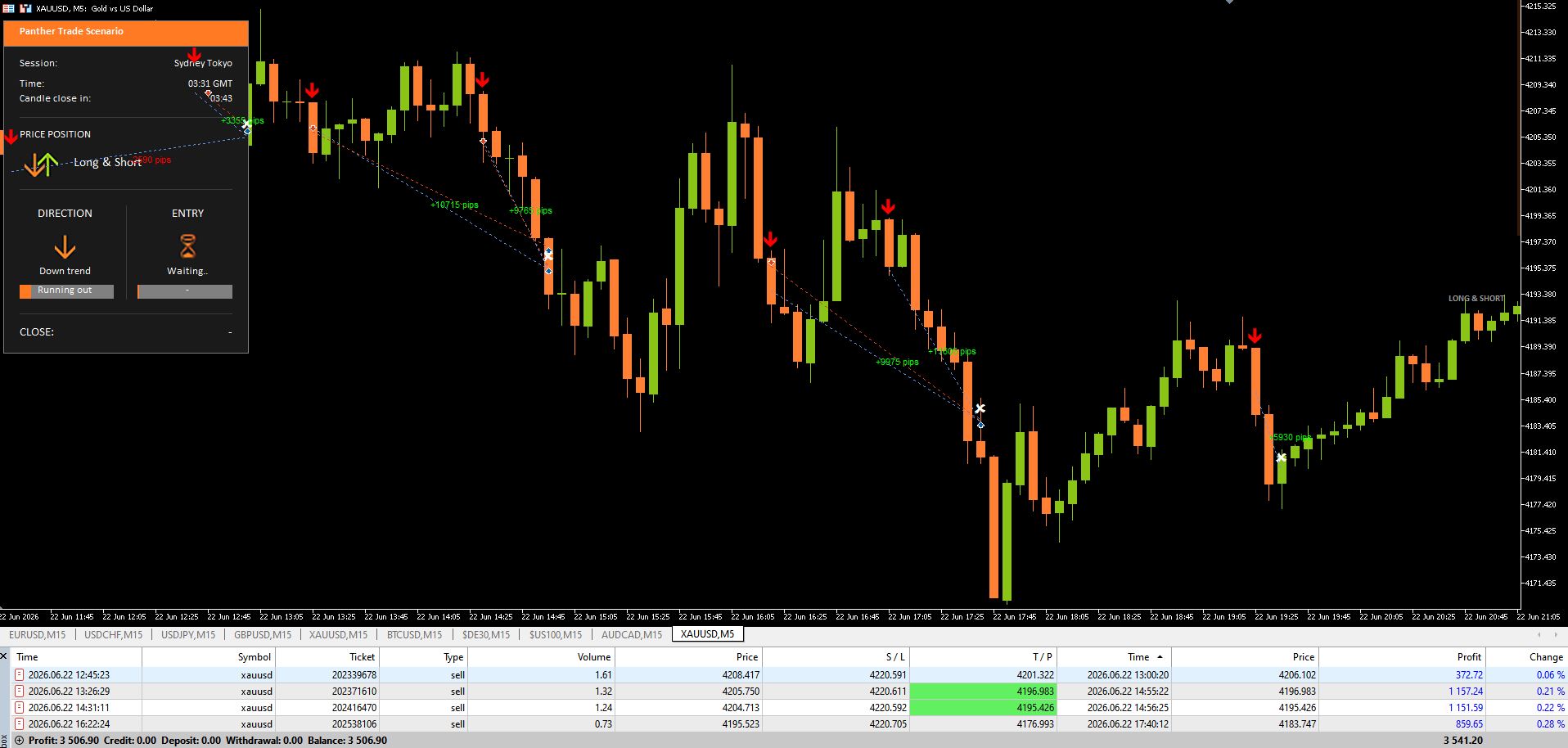
Fig. 1. Final result of the XAUUSD trading day: positions opened based on Panther Trade Scenario signals.
How the Signal Appeared and the Trades Were Opened
Part of the trading process was recorded while the market was moving.
The video shows how Panther Trade Scenario first identifies the bearish direction and waits for the entry conditions to be completed. Once the scenario is fully formed, the signal appears on the chart, the trade levels are calculated, and the positions are opened.
This makes it possible to see not only the final screenshot after the move was completed, but also the exact moment when the scenario appeared in real time.
Video showing the signal and the opening of the trades:
How the Trading Day Unfolded
At the beginning of the reviewed period, Panther Trade Scenario showed a bearish direction on XAUUSD, but no entry had been formed yet. The indicator remained in waiting mode until the price completed the required correction and all scenario conditions were met.
After the first signal appeared, an initial sell position was opened. As the bearish move continued, new entry opportunities formed on the chart.
As a result, four positions were opened during the day at different entry prices and with different position sizes.
Two trades reached their predefined Take Profit levels. Two other positions were closed before their original targets, but also finished with a positive result.
All four trades were opened in the same direction, but each of them had its own entry, risk parameters, and target.

Fig. 3. Parameters and results of four XAUUSD trades on June 22, 2026.
Summary
During one trading day, four XAUUSD sell trades were opened based on Panther Trade Scenario signals.
Two positions reached their predefined Take Profit levels. Two other trades were closed before their original targets. The total result after trading costs was +$3,506.90.
This trading day shows one practical way to use Panther Trade Scenario. The indicator helps structure market analysis and display the main trade parameters in advance, but it does not eliminate risk or make the final decision for the trader.
The main purpose of Panther Trade Scenario is not to promise a result, but to turn the current market structure into a complete scenario with a clear direction, entry point, Stop Loss, and target.
Learn more about Panther Trade Scenario and the available demo version:
Panther Trade Scenario trading system
MT4 Version | MT5 version | All trading reviews




