PropTrade Manager - The Complete Prop Firm Protection Solution for MT5
9 April 2026, 06:35

0
623
PropTrade Manager - The Complete Prop Firm Protection Solution for MT5
If you are trading on a Prop Firm account, you already know the biggest challenge is not making profit. It is avoiding rule violations that get your account terminated. One bad trade, one emotional moment, one news spike, and months of effort are gone.
PropTrade Manager is a trade management Expert Advisor for MetaTrader 5 designed from the ground up to solve this exact problem. It combines one-click execution, real-time drawdown monitoring, and automatic position protection into a single professional dashboard.
This article walks through every feature in detail so you can understand exactly how PropTrade Manager protects your funded account.

THE PROBLEM: WHY PROP FIRM TRADERS LOSE ACCOUNTS
Prop firms like FTMO, E8 Funding, and Topstep have strict rules. The most common reasons traders fail are:
1. Exceeding the daily drawdown limit (usually 5%)
2. Exceeding the max drawdown limit (usually 10%)
3. Trading during restricted news events
4. Not using stop losses
5. Emotional overtrading after losses
6. Holding positions over the weekend
PropTrade Manager addresses ALL of these risks with automated protection that runs in real-time.
---
FEATURE 1: PROP FIRM PROTECTION ENGINE
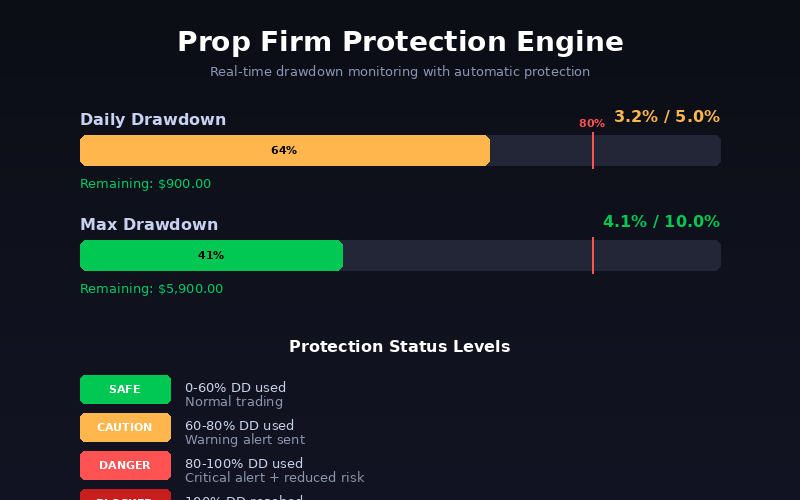
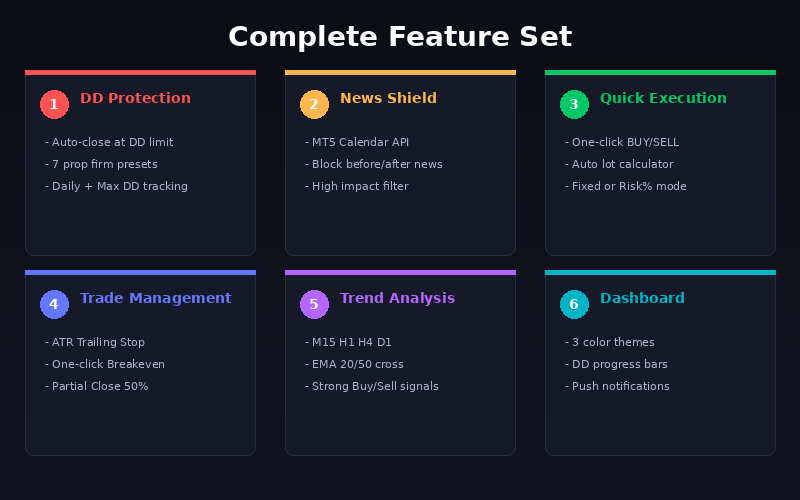
This is the core of PropTrade Manager. The protection engine monitors your account equity every 500 milliseconds and takes automatic action when drawdown limits are approached.
How the DD monitoring works:
The engine calculates your current drawdown as a percentage of your starting balance for the day (daily DD) and your overall account (max DD). It displays this on visual progress bars with the exact remaining dollar amount.
The status system works in four levels:
SAFE (0-60% of DD limit used): Normal trading. Green status indicator. No restrictions.
CAUTION (60-80% used): Yellow warning. You receive an alert notification. This is your signal to reduce position sizes.
DANGER (80-100% used): Red warning. Critical alert with push notification. You should consider closing some positions.
BLOCKED (100% reached): All open positions are immediately closed. Trading through the panel is disabled. This prevents you from breaching your prop firm rules.
Built-in presets:
Instead of manually entering drawdown percentages, you can select from 7 built-in presets:
- FTMO: 5% daily, 10% max
- MyForexFunds: 5% daily, 12% max
- The Funded Trader: 5% daily, 10% max
- True Forex Funds: 5% daily, 10% max
- E8 Funding: 5% daily, 10% max
- Topstep: 4.5% daily, 5% max trailing
- Custom: Set your own percentages
Select your firm from the input dropdown and all limits are configured automatically.
Additional protection features:
Force Stop Loss: When enabled, the panel will not allow any trade to be executed without a stop loss. This prevents accidental unprotected entries.
Max Open Trades: Set a maximum number of concurrent positions. The panel blocks new trades when this limit is reached.
Min Hold Time: Some prop firms require trades to be held for a minimum duration. Set this in seconds and the panel enforces it.
Weekend Auto-Close: Automatically closes all positions on Friday at 22:00 server time to avoid weekend gap risk.
---
FEATURE 2: NEWS PROTECTION
High-impact news events like NFP, FOMC, and CPI releases cause massive volatility. Many prop firms either restrict or discourage trading during these events.
PropTrade Manager integrates with the MT5 Economic Calendar API to automatically detect upcoming news events. When a high-impact event is approaching:
- Trading is blocked X minutes before the event (configurable)
- Trading remains blocked X minutes after the event (configurable)
- The dashboard displays the active news event name
- You can filter by high-impact only or include all news levels
This works for all currency pairs. The system automatically detects which currencies are affected by each news event and blocks trading on relevant pairs.
---
FEATURE 3: SPREAD FILTER
During volatile periods and news events, spreads can widen dramatically. A wide spread means your stop loss is effectively closer, increasing risk beyond your intended level.
The spread filter allows you to set a maximum acceptable spread in points. When the current spread exceeds this value, the panel blocks new trade execution. The current spread is displayed on the dashboard with color coding: green for normal, red for excessive.
FEATURE 4: QUICK EXECUTION
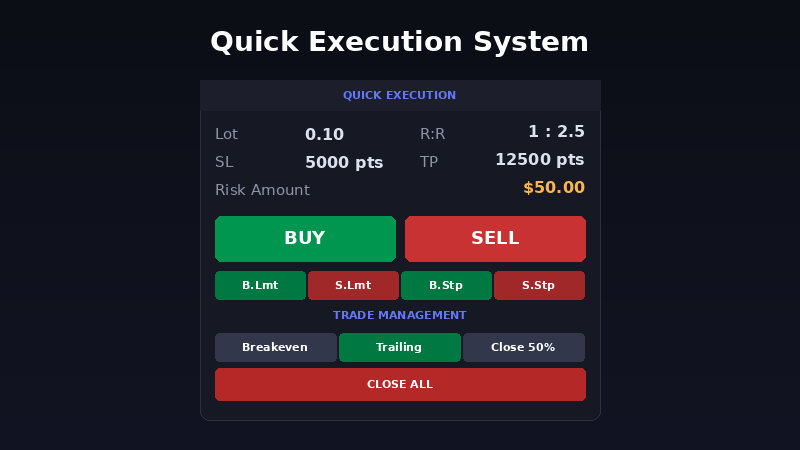
PropTrade Manager provides a complete one-click trading system.
Lot calculation: You have two modes. Fixed Lot mode uses a predetermined lot size for every trade. Auto Risk% mode calculates the lot size based on your risk percentage and the distance to your stop loss. For example, with a $100,000 account, 1% risk, and a 500-point stop loss, the panel automatically calculates the exact lot size that risks $1,000.
Order types: Market orders (BUY/SELL) and four pending order types (Buy Limit, Sell Limit, Buy Stop, Sell Stop).
SL/TP lines: Draggable lines appear on the chart showing your planned stop loss, take profit, and entry price. As you drag these lines, the lot calculation, R:R ratio, and risk amount update in real-time on the dashboard.
Before executing any trade, the panel validates that your SL and TP are positioned correctly relative to the entry price and current market price.
---
FEATURE 5: TRADE MANAGEMENT
Once a trade is open, PropTrade Manager provides several management tools:
Breakeven: Moves your stop loss to the entry price plus spread compensation with one click. This locks in a break-even trade.
ATR Trailing Stop: An intelligent trailing stop based on the Average True Range indicator. Configure the ATR period (default 14) and multiplier (default 1.5). The trailing stop adjusts based on market volatility, giving your trade room to breathe in volatile conditions and tightening in calm markets.
Partial Close 50%: Closes half your position with one click. A common strategy is to close 50% at a certain profit level and let the rest run with a trailing stop.
Quick close buttons: Close All positions, Close only Profits, Close only Losses, Close only Buy positions, Close only Sell positions, or Delete all Pending orders.
---
FEATURE 6: MULTI-TIMEFRAME TREND
The dashboard includes a trend analysis section that scans four timeframes: M15, H1, H4, and D1. It uses EMA 20/50 crossover on each timeframe to determine the trend direction.
Each timeframe shows a visual arrow indicator. The overall summary combines all four timeframes into a single verdict: STRONG BUY (3 or 4 timeframes bullish), STRONG SELL, BUY BIAS, SELL BIAS, or MIXED.
This helps you align your trades with the higher timeframe trend before clicking BUY or SELL.

FEATURE 7: PROFESSIONAL DASHBOARD
The dashboard is designed to show maximum information in minimum space. All sections are arranged by importance:
1. Quick Execution (top) - What you interact with most
2. Trade Management - Manage open positions
3. DD Protection - Monitor your safety margins
4. Daily P/L - Track daily performance
5. Trend - See multi-timeframe direction
6. Trade Info - Spread, candle timer, risk settings
7. Account - Balance, equity, free margin
8. Status Bar - Overall prop firm safety status
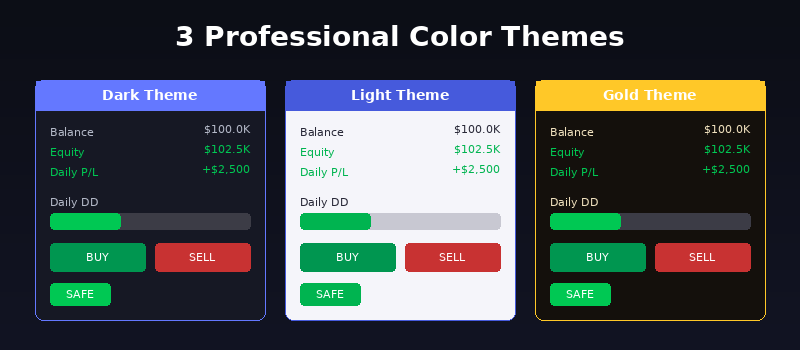
Three color themes are available: Dark (best for long sessions), Light (good visibility in bright environments), and Gold (premium look for gold traders).
The panel can be minimized to save chart space and repositioned anywhere on the chart.
---
COMPATIBILITY AND SETUP
PropTrade Manager works on all symbols (Forex, Gold, Indices, Crypto, Stocks) and all timeframes. Attach it to one chart per account. It monitors all open positions on the account regardless of which symbol or EA opened them.
It is fully compatible with other Expert Advisors running on the same account. PropTrade Manager acts as a safety layer on top of your existing trading setup. If your other EAs cause drawdown that approaches your limits, PropTrade Manager will close positions to protect your account.
Setup takes less than one minute:
1. Attach to any chart
2. Select your Prop Firm preset
3. Set Fixed Lot or Risk%
4. Start trading
SUPPORT
I provide full support for all buyers. If you encounter any issues, have questions about settings, or want to request new features, message me directly on MQL5. Updates are free for all buyers.
PropTrade Manager is available on the MQL5 Market. Try it on a demo account first to familiarize yourself with all features before using it on your funded account.
Happy trading!
Hicham M. Almoustafa
MQL5 Profile: https://www.mql5.com/en/users/playerhm3


