Protect Every Open Position Automatically With Gold Stop Guardian

💎 TL;DR
Gold Stop Guardian is a MT5 utility for XAUUSD manual traders who want to make sure every open position has a proper, well-placed stop loss - without slowing down their execution. It scans your live trades in real time, calculates a recommended stop using structure, ATR, and spread data, shows you the exact dollar risk and risk percentage per trade, and lets you apply the improved stop in a single click. No EA trading. No automation you didn't explicitly enable. Just protection, clearly laid out in front of you while the market is still moving.

🔔 The Problem
You've been trading gold long enough to know the drill. You spot the setup, you enter fast - sometimes a little faster than you'd like - and you tell yourself you'll place the stop properly once you're in. Then price starts moving, a new candle forms, and suddenly you're managing a live trade on XAUUSD with either no stop at all, or one you dragged to a round number just to have something there.
It's not laziness. It's the reality of trading a market that moves $15 to $30 in a matter of minutes. The entry matters. The stop feels like something you can fix later.
Except "later" is when the news drops. Or when London opens with a gap. Or when you step away from the screen for a few minutes and come back to a trade that's already moved through where your stop should have been.
XAUUSD punishes undefined risk. A 0.50 lot position without a stop can accumulate several hundred dollars of loss surprisingly quickly during volatile conditions. That's not a worst case - that's a normal outcome during any active session.
The real problem isn't that traders don't know stop losses matter. It's that the workflow for placing a good stop - one grounded in actual structure, current volatility, and spread conditions - takes time and attention that's genuinely hard to spare in the middle of a live trade. That cognitive load is real, and it compounds when you're managing more than one position at once.
🏆 The Real Engine
Gold Stop Guardian MT5 runs continuously on your chart, watching every open position. For each trade, it calculates a recommended stop using a hybrid approach that considers recent price structure, current ATR-based volatility, and live spread conditions - then compares that recommendation against what you currently have (or don't have) in place.
The recommendation isn't a static point offset. All key parameters are configurable: structure lookback, ATR period, ATR multiplier, spread buffer, and more. The defaults are calibrated for XAUUSD on M5, but the inputs are yours to adjust based on your own trading style and timeframe.
The tool then tells you, per trade, what applying that stop would cost you in real dollars and as a percentage of account equity. It also shows your combined exposure across all open positions simultaneously - a portfolio-level risk view that becomes especially valuable when you're running multiple XAUUSD trades across sessions.
Nothing moves without your approval unless you explicitly choose otherwise. The manual Apply button keeps you in control at all times. The automatic protection layer is available for traders who want it - but it is designed to be conservative by default, and many modifications will require manual confirmation depending on how you configure the inputs.
🔎 What the Tool Shows
🏅 Real-Time Stop Status Across All Positions
The main panel gives you an instant summary: how many trades are open, how many have no stop, how many are protected, and how many need attention. There's no digging through individual order windows - the panel surface tells you the whole picture in seconds.
🏅 Per-Trade Risk in Money and Percentage
Every row shows your current stop risk in dollars and as a percentage of account balance. Knowing your stop is 14 points away from entry tells you very little without knowing what 14 points costs on that specific lot size. The panel shows both numbers, side by side, for every trade simultaneously.
🏅 Portfolio Risk at a Glance
The summary header displays your combined estimated risk across all open positions - total dollar exposure and total account percentage - in one place. For traders managing multiple trades or working within prop firm drawdown limits, this combined view is the number that matters most.
🏅 Stop Quality Rating
Each position receives an algorithm-based quality rating - Tight, Normal, Wide, or Unsafe - calculated according to the current stop distance relative to market structure and volatility rules. These ratings are not universal judgments; they reflect how your stop compares against the tool's configured thresholds. A stop that appears inconsistent with the selected structure and volatility rules may be flagged as Unsafe. You decide whether to act on that signal.
🏅 Recommended Stop with Intent
Where the tool has a calculated stop to suggest, it shows you the recommended price level and flags the intent - whether that's adding an initial stop to an unprotected trade, moving to break-even once the trade is in profit, locking in gains, or tightening against structure. You decide whether to apply it.
🏅 Status Badges Per Position
Each row carries a live status badge: OK (protected, no action needed), Updated (stop was just improved), Locked (profit secured), or Attention (needs review). The color logic is immediate - green means protected, amber means check it, red means act now.
🏅 Visual Stop Lines on Chart
Current and recommended stop levels draw directly on the chart as horizontal lines with labels. You see where your stop is and where it's suggested to be - spatially, on the same candles you're reading.
🏅 Alerts for Unprotected Trades
If a position is running without a stop, the tool alerts you via popup. Push notifications are available for mobile. Configurable per alert type, with cooldown controls to prevent alert fatigue.
🚀 What This Looks Like in Real Trading
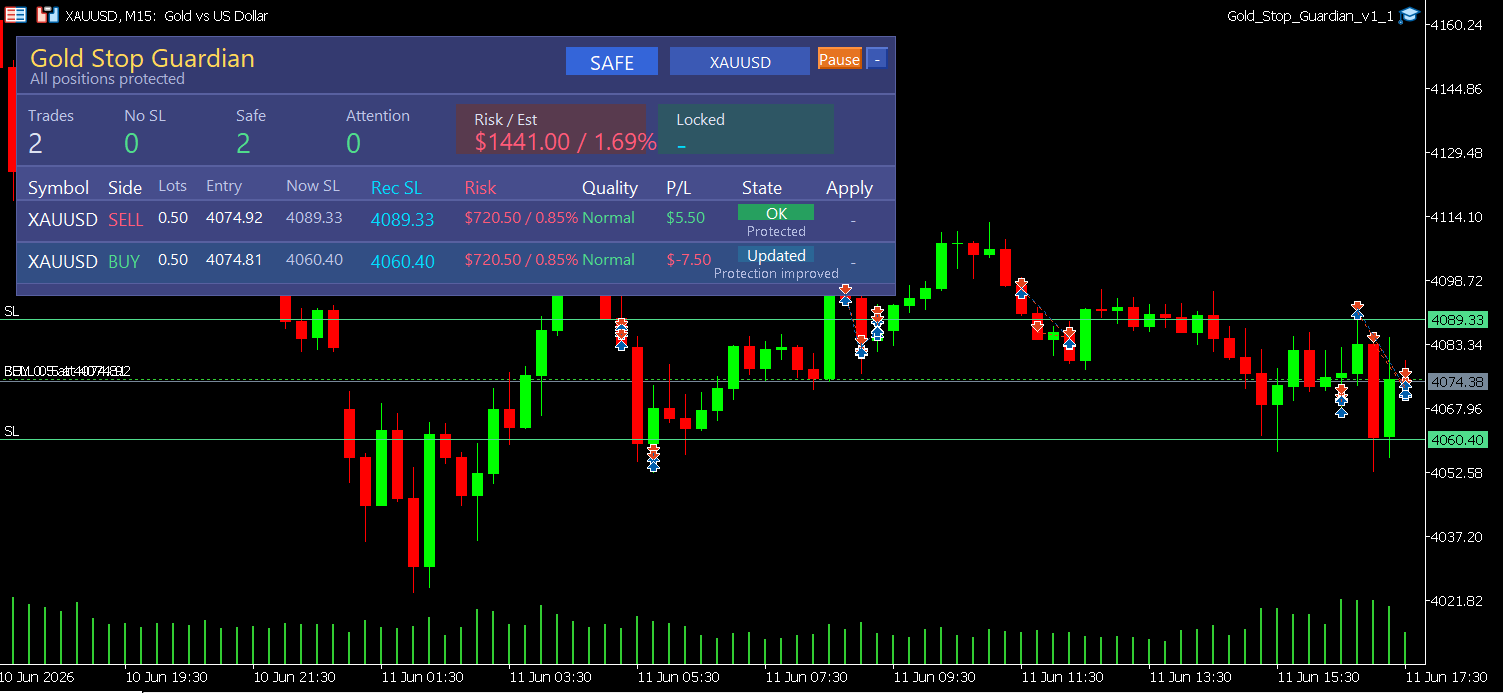
The screenshot from a live XAUUSD M15 session shows two positions running simultaneously - one SELL at 4074.92 and one BUY at 4074.81, both 0.50 lots. The panel shows:
- Combined portfolio risk: $1,441.00 / 1.69% of account across both positions
- SELL position: Stop at 4089.33, quality rated Normal, status OK - protected
- BUY position: Stop at 4060.40, status Updated - protection was just improved according to the configured rules, the new stop is more appropriate than what was previously in place
The header badge reads "SAFE" in green, meaning all positions have valid protection in place. The No SL counter reads zero. This is generally the preferred state before leaving the terminal unattended.
The chart shows both stop lines rendered directly at the correct levels - 4089.33 above for the SELL, 4060.40 below for the BUY. No ambiguity about where protection actually sits.
One thing worth noting: the screenshot represents clean trending conditions. In choppy or ranging markets, structure-based stops can be placed wider than you might expect, or may need manual review before applying. The tool surfaces the recommendation - final judgment on whether to use it remains yours.
🌟 Practical Advantages Worth Noting
The panel is designed to stay on-screen without being in the way. It supports four color themes, minimizes to a header strip, and can be repositioned to any corner of the chart. If you're running multiple charts, you can keep it on your main XAUUSD chart and let it monitor positions continuously while you focus on analysis.
The tool supports filtering by magic number, so if you run a mix of manual trades and EA-generated positions, you can scope Guardian to only watch the ones you care about.
The Pause button is deliberate. If you're in the middle of a manual management decision and don't want the tool calculating changes while you're thinking, one click pauses automated protection without closing the panel.
Broker compatibility is handled through built-in spread checks and freeze level awareness. If your broker's current spread is above the configured threshold, or if the broker's freeze level would reject a modification, the tool detects this and does not attempt an order that would fail anyway. This matters on XAUUSD, where spread and execution conditions can shift quickly during high-volume hours.
The automatic protection mode is intentionally conservative. Cooldowns, minimum improvement thresholds, spread filters, and quality checks mean that many rows will stay in a review state until conditions are right - or until you click Apply manually. This is by design, not a limitation.
🎁 Who This Is For
This tool was built for XAUUSD manual traders who trade actively and manage their own positions. If you regularly have multiple trades open across sessions, find yourself placing approximate stops that you intend to refine later, or trade during volatile London/New York overlap hours where precise stop placement matters, Gold Stop Guardian is designed to simplify this part of your workflow.
It also suits traders who are disciplined about entries but find stop calculation under live conditions genuinely difficult to sustain consistently - the mental load is real and this tool is designed to reduce it.
Prop firm traders working within daily drawdown limits will find the combined portfolio risk display particularly useful, since it shows total account exposure across all open positions at a glance.
This tool is NOT suited for traders who:
- Want a fully automated system that opens, manages, and closes trades without manual input
- Are looking for a signal or strategy tool
- Prefer to calculate all stop distances manually without panel assistance
- Are primarily trading instruments other than gold (though it will function on any MT5 symbol)
📢 What It Doesn't Do
Gold Stop Guardian does not open trades. It does not close trades. It does not use grid logic, martingale, hedging, or any position-building strategy. It does not make decisions about when to enter or exit. It does not guarantee that your stop will prevent a loss - in a fast-moving market, stops slip, spread widens, and execution is never guaranteed. It does not override your broker's minimum stop distance rules.
It is a visibility and protection utility. It makes the risk you already have more visible and easier to manage. The trading decisions remain yours - the tool is there to make sure those decisions are better informed.
🎁 Get the Tool
👉 Gold Stop Guardian MT5 on MQL5 Market: https://www.mql5.com/en/market/product/170403
If you're running live XAUUSD positions without a clearly defined, well-placed stop on every trade, this tool is designed to reduce the chance of leaving a position unprotected during volatile market conditions.
🧰 Related Tools
👉 Gold Trade Manager MT5 - If you want one-click entry with stop and take-profit placement built into the execution itself, this pairs naturally with Guardian as your pre-entry layer. Guardian handles post-entry protection; Trade Manager handles execution quality at the open.
👉 Equity Protector Pro MT5 - Guardian protects individual trade stops. Equity Protector Pro manages account-level drawdown, pausing activity automatically when daily loss limits approach. The two tools address different layers of the same risk management problem and are designed to work alongside each other.
👉 Gold ATR Risk Calculator - If you want to size your position based on your intended stop distance and account risk percentage before you enter, this calculator gives you the lot size number. Gold Stop Guardian then takes over once the trade is live.
❓ FAQ
✅ Does this work with EA-generated positions or only manual trades? Both. You can filter by magic number to watch only specific EA positions, only your manual trades, or everything at once. The scope is fully configurable in the inputs.
✅ Will it move my stop automatically without asking me? The automatic protection mode is available and can be enabled, but it is conservative by default. When active, it will add initial stops to unprotected positions and improve stops that qualify for update according to the configured protection rules - minimum improvement threshold, spread conditions, quality filters, and cooldown windows all apply. Many situations will stay in a review state and require you to click Apply manually. If you prefer full manual control, you can run the tool in Review Only mode, where it shows recommendations but never modifies anything until you click.
✅ How does it calculate the recommended stop? The default method is Hybrid - it combines recent price structure (swing highs and lows from a configurable lookback window, defaulting to 80 bars on M5), an ATR-based volatility buffer, and live spread data to find a stop level that is logically placed relative to current market conditions and practically executable at your broker. You can switch to pure ATR, fixed points, or structure-only in the settings. All key parameters are adjustable.
✅ Will it widen my stop if it thinks the current one is too tight? No, by default. The "Never Widen Risk" protection means the tool will not push your stop further away from entry in a way that increases your loss exposure. It only applies improvements that reduce or maintain your existing risk.
✅ Does it work during high-spread periods like news events? The tool monitors live spread and will alert you if spread exceeds your configured threshold. It also respects your broker's freeze level, so it will not attempt modifications during periods when the broker would reject them. That said, stop execution during extreme news conditions involves slippage and spread behavior that no utility tool can fully control - this applies to manual and automated stop placement alike.
✅ I'm on a prop firm account with strict drawdown limits. Will this help? Yes. The combined portfolio risk display shows your total account exposure in dollars and percentage across all open positions simultaneously. This is the number you need when managing against a maximum daily drawdown rule, and having it visible at all times reduces the mental load of tracking it manually across multiple trades.
🎁 New to Gold Algo Lab?
Start with the Gold Algo Lab Tool Map - a practical guide that organizes our MT5 tools into 6 connected stages: market context, setup selection, risk planning, trade execution, position management and account protection.
→ Gold Algo Lab Tool Map: Where to Actually Start With MT5 Tools for XAUUSD
https://www.mql5.com/en/blogs/post/771930
Do not choose a tool by its name alone. Start with the part of your trading process that needs the most control, then build your workflow one layer at a time.
Gold Algo Lab builds practical, risk-first MT5 tools for serious XAUUSD traders, shaped by 8 years of developing and trading real systems to help traders identify clearer setups, manage risk with greater confidence and execute with more discipline.