
TW Wolf Martingale – Professional Grid & Martingale EA for Serious Traders

TW Wolf Martingale :
Professional Grid & Martingale EA for Serious Traders
Introduction to TW Wolf Martingale
TW Wolf Martingale is an advanced Grid Trading EA and professional Forex Expert Advisor developed specifically for serious traders who demand precision, flexibility, and strict risk control in automated trading systems. Unlike basic grid or martingale robots that rely on aggressive position scaling, this Smart Grid EA is designed to provide controlled execution across various market conditions.
The philosophy behind TW Wolf Martingale is not blind automation, but structured and disciplined trading. By combining grid logic with intelligent risk management tools, this Advanced Forex EA allows traders to adapt their strategies dynamically without relying on fixed, rigid, or dangerous configurations. The primary objective is safer grid trading behavior with transparency and control.
Understanding Grid and Martingale Trading for Professionals
Grid and martingale strategies are widely known in automated trading due to their ability to capitalize on market fluctuations. However, when used improperly, they can expose traders to significant drawdowns. TW Wolf Martingale addresses these challenges by offering a Safe Grid Trading EA framework that emphasizes configurability, monitoring, and risk awareness.
Instead of forcing the trader into a single execution model, the EA allows full customization of entry logic, lot scaling, trade spacing, and exit management. This makes it suitable not only for experienced traders but also for disciplined users who understand the importance of risk control in grid-based systems.

Advanced Trading Features Explained
Dual Entry System for Flexible Execution
One of the core strengths of TW Wolf Martingale is its dual entry system. Traders can choose between pure grid-based execution or indicator-confirmed entries. This flexibility allows the EA to perform effectively in both ranging and trending markets, adapting to changing price behavior without manual intervention.
Multi-Timeframe Compatibility
This Forex Expert Advisor is not limited to a specific timeframe. Whether used on lower timeframes for more frequent trading or higher timeframes for reduced exposure, the EA operates entirely based on the trader’s chosen risk management EA settings. This ensures consistency across different trading styles.
Multi-Market Support Across Assets
TW Wolf Martingale is compatible with a wide range of instruments, including Forex pairs, Gold (XAUUSD), indices, and cryptocurrencies. This multi-market capability makes it a versatile Grid Trading EA suitable for diversified portfolios, provided the selected instruments offer sufficient liquidity and stable volatility.
On-Chart Trade Mode Control
A key professional feature is the ability to control trade behavior directly from the chart. Traders can switch entry modes or manage execution logic in real time without stopping the EA. This level of interaction bridges the gap between manual decision-making and automated execution.
Emergency Trade Protection
Market conditions can change rapidly. TW Wolf Martingale includes an emergency trade protection feature that allows traders to instantly stop new entries during high-risk periods while continuing to manage existing positions. This is a crucial element of a Safe Grid Trading EA.(By buttons on the chart)
Advanced Take Profit Management
The EA supports both individual Take Profit levels per position and combined Take Profit for grouped trades. This allows traders to optimize exits depending on whether the market is ranging or trending, improving overall risk-to-reward efficiency.
Adjustable Lot Scaling and Grid Distance
Unlike fixed martingale systems, TW Wolf Martingale offers full control over lot multipliers and minimum grid spacing. This enables precise position sizing and prevents uncontrolled exposure, reinforcing its role as a professional Advanced Forex EA.
Trend Misalignment Alerts
To reduce the risk of excessive entries against the dominant market direction, the EA includes a trend misalignment alert system. This feature warns traders when grid expansion may conflict with prevailing trend conditions.
Multi-Symbol Trading Capability
TW Wolf Martingale can manage multiple symbols simultaneously, even in different trade directions. This makes it suitable for traders who operate diversified strategies across several markets using a single Forex Expert Advisor.

On-Chart Trade Statistics
Transparency is essential for professional trading. The EA displays real-time statistics on the chart, including drawdown, number of open positions, and total traded volume per symbol, allowing continuous performance monitoring.
Multiple Entry Modes
With four distinct entry modes, traders can fine-tune how the EA behaves under different market environments. This adaptability strengthens the EA’s position as a Smart Grid EA rather than a one-dimensional robot.
Spread Filter Protection
High spreads can significantly impact grid strategies. TW Wolf Martingale includes a spread filter to prevent entries during unfavorable trading conditions, improving execution quality.
Full Risk Customization
From beginners seeking conservative exposure to professionals managing larger accounts, the EA offers fully adjustable parameters to align with individual risk tolerance and trading objectives.

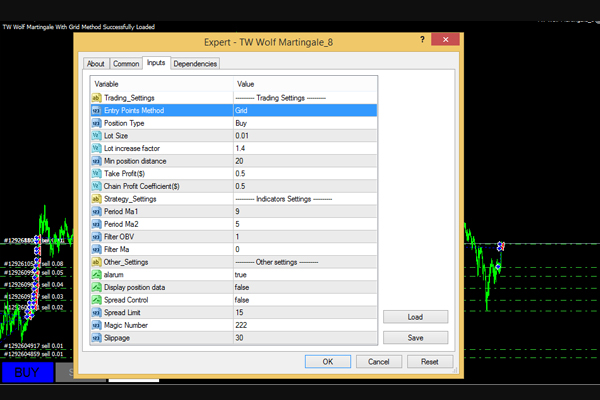
Expert Parameters and Settings Guide This section provides a detailed explanation of the main parameters and settings of TW Wolf Martingale, allowing traders to configure the Expert Advisor based on their trading style, risk tolerance, and market conditions.
Trade Entry Parameters
Entry Mode Selection
The Entry Points Method parameter is used to determine the trade entry logic, which can be set to either Indicator-based or Grid-based execution.
Indicator Mode
In this mode, trade entries are determined by the indicator settings. The EA does not open trades against the direction defined by the indicators.
This approach significantly reduces false entries. Although entries may occur slightly later compared to pure grid or averaging strategies, this mode offers lower risk exposure and more stable profit behavior.
Grid Mode
In Grid mode, if the market trend moves against the current position and the distance between the next candle open and the last entry exceeds the defined minimum distance, the EA opens an additional trade.
This mode accelerates position averaging and trade recovery. However, in strong uncorrected trends, the number of open positions may increase.
Directional Trade Control
The Position Type parameter determines the direction of trade entries. Traders can define whether the EA opens Buy or Sell positions based on technical or fundamental analysis.
To increase accuracy, users who purchase TW Wolf Martingale are gifted a professional trend indicator that helps them align their trades with prevailing market trends.
Note:
This parameter can be changed or locked instantly using on-chart buttons, without the need to reopen the Expert Advisor settings.
Lot Management Parameters
Initial Lot Size
The Lot Size parameter defines the volume of the first position when no trades are currently open. All subsequent trade volumes are calculated automatically based on this initial value.
Lot Multiplier Configuration
The Lot Increase Factor parameter determines how position volume increases when additional trades are opened against the trend.
This parameter must be configured carefully based on account balance, symbol volatility, and risk tolerance.
Note:
It is strongly recommended to test this setting thoroughly in the Strategy Tester before using it on a live account.
Minimum Grid Distance
The Min Position Distance parameter defines the minimum distance required between grid entries when opening trades against the trend.
If the distance between the indicator signal and the next candle open is smaller than the previous position, the EA will not open a new trade.
Usage Guidelines:
-
Prevent entries during ranging market conditions by setting the value larger than the first zigzag range length.
-
Reduce excessive counter-trend entries by using higher values.
-
Optimize grid behavior based on symbol type and timeframe.
Note:
Recommended values are:
-
Currency pairs: 3 to 20
-
Gold (XAUUSD): 20 to 50
Always test settings on at least one year of historical data in the Strategy Tester.
Take Profit and Exit Parameters
Take Profit
The Take Profit parameter defines the TP level when only one position is open for a specific symbol. This value is hidden, accounts for commission and swap, and always closes trades at a positive monetary value (in dollars).
Chain Profit Coefficient
The Chain Profit Coefficient parameter defines the profit target in dollars for a chain of positions opened against the trend.
This coefficient is multiplied by the number of open positions. When the average profit of all positions reaches this calculated value, all trades for that symbol are closed simultaneously.
Indicator Confirmation Settings
The Indicators Settings section consists of four main parameters:
-
The first two parameters control two Moving Averages that are recalculated and filtered. The second MA is designed to be approximately half the value of the first MA.
-
Smaller values produce noisier signals.
-
Larger values generate smoother and more reliable signals.
-
-
The Filter OBV parameter applies a volume-based filter to the Moving Averages. Values between 1 and 6 are recommended.
-
The Filter MA parameter is a rounding coefficient applied to the final indicator output.
-
It has limited impact on currency pairs.
-
For Gold (XAUUSD), values between 10 and 20 are recommended.
Other Settings
Alarm Settings
When enabled, the alarm notifies the trader if the number of open positions increases against the market trend. This check is performed separately for each symbol and position type.
Display Position Data
When enabled, real-time chart data is displayed in the upper-left corner, including:
-
Drawdown per symbol
-
Number of open positions
-
Total open volume
Data is separated by symbol and position type, which is especially useful when managing multiple instruments simultaneously.
Spread Filter Settings
Spread Control
When enabled, and if a maximum value is defined in the Spread Limit parameter, the EA will not open new trades during periods of high spread.
Multi-Symbol Management Parameters
Magic Number
The Magic Number parameter allows traders to manage multiple symbols simultaneously by assigning a unique Magic Number to each symbol and position type.

The development plan for this product continues, and with its affordable purchase, expect more amazing algorithms from Trade Wizards team.