

MQL5 Developer Gotchas (Part 2): A Multi-Line Text Block for Chart Labels Beyond the 63-Character Limit
 48
 0

Contents
- Introduction
- What is already known
- How the limit behaves
- Architecture
- Measuring text
- The wrapper
- The label block
- The canvas block
- Using a block in an EA
- Verification
- The Python consistency check
- Screenshots against TextGetSize and against the stored text
- Strategy Tester runs and cost
- Limitations
- What the checks do not cover
- Conclusion
- Attached files
Introduction
A status line of 158 characters that I set on an OBJ_LABEL object in the demo script of this article ended in the middle of a word. The chart showed "...3 open positions, floatin" and nothing after that. The ObjectSetString() call had returned true, and GetLastError() returned 0. When I read the text back from the object, I got the first 63 characters.
This article is the second part of a series on MQL5 behaviors that compile and run but produce wrong results without any message. Part 1 treated the input group lines that shift the parameters of iCustom(). Here the subject is the text of chart objects. On build 6230, each of the five native text object types that I tested kept 63 UTF-16 code units of a longer text and dropped the rest without a message. A panel that shows an order comment, a news headline, or a status sentence of more than 63 code units loses the end of the text in the same way.
The title and the earlier articles call this limit a limit of 63 characters. The terminal counts UTF-16 code units, which is not the same thing. A Latin, Cyrillic, or CJK letter is one code unit, an emoji is two, and a letter with a combining accent is two. In this article, every count of the limit is given in code units.
The article builds a small set of include files around one question. How can an EA show a long text with native chart objects, and how can the EA find out that a text was cut? The files consist of the following parts.
- CScreenMeter measures the width of a text in pixels with TextGetSize(). CFixedMeter gives each code unit the same width, so that the tests do not depend on a font.
- CTextWrap breaks a text into lines. A line ends at a pixel width, at 63 code units, or at a line break of the text.
- CLabelBlock shows the lines as a stack of OBJ_LABEL objects and reads each label back to compare the text.
- CCanvasBlock shows the same lines on one bitmap label drawn with CCanvas. The 63-unit cap of the native objects does not apply to it. The canvas block section lists its other limits.
I tested the code in six ways. First, a probe script measured the limit on five object types and drew long strings on a canvas. Second, 67 unit tests check the logic. Four of these tests are mutation tests that must report a defect. Third, a Python consistency check reads 9,196 exported wrapped lines and checks the wrap rules without MetaTrader. Fourth, a screenshot check compares the pixel width of 27 rendered label rows in three fonts with the width that TextGetSize() reported. The same check compares what five object types and a canvas line display with the text they store. Fifth, two Strategy Tester runs refresh a block more than 7,000 times each, one run with labels and one with the canvas. Sixth, a timing script measures the cost of one update.
The numbers in this article come from build 6230 of the terminal on one system, from a chart of EURUSD H1. Most measurements use the font Arial at 10 points. While I was revising the code, the terminal updated itself to build 6276. On that build, I ran the unit tests on the current code, repeated the probe and the tester runs, and ran the sensitivity checks. The table below lists the environment. The statements hold for that setup. The next section explains what I measured, and the section "What the checks do not cover" lists what I did not.
| Setting | Value |
|---|---|
| Operating system | Windows 11 Pro, version 10.0.22621 |
| Display | 144 DPI as reported by the terminal, which corresponds to 150% scaling in Windows |
| Terminal builds | 6230 for the measurements, 6276 for the reruns and the sensitivity checks |
| Data source | EURUSD history of the MetaQuotes-Demo server, downloaded by the terminal |
| Python | 3.12.10, standard library only |
| TestChartText.mq5 | 300 random texts per property check |
| WrapExport.mq5 | 200 generated texts and 12 fixed texts |
| ChartTextDemo.mq5 | block width 620 pixels, screenshots on |
| UpdateCost.mq5 | 200 calls per measurement, three measurements per row |
| ChartTextEA.mq5 | refresh every 50 ticks, block width 620 pixels, labels or canvas |
What is already known
The limit itself is not new. The reference page of ObjectCreate() says that an object name should not exceed 63 characters. I did not find a limit for the text of an object on the reference pages of ObjectSetString(), of the object properties, and of OBJ_LABEL. The reference page of Comment() states a limit of 2,045 characters for the whole comment.
One published article mentions the limit for the text of an object. The article Graphical Interfaces VII: the Tables Controls (Chapter 1) says that all graphical objects capable of displaying text have a limitation of 63 symbols, and it recommends CCanvas as the way around the limit. The DoEasy library of Artyom Trishkin meets a limit with the same number for names. In DoEasy. Controls (Part 7) a graphical object name longer than 63 characters causes an error when a resource is created. In DoEasy. Controls (Part 14) a new naming algorithm removes that problem.
Two articles of the MQL5 Trading Tools series draw text panels. Part 14 builds a scrollable text panel on a canvas with line wrapping, and Part 9 contains a
function that shortens long strings for a wizard window. Both articles draw complete interfaces, and I found no section in either one that measures the limit of native objects.
This article adds the following points. First, on build 6230, I measured the limit on five object types and documented how the truncation happens. The truncation is silent, it counts UTF-16 code units, and it can split a surrogate pair. Second, I compared the stored text with what the chart displays. Third, I showed that two object names that share their first 63 code units refer to the same object. Fourth, the wrapper is a small tested class that respects the pixel width and the 63 code units at the same time. Fifth, the label block and the canvas block share one interface, and the label block can read its own text back to detect a cut. Finally, I measured the cost of an update for both blocks. The number 63 and the canvas workaround were published before.
How the limit behaves
The probe script TextLimitProbe.mq5 creates an object of each of the five types, sets a text of a chosen length, and reads the text back. The text consists of the digits 0 to 9 in a repeating sequence, so that the cut point can be read from the result. The probe calls ResetLastError() right before each ObjectSetString() call, so the error code that it prints belongs to that call.
//+------------------------------------------------------------------+
//| ProbeTypes                                                       |
//| Sets a text of every length on every text object type and reads  |
//| the stored text back.                                            |
//+------------------------------------------------------------------+
void ProbeTypes(void)
  {
   for(int t=0; t<ArraySize(g_types); t++)
      for(int k=0; k<ArraySize(g_lengths); k++)
        {
         string name="CTL_type";
         ObjectDelete(0,name);
         if(!ObjectCreate(0,name,g_types[t],0,TimeCurrent(),SymbolInfoDouble(_Symbol,SYMBOL_BID)))
           {
            PrintFormat("LIMIT type=%s len=%d create_failed err=%d",g_type_names[t],g_lengths[k],GetLastError());
            continue;
           }
         string want=Digits(g_lengths[k]);
         ResetLastError();
         bool ok=ObjectSetString(0,name,OBJPROP_TEXT,want);
         int err=GetLastError();
         string got=ObjectGetString(0,name,OBJPROP_TEXT);
         PrintFormat("LIMIT type=%s sent=%d set=%s err=%d stored=%d same=%s",g_type_names[t],g_lengths[k],ok ? "true" : "false",err,
                     StringLen(got),got==want ? "yes" : "no");
         ObjectDelete(0,name);
        }
  }
The table below shows how many code units each type retained. Each digit is one code unit. The ObjectSetString() call returned true and GetLastError() returned 0 in every row, including the rows with 5,000 code units.
| Code units sent | OBJ_LABEL | OBJ_TEXT | OBJ_EDIT | OBJ_BUTTON | OBJ_RECTANGLE_LABEL |
|---|---|---|---|---|---|
| 10 | 10 | 10 | 10 | 10 | 10 |
| 62 | 62 | 62 | 62 | 62 | 62 |
| 63 | 63 | 63 | 63 | 63 | 63 |
| 64 | 63 | 63 | 63 | 63 | 63 |
| 100 | 63 | 63 | 63 | 63 | 63 |
| 255 | 63 | 63 | 63 | 63 | 63 |
| 256 | 63 | 63 | 63 | 63 | 63 |
| 1,000 | 63 | 63 | 63 | 63 | 63 |
| 5,000 | 63 | 63 | 63 | 63 | 63 |
The unit of the limit is the UTF-16 code unit. A text of 70 Latin, Cyrillic, or CJK characters retained 63 of those characters. A text of 35 emoji, which is 70 code units, also retained 63 code units. The cut can fall inside a character encoded as two UTF-16 code units. A text of 62 letters followed by one emoji retained 63 units, and the last unit was 0xD83D. That value is the first half of the emoji and no valid character by itself.
LIMIT units tag=ascii sent=70 set=true err=0 stored=63
LIMIT units tag=cyrillic sent=70 set=true err=0 stored=63
LIMIT units tag=cjk sent=70 set=true err=0 stored=63
LIMIT units tag=emoji_pairs sent=70 set=true err=0 stored=63
LIMIT pairsplit set=true err=0 stored=63 last_unit=0xD83D
LIMIT linebreak set=true err=0 stored=17 has_lf=yes
A line break in the text of a label is stored, but the label does not draw it as a break. The text "line one" and "line two" with a line feed in the middle is kept with all 17 code units, and the chart shows both parts on one row. Fig. 1 shows this in the second row. The third row of the same figure shows the block that this article builds.
These rows show what the objects store. The screenshot section below checks what the chart displays. On the screenshot, OBJ_LABEL, OBJ_TEXT, OBJ_EDIT, and OBJ_BUTTON received an 80-digit text and displayed a text as wide as the stored 63 digits. OBJ_RECTANGLE_LABEL displayed no text at all.
Object names have a limit with the same number. For each name, the probe looks up the name that the terminal stored on the chart and prints its length. For a name of 62 or 63 code units, the first 63 units are the whole name, so the column found_by_first_63 does not apply and prints n/a.
LIMIT name kind=ascii len=62 created=true err=0 objects_added=1 stored_len=62 stored_last_unit=0x006E found_by_full=yes found_by_first_63=n/a
LIMIT name kind=ascii len=63 created=true err=0 objects_added=1 stored_len=63 stored_last_unit=0x006E found_by_full=yes found_by_first_63=n/a
LIMIT name kind=ascii len=64 created=true err=0 objects_added=1 stored_len=63 stored_last_unit=0x006E found_by_full=yes found_by_first_63=yes
LIMIT name kind=ascii len=70 created=true err=0 objects_added=1 stored_len=63 stored_last_unit=0x006E found_by_full=yes found_by_first_63=yes
LIMIT name kind=emoji len=70 created=true err=0 objects_added=1 stored_len=63 stored_last_unit=0xD83D found_by_full=yes found_by_first_63=yes
LIMIT collision first=true err=0 second=true err=0 objects_added=1
LIMIT collision read_a=text of B read_b=text of B
A name of 64 or 70 code units was created without an error, and the terminal stored the first 63 units of it. A name of 35 emoji was stored with 63 units as well, and its last unit was again the first half of an emoji. Two names of 66 code units that differ only in the last character gave a worse result. The second ObjectCreate() call returned true and the error code stayed 0, but the number of objects grew by one. Both names pointed to the same object, so the text written for the second name replaced the text of the first. The same truncation affects a label block when the prefix exceeds 59 code units. The block adds an underscore and three digits to the prefix, so the digits would be truncated. All labels of the block would then collapse into one object without any warning. The name limit and the text limit have the same number. I did not test whether they come from one mechanism, so this article treats them as two limits.
The tooltip of an object has a different limit. A tooltip of 64 code units was kept completely, and tooltips of 200 and 1,000 code units were both cut to 159. A chart comment of 3,000 code units could be read back completely from CHART_COMMENT. The reference page of Comment() says that the excess symbols are cut during output. I did not check what the chart displays for the tooltip or for the comment.
One more result is negative. My first plan was to measure the width of a drawn label with OBJPROP_XSIZE. On build 6230, after the label was drawn and the chart was redrawn, the property returned 0 for an OBJ_LABEL object. On build 6276, the same probe returned 190 pixels by 23 pixels. I did not check these values against the drawn text. The screenshot section below therefore checks the widths on screenshots.
One label that is cut, one label with a line break, and the wrapped block
The same chart, three ways to show a made-up status line
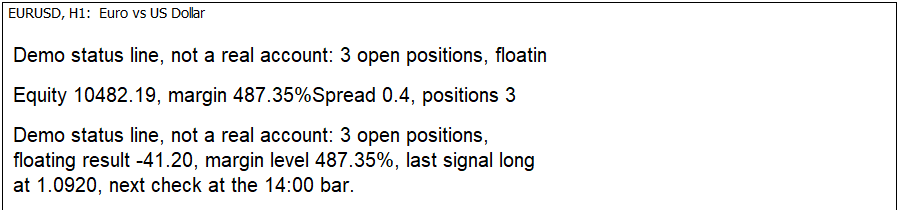
Fig. 1. The first row is one OBJ_LABEL that ends with the letters floatin. In the second row the line break is not drawn, so 487.35% and Spread run together. The next three rows show the same status line from CLabelBlock.
Architecture
The core module consists of four include files. The archive also holds a probe script, a unit test script, an export script, a demo script, a timing script, one Expert Advisor, and one Python script. Fig. 2 shows how the parts depend on each other.
Parts of the text block
From a long text to labels or to a canvas, and the checks around them
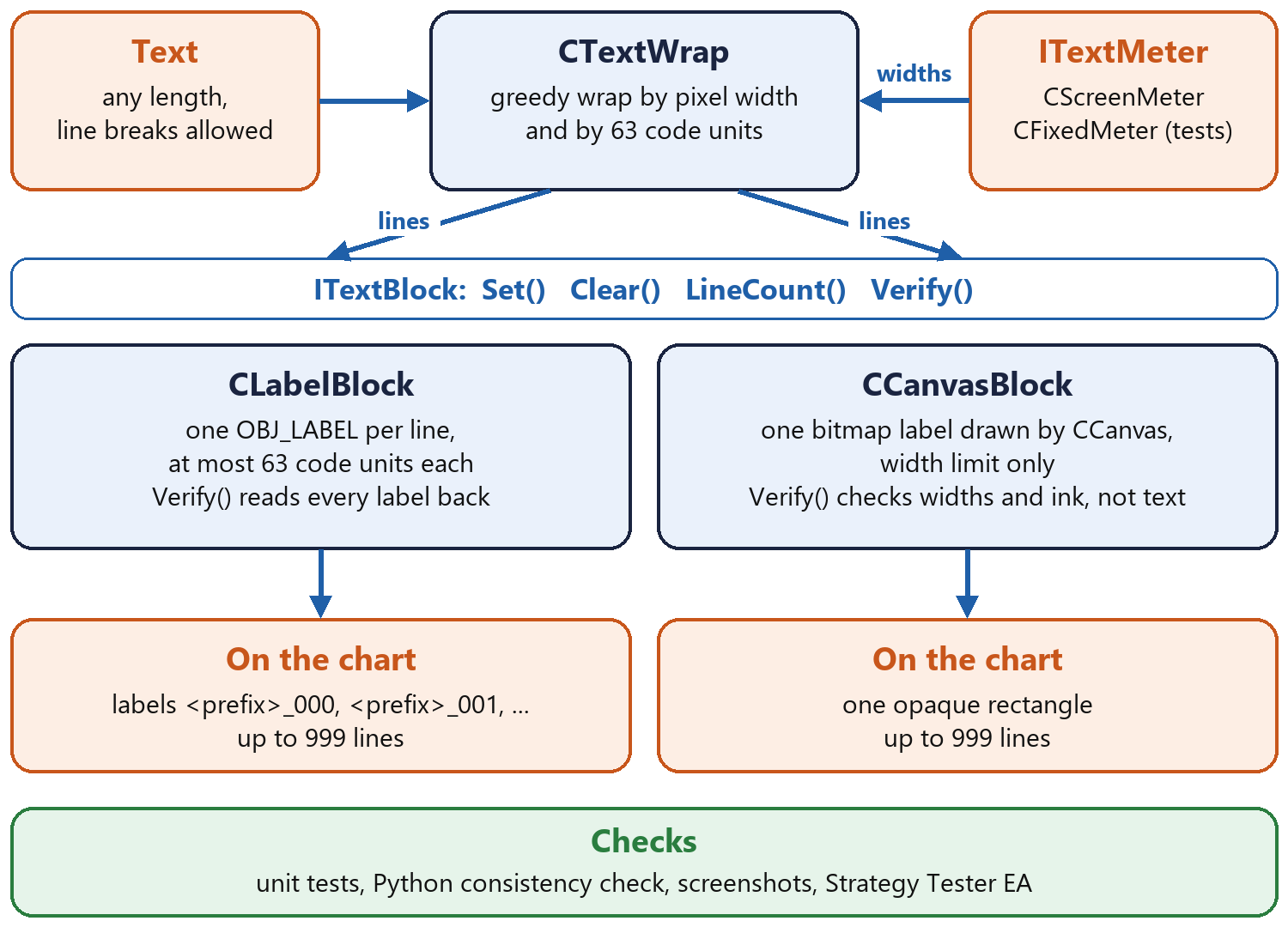
Fig. 2. CTextWrap turns a text and the pixel widths of ITextMeter into lines. CLabelBlock and CCanvasBlock show the lines, and the checks run against both blocks.
Both blocks implement the interface ITextBlock, so that the code of an EA can switch between the two blocks with one input.
//+------------------------------------------------------------------+
//| ITextBlock                                                       |
//| What a text block offers, whatever draws it. Set() returns the   |
//| number of lines or one of the TXT_ERR_ codes. Verify() returns   |
//| the number of problems the block can find by itself, and what it |
//| can find depends on the block (see each class).                  |
//+------------------------------------------------------------------+
interface ITextBlock
  {
   int               Set(const string text);
   void              Clear(void);
   int               LineCount(void);
   int               Verify(void);
  };
Set() takes the text and returns the number of lines, or a negative code when the text could not be shown completely. The label block section lists the codes. Verify() returns the number of problems that the block can find by itself, and the two blocks do not find the same problems. The label block counts the labels that are missing or hold another text. The canvas block cannot read its text back. It counts the lines that are wider than the bitmap or left no ink in it, plus one when the bitmap label is missing from the chart. A result of 0 from the label block therefore says more than a result of 0 from the canvas block.
Measuring text
Wrapping by width needs the width of a text in pixels, and the width depends on the font and on the display. The wrapper therefore asks an object that implements ITextMeter. The screen version calls TextGetSize().
//+------------------------------------------------------------------+
//| CScreenMeter::Width                                              |
//+------------------------------------------------------------------+
int CScreenMeter::Width(const string text)
  {
   uint w=0,h=0;
   TextSetFont(m_font,-10*m_points);
   TextGetSize(text,w,h);
   return((int)w);
  }
The size passed to TextSetFont() is negative. According to the reference page, a negative value is set in tenths of a point, and the size of the displayed text then follows the font settings of the operating system. The size of OBJPROP_FONTSIZE is in points, so the same unit should give matching widths for labels and for the canvas. The screenshot section checks this for labels in three fonts. The terminal reports 144 DPI for the display of my test system. On that display, the 55-unit first line of the wrapped block in Fig. 1 is 476 pixels wide.
The meter has a side effect that deserves a warning. Every call to Width() sets the font of the whole program with TextSetFont(). Code that draws with TextOut() after a call into the wrapper must set its own font again. CCanvasBlock does this before it draws.
CFixedMeter is the second implementation, and the unit tests use it because the result of a wrap with a fixed width can be calculated by hand. The class returns the number of code units times a fixed number of pixels.
The wrapper
CTextWrap::Wrap() is a greedy word wrap. It adds words to a line as long as the line stays within the width limit and within the cap on code units. Four rules decide the details.
- A line break in the text starts a new paragraph, and an empty paragraph gives an empty line.
- Runs of spaces and tabs become one space, so the wrapper does not keep the spacing of the original. A text whose spacing carries meaning, such as aligned columns, needs another solution.
- A word that does not fit on a line of its own is cut at a prefix that fits.
- The wrapper does not cut inside a character that consists of several code units. Such a character moves to the next line whole.
The function CanCut() decides where a cut is allowed. Its first test refuses a cut between the high and the low surrogate of a pair. This case is a high surrogate before the position and a low surrogate after it, for any character outside the Basic Multilingual Plane. CanCut() also refuses a cut between the two regional indicators of a flag. CanCut() also refuses a cut before a combining mark from the blocks listed in the code, a zero width joiner, a variation selector, or a skin tone modifier. A cut right after a zero width joiner is refused as well.
//+------------------------------------------------------------------+
//| CTextWrap::CanCut                                                |
//| True when a cut before position pos keeps every character whole: |
//| no cut inside a surrogate pair, before a combining mark, joiner, |
//| variation selector or skin tone modifier, after a joiner, or     |
//| between the two indicators of a flag. These cases cover some     |
//| Unicode character boundary rules, but not all of the rules.      |
//+------------------------------------------------------------------+
bool CTextWrap::CanCut(const string text,const int pos)
  {
   int n=StringLen(text);
   if(pos<=0 || pos>=n)
      return(true);
   ushort prev=StringGetCharacter(text,pos-1);
   ushort next=StringGetCharacter(text,pos);
   if(IsHighSurrogate(prev) && IsLowSurrogate(next))
      return(false);                               // inside a surrogate pair
   if(IsExtender(next) || prev==0x200D)
      return(false);
   if(next==0xD83C && pos+1<n)
     {
      ushort low=StringGetCharacter(text,pos+1);
      if(low>=0xDFFB && low<=0xDFFF)
         return(false);                            // skin tone modifier
     }
   if(IsRegional(text,pos))
     {
      int before=0;
      for(int k=pos-2; IsRegional(text,k); k-=2)
         before++;
      if(before%2==1)
         return(false);                            // second half of a flag
     }
   return(true);
  }
The helper functions are short. IsHighSurrogate() and IsLowSurrogate() test the two ranges of code units. IsExtender() lists the combining marks, the joiner, and the variation selectors. IsRegional() tests for a regional indicator.
//+------------------------------------------------------------------+
//| CTextWrap::IsHighSurrogate                                       |
//+------------------------------------------------------------------+
bool CTextWrap::IsHighSurrogate(const ushort unit)
  {
   return(unit>=0xD800 && unit<=0xDBFF);
  }
//+------------------------------------------------------------------+
//| CTextWrap::IsLowSurrogate                                        |
//+------------------------------------------------------------------+
bool CTextWrap::IsLowSurrogate(const ushort unit)
  {
   return(unit>=0xDC00 && unit<=0xDFFF);
  }
//+------------------------------------------------------------------+
//| CTextWrap::IsExtender                                            |
//| A code unit that belongs to the character before it: a combining |
//| mark, the zero width joiner, or a variation selector. Surrogate  |
//| pairs are checked separately in CanCut().                        |
//+------------------------------------------------------------------+
bool CTextWrap::IsExtender(const ushort unit)
  {
   return((unit>=0x0300 && unit<=0x036F) ||        // combining diacritical marks
          (unit>=0x1AB0 && unit<=0x1AFF) ||        // combining diacritical marks extended
          (unit>=0x1DC0 && unit<=0x1DFF) ||        // combining diacritical marks supplement
          (unit>=0x20D0 && unit<=0x20FF) ||        // combining marks for symbols, keycaps
          (unit>=0xFE20 && unit<=0xFE2F) ||        // combining half marks
          (unit>=0xFE00 && unit<=0xFE0F) ||        // variation selectors
          unit==0x200D);                           // zero width joiner
  }
//+------------------------------------------------------------------+
//| CTextWrap::IsRegional                                            |
//| True when a regional indicator (half of a flag) starts at pos.   |
//+------------------------------------------------------------------+
bool CTextWrap::IsRegional(const string text,const int pos)
  {
   if(pos<0 || pos+1>=StringLen(text) || StringGetCharacter(text,pos)!=0xD83C)
      return(false);
   ushort low=StringGetCharacter(text,pos+1);
   return(low>=0xDDE6 && low<=0xDDFF);
  }
Two unit tests use the letter U+1D400, a bold A from the mathematical alphanumeric symbols. This letter is a plain surrogate pair and not an emoji. In the first test, CanCut() refuses only the position between its high and low surrogate. In the second test, the letter falls at the cap, and the wrap moves the whole pair to the next line.
These cases are part of the character boundary rules in Unicode Standard Annex 29, but not all of the rules. Hangul syllables built from separate jamo, Indic conjuncts, and spacing marks are not handled. A cut inside a word happens only when the word is wider than a line, so these gaps matter only for long words in those scripts.
The function that finds the prefix is a binary search, followed by a loop that steps back to a cut that CanCut() allows.
//+------------------------------------------------------------------+
//| CTextWrap::FitPrefix                                             |
//| Length of a prefix of the word that fits and ends where CanCut() |
//| allows. The binary search finds the longest such prefix when a   |
//| longer text is never narrower than a shorter prefix of it. The   |
//| loop after the search measures the prefix it returns, so the     |
//| result fits even when that assumption fails. In that case the    |
//| prefix may be shorter than the longest one that fits. When no    |
//| prefix fits, the first character is returned alone, and it can   |
//| be wider than max_px.                                            |
//+------------------------------------------------------------------+
int CTextWrap::FitPrefix(ITextMeter &meter,const string word,const int max_px,const int max_chars)
  {
   int n=StringLen(word);
   int lo=0;
   int hi=n;
   while(lo<hi)
     {
      int mid=(lo+hi+1)/2;
      if(Fits(meter,StringSubstr(word,0,mid),max_px,max_chars))
         lo=mid;
      else
         hi=mid-1;
     }
//--- step back to a cut that keeps characters whole and was measured
   while(lo>0 && (!CanCut(word,lo) || !Fits(meter,StringSubstr(word,0,lo),max_px,max_chars)))
      lo--;
   if(lo>0)
      return(lo);
//--- no prefix fits: one character alone, cut at the cap if it is longer
   lo=1;
   while(lo<n && lo<max_chars && !CanCut(word,lo))
      lo++;
   if(lo<n && lo>1 && IsHighSurrogate(StringGetCharacter(word,lo-1)))
      lo--;
   return(lo);
  }
The binary search is correct only if a longer text is never narrower than its own prefix. When this assumption fails, the loop after the search measures the prefix that it returns. The returned prefix therefore fits, but it can be shorter than the longest prefix that fits. A unit test checks this with a meter that gets 25 pixels narrower at every fourth code unit. With that meter, no line of 300 random texts exceeded a limit or lost a character. With the real fonts, the assumption held in a small sample. The test script measured seven fonts at 10 points on seven strings that include kerning pairs such as "AV" and "To". For none of the 188 prefixes per font was the width smaller than the width of the prefix one character shorter.
MONO font=Arial points=10 prefixes=188 narrower_than_shorter=0
MONO font=Times New Roman points=10 prefixes=188 narrower_than_shorter=0
MONO font=Consolas points=10 prefixes=188 narrower_than_shorter=0
MONO font=Segoe UI points=10 prefixes=188 narrower_than_shorter=0
MONO font=Calibri points=10 prefixes=188 narrower_than_shorter=0
MONO font=Tahoma points=10 prefixes=188 narrower_than_shorter=0
MONO font=Verdana points=10 prefixes=188 narrower_than_shorter=0
The width limit has one exception. When a single character is wider than the limit by itself, no prefix fits, and the wrapper puts that character on a line of its own. That line is wider than the limit. CTextWrap::Overwide() returns the number of such lines of the last call. The count was 0 in the export for the Python consistency check and in both tester runs. Every other line passed the width check when the wrapper built it.
The main function walks over the paragraphs and the words.
//+------------------------------------------------------------------+
//| CTextWrap::Wrap                                                  |
//| Fills lines[] and returns their number. Returns -1 when max_px   |
//| is below 1 or max_chars is below 2, and 0 for an empty text.     |
//| Every line was measured to fit, except a line that holds one     |
//| character wider than max_px. Overwide() returns the number of    |
//| those lines.                                                     |
//+------------------------------------------------------------------+
int CTextWrap::Wrap(ITextMeter &meter,const string text,const int max_px,const int max_chars,string &lines[])
  {
   ArrayResize(lines,0);
   s_overwide=0;
   if(max_px<1 || max_chars<2)
      return(-1);
   string norm=Normalize(text);
   if(norm=="")
      return(0);
   string paragraphs[];
   int paragraph_count=StringSplit(norm,'\n',paragraphs);
   for(int p=0; p<paragraph_count; p++)
     {
      string words[];
      int word_count=StringSplit(paragraphs[p],' ',words);
      string line="";
      bool pushed=false;
      for(int w=0; w<word_count; w++)
        {
         string word=words[w];
         if(word=="")
            continue;
         string candidate=(line=="") ? word : line+" "+word;
         if(Fits(meter,candidate,max_px,max_chars))
           {
            line=candidate;
            continue;
           }
         if(line!="")
           {
            Push(lines,line);
            pushed=true;
            line="";
           }
         while(!Fits(meter,word,max_px,max_chars))
           {
            int k=FitPrefix(meter,word,max_px,max_chars);
            string piece=StringSubstr(word,0,k);
            if(!Fits(meter,piece,max_px,max_chars))
               s_overwide++;
            Push(lines,piece);
            pushed=true;
            word=StringSubstr(word,k);
            if(word=="")
               break;
           }
         line=word;
        }
      if(line!="" || !pushed)
         Push(lines,line);
     }
   return(ArraySize(lines));
  }
My first version of this function pushed an extra empty line after the last piece when a single character was wider than the limit. I saw this while I wrote the test for that case, and the test stayed in the script. The variable pushed in the listing is the fix. It separates a paragraph that produced lines from a paragraph that is empty.
The width limit and the 63 code units compete. In the 212 texts of the export, the lines of a 900-pixel block averaged 55.9 code units and 482.8 pixels, and none was longer than 63 code units. The width limit of 900 pixels played almost no role. Fig. 3 shows how often each limit ended a line. At 300 and 450 pixels the width decided 99.8% and 99.6% of the breaks, respectively. At 620 pixels the cap of 63 units decided 92.3% of the breaks, and at 900 pixels it decided 99.8%. At 1,200 pixels the share was 99.9%.
What ends a line
The width limit or the 63 code units, for five width limits and 212 texts
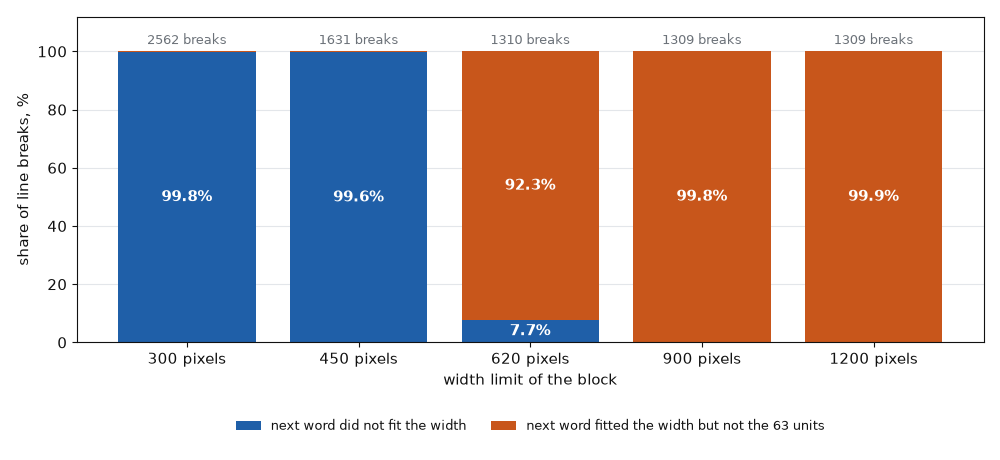
Fig. 3. At 300 and 450 pixels the width limit decides almost every line break. At 620 pixels and above, the 63-unit cap decides at least 92% of the breaks.
The practical consequence is a rule for the label block on this setup. In these texts, the 220 lines of exactly 63 code units were 542.6 pixels wide on average at 620 and at 900 pixels. A width limit above roughly 550 pixels therefore added nothing for these texts. Of the 212 texts, 200 are generated from a vocabulary of status words, so the threshold describes this sample and this font, not text in general. A text with wide glyphs, such as a line of capital letters W, can use more room. A wider block of such text needs the canvas.
The label block
CLabelBlock keeps one OBJ_LABEL per line. The objects are named after a prefix, a separator, and three digits, so the first label of a block with the prefix Panel is named Panel_000. A name must not exceed 63 code units, and the section on how the limit behaves showed what happens when it does. The first job of Init() is therefore to refuse a prefix that would make a name too long.
//+------------------------------------------------------------------+
//| CLabelBlock::Init                                                |
//| Returns false, and leaves the block unusable, when the prefix    |
//| would make an object name longer than 63 code units, because the |
//| terminal cuts such a name without an error and two blocks could  |
//| end up sharing objects. Every label on the chart whose name is   |
//| the prefix, "_" and three digits is deleted, so that labels left |
//| by an earlier run go away even when their numbers have gaps.     |
//+------------------------------------------------------------------+
bool CLabelBlock::Init(const string prefix,const int x,const int y,const int max_px,
                       const string font="Arial",const int points=10,const color clr=clrBlack,
                       const int gap=2,const long chart_id=0)
  {
   m_ready=false;
   if(prefix=="" || StringLen(prefix)+TXT_SUFFIX_LEN>TXT_NAME_LIMIT)
      return(false);
   if(max_px<1 || points<1 || gap<0)
      return(false);
   m_chart=chart_id;
   m_prefix=prefix;
   m_font=font;
   m_points=points;
   m_color=clr;
   m_x=x;
   m_y=y;
   m_max_px=max_px;
   m_meter.Set(font,points);
   m_line_step=m_meter.LineHeight()+gap;
   m_shown=0;
   m_text="";
   m_failed=0;
   m_last_error=0;
   m_rewrite=false;
   m_cut=false;
   ArrayResize(m_lines,0);
   for(int i=ObjectsTotal(m_chart,-1,OBJ_LABEL)-1; i>=0; i--)
     {
      string name=ObjectName(m_chart,i,-1,OBJ_LABEL);
      if(IsOwnName(name))
         ObjectDelete(m_chart,name);
     }
   m_ready=true;
   return(true);
  }
The loop at the end of Init() deletes labels that an earlier run left on the chart. It walks over all labels of the chart and deletes every label whose name is the prefix, an underscore, and exactly three digits. Leftovers with gaps in their numbers go away too. A unit test leaves the labels 000, 001, 005, and 017 on the chart, and Init() deletes all four. The same test checks that Init() keeps the objects CTT_old_x and CTT_oldest_000, whose names only start like the prefix CTT_old.
Set() is the method that an EA calls.
//+------------------------------------------------------------------+
//| CLabelBlock::Set                                                 |
//| Wraps the text, writes only the lines that changed, and deletes  |
//| the labels that are no longer needed. The same text as the last  |
//| call is not wrapped again, so a label that was changed or        |
//| deleted outside the block comes back only after Clear(). That    |
//| early return gives the same result as the call that wrote the    |
//| text, TXT_ERR_TOO_LONG included.                                 |
//| Returns the number of lines, or:                                 |
//|  TXT_ERR_NOT_READY  the block is not ready, nothing changed      |
//|  TXT_ERR_CHART      a chart call failed, the chart may show a    |
//|                     part of the text, and the next Set() writes  |
//|                     every line again                             |
//|  TXT_ERR_TOO_LONG   the text needs more than 999 lines, the      |
//|                     block shows the first 998 and a last line    |
//|                     that says how many lines are not shown       |
//+------------------------------------------------------------------+
int CLabelBlock::Set(const string text)
  {
   if(!m_ready)
      return(TXT_ERR_NOT_READY);
   if(m_shown>0 && !m_rewrite && text==m_text)
      return(m_cut ? TXT_ERR_TOO_LONG : m_shown);
   string lines[];
   if(CTextWrap::Wrap(m_meter,text,m_max_px,TXT_LABEL_LIMIT,lines)<0)
      return(TXT_ERR_NOT_READY);
   bool cut=TextBlockLimit(lines,TXT_MAX_LINES);
   int total=ArraySize(lines);
   m_failed=0;
   for(int i=0; i<total; i++)
     {
      bool is_new=(i>=m_shown) || (m_rewrite && ObjectFind(m_chart,NameOf(i))<0);
      if(is_new && !Create(i))
         continue;
      if(is_new || m_rewrite || lines[i]!=m_lines[i])
        {
         m_calls++;
         ResetLastError();
         if(!ObjectSetString(m_chart,NameOf(i),OBJPROP_TEXT,lines[i]))
            Failed();
        }
     }
   for(int i=total; i<m_shown; i++)
     {
      m_calls++;
      ResetLastError();
      if(!ObjectDelete(m_chart,NameOf(i)) && ObjectFind(m_chart,NameOf(i))>=0)
         Failed();
     }
   ArrayResize(m_lines,total);
   for(int i=0; i<total; i++)
      m_lines[i]=lines[i];
   m_shown=total;
   m_text=text;
   m_cut=cut;
   m_rewrite=(m_failed>0);
   if(m_failed>0)
      return(TXT_ERR_CHART);
   return(cut ? TXT_ERR_TOO_LONG : total);
  }
Three details of Set() deserve a closer look. The first one is that a call with the same text as the previous call returns at once. The wrap is not repeated, and no object is touched. The consequence is documented in the header of the method: a label that someone changed or deleted outside the block comes back only after Clear(). The early return gives the same result as the call that wrote the text. The member m_cut keeps that result. Without it, a second call with a text of more than 999 lines returned the line count instead of -3, and the EA saw a success.
The second detail is that only the lines that differ from the previous call are written. When a change leaves every line break where it was, only the changed line is written. In the unit test, one replaced letter kept every break and cost one object call. When a change moves a line break, every line after the break can change. One word added at the start of a long text cost 25 object calls, and the block then had 24 lines.
LABELS one word added at the start: 25 object calls for 24 lines
PASS labels: a shorter text deletes the surplus labels
PASS labels: Verify() reports a label that was set outside the block (70 units stored as 63)
PASS labels: the same text is not written again, so an outside change stays until Clear()
PASS labels: Clear() followed by Set() writes the lines again
PASS labels: Verify() reports a label that was deleted outside the block
PASS labels: a text of 1,100 lines returns -3 and shows 998 lines and one line that says how many are missing
LABELS too long: result=-3 labels=999 last=(102 more lines not shown)
PASS labels: a failed chart call returns -2 and keeps its error code
LABELS chart that does not exist: result=-2 failed_calls=1 last_error=4101
The third detail is the limit of 999 lines. The limit comes from the three-digit suffix of the names, not from the chart. A text that needs more lines returns -3. The block then shows the first 998 lines and a last line that says how many lines are not shown, so the chart does not keep an older text without a sign. A repeated call with the same text returns -3 as well, and a unit test calls Set() twice with such a text to confirm it. That last line is not wrapped, so in a very narrow block it can be wider than the limit.
Every chart call in Create() and in Set() is checked. When a call returns false, Set() records the error code, returns -2, and writes every line again at the next call. FailedCalls() and LastError() report the count and the code. In the unit test, a block on a chart ID that does not exist returned -2 with error 4101. The reference pages of ObjectCreate() and ObjectSetString() describe the return value as the result of sending the command to the chart. A true value therefore does not prove that the label holds the text. Verify() covers that part.
Verify() reads every label back and compares the stored text with the line that was written. After Set() it should return 0, because the wrapper keeps every line within 63 code units. The checks below found no exception. If a later build of the terminal lowered the limit, or if another program edited a label of the block, Verify() would report the difference. A higher limit would go unnoticed, but the lines would stay within 63 code units. Verify() checks the stored text, not what the chart displays. The screenshot section compares the two.
The canvas block
The canvas block uses the same wrapper with a cap that cannot be reached, so only the width limit counts. It draws all lines on one bitmap label.
//+------------------------------------------------------------------+
//| CCanvasBlock::Set                                                |
//| Wraps the text by width only and redraws the bitmap when a line  |
//| changed. The same text as the last call is not wrapped again and |
//| returns the result of the call that drew it.                     |
//| Returns the number of lines, 0 for an empty text, which removes  |
//| the bitmap, or the TXT_ERR_ codes of CLabelBlock::Set(). The cap |
//| of 999 lines keeps the bitmap height within about 25,000 pixels  |
//| for a 10-point font at 144 DPI.                                  |
//+------------------------------------------------------------------+
int CCanvasBlock::Set(const string text)
  {
   if(!m_ready)
      return(TXT_ERR_NOT_READY);
   if(m_created && text==m_text)
      return(m_cut ? TXT_ERR_TOO_LONG : m_shown);
   string lines[];
   int total=CTextWrap::Wrap(m_meter,text,m_max_px,TXT_NO_LIMIT,lines);
   if(total<0)
      return(TXT_ERR_NOT_READY);
   if(total==0)
     {
      Clear();
      return(0);
     }
   bool cut=TextBlockLimit(lines,TXT_MAX_LINES);
   total=ArraySize(lines);
   bool same=m_created && total==m_shown;
   for(int i=0; same && i<total; i++)
      same=(lines[i]==m_lines[i]);
   if(same)
     {
      m_text=text;
      m_cut=cut;
      return(cut ? TXT_ERR_TOO_LONG : total);
     }
   int width=m_max_px+2*m_pad;
   int height=total*m_line_step+2*m_pad;
   ResetLastError();
   if(!m_created)
     {
      if(!m_canvas.CreateBitmapLabel(m_chart,0,m_name,m_x,m_y,width,height,COLOR_FORMAT_ARGB_NORMALIZE))
        {
         m_last_error=GetLastError();
         return(TXT_ERR_CHART);
        }
      m_created=true;
     }
   else
      if((width!=m_canvas.Width() || height!=m_canvas.Height()) && !m_canvas.Resize(width,height))
        {
         m_last_error=GetLastError();
         m_text="";
         return(TXT_ERR_CHART);
        }
   m_canvas.FontSet(m_font,-10*m_points);
   m_canvas.Erase(m_back);
   for(int i=0; i<total; i++)
      m_canvas.TextOut(m_pad,m_pad+i*m_line_step,lines[i],m_fore);
   m_canvas.Update();
   ArrayResize(m_lines,total);
   for(int i=0; i<total; i++)
      m_lines[i]=lines[i];
   m_shown=total;
   m_text=text;
   m_cut=cut;
   return(cut ? TXT_ERR_TOO_LONG : total);
  }
The bitmap is created at the first call, and it is resized when the number of lines changes. The font is set again before the text is drawn with CCanvas::TextOut(). This undoes the side effect of the meter. The name of the bitmap label follows the same 63-unit rule as the names of the labels. CCanvas shortens the name of its resource by itself: the Create() method in Canvas.mqh cuts the name to make room for a unique suffix. The name of the bitmap label is not shortened, so Init() refuses a name of more than 63 code units.
That the 63-unit cap does not apply to the canvas needs its own test. The probe drew digit strings of 63 to 2,000 code units with CCanvas::TextOut() into a bitmap in memory and looked for the columns that hold ink. For every length, the ink was as wide as the width that CCanvas::TextWidth() reported for the whole string. The probe also created bitmaps of 1,000 by 25,000 pixels and of 65,536 by 64 pixels, and each Create() call returned true.
LIMIT canvas units=63 text_width=693 bitmap_width=733 ink_from=10 ink_to=702 ink_width=693
LIMIT canvas units=64 text_width=704 bitmap_width=744 ink_from=10 ink_to=713 ink_width=704
LIMIT canvas units=255 text_width=2805 bitmap_width=2845 ink_from=10 ink_to=2814 ink_width=2805
LIMIT canvas units=256 text_width=2816 bitmap_width=2856 ink_from=10 ink_to=2825 ink_width=2816
LIMIT canvas units=1000 text_width=11000 bitmap_width=11040 ink_from=10 ink_to=11009 ink_width=11000
LIMIT canvas units=2000 text_width=22000 bitmap_width=22040 ink_from=10 ink_to=22009 ink_width=22000
LIMIT bitmap width=1000 height=25000 created=true err=5035 megabytes=95.4
LIMIT bitmap width=16384 height=64 created=true err=5035 megabytes=4.0
LIMIT bitmap width=32768 height=64 created=true err=5035 megabytes=8.0
LIMIT bitmap width=65536 height=64 created=true err=5035 megabytes=16.0
GetLastError() returned 5035 after each of these successful Create() calls, and I did not investigate which call inside CCanvas sets this error code. For that reason, CCanvasBlock reads the error code only after a call that returned false. I did not search for the largest bitmap that the terminal accepts. The cap of 999 lines also applies to the canvas block, and it keeps the bitmap of a 10-point font at about 25,000 pixels in height on this display.
Fig. 4 shows the same status line as a block of labels and as a canvas, both with a width limit of 900 pixels. The labels need three lines of at most 63 code units, and the canvas needs two lines.
The same text as labels and as a canvas
Both blocks have a width limit of 900 pixels

Fig. 4. The block of labels breaks the made-up status line into three short lines because of the 63-unit cap, and the canvas block fits the same text into two lines that use the full width
The difference is not specific to the sample text. Fig. 5 compares the mean number of lines for the 212 texts of the export. At 900 pixels the labels needed 7.19 lines and the canvas needed 4.53. The labels needed 58.6% more lines. At 300 and 450 pixels the two blocks needed nearly the same number of lines, with a difference of 0.1% and 0.2%, respectively.
Lines per text with and without the cap
Mean over 212 texts, five width limits
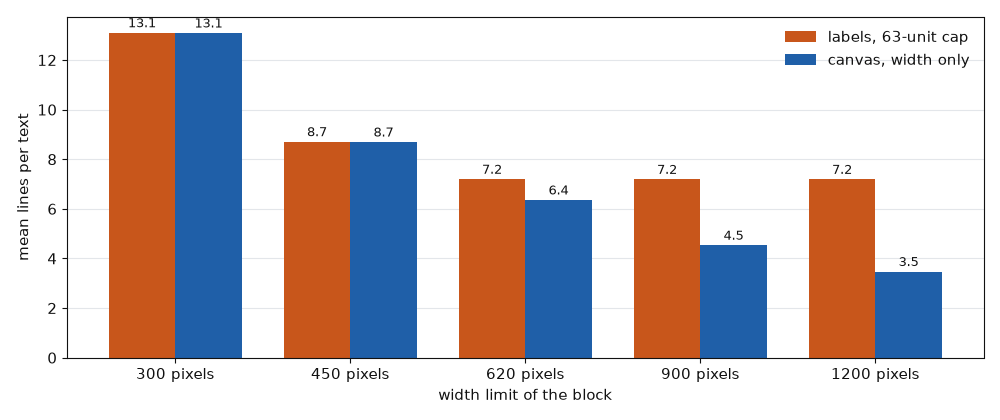
Fig. 5. The mean number of lines per text is nearly the same for labels and canvas at 300 and 450 pixels. At 620, 900, and 1,200 pixels the labels need more lines.
The canvas removes the 63-unit cap and brings its own costs. The following points belong to the comparison as much as the number of lines.
- A bitmap label is an opaque rectangle in the background color that the code passes to Init(). The chart under it is hidden.
- The bitmap needs 4 bytes per pixel. A block of 620 pixels with four lines is 628 by 108 pixels at this display. That bitmap takes about 270 KB. Each change of a line redraws the whole bitmap.
- The text of a canvas cannot be read back from an object. Its Verify() checks the bitmap label, the line widths, and that every line left ink in the bitmap. It cannot show that the right text was drawn. A unit test draws text in the background color, and Verify() reports every line of it.
- An update costs more than with labels, as the cost measurements below show.
//+------------------------------------------------------------------+
//| CCanvasBlock::Verify                                             |
//| Returns the number of lines that are wider than the bitmap       |
//| allows or left no ink in the bitmap, plus one when the bitmap    |
//| label is missing from the chart. This checks the bitmap in       |
//| memory. It cannot show that the drawn text is the right text,    |
//| and it does not check what the chart displays.                   |
//+------------------------------------------------------------------+
int CCanvasBlock::Verify(void)
  {
   if(!m_created)
      return(0);
   int bad=(ObjectFind(m_chart,m_name)<0) ? 1 : 0;
   for(int i=0; i<m_shown; i++)
      if(m_meter.Width(m_lines[i])>m_max_px || !HasInk(i))
         bad++;
   return(bad);
  }
Using a block in an EA
The EA ChartTextEA.mq5 shows how an EA uses a block. The text comes from a function.
//+------------------------------------------------------------------+
//| StatusText                                                       |
//| A status text of the kind an EA keeps on the chart. It is far    |
//| longer than 63 characters.                                       |
//+------------------------------------------------------------------+
string StatusText(void)
  {
   return(StringFormat("%s %s | server time %s | bid %s, ask %s, spread %d points | ticks seen %I64d | "
                       "equity %.2f, balance %.2f, margin level %.2f%% | open positions %d | "
                       "this panel has refreshed %I64d times since the start of the run.",
                       _Symbol,EnumToString(_Period),TimeToString(TimeCurrent(),TIME_DATE|TIME_SECONDS),
                       DoubleToString(SymbolInfoDouble(_Symbol,SYMBOL_BID),_Digits),DoubleToString(SymbolInfoDouble(_Symbol,SYMBOL_ASK),_Digits),
                       (int)SymbolInfoInteger(_Symbol,SYMBOL_SPREAD),g_ticks,AccountInfoDouble(ACCOUNT_EQUITY),AccountInfoDouble(ACCOUNT_BALANCE),
                       AccountInfoDouble(ACCOUNT_MARGIN_LEVEL),PositionsTotal(),g_updates));
  }
The block is initialized once, and the input InpCanvas chooses the version.
//+------------------------------------------------------------------+
//| Expert initialization function                                   |
//+------------------------------------------------------------------+
int OnInit(void)
  {
   bool ok=InpCanvas ? g_canvas.Init("CTEA_block",10,30,InpWidth) : g_labels.Init("CTEA_block",10,30,InpWidth);
   if(!ok)
      return(INIT_FAILED);
   ResetLastError();
   bool made=ObjectCreate(0,"CTEA_raw",OBJ_LABEL,0,0,0);
   made=made && ObjectSetInteger(0,"CTEA_raw",OBJPROP_YDISTANCE,6);
   made=made && ObjectSetString(0,"CTEA_raw",OBJPROP_TEXT,StatusText());
   int err=GetLastError();
   g_raw_stored=StringLen(ObjectGetString(0,"CTEA_raw",OBJPROP_TEXT));
   PrintFormat("CTEA init build=%d tester=%s raw_label_set=%s err=%d raw_label_sent=%d raw_label_stored=%d",TerminalInfoInteger(TERMINAL_BUILD),
               MQLInfoInteger(MQL_TESTER) ? "yes" : "no",made ? "true" : "false",err,StringLen(StatusText()),g_raw_stored);
   return(INIT_SUCCEEDED);
  }
The plain label CTEA_raw in OnInit() is there for the tester log. It receives the same text without the block, and the log line shows how many code units it kept. Every refresh of the block is one Set() call followed by one Verify() call.
//+------------------------------------------------------------------+
//| Expert tick function                                             |
//+------------------------------------------------------------------+
void OnTick(void)
  {
   g_ticks++;
   if(g_ticks%InpEveryTicks!=0)
      return;
   string text=StatusText();
   int lines=InpCanvas ? g_canvas.Set(text) : g_labels.Set(text);
   if(lines<0)
     {
      g_set_failed++;
      PrintFormat("CTEA Set() returned %d, last error %d",lines,InpCanvas ? g_canvas.LastError() : g_labels.LastError());
      return;
     }
   g_updates++;
   g_overwide+=CTextWrap::Overwide();
   g_max_lines=MathMax(g_max_lines,lines);
   g_max_units=MathMax(g_max_units,StringLen(text));
   g_verify_bad+=InpCanvas ? g_canvas.Verify() : g_labels.Verify();
  }
The refresh runs every 50 ticks in the tests below. A real EA would refresh when the displayed values change. In the timing run described below, a Set() call with an unchanged text, together with the ChartRedraw() call after it, took at most 5.1 microseconds.
Verification
The test suite TestChartText.mq5 consists of 67 unit tests. Of these tests, 22 check the wrap rules with CFixedMeter, so a result can be calculated by hand. Three run random texts through the wrapper. One of these three uses the meter that gets narrower. Three more feed deliberate defects to the same properties. Four use the real fonts. The label block has 23 tests on a chart, and the canvas block has 12. One of the canvas tests is a fourth mutation test.
The random texts are built from words of up to 12 code units. About a quarter of the words consist of characters of several code units, so that such characters fall on many positions. Those characters are emoji, emoji joined by zero width joiners, flags, emoji with a skin tone, and letters with a combining accent. For each wrapped text the check verifies four properties.
- No character other than a space, a tab, or a line break is lost or added.
- No line is longer or wider than the limits.
- No line starts or ends inside a character.
- No word that fits on a line is cut.
The check for the third property is written in the test script apart from CanCut(), so it does not reuse the rule that it checks. A further check looks at every line break and asks whether the first word of the next line would have fitted on the current line. With 300 random texts, none of these checks reported a violation.
The mutation checks do the opposite. They feed a wrong result to the same checks and expect a report. One splitter cuts a text every 63 code units, which is the obvious fix for the limit. The check reported a violation for more than half of 300 texts, and it reported the split surrogate pair in the special case of 62 letters followed by an emoji. The third mutation check wraps without the cap and expects the report that a line is too long. The fourth one draws a canvas block in the background color and expects Verify() to report every line. Each of the four expected a failure and received it, as this part of the log of TestChartText.mq5 shows.
PASS mutation: the cut-every-63 splitter is flagged on most texts (expected to fail the properties)
PASS mutation: the cut-every-63 splitter splits a surrogate pair and the check reports it
PASS mutation: wrapping without the 63 cap is reported as too long
PASS mutation: text drawn in the background color leaves no ink, and Verify() reports every line
The first full run of the script reported one failure. The label test that compares the stored lines with the original text had compared text that contained spaces with text that did not. The class was right and the test was wrong, so I fixed the test. On build 6230, all 63 tests of that version passed. The current suite adds four tests: two for a plain surrogate pair and two for a repeated Set() with a text of more than 999 lines. The run on build 6276 prints the following lines.
TESTS build=6276 dpi=144
PASS cut: CanCut() refuses only the position between the two halves of a plain surrogate pair (U+1D400)
PASS wrap: a plain surrogate pair (U+1D400) at the cap moves to the next line
PASS labels: the same too long text again returns -3 and makes no object call
PASS canvas: the same too long text again returns -3
TESTS 67 passed, 0 failed
These checks test my own logic on the samples above. They found no violation. That result does not show that none exists for other fonts, other scripts, or other texts. They also say nothing about whether the terminal keeps the same limit in another build.
The Python consistency check
The script WrapExport.mq5 wraps 212 texts at five width limits. The script writes each line to a file together with three values: the width of the line, its length, and the width that the line would have had with the first word of the next line added. Of the texts, 12 are fixed and 200 are built from a vocabulary of status words with a fixed seed. Six of the fixed texts hold characters of several code units: accents, joined emoji, flags, skin tones, an emoji at the cap, and a sentence that mixes them. The files are written as UTF-16. The Python script chart_text_crosscheck.py reads them and keeps lone surrogates, so a pair that was cut would show.
The script verifies the rules again without MetaTrader. Its test for a cut inside a character uses the unicodedata module of Python and is written apart from CanCut(). As a second implementation of the rules, the check uses the widths that the terminal measured. For that reason the check cannot show that these widths are right. That agreement shows that the wrapper is consistent with the measured widths. The Python check is not an independent test of TextGetSize().
cases 212, case x width groups 1060, line rows 9196
lines that hold a character of several code units: 73
groups where characters were lost or added: 0
lines wider than the limit: 0
lines over 63 UTF-16 units: 0
lines that start or end inside a character: 0
line breaks checked for the greedy rule: 8121
line breaks where the next word would fit: 0
limit  300 px:  2776 lines, mean width  262.2 px, mean 30.2 units, longest 60 units, 0 lines of exactly 63 units, n/a px wide on average
limit  450 px:  1845 lines, mean width  397.5 px, mean 46.0 units, longest 62 units, 0 lines of exactly 63 units, n/a px wide on average
limit  620 px:  1524 lines, mean width  482.5 px, mean 55.9 units, longest 63 units, 220 lines of exactly 63 units, 542.6 px wide on average
limit  900 px:  1523 lines, mean width  482.8 px, mean 55.9 units, longest 63 units, 220 lines of exactly 63 units, 542.6 px wide on average
limit 1200 px:  1523 lines, mean width  482.8 px, mean 55.9 units, longest 63 units, 221 lines of exactly 63 units, 545.6 px wide on average
limit  300 px:  2562 breaks,  99.8% decided by the width,   0.2% by the 63-unit cap
limit  450 px:  1631 breaks,  99.6% decided by the width,   0.4% by the 63-unit cap
limit  620 px:  1310 breaks,   7.7% decided by the width,  92.3% by the 63-unit cap
limit  900 px:  1309 breaks,   0.2% decided by the width,  99.8% by the 63-unit cap
limit 1200 px:  1309 breaks,   0.1% decided by the width,  99.9% by the 63-unit cap
Python prints the following. In none of the 1,060 combinations of a text and a width limit was a character other than whitespace lost or added. None of the 9,196 lines exceeds a limit or starts or ends inside a character, and 73 of these lines hold a character of several code units. None of the 8,121 checked line breaks had room for the first word of the next line. The last five lines show which limit decided the breaks, and they are the data of Fig. 3. To confirm that the script can fail, I ran it again with a cap of 50 instead of 63 code units. It reported 4,523 lines over the cap.
The same files give the lines per text of Fig. 5.
limit  300 px: 13.10 lines per text with the cap, 13.09 without it (+0.1%)
limit  450 px: 8.71 lines per text with the cap, 8.69 without it (+0.2%)
limit  620 px: 7.19 lines per text with the cap, 6.36 without it (+13.1%)
limit  900 px: 7.19 lines per text with the cap, 4.53 without it (+58.6%)
limit 1200 px: 7.19 lines per text with the cap, 3.47 without it (+107.1%)
Screenshots against TextGetSize and against the stored text
The demo script opens new charts, sets the colors to black on white, builds five scenes, and saves each scene as PNG and as BMP. A chart that the script opens itself has no running-script icon, which keeps the capture clean. The Python script reads the BMP with the standard library and finds the dark pixels of every row. The screenshot check is the one check in the article whose numbers do not all come from TextGetSize(). It compares TextGetSize() with pixels.
The first check looks at the right edge of label rows. A label starts at x equal to 10, so the right edge should lie near 10 plus the width from TextGetSize(). Scene 1 holds the three rows of the wrapped block of Fig. 1. Scene 3 holds 24 more rows: six patterns in Arial at 10 and 14 points, Times New Roman at 10 points, and Consolas at 10 points. The patterns include a row of capital W, narrow letters, a row that ends with the letter f, digits, and kerning pairs.
bmp 900x300, 32 bits, 3 label rows and 0 object rows in the journal
row y=120 Arial 10             units=55  TextGetSize width=476, dark pixels from x=15 to x=485, right edge minus expected +0 px
row y=145 Arial 10             units=62  TextGetSize width=522, dark pixels from x=14 to x=532, right edge minus expected +1 px
row y=170 Arial 10             units=39  TextGetSize width=342, dark pixels from x=14 to x=351, right edge minus expected +0 px
font Arial 10             rows 3, right edge minus expected from +0 to +1 px
largest difference: 1 px (accepted up to 6)
font Arial 10             rows 6, right edge minus expected from +0 to +3 px
font Arial 14             rows 6, right edge minus expected from +0 to +4 px
font Times New Roman 10   rows 6, right edge minus expected from +1 to +4 px
font Consolas 10          rows 6, right edge minus expected from -1 to +2 px
largest difference: 4 px (accepted up to 6)
The right edges of all 27 rows lie between 1 pixel left and 4 pixels right of the expected position. I chose a tolerance of 6 pixels when I had only the three rows of scene 1, because the ink of a glyph does not end exactly at its advance width. The largest difference in the 27 rows was 4 pixels. A tolerance of 4 or 5 pixels therefore gives the same result as 6 pixels. A tolerance of 3 pixels would fail two rows. A larger tolerance makes the check weaker, because a missing character narrower than the tolerance would pass. On this display, a digit in Arial at 10 points is about 11 pixels wide (880 pixels for 80 digits). The tolerance remains my choice for these fonts at 144 DPI, and other fonts, sizes, or scaling values may need another value.
The second check compares what an object displays with what it stores. Scene 4 gives 80 digits to an OBJ_LABEL, an OBJ_EDIT, an OBJ_BUTTON, and an OBJ_RECTANGLE_LABEL, and draws the same digits as one canvas line. Scene 5 does the same for an OBJ_TEXT alone. In my runs, a chart opened by the script had a height of 0 and a price range of 0, as the next log line shows. OBJ_TEXT is placed by time and price, so it gets a scene of its own with a fixed scale.
SHOT scene=five chart height=0 price_max=0.00000 price_min=0.00000
For each object the Python script measures the width of the dark pixels and compares it with the width of the stored 63 digits and of all 80 digits. For the boxes it reads only the inside, 6 pixels away from the border.
bmp 1000x285, 32 bits, 0 label rows and 5 object rows in the journal
OBJ_LABEL            sent 80, stored 63 units: dark pixels 690 px wide, stored text 693 px, sent text 880 px, nearer to the stored text
OBJ_EDIT             sent 80, stored 63 units: dark pixels 690 px wide, stored text 693 px, sent text 880 px, nearer to the stored text
OBJ_BUTTON           sent 80, stored 63 units: dark pixels 690 px wide, stored text 693 px, sent text 880 px, nearer to the stored text
OBJ_RECTANGLE_LABEL  sent 80, stored 63 units: no dark pixels
canvas               sent 80, stored 80 units: dark pixels 878 px wide, stored text 880 px, sent text 880 px, nearer to the sent text
OBJ_TEXT sent 80, stored 63 units: dark pixels 690 px wide, stored text 693 px, sent text 880 px, nearer to the stored text
OBJ_LABEL, OBJ_TEXT, OBJ_EDIT, and OBJ_BUTTON displayed a text 690 pixels wide. The stored 63 digits measure 693 pixels and the 80 sent digits 880 pixels. The displayed width therefore matches the stored part, not the text that was sent. OBJ_RECTANGLE_LABEL drew no text inside its border. The canvas line was 878 pixels wide, close to the 880 pixels of all 80 digits. Fig. 6 shows scene 4. This check covers one font, one size, one display, and a text of digits only.
What each object type displays
Every object received the same 80 digits

Fig. 6. From top to bottom: OBJ_LABEL, OBJ_EDIT, and OBJ_BUTTON each show the first 63 digits, the box of OBJ_RECTANGLE_LABEL is empty, and the canvas line shows all 80 digits
Strategy Tester runs and cost
The tester runs use the EA with refreshes every 50 ticks. With this value, three months of EURUSD H1 give 7,046 updates, and a run still finishes in seconds. The quarter itself is my choice, and I did not select it for any property of the data. The settings were the same in both runs.
| Setting | Value |
|---|---|
| Symbol and period | EURUSD H1 |
| Dates | 2026.01.01 to 2026.03.31 |
| Model | 1-minute OHLC |
| Deposit | 10,000 USD |
| Block width | 620 pixels |
In the first run the block used labels, and in the second run it used the canvas. The two Verify() methods check different things, so the table names what each one checks.
| Value | Labels | Canvas |
|---|---|---|
| Ticks seen | 352,319 | 352,319 |
| Block updates | 7,046 | 7,046 |
| What Verify() checks | the stored text of every label | bitmap label present, line widths, ink in every line |
| Problems that Verify() reported | none | none |
| Set() calls that returned a negative number | none | none |
| Lines wider than the block, from Overwide() | none | none |
| Most lines in the block | five | four |
| Code units kept by a plain label of 248 sent | 63 | 63 |
| Time of the run in seconds | 0.295 | 8.402 |
2026.03.30 23:59:59 CTEA summary block=labels ticks=352319 updates=7046 readback_mismatch=0 set_failed=0 overwide=0 max_lines=5 max_units=256 raw_label_stored=63 object_calls=21152
2026.03.30 23:59:59 CTEA summary block=canvas ticks=352319 updates=7046 canvas_verify_bad=0 set_failed=0 overwide=0 max_lines=4 max_units=256 raw_label_stored=63 object_calls=0
The plain label kept 63 of 248 code units in the tester, like on a chart. In non-visual mode, both blocks ran without a negative result, and Verify() reported no problem. For the labels this means that every stored text matched. For the canvas it means less, because the canvas cannot compare text. The runs do not show that anything is displayed, because the tester draws nothing in that mode. The run with the canvas took longer, and I did not investigate the reason.
To see whether these choices matter, I repeated both runs on build 6276. Two runs changed the refresh to every 25 and every 100 ticks. Two more runs used the fourth quarter of 2025 with refreshes every 50 ticks. In the column of problems, a problem means a Verify() report, a negative result of Set(), or a line wider than the block.
| Run on build 6276 | Updates | Problems found | Labels, seconds | Canvas, seconds |
|---|---|---|---|---|
| 2026 Q1, every 50 ticks | 7,046 | none | 0.292 | 9.553 |
| 2026 Q1, every 25 ticks | 14,092 | none | 0.396 | 32.396 |
| 2026 Q1, every 100 ticks | 3,523 | none | 0.165 | 2.415 |
| 2025 Q4, every 50 ticks | 7,282 | none | 0.272 | 7.761 |
All eight runs ended without a problem. The number of updates follows the refresh interval. The time of the canvas runs grew faster than the number of updates, and I did not investigate the reason.
The script UpdateCost.mq5 builds the texts before the clock starts. It then measures one Set() call on a visible chart, followed by one ChartRedraw() call. Three cases are measured: one row of the text changes, every row changes, and the same text is set again. A fourth case calls ChartRedraw() alone, without Set(). Each measurement is the mean of 200 calls, and each case is measured three times. Fig. 7 shows the median of the three values. With 200 calls, even the fastest measurement lasts about 0.4 milliseconds. This duration is far above the resolution of GetMicrosecondCount(). The median of three values ignores one outlier, such as a slow first measurement.
Time of one Set() call followed by ChartRedraw()
Median of three measurements, 200 calls each, logarithmic axis
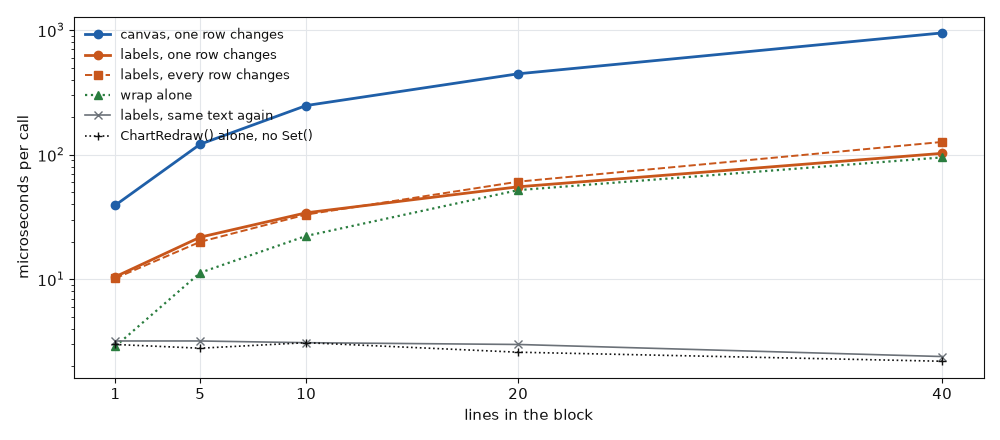
Fig. 7. Median time per call for blocks from one to 40 lines. With one changed row, the canvas block needs about 39 and 950 microseconds. The label block needs about 11 and 103. The wrap alone needs about 3 and 95. The same text set again or ChartRedraw() alone needs between 2 and 5.
ChartRedraw() alone took a median of 2.2 to 3.2 microseconds for every block size. The figures of Fig. 7 therefore contain about 3 microseconds for the redraw request. That time did not grow with the number of lines. This behavior suggests that the call does not wait for the drawing. I did not measure the drawing itself.
For the label block the wrap takes most of the time. At 40 lines the wrap alone needs 95.2 microseconds, and a whole update where one row changes needs 102.6. When one row changes, the canvas costs between 3.8 and 9.3 times as much as the labels for blocks from one line to 40 lines. I assume that the reason is the erasing and redrawing of the whole bitmap, and I did not test that assumption. A call with the same text costs at most 5.1 microseconds for both blocks, the redraw request included.
On build 6276, I repeated the timing with 100, 200, and 400 calls per measurement. In every row with a changed text, the canvas took between 2.8 and 11.2 times as long as the labels. A call with the same text took between 2.1 and 3.2 microseconds. The numbers moved between runs, but the order of the two blocks did not change.
one    lines=1   canvas  median     39.4 us   runs 158.3, 39.4, 35.9
one    lines=1   labels  median     10.5 us   runs 9.4, 10.5, 12.3
one    lines=5   canvas  median    121.5 us   runs 121.5, 136.1, 120.3
one    lines=5   labels  median     21.8 us   runs 30.1, 21.7, 21.8
one    lines=10  canvas  median    248.3 us   runs 248.3, 259.0, 223.6
one    lines=10  labels  median     34.2 us   runs 31.7, 34.6, 34.2
one    lines=20  canvas  median    446.5 us   runs 439.5, 446.5, 468.1
one    lines=20  labels  median     55.3 us   runs 54.5, 56.7, 55.3
one    lines=40  canvas  median    950.4 us   runs 910.1, 950.4, 958.2
one    lines=40  labels  median    102.6 us   runs 96.7, 102.6, 104.0
Limitations
The following items are the limits of the design and of the measurements. The sections above explain each one.
- Most numbers come from build 6230 on one system. On build 6276, the probe found the same limits, and the tester runs reported the same counts. A later build may lower the limit, and Verify() of the label block would then report a cut.
- Most pixel widths come from Arial at 10 points at 144 DPI. The screenshot check adds Arial at 14 points, Times New Roman, and Consolas, but the blocks were tested with Arial only.
- The block is anchored to the upper left corner. Other corners, right-to-left text, and rotated labels are not supported.
- The line height is the height of the text "Ay" plus a gap that I chose. A font with taller glyphs could make lines overlap.
- The block takes its metrics at Init(). After a change of scaling or font, the block must be initialized again. I did not test this case.
- CanCut() covers the cases listed in the wrapper section, not all of Unicode Standard Annex 29.
- Runs of spaces and tabs become one space.
- Two blocks with the same prefix on one chart share their labels, and Init() cannot detect that.
- An outside change to a label stays until Clear() is called, because Set() skips an unchanged text.
- A block holds at most 999 lines, a limit of the name format.
- A single character wider than the block gives a line wider than the block. Overwide() counts these lines.
- The canvas block hides the chart under an opaque rectangle, and its Verify() cannot compare text.
- The timing numbers include a ChartRedraw() call but not the drawing. I report the median of three measurements.
- The tolerance of 6 pixels, the refresh every 50 ticks, the tester quarter, and the timing scheme of 200 calls and three measurements are my choices. The sensitivity runs cover only the neighboring values that are listed above.
What the checks do not cover
The unit tests check my own logic and say nothing about how the terminal behaves. The Python script uses the widths that the terminal measured, so the script cannot show that the widths are right. The screenshot check covers 27 label rows in three fonts on one display. The display check of the object types covers one font and a text of digits.
I did not check what the chart displays for the tooltip and for the chart comment, both of which I only read back. I did not display a comment of more than 2,045 characters. I did not check how emoji, accents, or flags are displayed. The tester runs were non-visual, so they say nothing about drawing. I did not test other symbols, builds other than 6230 and 6276, other scaling values, or a chart that is resized while a block is shown. The screenshot checks ran on build 6230 only. I did not search for the largest bitmap that the terminal accepts.
Conclusion
On build 6230, the five text object types that I tested keep 63 UTF-16 code units and cut the rest without a return value or an error code. On a screenshot in one font, four of the five displayed the stored part, and OBJ_RECTANGLE_LABEL displayed no text. On the same build, a name longer than 63 code units is cut as well, and two names with the same first 63 code units point to one object.
The four include files in this article wrap a text by pixel width and by the 63 code units. They show the lines as labels or on a canvas. Problems are reported through return codes and Verify(). Verify() of the label block reads the stored text back. Verify() of the canvas block checks only the bitmap. The 67 unit tests, the Python consistency check, and the screenshot checks found no violation for the setup and the samples in the limits above. In the timing run, an update of the labels where one row changes cost between one-quarter and one-ninth of the same update on the canvas. The canvas fits more code units on a line once the width limit exceeds what 63 code units need, and it hides the chart under its rectangle.
Attached files
The archive MQL5.zip contains all files with the folder structure of the terminal.
| File | Folder | Purpose |
|---|---|---|
| TextMeter.mqh | MQL5\Include\ChartText | ITextMeter, CScreenMeter, and CFixedMeter |
| TextWrap.mqh | MQL5\Include\ChartText | CTextWrap, the greedy wrapper |
| LabelBlock.mqh | MQL5\Include\ChartText | ITextBlock and CLabelBlock |
| CanvasBlock.mqh | MQL5\Include\ChartText | CCanvasBlock |
| TextLimitProbe.mq5 | MQL5\Scripts\ChartText | measures the limits of text, name, tooltip, comment, and canvas |
| TestChartText.mq5 | MQL5\Scripts\ChartText | unit and mutation checks |
| WrapExport.mq5 | MQL5\Scripts\ChartText | writes the wrapped lines for the Python check |
| ChartTextDemo.mq5 | MQL5\Scripts\ChartText | builds the demo charts and saves the screenshots |
| UpdateCost.mq5 | MQL5\Scripts\ChartText | measures the cost of Set() |
| ChartTextEA.mq5 | MQL5\Experts\ChartText | shows a status block, for the tester runs |
| chart_text_crosscheck.py | MQL5\Files\ChartText | Python consistency check |
| MQL5.zip | attachment | all files above with the folder structure of the terminal |
Warning: All rights to these materials are reserved by MetaQuotes Ltd. Copying or reprinting of these materials in whole or in part is prohibited.
This article was written by a user of the site and reflects their personal views. MetaQuotes Ltd is not responsible for the accuracy of the information presented, nor for any consequences resulting from the use of the solutions, strategies or recommendations described.


