

Local Outlier Factor: Density-Based Anomaly Detection in Native MQL5
 71
 0

Introduction
Most anomaly filters in trading code start with a single threshold on a single number: skip the bar if its range is greater than three ATRs, stand aside if volume is above the 95th percentile. Rules like that work until the market changes gear. A range of two ATRs at the London open is routine. The same range at three in the morning is something else. A global cut-off cannot tell the difference, because it measures how far a bar sits from the whole crowd, not from the bars that actually resemble it. Session-aware thresholds, volatility regimes and other local methods address the same gap too; LOF is one route among several, chosen here for how directly it turns "unfamiliar neighbourhood" into a single number.
Local Outlier Factor (LOF) is a general-purpose way to spot points that sit in a thinner neighbourhood than their neighbours do, and it fits this problem well even though nothing in it was built with trading sessions or market regimes specifically in mind. It scores a point by comparing how densely packed its own neighbourhood is with how densely packed the neighbourhoods of its neighbours are. A point in a thin region next to thick ones scores well above 1. A point in a busy region scores about 1, wherever that region happens to sit in the feature space, so a quiet regime and a wild regime can both be "normal" at the same time.
In this article we build LOF from scratch in native MQL5 using the built-in matrix and vector types. No DLLs, ALGLIB, or ONNX are used. Every closed bar becomes a five-dimensional point. The last 500 bars form a reference cloud, and the newest bar is scored against that cloud without ever being added to it. The alarm level is not a hand-picked number: it is a quantile of the reference cloud's own scores, so it moves with the symbol and the timeframe.
We then use the score as an entry gate for a plain EMA-cross Expert Advisor. We also add an indicator that plots the score under the price chart and a script that verifies the engine against independently computed values. Finally we run the gated and ungated EAs on four symbol/timeframe pairs and look at exactly which trades the gate removed.
Scope. The base strategy is deliberately simple and sits close to breakeven, so that any change caused by the gate is easy to see. We study what the LOF gate does to that strategy. It is not offered as a profitable trading system. All backtests use 1-minute OHLC modelling, cover a single historical interval with no out-of-sample or walk-forward verification, and are a demonstration of the gate's effect rather than a validated trading result.
Contents
- Architecture and the LOF Math
- MarketFeatures.mqh: From Bars to Points
- LOFEngine.mqh: Neighbours, Reachability and the Score
- LOF_Gate_EA.mq5: The Entry Gate
- LOFScore.mq5 and LOF_SelfTest.mq5: Seeing and Verifying the Score
- Testing in the Strategy Tester
- Limitations and Practical Considerations
- Conclusion
Architecture and the LOF Math
The design has two lanes that share one scaler and one reference cloud. The reference lane runs every fourth bar, while the query lane runs on every newly closed bar. The reference lane loads the last 500 closed bars, turns each into five features, fits a robust scaler on them, and lets the engine work out the nearest-neighbour geometry of the cloud. The query lane builds the same five features, applies the scaler fitted in the reference lane, and asks the engine how unfamiliar the point looks against the cloud. If the score is above the alarm level, the EA skips new entries on that bar.
LOF Pipeline: Reference Lane and Query Lane
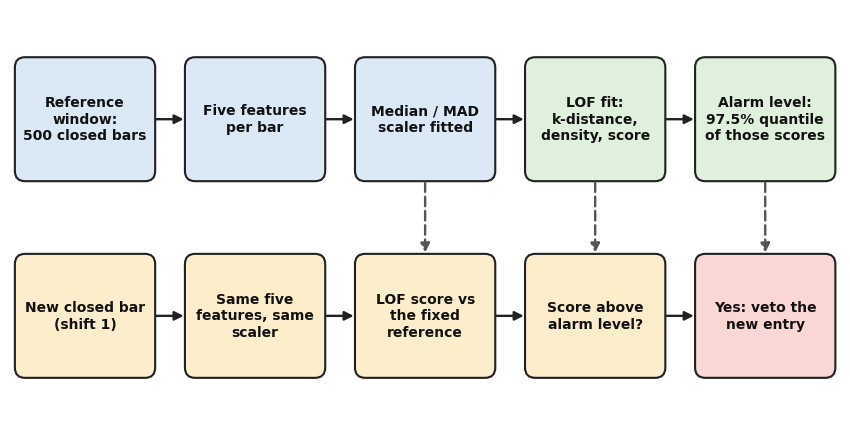
Fig. 1. The reference lane (top) is rebuilt every fourth bar. The query lane (bottom) runs on every new closed bar and reuses the scaler, the reference cloud and the alarm level from the last refit. Dashed arrows show what the query lane borrows from the reference lane.
The quantities behind the score. Pick a neighbourhood size k. For a point p, the k-distance is the distance to its k-th nearest neighbour. Equivalently, it is the radius of the smallest ball around p that contains k other points. The reachability distance from p to a neighbour o is the larger of o's own k-distance and the plain distance between p and o. The local reachability density of p is the inverse of the average reachability distance from p to its k neighbours. LOF itself is the average density of p's neighbours divided by p's own density. In formulas:
d_k(p)         = distance from p to its k-th nearest neighbour
N_k(p)         = the k nearest neighbours of p
reach_k(p, o)  = max( d_k(o), d(p, o) )
lrd_k(p)       = 1 / ( mean over o in N_k(p) of reach_k(p, o) )
LOF_k(p)       = ( mean over o in N_k(p) of lrd_k(o) ) / lrd_k(p)
The reachability step is what keeps the estimate stable. Inside a tight cluster the plain distances between neighbours are tiny and jumpy, and a ratio of them would be noisy. Flooring each distance at the neighbour's own k-distance makes every point in a cluster "reach" the others at the cluster's typical spacing, so the density stops reacting to accidental near-collisions.
Reading the score. A score near 1 says the point is about as dense as the neighbours it borrows from. A score of 2 says those neighbours live in space twice as dense as the point's own surroundings. Both sides of the ratio are densities measured in the same units, so multiplying every coordinate by the same factor leaves the score unchanged. It is a statement about shape, not about distance. The only thing that breaks this invariance is a tiny guard constant added to the mean reachability distance before it is inverted, which matters at about the ninth decimal.
A twelve-point example. The self-test script described later uses twelve points in two dimensions: six in a tight cluster near the origin, five in a looser cluster around (4, 4), and one isolated point at (2.1, 7.9). With k = 3 the origin cluster scores between 0.94 and 1.09, the cluster near (4, 4) between 0.96 and 1.10, and the isolated point 5.49. Scoring three new points against that cloud gives 0.92 for (0, 0), which sits inside the tight cluster, 6.00 for (2, 2), which sits in empty space between the clusters, and 11.71 for (9, -3), which is far from everything. A single distance cut-off measured from the overall centre has to be generous enough for the looser cluster, and by then it tends to miss oddities near the tight one.
Where the alarm level comes from. After the reference cloud is fitted, every reference point has its own LOF score. The alarm level is a quantile of those scores, 97.5% by default:
alarm_level = quantile( LOF of every reference point, 0.975 ) That 2.5% figure describes the reference scores themselves, not new bars: with interpolation between order statistics and ties in the data, the exact share can land a little off 2.5%, and a new bar is judged as a novelty point against an aging window rather than against itself, so its firing rate is a separate question we measure in the tests. Because the level is read off each symbol's own cloud rather than hard-coded, the same code ran unchanged on gold, EURUSD and another timeframe below without retuning a number such as 1.5 — checked on these four pairs, not established as a general property.
What one refit costs. The engine measures brute-force distances from each of the 500 reference points to all 500: 500 x 500 x 5 is about 1.25 million multiply-adds, plus a bounded insertion list that keeps the k nearest. That happens once every InpRefitEvery bars. The per-bar query afterwards is only 500 distances.
Keeping the bar out of its own reference. The reference window always ends at shift 2, one bar before the bar being judged at shift 1. If the bar belonged to the cloud it is measured against, it would raise the local density around itself, and unusual bars would look less unusual than they are.
MarketFeatures.mqh: From Bars to Points
LOF only ever sees distances, so what the coordinates mean and how they are scaled decides everything the engine does afterwards. MarketFeatures.mqh defines five features per bar, loads a whole window of bars in a single pass, fits a robust scaler on the reference window, and applies that same scaler to every new bar.
Two constants sit at the top of the file. MF_DIM fixes the width of the feature vector, and MF_EPS is the floor used when ATR values and scales are checked before a division.
//+------------------------------------------------------------------+
//| Constants                                                        |
//| Width of the feature vector built for every bar, and the numeric |
//| floor that protects divisions inside the robust scaler.          |
//+------------------------------------------------------------------+
#define MF_DIM 5        // features per bar
#define MF_EPS 1.0e-12  // floor for scale and ATR checks
The five column positions live in an enum, so every matrix built by the class can be addressed by name instead of by a magic number.
//+------------------------------------------------------------------+
//| ENUM_MF_FEATURE                                                  |
//| Column positions inside one feature vector. Every matrix built   |
//| by CMarketFeatures uses this order, so a column can be addressed |
//| by name instead of a magic number.                               |
//+------------------------------------------------------------------+
enum ENUM_MF_FEATURE
  {
   MF_F_RETURN,    // log return close[t] / close[t-1]
   MF_F_RANGE,     // bar range divided by the previous bar's ATR
   MF_F_VOLUME,    // log(1 + tick volume)
   MF_F_SPREAD,    // spread in points recorded on the bar
   MF_F_CLOSELOC   // close location inside the bar, centred on zero
  };
The features. Feature 0 is the log return of the close. It is additive across bars and symmetric around zero, unlike a percentage change. Feature 1 is the bar's range in ATR units, so a big bar means the same thing on gold and on EURUSD, which is what lets one alarm rule survive a change of symbol. The ATR used is the one from the bar before, because the bar's own range is part of its own ATR, and the goal is to compare the bar with conditions that existed before it formed. Feature 2 is log(1 + tick volume): volume is heavy-tailed and the log compresses it. Feature 3 is the spread in points recorded on the bar, since a widening spread is one of the first symptoms of an unusual market state. Feature 4 is where the bar closed inside its own range, shifted so that 0 means the middle, with a neutral 0 for zero-range bars. None of the five features names the time of day or session directly, so the gate relies on volatility, volume and spread to carry that signal rather than a clock — a calendar feature is a natural addition, not something this version does.
The class stores configuration (symbol, timeframe, ATR handle, clip level) and scaler state (per-feature centre and scale, plus a fitted flag). Init creates the ATR handle once. BuildReference and LoadQuery are the two loaders the EA and the indicator call. FitScaler, Transform and TransformMatrix are public so they can be reused and tested on their own.
//+------------------------------------------------------------------+
//| CMarketFeatures                                                  |
//| Turns closed bars into 5-dimensional points for the LOF engine.  |
//| It loads bars and ATR values, builds the raw features, fits a    |
//| median/MAD scaler on the reference window and applies that same  |
//| scaler to every new bar, so the query point and the reference    |
//| points live in one coordinate system.                            |
//+------------------------------------------------------------------+
class CMarketFeatures
  {
private:
//--- configuration
   string          m_symbol;          // symbol the bars are read from
   ENUM_TIMEFRAMES m_period;          // timeframe the bars are read from
   int             m_atr_handle;      // iATR handle used to normalise the range
   double          m_clip;            // standardized values are clipped to +/- m_clip
//--- robust scaler state
   double          m_center[MF_DIM];  // per-feature median of the reference window
   double          m_scale[MF_DIM];   // per-feature robust scale (1.4826 * MAD)
   bool            m_fitted;          // true once FitScaler() has succeeded
//--- internal helpers
   double          MedianOf(double &a[], const int n);
   bool            LoadRaw(const int first_shift, const int count, matrix &raw);
public:
//--- lifecycle
                   CMarketFeatures(void);
                   ~CMarketFeatures(void);
   bool            Init(const string symbol, const ENUM_TIMEFRAMES period,
                        const int atr_period, const double clip);
   void            Release(void);
//--- scaler and transforms
   bool            FitScaler(matrix &raw);
   void            Transform(const double &raw_row[], double &out[]);
   void            TransformMatrix(matrix &raw, matrix &out);
//--- high-level loaders
   bool            BuildReference(const int first_shift, const int count, matrix &std_ref);
   bool            LoadQuery(const int shift, double &std_row[]);
  };
LoadRaw: one read per window. The function asks for count + 1 bars, not count, because row 0 needs the previous bar's close for its return and the previous bar's ATR as its yardstick. Both arrays are non-series, so index 0 is the oldest bar, which is also the order the matrix rows are built in. If either CopyRates or CopyBuffer returns fewer bars than requested, the whole call fails and the caller simply tries again on the next bar. A half-filled window would fit a scaler to partial data, which is worse than no verdict at all. A non-positive price or ATR also aborts the load, since the log and the division would be undefined.
//+------------------------------------------------------------------+
//| CMarketFeatures::LoadRaw                                         |
//| Builds 'count' raw feature rows, oldest first, where the newest  |
//| row belongs to the bar at 'first_shift' (1 = last closed bar).   |
//|                                                                  |
//| One extra older bar is read. Row 0 needs the previous close for  |
//| its return and the previous bar's ATR as the volatility          |
//| yardstick, so the range is measured against conditions that      |
//| existed BEFORE the bar formed. Returns false on any short read.  |
//+------------------------------------------------------------------+
bool CMarketFeatures::LoadRaw(const int first_shift, const int count, matrix &raw)
  {
   MqlRates rates[];           // bars, oldest first
   double   atr[];             // ATR values, same indexing as rates[]
   int      need = count + 1;  // bars to read: one extra for the previous bar
//--- Plain (non-series) arrays make index 0 the oldest bar, which is the order the
//    matrix rows are built in.
   ArraySetAsSeries(rates, false);
   ArraySetAsSeries(atr, false);
   if(m_atr_handle == INVALID_HANDLE || count < 1)
      return(false);
//--- Both reads start at the same shift and cover the same number of bars, so rates[i]
//    and atr[i] always describe the same bar. A short read means the history or the
//    indicator is not ready yet, and the caller simply tries again next bar.
   if(CopyRates(m_symbol, m_period, first_shift, need, rates) != need)
      return(false);
   if(CopyBuffer(m_atr_handle, 0, first_shift, need, atr) != need)
      return(false);
   raw.Init(count, MF_DIM);
//--- Row i describes the bar rates[i + 1]. Its 'previous bar' is rates[i].
   for(int i = 0; i < count; i++)
     {
      double prev_close = rates[i].close;                        // close of the previous bar
      double prev_atr   = atr[i];                                // ATR known before this bar opened
      double range      = rates[i + 1].high - rates[i + 1].low;  // high-low of this bar
      //--- A non-positive price or ATR would make the log or the division undefined.
      //    Rejecting the whole load is safer than inventing a value for one row.
      if(prev_close <= 0.0 || rates[i + 1].close <= 0.0 || prev_atr <= MF_EPS)
         return(false);
      //--- Feature 0: log return. Additive across bars and symmetric around zero,
      //    unlike a percentage change.
      raw[i][MF_F_RETURN] = MathLog(rates[i + 1].close / prev_close);
      //--- Feature 1: range in ATR units. Makes a 'big bar' mean the same thing on gold
      //    and on EURUSD, which is what lets one threshold rule survive a change of
      //    symbol.
      raw[i][MF_F_RANGE] = range / prev_atr;
      //--- Feature 2: log(1 + tick volume). Volume is heavy-tailed, and the log
      //    compresses it so the later median/MAD scaling behaves like a robust z-score.
      raw[i][MF_F_VOLUME] = MathLog(1.0 + (double)rates[i + 1].tick_volume);
      //--- Feature 3: spread in points as recorded on the bar. Widening spread is one
      //    of the first symptoms of an unusual market state.
      raw[i][MF_F_SPREAD] = (double)rates[i + 1].spread;
      //--- Feature 4: where the bar closed inside its own range, shifted so that 0
      //    means the middle. A zero-range bar has no location, so it gets the neutral
      //    value 0.
      if(range > MF_EPS)
         raw[i][MF_F_CLOSELOC] = (rates[i + 1].close - rates[i + 1].low) / range - 0.5;
      else
         raw[i][MF_F_CLOSELOC] = 0.0;
     }
   return(true);
  }
FitScaler: median and MAD, not mean and standard deviation. The reference window will contain some of the very bars we want to flag. A mean and a standard deviation get dragged by them, while the median and the median absolute deviation barely move. The factor 1.4826 rescales the MAD so that it equals the standard deviation for normally distributed data, which keeps the standardized values on a familiar scale. A feature that is constant for more than half the window has a MAD of zero, for example the spread on a fixed-spread account. The function then falls back to the mean absolute deviation, so a rare spike stays large but finite, and as a last resort to a scale of 1.0, so a perfectly constant feature contributes nothing to any distance.
//+------------------------------------------------------------------+
//| CMarketFeatures::FitScaler                                       |
//| Fits a robust scaler on the reference window: per feature, the   |
//| center is the median and the scale is 1.4826 * MAD, which equals |
//| the standard deviation for normal data but ignores outliers.     |
//|                                                                  |
//| Fallbacks keep the scale usable when a feature barely moves:     |
//| first the mean absolute deviation, then 1.0. The scaler is       |
//| fitted on reference data only and reused for every later query.  |
//+------------------------------------------------------------------+
bool CMarketFeatures::FitScaler(matrix &raw)
  {
   int    n = (int)raw.Rows();  // reference rows
   double col[];                // scratch copy of one feature column
   double dev[];                // absolute deviations from the median
//--- Ten rows is the bare minimum for a median and MAD that mean anything.
   if(n < 10 || (int)raw.Cols() != MF_DIM)
      return(false);
   ArrayResize(col, n);
   ArrayResize(dev, n);
   for(int c = 0; c < MF_DIM; c++)
     {
      for(int i = 0; i < n; i++)
         col[i] = raw[i][c];
      double med     = MedianOf(col, n);  // column median (also sorts col)
      double sum_dev = 0.0;               // running sum of absolute deviations
      for(int i = 0; i < n; i++)
        {
         dev[i]   = MathAbs(col[i] - med);
         sum_dev += dev[i];
        }
      double mad   = MedianOf(dev, n);  // median absolute deviation
      double scale = 1.4826 * mad;      // MAD rescaled to a standard deviation
      //--- A feature that is constant for more than half the window (spread on a
      //    fixed-spread account) has MAD = 0. Falling back to the mean absolute
      //    deviation keeps a rare spike large but finite, and the last resort of 1.0
      //    makes a perfectly constant feature contribute nothing.
      if(scale < MF_EPS)
         scale = 1.2533 * sum_dev / n;
      if(scale < MF_EPS)
         scale = 1.0;
      m_center[c] = med;
      m_scale[c]  = scale;
     }
   m_fitted = true;
   return(true);
  }
Transform: centre, scale, clip. Each raw value has the reference median subtracted and is divided by the robust scale. The result is then clipped to plus or minus InpClip, 8.0 by default. Clipping bounds how much any single feature can contribute to a distance. Without it, one freak bar such as a news spike or a bad tick would sit hundreds of units from everything, and every distance involving it would be meaningless. Transform() is public and reusable on its own, so it now guards that precondition directly rather than assuming it.
//+------------------------------------------------------------------+
//| CMarketFeatures::Transform                                       |
//| Standardizes one raw feature row with the fitted scaler:         |
//| subtract the median, divide by the robust scale, clip to +/-     |
//| m_clip, after checking that FitScaler() has already run. An      |
//| unfit call returns a zero vector instead of using unset state.   |
//+------------------------------------------------------------------+
void CMarketFeatures::Transform(const double &raw_row[], double &out[])
  {
   ArrayResize(out, MF_DIM);
//--- Guard: Transform() is public and reusable, so a caller that skips BuildReference/
//    LoadQuery must not standardize against an unset scaler.
   if(!m_fitted)
     {
      ArrayInitialize(out, 0.0);
      return;
     }
   for(int c = 0; c < MF_DIM; c++)
     {
      double z = (raw_row[c] - m_center[c]) / m_scale[c];
      //--- Clipping bounds the distance contribution of any single feature. Without it,
      //    one freak bar (news spike, bad tick) would sit hundreds of units from
      //    everything and make every distance involving it meaningless.
      out[c] = MathMax(-m_clip, MathMin(m_clip, z));
     }
  }
BuildReference: load, fit, transform in one call. The EA and the indicator never call FitScaler or Transform directly. BuildReference wraps the sequence, so the scaler always ends up fitted on exactly the window the engine will use as its reference. LoadQuery mirrors it for a single bar and refuses to run until a scaler exists. The scaler is never fitted on a query: if it were, every bar would look normal to itself.
//+------------------------------------------------------------------+
//| CMarketFeatures::BuildReference                                  |
//| Loads 'count' bars ending at 'first_shift', fits the scaler on   |
//| them and returns the standardized matrix in 'std_ref'.           |
//|                                                                  |
//| Callers pass first_shift = 2 (or s + 1 when scoring the bar at   |
//| shift s) so the bar about to be scored is never part of its own  |
//| reference window.                                                |
//+------------------------------------------------------------------+
bool CMarketFeatures::BuildReference(const int first_shift, const int count, matrix &std_ref)
  {
   matrix raw;
   if(!LoadRaw(first_shift, count, raw))
      return(false);
   if(!FitScaler(raw))
      return(false);
   TransformMatrix(raw, std_ref);
   return(true);
  }
LOFEngine.mqh: Neighbours, Reachability and the Score
LOFEngine.mqh holds the algorithm. It knows nothing about bars, prices or MetaTrader. It takes a matrix of points and returns scores, which is why the same class runs unchanged in the EA, in the indicator and in the self-test script.
One constant lives at the top of the file. LOF_EPS is added to the mean reachability distance before it is inverted. It only matters when several reference points coincide exactly: their reachability distances are zero and the density would otherwise be infinite. It is the same value scikit-learn uses, which lets the self-test compare against that library's numbers.
//+------------------------------------------------------------------+
//| Constants                                                        |
//| Small constant added to the mean reachability distance before it |
//| is inverted. It stops the local density from becoming infinite   |
//| when several reference points sit on top of each other.          |
//+------------------------------------------------------------------+
#define LOF_EPS 1.0e-10  // density guard, same value scikit-learn uses
The class holds its configuration (k and the alarm quantile), the fitted reference (the matrix of points, the vectors of k-distance, density and LOF score, and two flat tables with neighbour indices and distances) and one scratch buffer for distances. The two neighbour tables are plain arrays addressed as row * k + rank, which keeps the inner loops simple. Fit and Score are the two calls that matter. Everything else is either a helper or an accessor.
//+------------------------------------------------------------------+
//| CLOFEngine                                                       |
//| Local Outlier Factor written from first principles on native     |
//| matrix and vector types. Fit() stores a reference set and        |
//| precomputes each point's k-distance, local reachability density  |
//| (lrd) and LOF score. Score() then rates a NEW point against that |
//| fixed reference without ever inserting it, so a query can never  |
//| distort the density it is measured against.                      |
//+------------------------------------------------------------------+
class CLOFEngine
  {
private:
//--- configuration
   int    m_k;           // neighbourhood size
   double m_quantile;    // quantile (0..1) used for the alarm threshold
//--- fitted reference state
   bool   m_ready;       // true once Fit() has succeeded
   int    m_n;           // number of reference points
   int    m_dim;         // number of features per point
   double m_threshold;   // quantile of the reference LOF scores
   matrix m_ref;         // reference points, one per row
   vector m_kdist;       // distance to the k-th neighbour of each point
   vector m_lrd;         // local reachability density of each point
   vector m_lof;         // LOF score of each reference point
   int    m_nbr[];       // flat n*k table of neighbour indices
   double m_nbr_dist[];  // flat n*k table of neighbour distances
   double m_dbuf[];      // scratch: distances from one point to all
//--- internal helpers
   void   DistancesTo(const double &q[], double &out[]);
   int    SelectNearest(const double &dist[], const int exclude, int &idx[], double &val[]);
   double LocalReachDensity(const int &idx[], const double &val[], const int offset);
   double NeighbourRatio(const int &idx[], const int offset, const double lrd_self);
   double QuantileOf(vector &v, const double q);
public:
//--- lifecycle
          CLOFEngine(void);
          ~CLOFEngine(void);
   bool   Init(const int k, const double quantile);
//--- fitting and scoring
   bool   Fit(const matrix &ref);
   double Score(const double &point[]);
//--- accessors
   bool   Ready(void);
   double Threshold(void);
   int    Count(void);
   int    K(void);
   double ReferenceScore(const int i);
  };
SelectNearest: a bounded insertion list. To find the k nearest points, sorting all n distances would cost O(n log n) per point. Instead the function keeps a sorted list of the k best candidates so far. Once the list is full, a candidate that is not closer than the current k-th best fails a single comparison and is skipped, so almost every point costs one comparison. When a candidate does get in, it takes the last slot and bubbles left until the list is ordered again. The exclude argument removes one index, so a reference point never counts as its own neighbour. A new query passes -1 because it is not in the reference at all.
//+------------------------------------------------------------------+
//| CLOFEngine::SelectNearest                                        |
//| Finds the k nearest reference points from a distance array.      |
//| idx[] and val[] (both sized k) receive the neighbour indices and |
//| distances in ascending order. 'exclude' removes one index, so a  |
//| reference point never counts as its own neighbour (-1 for a new  |
//| query). Returns how many neighbours were found.                  |
//|                                                                  |
//| A bounded insertion list is used instead of sorting all n        |
//| distances: after the first k points almost every candidate fails |
//| one comparison against the current k-th best, so the pass costs  |
//| close to O(n) instead of O(n log n).                             |
//+------------------------------------------------------------------+
int CLOFEngine::SelectNearest(const double &dist[], const int exclude, int &idx[], double &val[])
  {
   int filled = 0;  // slots of idx[]/val[] filled so far
   for(int j = 0; j < m_n; j++)
     {
      if(j == exclude)
         continue;
      double dj  = dist[j];  // distance of this candidate
      int    pos = 0;        // slot the candidate will occupy
      //--- Once the list is full, a candidate that is not closer than the current k-th
      //    neighbour cannot change the result and is skipped immediately.
      if(filled == m_k && dj >= val[m_k - 1])
         continue;
      //--- Start in the first free slot, or overwrite the last slot (the worst
      //    neighbour) when the list is already full, then bubble the candidate left
      //    until the list is sorted again.
      pos = (filled < m_k) ? filled : m_k - 1;
      while(pos > 0 && val[pos - 1] > dj)
        {
         val[pos] = val[pos - 1];
         idx[pos] = idx[pos - 1];
         pos--;
        }
      val[pos] = dj;
      idx[pos] = j;
      if(filled < m_k)
         filled++;
     }
   return(filled);
  }
LocalReachDensity and NeighbourRatio. These two helpers are the formulas from the architecture section, written once and used for both reference points and new queries. They take an offset into the neighbour arrays, so a reference point can read its neighbours from row * k in the flat tables while a query reads them from the start of two small local arrays.
//+------------------------------------------------------------------+
//| CLOFEngine::LocalReachDensity                                    |
//| Computes lrd = 1 / (mean reachability distance + LOF_EPS) for    |
//| one point whose neighbours start at 'offset' inside idx[] and    |
//| val[].                                                           |
//|                                                                  |
//| The reachability distance from the point to neighbour o is       |
//| max(k-distance(o), d(point, o)). Using the neighbour's own       |
//| k-distance as a floor smooths the estimate: points inside a      |
//| tight cluster all 'reach' each other at the cluster's typical    |
//| spacing instead of at their tiny raw distances.                  |
//+------------------------------------------------------------------+
double CLOFEngine::LocalReachDensity(const int &idx[], const double &val[], const int offset)
  {
   double acc = 0.0;  // sum of reachability distances
   for(int t = 0; t < m_k; t++)
      acc += MathMax(m_kdist[idx[offset + t]], val[offset + t]);
   return(1.0 / (acc / m_k + LOF_EPS));
  }
The density helper computes the mean reachability distance, floored per neighbour at that neighbour's k-distance, and inverts it with the LOF_EPS guard.
//+------------------------------------------------------------------+
//| CLOFEngine::NeighbourRatio                                       |
//| Computes the LOF ratio: the mean lrd of the point's neighbours   |
//| divided by the point's own lrd.                                  |
//|                                                                  |
//| A value near 1 means the point is as dense as its surroundings.  |
//| A value well above 1 means the neighbours sit in denser space    |
//| than the point does, which is what 'locally sparse' means.       |
//+------------------------------------------------------------------+
double CLOFEngine::NeighbourRatio(const int &idx[], const int offset, const double lrd_self)
  {
   double acc = 0.0;  // sum of neighbour densities
   for(int t = 0; t < m_k; t++)
      acc += m_lrd[idx[offset + t]];
   return((acc / m_k) / lrd_self);
  }
Fit: three passes, in this order. Pass one finds every point's neighbours and k-distance. Pass two computes every point's density, which needs the k-distance of each neighbour, so pass one has to finish for all points first. Pass three computes the LOF scores, which need the density of each neighbour, so it gets its own pass after all densities exist. The reference matrix is copied into the object, so the caller's matrix can be reused freely. The last step sets the alarm level from the reference scores. Fit returns false when the set has k or fewer points, because a point needs k neighbours other than itself.
//+------------------------------------------------------------------+
//| CLOFEngine::Fit                                                  |
//| Stores the reference set (one standardized point per row) and    |
//| computes, in three passes: 1) each point's k nearest neighbours  |
//| and k-distance; 2) each point's local reachability density; 3)   |
//| each point's LOF score. The alarm threshold is then set to the   |
//| configured quantile of those reference scores.                   |
//|                                                                  |
//| Returns false if the set has k or fewer points, because a point  |
//| needs k neighbours other than itself.                            |
//+------------------------------------------------------------------+
bool CLOFEngine::Fit(const matrix &ref)
  {
   m_ready = false;
   int    n   = (int)ref.Rows();  // reference points
   int    d   = (int)ref.Cols();  // features per point
   int    cnt = 0;                // neighbours found for one point
   double q[];                    // one reference row as a plain array
   int    idx[];                  // neighbour indices of one point
   double val[];                  // neighbour distances of one point
//--- Each point needs k neighbours that are not itself, so at least k + 1 points are
//    required.
   if(n <= m_k || d < 1)
      return(false);
   m_n   = n;
   m_dim = d;
   m_ref = ref;
   ArrayResize(m_nbr, n * m_k);
   ArrayResize(m_nbr_dist, n * m_k);
   ArrayResize(m_dbuf, n);
   ArrayResize(q, d);
   ArrayResize(idx, m_k);
   ArrayResize(val, m_k);
   m_kdist.Init(n);
   m_lrd.Init(n);
   m_lof.Init(n);
//--- Pass 1: neighbours and k-distance. The k-distance of a point is the distance to
//    its k-th nearest neighbour, i.e. the radius of the smallest circle around it that
//    holds k other points. The results go into flat tables addressed as row * k + rank
//    so later passes need no further searching.
   for(int i = 0; i < n; i++)
     {
      for(int c = 0; c < d; c++)
         q[c] = m_ref[i][c];
      DistancesTo(q, m_dbuf);
      cnt = SelectNearest(m_dbuf, i, idx, val);
      if(cnt < m_k)
         return(false);
      for(int t = 0; t < m_k; t++)
        {
         m_nbr[i * m_k + t]      = idx[t];
         m_nbr_dist[i * m_k + t] = val[t];
        }
      m_kdist[i] = val[m_k - 1];
     }
//--- Pass 2: local reachability density. It needs the k-distance of every neighbour,
//    which is why pass 1 has to finish for all points first.
   for(int i = 0; i < n; i++)
      m_lrd[i] = LocalReachDensity(m_nbr, m_nbr_dist, i * m_k);
//--- Pass 3: LOF. It needs the density of every neighbour, hence its own pass after all
//    densities exist.
   for(int i = 0; i < n; i++)
      m_lof[i] = NeighbourRatio(m_nbr, i * m_k, m_lrd[i]);
//--- The alarm level is taken from the reference set's own score distribution, so it
//    adapts to the symbol and timeframe instead of using a fixed number such as 1.5
//    that fits one market and silently fails on another.
   m_threshold = QuantileOf(m_lof, m_quantile);
   m_ready     = true;
   return(true);
  }
Score: a novelty test. A new point is never added to the reference set. Its neighbours come from the reference only, and it uses the stored k-distances and densities of those neighbours. That is what makes the result a genuine novelty test: the query cannot shift the density it is measured against. The function returns -1.0 when the engine is not fitted or the point has the wrong dimension, so a failed score can never be mistaken for a real value.
//+------------------------------------------------------------------+
//| CLOFEngine::Score                                                |
//| Returns the LOF score of a new point measured against the fitted |
//| reference set, or -1.0 when the engine is not ready or the point |
//| has the wrong dimension.                                         |
//|                                                                  |
//| The point is never added to the reference set. Its neighbours    |
//| come from the reference only, and it uses the stored k-distances |
//| and densities of those neighbours. This is what makes the score  |
//| a novelty test rather than a self-referential one.               |
//+------------------------------------------------------------------+
double CLOFEngine::Score(const double &point[])
  {
   int    idx[];        // neighbour indices of the query
   double val[];        // neighbour distances of the query
   double lrd_q = 0.0;  // local reachability density of the query
   if(!m_ready || ArraySize(point) != m_dim)
      return(-1.0);
   ArrayResize(idx, m_k);
   ArrayResize(val, m_k);
   DistancesTo(point, m_dbuf);
//--- Exclude index -1: the query is not a member of the reference, so nothing has to be
//    skipped.
   if(SelectNearest(m_dbuf, -1, idx, val) < m_k)
      return(-1.0);
   lrd_q = LocalReachDensity(idx, val, 0);
   return(NeighbourRatio(idx, 0, lrd_q));
  }
QuantileOf: the alarm level. The quantile uses linear interpolation between the two neighbouring order statistics, the rule numpy.percentile uses by default. It works on a sorted copy, so the score vector keeps its original order.
//+------------------------------------------------------------------+
//| CLOFEngine::QuantileOf                                           |
//| Returns the q-quantile (0..1) of a vector using linear           |
//| interpolation between the two neighbouring order statistics, the |
//| same rule numpy.percentile uses by default. Works on a sorted    |
//| copy and leaves the vector untouched.                            |
//+------------------------------------------------------------------+
double CLOFEngine::QuantileOf(vector &v, const double q)
  {
   int    n   = (int)v.Size();  // number of values
   double tmp[];                // sortable copy of the vector
   double pos = q * (n - 1);    // fractional rank of the quantile
   if(n < 1)
      return(0.0);
   ArrayResize(tmp, n);
   for(int i = 0; i < n; i++)
      tmp[i] = v[i];
   ArraySort(tmp);
   int lo = (int)MathFloor(pos);  // order statistic below the rank
   int hi = (int)MathCeil(pos);   // order statistic above the rank
   return(tmp[lo] + (pos - lo) * (tmp[hi] - tmp[lo]));
  }
LOF_Gate_EA.mq5: The Entry Gate
The EA is a deliberately plain strategy with the gate applied. When the 20-period EMA crosses the 50-period EMA on a closed bar, it opens a market position with a stop loss two ATRs away and a take profit three ATRs away. An opposite cross closes the position. The LOF gate has exactly one power: it can veto a new entry. It never closes a trade, never changes the size and, unless the optional tightening is switched on, never touches a stop. That keeps the comparison clean. With InpUseGate set to false the EA is the plain crossover, and with it set to true the only difference between the two runs is the set of vetoed signals.
The inputs come in three groups: the base strategy, the LOF gate, and an optional stop-tightening mode that is switched off in every test in this article. The defaults are the values used throughout the testing section.
//+------------------------------------------------------------------+
//| Inputs                                                           |
//| Base strategy, LOF gate and stop-tightening settings. Setting    |
//| InpUseGate to false gives the plain EMA-cross baseline, so the   |
//| gated and ungated runs differ in exactly one switch.             |
//+------------------------------------------------------------------+
input group "Base strategy"
input int    InpFastEMA          = 20;        // fast EMA period
input int    InpSlowEMA          = 50;        // slow EMA period
input int    InpATRPeriod        = 14;        // ATR period for stops and for the range feature
input double InpSLATR            = 2.0;       // stop loss distance in ATR multiples
input double InpTPATR            = 3.0;       // take profit distance in ATR multiples
input double InpLots             = 0.10;      // fixed lot size
input long   InpMagic            = 52017701;  // magic number
input int    InpDeviation        = 20;        // max slippage in points
input group "LOF novelty gate"
input bool   InpUseGate          = true;      // block new entries on anomalous bars
input int    InpWindow           = 500;       // reference window in bars
input int    InpK                = 20;        // LOF neighbourhood size k
input double InpQuantile         = 97.5;      // alarm quantile in percent
input int    InpRefitEvery       = 4;         // refit the reference every N bars
input double InpClip             = 8.0;       // clip standardized features at +/- this value
input group "Anomaly stop tightening"
input bool   InpTightenOnAnomaly = false;     // pull stops in when the market turns unfamiliar
input double InpTightenATR       = 1.0;       // tightened stop distance in ATR multiples
OnTick: the order of decisions. Intra-bar ticks carry no new information for a model that reads closed bars, so the handler returns immediately unless a new bar has opened. LOF is refreshed only when something depends on it, which keeps the ungated baseline run fast. An opposite cross closes the current position first, and closing is never blocked by the gate. Only after that does the veto run: if the bar just scored is flagged, the signal is dropped and a counter is incremented.
//+------------------------------------------------------------------+
//| OnTick                                                           |
//| Runs the decision logic once per closed bar. The order matters:  |
//| 1) refresh the LOF verdict for the bar that just closed, 2)      |
//| optionally tighten stops on open positions if that bar was       |
//| anomalous, 3) act on a fresh EMA cross: close an opposite        |
//| position, then open a new one unless the gate vetoes it.         |
//+------------------------------------------------------------------+
void OnTick()
  {
//--- Intra-bar ticks carry no new information for a bar-based model, so everything
//    below runs once per new bar.
   if(!IsNewBar())
      return;
   double atr    = ReadATR();    // volatility of the last closed bar
   int    signal = ReadCross();  // +1 bullish cross, -1 bearish cross, 0 none
   ulong  ticket = 0;            // ticket of the open position, if any
   int    dir    = 0;            // direction of the open position, if any
   if(atr <= 0.0)
      return;
//--- LOF is only computed when something depends on it. The baseline run (gate off,
//    tightening off) skips it entirely, which also keeps that backtest fast.
   if(InpUseGate || InpTightenOnAnomaly)
      RefreshLOF();
   if(InpTightenOnAnomaly && g_anomaly)
      TightenStops(atr);
   if(signal == 0)
      return;
//--- An opposite cross ends the current trade first. Closing is never blocked by the
//    gate; the gate only guards NEW risk.
   CloseOpposite(signal);
   if(FindPosition(ticket, dir))
      return;
//--- The veto. An unfamiliar market state means the EMA cross is being read in
//    conditions the reference window has rarely seen, so the signal is skipped rather
//    than traded.
   if(InpUseGate && g_anomaly)
     {
      g_entries_blocked++;
      return;
     }
   OpenPosition(signal, atr);
  }
RefreshLOF: one verdict per closed bar. The function first assumes the bar is not anomalous. That default is deliberate: if the history is too short, an indicator is not ready or the window cannot be built, there is no verdict, and no verdict means no veto. It then refits when the engine has never been fitted or when InpRefitEvery bars have passed. BuildReference is called with a first shift of 2, so the reference ends one bar before the bar at shift 1, which is scored with the scaler and cloud from the last refit. Two counters record how many bars were scored and how many were flagged.
//+------------------------------------------------------------------+
//| RefreshLOF                                                       |
//| Produces the LOF verdict for the bar that just closed and stores |
//| it in g_score, g_threshold and g_anomaly.                        |
//|                                                                  |
//| The reference window always ends at shift 2, so the bar being    |
//| scored (shift 1) is never inside the window it is judged         |
//| against. The window is rebuilt every InpRefitEvery bars; in      |
//| between, the stored reference and scaler are reused and only the |
//| new bar is scored. If anything fails (short history, indicator   |
//| not ready) the verdict defaults to 'not anomalous': no data      |
//| means no veto.                                                   |
//+------------------------------------------------------------------+
bool RefreshLOF()
  {
   matrix ref;  // standardized reference window
   double q[];  // standardized feature vector of the new bar
   g_anomaly = false;
//--- Refit when the engine has never been fitted, or when enough bars have passed.
//    BuildReference() also refits the scaler, so scaler and reference always belong
//    together.
   if(!g_lof.Ready() || g_since_fit >= InpRefitEvery)
     {
      if(!g_features.BuildReference(2, InpWindow, ref))
         return(false);
      if(!g_lof.Fit(ref))
         return(false);
      g_since_fit = 0;
     }
   g_since_fit++;
//--- Score the closed bar with the scaler and reference from the last refit.
   if(!g_features.LoadQuery(1, q))
      return(false);
   g_score = g_lof.Score(q);
   if(g_score < 0.0)
      return(false);
   g_threshold = g_lof.Threshold();
   g_anomaly   = (g_score > g_threshold);
   g_bars_scored++;
   if(g_anomaly)
      g_bars_flagged++;
   return(true);
  }
OpenPosition: ATR stops with a broker floor. The stop and target distances are ATR multiples, floored at the larger of the broker's stop level and the current spread, so an order is not rejected as having invalid stops when ATR is tiny. Volume passes through NormalizeLots, which rounds it down to the symbol's volume step and clamps it between the minimum and maximum, and prices are normalized to the symbol's digits.
//+------------------------------------------------------------------+
//| OpenPosition                                                     |
//| Opens one market position in the signal direction with ATR-based |
//| stop loss and take profit. Distances are floored at the broker   |
//| minimum, prices are normalized to the symbol's digits, and the   |
//| outcome is counted so OnDeinit() can report it.                  |
//+------------------------------------------------------------------+
void OpenPosition(const int signal, const double atr)
  {
   double min_dist = MinStopDistance();                  // broker floor
   double sl_dist  = MathMax(InpSLATR * atr, min_dist);  // stop distance
   double tp_dist  = MathMax(InpTPATR * atr, min_dist);  // target distance
   double lots     = NormalizeLots(InpLots);             // order volume
   double price    = 0.0;                                // entry price
   bool   ok       = false;                              // order result
   if(signal > 0)
     {
      price = SymbolInfoDouble(_Symbol, SYMBOL_ASK);
      ok    = g_trade.Buy(lots, _Symbol, price,
                          NormalizeDouble(price - sl_dist, _Digits),
                          NormalizeDouble(price + tp_dist, _Digits), "LOF gate");
     }
   else
     {
      price = SymbolInfoDouble(_Symbol, SYMBOL_BID);
      ok    = g_trade.Sell(lots, _Symbol, price,
                           NormalizeDouble(price + sl_dist, _Digits),
                           NormalizeDouble(price - tp_dist, _Digits), "LOF gate");
     }
   if(ok)
      g_entries_taken++;
   else
      PrintFormat("LOF_Gate_EA: order failed, retcode %u (%s)", g_trade.ResultRetcode(),
                  g_trade.ResultRetcodeDescription());
  }
Four small helpers complete the file. ReadCross reads both EMAs as series arrays, so index 0 is the bar that just closed and a cross means the order flipped between shift 2 and shift 1. FindPosition matches on both symbol and magic number, so the EA never touches positions opened by anything else. CloseOpposite closes a position that runs against the new signal. TightenStops, used only when InpTightenOnAnomaly is true, moves a stop closer to the market when the last bar was flagged and never loosens one; it is untested here.
The summary line. OnDeinit prints one line when a run ends: bars scored, bars flagged with the percentage, entries taken and entries blocked. Taken plus blocked must equal the trade count of the ungated run on the same symbol, and an ungated run must print a scored count of zero. The testing section uses it for exactly that.
LOFScore.mq5 and LOF_SelfTest.mq5: Seeing and Verifying the Score
LOFScore: the same engine, drawn. The indicator opens a separate window with two lines: the LOF score and the alarm level in force when the bar was scored. It calls the same feature builder and the same engine as the EA, on the same refit cadence, so a single bar is scored the same way in both places; a long history redraw tracks its own refit counter per shift rather than live bar by live bar, so bar-for-bar agreement on the scoring rule is what's shown here, not a proof that a chart redraw retraces the EA's exact refit history. ScoreShift handles one closed bar. Its reference window ends at shift + 1, which is the same rule used in the EA.
//+------------------------------------------------------------------+
//| ScoreShift                                                       |
//| Scores the closed bar at 'shift' and writes the score and the    |
//| threshold into the buffers.                                      |
//|                                                                  |
//| The reference window ends at shift + 1, so the bar is never part |
//| of the window it is judged against. The window is rebuilt every  |
//| InpRefitEvery bars, exactly as in the EA, which keeps the        |
//| indicator and the EA in agreement. Returns false if data is      |
//| missing; the buffers are then left empty for that bar.           |
//+------------------------------------------------------------------+
bool ScoreShift(const int shift)
  {
   matrix ref;          // standardized reference window
   double q[];          // standardized feature vector of the bar
   double score = 0.0;  // LOF score of the bar
   if(!g_lof.Ready() || g_since_fit >= InpRefitEvery)
     {
      if(!g_feat.BuildReference(shift + 1, InpWindow, ref))
         return(false);
      if(!g_lof.Fit(ref))
         return(false);
      g_since_fit = 0;
     }
   g_since_fit++;
   if(!g_feat.LoadQuery(shift, q))
      return(false);
   score = g_lof.Score(q);
   if(score < 0.0)
      return(false);
   BufLOF[shift] = score;
   BufThr[shift] = g_lof.Threshold();
   return(true);
  }
OnCalculate does the bookkeeping. On the first call it clears both buffers, forces a fresh fit and scores the last InpHistory closed bars from the oldest to the newest, so every refit sees only older data. After that it scores each newly closed bar once and ignores intra-bar ticks. The bar in progress is always left empty, because LOF is defined on closed bars only. InpHistory is limited on purpose, because every refit costs a full pass over the window.
//+------------------------------------------------------------------+
//| OnCalculate                                                      |
//| Indicator calculation. On the first call it back-fills the last  |
//| InpHistory closed bars, oldest first, so every refit sees only   |
//| older data. After that it scores each newly closed bar once and  |
//| ignores intra-bar ticks.                                         |
//|                                                                  |
//| The bar in progress (shift 0) is always left empty, because LOF  |
//| is defined on closed bars only.                                  |
//+------------------------------------------------------------------+
int OnCalculate(const int rates_total,
                const int prev_calculated,
                const datetime &time[],
                const double &open[],
                const double &high[],
                const double &low[],
                const double &close[],
                const long &tick_volume[],
                const long &volume[],
                const int &spread[])
  {
   int need  = InpHistory + InpWindow + InpATRPeriod + 10;  // bars required before any scoring
   int fresh = rates_total - prev_calculated;               // newly formed bars since the last call
   if(rates_total < need)
      return(0);
   if(prev_calculated == 0)
     {
      //--- Full recalculation: clear both buffers, force a fresh fit and score the
      //    history from the oldest bar to the newest closed bar.
      ArrayInitialize(BufLOF, EMPTY_VALUE);
      ArrayInitialize(BufThr, EMPTY_VALUE);
      g_lof.Init(InpK, InpQuantile / 100.0);
      g_since_fit = 0;
      for(int s = InpHistory; s >= 1; s--)
         ScoreShift(s);
      return(rates_total);
     }
   if(fresh <= 0)
      return(rates_total);
//--- One or more bars closed since the last call. Blank the forming bar, then score the
//    newly closed bars oldest first, ending at shift 1.
   BufLOF[0] = EMPTY_VALUE;
   BufThr[0] = EMPTY_VALUE;
   for(int s = fresh; s >= 1; s--)
      ScoreShift(s);
   return(rates_total);
  }
LOFScore Under the Price Chart
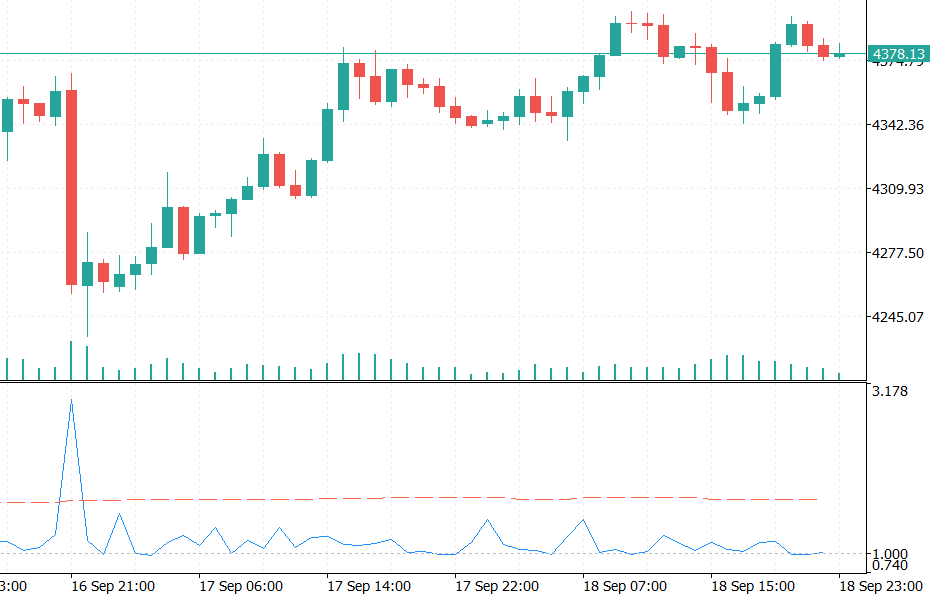
Fig. 2. LOFScore below XAUUSD H1 with the LOF defaults (window 500, k = 20, alarm quantile 97.5%, refit every 4 bars). The blue line is the LOF score, the dashed red line is the alarm level and the dotted line marks 1.0. The score jumps far above the alarm level on the large bearish bar on 16 Sep, while most other bars stay close to 1.
LOF_SelfTest: numbers from an independent implementation. The script fits the engine on the twelve two-dimensional points from the architecture section with k = 3 and checks every reference score, three query scores and the 90% quantile threshold against expected values. The expected values were computed with scikit-learn's LocalOutlierFactor in novelty mode, not with this code. Distances at the k-th neighbour boundary are all distinct in this dataset, so tie-breaking cannot change the result. Agreement here confirms the arithmetic of k-distance, reachability and lrd is right; it says nothing about ties, clipped features, constant columns or the larger reference windows used below, which is why those are called out separately above rather than assumed covered by this check.
//+------------------------------------------------------------------+
//| Reference data                                                   |
//| Twelve 2-D points: a tight cluster near the origin, a looser     |
//| cluster around (4, 4) and one isolated point at (2.1, 7.9). The  |
//| expected values below were computed independently with a         |
//| line-by-line port of the algorithm and cross-checked against     |
//| scikit-learn's LocalOutlierFactor (k = 3, novelty mode). All     |
//| distances at the k-th neighbour boundary are distinct, so        |
//| tie-breaking cannot affect the result.                           |
//+------------------------------------------------------------------+
double g_ref[] =
  {
    0.10,  0.20,                             // point 0
    0.35,  0.05,                             // point 1
   -0.20,  0.30,                             // point 2
    0.05, -0.25,                             // point 3
   -0.30, -0.10,                             // point 4
    0.25,  0.40,                             // point 5
    4.00,  4.10,                             // point 6
    4.30,  3.80,                             // point 7
    3.70,  4.40,                             // point 8
    4.60,  4.35,                             // point 9
    4.15,  4.70,                             // point 10
    2.10,  7.90                              // point 11
  };
TestValues: exact and scale-free. The same function runs twice. At scale 1.0 the tolerance is 1e-9. At scale 37.5, with every coordinate multiplied by the same factor, the expected numbers are the same, because LOF is a ratio of densities and the units cancel. The tolerance is looser there, 1e-6, because the LOF_EPS guard is an absolute constant and moves the scores by about 1e-9 when the data are rescaled. A separate TestGuards function checks the defensive paths: scoring before fitting returns -1.0, a set with only k points is rejected, and a query of the wrong dimension returns -1.0. OnStart prints a single PASS or FAIL line.
//+------------------------------------------------------------------+
//| TestValues                                                       |
//| Fits the engine on the data scaled by 'scale' and checks every   |
//| reference score, every query score and the threshold against the |
//| expected values. Returns the number of failed checks.            |
//|                                                                  |
//| The queries are scaled together with the reference, so a correct |
//| LOF implementation must return the same numbers for any scale:   |
//| LOF is a ratio of densities and the units cancel.                |
//+------------------------------------------------------------------+
int TestValues(const double scale, const double tol)
  {
   CLOFEngine eng;        // engine under test
   matrix     ref;        // scaled reference data
   double     q[];        // scaled query point
   string     tag;        // label for a check
   int        fails = 0;  // failed checks
   BuildReference(scale, ref);
   if(!eng.Init(ST_K, 0.90) || !eng.Fit(ref))
     {
      Print("FAIL  engine could not be fitted");
      return(1);
     }
   for(int i = 0; i < ST_POINTS; i++)
     {
      tag = StringFormat("reference point %d", i);
      if(!Check(tag, eng.ReferenceScore(i), g_expected_lof[i], tol))
         fails++;
     }
   for(int j = 0; j < ST_QUERIES; j++)
     {
      tag = StringFormat("query %d", j);
      BuildQuery(j, scale, q);
      if(!Check(tag, eng.Score(q), g_expected_query[j], tol))
         fails++;
     }
//--- The threshold is a quantile of LOF values, and LOF values do not change with
//    scale, so it is checked against the same expected number.
   if(!Check("threshold", eng.Threshold(), g_expected_thr, tol))
      fails++;
   return(fails);
  }
Testing in the Strategy Tester
All results use the same setup: 2026.03.07–2026.09.18, 1-minute OHLC modelling, zero latency, and ideal execution. The deposit is 100,000 USD at 1:100 with fixed 0.10 lots and default EA inputs. Between the two runs on a symbol, the only input that changes is InpUseGate. Four symbol/timeframe pairs were tested: XAUUSD M5, XAUUSD M15, EURUSD M15 and GBPUSD H1. All runs were made on an FBS demo account, with floating spread taken from the broker's historical quotes and no separate commission on this account type; XAUUSD carries a swap of -69.95 points long / +24.91 points short (triple on Wednesday, the MT5 default), with EURUSD and GBPUSD using the same account's standard floating-spread, no-commission conditions.
| Setting | Value |
|---|---|
| Symbols/timeframes | XAUUSD M5, XAUUSD M15, EURUSD M15, GBPUSD H1 |
| Period | 2026.03.07 - 2026.09.18 |
| Modelling | 1-minute OHLC, zero latency, ideal execution |
| Deposit/leverage | 100,000 USD / 1:100 |
| Account / costs | FBS demo account, floating spread, no commission, standard contract size (100 oz XAUUSD) |
| Position size | 0.10 lots, one position at a time |
| Base strategy | EMA 20 / EMA 50 cross, SL 2.0 ATR, TP 3.0 ATR, ATR period 14 |
| LOF settings | window 500, k = 20, alarm quantile 97.5%, refit every 4 bars, clip 8.0 |
| Toggle between paired runs | InpUseGate = false / true |
Checking that the runs are what they claim to be. In every gated run, trades taken plus signals blocked equal the trade count of the ungated run on the same symbol: 725 + 36 = 761 on XAUUSD M5, 212 + 24 = 236 on XAUUSD M15, 243 + 14 = 257 on EURUSD M15 and 65 + 4 = 69 on GBPUSD H1. Every ungated run prints a scored count of zero. That match shows nothing was dropped or double-counted; it does not, on its own, prove every trade lines up one-for-one at the same price and exit, only that the two deterministic runs differ by exactly the gate. The win and loss counts of the blocked trades below are read off the aggregate difference between the two reports, not off a trade-by-trade match.
XAUUSD M5. With the gate off the EA made 761 trades and finished at +221.90 with a profit factor of 1.00, a maximum equity drawdown of 5.45% and a Sharpe ratio of 0.14. With the gate on it made 725 trades and finished at +1,737.30 with a profit factor of 1.04, a maximum equity drawdown of 3.82% and a Sharpe ratio of 1.21. The two curves follow the same path because the signals are the same, so the gated one differs only where a blocked trade would have changed the balance. Note that the vertical axes differ between the two figures.
XAUUSD M5 with the Gate Off
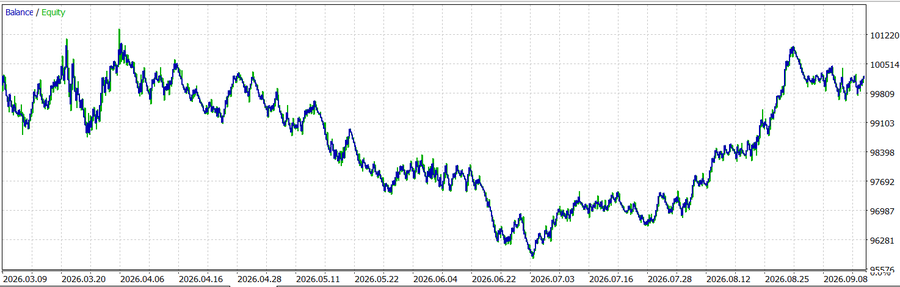
Fig. 3. Strategy Tester balance (blue) and equity (green) for XAUUSD M5 with InpUseGate = false: 761 trades, net profit +221.90, maximum equity drawdown 5.45%.
XAUUSD M5 with the Gate On
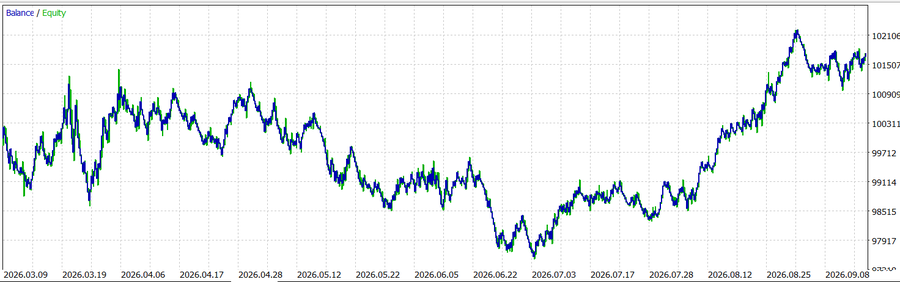
Fig. 4. Strategy Tester balance (blue) and equity (green) for XAUUSD M5 with InpUseGate = true: 725 trades, net profit +1,737.30, maximum equity drawdown 3.82%.
The full comparison across the four symbol/timeframe pairs follows. Profit is in account currency at 0.10 lots, so dollar figures are only comparable within a symbol.
| Symbol / TF | Gate | Trades | Net profit | Profit factor | Win rate | Max equity DD | Sharpe |
|---|---|---|---|---|---|---|---|
| XAUUSD M5 | off | 761 | +221.90 | 1.00 | 37.71% | 5.45% | 0.14 |
| XAUUSD M5 | on | 725 | +1,737.30 | 1.04 | 38.34% | 3.82% | 1.21 |
| XAUUSD M15 | off | 236 | -1,521.60 | 0.94 | 38.98% | 6.07% | -1.01 |
| XAUUSD M15 | on | 212 | -558.60 | 0.98 | 39.62% | 5.94% | -0.41 |
| EURUSD M15 | off | 257 | -20.30 | 0.99 | 36.19% | 0.33% | -0.21 |
| EURUSD M15 | on | 243 | +10.00 | 1.01 | 36.63% | 0.31% | 0.12 |
| GBPUSD H1 | off | 69 | -281.80 | 0.78 | 33.33% | 0.52% | -2.09 |
| GBPUSD H1 | on | 65 | -342.70 | 0.72 | 32.31% | 0.55% | -2.71 |
Three of the four pairs improved with the gate on. The improvement is largest on gold, where XAUUSD M15 went from -1,521.60 to -558.60 and XAUUSD M5 from +221.90 to +1,737.30. EURUSD M15 moved from a small loss to a small gain, and GBPUSD H1 got slightly worse. XAUUSD M15 remains a loser even with the gate on, with a profit factor of 0.98 and a negative Sharpe ratio, so the gate reduced its loss without turning it into a profitable system.
What the gate actually removed. Subtracting each gated report from its ungated report gives the blocked trades themselves.
| Symbol / TF | Blocked | Winners | Losers | Gross won | Gross lost | Net of blocked |
|---|---|---|---|---|---|---|
| XAUUSD M5 | 36 | 9 | 27 | 1,883.60 | -3,399.00 | -1,515.40 |
| XAUUSD M15 | 24 | 8 | 16 | 2,240.80 | -3,203.80 | -963.00 |
| EURUSD M15 | 14 | 4 | 10 | 81.30 | -111.60 | -30.30 |
| GBPUSD H1 | 4 | 2 | 2 | 127.20 | -66.30 | +60.90 |
| All four | 78 | 23 | 55 | 4,332.90 | -6,780.70 | -2,447.80 |
On the three improved pairs the blocked group had a net loss, and that net equals, with the sign reversed, the difference in profit between the two runs. Across all four pairs the blocked trades won 23 of 78, or 29.5%, against 37.4% for all 1,323 ungated trades; the 78 are part of that 1,323, so this sets a subset against the group containing it, read here as a description of what the gate removed rather than a test of two independent samples. On XAUUSD M5 the blocked winners averaged about 209 against 161 for a typical winner, and the blocked losers about 126 against 97 for a typical loser. Bars flagged as unfamiliar seem to bring bigger moves in both directions. Thirty-six trades are too few to prove that.
Win Rate of Blocked Trades Versus All Trades
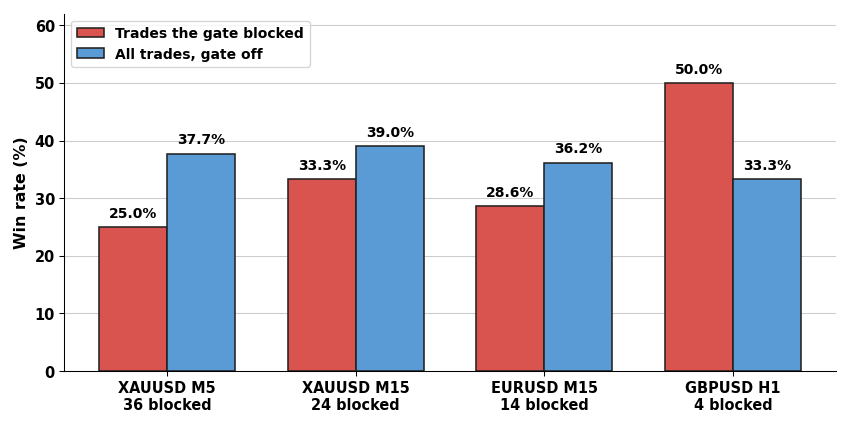
Fig. 5. Win rate of the trades the gate blocked (red) against the win rate of all trades in the ungated run (blue), per symbol and timeframe. Blocked trades won less often on the three pairs with more than four blocked trades. On GBPUSD H1 only four trades were blocked, two of them winners.
The GBPUSD H1 row does not follow the pattern. The gate blocked four trades there, two winners and two losers, and those four had a positive net of +60.90, so removing them made the result worse. Four trades say nothing about the gate in either direction, but leaving the row out would make the other three look cleaner than they are.
How strong is the evidence? Everything here is diagnostic, not a formal test: a bootstrap or permutation test over trades or time blocks would be the rigorous way to size the effect, and was not run. The blocked win rate of 29.5% is about 1.4 standard errors below the 37.4% baseline, which is suggestive and not statistically significant. For XAUUSD M5, the net of -1,515.40 is roughly two standard deviations of what 36 random trades from this strategy would produce, using the average win of 161 and the average loss of 97 from the report. Both figures treat trades as independent draws with a fixed win probability, ignoring serial correlation, unequal win/loss sizes, and that LOF chose which trades to remove rather than picking a random subset. The two gold runs also trade the same price path over the same window, so they are not independent tests, and EURUSD and GBPUSD are correlated with gold and with each other. In short, the direction is consistent on three of four pairs and the size of the effect is unproven.
Gate diagnostics. The summary line printed by every gated run gives the flagged share and the run time.
| Symbol / TF | Bars scored | Flagged | Flag rate | Taken | Blocked | Run time gate on / off |
|---|---|---|---|---|---|---|
| XAUUSD M5 | 37,659 | 1,214 | 3.22% | 725 | 36 | 1 min 29 s/1 s |
| XAUUSD M15 | 12,646 | 356 | 2.82% | 212 | 24 | 30 s/under 1 s |
| EURUSD M15 | 13,332 | 367 | 2.75% | 243 | 14 | 49 s/under 1 s |
| GBPUSD H1 | 3,333 | 99 | 2.97% | 65 | 4 | 5 s/under 1 s |
The alarm level is set for 2.5% of the reference bars, and new bars land a little above that, between 2.75% and 3.22%. That is not surprising for a novelty test: the reference cloud can be up to three bars old and unusual bars tend to arrive in clusters. Scored bars equal the bar count in every run, so LOF produced a verdict for every bar it was asked about. The cost of the gate is visible in the run times. With refits every fourth bar, the gated runs took between 5 seconds and 1 minute 29 seconds against a second or less without the gate, which works out to roughly 5 to 15 milliseconds per refit including scoring on the test machine.
Limitations and Practical Considerations
1-minute OHLC modelling. Ticks are generated from minute bars in this tester mode, so two of the five features, tick volume and spread, are only approximations of what a live feed carries. The gate may behave differently on real ticks. A run on real ticks is the first thing to add before trusting any of these numbers. The standard errors, Sharpe ratios and profit factors quoted in the testing section are computed to more decimal places than this modelling supports; treat them as a consistent way to compare the runs against each other, not as a claim about live precision.
Small samples that are not independent. The blocked-trade counts are 36, 24, 14 and 4, the two gold runs share one price path, and the currency pairs are correlated with gold and with each other. No significance claim should be read into the results.
Defaults only. The window (500), k (20), the alarm quantile (97.5%) and the refit interval (4) are the EA's default inputs and were not swept; treat them as demo settings, not values tuned or recommended for any symbol. A sensitivity sweep over k and the quantile on one symbol would show whether the XAUUSD M5 result is specific to this combination; it has not been run.
One window, idealised fills. Every number here comes from a single interval, 2026.03.07 to 2026.09.18, with no out-of-sample split by market phase, zero latency and this tester's fill model. A different stretch of history could move the results either way, and real slippage and spread would erode the smaller gains first, such as the move from -20.30 to +10.00 on EURUSD M15.
A weak baseline. The EMA cross is close to breakeven on these instruments in this window. A gate that removes trades can only change what the strategy already does. It cut losses on gold, and it did not create an edge where none existed. XAUUSD M15 is still a loss with the gate on.
The window means different things on different timeframes. 500 M5 bars is about 42 hours of clock time, 500 M15 bars is about five days, and 500 H1 bars is about three weeks. On M5 the reference cloud can be dominated by a single session, so a normal session change may look unfamiliar. The session effect has not been examined directly.
Cost grows with the square of the window. One refit is n x n x d distance operations. A window of 2,000 bars costs sixteen times as much as a window of 500. Refitting every fourth bar keeps a multi-month backtest practical. The run times in the gate-diagnostics table above cover the whole tester loop — CopyRates, CopyBuffer, the matrix work and the LOF computation itself are not timed separately — so they describe this backtest's cost, not necessarily what a live, multi-symbol deployment would spend on the LOF step alone.
Five features, standardized. Nearest-neighbour methods degrade as dimensions are added, because distances between points concentrate. Five features are comfortably low. Adding many more without thinking about their scale and redundancy would blunt the score.
Ties, clipping and one narrow interface gap. Classical LOF lets a neighbourhood grow past k when points share a k-distance; this engine always keeps exactly k, breaking ties by data order, and clipping at ±InpClip makes that more likely on extreme bars (it never affected the self-test). A reference point is scored from inside its cloud while a query bar never joins it, so the two scores are not quite the same distribution, which is part of why 2.5% is a design target rather than a guarantee for new bars. One smaller gap remains: Score()'s -1.0 fallback is currently treated the same as "not anomalous" by the caller, so a scoring failure and a genuinely low score look alike.
Failure means no veto. If the window cannot be built, RefreshLOF returns false and the bar counts as not anomalous. On a bar where that happens the EA trades unfiltered. In the runs above every bar was scored, because the tester supplied enough history before the start date.
Live use. The gate guards entries only, and the EA is a test harness. Before anything live: check that the ATR and EMA handles have data before the first bar is scored, check broker stop levels on the symbol, and decide how positions should be handled on hedging and netting accounts. LOF ignores everything that happens inside a bar, and it scores the last closed bar only.
Conclusion
We built Local Outlier Factor in native MQL5: a feature builder that turns bars into standardized points, an engine that computes k-distance, reachability, density and the LOF score, and a quantile alarm level taken from the reference cloud itself. The engine scores a new bar without ever adding it to the cloud, and a self-test script checks it against values computed independently.
As an entry gate on an EMA-cross EA, the score flagged 2.75% to 3.22% of bars and blocked 78 trades across four symbol/timeframe pairs. Those blocked trades won 29.5% of the time against 37.4% overall, and on three of the four symbol/timeframe pairs the gated run did better than the ungated one. On GBPUSD H1 it did slightly worse, on four blocked trades. The gate cut losses on XAUUSD M15 without making it profitable. The evidence is suggestive rather than conclusive, rests on default settings and 1-minute OHLC modelling over one historical interval with no out-of-sample check, and is best read as a demonstration of what the gate does to this strategy rather than a validated result to trade on.
Natural extensions are a parameter sweep over k, the quantile and the window, a run on real ticks, and a look at gating exits and position size as well as entries. The table below lists the files in MQL5.zip.
| File | Type | Description |
|---|---|---|
| MQL5\Include\LOFDetector\LOFEngine.mqh | Include | CLOFEngine: k-nearest-neighbour search, k-distance, reachability density, LOF score and quantile alarm level on native matrix and vector types. |
| MQL5\Include\LOFDetector\MarketFeatures.mqh | Include | CMarketFeatures: five-feature bar builder, median/MAD scaler and the reference and query loaders. |
| MQL5\Experts\LOFDetector\LOF_Gate_EA.mq5 | Expert Advisor | EMA-cross EA with ATR stops and the LOF entry gate, plus the summary line printed at the end of a run. |
| MQL5\Indicators\LOFDetector\LOFScore.mq5 | Indicator | Draws the LOF score and the alarm level in a separate window using the same engine as the EA. |
| MQL5\Scripts\LOFDetector\LOF_SelfTest.mq5 | Script | Checks the engine against independently computed LOF values, at two data scales, plus guard cases. |
Warning: All rights to these materials are reserved by MetaQuotes Ltd. Copying or reprinting of these materials in whole or in part is prohibited.
This article was written by a user of the site and reflects their personal views. MetaQuotes Ltd is not responsible for the accuracy of the information presented, nor for any consequences resulting from the use of the solutions, strategies or recommendations described.


