

Use of WinAPI—Implementing Text-to-Speech in MQL5
 71
 0

A trading terminal is a silent machine. It draws, it calculates, it fills orders, and it says nothing. When you look away from the monitor, everything it produces stops existing for you: the stop loss that was hit, the second signal that fired while you were reading the first, and the spread that widened ahead of news. All of it was logged, and none of it was heard.
MQL5 gives you two ways out of that silence, and both stop short. Alert shows a text in a window and plays a fixed chime. PlaySound plays a WAV file you prepared in advance. Either one can tell you that something happened. Neither one can tell you what happened.
Windows can speak and have been able to for many years. This article builds a single include file that lets an Expert Advisor or a script say a sentence composed at runtime. Indicators are refused deliberately, and the reason is explained later.
We will cover the Windows speech system, how other languages access it, and how MQL5 reaches it via WinAPI and PowerShell. Then we will describe the header layout, the library internals, usage examples, behavior in the MQL5 event model, and how markup affects the voice.
Point A: a terminal that can only beep and information that exists only on screen.
Point B: one function, Speak(), that says a bounded sentence in a preferred voice, speed, and volume; waits for it within a time limit; and refuses to run where speaking would do harm.
What SAPI Is
SAPI, the Speech API, is the part of Windows that turns text into audio. An application hands it a string, SAPI hands the string to a speech engine, and the engine plays the result on the audio device. Sample rates, waveform synthesis, and device handling never reach your code. SAPI is free, needs no download, and ships with Windows.
The object that does the speaking is created by its name.
SAPI.SpVoice
Three of its properties decide how a sentence sounds. The voice is the installed speech persona, such as David or Zira, and only voices installed on the machine exist. The rate is the speed, an integer from -10 to 10 where 0 is normal. The volume is a percentage from 0 to 100, independent of the Windows system volume slider.
The Speak method of this object takes the text and a flag number. The library uses two values: 0 for plain text and 8 for text that contains markup tags. With both values, the call is synchronous, which means it returns only after the voice has finished the sentence.
Reaching SAPI From Other Languages
SAPI is not tied to one language. It is a COM component registered in Windows, so any language that can use COM can create the voice object and call it. C and C++ use the header sapi.h with sapi.lib linked, Visual Basic and the Windows scripting hosts use automation, and C# uses the speech namespace under System in the .NET Framework, which reaches installed SAPI voices, and PowerShell uses the object directly. COM is the Windows technique for using objects written by someone else. The steps are the same everywhere: start COM, create the voice, call Speak, and release the voice. In C++ they look like this:
#include <sapi.h>
int main()
  {
   if(FAILED(::CoInitialize(NULL)))         // start COM
      return 1;
   ISpVoice *voice=NULL;                    // the voice object
   HRESULT hr=::CoCreateInstance(CLSID_SpVoice,NULL,CLSCTX_ALL,IID_ISpVoice,(void **)&voice);
   if(SUCCEEDED(hr))
     {
      voice->Speak(L"Hello world",0,NULL);  // flag 0: plain text, synchronous
      voice->Release();                     // release the voice
     }
   ::CoUninitialize();
   return 0;
  }
Of these languages, PowerShell gives the shortest script, and you can try it right now without installing anything. Open PowerShell (press the Windows key, type PowerShell, and press Enter), paste the following two lines, and press Enter. You should hear "Hello world."
$v = New-Object -ComObject SAPI.SpVoice
[void]$v.Speak("Hello world")
The first line creates the voice object by its name.
SAPI.SpVoice
The second line calls its Speak method. Speak returns a number that PowerShell would otherwise print on the screen, so [void] discards it. The rate, the volume, and the voice are properties of the same object, and a second argument to the Speak function turns on markup tags. This script speaks a little faster than normal at 80 percent volume, and the flag 8 tells SAPI that the text contains tags:
$v = New-Object -ComObject SAPI.SpVoice
$v.Rate = 2
$v.Volume = 80
[void]$v.Speak("<emph>Stop loss hit</emph> on EURUSD.", 8)
To see which voices are installed on your machine, ask the same object for its voice list:
(New-Object -ComObject SAPI.SpVoice).GetVoices() | ForEach-Object { $_.GetDescription() }
MQL5, WinAPI, and PowerShell
MQL5 is the exception among these languages. The functions of a COM object are reached through a table of function addresses stored inside the object, and as far as I know MQL5 has no way to call a function through such a table, so SAPI cannot be imported directly the way a flat DLL function can. A small C++ DLL that wraps the object would solve this, but then you must write, compile, distribute, and maintain a binary that every user has to trust.
The library takes another route. This is the key idea to understand before reading the code. We let PowerShell do the COM work, exactly as in the scripts above, and we let MQL5 control PowerShell.
Each Speak call builds a PowerShell script from a fixed template. The sentence, voice, rate, and volume are inserted at runtime. It converts the script to Base64, which is a way of writing any bytes using only letters, digits, plus, and slash so that the text of your sentence cannot alter the command line. Then it starts a new, hidden PowerShell process through the WinAPI function CreateProcessW and hands the encoded script to it. PowerShell decodes the script, speaks the sentence, and ends. MQL5 waits for the process with a time limit and reads its exit code, the small number a process leaves behind when it ends. The code reports whether the script finished without an error.
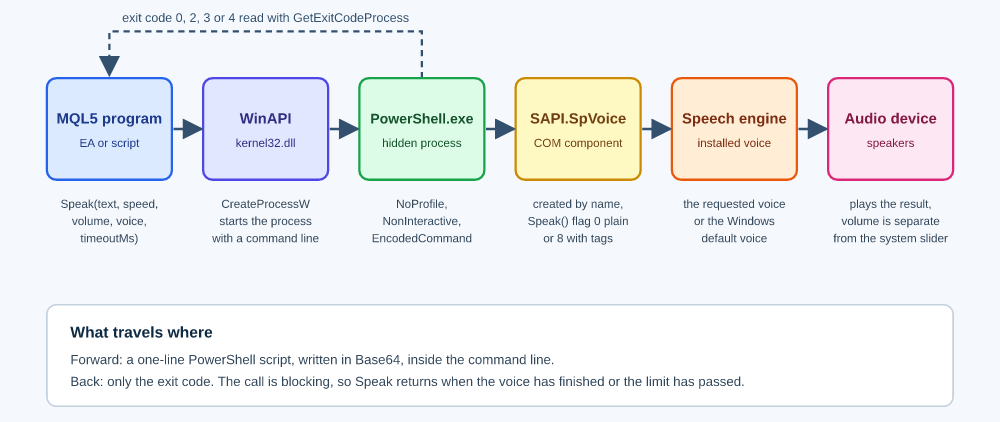
It does not prove that sound came out of the speakers.
For the call
Speak("Hello world",1.0,1.0,Zira);
The library builds the following script. It is shown here on several lines for reading, and the library sends it as one line:
$ErrorActionPreference='Stop'
$c=0
try{
  $v=New-Object -ComObject SAPI.SpVoice
  $f=$false
  foreach($t in $v.GetVoices()){if($t.GetDescription() -match '\bZira\b'){$v.Voice=$t;$f=$true;break}}
  if(-not $f){$c=3}
  $v.Rate=0
  $v.Volume=100
  $x='Hello world'
  [void]$v.Speak($x,0)
  exit $c
}catch{exit 2}
It is the same script you pasted into PowerShell, with a voice search in front of it and an exit code at the end. The search matches the voice name as a whole word inside the description of each installed voice. The process is then started with this command line, where the long text at the end is the script after the Base64 step:
"C:\Windows\System32\WindowsPowerShell\v1.0\powershell.exe" -NoProfile -NonInteractive -WindowStyle Hidden -EncodedCommand JABFAHIAcgBv... A program that imports DLLs cannot be sold through the MQL5 Market. The machine needs a working audio device and a desktop session, and the library is for Windows only.
The terminal normally does not start a program that imports DLLs while the permission is missing. The library checks again as a safety net and returns false if the permission is missing.
Header and WinAPI Importation
This section walks through the include file TextToSpeech.mqh, from the declarations at the top to the Speak function at the bottom. Every function and every block of declarations in the file has a frame above it with its name on the first line, and the inline comments are aligned in one column. Reading the top first makes the rest of the code easier to follow.
//+------------------------------------------------------------------+
//| Include guard and includes                                       |
//| The guard makes the file process only once, even if two of your  |
//| files include it.                                                |
//+------------------------------------------------------------------+
#ifndef TEXT_TO_SPEECH_MQH    // include guard
#define TEXT_TO_SPEECH_MQH    // include guard macro
#include <WinAPI\winapi.mqh>  // CreateProcessW, CloseHandle, ZeroMemory and the structures
//+------------------------------------------------------------------+
//| Imports                                                          |
//| The four kernel32 functions below were not declared by the       |
//| WinAPI headers of the tested build. Tested on build 6128.        |
//| If your build declares one of them, remove that line, because a  |
//| duplicate declaration is a compiler error.                       |
//+------------------------------------------------------------------+
#import "kernel32.dll"
uint WaitForSingleObject(long hHandle,uint dwMilliseconds);  // waits for the process with a limit
int GetExitCodeProcess(long hProcess,uint &lpExitCode);      // reads the exit code of the process
int TerminateProcess(long hProcess,uint uExitCode);          // ends the process when the limit passes
uint GetSystemDirectoryW(ushort &lpBuffer[],uint uSize);     // path of the Windows system folder
#import
The first two lines and the last code line of the file, #endif, form an include guard. It makes the file process only once, even if two of your files include it. The next line includes the WinAPI headers that ship with the terminal. They already declare CreateProcessW, CloseHandle, ZeroMemory, and the two structures STARTUPINFOW and PROCESS_INFORMATION, which is why the library does not declare them again. The import block declares the four functions that the library needs and that are not in those headers: WaitForSingleObject waits for the process, GetExitCodeProcess reads its exit code, TerminateProcess ends it when the time limit passes, and GetSystemDirectoryW returns the path of the Windows system folder. If your terminal build already declares one of them, remove that line, because a duplicate declaration is a compiler error.
Below the imports sits the EVoice enumeration. It names ten voices and VoiceDefault so that a voice can be chosen from the input dialog of a program or written as a plain word in code. The members carry no comments deliberately, because MQL5 shows a member comment as its text in the input dialog. Then come the constants. The Win32 values TTS_CREATE_NO_WINDOW, TTS_STARTF_USESHOWWINDOW, and TTS_SW_HIDE keep the helper process invisible, and the two wait results tell whether the process ended or the time ran out. TTS_MAX_TEXT is the longest sentence, 4000 characters, and TTS_MAX_CMD is the longest command line, 30000 characters, safely below the Windows limit of 32767. The three exit codes are named too: TTS_EXIT_ERROR is 2, TTS_EXIT_NOVOICE is 3, and TTS_EXIT_BADXML is 4. Every helper and constant starts with Tts or TTS_, so they do not collide with names in your own code. The names meant for you are Speak, GetVoiceList, IsVoiceAvailable, TtsPrintVoices, TtsXmlEscape, and EVoice, and the enumeration values such as David and Mark are global names too. One global variable, g_ttsBusy, records that a helper process is running.
After the declarations come the helper functions, from small to large. TtsContextAllowed is the guard that refuses to speak in places where speaking would do harm. TtsXmlEscape, TtsSanitize, and TtsQuote prepare the sentence, and TtsRate and TtsVoiceName turn your parameters into the values PowerShell understands. TtsTagAt and TtsLooksLikeXml decide whether the sentence contains tags, and TtsBuildScript writes the PowerShell script. TtsEncode converts the script to Base64. TtsPowerShellPath finds PowerShell, TtsExec starts it, waits for it, and reads the exit code, and TtsRun checks the sentence, calls the others, and turns the exit code into true or false. The voice helpers TtsLoadVoices, TtsShortName, GetVoiceList, IsVoiceAvailable, and TtsPrintVoices ask Windows which voices are installed. Last comes Speak, a short function that only guards, prints, and calls TtsRun. That is the only function you need to remember.
The Speak Function
Speaks a sentence with the Windows voice and waits until the voice has finished.
bool Speak(
   string  text,
   double  speed=1.0,
   double  volume=1.0,
   EVoice  voice=VoiceDefault,
   uint    timeoutMs=0
   );
Parameters
Text
[in] The sentence to speak, plain or with markup tags, between 1 and 4000 characters long.
Speed
[in] The speaking speed as a scale, where 1.0 is normal. The library maps the scale to a SAPI rate with round(log2(speed) × 10). Speed 2.0 gives rate 10, which is the fastest setting, not necessarily twice as fast.
Volume
[in] The loudness from 0.0 to 1.0, converted to the SAPI scale of 0 to 100. Values outside the range are limited to it.
Voice
[in] The preferred voice from the EVoice enumeration. VoiceDefault, the default value, means the voice Windows has selected as its default.
timeoutMs
[in] The longest time in milliseconds that Speak may wait. The value 0 means the library calculates a limit: 20 seconds plus about 250 milliseconds per character divided by the speed factor, never more than 10 minutes. The speed factor is the speed parameter limited from below to 0.25, so any speed under 0.25, including zero and negative values, is divided as if it were 0.25. For positive speeds under 0.25, this makes the limit shorter than the plain formula would give. The speech rate follows its own rule: TtsRate reads a speed of zero or below as 1.0, so the voice speaks at a normal pace while the limit is calculated with the factor 0.25. Speeds below 0.6 were not tested.
Return Value
true – if the helper script ended without an error, including the case where the default voice replaced a missing one; otherwise false, when the call was refused, failed, timed out, or contained malformed tags. A true result does not prove that sound was produced.
The Speak function is blocking. It returns only after the voice has finished, the time limit has passed, or the call was refused, so two sentences from the same program cannot overlap. A returned true means that PowerShell reported success, not that the speakers produced sound.
Speak does not work in the Strategy Tester, in optimizations, or in indicators, and it needs DLL imports to be allowed. In these cases it returns false at once.
Example
#include <TextToSpeech.mqh>  // Speak() and helper functions
//+------------------------------------------------------------------+
//| Script program start function                                    |
//+------------------------------------------------------------------+
void OnStart()
  {
   Speak("Stop loss hit on EURUSD.",1.0,1.0,Zira,8000);  // Zira, at most 8 seconds
  }
How the Library Works
A call to Speak passes through a few small steps. First, a guard checks that speaking makes sense in the current program, which is covered in the section on the MQL5 event model. Then the text length is checked. Then the library writes a short PowerShell script: it creates the voice object, selects the voice, sets the rate and volume, places the sentence in a single-quoted string, speaks it, and ends with an explicit exit code. PowerShell performs no expansion inside single quotes, so a dollar sign or a backtick in your sentence stays plain text.
The script is not placed on the command line as quoted text.
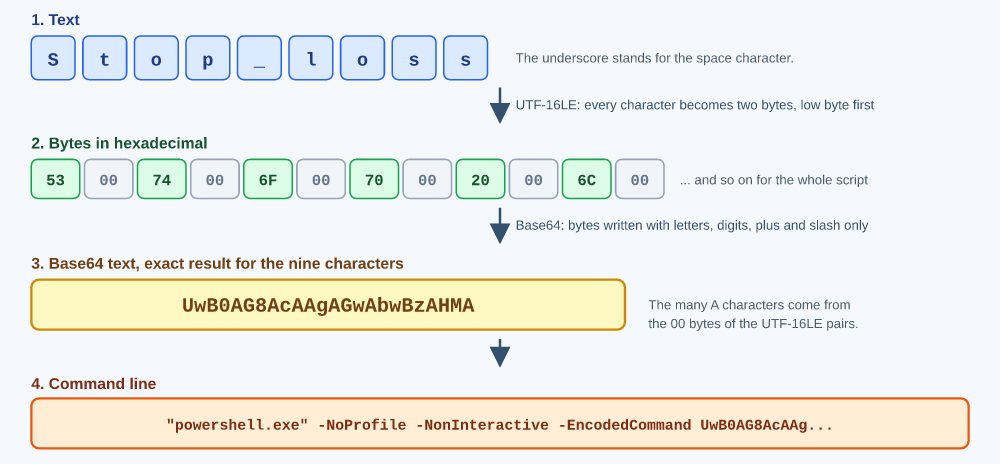
It is converted to UTF-16LE, which is how Windows stores text, written in Base64, and passed with the -EncodedCommand switch. Base64 is a way of writing any bytes using only letters, digits, plus, and slash. The command line then contains no quote or backslash from your sentence, so the sentence cannot change how the command line is read. The switch -NoProfile keeps the start fast, and -NonInteractive prevents questions that nobody could answer. The process is created hidden through the structures STARTUPINFOW and PROCESS_INFORMATION, which are cleared with ZeroMemory and filled by field name, never by byte offset.
The program path is not guessed. CreateProcessW does not expand a variable such as %SystemRoot%, so the library asks Windows for the real system folder with GetSystemDirectoryW and appends the PowerShell location. The wait is bounded: WaitForSingleObject waits at most timeoutMs milliseconds, and when the time runs out, the process is ended with TerminateProcess, Speak returns false, and the program carries on.
The exit code of the script is the only message that travels back.
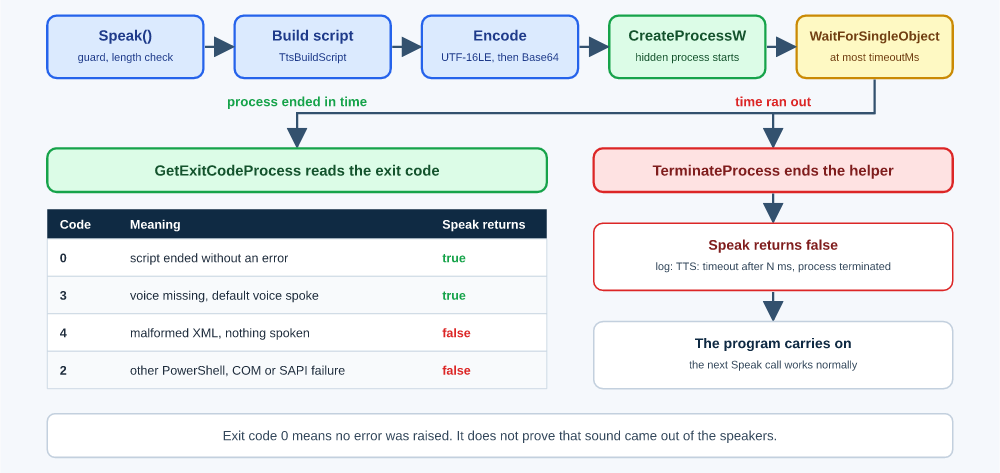
Code 0 means that no error was raised, not that sound was heard, and Speak returns true. TTS_EXIT_NOVOICE means the requested voice is not installed and the default voice spoke instead, so Speak returns true and prints a note. TTS_EXIT_BADXML means the markup tags were malformed and nothing was spoken, so Speak returns false. TTS_EXIT_ERROR stands for any other PowerShell, COM, or SAPI failure and returns false. The helper process has no captured output, so the exact error text behind TTS_EXIT_ERROR is not available.
Using the Speak Function
Every feature below is shown the same way: a short script that includes the library and calls the feature from OnStart, followed by the log the terminal printed when the script ran. Where the effect can only be heard, a second block named Heard records what was heard on the tested machine. The Speak function prints the sentence to the Experts log before it says it. The log shows the sentence after TtsSanitize. In tag mode, PowerShell may still repair a bare ampersand or a stray less-than sign afterward, so the spoken string can differ slightly from the logged one.
Plain Text and Hidden Characters
Text from the outside world, such as a broker message or a file, can carry characters that nobody sees. XML cannot carry some of them, so the library replaces them with a space before speaking: control characters other than tab, line feed, and carriage return; lone surrogates (half of a two-part character with no partner); and the values 0xFFFE and 0xFFFF. A valid two-part character passes through unchanged. Other characters are left to the speech engine.
ShortToString converts a number into the character with that code. The codes 7 and 1 below are not the space bar, which is code 32. Code 7 is the bell, a control character that once rang a physical bell on a teleprinter, and code 1 is another control character. Both are invisible, and neither can be carried by XML.
Script
#include <TextToSpeech.mqh>  // Speak() and helper functions
//+------------------------------------------------------------------+
//| Script program start function                                    |
//+------------------------------------------------------------------+
void OnStart()
  {
   Speak("Bell"+ShortToString(7)+" and null-ish"+ShortToString(1)+" removed.");
  }
Log
Bell and null-ish removed.
The log has two spaces at each position. One is the space the library put in place of the control character, and the other is the space that was already written in the string after it. The two invisible characters were replaced, not deleted, so the words keep their distance.
Ordinary punctuation is carried through to the voice. Apostrophes, double quotes, angle brackets, and an ampersand reach the engine as written. PowerShell treats the ASCII apostrophe and the typographic single quotes U+2018 to U+201B as quote characters, so inside its single-quoted string the library writes each of them twice, and PowerShell reads every doubled pair back as one character. The voice therefore receives the original sentence. The script is then encoded, so none of this reaches the command line.
Script
#include <TextToSpeech.mqh>  // Speak() and helper functions
//+------------------------------------------------------------------+
//| Script program start function                                    |
//+------------------------------------------------------------------+
void OnStart()
  {
   Speak("It's a \"test\" with <tags> & ampersand, and smart "+ShortToString(0x2019)+"quotes"+ShortToString(0x2019)+".");
  }
Log
It's a "test" with <tags> & ampersand, and smart ’quotes’.
Note the backslash before each double quote in the script. That is how MQL5 writes a double quote inside a string, and the tag section explains it in full. Also note that this sentence is spoken in plain mode: no SAPI tag name, closing tag, or entity appears in it, so the angle brackets are not interpreted as markup.
Angle Brackets in Plain Mode
In plain mode the sentence is handed to the engine as text. The engine does not see tags, and it decides by itself what to do with the bracket characters.
Script
#include <TextToSpeech.mqh>  // Speak() and helper functions
//+------------------------------------------------------------------+
//| Script program start function                                    |
//+------------------------------------------------------------------+
void OnStart()
  {
   Speak("Compare <tags> and <b>bold</b> here.");
  }
Log
Compare <tags> and <b>bold</b> here.
Heard
Compare tags and b bold slash b here.
On the tested machine, the voice skipped the bracket characters and read the slash aloud. Nothing was interpreted as markup. The situation changes in tag mode, which starts when the sentence contains an SAPI tag name, a closing tag, or an entity. In that mode, a less-than sign followed by a letter or a slash is read as a tag, and the sentence must then be well-formed. The section on tags shows both cases.
When you build markup yourself and want a literal ampersand or bracket to survive, the helper TtsXmlEscape writes the matching entity. An entity is a written replacement for a special character: & stands for an ampersand, and < stands for a less-than sign.
Script
#include <TextToSpeech.mqh> // Speak() and helper functions //+------------------------------------------------------------------+ //| Script program start function | //+------------------------------------------------------------------+ void OnStart() { Speak("Fish & chips <3."); Speak("Fish "+TtsXmlEscape("&")+" chips "+TtsXmlEscape("<3")+"."); }
Log
Fish & chips <3.
Fish & chips <3.
Heard
Fish and chips love.
Both calls produce the same sentence, because the second builds the entities with the helper. The log shows the entities, and the voice receives the decoded text. On the tested machine the sentence was spoken as "Fish and chips love." The engine, not the library, decides how symbols are read, so write the words out if you want them heard.
Length Limits
A sentence must be between 1 and 4000 characters. Anything else is refused before a process is started.
Script
#include <TextToSpeech.mqh>  // Speak() and helper functions
//+------------------------------------------------------------------+
//| Script program start function                                    |
//+------------------------------------------------------------------+
void OnStart()
  {
   Speak("");   // empty sentence, refused
   string big;  // sentence one character too long
   StringInit(big,TTS_MAX_TEXT+1,'a');
   Speak(big);
  }
Log
TTS: text length 0 outside 1..4000
TTS: text length 4001 outside 1..4000
The empty sentence prints as an empty line first, which is not visible here, followed by the refusal. For the long sentence, the log first shows the text cut to 200 characters and ending with three dots so that a very long phrase cannot flood the log, and the second line gives the real length.
Choosing a Voice
A voice is a preference, not a promise. The library matches the name as a whole word inside the description that Windows gives each installed voice, so Mark matches a description that contains the word "Mark," and a description that contains only "Markus" does not match.
If the names of two installed voices both match, the first one found wins, and if nothing matches, the sentence is spoken with the default voice. GetVoiceList returns the installed voices as one text, such as "David, Zira." IsVoiceAvailable answers for a single voice, and TtsPrintVoices prints the whole picture. Note that IsVoiceAvailable compares exact short names, while Speak matches a whole word inside the description, so a voice such as "Microsoft Mark Mobile" can speak and still be reported as missing.
Script
#include <TextToSpeech.mqh>  // Speak() and helper functions
//+------------------------------------------------------------------+
//| Script program start function                                    |
//+------------------------------------------------------------------+
void OnStart()
  {
   TtsPrintVoices();                       // the installed voices and the state of each EVoice value
   Speak("Voice number 4.",1.0,1.0,Mark);  // Mark is not installed on this machine
  }
Log
TTS voices installed: David, Zira
  Emma       missing
  Elma       missing
  David      installed
  Mark       missing
  Zira       installed
  Hazel      missing
  George     missing
  Susan      missing
  Catherine  missing
  James      missing
Voice number 4.
TTS: requested voice is not installed, the default voice was used.
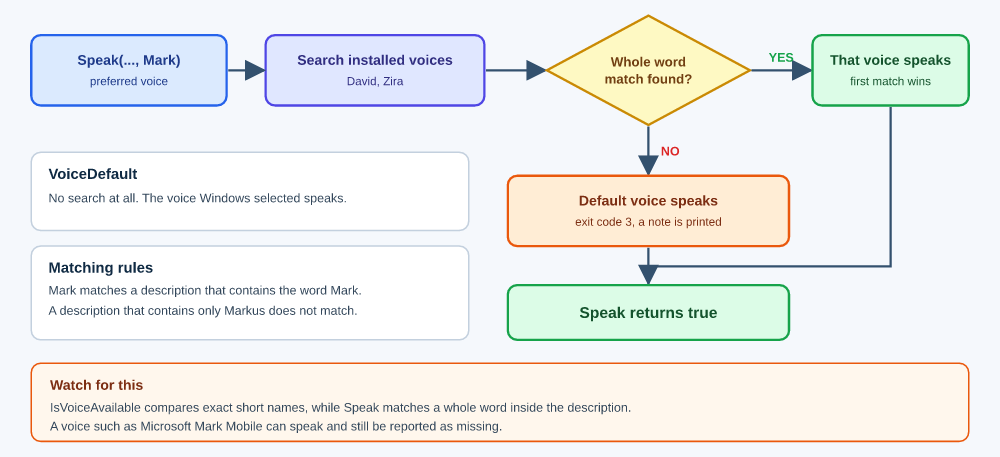
On this machine only David and Zira are installed. The request for Mark was not an error: the sentence was spoken with the default voice, the library printed a note, and Speak returned true. The note appears after the speech, because the exit code is only known when the process ends.
Speed and Volume
Both are plain parameters. The log shows only the sentences, because the effect is something you hear. Values outside the range are limited by the library.
Script
#include <TextToSpeech.mqh>  // Speak() and helper functions
//+------------------------------------------------------------------+
//| Script program start function                                    |
//+------------------------------------------------------------------+
void OnStart()
  {
   Speak("Slow speech.",0.6);       // speed 0.6, SAPI rate -7
   Speak("Fast speech.",1.8);       // speed 1.8, SAPI rate 8
   Speak("Quiet speech.",1.0,0.3);  // volume 30 percent
  }
Log
Slow speech.
Fast speech.
Quiet speech.
Speed 0.6 becomes rate -7, speed 1.8 becomes rate 8, and volume 0.3 becomes 30 percent.
The Time Limit
The last parameter of Speak bounds the wait. In this script the limit is 100 milliseconds, far too short for the sentence, so the library ends the helper process and gives control back. On the tested machine the next call worked normally.
Script
#include <TextToSpeech.mqh>  // Speak() and helper functions
//+------------------------------------------------------------------+
//| Script program start function                                    |
//+------------------------------------------------------------------+
void OnStart()
  {
   Speak("This sentence is long enough that one hundred milliseconds cannot finish it.",1.0,1.0,VoiceDefault,100);
   Speak("Recovered after timeout.");
  }
Log
This sentence is long enough that one hundred milliseconds cannot finish it.
TTS: timeout after 100 ms, process terminated
Recovered after timeout.
The first call returned false, and the second returned true. In live code, pass a limit such as 8000 milliseconds so that a stalled speech engine cannot hold your program for long.
How It Behaves Inside MQL5
Every MQL5 program handles its events one at a time, and Speak is blocking: it does not return until the voice has finished, the time limit has passed, or the call was refused. There is no background mode, so two sentences from one program cannot overlap. The busy flag is private to each program, so two different programs that speak at the same moment start two helper processes, and nothing in the library prevents their sentences from overlapping. Blocking is a sound choice for audio from one program, but it decides where Speak belongs.
In an Expert Advisor, OnTick and OnTimer run in the same thread. While Speak waits for the voice, that expert advisor handles nothing else. The terminal skips price ticks that arrive while OnTick is still running. Every call pays for starting a new PowerShell process, and while the voice speaks, the program is not listening.
The following Expert Advisor makes this visible. It sets a one-second timer and speaks four short sentences in the handler. It also prints the time between the start of one run and the start of the next, measured in milliseconds. The word tick in the log counts runs of the timer handler, not price ticks.
Code
#include <TextToSpeech.mqh>  // Speak() and helper functions
//+------------------------------------------------------------------+
//| Global variables                                                 |
//+------------------------------------------------------------------+
ulong g_last=0;  // tick count at the start of the previous run
int g_ticks=0;   // number of timer runs
//+------------------------------------------------------------------+
//| Expert initialization function                                   |
//+------------------------------------------------------------------+
int OnInit()
  {
   EventSetTimer(1);  // timer period: one second
   return INIT_SUCCEEDED;
  }
//+------------------------------------------------------------------+
//| Expert deinitialization function                                 |
//+------------------------------------------------------------------+
void OnDeinit(const int reason)
  {
   EventKillTimer();
  }
//+------------------------------------------------------------------+
//| Timer function                                                   |
//+------------------------------------------------------------------+
void OnTimer()
  {
   ulong now=GetTickCount64();  // start of this run
   g_ticks++;
   if(g_last>0)
      PrintFormat("tick %d, gap %I64u ms",g_ticks,now-g_last);
   g_last=now;
   Speak("Five second call.");
   Speak("i is five");
   Speak("Fifty second call.");
   Speak("You can then stop.");
  }
Log
Five second call.
i is five
Fifty second call.
You can then stop.
tick 2, gap 10141 ms
Five second call.
i is five
Fifty second call.
You can then stop.
tick 3, gap 10203 ms
The timer is set to one second, so you might expect the handler to run every second. It does not. The handler speaks four sentences, and in this run the four sentences keep the handler busy for about ten seconds. The split between start-up and speech was not measured. The next run did not start until the previous one had ended: on the tested machine the gap was about 10000 ms, ten times the timer period and roughly the time the four sentences took. The handler was not re-entered while it was busy. The log does not show whether timer events that fell due in the meanwhile were dropped or only delayed.
For this reason, Speak is best called from OnTimer for deliberate announcements, from a script, or from a rate-limited or event-based corner of OnTick. A script runs in its own thread, so blocking inside it does not stop the other programs of the chart. Do not call Speak on every tick. If you must react to ticks, gate the call by time so the program speaks at most once in a while:
//+------------------------------------------------------------------+
//| Global variables                                                 |
//+------------------------------------------------------------------+
datetime g_lastSpoken=0;  // time of the last announcement
//+------------------------------------------------------------------+
//| Expert tick function                                             |
//+------------------------------------------------------------------+
void OnTick()
  {
   if(TimeCurrent()-g_lastSpoken<300)  // less than five minutes since the last one
      return;
   g_lastSpoken=TimeCurrent();
   Speak("Five minutes passed on "+_Symbol,1.0,1.0,VoiceDefault,8000);
  }
Indicators are the dangerous case. All indicators of a symbol share one thread, so a blocking call could freeze every indicator on that symbol. The library therefore refuses to speak in an indicator. It also refuses in the strategy tester and in optimizations, because nobody is listening there and every signal would start a process, and it refuses when DLL imports are not allowed, because the call could not succeed anyway.
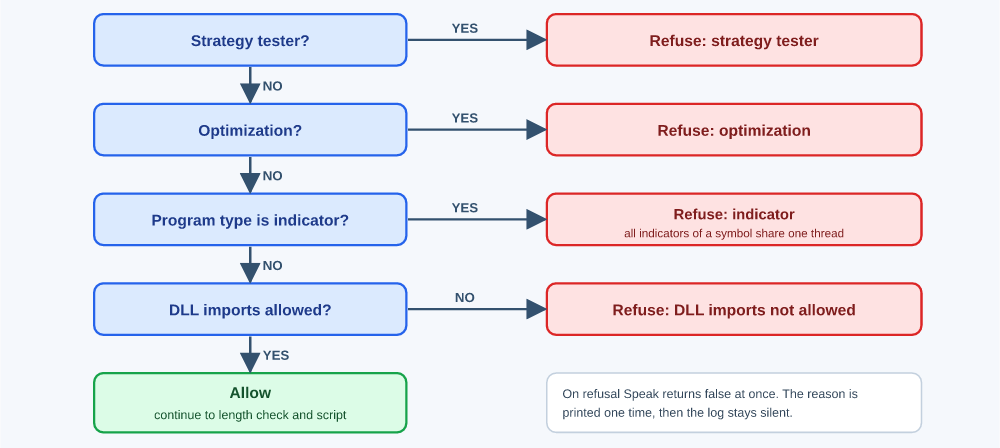
When the guard refuses, Speak returns false and prints one line of the form TTS: speech disabled, reason: strategy tester the first time, and stays silent afterward, so the log is not flooded.
SAPI XML Tags
A tag tells the voice how to read part of a sentence: louder, slower, spelled out, with a pause. A tag can wrap text, in which case it applies only to that text, or it can stand alone, in which case it applies to everything after it. Whether a tag changes what you hear depends on the installed voice, so treat tags as requests.
Writing Tags in MQL5
A string in MQL5 is wrapped in double quotes, and the attributes of a tag also use double quotes. Inside a string, every double quote must therefore be written with a backslash in front of it, and a backslash itself is written twice. For example, the tag
<silence msec="300"/> is written in MQL5 as
Speak("<silence msec=\"300\"/>"); Nothing else needs special handling. The library repairs a bare ampersand and a stray less-than sign by itself, as shown below. Every example in this section uses the backslash form, and the XML form of each tag is shown first so that you can see what the backslashes protect.
What the Library Checks
The library switches to tag mode when the sentence contains one of the tag names in this section, a closing tag, or an entity, ignoring letter case. Before speaking, it repairs a bare ampersand and a less-than sign that is not followed by a letter or a slash, then checks that the tags are well-formed, which means every opening tag has a matching closing tag, closed in the reverse order of opening. Text that is not well-formed is not spoken, and Speak returns false. The check proves well-formedness only: a well-formed tag that SAPI does not know is not caught.
Script
#include <TextToSpeech.mqh>  // Speak() and helper functions
//+------------------------------------------------------------------+
//| Script program start function                                    |
//+------------------------------------------------------------------+
void OnStart()
  {
   Speak("<emph>unclosed");                                        // tag never closed
   Speak("<emph>one</volume>");                                    // closed in the wrong order
   Speak("<emph>Fish & chips</emph> and I & you.");                // bare ampersands, repaired
   Speak("<emph>Score</emph> is 2<3.");                            // stray less-than sign, repaired
   Speak("<EMPH>Loud</EMPH> and <Silence Msec=\"200\"/> quiet.");  // capital letters, accepted
  }
Log
<emph>unclosed
TTS: malformed XML, nothing was spoken.
<emph>one</volume>
TTS: malformed XML, nothing was spoken.
<emph>Fish & chips</emph> and I & you.
<emph>Score</emph> is 2<3.
<EMPH>Loud</EMPH> and <Silence Msec="200"/> quiet.
The first sentence opens a tag and never closes it. The second closes volume while the emph tag is still open, so the order is wrong. Both were rejected without a sound. The third and fourth contain a bare ampersand and a stray less-than sign, which the library repaired, and the fifth uses capital letters, which the check accepts because it compares in lowercase while the spoken text keeps its case.
A less-than sign that is repaired is still a character for the engine to read. The next script contains an entity, so it runs in tag mode. The less-than sign between the digits 2 and 3 is followed by a space, so the library turns it into an entity, and the sentence stays well-formed.
The log lines above show the sentences before the repair. The bare ampersands and the stray less-than sign were repaired afterward, inside PowerShell, so those logged lines are not the final strings handed to SAPI. These figures are indicative only: each comes from a single run on one machine, with three speeds and one voice, so measure your own values before relying on them.
Script
#include <TextToSpeech.mqh>  // Speak() and helper functions
//+------------------------------------------------------------------+
//| Script program start function                                    |
//+------------------------------------------------------------------+
void OnStart()
  {
   Speak("Test five B. Value 5"+TtsXmlEscape(">")+"3 and 2 < 3 here.");
  }
Log
Test five B. Value 5>3 and 2 < 3 here.
Heard
Value 5 greater than 3 and 2 3 here.
The library delivered both characters. The engine read the greater-than sign as "greater than" and skipped the less-than sign, so the same kind of symbol was treated differently in the same sentence. Write "greater than" and "less than" as words when the meaning matters.
In tag mode, a less-than sign followed by a letter or a slash is treated as a tag, so write < for a literal one. In plain mode nothing is treated as a tag.
Volume, Rate, and Pitch
<volume level="50"> Text Here </volume>
The volume tag sets the loudness inside it. The level runs from 0 to 100. Tags can be nested, and a tag with no content applies to everything after it. How the level combines with the volume parameter of Speak was not measured here, so do not rely on a product of the two.
Speak("<volume level=\"50\">Half volume, <volume level=\"100\">full volume,</volume> half again.</volume>"); <rate absspeed="5"> Text Here </rate> <rate speed="-3"> Text Here </rate>
The rate tag sets the speed and takes one of two attributes. The absspeed attribute sets an absolute rate inside the tag, and the speed attribute changes the current rate by the given amount. SAPI documents that tag values are combined with the rate set in code, so the result when both are used can differ between voices.
Speak("<rate absspeed=\"5\">Fast, <rate absspeed=\"-5\">then slow.</rate></rate>"); <pitch absmiddle="5"> Text Here </pitch> <pitch middle="-2"> Text Here </pitch>
The pitch tag works the same way: the absmiddle attribute sets an absolute value, and the middle changes the current one. Positive values are higher and negative values are lower.
Speak("<pitch absmiddle=\"5\">Higher, <pitch absmiddle=\"-5\">lower.</pitch></pitch>"); Script
#include <TextToSpeech.mqh>  // Speak() and helper functions
//+------------------------------------------------------------------+
//| Script program start function                                    |
//+------------------------------------------------------------------+
void OnStart()
  {
   Speak("<volume level=\"50\">Half volume, <volume level=\"100\">full volume,</volume> half again.</volume>");
   Speak("<rate absspeed=\"5\">Fast, <rate absspeed=\"-5\">then slow.</rate></rate>");
   Speak("<pitch absmiddle=\"5\">Higher, <pitch absmiddle=\"-5\">lower.</pitch></pitch>");
  }
Log
<volume level="50">Half volume, <volume level="100">full volume,</volume> half again.</volume>
<rate absspeed="5">Fast, <rate absspeed="-5">then slow.</rate></rate>
<pitch absmiddle="5">Higher, <pitch absmiddle="-5">lower.</pitch></pitch>
Heard
The voice started at half volume, became louder for the nested phrase, then dropped back to half volume.
The voice started fast, then became slow.
The voice started high-pitched, then became low-pitched.
Emphasis, Spelling, and Pauses
<emph> Text Here </emph>
The emph tag asks the voice to emphasize the word or text inside it. It cannot be empty, and the way emphasis sounds differs from voice to voice.
Speak("<emph>Stop loss hit</emph> on EURUSD."); <spell> Text Here </spell>
The spell tag reads every character one by one, including digits and punctuation, instead of reading words. It cannot be empty. It is useful for order numbers and tickers.
Speak("Order <spell>abc123</spell> was closed."); <silence msec="500"/> The silence tag inserts a pause of the given length in milliseconds. It must be empty, which is why it ends with a slash.
Speak("Margin level is low.<silence msec=\"500\"/> Close positions."); Script
#include <TextToSpeech.mqh>  // Speak() and helper functions
//+------------------------------------------------------------------+
//| Script program start function                                    |
//+------------------------------------------------------------------+
void OnStart()
  {
   Speak("<emph>Important</emph><silence msec=\"300\"/> then <spell>abc</spell>.");
  }
Log
<emph>Important</emph><silence msec="300"/> then <spell>abc</spell>.
Pronunciation
<pron sym="k ae 1 t"> dog </pron>
The pron tag gives an exact pronunciation as a series of phonemes, the individual speech sounds, separated by spaces. Text inside the tag is replaced by those sounds instead of being read normally. The phoneme set depends on the language of the voice, and the examples here use the United States English set. How the sounds are rendered depends on the voice.
To prove that the sounds replace the text, the first example writes the word "dog" and gives the phonemes of "cat."
Speak("<pron sym=\"k ae 1 t\">dog</pron>"); The second example is the one from the SAPI documentation. It contains an ampersand inside the attribute. A bare ampersand is not valid XML, and SAPI called directly from PowerShell rejects it with an XML parser error. The library repairs it before speaking, so the same text works through Speak.
Speak("<pron sym=\"h eh 1 l ow & w er 1 l d\"> hello world </pron>"); Script
#include <TextToSpeech.mqh>  // Speak() and helper functions
//+------------------------------------------------------------------+
//| Script program start function                                    |
//+------------------------------------------------------------------+
void OnStart()
  {
   Speak("<pron sym=\"k ae 1 t\">dog</pron>");                          // text dog, sound cat
   Speak("<pron sym=\"h eh 1 l ow & w er 1 l d\">hello world</pron>");  // bare ampersand, repaired
  }
Log
<pron sym="k ae 1 t">dog</pron>
<pron sym="h eh 1 l ow & w er 1 l d">hello world</pron>
Heard
Cat
Hello world
The first sentence was spoken as "cat" even though the text says "dog," so the phonemes replaced the text. The second sentence was spoken from its phonemes, and the library repaired the ampersand in the attribute. Both calls returned true.
<P PRON="k ae 1 t"> dog </P>
The P tag has a long form with the attributes DISP and PRON, and the SAPI documentation also lists a short form that places the parts between slashes. Both forms were tried on the tested machine, and neither behaved as the documentation suggests. To make the result easy to hear, the long form was given the word "dog" and the phonemes of "cat," the same pair that worked in the pron tag above.
Script
#include <TextToSpeech.mqh>  // Speak() and helper functions
//+------------------------------------------------------------------+
//| Script program start function                                    |
//+------------------------------------------------------------------+
void OnStart()
  {
   Speak("<P PRON=\"k ae 1 t\">dog</P>");               // long form, PRON only
   Speak("<P DISP=\"dog\" PRON=\"k ae 1 t\">dog</P>");  // long form, DISP and PRON
   Speak("<P>/greeting/hello/ah;</P>");                 // short form
  }
Log
<P PRON="k ae 1 t">dog</P>
<P DISP="dog" PRON="k ae 1 t">dog</P>
<P>/greeting/hello/ah;</P>
Heard
Dog
Dog
Slash greeting Slash Hello Slash Ah
Both long forms were spoken as the word "dog," so the PRON value had no audible effect, with or without DISP, even though the same phonemes in a pron tag produced "cat." The short form was not recognized: the voice read its content as text, including the slashes. On this voice, use the "pron" tag when you need control over the sound.
Spelling Currency Pairs and Tickers
<spell> EURUSD </spell>
A symbol such as EURUSD is not a word, so the voice invents a pronunciation for it. Wrap every currency pair and ticker in the spell tag so that each letter is read separately.
Speak("Stop loss hit on <spell>EURUSD</spell>.");
Speak("Five minutes passed on <spell>"+_Symbol+"</spell>.");
The spell tag reads every character, including digits and punctuation. A broker symbol with a suffix, such as "EURUSD.m" or "EURUSD#", will have the dot or the hash spoken aloud. Remove the suffix before speaking, for example with StringSubstr, which also lets you read the pair in two parts with a short pause between them.
Speak("<spell>EUR</spell><silence msec=\"150\"/><spell>USD</spell>"); Script
#include <TextToSpeech.mqh>  // Speak() and helper functions
//+------------------------------------------------------------------+
//| Script program start function                                    |
//+------------------------------------------------------------------+
void OnStart()
  {
   Speak("Stop loss hit on EURUSD.");                 // plain symbol
   Speak("Stop loss hit on <spell>EURUSD</spell>.");  // spelled symbol
   string base=StringSubstr(_Symbol,0,3);             // first currency of the pair
   string quote=StringSubstr(_Symbol,3,3);            // second currency of the pair
   Speak("<spell>"+base+"</spell><silence msec=\"150\"/><spell>"+quote+"</spell>");
  }
Log (on a EURUSD chart)
Stop loss hit on EURUSD.
Stop loss hit on <spell>EURUSD</spell>.
<spell>EUR</spell><silence msec="150"/><spell>USD</spell>
Heard
The voice read the symbol as one invented word, something like "Eu-ru-sd".
Every letter was spelled out: E, U, R, U, S, D.
The two currencies were spelled out separately, with a short pause between EUR and USD.
Dates and Numbers
<context id="date_mdy"> 03/04/01 </context>
The context tag tells the voice how to read dates, numbers, and currency. It cannot be empty. SAPI defines identifiers such as date_mdy, date_dmy, and date_ymd, and how far a voice follows them depends on the voice. On the tested machine, date_mdy and date_ymd were tried, and the other identifiers were not.
Speak("<context id=\"date_mdy\"> 03/04/01 </context>"); Script
#include <TextToSpeech.mqh>  // Speak() and helper functions
//+------------------------------------------------------------------+
//| Script program start function                                    |
//+------------------------------------------------------------------+
void OnStart()
  {
   Speak("<context id=\"date_mdy\"> 03/04/01 </context>");
   Speak("<context id=\"date_ymd\"> 03/04/01 </context>");
  }
Log
<context id="date_mdy"> 03/04/01 </context>
<context id="date_ymd"> 03/04/01 </context>
Heard
March fourth 01
April first 03
The month and day followed the tag, but the year was not spoken in full.
Bookmarks and Parts of Speech
<bookmark mark="one"/> The bookmark tag places a named marker in the audio so that an application listening for events can learn when the voice reaches that point. This library does not listen for events, so no event is handled. On the tested machine, the voice shifted its tone slightly at the marker, with no pause. The documentation describes the tag only as an event marker, so treat the tone change as an observation of this voice.
Speak("First part.<bookmark mark=\"one\"/> Second part."); <partofsp part="noun"> Text Here </partofsp>
The "partofsp" tag names the part of speech of the enclosed word, one of Unknown, Noun, Verb, Modifier, Function, or Interjection, so that the voice can choose between pronunciations of the same spelling. It cannot be empty.
Speak("<partofsp part=\"noun\">A</partofsp> is the first letter of the alphabet."); Script
#include <TextToSpeech.mqh>  // Speak() and helper functions
//+------------------------------------------------------------------+
//| Script program start function                                    |
//+------------------------------------------------------------------+
void OnStart()
  {
   Speak("First part.<bookmark mark=\"one\"/> Second part.");
   Speak("<partofsp part=\"noun\">A</partofsp> is the first letter of the alphabet.");
  }
Log
First part.<bookmark mark="one"/> Second part.
<partofsp part="noun">A</partofsp> is the first letter of the alphabet.
Heard
No pause was heard between the two parts. A slight change in delivery was audible.
The letter A was read by its letter name.
Voices differ in how far they follow the partofsp tag.
Choosing a Voice Inside a Sentence
<voice required="Gender=Female;Age!=Child"> Text Here </voice>
The voice tag picks a voice by its attributes: age, gender, language, name, and vendor. The attribute required lists conditions that must be met, and if no installed voice meets them, nothing changes, and the current voice keeps speaking. According to the SAPI documentation, when several voices fit equally well, one is picked at random, and the current voice counts as a preference.
Speak("<voice required=\"Gender=Female;Age!=Child\">A female voice speaks this, if one exists.</voice>"); <lang langid="409"> Text Here </lang>
The language tag picks a voice by language only. The attribute langid is the Windows language identifier written in hexadecimal without the 0x prefix: 409 is United States English and 411 is Japanese.
Speak("<lang langid=\"409\">A United States English voice speaks this.</lang>"); Script
#include <TextToSpeech.mqh>  // Speak() and helper functions
//+------------------------------------------------------------------+
//| Script program start function                                    |
//+------------------------------------------------------------------+
void OnStart()
  {
   Speak("<voice required=\"Gender=Female;Age!=Child\">A female voice speaks this, if one exists.</voice>");
   Speak("<lang langid=\"409\">A United States English voice speaks this.</lang>");
  }
Log
<voice required="Gender=Female;Age!=Child">A female voice speaks this, if one exists.</voice>
<lang langid="409">A United States English voice speaks this.</lang>
Heard
The first sentence was spoken by Zira, the only installed female voice on this computer.
The second sentence was said with an American accent.
Test Environment
We recorded every Heard block and tag observation in this article on one machine, and audible results depend on the installed voices, so compare them with your own setup before you draw conclusions. The terminal was build 6128, and the system was Windows 11 Pro, version 21H2, with OS build 22000.675. The library starts Windows PowerShell from the WindowsPowerShell\v1.0 folder of the system directory, and on this machine that program is version 5.1, build 22000.653. The user culture and the system locale were both English (United States), en-US. Two SAPI voices were installed: Microsoft David Desktop - English (United States) and Microsoft Zira Desktop - English (United States).
The voice parameter of Speak sets the voice of each call, and it takes an EVoice value. The default value, VoiceDefault, means the voice that Windows has selected as its default, which on this machine is David. A call that passes David or Zira asks for that voice by name. Every example that passes no voice was therefore spoken by David, and the examples that pass Zira were spoken by Zira. If your default voice is not David, expect the examples without a voice to sound different on your machine. The request for Mark, which is not installed, fell back to the default voice, David. The voice tag example is the exception: the tag inside the sentence selected Zira, and its Heard block says so.
Where the Limits Come From
The one Windows limit these values relate to is the command line limit of 32767 characters. Every number below is a working default of this library, not a rule of Windows, and each one can be changed in the constants block at the top of the header. The figures come from a short test script run once on the tested machine. Each result is a single run, except the start-up baseline, which is the average of three runs of a one-letter sentence. Only the speeds 0.6, 1.0, and 1.8 were tested, with the default voice.
TTS_MAX_TEXT, 4000 characters, keeps the encoded command well below TTS_MAX_CMD. The script is encoded as UTF-16LE, so an ordinary character becomes two bytes and then about 2.67 Base64 characters. In the worst case, where every character is a single quote and gets doubled, a 4000-character sentence gave a command line of 22199 characters. The same number of plain letters gave 11531 characters, so the script template and the program path account for roughly 860 characters of either figure. If you raise TTS_MAX_TEXT, the command line check refuses the call when the line passes 30000 characters. Extending the two measurements gives about 5400 characters of quotes or about 10900 characters of plain text, and these are calculated figures, not measured ones. A sentence with tags, or a named voice, adds script text and lowers both ceilings somewhat. TTS_MAX_CMD, 30000 characters, is a margin under the Windows limit and should not be raised to 32767 or above.
The automatic timeout is a safety limit, not an expected duration. TTS_TIMEOUT_PER_CHAR_MS, 250 ms, was set as a generous reserve, and the test checks it. The speech time of each call was estimated by subtracting the average start-up baseline from the total time of the call. At normal speed the three test sentences needed between 50 and 65 ms per character, so the allowance was about four to five times what the speech needed. At speed 0.6 the voice needed between 118 and 170 ms per character, and the reserve fell to between 2.5 and 3.5 times. It fell because the allowance grows only by the factor 1/speed, while with this voice the speech slowed down by more than that factor. At speed 1.8 the reserve was about nine times on the two longer sentences. The shortest sentence at speed 1.8 gave a speech time of about zero, because its total time was below the average baseline, so that result was discarded. Start-up time differs from call to call, and it matters most for short sentences.
TTS_TIMEOUT_BASE_MS, 20 seconds, is meant to cover the start of PowerShell, the creation of the COM object, and a possible security scan. The three baseline runs took between 1.6 and 2.0 seconds, so the allowance is about ten times the measured start-up. TTS_TIMEOUT_MAX_MS, 10 minutes, caps the automatic wait. TTS_MIN_SPEED_FACTOR, 0.25, keeps a very low or invalid speed from stretching the limit further, and speeds below 0.6 were not tested. You can change all four values, but keep the reserve per character and the base allowance well above what your machine needs, or normal sentences will be cut off. For a single call, a non-zero timeoutMs parameter of Speak replaces the automatic limit.
TTS_VOICELIST_TIMEOUT, 20000 ms, is the same allowance as the base limit with no speech time added, because listing voices speaks nothing. Setting it below the time PowerShell needs to start and list the voices makes the listing fail. TTS_KILL_WAIT_MS, 2000 ms, is a short wait after TerminateProcess, which only requests the end of the process so that the old process can finish ending before the next call starts. Neither value was measured or tuned. Both are working defaults, and they matter only when a call fails or stalls.
Honest Limits
True from Speak means PowerShell ended with exit code 0, or with code 3 after a voice fallback. It does not prove that an audio device exists, is unmuted, or played anything. Every call starts a new PowerShell process, and that start-up adds a delay to every call. Start-up time varies with caching and security software, so measure it on your own machine. A call made while another is still running in the same program is refused with the note TTS: busy, call rejected, which can only happen if code re-enters Speak. Two different programs have separate busy flags and can speak at the same time.
The sentence is visible to any process that can read command lines, because Base64 is an encoding and not encryption. The speak function also writes the sentence to the Experts log before speaking it. For both reasons, never speak account numbers or client details. The voice-listing helpers write and delete a temporary file named tts_voices.txt in the common Files folder. The four kernel32 functions are declared here because the WinAPI headers of the tested build did not declare them. Tested on build 6128. If your build declares one of them, remove that line, because a duplicate declaration is a compiler error.
How Does One Include File Give a Terminal a Voice?
One include file and one function are enough. MQL5 cannot speak COM, so the COM work is delegated to PowerShell, and MQL5 does what it does well: starting a program, waiting for it with a limit, reading what it returns, and closing every handle. Because the call is blocking, its right place is OnTimer, a script, or a rate-limited corner of OnTick, never an indicator and never every tick. With the markup tags, a sentence is no longer a flat string: it can stress the word that matters, pause before the number, and spell out the order ticket, so the terminal does not only announce that something happened, it says what.
Full Code: TextToSpeech.mqh
Save as MQL5\Include\TextToSpeech.mqh.
//+------------------------------------------------------------------+ //| TextToSpeech.mqh | //| Text to speech for MQL5 through SAPI | //+------------------------------------------------------------------+ //| Speaks a sentence composed at runtime with the Windows voice. | //| The COM work is delegated to a hidden PowerShell process that | //| MQL5 starts, waits for with a limit, and reads the exit code of. | //| Markup: SAPI XML tags. | //| | //| Requirements: | //| - Windows only | //| - DLL imports allowed in Tools, Options, Expert Advisors | //| - A working audio device and a desktop session | //| - SAPI voices installed (they ship with Windows) | //| - Not an indicator, not the tester, not an optimization | //+------------------------------------------------------------------+ //+------------------------------------------------------------------+ //| Include guard and includes | //| The guard makes the file process only once, even if two of your | //| files include it. | //+------------------------------------------------------------------+ #ifndef TEXT_TO_SPEECH_MQH // include guard #define TEXT_TO_SPEECH_MQH // include guard macro #include <WinAPI\winapi.mqh> // CreateProcessW, CloseHandle, ZeroMemory and the structures //+------------------------------------------------------------------+ //| Imports | //| The four kernel32 functions below were not declared by the | //| WinAPI headers of the tested build. Tested on build 6128. | //| If your build declares one of them, remove that line, because a | //| duplicate declaration is a compiler error. | //+------------------------------------------------------------------+ #import "kernel32.dll" uint WaitForSingleObject(long hHandle,uint dwMilliseconds); // waits for the process with a limit int GetExitCodeProcess(long hProcess,uint &lpExitCode); // reads the exit code of the process int TerminateProcess(long hProcess,uint uExitCode); // ends the process when the limit passes uint GetSystemDirectoryW(ushort &lpBuffer[],uint uSize); // path of the Windows system folder #import //+------------------------------------------------------------------+ //| Voices | //| The name is matched as a whole word inside the description that | //| Windows gives each installed voice. If nothing matches, the | //| default voice speaks. VoiceDefault always succeeds. | //| Do not add comments to the members: MQL5 shows a member comment | //| as its text in the input dialog. | //+------------------------------------------------------------------+ enum EVoice { VoiceDefault=0, Emma=1, Elma=2, David=3, Mark=4, Zira=5, Hazel=6, George=7, Susan=8, Catherine=9, James=10 }; //+------------------------------------------------------------------+ //| Constants | //| The first five values are defined by Windows. The limits, the | //| exit codes of the helper script and the timing values are | //| working defaults of this library that you can change here. | //| Windows itself limits only the command line, to 32767 characters.| //+------------------------------------------------------------------+ #define TTS_CREATE_NO_WINDOW 0x08000000 // CreateProcess flag: no console window #define TTS_STARTF_USESHOWWINDOW 0x00000001 // STARTUPINFO flag: wShowWindow is used #define TTS_SW_HIDE 0 // wShowWindow value: hidden window #define TTS_WAIT_OBJECT_0 0 // wait result: the process ended #define TTS_WAIT_TIMEOUT 0x102 // wait result: the time ran out #define TTS_MAX_TEXT 4000 // practical limit on the sentence length, not a Windows limit #define TTS_MAX_CMD 30000 // safely below the Windows command line limit of 32767 #define TTS_EXIT_ERROR 2 // PowerShell, COM or SAPI failed for another reason #define TTS_EXIT_NOVOICE 3 // requested voice missing, the default voice spoke instead #define TTS_EXIT_BADXML 4 // the markup tags are not well-formed, nothing was spoken #define TTS_TIMEOUT_BASE_MS 20000 // automatic limit: allowance for PowerShell start-up #define TTS_TIMEOUT_PER_CHAR_MS 250.0 // automatic limit: reserve per character, divided by the speed factor #define TTS_TIMEOUT_MAX_MS 600000.0 // automatic limit: upper bound, 10 minutes #define TTS_MIN_SPEED_FACTOR 0.25 // automatic limit: lowest speed used as the divisor #define TTS_VOICELIST_TIMEOUT 20000 // wait for the voice listing, no speech time added #define TTS_KILL_WAIT_MS 2000 // wait after TerminateProcess so the process can finish ending //+------------------------------------------------------------------+ //| Busy flag | //| Detects re-entrance: a call to Speak while another call waits. | //+------------------------------------------------------------------+ bool g_ttsBusy=false; // true while a helper process is running //+------------------------------------------------------------------+ //| TtsContextAllowed | //| Refuses to speak in the tester, in optimizations, in indicators | //| and when DLL imports are not allowed. | //| The reason is printed once. | //+------------------------------------------------------------------+ bool TtsContextAllowed() { static bool warned=false; // the reason is printed only once string why=""; // empty text means that speaking is allowed if(MQLInfoInteger(MQL_TESTER)) why="strategy tester"; else if(MQLInfoInteger(MQL_OPTIMIZATION)) why="optimization"; else if(MQLInfoInteger(MQL_PROGRAM_TYPE)==PROGRAM_INDICATOR) why="indicator (shares the symbol thread)"; else if(!MQLInfoInteger(MQL_DLLS_ALLOWED)) why="DLL imports not allowed"; if(why=="") return true; if(!warned) { warned=true; Print("TTS: speech disabled, reason: "+why); } return false; } //+------------------------------------------------------------------+ //| TtsVoiceName | //| Converts an EVoice value to the name used in the voice search. | //| Returns an empty string for VoiceDefault and unknown values. | //+------------------------------------------------------------------+ string TtsVoiceName(EVoice voice) { switch(voice) { case Emma: return "Emma"; case Elma: return "Elma"; case David: return "David"; case Mark: return "Mark"; case Zira: return "Zira"; case Hazel: return "Hazel"; case George: return "George"; case Susan: return "Susan"; case Catherine: return "Catherine"; case James: return "James"; } return ""; } //+------------------------------------------------------------------+ //| TtsXmlEscape | //| Writes the entity for each special character so that it is read | //| as text and not as markup. The ampersand must be replaced first. | //+------------------------------------------------------------------+ string TtsXmlEscape(string text) { string out=text; // working copy of the sentence StringReplace(out,"&","&"); // first, or the other entities would be damaged StringReplace(out,"<","<"); StringReplace(out,">",">"); StringReplace(out,"\"","""); StringReplace(out,"'","'"); return out; } //+------------------------------------------------------------------+ //| TtsSanitize | //| Replaces with a space the characters that XML cannot carry: | //| - control characters except tab, line feed and carriage return | //| - lone surrogates | //| - the values 0xFFFE and 0xFFFF | //| A valid pair of surrogates passes through unchanged. | //+------------------------------------------------------------------+ string TtsSanitize(string text) { string out=""; // the cleaned sentence int len=StringLen(text); // length in UTF-16 code units for(int i=0;i<len;i++) { ushort ch=StringGetCharacter(text,i); // current code unit if(ch>=0xD800 && ch<=0xDBFF) // high surrogate, a low one must follow { if(i+1<len) { ushort lo=StringGetCharacter(text,i+1); // candidate low surrogate if(lo>=0xDC00 && lo<=0xDFFF) // valid pair, both pass through { out+=ShortToString(ch)+ShortToString(lo); i++; // the low surrogate is already copied continue; } } out+=" "; // lone high surrogate continue; } if((ch>=0xDC00 && ch<=0xDFFF) || ch==0xFFFE || ch==0xFFFF) // lone low surrogate or forbidden value { out+=" "; continue; } if(ch<0x20 && ch!=0x09 && ch!=0x0A && ch!=0x0D) // control character except tab, LF and CR { out+=" "; continue; } out+=ShortToString(ch); } return out; } //+------------------------------------------------------------------+ //| TtsQuote | //| Prepares the sentence for a PowerShell single-quoted string. | //| PowerShell treats the ASCII apostrophe and the typographic | //| single quotes U+2018 to U+201B as quote characters, so each | //| one is doubled. PowerShell collapses every doubled pair back | //| to one character, so the voice receives the original | //| sentence. Nothing in it is expanded. | //+------------------------------------------------------------------+ string TtsQuote(string text) { string clean=TtsSanitize(text); // sentence without the characters XML cannot carry string out=""; // the quoted sentence int len=StringLen(clean); // length in UTF-16 code units for(int i=0;i<len;i++) { ushort ch=StringGetCharacter(clean,i); // current code unit if(ch=='\'' || (ch>=0x2018 && ch<=0x201B)) // plain or typographic single quote out+=ShortToString(ch)+ShortToString(ch); // the quote is doubled else out+=ShortToString(ch); } return out; } //+------------------------------------------------------------------+ //| TtsRate | //| Converts a speed scale into a SAPI rate from -10 to 10, | //| where 0 is normal. A speed of zero or below is treated as 1.0. | //| Formula: round(log2(speed) x 10), limited to -10..10. | //| Examples: | //| 0.5 gives -10 | //| 1.0 gives 0 | //| 1.8 gives 8 (8.48 rounded) | //| 2.0 gives 10 | //+------------------------------------------------------------------+ int TtsRate(double speed) { if(speed<=0) speed=1.0; int r=(int)MathRound(MathLog(speed)/MathLog(2.0)*10.0); // SAPI rate before the limits if(r<-10) r=-10; if(r>10) r=10; return r; } //+------------------------------------------------------------------+ //| TtsPowerShellPath | //| CreateProcessW does not expand variables such as %SystemRoot%, | //| so the system folder is requested from Windows and the known | //| PowerShell location is appended. | //| Returns "" when the lookup fails. | //+------------------------------------------------------------------+ string TtsPowerShellPath() { ushort buf[260]; // MAX_PATH characters uint n=GetSystemDirectoryW(buf,260); // number of characters written if(n==0 || n>=260) return ""; return ShortArrayToString(buf,0,(int)n)+"\\WindowsPowerShell\\v1.0\\powershell.exe"; } //+------------------------------------------------------------------+ //| TtsTagAt | //| Finds an opening tag name followed by a tag boundary: a space, | //| tab, line break, closing bracket or slash. The word "volume" | //| inside "revolution" is therefore not a match. | //| Used to decide whether the sentence contains SAPI XML tags. | //+------------------------------------------------------------------+ bool TtsTagAt(const string t,const string name) { string key="<"+name; // opening part of the tag, such as <volume int pos=0; // search position int klen=StringLen(key); // length of the opening part int tlen=StringLen(t); // length of the sentence while((pos=StringFind(t,key,pos))>=0) { int e=pos+klen; // position right after the tag name if(e<tlen) { ushort c=StringGetCharacter(t,e); // the character that must be a boundary if(c==' ' || c=='\t' || c=='\r' || c=='\n' || c=='>' || c=='/') return true; } pos=e; } return false; } //+------------------------------------------------------------------+ //| TtsLooksLikeXml | //| Tag mode starts when the sentence contains a SAPI tag name, a | //| closing tag or an entity. The comparison ignores letter case. | //+------------------------------------------------------------------+ bool TtsLooksLikeXml(string text) { string t=text; // lower-case copy for the comparison StringToLower(t); string names[]= {"volume","rate","pitch","emph","spell","silence","pron", "bookmark","partofsp","context","voice","lang","p","sapi" }; for(int i=0;i<ArraySize(names);i++) { if(TtsTagAt(t,names[i]) || StringFind(t,"</"+names[i]+">")>=0) return true; } string ents[]= {"&","<",">",""","'","&#"}; for(int i=0;i<ArraySize(ents);i++) if(StringFind(t,ents[i])>=0) return true; return false; } //+------------------------------------------------------------------+ //| TtsBuildScript | //| Builds the one-line PowerShell script: | //| 1. creates the SAPI.SpVoice object | //| 2. searches for the requested voice as a whole word | //| 3. sets the rate and the volume | //| 4. in tag mode repairs and checks the markup | //| 5. speaks the sentence | //| 6. ends with an exit code: 0, 2, 3 or 4 | //| In tag mode a less-than sign becomes an entity only when no | //| letter or slash follows it. Text such as a<b is read as a tag. | //+------------------------------------------------------------------+ string TtsBuildScript(string text,double speed,double volume,EVoice voice,bool xml) { int vol=(int)MathRound(volume*100.0); // SAPI volume, 0.0..1.0 becomes 0..100 if(vol<0) vol=0; if(vol>100) vol=100; //--- start of the script: error mode, exit code 0, the voice object string s="$ErrorActionPreference='Stop';$c=0;try{$v=New-Object -ComObject SAPI.SpVoice;"; string name=TtsVoiceName(voice); // empty for VoiceDefault //--- voice search by whole word, exit code 3 when nothing matches if(StringLen(name)>0) s+="$f=$false;foreach($t in $v.GetVoices()){if($t.GetDescription() -match '\\b"+name+"\\b'){$v.Voice=$t;$f=$true;break}};if(-not $f){$c=3};"; s+="$v.Rate="+IntegerToString(TtsRate(speed))+";$v.Volume="+IntegerToString(vol)+";"; s+="$x='"+TtsQuote(text)+"';"; if(xml) { //--- repair a bare ampersand and a stray less-than sign, then check the tags s+="$x=[regex]::Replace($x,'&(?!(amp|lt|gt|quot|apos|#[0-9]+|#x[0-9a-fA-F]+);)','&');"; s+="$x=[regex]::Replace($x,'<(?![A-Za-z/])','<');"; s+="try{[void][xml]('<r>'+$x.ToLower()+'</r>')}catch{exit 4};"; } s+="[void]$v.Speak($x,"+(xml?"8":"0")+");exit $c}catch{exit 2}"; return s; } //+------------------------------------------------------------------+ //| TtsEncode | //| Converts the script to UTF-16LE and then to Base64, so that no | //| quote or backslash from the sentence reaches the command line. | //| The result is passed with the -EncodedCommand switch. | //+------------------------------------------------------------------+ string TtsEncode(string script) { ushort w[]; // UTF-16 code units of the script int n=StringToShortArray(script,w,0,StringLen(script)); // number of code units if(n<=0) return ""; uchar src[]; // the same data as little-endian bytes ArrayResize(src,n*2); for(int i=0;i<n;i++) { src[2*i]=(uchar)(w[i]&0xFF); src[2*i+1]=(uchar)(w[i]>>8); } uchar key[]; // not used by Base64 uchar dst[]; // Base64 text as bytes if(CryptEncode(CRYPT_BASE64,src,key,dst)<=0) return ""; string b64=CharArrayToString(dst,0,WHOLE_ARRAY,CP_ACP); // Base64 text StringReplace(b64,"\r",""); StringReplace(b64,"\n",""); return b64; } //+------------------------------------------------------------------+ //| TtsExec | //| Starts the hidden PowerShell process, waits for it with a limit | //| and reads its exit code. | //| script - the PowerShell script | //| timeoutMs - the longest wait in milliseconds | //| code - receives the exit code, a 32-bit unsigned value | //| Returns true when the process ended and the exit code was read. | //+------------------------------------------------------------------+ bool TtsExec(string script,uint timeoutMs,uint &code) { code=1; // failure until the real exit code is read if(!TtsContextAllowed()) return false; if(g_ttsBusy) { Print("TTS: busy, call rejected"); return false; } string exe=TtsPowerShellPath(); // full path of powershell.exe if(exe=="") { Print("TTS: system directory not found"); return false; } string enc=TtsEncode(script); // Base64 text of the script if(enc=="") { Print("TTS: command encoding failed"); return false; } string cmd="\""+exe+"\" -NoProfile -NonInteractive -WindowStyle Hidden -EncodedCommand "+enc; if(StringLen(cmd)>TTS_MAX_CMD) { PrintFormat("TTS: command line %d chars exceeds %d",StringLen(cmd),TTS_MAX_CMD); return false; } STARTUPINFOW si; // start-up options of the new process PROCESS_INFORMATION pi; // handles of the new process ZeroMemory(si); ZeroMemory(pi); si.cb=sizeof(si); // size of the structure si.dwFlags=TTS_STARTF_USESHOWWINDOW; // wShowWindow is used si.wShowWindow=TTS_SW_HIDE; // the window stays hidden g_ttsBusy=true; // from here Speak cannot be re-entered if(!CreateProcessW(NULL,cmd,0,0,0,TTS_CREATE_NO_WINDOW,0,NULL,si,pi)) { Print("TTS: CreateProcessW failed"); g_ttsBusy=false; return false; } long hProc=pi.hProcess; // process handle, closed at the end if(pi.hThread!=0) CloseHandle(pi.hThread); // the thread handle is not needed bool finished=false; // true when the exit code was read uint wr=WaitForSingleObject(hProc,timeoutMs); // waits at most timeoutMs if(wr==TTS_WAIT_OBJECT_0) finished=(GetExitCodeProcess(hProc,code)!=0); else if(wr==TTS_WAIT_TIMEOUT) { PrintFormat("TTS: timeout after %u ms, process terminated",timeoutMs); TerminateProcess(hProc,1); WaitForSingleObject(hProc,TTS_KILL_WAIT_MS); } else PrintFormat("TTS: wait failed, result %u",wr); CloseHandle(hProc); g_ttsBusy=false; return finished; } //+------------------------------------------------------------------+ //| TtsRun | //| Checks the length, detects tag mode, calculates the time limit, | //| runs the script and turns the exit code into true or false. | //| Exit code 0 means the script ended without an error. It does | //| not prove that sound came out of the speakers. | //+------------------------------------------------------------------+ bool TtsRun(string text,double speed,double volume,EVoice voice,bool xml,uint timeoutMs) { if(g_ttsBusy) { Print("TTS: busy, call rejected"); return false; } int len=StringLen(text); // length in characters if(len==0 || len>TTS_MAX_TEXT) { PrintFormat("TTS: text length %d outside 1..%d",len,TTS_MAX_TEXT); return false; } if(!xml) xml=TtsLooksLikeXml(text); //--- limit, not an expected duration: base allowance plus a reserve per character if(timeoutMs==0) { double factor=speed>TTS_MIN_SPEED_FACTOR?speed:TTS_MIN_SPEED_FACTOR; // a very low speed does not stretch the limit further timeoutMs=(uint)MathMin(TTS_TIMEOUT_MAX_MS,TTS_TIMEOUT_BASE_MS+len*TTS_TIMEOUT_PER_CHAR_MS/factor); } uint code=1; // exit code of the helper process if(!TtsExec(TtsBuildScript(text,speed,volume,voice,xml),timeoutMs,code)) return false; if(code==0) return true; if(code==TTS_EXIT_NOVOICE) { Print("TTS: requested voice is not installed, the default voice was used."); return true; } if(code==TTS_EXIT_BADXML) Print("TTS: malformed XML, nothing was spoken."); else PrintFormat("TTS: PowerShell exit code %u",code); return false; } //+------------------------------------------------------------------+ //| TtsLoadVoices | //| Lists the installed voices through PowerShell. The descriptions | //| are written to tts_voices.txt in the common Files folder, read | //| back and the file is deleted. | //| Returns the number of voices or -1 when the query failed. | //+------------------------------------------------------------------+ int TtsLoadVoices(string &names[]) { ArrayResize(names,0); string file="tts_voices.txt"; // temporary file in the common Files folder //--- full path, because PowerShell writes the file, not MQL5 string full=TerminalInfoString(TERMINAL_COMMONDATA_PATH)+"\\Files\\"+file; FileDelete(file,FILE_COMMON); string s="$ErrorActionPreference='Stop';try{$v=New-Object -ComObject SAPI.SpVoice;" "$o=@(foreach($t in $v.GetVoices()){$t.GetDescription()});" "$o|Out-File -LiteralPath '"+TtsQuote(full)+"' -Encoding Unicode;exit 0}catch{exit 2}"; uint code=1; // exit code of the helper process if(!TtsExec(s,TTS_VOICELIST_TIMEOUT,code) || code!=0) { Print("TTS: could not list voices"); return -1; } int h=FileOpen(file,FILE_READ|FILE_TXT|FILE_UNICODE|FILE_COMMON); // file handle if(h==INVALID_HANDLE) { Print("TTS: voice list file not readable"); return -1; } while(!FileIsEnding(h)) { string line=FileReadString(h); // one voice description StringTrimLeft(line); StringTrimRight(line); if(StringLen(line)>0) { int n=ArraySize(names); // index of the new item ArrayResize(names,n+1); names[n]=line; } } FileClose(h); FileDelete(file,FILE_COMMON); return ArraySize(names); } //+------------------------------------------------------------------+ //| TtsShortName | //| Reduces a voice description to a short name: | //| "Microsoft David - English (United States)" gives "David" | //| "Microsoft Zira Desktop" gives "Zira" | //+------------------------------------------------------------------+ string TtsShortName(string desc) { int p=StringFind(desc," - "); // start of the language part if(p>0) desc=StringSubstr(desc,0,p); if(StringFind(desc,"Microsoft ")==0) // vendor prefix, 10 characters desc=StringSubstr(desc,10); int n=StringLen(desc); // length without the vendor prefix if(n>8 && StringSubstr(desc,n-8)==" Desktop") // suffix, 8 characters desc=StringSubstr(desc,0,n-8); StringTrimLeft(desc); StringTrimRight(desc); return desc; } //+------------------------------------------------------------------+ //| GetVoiceList | //| Returns the installed voices as one text, such as "David, Zira". | //| The result is cached, a failed query too, so a failure is not | //| repeated at every call. Pass refresh=true to ask Windows again. | //+------------------------------------------------------------------+ string GetVoiceList(bool refresh=false) { static string cache=""; // the last result static bool loaded=false; // true after the first query, even a failed one if(!refresh && loaded) return cache; string names[]; // full descriptions from Windows int n=TtsLoadVoices(names); // number of voices or -1 if(n<0) { cache=""; loaded=true; return ""; } string list=""; // short names separated by commas for(int i=0;i<n;i++) { string nm=TtsShortName(names[i]); // short name of one voice if(StringLen(nm)==0) continue; if(StringLen(list)>0) list+=", "; list+=nm; } cache=list; loaded=true; return cache; } //+------------------------------------------------------------------+ //| IsVoiceAvailable | //| Compares the exact short names, while Speak matches a whole word | //| inside the description. A description such as "Microsoft Mark | //| Mobile" can therefore be used by Speak and still be reported | //| as missing here. VoiceDefault is always available. | //+------------------------------------------------------------------+ bool IsVoiceAvailable(EVoice voice) { if(voice==VoiceDefault) return true; string want=TtsVoiceName(voice); // the name to look for StringToLower(want); string parts[]; // the short names of the installed voices int n=StringSplit(GetVoiceList(),',',parts); // number of installed voices for(int i=0;i<n;i++) { string p=parts[i]; // one installed voice StringTrimLeft(p); StringTrimRight(p); StringToLower(p); if(p==want) return true; } return false; } //+------------------------------------------------------------------+ //| TtsPrintVoices | //| Prints the installed voices and the state of each EVoice value. | //+------------------------------------------------------------------+ void TtsPrintVoices() { Print("TTS voices installed: "+GetVoiceList(true)); for(int v=1;v<=10;v++) PrintFormat(" %-10s %s",TtsVoiceName((EVoice)v),IsVoiceAvailable((EVoice)v)?"installed":"missing"); } //+------------------------------------------------------------------+ //| TtsPreview | //| Cuts a long sentence to 200 characters for the log. | //+------------------------------------------------------------------+ string TtsPreview(string text) { return StringLen(text)>200 ? StringSubstr(text,0,200)+"..." : text; } //+------------------------------------------------------------------+ //| Speak | //| Speaks a sentence with the Windows voice and waits for it. | //| | //| text - the sentence, plain or with SAPI XML tags, | //| 1 to 4000 characters | //| speed - speed scale, where 1.0 is normal. Mapped to a SAPI | //| rate by the TtsRate rule | //| volume - 0.0 to 1.0, mapped to the SAPI volume of 0 to 100 | //| voice - preferred voice, VoiceDefault for the Windows | //| default | //| timeoutMs - the longest wait in milliseconds, 0 for automatic | //| | //| Returns true when the script ended without an error. True does | //| not prove that sound was heard. | //+------------------------------------------------------------------+ bool Speak(string text,double speed=1.0,double volume=1.0,EVoice voice=VoiceDefault,uint timeoutMs=0) { if(!TtsContextAllowed()) return false; Print(TtsPreview(TtsSanitize(text))); // the log shows the sentence after sanitizing, before any markup repair return TtsRun(text,speed,volume,voice,false,timeoutMs); } #endif // TEXT_TO_SPEECH_MQH //+------------------------------------------------------------------+ //| Summary of SAPI XML tags | //| Write the quotes of an attribute as \" inside an MQL5 string. | //| | //| volume <volume level="0-100"> ... </volume> | //| rate <rate absspeed="-10..10"> ... </rate> | //| or <rate speed="-10..10"> ... </rate> | //| pitch <pitch absmiddle="-10..10"> ... </pitch> | //| or <pitch middle="-10..10"> ... </pitch> | //| emph <emph> ... </emph> | //| spell <spell> ... </spell> | //| silence <silence msec="500"/> | //| pron <pron sym="phonemes"> text </pron> | //| voice <voice required="Gender=Female;Age!=Child"> | //| ... </voice> | //| lang <lang langid="409"> ... </lang> | //| bookmark <bookmark mark="name"/> | //| no event handling in this library | //| partofsp <partofsp part="noun"> ... </partofsp> | //| context <context id="date_mdy"> ... </context> | //+------------------------------------------------------------------+
References
- Microsoft Learn, SpVoice Interface (SAPI 5.4)
- Microsoft Learn, SpVoice Speak Method (SAPI 5.4)
- Microsoft Learn, SpeechVoiceSpeakFlags Enumeration
- Microsoft Learn, CreateProcessW function
- Microsoft Learn, STARTUPINFOW structure
- Microsoft Learn, WaitForSingleObject function
- MQL5 Reference, MQLInfoInteger
Warning: All rights to these materials are reserved by MetaQuotes Ltd. Copying or reprinting of these materials in whole or in part is prohibited.
This article was written by a user of the site and reflects their personal views. MetaQuotes Ltd is not responsible for the accuracy of the information presented, nor for any consequences resulting from the use of the solutions, strategies or recommendations described.

 Neural Networks in Trading: Recurrent Modeling of Market Micromovements (Conclusion)
 From Novice to Expert: Using Market Structure to Validate RSI Signals
 MetaTrader 5 Machine Learning Blueprint (Part 25): Live Monitoring
 RSI Divergence Grid Expert Advisor with Risk Manager in MQL5

- Free trading apps
- Over 8,000 signals for copying
- Economic news for exploring financial markets
You agree to website policy and terms of use