

Using the MQL5 Economic Calendar for News Filtering (Part 2): Stop Management Positions During News Releases
 4 423
4 423
 2
2

Introduction
In Part 1 we introduced a news-filter that blocks new trade entries during high‑impact events. That layer reduces entry exposure to abnormal volatility, but does not address the remaining issue: trades opened before the news window still experience widened spreads, transient spikes, and temporary distortions that can trigger SL/TP levels prematurely. Closing all positions before every news event is often not acceptable — it breaks trade structure, skews statistics, and conflicts with longer‑term logic.
This article addresses that specific engineering problem: how to add a controlled, reversible stop‑management layer that temporarily suspends stop‑loss and take‑profit levels for already open positions during the restricted news window and then restores them deterministically afterwards. The success criteria are explicit: actions must occur once per news window (no repeated modifications), original SL/TP values must be preserved and restored when technically possible, broker stop‑distance rules must be respected (no invalid placements), and the mechanism must be filterable by the EA (magic number) and clearly scoped (and the single‑symbol behavior is documented). The goal is mitigation of premature stop‑outs — not prediction of market direction.
Solution, objective, and principles
The objective of Part 2 is strictly defined to temporarily suspend stop-loss and take-profit levels during the restricted news window and restore them safely once the window ends.
This approach does not attempt to interpret the direction of the news. It only prevents premature stop-outs caused by abnormal market conditions.
Principles of stop restoration
The restoration logic is deterministic:
- If price has not crossed the original stored stop-loss or take-profit level, the stop is restored exactly at its original value.
- If price has already moved beyond the original stop-loss level, the stop is restored at the nearest valid level just in front of the current price.
- The same logic is applied to take-profit levels.
This ensures:
- no invalid stop placement,
- no broker rejection due to crossed price levels,
- no restoration of logically impossible values, and
- preservation of original trade structure whenever technically feasible.
The mechanism remains rule-based.
Engineering Requirements
Because this approach modifies live positions, the implementation must directly or indirectly handle several non-trivial cases:
- Multiple open trades across symbols,
- broker minimum stop-distance constraints, and
- price already beyond the original stop or target at restoration time.
To remain robust, the system must:
- Safely store original SL/TP values before removal,
- track which trades are currently in a suspended state,
- avoid repeated or unnecessary modification attempts, and
- restore stops only once per event cycle.
Strategy persistence and controlled modification logic are therefore core components of this part.
Solution Overview and Scope of the Article
The solution introduced in this article adds a stop-management layer that activates only when the restricted news window is active.
The workflow is:
- Detect active news window [from part 1]
- Store original SL/TP values
- Remove SL/TP levels temporarily
- Track suspended state
- Detect the end of the window
- Restore SL/TP deterministically
- Reset the state safely
This structure allows the trading strategy to regain full control immediately after the news window ends without permanently altering the trade's intended structure.
Limitations of the Stop-Suspension Approach
Although effective, this approach is not without limitations.
- Exposure without hard protection: during the restricted window, trades temporarily have no stop-loss protection. Extreme or sustained directional moves can increase floating drawdown. It is recommended to keep the news restriction window short, e.g, 3—10 minutes.
- Gap risk: if a significant price gap occurs during the suspension period, restoration may occur at a less favorable level.
- Not a volatility prediction system: this mechanism does not predict market reaction or direction. It simply mitigates premature stop-outs caused by abnormal spreads or transient spikes.
- Broker execution constraints: Stop restoration must comply with broker minimum distance rules and symbol-specific constraints.
- Strategy compatibility: this approach may not be suitable for ultra-short-term scalping systems where immediate stop presence is mandatory.
The purpose of this layer is not to eliminate risk but to address a specific structural weakness in automated trading during high-impact events.
Implementation
Before we begin the implementation steps, we must first outline the workflow structure.
Workflow Structure
Detection phase:
- Identify upcoming news events [part 1 of the article already covers this and part 2 will make use of it], and
- check if the current time falls within the news window [read about news windows in part 1].
Suspension phase:
- Loop through open positions,
- save original SL/TP in an in-memory array,
- remove SL/TP, and
- mark trade as suspended.
Monitoring phase:
- Prevent duplicate modifications, and
- maintain suspension state until restore time.
Restoration phase:
- For each suspended trade, if the price has not crossed the original SL/TP, restore the exact values, but if price has crossed the original SL/TP, restore at the nearest valid level in front of the price, and
- clear suspension state.

Visual Diagram
Step 1: Designing the stop-state container
Before we can remove or store anything, the system must answer a simple question: where will we store the original SL and TP values once we remove them?
If we remove stops without storing them safely, restoration becomes impossible.
Why a tracking structure is necessary
When the news window begins, multiple trades may already be open with different tickets, different stop-loss levels, and different take-profit levels. Each trade must remember its own original configuration. We therefore introduce a state container that will
- store the ticket number,
- store the original stop-loss, and
- store the original take-profit.
This ensures restoration is precise per trade, not approximate.
Stop state structure
We define a structthat acts as a container for each suspended trade.
Required code:
//+------------------------------------------------------------------+
//| Global variables                                                 |
//+------------------------------------------------------------------+

//--- Structure to store removed stop information
struct SavedStops
  {
  ulong             ticket;       // Trade ticket number
  double            sl;           // Original stop loss
  double            tp;           // Original take profit
  };
The storage array
Because there may be multiple open trades, we use an array of this structure:
SavedStops savedStops[]; // Each element of this array represents one suspended trade
The Suspend-State Flag
In addition to storing stop values, we must track whether the system is currently inside a suspension cycle. This prevents:
- repeated stop removals,
- duplicate restoration attempts, and
- unnecessary position modification.
We introduce a boolean state flag:
bool newsSuspended = false; // When true stops are currently removed, when false stops are active
Why this design matters:
This small foundation guarantees deterministic restoration, per-ticket tracking, no cross-trade confusion, and separation between detection logic and modification logic.
At this stage, nothing is removed yet. We are only building the memory system the EA will rely on.
All global variables should be placed before the OnInit() function definition, looking like this:
//+------------------------------------------------------------------+
//|                                       News integration part2.mq5 |
//|                                                    soloharbinger |
//|                      https://www.mql5.com/en/users/soloharbinger |
//+------------------------------------------------------------------+
#property copyright "soloharbinger"
#property link      "https://www.mql5.com/en/users/soloharbinger"
#property version   "1.00"

#include <Trade/Trade.mqh>

//+------------------------------------------------------------------+
//| GLOBAL VARIABLES                                                 |
//+------------------------------------------------------------------+
CTrade trade;

//--- Structure to store removed stop information
struct SavedStops
  {
  ulong ticket;        // Trade ticket number
  double sl;           // Original stop loss
  double tp;           // Original take profit
  };

SavedStops savedStops[];

bool newsSuspended = false;         // when true stops are currently removed, and when false stops are active


//+------------------------------------------------------------------+
//| Expert initialization function                                   |
//+------------------------------------------------------------------+
int OnInit()
  {
  return(INIT_SUCCEEDED);
  }
Step 2: Suspension phase—Removing Stops During News
Now that we have a structure to store stop data, we can implement the actual removal phase.
When the news window becomes active,
- iterate through open positions,
- store original SL/TP values,
- remove SL/TP from the broker, and
- mark the system as suspended.
Guarding against duplicate suspension
If we remove stops on every tick while the news is active, we would repeatedly overwrite stored values, attempt repeated modifications, risk broker rejection, and corrupt the stored original levels. Therefore, the suspension logic must only execute once per news cycle.
We use:
//--- Already in the desired state, prevent duplicate execution
if (newsSuspended)
  {
  return;
  }
The SuspendStops() Function:
//+------------------------------------------------------------------+
//| Suspend Stops During News                                        |
//+------------------------------------------------------------------+
void SuspendStops(bool suspend)
{
    if (suspend == newsSuspended)
      return;
    newsSuspended = suspend;

    if(suspend)
    {
        ArrayResize(savedStops, 0); // Clear previous list
        for(int i = PositionsTotal() - 1; i >= 0; i--)
        {
            ulong ticket = PositionGetTicket(i);

            //--- If needed, filter by magic number here
            if(PositionSelectByTicket(ticket))
            {
                // Save current SL/TP
                int idx = ArraySize(savedStops);
                ArrayResize(savedStops, idx + 1);
                savedStops[idx].ticket = ticket;
                savedStops[idx].sl = PositionGetDouble(POSITION_SL);
                savedStops[idx].tp = PositionGetDouble(POSITION_TP);


                // Remove stops from broker side
                if(trade.PositionModify(ticket, 0.0, 0.0))
                {
                    PrintFormat("Frozen trade #%I64u: SL/TP removed for news.", ticket);
                }
            }
        }
    }
    else // Unsuspended using the RestoreStops() function then reset array
    {
        for(int k = 0; k < ArraySize(savedStops); k++)
        {
            RestoreStops(savedStops[k].ticket,
                         savedStops[k].sl,
                         savedStops[k].tp);
        }
        ArrayResize(savedStops, 0);
    }
}
At this stage, trades remain open, and no stops are active. The original levels are stored in memory.
Step 3: Restoration phase—Deterministic Stop Recovery
When the news window ends, we must restore stops safely. But restoration is not simply
trade.PositionModify(ticket, originalSL, originalTP);
Because the price may have moved.
If the price has crossed the original stop level, the broker will reject it, or worse, we would restore an invalid logical state. So restoration must be price-aware and broker-compliant.
Restoration Logic Principles
For each suspended trade:
- Select the position by ticket.
- Retrieve current market price.
- Compare price against stored SL/TP.
- If the original level is still valid, restore it exactly.
- If crossed, restore at the nearest valid level in front of the price.
- Respect broker stop-distance rules.
The Restore Function:
//+------------------------------------------------------------------+
//| Restore Stops After News                                         |
//+------------------------------------------------------------------+
bool RestoreStops(ulong ticket, double sl, double tp)
{
    if (!PositionSelectByTicket(ticket))
      return(false);

    ENUM_POSITION_TYPE type = (ENUM_POSITION_TYPE)PositionGetInteger(POSITION_TYPE);
    double price = (type == POSITION_TYPE_BUY) ?
        SymbolInfoDouble(_Symbol, SYMBOL_BID) :
        SymbolInfoDouble(_Symbol, SYMBOL_ASK);

    double point = SymbolInfoDouble(_Symbol, SYMBOL_POINT);

    double minStopDist = SymbolInfoInteger(_Symbol, SYMBOL_TRADE_STOPS_LEVEL) * point;

    // Safety check: If price has moved past the saved SL/TP, adjust to a valid level
    if(type == POSITION_TYPE_BUY)
    {
        if(sl != 0 && price <= sl)
            sl = price - minStopDist;
        if(tp != 0 && price >= tp)
            tp = price + minStopDist;
    }
    else // SELL
    {
        if(sl != 0 && price >= sl)
            sl = price + minStopDist;
        if(tp != 0 && price <= tp)
            tp = price - minStopDist;
    }

    // Full restore of stops
    if(trade.PositionModify(ticket, sl, tp))
    {
        PrintFormat("Restored SL/TP for #%I64u | SL=%.5f, TP=%.5f", ticket, sl, tp);
        return true;
    }
    else
    {
        PrintFormat("Failed to restore SL/TP for #%I64u | Error=%d", ticket, GetLastError());
        return false;
    }
}
What this does:
For every suspended trade:
- Restores original SL/TP if still valid,
- adjusts to nearest level if price already crossed, and
- respects broker minimum stop-distance.
Integration section—Part 2 added to Part 1
We will:
- Add suspension inputs.
- Add state variables.
- Attach the SuspendStops() and RestoreStops() functions.
- Integrate into OnTick() using state transition logic.
Use the part 1 code as a reference.
Add new suspension input to existing inputs
input bool SuspendStopsDuringNews = false; // Temporarily remove and later restore SL/TP during the news window
//EXISTING INPUTS

input bool   EnableNewsFilter = false;                           // Enable Economic News Filter
input int    NewsMinutesBefore = 5;                              // Minutes before news to restrict
input int    NewsMinutesAfter = 5;                               // Minutes after news to restrict
input bool   RestrictNewTradesDuringNews = true;                 // Block new trades during news window
input bool   CloseOpenTradesBeforeHighImpactNews = false;        // Close all trades before news
input string SymbolCurrencyOverride = "";                        // Manual currency override e.g. "USD,JPY"
enum ENUM_NEWS_IMPORTANCE_MODE
  {
   NEWS_HIGH_ONLY = 0,
   NEWS_MODERATE_ONLY,
   NEWS_HIGH_AND_MODERATE
  };
input ENUM_NEWS_IMPORTANCE_MODE NewsImportanceMode = NEWS_HIGH_ONLY; // Which importance levels to consider
// Cache reload interval
input int CacheReloadHours = 6;                                      // How often to reload calendar cache (hours)
Add the earlier struct and global variables
// EXISTING GLOBALS
MqlCalendarValue TodayEvents[];    // Calendar cache
datetime lastCalendarLoad = 0;
CTrade  trade;                     // CTrade instance for order management

// NEWLY ADDED [part 2]
// Structure to store removed stop information
struct SavedStops
{
   ulong ticket;        // Trade ticket number
   double sl;           // Original stop loss
   double tp;           // Original take profit
};
SavedStops savedStops[];

bool     newsSuspended = false;
Attach the Suspend and Restore functions from earlier
Place earlier suspend and restore functions below part 1 functions.
4. Integrate into OnTick
Why OnTick must be restructured:
Part 1 currently uses bool isNews, a close-trade latch, and a reset when news ends. This works for closing trades, but part 2 introduces something more advanced: we now need to detect exactly when the news window starts and exactly when it ends. This is because stop removal must happen once when the news window begins and once when the news window ends.
We introduce two variables:
currentNewsState // what the system sees right now
lastNewsState // what the system saw on the previous tick
If those two values differ, a transition occurred. The transition is either news just started or news just ended.
Final OnTick Function
Below is an integration that replaces part 1 of the news block area. This keeps part 1 and part 2 unified.
//+------------------------------------------------------------------+
//| OnTick                                                           |
//+------------------------------------------------------------------+
void OnTick()
  {
// Main News Logic
   if(EnableNewsFilter)
     {
      // Track previous state of the news window
      static bool lastNewsState = false;

      bool currentNewsState = (EnableNewsFilter && IsNewsTime(_Symbol));

      // Detect state transition
      if(currentNewsState != lastNewsState)
        {
         if(currentNewsState) // News window has just started
           {
            Print("--- NEWS WINDOW STARTED ---");

            // Part 1 Feature: Close trades if enabled
            if(CloseOpenTradesBeforeHighImpactNews)
              {
               Print("Closing all trades due to high impact news setting.");
               CloseAllTradesForSymbol(_Symbol);
              }

            // Part 2 Feature: Suspend SL/TP if enabled
            if(SuspendStopsDuringNews)
              {
               Print("Freezing trade management (SL/TP).");
               SuspendStops(true);
              }
           }
         else // News window has just ended
           {
            Print("--- NEWS WINDOW ENDED ---");

            // Part 2 Feature: Restore SL/TP
            if(SuspendStopsDuringNews)
              {
               Print("Restoring normal trade management.");
               SuspendStops(false);
              }
           }

         // Update last state after handling transition
         lastNewsState = currentNewsState;
        }
     }
  }
We removed the tradesClosedForThisNewsWindow latch variable, eliminated the per-tick close check, and replaced it with a state transition model, one execution per window start or window end.
New system behavior
When the news window starts, it optionally closes trades and optionally removes SL/TP. When the news window ends, simply restore SL/TP.
Below is an image showing news filter configuration.
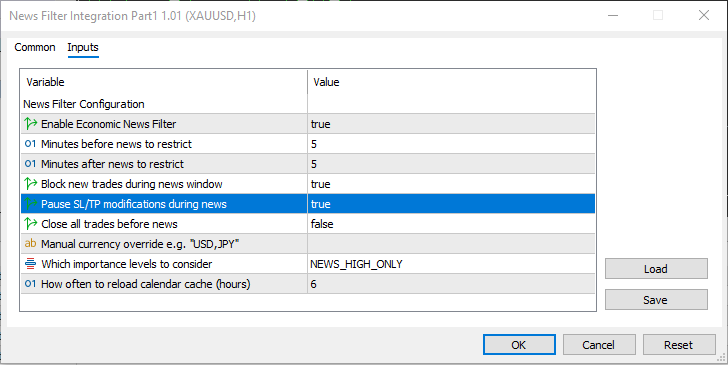
News filter settings
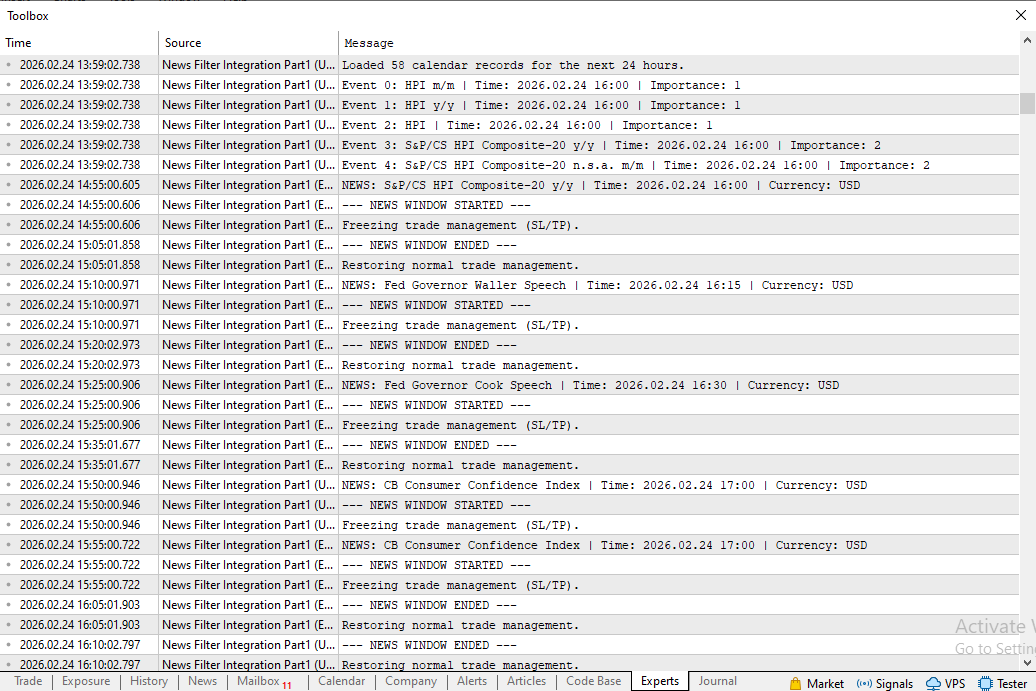
Example of Print statement output during the news window operation
Important Notice
- At the beginning of your entry logic or trade processing logic, call
if(!CanOpenNewTrade(_Symbol))
    return;
- Create a magic number so that all implementations will only affect trades taken by this EA.
input int magicNumber = 12345;

//--- in SuspendStops and CloseAllTradesForSymbol, filter by magic:

if (PositionSelectByTicket(ticket) &&
   PositionGetInteger(POSITION_MAGIC) == magicNumber)
- This implementation is designed for single-symbol EAs. It will not work correctly for multi-symbol EAs [trading multiple symbols at once], as stop restoration relies on the chart's current symbol.
Conclusion
We closed the engineering gap between “blocking new entries” and “safely managing existing positions” around news. The delivered design is deterministic and integration‑ready: a per‑ticket SavedStops container to persist original SL/TP in memory, a suspension flag and state‑transition model that ensures one‑time execution at news window start/end, SuspendStops() to remove SL/TP once, and RestoreStops() to recover stops price‑sensitively while honoring broker minimum distances. The mechanism preserves original trade structure whenever feasible and degrades predictably (placing the nearest valid level) when price has crossed the stored level.
Practical constraints are explicit: use a magic number to limit scope, expect single‑symbol operation as implemented, and accept temporary exposure during the suspension window. This layer is not a volatility predictor — it is a narrowly scoped, rule‑based mitigation that prevents false stop‑outs caused by spreads and spikes while keeping the EA's statistical integrity intact. In the next part we will add persistent storage so suspended stops survive terminal or EA restarts.
Below is an image showing print statements of a news window in action.
Warning: All rights to these materials are reserved by MetaQuotes Ltd. Copying or reprinting of these materials in whole or in part is prohibited.
This article was written by a user of the site and reflects their personal views. MetaQuotes Ltd is not responsible for the accuracy of the information presented, nor for any consequences resulting from the use of the solutions, strategies or recommendations described.

 Neural Networks in Trading: Dual Clustering of Multivariate Time Series (DUET)
 Larry Williams Market Secrets (Part 14): Detecting Hidden Smash Day Reversals with a Custom Indicator
 From Novice to Expert: Enhancing Liquidity Strategies with Multi-Timeframe Structural Confirmation in MQL5
 Low-Frequency Quantitative Strategies in Metatrader 5: (Part 1) Setting Up An OLAP-Friendly Data Store

- Free trading apps
- Over 8,000 signals for copying
- Economic news for exploring financial markets
You agree to website policy and terms of use
How I intend to use these functions:
I intend to use article Part One - Stopping new trades from opening or closing trades during the restricted news window, on all my EAs I have running on Prop Firms.
However Part 2 & Part3 - removing SL/TP and then replacing SL/TP , before/after the restricted news window, I intend to use this on a separate EA. Since this code iterates through the entire accounts open positions. I might have more than 1 chart open and don't need to run this more times than necessary. I will manual override the symbol selection to "USD, GBP, EUR" , since that is the only red folder news I know from experience I already have to filter for (it will be different for you).
So made a 1 line edit to RestoreStops() Function.
SuspendStops() function didn't need an edit.
From the looks of things I won't need to Change anything from Part3, as all I need is the; ticket number, sl and tp.
Thank you very much @Solomon Anietie Sunday
I'll test it out live on demo !
// I won't need this if statement, in the 2nd EA, as the 2nd EA only modifies trades,
// only need this is statement in the first EA (that opens trades)

if(!CanOpenNewTrade(_Symbol))
    return;