

Implementing Partial Position Closing in MQL5
 2 689
2 689
 0
0

- Introduction to partial position closing: advantages and disadvantages
- Integrating partial position closing in MQL5
- Creating the CPartials class
- Declaring and defining the CPartials class functions
- Implementing the CPartials class in the Expert Advisor
- Testing the Order Blocks Expert Advisor: the impact of partial position closing on performance
- Conclusion
Introduction to partial position closing: advantages and disadvantages
Partial position closing is a position management method that involves defining Take Profit levels and waiting for the price to reach those levels in order to close part of a position. For example, you can close 30% of the current volume. This allows you to lock in profit without having to close the entire trade. This is why the method is called partial closing.
Advantages over other methods
There are various ways to manage positions, such as moving to breakeven and using a trailing stop. However, partial position closing takes a different approach.
When moving to breakeven, very little profit is locked in, or sometimes no profit at all, because in many cases the Stop Loss remains equal to the entry price. On the other hand, a trailing stop usually closes a trade with limited profit. This is especially evident in sideways markets, where price movement does not allow the trailing stop to follow it effectively.
Partial position closing can improve this situation because it allows part of the profit to be locked in while keeping the possibility of additional profit if the price continues moving in a favorable direction. Unlike the methods mentioned above, the trade is not closed completely at the first unfavorable movement.
Possible disadvantagesIt should be kept in mind that the broker may charge a commission for each partial close. This can reduce the economic efficiency of the method under certain conditions.
Another important point is that if the price does not reach the specified Take Profit levels, the partial close is not executed, which means that profit is not locked in. For this reason, efficiency largely depends on the type of strategy used.
For example, when using a swing strategy, where Take Profit levels are usually wider, partial position closing can be useful for locking in intermediate results. In a scalping strategy, where price movements are shorter, using this technique may be less appropriate.
Integrating partial position closing in MQL5
To integrate partial position closing in MQL5, you can use a simple approach: define Take Profit levels at which a certain percentage of the current position volume will be closed. For example, close 30% of the volume when the price reaches the specified level.
There are many ways to define these levels. One option is to use support and resistance levels as a reference. Another is to wait for certain market conditions, such as overbought or oversold states, and perform a partial close when those conditions are met. Both methods can be programmed, but in this article we will focus on the most direct approach: working with predefined Take Profit levels.
Defining Take Profit levels
A Take Profit level is the price at which a partial close is executed.
- For a buy position, the level must be above the opening price but below the initial Take Profit level.
- For a sell position, the level must be below the opening price but above the initial Take Profit level.
Thus, partial position closing can be displayed visually on the chart. For example, if three levels are specified, they will be shown as intermediate points between the entry price and the final Take Profit level.
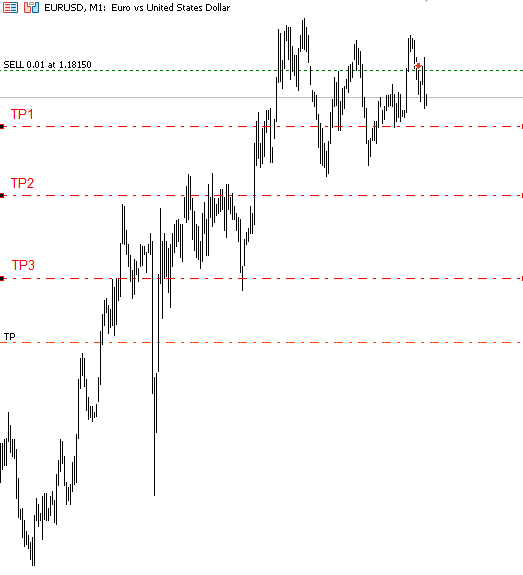
Figure 1. Example of partial close levels
Level calculation
To calculate levels such as tp1, tp2 and tp3, you can use a percentage of the distance between the entry price and the initial Take Profit level. For example:
- tp1 — 30% of this distance
- tp2 — 60% of this distance
- tp3 — 90% of this distance
The user can configure these percentages according to their needs in a text string separated by the "," character.
Implementation in MQL5
Based on the above, the next step is to implement this logic in MQL5. Before showing the code, it is important to explain the change in structure. Starting with the latest article on implementing the breakeven mechanism, I have reorganized the risk management architecture.
The CPartials class is not completely standalone because it depends on another class. This is important because the idea is not to create an isolated block, but to make partial position closing part of a complete position control system.
New changes in risk management
I have made several important changes to the risk management architecture. The most important ones are described below.
1. Using CLoggerBase
All classes now inherit from CLoggerBase. This class was created to improve message output in the Expert Advisor log. It is a simple class that allows its descendants to generate different types of messages, such as warnings, critical errors, or regular errors.
2. The Utils library
A library named Utils has been created. Its purpose is to group utilities that can be used in Expert Advisors, libraries, and projects in general. It consists of several .mqh files that contain:
- classes (bar opening control, ATR, minimum difference calculation, and others),
- functions (time, simple mathematical calculations, string processing, conversions, converting arrays to strings, sorting, array operations, etc.).
3. Risk management restructuring
Previously, risk management was concentrated in a single file. It has now been split into several modules to improve structure and extensibility:
- AccountStatus.mqh — a module responsible for calling functions of CAccountGestor objects,
- LossProfit.mqh — implementation of the CLossProfit class, designed to calculate and check whether the "maximum profit or loss" has been exceeded,
- LoteSizeCalc.mqh — a module for lot size calculation,
- Modificators.mqh — a module intended for "maximum profit or loss" modifiers,
- OcoOrder.mqh — basic implementation of OCO orders,
- OrdersGestor.mqh — implementation of the COrderGestor class, which manages pending orders,
- RiskManagement.mqh — the main module in which the CRiskManagement class is implemented,
- RiskManagementBases.mqh — contains the base class CRiskManagementBases,
- RM_Defines.mqh — definitions of structures, macros, and enumerations used by other modules,
- RM_Functions.mqh — a set of helper functions used by the modules listed above.
The only modules that do not participate directly in CRiskManagement are OrdersGestor and OcoOrder.
4. AccountStatus and CAccountGestor
The AccountStatus class serves as a link that makes it easier to work with events related to positions: opening, closing, order deletion, and others. To achieve this, the CAccountGestor class is used, functioning as a pseudo-interface.
class CAccountGestor : public CSpecializedManager
 {
public:
  virtual void       OnOpenClosePosition(const ROnOpenClosePosition &pos) = 0; //Function that will be executed each time a position is opened or closed
  virtual void       OnOrderDelete(const ROnOrderDelete& order) { } //Function that will be executed each time an order is closed, by deletion, expiration, etc.

  //-- Function that is executed only once, where only the account profit fields are filled, such as account_gross_profit
  //daily, weekly, etc.
  virtual void       OnNewProfit(const ROnOpenClosePosition &profit) { }

  //--- Function that is executed each time TesterDeposit or TesterWithdrawal is called... or capital is added to the account
  virtual void       OnWithdrawalDeposit(double value) { }  //If the value is positive it means a deposit, otherwise a withdrawal

  //-- Function that is executed every new day
  virtual void       OnNewDay(datetime init_time) { }

  //-- Function that will be executed every new week
  virtual void       OnNewWeek(datetime init_time) { }

  //-- Function that is executed every new month
  virtual void       OnNewMonth(datetime init_time) { }

  //--- Function that is executed only once, only if there are previously open trades, only the position structure
  virtual void       OnInitNewPos(const ROnOpenClosePosition &pos) { }
 };
This class will be used by other classes that need to execute code when a position is opened or closed. Examples include classes related to position management.
5. Modificators.mqh and CExtraModifications
A new change is the addition of the Modificators.mqh module. It was not implemented in previous risk management articles. The CExtraModifications class makes it possible to create modifiers for "maximum loss or profit".
For example, it is possible to set that each time a profit is obtained, the maximum allowed profit or loss value (GMLPO) is doubled. In the event of a loss, this value is reset to its initial state.
//+--------------------------------------------------------------------+
//| Class to integrate external modifications to risk management       |
//+--------------------------------------------------------------------+
class CExtraModifications : public CLoggerBase
 {
protected:
  CLossProfit*       m_modifier;
  ENUM_TYPE_LOSS_PROFIT m_property_to_modify;
  string             m_modifier_name;

public:
                     CExtraModifications(ENUM_TYPE_LOSS_PROFIT _property_to_modify = WRONG_VALUE) { m_property_to_modify = _property_to_modify; }

  //--- Non-modifiable functions
  // Function that returns the type of "maximum loss or profit" that this class is modifying
  inline ENUM_TYPE_LOSS_PROFIT MaximumProfitOrLossAModify() const { return m_property_to_modify; };

  // Function that will be used in CRiskManagement to assign the "maximum loss or profit" based on the type of "maximum loss or profit" chosen
  // in the constructor.
  void               SetPointer(CLossProfit* _modifier);

  // Name of the custom modifier (to differentiate from others)
  inline string      Name() const { return m_modifier_name; }

  //--- Virtual functions
  // Function that will be executed each time a position is closed
  virtual void       OnClosePosition(ModifierOnOpenCloseStruct &on_open_close_struct) {  }

  // Function that will be executed each time an operation is opened
  virtual void       OnOpenPosition(ModifierOnOpenCloseStruct &on_open_close_struct) {  }

  // Function that will be executed only once (at the moment of creating the m_modifier)
  virtual void       OnInitModifier(ModfierInitInfo &on_init) {  }

  // Function that will be executed each new day
  virtual void       OnNewDay() { }
 };
Based on this, custom classes such as CDynamicRisk can be implemented. This class dynamically adjusts risk using different methods: multiplication, exponential calculation, or summation.
//+------------------------------------------------------------------+
//| Clase para aumentar el riesgo                                    |
//+------------------------------------------------------------------+
enum ENUM_MULTIPLIER_METHOD_DR
 {
  DR_MULTIPLIER = 0,  // Multiplier
  DR_EXPONECIAL = 1,  // Exponential
  DR_SUMATORIO = 2    // Additive (Summation)
 };

//--- Clase
class CDynamicRisk : public CExtraModifications
 {
private:
  double             paso;
  double             val;
  double             percentage_a_empezar_modfiicacioneS;
  ENUM_MULTIPLIER_METHOD_DR metod;
  void               Aumentar();
  bool               is_set;

public:
                     CDynamicRisk(double step, double percentage_to_empezar, ENUM_TYPE_LOSS_PROFIT property_to_modify, ENUM_MULTIPLIER_METHOD_DR multiplier_);
  void               OnClosePosition(ModifierOnOpenCloseStruct &on_open_close_struct) override;
  void               OnInitModifier(ModfierInitInfo &on_init) override;
 };
//+------------------------------------------------------------------+
CDynamicRisk::CDynamicRisk(double step, double percentage_to_empezar, ENUM_TYPE_LOSS_PROFIT property_to_modify, ENUM_MULTIPLIER_METHOD_DR multiplier_)
  : CExtraModifications(property_to_modify)
 {
  m_modifier_name = "Risk enhancer by default";
  paso = step;
  percentage_a_empezar_modfiicacioneS = percentage_to_empezar;
  metod = multiplier_;
  is_set = false;

  if((int)metod > 2 || metod < 0)
   {
    LogFatalError(StringFormat("The method %s is invalid", EnumToString(metod)), FUNCION_ACTUAL);
    Remover();
   }

 }
//+------------------------------------------------------------------+
void CDynamicRisk::OnInitModifier(ModfierInitInfo & on_init)
 {
  percentage_a_empezar_modfiicacioneS /= 100.0;
  percentage_a_empezar_modfiicacioneS *= on_init.balance;
  Print("Balance to increase risk: ", percentage_a_empezar_modfiicacioneS);
  val = m_modifier.GetPercentage();
//Print("Valor del porcentaje: ", val);
 }
//+------------------------------------------------------------------+
void CDynamicRisk::OnClosePosition(ModifierOnOpenCloseStruct & on_open_close_struct)
 {
  if(on_open_close_struct.position.profit > 0 && on_open_close_struct.profit_total > percentage_a_empezar_modfiicacioneS)
   {
    LogInfo(StringFormat("By increasing the risk, a profit of %.2f has been obtained. The initial balance has been exceeded by %.2f.",
                         on_open_close_struct.position.profit, percentage_a_empezar_modfiicacioneS), FUNCION_ACTUAL);
    Aumentar();
    m_modifier.SetPercentage(val);
   }
  else
   {
    m_modifier.SetInitialPercentageOrMoney();
    val = m_modifier.GetPercentage();
   }
 }
//+------------------------------------------------------------------+
void CDynamicRisk::Aumentar(void)
 {
  switch(metod)
   {
    case DR_MULTIPLIER:
      val *= paso;
      break;

    case DR_EXPONECIAL:
      val *= MathExp(paso);
      break;

    case DR_SUMATORIO:
      val += paso;
      break;

    default:
      Remover();
      break;
   }
 }
In the summation method, for example, the step value is added to the current percentage of the "maximum loss or profit".
Creating the CPartials class
Before writing the class code, include the risk management module.
#include "..\\RM\\RiskManagement.mqh"
To apply partial position closing, it is necessary to determine when trades are opened and closed. For this purpose, the CPartials class will inherit from CAccountGestor, which allows us to use the already defined events that will then be called from AccountStatus.
//+------------------------------------------------------------------+
//| Class that implements partial position closing                           |
//+------------------------------------------------------------------+
class CPartials : public CAccountGestor
Private variables
General variables
To filter trades and apply partial closing only to certain positions, we will use a variable of type ulong that will store the magic number. Using this value, we avoid applying the partial closing logic to trades that do not match the specified conditions.
In addition, we will need a CTrade instance, which provides access to the PositionClosePartial function. We will also add a bool variable as a status flag indicating whether the class is allowed to execute (true) or is disabled (false).
  //--- General variables
  ulong              m_magic_number;          // Magic number used to apply partials only to selected positions
  CTrade             m_trade_executor;        // CTrade type instance to apply partials
  bool               m_disable_partials_flag; // Boolean that indicates if partials can be executed
Symbol variables
Since management depends on the symbol, we need information such as the minimum volume, the volume step, and the number of digits. We will also store the latest available MqlTick data.
  //--- Symbol variables
  string             m_trading_symbol;     // Symbol from which minimum volume and volume step data will be obtained
  double             m_volume_step;        // Volume step
  double             m_minimum_volume;     // Minimum volume
  int                m_price_digits;       // Symbol digits
  MqlTick            m_latest_tick;        // MqlTick type structure
Structures for partial position closing
First, we define the PartialTakeProfit structure, which represents a partial close level for a position:
struct PartialTakeProfit
 {
  double             partial_price;             // Price where the partial will be executed
  double             tp_level_percentage;        // Percentage of TP level
  double             volume_percentage_to_close; // Percentage of volume to close

  inline void Reset()
   {
    ZeroMemory(this);
   }
 };
Next, since one position can have several partial closes, we create the TrackedPosition structure. It will store all user-defined partial close levels, the position ticket, and an index indicating which partial close should be applied.
struct TrackedPosition
 {
  PartialTakeProfit  tp_levels[];             // Array of partial levels
  ulong              ticket;                  // Position ticket
  ENUM_POSITION_TYPE type;                    // Position type
  int                current_partial_index;   // Next partial to be applied
 };
Management arrays
After defining the structures, we declare the main variables for managing multiple positions and partial position closing.
  //--- Variables for partials
  int                m_max_partial_levels;  // Number of partial closes to apply to each position
  TrackedPosition    m_tracked_positions[]; // Array of positions to which partials will be applied
  int                m_indices_to_remove[]; // Indices to remove from the m_tracked_positions array
In addition, to apply partial position closing, two arrays must be stored:
- the percentage of volume to be closed,
- the percentages of Take Profit levels at which the partial close will be performed.
  //--- Arrays to take, both arrays must be the same size.
  double             m_volume_percentages_to_close[];
  double             m_tp_level_percentages[];
Temporary HashMap
Finally, we declare CHashMap. Its function is to organize Take Profit levels and make it easier to find the next level to check. The idea is for this "internal pointer" to move forward each time a partial close is performed, similar to a file read pointer.
  //--- Temporary hashmap
  CHashMap<double, double> m_temporary_hashmap;
The next section will explain how this CHashMap is used in the execution logic.
Constructor and destructor
We start by defining the constructor, where we initialize the class member variables with default values.
CPartials::CPartials()
  : m_magic_number(NOT_MAGIC_NUMBER), m_disable_partials_flag(true), m_trading_symbol(NULL), m_volume_step(0.00),
    m_minimum_volume(0.00), m_price_digits(0), m_max_partial_levels(0)
 {

 }
We leave the destructor empty.
//+------------------------------------------------------------------+
CPartials::~CPartials()
 {
// Empty destructor
 }
Declaring and defining the CPartials class functions
In this section, we continue implementing the CPartials class by declaring and defining its functions.
The first function we need is Init, which is responsible for initializing the class and setting the main parameters.
The Init function
It will take the following parameters:
- magic_number_ — the magic number used to filter trades,
- symbol_ — the symbol to which partial position closing will be applied,
- volume_percentages_string — a string indicating the percentage volume to close at each level,
- tp_percentages_string — a string with Take Profit levels expressed as percentages of the distance between the opening price and the Take Profit level.
For example:
- Take Profit percentage levels: "20,40,60" — levels at 20%, 40% and 60% of the distance between the opening price and Take Profit.
- Volume to be closed: "30,30,30" — at each level, 30% of the current volume will be closed.
If the initial volume was 0.90 lots, then when the first Take Profit level (20%) is reached, 0.27 lots will be closed. After this action is performed, the current_partial_index will move to the next Take Profit level.
The function declaration is as follows:
  //--- Initialize function
  bool               Init(ulong magic_number_, string symbol_, string volume_percentages_string, string tp_percentages_string);
Initial definitions
We define a constant indicating that partial closing will not be applied (value "0").
#define PARTIAL_NO_APPLIED "0"
The full function begins by checking the strings:
bool CPartials::Init(ulong magic_number_, string symbol_, string volume_percentages_string, string tp_percentages_string)
 {
//--- Validate if the strings are valid
  if(volume_percentages_string == PARTIAL_NO_APPLIED  || tp_percentages_string == PARTIAL_NO_APPLIED) // "0" as an invalid value
   {
    m_disable_partials_flag = true;
    return false;
   }
Configuring internal variables
We set the internal class values, including symbol parameters and the CTrade object configuration.
//--- Set the variables
  m_disable_partials_flag = false;
  m_magic_number = magic_number_;
  m_trading_symbol = symbol_;
  m_volume_step = SymbolInfoDouble(m_trading_symbol, SYMBOL_VOLUME_STEP);
  m_minimum_volume = SymbolInfoDouble(m_trading_symbol, SYMBOL_VOLUME_MIN);
  m_price_digits = (int)SymbolInfoInteger(m_trading_symbol, SYMBOL_DIGITS);
  m_trade_executor.SetExpertMagicNumber(m_magic_number);
Initial array reservation
We define initial reservation macros for the position arrays and for the indices to be removed:
#define CPARCIAL_RESERVE_ARR 5
#define CPARCIAL_RESERVE_TO_DELETE 5
Code.
//--- Initial resize
  ArrayResize(m_tracked_positions, 0, CPARCIAL_RESERVE_ARR);
  ArrayResize(m_indices_to_remove, 0, CPARCIAL_RESERVE_TO_DELETE);
Converting strings to arrays
We use the StrTo namespace from our Utils\FA\StringToArray.mqh library, which contains functions for converting text strings into arrays of the required type (the functions are overloaded, so the needed function is determined at compile time).
//--- Convert strings to double arrays
  StrTo::CstArray(m_volume_percentages_to_close, volume_percentages_string, ',');
  StrTo::CstArray(m_tp_level_percentages, tp_percentages_string, ',');
Array validation
First, we check that the arrays are not empty and then that they are the same size:
//--- 2nd validation, we validate that the array size is valid
  if(m_volume_percentages_to_close.Size() < 1 || m_tp_level_percentages.Size() < 1)
   {
    LogCriticalError(StringFormat("The size of the partial arrays to take %u or percentages to take %u are invalid", m_volume_percentages_to_close.Size(), m_tp_level_percentages.Size()), FUNCION_ACTUAL);
    m_disable_partials_flag = true;
    return false;
   }

//--- 3rd validation, we validate that both arrays are the same size
  if(m_volume_percentages_to_close.Size() != m_tp_level_percentages.Size())
   {
    LogCriticalError(StringFormat("The size of the partial arrays to take %u and percentages to take %u are not equal", m_volume_percentages_to_close.Size(), m_tp_level_percentages.Size()), FUNCION_ACTUAL);
    m_disable_partials_flag = true;
    return false;
   }
If info-type logging is enabled, we print the initial state of the arrays to the log.
//--- Initial log only if "info" type log is enabled
  if(IsInfoLogEnabled())
   {
    FastLog(FUNCION_ACTUAL, INFO_TEXT, "Arrays before revision");
    PrintArrayAsTable(m_tp_level_percentages, "Percentage of position where partials will be taken", "percentages simplified");
    PrintArrayAsTable(m_volume_percentages_to_close, "Percentage to take", "percentages simplified");
   }
Cleaning arrays and adding to the HashMap
At this stage, HashMap comes into play, functioning as a temporary key-value container for storing only valid data. Later, we will use the key values to obtain the corresponding values.
The use of HashMap is due to the following problem: if the Take Profit levels are sorted, the correspondence with the array of volume percentages to be closed will be lost.
To avoid this problem, we need a structure that preserves the relationship between key and value, so the optimal solution here is the CHashMap class.
- Key — percentage of the Take Profit level
- Value — percentage of volume to be partially closed
If invalid or duplicate values are found during the process (in the array of "Take Profit percentage levels"), their indices are stored in the temporary array indices_to_remove_temp. Then these elements are removed from the array of "Take Profit percentage levels" values, after which the array is sorted in ascending order.
//--- Declaration of indices to remove and hashmap cleanup
  m_temporary_hashmap.Clear();
  int indices_to_remove_temp[];

//--- Iteration and array cleanup
  for(int i = 0; i < ArraySize(m_tp_level_percentages); i++)
   {
    if(m_tp_level_percentages[i] <= 0.00)
     {
      LogWarning(StringFormat("The percentage where partials will be taken %f with index %d is invalid, therefore it will not be considered in partials", m_tp_level_percentages[i], i), FUNCION_ACTUAL);
      AddArrayNoVerification(indices_to_remove_temp, i, 0);
      continue;
     }

    if(m_volume_percentages_to_close[i] <= 0.00)
     {
      LogWarning(StringFormat("The percentage to take %f with index %d is invalid, therefore it will not be considered in partials", m_volume_percentages_to_close[i], i), FUNCION_ACTUAL);
      AddArrayNoVerification(indices_to_remove_temp, i, 0);
      continue;
     }

    if(m_temporary_hashmap.ContainsKey(m_tp_level_percentages[i]))
      AddArrayNoVerification(indices_to_remove_temp, i, 0);
    else
      m_temporary_hashmap.Add(m_tp_level_percentages[i], m_volume_percentages_to_close[i]);
   }

//--- Sort and removal
  RemoveMultipleIndexes(m_tp_level_percentages, indices_to_remove_temp, 0);
  ArraySort(m_tp_level_percentages);
  ArrayResize(m_volume_percentages_to_close, ArraySize(m_tp_level_percentages));
Converting and normalizing values
At this stage:
- we convert percentages into fractions (by dividing by 100),
- we overwrite the arrays using the valid values obtained from HashMap.
//--- Final iteration
  for(int i = 0; i < ArraySize(m_tp_level_percentages); i++)
   {
    double val;
    m_temporary_hashmap.TryGetValue(m_tp_level_percentages[i], val);

    m_volume_percentages_to_close[i] = val / 100.0;
    m_tp_level_percentages[i] /= 100.0;
   }
Final log output and maximum number of partial closes
Finally, we print the adjusted arrays to the log and set the maximum number of partial closes for a single position:
//--- Final log
  if(IsInfoLogEnabled())
   {
    FastLog(FUNCION_ACTUAL, INFO_TEXT, "Arrays after revision");
    PrintArrayAsTable(m_tp_level_percentages, "Percentage of position where partials will be taken", "percentages simplified");
    PrintArrayAsTable(m_volume_percentages_to_close, "Percentage to take", "percentages simplified");
   }

  m_max_partial_levels = ArraySize(m_volume_percentages_to_close);
  return true;
 }
Functions for adding positions to tracking in the CPartials class
To apply partial closing to open positions, these positions must first be added to the internal m_tracked_positions array.
We define two functions.
- AddPositionToTrack (public):
- allows positions to be added to tracking;
- It is used both automatically when trades are opened (if the conditions are met) and manually, for example from a panel where the user selects which positions will have partial closing available.
2. AddToTrackedPositions (private):
- a helper function that directly adds a TrackedPosition object to the internal array;
- called from AddPositionToTrack.
Public AddPositionToTrack function
Declaration in the public section of the class:
  //--- Function to add a position to the internal array manually (this is automatically invoked in OnOpen..... for all positions
  // opened with the magic number and with a valid tp).
  void               AddPositionToTrack(ulong position_ticket, double position_tp, double entry_price, ENUM_POSITION_TYPE position_type);
Function body:
//+------------------------------------------------------------------+
//| Adds a position with a set of variables to the internal array    |
//| Inputs:                                                          |
//| - position_ticket: position ticket.                              |
//| - position_tp: position takeprofit.                              |
//| - entry_price: position entry price.                             |
//| - position_type: position type (buy or sell)                     |
//|                                                                  |
//| Outputs:                                                         |
//| - The function returns nothing.                                  |
//|                                                                  |
//| Notes:                                                           |
//| - The mentioned properties can be consulted with the native      |
//|   function: PositionGetDouble(...);                              |
//| - The position must have a valid tp.                             |
//| - The function does not check if the ticket is valid, so if      |
//|   you manually introduce an operation, its ticket must be valid. |
//+------------------------------------------------------------------+
void CPartials::AddPositionToTrack(ulong position_ticket, double position_tp, double entry_price, ENUM_POSITION_TYPE position_type)
 {
  if(m_disable_partials_flag)
    return;

//--- Initial check, we verify that the tp is valid
  if(position_tp <= 0.00000000000001)
   {
    LogError(StringFormat("The take profit with a value of %f from position %I64u is less than or equal to 0", position_tp, position_ticket), FUNCION_ACTUAL);
    return;
   }

//---
  TrackedPosition new_tracked_position;
  new_tracked_position.ticket = position_ticket;
  new_tracked_position.type = position_type;
  new_tracked_position.current_partial_index = 0;
  ArrayResize(new_tracked_position.tp_levels, ArraySize(m_volume_percentages_to_close));

  for(int i = 0; i < ArraySize(new_tracked_position.tp_levels); i++)
   {
    new_tracked_position.tp_levels[i].Reset();
    new_tracked_position.tp_levels[i].tp_level_percentage = m_tp_level_percentages[i];
    new_tracked_position.tp_levels[i].volume_percentage_to_close = m_volume_percentages_to_close[i];

    if(position_type == POSITION_TYPE_BUY)
     {
      double calculated_partial_price = entry_price + ((position_tp - entry_price) * m_tp_level_percentages[i]);
      new_tracked_position.tp_levels[i].partial_price = calculated_partial_price;
     }
    else
     {
      double calculated_partial_price = entry_price - ((entry_price - position_tp) * m_tp_level_percentages[i]);
      new_tracked_position.tp_levels[i].partial_price = calculated_partial_price;
     }
   }

//--- Log about the "tps" where partials will be taken
  if(IsCautionLogEnabled())
   {
    FastLog("TPS: ", CAUTION_TEXT, FUNCION_ACTUAL);
    ArrayPrint(new_tracked_position.tp_levels, m_price_digits, " | ");
   }

//--- Add to internal array
  AddToTrackedPositions(new_tracked_position);
 }
Explanation of the logic
- Initial check: if partial closing is disabled (m_disable_partials_flag), no action is performed.
- Take Profit check: the position Take Profit level must be greater than zero.
- Creating a TrackedPosition object: the position data is initialized and the partial close levels (tp_levels) are reserved.
- Calculating prices for partial closing: for each level, the price at which the partial close will be performed is determined.
- For buy positions (POSITION_TYPE_BUY), the partial close price is calculated by adding the percentage of the distance between entry_price and Take Profit.
- For sell positions (POSITION_TYPE_SELL) — by subtracting.
- Log output: optionally, the configured Take Profit levels are printed.
- Adding to the internal array: the private AddToTrackedPositions function is called.
Private AddToTrackedPositions function
Declaration in the private section of the class:
  //--- Function to add a new partial to the internal array
  void               AddToTrackedPositions(TrackedPosition & new_tracked_position);
Definition:
void CPartials::AddToTrackedPositions(TrackedPosition &new_tracked_position)
 {
  AddArrayNoVerification2(m_tracked_positions, new_tracked_position, CPARCIAL_RESERVE_ARR)
 }
The AddArrayNoVerification2 macro (defined in Utils\FA\FuncionesBases.mqh) is responsible for adding the new_tracked_position element to the end of the dynamic array without additional checks and with reservation if necessary.
Detecting position openings and closings in CPartials
As shown when defining the CAccountGestor class, we have several functions that can be overridden to handle account events (opening, closing, order deletion, etc.).
In our case, we only need to implement the OnOpenClosePosition function, since it is automatically executed every time a trade is opened or closed.
Declaration in the class
In the public section of the CPartials class, we declare:
  //--- Function that will be automatically invoked by account status each time a position is opened or closed
  void               OnOpenClosePosition(const ROnOpenClosePosition &pos) override;
Function definition
When a trade is opened, we check whether the magic number of this position matches the internal magic number stored in the class, or whether the magic number member of the class has the value NOT_MAGIC_NUMBER.
If the trade is closed, we call the RemoveIndexFromAnArrayOfPositions function, which will remove the position from the m_tracked_positions array if it exists there.
//+--------------------------------------------------------------------+
//| Function that runs every time a position is opened or closed       |
//+--------------------------------------------------------------------+
void CPartials::OnOpenClosePosition(const ROnOpenClosePosition &pos)
 {
  if(m_disable_partials_flag)
    return;

//---
  if(pos.deal_entry_type == DEAL_ENTRY_OUT)
   {
    // Once the position is closed we verify if that ticket is in the internal array, if so the function
    // will remove it.
    RemoveIndexFromAnArrayOfPositions(m_tracked_positions, pos.position.ticket, CPARCIAL_RESERVE_ARR);
   }
  else
    if(pos.deal_entry_type  == DEAL_ENTRY_IN && (pos.position.magic == m_magic_number || m_magic_number == NOT_MAGIC_NUMBER))
     {
      LogInfo(StringFormat("A trade has just been opened with ticket %I64u", pos.position.ticket), FUNCION_ACTUAL);
      AddPositionToTrack(pos.position.ticket, pos.position.first_tp, pos.position.open_price, pos.position.type);
     }
 }
Once this function is ready, the most important part remains: the partial position closing logic.
Developing the function for partial position closing
In the public section of the class, we declare the main position checking function.
This function takes no parameters and returns no values.
  //--- Main function for position review
  void               CheckTrackedPositions();
Let's now define the function body. First, we implement two checks for early exit from the function.
The first checks whether the m_disable_partials_flag is active. If so, we execute return and prevent the rest of the code from running.
The second checks whether there are no open positions. In this case, we also execute return so as not to iterate over the m_tracked_positions array.
//--- Initial check to verify not to execute the function if partials are not allowed
  if(m_disable_partials_flag)
    return;

//--- If the internal array m_partials is empty we do an early exit.
  if(m_tracked_positions.Size() < 1)
    return;
Next, we use the SymbolInfoTick function to obtain the latest tick and store it in the private variable m_latest_tick.
Then we prepare an array that will be used to store the indices of positions that need to be removed. For this, we reserve five elements and initialize the array with zeros.
//---
  SymbolInfoTick(m_trading_symbol, m_latest_tick);
  ArrayResize(m_indices_to_remove, 0, CPARCIAL_RESERVE_TO_DELETE);
We now move on to the main partial position closing logic. We must iterate through all elements of the m_tracked_positions array and use an if statement to check whether the current Take Profit level has been exceeded.
If this condition is true, we partially close the position and move the internal pointer (index++) to the next Take Profit level. This process is shown in the illustrations below.
For buy positions
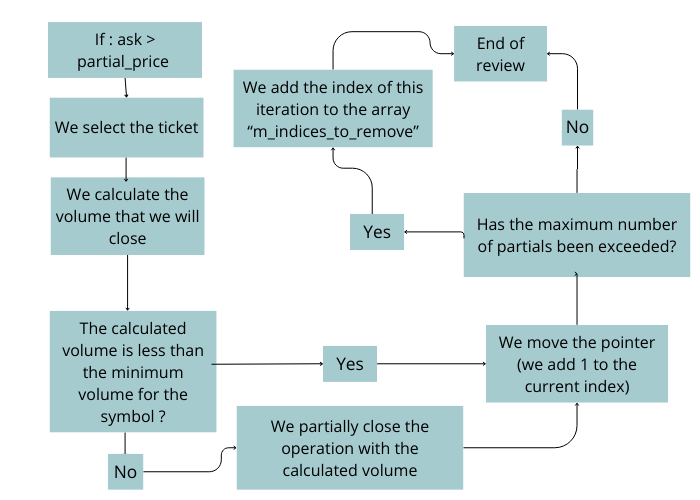
Figure 2. Partial closing algorithm for buy positions
For sell positions
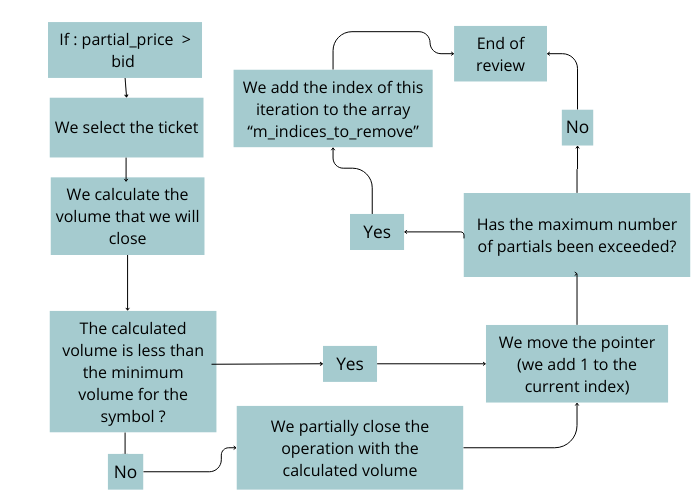
Figure 3. Partial closing algorithm for sell positions
The first step is to determine whether the position is a buy or a sell. To do this, we use the type member of the TrackedPosition structure and compare it with the POSITION_TYPE_BUY or POSITION_TYPE_SELL values.
//--- Main iteration
  for(int i = 0; i < ArraySize(m_tracked_positions); i++)
   {
    const ulong current_ticket = m_tracked_positions[i].ticket; // Current position ticket

    if(m_tracked_positions[i].type == POSITION_TYPE_BUY)
     {

     }
    else
      if(m_tracked_positions[i].type == POSITION_TYPE_SELL)
       {

       }
   }
Inside these blocks (the bodies of the if statements), the corresponding logic is added. The first step in this block is to check whether the Bid or Ask price has exceeded the partial_price value. If the condition is met, we select the position ticket.
  for(int i = 0; i < ArraySize(m_tracked_positions); i++)
   {
    const ulong current_ticket = m_tracked_positions[i].ticket; // Current position ticket

    if(m_tracked_positions[i].type == POSITION_TYPE_BUY)
     {
      const int current_level_index = m_tracked_positions[i].current_partial_index;
      if(m_latest_tick.ask > m_tracked_positions[i].tp_levels[current_level_index].partial_price)
       {
        // Failed to select the ticket
        if(!PositionSelectByTicket(current_ticket))
         {
          LogError(StringFormat("Could not select ticket %I64u, last error = %d", current_ticket, GetLastError()), FUNCION_ACTUAL);
          continue;
         }
       }
     }
    else
      if(m_tracked_positions[i].type == POSITION_TYPE_SELL)
       {
        const int current_level_index = m_tracked_positions[i].current_partial_index;
        if(m_latest_tick.bid < m_tracked_positions[i].tp_levels[current_level_index].partial_price)
         {
          if(!PositionSelectByTicket(current_ticket))
           {
            LogError(StringFormat("Could not select ticket %I64u, last error = %d", current_ticket, GetLastError()), FUNCION_ACTUAL);
            continue;
           }
         }
       }
   }
If the position ticket has been selected correctly, we calculate the volume that should be closed.
const double current_position_volume = PositionGetDouble(POSITION_VOLUME); // Current operation volume
double volume_to_close = current_position_volume * m_tracked_positions[i].tp_levels[current_level_index].volume_percentage_to_close; // Volume that will be "removed" from the position
If the calculated volume is less than m_minimum_volume, the partial close is ignored, the internal pointer is shifted, and if no more levels remain, the position is removed from m_tracked_positions (it is added to the temporary m_indices_to_remove array for later removal).
if(volume_to_close < m_minimum_volume)
 {
  m_tracked_positions[i].current_partial_index += 1;
  LogError(StringFormat("The lot to take %f is less than the minimum lot %f", volume_to_close, m_minimum_volume), FUNCION_ACTUAL);
  if(m_tracked_positions[i].current_partial_index == m_max_partial_levels) // Maximum partials reached
   {
    // Remove the partial
    AddArrayNoVerification2(m_indices_to_remove, i, CPARCIAL_RESERVE_TO_DELETE)
   }
 continue;
 }
If the volume is valid, a partial close is performed with that value, the internal pointer is incremented, and if no more levels remain, the position is also removed.
volume_to_close = RoundToStep(volume_to_close, m_volume_step);
m_trade_executor.PositionClosePartial(current_ticket, volume_to_close);
m_tracked_positions[i].current_partial_index += 1;

if(m_tracked_positions[i].current_partial_index == m_max_partial_levels) // Maximum partials reached
 {
  // Remove the partial
  AddArrayNoVerification2(m_indices_to_remove, i, CPARCIAL_RESERVE_TO_DELETE)
 }
Finally, the indices stored in the temporary array are removed from the main array.
//---
  RemoveMultipleIndexes(m_tracked_positions, m_indices_to_remove, CPARCIAL_RESERVE_ARR);
The complete function now looks as follows:
//+------------------------------------------------------------------+
//| Function that will iterate over the m_partials array             |
//| and if necessary will partially close the operation              |
//+------------------------------------------------------------------+
void CPartials::CheckTrackedPositions(void)
 {
//--- Initial check to verify not to execute the function if partials are not allowed
  if(m_disable_partials_flag)
    return;

//--- If the internal array m_partials is empty we do an early exit.
  if(m_tracked_positions.Size() < 1)
    return;

//---
  SymbolInfoTick(m_trading_symbol, m_latest_tick);
  ArrayResize(m_indices_to_remove, 0, CPARCIAL_RESERVE_TO_DELETE);

//--- Main iteration
  for(int i = 0; i < ArraySize(m_tracked_positions); i++)
   {
    const ulong current_ticket = m_tracked_positions[i].ticket; // Current position ticket

    if(m_tracked_positions[i].type == POSITION_TYPE_BUY)
     {
      const int current_level_index = m_tracked_positions[i].current_partial_index;
      if(m_latest_tick.ask > m_tracked_positions[i].tp_levels[current_level_index].partial_price)
       {
        // Failed to select the ticket
        if(!PositionSelectByTicket(current_ticket))
         {
          LogError(StringFormat("Could not select ticket %I64u, last error = %d", current_ticket, GetLastError()), FUNCION_ACTUAL);
          continue;
         }

        const double current_position_volume = PositionGetDouble(POSITION_VOLUME); // Current operation volume
        double volume_to_close = current_position_volume * m_tracked_positions[i].tp_levels[current_level_index].volume_percentage_to_close; // Volume that will be "removed" from the position

        if(volume_to_close < m_minimum_volume)
         {
          m_tracked_positions[i].current_partial_index += 1;
          LogError(StringFormat("The lot to take %f is less than the minimum lot %f", volume_to_close, m_minimum_volume), FUNCION_ACTUAL);
          if(m_tracked_positions[i].current_partial_index == m_max_partial_levels) // Maximum partials reached
           {
            // Remove the partial
            AddArrayNoVerification2(m_indices_to_remove, i, CPARCIAL_RESERVE_TO_DELETE)
           }
          continue;
         }

        volume_to_close = RoundToStep(volume_to_close, m_volume_step);
        m_trade_executor.PositionClosePartial(current_ticket, volume_to_close);
        m_tracked_positions[i].current_partial_index += 1;

        if(m_tracked_positions[i].current_partial_index == m_max_partial_levels) // Maximum partials reached
         {
          // Remove the partial
          AddArrayNoVerification2(m_indices_to_remove, i, CPARCIAL_RESERVE_TO_DELETE)
         }
       }
     }
    else
      if(m_tracked_positions[i].type == POSITION_TYPE_SELL)
       {
        const int current_level_index = m_tracked_positions[i].current_partial_index;
        if(m_latest_tick.bid < m_tracked_positions[i].tp_levels[current_level_index].partial_price)
         {
          if(!PositionSelectByTicket(current_ticket))
           {
            LogError(StringFormat("Could not select ticket %I64u, last error = %d", current_ticket, GetLastError()), FUNCION_ACTUAL);
            continue;
           }

          const double current_position_volume = PositionGetDouble(POSITION_VOLUME); // Current trade volume
          double volume_to_close = current_position_volume * m_tracked_positions[i].tp_levels[current_level_index].volume_percentage_to_close; // Volume to close

          if(volume_to_close < m_minimum_volume) // Volume too small
           {
            m_tracked_positions[i].current_partial_index += 1; // Continue with the next one
            LogError(StringFormat("The lot to take %f is less than the minimum lot %f", volume_to_close, m_minimum_volume), FUNCION_ACTUAL);
            if(m_tracked_positions[i].current_partial_index == m_max_partial_levels)
             {
              AddArrayNoVerification2(m_indices_to_remove, i, CPARCIAL_RESERVE_TO_DELETE)
             }
            continue;
           }

          //---
          volume_to_close = RoundToStep(volume_to_close, m_volume_step);
          m_trade_executor.PositionClosePartial(current_ticket, volume_to_close); // Partial closure
          m_tracked_positions[i].current_partial_index += 1; // Move to next index
          if(m_tracked_positions[i].current_partial_index == m_max_partial_levels) // Limit reached, remove this index
           {
            AddArrayNoVerification2(m_indices_to_remove, i, CPARCIAL_RESERVE_TO_DELETE)
           }
         }
       }
   }

//---
  RemoveMultipleIndexes(m_tracked_positions, m_indices_to_remove, CPARCIAL_RESERVE_ARR);
 }
Implementing the CPartials class in the Expert Advisor
To test the CPartials class, we will use an Expert Advisor based on Order Block, which was already presented in previous articles. The Expert Advisor file will be located in the OrderBlock folder.
In the same Expert Advisor, we will integrate the breakeven logic (developed in the article series on the breakeven mechanism) and the partial position closing logic developed in this article.
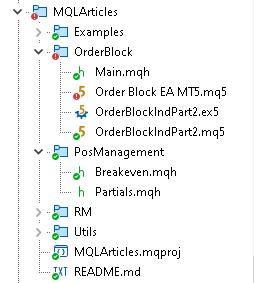
Figure 4. Location of the "Order Block EA MetaTrader 5.mq5" file in the repository
#include  "..\\PosManagement\\Breakeven.mqh"
#include  "..\\PosManagement\\Partials.mqh"
After specifying the include files, we proceed to define the Expert Advisor input parameters.
First block: configuring the Expert Advisor based on Order Blocks
This part contains parameters related to the Order Blocks indicator.
sinput group "-------| Order Block EA settings |-------"
input ulong InpMagic = 545244; //Magic number
input ENUM_TIMEFRAMES InpTimeframeOrderBlock = PERIOD_M5; //Order block timeframe

sinput group "-- Order Block --"
input int  InpRangoUniversalBusqueda = 500; //search range of order blocks
input int  InpWidthOrderBlock = 1; //Width order block
input bool InpBackOrderBlock = true; //Back order block?
input bool InpFillOrderBlock = true; //Fill order block?
input color InpColorOrderBlockBajista = clrRed; //Bearish order block color
input color InpColorOrderBlockAlcista = clrGreen; //Bullish order block color

input double InpTransparency = 0.5; // Transparency from 0.0 (invisible) to 1.0 (opaque)

sinput group ""
sinput group "-------| Strategy |-------"
input ENUM_TP_SL_STYLE InpTpSlStyle = ATR;//Tp and sl style:

sinput group "- TP SL by ATR "
input double InpAtrMultiplier1 = 9.3;//Atr multiplier 1 (SL)
input double InpAtrMultiplier2 = 24.4;//Atr multiplier 2 (TP)

sinput group "- TP SL by POINT "
input int InpTpPoint = 1000; //TP in Points
input int InpSlPoint = 1000; //SL in Points
General strategy parameters are also added, including Take Profit and Stop Loss modes.
Second block: AccountManager parameters
Here, only the logging level is defined.
sinput group ""
sinput group "-------| Account Status |-------"
input ENUM_VERBOSE_LOG_LEVEL InpLogLevelAccountStatus = VERBOSE_LOG_LEVEL_ERROR_ONLY; //(Account Status|Ticket Mangement) log level:
Third block: risk management
This part defines the main risk management parameters.
sinput group ""
sinput group "-------| Risk Management |-------"
input ENUM_LOTE_TYPE InpLoteType = Dinamico; //Lote Type:
input double InpLote = 0.1; //Lot size (only for fixed lot)
input ENUM_MODE_RISK_MANAGEMENT InpRiskMode = risk_mode_personal_account; //type of risk management mode
input bool InpUpdateDailyLossRiskModeProp = true; //Update the MDL, if the risk-management type is propfirm?
input ENUM_GET_LOT InpGetMode = GET_LOT_BY_STOPLOSS_AND_RISK_PER_OPERATION; //How to get the lot
input double InpPropFirmBalance = 0; //If risk mode is Prop Firm FTMO, then put your ftmo account balance
input ENUM_VERBOSE_LOG_LEVEL InpLogLevelRiskManagement = VERBOSE_LOG_LEVEL_ERROR_ONLY; //Risk Management log level:

sinput group "- ML/Maximum loss/Maximum loss -"
input double InpPercentageOrMoneyMlInput = 0; //percentage or money (0 => not used ML)
input ENUM_RISK_CALCULATION_MODE InpModeCalculationMl = percentage; //Mode calculation Max Loss
input ENUM_APPLIED_PERCENTAGES InpAppliedPercentagesMl = Balance; //ML percentage applies to:

sinput group "- MWL/Maximum weekly loss/Maximum weekly loss -"
input double InpPercentageOrMoneyMwlInput  = 0; //percentage or money (0 => not used MWL)
input ENUM_RISK_CALCULATION_MODE InpModeCalculationMwl = percentage; //Mode calculation Max weekly Loss
input ENUM_APPLIED_PERCENTAGES InpAppliedPercentagesMwl = Balance;//MWL percentage applies to:

sinput group "- MDL/Maximum  daily loss/Maximum daily loss -"
input double InpPercentageOrMoneyMdlInput  = 3.0; //percentage or money (0 => not used MDL)
input ENUM_RISK_CALCULATION_MODE InpModeCalculationMdl = percentage; //Mode calculation Max daily loss
input ENUM_APPLIED_PERCENTAGES InpAppliedPercentagesMdl = Balance;//MDL percentage applies to:

sinput group "- GMLPO/Gross maximum loss per operation/Percentage to risk per operation -"
input ENUM_OF_DYNAMIC_MODES_OF_GMLPO InpModeGmlpo = NO_DYNAMIC_GMLPO; //Select GMLPO mode:
input double InpPercentageOrMoneyGmlpoInput  = 2.0; //percentage or money (0 => not used GMLPO)
input ENUM_RISK_CALCULATION_MODE InpModeCalculationGmlpo = percentage; //Mode calculation Max Loss per operation
input ENUM_APPLIED_PERCENTAGES InpAppliedPercentagesGmlpo = Balance;//GMPLO percentage applies to:
Compared with the previous version, the GMLPO block has been simplified by removing one part. In addition, a new parameter, InpUpdateDailyLossRiskModeProp, has been added. This value tells the class whether Maximum Daily Loss should be updated automatically on PropFirm-type accounts.
Fourth block: dynamic GMLPO and MDP parameters
This part includes additional dynamic risk (GMLPO) settings and parameters related to Maximum Daily Profit.
sinput group "-- Optional GMLPO settings, Dynamic GMLPO"
sinput group "--- Full customizable dynamic GMLPO"
input string InpNote1 = "subtracted from your total balance to establish a threshold.";  //This parameter determines a specific percentage that will be
input string InpStrPercentagesToBeReviewed = "15,30,50"; //percentages separated by commas.
input string InpNote2 = "a new risk level will be triggered on your future trades: "; //When the current balance (equity) falls below this threshold
input string InpStrPercentagesToApply = "10,20,25"; //percentages separated by commas.
input string InpNote3 = "0 in both parameters => do not use dynamic risk in gmlpo"; //Note:

sinput group "--- Fixed dynamic GMLPO with parameters"
sinput group "- 1 -"
input string InpNote11 = "subtracted from your total balance to establish a threshold.";  //This parameter determines a specific percentage that will be
input double InpBalancePercentageToActivateTheRisk1 = 2.0; //percentage 1 that will be exceeded to modify the risk separated by commas
input string InpNote21 = "a new risk level will be triggered on your future trades: "; //When the current balance (equity) falls below this threshold
input double InpPercentageToBeModified1 = 1.0;//new percentage 1 to which the gmlpo is modified
sinput group "- 2 -"
input double InpBalancePercentageToActivateTheRisk2 = 5.0;//percentage 2 that will be exceeded to modify the risk separated by commas
input double InpPercentageToBeModified2 = 0.7;//new percentage 2 to which the gmlpo is modified
sinput group "- 3 -"
input double InpBalancePercentageToActivateTheRisk3 = 7.0;//percentage 3 that will be exceeded to modify the risk separated by commas
input double InpPercentageToBeModified3 = 0.5;//new percentage 3 to which the gmlpo is modified
sinput group "- 4 -"
input double InpBalancePercentageToActivateTheRisk4 = 9.0;//percentage 4 that will be exceeded to modify the risk separated by commas
input double InpPercentageToBeModified4 = 0.33;//new percentage 4  1 to which the gmlpo is modified

sinput group "-- MDP/Maximum daily profit/Maximum daily profit --"
input bool InpMdpIsStrict = true; //MDP is strict?
input double InpPercentageOrMoneyMdpInput = 11.0; //percentage or money (0 => not used MDP)
input ENUM_RISK_CALCULATION_MODE InpModeCalculationMdp = percentage; //Mode calculation Max Daily Profit
input ENUM_APPLIED_PERCENTAGES InpAppliedPercentagesMdp = Balance;//MDP percentage applies to:
Fifth block: risk modifiers
This part declares three risk modifiers.
- Risk Modifier 1 — corresponds to the CDynamicRisk modifier (booster type) presented at the beginning of the article.
- Risk Modifier 2 — adjusts risk based on a list of percentages. When there is a sequence of losses, the specified levels are applied. When Take Profit is reached, risk returns to the initial value.
- Risk Modifier 3 — changes the GMLPO risk per trade only if the account result is negative. The FunctionKevin function is used for the calculation.
inline double FunctionKevin(double defect_risk, double loss_percentage, double constante)
 {
  return (defect_risk * MathExp(loss_percentage / constante));
 }
Code of the 5th block.
sinput group ""
sinput group "-------| Risk Modifier |-------"
input bool InpActivarModificadorDeRiesgo = false; // Enables dynamic risk adjustment (Booster)
input double InpStepMod = 2.0;                 // Increment applied to risk each time the condition is met
input double InpStart = 2.0;                    // Profit percentage from which risk adjustment begins
input ENUM_MULTIPLIER_METHOD_DR InpMethodDr = DR_EXPONECIAL; // Type of progression used to increase risk

sinput group ""
sinput group "-------| Risk modifier 2 |-------"
input bool InpActivarModificadorDeRiesgo2 = false; //Activate risk modifier 2
input string InpStrPercentagesToApplyRiesgoCts = "6, 8, 10, 20, 25"; //Percentages to apply

sinput group ""
sinput group "-------| Risk modifier 3 by Kevin |-------"
input bool InpActivarModificadorDeRiesgo3 = false; //Activate risk modifier 3
input double InpConstante = 8.0; //Function constant
Sixth block: trading session
This block contains the trading session parameters.
sinput group ""
sinput group "-------| Session |-------"
input char InpPaSessionStartHour = 1;   // Start hour to operate (0-23)
input char InpPaSessionStartMinute = 0; // Start minute to operate (0-59)
input char InpPaSessionEndHour = 23;    // End hour to operate (1-23)
input char InpPaSessionEndMinute = 0;  // End minute to operate (0-59)
Seventh block: breakeven parameters
This part specifies the parameters for activating the breakeven mechanism.
sinput group ""
sinput group "-------| Breakeven |-------"
input         bool InpUseBe                       = true;               // Enable Breakeven logic
input ENUM_BREAKEVEN_TYPE InpTypeBreakEven       = BREAKEVEN_TYPE_RR;  // Calculation method (RR, ATR, or fixed points)
input ENUM_VERBOSE_LOG_LEVEL InpLogLevelBe      = VERBOSE_LOG_LEVEL_ERROR_ONLY; // Break Even log level:

sinput group "--- Breakeven based on Risk/Reward (RR) ---"
input         string InpBeRrAdv                  = "Requires a configured Stop Loss.";  // Warning: Stop Loss is required to calculate RR
input         double InpBeRrDbl                  = 1.0;                                 // Risk/Reward ratio to activate Breakeven (e.g. 1.0)
input ENUM_TYPE_EXTRA_BE_BY_RRR InpBeTypeExtraRr = EXTRA_BE_RRR_BY_ATR;                // Method to adjust Breakeven price (ATR or points)
input         double InpBeExtraPointsRrOrAtrMultiplier = 1.0;                       // Adjustment value: ATR multiplier (atr 14 period) if method = ATR, or fixed points if method = Points

sinput group "--- Breakeven based solely on ATR ---"
input         double InpBeAtrMultiplier          = 2.0;    // ATR multiplier to trigger Breakeven (atr 14 period)
input         double InpBeAtrMultiplierExtra    = 1.0;    // Additional multiplier for precise Breakeven adjustment (atr 14 period)

sinput group "--- Breakeven based on fixed points ---"
input         int InpBeFixedPointsToPutBe     = 200;   // Minimum distance (in points) to trigger Breakeven
input         int InpBeFixedPointsExtra         = 100;   // Extra points added when Breakeven is triggered
Eighth block: partial position closing
This final block sets the parameters of the CPartials class.
sinput group ""
sinput group "-------| Partial Closures |-------"
input ENUM_VERBOSE_LOG_LEVEL InpLogLevelPartials  = VERBOSE_LOG_LEVEL_ALL; // Partial Closures log level
input string InpComentVolumen4 = "Use '0' in both to disable. Order from lowest to highest.";
input string InpPartesDelTpDondeSeTomaraParciales = "0";    // Percentage of TP distance where partials trigger
input string InpComentParciales1 = "List of TP levels (%) to trigger partials."; //->
input string InpComentParciales2 = "Ex: \"25,50,75\" triggers at 25%, 50%, 75%."; //->
input string InpComentParciales3 = "String allows multiple dynamic levels."; //->
input string InpSeparatorPar = ""; // -------
input string InpVolumenQueSeQuitaraDeLaPosicionEnPorcentaje = "0";  // Volume to close at each defined level
input string InpComentVolumen1 = "Percentage of total volume closed at each level."; //->
input string InpComentVolumen2 = "Must match count of TP level entries."; //->
input string InpComentVolumen3 = "Ex: \"30,40,30\" closes 30%, 40%, then 30%."; //
Global scope of the Expert Advisor
After completing the input parameters section, we move on to the global scope.
This block declares the variables and class instances that will be used throughout the Expert Advisor.
First, a pointer of type CRiskManagement is defined for risk management, and CBreakEven and CPartials instances are created.
CRiskManagemet *risk;
CBreakEven break_even(InpMagic, _Symbol);
CPartials g_partials;
Two handles are also created: one for the Order Block indicator and another for the moving average indicator.
//--- Handles
int order_block_indicator_handle;
int hanlde_ma;
Four double arrays are declared to store the data obtained from the Order Block indicator buffers.
//--- Global buffers
double tp1[];
double tp2[];
double sl1[];
double sl2[];
Next, two datetime variables are declared to store the beginning and end of the session.
//--- Session
datetime start_sesion;
datetime end_sesion;
Then several CBarControler instances are created to control candle openings on different timeframes: current, daily, weekly, and monthly.
//--- General
CBarControler bar_d1(PERIOD_D1, _Symbol);
CBarControler bar_w1(PERIOD_W1, _Symbol);
CBarControler bar_mn1(PERIOD_MN1, _Symbol);
CBarControler bar_curr(PERIOD_CURRENT, _Symbol);
Next, instances of the risk modifiers are created: dynamic (CDynamicRisk), percentage-based (CModifierDynamicRisk), and Kevin-function-based (CMathDynamicRisk).
CDynamicRisk riesgo_c(InpStepMod, InpStart, LP_GMLPO, InpMethodDr);
CModifierDynamicRisk risk_modificator(InpStrPercentagesToApplyRiesgoCts);
CMathDynamicRisk risk_modificator_kevin(InpConstante);
Finally, the global variable opera is defined. It is used as a flag to enable or disable the Expert Advisor's trading activity, and an instance of the CAtrUltraOptimized class, which implements ATR calculation, is created.
bool opera = true;
CAtrUltraOptimized atr_ultra_optimized;
Full code.
CRiskManagemet *risk;
CBreakEven break_even(InpMagic, _Symbol);
CPartials g_partials;

//--- Handles
int order_block_indicator_handle;
int hanlde_ma;

//--- Global buffers
double tp1[];
double tp2[];
double sl1[];
double sl2[];

//--- Session
datetime start_sesion;
datetime end_sesion;

//--- General
CBarControler bar_d1(PERIOD_D1, _Symbol);
CBarControler bar_w1(PERIOD_W1, _Symbol);
CBarControler bar_mn1(PERIOD_MN1, _Symbol);
CBarControler bar_curr(PERIOD_CURRENT, _Symbol);
CDynamicRisk riesgo_c(InpStepMod, InpStart, LP_GMLPO, InpMethodDr);
CModifierDynamicRisk risk_modificator(InpStrPercentagesToApplyRiesgoCts);
CMathDynamicRisk risk_modificator_kevin(InpConstante);

//---
bool opera = true;
CAtrUltraOptimized atr_ultra_optimized;
OnInit
In the OnInit function, all main elements of the Expert Advisor are configured: ATR calculation, breakeven, partial position closing, indicators, risk management, modifiers, and global buffers.
ATR configuration
First, the CAtrUltraOptimized class is initialized with the period, symbol, and internal parameters.
//--- Atr
  atr_ultra_optimized.SetVariables(_Period, _Symbol, 0, 14);
  atr_ultra_optimized.SetInternalPointer();
Breakeven configuration
If the breakeven option is enabled, different calculation methods are set: by ATR, by fixed points, and by risk/reward ratio.
In addition, the logging level is set.
//--- We set the breakeven values so its use is allowed
  if(InpUseBe)
   {
    break_even.SetBeByAtr(InpBeAtrMultiplier, InpBeAtrMultiplierExtra, GetPointer(atr_ultra_optimized));
    break_even.SetBeByFixedPoints(InpBeFixedPointsToPutBe, InpBeFixedPointsExtra);
    break_even.SetBeByRR(InpBeRrDbl, InpBeTypeExtraRr, InpBeExtraPointsRrOrAtrMultiplier, GetPointer(atr_ultra_optimized));
    break_even.SetInternalPointer(InpTypeBreakEven);
    break_even.obj.AddLogFlags(InpLogLevelBe);
   }
Partial position closing settings
The CPartials class is initialized. If the Init function returns true, the instance is added to account management using account_status.AddItemFast().
//--- Partials
  g_partials.AddLogFlags(InpLogLevelPartials);
  if(g_partials.Init(InpMagic, _Symbol, InpVolumenQueSeQuitaraDeLaPosicionEnPorcentaje, InpPartesDelTpDondeSeTomaraParciales))
   {
    account_status.AddItemFast(&g_partials);
   }
Note: in the case of breakeven, this step is not performed manually, because the class itself already calls the public account_status function for registration.
Creating indicators
Handles are created for the Order Blocks indicator and for the exponential moving average. If the EMA handle is invalid, an initialization error is returned.
//--- Indicators
// Create ob handle
  order_block_indicator_handle = CreateIndicatorObHandle();

// Create ma handle
  hanlde_ma = iMA(_Symbol, InpTimeframeOrderBlock, 30, 0, MODE_EMA, PRICE_CLOSE);

// Check ma
  if(hanlde_ma == INVALID_HANDLE)
   {
    Print("The ema indicator is not available latest error: ", _LastError);
    return INIT_FAILED;
   }

  ChartIndicatorAdd(0, 0, hanlde_ma);
Risk management configuration
In this new version, risk management is configured using the CRiskPointer class.
First, a temporary pointer named manager is created, which takes the magic number and the volume calculation mode as parameters.
CRiskPointer* manager = new CRiskPointer(InpMagic, InpGetMode); If the PropFirm management mode is selected, the corresponding balance is set.
manager.SetPropirm(InpPropFirmBalance);
Next, we obtain the pointer and assign it to the risk variable from the manager object.
risk = manager.GetRiskPointer(InpRiskMode);
Logging flags are added and the CGetLote pointer is set.
 risk.AddLogFlags(InpLogLevelRiskManagement);
 risk.SetLote(CreateLotePtr(_Symbol));
Configuring maximum profit and loss
Rules are added for Maximum Daily Loss, GMLPO, Maximum Loss, Maximum Weekly Loss, and Maximum Daily Profit.
// We set the parameters
  string to_apply = InpStrPercentagesToApply, to_modfied = InpStrPercentagesToBeReviewed;

  if(InpModeGmlpo == DYNAMIC_GMLPO_FIXED_PARAMETERS)
    SetDynamicUsingFixedParameters(InpBalancePercentageToActivateTheRisk1, InpBalancePercentageToActivateTheRisk2, InpBalancePercentageToActivateTheRisk3
                                   , InpBalancePercentageToActivateTheRisk4, InpPercentageToBeModified1, InpPercentageToBeModified2, InpPercentageToBeModified3, InpPercentageToBeModified4
                                   , to_modfied, to_apply);

  risk.AddLoss(InpPercentageOrMoneyMdlInput, InpAppliedPercentagesMdl, InpModeCalculationMdl, LP_MDL);
  risk.AddLoss(InpPercentageOrMoneyGmlpoInput, InpAppliedPercentagesGmlpo, InpModeCalculationGmlpo, LP_GMLPO, CLOSE_POSITION_AND_EQUITY, (InpModeGmlpo != NO_DYNAMIC_GMLPO), to_modfied, to_apply);
  risk.AddLoss(InpPercentageOrMoneyMlInput, InpAppliedPercentagesMl, InpModeCalculationMl, LP_ML);
  risk.AddLoss(InpPercentageOrMoneyMwlInput, InpAppliedPercentagesMwl, InpModeCalculationMwl, LP_MWL);
  risk.AddProfit(InpPercentageOrMoneyMdpInput, InpAppliedPercentagesMdp, InpModeCalculationMdp, LP_MDP, InpMdpIsStrict);
  risk.EndAddProfitLoss(); // Execute this every time we finish setting the maximum losses and profits
If the risk management type is "dynamic PropFirm", updating of Maximum Daily Loss is configured.
//--- If the risk-management type is prop we need to configure whether to update the MDL (as FTMO)
  if(risk.ModeRiskManagement() == risk_mode_propfirm_dynamic_daiy_loss)
   {
    CRiskManagemetPropFirm* temp_ptr = dynamic_cast<CRiskManagemetPropFirm *>(risk); // Convert from normal to prop firm
    temp_ptr.UpdateLoss(InpUpdateDailyLossRiskModeProp);
   }
Adding risk modifiers
Active modifiers are added to the risk pointer.
// We add modifiers
  if(InpActivarModificadorDeRiesgo)
    risk.AddModificator(riesgo_c);

  if(InpActivarModificadorDeRiesgo2)

    risk.AddModificator(risk_modificator);

  if(InpActivarModificadorDeRiesgo3)
    risk.AddModificator(risk_modificator_kevin);
Then risk management is registered in account_status, after which the temporary pointer is deleted.
// We finish by adding it
  account_status.AddItemFast(risk);

// We delete the temporary pointer
  delete manager;
Initializing account_status
The initialization event of the global account_status instance is called.
//--- We initialize the account
  account_status.AddLogFlagTicket(InpLogLevelAccountStatus);
  account_status.AddLogFlags(InpLogLevelAccountStatus);
  account_status.OnInitEvent();
Configuring global arrays
Finally, arrays are created to store buffer data as time series.
//--- We configure the arrays in series
  ArraySetAsSeries(tp1, true);
  ArraySetAsSeries(tp2, true);
  ArraySetAsSeries(sl1, true);
  ArraySetAsSeries(sl2, true);
  return(INIT_SUCCEEDED);
OnTick
In the OnTick function, the general execution order of the Expert Advisor is organized.
First, a local variable time_curr is created, containing the current symbol time. The CAccountStatus_OnTickEvent macro is also called, which updates the current account profit. This data is used by the CRiskManagement class to check whether the maximum loss or profit has been reached.
Then the account_status functions OnNewDay, OnNewWeek, and OnNewMonth are called. This block is executed when each new daily candle opens and sets the global variable opera to true.
//--- General
  const datetime time_curr = TimeCurrent();
  CAccountStatus_OnTickEvent

//--- Code that runs every new day
  if(bar_d1.IsNewBar(time_curr))
   {
    account_status.OnNewDay();

    if(bar_w1.IsNewBar(time_curr))
      account_status.OnNewWeek();

    if(bar_mn1.IsNewBar(time_curr))
      account_status.OnNewMonth();

    opera = true;
   }
Then the trading session is checked. If the current time exceeds the session end time, the start and end values for the next session are calculated.
//--- Check Session
  if(time_curr > end_sesion)
   {
    start_sesion = HoraYMinutoADatetime(InpPaSessionStartHour, InpPaSessionStartMinute, time_curr);
    end_sesion = HoraYMinutoADatetime(InpPaSessionEndHour, InpPaSessionEndMinute, time_curr);

    if(start_sesion > end_sesion)
      end_sesion = end_sesion + 86400;
   }
Next, the main functions of the global break_even and g_partials objects are called. If the opera variable is false, the function exits without further execution.
//--- Breakeven
  if(InpUseBe)
    break_even.obj.BreakEven();

//--- Partials
  g_partials.CheckTrackedPositions();


//--- Check to operate
  if(!opera)
    return;
After that, we move on to the main strategy logic. Here, it is checked whether a new candle has formed and whether the current time is within the specified trading session. If there are no open positions, the indicator buffers are copied, and Take Profit and Stop Loss values are prepared. Based on this data, a decision is made to open a buy or sell order.
//--- Strategy
  if(bar_curr.IsNewBar(time_curr))
   {
    if(time_curr > start_sesion && time_curr < end_sesion)
     {
      if(risk.GetPositionsTotal() == 0)
       {
        CopyBuffer(order_block_indicator_handle, 2, 0, 5, tp1);
        CopyBuffer(order_block_indicator_handle, 3, 0, 5, tp2);
        CopyBuffer(order_block_indicator_handle, 4, 0, 5, sl1);
        CopyBuffer(order_block_indicator_handle, 5, 0, 5, sl2);

        if(tp1[0] > 0 && tp2[0]  > 0 && sl1[0] > 0 &&  sl2[0] > 0)
         {
          if(tp2[0] > sl2[0])  // buy orders
           {
            const double ASK = NormalizeDouble(SymbolInfoDouble(_Symbol, SYMBOL_ASK), _Digits);
            risk.SetStopLoss(ASK - sl1[0]);
            const double lot = (InpLoteType == Dinamico ? risk.GetLote(ORDER_TYPE_BUY, ASK, 0, 0) : InpLote);
            tradep.Buy(lot, _Symbol, ASK, sl1[0], tp2[0], "Order Block EA Buy");
           }
          else
            if(sl2[0] > tp2[0])  // sell orders
             {
              const double BID = NormalizeDouble(SymbolInfoDouble(_Symbol, SYMBOL_BID), _Digits);
              risk.SetStopLoss(sl1[0] - BID);
              const double lot = (InpLoteType == Dinamico ? risk.GetLote(ORDER_TYPE_SELL, BID, 0, 0) : InpLote);
              tradep.Sell(lot, _Symbol, BID, sl1[0], tp2[0], "Order Block EA Sell");
             }
         }
       }
     }
   }
Finally, the conditions for reaching maximum loss or profit are checked. If any of these values has been reached, positions are closed or the actions defined according to the configured risk mode are performed.
//--- Checking maximum losses and profits
  if(account_status_positions_open)
   {
    if(risk[LP_ML].IsSuperated())
     {
      if(InpRiskMode == risk_mode_propfirm_dynamic_daiy_loss)
       {
        Print("The expert advisor lost the funding test");
        Remover();
       }
      else
       {
        risk.CloseAllPositions();
        Print("Maximum loss exceeded now");
        opera = false;
       }
     }

    if(risk[LP_MDL].IsSuperated())
     {
      risk.CloseAllPositions();
      Print("Maximum daily loss exceeded now");
      opera = false;
     }

    if(risk[LP_MDP].IsSuperated())
     {
      risk.CloseAllPositions();
      Print("Excellent Maximum daily profit achieved");
      opera = false;
     }
   }
OnTradeTransaction
This function processes all transactions made on this account. For this, the public OnTradeTransactionEvent function of the global account_status instance is called.
//+------------------------------------------------------------------+
//| TradeTransaction function                                        |
//+------------------------------------------------------------------+
void OnTradeTransaction(const MqlTradeTransaction & trans,
                        const MqlTradeRequest & request,
                        const MqlTradeResult & result)
 {
  account_status.OnTradeTransactionEvent(trans);
 }
OnDeinit
At the deinitialization stage, the indicators loaded on the current chart are removed. The handles are also released using the IndicatorRelease function, which prevents memory leaks after the Expert Advisor is stopped.
//+------------------------------------------------------------------+
//| Expert deinitialization function                                 |
//+------------------------------------------------------------------+
void OnDeinit(const int reason)
 {
//---
  ChartIndicatorDelete(0, 0, ChartIndicatorName(0, 0, GetMovingAverageIndex()));
  ChartIndicatorDelete(0, 0, "Order Block Indicator");

  if(hanlde_ma != INVALID_HANDLE)
    IndicatorRelease(hanlde_ma);

  if(order_block_indicator_handle != INVALID_HANDLE)
    IndicatorRelease(order_block_indicator_handle);
 }
Testing the Order Blocks Expert Advisor: the impact of partial position closing on performance
Before comparing the Expert Advisor results with and without partial position closing, let's first look at how this is implemented in practice in the code.
For this check, the "Percentage of TP distance where partials trigger" parameter is set to "25, 45, 65", and the "Volume to close at each defined level" parameter is set to "30, 30, 30". Since the goal is to analyze the execution of partial position closing, all logging levels related to this functionality were enabled.
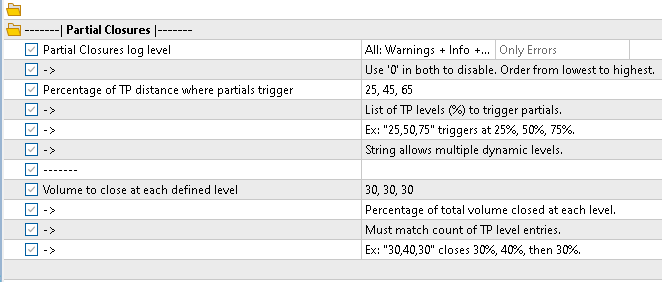
Figure 5. Partial closing settings for the first test
After completing the setup, we ran a test on gold, timeframe M5, from 01.01.2024 to 22.09.2025, using real ticks mode.
Each time the Expert Advisor executes a trade, the Take Profit levels are printed. In this case, since we defined three levels, three prices are displayed. Their analysis shows that in a sell position, the price corresponding to level index 0 is the highest, while the price corresponding to level index 2 is the lowest. This is expected because, in sell positions, exit levels are arranged in descending order.
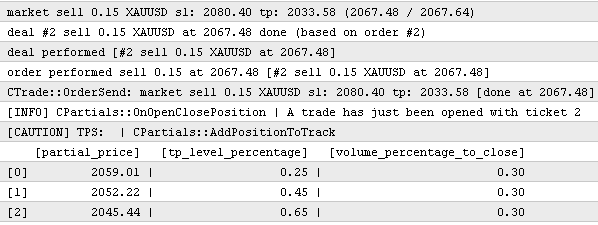
Figure 6. Log output of Take Profit levels for a sell position
Next, the log shows that the position was partially closed.
In this example, 0.05 lots of the open position were closed.

Figure 7. Log output with information about a successful partial position close
The value 0.05 is obtained as follows: the initial position volume was 0.15 lots; when applying the first partial close, the following calculation is performed: 0.15 * 0.30 = 0.045. However, this broker's minimum volume step is 0.01, so closing exactly 0.045 lots is impossible.
The partial closing code includes a check for this case, where the calculated volume is rounded to the nearest allowed value according to the volume step:
volume_to_close = RoundToStep(volume_to_close, m_volume_step);
Taking this adjustment into account, the final volume to close is 0.05, which matches what was implemented in practice.
This test confirmed that partial position closing works correctly. We can now move on to the most important part of this section: comparing the Expert Advisor's performance with and without partial position closing.
We will run testing with the following settings:
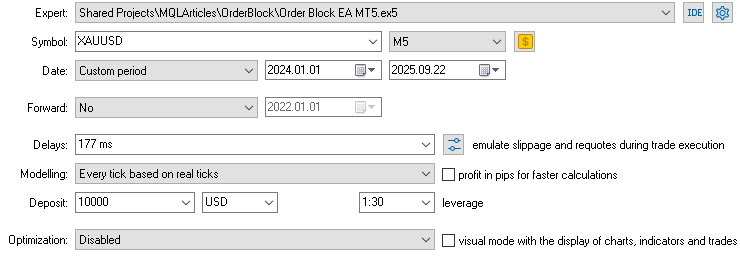
Figure 8. Strategy Tester settings used in tests 1 and 2
In these tests, no Maximum Daily Profit or Maximum Daily Loss limits were applied; the only active limit was GMLPO (10%). The Take Profit and Stop Loss values were the same in both scenarios, as was the specified trading session from 3 to 14. The only difference between the two tests is whether partial position closing is enabled.
First test: comparing performance with and without partial position closing
In the first test, Stop Loss = 2.0 and Take Profit = 6.0 were used (ATR-based Take Profit and Stop Loss, specified as ATR multipliers).
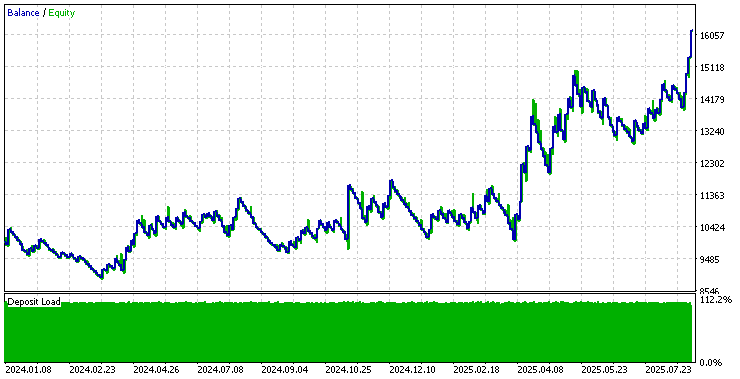
Figure 9. Expert Advisor test results without partial position closing
Let's compare this result with the Expert Advisor test results using partial position closing:
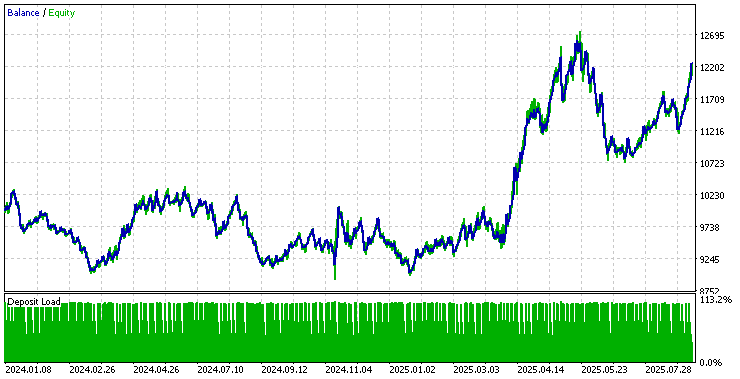
Figure 10. Expert Advisor test results with partial position closing
As we can see, the Expert Advisor performed better without partial position closing, and the final balance was about USD 4,000 higher. The main reason for this difference was the additional commissions incurred at each partial close.
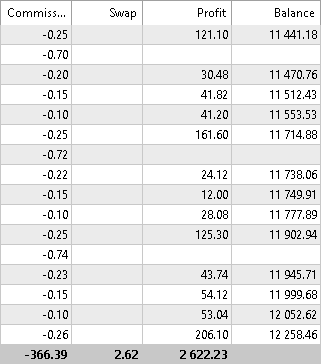
Figure 11. Commissions charged in the test with partial position closing
This result was expected: in scalping strategies, where profit and loss targets are small, commissions have a more noticeable impact.
Second test: larger timeframes with a swing strategy
In the second test, Stop Loss = 4.0 and Take Profit = 25.0 were set. These values correspond more closely to a swing strategy, where trades may last several days or even weeks.
Testing with partial position closing:
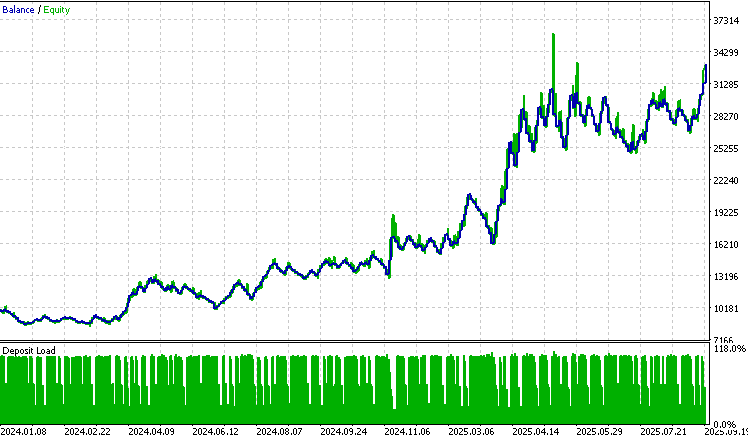
Figure 12. Expert Advisor test results with partial position closing
Testing without partial position closing:
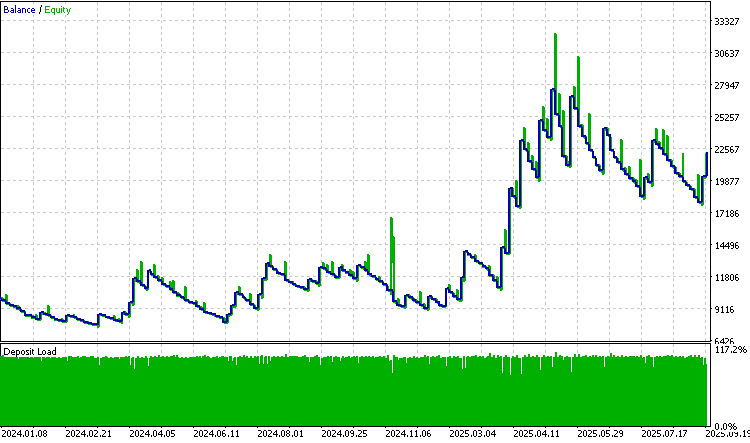
Figure 13. Expert Advisor test results without partial position closing
In this case, the difference is much more noticeable. The test with partial position closing ended with a final balance of around USD 33,000, while the test without partial position closing ended with a balance of approximately USD 22,234. The difference exceeds USD 11,000.
This result is explained by the fact that with a wider Take Profit, the probability that the price will fully reach it decreases. As a result, partial position closing makes it possible to lock in intermediate profit. A clear example was observed in December 2024: during testing without partial position closing, the equity curve showed a significant increase that ultimately was not locked in because the position did not reach the full Take Profit level. At the same time, in the test with partial position closing, the same position produced partial profit, which allowed the result of that trade to be secured.
Based on these tests, the effectiveness of partial position closing depends on the type of strategy used. In scalping approaches, where Stop Loss and Take Profit targets are small, additional commissions generally reduce performance.
By contrast, when using a swing strategy, where targets are wider and the market may need several days or weeks to reach the full Take Profit, partial position closing proves beneficial. By locking in intermediate profit, it improves the balance curve and reduces the impact of adverse movements that prevent the final target from being reached.
Although this result was obtained with our Expert Advisor, it will not necessarily be reproduced in every Expert Advisor. Therefore, partial position closing should be tested separately for each strategy, with careful assessment of its impact on overall performance. I encourage readers to implement partial position closing in their own Expert Advisors and check whether the approaches described in this article can improve, and in some cases even double, profits.
Conclusion
In this article, we reviewed the improvements made to risk management and implemented, step by step, an MQL5 class for partial position closing. Finally, we compared the Order Block Expert Advisor with and without partial position closing.
At first, the results suggested that partial position closing did not improve performance and could even make it worse. However, when the second test was carried out with wider settings oriented toward a swing strategy, it became clear that the advantages of partial position closing became much clearer. In this scenario, the difference in final balance exceeded USD 11,000, indicating that for long-term strategies, partial position closing can help maximize and lock in profit.
I also want to note that for this and previous articles I created a public repository in MQL Algo Forge, where all the code discussed is collected: the Order Block indicator, risk management libraries, breakeven, partial position closing, and other practical examples. The repository will be updated and improved regularly.
Click to go to the public repository.
| Folder | Files | Description |
|---|---|---|
| Examples | - Get_Lot_By_Risk_Per_Trade_and_SL.mq5 - Get_Sl_by_risk_per_operation_and_lot.mq5 - Risk_Management_Panel.mq5 | Practical examples of using the risk management (RM) library. |
| OrderBlock | - Main.mqh - Order Block EA MetaTrader 5.mq5 - OrderBlockIndPart2.mq5 | Contains the Order Block-based indicator and Expert Advisor used as examples in the series of articles on risk management, breakeven, and partial position closing. |
| PosManagement | - Breakeven.mqh - Partials.mqh | Specialized libraries for position management: breakeven and partial position closing. |
| RM | - AccountStatus.mqh - LossProfit.mqh - LoteSizeCalc.mqh - Modificators.mqh - OcoOrder.mqh - OrdersGestor.mqh - RiskManagement.mqh - RiskManagementBases.mqh - RM_Defines.mqh - RM_Functions.mqh | All modules included in the RM risk management library. |
| Utils | - FA \ - Atr.mqh - AtrCts.ex5 - BarControler.mqh - ClasesBases.mqh - Events.mqh - FuncionesBases.mqh - Managers.mqh - SimpleLogger.mqh - Sort.mqh - StringToArray.mqh - CustomOptimization.mqh - Fibonacci.mqh - File.mqh - Funciones Array.mqh - Objectos 2D.mqh - RandomSimple.mqh | Utility library for developing libraries, Expert Advisors, and indicators. It includes functions for working with arrays, time, conversions, strings, simple mathematical operations, as well as classes for handling candlestick patterns, optimized ATR calculation, checking whether the PC is suspended, and much more. |
| Sets | - Article_Partials \ - ARTICLE_PARTIAL_SET_TEST_2_OB_WITHOUT_PARTIALS.set - ARTICLE_PARTIAL_SET_OB_TEST_2_WITH_PARTIALS.set - ARTICLE_PARTIAL_SET_TEST_1_WITH_PARTIALS.set - ARTICLE_PARTIAL_SET_TEST_1_WITHOUT_PARTIALS.set | Folder with sets of settings (set files) used in tests 1 and 2. |
Translated from Spanish by MetaQuotes Ltd.
Original article: https://www.mql5.com/es/articles/19682
Warning: All rights to these materials are reserved by MetaQuotes Ltd. Copying or reprinting of these materials in whole or in part is prohibited.
This article was written by a user of the site and reflects their personal views. MetaQuotes Ltd is not responsible for the accuracy of the information presented, nor for any consequences resulting from the use of the solutions, strategies or recommendations described.

 Neural Networks in Trading: Actor—Director—Critic
 Neural Networks in Trading: Skill Hierarchy for Adaptive Agent Behavior (Final Part)
 Extremal Optimization (EO)
 Custom Debugging and Profiling Tools for MQL5 Development (Part III): Regression Gates for Performance and Trading Rules

- Free trading apps
- Over 8,000 signals for copying
- Economic news for exploring financial markets
You agree to website policy and terms of use