

Developing a Replay System (Part 64): Playing the service (V)
 1 891
1 891
 0
0

Introduction
In the previous article, Developing a Replay System (Part 63): Playing the service (IV), we developed and implemented a mechanism to allow users to adjust the maximum number of ticks that will be used to construct a bar on the chart. Although the primary purpose of this control is to ensure that bar construction does not interfere with other critical areas of the replay/simulator application, it does not affect or distort the actual volume values that should be displayed.
However, if you paid close attention to the video in that article or compiled and tested the replay/simulator application yourself, you might have noticed that, from time to time, the system would unexpectedly enter pause mode. Strangely enough, this happened without the control indicator reflecting any change. It wasn't clear why we somehow transitioned from play mode to pause mode. I admit, it's indeed quite odd. You're likely wondering how such a thing could happen. In fact, I asked myself the same question, trying to understand why the system was pausing, and always at specific points. With that said, the next section will explain the solution I developed and how the problem can be understood.
Understanding and Resolving the Automatic Pause Mode
The real issue is not simply understanding why the replay/simulator was automatically switching to pause mode. The true frustration lies in realizing something that will likely be addressed soon by the MetaTrader 5 developers, but which, at the time of writing, turns certain testing scenarios and use cases involving graphical objects into quite a headache. This is because certain object states may be altered without any clear reason or explanation.
Perhaps I'm being a bit harsh. But let's recall just how crucial these objects are for our replay/simulator application and how we use them to maintain control. This is particularly relevant for those who haven't been following this article series on the replay/simulator.When the replay/simulator service is initialized, it opens a chart, loads ticks from a file, creates a custom symbol, and finally, places an indicator on the chart. This indicator is our control indicator, which is responsible for managing the behavior of the replay/simulator.
At this stage, we no longer use terminal global variables to access or transfer information between the control indicator and the replay/simulator service. Instead, we've adopted a different technique, where the information flows between the two components in a way that prevents user interference with the data being exchanged.
Essentially, the service uses custom events to send information to the control indicator. In turn, the control indicator sends part of that information back to the service via a buffer. I say "part" because one piece of information is transmitted differently to avoid having the service constantly read from the buffer. Reading the buffer would mean transferring more data than is truly necessary. For this reason, the service can accesses an object maintained by the control indicator without modifying it. This object is the button that represents the current execution status, i.e., the button that lets the user indicate whether the system should be in play or pause mode.
You can observe this behavior in the source code of the C_Replay.mqh file. To illustrate this more clearly, see the following code snippet, which is part of the C_Replay.mqh class:35. //+------------------------------------------------------------------+ 36. inline void UpdateIndicatorControl(void) 37. { 38. static bool bTest = false; 39. double Buff[]; 40. 41. if (m_IndControl.Handle == INVALID_HANDLE) return; 42. if (m_IndControl.Memory._16b[C_Controls::eCtrlPosition] == m_IndControl.Position) 43. { 44. if (bTest) 45. m_IndControl.Mode = (ObjectGetInteger(m_Infos.IdReplay, def_ObjectCtrlName((C_Controls::eObjectControl)C_Controls::ePlay), OBJPROP_STATE) == 1 ? C_Controls::ePause : C_Controls::ePlay); 46. else 47. { 48. if (CopyBuffer(m_IndControl.Handle, 0, 0, 1, Buff) == 1) 49. m_IndControl.Memory.dValue = Buff[0]; 50. if ((C_Controls::eObjectControl)m_IndControl.Memory._16b[C_Controls::eCtrlStatus] != C_Controls::eTriState) 51. if (bTest = ((m_IndControl.Mode = (C_Controls::eObjectControl)m_IndControl.Memory._16b[C_Controls::eCtrlStatus]) == C_Controls::ePlay)) 52. m_IndControl.Position = m_IndControl.Memory._16b[C_Controls::eCtrlPosition]; 53. } 54. }else 55. { 56. m_IndControl.Memory._16b[C_Controls::eCtrlPosition] = m_IndControl.Position; 57. m_IndControl.Memory._16b[C_Controls::eCtrlStatus] = (ushort)m_IndControl.Mode; 58. m_IndControl.Memory._8b[7] = 'D'; 59. m_IndControl.Memory._8b[6] = 'M'; 60. EventChartCustom(m_Infos.IdReplay, evCtrlReplayInit, 0, m_IndControl.Memory.dValue, ""); 61. bTest = false; 62. } 63. } 64. //+------------------------------------------------------------------+
The original fragment of the source code from the file C_Replay.mqh
Notice that in line 38, we have a static variable whose purpose is to inform the procedure whether we can read the object directly or if we should instead read from the control indicator's buffer. When we send a custom event in line 60, we explicitly force, in line 61, that the next call must read from the control indicator's buffer. This way, the buffer is not read constantly, but only from time to time, with well-spaced intervals, which prevents too significant impact on the performance of the replay/simulator service. The real trick, however, lies in line 51, where we instruct the system that the next reads should not use the buffer, but instead perform direct access to the graphical object. However, this will only occur if we are in play mode. If we are in pause mode, the response time is not as critical or concerning.
So, if we are in play mode, starting from the third call, we execute line 45. This continues until the user explicitly sets the system to pause mode. When that happens, the LoopEventOnTime function in the C_Replay class will terminate. However, since the user only indicated that the service should enter pause mode, the LoopEventOnTime function will be invoked again, and the above logic will resume observing the control indicator. At this point, we are still monitoring the control status via the graphical object. Here, we encounter a limitation that prevents us from doing something else. But this is not what causes the automatic switch to pause mode. The pause mode is not triggered by the service itself. It is being triggered within the control indicator. And the cause is precisely the custom event sent at line 60 in the code snippet above. Now things get even more complicated. How can something we're using to trigger a custom event end up causing the service to receive a false indication from the control indicator that the user switched to pause mode? That's absolutely crazy. It truly is bizarre. But somehow, the custom event is causing the indicator to change the OBJPROP_STATE property of the object that the service is monitoring. When this property changes, line 45 in the previous snippet causes the service to falsely believe that the indicator has switched to pause mode. This then triggers the termination of the LoopEventOnTime function, causing it to be reinitialized. However, when LoopEventOnTime runs again and checks the value of the OBJPROP_STATE property, it sees an incorrect value. This leads the service to enter pause mode, even though the indicator is still showing the system as running normally, in play mode.
Now, if you've truly understood this failure, you're probably thinking the entire issue stems from the fact that we're monitoring an object on the chart instead of reading the contents of the indicator's buffer. And yes, I agree. The root of the issue is that the service is reading the OBJPROP_STATE property from a chart object it really shouldn't be accessing. Once again, I agree. However, this still doesn't justify the fact that the OBJPROP_STATE property is being modified just because a custom event was triggered. One mistake doesn't justify the other. In any case, there are two direct solutions to this problem. One would be to use a different property that allows the service to observe what a given chart object is doing. While this solution would solve the issue, I won't be implementing it. The reason is that we have another issue to address, or rather, something we still need to implement.
Even though reading from the indicator buffer may take slightly more time than observing a chart object, I have chosen to read from the indicator buffer. This is because I will be implementing a feature that is currently not available, but existed in earlier versions of this replay/simulator service. That feature is fast forward mode. So, after making the necessary changes and removing the static variable from the routine, the final implementation now looks like this:
35. //+------------------------------------------------------------------+
36. inline void UpdateIndicatorControl(void)
37.          {
38.             double Buff[];
39.
40.             if (m_IndControl.Handle == INVALID_HANDLE) return;
41.             if (m_IndControl.Memory._16b[C_Controls::eCtrlPosition] == m_IndControl.Position)
42.             {
43.                if (CopyBuffer(m_IndControl.Handle, 0, 0, 1, Buff) == 1)
44.                   m_IndControl.Memory.dValue = Buff[0];
45.                if ((C_Controls::eObjectControl)m_IndControl.Memory._16b[C_Controls::eCtrlStatus] != C_Controls::eTriState)
46.                   if ((m_IndControl.Mode = (C_Controls::eObjectControl)m_IndControl.Memory._16b[C_Controls::eCtrlStatus]) == C_Controls::ePlay)
47.                      m_IndControl.Position = m_IndControl.Memory._16b[C_Controls::eCtrlPosition];
48.             }else
49.             {
50.                m_IndControl.Memory._16b[C_Controls::eCtrlPosition] = m_IndControl.Position;
51.                m_IndControl.Memory._16b[C_Controls::eCtrlStatus] = (ushort)m_IndControl.Mode;
52.                m_IndControl.Memory._8b[7] = 'D';
53.                m_IndControl.Memory._8b[6] = 'M';
54.                EventChartCustom(m_Infos.IdReplay, evCtrlReplayInit, 0, m_IndControl.Memory.dValue, "");
55.             }
56.          }
57. //+------------------------------------------------------------------+
Modified source code fragment in C_Replay.mqh file
Despite all the inconveniences, this ultimately proves to be the best solution for us, even if it highlights something odd: certain properties of specific objects are not entirely reliable. At least not at the time of writing this article. However, if for any reason you still need to have a service read data from an object on the chart, I recommend using the OBJPROP_TOOLTIP property. Even though it is of type string, I encountered no issues using it in tests for transferring information to determine whether the control indicator was in pause or play mode. However, although this approach of accessing the object would have been adequate, it wouldn't have allowed us to properly implement the fast forward feature. It would require numerous other changes to the code, and in the end, we would still need to modify the UpdateIndicadorControl procedure, so that it would function as shown.
Now that we've addressed that issue, let's move on to another (equally frustrating one) that was demonstrated in the video in the article Developing a Replay System (Part 62): Playing the Service (III). To explain how that particular problem was solved, let's move on to a new topic.
Resolving the Memory Dump Issue
Many of you were likely surprised to see the application suddenly fail during execution. Specifically when the chart was being closed or had already been closed. A less experienced developer might immediately claim that the failure stems from something within MetaTrader 5 or MQL5 itself. After all, it's easier to shift the blame than to accept responsibility that your program is misbehaving or, at the very least, contains errors that you haven't taken the time to address. Whether due to a lack of knowledge or because you're prioritizing a specific feature over fixing bugs, relying on the platform to do everything for you is essentially signing a declaration of ignorance. Or admitting that you are being too naive. In truth, the platform will do only what it's designed to do. It's your responsibility as a developer to handle the rest, resolving bugs and ensuring your application works properly.
For quite some time, I neglected and postponed resolving certain issues and improving parts of the code. Because I was focused on developing other features. I didn't know if I would even reach a particular development milestone, so I didn't prioritize fixing issues or refining code. All I wanted was for the code to run or to provide a certain set of features. Spending time fixing bugs, only to later discard the corrected code because something turned out to be unfeasible or unsustainable, is discouraging. As a result, fixes and improvements are only made once the code has proven itself worthy of further attention.
Some of you might be thinking I'm overcomplicating things. I could just show you a more advanced version of the code right away. But the truth is, doing that would give beginners a false impression that code is born fully functional or that it should come preloaded with every feature. Experienced developers know that's simply not how it works. I want to show you how code truly evolves and how you can handle the problems that arise.
In any case, it is time to show how to solve the issue that has existed in the code for quite some time, ever since we began modifying the system's behavior. If you haven't tried to understand the issue by reviewing the code, you might think it's being caused by multiple unrelated bugs. But that's not true. If that's your mindset, you're not truly trying to study and understand these articles. You're just looking for ready-made code, with no real interest in learning how to program. That completely misses the purpose of these articles: to teach you, the reader, techniques and practices tested or used by other programmers, so that you can learn new methods or discover alternative ways to achieve certain results.
But enough philosophizing. Let's take a look at how to resolve this memory dump issue. The first thing you should pay attention to is the error messages reported by MetaTrader 5. For reference, take a look at the image below:
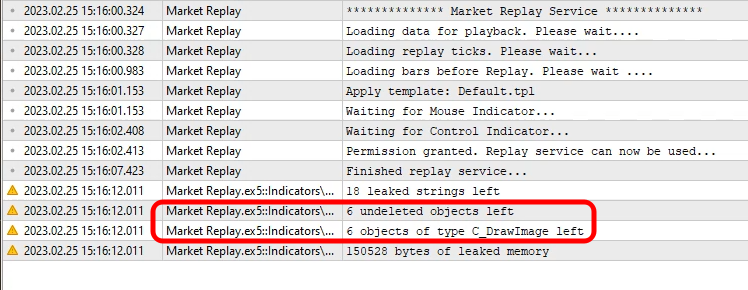
Figure 01 - Viewing errors reported by MetaTrader 5
Two specific lines are highlighted in this image. The remaining lines are related to these two. Looking closely, you can identify the root of the issue. This error happens because certain objects are not removed from the chart. You might be wondering: How is that possible? How are objects not removed? Did I forget to delete them? The answer is no. There's object removal that takes place in the class destructor. You can verify this by examining the control indicator's code. The issue occurs precisely there, as shown in the image.
So, if the objects are removed, why is MetaTrader 5 warning us that they are not? And worse, these objects are instances of the C_DrawImage class.
Seeing this, you might be left completely unsure of what to do. Especially since the C_DrawImage class is not directly accessed, but rather accessed indirectly. To better explain, let’s look at the code of the C_Controls class, which is responsible for managing all the objects. One of their tasks is to call this class. Keep in mind: MetaTrader 5 is alerting us to an issue where objects of type C_DrawImage are not removed. This tells us that the problem doesn't lie in the C_DrawImage class itself, but in the code that uses it, i.e., the C_Controls class.
Since it's not necessary to examine the full code to understand the issue and the solution, below you'll find the most relevant parts. Just one note: the code shown below already includes the fix for the memory dump issue.
001. //+------------------------------------------------------------------+
002. #property copyright "Daniel Jose"
003. //+------------------------------------------------------------------+
004. #include "..\Auxiliar\C_DrawImage.mqh"
005. #include "..\Defines.mqh"
006. //+------------------------------------------------------------------+
007. #define def_PathBMP            "Images\\Market Replay\\Control\\"
008. #define def_ButtonPlay         def_PathBMP + "Play.bmp"
009. #define def_ButtonPause        def_PathBMP + "Pause.bmp"
010. #define def_ButtonLeft         def_PathBMP + "Left.bmp"
011. #define def_ButtonLeftBlock    def_PathBMP + "Left_Block.bmp"
012. #define def_ButtonRight        def_PathBMP + "Right.bmp"
013. #define def_ButtonRightBlock   def_PathBMP + "Right_Block.bmp"
014. #define def_ButtonPin          def_PathBMP + "Pin.bmp"
015. #resource "\\" + def_ButtonPlay
016. #resource "\\" + def_ButtonPause
017. #resource "\\" + def_ButtonLeft
018. #resource "\\" + def_ButtonLeftBlock
019. #resource "\\" + def_ButtonRight
020. #resource "\\" + def_ButtonRightBlock
021. #resource "\\" + def_ButtonPin
022. //+------------------------------------------------------------------+
023. #define def_ObjectCtrlName(A) "MarketReplayCTRL_" + (typename(A) == "enum eObjectControl" ? EnumToString((C_Controls::eObjectControl)(A)) : (string)(A))
024. #define def_PosXObjects         120
025. //+------------------------------------------------------------------+
026. #define def_SizeButtons         32
027. #define def_ColorFilter         0xFF00FF
028. //+------------------------------------------------------------------+
029. #include "..\Auxiliar\C_Mouse.mqh"
030. //+------------------------------------------------------------------+
031. class C_Controls : private C_Terminal
032. {
033.    protected:
034.    private   :
035. //+------------------------------------------------------------------+
036.       enum eMatrixControl {eCtrlPosition, eCtrlStatus};
037.       enum eObjectControl {ePause, ePlay, eLeft, eRight, ePin, eNull, eTriState = (def_MaxPosSlider + 1)};
038. //+------------------------------------------------------------------+
039.       struct st_00
040.       {
041.          string   szBarSlider,
042.                   szBarSliderBlock;
043.          ushort   Minimal;
044.       }m_Slider;
045.       struct st_01
046.       {
047.          C_DrawImage *Btn;
048.          bool         state;
049.          short        x, y, w, h;
050.       }m_Section[eObjectControl::eNull];
051.       C_Mouse   *m_MousePtr;
052. //+------------------------------------------------------------------+

              ...

071. //+------------------------------------------------------------------+
072.       void SetPlay(bool state)
073.          {
074.             if (m_Section[ePlay].Btn == NULL)
075.                m_Section[ePlay].Btn = new C_DrawImage(GetInfoTerminal().ID, 0, def_ObjectCtrlName(ePlay), def_ColorFilter, "::" + def_ButtonPause, "::" + def_ButtonPlay);
076.             m_Section[ePlay].Btn.Paint(m_Section[ePlay].x, m_Section[ePlay].y, m_Section[ePlay].w, m_Section[ePlay].h, 20, (m_Section[ePlay].state = state) ? 1 : 0);
077.             if (!state) CreateCtrlSlider();
078.          }
079. //+------------------------------------------------------------------+
080.       void CreateCtrlSlider(void)
081.          {
082.             if (m_Section[ePin].Btn != NULL) return;
083.             CreteBarSlider(77, 436);
084.             m_Section[eLeft].Btn = new C_DrawImage(GetInfoTerminal().ID, 0, def_ObjectCtrlName(eLeft), def_ColorFilter, "::" + def_ButtonLeft, "::" + def_ButtonLeftBlock);
085.             m_Section[eRight].Btn = new C_DrawImage(GetInfoTerminal().ID, 0, def_ObjectCtrlName(eRight), def_ColorFilter, "::" + def_ButtonRight, "::" + def_ButtonRightBlock);
086.             m_Section[ePin].Btn = new C_DrawImage(GetInfoTerminal().ID, 0, def_ObjectCtrlName(ePin), def_ColorFilter, "::" + def_ButtonPin);
087.             PositionPinSlider(m_Slider.Minimal);
088.          }
089. //+------------------------------------------------------------------+
090. inline void RemoveCtrlSlider(void)
091.          {
092.             ChartSetInteger(GetInfoTerminal().ID, CHART_EVENT_OBJECT_DELETE, false);
093.             for (eObjectControl c0 = ePlay + 1; c0 < eNull; c0++)
094.             {
095.                delete m_Section[c0].Btn;
096.                m_Section[c0].Btn = NULL;
097.             }
098.             ObjectsDeleteAll(GetInfoTerminal().ID, def_ObjectCtrlName("B"));
099.             ChartSetInteger(GetInfoTerminal().ID, CHART_EVENT_OBJECT_DELETE, true);
100.          }
101. //+------------------------------------------------------------------+

              ...

132. //+------------------------------------------------------------------+
133.    public   :
134. //+------------------------------------------------------------------+
135.       C_Controls(const long Arg0, const string szShortName, C_Mouse *MousePtr)
136.          :C_Terminal(Arg0),
137.           m_MousePtr(MousePtr)
138.          {
139.             if ((!IndicatorCheckPass(szShortName)) || (CheckPointer(m_MousePtr) == POINTER_INVALID)) SetUserError(C_Terminal::ERR_Unknown);
140.             if (_LastError != ERR_SUCCESS) return;
141.             ChartSetInteger(GetInfoTerminal().ID, CHART_EVENT_OBJECT_DELETE, false);
142.             ObjectsDeleteAll(GetInfoTerminal().ID, def_ObjectCtrlName(""));
143.             ChartSetInteger(GetInfoTerminal().ID, CHART_EVENT_OBJECT_DELETE, true);
144.             for (eObjectControl c0 = ePlay; c0 < eNull; c0++)
145.             {
146.                m_Section[c0].h = m_Section[c0].w = def_SizeButtons;
147.                m_Section[c0].y = 25;
148.                m_Section[c0].Btn = NULL;
149.             }
150.             m_Section[ePlay].x = def_PosXObjects;
151.             m_Section[eLeft].x = m_Section[ePlay].x + 47;
152.             m_Section[eRight].x = m_Section[ePlay].x + 511;
153.             m_Slider.Minimal = eTriState;
154.          }
155. //+------------------------------------------------------------------+
156.       ~C_Controls()
157.          {
158.             for (eObjectControl c0 = ePlay; c0 < eNull; c0++) delete m_Section[c0].Btn;
159.             ObjectsDeleteAll(GetInfoTerminal().ID, def_ObjectCtrlName(""));
160.             delete m_MousePtr;
161.          }
162. //+------------------------------------------------------------------+

              ...

172. //+------------------------------------------------------------------+
173.       void DispatchMessage(const int id, const long &lparam, const double &dparam, const string &sparam)
174.          {
175.             short  x, y;
176.             static ushort iPinPosX = 0;
177.             static short six = -1, sps;
178.             uCast_Double info;
179.
180.             switch (id)
181.             {
182.                case (CHARTEVENT_CUSTOM + evCtrlReplayInit):
183.                   info.dValue = dparam;
184.                   if ((info._8b[7] != 'D') || (info._8b[6] != 'M')) break;
185.                   iPinPosX = m_Slider.Minimal = (info._16b[eCtrlPosition] > def_MaxPosSlider ? def_MaxPosSlider : (info._16b[eCtrlPosition] < iPinPosX ? iPinPosX : info._16b[eCtrlPosition]));
186.                   SetPlay((eObjectControl)(info._16b[eCtrlStatus]) == ePlay);
187.                   break;
188.                case CHARTEVENT_OBJECT_DELETE:
189.                   if (StringSubstr(sparam, 0, StringLen(def_ObjectCtrlName(""))) == def_ObjectCtrlName(""))
190.                   {
191.                      if (sparam == def_ObjectCtrlName(ePlay))
192.                      {
193.                         delete m_Section[ePlay].Btn;
194.                         m_Section[ePlay].Btn = NULL;
195.                         SetPlay(m_Section[ePlay].state);
196.                      }else
197.                      {
198.                         RemoveCtrlSlider();
199.                         CreateCtrlSlider();
200.                      }
201.                   }
202.                   break;
203.                case CHARTEVENT_MOUSE_MOVE:
204.                   if ((*m_MousePtr).CheckClick(C_Mouse::eClickLeft))   switch (CheckPositionMouseClick(x, y))
205.                   {
206.                      case ePlay:
207.                         SetPlay(!m_Section[ePlay].state);
208.                         if (m_Section[ePlay].state)
209.                         {
210.                            RemoveCtrlSlider();
211.                            m_Slider.Minimal = iPinPosX;
212.                         }else CreateCtrlSlider();
213.                         break;

              ...

249. //+------------------------------------------------------------------+
C_Controls.mqh source code parts
As I mentioned earlier, if you're just starting out in programming, you likely won't fully grasp how the solution was reached. Especially because, at first glance, there seems to be no difference in the code. That's because the fix doesn't involve a lengthy block of code or major modifications of the class. The issue was resolved by adding a single line of code. That's right, just one line. To fix the memory dump problem, we needed to introduce a line of code that, although extremely simple and seemingly insignificant, is surprisingly complex to anticipate for someone new to programming. It's a small instruction that anyone can understand when they see it. But if it's not present, it triggers the memory dump issue, warning that objects belonging to the C_DrawImage class are not being properly removed from memory.
So let's begin by understanding why the issue lies in the C_Controls class and not in C_DrawImage. As mentioned above, C_DrawImage is not accessed directly, but rather indirectly. And that's because access to the C_DrawImage class is made via a pointer, which is declared in line 47. Note: C_DrawImage is referenced through a pointer. However, since MQL5 handles pointers slightly differently from C/C++, you might think of line 47 as a simple variable declaration. Still, it is a pointer. And the problem does not lie in declaring the variable as a pointer. The issue lies in how we are managing this pointer.
The main issue with pointers, and perhaps the reason why MQL5 handles them differently from C/C++, is that pointer-related issues can be very difficult to diagnose. Some bugs only surface during specific interactions, making them a nightmare to resolve. You could test your program hundreds of times without encountering the issue, and then suddenly it appears, often precisely when you're not debugging. And that's the worst-case scenario.
So, as a best practice, whenever you declare something as a pointer or plan to use it as one, you should initialize it as early as possible. The same goes for variables in general. Since we're working with a class, initialization should happen in the class constructor. And in fact, this was already done, as you can see between lines 144 and 149 (specifically, the pointer is initialized in line 148). Pay attention that it is initialized with a value of NULL.
Now here's the key point. A class constructor can be called in two different ways. The first is when the class is referenced as a standard variable. In this case, there's generally no issue, as the compiler itself allocates memory for the class to operate normally. The second way is when the class is referenced via a pointer. In this case, the programmer must manually call the constructor using the new operator and release the memory using the delete operator.
Now, take a close look at line 156, where the destructor for the C_Controls class is implemented. Pay very close attention to the following, because it's critical to understanding the issue. When the destructor at line 156 runs line 158, it invokes the destructor for the C_DrawImage class, if it exists. But here's the catch: when that line is executed, it should also release the memory allocated by the pointer. If this is happening correctly, MetaTrader 5 will not issue any alerts about memory leaks. In other words, memory would be successfully deallocated with no problems. However, that's not what's happening. So the question is: Why not?
The root cause is that somewhere in the preceding code, something is interfering with the delete operator, and the only thing capable of doing that is the NEW operator. Therefore, the problem stems from how 'new' is being used. But why does this failure happen here? Because in MQL5, the NEW operator appears to behave similarly to how it does in C/C++. Some languages implement NEW differently, but not MQL5, as far as I can tell. So let's dig into what's really happening here.
Whenever the objects managed by C_DrawImage need to be created, this is done using the NEW operator. You can see this happening in the following lines:
- Line 75: where the button representing the play/pause image is created.
- Lines 84 to 86: where the buttons for the slider control are instantiated.
However, there are only two places where the memory for C_DrawImage is explicitly released. This happens in the destructor of the C_Controls class and in line 95. Now pay attention to this key detail: in line 96, immediately after memory is freed with delete, the pointer is assigned the value NULL. Why? Because if you try to reference a memory region that's no longer valid, you risk reading garbage, overwriting critical data, or even executing malicious code. That's why it's considered a best practice to always assign NULL to invalidated pointers. ALWAYS. Yet, despite this precaution already being present, the error still occurred.
So let's revisit where the NEW operator was used. Line 74 has been there since the beginning of the class implementation. It ensures that memory is only allocated if the pointer is not already in use. So the issue is definitely not there. But line 82 did not originally exist. And why not? Honestly, I can't say for certain. Maybe I forgot. Maybe I didn't think it would make a difference. I genuinely don't know. But it was the absence of line 82 that caused MetaTrader 5 to alert us to a memory leak.
You may not fully realize the possible impact of a seemingly trivial step, like checking whether a pointer is already in use. It might not even have been a programming oversight, because the CreateCtrlSlider method was only supposed to be called after RemoveCtrlSlider. However, there's one specific case where this doesn't hold true. Line 212 is the real source of the problem. It causes the NEW operator to repeatedly instantiate C_DrawImage, allocating new memory every time without deallocating the previous instance, thus duplicating objects. Over time, this memory accumulates, taking up more and more space, until the application is closed. At this point MetaTrader 5 reports a failure.
Conclusion
As I said earlier, some programming languages prevent a pointer already in use from being reassigned to something else. But that's not the case with MQL5, at least not as far as I've observed. What I'm showing here is not a vulnerability in MQL5, but rather something you need to be aware of and handle with care when programming. Even though many will claim that MQL5 doesn't support pointers, this clearly isn't entirely true. And if you don't manage them properly, you'll run into serious problems, even in seemingly simple programs with no apparent implementation challenges.
Over the years, I’ve dealt with countless bugs where a pointer simply started behaving erratically. And even after all this time, after years of experience, I still fell victim to a pointer-related error. All because I didn’t include the simple test on line 82, which would have ensured we weren’t using a pointer that was already in use. I also overlooked the call on line 212, which resides in a mouse event and gets triggered every time the mouse moves under certain conditions.
I truly hope this explanation helps you, and serves as a warning. Never, ever underestimate pointers. They are extremely powerful tools, but they can cause serious headaches if misused. In the video below, you can see how the system behaves after the issue was resolved.
Demo video
Translated from Portuguese by MetaQuotes Ltd.
Original article: https://www.mql5.com/pt/articles/12250
Warning: All rights to these materials are reserved by MetaQuotes Ltd. Copying or reprinting of these materials in whole or in part is prohibited.
This article was written by a user of the site and reflects their personal views. MetaQuotes Ltd is not responsible for the accuracy of the information presented, nor for any consequences resulting from the use of the solutions, strategies or recommendations described.

 Mastering Log Records (Part 6): Saving logs to database
 Developing a multi-currency Expert Advisor (Part 18): Automating group selection considering forward period
 Manual Backtesting Made Easy: Building a Custom Toolkit for Strategy Tester in MQL5
 Developing a Replay System (Part 63): Playing the service (IV)

- Free trading apps
- Over 8,000 signals for copying
- Economic news for exploring financial markets
You agree to website policy and terms of use