Yousufkhodja Sultonov / 新闻源
- 信息
|
13+ 年
经验
|
0
产品
|
0
演示版
|
|
0
工作
|
0
信号
|
0
订阅者
|
When all indicators give a valid buy or sell signal, a corresponding arrow will be printed on the chart, at the opening of the next candle/bar indicating a strong uptrend/downtrend. The user can choose which indicators will use and can adjust the parameters of each indicator separately. Matrix Arrow Indicator MT4/5© gathers information only from the selected indicators and prints the arrow based only on their data. Matrix Arrow Indicator MT4/5© can also send terminal, push notification or email alerts for all new signals. Matrix Arrow Indicator MT4/5© is a super friendly & efficient solution whether you are a scalper, intraday or swing trader!
Matrix Arrow Indicator MT4/5© comes with a free add on, the Matrix Arrow Indicator Multi Timeframe Panel MT4/5© that offers the option to show the Matrix Arrow Indicator signals for 5 customizable timeframes of 16 modifiable symbols/instruments. It gives also the option to change the current chart it is attached onto, by clicking any one of the 16 modifiable symbol buttons. This will allow you to work much faster between different symbols and never miss a trading opportunity again.
✔️ 100% Non-Repainting indicator
✔️ 10 in 1 unique and extremely efficient Matrix and Arrow indicator
✔️ Works on all timeframes and all symbols/instruments
✔️ Super accurate entry Arrow signals that indicate a strong trend
✔️ Exit dot signals define neutral periods with no clear trend
✔️ Equally effective in trending and ranging markets
✔️ Each one indicator can be turned ON/OFF
✔️ Each and every parameter of all 10 indicators are fully adjustable
✔️ Matrix and Arrow colors are fully customizable
✔️ Free add on Panel with Matrix Arrow signals for 16 symbols and 5 timeframes
✔️ Terminal, Push Notification and Email Alerts available
✔️ Ideal for beginners but also a great asset for experienced traders
🔥🔥🔥🔥🔥 Matrix Arrow Indicator MT4/5© Demonstration Video: https://www.youtube.com/watch?v=-teba5v_90I
⭐️⭐️⭐️⭐️⭐️ Matrix Arrow Indicator MT4©: https://www.mql5.com/en/market/product/69726
⭐️⭐️⭐️⭐️⭐️ Matrix Arrow Indicator MT5©: https://www.mql5.com/en/market/product/69725
👉 Matrix Arrow Indicator MT4/5© Real Trading Examples: https://www.mql5.com/en/blogs/post/745715
✅ Matrix Arrow Indicator MT4/5© Installation Guide: https://www.mql5.com/en/blogs/post/745711
✅ Matrix Arrow Indicator MT4/5© Settings/Inputs: https://www.mql5.com/en/blogs/post/745707
💎💎💎💎💎 Check out all my Expert Advisors, Indicators and Utilities: https://www.mql5.com/en/users/eleanna74/seller
7 October 2026
Рассматриваем адаптацию фреймворка DPCC для построения торговых планов с учётом ограничений счёта. Разбираются принципы диффузионной генерации траекторий, модельной проекции и проверки допустимости последовательности действий. Для финансовых рынков используется сценарное моделирование состояния счёта. Практическая часть посвящена OpenCL-кернелам DPCCRollout и DPCCRolloutReduce, которые рассчитывают последствия планов и определяют их допустимость по заданным ценовым сценариям.
For added protection, the EA includes advanced account safeguarding mechanisms. When a specified equity take profit or stop loss level or a maximum drawdown from the account's balance high is reached, the EA can automatically close all open trades, delete any pending orders, and shut down all charts, removing any Expert Advisors running on them. This feature helps protect your capital during unexpected market movements or when reaching your predefined account targets.
✔️ Does not use Martingale, Grid, Averaging, or other high-risk techniques
✔️ Allows exclusion of specific Magic Numbers, trade comments, or symbol trades from management
✔️ Basket Take Profit in % for all managed trades combined
✔️ Basket Stop Loss in % for all managed trades combined
✔️ Basket Break Even in % for all managed trades combined
✔️ Basket Trailing Stop Loss in % for all managed trades combined
✔️ Basket Take Profit in money for all managed trades combined
✔️ Basket Stop Loss in money for all managed trades combined
✔️ Basket Break Even in money for all managed trades combined
✔️ Basket Trailing Stop Loss in money for all managed trades combined
✔️ Basket Take Profit in average points for all managed trades combined
✔️ Basket Stop Loss in average points for all managed trades combined
✔️ Basket Break Even in average points for all managed trades combined
✔️ Basket Trailing Stop Loss in average points for all managed trades combined
✔️ Option to reset all Basket settings after each account balance update or after a Basket target is hit
✔️ Option to close all managed trades at break even after recovering from a drawdown
✔️ Option to close all managed trades at a specific time on a chosen day or daily
✔️ Account protection feature that closes all trades and charts when equity-based TP or SL is reached
✔️ Maximum drawdown % from balance high that closes all trades and charts/EAs if triggered
✔️ Optional on-chart panel to monitor profit/loss and close trades by type or all at once
✔️ Terminal, push notification, and email alerts when any Basket or protection condition is triggered
✔️ 100% automated Expert Advisor
✔️ Fully compatible with MQL5 VPS
⭐️⭐️⭐️⭐️⭐️ Basket EA EA MT4©: https://www.mql5.com/en/market/product/45192
⭐️⭐️⭐️⭐️⭐️ Basket EA EA MT5©: https://www.mql5.com/en/market/product/72782
📥 Download the Basket EA MT4© demo version in your demo account now: https://c.mql5.com/6/988/Basket_EA_MT4_2_20_Demo.ex4
📥 Download the Basket EA MT5© demo version in your demo account now: https://c.mql5.com/6/988/Basket_EA_MT5_2_00_Demo.ex5
✅ Basket EA MT4/5© detailed Settings/Inputs guide: https://www.mql5.com/en/blogs/post/746117
💎💎💎💎💎 Check out all my Expert Advisors and Utilities: https://www.mql5.com/en/users/eleanna74/seller
7 October 2026
Master Ice — Algorithmic Forex Expert Advisor for MT4 Master Ice is a fully automated Forex Expert Advisor for MetaTrader 4, designed for systematic market analysis, automated trade execution, and dynamic position management. The EA combines a configurable signal engine with money management, spread and volatility filters, pending-order management, basket trailing, and trading-series controls. How Master Ice Works Master Ice continuously analyzes market data using its Primary and Secondary
Arrival — Advanced Algorithmic Forex Expert Advisor for MT5 Arrival is a fully automated Forex Expert Advisor for MetaTrader 5, designed for systematic market analysis, algorithmic trade execution, and flexible position management. The EA combines a multi-level signal engine with automated money management, spread and volatility filters, pending-order management, basket trailing, and trading-series controls. How Arrival Works Arrival continuously processes market data through its Primary and
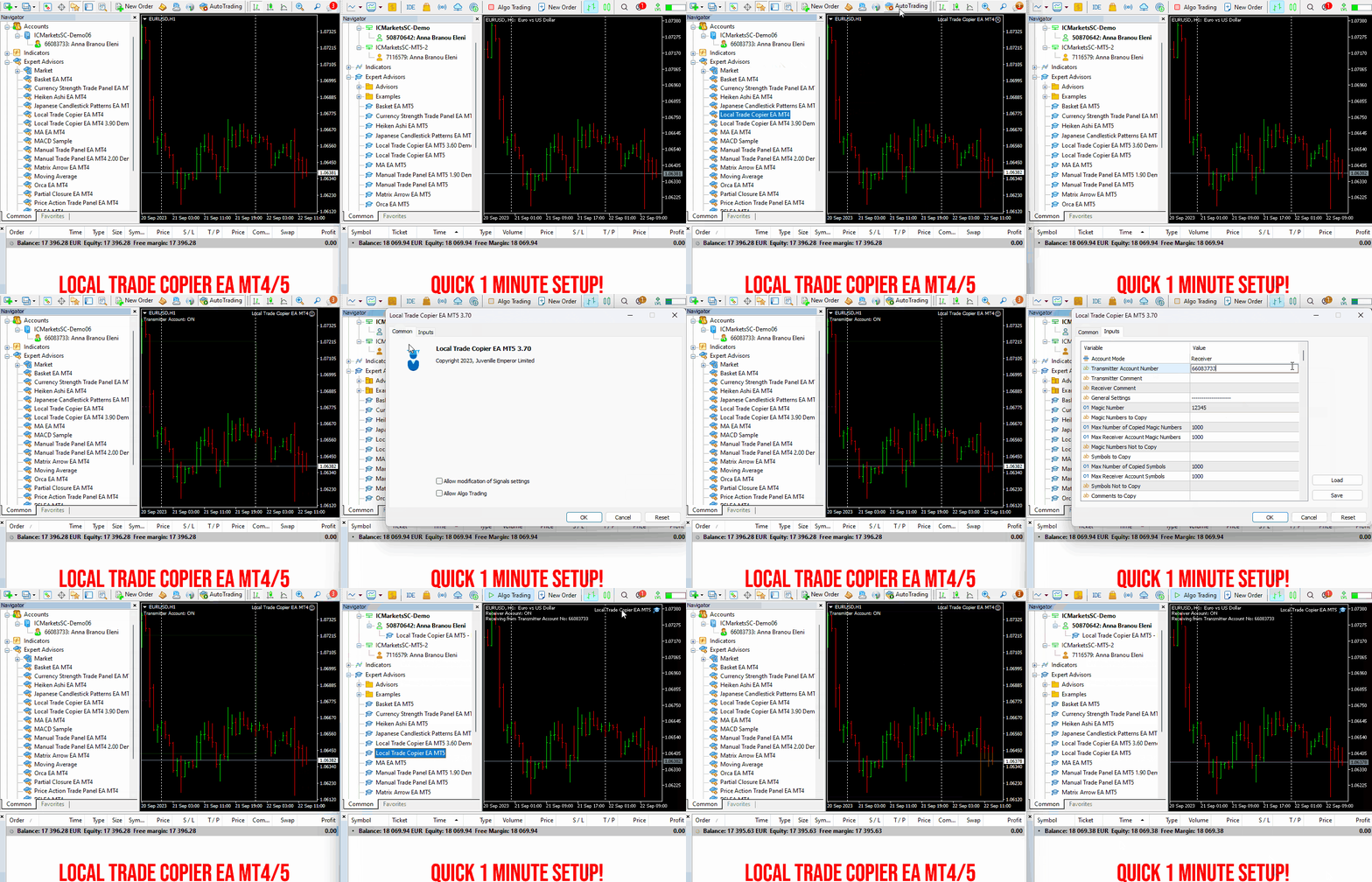
Set up your Transmitter and Receiver terminals in about 1 minute and copy manual or EA trades between accounts at the same or different brokers. Under suitable conditions, trade information can be synchronized between local MetaTrader terminals in under 0.5 seconds. Actual trade execution depends on broker latency, network conditions, computer/VPS performance and terminal workload.
Each Receiver account can use its own lot sizing, risk management, trade filtering, symbol mapping, trade management and account-protection settings. This allows the same trading activity to be synchronized across multiple accounts while each Receiver can be configured according to its own requirements.
✔️ Copying & Connectivity: Copy between multiple MT4/MT5 accounts* on the same Windows computer or VPS, across different brokers and real/demo accounts.
✔️ Lot Sizing & Risk Management: Choose from 18 lot size and risk options, with independent sizing and risk settings for each Receiver.
✔️ Trade Filtering & Copying Controls: Filter copied trades by symbol, magic number, comment, ticket, volume, direction, day and time.
✔️ Trade Management: Manage market and pending orders, TP/SL, partial closures, reopening, reverse copying, better-price conditions and trade splitting.
✔️ Account Protection: Control lot limits, risk, daily drawdown/profit, copying restrictions and emergency protection independently for each Receiver.
✔️ Broker Compatibility & Symbol Mapping: Copy between different brokers and configure suffixes and special symbol mappings when symbol names differ.
✔️ Notifications & Reliability: Use email/push notifications, persistent settings and MetaTrader logs for monitoring and troubleshooting.
✔️ 20 Activations: Each MT4/MT5 version includes 20 activations, allowing you to install and use it on multiple Windows computers or VPSs.
* MT4 → MT5 and MT5 → MT4 copying requires both LTC versions. Both terminals must run on the same Windows computer or Windows VPS.
🔥🔥🔥🔥🔥 Watch the Local Trade Copier EA MT4/5© Quick Setup Video: https://www.youtube.com/watch?v=zhc9s56QhlE
⭐️⭐️⭐️⭐️⭐️ Local Trade Copier EA MT4©: https://www.mql5.com/en/market/product/68950
⭐️⭐️⭐️⭐️⭐️ Local Trade Copier EA MT5©: https://www.mql5.com/en/market/product/68951
📥 Download the Local Trade Copier EA MT4© Free Demo: https://c.mql5.com/6/1030/Local_Trade_Copier_EA_MT4_4_60_Demo.ex4
📥 Download the Local Trade Copier EA MT5© Free Demo: https://c.mql5.com/6/1030/Local_Trade_Copier_EA_MT5_4_40_Demo.ex5
✅ Local Trade Copier EA MT4/5© Purchase, Installation & Quick Setup Guide: https://www.mql5.com/en/blogs/post/745683
✅ Local Trade Copier EA MT4/5© Detailed Inputs/Settings Guide: https://www.mql5.com/en/blogs/post/745681
✅ Local Trade Copier EA MT4/5© Troubleshooting Guide: https://www.mql5.com/en/blogs/post/746561
💎💎💎💎💎 View all my Expert Advisors, Indicators and Utilities: https://www.mql5.com/en/users/eleanna74/seller
7 October 2026
.
✔️ Martingale, Grid, Averaging or other dangerous techniques are not used
✔️ New trade on every change of the Moving Average slope direction
✔️ Option for a new same direction trade on each new candle
✔️ Offset setting for a better trade placement after a price retracement
✔️ Hard and Virtual Take Profit and Stop Loss levels
✔️ SL, TP, BE and Trailing SL levels in Percentage of the Average Daily Range
✔️ Basket TP, SL, BE and Trailing SL in % for all open positions combined
✔️ Optimized set files for many symbols/instruments
✔️ 100% automated Expert Advisor
✔️ MQL5 VPS compatible
🔥🔥🔥🔥🔥 Moving Average EA MT4/5© Backtests & New Set Files: https://www.mql5.com/en/blogs/post/745753
⭐️⭐️⭐️⭐️⭐️ Moving Average EA ΜΤ4©: https://www.mql5.com/en/market/product/45633
⭐️⭐️⭐️⭐️⭐️ Moving Average EA ΜΤ5©: https://www.mql5.com/en/market/product/47673
💎💎💎💎💎 Check out all my Expert Advisors, Indicators and Utilities: https://www.mql5.com/en/users/eleanna74/seller
6 October 2026
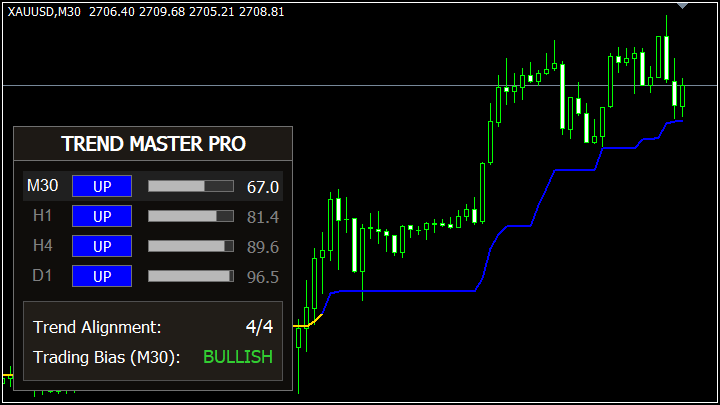
A completely redesigned version of Trend Master Pro is now available.
The new version focuses on one key idea:
Understand the market direction before looking for an entry.
Trend Master Pro now combines:
Trend Direction
Market State
Trend Strength
Multi-Timeframe Context
Trend Alignment
Trading Bias
The Multi-Timeframe Panel brings the selected timeframes together and gives you a clear directional view at a glance.
BULLISH — look for Bullish setups.
BEARISH — look for Bearish setups.
NEUTRAL — the market structure is not clear enough to force a trade.
This is more than a simple update — it is a new, more focused approach to understanding market context before looking for an entry.
Get Trend Master Pro:
MT5: https://www.mql5.com/en/market/product/68407
MT4: https://www.mql5.com/en/market/product/68405
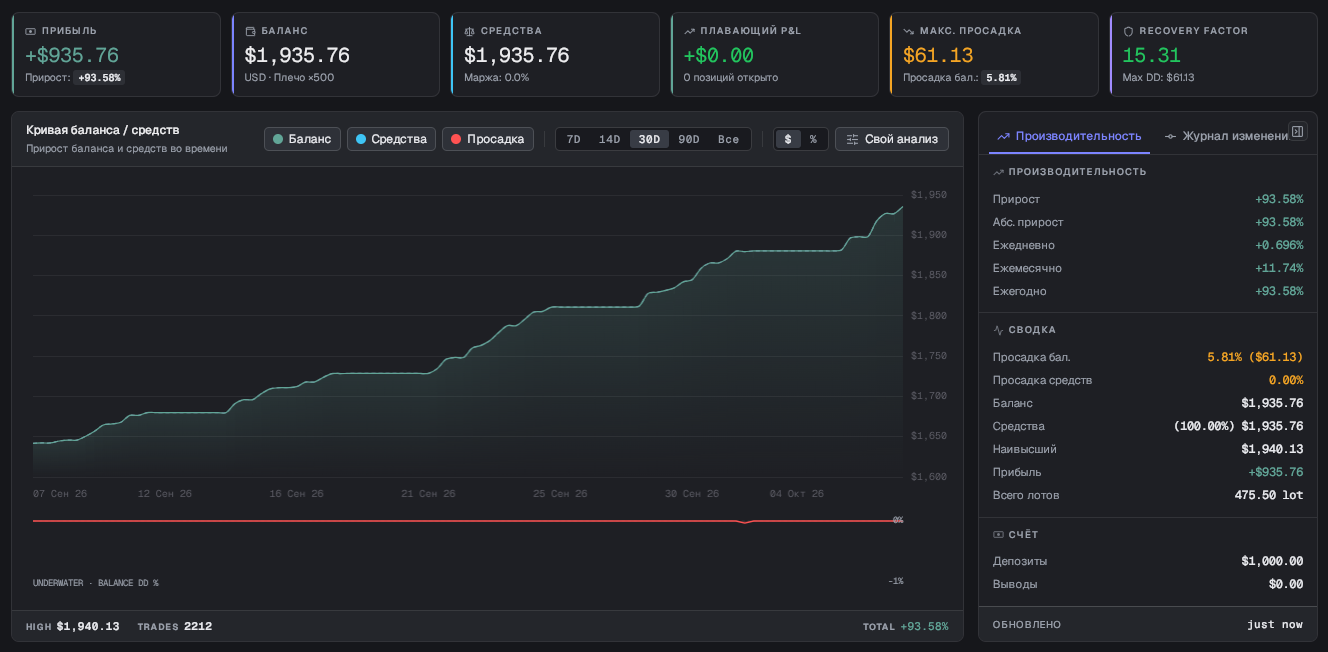
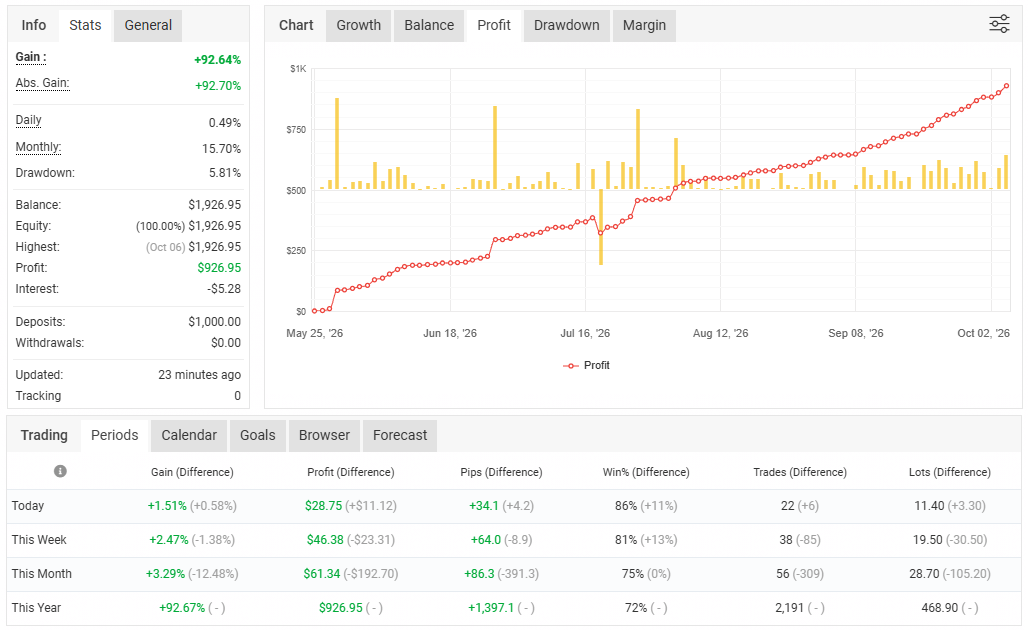
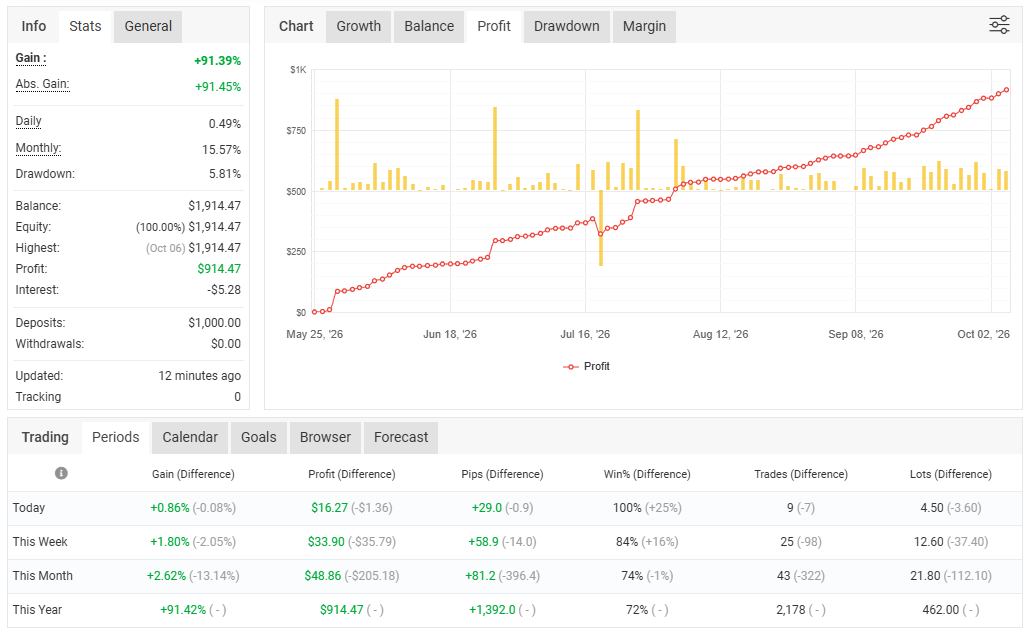
📈 Results: profit 92.6% 🚀
✅ https://www.mql5.com/en/market/product/175777
🔔 As soon as monitoring reaches 100% price of EA will be increased.
✔️ Extremely easy and straightforward interface
✔️ Works smoothly on any chart, account type, or broker
✔️ Automatic partial closure of managed trades at specified TP/SL levels, closing independent percentages of the initial lot size across up to 10 TP and 10 SL levels
✔️ Manual partial closure of all managed trades or any individual trade by ticket number, based on a percentage of the lot size
✔️ Option to move the stop loss to break even for the remaining portion of trades automatically partially closed as above
✔️ Option to move the stop loss to break even once a specified profit level (in points) is reached
✔️ Ability to exclude certain magic numbers, comments, or symbol trades from management
✔️ Compatible with MQL5 VPS
⭐️⭐️⭐️⭐️⭐️ Partial Closure EA MT4©: https://www.mql5.com/en/market/product/82356
⭐️⭐️⭐️⭐️⭐️ Partial Closure EA MT5©: https://www.mql5.com/en/market/product/82357
📥 Download the Partial Closure EA MT4© demo version in your demo account now: https://c.mql5.com/6/975/Partial_Closure_EA_MT4_1.30_Demo.ex4
📥 Download the Partial Closure EA MT5© demo version in your demo account now: https://c.mql5.com/6/975/Partial_Closure_EA_MT5_1.30_Demo.ex5
✅ Partial Closure EA MT4/5© installation & user guide: https://www.mql5.com/en/blogs/post/749385
💎💎💎💎💎 Check out all my Expert Advisors, Indicators and Utilities: https://www.mql5.com/en/users/eleanna74/seller
6 October 2026
Copylot – Forex copier for trade deals for MetaTrader has been updated to version 26.921. This release includes EAPADPRO v75 updating in the last MT terminal and fixes an issue with panel interaction in Strategy Tester visualization mode. For testing and optimization before live use, it is worth checking not only the final result, but also input settings, modelling quality, EA reports, and repeatability between passes. Small changes in parameters can affect the interpretation of test results, so it helps to review each run step by step and note what was changed and why.
More details: https://expforex.com/?exsa_click=1&qid=1150&platform=mql5
Set up your Transmitter and Receiver terminals in about 1 minute and copy manual or EA trades between accounts at the same or different brokers. Under suitable conditions, trade information can be synchronized between local MetaTrader terminals in under 0.5 seconds. Actual trade execution depends on broker latency, network conditions, computer/VPS performance and terminal workload.
Each Receiver account can use its own lot sizing, risk management, trade filtering, symbol mapping, trade management and account-protection settings. This allows the same trading activity to be synchronized across multiple accounts while each Receiver can be configured according to its own requirements.
✔️ Copying & Connectivity: Copy between multiple MT4/MT5 accounts* on the same Windows computer or VPS, across different brokers and real/demo accounts.
✔️ Lot Sizing & Risk Management: Choose from 18 lot size and risk options, with independent sizing and risk settings for each Receiver.
✔️ Trade Filtering & Copying Controls: Filter copied trades by symbol, magic number, comment, ticket, volume, direction, day and time.
✔️ Trade Management: Manage market and pending orders, TP/SL, partial closures, reopening, reverse copying, better-price conditions and trade splitting.
✔️ Account Protection: Control lot limits, risk, daily drawdown/profit, copying restrictions and emergency protection independently for each Receiver.
✔️ Broker Compatibility & Symbol Mapping: Copy between different brokers and configure suffixes and special symbol mappings when symbol names differ.
✔️ Notifications & Reliability: Use email/push notifications, persistent settings and MetaTrader logs for monitoring and troubleshooting.
✔️ 20 Activations: Each MT4/MT5 version includes 20 activations, allowing you to install and use it on multiple Windows computers or VPSs.
* MT4 → MT5 and MT5 → MT4 copying requires both LTC versions. Both terminals must run on the same Windows computer or Windows VPS.
🔥🔥🔥🔥🔥 Watch the Local Trade Copier EA MT4/5© Quick Setup Video: https://www.youtube.com/watch?v=zhc9s56QhlE
⭐️⭐️⭐️⭐️⭐️ Local Trade Copier EA MT4©: https://www.mql5.com/en/market/product/68950
⭐️⭐️⭐️⭐️⭐️ Local Trade Copier EA MT5©: https://www.mql5.com/en/market/product/68951
📥 Download the Local Trade Copier EA MT4© Free Demo: https://c.mql5.com/6/1030/Local_Trade_Copier_EA_MT4_4_60_Demo.ex4
📥 Download the Local Trade Copier EA MT5© Free Demo: https://c.mql5.com/6/1030/Local_Trade_Copier_EA_MT5_4_40_Demo.ex5
✅ Local Trade Copier EA MT4/5© Purchase, Installation & Quick Setup Guide: https://www.mql5.com/en/blogs/post/745683
✅ Local Trade Copier EA MT4/5© Detailed Inputs/Settings Guide: https://www.mql5.com/en/blogs/post/745681
✅ Local Trade Copier EA MT4/5© Troubleshooting Guide: https://www.mql5.com/en/blogs/post/746561
💎💎💎💎💎 View all my Expert Advisors, Indicators and Utilities: https://www.mql5.com/en/users/eleanna74/seller
6 October 2026
📈 Relults: profit 91.3% 🚀
✅ https://www.mql5.com/en/market/product/175777
🔔 As soon as monitoring reaches 100% price of EA will be increased.
When all indicators give a valid buy or sell signal, a corresponding arrow will be printed on the chart, at the opening of the next candle/bar indicating a strong uptrend/downtrend. The user can choose which indicators will use and can adjust the parameters of each indicator separately. Matrix Arrow Indicator MT4/5© gathers information only from the selected indicators and prints the arrow based only on their data. Matrix Arrow Indicator MT4/5© can also send terminal, push notification or email alerts for all new signals. Matrix Arrow Indicator MT4/5© is a super friendly & efficient solution whether you are a scalper, intraday or swing trader!
Matrix Arrow Indicator MT4/5© comes with a free add on, the Matrix Arrow Indicator Multi Timeframe Panel MT4/5© that offers the option to show the Matrix Arrow Indicator signals for 5 customizable timeframes of 16 modifiable symbols/instruments. It gives also the option to change the current chart it is attached onto, by clicking any one of the 16 modifiable symbol buttons. This will allow you to work much faster between different symbols and never miss a trading opportunity again.
✔️ 100% Non-Repainting indicator
✔️ 10 in 1 unique and extremely efficient Matrix and Arrow indicator
✔️ Works on all timeframes and all symbols/instruments
✔️ Super accurate entry Arrow signals that indicate a strong trend
✔️ Exit dot signals define neutral periods with no clear trend
✔️ Equally effective in trending and ranging markets
✔️ Each one indicator can be turned ON/OFF
✔️ Each and every parameter of all 10 indicators are fully adjustable
✔️ Matrix and Arrow colors are fully customizable
✔️ Free add on Panel with Matrix Arrow signals for 16 symbols and 5 timeframes
✔️ Terminal, Push Notification and Email Alerts available
✔️ Ideal for beginners but also a great asset for experienced traders
🔥🔥🔥🔥🔥 Matrix Arrow Indicator MT4/5© Demonstration Video: https://www.youtube.com/watch?v=-teba5v_90I
⭐️⭐️⭐️⭐️⭐️ Matrix Arrow Indicator MT4©: https://www.mql5.com/en/market/product/69726
⭐️⭐️⭐️⭐️⭐️ Matrix Arrow Indicator MT5©: https://www.mql5.com/en/market/product/69725
👉 Matrix Arrow Indicator MT4/5© Real Trading Examples: https://www.mql5.com/en/blogs/post/745715
✅ Matrix Arrow Indicator MT4/5© Installation Guide: https://www.mql5.com/en/blogs/post/745711
✅ Matrix Arrow Indicator MT4/5© Settings/Inputs: https://www.mql5.com/en/blogs/post/745707
💎💎💎💎💎 Check out all my Expert Advisors, Indicators and Utilities: https://www.mql5.com/en/users/eleanna74/seller
6 October 2026