EA Performance Analytics Dashboard
- 指标
-
Malik Korrich
 I am a professional algorithmic trading developer with more than 10 years of experience in MQL4 and MQL5.
I specialize in developing Expert Advisors automated trading systems, with a strong focus on stability, performance, and precise execution. - 版本: 1.0
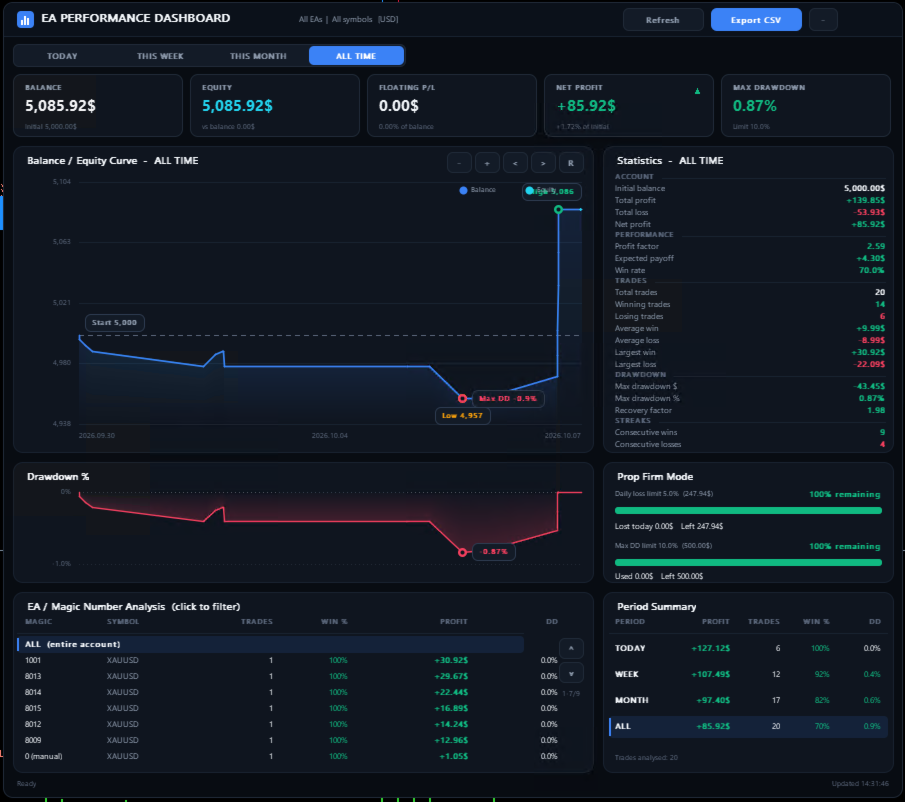
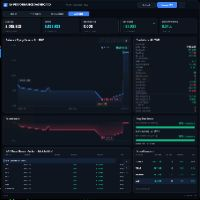
EA Performance Dashboard: Trading Account Analytics Panel for MT5
A dark, draggable performance dashboard that runs directly on your MT5 chart. It shows balance and equity curves, drawdown, trade statistics, a per-EA (Magic Number) table and prop firm limits (FTMO, FundedNext). It works from your
account history, with no DLLs and no external services.
EA Performance Dashboard brings the kind of account analysis you would see on Myfxbook or FXBlue into MetaTrader 5. It analyzes your closed trades and open positions and presents everything in one compact panel on the chart.
Use it to monitor the whole account, a single Expert Advisor (by Magic Number), a single symbol, or any combination.
Key features
Interactive dashboard
- A dark, minimal interface with smooth anti-aliased charts.
- Drag the panel anywhere on the chart. It remembers its position.
- Minimize it to a slim header bar.
- Hover effects, active states and color-coded values: green for profit, red for loss, amber for warnings, blue and cyan for information.
Time filters
- Switch the whole dashboard between TODAY, THIS WEEK, THIS MONTH and ALL TIME.
- A period summary table shows profit, trades, win rate and drawdown side by side.
KPI cards
- Balance, Equity, Floating P/L, Net Profit and Max Drawdown. Each card has a trend arrow and a small context line.
Balance / Equity curve
- Time-based chart with the starting balance, highest and lowest balance, maximum drawdown point and current balance marked.
- The equity line is recorded live while the indicator runs.
- Zoom in, zoom out, scroll and reset buttons.
Drawdown chart
- Drawdown as a percentage from the balance peak, with the worst point highlighted.
Full statistics
- Account: initial balance, total profit, total loss, net profit.
- Performance: profit factor, expected payoff, win rate.
- Trades: total, winning, losing, average win, average loss, largest win, largest loss.
- Drawdown: maximum drawdown in $ and %, recovery factor.
- Streaks: consecutive wins and consecutive losses.
EA / Magic Number analysis
- A table of every Magic Number and symbol found, with trades, win %, profit and drawdown.
- Click a row to filter the whole dashboard to that EA. Click "ALL" to go back to the whole account.
Prop firm mode (FTMO, FundedNext and similar)
- Daily loss limit and maximum drawdown limit, shown as progress bars with the amount remaining.
- On-screen warnings and optional popup alerts: "WARNING: Maximum Drawdown Risk" and "Daily Loss Limit Reached".
CSV export
- One click exports the filtered trades to EA_Performance_Report.csv in MQL5\Files.
- Columns: Date, Symbol, Magic, Type, Lot, Entry, Exit, Profit, Balance.
Light on resources
- Pure MQL5, with no DLLs or WebRequests.
- History is only reloaded when new deals appear, and the panel refreshes every X seconds.
How to use
1. Attach the indicator to any chart.
2. Choose a time filter with the tabs at the top.
3. Click a row in the EA table to analyze a single EA, or leave it on "ALL".
4. Use the zoom and scroll buttons on the chart to inspect any part of the history.
5. For prop firms, set PropFirmMode = true and enter your daily loss and drawdown limits.
Important notes
- It is an indicator, so it only reads account history and positions. It never opens, modifies or closes trades.
- Equity history: MT5 does not store past equity. The balance curve comes from closed trades. The equity line is recorded live from the moment the indicator is loaded.
- Prop firm limits: these are always calculated on the whole account, regardless of the Magic or Symbol filter. The daily loss uses the server-day balance. The maximum drawdown is static, measured from the initial balance.
- Deposits and withdrawals: they are not counted in profit statistics. The balance curve starts from the initial deposit.
- Fixed-size panel: the dashboard is a fixed-size panel of about 900×796 px. On small screens, minimize it or drag it as needed.
- History access: the terminal must have access to the account history (right-click the Account History tab and set the period to "All history").
- For informational purposes only. It is not financial advice, and you remain responsible for checking your prop firm's exact rules.