Trailing Stop Pro EA

https://www.mql5.com/tr/users/bilisimprofesoru/seller

Multi Symbol and Multi Magic Trailing Stop Manager with Basket

USER AND INSTALLATION GUIDE

 1. QUICK START & PARAMETERS

This Expert Advisor (EA) automatically manages and tracks the Trailing Stop levels for your manual trades or trades opened by other EAs, based on your custom symbol and point settings.

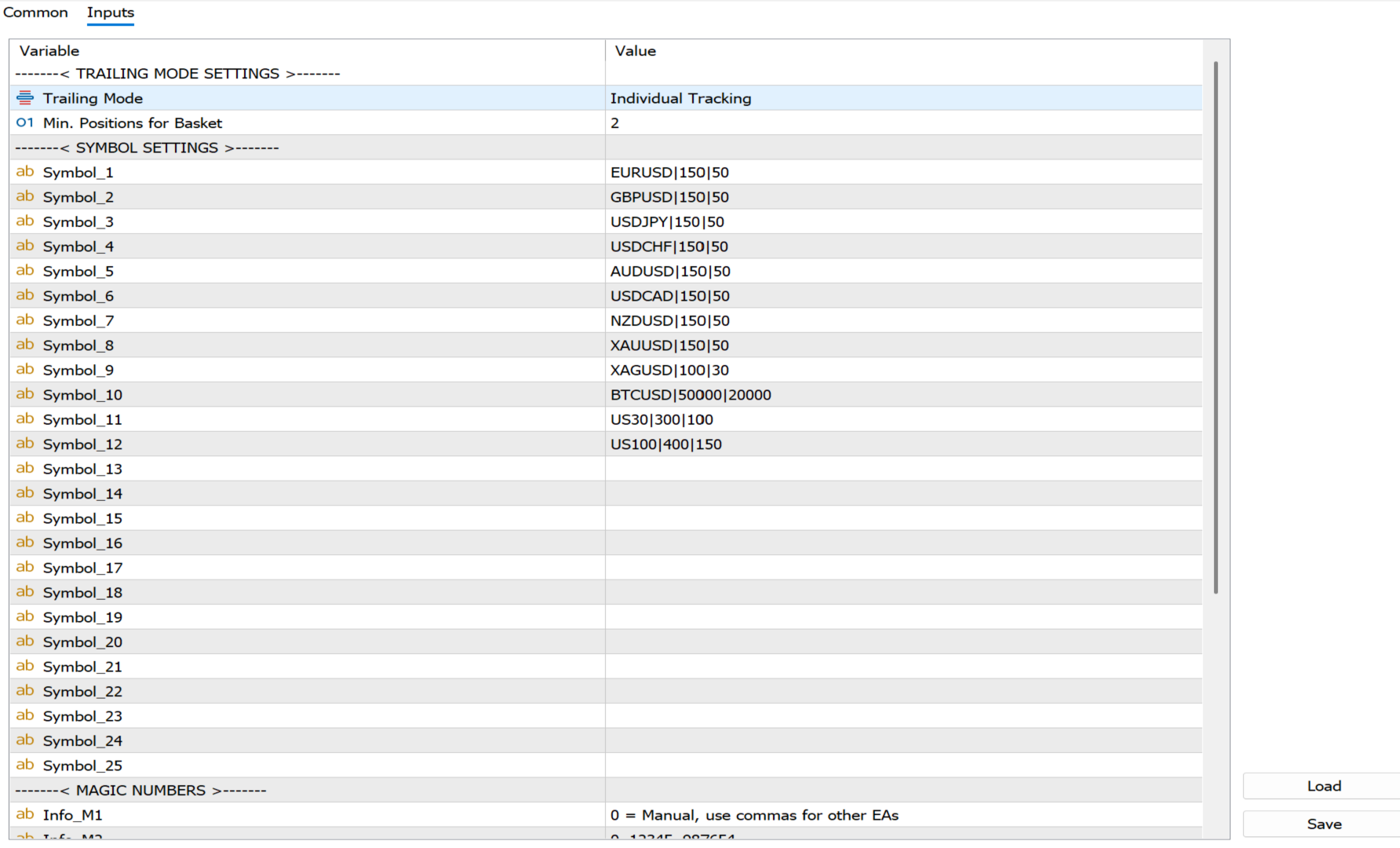
 Trailing Mode Settings

  • Trailing Mode:

    • Individual : Tracks each trade independently based on its own open price.

    • Basket : Tracks trades of the same symbol and direction together as a single bundle based on their volume-weighted average price.

  • Min. Positions for Basket: Specifies the minimum number of open positions required on a symbol to activate the Basket mode.

 Symbol Settings

Supports up to 25 different symbols simultaneously. Input format: SYMBOL|TRAILING_START|TRAILING_STEP

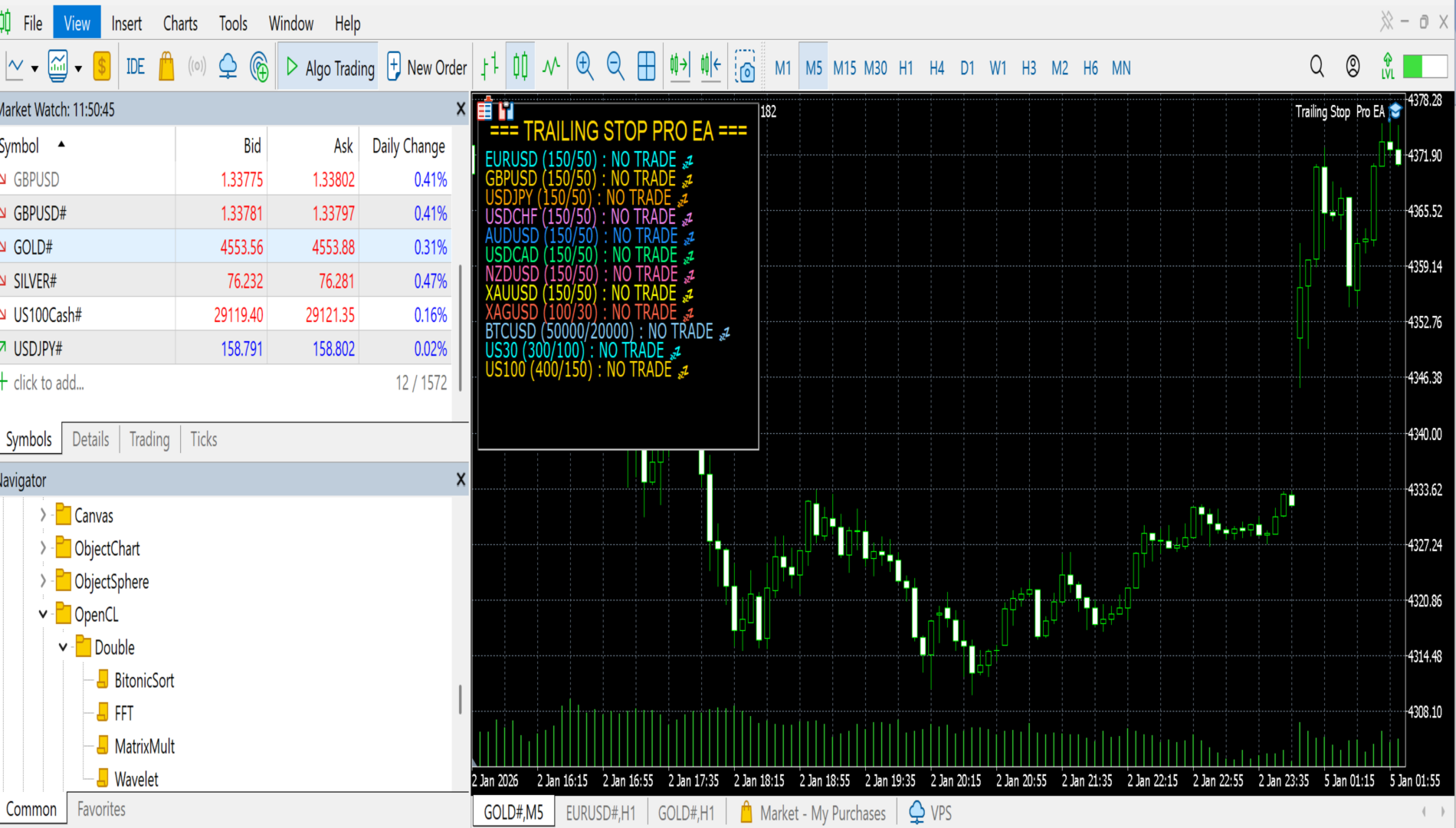
  • Example: EURUSD|150|50 (Trailing starts when the trade reaches 15 Pips in profit, and moves the stop loss level every 5 Pips of further movement).

  • Important: Values must be entered in Points, not Pips. For 5-digit pairs, 10 pips = 100 points.

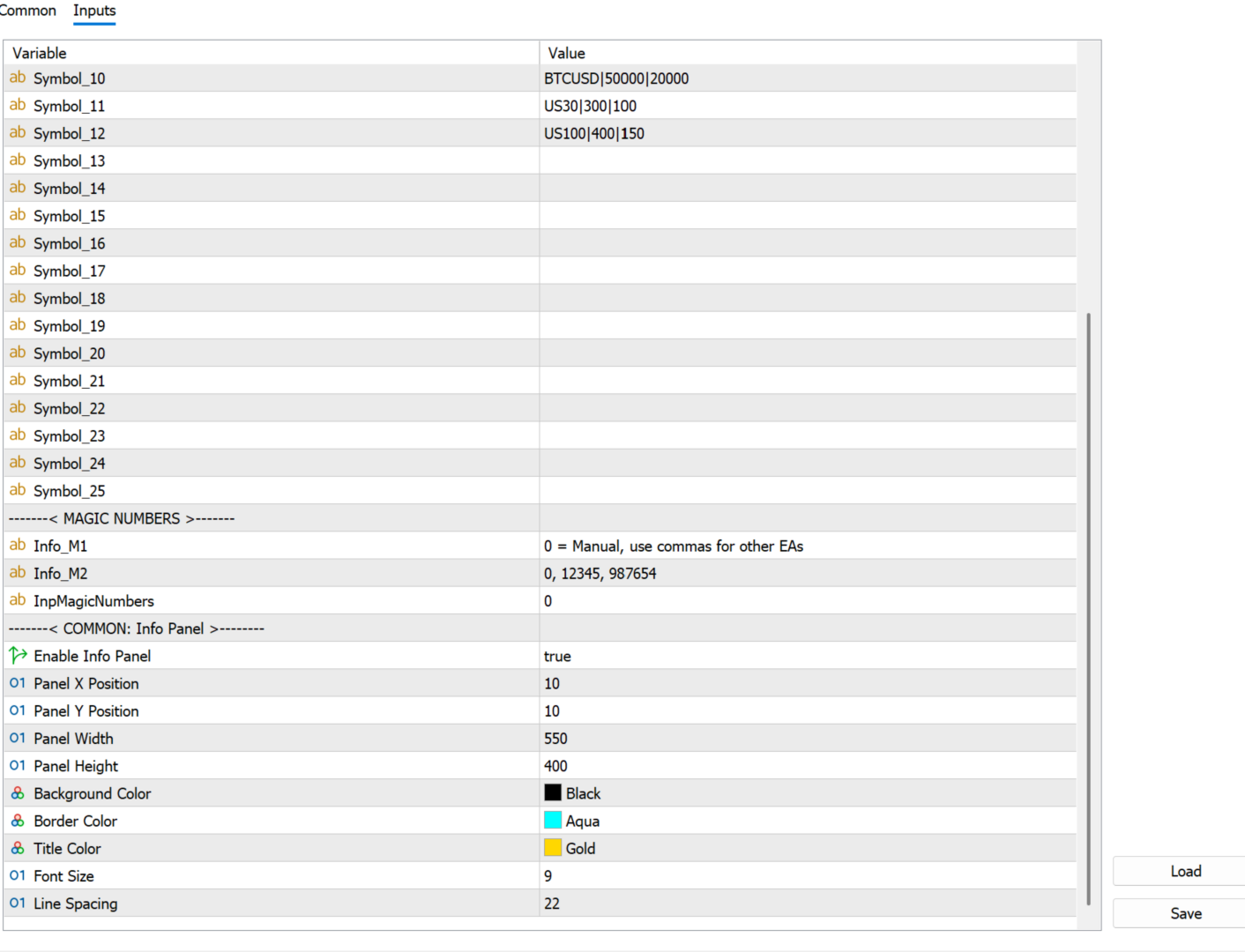
 Magic Numbers

  • InpMagicNumbers: Determines which trades the EA will manage (separate multiple magic numbers with commas).

    • 0 : Tracks Manual Trades only.

    • 0, 12345, 98765 : Tracks manual trades alongside trades from other EAs with Magic IDs 12345 and 98765 simultaneously.

 2. ON-SCREEN DASHBOARD STATUSES

You can monitor the live status of each symbol via the color-coded on-screen panel:

  • NO TRADE : No open positions found for this symbol/magic number. The EA is on standby.

  • PENDING  / BASKET PENDING : Open positions exist, but the profit has not yet reached the required Trailing Start distance.

  • STOP MOVED  / BASKET STOP MOVED : Trailing has been triggered, and the Stop Loss (SL) has been successfully moved into profit.

  • PROTECTION ACTIVE : The trade is locked in a secure profit zone; the EA is waiting for the next price step ( Trailing Step ).

  • ERROR : Modification failed due to broker limitations (the points specified might be closer than your broker's minimum Allowed Stop Level).

 3. INSTALLATION

  1. Copy the downloaded file into the MetaTrader 5 directory: MQL5 -> Experts . Right-click and Refresh the Navigator window.

  2. Attach the EA to only one chart. Since it features multi-symbol architecture, a single instance scans and manages all configured symbols in the background.

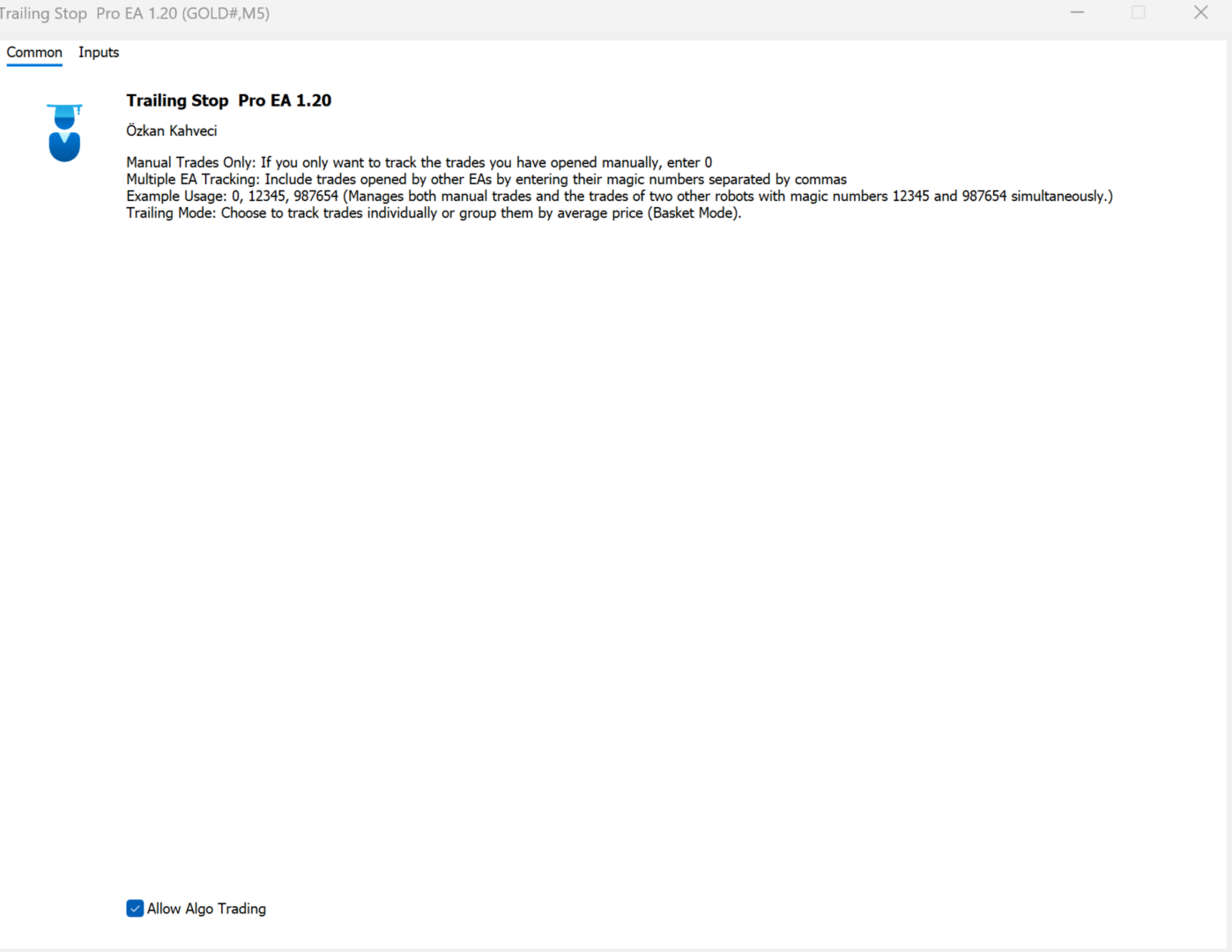
  3. In the EA settings window, navigate to the "Common" tab and check "Allow Algo Trading".

  4. Ensure the main "Algo Trading" button in the top menu bar of MetaTrader 5 is enabled (displays a green icon).

 4. IMPORTANT REQUIREMENTS (VPS Recommendation)

  • 24/7 Connectivity (VPS): Trailing Stop operations require constant price feed monitoring. It is highly recommended to run this EA on a VPS (Virtual Private Server). If you close your MetaTrader 5 platform or turn off your PC, the EA cannot modify or update your Stop Loss levels.

  • Execution Speed: Running the utility on a VPS with low latency to your broker's server ensures that trailing adjustments are sent and executed instantly without missing fast market spikes.
推荐产品
介绍适用于 MT5 的 NAS100 Auto SL 和 TP Maker: 有了我们的 NAS100 Auto SL 和 TP Maker,再也不会错过止损和止盈的设置,这是交易者在 MetaTrader 5 上浏览纳斯达克 100 市场时不可或缺的助手。该工具专为寻求自动管理止损和止盈水平的无缝解决方案的用户而设计。 主要功能 轻松实现自动化: 自动监控无止损和/或止盈的纳斯达克 100 指数交易。 根据用户配置设置动态调整水平。 订单类型的多样性: 兼容纳斯达克 100 指数的市价订单和挂单。 支持 MetaTrader 5 中的各种订单类型。 定制配置: 用户友好的参数设置允许自定义跟踪偏好和止损/止盈水平。 范围灵活: 可选择为其运行的特定 NAS100 工具或所有交易工具设置止损和止盈。 快速执行: 确保快速设置所需的 StopLoss 和/或 TakeProfit 值,无需等待新的 tick 即可迅速响应。 MetaTrader 5 兼容性: 与 MetaTrader 5 中的所有订单类型兼容,实现无缝集成。 使用 NAS100 Auto SL 和 TP Maker
FREE
The only EA for TRADING PSYCHOLOGY:Discipline, Mindset Training & Risk Control  Checklist-Enforced Trading (No trades allowed until  strategy checklist is met)  1-Click Revenge Trade Blocker (Auto-freezes account after losses)  Overtrading Circuit Breaker (Hard daily trade limits enforced)  Neuroplasticity Training (Rewires retail habits into institutional discipline)  Institutional Risk Protocols (Auto SL/TP, position sizing, daily loss cutoffs)  Prop Firm  and account Safeguard (Preve
Imagine flying a real aircraft without ever stepping into a flight simulator. That's what trading is like. You have to simulate your strategy before you can take it to a live market. It is good if you can simulate things speedily before even stepping into any live market, or before coming up with an automated system.  People don't have all day to stare at a higher timeframe chart until the entry signal finally arrives. That's why I built this so that you can simulate your strategy with speed. Th
FREE
Strategy Attribution Matrix is a performance and relationship view grouped by Magic Number or comment prefix. Key functions: - Strategy-level trading results - Contribution analysis - Drawdown by strategy group - Correlation estimates between selected groups - Detailed selected-group trade view - Magic Number and comment-prefix grouping - Clear account-history scope and status The utility analyzes available account history. Correlation estimates and attribution results depend on data completen
Gap Catcher
Mikita Kurnevich
5 (5)
Read more about my products Gap Cather - is a fully automated trading algorithm based on the GAP (price gap) trading strategy. This phenomenon does not occur often, but on some currency pairs, such as AUDNZD, it happens more often than others. The strategy is based on the GAP pullback pattern. Recommendations:  AUDNZD  TF M1  leverage 1:100 or higher  minimum deposit 10 USD Parameters:  MinDistancePoints - minimum height of GAP  PercentProfit - percentage of profit relative to GAP level

FREE
Talents ATR Scalper Utility (MT5) The Talents ATR Scalper Utility is a professional-grade trade execution and management tool built for MetaTrader 5. Inspired by the Biblical Parable of the Talents , this utility is designed to help traders multiply their potential with precision risk control, one-click simplicity, and advanced automation. Whether you’re scalping forex, gold, or indices, this tool delivers speed, consistency, and confidence. Key Features One-Click Trade Preview Click below price
Product Name: Anchor auto TP and SL Trade Manager Pro MT5 The ultimate manual assistant. Turns trades into auto-grids with Hedging, Zero-Loss Breakeven & Spread Detection. Your manual trade will be managed automatically. Anchor Auto TP and SL Trade Manager MT5 Pro is the advanced edition of our popular trade assistant. It transforms simple manual trades into sophisticated, professional-grade recovery grids. Unlike the free version, this PRO edition fully supports Hedging (simultaneous Buy & Sell
Grid Trading EA is a semi-automated one-click trading EA for both Normal Trading and Grid/Martingale Trading . Normal Trading Simply click Buy or Sell directly from the chart. The EA will automatically manage trades by: Setting Stop Loss and Take Profit Managing Trailing Stop Grid / Martingale Trading (For Hedging Account Type Only) When Grid Trading mode is enabled, the EA will automatically open additional grid orders at specified distances while increasing the lot size based on your settings.
Babel Assistant
Iurii Bazhanov
4.33 (9)
Babel assistant 1     The MT5 netting “Babel_assistant_1” robot uses the ZigZag indicator to generate Fibonacci levels on M1, M5, M15, H1, H4, D1, W1  periods of the charts , calculates the strength of trends for buying and selling. It opens a position with "Lot for open a position" if the specified trend level 4.925 is exceeded. Then Babel places pending orders at the some Fibonacci levels and places specified Stop Loss , Take Profit. The screen displays current results of work on the position
FREE
Click Trading
Jawad Tauheed
5 (2)
One Click Trading – Auto TP SL Developer TraderLinkz Version 1.00 Category Utility What it does Adds missing TP and SL to your manual trades and pending orders Sets them once per ticket Lets you move TP and SL afterward Works on hedging and netting accounts Scans on every tick and reacts on trade events Why you want it You place faster entries You get consistent risk and exit targets You reduce fat finger errors You keep full manual control Quick start Attach the EA to any chart Keep TP and SL e
FREE
DynamicTrader 1
Markus Christer Ekengren
Smart Trade Manager EA – Simple, Visual, and Risk-Based Trading Take control of your trades with ease! This free Expert Advisor is designed for traders who want a fast, intuitive, and risk-based way to manage entries directly from the chart. Risk-Based Position Sizing – Just set your preferred % risk in the EA settings, and lot size is calculated automatically. One-Click Trading – Place trades instantly with two simple buttons: BUY or SELL . Interactive SL & TP Lines – Drag and drop stop-
FREE
Discord Notify
Aleh Piatrenka
5 (2)
自动将 MT5 中的交易开仓、平仓以及部分平仓的实时通知发送到 Discord。 该工具支持 16 种语言:English、French、German、Indian (Hindi)、Indonesian、Italian、Kazakh、Korean、Dutch、Polish、Portuguese、Russian、Spanish、Turkish、Ukrainian 和 Vietnamese。该产品适用于需要在不持续监控终端的情况下接收 Discord 通知的交易者。它适合使用 Expert Advisor 的用户、同时交易多个品种的交易者以及 VPS 用户。 系统能够正确识别全部或部分平仓(例如:0.10 / 0.30 手),并且具备防止重复消息的功能。 通知可以针对交易账户中的所有品种发送,也可以仅针对挂载该工具的图表品种发送(可选)。 图表上提供 Test Discord 按钮用于测试聊天功能,设置完成后可以将其隐藏。 同时新增 Send open positions 按钮,可将当前所有未平仓交易以表格格式发送到 Discord。 通知内容: 开仓通知包括:交易品种、交易手数、交易方向
FREE
自动将 MT5 交易的开仓、平仓、部分平仓及修改的实时通知发送到 Slack。 该工具支持16种语言:英语、法语、德语、印地语、印尼语、意大利语、哈萨克语、韩语、荷兰语、波兰语、葡萄牙语、俄语、西班牙语、土耳其语、乌克兰语和越南语。你也可以通过自定义通知文本使用其他语言。该产品专为无需持续监控终端即可接收 Slack 通知的交易者设计。适用于使用 Expert Advisor 的用户、交易多个品种的交易者以及 VPS 用户。 能够正确识别全部和平仓(例如:0.10 / 0.30 手),并实现了防止重复消息的机制。 通知可以发送到交易账户的所有品种,或仅发送到附加该工具的图表品种(可选)。 提供 Test Slack 按钮用于验证聊天功能,并可在设置后从图表中隐藏。还新增了 Send open positions 按钮,可将当前所有未平仓头寸以表格形式发送到 Slack。 通知内容: 开仓通知包括:交易品种、交易量、交易方向(BUY / SELL)、开仓价格,以及 Take Profit 和 Stop Loss(可选)。 平仓通知包括:交易品种、平仓量(部分或全部)、平仓价格(可选),以
FREE
Net Z
Sugianto
5 (1)
NET Z uses a very well-known trend reversal technique to determine position entry with slight modifications by using virtual trade techniques and virtual pending orders so that position entry is not too early or too late. Why NETZ? NET Z does not require complicated settings and is easy to use because user only need to upload a set file that is already available. Currently there are set files for 20 fx pairs. The best GRID EA with the ability to control risks. I will share my personal daily rou
Gold Crazy EA MT5
Nguyen Nghiem Duy
Gold Crazy EA   is an Expert Advisor designed specifically for trading Gold H1/ EU M15. It use some indicators to find the good Entry. And you can set SL or you can DCA if you want. It can be an Scalping or an Grid/ Martingale depend yours setting. This EA can Auto lot by Balance, set risk per trade. You also can set TP/ SL for earch trade or for basket of trade. - RSI_PERIOD - if = -1, then the default strategy works, if >0, then the RSI strategy works - MAX_ORDERS - to trade with only 1 order,
Trading panel for manual trading. Has a fairly wide functionality. Allows you to automatically calculate the order size, open both market and pending orders. It has a wide range of options for closing orders, it is possible to partially close orders, close orders after reaching a certain profit or loss, separately close profitable and unprofitable, buy and sell, as well as pending orders. The panel also contains a simple implementation of a grid of pending orders, reverse and lock functions, tr
按价格设置TP和SL – MT5自动订单修改器 自动为任意交易设置精确的TP和SL价格 ️ 适用于所有货币对和EA,可按符号或魔术号筛选 此EA允许您通过直接价格值(例如EURUSD的1.12345)来设置和应用精确的止盈(TP)和止损(SL)水平。无需点数或Pips。为所有订单或按图表/魔术号筛选实现干净、精准的交易管理。 主要功能: 通过精确价格即时修改TP和SL 应用于所有订单、当前图表或特定魔术号 ️ 输入0以移除TP或SL 连接到任意图表后自动运行 兼容所有交易品种 适用于: 想快速控制TP/SL的手动交易者 需要覆盖默认退出逻辑的EA用户 管理多订单或复杂头寸的交易者 有问题或建议吗? 请留言提出您的问题或功能想法。 您的反馈将帮助我们改进未来版本。 Keywords: 按价格设置TP SL, MT5 TP SL管理, 自动SL TP MT5, 修改SL TP MT5, 交易管理EA, 专家顾问SL TP, 设置止盈价格, 设置止损价格, 应用TP SL MT5, MT5工具EA, SL TP覆盖,
The Ultimate All-In-One Trade Manager & Prop Firm Guardian for MT5. Nexus Pro Trade Manager is the most advanced, all-in-one trading assistant designed for both manual traders and Prop Firm challengers. Featuring a stunning, lag-free UI (Dark/Light mode), it completely transforms your MT5 into a professional trading terminal. Whether you are trading a personal account or trying to pass evaluations for FTMO, FundedNext, or other prop firms, Nexus Pro protects your capital, automates your risk cal
Manus Pro
Itumeleng Mohlouwa Kgotso Tladi
MANUS PRO EA The Trading Revolution You've Been Waiting For Are you TIRED of watching other traders make consistent profits while your account bleeds red?   The financial markets don't wait for anyone – and neither should you. MANUS PRO isn't just another Expert Advisor... it's your   TICKET TO FINANCIAL FREEDOM . Why MANUS PRO is Different (And Why Everyone's Talking About It) FOR BEGINNERS: Your Trading Mentor That Never Sleeps Zero Learning Curve   – Install, activate, and watch it wo
Kintech Gold
Doan Van Hai
Following our guide, you will gain more than you lose. EA for long-term. Stable profit - min risk. Symbol:  XAUUSD Attach to any timeframe Min deposit:   3000$ - Calculate profit by month Live signal:  https://www.mql5.com/en/signals/2080910?source=Site+Signals+My EA input instruction: 1. With XAU 2 digits (eg: 1843.23) please set - Input   [3. Max spread]: 55 2. With XAU 3 digits (eg: 1843.235) please set - Input   [3. Max spread]: 550 If you want daily trade, this signal maybe not suit with
RRtoolBox
David Ruiz Moreno
RRtoolbox - Professional Tools: Risk:Reward Trading Tool (SL/TP Horizontals + Pending orders + Diagonals), Alerts set on trend lines (for alerts on diagonal levels), SelfManagement (BE, partials...), close/cancelling by time, Statistics, Info and trading on chart. One-Click Trading with Visual Risk:Reward Management RRtoolbox is a comprehensive trading panel that combines one-click order execution,  statistics and  powerful visual Risk:Reward tools, alerts set with trendlines, on chart butt
Key Benefits at a Glance: Lorentzian ML signal generation Majority voting across 3 timeframes Automatic market regime detection Smart equity recovery with group profit targets 1% risk‑based adaptive lot sizing ATR‑based dynamic SL/TP & trailing Emergency drawdown cut Live on‑chart info panel Hybrid Lorentzian Gold ML EA v2.0 – Intelligent Adaptive Trading for XAUUSD Next‑Gen Machine Learning Core A Lorentzian KNN classifier analyzes 5 normalized features (RSI, WaveTren
FREE
EA16 Taka Grid
Nhat Tien Duong
TAKA Grid EA (EA16): The Sideway King & Prop Firm Shield Are you tired of EAs that get destroyed by choppy, ranging markets? Meet TAKA Grid EA , the ultimate mean-reversion system designed specifically for the AUDNZD cross pair on the M15 timeframe. It doesn't rely on explosive breakouts; it dominates the sideways chop with mathematical precision.   ENTER YOUR KEY HERE:   [  EA16_99999D_TANINCODER_595559587987 ] -- MANDATORY: ALLOW WEBREQUEST TO ACTIVATE THE BOT To verify your License
FREE
Neopips Engine EA
Md Billal Hossain
NeoPips Engine EA – 终极交易革命已然到来! “交易的真正力量在于洞察他人所忽略的。NeoPips Engine 不随波逐流,而是掌控市场。” 关于 NeoPips Engine EA:您的智能交易盟友 NeoPips Engine EA 并非普通的交易机器人。它是一款多维度、AI 优化的专家顾问,专为追求精准度、适应性和长期表现的交易者打造。 与那些规则僵化的过时机器人不同,NeoPips Engine 是一种动态策略——它会实时思考、学习并适应市场。 这不仅仅是自动化,更是一场持续的进化。 更上一层楼的智能:让您自由发挥的核心功能 人工智能决策 动态模式识别 预测趋势分析 基于实时数据的智能进出逻辑 多引擎策略核心 – 四种模式,同一个目标:赢。 NeoPips 引擎会根据实时信号自动切换引擎: 剥头皮模式 – 捕捉快速波动的爆发 波动模式 – 瞄准长期趋势阶段 突破模式 – 在重大经济新闻发布时激活 ️ 安全守护模式 – 在市场波动时介入 效果:无缝过渡,在所有市场阶段
Break Of Structure Pro Is price action king? 1. Price is the ultimate king in the forex market, stock market or any other market. Using price action is the reason we can see more profit over loss. Technical analysis is the art of using data points to your advantage and taking informed decisions while entering, trailing and exiting a position on any timeframe. Break Of Structure Pro can be used to trend trade, scalp, hedge or swing trade. Price action is a trading technique that allows a trade
概述 Candle Timer Countdown Pro 显示当前K线收盘的平滑、精准倒计时,并配有一个圆形进度弧,让您一眼即可直观了解剩余时间。不同于其他在无新tick时会冻结或时间漂移的计时器,本指标使用服务器时间插值算法,在 M1 至 MN 的所有周期上提供无卡顿的平滑倒计时。 无论您是在1分钟图上进行剥头皮交易,还是在H4进行波段操作,准确知道当前K线何时收盘,有助于把握入场时机、确认K线形态,并避免过早决策。 为什么本计时器与众不同 大多数 MT5 计时器仅依赖 TimeCurrent(),该函数只有在新tick到来时才更新。在低波动或高周期图表中,tick可能间隔数秒,导致计时器冻结后突然跳动。 本指标通过在每次tick到达时锚定服务器时间,并在两次tick之间使用本地毫秒时钟进行插值计算,实现每0.5秒平滑递减,无卡顿、无延迟。同时配备实时圆形进度弧,提供独特的可视化时间提示。 主要功能 精准倒计时 服务器时间插值确保即使在tick稀少时也能平滑倒计时,无冻结、无跳动、无漂移。 圆形进度弧 在倒计时文字旁显示实时圆形进度环。 可选样式: 空心圆环 实心扇形 颜色随多空方
Trade Panel by RWBTradeLab — The Ultimate Trade & Risk Management Utility Take full control of your MetaTrader 5 trading with the   Trade Panel by RWBTradeLab ! Designed by RWBTradeLab, this all-in-one utility is built for both professional and beginner traders who want to execute trades faster, manage risk perfectly, and analyse their account performance in real-time. Say goodbye to manual lot calculations and slow trade execution. With a sleek, draggable, and highly intuitive User Interfa
该指标建立当前报价,可以与历史报价进行比较,并在此基础上进行价格走势预测。指示器有一个文本字段,用于快速导航到所需日期。 选项: 符号 - 选择指标将显示的符号; SymbolPeriod - 选择指标从中获取数据的时段; IndicatorColor - 指示器颜色; HorisontalShift - 由指标绘制的报价移动指定的柱数; Inverse - true 反转引号,false - 原始视图; ChartVerticalShiftStep - 图表垂直移动(键盘上的向上/向下箭头); 接下来是文本字段的设置,您可以在其中输入日期,您可以通过按“回车”立即跳转到该日期。 接下来是文本字段的设置,您可以在其中输入日期,您可以通过按“回车”立即跳转到该日期。
Tp or Sl Fast
Perry Gonzaga Ndege
Take full control of your pending orders in MetaTrader 5 with a professional-grade order management script designed for precision, speed, and simplicity . If you trade grids, breakouts, news setups, or multi-symbol strategies, you already know how painful it is to manually edit take profits or stop losses one order at a time. This tool eliminates that friction entirely. With this MT5 script, you can apply a single, exact price as a Take Profit or Stop Loss to all pending orders instantly —acros
Trade with Confidence Using the Trendline Trading ATM (Advanced Trade Management)! Master entries, exits, and risk management with the powerful tools of the MetaTrader Trendline Trading ATM. This expert advisor equips you with a comprehensive suite of tools to trade consistently smarter, not harder.  Take control of your trading risk and drawdown, capture profitable entries, and let your winners run.  This innovative Trade Entry/Exit and Risk Management utility empowers you to:   Precision Entr
该产品的买家也购买
Trade Assistant MT5
Evgeniy Kravchenko
4.41 (215)
它有助于计算每笔交易的风险,容易安装新的订单,具有部分关闭功能的订单管理, 7 种类型的追踪止损和其他有用的功能。   附加材料和说明 安装说明   -   应用程序说明   -   模拟账户应用程序的试用版 线条功能  - 在图表上显示开仓线、止损线、止盈线。 有了这个功能,就可以很容易地设置一个新的订单,并在开仓前看到它的附加特性。   风险管理  - 风险计算功能在考虑到设定的风险和止损单的大小的情况下,计算新订单的成交量。它允许你设置任何大小的止损,同时观察设定的风险。 批量计算按钮 - 启用 / 禁用风险计算。 在 " 风险 " 一栏中设置必要的风险值,从 0 到 100 的百分比或存款的货币。 在 " 设置 " 选项卡上选择风险计算的变量: $ 货币, % 余额, % 资产, % 自由保证金, % 自定义, %AB 前一天, %AB 前一周, %AB 前一个月。   R/TP 和 R/SL - 设置止盈和止损的关系。 这允许你设置相对于损失的利润大小。 例如, 1 : 1 - 这决定了 TP = SL 的大小。 2 : 1 - 这意味着 TP 是 SL 的两倍。 RR -
欢迎来到 Trade Manager EA——这是一个终极风险管理工具,旨在使交易变得更直观、精准和高效。它不仅仅是一个下单工具,而是一个用于无缝交易计划、仓位管理和风险控制的全面解决方案。不论您是新手交易员、资深交易员,还是需要快速执行的剥头皮交易员,Trade Manager EA 都可以满足您的需求,适用于外汇、指数、大宗商品、加密货币等各种市场。 借助 Trade Manager EA,复杂的计算已成过去。只需分析市场,在图表上用水平线标记入场、止损和止盈,设置您的风险水平,Trade Manager 就会立即计算出理想的头寸规模,并实时显示以点、账户货币计价的止损和止盈。每笔交易都得以轻松管理。 主要功能: 头寸规模计算器 :根据定义的风险瞬间确定交易规模。 简单的交易计划 :在图表上用可拖动的水平线直接计划交易,设置入场、止损和止盈。 实时显示 SL 和 TP :以账户货币、点或分显示止损和止盈,便于分析。 高级保护工具 盈亏平衡选项 : 基本盈亏平衡 :当您的交易达到设定水平时自动保护利润。 多级盈亏平衡 :设置多达 4 个级别以逐步保护利润。 尾随止损选项 : 基本尾随
TradePanel MT5
Alfiya Fazylova
4.88 (167)
交易面板是一款多功能交易助手。该应用包含超过50种手动交易功能,并允许您自动执行大多数交易任务。 在购买之前,您可以在演示账户上测试演示版本。下载用于演示账户的试用版应用程序: https://www.mql5.com/zh/blogs/post/762579 。 完整说明 这里 。 贸易. 只需单击一下即可执行交易操作: 打開掛單和頭寸,並自動計算風險。 一鍵打開多個訂單和頭寸。 打開訂單網格。 按組別關閉掛單和頭寸。 反轉頭寸方向(關閉買入>打開賣出,關閉賣出>打開買入)。 鎖定頭寸(通過開啟缺少的頭寸,使買入和賣出頭寸的數量相等)。 一鍵部分關閉所有頭寸。 將所有頭寸的止盈和止損設置在同一價格水平。 將所有頭寸的止損設置在盈虧平衡水平。 開倉時,可使用以下功能: 在多個訂單或倉位之間分配計算出的數量(在單擊一次時開啟多個訂單和倉位)。 在開啟訂單前在圖表上可視化交易水平。 僅在當前點差不超過設定值時才開啟倉位。 止盈和止損之間的自動比例。 虛擬止損和止盈。 自動將止損和止盈的大小增加為當前點差的大小。 基於ATR指標讀數計算止盈和止損。 設置掛單的到期日期。 為掛單設置追蹤(掛單
Astro Trade MT5
Indra Maulana
5 (2)
AstroTrade Trading Assistant AstroTrade is a comprehensive multi-functional trading utility developed for the MetaTrader 5 platform. It integrates essential tools for trade execution, risk management, and technical monitoring into a single unified interface. The application is designed to assist traders in managing their daily operations through a visual and structured environment. Visual Trade Execution and Risk Management The application includes a specialized trading panel that assists in c
================================================================================ POC BREAKOUT - V20.72. Full Professional Grade Toolkit ================================================================================ POC Breakout is a full MetaTrader 5 trading dashboard for discretionary traders who want breakout signals, Point of Control (POC) context, volume profiles, order flow, market structure, news, alerts, and advanced trade planning in one professional workspace. Attached directly to you
Local Trade Copier EA MT5
Juvenille Emperor Limited
4.97 (146)
通过 Local Trade Copier EA MT5 获得非常快速的交易复制体验。它的简单1分钟设置,使您可以在同一台Windows计算机或Windows VPS上在多个MetaTrader终端之间复制交易,具有闪电般快速的复制速度,低于0.5秒。 无论您是初学者还是专业交易者, Local Trade Copier EA MT5 都提供了广泛的选项,可根据您的特定需求进行自定义。对于任何希望增加利润潜力的人来说,这都是终极解决方案。 今天就尝试一下,看看为什么它是市场上最快、最简单的贸易复印机! 提示: 您可以在您的模拟账户中下载并试用 Local Trade Copier EA MT5 模拟版: 这里 将下载的免费演示文件粘贴到您的 MT5 >> 文件 >> 打开数据文件夹 >> MQL5 >> 专家文件夹并重新启动您的终端。  免费演示版本每次可在 4 小时内发挥全部功能,仅限演示帐户。 要重置试用期,请转至 MT5 >> 工具 >> 全局变量 >> Control + A >> 删除。 请仅在非关键模拟账户上执行此操作,不要在挑战道具公司账户中执行此操作。 如果您无法
测试版发布 Telegram to MT5 Signal Trader 即将进入正式的 Alpha 版本。一些功能仍在开发中,您可能会遇到一些小错误。如果您遇到问题,请反馈,您的意见将帮助我们改进软件。 Telegram to MT5 Signal Trader 是一款强大的工具,能够将 Telegram 频道或群组的交易信号自动复制到您的 MetaTrader 5 账户。 支持公开和私人频道,可将多个信号提供者连接至一个或多个 MT5 账户。软件优化、高效、稳定,精准控制每笔复制交易。 界面简洁,仪表盘美观,图表交互性佳,导航直观。您可以管理多个信号账户,自定义每个提供者的设置,并实时监控所有操作。 系统需求 由于 MQL 限制,EA 需要配合 PC 端应用与 Telegram 通信。 安装程序可通过官方 安装指南 获取。 核心功能 多提供者支持: 从多渠道复制信号至多个 MT5 帐户 高级信号识别: 关键词、模式和标签全面自定义 逐提供者控制: 可启用/禁用特定信号类型、平仓策略等 灵活风险管理: 固定手数、固定金额、余额/权益百分比、部分平仓设置 可定制 SL/TP: 覆盖信号
Telegram to MT5 Multi-Channel Copier 可自动将您 Telegram 频道中的交易信号直接复制到 MetaTrader 5。无需机器人,无需浏览器扩展,无需手动复制。您在 Telegram 上收到信号,EA 会在几秒钟内在您的终端上开仓。 本产品包含两个组件:一个监听您 Telegram 频道的 Windows 应用程序,以及在您的 MT5 终端上执行信号的 EA。同时也提供 MT4 版本。 设置指南和应用程序下载: https://www.mql5.com/en/blogs/post/768988 工作原理 Windows 应用程序使用您自己的 API 凭据连接到 Telegram,而不是机器人。这意味着它可以读取您订阅的任何频道、群组或话题,包括私人和 VIP 频道。检测到信号后,它会进行解析并发送给 EA。EA 根据您的经纪商解析交易品种名称,基于您的风险设置计算手数,然后开仓。 整个过程都是自动的。您无需守在电脑前。 打开应用程序并登录 Telegram(仅第一次)。 选择要监听的频道或话题。 按下 Start。EA 会处理其余的一切。 支持的
Trade copier MT5
Alfiya Fazylova
4.58 (52)
Trade Copier 是一种专业实用程序,旨在复制和同步交易账户之间的交易。 复制发生从供应商的帐户/终端到收件人的帐户/终端,安装在同一台计算机或 vps 上。 促销活动 - 如果您已经购买了“Trade copier MT5”,您可以免费获取“Trade copier MT4”(用于 MT4 > MT5 和 MT4 < MT5 的复制)。欲了解更多详细条款,请通过私人消息与我们联系! 在购买之前,您可以在演示帐户上测试演示版本。 演示 这里 。 完整说明 这里 。 主要功能和优点: 支持复制MT5>MT5、MT4>MT5、MT5>MT4,包括МТ5 netting账户。 供应商和收件人模式在同一产品中实现。 简单直观的界面,允许您直接从图表中实时控制复制。 连接中断或终端重新启动时不会丢失设置和位置。 允许您选择要复制的符号,也可以替换接收者的符号,例如 EURUSD> USDJPY。 支持回拷贝。 能够仅复制某些订单。 允许您设置开仓交易价格的最大差异和最大时间延迟。 正确复制部分订单关闭的执行。 计算复制手数的几种方法。 同步止盈和止损。有几种方法可以计算它们的位置。 支持
Grid Manual MT5
Alfiya Fazylova
4.73 (22)
Grid Manual是一个交易面板,用于处理订单网格。 该实用程序是通用的,具有灵活的设置和直观的界面。 它不仅可以在亏损方向上设置订单网格,还可以在盈利方向上设置订单网格。 交易者不需要创建和维护订单网格,实用程序会这样做。 打开一个订单就足够了,Grid manual会自动为它创建一个订单网格,并伴随它直到非常关闭。 完整说明和演示版 此處 。 该实用程序的主要特性和功能: 伴隨以任何方式打開的訂單,包括從移動終端打開的訂單。 適用於兩種類型的網格:“限制”和“停止”。 使用兩種方法計算網格間距:固定和動態(基於 ATR 指標)。 允許您更改未結訂單網格的設置。 顯示圖表上每個網格的盈虧平衡水平。 顯示每個網格的利潤率。 允許您一鍵關閉網格中的盈利訂單。 讓您一鍵關閉每個訂單網格。 允許您對訂單網格應用追踪止損功能。 允許您在訂單網格上應用將訂單網格的止損轉移到盈虧平衡水平的功能。 相對於訂單網格的盈虧平衡水平自動重新排列止盈(僅在限價網格模式下,距離取決於所選的計算類型:“保守”或“激進”)。 最多可管理 20 個訂單網格,每個網格最多可包含 100 個訂單。 計算初始手數時,
Exp COPYLOT CLIENT for MT5
Vladislav Andruschenko
3.97 (35)
适用于 MetaTrader 5 的专业交易复制器 快速、专业、稳定可靠的 交易复制器 ,适用于 MetaTrader 。 COPYLOT 可在 MT4 和 MT5 终端之间复制 Forex 交易,并支持 Hedge 和 Netting 账户。 COPYLOT 的 MT5 版本支持: - MT5 Hedge → MT5 Hedge - MT5 Hedge → MT5 Netting - MT5 Netting → MT5 Hedge - MT5 Netting → MT5 Netting - MT4 → MT5 Hedge - MT4 → MT5 Netting MT4 版本 完整说明 + DEMO + PDF 如何购买 如何安装 如何获取日志文件 如何测试和优化 Expforex 的所有产品 您也可以将交易复制到 MT4 终端(MT4 → MT4,MT5 → MT4): COPYLOT CLIENT for MT4 COPYLOT 是一款专业的交易和持仓复制器,可同时与 2、3 甚至 10 个终端协同工作。 支持从 模拟账户和投资者账户 复制,也支持同时在多个终端上运行。 您可以使
Power Candles 策略扫描器——自优化多符号设置查找器 Power Candles策略扫描器 采用与Power Candles指标相同的自优化引擎,可同时扫描您“市场观察”中的所有交易品种。一个面板即可显示当前哪些品种在统计上具备交易价值、每种策略的最佳应用方向、最优止损/止盈组合,并在新信号触发时立即向您发送提醒。 本工具是 Stein Investments 生态系统的一部分 - 18+ 款工具,加上 Max,您的一对一 AI 交易导师。  随时在线,深入了解每一款指标,在您需要梳理思路的那一刻就在那里。  立即认识他: https://stein.investments 您的全面市场监控。每个交易品种超过3,000次自动优化。2种警报类型。一键切换图表并采取行动。 为何您需要此工具 大多数多标的扫描器仅展示价格 波动 。每只股票的波动率、百分比变化、RSI。您仍需自行摸索正确的策略、合适的止损位以及理想的入场阈值。Power Candles策略扫描器针对每只股票自动解答这些问题,仅在数学验证过的交易设置中触发实际入场信号时才会向您发出提示。这就是全部卖点。 自动
Premium Trade Manager - 内置交易导师的图表面板 Premium Trade Manager 将一位交易导师嵌入您的图表,并在其下搭载完整的执行引擎。像往常一样建立交易,然后让您的 AI 交易导师 Max 读取这笔具体的交易,结合您的实时账户给出直接判断,再由您决定是否下单:止损是否符合纪律化交易的要求、风险规模是否合理、高影响新闻事件是否即将发布、您是否接近资金盘限额。其下是完整的执行引擎,负责点击之后的一切:一键按风险下单、您在图表上拖动规划且交易进行中仍可随时调整的计划、最多四个分批止盈级别、七种移动止损方式、实时资金盘合规检查、新闻屏蔽保护,以及对自身成本进行评级的点差功能。决策由您做出。Max 给出第二次审视。面板负责此后的一切。 购买前先亲手体验。 直接在浏览器中点击实时面板,这是在购买前感受其工作方式的最快途径。 stein.investments/products/premium-trade-manager Max 是您的一对一 AI 交易导师,他直接内置于面板之中。  他了解您的账户、您的设置和您的规则,用您自己的语言回答,并在每笔交易下单前进
Telegram To MT5 Ultra
Mirel Daniel Gheonu
5 (4)
Telegram To MT5 — 信号复制器 将您的 Telegram 频道中的交易信号变成真实的 MT5 订单 — 自动执行,可用于任意数量的账户,风险与规则完全由您掌控。 Telegram To MT5 将您已在 Telegram 关注的 VIP / 信号频道连接到您的 MetaTrader 5 终端。一个免费的配套桌面应用读取消息(即使是禁止机器人的频道),而本 EA 在您的账户上执行这些信号 — 应用您自己的风险设置、品种映射、止盈处理、交易时段与新闻过滤。 它是一个信号复制器,而非黑箱策略:由您决定信任哪些频道,以及每笔交易如何计算手数和管理。 分步设置与配套应用安装指南 工作原理 [您的 Telegram 频道] -> [配套桌面应用] -> [MT5 + 本 EA] -> 订单 配套桌面应用(免费,已包含)使用您的 Telegram 账户登录并监视您所选择的频道。即使是禁止机器人的 VIP 频道也能正常工作,它通过一个私有、加密的本地桥接转发每条消息。 本 EA 挂在一个图表上,在 MT5 接收这些信号,并按照您的规则开仓 / 管理交易。 应用与 EA 之间的连接是位于
Timeless Charts
Samuel Manoel De Souza
5 (8)
Timeless Charts is an all-in-one trading utility for professional traders. It combines custom chart types such as Seconds Charts and Renko with advanced order flow analysis using Footprints , Clusters , Volume Profiles , VWAP studies, and anchored analysis tools for deeper market insight. Trading and position management are handled directly from the chart through an integrated trade management panel , while Market Replay and Virtual Accounts provide environments for practicing trading skills and
Farmed Hedge Yield Farming | All Markets (Manual - Hybrid - Semi/Automated EA) MULTI-ASSET SUPPORT Trade any asset available on your broker - Forex: Major, Minor, Exotic pairs - Crypto: BTC, ETH, XRP, SOL, BNB - Stocks: Apple, Tesla, Amazon, Google, etc. - Commodities: Gold, Silver, Oil, Gas - Indices: US30, NAS100, SPX500, DAX40 - Any CFD your broker offers VERIFIED TRADING RESULTS - Farmed Hedge Yield Axi Copy:  https://www.mql5.com/en/signals/2356376 - Farmed Hedge Yield Exn Copy:   https:/
Trade Manager DaneTrades
Levi Dane Benjamin
4.23 (30)
交易管理器可帮助您快速进入和退出交易,同时自动计算风险。 包括帮助您防止过度交易、报复性交易和情绪化交易的功能。 交易可以自动管理,账户绩效指标可以在图表中可视化。 这些功能使该面板成为所有手动交易者的理想选择,并有助于增强 MetaTrader 5 平台。多语言支持。 MT4版本  |  用户指南+演示 交易经理在策略测试器中不起作用。 如需演示,请参阅用户指南 风险管理 根据%或$自动调整风险 可选择使用固定手数或根据交易量和点自动计算手数 使用 RR、点数或价格设置盈亏平衡止损 追踪止损设置 最大每日损失百分比,在达到目标时自动平仓所有交易。 保护账户免遭过多提款并阻止您过度交易 最大每日损失(以美元为单位)在达到目标时自动关闭所有交易。 保护账户免遭过多提款并阻止您过度交易 一键实现所有交易的盈亏平衡 自动计算从手机/电话发送的交易的风险 OCO 在设置中可用 交易和头寸管理 通过设置每月、每周、每天、每小时或每分钟的最大交易次数,停止过度交易和报复性交易。 高级挂单管理。 调整何时关闭挂单的规则 追踪挂单 支持市价订单和挂单 每日最大利润目标(以美元为单位)以确保头寸并停止
Trade Dashboard MT5
Fatemeh Ameri
4.95 (132)
疲于复杂的订单下达和手动计算?Trade Dashboard 是您的解决方案。凭借其用户友好的界面,订单下达变得轻而易举,只需点击一下,您就可以开设交易、设置止损和止盈水平、管理交易手数,并计算风险回报比,让您只需专注于您的策略。告别手动计算,使用 Trade Dashboard 简化您的交易体验。 立即下载演示版本 。 您可以在这里找到仪表盘功能和特性的详细信息 。 加入 Telegram 频道 。 购买后请给我发消息以获取支持。如果您需要添加更多功能,可以在产品的评论区留下您的想法,我愿意听取任何建议,希望您能在使用我的产品时获得最佳体验 。 这是 MT4 版本。 风险管理:使用 Trade Dashboard,可以将您的风险设置为账户余额或权益的百分比,或将风险设置为总金额。在图表上直观地定义您的止损,让工具准确计算每个货币对的适当手数。该工具还可以根据您期望的风险回报比自动设置止盈水平。它甚至可以在手数计算中涵盖佣金和点差费用。此外,您的止损和止盈可以转变为虚拟水平,隐藏于经纪商。通过 Trade Dashboard 的高级风险管理功能,掌控风险,保护您的资本。 交易线
YuClusters
Yury Kulikov
4.93 (43)
Attention: You can view the program operation in the free version  YuClusters DEMO .  YuClusters is a professional market analysis system. The trader has unique opportunities to analyze the flow of orders, trade volumes, price movements using various charts, profiles, indicators, and graphical objects. YuClusters operates on data based on Time&Sales or ticks information, depending on what is available in the quotes of a financial instrument. YuClusters allows you to build graphs by combining da
Custom Alerts AIO:多市场智能监控,一键启动,无需设置 概述 Custom Alerts AIO 是一款“开箱即用”的高级市场扫描工具,无需额外安装任何其他指标或进行复杂设置。它内置了 Stein Investments 的所有核心指标(FX Power、FX Volume、FX Dynamic、FX Levels 和 IX Power),可帮助您轻松监控所有主要资产类别,如外汇、黄金、指数和加密货币。如果您的经纪商支持股票,您也可以手动添加个股进行监控。 1. 为什么选择 Custom Alerts AIO? 无需额外购买任何指标 • 所有关键指标均已内置,开箱即用。 • 专注于实时预警,不包含任何图形元素,性能高效,界面简洁。 全面覆盖所有主要市场 • 支持监控外汇、金属、加密货币和指数市场。 • 无需手动输入任何交易品种,只需在设置中勾选资产类别即可启用。 • 股票并不属于默认类别,如有需要可手动通过参数输入添加。 高效、专业、便捷 • 无需图表模板和手动加载,适合自动化或远程交易环境。 • 非常适合 VPS 上长期运行,或作为后台市场预警工具使用。 2
Seconds Chart MT5
Boris Sedov
4.61 (18)
秒级图表 (Seconds Chart) - 一款专为 MetaTrader 5 设计的独特工具,用于创建秒级时间框架的图表。 通过 秒级图表 ,您可以构建以秒为单位的时间框架图表,获得标准分钟或小时图表无法提供的极致灵活性和分析精度。例如,时间框架 S15 表示每根蜡烛图持续15秒。您可以使用任何支持自定义交易品种的指标和EA交易系统。操作它们就像在标准图表上交易一样方便。 与标准工具不同, 秒级图表 让您能够在超短时间框架下进行高精度交易,无延迟干扰。 免费演示版: Seconds Chart v2.29 Demo.ex5 下载免费演示版,亲自体验: 功能齐全 - 所有功能均可使用 24小时测试 - 足够评估准确性和便利性 仅限模拟账户 - 大多数经纪商均可轻松开立 仅限GBPCAD图表 - 大多数终端均可使用 这些限制仅适用于演示版。完整版适用于任何账户类型(真实、演示、竞赛)和任何图表(XAUUSD、EURUSD 等),无任何限制。 如何安装演示版 通过上方链接下载演示文件 打开MetaTrader -> 文件 -> 打开数据文件夹 -> MQL5 -> Experts 将下
Anchor Trade Manager
Kalinskie Gilliam
5 (7)
Anchor: The EA Manager Your EAs manage their own trades. Anchor manages the account around them. Anchor gives you one place to control your EAs, manage risk and decide when trading is allowed. Any EA, any vendor, any broker or symbol. No source-code changes required. The Problem Most EAs only know what they are doing. They cannot see when another EA is already trading, when several EAs open and are stacking risk or when the account has reached your loss limit. Even using just one EA, it may not
VirtualTradePad PRO SE MT5 — MetaTrader 5 专业交易控制中心 VirtualTradePad PRO SE 是一款基于图表的高级交易面板,也是适用于 MetaTrader 5 的交易管理工作区。它专为希望获得更快执行、更清晰持仓控制、结构化交易管理、可视化价位规划,以及直接在图表上完成专业交易流程的交易者而设计。 这不仅仅是一个 BUY / SELL 面板。PRO SE 将手动交易、挂单、持仓管理、部分平仓、篮子利润/亏损控制、加仓均价层级、ATM 规则、信号监控、实时市场信息、策略测试器 (Strategy Tester) 流程以及面向 VPS 的运行方式整合到一个互相关联的界面中。 MT4 版本 | 完整说明和截图 | 如何购买 | 如何安装 | 如何获取日志文件 | 如何测试与优化 | Expforex 的所有产品 为什么交易者会选择这套面板 图表一键交易 ,并支持键盘快速操作 快速完成开仓、平仓、修改、反转、锁仓与部分平仓 深度控制仓位、挂单、总利润与风控逻辑 自动参数计算,减少手动输入与重复劳动 为什么 PRO SE 比标准手动交易更高
Footprint Chart Pro — Professional OrderFlow EA for MetaTrader 5 Version 6.34 | Professional tool for real traders | Institutional-Grade Visualization DEMO USERS - PLEASE SELECT EVERY TICK / REAL TICK WHEN TESTING AND YOU HAVE DOWNLOADED HISTORICAL DATA. IF YOU SEE A WAITING SCREEN AND IT IS NOT DOWNLOADING, IT MEANS YOU HAVE LOW HISTORICAL DATA. TRY 1 MIN AND 5 MIN FIRST ON 1 DAY DATA. ONE DAY DATA SHOULD BE THE NEWEST AND MOST CURRENT DATE. PLEASE WAIT UNTIL THE MARKET HAS ROLLED OVER PERIOD.
Quant AI Agents
Ho Tuan Thang
5 (1)
Quant AI Agents are independent trading Expert Advisors. Instead of trading using a fixed strategy like other conventional EAs, Quant AI Agents   is a   multi-agent AI trading framework   that turns natural-language strategy prompts into live.  WANT THE SAME RESULTS AS MY LIVE SIGNAL?   Use the exact same brokers I do:   IC MARKETS , IC TRADING   .  Unlike the centralized stock market, Forex has no single, unified price feed.  Every broker sources liquidity from different providers, creating un
Exp5 Duplicator
Vladislav Andruschenko
4.78 (9)
Duplicator for MetaTrader 5 —— 单终端内的专业持仓复制系统 这是一款面向专业交易者的可靠 Expert Advisor,用于在 MetaTrader 5 中自动复制已经打开的持仓、放大总仓位、应用自定义手数规则,并按照明确的逻辑管理复制出来的持仓。 它非常适合手动交易者、自动化系统使用者,以及希望在同一个终端内更灵活地管理已有持仓的用户。 Duplicator for MT5 并不会依靠自己的交易策略主动开仓。它的职责是监控 MetaTrader 5 账户中已经存在的持仓,并根据你的设置创建对应副本,包括复制次数、手数、Stop Loss、Take Profit、注释以及额外的管理条件。 如果你需要的是 同一个 MetaTrader 5 终端内部 的持仓复制工具,而不是不同平台或不同终端之间的复制系统,那么 MT5 版 Duplicator 正是为这种需求而设计。 MT4 版本 详细描述 + DEMO + PDF 如何购买 如何安装 如何获取日志文件 如何测试和优化 Expforex 的所有产品 链接 如果你需要 MetaTrader 终端之间 的交易复
The product will copy all telegram signal to MT5 ( which you are member) , also it can work as remote copier.  Easy to set up, copy order instant, can work with almost signal formats, image signal,  s upport to translate other language to English Work with all type of channel or group, even channel have "Restrict Saving Content", work with  multi channel, multi MT5 Work as remote copier: with signal have ticket number, it will copy exactly via ticket number. Support to backtest signal. How to s
Trade Copier Ultimate
Janitha Sandaruwan Amaradasa Wickramasingha Arachchilage
5 (4)
Trade Copier Ultimate - Telegram to MT5 Signal Copier Trade Copier Ultimate automatically copies Telegram trading signals into MetaTrader 5. The EA can read signal messages, detect the symbol, order type, entry price, Stop Loss, Take Profit levels and selected update commands, then execute or manage the trade in MT5 using your lot and risk settings. It is more than a basic Telegram to MT5 copier. TCU also supports Bot API and user-account Bridge workflows, Discord signal routing, local MT5 to MT
Welcome to ENTRY IN THE ZONE WITH SMC MULTI TIMEFRAME Entry In The Zone and SMC Multi Timeframe is a real-time market analysis tool based on Smart Money Concepts (SMC), designed to analyze market structure, price direction, and key trading zones. It supports both Single-Timeframe Analysis and Multi-Timeframe Analysis, providing a clearer view of the overall market structure across multiple timeframes, with real-time BUY / SELL signals that do not repaint. It is designed to help filter trading op
MT5 to Telegram Signal Provider 是一个易于使用且完全可自定义的工具,它允许向 Telegram 的聊天室、频道或群组发送 指定 的信号,将您的账户变为一个 信号提供商 。 与大多数竞争产品不同,它不使用 DLL 导入。 [ 演示 ] [ 手册 ] [ MT4 版本 ] [ Discord 版本 ] [ Telegram 频道 ]  New: [ Telegram To MT5 ] 设置 提供了逐步的 用户指南 。 不需要了解 Telegram API;开发者提供了您所需的一切。 关键特性 能够自定义发送给订阅者的订单详情 您可以创建分层的订阅模型,例如铜、银、金。其中金订阅获得所有信号等。 通过 id、符号或评论过滤订单 包括执行订单的图表截图 在发送的截图上绘制已关闭的订单,以便额外核实 延迟发送新订单消息的可能性,以便在发送前对位置进行调整 订单详情完全透明: 新的市场订单*带截图 订单修改(止损、获利) 已关闭的订单*带截图 部分关闭的订单** 新的挂单 修改的挂单(进场价格) 挂单激活(作为新的市场订单附加) 已删除的挂单 历史订单报告
作者的更多信息
Private EA
Oezkan Kahveci
5 (2)
https://www.mql5.com/tr/users/bilisimprofesoru/seller ÖZEL EA SİSTEMİ v2.6 Haber Filtresi Ayarları: MetaTrader 5'te Araçlar → Seçenekler → Uzman Danışmanlar'ı açın . Listelenen URL için WebRequest'e izin ver seçeneğini etkinleştirin . Aşağıdaki adresi ekleyin: https://nfs.faireconomy.media/ EA'yı grafikten kaldırın ve tekrar ekleyin. Giriş alanlarında "Ekonomik Haber Filtresini Etkinleştir" seçeneğini "true" olarak bırakın . Bu filtre, yüksek etkili USD, GBP ve EUR haberlerinden 3 saat önce yen
https://www.mql5.com/tr/users/bilisimprofesoru/seller Flash Copy Pro MT5 - Professional & Ultra Fast Local Trade Copier Short Description:   A professional Trade Copier designed for Prop Firms and multi-account management. Features zero-lag copying, smart symbol matching, and advanced error protection. Full Description: Flash Copy Pro MT5   is a high-performance tool designed to copy trades from a single Master account to unlimited Slave accounts within milliseconds. It is specifically develope
https://www.mql5.com/tr/users/bilisimprofesoru/seller Support & Resistance Indicator Pro - User Manual This tool is an advanced analysis panel operating on MetaTrader 5 that instantly tracks the price's proximity to support and resistance levels, shows the trend direction (EMA), and sends notifications to both your computer and your mobile phone when an opportunity arises.  1. Adding to MetaTrader 5 (Installation) Open the Navigator window on the left side (Ctrl + N). Find the indicator under t
FREE
Fast Trade Pro
Oezkan Kahveci
https://www.mql5.com/tr/users/bilisimprofesoru/seller This is a highly profitable fully automatic and semi-automatic grid strategy. ======== Usage ======== : Symbol: XAU and any major currency pair Timeframe: M1 or higher, but all timeframes can be tested Note: The grid strategy always involves a certain level of risk due to the accumulation of position sizes. However, its high profit potential ensures that it remains popular regardless of how much the forex market evolves. Semi-automatic tradi
Grid Trend Pro 2
Oezkan Kahveci
https://www.mql5.com/tr/users/bilisimprofesoru/seller XAUUSD Özel Set Dosyası (Güncellendi)   Gerekli Bakiye:    20.000 Cent-200 usd ya da 20000 usd Odak noktası: 29-30 Ocak 2026   tarihlerinde gözlemlenen büyük XAU kazası .   Amaç:   Piyasadaki sert düşüşler sırasında hesap dayanıklılığını artırmak ve güvenli bir çıkış sağlamak. Dosya ektedir. Kullanmadan önce geriye dönük testler yapmanızı şiddetle tavsiye ederim. En son güncellenen dosya 4 numaralı yorumda yer almaktadır. Grid Trend Pro v2.
https://www.mql5.com/tr/users/bilisimprofesoru/seller Super Trend Reverse Grid Super Trend Reverse Grid is a professional algorithm designed to eliminate the risks associated with classic "counter-trend" strategies. Instead of opening trades against price direction, it utilizes Stop Orders (Buy Stop/Sell Stop) to follow the momentum. Multi-Asset Support: Optimized for XAUUSD (Gold), Silver, Bitcoin (BTC), and all major currency pairs. Smart Trend Filters: EMA 200 (Macro): Prevents opening trades
Vector Pro
Oezkan Kahveci
https://www.mql5.com/tr/users/bilisimprofesoru/seller XAUUSD - GOLD için optimize edilmiştir. Grafik zaman dilimi önemli değildir. 3 ondalık basamaklı komisyoncular için uygun değildir (Örneğin, Exness için uygun değildir). Sadece bir mod seçin. Hızlı geri test için, ayarlar bölümünün bilgi panelini devre dışı bırakabilirsiniz. Vector Pro v1.0 sadece basit bir alım-satım uygulamaları değil; Risk yönetimi, çoklu zaman dilimli analiz ve güçlü güçlerle oluşturulmuş kapsamlı bir işlem sistemidir. Si
https://www.mql5.com/tr/users/bilisimprofesoru/seller   Quantum Prime Pro EA is an automated trading Expert Advisor developed for MetaTrader 5, combining multiple strategy profiles, automatic risk management, a pending-order system, and active position management in a single EA. The robot includes five different trading profiles that can operate independently: Macro Trend Core Trend Dynamic Trend Fast Trend Rapid Entry The user can activate only one strategy or multiple strategies at the same ti
https://www.mql5.com/tr/users/bilisimprofesoru/seller Volatility Trapper – AI-Powered Volatility Breakout Indicator Volatility Trapper is a professional MT5 indicator developed to detect low volatility periods in the market and identify upcoming strong price movements in advance. The indicator combines Bollinger Bands and ATR (Average True Range) algorithms to analyze volatility squeezes and notifies the user of potential breakout points. This allows traders to prepare in advance for strong bull
https://www.mql5.com/tr/users/bilisimprofesoru/seller Wall Street Gold Pro  Advanced XAUUSD Trading System for MetaTrader 5 Symbol: XAUUSD | Timeframe: M15 or any timeframe Minimum deposit: $2000 | Recommended: $2500 Wall Street Gold Pro is a professional MetaTrader 5 Expert Advisor explicitly engineered for XAUUSD (Gold) trading. It delivers a comprehensive approach to the markets by combining multi-timeframe trend confirmation, session-based trading windows, advanced news protection, automatic
Gold Radar X
Oezkan Kahveci
https://www.mql5.com/tr/users/bilisimprofesoru/seller GOLD RADAR X v1.34 Fully Automated XAUUSD Trading Robot Product Introduction and Quick User Guide IMPORTANT USAGE INFORMATION The current default settings of Gold Radar X have been optimized specifically for XAUUSD trading and RoboForex Pro account conditions . Spreads, commissions, price digits, execution speed, liquidity, and trading conditions may vary between brokers. Therefore, before using the robot with a different broker or account t
Gold Auto Pilot
Oezkan Kahveci
https://www.mql5.com/tr/users/bilisimprofesoru/seller Gold Auto Pilot v3.1 Open the Trade from Your Phone — Let the Robot Manage the Rest Gold Auto Pilot v3.1 combines manual trading freedom with automated basket management. You can identify an opportunity and open your first BUY or SELL trade manually through the MetaTrader 5 mobile application . Gold Auto Pilot, running on your computer or VPS, automatically detects and adopts that manual trade on the same symbol. From that moment, the robot c
https://www.mql5.com/tr/users/bilisimprofesoru/seller ProTrader Toolbox EA  Multi-Asset • Multi-Strategy Trading Toolkit ProTrader Toolbox EA is a flexible MetaTrader 5 Expert Advisor designed for traders who want to build and manage different trading approaches from a single system. With more than 100 configurable inputs, the EA combines entry timing, grid management, trend filters, risk controls, multiple take-profit methods, manual trade takeover, market analysis, mobile notifications, and l
筛选:
无评论
回复评论