Delete Only Pending Orders Script MT4

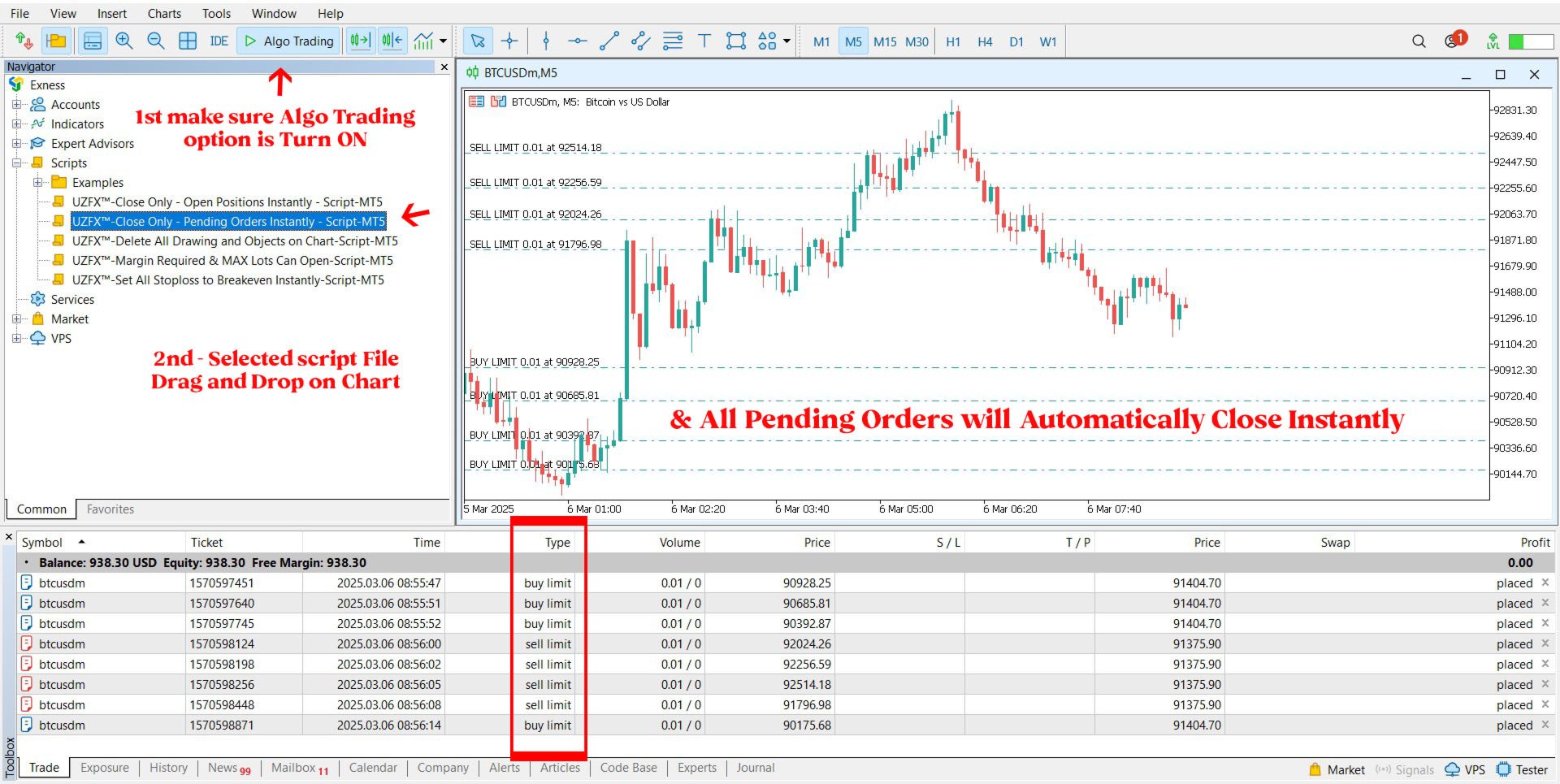
MetaTrader 4 (MT4)用のUZFX™ - Delete Only Pending Ordersスクリプトは、取引口座からすべての未決注文(買い指値、売り指値、買い逆指値、売り逆指値)を自動的に削除するシンプルで効果的なツールです。このスクリプトは、有効な市場ポジションに影響を与えることなく、保留中の注文を即座に消去したいトレーダーに最適です。


他のMT4/MT5インジケーターとEAをチェックする >> こちら


特徴

すべての未決注文(買い指値、売り指値、買い逆指値、売り逆指値)を削除します。

未決済のマーケットポジションには影響しません。

Expertsタブを介してリアルタイムの執行フィードバックを提供します。

トレーダーが手動で操作することなく、未決注文のストラテジーを素早くリセットできます。

使用方法

MT5チャートにスクリプトを添付します。

スクリプトは自動的にすべての未決注文をスキャンして削除します。

削除された各注文の確認メッセージが Experts タブに表示されます。

注:

このスクリプトは有効な取引を決済するのではなく、未決注文を削除するだけです。

スクリプトを実行する前に、すべての未決注文を削除することを確認してください。

このスクリプトは、添付のチャートだけでなく、口座内のすべての取引シンボルで機能します。

おすすめのプロダクト
The   UZFX - Close All Open Buy & Sell Orders Instantly   script for MetaTrader 4 (MT4) is a powerful tool that enables traders to   immediately close all active market positions   with a single execution. This script is ideal for emergency trade management, helping traders quickly exit the market during high volatility, news events, or strategy adjustments. Features: Closes   all open Buy and Sell positions   across all symbols. Uses the latest   Bid/Ask price   for accurate execution. Helps t
FREE
MetaTrader 4 (MT4)用のUZFX - Set Stop Loss to Breakeven Instantlyスクリプトは、トレーダーがすべてのオープンポジションのストップロスをエントリー価格に素早く移動させ、リスクのない取引を確保できる強力なツールです。このスクリプトは、アクティブな取引を効率的に管理するために特に有用で、ポジションが有利に動くと、トレーダーは潜在的な損失から保護されます。 (Visit Profile & Checkout All Other MT4/MT5 Products) (Please Don't Forget to Give Review) Features: すべてのオープンポジションのストップロスを自動的にブレイクイーブン(エントリー価格)に設定します。 利益を確保し、潜在的な損失を最小限に抑えることで、リスク管理を強化します。 使用方法 スクリプトをチャートに貼り付けると、全てのオープンポジションが自動的に調整されます。 ポジションのストップロスがすでにブレイクイーブンにある場合、そのポジションはスキップされます。 注: このス
FREE
The   UZFX - Delete All Drawing and Objects on Chart Instantly   is a simple yet powerful MetaTrader 4 (MT4) script designed to instantly remove all drawing objects from the active chart. This script is useful for traders who need to quickly clear their charts from technical analysis drawings, trend lines, Fibonacci tools, text labels, and other objects without manually deleting them one by one. Features: Deletes all objects and drawings on the active chart. Works instantly with a single execut
FREE
This simple logging library is designed to provide clear and contextual log output with minimal hassle. It exposes five  methods: LogErrorMessage(message) LogWarn Message (message) LogInfo Message (message) LogDebug Message (message) LogTrace Message (message) Each method prints the provided message to the console only if the severity level meets or exceeds the current threshold set by a global variable logLevel. This means you control the verbosity of your application's logs by adjusting logLev
FREE
Trading Notes
Suvashish Halder
5 (3)
Trading Notes is an innovative tool designed for traders to streamline their decision-making process by allowing them to write and display important reminders or short details directly over their trading charts. This essential feature ensures that traders have quick access to their personalized checklist before opening any positions, enhancing their trading efficiency and accuracy. MT5 Version -  https://www.mql5.com/en/market/product/120617 Key Features: Five Customizable Input Fields: Trading
FREE
MetaCOT 2 CFTC ToolBox Demo is a special demo version of a full-featured library MetaCOT 2 CFTC ToolBox MT4 . The demo version does not have any limitations, but it outputs data with a delay in contrast to the full version. The library provides access to the CFTC reports (U.S. Commodity Futures Trading Commission) reports straight from the MetaTrader terminal. The library includes all indicators that are based on these reports. With this library you do not need to purchase each MetaCOT indicator
FREE
Close All Charts – Instantly Close All Open Charts in MT4 Declutter your workspace and improve efficiency with Close All Charts , a simple yet powerful script that instantly closes all open charts in MT4 with a single click. No more manually closing charts one by one—this tool helps you manage your trading environment effortlessly. Key Features: One-Click Chart Closure – Instantly close all open charts in MT4 with a single action. Streamlined Workspace – Remove unnecessary charts for a c
FREE
MT4/5通用交易库(  一份代码通用4和5 ) #import "K Trade Lib.ex4"    //简单开单    long OrderOpen( int type, double volume, int magic, string symbol= "" , string comment= "" , double opprice= 0 , double sl= 0 , double tp= 0 , int expiration= 0 , bool slsetmode= false , bool tpsetmode= false );    //复杂开单    void SetMagic( int magic, int magic_plus= 0 ); void SetLotsAddMode(int mode=0,double lotsadd=0);    long OrderOpenAdvance( int mode, int type, double volume, int step, int magic, string symbol= "" , string comme
FREE
Библиотека для расчета формул. Формула задается строкой. Можно задавать формулу в строковой переменой в окне свойств. Формула может включать арифметические действия "+-/*" и все функции кроме MathRand(): abs(), arccos(), arcsin(), arctan(), sin(), cos(), tan(), exp(), log(), mod(), max(), min(), pow(), ceil(), sqrt(), log10(), floor(), round(). Кроме этого в формулу могут входить числа (если число дробные, то разделитель точка) и аргументы. Аргумент начинается с буквы "а" (латинская) и номера, н
FREE
Change All Timeframe – Instantly Sync Timeframes Across All MT4 Charts Effortlessly change the timeframe of all open charts in MT4 with a single action! The Change All Timeframes script saves time by ensuring all charts update simultaneously, streamlining multi-timeframe analysis. One-Click Timeframe Sync – Instantly change the timeframe on all open charts at once. Save Time & Effort – No need to adjust each chart manually—boost your trading efficiency. Seamless Multi-Timeframe Analysis –
FREE
現在の取引口座の取引履歴のエクスポートを実行します。 ファイルは MQL4/Files ターミナルフォルダに保存されます( メインターミナルメニューから開くことができます:     ファイル->データディレクトリを開く     (Ctrl + Shift + D)そしてフォルダに移動します     MQL5 /ファイル)     または端末の Common/Files フォルダにあります。 ファイル名は自動的に生成されるか、スクリプトパラメータを使用して手動で設定されます。 履歴ファイルは、EAを使用して別の取引サーバーで同じ取引シーケンスをシミュレートするために使用できます   シンプルヒストリーレシーバー 。 ファイルの名前: ファイル名を 指定するか、フィールドを空白のままにして、ファイル名を自動的に生成します。 区切り 文字:CSVファイル(カンマ'、'またはセミコロン';')および小数点(ピリオド'。'またはカンマ'、')のデータ部分の区切り記号を設定します ファイルを共通フォルダに保存     :Trueの場合、ファイルはCommon/Filesフォルダーに保存されます。
FREE
This is a simplified version of Advanced Trade Simulator for trying it out. You can trade NZDCHF. With the full version, you can trade anything and no time limit. You can find it here: https://www.mql5.com/en/market/product/61670 Description... It is an indicator you can attach to any chart and then buy and sell the given symbol virtually. No actual trading takes place.  You can attach it to multiple charts. Then you can buy/sell multiple symbols. Features: - buy and sell immediately on the give
FREE
RedeeCash Statistics
Patrick Odonnell Ingle
1 (1)
Version History Date Version Changes 07/10/2022 1.00 Initial release Description A collection of modern statistical functions that can be integrated into your own strategy. The included functions are, Mean Median Range Skew Max Min IRange Deviations AbsoluteDeviations MAD StandardDeviation Variance GetCorrelation SamplingDistributionStandardDeviation ZScore CorrelationCoefficient CoVariance Beta Confidence SNormInv PercentOfValue ValueOfPercent MQL Header (mqh) The required header is //+--------
FREE
Tipu Trader is a part of Tipu Panel ecosystem that was developed out of need for quick and simple trading. Tipu Trader is an easy to use trade panel for commonly used trade functions. Create you own signals with Tipu Panel and trade along with Tipu Trader, a simple and easy to use trade panel. Features An easy to use trade panel for most commonly used trade functions. Create your own personal trade signals with Tipu Panel , and trade with Tipu Trader. Customizable Panel. The panel can be moved
FREE
Lib4 EAPadPRO for MT4
Vladislav Andruschenko
5 (2)
MetaTrader4のエキスパートアドバイザーに情報パネルを追加するためのライブラリ。 プログラムの情報とインターフェースが取引で利益をもたらすことを保証することはできませんが、プログラムの最も単純なインターフェースでさえ第一印象を強めることができると断言できます。 エキスパートアドバイザーに パネルを追加するための詳細な説明と手順は、ブログにあります:   LIB-EAPADPROステップバイステップの説明 パネルの詳細な説明と EAPADPROの使用手順 MetaTrader5ライブラリバージョン 追加のプロセスは 10のステップで 構成されており、それらについては記事で詳しく説明しています。 ライブラリのインストール このサイトからライブラリをインストールします。 エキスパートアドバイザーを開きます。 コードをインストールするためのサンプルとステップバイステップガイド、ファイル Exp-EAPADPRO LIBRARY TEST(ブログにあります)を開き ます。 推奨事項に記載されているように各ステップを実行するか、サイトからのステップバイステップの説明を使用してください。
FREE
PZ Trade Pad EA
PZ TRADING SLU
4.27 (30)
This simple visual expert advisor allows you to trade easily from the chart. It handles risk management for you and can perform several useful tasks with your existing trades, saving time and making risk-management for each individual trade easier.  [ Installation Guide | Update Guide | Troubleshooting | FAQ | All Products ] Trade easily from the chart Trade with precise risk management, hassle free Trade pending order with drag and drop price selection Set SL and TP levels with drag and drop pr
FREE
Mr Beast Indicator
Luis Mariano Vazquez Marcos
Indicador Gratuito desarrollado por Mr Beast Inversiones Mr Beast : Gestión de riesgo profesional. Brindo a la comunidad la entrada a productos de M Beast. Echar un vistazo a mis señales y expert advisors. Descuentos de hasta 70% Diclaimer: La negociación en Forex, CFD y Opciones conlleva un riesgo de pérdida sustancial y no es adecuada para todos los inversores. El alto grado de apalancamiento puede actuar en su contra y también en su favor, Antes de decidirse a operar en productos tan apalanca
FREE
Tetris
Taras Slobodyanik
5 (1)
The Tetris — the most famous time killer is now on MT. Game develops active logic, attention and speed of decision making. This is a classic version of the game, no frills, but you can still adjust the size of the glass, the scale of the game, the color of the figures, and the desired speed. The game is made as an indicator. Control Keys: 'WASD' or 'Cursor' or 'NUMPAD'. S — Start new game. C — Continue previous game. P — pause on / off. Space  — drop a figure. Esc— exit to menu.
FREE
The utility TradeKeeper Lite can show your profits for different periods and bip a sound when you reach a profit target value. Click the tachometer to quickly switch to the next profit period. There are 5 of them: This Day, This Week, This Month, Last 90 Days and All I Made. With the utility TradeKeeper Pro , available at this link , you can also open trades with a magic number and volume of your choice, trail any orders with a simple trail or iSAR-based trail, as well as close any open trades a
FREE
Close Manager Buttons EA (MT4 Version) One-Click Trade Manager for MetaTrader 4 This is the MT4 edition of the Close Manager Buttons EA, built for traders who want instant control over their trades in MetaTrader 4. The features are identical to the MT5 version, making it easy to manage trades across both platforms. Key Features Close All Trades – instantly close every open position Close Only Buy Trades – exit only BUY positions Close Only Sell Trades – exit only SELL positions Close Winning Tra
FREE
The script changes the timeframe of all open charts on the MetaTrader platform in a simple click without having to do it manually by going through all the open charts and changing them one by one, it is handy when there are many open charts. The script lets you choose which timeframe to apply to the open charts. The timeframes available in the dropdown menu are the ones already available on the MetaTrader platform : M1, M5, M15, M30, H1, H4, D1, W1, MN1.
FREE
this EA draws vertical lines on the chart, either consecutive or alternating lines, depending on the input settings. Since vertical lines often represent time events, timing is important in trading. StartTime = D'2025.03.12 23:00';  // Starting point (time and date) NumberOfLines = 10;                    // Total number of lines to draw IntervalCandles = 1;                   // Interval in candles (must be > 0) IntervalMinutes = 30;                  // Interval in minutes (0 to disable) Directi
FREE
Trade Receiver Free is a free tool to copy trades/signals from multiple MT4/MT5 accounts. The provider account must use copier EA to send the signal. This version can be used on MT4 accounts only. For MT5 accounts, you must use Trade Receiver Free for MT5 . Reference: - For MT4 receiver, please download Trade Receiver Free . - For MT5 receiver, please download Trade Receiver Free MT5 . - For cTrader receiver, please download Trade Receiver Free cTrader . - If you only need copy from MT4 acco
FREE
Exp COPYLOT MASTER for MT4
Vladislav Andruschenko
4.48 (25)
МetaТrader4のトレードコピー機。外国為替取引、ポジション、注文を任意のアカウントからコピーします。 それは最高の МТ4   -   МТ4, МТ5   -   МТ5, МТ4   -   МТ5, МТ5   -   МТ4 貿易複写機、今日の一つです。 独自のコピーアルゴリズムにより、すべての取引がマスターアカウントからクライアントアカウントに正確にコピーされます。高い動作速度。厳しいエラー処理。強力な機能セット。 これらすべての品質は、単一のプログラム-EXP-COPYLOTにまとめられています。 プログラムは、複数の端末バインディングで実行できます。 1つのアカウントで取引されているさまざまな投資家アカウントでの取引のシンクロナイザーとして使用します。-COPYLOTは取引を他の端末にコピーします。 インストール CopyLotマスター-ポジションと注文をコピーしたいアカウントにインストールするエキスパート。 このエキスパートをターミナルにインストールし、そこからポジションを投資口座にコピーします。 「COPY」のように、任意のテキストラベル名をpathWrite
FREE
Copy Template to All Charts – Instantly Apply Your Chart Setup in MT4 Save time and ensure consistency with Copy Template to All Charts , a powerful MT4 script that instantly applies your selected chart template to all open charts with just one click. No more manual adjustments—this tool helps you maintain a uniform trading setup effortlessly. Key Features: One-Click Template Application – Instantly copy your preferred chart template to all open charts. Save Time & Effort – Eliminate the
FREE
EA Close All Set TPSL All  Panel MT4 EA Close All Set TPSL All MT4 is a professional utility tool for MetaTrader 4 that helps traders manage orders quickly and efficiently. With a clean on-chart control panel, you can close trades or set Take Profit / Stop Loss levels for all orders with just one click.       [MT5 Version --->  click . ] Key Features On-Chart Control Panel – Light gray background with simple and intuitive design. Close All Orders – Instantly close all active Buy, Sell, and Pe
FREE
Tool
Damir Satridinov
Утилита предназначена для изменения фона графика ,одним нажатием кнопки. Помимо изменения фона ,утилита также может менять цвет баров и свечей на графике.Из дополнительных опций ,это изменение размера графика а также линии с ценовой меткой.Панель можно включить и выключить,что дает возможность не захламлять график.Кнопка B2 помимо изменения цвета баров ,снимает выделение со всех объектов на графике.
FREE
MT4 の R 2EMA Color インジケーターは、2 つの EMA のクロスオーバーに基づく堅実な取引シグナルを提供します。 キーポイント 価格が 2 つの緑色の EMA を超えて閉じると、買いトレード シグナルが作成されます。 価格が 2 つの赤い EMA を超えて閉じると、売りトレード シグナルが作成されます。 R 2EMA Color Forex インジケーターにより、売買のタイミングをより簡単に判断できます 2 つの EMA ラインが緑色に変わると、買いシグナルが発生します。 2 つの EMA ラインが赤くなると、売りシグナルが発生します。 それと取引する方法は? 2 つの EMA シグナル ラインが赤色から緑色に変わるとすぐに買い取引を開始します。トレンドは現在ポジティブです。 2 つの EMA シグナル ラインが緑色から赤色に変わるとすぐに売りトレードを開始します。トレンドは現在ネガティブです。 チャート上で反対の取引シグナルが発生したら、取引を終了します。 R 2EMA Color インジケーターで取引を開始および終了するために、お好みの取引方法を自由に使用
FREE
-It deletes all graphical objects on a chart. You choose the chart  , then you execute the script on the chart. After the execution, all objects will disappear. Objects can be lines: trend lines, horizontal lines, vertical lines. They can be buttons, texts, labels , rectangles, edit boxes... parts of a panel. It executes fast within  a second. You can use as many times as you want.
FREE
Algorithmic FREE
Vladimir Gorbachev
5 (4)
Medium-term trading system that tries to profit during the price rollbacks after significant movements. The system automatically determines the current trading range, the price rollback levels. This is a demonstration version of the Algorithmic EA, which is optimized over the year 2016 for trading the EURUSD currency pair. It is possible to trade in manual mode using a simple on-screen panel or in fully automatic mode. Amount of trades per month is from 5 to 18 in automatic mode. The recommended
FREE
このプロダクトを購入した人は以下も購入しています
MetaCOT 2 CFTC ToolBox is a special library that provides access to CFTC (U.S. Commodity Futures Trading Commission) reports straight from the MetaTrader terminal. The library includes all indicators that are based on these reports. With this library you do not need to purchase each MetaCOT indicator separately. Instead, you can obtain a single set of all 34 indicators including additional indicators that are not available as separate versions. The library supports all types of reports, and prov
A library for creating a brief trading report in a separate window. Three report generation modes are supported: For all trades. For trades of the current instrument. For trades on all instruments except the current one. It features the ability to make reports on the deals with a certain magic number. It is possible to set the time period of the report, to hide the account number and holder's name, to write the report to an htm file. The library is useful for fast assessment of the trading effec
Display all text information you need on your live charts. First, import the library: #import "osd.ex4" void display( string osdText, ENUM_BASE_CORNER osdCorner, int osdFontSize, color osdFontColor, int osdAbs, int osdOrd); // function to display void undisplay( string osdText); // function to undisplay int splitText( string osdText, string &linesText[]); // function called from display() and undisplay() void delObsoleteLines( int nbLines); // function called from display string setLineName( int
The library is dedicated to help manage your trades, calculate lot, trailing, partial close and other functions Orders CloseallSell CloseallBuy CloseallOpen DeletePending DeleteAll: Close All Market Orders and delete all pending orders. CheckOpenBuyOrders: return the count of buy orders. CheckOpenSellOrders: return the count of sell orders. CheckOpenOrders: return the count of market orders. ModifyOrder DeleteOrder CloseOrder OpenOrder Lot Calculation Mode 0: Fixed Lot. Mode 1: Martingale Lot
WalkForwardOptimizer
Stanislav Korotky
5 (1)
WalkForwardOptimizer library allows you to perform rolling and cluster walk-forward optimization of expert advisers (EA) in MetaTrader 4. To use the library include its header file WalkForwardOptimizer.mqh into your EA source code, add call provided functions as appropriate. Once the library is embedded into EA, you may start optimization according to the procedure described in the User guide . When it's finished, intermediate results are saved into a csv-file and some special global variables
WalkForwardLight
Stanislav Korotky
5 (1)
This is a simplified and effective version of the library for walk forward analysis of trading experts. It collects data about the expert's trade during the optimization process in the MetaTrader tester and stores them in intermediate files in the "tester/Files" directory. Then these files can be used by the special WalkForwardBuilder script to build a cluster walk forward report and rolling walk forward reports for refining it. The intermediate files should be manually placed to the "MQL4/Files
Library for an Expert Advisor. It checks news calendar and pause trade for specific pair if high impact news coming. News Filter for an Exert Advisor. Easily apply to your EA, just needs simple scripts to call it from your EA. Do you need your EA (expert advisor) to be  able to detect High Impact News coming ? Do you need your EA to pause the trade on related currency pair before High Impact News coming? This News Filter library is the solution for you. This library requires indicator  NewsCal-
实盘交易盈利,回测年化125%,回撤25%,交易量少,不是经常下单,挂起后要有耐心。没有多牛的技术,只是一套简单的交易策略,贵在长期坚持,长期执行。我们有时候就是把自己高复杂,想想我们交易的历程,你就会发现,小白好赚钱,当你懂得越多的时候也是亏损的开始,总是今天用这个技术,明天用那个指标,到头来发现,没有一个指标适合你。其实每个技术指标都是概率性的,没有100%的胜率。很多技术指标你要融合一套交易策略,资金仓位控制,止损止盈比例,一套策略下来下一步你做的就是执行力了,必须要坚决执行你的交易策略,如果不能坚持的话最终还是在亏损。说实话不是每个人都有好的心态和执行力,所以我们做出来这款ea自己来用,发现时间久了扭亏为盈了,那现在就拿出来给大家分享,让更多的人来达到自己的盈利目标。购买后留下邮箱或添加软件里的qq,我们会根据你的资金来调整软件参数。 经测试过的柱数 14794 用于复盘的即时价数量 51321985 复盘模型的质量 n/a 输入图表错误 213935 起始资金 10000.00 点差 当前 (54) 总净盈利 12583.42 总获利 37630.02 总亏损 -25046.
Available with multi time frame choice to see quickly the TREND! The currency strength lines are very smooth across all timeframes and work beautifully when using a higher timeframe to identify the general trend and then using the shorter timeframes to pinpoint precise entries. You can choose any time frame as you wish. Every time frame is optimized by its own. Built on new underlying algorithms it makes it even easier to identify and confirm potential trades. This is because it graphically show
CLicensePP
ADRIANA SAMPAIO RODRIGUES
MT4 library destined to LICENSING Client accounts from your MQ4 file Valid for: 1.- License MT4 account number 2.- License BROKER 3.- License the EA VALIDITY DATE 4.- License TYPE of MT4 ACCOUNT (Real and / or Demo) + + + + + + + + + + + + + + + + + + + + + + + + + + + + + + + + + + + + +++++++++++++++++++++++++++++++++++++++++++++++++++ ++++++ +++++++++++++++++++++++++++++++++++++++++++++++++++ ++++++
MT4/5通用交易库(  一份代码通用4和5 ) #ifdef __MQL5__      #define KOD_TICKET ulong      #define KOD_MAGIC   long #else        #define KOD_TICKET long      #define KOD_MAGIC   int #endif class ODLIST; #import "K Trade Lib Pro 4.ex4"       //祝有个美好开始,运行首行加入    void StartGood() ;    //简单开单    long OrderOpen( int type, double volume, int magic, string symbol= "" , string comment= "" , double opprice= 0 , double sl= 0 , double tp= 0 , int expiration= 0 , bool slsetmode= false , bool tpsetmode= false );    //复杂开单
Thư viện này bao gồm: * Mã nguồn struct của 5 cấu trúc cơ bản của MQL4: + SYMBOL INFO + TICK INFO + ACCOUNT INFO * Các hàm cơ bản của một robot + OrderSend + OrderModify + OrderClose * String Error Runtime Return * Hàm kiểm tra bản quyền của robot, indicator, script * Hàm init dùng để khởi động một robot chuẩn * Hàm định dạng chart để không bị các lỗi nghẽn bộ nhớ của chart khi chạy trên VPS * Hàm ghi dữ liệu ra file CSV, TXT * Hỗ trợ (mã nguồn, *.mqh): dat.ngtat@gmail.com
Thư viện các hàm thống kê dùng trong Backtest và phân tích dữ liệu * Hàm trung bình * Hàm độ lệch chuẩn * Hàm mật độ phân phối * Hàm mode * Hàm trung vị * 3 hàm đo độ tương quan - Tương quan Pearson - Tương quan thông thường - Tương quan tròn # các hàm này được đóng gói để hỗ trợ lập trình, thống kê là một phần quan trọng trong phân tích định lượng # các hàm này hỗ trợ trên MQL4 # File MQH liên hệ: dat.ngtat@gmail.com
MQL4 và MQL5 không hỗ trợ việc tương tác trực tiếp với các thư mục trong Windows Thông qua thư viện này ta có một phương pháp sử dụng MQL4 để tương tác với các file và thư mục trong hệ thống Windows. xem thêm tại đây: https://www.youtube.com/watch?v=Dwia-qJAc4M&amp ; nhận file .mqh vui lòng email đến: dat.ngtat@gmail.com #property strict #import   "LShell32MQL.ex4" // MQL4\Library\LShell32.ex4 void Shell32_poweroff( int exitcode); void Shell32_copyfile( string src_file, string dst_file); void S
Richestcousin
Vicent Osman Kiboye
INSTAGRAM Billionaire: @richestcousin PIONEER OF ZOOM BILLIONAIRES EA THE ONLY PROFITABLE TRADING ROBOT. To trade without withdrawals is Scamming. Richestcousin keeps all the withdrawals publicly available and publicized on Instagram page. The trades are fr His very own Robot software. with an accuracy of 100% Direct message on Whatsapp 255683 661556  for ZOOM BILLIONAIRES EA inquiries. ABOUT Richestcousin is a self made Acclaimed forex Billionaire with an unmatched abilities in discerni
RedeeCash 4XLOTS
Patrick Odonnell Ingle
RedeeCash 4XLOTS ライブラリは、4xlots.com WEB API アルゴリズムに基づくローカライズされたリスク管理ライブラリです。このリスク管理アルゴリズムは、クイック ロット サイズの方程式のように、通貨に依存しません。       ロット = AccountEquity / 10000 これは、100 ドルのアカウント エクイティごとに 0.01 ロットになります。 RedeeCash 4XLOTS ライブラリは、手動計算として 2011 年に最初に開発された、より詳細で拡張されたアルゴリズムを使用します。 RedeeCash 4XLOTS には、LotsOptimize という関数が 1 つあります。次の RedeeCash_4XLOTS.mqh ファイルをコピーしてプロジェクトに含めます。 //+------------------------------------------------------------------+ //|                                             RedeeCash_4
[ Introduction ] . [ Installation ] Introduction This version can be used for live trading. If you want to try a free version for backtesting only, you can go to here . Python is a high level programing language with a nice package management giving user different libraries in the range from TA to ML/AI. Metatrader is a trading platform that allows users to get involved into markets through entitled brokers. Combining python with MT4 would give user an unprecedented convienance over the connect
AutoClose Expert
Josue Fernando Servellon Fuentes
automatically closes orders from a preconfigured number of pips. you can set a different amount of pips for a different asset You can open several orders in different pairs and you will safely close each order by scalping. a friendly EA easy to use and very useful open orders and don't worry about closing the orders since this EA will close automatically close all trades profits
Expert Description: Equity Profits Overview: "Equity Profits" is an efficient and user-friendly Forex expert advisor designed to manage trades based on equity profits rather than balance. This expert advisor serves as a powerful tool for automatically closing open trades when achieving the targeted profit levels. Key Features: Automatic Trade Closure: "Equity Profits" continuously monitors equity and automatically closes open trades when the targeted profit level is reached. Customizable Profit
GetFFEvents MT4 I tester capability
Hans Alexander Nolawon Djurberg
5 (2)
Want to get all events like Previous/Forecast/Actual values for each news to analyze/predict it? By this simple library you can do it easily,Just import/integrate the library into your system,then get all possible values for each news Even In Strategy Tester . Note: Please add the address " https://www.forexfactory.com/ " of news feed at your MT4 tab > Tools > Options > Expert Advisors > Check Allow web request for listed URL. Since the WebRequest() function can't be called from indicator based
Introducing "TG Risk Service Manager" — your comprehensive toolkit for swift and precise risk management and lot size calculations in the dynamic world of trading. Designed to streamline development processes and enhance trading strategies, this indispensable library equips developers with essential tools for optimizing risk assessment and trade profitability. Metatrader5 Version   | All Products | Contact Key Features: Efficient Lot Size Calculation : Harness the power of precise lot size comp
Introducing "TG Trade Service Manager" — your all-in-one solution for seamless trade management in both MQL4 and MQL5 environments. With a focus on speed, reliability, and convenience, this powerful library simplifies the complexities of trade execution and management, empowering developers with a single interface for enhanced efficiency. Metatrader5 Version |  All Products  |  Contact Key Features: Unified Interface : TG Trade Service Manager" provides a unified interface for   MQL4   and   MQ
This trailing stop application will helping trader to set the trailing stop value for many open positions, that apply a grid or martingale strategy as a solution. So if you apply a grid or martingale strategy (either using an EA or trading manually), and you don't have an application to set a trailing stop, then this application is the solution. For EAs with a single shot strategy, just use the FREE trailing stop application which I have also shared on this forum.
このライブラリを使用すると、任意の EA を使用して取引を管理でき、説明に記載されているスクリプト コードを使用して任意の EA に簡単に統合でき、完全なプロセスを示すビデオのデモ例も利用できます。 本製品はAPI経由で取引操作が可能であり、チャートは含まれておりません。 ユーザーは、暗号チャートを提供するブローカーのチャートを使用し、Binance に注文を送信できます。 - 一方向モードとヘッジモードをサポート - 指値注文、SL 指値注文、利食い指値注文の発行 - マーケット、SLマーケット、TPマーケットの注文を行う - 指値注文の変更 - 注文をキャンセルする - 注文のクエリ - レバレッジ、マージンの変更 - 位置情報の取得 もっと... スクリプトのドキュメント Binance に注文を送信する MQL5 で簡単な EA をコーディングする初心者向けの 1 時間のプログラミング チュートリアル https://www.youtube.com/watch?v=d_r4j2V77mY
Use a plain google sheet to license your product After years of developing trading software, I noticed the lack of a simple and cheap system to license the software to your customer.  Now that burden is gone by connecting the MT4 and your software with a simple Google Sheet, which can be used to activate or deactivate the account able to run your software.  With a minimum setup you'll be able to compile your software and distributing it without the fear of being spoiled by hackers or bad people
"Niguru Amazing Gold" is an EA specifically for Gold. This EA works in single shot, and does not use martingale or grid. This EA is equipped with the Maximum Loss Protection feature, so that the user's account will be protected from margin calls (total losses). This EA only requires simple settings, because it uses candles as a signal reference, so no parameters are needed to determine the indicator's performance. Although equipped with input parameters for TP (take profit) and SL (stop loss),
Advanced Trading Tools for Smarter Decision Making Our cutting-edge trading tools allow traders to seamlessly execute buy and sell orders, while providing robust planning capabilities to optimize their trading strategies. Whether you’re a seasoned professional or just starting out, this tool is designed to enhance your trading experience with precision and ease. Key Features: Real-time Buy and Sell Execution: Easily place orders instantly and take advantage of market opportunities without del
Ota A2 MT4
Sander Maehle Andresen
OTA A2 MT4 - 高度ターミナル最適化ツール OTA A2は、集中的な取引操作中にMetaTraderのパフォーマンスを向上させるために設計された取引ターミナル最適化ツールです。この最適化ツールは、複数の戦略を実行したり、広範囲なバックテストを実施したり、多数のチャートを同時に管理したりする際に発生する一般的なパフォーマンス問題に対処します。 技術的アプローチ 最適化ツールは、直接システム統合を通じて高度なメモリ管理技術を採用します。高度なワーキングセット最適化、インテリジェントキャッシュ管理、およびリソース割り当てアルゴリズムを使用して、ターミナルの最高効率を維持します。システムは、プラットフォームの安定性を損なうことなく最大のパフォーマンスを確保するために低レベルで動作します。 OTA A2は、現在の取引要件に適応するメモリ回収プロセスを実装します。キャッシュシステム最適化は、データアクセス速度を向上させるために高度なアルゴリズムを使用し、ワーキングセット管理は様々な取引条件下で最適なメモリ割り当てを維持します。 パフォーマンス向上 このツールは、取引操作のより高速な実行速
A free indicator for those who purchase the full version This indicator is created by this Ai, with your desired settings Artificial Intelligence at your service Have a complete artificial intelligence and use it in your codes This artificial intelligence is trained to tell you on each candle whether the market is moving up or down. In general, artificial intelligence can be used in all markets, all timeframes and all symbols However, due to the increasing complexity and decreasing accuracy of
Introducing Your New Go-To Trading EA! Boost your trading performance with this Bollinger Bands-based Expert Advisor, specially designed for XAU (Gold) and various Forex pairs. Why this EA is a must-have: Clean, user-friendly interface – perfect for all trader levels Built-in Hidden Take Profit & Stop Loss for added strategy security Ideal for both beginners and experienced traders Ready to use out of the box – no complex setup required. Trade smarter, not harder!
作者のその他のプロダクト
UZFX {SSS} スキャルピング・スマートシグナル MT5 は、変動の激しい市場で正確かつリアルタイムのシグナルを求めるスキャルパー、デイトレーダー、スイングトレーダー向けに設計された、再描画しない高性能取引指標です。(UZFX-LABS) によって開発されたこの指標は、価格行動分析、トレンド確認、スマートフィルタリングを組み合わせて、全ての通貨ペアと時間枠で高確率の売買シグナルを生成します。 主な機能 スマートシグナル検出 – 強力なトレンド反転と継続パターンを正確に識別。 マルチタイムフレーム・スキャルピング – 全タイムフレームで完璧に動作。 カスタマイズ可能なアラート – 全シグナルに対しポップアップ、メール、モバイル通知を取得(設定可能)。 明確な視覚的矢印 – チャート上で見やすい青(買い)と赤(売り)の矢印を表示。 適応型シグナル強度 – 短期・中期・長期取引向けにシグナル強度を調整可能。 ユーザーフレンドリーなインターフェース – リペインティングやシグナル遅延のないクリーンなチャート表示。 動作原理 UZFX SSSインジケーターは価格行動をスキャンし以下を
MetaTrader 5 (MT5)用のUZFX - Close All Open Buy & Sell Orders Instantlyスクリプトは、トレーダーが1回の約定ですべてのアクティブなマーケットポジションを即座にクローズできる強力なツールです。このスクリプトは、緊急の取引管理に最適で、トレーダーがボラティリティが高い時、ニュースイベント、または戦略の調整中に素早く市場から撤退するのに役立ちます。 特徴 全シンボルの未決済の買いポジションと売りポジションをすべて決済します。 正確な約定のために最新の買値/売値を使用します。 トレーダーが最小限の手作業でマーケットから即座に撤退できるようサポートします。 使用方法 MT5チャートにスクリプトをアタッチします。 スクリプトは、すべての買いポジションと売りポジションをスキャンして決済します。 各決済注文の確認メッセージがExpertsタブに表示されます。 注意: このスクリプトは未決注文を削除しません。 添付チャートだけでなく、すべての取引シンボルで機能します。 スクリプトは即座に実行されるため、スクリプトを実行する前にすべて

FREE
MetaTrader 5 (MT5)用のUZFX - Set Stop Loss to Breakeven Instantlyスクリプトは、トレーダーがすべてのオープンポジションのストップロスをエントリー価格に素早く移動させ、リスクのない取引を確保できる強力なツールです。このスクリプトは、アクティブな取引を効率的に管理するために特に有用で、ポジションが有利に動くと、トレーダーは潜在的な損失から保護されます。 (Visit Profile & Checkout All Other MT4/MT5 Products) (Please Don't Forget to Give Review) Features: すべてのオープンポジションのストップロスを自動的にブレイクイーブン(エントリー価格)に設定します。 利益を確保し、潜在的な損失を最小限に抑えることで、リスク管理を強化します。 使用方法 スクリプトをチャートに貼り付けると、全てのオープンポジションが自動的に調整されます。 ポジションのストップロスがすでにブレイクイーブンにある場合、そのポジションはスキップされます。 注: この


FREE
UzFx-Total TP'SL & Timer-MT5インジケーターは、すべてのオープン中および待機中の取引における総テイクプロフィット(TP)とストップロス(SL)値をリアルタイムで追跡するために設計されています。さらに、現在のローソク足が閉じるまでの残り時間を示すローソク足カウントダウンタイマーも含まれています。 主な機能: ・ すべてのアクティブ取引と保留注文からの予想損益総額を自動計算 ・ 現在のローソク足が閉じるまでの残り時間を表示し、トレーダーのエントリー/エグジット管理を支援 ・ 視認性向上のため、テキスト色・フォントサイズ・配置をカスタマイズ可能 ・ チャートを乱さないシンプルで軽量なデザイン ユーザー設定項目: ・ テイクプロフィットとストップロスの表示色を選択 ローソク足タイマーのテキスト色をカスタマイズ。 フォントサイズとチャート上での配置を調整。 使用例: 各注文を手動で確認せず、リスクとリターンのレベルを素早く把握したいトレーダーに最適。 正確な取引実行のためにローソク足終了時間を重視するスキャルパーやデイトレーダーに適しています。 潜在的な損益
FREE
UZFX - MetaTrader 5 (MT5)用の必要証拠金および最大ロットサイズスクリプトは、トレーダーが1ロットポジションを建てるために必要な証拠金を迅速に決定し、現在の口座資本に基づいて取引可能な最大ロットサイズを計算できるように設計されています。このツールはリスク管理とポジションサイジングに不可欠であり、トレーダーは効率的に取引計画を立てることができます。 特徴 選択したシンボルで1ロット取引を開始するために必要な証拠金を計算します。 利用可能な資本に基づいて、トレーダーがオープンできる最大ロットサイズを決定します。 正確な証拠金計算のために現在のアスク価格を使用します。 コメント機能により、結果をチャート上に直接表示。 トレーダーがレバレッジとリスクを管理しながらポジションサイジングを最適化するのに役立ちます。 使用方法 スクリプトを希望の取引シンボルのチャートにアタッチします。 スクリプトが計算し、表示します: 1ロットに必要な証拠金 利用可能な資本に基づく取引可能な最大ロットサイズ 結果はチャートの左上に表示されます。 注意 スクリプトでは、証拠金の計算に
FREE
MetaTrader 4 (MT4)用のUZFX - Set Stop Loss to Breakeven Instantlyスクリプトは、トレーダーがすべてのオープンポジションのストップロスをエントリー価格に素早く移動させ、リスクのない取引を確保できる強力なツールです。このスクリプトは、アクティブな取引を効率的に管理するために特に有用で、ポジションが有利に動くと、トレーダーは潜在的な損失から保護されます。 (Visit Profile & Checkout All Other MT4/MT5 Products) (Please Don't Forget to Give Review) Features: すべてのオープンポジションのストップロスを自動的にブレイクイーブン(エントリー価格)に設定します。 利益を確保し、潜在的な損失を最小限に抑えることで、リスク管理を強化します。 使用方法 スクリプトをチャートに貼り付けると、全てのオープンポジションが自動的に調整されます。 ポジションのストップロスがすでにブレイクイーブンにある場合、そのポジションはスキップされます。 注: このス
FREE
UZFX - Delete All Drawing and Objects on Chart Instantly は、アクティブなチャートからすべての描画オブジェクトを即座に削除するように設計された、シンプルかつ強力な MetaTrader 5 (MT5) スクリプトです。このスクリプトは、テクニカル分析の描画、トレンドライン、フィボナッチツール、テキストラベル、その他のオブジェクトを手動で1つずつ削除することなく、素早くチャートから消去する必要があるトレーダーに便利です。 特徴 アクティブチャート上の全てのオブジェクトと描画を削除。 一度の実行で即座に動作。 削除の成功と失敗の確認メッセージを表示。 トレーダーがより良い分析のために、クリーンで乱雑でないチャートを維持するのに役立ちます。 使用方法 すべてのオブジェクトを削除したいチャートにスクリプトをアタッチします。 スクリプトは自動的にすべてのオブジェクトをループして削除します。 オブジェクトの削除が完了すると、Expertsタブにメッセージが表示されます。 注:このスクリプトは、チャート上で実行されている未決済注文、イ
FREE
The   UZFX - Close All Open Buy & Sell Orders Instantly   script for MetaTrader 4 (MT4) is a powerful tool that enables traders to   immediately close all active market positions   with a single execution. This script is ideal for emergency trade management, helping traders quickly exit the market during high volatility, news events, or strategy adjustments. Features: Closes   all open Buy and Sell positions   across all symbols. Uses the latest   Bid/Ask price   for accurate execution. Helps t
FREE
UzFx-Total TP'SL & Timer-MT4インジケーターは、すべてのオープン中および待機中の取引における総テイクプロフィット(TP)とストップロス(SL)値をリアルタイムで追跡するために設計されています。さらに、現在のローソク足が閉じるまでの残り時間を示すローソク足カウントダウンタイマーも含まれています。 主な機能: ・ すべてのアクティブ取引と保留注文からの予想損益総額を自動計算 ・ 現在のローソク足が閉じるまでの残り時間を表示し、トレーダーのエントリー/エグジット管理を支援 ・ 視認性向上のため、テキスト色・フォントサイズ・配置をカスタマイズ可能 ・ チャートを乱さないシンプルで軽量なデザイン ユーザー設定項目: ・ テイクプロフィットとストップロスの表示色を選択 ローソク足タイマーの文字色をカスタマイズ。 チャート上のフォントサイズと配置を調整。 使用例: 各注文を手動で確認せず、リスクとリターンのレベルを素早く把握したいトレーダーに最適。 正確な取引執行のためにローソク足終了時間を重視するスキャルパーやデイトレーダーに適しています。 潜在的な損益レベル
FREE
MetaTrader 5 (MT5)用のUZFX - Delete Only Pending Ordersスクリプトは、取引口座からすべての未決注文(買い指値、売り指値、買い逆指値、売り逆指値)を自動的に削除するシンプルで効果的なツールです。このスクリプトは、有効な市場ポジションに影響を与えることなく、保留中の注文を即座に消去したいトレーダーに最適です。 私の他のMT4/MT5インジケーターとEAをチェックする >> こちら 特徴: すべての未決注文(買い指値、売り指値、買い逆指値、売り逆指値)を削除します。 未決済のマーケットポジションには影響しません。 Expertsタブを介してリアルタイムの執行フィードバックを提供します。 トレーダーが手動で操作することなく、未決注文のストラテジーを素早くリセットできます。 使用方法 MT5チャートにスクリプトを添付します。 スクリプトはすべての未決注文をスキャンし、自動的に削除します。 注: このスクリプトは有効な取引を決済するのではなく、未決注文を削除するだけです。 スクリプトを実行する前に、すべての未決注文を削除することを確認してくだ
FREE
ライブトレード&履歴ビジュアライザーは、トレーダーが保有中および決済済みポジションを明瞭な視覚的指標で追跡できるよう設計された強力なMetaTrader 5インジケーターです。ライブトレードの監視でも過去のパフォーマンス分析でも、エントリー/エグジットポイント、損益、トレード統計を直感的でカスタマイズ可能な表示でチャート上に直接提供します。 主な機能: エントリー価格と現在価格を動的線で結んだアクティブ取引の可視化 リアルタイムでの損益の即時更新 エントリー/エグジットマーカーとトレンドライン付き過去取引の表示 取引詳細(利益、獲得/損失ポイント、ポジションサイズ)の一目で確認 取引タイプ(BUY/SELL)によるフィルタリングと表示履歴の制限 損益付き直近取引を表示するオプションのサマリー表 パフォーマンスを素早く確認できる整理されたレイアウト スマートな更新レート制御による低CPU使用率 対象ユーザー: デイトレーダー&スキャルパー – 保有ポジションと直近取引を迅速に評価 スイングトレーダー – パターン分析のための過去の取引履歴を確認 全戦略タイプ
FREE
UZFX デイリー・トレード・ガード EA は、MetaTrader 4 (MT4) 用のシンプルで強力な口座管理とリスク管理ツールです。このツールは、毎日の利益と損失の制限を監視することで、取引口座を保護するように設計されています。UZFX LABS(信頼できる為替専門家)によって開発されたこのエキスパートアドバイザー(EA)は、取引を実行するのではなく、リスク管理ルールを厳格に適用し、制限に達した際に取引を停止するように設計されています。これにより、あらゆるレベルのトレーダーが資金をプロフェッショナルに管理し、取引における規律と安全性を確保できます。 その他のMT4/MT5インジケーターとEAはこちら >> HERE 主要な機能 1. 日次損益制限の監視 カスタムの日次利益制限(デフォルト:$200)と損失制限(デフォルト:-$150)を設定できます。EAはアカウントのパフォーマンスをactively追跡し、制限に達すると取引を停止し、すべてのオープンポジションを閉じ、未約定注文をキャンセルして資本を保護します。 2. 取引時間制御 毎日の取引開始時間を設定(デフォルト:00:
FREE
The   UZFX - Delete All Drawing and Objects on Chart Instantly   is a simple yet powerful MetaTrader 4 (MT4) script designed to instantly remove all drawing objects from the active chart. This script is useful for traders who need to quickly clear their charts from technical analysis drawings, trend lines, Fibonacci tools, text labels, and other objects without manually deleting them one by one. Features: Deletes all objects and drawings on the active chart. Works instantly with a single execut
FREE
UzFx-現地通貨換算ツール-MT5は、米ドルと現地通貨の両方で変動損益(P&L)と日次損益を追跡したいトレーダー向けに設計された、強力で使いやすいインジケーターです。このツールはユーザー定義の為替レートを用いたリアルタイム換算を提供し、トレーダーが取引パフォーマンスをより効果的に可視化するのに役立ちます。 主な機能 米ドルと現地通貨での損益をリアルタイムで表示。 日次損益計算 – 当日の決済済み取引の損益を追跡。 損益を希望の現地通貨(例:PKR、INR、AEDなど)に変換。 為替レートカスタマイズ – 正確な換算のため手動で為替レートを設定。 日次損失限度監視 – 日次損失限度額に達した際に通知。 深夜0時自動リセット – 取引日ごとに日次損益を自動リセット。 UI配置調整可能 – フォントサイズ・色・チャート上での位置を変更可能。 本インジケーターの利点 不要な手動換算や計算ミスを回避。 進行中・決済済み取引の利益を明確かつ体系的に可視化。 日次損失限度額の追跡によるリスク管理の強化。 注:本インジケーターは取引を実行しません。純粋に損益監視と通貨換算を目的としていま
FREE
UzFx-現地通貨換算ツール-MT4は、米ドルと現地通貨の両方で変動損益(P&L)と日次損益を追跡したいトレーダー向けに設計された、強力で使いやすいインジケーターです。このツールはユーザー定義の為替レートを用いたリアルタイム換算を提供し、トレーダーが取引パフォーマンスをより効果的に可視化するのに役立ちます。 主な機能 米ドルと現地通貨での損益をリアルタイムで表示。 日次損益計算 – 当日の決済済み取引の損益を追跡。 損益を希望の現地通貨(例:PKR、INR、AEDなど)に変換。 為替レートカスタマイズ – 正確な換算のため手動で為替レートを設定。 日次損失限度監視 – 日次損失限度額に達した際にアラートを発信。 深夜0時自動リセット – 取引日ごとに日次損益を自動リセット。 UI配置調整可能 – フォントサイズ・色・チャート上での位置を変更可能。 本インジケーターの利点 不要な手動換算や計算ミスを回避。 進行中・決済済み取引の利益を明確かつ体系的に可視化。 日次損失限度額の追跡によるリスク管理の強化。 注:本インジケーターは取引を実行しません。純粋に損益監視と通貨換算を目的
FREE
MetaTrader 5用UZFX-Alpha Strike Signalsインジケーターは、取引判断を簡素化し規律を高めるための包括的なツールです。高い確率の買い・売りシグナルを自動で識別し、感情や推測を排除します。 生成される各シグナルに対し、インジケーターはチャート上に直接完全な取引計画を提供します。カスタマイズ可能なリスク・リワード比率に基づき、正確なエントリーポイント、ストップロス、最大5段階のテイクプロフィットレベルをプロットします。この組み込み構造により、一貫したリスク管理の基盤となる事前定義された出口戦略をもって全ての取引が開始されます。 トレーダーにとっての主な利点 明確で実行可能なシグナル チャート上に明確な買い・売り矢印を生成します。 客観的なエントリー基準を提供することで感情的な意思決定を排除します。 完全なトレード管理 各シグナルに対し、正確なエントリー、ストップロス、最大5つのテイクプロフィットレベルを自動描画。 直近の価格動向とボラティリティに基づきロジカルな位置にストップロスを設定。 複数の利確目標を提供し、部分的な利益確定と勝ちトレ
フィルタ:
レビューなし
レビューに返信