
Scalping Pro Tool

5

This plugin is designed to enhance trading efficiency and risk management in scalping strategies. Key features include:


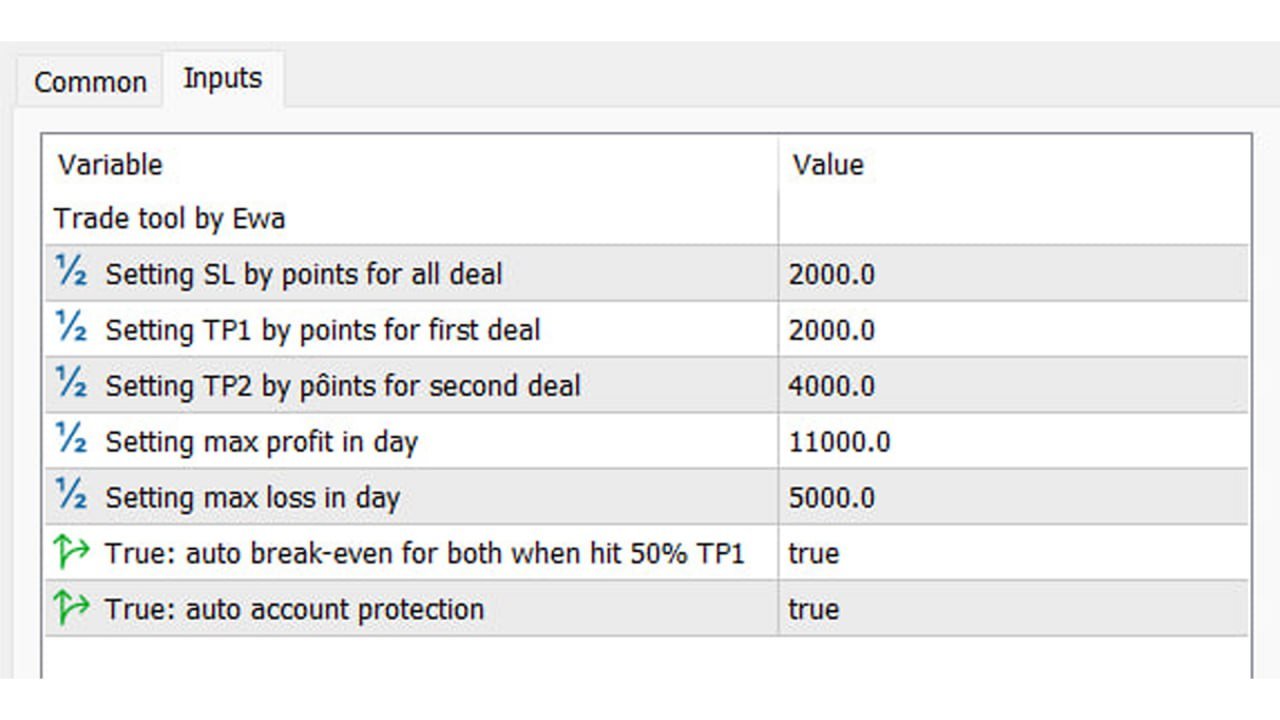
-One-Click Trade Execution: With a single click, the plugin opens two trades simultaneously, each with its own Take Profit (TP1 and TP2) targets.

-Automatic Stop Loss Adjustment: The plugin automatically adjusts the Stop Loss (SL) to Break Even (BE) once the price reaches halfway towards TP1, securing partial profits.

-Account Protection Features: It includes built-in protections to manage risk, including a loss limit to prevent excessive drawdowns and a daily profit target to lock in gains.


This plugin simplifies scalping by automating key aspects of trade management and helps maintain control over risk exposure.

评分 4
Aldo Doberti
572
Aldo Doberti 2024.10.12 12:24 
 

GOOD WORK mister

推荐产品
Close All in 1s
Seng Yang
4.68 (22)
Hello, Every one  A script to close all market positions and/or pending orders. ----------------------------------------------------------------------------------- This is Close All      market positions and/or pending orders button  You can close all orders in 1 second by one click  For advanced version:  Advanced:  https://www.mql5.com/en/market/product/77763           https://www.mql5.com/en/market/product/89311 Key:  1 Close all button: The script will close All orders market + pending
FREE
AllClosedMT5
Andrey Spiridonov
The AllClosedMT5 utility in the form of an expert. The utility is designed for closing all open positions simultaneously based on the total profit (in the deposit currency) of all open positions. The utility can be attached to any chart with any trading instrument. Parameters Profit - the total positive profit in the deposit currency, at which all open positions are closed (profit). Stop - the total negative profit in the deposit currency, at which all open positions are closed (loss). The valu
FREE
Smart Trail Free MT5 — ATR Stop Management & Trading Panel Smart Trail Free is an ATR-based trailing stop and break-even utility for MetaTrader 5. It manages stop-loss levels using ATR-calculated distances based on market volatility. ATR-Based Stop Management Trailing Stop — Trails stop-loss at an ATR-calculated distance. Break-Even — Moves SL to entry price when profit reaches a predefined ATR threshold. Stop Loss — Initial SL set at an ATR-based distance. Take Profit — TP set at an ATR-based d
FREE
Look Back My Trading History MT5
Sa No Tsuyoshi Kokorozashi
5 (2)
Description This is a utility tool for MT5 reminding traders of all the entry points by highlighting trading history. For those who just started to learn trading, one of the most efficient tips to improve their trading skill is to look back their own trading history. However, trade history arrow shown on MT5 chart is simply too small to find out, which will keep traders away from reviewing their trade, especially stupid mistakes like overtrading. By clearly showing their trade history and face i
FREE
Copying trading signals from the Telegram channel to MetaTrader. The utility will help you easily and simply   copy transactions from   your Telegram   channel or chat to the MetaTrader trading terminal almost instantly This is a DEMO version, restrictions - minimum lot Operational support in telegram chat: https://t.me/forex4up_chat Template for signals in the Telegram channel, chat (can be changed in the parameters) SYMBOL=EURUSD, TYPE=SELL, PRICE= 0.00000 , LOT= 0.01 , STOPLOSS= 0.00000
FREE
Click Trading
Jawad Tauheed
5 (2)
One Click Trading – Auto TP SL Developer TraderLinkz Version 1.00 Category Utility What it does Adds missing TP and SL to your manual trades and pending orders Sets them once per ticket Lets you move TP and SL afterward Works on hedging and netting accounts Scans on every tick and reacts on trade events Why you want it You place faster entries You get consistent risk and exit targets You reduce fat finger errors You keep full manual control Quick start Attach the EA to any chart Keep TP and SL e
FREE
Trade assistant pro v8
Ahmed Mohammed Bakr Bakr
FREE FREE FREE Trade Assistant MT5 – Professional Trading & Risk Management Panel Trade Assistant MT5 is an advanced trading panel designed to help traders execute orders faster, safer, and more professionally . It simplifies manual trading by combining smart order management , precise risk control , and one-click execution , making it ideal for both beginners and advanced traders. This tool does not trade automatically . Instead, it empowers you with full control while applying professional-gra
FREE
DeletePendingOrder
Konstantin Chernov
5 (1)
Script for deleting pending orders If you need to delete all pending orders you placed, this script will do it for you! It doesn't have any input parameters. Allow AutoTrading before running the script. Usage: Run the script on a chart. If you need a possibility to adjust parameters of the script, use the version with input parameters https://www.mql5.com/en/market/product/627 You can download MetaTrader 4 version here: https://www.mql5.com/en/market/product/2782
FREE
Quick Exit
Jefferson Judge Metha
This MT5 Utility is designed to simplify the process of managing multiple trades. If you have several open positions, it can be time-consuming to close each one manually. With this tool, you can easily close all profit trades, losing trades, or just the trades that are linked to the chart you're currently viewing. It saves you time and effort by allowing you to manage your trades with just a few clicks, making your trading experience smoother and more efficient. Whether you're focusing on profit
FREE
DTK Scalping Panel
Thiago Pereira Pinho
A powerful and intuitive trade management tool designed for scalpers and intraday traders. Created to complement the Nampim Samba Scalper strategy , it allows traders to open, manage, and close positions quickly without leaving the chart.  Key Features: Customizable trading panel – choose position (left, right, center, top, bottom). One-click trading buttons – instantly open Buy/Sell trades with pre-set lot sizes. Close management – close last 1/2/3 trades or all Buy/Sell positions with one clic
FREE
Smart Bulk SL Setter
Muhammad Hassan Muhammad Ahmad Atiyah
Smart Bulk SL Setter MT5 Script – Bulk Stop Loss Management Overview Smart Bulk SL Setter is a trade management script for MetaTrader 5 designed to modify the Stop Loss level of multiple existing open positions at once. The script executes once per attachment and applies a user-defined Stop Loss price based on selected filters. It does not run in the background, does not open trades, and does not generate signals. Core Functionality The script allows setting a unified Stop Loss level for multip
FREE
NS Financas Clear All Objects Automatically Script for quick removal of all objects from your chart (lines, shapes, symbols, etc ...) Don't waste any more time trying to find all the objects on your screen for removal. Use this script and in one click all objects will be removed from the chart automatically. Also, it is possible to configure hotkeys to make the script even faster in its use. NS Financas Clear All Objects Automatically does not remove indicators. Take the opportunity to visit our
FREE
This tool automatically calculates the lot size, the TP and SL (in pips) for you, and directly places trades. It has 5 clickable buttons: Risk percentage Variable, holds the value in percentage of the account balance you willing to risk. Example: if the value is 1% and your account balance is 1000USD, the EA will place the trade that will ensure that you only loss 10USD should the market goes against you. TP (in pips) variable, holds the value of your preferred Take Profit in pips. SL (in pips)
FREE
A simple utility to copy trade volumes from one MT5 or MT4 account to another MT5 account. You can copy positions between Netting and Hedging accounts in any combination. By default, positions opened by all matching symbols with the same volumes will be copied. If the symbol names are different or the volume of copied positions should be different or not all positions should be copied, then the desired behavior can be specified in the settings described in this   post . This product will expand
FREE
Bneu Trade Manager
Marvinson Salavia Caballero
**Bneu Trade Manager** is a trading utility Expert Advisor for MetaTrader 5 designed to assist traders in managing their trading operations through a visual panel interface. This free version provides essential trade management tools suitable for manual traders who want to manage trades efficiently using a graphical interface. **Main Functionality** **Visual Trade Management:** The utility provides drag-and-drop horizontal lines on the chart for stop loss and take profit placement. Users can
FREE
Lot by Risk MT5
Sergey Vasilev
4.93 (14)
风险交易面板是为手动交易而设计的. 这是发送订单的另一种方式。 面板的第一个特点是使用控制线方便地下订单。 第二个特征是在存在止损线的情况下计算给定风险的交易量。 使用热键设置控制行: 获利-默认情况下T键; 价格-默认情况下p键; 止损-默认情况下,S键; 您可以在交易面板的设置中自行配置密钥。 运算算法: 1)-我们把水平在所需的地方(这是没有必要把所有的水平); 2)-指定风险(可选); 3)-点击绿色发送订单按钮; 4)-我们正在等待下订单,或者会出现带有错误消息的警报; 5)-如果我们想关闭当前符号的所有订单,通过魔术链接到专家顾问,然后点击关闭订单按钮。 您不应该多次按下发送订单按钮。 一次就够了。 下单后,按钮将呈现"未按下"状态。 要发送带有风险计算的订单,需要设置止损线并在交易面板的"风险"字段中设置风险。 否则,订单将以当前交易工具的最低手数放置。 风险是从账户余额计算出来的. 由于经纪商对保证金交易细节的限制,不可能承担100%的风险。 在"风险"字段中允许小数(例如,您可以以余额的0.5%的风险进行交易)。 如果指定的风险低于允许
FREE
Close Manager
ELITE FOREX TRADERS LLC
One-Click Trade Manager for MetaTrader 5 The Close Manager Buttons EA is a powerful utility designed to give you full control of your open positions and pending orders with just one click. Forget about manually closing trades one by one during fast market moves—this EA does it instantly, safely, and efficiently. Key Features Close All Trades – instantly close every open position Close Only Buy Trades – exit only BUY positions while keeping SELL trades running Close Only Sell Trades – exit only
FREE
Manage Positions is an MT5 script designed with five distinct options for efficiently managing open positions. It offers versatile functionality, allowing for both global impact across all currency pairs and localized influence on specific pairs of interest. Additionally, users can target particular currency pairs to tailor their actions accordingly. For instance, leaving the "LEAVE BLANK to Manage Positions for ALL Symbols" field empty enables closing all positions universally, while specifyin
FREE
Indicator Removal Script for MetaTrader 5 (Version 1.4) The Delete  All Indicators Script is a powerful and user-friendly tool designed for MetaTrader 5 (MT5) to instantly remove all indicators from the main chart, sub-windows, or both, with a single click. Developed by Louis MattFX , this script (Version 1.4) simplifies chart management, saving traders time and effort when resetting their workspace for fresh analysis or new trading strategies. Key Features Flexible Removal Options : Choose to c
FREE
Apex StopLoss Manager
Muhammad Hassan Muhammad Ahmad Atiyah
Apex StopLoss Manager MT5 脚本 – 止损管理工具 概述 Apex StopLoss Manager 是一款 MetaTrader 5 脚本,可对 已有持仓 的止损进行精确控制。 脚本在图表加载时 仅执行一次 ,所有操作均通过用户输入启用。 不使用自动交易逻辑,不开仓,也不生成交易信号。 核心功能 止损移动至无亏水平 可将止损移动到考虑点差和手续费的无亏水平,仅适用于盈利仓位。 可选择自动点差缓冲或手动固定缓冲。 移除止损 用户明确启用时,脚本可删除选定仓位的止损。 未启用时不删除。 仓位选择 仅对符合条件的仓位应用操作。 不符合条件的仓位将被忽略。 重要说明 本产品为 脚本 ,非 EA。 不开仓,不管理策略,也不生成信号。 所有操作需用户明确配置并手动执行。
FREE
LT Trade Panel Lite
Thiago Duarte
4.65 (52)
Have you missed any tools or shortcuts in Meta Trader? Simple things that would make your daily trading much easier ? We have the solution for you: our Trade Panel! This is an EA tool (Expert Advisor) that, if configured to controll all symbols, needs to be loaded only once. This is the Lite version (free) of our tool. Professional version:   https://www.mql5.com/en/market/product/42658 If you have some problemas with the shortcut buttons on chart on unpinned mode try change the tickets digi
FREE
Breakeven Bot
Gabriel Paul Ange Perrin
Optimize your trading management with Breakeven Bot, the essential tool for active traders managing multiple positions at once. No more wasting time manually adjusting your stops—one click is all it takes to secure your profits! Main Feature: ️ "BREAKEVEN" Button – Instantly set all profitable positions to breakeven and protect your gains quickly. ️ Customization Options: Set breakeven in pips or currency, depending on your preference. Choose whether breakeven should be at the entr
FREE
CloseAllPosition
Konstantin Chernov
4 (2)
A script for closing positions If you need to quickly close several positions, this script will make all the routine for you! The script does not have any input parameters. Allow AutoTrading before running the script. Usage: Run the script on a chart. If you need to specify the maximal deviation and the number of attempts to close positions, use the script with input parameters https://www.mql5.com/en/market/product/625 You can download MetaTrader 4 version here: https://www.mql5.com/en/market/
FREE
这款专为MetaTrader 5设计的EA(Expert Advisor),能够在加载后自动关闭所有图表,并立即从当前图表中自行移除。它适合那些希望快速清理所有图表,并避免手动关闭每个图表的用户。 功能特点: 一次性清理: 加载后立即关闭所有打开的图表。 自动移除: 执行完毕后,EA自动从当前图表中移除,无需手动操作。 快速高效: 适用于快速清理交易环境,特别适合在需要快速重置或结束交易日的情境。 使用说明: 只需将此EA添加到任何一个图表上,它将自动执行关闭所有图表的操作并自行移除。使用前,请确保已保存所有重要的图表数据和设置。 风险提示: 请谨慎使用此EA,以防不小心关闭重要图表。 适用于MetaTrader 5平台。 技术支持: 如有任何技术问题或需求,请联系我以获得帮助。
FREE
當蠟燭觸及手動放置的趨勢線時,該實用程式會打開訂單,就好像它是一個更明確的掛單一樣。  它可以用於任何資產,當它打開訂單時,它會消除它所觸及的線並創建箭頭。在這種情況下,它用於價格反轉操作,當看漲蠟燭觸及自下而上的線時,它打開賣單,當看跌蠟燭觸及自上而下的線時,打開買單。  您可以調整停損和止盈,該實用程式非常有用,因為您可以對要打開的訂單進行編程並退出螢幕,對於圖表模式非常有用,當價格達到上升和下降的支撐線和阻力線時,例如水平線和垂直的。 使用最新更新,您可以放置​​多行。 非常重要:Meta trader 5 有交易歷史記錄,當訂單關閉並繪製一條線時,該線可能會與機器人的邏輯混淆並打開不需要的訂單,要解決此問題,請禁用交易歷史記錄,使其不顯示,請參閱列印輸出,如果它已顯示在圖表上,請以滑鼠右鍵按一下「交易記錄」將其隱藏。 注意:無法測試策略測試器。
FREE
MMTrade
Alexander Martynov
5 (3)
This tool is designed to quickly calculate the lot depending on the Stop Loss. The control is done by hot keys By default: 1 - Limit order price level 2 - Stop Loss Level 3 - Take Profit Level Space Bar - Open an order Escape - Cancel All 9 - Open 2 orders Market Order To open a Market order, click (2) and set up Stop Loss with the mouse If you want to put Take Profit - click (3) and set up Take Profit with the mouse
FREE
TradingTimeControl 是一款为 MetaTrader 5 平台开发的实用工具,以智能交易系统(EA)的形式实现。它可以在每天的指定时间自动关闭所有未平仓头寸并删除挂单,适合需要自动化管理头寸的交易者。 主要功能 每天在指定时间( CloseHour 和 CloseMinute )关闭头寸和挂单。 允许您随时更改关闭时间,并立即应用新设置。 支持 MagicNumber :0 表示关闭所有头寸,或指定编号以选择性关闭。 每分钟检查一次时间,最大程度减少对终端的负载。 任务完成后不会干扰其他 EA,静静等待下一次关闭时间。 对交易者有何便利和益处? 自动化关闭头寸,降低风险(例如在新闻发布或市场关闭前)。 节省时间,无需手动关闭头寸。 灵活适应:您可以随时更改关闭时间。 与其他 EA 无冲突,兼容性强。 设置简单,易于使用。 如何使用 TradingTimeControl? 将关闭时间设置为交易时段结束(例如 17:00),以避免隔夜风险。 在重大新闻前(例如 14:30)关闭头寸,以减少波动影响。 与其他 EA 配合使用,自动化交易策略。 根据市场情况在日内调整关闭时间
FREE
Exp Assistant 5
Vladislav Andruschenko
4.77 (124)
自动设置、止损、止盈、追踪止损、盈亏平衡水平,实现 虚拟 止损和止盈。 经验助理 将帮助您组织职位维护。 该程序(EA 交易)旨在自动设置 真实或虚拟   交易时您的仓位的 止损和止盈 水平。 您可以从图表上的控制面板轻松管理 EA 交易的所有操作。 如果您在为未平仓头寸设置止损、止盈、 追踪止损 或 盈亏平衡 时遇到任何困难 ,或者如果您更喜欢手动交易,您可以使用助手。 它将自动执行必要的操作,例如为您的交易设置止损和获利、打开追踪止损以及在需要时将止损移至盈亏平衡。 该助手还具有基于 抛物线 Sar 指标的追踪止损功能。 MT4 版本 详细描述 +DEMO +PDF 如何购买 如何安装     如何获取日志文件     如何测试和优化     Expforex 的所有产品 我们的助手的9个主要功能: 打开买入卖出; 止损/止盈集; 设置追踪止损; 一套收支平衡; 抛物线追踪止损; 虚拟止损和止盈; 虚拟栏杆止损和盈亏平衡; 显示当前柱的结束时间; 显示有关帐户的有用信息; 对于实时图表上的一键交易,您可以下载实用程序 VirtualTradePad for MetaTrade
FREE
清除所有止损和止盈 — 快速删除 SL/TP 水平的简单解决方案 只需一键即可删除所有止损和止盈水平! 清除所有止损和止盈 是一款便捷的脚本,专为希望快速高效地删除所有未平仓订单的 SL 和 TP 水平的交易者设计。 简单的操作和即时执行使其成为动态市场条件下不可或缺的工具。 主要优势: • 节省时间: 无需手动逐一编辑每个订单 — 一切自动完成。 • 多符号支持: 脚本可删除所有交易工具的水平。 • 易于使用: 只需将脚本拖到图表上 — 就完成了! • 可靠性: 在执行前检查每个订单,确保操作准确无误。 使用方法: 将脚本拖到 MetaTrader 5 的图表上。 脚本会自动删除所有未平仓订单的 SL 和 TP 水平。 享受完全自由的交易控制! 适用人群: • 切换到没有固定风险水平新策略的交易者。 • 想快速重置所有订单 SL/TP 水平的人。 • 任何寻找简单可靠的风险管理工具的人。 简化您的交易!免费下载 Clear All Stops and Takes,完全掌控您的交易。 顺便提一下,删除 仅限选定符号 的所有止损和止盈的脚本目前可通过 此 链 接 免费下载。 别忘
FREE
Copier of transactions through       Telegram           channel. Will help you instantly publish your trade in       Telegram       channel or copy trades from       Telegram           channel. The utility can work in two directions by receiving signals in MT5 and transmitting signals to       Telegram   . Telegram chat for questions and discussion: https://t.me/forex4up_chat No more missed deals No more panic Capital Management Ease of use PAY version: https://www.mql5.com/en/market/product/
FREE
该产品的买家也购买
Trade Assistant MT5
Evgeniy Kravchenko
4.42 (208)
它有助于计算每笔交易的风险,容易安装新的订单,具有部分关闭功能的订单管理, 7 种类型的追踪止损和其他有用的功能。   附加材料和说明 安装说明   -   应用程序说明   -   模拟账户应用程序的试用版 线条功能  - 在图表上显示开仓线、止损线、止盈线。 有了这个功能,就可以很容易地设置一个新的订单,并在开仓前看到它的附加特性。   风险管理  - 风险计算功能在考虑到设定的风险和止损单的大小的情况下,计算新订单的成交量。它允许你设置任何大小的止损,同时观察设定的风险。 批量计算按钮 - 启用 / 禁用风险计算。 在 " 风险 " 一栏中设置必要的风险值,从 0 到 100 的百分比或存款的货币。 在 " 设置 " 选项卡上选择风险计算的变量: $ 货币, % 余额, % 资产, % 自由保证金, % 自定义, %AB 前一天, %AB 前一周, %AB 前一个月。   R/TP 和 R/SL - 设置止盈和止损的关系。 这允许你设置相对于损失的利润大小。 例如, 1 : 1 - 这决定了 TP = SL 的大小。 2 : 1 - 这意味着 TP 是 SL 的两倍。 RR -
欢迎来到 Trade Manager EA——这是一个终极风险管理工具,旨在使交易变得更直观、精准和高效。它不仅仅是一个下单工具,而是一个用于无缝交易计划、仓位管理和风险控制的全面解决方案。不论您是新手交易员、资深交易员,还是需要快速执行的剥头皮交易员,Trade Manager EA 都可以满足您的需求,适用于外汇、指数、大宗商品、加密货币等各种市场。 借助 Trade Manager EA,复杂的计算已成过去。只需分析市场,在图表上用水平线标记入场、止损和止盈,设置您的风险水平,Trade Manager 就会立即计算出理想的头寸规模,并实时显示以点、账户货币计价的止损和止盈。每笔交易都得以轻松管理。 主要功能: 头寸规模计算器 :根据定义的风险瞬间确定交易规模。 简单的交易计划 :在图表上用可拖动的水平线直接计划交易,设置入场、止损和止盈。 实时显示 SL 和 TP :以账户货币、点或分显示止损和止盈,便于分析。 高级保护工具 盈亏平衡选项 : 基本盈亏平衡 :当您的交易达到设定水平时自动保护利润。 多级盈亏平衡 :设置多达 4 个级别以逐步保护利润。 尾随止损选项 : 基本尾随
Local Trade Copier EA MT5
Juvenille Emperor Limited
4.96 (131)
通过 Local Trade Copier EA MT5 获得非常快速的交易复制体验。它的简单1分钟设置,使您可以在同一台Windows计算机或Windows VPS上在多个MetaTrader终端之间复制交易,具有闪电般快速的复制速度,低于0.5秒。 无论您是初学者还是专业交易者, Local Trade Copier EA MT5 都提供了广泛的选项,可根据您的特定需求进行自定义。对于任何希望增加利润潜力的人来说,这都是终极解决方案。 今天就尝试一下,看看为什么它是市场上最快、最简单的贸易复印机! 提示: 您可以在您的模拟账户中下载并试用 Local Trade Copier EA MT5 模拟版: 这里 将下载的免费演示文件粘贴到您的 MT5 >> 文件 >> 打开数据文件夹 >> MQL5 >> 专家文件夹并重新启动您的终端。  免费演示版本每次可在 4 小时内发挥全部功能,仅限演示帐户。 要重置试用期,请转至 MT5 >> 工具 >> 全局变量 >> Control + A >> 删除。 请仅在非关键模拟账户上执行此操作,不要在挑战道具公司账户中执行此操作。 如果您无法
TradePanel MT5
Alfiya Fazylova
4.87 (149)
交易面板是一款多功能交易助手。该应用包含超过50种手动交易功能,并允许您自动执行大多数交易任务。 在购买之前,您可以在演示账户上测试演示版本。下载用于演示账户的试用版应用程序: https://www.mql5.com/zh/blogs/post/762579 。 完整说明 这里 。 贸易. 只需单击一下即可执行交易操作: 打開掛單和頭寸,並自動計算風險。 一鍵打開多個訂單和頭寸。 打開訂單網格。 按組別關閉掛單和頭寸。 反轉頭寸方向(關閉買入>打開賣出,關閉賣出>打開買入)。 鎖定頭寸(通過開啟缺少的頭寸,使買入和賣出頭寸的數量相等)。 一鍵部分關閉所有頭寸。 將所有頭寸的止盈和止損設置在同一價格水平。 將所有頭寸的止損設置在盈虧平衡水平。 開倉時,可使用以下功能: 在多個訂單或倉位之間分配計算出的數量(在單擊一次時開啟多個訂單和倉位)。 在開啟訂單前在圖表上可視化交易水平。 僅在當前點差不超過設定值時才開啟倉位。 止盈和止損之間的自動比例。 虛擬止損和止盈。 自動將止損和止盈的大小增加為當前點差的大小。 基於ATR指標讀數計算止盈和止損。 設置掛單的到期日期。 為掛單設置追蹤(掛單
测试版发布 Telegram to MT5 Signal Trader 即将进入正式的 Alpha 版本。一些功能仍在开发中,您可能会遇到一些小错误。如果您遇到问题,请反馈,您的意见将帮助我们改进软件。 Telegram to MT5 Signal Trader 是一款强大的工具,能够将 Telegram 频道或群组的交易信号自动复制到您的 MetaTrader 5 账户。 支持公开和私人频道,可将多个信号提供者连接至一个或多个 MT5 账户。软件优化、高效、稳定,精准控制每笔复制交易。 界面简洁,仪表盘美观,图表交互性佳,导航直观。您可以管理多个信号账户,自定义每个提供者的设置,并实时监控所有操作。 系统需求 由于 MQL 限制,EA 需要配合 PC 端应用与 Telegram 通信。 安装程序可通过官方 安装指南 获取。 核心功能 多提供者支持: 从多渠道复制信号至多个 MT5 帐户 高级信号识别: 关键词、模式和标签全面自定义 逐提供者控制: 可启用/禁用特定信号类型、平仓策略等 灵活风险管理: 固定手数、固定金额、余额/权益百分比、部分平仓设置 可定制 SL/TP: 覆盖信号
VERIFIED TRADING RESULTS - Farmed Hedge Yield Axi Copy:  https://www.mql5.com/en/signals/2356376 - Farmed Hedge Yield Exn Copy:   https://www.mql5.com/en/signals/2356404 - Farmed Hedge Yield V Copy:  https://www.mql5.com/en/signals/2357156 Contact me via private message to receive the User Manual and Setup. * Thai Lauguage Support Available Farmed Hedge Yield Farming - Professional Pair Trading Dashboard (Manual - Hybrid - Semi/Automated EA) VERSION 3 - WILD HARVEST UPDATE Trading Approac
Trade Dashboard MT5
Fatemeh Ameri
4.94 (118)
疲于复杂的订单下达和手动计算?Trade Dashboard 是您的解决方案。凭借其用户友好的界面,订单下达变得轻而易举,只需点击一下,您就可以开设交易、设置止损和止盈水平、管理交易手数,并计算风险回报比,让您只需专注于您的策略。告别手动计算,使用 Trade Dashboard 简化您的交易体验。 立即下载演示版本 。 您可以在这里找到仪表盘功能和特性的详细信息 。 加入 Telegram 频道 。 购买后请给我发消息以获取支持。如果您需要添加更多功能,可以在产品的评论区留下您的想法,我愿意听取任何建议,希望您能在使用我的产品时获得最佳体验 。 这是 MT4 版本。 风险管理:使用 Trade Dashboard,可以将您的风险设置为账户余额或权益的百分比,或将风险设置为总金额。在图表上直观地定义您的止损,让工具准确计算每个货币对的适当手数。该工具还可以根据您期望的风险回报比自动设置止盈水平。它甚至可以在手数计算中涵盖佣金和点差费用。此外,您的止损和止盈可以转变为虚拟水平,隐藏于经纪商。通过 Trade Dashboard 的高级风险管理功能,掌控风险,保护您的资本。 交易线
The News Filter MT5
Leolouiski Gan
4.74 (19)
这个产品在新闻时间过滤所有的专家顾问和手动图表,因此您不必担心突然的价格波动会破坏您的手动交易设置或其他专家顾问输入的交易。此产品还带有完整的订单管理系统,可在任何新闻发布前处理您的持仓和挂单。一旦您购买了   The News Filter ,您将不再需要依赖以后的专家顾问内置的新闻过滤器,因为这个产品可以从此过滤它们所有。 新闻选择 新闻来源于Forex Factory的经济日历。 选择可以基于任何一种货币,如USD,EUR,GBP,JPY,AUD,CAD,CHF,NZD和CNY等。 选择也可以基于关键识别,例如Non-Farm (NFP),FOMC,CPI等。 能够选择新闻影响级别的筛选,从低、中、到高影响。 自动模式只选择与图表相关的新闻。 新闻来源每小时自动刷新,以确保最新的新闻数据。 为每个新闻影响级别提供单独的输入,以确定您要过滤掉的新闻发布前后的分钟数。 订单管理选项 在新闻发布前关闭未平仓头寸的选项,并在新闻发布后恢复它们。 在新闻发布前删除挂单的选项,并在新闻发布后恢复它们。 在新闻发布前移除止损和止盈水平的选项,并在新闻发布后恢复它们。 在新闻发布前移动止损和
Copy Cat More Trade Copier MT5 (复制猫MT5) 是一个本地跟单软件,也是一个完整的风险管理和执行框架,专为当今的交易挑战而设计。从资金管理公司挑战到个人投资组合管理,它能适应各种情况,结合了稳健的执行、资本保护、灵活配置和高级交易处理功能。 该跟单软件可在主端(发送方)和从端(接收方)模式下工作,实时同步市价单和挂单、交易修改、部分平仓和对冲平仓操作。它兼容模拟和实盘账户、交易或投资者登录,并通过持久的交易记忆系统确保恢复功能,即使EA、终端或VPS重启也不例外。可以同时管理多个主端和从端,使用唯一ID,并通过前缀/后缀调整或自定义品种映射自动处理跨经纪商差异。 手册/设置  | Copy Cat More MT4 | 频道  特色功能: 易于设置——快至30秒(见视频)。 快速、稳定、准确——Turbo模式下低延迟复制(见截图)。 高安全性——不使用潜在危险的DLL或WebRequest。 持久交易记忆,避免孤立、丢失或不准确的交易。 可从手动或EA复制,支持所有账户类型。 品种自动前缀/后缀,快速设置;支持MT4和MT5之间复制。 非常灵活的多主端
HINN Lazy Trader
ALGOFLOW OÜ
5 (2)
The core idea: using the user interface, you configure the parameters the chart must meet before entering a position (or positions), choose which entry models to use, and set the rules for when trading and planning should end. Lazy Trader takes over all the routine chart watching and execution.  Lazy Trader  handles the rest. full description  :: 3 key videos [1] ->  [2]   ->  [3] What can it do? - Understands Larry Williams market structure - Understands swing market structure by Michael Hu
Exp COPYLOT CLIENT for MT5
Vladislav Andruschenko
3.82 (34)
MT5 交易复印机是 МetaТrader 5 平台的交易复印机 。 它复制外汇交易 之间   任何账户 MT5   -   MT5, MT4   -   MT5 对于 COPYLOT MT5 版本(或 MT4   - MT4 MT5   -   MT4 对于 COPYLOT MT4 版本) 值得信赖的复印机! MT4版本 详细描述   +DEMO +PDF 如何购买 如何安装     如何获取日志文件     如何测试和优化     Expforex 的所有产品 您还可以在 МТ4 终端 (   МТ4   -   МТ4, МТ5   -   МТ4   ) 中 复制交易: COPYLOT CLIENT for MT4 此版本包括在终端 МТ5   -   МТ5, МТ4   -   МТ5 之间 。 交易复制器用于在 2/3/10 终端之间复制交易/头寸。 支持从模拟账户和投资账户复制。 该程序可以在多个终端绑定上运行。 使用它作为您在一个账户上交易的各种投资者账户的交易的同步器, - COPYLOT 会将您的交易复制到其他终端。 从 多个 终端复制到一个; 从一个终端复
Smart Stop Scanner – 多品种结构化止损扫描系统 概述 Smart Stop Scanner 为交易者提供跨市场的专业止损结构监控。系统基于真实市场结构、关键突破点以及价格行为逻辑,自动识别最有意义的止损区域,并在统一的、高度清晰、DPI 自适应面板中展示所有信息。 适用于 Forex、黄金、指数、金属、加密货币等多种资产。 止损如何计算 本系统并未使用传统指标或任意公式,而是通过纯价格行为识别 突破、更高高点、更低低点 等结构事件。 止损位置基于这些结构节点生成,因此更加真实、自然,并与实际市场行为紧密吻合。 核心功能亮点 • 多品种精准兼容 完整支持外汇、黄金、指数、金属、加密资产及其他工具,自动处理不同的点值和小数位。 • 即时结构识别 实时检测新的、失效的和当前有效的止损结构,并提供方向、形成时间、距离等关键信息。 • SL %ADR – 自适应止损质量评估 每个止损都会与该品种历史的结构性止损事件进行统计对比。 自适应颜色区间清晰显示止损是 极紧、紧、适中、宽、非常宽 。 基于真实波动率,而非固定阈值。 • Dist % – 实时止损距离
Trade copier MT5
Alfiya Fazylova
4.56 (39)
Trade Copier 是一种专业实用程序,旨在复制和同步交易账户之间的交易。 复制发生从供应商的帐户/终端到收件人的帐户/终端,安装在同一台计算机或 vps 上。 在购买之前,您可以在演示帐户上测试演示版本。 演示 这里 。 完整说明 这里 。 主要功能和优点: 支持复制MT5>MT5、MT4>MT5、MT5>MT4,包括МТ5 netting账户。 供应商和收件人模式在同一产品中实现。 简单直观的界面,允许您直接从图表中实时控制复制。 连接中断或终端重新启动时不会丢失设置和位置。 允许您选择要复制的符号,也可以替换接收者的符号,例如 EURUSD> USDJPY。 支持回拷贝。 能够仅复制某些订单。 允许您设置开仓交易价格的最大差异和最大时间延迟。 正确复制部分订单关闭的执行。 计算复制手数的几种方法。 同步止盈和止损。有几种方法可以计算它们的位置。 支持通过执行在“Market account”上工作,其中 SL / TP 仅在开仓后设置。 如何使用简单的设置复制交易 将供应商终端和接收终端安装在同一台计算机或 VPS 上。 在供应商终端上以“Master”模式安装复印机,然后
Timeless Charts
Samuel Manoel De Souza
5 (3)
Timeless Charts is an advanced charting solution designed for professional traders seeking for custom charts / custom timeframes , including seconds charts / seconds timeframe, renko charts / renko bars, cluster charts / footprint charts and advanced tools present in most of the popular platforms. Unlike traditional offline charts or simplistic custom indicators, this solution constructs fully custom bars with true timestamp accuracy , down to miliseconds, allowing for a powerful and precise tr
Smart Stop Manager – 专业级自动化止损管理系统 概述 Smart Stop Manager 是 Smart Stop 产品线的执行核心,为需要结构化、可靠且全自动止损管理的交易者而设计。它持续监控所有持仓,根据 Smart Stop 市场结构逻辑计算最佳止损位置,并按照清晰透明的规则自动更新止损。 无论是管理单一品种还是多品种组合,Smart Stop Manager 都能为每笔交易提供纪律性、一致性和全面的风险可视化。它减少情绪化判断,降低手动操作负担,并确保止损始终基于真实的市场结构进行调整。 功能亮点 基于市场结构的自动止损计算 • 自动评估所有持仓,并根据 Smart Stop 逻辑应用最佳止损水平。 一站式组合管理面板 • 显示交易品种、方向、Magic Number、手数、开仓价、当前价、推荐止损、点差距离、浮动盈亏、风险敞口及实时状态标签。 DPI 自适应专业界面 • 在高分辨率屏幕上呈现清晰锐利的显示效果,布局会动态适配窗口。 清晰的状态标签 • 每笔交易都会标注当前状态,让交易者即时了解风险状况。 高级特殊情况识别 • 智能识别逆趋势
Ultimate Extractor
Clifton Creath
5 (9)
Ultimate Extractor - Professional Trading Analytics for MT5 *****this is the local HTML version of Ultimate Extractor. For the online version please reach out to me directly****** Ultimate Extractor transforms your MetaTrader 5 trading history into actionable insights with comprehensive analytics, interactive charts, and real-time performance tracking. What It Does Automatically analyzes your MT5 trading history across all Expert Advisors and generates detailed HTML reports with interactive vi
HINN MagicEntry Extra
ALGOFLOW OÜ
4.71 (14)
HINN MAGIC ENTRY – the ultimate tool for entry and position management! Place orders by selecting a level directly on the chart! full description   ::  demo-version  :: 60-sec-video-description Key features: - Market, limit, and pending orders - Automatic lot size calculation - Automatic spread and commission accounting - Unlimited partitial take-profits  - Breakeven and trailing stop-loss and take-profit  functions - Invalidation leves - Intuitive, adaptive, and customizable interface - Works
Advanced Dashboard Ultra
Mirel Daniel Gheonu
5 (1)
MT5 统计仪表板 & 交易日志 ULTRA (Stats Dashboard & Journal ULTRA) 完整的交易指挥中心:分析、自动化与新闻情报。 Stats Dashboard ULTRA 是 Pro 分析工具的终极进化版。它将 MetaTrader 5 转化为专业的交易工作站,结合了机构级的绩效分析、自动新闻保护和高级心理指标。专为需要全面掌控的手动交易者和 EA 组合经理设计。 ULTRA 版本新功能 新闻情报引擎 (News Intelligence Engine): 不仅是看新闻——而是分析它。仪表板会模拟过去的新闻事件如何影响您的未平仓交易,告诉您是应该持有还是平仓。 EA 机器人卫士 (Bot Guard): 在高影响力新闻期间自动暂停您的其他智能交易系统 (EA),并在市场平静后重新启动它们。 真实权益回撤 (True Equity Drawdown): 基于日内浮动亏损 (MAE) 计算风险,而不仅仅是已结余额,为您提供真实的风险图景。 心理与效率评分: 游戏化的指标,衡量您的纪律性、交易效率 (MFE 捕获率) 和错误成本。 魔术编号 (Magic Nu
Seconds Chart MT5
Boris Sedov
4.59 (17)
秒级图表 (Seconds Chart) - 一款专为 MetaTrader 5 设计的独特工具,用于创建秒级时间框架的图表。 通过 秒级图表 ,您可以构建以秒为单位的时间框架图表,获得标准分钟或小时图表无法提供的极致灵活性和分析精度。例如,时间框架 S15 表示每根蜡烛图持续15秒。您可以使用任何支持自定义交易品种的指标和EA交易系统。操作它们就像在标准图表上交易一样方便。 与标准工具不同, 秒级图表 让您能够在超短时间框架下进行高精度交易,无延迟干扰。 秒级图表的优势 支持 1至900秒 的时间框架图表。 基于内置的实时报价数据库, 即时加载 历史数据。 数据实时更新, 无延迟或滞后 。 可同时创建 多个秒级图表 。 秒级图表的理想应用场景 剥头皮交易 和高频交易。 精确的入场和出场时机。 在短时间框架下测试交易策略。 时间框架设置 默认设置包含以下时间框架: S1、S2、S3、S4、S5、S6、S10、S12、S15、S20、S30 。 您可轻松自定义时间框架组合,只需按升序列出 1至900秒 的数值且避免重复即可。 其他免费工具 快速交易管理器 ( Quick Trade Ma
AntiOverfit PRO MT5
Enrique Enguix
5 (1)
Market 中那个正在让你亏钱的隐形错误(甚至很多开发者自己都没有看到) 一个漂亮的回测,可能会让你损失几百甚至几千美元。 大多数交易者在开出第一笔真实仓位之前就已经亏钱了:他们是在仅凭一条绿色收益曲线购买 EA 的那一刻亏掉这些钱的。 公平地说,Market 上的大多数开发者并不是故意想欺骗你。他们花了几个月时间去编写一个系统,在策略测试器里看到一条完美的盈利曲线,于是真心相信自己创造了一件杰作。 但他们其实正被自己的工具所误导。 当他们把系统优化到与唯一真实发生过的那段历史严丝合缝时,他们就在不知不觉中落入了过度优化的陷阱。传统回测是不够的。它呈现给你的只是一个幻象。即使 EA 的作者本身没有恶意,对你的交易账户来说结果也可能一样: 一旦市场条件发生变化,系统恶化的概率会大幅上升 。 如果你不自己去验证这一点,那你很可能是在盲目购买一个只靠历史偶然性存活下来的 EA。 越来越多的交易者 已经不再这样评估系统。他们知道,单一的历史路径根本说明不了什么。真正的问题不是这个系统是否在一个完美场景里赚过钱;真正的问题是,它能否在真实世界中存活下来。 现在,终于有一种方法可以看穿
MT5 to Telegram Signal Provider 是一个易于使用且完全可自定义的工具,它允许向 Telegram 的聊天室、频道或群组发送 指定 的信号,将您的账户变为一个 信号提供商 。 与大多数竞争产品不同,它不使用 DLL 导入。 [ 演示 ] [ 手册 ] [ MT4 版本 ] [ Discord 版本 ] [ Telegram 频道 ]  New: [ Telegram To MT5 ] 设置 提供了逐步的 用户指南 。 不需要了解 Telegram API;开发者提供了您所需的一切。 关键特性 能够自定义发送给订阅者的订单详情 您可以创建分层的订阅模型,例如铜、银、金。其中金订阅获得所有信号等。 通过 id、符号或评论过滤订单 包括执行订单的图表截图 在发送的截图上绘制已关闭的订单,以便额外核实 延迟发送新订单消息的可能性,以便在发送前对位置进行调整 订单详情完全透明: 新的市场订单*带截图 订单修改(止损、获利) 已关闭的订单*带截图 部分关闭的订单** 新的挂单 修改的挂单(进场价格) 挂单激活(作为新的市场订单附加) 已删除的挂单 历史订单报告
Pulsar Terminal 是 Astralys LLC 旗下商标 Pulsar Technologies 的产品。 Pulsar Terminal是MetaTrader 5的实用工具插件。它是一个 可视化界面 ,结合了 配套应用程序 中的执行工具,通过 Expert Advisor 连接到您的MetaTrader 5账户。我们使用配套应用程序来最大化工具的功能,并提供比标准MT5面板更先进的可视化界面和工作流程。Pulsar Terminal不是独立应用程序,需要MetaTrader 5才能运行。EA与Pulsar Terminal配套应用程序 仅通过localhost 通信。配套应用程序的安装程序通过安装指南(MQL5博客文章)提供给购买者。 该界面允许您执行订单、管理风险、查看交易统计数据,以及通过连接到MetaTrader 5的配套应用程序中的高级图表工具直接进行图表分析。 安装指南(MQL5博客): 将在产品批准后发布 用户指南(MQL5博客) 重要 - 运行条件 1) MetaTrader 5必须在与配套应用程序相同的PC上打开(通过EA的仅限localhost连
The product will copy all telegram signal to MT5 ( which you are member) , also it can work as remote copier.  Easy to set up, copy order instant, can work with almost signal formats, image signal,  s upport to translate other language to English Work with all type of channel or group, even channel have "Restrict Saving Content", work with  multi channel, multi MT5 Work as remote copier: with signal have ticket number, it will copy exactly via ticket number. Support to backtest signal. How to s
Take a Break MT5
Eric Emmrich
4.75 (24)
News filter, equity guard & session control for all your EAs — one tool, full protection Take a Break has evolved from a basic news filter into a comprehensive account protection solution . It pauses your other Expert Advisors during news events or based on custom filters. When trading resumes, it automatically restores your entire chart setup , including all EA settings. Why traders choose Take a Break One news filter for all your EAs — no more relying on individual built-in filters that may o
Comprehensive on chart trade panel with the unique ability to be controllable from mobile as well. Plus has a library of downloadable configuration, e.g. exit rules, extra panel buttons, pending order setup and more. Please see our product video. Works with all symbols not just currency pairs. Features On chart panel plus controllable from free app for Windows, iPhone and Android Built-in script engine with library of downloadable configuration, e.g. add 'Close All Trades in Profit' button, exit
Trade Manager DashPlus
Henry Lyubomir Wallace
5 (13)
DashPlus 是一款先进的交易管理工具,旨在提升您在 MetaTrader 5 平台上的交易效率和效果。它提供一整套功能,包括风险计算、订单管理、先进的网格系统、基于图表的工具和绩效分析。 主要功能 1. 恢复网格 实施一个平均和灵活的网格系统,以在不利的市场条件下管理交易。 允许设置战略性进出点,以优化交易恢复。 2. 叠加网格 通过在强劲的市场波动中增加仓位,最大化有利交易的潜在回报。 帮助您通过扩展获利交易来利用趋势市场。 3. 盈亏线 在图表上直接提供潜在利润和损失场景的可视化表示。 调整设置并拖动盈亏线,以在执行之前评估各种交易结果。 4. 篮子模式 简化同一交易品种的多仓位管理,将它们合并为一个聚合仓位。 基于平均价格,便于监控和应用止损、止盈以及其他订单修改。 5. 图表上的新闻 将预定的经济新闻事件整合到您的交易图表中。 帮助您随时掌握可能影响市场波动的即将发生的事件,从而更好地规划交易。 6. 警报 设置基于时间或价格的警报,通知会显示在 MT5 中,或通过 MT5 应用发送到您的移动设备。 对监控关键价格水平或重要的交易时段非常有用。 7. 绩效统计 提供详细的
Anchor Trade Manager
Kalinskie Gilliam
5 (1)
Anchor: The EA Manager A coordination system for traders running multiple EAs. Anchor ensures only one EA can trade at a time, preventing conflicting positions and keeping your portfolio safer. Attach Anchor to any chart. Configure your EAs and their magic numbers. Anchor handles the rest. Built for portfolios. Built for discipline. Built for prop firms. The Problem Running multiple EAs on the same account creates risk. Two gold EAs can open opposite positions on the same candle. Three EA
DrawDown Limiter
Haidar Lionel Haj Ali
5 (20)
Drawdown Limiter EA You are in the right place if you were searching for Drawdown control, Drawdown limiter, Balance protection, Equity Protection or Daily Drawdown Limit related to Prop Firm, FTMO, or Funded account trading, or if you want to protect your trading account. Have you suffered from controlling your drawdown when trading funded accounts? This EA is meant for you. Prop firms usually set a rule called “Trader Daily Drawdown”, and if it is not respected, you are disqualified.  I am an
Equity Protect Pro:全方位账户保护专家,让您的交易更安心 如果您正在寻找账户保护、净值保护、投资组合保护、多策略保护、利润保护、利润收割、交易安全、风控程序、自动风控、自动清仓、条件清仓、定时清仓、动态清仓、跟踪止损、一键关闭、一键清仓、一键还原等功能,Equity Protect Pro 就是您要找的程序。 它配置简单,当到达预设条件时,可关闭所有图表,同时支持关闭信号订阅(这意味着所有交易程序也将停止运行)。此时,将不再有新订单产生,最后再关闭所有订单,有效防止意外损失,让您在交易过程中高枕无忧。 Equity Protect Pro Demo Version for yo u to test   Equity Protect Pro MT4 Demo.ex4 Equity Protect Pro MT5 Demo.ex5 Equity Protect Pro 拥有 14 个核心功能,它们都是独立运行的。您可以根据您的交易策略,选择合适的功能组合使用。这些功能默认为关闭状态,不使用时无需修改。需要使用时,只需将“enable (function)”设置为 true
OrderManager MT5
Lukas Roth
4.84 (25)
介绍 OrderManager :MT5的革命性工具 使用全新的Order Manager实用程序,像专业人士一样管理您在MetaTrader 5上的交易。Order Manager设计简单,易于使用,可让您轻松定义和可视化每笔交易的风险,从而做出明智的决策并优化您的交易策略。有关OrderManager的更多信息,请参阅手册。 [ 手册 ] [ MT4版本 ] [ Telegram 频道 ]  New: [ Telegram To MT5 ] 主要功能: 风险管理:快速轻松地定义您交易的风险,让您做出更好的决策并提高交易性能。 视觉表示:图形化地查看您的交易和相关风险,以清晰简洁地了解您的开放头寸。 订单修改:只需几次点击即可轻松修改或关闭您的订单,简化您的交易过程,为您节省宝贵的时间。 掌握新闻:一键获取最新市场新闻。 不要错过这个MT5交易员的必备工具。用Order Manager提升您的交易体验,将您的交易游戏提升到新的水平。 OrderManager在startegyTester中 不 工作! OrderManager 仅与 Windows 兼容。 请考虑给这个产品一
筛选:
22487555
74
22487555 2025.04.01 03:29 
 

用户没有留下任何评级信息

marta.chomin
14
marta.chomin 2025.02.09 22:26 
 

用户没有留下任何评级信息

Aldo Doberti
572
Aldo Doberti 2024.10.12 12:24 
 

GOOD WORK mister

nexgen
86
nexgen 2024.10.10 18:08 
 

用户没有留下任何评级信息

回复评论