 MetaTrader 5
 专家
专家 指标
指标 程序库
程序库 实用工具
实用工具 窗口小部件
窗口小部件 规则
规则全新的MetaTrader 4 交易实用工具 - 25
 以下是可在MetaTrader 4中简化外汇交易的交易程序。将鼠标悬停在下面列表中的工具上,阅读它的描述和用途。
Auto Take Profit MT4 is designed to take profits in automatic way.
As a trader (manual or auto), you define your own expected profits schema. When you open one or several orders, the AutoTP program calculates profits then update into SL or TP automatically. It also re-calculates and updates accordingly for remaining open positions when a new order opened or an existing position closed. ---------------------------------- (Watch live in this DEMO ONLY signal https://www.mql5.com/en/signa

MAMMA 指标是初学者和高级交易者计算止损、交易量或风险水平的理想选择 。 您有一个驾驶舱来控制参数并使工具适应您的交易。 这个驾驶舱可以移动或简单地缩小以在您需要时放大。 有3种计算方法: 您可以根据您计划使用手数和止损大小自动计算风险 您可以根据预期风险和止损大小设置手数 您可以根据预期风险和手数设置理想的止损尺寸。 每次计算都可以让您知道确切的风险量,您还可以直接在图表上看到计划止损的位置。 为了不忘记您的计划,您可以设定一个目标和当天的最大损失。 最后,您可以综合查看当前市场的进度,或仅查看当天、本周和当月的进度。 作为奖励,您将收到每个新未平仓头寸的提醒,并提供理想的止损建议。 最后,驾驶舱可以在法语和英语之间进行编程。 您还有机会根据 3 个时区显示时间:经纪人的服务器、UTC 参考或您 PC 的时间。 MAMMA 仍然隐藏着一些宝藏,但我已将主要功能介绍给您。 当我开始交易时,MAMMA 是我最想念的工具,它可以保证我的结果稳定。 好交易 再见

This is an ON CHART trade management panel. In other words, ON CHART Lot Size, Buy, Sell, Stop Loss, Take Profit, Close Buy, Close Sell and Close All buttons! *IMPORTANT NOTE: Input settings are NOT usable. You can change or insert Stop Loss and Take Profit values only on the chart panel. (See the below video!) This one is MT4 version!
BUTTONS List: 1. Lot Size - (0.01) is default click on it and insert the lot size with which you want to open a trade. 2. Stop Loss - (0.0) is default click on i
FREE

New version 1.22. Partagas
The AG algorithm is an element of a comprehensive trading system for trading a basket of currencies across 8 major currencies across all 28 currency pairs. The algorithm serves as a signal block for determining entry/exit from a position. To collect initial values, AG uses data from the CSS Currency Slope Strength cluster indicator. This indicator was not chosen by chance - it performed very well during testing of the algorithm. A. AG determines the width of the e
FREE

This EA is designed to simplify your trading activities and automatically close all open order when the trendline or horizontalline you draw touched by the running price, You can also choose to close only all buy order or close only all sell order or both close all buy and sell order at the same time. This EA include : 1. Close Mode, BUY or SELL mode 2. Time Filter (Broker Time) 3. Advanced Breakeven and Trailing Stops 4. Partial Close 5. Magic Number You can save it as template (for BUY or SELL

Kangooroo is the advanced grid system which already works on real accounts for years. Instead of fitting the system to reflect historical data (like most people do) it was designed to exploit existing market inefficiencies. Therefore it is not a simple "hit and miss" system which only survives by using grid. Instead it uses real market mechanics to its advantage to make profit Only 5 download of the EA left at $555! Next price --> $1111 Symbol AUDCAD, AUDNZD, NZDCAD,GBPUSD,EURUSD Timef
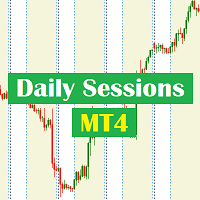
Daily Sessions utility is the best tool to highlight trading sessions , the trader can set any starting hour and ending hour to mark his trading session. Main features :
Customizable session time. Customizable Colors. Customizable vertical lines for the start and end of sessions
Set as many sessions as you want by simply plotting the indicator and changing the Indicator ID.
This is a tool for back testing your strategy manually on the chart , it's very easy to use, it may be useful for both professional and beginner traders. Features : • Simple buttons. • Export : P/L Points , Lots , Order P/L Result , Balance , to CSV file. • Ability to choose Auto or Manual StopLoss & TakeProfit. • Manual lot , or lot by risk can be used.
• Ability to change the chart time frame for live charts without losing the backtest result , you can even clo
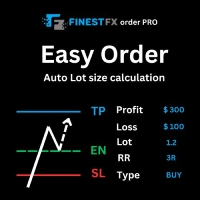
FinestFx order PRO is easy order execution and auto risk management tool developed by FinestFx official Programmer : Mohammed Rafi Just move SL,TP , Entry lines or Type SL,TP on entry columns . Lot are calculated automatically by fill out the loss cut amount. Work with all base currencies Fixed loss amount can be selected. Calculate risk rewards. Market order, limit order, and stop order are selected using buttons Supports FX, CFD, and crypto currency on MT4 Visit the owner website to see its

The panel allows you to place and open orders with one click of a button.
It is possible to quickly change the parameters of the lot, take profit, stop loss and expiration time.
The expiration parameter is valid only for pending orders. The trading panel works in the tester. To open a pending order, click on the buy or sell stop button, and then on a place on the chart.
(This function cannot work in the strategy tester for technical reasons) Expiration time is in minutes, everything else is
FREE

Do you think that in markets where the price can change in a split second, placing orders should be as simple as possible? In Metatrader, each time you want to open an order, you have to open a window where you enter the opening price, stop loss and take profit, as well as the trade size. EA Trade Assistant V for MT4 is an advanced tool that allows you to easily plan each transaction and manage them effectively. If you are a scalper and need to quickly open and close trades without setting defe

Martingale grid panel - a semi-automatic Expert Advisor with a built-in trading panel. The Expert Advisor is activated by standard MT4 tools (or via its own panel) and automatically sets Take Profit, Stop Loss, Trailing Stop. Automatically or manually opens averaging orders. Changes the volume of orders in accordance with the Martingale strategy. Works with all orders of the selected symbol or only those opened from the panel, when the ID number is set. The Expert Advisor (and its Free Demo) are

Line Trader Pro is designed to simplify your trading activities and automatically open trade when the trendline or horizontalline you draw touched by the running price, You can choose to set EA to trade buy order or sell order when the trendline or horizontalline touched by running price, you can also set stoploss and takeprofit in pips, when using MM Lot it will automatically calculate your order lot based on the SL distance and set risk per trade from your current equity. This EA include : 1.
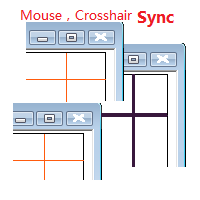
目标: 同品种多周期历史分析时候对齐时间很耗时,鼠标同步使得这一步骤可以自动完成。 使用: 1.下载程序并放在指标目录(MQL5/Indicators 或 MQL4/Indicators)里。
2.在所有需要同步的图表上加载这个指标。它就可以在同品种的图表里起作用了。 3.支持键盘的左右键,左右键在一个图表上移动时,同品种别的图表也会同步移动。
4.按下Ctrl键同时移动鼠标可以暂停或重启当前品种的同步。暂停或重启即使在所有图表关闭的状态下也是起作用的,当看见窗口没有同步时,请按住Ctrl键移动鼠标重启启动同步。 5.在未来时间区域暂停同步,工具会自动把当前品种的所有图表设置为autoscroll。在历史时间区域暂停,当前品种的所有图表会暂停在当时状态。 6.程序最大支持100个图表的鼠标和crosshair同步。

You can send MetaTrader screenshot easily to your identified telegram channel via press the send button that on the chart. TelegramBotToken: Telegram API credentials. You can create API credentials on my.telegram.org web page ChatId: Your telegram chatId. Secreenshots will be sending this channel - Please do not press the button repeatedly. This may cause your bot or ip address to be blocked. - You have to add telegram api address ( https://api.telegram.org ) in Option > Expert Advisors > Allow
FREE

Simple Trendline Trader is designed to simplify your trading activities and automatically open trade when the trendline you draw touched by the running price, You can choose to set EA to trade buy order or sell order when the trendline touched by running price, you can also set stoploss and takeprofit in pips, when using MM Lot it will automatically calculate your order lot based on the SL distance and set risk per trade from your current equity. This EA include : 1. Trade Mode, BUY or SELL mode

Simple HorizontalLine Trader is designed to simplify your trading activities and automatically open trade when the horizontalline you draw touched by the running price, You can choose to set EA to trade buy order or sell order when the horizontalline touched by running price, you can also set stoploss and takeprofit in pips, when using MM Lot it will automatically calculate your order lot based on the SL distance and set risk per trade from your current equity. This EA include : 1. Trade Mode,

交易头寸和回测工具:
“交易头寸和回测工具”又称“风险收益比工具”,是一款全面而创新的指标,旨在提升您的技术分析和交易策略。 风险工具是外汇交易中有效风险管理的全面而用户友好的解决方案。它具有预览交易头寸的能力,包括入场价格、止损(SL)和获利水平(TP),为即将进行的交易提供透明的视图。用户友好的面板配备了自动余额和自定义余额选项,以及自动手数和风险计算。它支持各种交易预览,包括市场买入和卖出、买入止损和卖出止损订单。该工具包括高级的风险收益比特性,允许在图表上任意定制移动,包括买入和卖出设置。交易信息的智能显示包括关键细节,如开仓手数、止损、TP和订单类型。它还提供了在移动SL或TP水平时自动调整风险的便利性,一个按钮将当前价格吸引过来的功能,以及一个热键用于轻松隐藏和显示风险工具。此外,该工具提供了进行彻底分析交易策略的回测能力。
特点:
- 预览交易头寸,包括入场价格、止损(SL)和获利(TP)水平的详细信息。 - 用户友好的面板:提供自动余额和自定义余额。 - 自动手数计算和风险计算。 - 各种类型的交易预览:市场买入和卖出、买入止损和卖出止损订单等。 - 高级风险收
FREE

is highly helpful in both performing and assisting a successful trade. This program allows you to work in a real account and take advantage of its most important feature, the Back-Test feature. is made up of two panels that work together to provide you with the best and fastest performance possible. The command panel is on the left, and the confirmation panel is on the right. The command panel is divided into four main categories: Buy/Sell, Lot, Distance, and Set Close. You make all the decisi
If you need an advisor on any arrow indicator signals - this utility will definitely help you. You will be able, with the help of this utility to form an unlimited number of EAs on YOUR signals , with your set of settings, with your copyright and complete source code . You will be able to use the resulting EAs unlimitedly , including adding them to the Market and other resources. Free simple version of the generation script to help you understand how it works - here
What does the utility do?

Let Your Ideas Earn For You.
Convert your Ideas and Strategies in to automated trading bots directly on MT4. Visual Strategy Builder with Instant Results on the chart. This One of a kind strategy builder, allows you to specify rules and visually see the signals based on those rule as you create them. Visit the link for Group, User Manual, Video Examples
Why Use LBM
LBM is an essential tool for traders of all levels. It allows traders to create strategies quickly and easily, and to test them i
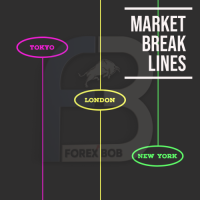
Market Break Lines is an utility tool to create a partition line at market openings/closings of Tokyo/London/NewYork sessions. This will help you to compare the market movements, volatility variations between the different markets.
Inputs: Inputs are simple to feed the time of Tokyo/London/NewYork sessions as per your broker server time Change Color and width of partition lines You can enable or disable any line (Hide/Show).
Please don't forget to support by giving handsome reviews/rating MT5
FREE

"Statistics by magic pro" is a program that provides statistics after entering a magic number. You can simultaneously track up to 10 statistics for different magic numbers in one chart window. The program is very easy to use. The program should be run on any free chart. In the EDIT field on the chart, you should enter the magic number. Entering "0" will erase the statistics in that window. The operation of the program can be stopped by selecting the statistics off option. After selecting it, the
FREE

On the other hand, we denounce with righteous indignation and dislike men who are so beguiled and demoralized by the charms of pleasure of the moment, so blinded by desire, that they cannot foresee the pain and trouble that are bound to ensue; and equal blame belongs to those who fail in their duty through weakness of will, which is the same as saying through shrinking from toil and pain. These cases are perfectly simple and easy to distinguish. In a free hour, when our power of choice is untram
FREE
Introducing the Revolutionary Trade Closing Assistant ! Are you tired of manually closing hundreds trades? Are you a scalper , day trader , swing trader and you want to maximize your profits and minimize your losses by closing multiple positions at thesame time under different conditions? Are you a Prop Firm Trader who wishes to avoid hitting maximum daily drawdown? Search no further. This kit is the ultimate solution for all you.
GUIDE TO USE THE KIT 1. Shows the total profit/lo

This is a Semi Automated OTE EA based on the free teachings of ICT. One of the biggest challenges in trading is related to executing and managing trades. After analyzing charts, draw an OTE Fibonacci and turn on the EA. It will automatically execute orders based on the Fibonacci level of your placement and protect any open positions when in profit. Please review the documentation that accompanies this product.
Auto Lot Calculation Based on Risk Percent
Auto SL and TP
Auto BE
Risk Per
FREE

FXO PRICE ACTION LEVEL NOTIFICATIONS
Notes:
1. .ex4 must be loaded in EA folder (not indicator folder).
2. Activate MT4 application notifications by Tools/options/enable push notification.
3. Drag Overlapped Horizontal lines to desired levels at start.
This is an Indicator file, it will not take trades by itself.
For any query Support: admin@forexmarket.one
Copyright: www.forexmarket.one
FREE

This EA is literally a reverse of Recovery Zone Assistance, as its name says ... It is an assistant, an expert advisor that monitors all the orders for the asset in which it has been placed, no matter if that order was by some other expert advisor or by the trader placed on the Manually, he will start his work after each order that is negative. Find Recovery Zone Assistance on https://www.mql5.com/en/market/product/68909 This Expert Advisor is based on this sistem on video "Recovery Zone" on
FREE

FXO BROKER SPREAD INFORMATION
Floating spreads are harmful for your trading strategy, even with Raw spread account. it makes a lot difference.
Floating spread goes too high when it's news time or daily or weekend rollovers.
this can affect trades's Expert Advisors, Pending orders and Stop losses.
Therefore this tool is created to find right information about spread while rollovers.
How to use :
download/paste the program file to Expert Advisor folder,
Open a chart of any instrument, Lo
FREE

The Saz_Timer indicator belongs to the Saz_Forex suite of professional indicators designed by Traders, for Traders. This indicator will show minutes and seconds of real time on the chart window. The indicator uses the OnTimer() event so it can update even while no ticks received on the chart. The text is shown toward the bottom right of the chart, encircled red in the screenshot. Inputs: Text Colour, allows selection of the colour for the text.
FREE
This trading tool automatically applies stop loss, take profit, and breakeven levels to trades that are opened manually or with a specific magic number or comment. The stop loss is set in pips, and the take profit and breakeven levels are calculated as a multiple of the stop loss. This helps traders to manage their risk and protect their profits. Additionally, the tool also watches for the breakeven point, allowing traders to move their stop loss to break even once a certain level of profit has
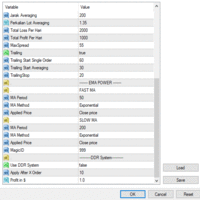
Ea SING MAIN MAIN menggunakan strategy DUA CROS EMA yang anda dapat sesuaikan di pengaturan sesuai dengan strategy anda masing masing ea SING MAIN MAIN juga sangat dapat membantu kita open posisi dan mengatur resiko yang kita akan gunakan karena sudah dilengkapi dengan cut loss BY % cut loss BY $ ea SING MAIN MAIN ini juga dapat mengurangi resiko ketinggalan moment entry

达尔文报告工具EA
异常的介绍性价格! 35美元
描述。
达尔文报告工具EA是达尔文系列中的新产品。
达尔文的产品因其质量和性能而在MQL5上广为人知并享有盛誉。
这一次,我向你推荐的不是专家顾问,而是一个旨在实现任务自动化的工具。
基本上,要对你的表现做出报告
解释:
事实上,由于这个工具,你将能够发送一个账户、一个策略、甚至几个可选择的EA的任何性能报告。
你可以通过电子邮件、Telegram等网络和短信、手机上的推送信息来发送你的报告。
福利待遇:
每天、每周或每月都能收到来自每个EA的报告,以研究其表现。
对你的交易账户进行准确的统计.....
--通过电子邮件发送
-- 在Telegram频道上发送
-- 通过Mt4/5平台的推送通知发送
-- 每日利润(在 "X "时间发送)。
-- 每周的利润(在X天X小时发送)。
-- 每月的利润(在X天X小时发送)。
-- 开设账户以来的总利润
-- 每一天,每一个月的利润......可以是%,可以是货币,也可以是两者。
-- 当天已结束的订单摘要
-- 本周订单汇总
-- 本月订单汇总
-- 能够以货币

Broker Desynchronization script MT4 is a script in the form of an EA. It will check the desynchronization of a BROKER's server compared to your time at your PC.
Usually BROKER sets time forward to have some space to execute trades.
If you wish to check how big the difference is, please load the EA to any chart.
After loading, it will wait for the first tick to check the desynchronization.
Information will be available for 10 seconds.
NOTE!
If market is closed, you get information to try again la
FREE

用於管理未平倉頭寸和掛單的實用程序。 內置追踪止損有五種模式和七種工具。 有虛擬止損和虛擬止盈,可以在圖表上自由移動。 借助內置的交易模擬器,您可以檢查 EA 在策略測試器中的工作方式。 UTralVirtual 的詳細指南可以在“評論”部分找到。 好處 5種追踪止損模式:虛擬、正常、總計、百分比和移動止損; 7 個選項:按點、按柱極值、按分形、按交易量、按 MA、按拋物線 SAR 和按 ATR; 虛擬 TP 和 SL - 根據圖表手動自由移動; 為所有未平倉頭寸添加止損和止盈; 通過以下方式設置止損:點、分形、ATR 指標、每日高/低; 圖表上打開的所有訂單的追踪止損; 迷你利潤開始追踪止損。; 通過幻數和方向為未平倉頭寸設置追踪止損; 掛單的尾隨:按類型、方向、點、分形、柱極值; 圖表上的“熱鍵”用於快速執行命令; 適用於具有 4 位和 5 位報價的帳戶; 5位數賬戶,參數自動加10; 用於處理加密貨幣、指數、期貨、差價合約的特殊參數乘數。. 參數 Block 1. GENERAL SETTINGS Allow the EA to work Magic number (-1 fo

A utility for managing open positions using virtual (invisible to the broker) stops. Virtual stop loss and virtual take profit can be freely moved around the chart. If the price touches the virtual stop line (TP, SL, TS), the EA will close all orders of the same direction on the current chart. Closing orders by virtual take profit is possible only if there is a profit.
With the help of the built-in trading simulator, you can, in the strategy tester, see how the adviser works. Parameters Block

XLT Alert EA identify the long-term trend and provide alerts for possible trades. EA shows alert only, but then the trader can decide to open the order or wait for a better signal. Information window Trade Management show the Month trend direction, EA only send alert when signal is with the trend. Trade Management allows for easy access to Buy and Sell buttons as well as Order close button.

Indicador SMART MONEY CONCEPTS DRAW Este indicador te permitirá dibujar de forma sencilla, rápida y fácil todos los conceptos de Trading Institucional e Smart Money Concepts basados en la terminología de The Inner Circle Trader (ICT) necesarios para realizar análisis técnico en tus gráficos de Metatrader.
Este indicador ha sido desarrollado por el equipo de TradingForexTV y lo entregamos totalmente gratis para toda nuestra comunidad y seguidores de nuestro canal y redes sociales.
Algunos de lo
FREE

Control Panel mette a disposizione una semplificata ed avanzata gestione dedicata per ogni singolo mercato Forex, CFD, Materie Prime, Indici Azionari, Metalli Preziosi, Prodotti Energetici, Azioni & Crypto Valute, dal trade pad si posso aprire posizioni e ordini pendenti, visualizzare tutti i dati relativi alla quantità delle posizioni Buy, Sell e di tutti i trade oltre alla quantità espressa in lotti anche per i posizionamenti hedge indicando il valore espresso in lotti relativo all’esposizion

Pip Counter Indicator Point This Panel is a great tool for Traders who open multiple orders and want to have detailed control of their operations, as well as traders who want to see the pips obtained at the end of their Trading session. This Panel reports on the buy and sell orders you have open, the pips traveled, pips generated and distance from the Stop Loss Long: Indicates the number of open buy orders. Short: Indicates the number of open sell orders. PIPS Counter: Indicates the real-time
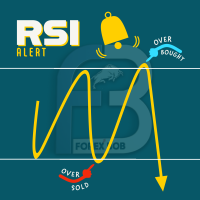
RSI PHONE ALERT RSI Alert is an amazing tool to get alerted on your mobile phone when Overbought/Oversell levels reached on RSI indicator. So that traders who doing manual trading can execute their trades from mobile phone while following their RSI strategy, as most of the traders use RSI for entering their trades. New suggessions are welcome INPUTS RSI levels RSI period Start/End time of the tool Custom text message to get on mobile phone Enable/Disable mobile alert function available Do not fo
FREE

It is just an alternative fibo lines, because mt4 have is a very strange drawing of fibo lines A simple Box (Rectangle) graphic element with adjustable levels binding: it is possible to specify up to 17 custom levels, all rectangles on the chart with the given prefix in their name are processed. Levels are specified in % of the height of the rectangle. A convenient graphical element for analyzing charts by growth-correction levels. Enjoy your work!
FREE

A script to open and Close charts of multiple pairs instantly with custom template
$30 for the next 25 downloaders, next price: $45
Features:
Chart Opener : Open chart(s) of multiple pairs simultaneously
Template Opener : Load any User specified template (.tpl) to the opened chart(s)
Chart Closer : Close chart(s) of multiple pairs simultaneously
Disclaimer:
Any loss involving this trading tool is the sole responsibility of the User, and not the responsibility of the Creator of this trading

Clean up Market Watch from unused symbols.
If you use multiple advisors and terminals on the same account your Market Watch windows may get filled with unused symbols from orders and positions opened on other terminals. Every symbol in the Market Watch consumes cpu power and bandwidth to get constantly updated and if you are on a vps you want to minimize resources consumption. Market Watch Cleaner helps you with that by periodically cleaning your Market Watch window from unused symbols.
Param
FREE
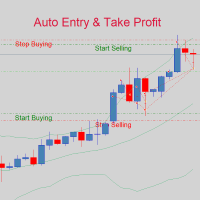
If you are good at market analysis this Semi-automatic EA will help you to manage trade for entry and take profit as you analyzed You job is set the zone for buying or selling by moving the lines on MT4 chart
For Supply and Demand Strategy - Support & Resistance System.. Buy low sell high from potential reversal point For this tool you only need to set the Market zone for buy or sell Start lots should be small for low drawdown for 0.01 standard lots for each $200 or more Default setting is for t

Prop Manager allows you to automatically close trades once the max daily loss or profit target is reached so it's designed for the control and management of PROP FIRM ACCOUNT , but also live accounts.
Prop Manager will allow you to manage prop accounts with maximum security, whether you want to do manual trading or algorithmic trading.
It was created for people who want to be sure that their trading does not run into daily drawdown or total drawdown problems. The user is left with complete fr

Hide TP and SL from your broker. Set Use_TP_SL_Stealth_Mode to true to hide your TP or SL from the brokers. Stealth Trailing now avalable in updated version. Set Use_Stealth_Trailing to true for profit trailing without your broker knowing. This EA can be used on any currency pair and will manage your open orders. Besides the stealth mode EA can also be used for normal order management where actual TP SL levels can be set. Also the EA can trail order by adjusting the Stoploss price.
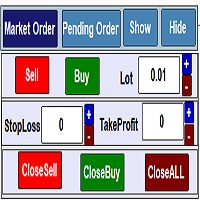
Trading Panel for managing orders in one click ... for MetaTrader 4 . Market Order : Open Order Sell . Open Order Buy . Set Lot orders . Set stop loss, Take profit orders on the chart. closing all Sell positions. closing all Buy positions. closing all positions. Open Pending Order : Calculating pips on the chart Sell limt . Sell Stop . Delet Sell limt. Delet SellStop . Buy limt . Buy Stop . Delet Buy limt . Delet Buy Stop . Delet All ,Sell limt,Sell Stop,Buy limt,Buy Stop . Work in the back t
The utility for managing open positions can work with stops (take profit and stop loss) in money, percentages or points. The built-in trailing stop starts working from profit, the size of which can be set in currency or as a percentage. With the help of the built-in trading simulator, you can check how the utility works in the strategy tester. Benefits setting stop loss and take profit in the deposit currency, as a percentage of the account balance or by points; adding stop loss and take profit
The utility for managing open positions can work with stops (take profit and stop loss) in money, percentages or points. The built-in trailing stop starts working from profit, the size of which can be set in currency or as a percentage. Trailing stop can work in three modes and for five instruments. With the help of the built-in trading simulator, you can check how the utility works in the strategy tester. Benefits setting stop loss and take profit in the deposit currency, as a percentage of the

该脚本对于那些处理大量订单的人非常有用。 碰巧账户上有盈利,您需要立即关闭账户上的所有订单。 这就是完整的Closer脚本的用途。
脚本参数: Close type - 指定要关闭的订单类型。 如果您只想关闭买入订单。 将参数设置为唯一的买入订单位置,如果要关闭所有订单,则将参数保留在所有类型位置 MagicNumber - 如果您的帐户上运行了多个订单,但您需要关闭某个顾问的订单,请在此参数中指定该顾问的唯一编号,然后脚本将仅关闭该顾问的订单,其余订单将 将我添加为朋友,以免错过新机器人的更新和发布-> Dmitrii Korchagin 查看市场上我的其他产品->我的产品 我的机器人很快就会发布,但与此同时,看看它是如何交易的-> Hewer信号
FREE
TradeStops Manager EA is a simple, dynamic, volatility-adaptable stops-management tool that will help you to manage your open order's stops effectively according to your way. The fact that most traders lose money in the markets is not really surprising if you consider that most traders do not know how to set up the right, dynamic, adaptable stops in the face of current volatility in the market. Do you want to close a specific order after a specified
number of candles, StopLoss Level is reach
FREE

Dear Friend ... I hope and Wish a happy new year to all of you .. as i told you < this is a simple Utility EA can helps you in your trading . he helps you to ensure that your decision is correct to enter the market . it is work on all currency pairs , stocks ,indices and crypto . its easy to install . no complicated inputs. this EA works as follows : it's main work is to detect the highest price and the lowest price on H4 & H1 time frame and draw resistance and support and trend every line has
FREE

================================================================================ The utility is useful when you have to load history data for many symbols and timeframes. It loads the symbol used in the market watch. One symbol is scanned for all timeframes. Then the charts will be closed and the next symbol is scanned. You cannot abort the operation. Wait till it is done. ================================================================================
FREE

The Spread Monitor indicator is designed to instantly show the seprads of currency pairs. Spreads of all pairs appear at the bottom of the screen as oscillators. The indicator has a spread level parameter. When you enter a value in this parameter, the ones below that value are displayed in green and the ones above it in red. The spreads of 28 pairs appear on the indicator. Note: It does not work in test mode. In test mode, spreads show 0. Works in live mode To View Our Other Products Go to the

This EA is fully automated , it is built based on the method of catching the pop-up Alert event and forwarding them to Telegram Channel/Group.
Parameters of the EA: -------- <EA Settings> -------- Magic Number: The identifying (magic) number of the currently selected order. Bot name: Name of the Expert Advisor. Allow forward Alert: Enable/ Disable Forward Alert. Do not send messages after the current time (seconds) .
Number of rows to read from list (>= 4...| affect processing speed).
--

The utility provides data on balance, equity and profit/loss on a trading account from the start of a trading day at a specified time.
You no longer need to constantly check your VPS or computer.
The utility features email and push notifications to the mobile platform version on your smartphone.
Set the EA on any H1 chart.
Configure parameters of your MetaTrader 4 for sending messages before usage.
Parameters Send test notification - true/false - send a text message when launching on a ch
FREE

This Tool Allow you close all open Orders automatics when Equity reach to specific value: - When Equity is less than specific value - When Equity is greater than specific value - And Allow you close all open orders in manual - It will notification to MT4 Mobile app when it execute close all orders. __________________________________________ It very helpful for you when you trade with prop funds. Avoid reach daily drawdown and automatics close all orders when you get target.
FREE

This EA is been tested on difference Prop firm including FTMO, MFF, TFF, Funding Next and E8. The main focus of this EA is to provide you Risk Management, Trade Management. It can calculate lot size for you in any market to make sure fix % risk per trade. It has a partially close and brake even line you can place on the screen. When the line is hit, EA will partially close the position can move the SL to entry to provide you a guarantee profit. One EA can trade all symbol. Is a Prop Firm tr

这是一个简易的下单功能面板 不仅可以开市价多单和市价空单 当设置好止盈止损点数 就可以点击按钮开仓 除了市价单还可以挂限价多单和限价空单及突破多单和突破空单 认为不需要挂单的时候可以点击删除挂单按钮 。 面板还带有平仓多单和平仓空单及平仓后开反向单功能, 在面板的最上面有退出面板和隐藏面板功能。 在面板里边有参数输入功能:下单量、止损点数、止盈点数、多单挂单位置、空单挂单位置。 该面板是挂在什么货币对就执行当前图表上货币对下单功能,设置有订单识别码 也可以相同的图标货币对上挂2个以上的面板下单功能互不影响。 该面板显示在图标的右边角落,不会挡住当前行情方便操作。当前是最新版本 以后在运行当中会不断升级完善做到精益求精,给使用者带来良好的体验。

FOREXBOB AUTO CLOSER is a very handsome tool for manual traders who doing :- Scalping Correlation Hedging Those who use averaging methods etc. As this utility tool will help you by closing all your running trades when the universal floating P/L reaches a certain value that you will put in inputs. You may enable and disable the alert message on your mobile phone when auto closer close all the running deals on specified profit. You may add any message you want in notification. This tool consid
FREE

The main purpose of this expert advisor is to protect your hardly gained profits. Once the market goes in your favor, with amount of specified pips [configured via EA inputs], the EA will do the following: Move the Stop-loss of the profitable positions to Breakeven. Lock in some profits, i.e put the SL above/below your entry with specified pips Will close part of position, % of lots, once the EA was triggered. By default, the "Move to Breakeven EA" will modify all opened positions on the termi
FREE

The main purpose of this expert advisor is to protect your hardly gained profits. Once the market goes in your favor, with amount of specified pips [configured via EA inputs], the EA will do the following: Move the Stop-loss of the profitable positions to Breakeven. Lock in some profits, i.e put the SL above/below your entry with specified pips Will close part of position, % of lots, once the EA was triggered. By default, the "Move to Breakeven EA" will modify all opened positions on the termi

This is application readymade scanner for the traders, you can scan your watch list symbols, explanation timeinterval is the refresh rate of the symbols column height is the number of the symbols you want to scan, high1 and high2 are the comparison of the last two candles low1 and low2 are the comparison of the last two candles l1 is the last candle and l2 is the previous candle. other things are self explanatory, you can message me for any explanation, this indicator is more than worth 300US
FREE

The ScriptForOrders utility is intended for placing orders with the required Magicnumber parameter manually!
Manually opened orders have Magicnumber = 0. Expert Advisors often open orders with a Magicnumber parameter other than zero. This is done so that the EA can distinguish its own orders from those of others, or apply different control algorithms to different orders.
Sooner or later, a trader has a situation when he needs to intervene in the work of the adviser and place an order manually

DYJ NewsForexFactory是用于基本市场分析的日历交易工具,同时它也是宏观经济事件指标。 在这里,你可以找到全球最大经济体的金融新闻和指标——从美国、欧盟到澳大利亚和纽西兰和日本和中国,共有9个经济体,涉及60多个货币对。800多个宏观经济指标和事件是从公共来源实时收集的。每个指标都有历史、当前和预测值以及重要性特征。此外,该服务存储图表和表格中列出的大量历史数据。 指示器右侧动态绿色箭头指示最后一个事件的发生,并给出该货币的数据分析结果,Better或者Worse,你能根据结果判断货币对的多与空 指示器左边指示黄色星号表示下一个即将发生的事件 指示器时间序列栏里显示每个时间点的事件对象。 指示器具有电子邮件和推送通知功能。
所有货币对 GBPUSD、EURUSD、USDJPY、USDCHF、USDCAD、GBPJPY、EURJPY、eugbp、EURAUD、EURNZD、EURCAD、EURCHF、CADJPY、CADCHF、AUDUSD、AUDNZD、AUDCAD、AUDJPY、AUDCHF,NZDJPY、NZDUSD、NZDCAD、NZDCHF
参数
Inp

SmartDash Trader EA This is MT4 Semi Automated EA which trade using BUY, SELL and CLOSE Buttons to executes trade actions. You can use Auto Set SL/TP/Lot of your choice since the EA comes with only 0.01 lot and 0 for TP/SL. Set 10 pips for TP to take advantage of trades. NOTE: THIS EA DOES NOT BACKTEST. ITS BUTTON TRADER EA HOW THE STRATEGIES TO USE THE DASHBOARD TRADER Wait for a weaker or stronger currency means the currency strength meter should show less than 15% for SELL and more than 88% f

請點選copyright link跳轉至官方網站觀看詳細說明 https://www.ainstein.com.tw/
由AInstein研發團隊獨立開發的全方位交易整合軟體,並獲得經濟部核可「智能交易系統軟體」智產權專利,提供協助交易者最專業的交易資訊軟體與諮詢服務。 由AInstein研發團隊獨立開發的獨創外匯智能交易系統,並持有經濟部智慧財產局頒發的專利證書新型第M598465號—智能交易系統,讓交易者能以玩遊戲的形式,輕鬆愉快地進行交易。 提供官方專屬的合作券商平台優惠方案,並依據個別需求,提供客製化策略方案設計及諮詢服務。 提供同業與異業間彼此推廣的商業合作策略方案設計及諮詢服務。 提供專業的客製化EA代寫,協助有策略但非程式專長的交易者,也能有專屬的量化交易工具。 提供與券商間互惠互利的合作,以及代理技術客製化培訓課程,協助代理專業交易知識與技術的提升。

Forex Trade Manager MT4 simplifies managing open orders in MetaTrader 4. If you open a new order, the manager automatically sets Stop Loss and Take Profit. When price will move, then the program could move Stop Loss to Break Even (stop loss = open price) or continuously moving Stop Loss (Trailing Stop) to protect your profits. Forex Trading Manager is able to control orders for only current symbols (where EA works) or for all opened orders (regardless symbol) and hide the Stop Loss and Take Prof
FREE

Forex Trade Manager Grid MT4 helps you to managing orders and achieve the goal. You only need to place first order with Take Profit, run EA and set in params profit (pips) you want to get. EA will be managing your positions, as will gather appointed amount of pips. It’s a strategy for management of manual trades opened on current pair. The strategy adds positions to currently opened trades in a grid management (with chosen distance in pips between trades) - up to 15 trades (or less). First up to
FREE
MetaTrader市场是 出售自动交易和技术指标的最好地方。
您只需要以一个有吸引力的设计和良好的描述为MetaTrader平台开发应用程序。我们将为您解释如何在市场发布您的产品将它提供给数以百万计的MetaTrader用户。
