 MetaTrader 5
 专家
专家
 指标
指标
 程序库
程序库
 实用工具
实用工具
 窗口小部件
窗口小部件
 规则
规则
全新的MetaTrader 4 交易实用工具 - 45
 以下是可在MetaTrader 4中简化外汇交易的交易程序。将鼠标悬停在下面列表中的工具上,阅读它的描述和用途。
The strategy used by this trading robot is placing stop orders (Pending) before the news event. The news event release time can be accessed from investment.com an app that the trader must download from play store into his/her mobile device. The robot places two stop orders, a Buy Stop and Sell Stop at the same time at least two minutes before news release time. For example, if the news release time is 15:30, the pending orders will be opened at 15:28(see how to insert the news time at screensho
FREE

Y-tax Telegram Bot sends text messages only to a group of telegrams or a channel of your choice. Messages are configured to display information about any trading activity on the account. A daily, weekly and monthly report is also displayed.
Below are the features of sending messages by a Y-tax Telegram Bot expert to a group / channel in a telegram:
Trading activities: opening, changing, closing deals and pending orders. This adviser does not need an active Auto Trading button. This Expert Advi

JRFX Trade Manager This product is a must have tool for every trader even if you trade manually or follow any signal providers via Telegram. You can set maximum 10 Take Profit levels and also you can choose the lot size what you wish to close as partial close at any Take Profit levels. At Take Profit 1 the EA will move SL to BE + X pips which is specified by you. At the next Take Profit levels you can set where you want the EA to move your Stoploss.
Settings Stoploss (Pips)
TakeProfit1 - Tak

With this software you can test your Forex strategies live. Compatible with Meta Trader 4. Extra features are available. You can trade through the panel. You can put signs with Fish Hook. In addition, your strategy test is saved to the file folder in csv format. You can review these reports with CSV Quick Viewer. One Lot can do with Scalp. Your account also determines the lot based on the amount of money found. It gives you information about the transaction before you open the transaction. You c

This expert has been designed with manual traders in mind. It allows you to: Place and manage orders faster with keyboard shortcuts and in a visual manner Setup entry and exit points directly in chart Easily control risk and money involved in each operation DEMO warning: If you want to try the demo version do not download it directly as keyboard events do not work in the strategy tester. Please go to the following link instead for a limited trial version : https://www.mql5.com/en/market/pro
TrailingAll_8 The utility determines an average value of the same-direction orders and a starting profit profit provided that the directions of orders are different (SELL or BUY outweighs). It can set a general TP estimating it based on the profit pips. It is also capable of tralling the profit. The utility marks the points where the orders are opened, too.
Input paremeters
Find by comment - a space where you can specify the parameter of order choice within the "comment" column of t

ALPC forex Matrix produces signals based on five different strategies . ALPC forex Matrix copies itself to all charts. Quick and easy management is your responsibility. Forex trading is fast control. ALPC MATRIX FOREX SYSTEM DOCUMENTATION !Please open the scalp process according to the hourly trend direction. (does not work with strategy test)
ALPC MATRIX 2015-2019 Supportive EA Tool for all Forex Pairs Producer: Mehmet Ozhan Hastaoglu ALPC MATRIX Forex System is actually a supportive tool wher

If you use Resistance and Support Trendlines in your trading, this tool will be very useful for you! The Trendline Trading EA is a smart and easy tool to helps you in your trading using trendlines on your chart. Just create a trendline for the Resistance and Support, and the EA will create pending orders when the price touch the trendline. The following orders will be created when the price touch the trendline: Pending order in case the price breaks the trendline Pending order in case the price

!!! New faeture sending Signals as VIP EMAILS
MT4 Telegram Signal is tool, which sends selected trades via magic number to telegram channel, sms and email to user. Tool sends trades when open and close with chart to telegram chanel. It also sends every modification from trades to telegram. Tool can send multiple charts and magic numbers and pairs from a single chart. For this you have to fill in on the chart corresponding magic number to be sent by the chart. Send information of all type of ord
FREE
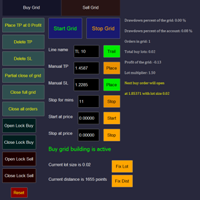
Overall Grid Assistant trading panel is a fully-featured tool for building grids of orders and semi-automatic management of them. The panel has flexible settings of lot multiplier and distance between orders and also a lot of functions protecting the deposit from big losses. The panel has separate independent tabs for grids of buy and sell orders.
Grids build for losing trades opened manually or by another EA which can be chosen by magic number, comment or ticket.
There is a possibility to decre

This tool works on MT4. The connection to the IQ option box program is established. With this software, IQ Optiona opens orders in selected time periods. The IQ option box program is required. First, the connection to the IQ option box is established. Then you can trade by sending a trading order by adding MT4.
IQ O BOX Free Connection Software Download Link. https://drive.google.com/open?id=1xW6ynCwtdbGL4_GFzXU7penZAvTwYaWP

Keyboard Trading Open and Close orders with your keyboard. This tool allows you to open and close orders with your keyboard. As opening and closing orders with your keyboard is faster than with your mouse, this tool is very useful for Scalpers. How does it work? If you press the key "b", it will open a buy order with lot size, SL and TP as specified in the settings. If you press the key "s", it will open a sell order with lot size, SL and TP as specified in the settings. If you press the key "c
FREE

This is the Free Version of "Quick Copier MT4" (Please check : https://www.mql5.com/en/market/product/34184) This free version is available to be used within 2 hours only, and it has limited features. Please also check this product at fxina.hostingerapp.com.
"Quick Copier" is designed to copy trading without any complicated settings. It copies master orders faster than "Just Copier". The copy can be done in one PC. One EA can be set as master (provider) or slave (receiver). The receiver lot ca
FREE

close all profitable orders The set contains scripts for different purposes, facilitating work in the MetaTrader 4 terminal. If necessary, a screen is provided for some scripts. Before working on a real account, check (on a demo account) whether the required script responds to your tasks (for example, there is a script for opening five orders at the same time, by default the lot is set to 10; so that you do not accidentally open five positions with a total volume of 50 lots - be attentive))) Use

A simple risk management tool that closes all open orders if equity drops by a specified percentage. This tool is useful if you are running multiple EAs and multiple charts and pairs in order to control your risk. All orders will close accordingly. Once it hits specified percentage drawdown the closing of all orders cannot be stopped. The EA will reset once all orders are closed, until account equity drops again relative to account balance. Use at your own risk. This is only for MT4. There is o
FREE
专家进行技术分析,你可以看到分析。 分析在白天更新。 MetaTrader的一键式分析显示在屏幕上。 如果这些分析存在挂单,您只需单击一次即可打开交易记录。 这是很容易和易于使用。 相关的分析,期间和信息作为模板保存到您的计算机。 然后,您可以从"文件"文件夹下载并查看它。 这是相当教育和产品,可以帮助你赚钱。 专家进行技术分析,你可以看到分析。 分析在白天更新。 MetaTrader的一键式分析显示在屏幕上。 如果这些分析存在挂单,您只需单击一次即可打开交易记录。 这是很容易和易于使用。 相关的分析,期间和信息作为模板保存到您的计算机。 然后,您可以从"文件"文件夹下载并查看它。 这是相当教育和产品,可以帮助你赚钱。 专家进行技术分析,你可以看到分析。 分析在白天更新。 MetaTrader的一键式分析显示在屏幕上。 如果这些分析存在挂单,您只需单击一次即可打开交易记录。 这是很容易和易于使用。 相关的分析,期间和信息作为模板保存到您的计算机。 然后,您可以从"文件"文件夹下载并查看它。 这是相当教育和产品,可以帮助你赚钱。

这是一个交易辅助工具箱,并不是全自动交易的机器人 W10 系统请保持 100%的缩放比,如果超过这个值。按钮内的字体将超出按钮边框 常规: 一键下单、一键挂单、一键反手,自动设置止盈止损。 一键平仓、一键平多单(空单)、一键删除挂单。 一键反手、一键锁单、设置自动追踪止损。 根据画线追踪止损 非农: 消息突破单,可在非农或者其他重大消息时使用,在消息行情爆发前在当前价格上方 挂BUYSTOP,下方挂SELLSTOP。订单自动设置止盈止损。 划线下单: 支持最多四根做多趋势线或者做空趋势线并存。价格到达趋势线自动开单。 支持每根下单趋势线设置不同的仓位。 每根下单趋势线可以设置不同的止损趋势线、止盈趋势线。 支持止损止盈趋势线进行止损止盈追踪移动。 支持趋势线的“时效性”,如果价格运行到开单(止损、止盈)趋势线的右方仍未订单成交,则价格将永远不会接触到趋势线,策略失效。如需要请延长趋势线 杂项: 支持历史订单轨迹显示,可在图表显示历史记录中所有订单的下单轨迹,显示开仓价、平仓价、单量。 支持实时点差显示 支持平台信息显示,杠杆,一个点的价值,一手保证金,仓息,是否支持EA等等
FREE

Grid Manual是一个交易面板,用于处理订单网格。 该实用程序是通用的,具有灵活的设置和直观的界面。 它不仅可以在亏损方向上设置订单网格,还可以在盈利方向上设置订单网格。 交易者不需要创建和维护订单网格,实用程序会这样做。 打开一个订单就足够了,Grid manual会自动为它创建一个订单网格,并伴随它直到非常关闭。 完整说明和演示版 此處 。 该实用程序的主要特性和功能: 伴隨以任何方式打開的訂單,包括從移動終端打開的訂單。 適用於兩種類型的網格:“限制”和“停止”。 使用兩種方法計算網格間距:固定和動態(基於 ATR 指標)。 允許您更改未結訂單網格的設置。 顯示圖表上每個網格的盈虧平衡水平。 顯示每個網格的利潤率。 允許您一鍵關閉網格中的盈利訂單。 讓您一鍵關閉每個訂單網格。 允許您對訂單網格應用追踪止損功能。 允許您在訂單網格上應用將訂單網格的止損轉移到盈虧平衡水平的功能。 相對於訂單網格的盈虧平衡水平自動重新排列止盈(僅在限價網格模式下,距離取決於所選的計算類型:“保守”或“激進”)。 最多可管理 20 個訂單網格,每個網格最多可包含 100 個訂單。
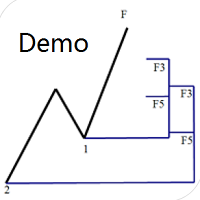
专门为帝纳波利点位交易法写的辅助工具。 这是试用版本,在XAUUSD H4上没有任何限制。正式版 https://www.mql5.com/en/market/product/32213
主要功能:
1.可以直接画线多组斐波那契折返,重要折返点之间的关系一目了然
2.可以画出斐波那契扩展,比率有三种0.618,1,1.618
3.画出的斐波那契折返和扩展均可左右移动,有数值显示,方便观察
4.图表显示清爽简洁,没有多余的线
5.可通过数字键切换周期 使用指南和功能键:
1.按 [ 或R画折返,按需要画折返,从1组到最多画8组
2.按 ] 或E画扩展
3.按 \ 删除当前周期下的所有扩展和折返,其余周期的不受影响
4.移动、删除折返和扩展
FREE

【分析大师】 简介 分析大师是一款强大的MT4交易数据,交易策略统计分析软件,可以为用户体提供直观的账户表现,同时具有复盘交易轨迹的功能。 可以有效帮助用户做基础的盈亏统计,并直观看到自己的交易是否稳定,自己的交易策略是否需要调整。 使用方法 将其拖入任意货币对图表中,即可展示其效果。 如果统计数据不全,请检查历史交易记录是否完全显示,因为程序是从历史记录中读取并转化成可视数据图像的。 功能 根据历史盈亏,将交易成绩可视化,直接查看盈亏曲线。 统计不同币种历史盈亏及交易单量,方便我们总结什么品种好盈利,什么品种容易亏损。 可以复盘交易轨迹在K线图标上,方便观察交易策略。 显示每日/每周/每月交易盈亏数据,方便查看账户收益率。
如果遇到问题,可以咨询我,为你提供使用帮助。
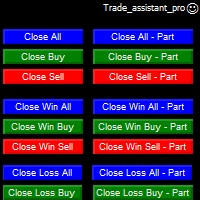
Trade Assistant helps in order management. Just run EA, set up your settings and open a store. EA automatically set = Target Profit, Stop Loss, Trailing Stop / Break Even, Close Trade after + "X" pips (Volume Size "X"%), Delete Pending Orders After "X" Seconds. See the buttons on the chart. He works to close trade, close partialli trade and delete orders
parameters: Set button - close partially (close all part) Volume Size "X"% More settings Enable / Disable Target Profit Target profit Enable

Spread Data tool will display current spread and average spread. It will record spread for every hour (from 0 to 23) and can give better data about your broker spread. Run it for 2 days or more to get better spread data . Every spread smaller than MinSpread will be recorded as MinSpread Every spread larger than MaxSpread will be recorded as MaxSpread It help to decide what spread to be used when do backtest, EA spread settings, EA that trade in specific time interval, especially for scalping EA
FREE
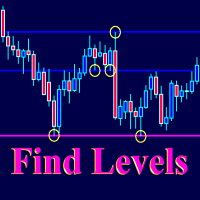
The Find Levels utility scans the range of prices and bars indicated by you on the chart, finds the levels most often related to High and Low prices and provides a full report. The color of the level line depends on the number of touches and changes in the program settings. The level is drawn in the event that if the shadow of the High or Low candle was at least two touches during the period specified in the parameters. The characteristics of the candle, namely, what should be its parameters for

(8th Feb 2019 Launch Promo: $97/lifetime just for 1 day! Price goes to $180/lifetime in 24 hours!) The TFA Trade Manager helps you easily manage your trades with an intelligent vertical "bars" system. You easily now easily click + drag your entry, stop loss, take profit, breakeven, partial profit and trailing stop with a few simple mouse clicks. You can also easily calculate the risk you wish to allocate to each trade by telling the trade manager your desired risk %, lot size or $dollars to risk

An excellent and fine deal copyist!
Copies from one or more source terminals to one or more receiver terminals.
Convenient and quick to set up.
Settings:
1. Type Select the type of Master - source or Slave - receiver.
2. Lot Sets the lot for the Slave type. Orders will open with the specified lot, if the lot = 0 is the same as in the source. 3. MasterLot Allows you to set the lot size transmitted (on the side of the MASTER) by the master. / X - the ma

News Panel is a fully adjustable utility for Forex News. It can show upcoming news in InfoPanel as well as lable for upcoming and past news labels on the chart.
This utility also enables Upcoming news Alerts and Push notification. User can change number of upcoming news displayed, colors and many others.
Instructions Alow WebRequest for Listed URLS in Metatrader Tools -> Options -> Expert Advisors tab (see screen or watch the video) Add " https://ec.forexprostools.com/ " to the list of allo

Trading Board is a Tool That Help you execute Sell and Buy Operation very smoothly.
General Description : This Tool has this functions: The function of Send Buy or Sell orders. The function to close all orders in the current chart. Choose the volume you need to trade. Calculate of Stop loss and Take Profit with the number of points. Draw the Fibonacci retracement.
FREE

交易面板是一款多功能交易助手。该应用包含超过50种手动交易功能,并允许您自动执行大多数交易任务。 应用程序说明 : https://www.mql5.com/zh/blogs/post/761102 用于模拟账户的应用程序试用版: https://www.mql5.com/zh/blogs/post/762579 如何安装应用程序: https://www.mql5.com/zh/blogs/post/762580 如何在可视化模式下测试应用程序: https://www.mql5.com/zh/blogs/post/770278 如何在VPS MetaTrader上安装应用程序: https://www.mql5.com/zh/blogs/post/770196 贸易. 只需单击一下即可执行交易操作: 打開掛單和頭寸,並自動計算風險。 一鍵打開多個訂單和頭寸。 打開訂單網格。 按組別關閉掛單和頭寸。 反轉頭寸方向(關閉買入>打開賣出,關閉賣出>打開買入)。 鎖定頭寸(通過開啟缺少的頭寸,使買入和賣出頭寸的數量相等)。 一鍵部分關閉所有頭寸。 將所有頭寸的止盈和止損設置在同一價格水平。

始终知道智能货币/做市商何时活跃! 向您显示过去到现在,快速美丽的直方图中的货币对的真实数量,您可以调整大小以适合任何图表。 --------------------------------------------------------------------------------------------------------------------------------------------------- - 所有时间范围和所有货币的工作。 - 显示从超低到超高的音量,甚至显示音量过大,这将告诉您何时不在酒吧或货币对之外!
********************************************************************************************************************
始終知道智能貨幣/做市商何時活躍! 向您顯示過去到現在,快速美麗的直方圖中的貨幣對的真實數量,您可以調整大小以適合任何圖表。 ---------------------------------------------

Скрипт открывает графики по всем инструментам находящимся в окне "Обзор рынка" и по желанию может задать для всех графиков один шаблон. Так-же можно удалить все графике открытые в терминале Мт4. В скрипте имеются следующие настройки: "Таймфрейм" по умолчанию M30; (Можно поставить свой: M1, M5, M15, M30, H1, H4, D1, W1, MN.) "Задержка" по умолчанию "0"; (Задержка перед открытием следующего графика в миллисекундах.) "Шаблон" по умолчанию "True"; (True=пр

По факту вы выставляете виртуальные Buy Stop и Sell Stop которые срабатывают после закрытия свечи. Данный помощник позволяет заранее выставить уровень Stop Loss и Take Profit. Так-же имеется демо режим для предварительного расчёта параметра риск/прибыль. Помощник имеет следующие настройки "Лот" по умолчанию "0.01" "Проскальзывание" по умолчанию "60" (Значение в пунктах) "Номер Ордера" по умолчанию "0" (Магический номер ордера) "Цвет Комментариев" по умолчанию "Black" "Шрифт

Тестер поможет протестировать вашу ручную стратегию или проверить чужую . В обращении тестер достаточно прост,есть возможность регулировать скорость теста и лот, отдельно закрывать и модифицировать ордера. У данного тестера имеются следующие настройки: "Начальный лот" по умолчанию"0.01" "Шаг изменения лота" по умолчанию "0.01" "Шаг изменения скорости" по умолчанию "50" (условная величена, чем она больше, тем быстрее меняется скорость)
FREE

BRiCK is a simple and versatile Utility.
By combining Experts, Indicators and utilities like the Lego block, various trading styles can be realized. "BetByTrade" is a utility to automatically add / close positions when trading. If you open the position in the trade pool, if the calculation result of the betting method exceeds the initial lot, the utility will order additional.
If you close the position in the trade pool, if the position that was additionally ordered by the utility remains, it w
FREE

Trailing Stop Forward EA locks trade profit once trade moves in profit by certain points(eg 100 points) by moving the Stop Loss in direction of trade. There are three inputs in EA to be provided by user to EA TrailingStart this input used as activator when trade moved 100 points towards profit, this EA will start shifting your stop loss towards profit. TrailingStop input defines what should be the distance of stop loss from current market price once TrailingStart activated i.e trade moved 1

Always have a quick reference to timely information while trading. -Includes Currency Spread, Currency Trend w/ Time frame, Bar Timer, Server Time, Connection Status. ------------------------------------------------------------------------------------------------------------------------------ -Currency Spread; to know exactly how much you have to pay to get in. -Currency Trend with Time Frame; Understand the major direction of the currency pair for the last 3 months or other Time Frame. -Bar Tim

发现信号很好,但提供商的信号太小?您需要更大的持仓量,但终端设置太差?信号手数管理器将通过所需交易量的重复订单来增加提供商的头寸交易量。 只需设置手数大小和用于复制订单的信号名称即可。 Signal Lot Manager 是一个批量乘数实用程序,用于在您的终端上复制订单。来源可以选择任何顾问、手动交易、单独的交易信号。它具有广泛的功能、简单的设置以及高速度和可靠性。 Signal Lot Manager 安装和输入指南 如果您想获取有关 EA 的通知,请将我们的 URL 添加到 MT4/MT5 终端(参见屏幕截图)。 MT4版本 https://www.mql5.com/en/market/product/34864 MT5版本 https://www.mql5.com/en/market/product/41610
一般输入:
信号标题:信号的名称(您可以从信号顺序注释中复制它)。 最大限度。滑点:开仓交易可接受的最大滑点。因此,如果当前价格超过最高价格。与信号订单的入场价格相比的滑点距离,交易不会被复制。这对于防止复制交易出现不必要的滑点非常有用,特别是在高波动

The utility is designed to close several types of orders. Closing is done by pressing the hot key. How to place and delete orders by voice using the utilities of this type, see the video below the description. https://www.youtube.com/channel/UCTpVWJkEic6TzoXr0qc9RIw/featured Provided closing options:
KEY "1" DELETE BUY STOP. KEY "2" DELETE SELL STOP. KEY "3" DELETE BUY AND SELL STOP. KEY "4" DELETE BUY LIMIT. KEY "5" DELETE SELL LIMIT. KEY "6" DELETE BUY AND SELL LIMIT. KEY "7" DELETE ALL PEND
FREE

* The product for MT5 converted using "BRiCK TradeByArrow MT4" is here. BRiCK is a simple and versatile utility.
By combining Experts, Indicators and utilities like the Lego block, various trading styles can be realized. "TradeByArrow" is Utility that executes order processing when an arrow object is created on the chart.
Combined with Indicator which outputs arrow object, it can be used like Expert.
Parameter
[ArrowName] EntryBuy: Arrow object name for buy order (partial match) EntrySel
FREE

EasyAgent Trade Tool.This is not an automatic trading robot (EA) and it doesn’t take decisions or opens position, but it helps your work when you trading manual work with Strategy Tester and you can control trade via magic number. The following functions are available: Order opening in one click. Order closing/deleting in one click. Modification of Stop Loss and Take Profit using a mouse. Closing all orders based on their type. Order reversal. Breakeven function. Trailing Stop function.
FREE

HelloTrader is a completely new product view for the MetaTrader platform. Immediately after launching, the utility displays randomly one of the lines of the phrase, quotes of famous people or an aphorism in the upper left corner of the terminal. Every 5 minutes the recording changes. The Demo version includes 32 phrases, quotes or aphorisms in English only.
The utility starts working immediately after launch and no longer has any settings or functions. The only task is to randomly display quot
FREE

Grid Hero War Pad is a GRAPHICAL MANUAL TRADER version of the original Grid Hero EA, designed and created for ADVANCED TRADERS who are experienced in plotting their own market entries. It is coded using ADVANCED GRAPHICAL INTERFACE programming, that combines the power of discretionary trading with Grid Hero algorithm in the form of a graphical console with button-click easy execution.
It allows you to execute trades manually using Market Orders and Pending Orders, and then automatically uses th

This is the Free Version of "Just Copier Pro MT4" (Please check : https://www.mql5.com/en/market/product/34472) This free version is available to be used within 2 hours only, and it has limited features. Please also check this product at fxina.hostingerapp.com.
If you want to share your trading signal, but you dont want to distribute your investor password, this product is fit with you. "Just copier Pro" is designed to copy trading without any complicated settings. The copy can be done in o
FREE

The new version of MirrorSoftware 2021 has been completely rewriten and optimized.
This version requires to be loaded only on a single chart because it can detect all actions on every symbol and not only the actions of symbol where it is loaded.
Even the graphics and the configuration mode have been completely redesigned. The MirrorSoftware is composed of two components (all components are required to work): MirrorController (free indicator): This component must be loaded into the MASTER

DoubleUp System is created as trade assistance, manager and profit-enhancing Utility. It is NOT to trade for you but helps you maximize your trading.
It has 10 On-Chart Buttons for various trading operations and setting parameters to manage your orders. like its name, it doubles and increases your profit targets with just a few pips distance by opening 4 pending orders or 1 Instant orders with 3 pending orders (depending on the situation of the market at the time)
If your trading system can gu

Эта утилита поможет вам рассчитать прибыль в валюте депозита, если цена пройдет от своего текущего значения к значению, указанному горизонтальной линией ProfitMeter. При запуске индикатора эта линия автоматически создается на уровне текущего значения цены. Линию следует выбрать и переместить на нужный вам уровень. Расчетное значение прибыли при входе в рынок минимально возможным лотом отображается в правом нижнем углу окна графика. Входные параметры Style of ProfitMeter Color of ProfitMeter Widt

This simple utility EA designed for managing the open trades. For all open trades when the certain amount of profit is reached it closes a part of the position and moves the Stop Loss to breakeven level.
EA has following entry parameters: - Scale-out lots: defines the size of the position that we want to close when profit is reached - Scale-out profit: defines the profit in points when we want to scale out - Breakeven profit: defines how many points above/below breakeven value we want to put

Auto tactic trade with two Lines:
They are (Top Line) and (Bottom Line), for tactic trade.
Big Features: Line will be auto created and detect the Top of shape, and Bottom of shape. Display how far the Line from market price. When Market Price *Touch (Top Line), will create a new order : **Sell**. When Market Price *Touch (Bottom Line),will create a new order:**BUY**. Moving the Lines:
Double Clicks on Line,it will be movable by User's Mouse. You can let a Line longer by Double Clicks on
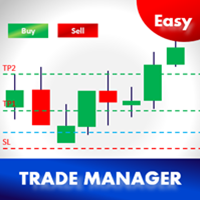
Easy Trade Manager 1.0
基本特征是成功交易者最重要的因素之一;
1.预订TP1,TP2和TP3的利润
2.根据每笔交易金额管理风险。例如,100美元(最大损失) - 这可能是您总权益的2%。
3.设置您想要在TP1,TP2和TP3预订的金额(%)。例如。 TP1为100美元的50%,TP2为25%,TP3为25%
4.根据STOP-LOSS自动选择LOT SIZE! (设置批量大小=自动以启用此功能)
5.最重要的是,将交易自动设置为TP1或TP2的盈亏平衡! (盈亏平衡= TP1 / TP2)
如果您愿意,请留下好的评论和EA,给我一些改进的建议
高级用户 -
1.基于两个功能自动跟踪止损(设置=是/自动);
- 手动设置步骤点数(是)
- 基于抛物线SAR(自动)|自动跟踪P.SAR的优点 - https://goo.gl/NWG3dV
2.手动输入TP1,TP2和TP3点数(确保其点数)并进行交易
3.手动输入手数和交易(

This is Advanced NotifyMe version with large interface.
Overview
The Expert Advisor allows you to receive notifications to the mobile phone (or tablet PC), mailbox or play the sound alert when some events occured: opening or closing position, placing or deleting pending order; changing open price, stop loss or take profit; the account balance, equity, margin level, free margin or drawdown has reached the user specified level. You can specify a notification interval, notification text template an

HelloTrader is a completely new product view for the MetaTrader platform. Immediately after launching, the utility displays randomly one of the lines of the phrase, quotes of famous people or an aphorism in the upper left corner of the terminal. Every 5 minutes the recording changes.
The structure includes more than 1000 phrases, quotes and aphorism in Russian and English.
In the input parameters, you can choose the Russian language display of records, the default is English.
The utility star

The utility TradeKeeper Lite can show your profits for different periods and bip a sound when you reach a profit target value. Click the tachometer to quickly switch to the next profit period. There are 5 of them: This Day, This Week, This Month, Last 90 Days and All I Made. With the utility TradeKeeper Pro , available at this link , you can also open trades with a magic number and volume of your choice, trail any orders with a simple trail or iSAR-based trail, as well as close any open trades a
FREE

The utility TradeKeeper Pro allows you to open a trade manually with a magic and a volume of your choice. It does not open its own trades, it can only open a trade by your command.
TradeKeeper Pro can trail any open trades by the iSAR (parabolic) indicator, and a simple trail. It can set the stoploss level at the open price as soon as possible. To trail any open trades for any instruments, it suffices to launch the utility in one chart. TradeKeeper Pro can close any trades or pending orders of a

If you want to share your trading signal, but you do not want to distribute your investor password, this product is fit with you. "Just copier Pro" is designed to copy trading without any complicated settings. The copy can be done in one PC or over the internet. One EA can be set as master (provider) or slave (receiver). The receiver lot can be set to multiple providers lots. In "Globe" mode, the signal provider (master) have to give the password to signal receiver, (the password that is set in

A very fast way to save your chart template.
Set the keyboard shortcut to further speed up the operation.
The script allows you to save a template with a specific prefix, with the current date or with the chart timeframe. The symbol is saved automatically. Script parameters: Prefix - prefix for the template name. Can be empty. With date - true = template name will containt current date With timeframe - true = template name will containt timeframe of the current chart
FREE

A script that allows you to quickly save the image of the current chart.
Accelerate the use of the script by assigning a keyboard shortcut to it. The image is saved in the location of your MT4 platform: /MQL4/Files/{current_date}. The script does not contain any parameters. The name of the chart being saved is determined automatically and consists of a symbol, the current date and the timeframe.
Attention! Files with the same names are overwritten!

A script that allows you to deselect all selected items on the current chart.
Very simple, but at the same time can be a very useful script, especially when a keyboard shortcut is assigned to it.
MT4 has the same functionality under the right mouse button, but using the keyboard shortcut running this script is much faster and more convenient.
The script does not have any input parameters.
Have fun using this free tool.
FREE

Данная утилита предоставляет возможность работать с ордерами, переключатся по периодам и менять шаблон графика используя клавиши
клавиатуры. Быстрое открытие и закрытие ордеров, установка и удаление отложенных приказов пригодится как скальперам, так и
трейдерам торгующих на новостях. Смена периода или шаблона в одно нажатие клавиши, упростит анализ графиков. Также предусмотрено
закрытие части позиции. Возможность назначения любых клавиш и различные настройки ордеров, поможет собрать торговый пул

What Exactly Is A Smart Trading Tool? Smart Trading Tool was developed for fast and comfortable trading of the financial markets especially for ORDER BLOCKS TRADERS . It provides traders functionalities, such as: A Drawing Tool One-Click Trading Panel Automated Lot Sizes Calculation based on your risk appetite & Money Management ( Watch this video , how this tool can help manage your risk per trade better!) Built in PRICE LEVELS (Fibonacci, Round Numbers, Daily hi-low, etc) Shows Trading Informa
Parameters
AutoTargetMoney If the total profit on the account equals or exceeds the target that has been filled in this column, EA will close the order of all transactions AutoTarget % If the total profit on the account equals or exceeds the target in the percentage of the balance that has been filled in this column, EA will close the order of all transactions DeletePendingOrders If TRUE is when the profit transaction is reached from TargetMoney or Target Percennt column, then EA will delete Pe

这是一个MT4自动跟单的EA,发送端下单以后接收端自动秒跟,包括手数,止盈,止损同时设置,下单手数可以根据自己的情况设置加倍也可以固定手数,适合多帐户同时交易的朋友们。 可以多个平台跟单,可以 一个主发送帐户多个跟单帐户,也可以同时跟多个主帐户。 参数说明:
DirectionSelection=Receive;为主发送端。--SendOut为接收端。发送端其它无设置 Receiving Parameters;以下是接收端设置。 SendingEndID = " ";填写发送端交易帐户的ID,全为数字。 AcceptanceMode=Multiplication;接收端下单模式,加倍模式。--Fixed为固定手数下单。 MultiplicationLots = 1; Multiplication模式下的下单倍数 FixedLots = 0.01;Fixed模式下,固定手数。 SymSuffix="";接收端交易品种名称如果有后缀,请正确填写,比如:EURUSDxxx填写xxx就可以。

"Quick Copier" is designed to copy trading without any complicated settings. It copies master orders faster than "Just Copier". The copy can be done in one PC. Please also check this product at fxina.hostingerapp.com. One EA can be set as master (provider) or slave (receiver). The receiver lot can be set to multiple providers lots. Any type of copy is available. MT4 -> MT5 MT4 -> MT4 MT5 -> MT5 MT5 -> MT4 If you want to copy MT4 -> MT5 or MT5 -> MT4, please purchase "Quick Copier MT4" and "Quic

The advantage of using this EA This EA directly updates takeprofit and stop losses that are still empty in a manual order
Parameters Multiplier: Multiplier value of the previous transaction Distance: Distance hedging from the previous order Takeprofit: take profit taken from the last price + the value of this column
We recommend that you do not add more than one manual transaction in the same pair martingale hedging | manual hedging | hedging manual | hedging lot | best robot | best ea

The utility is designed for placing pending orders Buy Stop, Sell Stop, Buy Limit, Sell Limit with predefined values for each type of orders, number 0 ... 15, distance from current price, Lot, Take Profit, Stop Loss, Magic. Expose and delete by pressing the hot key. How to place and delete orders by voice using the utilities of this type, see the video below the description. https://www.youtube.com/channel/UCTpVWJkEic6TzoXr0qc9RIw/featured Key "A" sends a request for placing orders Buy Stop. Ke
FREE

The utility Filled Area Chart adds to the standard set of price presentations. It is a brand new, nice price chart. You will certainly like it if you want to feel yourself a trader born under the Bloomber lucky star.
The Properties allow to set the colors and other things: Color preset - choose a preset or set to "Custom" and set your own colors using the properties below.
Custom area color - color of the area below the price line. Works only with Color preset = Custom.
Custom chart color - col
FREE

The purpose of this utility is to manage one or more subwindow in the same chart by opening and closing them through a button or the keyboard keys
How it works: If you want to handle more than one subwindow you need to reinstall the indicator . In this case some setups has to be customized onlu in the last subwindow installed and others setups in the installed subwindow during the first time installation. They are denoted in the input rispectively as ' LW ' and ' IW '.
First of all install

Notify To Telegram MT4 Expert Advisor will send notifications via Telegram when orders are opened/modified/closed on your MetaTrader 4 account. Send message to person, channel or group chat. Easy to customize message. Support custom message for all languages. Support full Emoji.
Parameters: Telegram Bot Token - create bot on Telegram and get token. Telegram Chat ID - input your Telegram user ID, group / channel ID Magic number filter - default all, or input magic number to notify with com
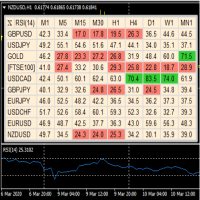
A useful dashboard that shows the RSI values for multiple symbols and Time-frames. It can be easily hidden/displayed with a simple click on the X top left of the dashboard. You can input upper and lower RSI values and the colours can be set to show when above/below these values. The default values are 70 and 30. Symbols and time-frames are input separated by commas. Symbols can also be loaded from the Market Watch window. If there are more than 30 symbols, only the first 30 will be loaded. You
FREE
* Based on this product "BRiCK Convert4To5 MT5 Free" was created. "Convert4To5" is a Script that converts MQL4 source files into MQL5 source files.
Experts, Indicators, Scripts, and Libraries with extension ".mq4" will be available for MT5.
Parameter
None.
Procedure
1. Open the following folder.
terminal_data_folder\MQL4\Files\ (in the terminal menu select to view "File" - "Open the data directory") 2. Confirm that the BRiCK_Convert4To5 folder exists.
If it does not exist, insert
FREE

The Sensitive Price Level indicator (SPL) draws fixed horizontal levels on charts that allow seeing sensitive target prices, helping to find more accurate entry points to open or close your trades. It is a needful instrument to take a decision in trading activity and to give a clear orientation on charts. A simple control panel allows calculating operation costs and lots. Features 1.Grid visualization price levels multiple of 10X,100X,1000X, identified by colors: - 10X : DIMGRAY dot lines. -

InfoTrade指标专为那些同时开立多笔交易并放置许多挂单的人设计。如果您正在对冲并下订单,也许您正在沉迷于鞅,那么该指标将对您的工作有很大帮助。为了正确显示利润和止损,有必要将止盈和止损放入订单中
您的帐户设置显示:
最大。允许批次 - 一对图形可能的最大批次。交易时建议避免超过此值的10%。
未结头寸的计划利润 - 根据未结头寸的获利计算的利润。
待定订单的预期利润总额 - 可能的利润,根据未结头寸和挂单的获利计算。
未平仓头寸的总面积 - 所有未平仓头寸的总手数。
计划订单的总规模 - 所有未平仓头寸和挂单的总手数。
最大亏损 - 自InfoTrade指标启动以来账户的最大亏损。当终端复位时,它被复位。
点差 - 金融工具图表的传播。
止损所有未平仓头寸 - 止损未平仓头寸总数。如果为正值,则所有未平仓头寸均转为盈亏平衡。如果它需要一个很大的负值,那么这意味着对于某些未平仓头寸,不会设置止损。
MetaTrader市场是您可以下载免费模拟自动交易,用历史数据进行测试和优化的唯一商店。
阅读应用程序的概述和其他客户的评论,直接下载程序到您的程序端并且在购买之前测试一个自动交易。只有在MetaTrader市场可以完全免费测试应用程序。
