 MetaTrader 5
 专家
专家
 指标
指标
 程序库
程序库
 实用工具
实用工具
 窗口小部件
窗口小部件
 规则
规则
全新的MetaTrader 4 交易实用工具 - 32
 以下是可在MetaTrader 4中简化外汇交易的交易程序。将鼠标悬停在下面列表中的工具上,阅读它的描述和用途。
迈达克论坛交易记录复盘工具。 运行平台:MT4 迈达克论坛有很多优质的信号,如果你需要研究学习这些优质信号的交易轨迹,可以用这个工具进行复盘。 适用方法: 1、选择优质信号 2、选择“交易历史记录” 3、交易历史记录标签页右下角选择 导出至CSV历史,导出历史记录 4、将导出导出的CSV历史记录文件存放到MT4安装目录下的 \ MQL4\Files文件夹中。 5、运行程序,在参数表中输入历史文件名称,并点击确定。 6、软件自动在所选图表中绘出涉及到当前交易品种的交易痕迹。 说明: MT4,MT5信号均可在MT4上进行交易痕迹绘制。 多单蓝色显示,空单红色显示。止损红色表示,止盈蓝色表示。 在具体使用中有任何问题,可以联系我的微信gaoqing001
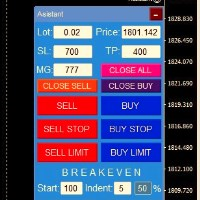
交易面板一鍵開倉! 為了幫助交易者,設定止盈、停損、掛單停損和限價訂單、轉移至損益平衡、追蹤。 還有訂單的部分平倉(%)
所有參數均可自訂。 裝高手!
設定
手數 -- 0.02 手 停損 --- 700 停損 止盈 --- 400 止盈 UseBreekeven ---- false 損益兩平關閉 ClosePersent--- 訂單的 50 關閉百分比 brStart ---- 100 損益平衡開始 brIndent ---- 5 損益平衡步驟 UseSTtrall ---- 假拖網停止 UseTPtrall ----真正的Tral Take On TrStart ---- 150 拖網開始 trstep ---- 5 拖網步驟
訂單管理
此面板支援市價訂單和掛單。 部分平倉 - 按設定交易量的百分比平倉部分訂單。 追蹤停損 - 管理停損
FREE

The trend in the market can be predicted using trend lines but the problem is you don’t know where exactly the price is going to touch the trend line where you can put your pending orders on. Smart Channel Expert Advisor makes it possible to put an advanced channel around the price data, which can be configured to handle placing orders, opening and closing positions, managing risk per trade, spread, slippage, and trailing stop-loss and take-profit automatically. Features Money Management (Calcul

The Silver Volatility Trend Line for MT4 is an EA that helps you trade using the trendlines, drawn on your chart. It basically allows you to send and manage orders using trend lines. It automatically calculates the True Range of your asset to allow you to send orders well calibrated with the market volatility. Take Profit and Stop Loss are calculated in number of True Range. You can do that for two different orders at the same time , so that you can trade two different kind of risk / profit rat

This is a simple yet really handy assistant. It is useful if you want to close all positions on the market when a definite sum of the free margin is reached. Just place the assistant on a free chart and set a closing amount. All positions of all symbols will be closed when this amount is reached. At that, you don't have to sit by the monitor waiting for a good moment. The EA will do it for you.

Main features: I nforming via telegram buttons content and closing orders for one of the pairs or all necessary orders. Alert and information buttons to the telegram window when the specified percentage of profit is reached for each pair, or for two at once. The telegrams "sleep" while no profit we need, when a profit is reached, a menu of 5 buttons appears, in each button the profit will be displayed both in currency and in %%. When you click on the button, the direction of orders for this pa

Вспомогательный советник. Советник сам не торгует. В тестере открывает сделки для демонстрации и возможности подбора настроек.
Советник анализирует сделки по всему счету, находит самый убыточный ордер, со значением ( Minimum order LOSS ) и закрывает его с минимальной прибылью ( Minimal annihilation profit for closing ) за счет текущих прибыльных ордеров, минимальная прибыль для закрытия прибыльного ордера ( Minimum order PROFIT ). Советник может оставлять самые прибыльные ордера ( Saving prof

OpenCharts for OpenOrders, 智能图表管理助手 只需将此智能脚本拖放到 任意图表 ,它就会自动为您的每个 持仓品种 打开一个新的图表窗口。 主要功能 : 为每个持仓的交易品种自动打开一个图表 如果已有图表已打开,则不会重复打开 即使有多个订单,也只为该品种打开 一个 图表 可在执行前选择时间周期 简洁高效,适合管理多订单的交易者 本脚本为 完全免费 ,无任何费用或限制。 关键词 : chart manager , auto chart opener , open order charts , free script , smart terminal tool , multiple trades , chart automation
FREE

- Go up one more level with the most important Tools to Analyze the Market, such as drawing Horizontal and Dynamic Lines, Zones, Ratios, Trap Level Strategy, Impulse Projection, Bar Information with precision, automatic drawing of the most important Opening Levels (Open Day , Open Week, Open Month, Open Year), floating boxes on the chart where we can see the Countdown of each bar, the Spread and ATR indicator, an independent Panel with buttons for all options and shows the symbol, Time Frame

Ultimate MT4 to Telegram (UMT) sends controlled trades (via symbol, magic, comment) to your telegram channel. It sends open and closed trades, including pending orders and TP/SL modifications, along with chart screenshots, to any telegram channel. Additionally, you can send trade reports of open trades and summary profit/pip reports for day, week, or month. You can customize the design of the trade actions or reports with variables and emoticons.
A beautiful panel allows you to visualize all t

Ultimate MT4 to Telegram Public Channel sends controlled trades (via symbol, magic, comment) to a public telegram channel. It sends open and closed trades, including pending orders and TP/SL modifications, along with chart screenshots, to this public telegram channel. Additionally, you can send trade reports of open trades and summary profit/pip reports for day, week, or month. You can customize the design of the trade actions or reports with variables and emoticons.
A beautiful panel allows
FREE

The CandleStick Factory is a tool that allow you to perform a market scan and search any candlestick pattern that you already created. The lite version can be downloaded here : https://www.mql5.com/en/market/product/75622 You can perform a quick search in the current chart (500 bars will be scanned), or save your custom candlestick patterns, and search in different Symbols/Timeframes that you can select in the settings tab, the scan can be scheduled every 1, 5 or 10 minutes by updating t
FREE

The CandleStick Scanner is a tool that allow you to perform a market scan and search any candlestick pattern that you already created in the current chart, You can perform a quick search in the current chart (500 bars will be scanned), This is a lite version of CandleStick Factory for MT4 . The full version video can be found here : https://www.youtube.com/watch?v=fq7pLXqVO94 The full version can be purchased here: https://www.mql5.com/en/market/product/75628
How it works Yo
FREE
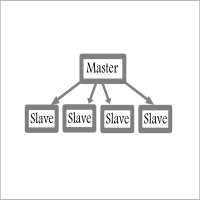
Fast / Reliable / Multi Functions / Simple To use local MT4 to MT4 | MT4 to MT5 platform copier , it will copy all your Master account orders into any Slave accounts very fast , no delay, Also it supports any kind of orders/ExpertAdvisors such as Buy / Sell / BuyStop / SellStop / BuyLimit / SellLimit / Smart Partial Closing / opened in Hedge mode / opened in Martingale mode / Modifying Pending orders / Modifying StopLoss-TakeProfit .using it is simple , Just drop the EA on Master account which y

使用內置算法幫助處理未結訂單的助手。允許您通過單擊主圖表窗口信息面板中的按鈕來打開買單或賣單。
交易中所需的頭寸量以三種方式計算:
自動,取決於天平的體積。 手動指定。 取決於每筆交易的風險水平和止損值。 止損可以通過三種方式指定:
一定數量的柱線(蠟燭圖)的最高或最低價格。 以點為單位指定止損的大小。 使用沿線設置止損功能。允許您使用圖表上的一條線提前設置所需的止損值,獲取更多信息並以設置的止損位開立交易。 開倉時,會創建一系列三個訂單,其中按指定比例將總手數除以一筆交易。
第一個訂單的止盈設置在止損水平。 第二個訂單的止盈設置在 SL / TP 比率水平。比例在設置中設置。 未為系列中的第三個訂單設置止盈。 開啟交易後,跟踪機制被激活,其設置可以提前設置。有兩種模式支持未結交易:
激進 - 在系列中的第二個訂單以指定的止盈與止損比率平倉後,止損移動到沒有損失的水平。 保守 - 在關閉系列中的第一個訂單且止盈等於止損水平後,止損移至沒有損失的水平。 功能說明 系列中最後一個訂單的追踪止損 在距價格指定距離的指定步長處啟用系列中最後一個訂單的追踪機制。 關閉所有訂單 它允許

Customized Copy is a Multi-Terminal visual trade copying utility that supports Metatrader4 and Metatrader5 for Trade Copying.
You can activate EA on 10 different PCs/VPS. On each PC/VPS can install on Unlimited Terminals.
Specifications :
Real Time, Multi Terminal - Multi Account - MT4/MT5 trade copying (support over 50 accounts at same time) All settings are input visually. Visual display and modify of copy map and network Each copy path can be used with different settings

Excellent spread indicator. Reflects the spread on each bar as it is. It should be remembered that the spread is displayed at the time of the bar opening. Therefore, the most correct information will be on the minute bars. Spread is one of the basic forex concepts that any trader should know. If explained clearly, you can describe such an example. The trader buys the EUR / USD pair at the rate of 1.1000. However, he immediately goes into negative territory, for example, by 10 points, as if he bo

The utility is convenient for closing trade operations when trade with two instruments.
Should be Installed to Experts folder and launched as an Expert Advisor.
After starting, Metatrader will indicate the device ID that is trying to connect.
In Telegram, start/create the channel with the standard command /start
Next, you need to enter a password that is assigned in the Expert Advisor field. If the password is correct, the Metatrader's comment will indicate that the password was successful,

Hello, boys and girls!
Script allows you either to quickly save opened charts and then close all charts opened by visual tester mode or just faster close all charts. Feel free to take a look at video manual about how to use this script on my YouTube channel. Also, feel free to join my telegram channel , where time to time I publish some exclusive stuffs. Feel free to leave feedback and thoughts how to improve this script - I'd highly appreciate that. All the best.
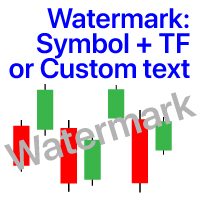
图表上的水印:符号+时间帧/或您自己的文本 我的#1实用程序 :包括66+功能 / 如果您有任何问题 ,请与我联系 在指示器的设置中,您可以配置: 字体大小;文字颜色; 字体名称; 职位:
1=左上;
2=右上;
3=左下;
4=右下;
5=中心; 显示当前时间范围:开/关; 要删除的符号的前缀(n_AUDCAD-->AUDCAD); 要删除的符号的后缀(USD CAD pro-->USD CAD); 显示自定义文本:如果启用,将显示您自己的文本,如下所示: 自己的水印; 我的#1实用程序 :包括38+功能 / 如果您有任何问题 ,请与我联系 .....................................................

AutoOrderModifyEAPro: A Vital Aid for Forex Traders, Both Manual and System-based Catering to the diverse needs of forex traders, whether engaged in manual or system-based trading, AutoOrderModifyEAPro emerges as a pivotal tool in this intricate landscape. The tool's efficacy is most evident in scenarios such as: Enhancing EA Strategies: Addressing the common dilemma of lacking Trailing and/or Break Even mechanisms in otherwise promising EAs. Streamlining Position Management: Overcoming the hass

Levels and risk calculator for the Antimartingale (or Antimartingala) technique Totally visual, setup everything from control panel Decide your risk and margin, it will calculate and show trading lavels on the chart Free version of the orginal Antimartingale EA: https://www.mql5.com/en/market/product/53653 Public Signals using the Antimartingale's technique:
https://www.mql5.com/en/signals/1016250 https://www.mql5.com/en/signals/1018964 This EA does not open trades, it only shows the trading le
FREE

This is script to quickly modify multiple trades all at once and automatically calculate the breakeven point which work perfectly for martingale strategy and can be used alongside any martingale EA to adjust the TakeProfit and StopLoss For all the running orders on the chart. How to use: Pip worth : is for easily calculate the pips according to the chart you are running on, for example (pip = 10 points on major currency pairs, 100 point in indices, and 1000 on some crypto charts like BTCUSD) Sto
FREE
基于MT4的画线交易 辅助 EA。通过在图表上绘制趋势线和/或水平线实现开平仓等多种功能。 EA提供2种功能定义模式: 1.颜色标示模式。 2.文字说明模式。 颜色标示模式下, 默认颜色相应功能如下:
Blue(蓝色):开仓BUY.
Red(红色):开仓SELL.
Yellow(黄色):平仓当前品种所有BUY订单。
White(白色):平仓当前品种所有SELL订单。
Lime: 平仓当前品种所有盈利的BUY订单。
Aqua: 平仓当前品种所有盈利的SELL订单。
你可以在EA参数页修改设置你习惯并喜欢的颜色来实现相关功能.
文字说明模式:参数页输入预定义字符,在图表上添加 线条时,在该线的描述中输入与参数页相匹配的字符即实现相应功能。默认文字详见参数页。
图表中画线的数量不受限制,你可以在图表中不同位置添加多条相同功能的趋势线

This tool will help you hide your stoploss and takeprofit prices of all trades, it will manage them to close your trade when market price reached these levels. And it will replace all these StopLoss, TakeProfit levels for trades when you removed it, so you don't need to worry about missing your StopLoss, TakeProfit level when you remove it. It draw a button for you to control On/Off of working, you can see your SL,TP and modify it easy by the way turn Off the button, then drag your SL,TP price,

The tool will help you to hide your pending orders (buy/sell limit; buy/sell stop) To run it, you just need to add it on any chart (only 1 chart needed). So, when you make any pending order, it will remember that order (with price to open, lot number, symbol, your stop loss, take profit....) then, it will delete your pending order (hide it with broker). And it will make trade when market price reached the open price of your pending order, will all same parameters get from your old pending order.

Hi Dear Friends , As i told you ,,, today i produce the management EA to managing your trades and with closing instruments used to closing tow kind of trades.. the profitable trades and losable trades .. u can try it for free for 2 days ,, it is worth every cent .. now .. you do not need to keep tracing your deals.... let the EA do it for you automatically... for any inquires contact me directly in my contacts shown on my profile after adding me ..
best regards
Fawaz A. Al-baker

Информер предназначен для получения информации о состоянии счета (номер, баланс, эквити) через Телеграм канал. Для работы необходимо создать канал и взять токен который указывается в настройках эксперта вместе с именем канала. Выбирается 2 временные отметки по которым отправляются отчеты в Телеграм. Данный инфрормер удобна для мониторинга счетов с работающими экспертами. Возможна отправка отчетов с разных счетов в один телеграм канал. Для запуска скопируйте в папку Experts, наличие файла Telegra

If you use several charts open at the same time, you know how boring it is to apply formats to each chart individually. This script can change all open charts using a single command. Parameters: 1 - Choose symbol to put on charts: apply the selected symbol to all charts. If "current", it does not change the symbol; 2 - Choose timeframe or leave empty: apply the selected timeframe to all charts. If "CURRENT", it does not change the timeframe; 3 - Apply template to the charts: If true, apply the t
FREE

在使用智能交易的时候,可能需要针对多个品种进行交易,如果手动去把品种一个个打开,会很繁琐,所以我们开发了这个小工具,可以帮你一次性打开列表式所有的品种,只需要1秒时间。 在使用智能交易的时候,可能需要针对多个品种进行交易,如果手动去把品种一个个打开,会很繁琐,所以我们开发了这个小工具,可以帮你一次性打开列表式所有的品种,只需要1秒时间。 在使用智能交易的时候,可能需要针对多个品种进行交易,如果手动去把品种一个个打开,会很繁琐,所以我们开发了这个小工具,可以帮你一次性打开列表式所有的品种,只需要1秒时间。 在使用智能交易的时候,可能需要针对多个品种进行交易,如果手动去把品种一个个打开,会很繁琐,所以我们开发了这个小工具,可以帮你一次性打开列表式所有的品种,只需要1秒时间。

货币强度交易面板 EA MT4 是适合任何初学者或专家交易者的创新解决方案!它将货币强度概念提升到一个全新的水平,因为它将它与价格行为相结合,并且可以应用于任何符号/货币对,除了通常的 8 种主要货币的 28 种组合。这意味着您可以交易任何货币对的强弱,包括所有货币、商品和加密货币(不是指数)。这是一款真正的突破性产品,通过使用彩色条形图,让您一眼就能清楚地了解 16/32 符号,从而直观地告知您任何对的 2 个部分的强度/弱点平衡,而无需破译复杂的强度线或直方图,就像在其他传统的货币强度解决方案中一样。
货币强度交易面板 EA MT4 也是您可以找到的最简单易用的 MT4 交易面板。它的所有选项和功能都集中在一个表面上,无需打开额外的窗户或面板。它是一个订单管理、风险计算器、部分关闭和帐户保护实用程序的合一,使用起来极其方便!通过使用 货币强度交易面板 EA MT4 ,您可以比传统的手动交易方法更快、更准确地进行多次交易,这让您有更多时间和更清晰的头脑专注于您的交易决策。 货币强度交易面板 EA MT4 也是一个很好的账户保护实用程序,它可以在达到账户止盈或止损净值后关闭所有未平

PROMINING EA+Ai 是一个全自动算法交易系统,在 XAUUSD 黄金对中最有效。 系统采用多时间框架图进行交易,EA同步跟随趋势。 它是一个非常快速的剥头皮交易者,交易非常活跃。 它专门设计用于交易 XAUUSD 对。
加入我们的 MQL5 小组,我们在其中分享新的设置文件、升级和更新。 当您购买 Promining EA +Ai 机器人时,欢迎您加入私人小组,我们可以讨论 EA 的工作原理、文件集、指南和教程如何设置和配置。
推荐:
时间范围:M1, M15 和 H1 货币对:XAUUSD 设置:M1 的默认设置文件和 M15 的默认设置文件 , H1 手数:使用 0.01 手 2-3 周了解 EA 策略。 之后,您可以根据余额增加您的手数。
给出的 EA 设置文件有一个 martiangle 设置。 如果您想关闭 martiangle 设置,请私下联系我。

Программа работает на сочетании двух индикаторов. Set _ Lot = 0.01 – значение объема лота Set _ TP = 100 – значение тейкпрофит в пунктах Set _ SL = 100 – значение стоплосс в пунктах Up _ Limit _ CCI = 100 – верхний предел CCI Down _ Limit _ CCI = -100 – нижний предел CCI Delta _ CCI = 25 – отклонение CCI от первой свечи Set _ Time _ Frame _ CCI = 15 – значение таймфрейма для расчета CCI Set _ Period _ CCI = 14 – значение периода для расчета CCI Set _ Price _ CCI = 0 – тип цены, по которому вед
The Five Minutes Strategy EA is designed for trading binary options. EURUSD on the five-minute period is strongly recommended. Trading is performed by the opening prices based on the signals of the Five Minutes indicator. It requires at least 100 bars in history to operate.
Input Parameters Initial Deposit - initial deposit. Lot Value - lot size. Lot Type - lot type: Fixed - fixed. Variable - variable. Last Lot Value - last lot value (used in cases when the EA is reattached) Day lot typ

The Rapid Strategy Expert Advisor is designed for binary option trading. M5 timeframe with the 15-minute expiration is recommended. Available financial instruments: EURUSD, EURCHF, GBPUSD, GBPJPY, USDJPY and XAGUSD. Trading multiple financial symbols at a time is not recommended. The EA trades at Open prices based on the signals of the Rapid indicator. It requires at least 100 history bars.
Input Parameters Experts Number - the number of expert advisors (corresponds to the number o

Mr Proper is made for manual trading and is well suited for people who are engaged in scalping and not only.
The idea was to make trading as easy as possible
And in this adviser, I think that I did not do badly.
There are 2 types of levels in the assistant at once. These are Zones and important levels from which the price often reacts.
What is in it?
You can turn zones and levels on or off.
Trailing is not as usual, trailing goes through bars.
There is a breakeven.
Stop loss and Take p

Description: Automatic Equity Manager EA manages the whole account equity. You need to set it up on its own chart. -----------------------------------------------------------------------------------------------------------------------------------------
Parameters: EquityGainPercent = 3 (This automatically closes all trades when your equity shows a gain of X percent.) ---------------------------------------------------------------------------------------------------------------------------------
FREE

Dear Friends ,
this EA helps u to automatically tracing (following) your opening trades .. the trades will opened manually .. you can set all parameters such as lot size sl
tp distance from open price to set the break even point (that's to keep your deal in safe from losing any funds in case of the market go on negative way that you expect ) trailng your trade by set the distance of pips u need
if u need any assistance , add me and contact me on my links in profile .
wish all the best f
FREE

Details of each condition Type 1. Set no use Hedging Martingale, to open the order by yourself only through the push button. TP and SL follow setting. Set Setting_Hedging =false; Set Setting_TrailingStop =false; if not use.
Type 2. Semi Auto Recovery Zone You have to open the order by yourself only through the push button. If in the wrong direction and Set true on Hedging Martingale, EA will fix the order with the zone system by use Hedging Martingale Set Setting_Hedging =true; Set Setting_Tra

This application is a close all feature that will allow the user to close all open trades under the chart being used. For an example, if the application is attached to the pair being traded, it will only close those positions. So, if you need to close positions on pairs that is not associated with the active chart, you will need to add the Emergency Stop software to the chart of pairs that you are trading.
**Please note: Data signals that are being sent from your computer, sometimes gets inte

He is a very good tool, if you like him, he can be very effective to help you manage some of the orders, but not so effective every day, this depends on the market, to listen to my words, you need to open it every day, and then set a time to get up every day, he was like an alarm clock, let you every day have spirit, my products will only be released in MQL5, If you see him anywhere else, stay away from him

You can check out comment #1 how does it work This is a very useful tool, enter the currency charts you need to open, use the symbol "/" to distinguish them, and select the periodicity /TF of the chart, press the button and they will open the charts for you in batches without you having to manually open them each! Because some EA use multiple currency pairs strategy, but do not support one chart to support all currency pairs, so I developed this tool, hope you like it, if you are satisfied with
FREE
金字塔法是一种通过使用成功交易的未实现利润作为新交易的保证金来增加头寸规模的方法。该智能交易系统将在没有您干预的情况下对您的交易进行金字塔式处理。 [ 安装指南 | 更新指南 | 故障排除 | 常见问题 | 所有产品 ] 轻松地将您成功的交易金字塔 充分利用您的盈利交易 完全可配置的金字塔行为 金字塔与时间框架无关 适用于 ECN/非 ECN 经纪商和 2-3-4-5 数字 在回测中进行随机交易 支持双向交易 用法相当简单:
将 EA 加载到图表 选择交易数量、间隔和金字塔行为 在输入中输入止损和获利(作为余额的百分比) 手动进行初始交易 让 EA 处理剩下的事情
输入
将“EA 交易”加载到任何图表时,您将看到一组选项作为输入参数,按块分组。 金字塔行为
此参数指示 EA 如何处理金字塔交易的手数:手数可以与原始交易相同,每增加一笔交易减少一半或每增加一笔交易增加一倍。
金字塔行动
当您认为合适时,使用此参数关闭交易。
交易量
此参数控制 EA 可以堆积多少笔交易。
初始手数
第一笔交易的手数。 EA 仅在测试器中随机交易。在实时交易中,您必须随机进行第一笔交易。
止损和

CyberZingFx Buffer Finder Tool Developed for Finding Buffers of Indicator to use in Universal Indicator EA . This is Not an Indicator or EA CyberZingFx Buffer Finder Tool is utility tool designed specifically for MetaTrader 4 (MT4) users. It is a standalone application that helps you easily find the buffers of any MT4 indicator, allowing you to use them in your Universal Indicator EA. With the Buffer Finder Tool, you no longer have to search through the data window to find the buffers you need.
FREE

Utility for order reversal. Closes orders on the chart on which it is launched and opens orders with the opposite direction instead of them. Has a simple and intuitive graphical interface. It is also possible to automatically reverse newly opened orders. MT5 version of the utility - https://www.mql5.com/en/market/product/74770 If you like this utility, take a look at my other products - https://www.mql5.com/en/users/nina_yermolenko/seller
FREE

Price Ray indicator is a utility that will improve the way you trade. Primarily, it shows the Bid, Ask or Last price as a line ray which beams till the current candle, last visible chart candle or extended to all candle bars. The enhanced features in this indicator provide information in an area where you focus most, right next to the current candle. You can select text to be shown above or below the Price ray. The indicator is fully customizable, allowing it to fit any strategy requirements. Th
FREE

Disciplina disciplina, quante volte hai sentito dire che e' la chiave del successo nel trading
Tutto vero... ma facile a dirsi , difficile a farsi; sopratutto se sei il tipico trader che usa le lot size in maniera errata o peggio ancora si dimentica totalmente di inserire lo stop loss...
Zerodrawdown.com ti viene incontro con Companion un expert advisor per mt4 che: inserisce automaticamente dopo un tempo configurabile dall'apertura della posizione lo stop loss in tutti quei trade dove:ti sei

Exit strategy is the key to success in Forex. But its hardly followed by any Forex trader leading to huge losses. Without a legitimate exit plan, as where to close with profit, when to close trade and exit, nobody can profit and most markets are loss-making. Considering the significance of money and trade management, we have few alternatives to deal with that: Handle just about all trades and risk your investment by combating apprehension and self-indulgence. That is certainly where almost all

这个工具将在您的手机上发送详细的通知,并在MT4终端上提醒您,一旦您想看到的蜡烛图出现在图表上。该通知包含符号、蜡烛图样和形成该图样的时间框架。
你需要将Metatrader 4 Mobile与你的Windows终端连接起来。以下是方法。 https://www.metatrader4.com/zh/trading-platform/help/setup/settings_notifications
可以检测的烛台形态列表。 三个白兵 三只黑乌鸦 看涨的三线击球 看跌的三条线罢工 三条内侧上升线 三条内侧下跌 三条外线上涨 三线外跌 早晨之星 傍晚之星 看涨被遗弃的婴儿 看跌被遗弃的婴儿 看涨的哈拉米 看跌哈拉米 看涨的吞噬 看跌吞噬 锤子 射击之星 反转锤子 悬挂的人 蜻蜓斗鸡 墓碑十字星 早晨的斗极星 晚间斗极星 穿透线 黑暗四叶草 看跌的踢球者 看涨踢球者 长下影线(长颈线在下侧)。 长上影线(长灯芯在上方)。 输入参数 当你启动该工具时,你将不得不设置一些输入参数。 EnableMobileNotifications: 启用移动通知(MT5终端的警报默认为激活)。 Sca
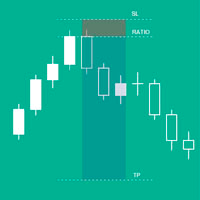
它將幫助您輕鬆快速地控制每個操作的風險。其創新的界面讓您可以立即計算手數和風險/回報比率。將您的操作保持在您想要的風險範圍內,避免交易中的糟糕時期。
線函數 - 在圖表上顯示開盤線、止損、獲利。使用此功能,您可以輕鬆了解下一個訂單的主要和最相關的特徵。
風險管理 - 風險計算功能會根據既定風險和止損大小計算您的下一個訂單的數量。
- 允許您設置任意大小的止損。
- 它允許建立風險/收益關係來計算獲利。
- 允許您設置是根據基本金額計算批次大小還是手動輸入批次大小。
- 允許您設置百分比風險。
[風險設置]
基礎金額:設置計算的基礎金額值。如果設置為 0,該工具將以賬戶餘額為基礎金額。
最大止損水平:以點為單位設置默認止損值。
風險/收益[1-X]:設置風險/收益比率(Take Profit to Stop Loss 比率)。
這允許您設置與損失相關的利潤大小。
例如 1 - 這意味著 TP = SL 的大小,2 - 這意味著 TP 是 SL 的兩倍。
[地段設置]
計算手數:設置是否需要根據設置的參數計算手數。
百分比風險(%):根據基礎金

如果您是在 Metatrader 圖表中擁有多個指標窗口的交易者之一,那麼此工具非常適合您。
管理器幫助您自動組織所有指標子窗口,盡可能保持圖表乾淨。現在,只需點擊幾下,您就可以在閒暇時查看您的指標。如果您不想再看到指標,只需隱藏所有指標,而無需刪除它們以供日後使用!
- 標準化子窗口的高度
- 用於直接訪問指標的按鈕
- 最大化/最小化子窗口
- 隱藏快捷按鈕
- 明暗主題
如果您是在 Metatrader 圖表中擁有多個指標窗口的交易者之一,那麼此工具非常適合您。
管理器無疑會幫助您自動組織所有指標子窗口,使圖表盡可能乾淨。現在,只需點擊幾下,您就可以在閒暇時查看您的指標。如果您不想再看到指標,只需隱藏所有指標,而無需刪除它們以供日後使用!

GIA Symbol Changer 將幫助您在同一窗口中更改符號和句號,防止您在平台上填滿窗口,避免因窗口過多而頭暈目眩,錯失良機。 Symbol Changer 簡化了這一切,並促進了您想要在單個窗口中分析或觀察的圖形的可視化。
特徵
- 更改符號。
- 變更期。
- 隱藏當前資產以外的資產中的對象。
- 顯示當前資產的對象。
- 調整當前資產規模。
- 在多個窗口中同步符號。
- 非常容易使用。
GIA Symbol Changer 將幫助您在同一窗口中更改符號和句號,防止您在平台上填滿窗口,避免因窗口過多而頭暈目眩,錯失良機。 Symbol Changer 簡化了這一切,並促進了您想要在單個窗口中分析或觀察的圖形的可視化。_________

它將幫助您控制您的交易和您的賬戶,就像繼續查看您的圖表一樣簡單。其創新的界面讓您可以查看當前交易中發生的情況並監控您的賬戶狀態。控制您的操作並避免交易中的糟糕時期。
參數: 符號設置 顯示符號標記:“真”顯示符號/“假”隱藏符號。 顯示期間戳:“真”顯示期間/“假”隱藏期間。
信息設置 Show current trade summary ?: 顯示當前圖表交易的數據塊。 Show general account summary ?:顯示賬戶的一般數據塊。 顯示當天的盈利能力?:顯示有關當天獲得的盈利能力的數據塊。
時鐘蠟燭設置 顯示時鐘?:顯示一個時鐘,指示當前週期關閉蠟燭圖的剩餘時間。 將時鐘放在蠟燭上?:“真”顯示蠟燭側面的時鐘/“假”顯示側面的時鐘。
數據表 一個名為 GIAChartAccountInfo 的文件 支持MT4 安裝在指標文件夾中 圖表內界面

Multi Strategy Dashboard Utility Some functions of the MSD Utility can only be used on the full version. Multi instrument and multi time frame scanner, with the best indicators. Comes with an order management panel. The MSD Utility can be used for manual trading. Click on the '?' button on the dashboard to obtain information about the various elements of the MSD Utility. Uses ATR Take Profits, ATR Stop Losses and ATR Trailing Stops. Comes with an FX Currency Strength meter and a Market Session

The EA closes market orders after a specified time interval (put simply - by timer) after they are opened. Use this utility if you need to close a trade after a certain time. The EA has the following input parameters: Only current symbol - if true , the EA will close only the selected symbol's orders; if set to false - it will close any order of any symbol. Timeout - time (in seconds), after which the EA closes the orders. This EA is simple and very easy to use, does not use up your CP

This expert advisor is a reverse version of the operation of "Dexter EA" ( https://www.mql5.com/en/market/product/67307 ) which works with the martingale method ... therefore it works in the opposite way. For each positive order, it will open one in the same direction with its respective increase in volume if the trader so wishes, on the side of negative orders, its lot will not increase.
Inputs Lot size Multiplier First order stop loss Profit distance to place a stop limit order Revert aver
FREE

A utility to close all orders automatically when conditions meet.
Various options are available to filter or select orders : Conditions : Closing conditions. 3 different conditions can be defined. EA will close orders anytime one or more defined conditions meet. Conditions can be defined based on account properties or selected orders properties. Also a fixed time to close orders is available.
Type of orders : Buy / Sell / Buy Limit / Sell Limit / Buy Stop / Sell Stop Symbol Selection : All / Ch

Pro-Wealth is a new business entity focused on helping others make a success of their Forex trading. Thus it makes only sense to help others use the correct lot size and start practicing the correct risk management. This utility is a very simple tool to show the lot size respective to one percent of their balance which should be entered by the user when attaching the utility to the EUR/USD chart.

Rewards Taker Utility EA
Rewards Taker Utility EA is a portable semi-automated utility expert advisor which can close profitable trades when the amount set as a
profit target by the user is reached on a single currency pair.
The idea comes from the fact that, forex profit does not stay forever in the account, your trade(s) many be in profits now and be in losses
in the next minutes or hour but by this method, you will detain already made profits by closing the profitable trades to increase

Rewards Taker Utility EA PLUS
Rewards Taker Utility EA PLUS is a portable semi-automated utility expert advisor which can close profitable trades when the amount set as a
profit target by the user is reached while trading.
The idea comes from the fact that, forex profit does not stay forever in the account, your trade(s) many be in profits now and be in losses
in the next minutes or hour but by this method, you will detain already made profits by closing the profitable trades to increase yo
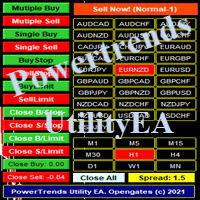
Power Trends System Utility EA
Power Trends System Utility EA is a semi-automated Expert advisor. The user can only open trades manually but it has signal board
where it informs the trader of any trade signals forming according to the current market's states. Many features were combined
together to make up this versatile ONE-in-ALL Utility EA:
1. Trade system that has signals provision:
It has in-built trade system that gives timely trade signals for the trader for profitable trades.
2. Tra

Trading panel for manual trading. Has a fairly wide functionality. Allows you to automatically calculate the order size, open both market and pending orders. It has a wide range of options for closing orders, it is possible to partially close orders, close orders after reaching a certain profit or loss, separately close profitable and unprofitable, buy and sell, as well as pending orders. The panel also contains a simple implementation of a grid of pending orders, reverse and lock functions, tr

This utility manage your position risk by trailing stop with "Parabolic SAR" indicator value. Indicator Parameters SAR step(Parabolic SAR step value) SAR maximum(Parabolic SAR maximum value) Timeframes(Choose timeframes). Stop Place(put SL in current(open) candle or last close candle). Is the spread considered?(Set SL with considering to Spread or not, the choice is with you). Working with this utility is very simple, Just drag it onto the chart. There is no problem with multi-part trades. It is
FREE

Don't purchase before testing the Demo version first. DEMO version: https://www.mql5.com/en/market/product/76917 __________________________________________________ This EA - Tool allow you replay bar in Meta Trader 4 for back test. This Tool can back test in multi timeframe in only one chart. This Tool is very useful for Price action trader. It can work with Indicators, some indicators cannot works. So please download Demo to test before purchase. Demo Version We do not accept refund in any

Details of each condition Type 1. Set no use Hedging Martingale, to open the order by yourself only through the push button. TP and SL follow setting. Set Setting_Hedging =false; Use_Signal =false;
Type 2. Semi Auto Recovery Zone You have to open the order by yourself only through the push button. If in the wrong direction and Set true on Hedging Martingale, EA will fix the order with the zone system by use Hedging Martingale Set Setting_Hedging =true; Use_Signal =false;
Type 3. Use

Мы должны терять в сделке как можно меньше и никогда не превышать лимит, который мы установим. Тогда вы забудете, что такое ликвидация, и увидите, что торговля станет намного приятнее. Ведь вы уже заранее знаете, что получив стоп-лосс, вы потеряете не больше N-ой суммы денег. И сумма эта должна быть такой, чтобы вы не тряслись над каждой сделкой, стирая пот со лба, а спокойно позволили рынку идти к вашим целям

G-Labs Trade Manager by G-Labs — on-chart trade panel for MetaTrader 4. Risk-based lot sizing, visual entry stop and take profit lines, position management, currency strength, statistics, and OCO breakout tools.
One panel for planning, executing, and managing manual trades. Set risk before you click buy or sell, drag stop loss and take profit on the chart, manage open positions and pending orders, and track performance — you stay in control of every decision. Trading utility, not a black-box si

The utility places a grid of pending orders. You can select the number of orders in the grid, the step between orders, multiplier for the order size, SL and TP levels and the magic number. If you use a profit bucket , please note that it applies to all orders on the current currency pair with the current magic. If you want to use several grids with independent profit buckets at the same time, run several copies of the utility and specify different magics in the settings.
MT5 version of the ut
FREE
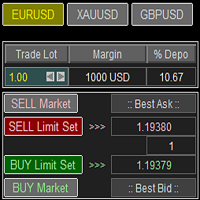
Trade Panel with Loss Breaking for MT4
Multi-instrumental trading panel with the function of transferring the stop loss of positions to loss breaking.
Has the following distinctive properties:
All trading parameters and panel operation are set in the settings. The traded position volume (lot size) is quickly changed. The required margin and the percentage of the required margin of the current deposit for the specified lot size are displayed. Shows profit when take profit is triggered and losses

Chemical rockets are the most common type of high power rocket, typically creating a high speed exhaust by the combustion of fuel with an oxidizer . The stored propellant can be a simple pressurized gas or a single liquid fuel that disassociates in the presence of a catalyst ( monopropellant ), two liquids that spontaneously react on contact ( hypergolic propellants ), two liquids that must be ignited to react (like kerosene (RP1) and liquid oxygen, used in most liquid-propella
FREE
学习如何在MetaTrader AppStore上购买EA交易,MetaTrader平台的应用程序商店。
MQL5.community支付系统支持通过PayPay、银行卡和热门付款系统进行交易。为更好的客户体验我们强烈建议您在购买前测试EA交易。
