 MetaTrader 5
 专家
专家
 指标
指标
 程序库
程序库
 实用工具
实用工具
 窗口小部件
窗口小部件
 规则
规则
全新的MetaTrader 4 交易实用工具 - 30
 以下是可在MetaTrader 4中简化外汇交易的交易程序。将鼠标悬停在下面列表中的工具上,阅读它的描述和用途。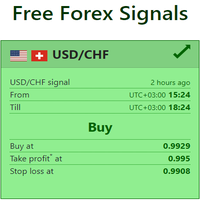
Live Forex Signals 专为现场信号交易而设计 https://live-forex-signals.com/en 和 https://foresignal.com/en . Live Forex Signals for MetaTrader 5 https://www.mql5.com/ru/market/product/81448
参数 如果您已订阅网站,则用户名和密码live-forex-signals.com/foresignal.com ,然后您应该使用您的凭据填写这些参数;如果没有订阅,则将字段留空; 评论对正在开启的交易的评论 风险风险作为交易存款的百分比,如果风险=0,则使用价值地段 固定交易量 使用获利使用从网站获利 UseStopLoss从网站使用止损 FrequencySignalUpdateInMinute顾问访问网站的频率 交易的最大点差交易的最大允许点差,如果点差较高,则设置的挂单被取消 使用追踪止损 TrailingStop跟踪止损的值以点为单位 为了使实时外汇信号正常工作,您需要放置网站地址 https://live-fore

该实用程序的工作是分析其他顾问在所有工具上的工作,以帮助防止存款减少。当超出指定参数时,“权益保护”可以锁定、平仓并发送相关通知。 “权益保护 ” 可以对当前交易品种或所有交易品种起作用,内置功能允许您删除挂单头寸并关闭在您账户上工作的其他顾问。 机会:
当对帐户启动操作时发送所有类型的通知, 只需上传一张图表即可在帐户上的所有工具上使用, 使用选定的幻数或所有幻数,在当前符号或所有符号上, 可以阻止、结束损失或只是通知您损失, 如有必要,禁用所有交易品种或当前交易品种上的其他顾问, 可以删除挂单以及止损和获利, 可定制的面板,能够在面板上手动执行操作。 问题解决-> 这里 实用程序启动策略: 该实用程序监控其他顾问在所有工具上的工作,并帮助防止存款减少。如果另一个 EA 交易产生损失,该实用程序将能够将其关闭,然后锁定或删除无利可图的头寸,并向您发送有关此情况的通知。 为了这: 1) 在您的一张图表上运行“权益保护”, 2)调整输入变量, 3) 该实用程序可以从一个窗口操作所有工具, 4) 请勿使用该实用程序关闭窗口并使用其他工具进行操作。 输入变量: MAIN_SETT
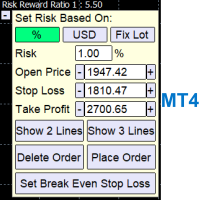
A Trading Assistant EA that can place order at user's desired open, stop loss, and take profit prices with automatically calculated lot size based on user's risk per trade
$30 for the next 25 downloaders, next price: $45 Try it out on demo account for free: Download Demo
Features: Smart Place Order : Automatically determine the Type of Order (Market/Stop/Limit & Buy/Sell) to be placed based on Open, and Stop Loss Price input, then execute it immediately Risk Manager : Set your risk of loss o
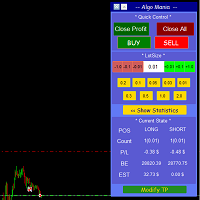
This is a trade manager specially for traders using martingale strategy and multiple trades at the same chart.
features: - easy and fast to set the lot size with mouse clicks. - Close all trades and close profit trades with a single click. - Show details on the running symbol: - number of trades (long - short) and total lots of each direction. - total profit/loss on this symbol separately and for both directions. - Break even point for both long and short. - Estimated profit if all the trades
FREE

50% off. Original price: $60 Order Manager is a trade assistant and trade copier with a money manager that helps traders open, modify and close manual trades and also copy their trades between multiple accounts in the most simple way to help them focus more on their market analysis and open orders with just a few clicks.
Download Demo here (It only works on demo accounts for 14 days) Full guide here MT5 version here
Order Manager features: Works on all instruments such as currency pairs, i

Pomo Panel is a simple panel to help trader using grid strategy. It is designed with grid strategy in mind.
Its features: Open standard transactions Set up pending transactions Delete all pending transactions Modify multiple Stop-Loss and Target-Profit Calculate Lots of all opened transactions Calculate average Open-Close, High-Low Close All Opened Orders

svidoks 的支撐位和阻力位
該實用程序繪製了價格反應良好的支撐和阻力區域。 它還有一個基於支撐和阻力區域的趨勢指標。 您可以手動和自動使用指標顧問(還有一個外部控制面板)。 組支持,你也可以寫你的願望清單和願望 - 電報聊天 支持所有貨幣對
選項: Dist_set_limit - 300,這是以點為單位的值。當價格接近此距離時,將對該區域設置限制 Dist_del_limit - 400,這是以點為單位的值。當價格在距該區域的距離處移動時,將取消限制 shift_trend_ind - 影響趨勢線繪製的參數
One_Limit_Zone - 每個區域只設置一個限制 proc_deviation, koef_impuls, N_High_back, Z_bar_min - 默認設置是最佳的,你當然可以玩。 支撐和阻力區的繪製取決於這些參數。
安全 - 安全 n_Bars - 繪圖區域中涉及的條數
On_TP_Buy - 達到支撐位時獲利 On_TP_Sell - 達到阻力位時獲利 ON_Close_zone - 當區域關閉時關閉訂單? ON_Close_ind - 按

Evening Scalper Pro is the state-of-the-art mean-reversion trading system that operates during all trading session. It's very different from most other scalping systems, since it uses a unique trading logic on cross pairs that have a strong mean-reverting tendency with high profit targets. EA not enters the market with market orders, it does not open trades. In terms of a trade duration, it's classical scalping: in and out of the trade within a few hours at the most. The EA uses a number of adv

AW MT4 To Telegram 是一款把 MetaTrader 5 账户事件发送到 Telegram 的工具:开仓和平仓、部分平仓、Stop Loss 和 Take Profit 的修改、挂单、账户警报和报告。该工具本身不交易。它读取账户的成交历史,把每一项变化转换成消息,发送到私聊、带话题的群组或频道。 它适用于同时运营 VIP 频道(即时发送)和 Free 频道(延迟发送)的信号销售者,也适用于希望在手机上收到回撤、保证金和连接警报的交易者。 使用手册与说明 -> 这里 / MT5 -> 这里 特点: 最多五个聊天,每个聊天都有各自的样式、事件、过滤、延迟和按钮 图表上的 AW Message Designer:12 个现成模板和实时预览 消息在磁盘上的队列中等待,网络故障后会重新发送 平仓和 SL/TP 修改以回复开仓消息的形式发出 消息支持 8 种语言:EN、RU、ES、PT、DE、FR、IT、TR 隐藏账户规模模式:以风险 % 和 pips 代替手数和金额 截图在单独的图表上生成,交易者自己的图表保持不变 工作特点: 发送 - 队列在终端重启后依然保留,并对每个聊天

為了讓新手交易者更容易理解,我做了一個交易平台賬戶信息面板,不收取任何費用。
首先,您必須在交易前了解平台。
各平台報價及商品規格與賬戶交易規則不同。
您可以調整面板的顏色和大小,如果您嘗試按下,面板可能會移動。 面板不會下單,放心加載EXPERTS 如果我升級了免費產品,您需要先將我的舊產品從市場上移除,然後重新啟動 MT4,然後再次下載以使用我升級的免費產品。
In order to make it easier for novice traders to understand, I made a trading platform account information panel, which does not charge any fees. First of all, you must understand the platform before trading. The quotations and commodity specifications of each platform are not the same as the account trading
FREE
TradeKeyboard50 is a platform in which you can operate your real and training account in a simple way through your pure computer keyboard without the need to interact with the screen. We developed the platform so that you can trade automatically, semi-automatically and manually, you can open, close, change TakeProfit and StopLoss in multiple financial instruments, from currencies, futures, stocks, CFDs, Cryptos, Shares, in any Metatrader 4 of any Broker.
With the ability to display with differ

这是一款基于MT4开发的娱乐游戏,免费提供。 游戏是如何进行的 使用游戏手柄控制蛇的上下左右方向,寻找吃的东西。 每咬一口可以获得一定的积分,而且蛇的身子会越来越长,而且身子越长越难打。 Snake的唯一目标就是长成最长的蛇! 滑动操纵杆控制蛇的位置,吃掉地图上的彩色圆点,它会变长。 控制: ....................................................... S - 开始/更改,↑- 上,←- 左,↓- 下,→- 右。 ....................................................... 在输入参数中,可以改变不同的速度来提升游戏体验。 该程序提供十种速度可供选择。
FREE

ASTA Trade Manager is a semi-automated trading tool designed to assist professional traders in Exit Strategy Management . This EA will not open trading positions automatically. This version is made to manage manual transactions on 1 chart (pair) only. For the Multipair version, you can check the product at: ASTA Multipair Trade Manager . FEATURES: 1. Entry and Exit Panel Order Panel: Buy, Sell and Pending Orders Exit Button: Close All Order, Close All Buy, Close All Sell Can be used on strategy
ASTA Multipair Trade Manager is a semi-automated trading tool designed to assist professional traders in Exit Strategy Management . This EA will not open trading positions automatically. This version is One Chart System, attach this EA on 1 chart only to manage Exit on all pairs. For single pair version, you can check the product at: ASTA Trade Manager . FEATURES: 1. Entry and Exit Panel Order Panel: Buy, Sell and Pending Orders Exit Button: Close All Order, Close All Buy, Close All Sel

这是中文简体版本 为了让新手交易者更容易理解,我做了一个交易平台账户信息面板,不收取任何费用。 首先,您必须在交易前了解平台。 各平台报价及商品规格与账户交易规则不同。 您可以调整面板的颜色和大小,如果您尝试按下,面板可能会移动。 面板不会下单,放心加载EXPERTS 如果我升级了免费产品,您需要先将我的旧产品从市场上移除,然后重新启动 MT4,然后再次下载以使用我升级的免费产品。 In order to make it easier for novice traders to understand, I made a trading platform account information panel, which does not charge any fees. First of all, you must understand the platform before trading. The quotations and commodity specifications of each platform are not the same as the account tra
FREE

為了讓新手交易者更容易理解,我做了一個交易平台賬戶信息面板,不收取任何費用。
首先,您必須在交易前了解平台。
各平台報價及商品規格與賬戶交易規則不同。
您可以調整面板的顏色和大小,如果您嘗試按下,面板可能會移動。 面板不會下單,放心加載EXPERTS 如果我升級了免費產品,您需要先將我的舊產品從市場上移除,然後重新啟動 MT4,然後再次下載以使用我升級的免費產品。
In order to make it easier for novice traders to understand, I made a trading platform account information panel, which does not charge any fees. First of all, you must understand the platform before trading. The quotations and commodity specifications of each platform are not the same as the account trading
FREE
Об индикаторе CandTimer: Крайне простой индикатор CandTimer. Индикатор CandTimer показывает оставшееся время свечи. Работает для таймфреймов: М1 (Минутный таймфрейм); М5 (Пятиминутный таймфрейм); М15 (Пятнадцатиминутный таймфрейм); М30 (Тридцатиминутный таймфрейм); Н1 (Часовой таймфрейм); Н4 (Четырехчасовой таймфрейм); D1 (Дневной таймфрейм); W1 (Недельный таймфрейм); MN (Месячный таймфрейм). Таймер отображается в виде чисел на графике в часах, минутах и секундах.
FREE

AUTOMATIC TRADE COPIER for local * use . (copy trades between several metatrader terminals on the local computer/ *or GLOBALLY after setting your network /server !)
Can copy trades from one or several main MT4 accounts to several MT4 and MT5 accounts (no limit). For MT4 to MT5 copy you have to also get version for Metatrader 5 here: https://www.mql5.com/en/market/product/80843
- very fast execution (theoretically up to 5ms delay, depends on computer speed)
- user can set speed of copying (re

Alert line pro allows to make alert when price cross these objects: Horizontal lines Trendline Price Zone (Rectangle) Alert when close current bar (have new bar) When the price crosses the alert lines, the software will sound an alarm and send a notification to the MetaTrader 4 mobile, and Telegram with screenshot. You need to settings your MetaQuotes ID of MT4 apps to MetaTrader4 software to get notification to the mobile phone. Sound files must be place in Sounds folder of MT4
Hotkey: Pre

疲于复杂的订单下达和手动计算?Trade Dashboard 是您的解决方案。凭借其用户友好的界面,订单下达变得轻而易举,只需点击一下,您就可以开设交易、设置止损和止盈水平、管理交易手数,并计算风险回报比,让您只需专注于您的策略。告别手动计算,使用 Trade Dashboard 简化您的交易体验。
立即下载演示版本 。 您可以在这里找到仪表盘功能和特性的详细信息 。 加入 Telegram 频道 。 购买后请给我发消息以获取支持。如果您需要添加更多功能,可以在产品的评论区留下您的想法,我愿意听取任何建议,希望您能在使用我的产品时获得最佳体验 。 这是 MT5 版本。
风险管理:使用 Trade Dashboard,可以将您的风险设置为账户余额或权益的百分比,或将风险设置为总金额。在图表上直观地定义您的止损,让工具准确计算每个货币对的适当手数。该工具还可以根据您期望的风险回报比自动设置止盈水平。它甚至可以在手数计算中涵盖佣金和点差费用。此外,您的止损和止盈可以转变为虚拟水平,隐藏于经纪商。通过 Trade Dashboard 的高级风险管理功能,掌控风险,保护您的资本。
交易线

导出当前交易账户的交易历史。 该文件保存在 MQL4/文件 终端文件夹( 可以通过主终端菜单打开: 文件 -> 打开数据目录 (Ctrl+Shift+D) 并转到文件夹 MQL5/文件) 或在终端的 共同文件 文件夹。 文件名自动生成或通过脚本参数手动设置。 历史文件可用于使用 EA 在另一个交易服务器上模拟相同的交易序列 简单的历史接收器 . 文件名 :指定文件名或将该字段留空以自动生成文件名。 分隔符 :设置CSV文件中数据部分的分隔符(逗号','或分号';')和小数点(句点'.'或逗号',') 将文件保存到公用文件夹 :如果为 True,文件将保存到 Common/Files 文件夹。
文件格式 标题放在最前面(分隔符在参数中设置) DATE,TICKET,TYPE,SYMBOL,VOLUME,ENTRY,PRICE,STOPLOSS,TAKEPROFIT,PROFIT,COMMISSION,FEE,SWAP,MAGIC,C
FREE
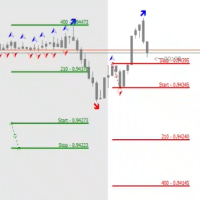
The STP Trade Manager is a utility tailored to the ST Patterns strategy by Vladimir Poltoratskiy ( www.stpatterns.com )
While specifically made for this strategy, it can also be used for other trade management. Especially when you have a need for quickly making trades and risk management.
It is a huge time saver and helps in quickly drawing the different ST Patterns corridors.
People familiar with the ST Patterns strategy will recognize and above all; appreciate the functions of this EA.
This

A simple and useful Current Price Panel, which displays magnified current Bid, Ask prices and spread, movable anywhere on chart window using the mouse. Also provides an option to have as text at a static location showing bid or ask price along with spread, shown at any location on the chart. Allows display as pips or points along with spread highlighted in distinct color if it crosses the threshold point for the previous 100 ticks. Includes an option to show or hide the last digit (pipette) of t
FREE

This is an expert advisor that works more like an indicator.
Its functions are the following: - Print the balance and equity in Arial font size 40 (cannot be changed) - Change chart background and candle colors depending on the close of the previous candle and the current price level.
Now... what is this for or what can I use it for? Good. Personally I use it to put it as the main chart while in other charts I leave other expert advisors working, what I care to see is the balance and equity..
FREE

Currency trading offers a challenging and profitable opportunity for well-educated investors. However, it is also a risky market, and traders must always remain alert to their positions—after all, the success or failure is measured in terms of the profits and losses (P&L) on their trades. It is important for traders to have a clear understanding of their P&L because it directly affects the margin balance they have in their trading account . If prices move against you, your margin bal

Reviewed by Many forex traders spend their time looking for that perfect moment to enter the markets or a telltale sign that screams "buy" or "sell." And while the search can be fascinating, the result is always the same. The truth is, there is no one way to trade the forex markets . As a result, traders must learn that there are a variety of indicators that can help to determine the best time to buy or sell a forex cross rate . Here are four different market indicators that most su

In this section, we go through the top 10 best indicators for forex in more detail so you can see them in action and incorporate them in your trading. To do this we will be using the technical analysis charts and indicators provided by top-rated broker eToro. You can also use these forex indicators for Metatrader 4 . 1. Moving Averages Moving averages is one of the best forex trend indicators there are. They help to smooth price data so you can identify the overall market trends. The levels

Achieving success in the foreign exchange (forex) marketplace can be challenging. Nonetheless, traders from around the globe, both experienced and novice, attempt to do exactly that on a daily basis. Given the above-average failure rate of new entrants to the market, one has to wonder how long-run profitability may be attained via forex trading. Among the many ways that forex participants approach the market is through the application of technical analysis. By definition, technical analysis is

Success comes from knowledge – this is true for most things in life and especially Forex trading. To become successful, a trader needs to learn technical analysis. Technical indicators are a big part of technical analysis. The problem is that, at first sight, names of technical indicators can sound unpleasantly complicated, for example, MACD, RSI or Stochastic. However, we recommend you not to judge a book by its cover. We will provide you with a fair and simple explanation of the most popular t

A forex robot is a type of computer program that’s designed to trade forex automatically. Forex robots follow a specific set of trade signals and settings in determining the best prices at which you can buy or sell a currency pair. They use complex mathematical algorithms to monitor the markets and follow price action. Forex robots can help both beginners and experienced foreign exchange traders maximize their return on investment. They eliminate emotional and psychological biases when trading a

Do you want to have a fully automated trading bot that trades instead of you to make profits all the time?
Get your unlimited account license copy for only £49.99 one time payment!
Features:
Forex Golden Moon EA Automated Forex Trading System For MetaTrader 4 Setup Instructions | Quick & Easy 5 Minute Setup | Set & Forget Unlimited Licenses For All Your MT4 Accounts No Trading Experience Required US Brokers | Non-US Brokers No Trading Account Limitations Optimised SET files included
Here’s
This tool will assist all those who trade the forex market manually. It will help them in a sense that it will calculate the required margin in order to initiate a trade. This calculator is so simple to use that a that the user only inputs only 2 pieces of information. which are Price and Lot size the trader wishes to take. All other information needed to calculate the calculator will work it out by itself. It will run or calculate on the current opened chart. As the name suggest it's
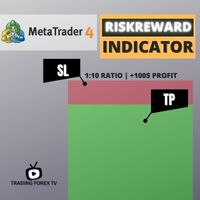
If you are looking for an indicator in the purest Tradingview style to plot your trades with Take Profit (TP) and Stop Loss (SL) as well as the entry point on the chart, Risk Reward Indicator is your indicator for Metatrader 4.
This indicator, among many other functions, allows you to draw and simulate operations, as well as the risk ratio (RB) benefit and the pips that you can win or lose in that operation.
In addition, this indicator includes a calculator where you can indicate the % of ris
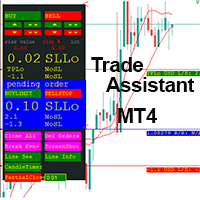
This EA is a trade management tool for Mt4 and Mt5. Mt5 version will find the Mt5 section here: https://www.mql5.com/en/market/product/80399?source=Site +Market+MT5+Utility+New+Rating006. It was to make a way for the trader to make the initial decision of when and which direction to enter. The trader decides in advance whether he wants the robot to take or stop an order. He also decides what new lot size, percent size or money size to use on each trade. On a live chart you can place a t

A complete Session Timer that shows the current time, session information with remaining time, chart display of range (high-low) and open price, of current and previous sessions for major markets, and option to add an additional city. A friendly user interface with clickable icons, customizable panel location and format, selection of colors and text. It automatically handles the DST (daylight saving) settings. It also shows the GMT/UTC and server (broker) time. And includes a Candle timer option
FREE
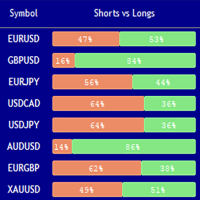
Market Sentiment Indicator Market Sentiment is a Trading Tool which allows you to see the positions of other currency traders. Until now, only institutional traders had access to such data which gave them a serious advantage over retail traders because of obvious reasons. With Market Sentiment, you too will finally know what other traders are doing which makes it easy to beat them on the forex battlefield.
Data comes from MyFxbook Community Outlook data feed and is based on up to 100 000 live

Simple Order Panel for calculating actual lot size with fixed risk amount. Working on both Market orders and pending orders. Notify Line Application when an order is opened or closed. Automatic set up Stoploss and Takeprofit with Risk Reward Ratio. Open one order with the risk(amount) per trade or separate the bet into three orders in one click. Involuntary modification Stopsloss to Breakeven when the Market takes the first or second-order profit. Filter button Buy or Sell when Moving Averate C
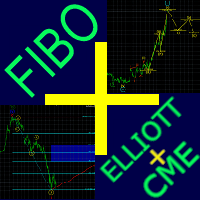
Fibo + Elliott + CME
The Expert Adviso r is designed as an assistant for manual trading. Ready-made trading system based on Elliott waves and Fibonacci retracement levels . It is simple and affordable. Display of the marking of Elliott waves (main or alternative option) on the chart. Construction of horizontal levels, support and resistance lines, a channel. Superposition of Fibonacci levels on waves 1, 3, 5, A Display data from CME (CME - Chicago Mercantile Exchange Chicago Mercantile Excha

KT Auto SL TP EA 为每一笔手动交易添加止损和止盈,然后将止损移动到保本位置并进行追踪。 在电脑或手机上开一笔交易。片刻之后,止损和止盈就已设置好,图表上的标签会显示当前使用的具体设置。该 EA 从不自行开仓或平仓。 功能 为市价交易和挂单添加您的止损和止盈,可以只管理图表品种,也可以在一个图表上管理所有品种。 只管理您的手动交易,不会触碰其他 EA 的交易。 大约每秒检查七次您的交易,而不仅仅在新报价到来时检查。 挂单的止损和止盈从挂单价格计算,因此挂单成交时保护已经就位。 如果距离小于经纪商的最小止损水平,会自动放宽到该最小值。 保本与追踪止损 当交易达到您设定的盈利时,EA 会将止损移动到开仓价。可选的偏移量可以锁定几个点的利润,而且保本止损永远不会被拉回原来的距离。追踪止损在保本移动之后启动,然后按照您选择的步长跟随价格。 如何设置 将 EA 加载到一个图表上并开启 Algo Trading。选择 Current Symbol 或 All Symbols,以及 Positions、Pending Orders 或 Both。以点数输入止损和止盈(在大多数 5 位小

顾问工具,用于将交易从一个MT5帐户或MT4帐户复制到另一个MT4帐户。 Demo-version can be downloaded here .
您可以在净额结算和套期保值账户之间以任何组合复制头寸。 您可以通过仪器的名称和将被复制的位置的魔术数字来设置过滤器。 到目前为止,来源仅发送有关市场头寸的信息。 挂单在变成公开市场头寸时被处理.
在一个终端上,顾问以发送者模式(发送者)启动,在另一个终端上-在接收者模式(接收者)中启动。
终端必须在同一台服务器上工作,以便它们具有相同的共享数据文件夹,通过该文件夹交换数据。
安装程序
在发件人帐户的终端中,我们以发件人模式启动顾问,配置常规参数。 在接收器帐户的终端中,我们在接收器模式下启动顾问,为接收器配置常规参数和参数。
要复制MT4->MT5,请使用此产品作为发送者,另一个真实交易复制MT5产品作为接收者。
要复制MT5->MT4,请使用此产品作为接收方,另一个真实交易复制MT5产品作为发送方。 More detailed information in the post .

在此向大家介绍一款我本人使用多年的机器人。该产品支持半自动和全自动交易模式。 >>> Chat <<< 本程序包含基于经济日历新闻的灵活交易设置功能。不支持策略测试器检验。仅可进行实际操作。需在终端设置允许URL 列表中添加新闻网站。点击服务 > 设置 > 智能交易系统。选中“允许WebRequest对下列URL发出请求:”。添加下列(删除空格):https:// nfs.faireconomy.media 下載最新的設定檔: https://www.mql5.com/en/blogs/post/747929 訊號監控: https://www.mql5.com/en/signals/author/test-standart 请参考博客中各类参数说明自行实现个性化设置 : https://www.mql5.com/en/blogs/post/748545 。
主要默认设置说明 单一图表英镑/GBP(英镑美元/GBPUSD、欧元英镑/EURGBP、英镑日元/GBPJPY、英镑加拿大元/GBPCAD、英镑澳大利亚元/GBPAUD、英镑瑞士法郎/GBPCHF)货币对操作。英镑/

MT4 的 Expert Advisor 风险管理器对于每个交易者来说都是一个非常重要的工具,用于管理他的交易风险并保持余额安全。超过 60% 的交易者因为没有很好地管理风险而损失了他们的投资。
使用风险管理专家顾问,您将能够控制您交易账户中的风险。风险和利润控制可以以货币形式和百分比形式进行。
要让智能交易系统工作,只需将其附加到货币对图表并以存款货币或当前余额的百分比设置可接受的风险值。
顾问功能
该风险经理将帮助您控制风险: 为了交易 当天 一个星期 一个月 你也可以控制 交易时允许的最大手数 每天最大订单数 每天最大利润 设置股票获利了结 不仅如此,如果您在设置中指定自动设置,顾问还可以为您设置默认的止损和止盈。
设置说明:
价格:当前价格;如果您想打开市场交易,您可以将其设置为 Auto,如果您想以特定价格打开交易,您可以将其设置为 Manuel。
S.L. :您可以设置每点或您想要的特定价格的止损。
T.P. :您可以设置每点或您想要的特定价格的获利。
利润:您从交易中获得的点数和当前货币美元的利润。
损失:如果交易以点数或当前货币美元

StatBar 1.6 Indicator showing balance, earnings for today, yesterday and the day before yesterday. The indicator also shows: - Server; - GMT; - Server time; - Shoulder; - Spread.
Description of variables: extern int Magic = "-1"; // Magic for statistics -1 = all 0 = manual extern string Symboll = "-1"; // Symbol for statistics -1 = all 0 = current EURUSD = for EURUSD
FREE

The Week7D indicator helps traders identify the day of the week on a price chart. It simply marks each period or each candle as the day of the week at the start of a new trading day. This allows traders to watch how prices move on any given day.
The Week7D indicator has several customization options that traders can use to change the visual representation of the indicator.
The variable "BarCount" changes the number of days during which the indicator will indicate the day of the week in each d
FREE

Simple Strategy Checklist Panel, as its name suggests, is a panel that works as a checklist, and can place up to twenty lines of text. This was created for traders who want to have their trading plan or to-do list at hand, a simple but useful product for many.
I will write this pointless paragraph since Metatrader asks me to put a minimum of 6300 characters, so I also explain that the list can also be used to make purchases from the supermarket! Example bread, milk, flour and much more... Enjo
FREE

Slow trading, low risk low return strategy open position only buy no stoploss , option ea : close equity target, stop equity target. Take profit step by step. For minimum blance please download excel file, and try ea in demo account before purchase link download how our ea works is * Recommended free swap account (islamic account) * trading with own money * ea will open buy, the price goes down will buy again and so on ea will stop when the highest price is according to settings * floating min

EA only work XAGUSD symbol Slow trading, low risk low return strategy open position only buy no stoploss , option ea : close equity target, stop equity target. Take profit step by step. For minimum blance please download excel file, and try ea in demo account before purchase link download forex robot ea xagusd miner forex robot to generate profits with very low risk, such as owning a mine but does not require high-spec hardware which is very expensive, rather than buying mining hardware, it is

An equity protection EA for MetaTrader that enforces your loss limits and profit target for you: when your account reaches a rule you set, it closes your trades on every symbol, before one bad day turns into a lost account. It suits prop firm challenges and personal accounts alike. Attach it to one chart, answer a few questions in the on-chart setup wizard, and it watches your whole account in the background while you trade by hand or with other EAs. What it protects Daily loss limit: a percenta

Displays time lines based on your custom time zone offset (Note: 30-minute offsets are not supported). It also displays price lines at clean, round intervals (e.g., 100.000, 100.010, 100.020). By default, MT4 displays grid lines based on the broker's server time and price, which often results in awkward, uneven placements that can be highly confusing. This indicator solves that by drawing grid lines exactly where you want them—at intuitive time offsets and price levels. It is highly optimized an

MACD Divergence Scanner is a multi-timeframe and multi-symbol dashboard and alert that checks all timeframes and symbols to find regular and hidden divergences between price chart and MACD indicator. This divergence scanner is integrated with support and resistance zones so you can check the MACD divergences in the most important areas of the chart to find trend reversals in the price chart. Download demo version (works on M 1,M5,M30,W1 timeframes) Full description of scanner parameters ->

The programmable signal panel analyzes the charts of all available symbols and timeframes and sends a notification about the appearance of a trading signal. You can program all the necessary signals using the free binding indicator "Signal Collection". The binding indicator is provided with open source code. Thus, it is possible to program all the necessary signals for subsequent use in conjunction with the signal panel. The signal panel can not only analyze charts, but also manage these chart
FREE

Currency Pair Information
Useful indicator to have the following information on the chart: 1. Asset Name 2. Current Spread 3. Current ATR of the actual time frame 4. Time to close of the candle
It is located at the top right of the chart. If you request it, I can add the parameterization of the location of the information.
Other tools:
AMS Forex System
hockfx Price Alert Pro
hockfx
FREE

Ofir Dashboard is the first level of the Ofir trading solutions. We are building the first full trading application from Telegram. The Dashboard is focused on giving you the best information about your account, positions, risk,... when you are away from keyboard. Everything is accessible from Telegram. More info in my Blog Enjoy!
Ofir Notify, our very successful application for sending Notifications to Telegram (chat, channels, groups) is included in Ofir Dashboard.
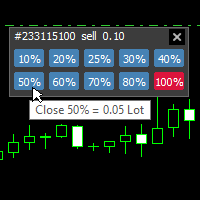
With this tool, you can easily and quickly close part of the trade . Click near the trade to display the closing panel. There are ten preset values for partial closing, but you can set your own values. You can also resize the panel according to Windows settings (125%, 150% ...) See the animation below for how it works. **********************************************************
Note: This tool does not work in the tester.

我很高兴欢迎您来到我的产品页面 面板初次加载会服从后台设置,面板控制交易管理凌驾于后台之上。请注意交易方向的管理,正确的交易方向是交易市场生存的根本,这点很重要。 Ea交易有2种策略Sto,MA和用户在面板打开的执行订单,同时也支持移动端下单(下单基础请服从后台自行设置手数)、移动端预下单功能。 Sto策略单量密度大,是激进策略;MA策略较缓和。
此EA可全自动化交易,设置偏向于辅助手控交易。 ============Basic settings============= Magic EA 交易品种(trading variety) 点差(Spreads) 点差系数(Spread coefficient) =============conditions for execution==== 交易模式(Choosing strategy) 打开新系列订单(Open new series) //是否允许,否的话会停止打开新阶段订单。关闭状态适合运行预交易功能,也就是控制运行,一阶段一结。。 开多(Trade Sell) //处于关闭状态会停止一切开Sell方向单子。 开
FREE

Traders Toolbox Overwatch - 是所有 Traders Toolbox 运行实例的监控实用程序。
它是一个简单的图表切换实用程序和所有 Traders Toolbox Running 图表的市场观察。
特征:
1. 可定制的按钮颜色、行和列。
2. 三种信号类型(持有 - 黄色 / 卖出 - 红色 / 买入 - 绿色)
3. 根据 Traders Toolbox 的新实例或已关闭实例动态更新按钮列表
4.单击按钮将相关图表带到前台。
5. 买入和卖出信号以与您的 Traders Toolbox 图表信号匹配的百分比显示其信号强度。
请注意:该实用程序只能与 Traders Toolbox / Traders Toolbox Lite 结合使用,不能独立运行。
单击此处加入我们自己的社交网络,通过 Traders Toolbox 交换有关交易的想法
我们还有一个推荐经纪人列表,可以在我们的链接树上找到。 Linktree here.

Metatrader 4 protection EA that limits loss Ways of working: * Aktif this EA to any pair in metatrader 4, you can start trade manual * Close all open orders if you have profit loss in money according to settings "Will close all open buy and sell orders regardless of profit or loss" * The EA/robot does not open orders, only closes orders if the settings are reached, this could be more or less due to market movements. For example, setting a loss of -5 $, the estimated profit can be -4.8 $ or -5.4
FREE

ขอบคุณ แรงบันดาลใจ จากโค้ชแพม ที่ทำให้เริ่มทำ Close all ตัวนี้ Close all and update profit Version 3.03 Full version Give you free
For MT5 Click https://www.mql5.com/en/market/product/95989
V3.03 Fix TPSL calculate USDxxx and xxxUSD or XXX/XXX and add Decimal Digi, 0 is default
Program function
Tab 1 Close order function and show break port
1.Can show and hidden all button
2.Update sell and buy total lots easy to manage order
3.Close all order and update all profit
4.Close all sell a
FREE

报复交易保护器对于可能成为报复交易受害者的交易者来说是一个简单但有效的工具。作为一名日间交易者,我了解报复性交易的心理层面以及弥补损失的愿望。
因此,我开发了这个工具(我自己也在使用),以百分百确定我能够在损失后保持耐心,而不是做出不合理的交易决定。
当您遭受损失时,复仇交易保护器 EA 会阻止您开立另一个订单 (限价订单、止损订单或市场执行订单), 直到所需的时间间隔过去。
例如,如果您在上午 10:45 亏损,并且设置了 30 分钟的休息时间,则您在上午 11:15 之前设置的任何订单都将被 EA 立即取消。一旦您再次获得允许,您将收到警报通知。
如果您在 30 分钟内尝试进行交易,您将会收到相应通知。
附加功能:最大净值回撤旨在防止当您超过所需的最大净值回撤时在当天剩余时间(日历日)出现任何类型的挂单。
例如,假设您将最大回撤设置为 2%,并且当天的亏损已经为 -1.75%,如果您进行另一笔交易并且浮动亏损超过 0.25%(因此为 -2%),
则EA将自动关闭交易并禁止当天剩余时间的交易
用户插入 3 个参数的值: Max DD :这是所需的最大回撤百分

跟单->方便快捷的界面交互,用户上手即用 ->>>> 推荐在windows电脑,或者VPS Windows上使用 基本功能: 跟单正常交互速度0.5s以下 自动检测信号源,并显示信号源账号列表 自动匹配品种,不同平台常用交易品种(后缀不同等特殊情况)95%自动匹配,基本无需手动设置,品种映射表可随意双击更改对应品种.(映射表具有快速搜索品种功能) 4种手数计算模式(1.倍率 2.固定手数 3.自适应资金风险 4.源账户资金比例风险) 特殊手数模式:可以根据止损资金风险反算手数(可能止损过小计算的手数过大,请谨慎使用) 多个平台,多组信号源,多组接收端随意组合( MT4 和MT5数据可互通, 需分别购买安装 ) 发送端接收端二合一,加载的时候选择模式 接收减仓信号,可以进行减仓操作. 可以反向跟单 可以分别控制跟单类型,是否跟随止损止盈 提供4种跟单开仓价格模式设置(1.开仓价格范围 2.跟单比信号更有优势的价格 3.跟单开仓在比信号劣势的价格 4.不限制开仓价格) 支持语言自动识别[中文,英文] 常见使用小技巧: 一个账户仅加载一个接收端即可自动交易所有

Layer Master:MT4 专业网格交易工具
50% DISCOUNT FOR LIMITED TIME ONLY - BE QUICK!!!
使用 Layer Master 改变您的网格交易 - 专为专业交易者设计的最直观、最强大的订单管理工具包。
MT5 版本: https://www.mql5.com/en/market/product/129705
精准掌握网格交易
Layer Master 彻底改变了您下达和管理网格交易的方式。借助我们的可视化界面,您可以: 立即部署数百个订单 轻松管理多个头寸 精准控制风险 实时监控性能
核心功能
高级订单管理 Layer Master 工具箱可帮助交易者一键部署多个订单。它可以让您绘制可视化区域图,以便精确下达网格订单。 Layer Master 支持所有订单类型(买入/卖出止损、买入/卖出限价),并通过提供实时价格水平和点差显示帮助您了解您的仓位
专业风险管理 我们通过可视化止损和获利管理、一键盈亏平衡功能、总风险计算、目标利润监控和批量仓位修改执行(更改止损、获利甚至部分退出)帮助交易管理风险。
实时交易信

Close all your trades or some of them with this script. If you have multiple trades open on a symbol and you want to close all of them just drag the script onto the chart and close the trades without delay. The Script will ask you how many trades you want to remain open... In case you want to close all trades just click OK Say you want to leave 1 position open out of 7, just type in 1 and click ok. Script closes trades faster than EA because it does not wait for the market to move but rather

Metatrader 4 protection EA that limits profit Ways of working: * Aktif this EA to any pair in metatrader 4, you can start trade manual * Close all open orders if you have profit equity in money according to settings "Will close all open buy and sell orders regardless of profit or loss" * The EA/robot does not open orders, only closes orders if the settings are reached, this could be more or less due to market movements. For example, setting a profit of 5 $, the estimated profit can be 4.8 $ or
FREE
NFTrader Lite Displays Resistance / Support Lines Displays Take Profit and Stop Loss Easy adjust Take Profit/Stop Loss and Lot Size Open Buy/Sell with one click Displays Take Profit/Stop Loss in money value Easy to hide the panel when in trading Take your trading to the next step with easy to use panel display
For more information please visit us at www.nextforce-ig.com

Todo comerciante sabe que él o ella nunca deben arriesgar más del 5% (o 7%) por operación. Esta es una ley de administración de dinero y se debe calcular un tamaño de lote utilizable cada vez porque un comerciante debe usar un valor StopLoss diferente para diferentes niveles de negociación. Este indicador calculará un tamaño de lote apropiado para el momento en que lo colocará en el gráfico y cada vez arrastrará la "Línea de stop loss" en cualquier dirección.
OFERTA POR TIEMPO LIMITADO: Todos

以最精確的方式管理您的風險和交易,其交易能力不僅限於實時任何類型的資產,還可以在策略測試器中使用您感興趣的指標對任何策略進行回測! ,立即練習您的策略,不要冒任何風險,然後打印結果報告以執行它們的性能日誌!
我們的交易助手有一個交互式控制面板,可讓您管理交易風險、選擇損益比、放置任何類型的交易、您可以按需關閉它們或單擊一下即可全部關閉。考慮到每個操作可能產生的所有費用,您還可以選擇將它們全部放在收支平衡中。
它的圖形工具可以讓您直觀地看到您的入場點、止損和獲利的位置。您將隨時了解您的風險以及您可以賺取多少,只需點擊幾下即可調整您想要的風險和比率。在交易時,您將擁有安全控制,您可以在其中查看您正在進行的交易類型,讓您有機會在必要時在進行交易之前取消交易。
主要功能 MT4 策略測試器中的回測功能 任何資產的實時運營管理 風險計算 盈虧比率管理
風險選項 操作風險管理,一鍵增減。 以操作線繪製的操作比例管理
商業管理 買入:市價做多,即時執行。 Buy Limit:在經紀商中編程的多頭入場操作,其開盤價低於當前價格。 Buy Stop:在經紀
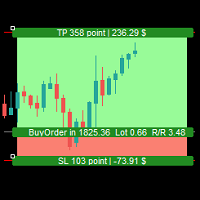
Simple Assistant for Trading
Precise Risk Management in each
Automatic Money Management Visual Trading Open Position Management User friendly and practical
during 15 years of considerable experience in stock market, we have dealt with many professional traders who have been used profitable and unrivalled methods in this market but failed in the long term. The reason is undoubtedly the lack of standard in their manner during their trade. Standard means the accurate repetition of a process….

The utility is designed to save funds on your trading account. There is support for three levels of minimum equity and free margin. For each level, you can set partial (by a certain percentage) or complete closing of all market orders. The partial close percentage is applied for each order separately based on its current size (i.e. the size at the time the equity or free margin reaches the appropriate level). Upon reaching the last third level, the utility can close all charts, which will make i

Description of Monitoring_ExpertAdvisor+Balance_Equity Indicator: Monitoring Expert Advisor is an indicator that analyzes your Account MT4 elaborating the archived operation data in the order history. It is sufficient to connect it to any open and empty graphic window. The orders in the account database are identified by the indicator of their MagicNumber, divided in groups based on their strategy (Expert Advisor) to calculate complex efficiency Objectives: It has the main objective of monitor

This tool is part of the Stein Investments ecosystem - 18+ tools plus Max, your 1-on-1 AI trading mentor.
Always on, knows every indicator in depth, available the moment you need to think something through. Meet him at https://stein.investments
Crosshair is a fantastic tool that simplifies our chart analysis by bringing the price candles perfectly in line with the indicator values in the subwindows. You can enable and disable it via a single press on the "C" of your keyboard, and it provide
FREE
MetaTrader市场提供了一个方便,安全的购买MetaTrader平台应用程序的场所。直接从您的程序端免费下载EA交易和指标的试用版在测试策略中进行测试。
在不同模式下测试应用程序来监视性能和为您想要使用MQL5.community支付系统的产品进行付款。
